Hosts from LAN1 should be able to access hosts at LAN2 and vice-versa through GRE tunnel between R1 and R2. ISP doesn’t care what networks are behind R1 and R2 so the only way to establish connection between LAN1 and LAN2 is to use VPN, in this example we use GRE.
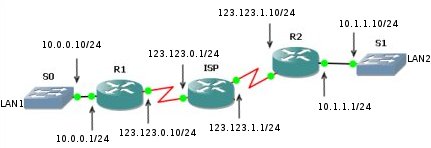
GRE setup example topology
R1’s startup-config (part of it)
!
hostname R1
!
interface Tunnel0
description GRE tunell to R2
ip address 192.168.200.1 255.255.255.0
tunnel source 123.123.0.10
tunnel destination 123.123.1.10
!
interface FastEthernet 1/0
ip address 10.0.0.1 255.255.255.0
!
interface Serial1/0
ip address 123.123.0.10 255.255.255.0
serial restart-delay 0
!
ip classless
ip route 0.0.0.0 0.0.0.0 123.123.0.1
ip route 10.1.1.0 255.255.255.0 192.168.200.2
!
R2’s startup-config (part of it)
!
hostname R2
!
interface Tunnel0
description GRE tunnel to R2
ip address 192.168.200.2 255.255.255.0
tunnel source 123.123.1.10
tunnel destination 123.123.0.10
!
interface FastEthernet 1/0
ip address 10.1.1.1 255.255.255.0
!
interface Serial1/0
ip address 123.123.1.10 255.255.255.0
no fair-queue
serial restart-delay 0
!
ip classless
ip route 0.0.0.0 0.0.0.0 123.123.1.1
ip route 10.0.0.0 255.255.255.0 192.168.200.1
!
Results
R2#ping 10.1.1.1
Type escape sequence to abort.
Sending 5, 100-byte ICMP Echos to 10.1.1.1, timeout is 2 seconds:
!!!!!
Success rate is 100 percent (5/5), round-trip min/avg/max = 12/17/28 ms

R3#ping 10.0.0.1
Type escape sequence to abort.
Sending 5, 100-byte ICMP Echos to 10.0.0.1, timeout is 2 seconds:
!!!!!
Success rate is 100 percent (5/5), round-trip min/avg/max = 12/20/44 ms