Here is a Flip Converter which can help you encode flip video to common video formats: AVI, MP4, MPEG, WMV, FLV, SWF, MKV, VOB, 3GP, MOV, HD video and extract audio track from the referred video formats to MP3, WAV, WMA, AAC, AC3, MP2, M4A, MKA, etc. And it also has powerful video editing function such as supporting movie trimming, cropping, effect adjustment, watermark, snapshot and merge.
Preparation: Intall and run 4Easysoft Flip Converter
Step 1: Import files
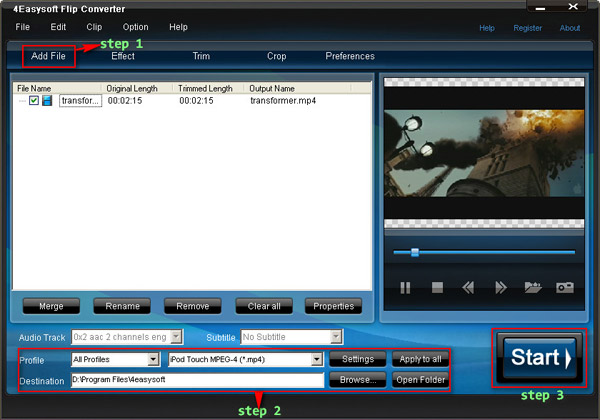
Click “Add File” button, you are allowed to import versatile video/audio files.
Step 2: Select output settings.
New: Using 4Easysoft Flip Converter, you are available to convert Flip video to different formats simultaneously.
From the profile drop-down list, you can choose the output video formats.
You can set Encoder, Bitrate, Channels, Resolution and so on by clicking “Settings” button.
You can choose the output folder by clicking “Browse”, or the defalt folder is D:\My Documents\4Easysoft Studio\Output.
Step 3: Start conversion
Click “Start” button, you are allowed to start conversion. All the tasks of conversion will be finished at fast speed and high output quality.
Editting Tips:
1. Adjust video effect
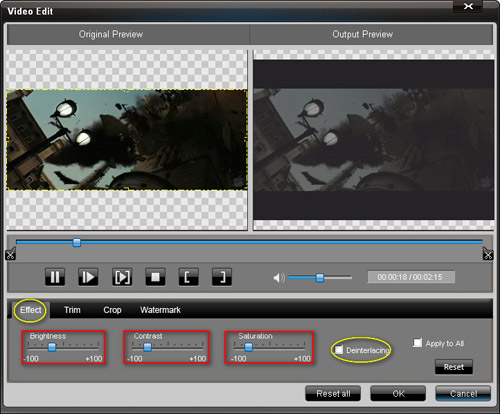
Click “Effect” button and a dialogue pops up, you can set the video Brightness, Contrast, Saturation and check the Deinterlacing which helps you to optimize the video effect.
2. Trim video
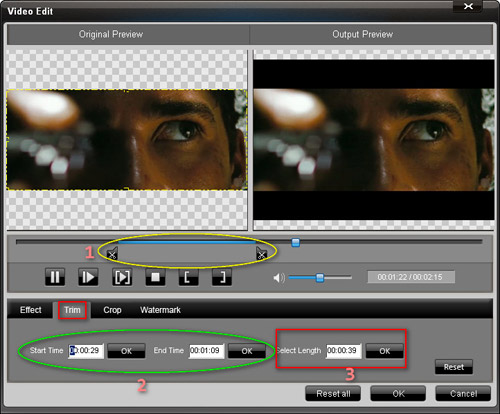
Click “Trim” button, a dialogue will pops up. Then you can trim the videos by dragging the slider bar, click "Start Time" and "End Time" button, or setting the values