Author: Brian Fagioli

  • Linux Mint 15 — The best Linux distro gets better

    Linux users are a strange bunch. As a distro gets popular, it tends to lose credibility with the Linux elitists. It is much like an underground rock band. As the band gains mainstream success, the original fans view the band as “sell-outs”. For instance, Ubuntu, the most popular Linux distro, is viewed negatively by many as a beginner distro (Linux users only feel this way because of its success — Ubuntu is a wonderful OS). Linux Mint however, is the exception to the rule — it is revered by newbies and elite users alike. This is despite its long-held top spot on www.distrowatch.com and the fact that it is based on Ubuntu.

    On May 29, 2013, Linux Mint 15, codenamed “Olivia” was released. This is the newest version of Mint and is based on Ubuntu 13.04. While Linux Mint is built on Ubuntu, it removes what many users hate about that distro — the Unity desktop environment and integrated Amazon.com search.
    Instead of Unity, Linux Mint generally offers two desktop environments — Cinnamon and Mate (other environments such as KDE are usually made available later). Both of these are forks of Gnome. Mate is a fork of Gnome 2 whereas Cinnamon is a fork of Gnome 3. To clarify, a “fork” is when someone alters an existing program’s source code. A program is typically forked when someone is dissatisfied with the program in its existing state. For the purpose of this article and test, I am using Cinnamon as it is more “modern” than Mate.

    Cinnamon still offers a classic desktop interface — much like Windows 95 through Windows 7. The user clicks on a button in bottom left of the screen and is presented with a listing of the installed software. The programs are opened in windows and can be maximized or minimized.

    While many may find this to be boring, it adds to the allure of Linux Mint. This classic styled desktop interface is what makes Linux Mint so accessible — Windows users can jump right in.

    Linux Mint comes pre-installed with some wonderful programs including:

    • Firefox — for web surfing
    • GIMP — for photo editing
    • Banshee — for music
    • Pidgin — for instant messaging
    • xChat — for IRC
    • Libreoffice — for office work

    All of these are great choices. However, users can easily add additional software using the software manager or by installing .deb files from the web. I personally installed Google Chrome from the web and Audacious from the software manager. While the Linux Mint software manager is not as full-featured as Ubuntu’s, it is far less bloated and offers better performance. I prefer it to Ubuntu’s by far.

    What’s New in Olivia?

    One of the first new things I discovered was the new login screen with Mint’s MDM. It was very aesthetically pleasing with pictures of clouds —  the little things do matter. This polished login screen tells the user that this is a cared-for distro. According to Mint, this screen can be customized, including animations. However, I did not see a reason to do this on day one of using the OS.

    I also found a new feature called “Desklets”. These are just desktop widgets. I was excited for this new feature until I tried it. The first desklet that I added was a clock. It was a very basic widget that displayed a clock on the desktop. Unfortunately, it displayed the time in 24-hour format (we Americans call it “Army Time”) and there was no way to change it to AM/PM. It ignored the fact that I changed the system time to AM/PM — bummer. The second desklet I tried was an XKCD comic widget. I love the comic but I hate the desklet — it just took up space. Also, I found that each comic was being stored as a file in my Pictures folder, something I did not appreciate. I quickly removed both of these desklets. While the desklet feature is nice to have, I am disappointed with the quality of the launch day widgets. I’m sure they will get better but it was a poor first experience.
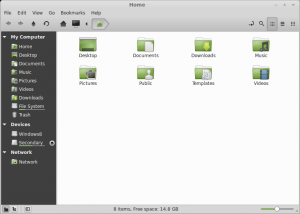
    Also new in Mint is a new version of the Nemo file manager. To those that don’t know, Nemo is a forked version of Gnome’s “Files” program. I normally consider myself a purist when it comes to Gnome programs. However, Nemo greatly improves upon the original — it is now vastly superior to Files. The UI is far better including a new bar that sits under each drive and tells you how much space is left. Again, it’s the little things that matter sometimes.

    Another new feature is a lock screen away message. This is a neat addition that lets you add an away message to your lock screen. I don’t see the point of this really. I guess if someone walks up to your workstation, they can read your screen to see where you are. However, most businesses frown at users getting up from their seats to go to a workstation (email or messaging should be utilized). Even if someone did walk up to your workstation, chances are, your monitor will be asleep/off. I found a bug with this feature as well. I set an away message when locking my computer. However, it did not clear the message when I unlocked it. So, an hour later when I walked away without manually locking, the system auto-locked. My previous lock message was now displaying. I could see a user putting “Out to Lunch” and then having that display all day long, whenever they leave their desk. Hopefully their boss doesn’t get mad!

    Conclusion

    Do I really think Mint 15 Olivia is the best Linux distro today? Absolutely and unequivocally. It just works and it works well. That is the most important aspect of any operating system — stability and dependability. Mint builds on the stability and foundation of Ubuntu and takes it a step further by polishing and perfecting the user interface and overall experience. The secret to Mint’s success is that it listens to and focuses on its users. If only all distros did the same…

    Photo credit: Volosina/Shutterstock
  • Dear Linux, I’m leaving you — for Windows 8

    Microsoft Windows 8 is the best desktop operating system. Period. No Linux distribution or OS X can compare. I say this as a Linux user and lover.

    When it comes to computing, I have always had a soft spot in my heart for Microsoft Windows. Windows 95 was the operating system of my first-ever computer — we could not afford a computer before then. As time marched on, I found myself dual-booting Windows and Linux on my future computers, with most of my time being spent in Linux. That is, until a few years ago when I exclusively ran various Linux distributions as the sole OS on my computer.

    After trying various Linux distributions and desktop environments, I eventually fell in love with Gnome 3. It was a new way of interfacing with my computer. It enabled me to focus on a task without needing to minimize or resize a window. The overview allowed me to switch programs as I need them. I was pretty much in paradise. This year, I even donated money to the Gnome Foundation as a kudos for its great work.

    However, despite my happiness with Linux and Gnome, I was a bit dismayed at my inexperience with the Modern/Metro UI of Windows 8. I like having knowledge about all operating systems. It seemed to be a very polarizing topic in Windows computing — there was either love or hate. I had tried Windows 8 at Best Buy and generally didn’t like it, but it wasn’t a fair review — just a few minutes while my wife shopped for Blu-Rays. A few weeks ago, Newegg was running a promotion for Windows 8 — $79.99 for the OEM. As a system builder, installing on a self-built computer, the OEM version would be perfect. The price was right, so I ordered it. While waiting for the disc, I remembered that I was eligible to buy Office 2013 Pro Plus for $10 in another promotion and bought that too.

    When Windows 8 arrived, I decided to start from scratch. I formatted my SSD and setup two partitions — NTFS and EXT4. I installed Windows 8 to the NTFS partition. On the other partition, I installed Ubuntu 13.04 Gnome. I then setup GRUB so that Windows 8 was a selectable option at boot. I told myself that Windows 8 was only being installed for educational purposes and that I would continue to use Ubuntu as my main OS. This was true for a little while.

    When I would log in to Windows 8, I found myself really enjoying the experience. In fact, the aspect of the experience that I loved the most was the Start Screen. This is the most controversial part of Windows 8. Many people want the start button back. I think those people are crazy. In my opinion, the entire classic desktop needs to go away and go Modern UI only.

    Modern UI actually reminds me of Gnome 3 in a way. By putting my mouse pointer in the top left corner, I can see all Modern UI apps that are running and then select one. It is very painless to move between two apps when doing it this way. I even discovered some great Modern UI Apps including some alternatives to some classic apps. For instance, instead of mIRC, I found the amazing IRC Explorer. I even did something sacrilege — I tried Internet Explorer 10 and liked it. I liked it so much that I made it my main web browser with Chrome as my secondary browser. The Netfix app in Moden UI is nothing short of exquisite.

    No matter the OS nowadays, the interface is similar in one regard. From iOS, to Android to Ubuntu to OSX to Fedora — you hunt for an icon that represents the program you want and click it to open — yawn. Windows 8 is truly the first OS to really look beyond that. While the tiles are basically icons, they are so much more. They create a way to interact with your installed programs like no other OS. It is so refreshing to see the tiles scroll with updates. IRC Explorer will show me recent channel activity without needing to go in the app. The mail app, which I love, gives me a sneak peek into recent email.

    As I mentioned previously, I was able to get Microsoft Office for very cheap — $10.00. I have long been a proponent of OpenOffice and LibreOffice. While I still think they are fine options for the financially challenged, they are no match for Office 2013. It’s a shame to see how much I was missing by using Office-alternative suites for so many years. Office 2013 is worth the normal price. There may be something to those Scroogled commercials after all. Alternatives like Google Docs just don’t compare.

    So, in conclusion, while I have left Linux as my desktop OS of choice, I am not leaving it entirely. I will still keep Ubuntu in a dual boot as my secondary OS. Linux distributions are still a great desktop OS choice and LibreOffice is very functional. And who knows, maybe one day Linux will be able to produce something better than Windows 8 on the desktop and I will switch back. I will still be using Linux daily when I use my Android phone and tablet or my Chromebook.

    But on the desktop, for the time being, Windows 8 and I are having a great time together.

    Photo Credit: A pyro Design/Shutterstock

  • If Microsoft can’t beat them, it bashes them

    Microsoft has been on a roll lately in its sad attempt to publicly bash Google. From the “Scroogled” campaign, to “Bing It On”, the company is more focused on the current king of online search than solving its own problems. Focusing on Google internally is fine enough, but is classless to do so publicly. You should never have to bash a competitor’s products to further advance your own.

    With that said, Microsoft continues the desperation in the latest Bing blog entry entitled “The Grand Bargain”. Stefan Weitz, Bing senior director, explains that your information being sold to advertisers is the price paid for Google services. However, Weitz further claims Microsoft does it too but it is OK because the software giant isn’t “solely an advertising-driven company”. This implies that Google is strictly an advertising-driven company. While advertising is a huge source of Google’s revenue, it is not the company’s sole source. Microsoft’s statement is simply not true.

    The blog goes on to criticize Google Play Music All Access by saying “Google’s streaming music is intended to crowd out Spotify and Pandora”. I personally love Google Play Music All Access and recently wrote that Spotify and Pandora are in trouble. But, to say that Google launched the new service with the intention of harming Pandora and Spotify is not a statement that can be proven. However, even if it is true, that isn’t necessarily a bad thing — it is capitalism. Plus, let us not forget Microsoft’s infamous bundling of Internet Explorer in Windows, which “crowded-out” other browsers such as Netscape and Opera and resulted in an anti-trust law case. Remember that Microsoft?

    The blog then criticizes Google for tying its users to one identity. While Microsoft portrays this as a privacy negative, many users appreciate that feature for convenience. Comically, Microsoft brags that conversely,  users can login to its services with both Microsoft accounts and Facebook accounts. How is Facebook integration better for a user’s privacy? That company is notorious for having complicated privacy and security options.

    Microsoft, do yourself a favor and follow these adages:

    • If you have nothing nice to say, don’t say anything at all.
    • People who live in glass houses shouldn’t throw stones.

    Photo Credit: paulista/Shutterstock

  • Dropbox picks up single sign-on — business users drop passwords

    As cloud-based storage gains traction vs. physical storage, there have been many big-name providers popping up, such as Google Drive and Amazon Cloud. However, Dropbox continues to be an extremely popular option for both personal and business users alike.

    While already popular for business use, the company announced on April 10, 2013, that it was working on single sign-on for business users.  This would enable Dropbox to better integrate with the corporate world — a huge step towards broader corporate adoption and acceptance.

    Surprisingly, on May 21, 2013 (only about a month after announcing that it was being worked on), Dropbox released the single sign-on option.

    But What exactly is Single Sign-on?

    Single sign-on enables business users to access Dropbox based on their centralized corporate login without needing to login to Dropbox separately. In a corporate setting, this is a huge win for both the user and the admin.

    It is a win for the user as it is one less password for them to remember. It is a win for the admin, as they will have less lost and forgotten password issues to resolve. More importantly, these wins translate to productivity and cost savings for the company.

    Convenience and economics aside, single sign-on also provides increased security. Dropbox single sign-on will work seamlessly with existing password policies such as frequency of password changes and password requirements. It will also allow admins to easily add and restrict access to users.

    So what are you waiting for administrators? It’s available now — start making your user’s lives easier and impress your boss in the process.

    Photo Credit: Sergej Khakimullin/Shutterstock

  • Google’s pants are on fire — it’s lying to Android users

    Something strange happened last week. My ultra-fast Nexus 7 started to freeze and run slow. The problem persisted for about a week and I feared that the tablet had become a paperweight. I turned to Google Search to research the issue and as it turns out, I was not alone. Other Nexus 7 users (and other Android device users) were reporting the same issue — if the device uses most of or all of the available storage, then the operating system is slow. When I say “slow”, I mean painfully slow. Users were reporting that they needed to keep at least 3GB free to keep the tablet running properly.
    As a test, I wiped all data from my device and rebooted. Amazingly, the device ran as well as the day I bought it. Unfortunately, the solution raised a much bigger problem — I could not use all of the storage space that I had paid for. Was this a case of false advertising? Did Google lie to me about the available storage? I decided to contact Google for confirmation.

    I called the tech support line and was connected to a CSR. I explained the situation to her. She confirmed that it was a known issue. I appreciated her honesty but was disappointed that Google was aware of the issue and was doing nothing. I explained that the device only had 13GB usable out of the box, since Android OS took up about 3GB. By keeping an additional 3GB free, I really only had 10GB available. I explained it seemed to be false advertising and that Google was essentially lying about the storage space.

    What happened next was shocking. She told me that, if I knew I was going to be using that much storage, I should have bought the 32GB Nexus 7. Unfortunately, there was no Nexus 7 32GB available at the time, but even if there was, that is a pretty poor answer. You shouldn’t have to buy more storage than you need in anticipation of you using the full amount of storage that you paid for. I asked for a supervisor and was hung up on. I called back and got a supervisor who seemed sympathetic. He also confirmed that Android devices will run slow with most or all of the storage being used.

    So, is Google lying to consumers about the advertised storage space? I sure think so. In my opinion, this is false advertising. Consumers are not getting what they paid for. If Google’s Android OS needs a percentage of free space dedicated to it, then it should be inaccessible to the user, and deducted from the advertised storage space. This way, the user knows the true available storage.

    Have you encountered this issue? Which device do you own? Do you think it is false advertising?

    Tell me in the comments below.

    Photo Credit: Ron Leishman/Shutterstock

  • Google Play Music All Access is a game changer and iTunes killer

    Music Piracy is now dead. Apple iTunes is now obsolete. Spotify, Pandora, Slacker — yesterday’s news. This is all because of Google Play Music All Access. It will change the way you listen to music. It will change your life. You will subscribe. Resistance is futile. This is the future of music.

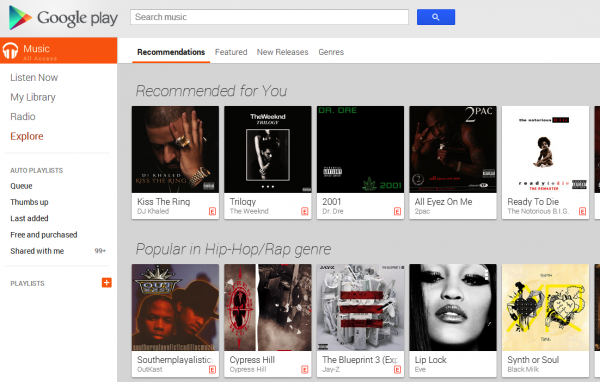
    The idea of a music streaming service is not new. However, a music streaming service by the most important and influential tech company is. On May 15, 2013, Google unveiled its new music streaming service, named Google Play Music All Access. Other than the ridiculously long name (I will just call it All Access for the rest of the article), the service is near-perfect.

    Details

    Here are some facts about the service:

    • Unlimited streaming of millions of songs
    • Available in the USA only (for now)
    • It costs $9.99 a month ($7.99 if you subscribe before June 30)
    • Offers a radio feature so users can discover new music
    • Available as an app for Android, plus all modern web browsers

    Selection

    The most important aspect of a streaming service is content. Availability of millions of songs is great but if the music you like is not included, it is worthless. With that in mind, I decided to put it through the paces. I wrote down a random and eclectic list of 10 albums I wanted to find:

    • Neil Young — Rust Never Sleeps
    • Kendrick Lamar — good kid, m.A.A.d city
    • Beck — Sea Change
    • The Rentals — Return of
    • The Velvet Underground & Nico — The Velvet Underground & Nico
    • De La Soul — Stakes is High
    • Cru — Da Dirty 30
    • Radiohead — OK Computer
    • Roc Marciano — Marcberg
    • Cam’Ron — Purple Haze

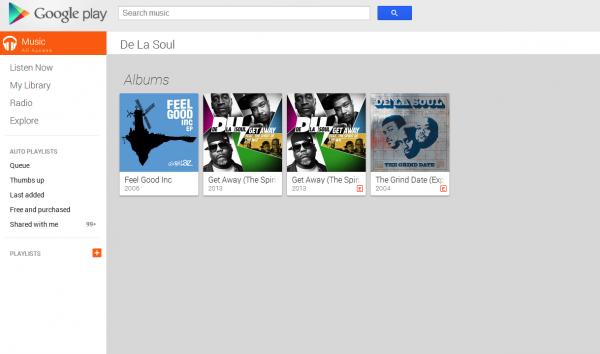
    Amazingly, of these 10 albums I picked, nine of them were available. Sadly, it was De La Soul’s album that was not available. In fact, none of De La Soul’s albums were available. This was a huge disappointment, but not a deal breaker as I already own these albums and can upload them later. However, it shows that the service is not perfect yet and Google has work to do. I scrolled through many other selections and was amazed by the amount of music available for a paltry $7.99/ month.

    However, the fun does not stop there. Much like Pandora, All Access gives you virtual radio stations based on the music you like. This gives you the opportunity to explore and discover new music. I have already discovered some new hip-hop songs after creating a radio station based on one of my favorite groups, Ugly Duckling. However, unlike Pandora, you have unlimited music skips. So, you are never stuck listening to a song you don’t like. You can even click on the album name from which the song is from and immediately begin to listen to the entire album. You can even click on the artist’s name to be presented with their discography.

    At the start of the article, I mentioned that music piracy is dead. This selection and price point is the reason why. While there will always be stubborn people who just refuse to pay for media, with this price and level of convenience, piracy just isn’t worth the hassle.

    Buying songs in iTunes, storing them and synching them is just a waste of time, space, energy and money.

    Quality

    Besides selection, the next most important aspect is sound quality. Before I discuss quality, I should tell you what I am using to listen:

    • Windows 8 x64
    • Google Chrome Browser
    • FiiO E10 USB DAC
    • Audio-Technica ATH-M50 Headphones

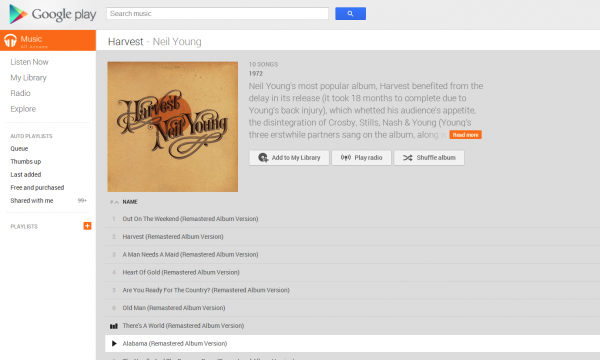
    I was dubious of having good sound quality with a streaming service. However, I am happy to report that sound quality does not disappoint. I fired up There’s A World by Neil Young and was blown away at the quality and clarity. I actually own this on CD. Comparing the same song on CD (played through Foobar 2000) with the All Access streaming version, yielded no difference.  I tried countless other songs such as Skrillex Breakin’ a Sweat and was blown away by the quality.

    Conclusion

    Do I really think Google Play Music All Access renders iTunes, Spotify, Pandora and Slacker as obsolete? Absolutely. I defy you to find a better deal in entertainment. With a price point of $7.99 or $9.99, you have pretty much any song available to you whenever and wherever you want. That is cheaper than a single movie theater ticket! The selection is amazing and the quality must be heard to be believed. But don’t take just my word for it; Google is offering a 30-day free trial.

    Give it a try and tell me if you agree in the comments below.

  • Cinnarch is dead — long live Antergos!

    Arch Linux is considered by many to be the Linux expert’s OS of choice. As you may or may not know, Arch Linux is a very robust rolling-release OS with bleeding edge (yet stable) packages. Arch has a really large and knowledgeable community. However, there is a price to pay to join this elite club of Linux users — a terrifyingly hard command line installer.

    Truth be told, Arch is not that difficult too install (even though it has that reputation), as long as you print out detailed instructions and follow them step by step. Unfortunately, many people do not have the time and patience for such a project. Some advanced Linux users (such as myself) just want an easy to install distro because we simply do not have the time. However, we also want to enjoy the benefits of Arch. Cinnarch was a Linux distro born to solve this dilemma.

    Cinnarch combined the rock solid base of Arch Linux with an easy to use installer and used Linux Mint’s Gnome3 fork desktop environment called Cinnamon (get it? Cinnamon + Arch = Cinnarch). Cinnamon itself was a solution to another dilemma; users that hated Gnome3.

    Unfortunately, as Cinnamon forked way too far from Gnome, it became too difficult and cumbersome to maintain for Arch Linux. So, ironically, Cinnarch decided to drop Cinnamon for Gnome3. Naming a distro after the desktop environment proved to be foolish and shortsighted. It made no sense to continue to call the distro “Cinnarch”.

    And so, Antergos is born…

    Installation

    The first public release of Antergos was announced on 12 May and is available now for download (version 2013.04.11). Being a huge fan of Arch and Gnome 3, I had to test it, so I quickly downloaded the ISO and began the install.

    The first thing you are presented with is an option to run a live session, a Command Line install or a Graphical install. I always prefer to install from within a live environment so I can play around during the install.

    Once booted to the live session desktop, I launched the Antergos graphical installer dubbed “Cnchi”. I was blown away by the polish and simplicity of Cnchi.  I was given the option to install the following desktop environments:

    • Gnome3
    • Cinnamon
    • XFCE
    • Razor-qt

    I am a huge Gnome fan so I installed Gnome3. The rest of the setup was as expected for Gnome. I set up my profile and disks and was on my way.

    Software

    I was very happy to see that Antergos was using Gnome 3.8.1. Many distros are still on Gnome 3.4 and 3.6. A quick “uname –r” in Terminal showed that Kernel 3.9.2 was already installed — impressive. Antergos provides a fair amount of default software but here are some of the major examples:

    • Chromium as the default web browser
    • Xnoise for music
    • Empathy for chat
    • Shotwell for photo management.

    These are all great choices. Curiously, there was no office suite provided. Typically, if a Gnome-based distro doesn’t supply Libreoffice, they at least supply Abiword. Strangely, there was no email client installed either (Thunderbird? Evolution?).

    Lack of Libreoffice gave me a great opportunity to use “PackmanXG”, which is Antergos’ choice of package management software.  Ubuntu users may be be in shock to see packages listed by their name only. Despite the lack of graphics, PackmanXG is very robust and easy to use. There was a plethora of packages available to the user. In particular, I was very impressed with the Arch Linux Libreoffice installer. It gave me a straightforward way to choose the aspects of Libreoffice that I wanted. It even let me choose Gnome vs. KDE integration.

    Conclusion

    Antergos is a distro that is great for both Linux beginners and Linux experts. You have stability and updated packages backed by a great community with a very easy and polished graphical installer. My only suggestion to the developers would be to include Libreoffice (Office Suite) and Evolution (email client). This will create a better out-of-the-box user experience, which is important for broader adoption. This is definitely a distro to keep an eye on and a candidate to become the definitive Gnome3 distro. In that regard, Fedora, you are on notice.

    Photo Credit: Fer Gregory/Shutterstock

  • I support the Internet Sales Tax and you should too

    It takes an honorable person to support something that impacts them negatively (or conversely, be against something that impacts them positively). In other words, it is noble to support what is right rather than what is right for you. Some may view such an act as lunacy. For instance, I support the Internet Sales Tax Bill (Marketplace Fairness Act).

    When it comes to Internet Sales Tax, you too should be honorable and support equality instead of looking out for your own interests. Anyone who is against the bill is simply selfish. Internet sales tax will impact your wallet. It will make you spend more money.

    However, while internet stores do not currently charge tax, it is your responsibility to pay it. You are supposed to be paying these taxes on your own. However, this honor-system is simply a charade. Most people do not pay their fair share at the end of the year. So, this bill is in reality, enforcing a law that is already in effect. It is just closing a loophole.

    Look, no one likes paying taxes but it is a necessary responsibility. Truth be told, I generally do not support sales tax at all. I tend to follow a libertarian ideology. We are already taxed on our income, so it is not fair to tax us to use that same money. However, the legitimacy of double taxation is a separate issue saved for another day.

    The true issue at hand is equality in business. Tax-free internet shopping has reduced brick and mortar stores like Best Buy to nothing more than places to try out new tech before buying it online tax-free. Stores like Circuit City and CompUSA were forced to close their doors. Countless jobs have been lost due to a lack of internet sales tax; countless potential jobs were just never created. And it’s not fair.

    We need to level the playing field.

    I support a bill that will cause me to spend more money. I support a bill that is not in my best interest. Do you have the courage to do the same?

    Give me your feedback in the comments below.

    Photo Credit: Jane0606/Shutterstock