Author: Derrick Wlodarz

  • Podio introduces real-time chat, facelift in newest update

    Cloud workspace platform Podio introduced another round of fresh updates on Thursday, bringing exciting new functionality to the quickly evolving SaaS offering. Hot on the heels of a major UI facelift that was released back in late April, the newest refresh brings much requested real-time chat capability with online members of your various workspaces. For my company that uses Podio on a daily basis, these additions are definitely appreciated.

    For those unfamiliar with the service, I provided a mostly positive in-depth review back in December of last year. For those who have never given Podio a spin, placing a label on what it “is” definitely takes a little effort since it is almost anything you want it to be. The product fills the gap of online task, project, and customer management that is much cheaper and flexible than any other mainstream CRM offering. It also correctly introduces the aspect of “professional social”, something which Yammer forces down your throat — but Podio makes feel like a natural fit.

    Design Tweaks bring Subtle, Meaningful Changes to Podio

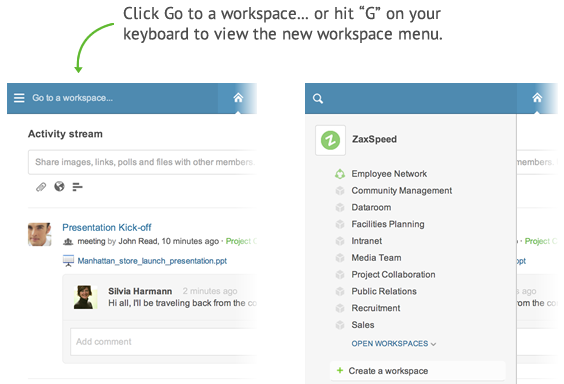
    Podio has always had a fairly fluid online interface, but it was bugged by one large problem: the Workspace menu on the left-hand side took up nearly a quarter of the entire screen. While it may be useful to have a visual reference as to what workspace you are in at any given time, your intuition takes over after a certain point.

    So Podio took the liberty to get rid of this throbbing nuisance and introduced a sliding, animated left-hand drop menu. This was a much needed change to the overall design of Podio, since working within workspaces requires more screen real estate, especially when you start working with very complex, data driven apps. Getting back a full quarter of screen real estate is the equivalent of buying a larger monitor just to see the same amount of information at once.

    The Podio team also introduced some smaller, but also noticeable, UI tweaks to a few other aspects of the main screen. For one, the top blue nav bar is now host to an inbox shortcut (also called notifications) towards the right hand side of the screen instead of where it used to sit oddly towards the center. Much of this was changed intuitively to likely coincide with the introduction of the new Chat feature, which hugs the right hand side of the screen starting Thursday.

    Search has also gotten some nice boosts, including some smart predictive search technology (straight out of Google’s playbook) that also presents results in real time without the need to go to different screens. For multitasking hogs like me, this is a small but timesaving UI improvement.

    If Social is Where it’s at, then Live Chat is King

    By far easily the biggest new feature added to Podio in the last six months has to be the introduction of live chat turned on yesterday. For someone that is dug into a few different Gmail chat windows each day for work purposes, this is exciting to try out. As my team continues to spend more time organizing projects and customer workflow in Podio, the fact that we can establish chats not only with eachother, but with invited customers, is a monumental change for the way we do daily business.

    The new chat feature is not only 1-on-1, but you can have team chats with colleagues, or better yet — full blown project team chats with customers and people from your company at the same time. If the users are a part of your workspaces, then you can use Podio as a full blown integrated chat platform built around the way you do work in the cloud. This is where Yammer falls short against Podio: in bringing external colleagues or customers into the conversation.

    Chat brings with it some finer points as well. Conversations can continue onward even after you finish your most immediate chat, because Podio treats them as free-flowing ongoing thread instead of a separated, disparate phone call. And Podio’s extremely powerful search capability is present even for chats, so you can look back and find nuggets of information from previous chats as easily as if they happened yesterday.

    You can watch a short informative intro on Podio chat on YouTube.

    Coming this Summer: Integrated Audio/Video Chat

    If real time text chat doesn’t suit your fancy, Podio is working away on introducing full blown audio and video chat within the product that should break down the communication barriers even further. Not much is yet known about the extent of the capabilities of these new rich multimedia features, but judging from first screenshots, the changes are going to turn Podio into a full fledged presence heavy online workspace platform.

    Could Google Hangouts or even Lync be getting a run for their money from Podio? It’s too early to say, but I like what I am seeing. As a dedicated Podio customer building out most of my business processes on the platform, it’s reassuring to see that newfound owner Citrix did not give the Podio team the forgotten child treatment. As soon as Podio rolls out its planned rich multimedia functionality, I hope to present a revised review of the product focusing squarely on real time collaboration capabilities — something which I don’t think has been this drastically changed since the rise of Google Docs.

    Podio is a SaaS powered workspace platform that runs 100% in the cloud, and is completely free for companies or organizations up to five people in size. External colleagues or customers you invite to join your workspaces are also completely free. For organizations over five people, the cost is only $9 USD/person. Pricing includes full access to the platform for internal workspaces and comes with access to the Android and iOS apps for mobile access. You can learn more over at Podio’s website.

    Derrick Wlodarz is an IT Specialist that owns Park Ridge, IL (USA) based technology consulting & service company FireLogic, with over 8+ years of IT experience in the private and public sectors. He holds numerous technical credentials from Microsoft, Google, and CompTIA and specializes in consulting customers on growing hot technologies such as Office 365, Google Apps, cloud hosted VoIP, among others. Derrick is an active member of CompTIA’s Subject Matter Expert Technical Advisory Council that shapes the future of CompTIA exams across the world. You can reach him at derrick at wlodarz dot net.

  • If Congress passes Internet sales tax legislation, you lose

    It’s almost as if some in Congress forget that we’ve been down this path before. Garbage legislation, now under the moniker of the Marketplace Fairness Act, has been discussed in various guises and masks over the last 20 years or so. Streamlined Sales Tax. Remote Sales Tax. Distant Sales Tax. They’ve been tried, debated and debunked each time before.

    But it’s funny how larger than ever state budget deficits perk up the ears of slimy congressmen on the umpteenth attempt at an Internet sales tax. While proponents like J Marra, writing for BetaNews this week, are in favor of this bill, I stand tall against it, without hesitation.

    Speaking from Experience

    As a small business owner myself, already reeling in yearly time wasted in wading red tape, I have full right to be fired up about this new effort. Even though my business only does taxable commerce in Illinois, I have numerous colleagues in the IT industry who would be affected by this legislation. Any time government tries to impose new taxes and says that it is merely filling in the gaps is cause for alarm.

    Remember when big government lied to us and claimed that Obamacare would save money for everyone across the board? It’s the same flawed thinking that leads some to estimate costs rising for individual plan claims up to 32 percent under the massive legislation. Rule of thumb: the more government gets involved, the worse off we generally are.

    Just about 20 years ago, the Supreme Court made a landmark ruling in Quill v. North Dakota that set an important precedent in today’s debates. In that case, the court said, rightfully so, that obligating businesses to collect taxes on behalf of jurisdictions which they have no presence was too burdensome to enforce and expect of them.

    Yes, you can say that the case was pitted in the discussion surrounding mail order catalogs and their sales across state lines, but the basis for argument is the same. Should businesses large and small be held liable for collecting taxes on any number of items they may sell to any person online in the vast United States?

    Small Business Nightmare

    If this junk legislation passes, it means that businesses with online sales across state lines will be liable for tax collection across roughly 9,600 different jurisdictions in the country. As if small business owners didn’t have enough paperwork and red tape to wade through already to keep their businesses legal.

    Proponents of this smelly pile refute the tax liability mess by claiming simplified “tax calculation software” will be available to affected merchants in efforts to simplify tax liabilities. Reality to Congress: QuickBooks has been around for over 20 years now, and taxes have not gotten any easier for US small businesses. I’m not sure how another band aid to a broken, over-complicated tax system is going to make life any easier or the burden any less troublesome.

    One of the bills sponsors, web giant Amazon, has come out in favor of the legislation. Not surprisingly, Amazon already has the vast, expensive technical infrastructure in place to handle such broad tax collections. So much so that it’s even offering expertise in the form of tax compliance services to other businesses. The online retailer has got more to gain financially from this bill passing than just “leveling the playing field” as it claims publicly.

    The 3,007 counties of the USA, as shown above, are just a sliver of the jurisdictions that small businesses would be liable in collecting taxes if this legislation passed. All because they survive by selling across state lines. Whatever politicians calls the legislation, it’s the same tax increase that has failed time and time again in congress. (Image courtesy of: mapsfordesign.com)

    It’s also interesting to note that this bill has zero language addressing how States would force brick and mortars to collect taxes for purchases made in person by out-of-town residents. After all, the name of this bill is the Marketplace Fairness Act, and in the interest of fairness, shouldn’t brick and mortars be held to the same legislation that is burdening their out-of-state competitors?

    Five states do not collect any form of state sales tax, including Alaska, Delaware, Montana, New Hampshire, and Oregon. So if I were a Washington resident I could make the short trek into Oregon and get away without paying any sales taxes. Yet sitting back in my recliner, ordering from the same vendor in the comfort of my home, would yield a fully taxable purchase. That’s fairness? Depends on who you ask, I guess.

    Bill sponsors claim that the reason brick and mortars cannot be held to the same standard is because, presumably, it would be too difficult to impose questions upon each buyer about what state and county they come from. But hypocritically, they agree, that imposing the same burden on online retailers is justifiable because they can wrangle in some legal language providing cost-effective tax calculation software that will make the process seamless.

    No Silver Bullet

    If there’s one thing I know as a small business owner, it’s that nothing surrounding government legislation is as easy as it’s portrayed. I don’t care how much software you toss my way.

    Here’s a suggestion to a Congress hell-bent on raising taxes: how about focusing efforts on cleaning up our broken tax code instead? It’s already been proven that Americans as a whole waste 6.1 billion hours annually merely complying with federal tax laws. That’s the equivalent labor time of 2.1 million full time workers! Talk about waste to the nth degree.

    While there has been no silver bullet plan as of yet, the attention Herman Cain received for his (flawed, but commendable) 9-9-9 flat tax plan was a step in the right direction, at least as food for thought. If Congress was discussing ways to reduce tax loopholes and administrative overhead/complexity, we wouldn’t have talk about ways to raise taxes on Americans to fill budget deficits.

    While the Senate tries its best to ram through the Marketplace Fairness Act as fast as possible, I urge all commonsense Americans to not only sign the public eBay petition against this grimy monstrosity, but also reach out to their representatives and tell them why you are opposed to any new tax increases of this nature.

    Legislation supporters claim this is out of fairness to the mom and pops losing money due to online retailers, yet the very ones that will be hurt most are the small-timers selling on the web who will be burdened with more red tape, overhead, and administrative waste.

    Fix the glaring mess we already have, Congress — then perhaps we can discuss just cause for more taxation.

    Photo Credit: Jane0606/Shutterstock

  • Six ways Apple could correct its enterprise blunders

    Second in a series. Out of fairness, I follow up my long analysis “The enterprise will never embrace Apple” with some advice for the company. There’s room in the enterprise if only Apple made more effect. None of these suggestions is outside the reach of CEO Tim Cook and the core leadership.

    Perhaps Apple stays out of the enterprise game because the top brass knows that they have little expertise in the general directions that big business is heading. Their lack of desire (or capability) for true Active Directory integration, for example, is already public knowledge. When it comes to virtualization and the move to virtual desktops, Apple has no public strategy for allowing (or supporting) such an infrastructure on OS X devices, at least first party. To put it plainly, Apple’s overall game plan for cozying up to the wants of enterprise is nearly nonexistent.

    More precisely, perhaps Apple figures it shouldn’t get into a game mistakenly forgotten about years ago — for the sake of tarnishing its good name. If perfection and secrecy are the golden rules for Apple product development, then perhaps the void in the enterprise is actually a differentiator. The consumer market, on the back of iOS, treats Apple so swell that keeping out of the bare knuckle enterprise sector may be the foretold plan for the Cupertino, Calif.-based company all along.

    If you’ve spent any time researching the prospect of taking your business in an Apple direction, your frustrations are likely similar to that of what I’ve experienced and heard of from colleagues. A lack of any leverage on pricing for bulk purchases. A sub-part approach to business level support for OS X-based hardware. And headaches in every direction when it comes to fitting OS X into an existing Windows AD ecosystem. But perhaps I fret too heavily; maybe those organizations going Apple are past the usual grievances with Apple.

    But I digress. While I think Apple would take my suggestions on deaf ears, there are a few core things the company could easily do to improve its reputation in the enterprise:

    1. Get off the high horse and embrace the channel. The very reason Windows and its supporting ecosystem is so strong in big business is squarely due to the value-added offerings and sales positioning from traditional partners. I know this is against the grain for the entire sales strategy, but the company will never grow its foothold by standing behind an Apple Store and retail-only sales model.

    NOTE: I know there a sprinkling of Apple Authorized Resellers out there, but ask anyone in IT about how much of a joke the entire program is.

    2. Get the channel involved in product development and lifecycle process. Again, I highly doubt Apple would concede defeat in this realm of super-secret development, but it would give the transparency the enterprise so clearly lackd. And this lack of transparency creates the distrust between the organization and business that is core to their butting heads.

    3. Create a support structure for enterprise that actually matters. The current Apple Care offerings for business level critical support is laughing stock compared to the likes of what Lenovo, Dell, Microsoft, and HP (to name a few) offer their buyers. Apple needs to get away from the boutique shop mentality that surrounds its consumer offerings and realize that big business doesn’t have time to deal with Genius Bar concierge.

    4. Make your intentions on dropping products known with plenty of advance notice. The debacle surrounding the death of Xserve is a perfect example of Apple’s stuck up “us first” attitude. If you’re going to build a legion of followers around solid enterprise-grade products, you better have good intentions to support them with a stated lifecycle. And if that plan needs to change, be transparent — the “oh, by the way” approach to killing products only fosters enemies.

    5. Stop forcing IT to treat Apple devices as second-class citizens in the workplace. It’s squarely Apple’s fault that its own devices cannot behave nicely in the larger workplace. Apple’s hands-off approach to management of its technology needs to change, and change fast. From full Active Directory and Group Policy integration, to competing Windows features like BitLocker and DirectAccess, Apple needs to focus less on coolness and more-so on making workers’ lives easier.

    6. Realize that virtual desktops are the future, and Mac hardware can’t be the center of the Apple experience forever. From VMWare to Citrix to Microsoft, the direction of computing is heading towards VDI and virtual infrastructure as a whole. If Apple believes that a shiny Mac on every worker’s desk is the only way to get the Apple experience, then management is greatly mistaken and the company will be left behind.

    Even though I primarily support small to midsize businesses in my day-to-day consulting, my reservations with going Apple are still heavily based around similar above gripes. Keeping business IT running smoothly is more than a debate around Windows vs Mac vs Linux. It’s an overarching, unifying argument for stability, processes, and known quantities that Apple lacks in every category.

    Photo Credit: nui7711/Shutterstock

    Derrick Wlodarz is an IT Specialist that owns Park Ridge, IL (USA) based technology consulting & service company FireLogic, with over 8+ years of IT experience in the private and public sectors. He holds numerous technical credentials from Microsoft, Google, and CompTIA and specializes in consulting customers on growing hot technologies such as Office 365, Google Apps, cloud hosted VoIP, among others. Derrick is an active member of CompTIA’s Subject Matter Expert Technical Advisory Council that shapes the future of CompTIA exams across the world. You can reach him at derrick at wlodarz dot net.

  • The enterprise will never embrace Apple

    First in a series. If there is one company that clearly doesn’t care about the corporate world, it is Apple. As iOS continues to forge flagship status as Apple’s core offering, OS X gets second-class-citizen treatment in every possible way from the Cupertino, Calif.-based company. While the enterprise reluctantly builds out BYOD (bring your own device) initiatives to support usage of Apple devices at the workplace, this is a far stretch from openly embracing iOS or OS X as viable corporate platforms. Apple’s presence in the boardroom is due to bottom-up organic acceptance as opposed to top-down purposeful planning.

    By even conservative estimates, the enterprise IT market is massive, and growing steadily as the recession continues to recede. IDC recently pinned US corporate IT spending for 2013 at $474 billion, a 6 percent increase over the previous year. And globally, Gartner says that this figure is closer to $2.679 trillion, which represents a 2.5 percent year over year bump. Yet while Apple’s sales in phones and tablets continues to stay consistently solid, the  company’s attitude towards enterprise hasn’t changed one bit. For lack of a better description, top Apple executives just “don’t care”.

    Even as iPads and iPhones grace boardrooms around the globe, let’s not mistake the true meaning behind this. BYOD programs were put in place to foster a sense of openness and acceptance for technologies that corporate IT refused to support for a bevy of reasons (many of which I’ll outline later.) But those who clamor for a sea of Windows devices to be replaced by Macs and iDevices will wait quite a while. You may love to hate Microsoft, but the company represent everything that corporate IT loves: stability, long term product support, flexibility, and standards.

    Apple and enterprise IT have had a public hate-hate relationship for some time now. Here’s my honest take on the duo’s sad state of affairs.

    Jobs’ Vision for Technology: We Know Best

    Steve Jobs is no doubt Apple’s greatest (now passed) intellectual asset, and likewise, the biggest obstacle to overcome. Jobs’ entire philosophical drive surrounding technology innovation was guided by a tunnel vision mentality that placed form on such a high pedestal, that function always had to take a backseat. You can see it on almost every Apple product today. It’s symbolized in Apple’s reluctance to use phone connectors on standardized micro USB ports. It’s the same reason why you can’t buy an Apple notebook that supports a native docking station port. And also the same reason why users can’t benefit from self-replaceable batteries in their iDevices.

    The enterprise market, and the business world at large, have always tended to embrace technologies that have transparency in repair, port selection, upgrade path, and support options, to name a few. Apple represents the epitome of everything opposite what corporate IT looks for. It’s no surprise, then, that Apple’s Retina Macbook Pro was labeled the “least repairable laptop ever” by tear-down website iFixit. Apple has a no-compromise viewpoint on form and style, and this overtakes a majority of the devices  introduced to market.

    It’s not like Steve Jobs himself didn’t allude to his distaste for big business’ IT needs. Before his passing, Jobs shared frank thoughts with the Wall Street Journal:

    What I love about the consumer market, that I always hated about the enterprise market, is that we come up with a product, we try to tell everybody about it, and every person votes for themselves. They go ‘yes’ or ‘no’, and if enough of them say ‘yes,’ we get to come to work tomorrow… With the enterprise market, it’s not so simple. The people that use the products don’t decide for themselves, and the people that make those decisions sometimes are confused.

    While I agree with Jobs that many C-level execs make decisions that are questionable regarding tech direction, I don’t think many CIOs or CTOs would level with that statement. The enterprise market demands many things that Apple just refuses to bow down to: timeframes, consistency, support paths, lifecycles, etc. In fact, if Apple had to develop around being more consistent with these ideals, it would probably tarnish what it represents in the consumer sector today. We all know that is something the company would never dare to touch.

    Even Google, the mighty trial-by-fire innovator in the cloud arena, understood these very basic facets of competing in enterprise IT when it went primetime with Google Apps for Business. From its public Status Dashboard on Apps’ uptime, to its delivery of two separate (Rapid and Scheduled) release tracks for new features, Google gets corporate IT right for the email platform. Until Apple concedes to corporate missteps, it will likely never gain the trust of business IT management in the short term.

    What does Business IT think of Apple?

    I definitely don’t stand alone in my thoughts on Apple. Industry magazine InformationWeek, which caters to the folks keeping enterprise IT running, ran a great story a few months ago on Apple in the big business sector. It covered a summary of the results that they found in a formal Apple Outlook Survey, which dove into where Apple’s acceptance in the business world currently sits and where it’s headed.

    What kind of things did BW discover? Here are some of the most important points culled from 331 IT decision makers, and the results shouldn’t be too surprising:

    • 64 percent have no Apple servers being used in their organizations
    • 47 percent believe Apple’s products are too expensive for the value provided
    • Only 11 percent rate Apple’s product value as “excellent”
    • 39 percent say that Apple is making no efforts to improve enterprise support
    • Only 11 percent spend more than 20 percent of their IT budgets on Apple gear
    • 35 percent dislike the difficulty of integrating Apple gear with existing infrastructure

    In Apple’s defense, however, more than 90 percent of the same respondents already have support for iPhones/iPads or are planning to do so. And over 80 percent have the same attitude towards Mac laptops and desktops. So again, while the organizations themselves are not rushing to internally purchase and support these devices at large, employees use their BYOD freedoms to introduce Apple into the workplace. While I definitely have no issue with users wishing to use technologies they like, at the same time, the folks that maintain the infrastructures (such as myself) are placed with the burden of wrangling these free-spirited devices into a safe and secure environment. And from my own experience, it’s definitely easier said than done.

    Another glaring hole with Apple’s approach to the enterprise has long been reluctance to natively support Active Directory like its Windows brethren (specifically, Group Policies). Most large businesses today rely deeply on AD to provide basic security and organizational needs surrounding deployed technologies, and Apple’s efforts to help OS X-based products to fit into this mold is pathetic at best. Face value support for Active Directory does little to cater to this basic need this day in age.

    Even Apple’s official “Why Mac?” website has zero reference as to why it’s a great platform for the workplace. Apple’s perception problem, for better or for worse, is entirely centered around the consumer experience. Apple proves it truly doesn’t care about the enterprise.

    Perhaps this is part of Apple’s official anti-enterprise stance, though. Subtleties are paramount in the Apple universe, and this could very well be the company’s way of showing without telling how much it despises the enterprise IT sector. Jobs got his wish, and Apple doesn’t give two bucks about what big business thinks of their policies.

    On the pricing front, it’s tough for many businesses (including the ones my company supports) to justify spending on Apple gear when you can equip roughly two people with Windows devices for the price of one low-end Macbook Pro, for example. The starting price for the lowest Macbook Pro is $1,200 USD (before tax), which doesn’t include Office in any form. Likewise, I can turn and look at entry level Dell Vostro laptops for my organization going for $420 a unit (as of 4-10-2013) and get both of them loaded with Office for just slightly more than a single Macbook Pro without Office. And the point of my example isn’t to start an apples for apples debate on specs alone — we all know Apple would win in the above scenario. Let’s be realistically mindful that most organizations don’t need a BMW for every information worker to get the job done. This is exactly what I’m getting at, and what other CIOs attested to in the InformationWeek study, in that Apple’s value proposition is not very appealing.

    Managing iDevices is Nothing Less than a Chore

    Take a quick look at how IT departments have taken to iOS based devices, namely iPads that are the poster children for the BYOD era. Not a single iOS device can be managed through Active Directory (or any other formal LDAP system, for that matter) yet departments worldwide fill in this oversight gap with third party MDM (mobile device management) tools.

    While these third-party solutions are great, and many do work wonders, notice that there is no movement from Apple to help alleviate these management woes. Apple’s official stance has been (and probably will be) to keep pushing the agreeably painful “center of gravity” for all things: iOS, iTunes. This is terrible policy if you ask me, or any other IT person, for that matter.

    I saw first hand just how lackluster Apple’s efforts in the enterprise sector are when I used to work in K-12. Attending educational tech conferences multiple times a year taught me one solid lesson: Apple wants an i-device in every kid’s hand, but has no desire to make educators’ or technology support staffs’ lives any easier in managing the iOS ecosystem.

    Ask anyone who has to manage a fleet of iPads for a school without the help of expensive third party MDM software. Apple’s loose directives on managing these device “silos” for lack of a better term is mind numbing. Why does app licensing have to be twice as complex as Microsoft’s? Why does the Apple Volume Purchase Program still rely on a hard-t0-manage consumer-oriented program such as iTunes? And if iTunes is the de-facto platform to manage iPads, how come none of Apple’s bright engineers can figure out a way to natively update and manage more than a single iPad at a time? For a company usually billed as cutting edge, these backend fumbles are more embarrassing than some of Microsoft’s recent follies.

    But I keep telling myself: An Apple that truly cared would have fixed this mess years ago. iOS device management wouldn’t be a chore; it would be as simple and elegant as iCloud in execution. OS X devices would seamlessly fit into any existing AD infrastructure, and companies could ideally make the case for moving to an Apple ecosystem. If this is part of Apple’s intentions in any way, they surely don’t have a knack for showing it.

    Apple’s Long Term: Zero Stated Outlook for the Enterprise

    Without even having remote access to Apple’s 10-year outlook, I can safely say that the lack of appetite in the enterprise e sector is very likely tied to the exponential dominance of iOS device sales as a percentage of revenue for the company as a whole. As much as the legions of Apple fans would yearn for the day Microsoft is dethroned in the enterprise, this is a non-starter for me for a number of reasons.

    First, you have to extrapolate the subliminal meanings behind Apple’s overall intentions in the tech world. With iOS growing, and OS X sales slowing (or standing still, depending on your sales sources) the desire for Apple to compete in the traditional enterprise market with proper vigor becomes less and less important. In some ways, the forceful approach as the anti-enterprise works to Apple’s benefit. They would clearly agree that enterprise as a whole shifting to work around the Apple way of doing things is a sign that they just don’t have to conform.

    The same goes for Apple’s slowing on releases of revised laptops and desktops. While the Macbook laptop line has gotten decent attention the past few years, fans of the Mac Pro tower computer clutch to a nearly 3+ year old design by now — with just rumor of a revised device coming soon. This is a far cry from the dominating lineup Apple used to run in the Mac laptop/desktop sector.

    But this shouldn’t be entirely surprising to most folks. Let’s not forget that Apple dumped on its enterprise fanclub heavily a few years back when discontinuing the Xserve line out of the blue. Just as some thought Apple was warming up to enterprise and giving deserved attention, the plug is pulled on an arguably solid product which was heading in the right direction. This was no doubt a slap in the face to techies making the case for Apple as a viable alternative to Windows in the workplace.

    Here’s another possible prospect in five years: what if Apple just stops making traditional computers altogether? Is this really that crazy of a prediction to make? It doesn’t take a genius to figure out that when you have a growing majority of your revenue (iOS) overtaking a product line that represents the “old vision” of computing according to Apple (laptops, desktops), some kind of drastic change needs to be made. And seeing how blunt Apple generally is with its market statements, I wouldn’t at all be shocked to see OS X 10.x be the last of its breed. In true Xserve fashion, the legacy of the Mac cats may be slowly nearing its digital end.

    One must also be slightly suspicious as to why Apple has not made a peep about competing with Microsoft in touch on the traditional laptop and desktop side. After all, Windows 8 has been a public reality for Apple since 2011 when the fuller picture about Microsoft’s intentions for 8 were solidifying. We’re now full force moving into Spring 2013 and there is zero news about anything remotely touch related making its way to Macbooks or Mac desktops. If Apple plans something spectacular to slow the Windows 8 touch train, it certainly hasn’t brushed through any of the traditional leak channels as with most prior releases.

    Apple’s long had a middle finger raised pointedly at big business. If the company wants to change this perception with us folks in IT, it needs to get serious about the intentions from the ground up. I’m not alone in my grim outlook for Apple in the enterprise, and until I see Apple making treads in the right direction, its products will be relegated to the BYOD policy for the foreseeable future.

    Photo Credit: igor.stevanovic/Shutterstock

    Derrick Wlodarz is an IT Specialist that owns Park Ridge, IL (USA) based technology consulting & service company FireLogic, with over 8+ years of IT experience in the private and public sectors. He holds numerous technical credentials from Microsoft, Google, and CompTIA and specializes in consulting customers on growing hot technologies such as Office 365, Google Apps, cloud hosted VoIP, among others. Derrick is an active member of CompTIA’s Subject Matter Expert Technical Advisory Council that shapes the future of CompTIA exams across the world. You can reach him at derrick at wlodarz dot net.

  • Nationwide Google Fiber is a lofty ‘pipe dream’

    Many people considered this company irrelevant and dead years ago. Yet with nearly three million paying Internet service subscribers still, this provider is anything but dried up — yet. Internet access, among other subscription services, makes up a clear majority of its continuing sales and its greatest chunk of profits as a whole. Subscriber growth peaked off back in 2002, but for this aging Internet heirloom, at this point they will no doubt take what they can get. Who the heck am I referring to?

    Don’t choke on your coffee, but it’s none other than AOL. Namely, their dialup Internet service division. It’s hard to believe that in the year 2013 any company has more than a trickle of subscribers left on dial up, but this attests to the sad state of broadband adoption in the United States. Of the estimated 74 percent of Americans who have internet access in their homes (2010 figures), a full 6 percent of those are still on dial-up service. There are a myriad of issues affecting broadband adoption, including things such as lack of access, pricing, reluctance to switch, etc.

    A full 19 million Americans sadly don’t have access to any form of broadband. And in a comparison of adoption rate per capita, our country ranks a miserable 15th globally — behind United Kingdom and South Korea, to name just a few. Much of the Internet is abuzz about Kansas City’s recently completed rollout of Google Fiber, with its near gigabit speeds delivered directly to the home.

    Even with  slow expansion into other small markets, like the recently announced Olathe, KS, the excitement over Google Fiber is premature by all reasonable measures. One giant (Google) is getting into the fiber game while another (Verizon) is slowly exiting after making similar market promises of “fiber to all” just a half decade ago.

    While I’m all for nationwide fiber like the rest of us, as an IT consultant by day, I know the tough realities of broadband penetration in our diverse urban & rural mix that is the USA. Here are some of the roadblocks that the pure optimists continue to overlook.

    Verizon’s Lesson with Fiber: a Messy, Messy Game to be in

    Simple economics can explain much of the problem with fast-paced fiber rollout stateside. In many ways, Google could (and should) use Verizon’s failed attempt to take FiOS nationwide as a cue to what it can expect in its own forthcoming efforts. It was reported that as of mid last year, FiOS held a nominal subscription base of roughly 5.1 million households. In comparison, the largest cable (coax) broadband provider in the USA, Comcast, holds somewhere between 17-19 million subscribers right now. No wonder Wall Street held Verizon’s feet to the fire, and ultimately forced its arm on exiting this ‘wild west’ of a service buildout.

    Most people clamoring for Google to expand Fiber don’t know the half of what goes into a fiber network build. Before Google or Verizon can even start taking pre-orders for such service from households, there is a nightmarish mix of legal, financial, and technical boundaries that need to be overcome. Franchise agreements generally have to be negotiated with each and every municipality that is up for consideration. If other providers have exclusivity contracts in a given area, let the legal wrangling begin. And the mess only continues, as a myriad of permits are generally needed to install fresh lines in a small urban area — including state and local permits, as needed, depending on which roadways and areas are controlled by a given authority.

    No better example is needed than the delays that Kansas City, Missouri is running into with rolling out its promised Google Fiber. Local cable providers there are up in arms over Google’s preferred treatment by local authorities. More importantly, there is a big rift on how these new fiber lines are to be installed in the community. The preferred, and cheapest, method happens to be utilizing existing cable-ways via electric poles, but this requires using (very) specially trained crews that are quite costly to hire. The current status page for the city shows the first neighborhoods to get service start this month, but that timeline can already be taken with a grain of salt in light of the lack of news on progress there.

    Google Fiber promises gigabit speeds at lower prices than even high speed coax cable providers. But is Google the savior to reign in nationwide fiber for all? Possibly, but due to numerous challenges, I doubt it.

    The level of paperwork and overhead required in fiber rollout pales in comparison to the cost complexities with actual installations. As seen above, while running fiber on electrical poles is ideal and logical, it is often met with fierce kickback from local municipal higher ups alongside the many others who share these infrastructure pathways — from electrical companies themselves, to cable providers, and telephone companies, to name a few.

    Another option, and one which is less susceptible to weather and the elements, happens to be underground fiber, but this has numerous drawbacks of its own. Digging permits, existing utility lines, and costs related to reconstruction after installation all dog these endeavors to the point where rollout either slows down indefinitely or gets abandoned altogether.

    Sprawling suburban areas like my own backyard of Park Ridge, IL provide enough  headache for companies like Wide Open West engaging in limited fiber expansion for key areas. I can only imagine what would happen if Google had to install underground fiber in the center of our next-door monster neighbor, Chicago.

    Rural America is always an Afterthought

    Over 14.5 million Americans, all located in rural areas, still have zero access to any form of broadband. Troubling indeed, and definitely the reason why AOL can still lay claim to nearly three million subscribers. But if you had to pinpoint one reason why broadband penetration in the sticks was so poor, there wouldn’t be a single culprit to point fingers at.

    Cities and towns blame lack of provider willingness to expand; providers blame staggering costs to build out oodles of infrastructure for a scattering of residents; and rural Americans refuse to pay boatloads for sub-standard broadband when dial up is still relatively dirt cheap. In simple words, the entire situation has been anything but a win-win for any side.

    The realities of expanding access in the vast heartland of America is mind boggling. Many small towns sit dozens, if not hundreds, of miles apart from one another and the cabling, manpower, and future upkeep for relatively limited return on investment is what keeps many providers from stretching their reach. The numbers just don’t make sense any way they look at it. Even if a small rural town was connected with full fiber access to each neighborhood, the provider would have to outlay nearly all of the capital expenditures necessary to get this in place.

    Surely, Google could charge new customers for a fair share of their homes’ installation fees, but in order for customers to bite, the price would have to be right. There’s no way that Google’s fee schedule for Kansas City would hold true for any regular rural community. As opposed to larger urban and suburban centers that take advantage of the economies of scale that come with such locales, rural America would be forced to foot a larger sliver of the installation bill — or expect Google to do so. If Verizon’s FiOS is any lesson for us on fiber rollout, don’t expect the latter to hold true in the long term.

    While the 2010 initiative under the moniker of the National Broadband Plan was devised to solve these dilemmas, the program has raised more questions then it has solved. Wild cost estimates have still to be hammered out (with some guesses putting such expansion at close to $350 billion USD) and numerous voices of opposition are claiming the NBP will only stifle  innovation, growth, and ultimately lead to higher prices for rural areas. A federally backed plan to address broadband is definitely desirable, but in its current form, the NBP is not living up to expectations.

    The Chicken or the Egg Dilemma: Subscribers or Penetration First?

    This is probably the trickiest aspect to any proposed fiber rollout. Does there have to be a minimum number of potential subscribers in a given area before a provider will promise a fiber expansion? Or does the provider take an educated gamble and just build out blindly? The real answer is one buried in a little bit of both angles to this reality.

    ISPs (like Google) of course want to have a solid commitment from a given percentage of customers in a community. But most Americans won’t jump on the fiber bandwagon without letting the service(s) mature a bit and outgrow their first iteration bugs. This natural hesitation scares the likes of any potential fiber provider, as their success lays directly with pulling in as many first-generation customers as possible to sustain continued service growth.

    Verizon’s CFO made it pretty clear last year that the company was opting to raise prices in the face of limited adoption by customers. What choice did Verizon have? They have spent admirably since 2005 to get FiOS rolling in numerous markets (primarily situated on or near the East coast) and while they don’t have any new plans for fresh expansion, they do have existing market commitments to uphold.

    Fiber isn’t something you can roll up and change in relatively short order, such as wireless cell networks moving from WiMAX and HSPA+ to LTE, for example. Fiber is a huge up front expense not unlike our crumbling copper telco network — once it’s here, someone needs to support it one way or another, high prices or not. Those who made the early move either bite the higher pricing, or switch off to older technologies they presumably left for the very same reason. Go figure.

    Much of the opposition to fiber adoption could indirectly come from regular citizens who have no intention of switching service providers at all. Even in my broadband-plastered suburb of Park Ridge, our company FireLogic still has customers on dial up service who refuse to upgrade. They are under the illusion that “it just works” and they don’t need anything better.

    In many cases, the service is either on par or cheaper than the lowest tiers of broadband, so the case against dial up becomes even harder for these individuals. The same goes for customers on sub-standard DSL who will not consider faster options like cable. To many, what they have is what they intend to have for the long term. Fiber won’t change their minds unless extreme price hikes made moving a necessity. A path of least resistance keeps services like AOL operating for a sizable minority of its subscriber base.

    But if raising prices is Verizon’s way of battling limited uptake, doesn’t this defeat the goal of cheap fiber for the masses? It most definitely does. Subsequently, it further allows market pricing for competitive providers of cable and DSL service to stay artificially high. As if cable monsters like Comcast needed any more reason to keep prices inching upward. Premature “harvesting” of customers, as analysts are calling Verizon’s FiOS moves, is not the solution to establish and keep fiber expansion growing nationwide.

    No one knows if Google will be forced into similar corners with its Google Fiber service if adoption doesn’t meet expected levels. But if so, those clamoring for the search giant to bring its Fiber service nationwide could start to rethink their wishes.

    Google Fiber for All? Lofty, but unlikely

    In a perfect world, Google Fiber would blanket America. But if the above roadblocks (and Verizon’s own troubles in fiber) are any indication, we need to tone down our expectations quite a bit. Even if Google had the motivation and financial backing to take the service across the USA, it would hit major urban markets first and then crawl outwards into the suburbs at a slow, painstaking pace. Our nation’s biggest coax providers started their cable buildouts in the 1960s, and today we are still struggling to extend those networks past suburban areas. History tells an obvious lesson — infrastructure growth in the United States is a tough-as-hell endeavor, and not for the faint of heart.

    The most likely scenario for Google Fiber is a staggered introduction into new markets every few years. The biggest cities would act as the incubators, providing subscriber padding to back capital expenditures and to gauge capacity and upkeep needs for the longer term. Suburbs would then receive service capability once their neighboring saturated urban cities were solidly covered, and those out in rural America would likely be left out in the cold indefinitely.

    Unless government subsidies make it financially feasible to bring above-ground fiber to these rural areas, I can foresee Google handling these customers just like Verizon is itching towards doing; cutting off fiber expansion at some point and merely pushing high speed cell coverage through some fashion of partnerships with the likes of Sprint, ATT, Verizon or T-Mobile.

    So while it’s great to stay optimistic about Google’s Fiber plans for the rest of America, let’s keep our expectations in check. This entire discussion about nationwide fiber is a topic that feels more like a “been there, done that” style debate when it comes to American infrastructure. Everyone wants it, yet no one knows how to both pay for it and keep it sustainable for the long run. Here’s hoping that Google can pull off a miracle, but like many, I’ll believe it when I see it.

    Derrick Wlodarz is an IT Specialist that owns Park Ridge, IL (USA) based technology consulting & service company FireLogic, with over 8+ years of IT experience in the private and public sectors. He holds numerous technical credentials from Microsoft, Google, and CompTIA and specializes in consulting customers on growing hot technologies such as Office 365, Google Apps, cloud hosted VoIP, among others. Derrick is an active member of CompTIA’s Subject Matter Expert Technical Advisory Council that shapes the future of CompTIA exams across the world. You can reach him at derrick at wlodarz dot net.

  • Why Office 365 beats hosted Exchange for small business email

    Nearly six months ago, I voiced in on the Google Apps vs Office 365 debate and let it be known that (at the time) I fully believed Google Apps was the better platform in many respects. Fast forward to February 27, and Microsoft unveiled why waiting until the second (or third) try on a given product is usually a good bet. In all honesty, I think Microsoft has been on the right track with Office 365 for four to five months now, introducing quality features and fixing stability issues that plagued its reputation in the past.

    I’ll go so far as to say that the Office 365 ecosystem has been nothing short of respectable lately. My technology consulting company FireLogic steadily has recommended the suite as reliable alternative to Google Apps for some months now, and the results are extremely positive. Heavy Microsoft shops moving away from their legacy on-premise Exchange servers are itching for a new home, and the company seems to have a cloud of its own that is living up to even my stringent expectations.

    A big question that a lot of customers are asking now is: why shouldn’t we just move to hosted Exchange? And that’s an entirely valid debate to have. I’ve worked with countless customers over the years that have been on a bevy of providers from AppRiver to Intermedia to RackSpace, naming just a few. While the experiences were generally good to great, I just don’t think they match the value-added entirety that Office 365 brings to the table now.

    For Microsoft, time is generally on its side. Just two years ago, when Office 365 was formerly under the Business Productivity Online Suite flag, Redmond’s cloud suite was nothing short of a hodgepodge; loosely connected by company name only, and lacking a majority of the big features that companies rely on from traditional Exchange. Microsoft well understood that the underwhelming collective it was selling to the masses fell short. Redmond came full circle last month when it unveiled a true toe-to-toe alternative to on-premise or hosted Exchange, which is the modern Office 365 for Business.

    While price is certainly one factor where Office 365 reigns supreme compared to hosted Exchange offerings, this is not the only merit that takes it over the top. Businesses and organizations want the entire package — security, stability, functionality, scalability, and elasticity – in addition to a cost effective bottom line. I fully believe that Office 365 is finally delivering on the promise that Microsoft’s budding cloud vision entailed a few years ago.

    Hosted Exchange Providers can’t touch Office 365 on Price

    As a technology consultant by day, I know that price alone should not be the deciding factor on which platform a business chooses. But then again, cost does affect the bottom line, and it’s something that inevitably needs to be considered heavily. This is one area where Office 365 just blows the away competition. The chart below just exemplifies how well Microsoft has leveraged its tremendous weight in cloud economies of scale to bring Office 365 pricing down to extremely affordable levels.
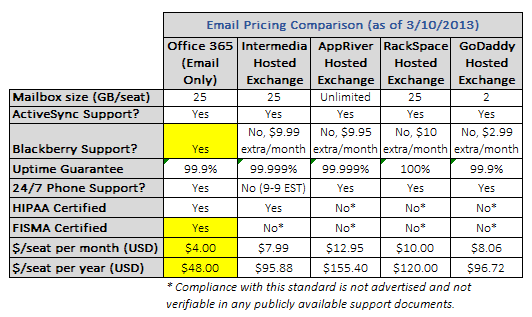
    A quick glance at the above comparison clearly outlines a few important items. Firstly, Microsoft’s pricing for Office 365 (at the Email Only level) is dirt cheap — a mere $4/person per month which equates to a lowly $48/person per year. That’s nearly half the cost of the next cheapest provider, Intermedia. But the advantages on cost don’t stop at the monthly price tag alone; Microsoft has the other big names beat on a few other key areas hands down.

    First off, while ActiveSync support for mobile devices such as iPhone, Android, and Windows Phone are a given these days, BlackBerry support (pre-BB10) is not a universal privilege. Of all five providers showcased in my comparison, only one, Office 365, has native complimentary BlackBerry email/calendar/contacts support out of the box. The other providers have nominal, but still extra, monthly fees tacked on for BB usage which could definitely have some sway in a final decision. Much of big enterprise, and some small businesses, still have large fleets of BlackBerries in use and having to pay a surcharge to continue using them is something many SMB owners don’t want to hear.

    When it comes to security compliance and certifications, Microsoft also has the third parties beat by a long shot. Other then Intermedia, which does have posted HIPAA compliance, the other providers are all either not advertising their credentials (which I doubt) or simply don’t have them under their belts. Office 365 boasts HIPAA and FISMA compliance, two important factors which make the suite 100-percent capable options for running in the public government sector or for healthcare-related institutions.

    Of course, there are a few providers that have Microsoft beat in a few aspects. For example, AppRiver has a slightly audacious claim that its hosted Exchange service affords “unlimited” email space. What the provider call unlimited, we all know is merely a glass ceiling that isn’t publicized. Similarly, RackSpace takes the same approach in its advertisement of a 100-percent uptime guarantee. I’ve heard from customers of theirs who have experienced outages, similar to this first-hand account, which Rackspace brushed off as not falling under their strict SLA terms. Whether or not the claims are a bit outlandish are up to your own discretion, but I prefer Microsoft’s down-to-earth, honest approach to advertised capabilities and uptime.

    Businesses want Security, and O365 delivers

    I’m not here to say that hosted Exchange providers aren’t secure. That isn’t the case by any means. But in a level playing field comparison, Office 365 holds a sizable advantage in presenting what has to be the single most secure email platform alongside the primary non-Exchange alternative, Google Apps. I put together another feature matrix that highlights the same providers I pinpointed in pricing earlier.
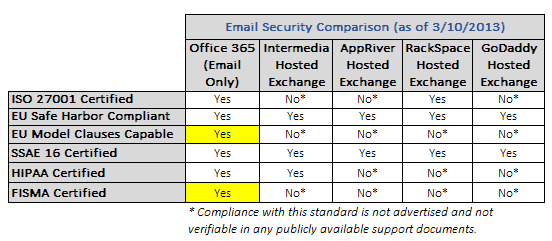
    The important differentiating factors here between Office 365 and everyone else happens to be EU Model Clauses capability, along with FISMA certification. EU Model Clauses is a contractual framework that was created by the EU to establish international data transfer standards. While most major providers fall in line with the commonplace EU Safe Harbor guidelines, only Office 365 advertises Model Clauses capability with customers.

    FISMA (Federal Information Security Management Act) is the other, much more important, credential that Office 365 has achieved. Specifically, this makes Office 365 fully acceptable for usage in any U.S. Federal Government agency. Google Apps is the only other large cloud email service to have attained this level of security. And government acceptance of Office 365 is subsequently on the rise. Microsoft has inked major deals with the City of Chicago, U.S. Department of Veteran’s Affairs, as well as the State of Texas to name just a few. While it could be partly due to Microsoft’s immense datacenter investment strategy and overall size, it still speaks numbers to their ability to handle some of the most delicate email needs within US borders.

    Is this to say that hosted Exchange providers like Intermedia and RackSpace aren’t suitable for small business? Not at all. They very well may be fully capable of meeting your own needs. But at nearly half the price of even the next cheapest option, Office 365 presents a true bargain when you take into account all of the security backbone you receive. The second best options of the given list are a tie between Intermedia and RackSpace; each respective provider has three different missing security credentials up against O365.

    On the Extras, O365 goes Above and Beyond

    If we were to end our comparison here, Office 365 would go home a solid winner. But some companies look for options above and beyond the plain-Jane features described above. And this is where Microsoft’s first party solution outshines the competition once more.

    Extras in the realm of cloud hosted email systems come in many forms. But the most popular ones being advertised today include SharePoint access, Lync capability, and download rights for some or all MS Office applications. Indeed, the disparities between providers are fairly wide, with some providers offering some extras in areas that others don’t, and vice-versa.

    But the consensus easily shows that Office 365 offers the widest array of possibilities out of the box. Let’s be clear and fair here to point out that my matrix in this area merely highlights if a provider affords access to a given flavor of value added service, and if so, what the associated cost happens to be. The comparison chart isn’t as apples-to-apples as the previous two, but it does show you the possibilities for all of the providers listed on various items that may be of importance to an organization.
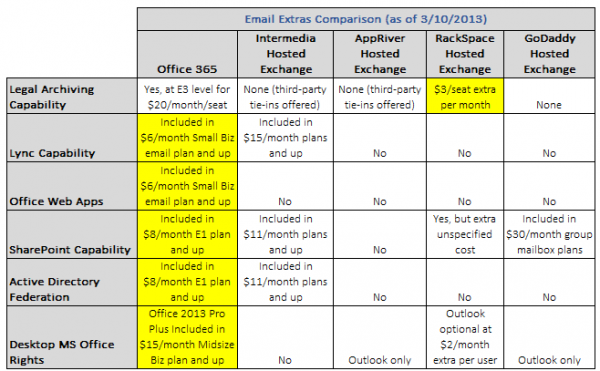
    Without a doubt, it’s fairly easy to see why Office 365 is the most flexible offering here. While the lowest Office 365 Email Only plan does not provide all of the extras listed in the chart, as a whole, some level of subscription of the suite provides each and every option you may desire on the scale. And that’s the key benefit that sits with Office 365; the choice is up to you. You can have as much or as little of the pie as you’d like — a winning combination of cloud elasticity and scalability alike.

    Microsoft doesn’t win on every category above, mind you. On Legal Archiving, 365 takes second seat next to RackSpace Hosted Exchange. This third-party provider has a quite excellent $3/seat extra per month plan that can provide full legal archiving and retention capability. However, in the grand scheme of the entire package that 365 provides, this is a small shortcoming which will likely be rectified as time goes on, seeing how Microsoft has every other provider beat on features and pricing for nearly every other aspect.

    The rest of the positives that Office 365 brings with it are pretty self explanatory. None of the hosted Exchange providers provide downloadable Office suite rights; the few that offer anything just pony up standard Outlook licenses, which are petty compared to having full Office download rights for just slightly more money through Microsoft (for multiple devices, too). Office Web Apps are another exclusive to 365, which are browser based versions of Word, Excel, PowerPoint, etc. Lync capability also comes in cheapest through 365, with the next best bet being Intermedia at a steep $15/month per seat.

    It’s keen to note that SharePoint offerings from the hosted Exchange providers are also expensive, when available. Office 365 comes with SharePoint Online access starting at the lowly $8/month E1 plan, and the next closest option is Intermedia which bundles SharePoint rights into its $11/month plans and higher. The same goes for Active Directory Federation and/or SSO capability – only Microsoft provides the purest SSO option in the form of Active Directory Federation Services which can tie natively into your optional existing on-premise AD domain. Intermedia offers a third party based directory sync option, but at a slightly higher $11/month per seat starting point.

    Is your business looking for future headroom with whichever direction you are heading in terms of email hosting? If so, I think Office 365 is the natural option that provides the greatest elasticity on features and scalability for your workforce. Price isn’t everything, but Office 365’s feature set and rock-bottom pricing is a tough option to say no to.

    The Finer Points matter, Too

    There are a few qualitative advantages that Office 365 carries over the various hosted Exchange providers; some of which may matter more to a prospective organization making the switch. It’s critical to bring these to light because too often we get lost in a purely price vs feature comparison only. These considerations are equally important when moving from a legacy email system and into the cloud:

    Continuous, gradual improvements vs “Big Bang” upgrades. Office 365 is on a similar, but not as radical, development cycle as Google Apps. The entire suite undergoes continual, evolutionary upgrades as opposed to hosted Exchange, which delivers the same traditional approach to on-premise legacy Exchange platforms: what you see is what you get (and will have) until the next major release — and even then you may not get moved without some friendly prodding of your provider. Most business owners I speak with prefer a consistent upgrade path that introduces new features and fixes slowly, as opposed to putting people through revolutionary shocks between major stepped releases.

    What level of uptime transparency does the provider have? Like Google Apps’ own Status Dashboard, Office 365 provides a very similar Service Health section within your control panel interface. I ran a quick check across a few of the hosted Exchange providers, and I couldn’t find any public information on service status or outages. They may offer intra-control panel dashboards for service status information, but be sure to ask about this if you are considering someone else outside of Office 365 or Google Apps.

    What level of integration do you want from your cloud email solution? It goes without saying that Office 365 is one of the most tightly-integrated cloud email offerings around next to Google Apps. While some providers of hosted Exchange offer bits and pieces of the same experience, none of them have the seamless full circle packaging across all aspects of the cloud services you may be subscribing to. This could be the difference between a simplified, easy-to-maintain platform and one with numerous phalanges that need to be separately controlled and serviced.

    How much control do you want over your platform? While the Office 365 online control panel provides access to about 80-percent of all the intricacies that the service provides, everything else can be directly accessed via the powerful PowerShell command interface. Hosted Exchange providers may be able to provide the same level of access, but generally, they need to keep the “reigns closer to the belt” due to the very nature of how hosted Exchange works. Office 365’s version of Exchange Online is built from the ground up for cloud usage, which makes it technically the more sound solution in most cases (but not all.)

    Don’t get lured in solely on offers for free migration by hosted Exchange providers. While migration costs can get costly depending on your current setup, keep in mind this one important fact: migrations are one-time fees, while recurring monthly fees are just that, recurring, and last for as long as you are on the platform. As you add more users to the service, you are increasing your monthly costs at the same pace. Hosted Exchange providers love to highlight their free migration services and sway the discussion away from their generally (sometimes substantially) higher monthly fees. Good business sense indeed, but as a consultant to my customers, I’m equally responsible for providing them with honest cost-minded recommendations for their ongoing needs.

    The points above are definitely things every organization needs to consider above the traditional feature/price matrix. Since switching costs are inherent to any cloud provider move, it’s always best to make the right decision up front and stick to a given platform for a number of years – instead of hopping and flopping between providers.

    Either Way you look, On-premise Exchange should not be on Your Shortlist

    We can debate the differences between Office 365 and hosted Exchange all day, but one thing that we can hopefully agree on is that on-premise Exchange just simply doesn’t have a place in the modern small business (50 seats or less.) Microsoft already nudged the SMB market away from on-premise Exchange by killing off Windows Small Business Server, and I’m certain that even the new Server 2012 Essentials offering is merely a placeholder to buy small businesses time as they make their way the cloud. Customers are even approaching us about moving Active Directory into the Azure cloud, which could bid servers farewell in the small business workplace entirely.

    The modern small business needs agility, flexibility, and a reduction in reliance on static servers that need painstaking ongoing maintenance to keep them operational. Are there situations where servers or on-prem makes sense? Sure — but I fully believe those scenarios are few and far between in 2013, and even less so going forward, especially for the SMB market.

    If your organization is planning a move to the cloud for its email needs, don’t fall victim solely on price-wars or steep promises. Do your homework, compare your options, and make your own informed determination. While I’m not writing off hosted Exchange entirely, most of my customers who have switched to Office 365 are quite happy on all levels including price, features, and elasticity for optional upgrade headroom. Sit down with your trusted technology consultant and lay all the cards out on the table.

    While I don’t want to blindly champion Microsoft’s first party offerings, with the new Office 365, they’re truly on to something pretty great.

    Photo Credit:  2jenn/Shutterstock

    Derrick Wlodarz is an IT professional who owns Park Ridge, IL (USA) based computer repair company FireLogic. He has over 7+ years of experience in the private and public technology sectors, holds numerous credentials from CompTIA and Microsoft, and is one of a handful of Google Apps Certified Trainers & Deployment Specialists in the States. He is an active member of CompTIA’s Subject Matter Expert Technical Advisory Council that shapes the future of CompTIA examinations across the globe. You can reach out to him at [email protected].

  • Microsoft’s backing of anti-Google Apps school privacy bill is just plain dirty

    We all know software vendors have vested interests that sway some of the decisions they make. When I heard that Microsoft was the real driving force behind a sly K-12 school privacy bill making the rounds in Massachusetts, I immediately smelled something rotten. While the public purpose behind the bill aims squarely at protecting student privacy, it’s not hard to connect the dots back to Redmond, Wash.

    Even though it’s easy to see why Microsoft would prop up such a bill (to ease Google Apps’ rise in the K-12 educational market), I question the long-term business sense of such dirty grandstanding. Microsoft’s Office 365 for Education is already free for students and staff of any qualifying school district (just like Google Apps), and the suite is pretty darn good competition for Google on technical and functional merit alone. So what’s the sense in playing dirty just to sign on a few more seats here or there based on misinformation?

    Shady maneuvers like this almost always backfire in one way or another. Apple may have scored a legal victory against Samsung recently, but its behind the scenes efforts to get retailers to ditch Samsung devices on shelves only angers those who enjoy free competition and choice. And how well have Apple’s attempts to keep popular Google apps, like Voice, out of users’ hands turned out? They soured Apple’s image, and in the end likely turned more users against the company than anything else.

    School Privacy Bill with Microsoft Roots

    At face value, the bill up for consideration in Massachusetts has some pretty agreeable stated goals. It aims to prohibit any company providing cloud services to schools in the state from using mined information for any commercial (read: advertising) purposes. Both Microsoft and Google compete toe-to-toe for K-12 district mindshare in the cloud email space, and Google Apps steadily chalks up conversions — over the last few years. My own former high school district and employer, Maine 207, was one of the first large high school districts in Illinois to make the move to Google’s ecosystem starting back in 2008.

    Microsoft is oddly standing behind its efforts in backing the bill. Microsoft spokesman Mike Houlihan says, “We believe that student data should not be used for commercial purposes; that cloud-service providers should be transparent in how they use student data; and that service providers should obtain clear consent for the way they use data. We expect that students, parents and educators will judge any proposed legislation on its merits”. Not to spill egg on Microsoft’s face, but does this legislation even apply to Google Apps in the first place?

    As a consultant to many school districts considering switches to cloud email, this discussion comes up quite often. And it’s an area that I fully believe Microsoft and Google are on level playing fields for, and never recommend one service over the other on privacy issues alone. Lifting one provider over the other on this line item alone is like winning the game because the other team didn’t show up to play — satisfying, but it doesn’t really prove anything, as both Google and Microsoft are very good in regards to privacy concerns alike.

    A quick check on Google’s public Terms of Service for the Google Apps for Education suite speak numbers to the way that commercial interested (primarily ads) are handled for school needs. Simply put, they aren’t displayed or used. By default, Google has all ads disabled for student and staff accounts; the only time ads are allowed are on alumni accounts, which don’t technically qualify as students or staff in the first place.

    Microsoft, Google squirm around Different Facets of Email Scanning

    The larger discussion at hand here, especially in light of the recent “Don’t Get Scroogled” campaign by Microsoft, surrounds the very fact both companies have and still do scan all of your email whether you like it or not. Microsoft’s attempt to paint the debate around strict advertisement targeting is indeed intellectually dishonest to the nth degree. Since we now know that neither Google or Microsoft are targeting ads for students or staff at schools for advertising, what exactly are they scanning for, then?

    A lot of things, actually. Spam detection and control, for example, wouldn’t be possible without contextual and precise data filtration from incoming and outgoing messages. Does this constitute a breach of privacy? I don’t believe so, and have stood behind this belief for quite some time. Technical, computer algorithms deciphering the spam levels of email messages is a far stretch for painting respective vendors in a bad light for helping merely keep our inboxes clean.

    Funny that Microsoft should take the stance it does, since the company has some uses for targeted email scanning. Straight out of the conscripts of its own Services Agreement reads:

    For example, we may occasionally use automated means to isolate information from email, chats, or photos in order to help detect and protect against spam and malware, or to improve the services with new features that makes them easier to use.

    Even though it is not serving up ads, isn’t it fairly easy to foresee that Microsoft may be commercially gaining from your information? Wouldn’t an overall better user experience ideally lead to more new customers of Office 365 for Education? I’m not a legal scholar, but you can come to your own logical conclusions.

    Similarly, another snippet from the same policy reads:

    When you upload your content to the services, you agree that it may be used, modified, adapted, saved, reproduced, distributed, and displayed to the extent necessary to protect you and to provide, protect and improve Microsoft products and services.

    So again, if your definition of “commercial benefit” is strictly aligned in the realm of advertising, then Microsoft using your data to influence its direction of given services could be a moot point. I happen to differ, and this is why I label the Scroogled campaign and subsequent school privacy bill battle as intellectually empty in all respects.

    Keep the Fight focused on Cost and Technical Merit — Not Legal Battles

    Consumers always win when competition is high and barriers to entry are low. It’s a fact of our wonderful capitalist system, and the reason why we’re free to use Gmail or Outlook.com, Google Apps or Office 365 in our school districts, and all the other services these two great companies have to offer. I’m not penning this article to talk down Office 365 on technical merit — in that area, it’s a solid competitor and often times better option than Google Apps.

    But let’s not divest this cloud services battle to one full of patent law pickpocketing, dishonest privacy rights campaigns and backhanded attempts at keeping competition out of the K-12 market. If Microsoft spent as much time, energy, and money on showcasing the great benefits schools could enjoy through Office 365 (like they have quite wonderfully done in their great Surface commercial campaign) then perhaps we wouldn’t be discussing the legal filler in its respective terms of service.

    Email scanning is here to stay for as long as we need spam protection. Unless, of course, you prefer wading through hundreds of junk emails each night. No, thank you. I’ll give the cloud providers the benefit of the doubt here.

    Photo Credit: Igor Zakowski/Shutterstock

    Derrick Wlodarz is an IT professional who owns Park Ridge, IL (USA) based computer repair company FireLogic. He has over 7+ years of experience in the private and public technology sectors, holds numerous credentials from CompTIA and Microsoft, and is one of a handful of Google Apps Certified Trainers & Deployment Specialists in the States. He is an active member of CompTIA’s Subject Matter Expert Technical Advisory Council that shapes the future of CompTIA examinations across the globe. You can reach out to him at [email protected].
  • What’s wrong with tech in US K-12 education today

    If you surveyed the different directions K-12 school districts take in the United States, you’d find nothing less than a hodgepodge of technologies. The mess that was known as “Novell Hell” universally bows down to a diverse array of technologies including Active Directory, campus-wide Wi-Fi, iPads, Chromebooks, and a little bit of everything else in between. While it’s reassuring that most districts I’m in discussions with are moving to cloud-based Google Apps or Office 365 for their email, the end-user device side of things is murkier.

    I’m not going to call myself an expert in K-12 technology and policy, but seeing that I spent the last four years supporting and training users’ technology needs at my former high school district, I’ve got good experience understanding the issues affecting teachers and students alike. After attending educational tech conferences year after year, the common consensus stands: everyone in education knows where they want to be, but the paths some of them take to get there are muddled with too much idealism and not enough realism.

    Readers who frequent BetaNews know that I’m very passionate about the topic of educational tech. I’ve already shared my thoughts on why the Surface and Chromebook are better devices for 1:1 student engagement, and specifically why the Surface has better long terms odds for K-12 over Apple’s iPad. But the debate has to go further than merely just devices and “cool-factor”. Our public education system ranks a measly #17 of the world’s greatest powers, and I think leveraging technology properly is one way we can get back on track and regain our elite ranking that we once held a half century ago.

    Problem 1: Many Teachers refuse to realign their Teaching Styles

    The move towards 1:1 computing in K-12 education is meaningless if teachers aren’t willing to rethink, realign, and downright renovate their entire instructional mentality. Too much of the 1990s and early 2000s was spent wasting oodles of money on pet projects and technology implementations that didn’t really further students’ overall foundations of technical aptitude in any way. And teachers were then forced under the bus by administration to “adopt or die” even if the path forward was illogical and useless for the overall betterment of the student body.

    Much of this issue extends well into today, where my consulting company FireLogic comes across many seasoned teachers who are scared to branch out and utilize new-age technologies like Google Apps or Chromebooks full time. Some of the fears stem from appropriate auxiliary-but-related problems like sporadic Wi-Fi coverage in buildings, but a lot of it is tied to a reluctance to change the “status quo”. It’s easier to keep on the path forward than to deviate and build something fresh.

    While the student body at large has already been moving towards an online-driven and device-enriched culture, the teaching body as a whole is stuck in the textbook and paper mindset. The few technologies that teachers have adopted fairly well (like Microsoft Word and online research) are unchanged from the way they were used starting back in the mid 1990s. So now we have a generational gap where students are truly outpacing their teachers, and many instructors are torn whether to keep up or just give up on tech.

    At my former high school district, for example, I spent years trying to educate teachers conceptually and functionally how Google Docs was a much better approach for student created work (Office Web Apps affords similar benefits to Google Docs now, too, through Office 365.) Students could collaborate on teamwork in real time, share notes and spreadsheets to fellow students in a single click, and the fear of losing work was eliminated due to Docs’ wonderful cloud auto save functionality. So what was the hangup that kept Docs adoption down? Teachers refused to change the way they graded papers — with red pen in hand, no less.

    There is a lot of technology out there in education that never sees the light of day, with all of its benefits to boot, because we have a generation of teachers who are afraid to leave their comfort zone due to fears, unjustified or not. Some facets of K-12 education have been making the right moves, like adopting 1:1 programs and/or flipping their classrooms, but the progress has not kept up with the general direction of student learning expectations.

    Problem 2: Too Much Focus on Consumption

    The consumption-first mentality is one of the biggest problems surrounding K-12 “growing up” when it comes to technology adoption for the 21st century. What does consumption-first in K-12 look like? Districts that push 1:1 computing initiatives driven around app-centric devices like the iPad or Android tablets. These hardware choices are not well suited for education in a number of ways, including the lack of traditional input devices like keyboards/mice and too much importance placed on consumption instead of creation.

    I’m not here to discourage iPad or Android tablet plans ad hoc. There are situations and areas where these devices make sense. Special Education, for example, benefits greatly from iPads in my own former district and this is something that should be praised. But applying such focused use case scenarios into the macro at large, aka an entire high school student body, is recipe for disaster.

    Where do devices like the iPad excel? In consumption oriented tasks, driven by the use of single-purpose apps that are built for limited functionality. Sure, Google Apps offers the Drive app for Docs access, but is this an ideal way for students to access and organize their work on a prime-time scale? Definitely not. The same goes for research, analysis, and information dissertation in a number of other related areas for the modern student. If asking a student to type research papers and collaborate in groups on a touch based tablet is the new norm, then I must be behind the times.

    Microsoft Surface could possibly be one of the best post-PC platforms for students and educators alike; if only K-12 was willing to look past the iPad standard that is overtaking many districts.

    While there is a place for consumption in K-12 education, we shouldn’t fall victim into training the next generation of workers that consumption is more important than all else. Well-made apps that teach a given topic for a subject have their role in the classroom — but they should not be the driving force guiding device policy, especially in the wake of 1:1 computing pilots. We should ask more of our students, preparing them for the real world that expects ever-more demanding competency in typing, analysis, mathematics, and extensive group work.

    The new wave of computing hitting districts nationwide may be moving away from centralized computer labs, but it certainly is not necessitating a shift from keyboard-based input and the flexibility that traditional input devices afford. And I think there are lots of options that provide the flexibility our students need. Chromebooks, Surface tablets, and some other mixed-use hardware is a much better answer to this reality than single-purpose iPads that need dongles and extras just to double as usable input-focused machines.

    Problem 3: Adopting Technology that is guided by Fads, not Goals

    One good example is the misguided approach many K-5 districts took early on when it came to deciding which computing platform they wanted to unify upon. At least in my neck of the woods, this happened to be Apple, only to present all those graduating into high school and college with the reality check that the real world still runs primarily on Windows PCs. Luckily, my own high school district standardized on Windows machines nearly across the board, but many districts do students an injustice by pushing technologies that are not widespread in the world of work.

    A fellow BetaNews reader emailed me with his shared viewpoint on this problem. “The use of Apple based products in schools is something I never could understand. In fact I consider it ridiculous from a cost point of view and a practical benefit as well”, Robert Peltier stated in his message. “How many businesses use Apple compared to Microsoft Windows?”

    A good question indeed. If operating system usage numbers continue to hold, Windows will still have a solid 90-percent+ of the global computer share. In plain speak, this means more likely than not, students entering the work world will have to deal with Windows-based machines 9 out of 10 times. Perhaps more, as established business generally prefers Windows over OS X at an ever higher rate. So what benefit does a childhood of schooling centered around Apple equipment really provide? If the educational system is here to prepare students for their next steps in life, I’m not sure if this approach makes much sense.

    My own former employer and high school district made a similar mistake when jumping on the touch bandwagon without a solid vision as to the why and the how around the initiative. With budget money spilling at the seams, district decided that every classroom would receive one of these ill-conceived QOMO Tablets. At face value, the devices seem to fill the input gap between pen/paper and digital.

    But their implementation and execution was flawed in every way from the very start. Like many other failed tech launches in K-12, the devices were merely dumped into classrooms without any proper training or guidance. It was expected that just because the iPad craze was in full swing, everyone would cozy up to touch and incorporate the tablets into day-to-day teaching. Were they wrong.

    My own experience found less than 5 percent of our district’s teachers even considered the devices; the remaining few who did try them were inundated with a range of issues due to sub-par technology design, leading most of them to drop the tablets altogether from lesson plans. And so the devices sat; pushed into corners, with our technology department expected to “keep supporting them” with no end in sight. They became the laughing stock of tech policy in our district.

    I don’t think one single party can be blamed on similar failed initiatives. Districts have a spending problem in that they are forced to expunge budget money before they lose it. Educational tech leaders are too often caught up in fads being pushed both by outside influence and a vocal subset of teachers – a sort of “keeping up with the Joneses” mentality in education today.

    I think if districts were more often looked at to resolve problems in the way that corporate America does, we wouldn’t have the kind of waste on ineffective technologies and short-sighted pilots as we do today. A focus on ROI (return on investment) in the mindset that student education needs to be balanced as much with logical technology platforms as it does with common-sense spending habits.

    Let’s shift the Debate: How can we BEST prepare the Next Generation?

    My background in educational technology has taught me a few things, and one of the most notable ones is that using tech fads as a guide for what’s best in a student’s hands does no one justice. Budgets are unnecessarily bloated by expensive hardware (Apple gear isn’t the only culprit here); K-12 tech leaders believe that new hardware alone will solve all ills; and administration just wants to be able to push out the next self-praising press release to the community and save face.

    The messes of yesteryear are finally bearing way to more reasoned approach and a fresh thinking to the way districts can bring tech into students’ hands. One of the best moves that could be sweeping K-12 across America, 1:1 Computing, is our best shot at grasping the moment to re-think what students need going forward and how to best equip them for that vision. But let’s not make the same mistakes of the past.

    Chromebooks save $935 on average over a three-year span, compared to other alternatives like iPad. They are rugged, cost-effective, and excellent options for 1:1 programs. (“Quantifying the Economic Value of Chromebooks for K-12 Education”; IDC, Aug 2012)

    Collaboration is definitely one of the keys to this debate. Inclusive platforms like Google Apps and Office 365 are providing students and educators with the means to weave together rich, online-driven instruction without tying everyone to a single brand of hardware or price level. Unlike an iPad and iTunes Store, you can use either Office 365 or Google Apps on a PC or Apple device with a similar experience, give or take some bells/whistles here or there.

    But if we are to believe that touch is where computing is headed, Surface is a device that truly invokes the best of both worlds. A platform that shifts from tablet to traditional laptop in a matter of seconds, and offers tactile input along with touch-based capability seamlessly. I really think this is where education wants to be, but just doesn’t know how to best get there. The one common theme from teachers who I mingled with at educational tech conferences was that touch on the iPad was great, but the technical boundaries and reliance on Apple’s strict iTunes Store for nearly every aspect of functionality were near universal grievances.

    And so I ask: why don’t we broaden the horizon? Instead of focusing so much energy and attention on the iPad and its Android clones, let’s ask ourselves if this family of single-function devices is really what students need to excel and prepare themselves for post-K12 and life in general. Too many college professors at America’s finest higher-ed institutions question the preparedness of incoming students year after year. Taking the opportunity that is 1:1 computing and dumbing it down to a generation of iPad-aholics is a sad excuse for technology in the classroom.

    So when I learned just a few weeks back that my former high school district is moving to Google Chromebooks for all students, it was a true sigh of relief. There is still some dose of reasoned sanity in the educational sector, it seems. If teachers can integrate the devices to capitalize on their inherent benefits, perhaps we can close that American education gap — one baby step, and district, at a time.

    Derrick Wlodarz is an IT professional who owns Park Ridge, IL (USA) based computer repair company FireLogic. He has over 7+ years of experience in the private and public technology sectors, holds numerous credentials from CompTIA and Microsoft, and is one of a handful of Google Apps Certified Trainers & Deployment Specialists in the States. He is an active member of CompTIA’s Subject Matter Expert Technical Advisory Council that shapes the future of CompTIA examinations across the globe. You can reach out to him at [email protected].

  • Spanning takes the crown for Google Apps backup services [review]

    The competition in the Google Apps backup market is steadily ramping up, with more than a few contenders jumping in lately to have a piece of this newfound need. Just two months ago, I wrote about my (mostly) positive thoughts regarding Apps backup provider Backupify. But in order to do the competition justice, I decided to give the other popular alternative Spanning a run for the money.

    Your choices don’t stop at Spanning and Backupify, in case you’re wondering. Google stepped into the backup arena with its first party Vault solution earlier last year, which takes the crown for being the  most integrated option (for apparent reasons.) Some of the junior vendors in this space also include CloudAlly and SysCloudSoft. These two latter providers try to edge out Spanning and Backupify with better pricing, but they are not yet as established so it is tough to judge them on cost comparison alone.

    For Google Apps administrators looking for a quality cloud backup solution, both Spanning and Backupify fit the bill at face value. Each provides varying degrees of data backup for the Apps platform, and both are quite cost-effective. But as I outlined in my writeup on Backupify back in December 2012, it does have a few shortcomings. Namely in offering no price discounts for the educational/nonprofit sectors and also in having some questionable inabilities like no true Google Sites restoration, as well as forced “all or nothing” restores as opposed to per-item selections.

    Spanning is Well-organized and Visually Appealing

    I know backup platforms aren’t here to win fashion awards, but visual organization and a clean UI go a long way in creating a fully functional service. Case in point: Backupify doesn’t have the worst UI in the cloud arena, but it surely wouldn’t win any trophies from me. It took me a good 15-20 mins to get acquainted enough with Backupify to truly understand how to navigate the entire interface, and how it grouped backups, settings, etc.

    Spanning spared me the lesson in software navigation. In short order, I quickly understood that moving around the backup service entailed two simple concepts. The first entails understanding what level of your domain you are browsing (the uppermost “domain” portion of your account, or a particular user account) and then the subsequent settings and available restoration options for that level. The contrasting color scheme goes a long way in creating simplistic experience that doesn’t dumb down the interface, but saves me from having to go into the FAQ section to get my bearings straight.

    Even non-technical admins can make their way around Spanning. The interface as a whole is a pleasure to navigate and you’re never left wondering about where to go next.

    Spanning takes a more Google Apps-esque viewpoint on assigning backup rights to accounts in your domain. Whereas Backupify opts to have mere on and off approach to which accounts are backed up, Spanning uses the licenses method that Google Apps admins should already be used to (since Google Apps forces you to purchase seats by licenses.) I wouldn’t say I necessarily favor one approach over the other, but you can quickly reassign licenses and see how many are left at a glance.

    Another area where I like Spanning in the visual department is its Status History page that shows you a simple dot matrix chart that corresponds to how backups went for each user over the past 30 days. Its clever, simple, yet intuitive and reduces the need for admins to waste time digging into status reports unnecessarily. In many ways, this page takes numerous cues from Google’s own Status Dashboard, but I don’t mind. The basis behind the idea works well.

    Checking on your backup stats couldn’t be simpler. Green is good, anything else deserves a second look. Clean, yet effective.

    There are other small areas that aren’t very crucial on the outset but become more useful in more nuanced scenarios. For example, there’s no way in Backupify to view how much space each user is taking up in terms of backup needs. In Spanning, this is easily done on a single page that displays the largest users on top, using simple bars or varying sizes to denote storage space used. Other minor nuances persist throughout the service like bright, big buttons for changing options and visual cues that hit you over the head when something is wrong.

    Backup and Restore Capabilities are Top-notch

    I have to bite my tongue a bit, because I gave Backupify some high accolades for impressive capabilities. That was until I laid my hands on what Spanning offered Google Apps administrators. The level of features baked into the service are quite stellar, especially when you look at the bevy of options provided when it comes to restoration abilities.

    For starters, Spanning introduces some welcome settings that allow you to adjust things like backup exclusions per account. By default the service has options configured that prevent shared documents and calendars from being backed up to a third party’s (the sharing recipient) account. But as an admin, you may opt to change these settings for select users. In similar fashion, particularly email under certain labels can be excluded from backups if it serves little value to the user or organization.

    The crown jewel of Spanning’s prowess is clearly demonstrated on its Restore page that allows each user’s data to be plucked back from oblivion. And here is where the differences between Spanning and Backupify are even greater, because Spanning allows for point-in-time restoration on top of multi-item restoration. Want to go back and merely bring back a copy of a Google Doc from two weeks ago, as well as a Google Presentation two days prior to that? With Spanning this is easy as ever, since the interface allows for complex searches that are visually succinct and easy to follow.

    Spanning lets you see your inbox the way it stood at any point in time. Talk about detailed restoration.

    Another important difference is that Spanning allows you to restore entire folder structure for your Google Drive account. In Backupify, to my best knowledge from past tests, folder structure was not kept intact and large, complex accounts became a miserable mess if a full restoration was needed due to data disaster. Spanning not only brings these files back but recreates where they sat, saving you endless hours in cleaning up your cloud storage drive.

    The level of control provided on restores really does matter. Think about it: do most users truly make messes of their entire inbox or Google Drive account at a time? Not likely. Most of the time, in my own consulting experience, end users lose single files or emails and want the ability to bring those selective items back from the dead. Spanning simplifies this process to the lowest common denominator, and I can’t commend it enough for this capability.

    An item that may or may not matter to some organizations could also be the fact that Spanning can handle full restores on Google Sites within a domain. While Backupify does handle backup of Sites, it can only offer exports on them – not true restores. Many organizations I consult are choosing Google Sites as an alternative to Sharepoint these days, so this could be another tipping point in your own comparison search.

    A colorful interface that has a dead simple menu structure. “It just works”.

    In keeping with their dedication to granular file control, Spanning goes a step further and allows for multi-selected file export. Want to download three files from someone’s Google Drive that may be needed? You can do it with just a few clicks. The online interface for Spanning represents a simplistic version of Windows Explorer so even the most beginner of Google Apps admins will not feel overwhelmed with performing such tasks. Backupify has export capability on the various Apps, but they are primarily full service exports. The “all or nothing” mentality as I mentioned previously which is nice, but not great.

    Spanning doesn’t come without its flaws, however. While it allows you as admin to select whether end users can or can’t change their backup settings, it doesn’t let you, for example, pick and choose which options users can adjust. It would have been nice to see Spanning allow admins to let users adjust which mail labels they can/can’t backup, but force full backups on each Drive account if necessary.

    Also, while you can see how much storage space each user occupyies on the service at a glance, you can’t tell what services account for the used space. Spanning could have taken a few functional cues from FlashPanel on that point, since the service excels in providing very good insight as to how much data is residing in both Drive and Email at any given time.

    Minor grievances aside, Spanning provides an all around experience that is exemplary of what my wish list from a cloud backup provider looks like. Some companies excel in function, some in form – but Spanning seems to have hit it home in both areas, and to that, a much needed kudos.

    Competitive Pricing and Proven Security Credentials

    Lots of companies are very particular on the security credentials of auxiliary services my company recommends in the course of Google Apps and Office 365 consulting. And while I was pretty impressed with Backupify’s claims about security, Spanning puts their money where their mouth is in the form of having achieved full SSAE 16 audit status.

    This accreditation not only certified the level of security and standards in place for their technology backbone, but everything else encompassing employee protocol, customer communication, and much more. If everything else puts Spanning and other backup providers neck and neck, then this should be something to bring it over the top.

    Before you wish to purchase, they provide the obligatory 14 day free trial. Getting signed up is a piece of cake. And on the pricing front, Spanning has another clear win. Their service costs a flat $40/year at face value ($35/year if you can find a discount code) and the most important factor here is that there is no storage cap. Backupify’s lowest end tier places a 35GB cap on storage space per user, which could easily become a problem for execs who have 20GB in their email inboxes and another 20GB+ of Drive files to manage. Sure, you could go up to Backupify’s $4/month plan but Spanning still has them beat in cost for the same feature set level.

    I also knocked Backupify on their lack of discounts for the educational and nonprofit sectors. Spanning has, in contrast, been offering lofty 25-percent discounts for these two important markets, and this will definitely play a big part in many organizations’ decisions. Google’s own Vault may be the one platform that undercuts Spanning on cost, as they offer free Vault service to all students at any K-12 domain that purchases Vault for its entire staff base (at a cheap $10/user per year.) But for the feature set and multi-faceted capabilities of Spanning, Vault is tough to recommend above that of the former.

    Whichever direction you decide to head with your organization, remember that the cloud still needs to be backed up like any other on-premise system. While it’s very true that Google Apps and Office 365 both have the technical underpinnings to prevent systematic failure or data loss, they do nothing to prevent user-induced data loss. This is where you need to have some kind of solution in place, ready to help restore files in times of need.

    The cloud is great as a whole, but data backup is something we just can’t seem to shake. At least Spanning makes it foolproof easy.

    Photo Credit: T. L. Furrer/Shutterstock

    Derrick Wlodarz is an IT professional who owns Park Ridge, IL (USA) based computer repair company FireLogic. He has over 7+ years of experience in the private and public technology sectors, holds numerous credentials from CompTIA and Microsoft, and is one of a handful of Google Apps Certified Trainers & Deployment Specialists in the States. He is an active member of CompTIA’s Subject Matter Expert Technical Advisory Council that shapes the future of CompTIA examinations across the globe. You can reach out to him at [email protected].

  • Big Data can kill American gun crime

    While Betanews isn’t usually a place for political discourse, I’m going against the grain on this one. It’s because I strongly believe the real answer to solving our serious gun crime problem in America rests in something most readers on this site tend to embrace: technology. More specifically, what we refer to as Big Data. I fully believe we have a data problem, not a gun problem. While the debate at large focuses on reaching the same end goal, the fingers point at the wrong solution.

    Big Data, in my opinion, does have a spot in this debate. While Robert Cringely one month ago wrote why he believed just the opposite, I think we have more than enough examples of where Big Data has been helping more than hurting. If you listened solely to the press conferences politicians hold in Washington, you’d almost come to the conclusion that all the guns used in recent crimes pulled their own triggers. There seems to be a steady forgetfulness that nearly every recent mass tragedy was actually perpetrated by individuals with some form of mental illness. But this doesn’t stir the headlines the same way gun debates do, so the topic gets swept to the wayside.

    We’ve got a serious problem in America, and I don’t think it lies in magazine round capacities or (mislabeled) assault weapons. It’s that we have no reasonable technological backbone in the form of data collection and sharing that can track individuals at risk for committing these types of violent crimes. New York City successfully leveraged Big Data (CompStat) to fight its own crime problem; we’ve tracked sex offenders with ease down to the city block for many years already; and the USA has managed a national detailed terror “No Fly List” for nearly a decade now.

    So why can’t we effectively track mass data on potentially violent threats afflicted with mental illness? It’s a very good question, and one that will only be logically tackled once we get over the largely theatrical gun control debate.

    The Dead End that is New Proposed Gun Control

    It’s a shame that so much congressional energy is being spent on clarifying what visual aspects of guns constitute assault weapons that politicos like Sen. Dianne Feinstein (D-CA) want to ban. The biggest sham about the new proposed assault weapons ban, for example, is the established fact that most violent crime isn’t even committed with so-called “assault weapons”. Handguns are the most prevalent choice for mass shootings.

    If you’re hesitant to believe the true numbers, have a look at some of the most violent recent school shooting suspects in the United States:

    • Adam Lamza (Sandy Hook shootings): Semi-Automatic Rifle used, yes.
    • One L. Goh (Oikos University shootings): Semi-Automatic Rifle used, no.
    • Seung-Hui Cho (Virginia Tech shootings): Semi-Automatic Rifle used, no.
    • Steven Kazmierczak (Northern Illinois shootings): Semi-Automatic Rifle used, no.
    • Charles Carl Roberts IV (Amish School shootings): Semi-Automatic Rifle used, no.
    • Eric Harris and Dylan Klebold (Columbine shootings): Semi-Automatic Rifle used, yes.

    Of just the above sampling of 6 recent violent US school shootings, only two instances involved semi-automatic rifles (the center of the current assault weapons ban controversy.) Of the rest, all involved some form of handguns, supporting the established statistics on US gun crimes at large.

    A standard S&W MP15 sporting rifle, commonly referred to as an AR-15. Contrary to reports, “AR” merely stands for “Armalite” — the company which originated this style of weapon. And doubly, it can only fire at semi-automatic levels, unlike a true “assault rifle” that can handle fully-automatic. Gun paranoia fuels this kind of media misinformation.

    While there is no strong correlation between assault weapons and recent mass school shootings, mental illness definitely has a staggering presence among the involved suspects. Using the same sampling of perpetrators, have a look at just how many had some form of mental illness that has been publicly reported:

    • Adam Lamza (Sandy Hook shootings): Reported to have a personality disorder in combination with Asperger syndrome.
    • One L. Goh (Oikos University shootings): Afflicted with paranoid schizophrenia and to-date determined mentally unfit to stand trial for crimes committed.
    • Seung-Hui Cho (Virginia Tech shootings): Declared mentally ill by Virginia in 2005, two years before the infamous shootings.
    • Steven Kazmierczak (Northern Illinois shootings): Long history of mental illness; multiple suicide attempts; strong interest in Columbine shootings; sympathetic towards Palestinian terror group Hamas.
    • Charles Carl Roberts IV (Amish School shootings): Suspected sexual attraction to children due to falsities told before shootings and sexual lubricant found at crime scene where young girls were murdered.
    • Eric Harris and Dylan Klebold (Columbine shootings): Described in multiple reports as “psycopathic” and “depressive” among other social and mental related issues that affected the duo.

    In some form or fashion, all of these individuals above had one thing in common: mental instability. That’s right, every single one of them. In fact, a majority of them had traceable histories of instability that was brought to light only after it was too late. I’d argue it’s not a gun problem at all that we’re fighting, but a lack of coherent direction on information sharing and mental health access. Both sides on the issue are at fault to some degree.

    New gun legislation is likewise doomed for failure in solving the core issue of gun access because even the US Department of Justice concedes that among state prisoners in jail for gun crimes, 80 percent obtained their weapon in part by “street buys” or “illegal sources”. So this begs the question: if criminals aren’t following the law to begin with, what makes us believe these new regulations are going to keep weapons out of their hands? If I’m connecting the dots right here, these stricter gun laws will merely give the bad guys another leg up over law-abiding citizens.

    If there’s one thing I would recommend in light of all the above data, it’s that broadening our concealed carry laws could likely have the biggest impact on keeping death tolls down when shock killers decide to strike. The evidence already points to lower murder rates among states that have concealed carry in contrast to those that do not. And there’s even movement to get teachers prepared to fight back, like these Utah educational workers who are training to carry concealed weapons in school, something already legal in the state.

    Renowned security expert Larry Correia said it best on a recent blog post surrounding the gun control debate: “Gun Free Zones are hunting preserves for innocent people. Period”.

    The Data is out There, We just refuse to make sense of It

    If there was a posterboy for the mess that is our state of mental health information sharing in America, it would be Seung-Hui Cho. This was the 23 year-old troubled college student who took 32 lives plus his own on the campus of Virginia Tech in 2007. The signs that were present, and data that was already available, was insurmountable. For example, Lucinda Roy was the co-director of Virginia Tech’s creative writing program, and experienced Cho’s conditions first hand. “[He was] the loneliest person I have ever met in my life”, she told ABC News.

    Roy attempted to get Cho help through official channels, but met resistance from higher-ups who noted “legal hurdles” in getting Cho the help he needed. The University even made public mental health records they held on Cho, noting several instances of discussions between Cho and school health specialists where he described ongoing symptoms for depression and anxiety. Three therapists had the chance to talk with Cho before his murder spree, to no true avail. They are not to blame necessarily — the broken system is.

    The more you look into the past lives of these school shooting perpetrators, the more commonalities you find with similar signs and data. While every single shooter doesn’t leave behind such a vivid trail of mental illness evidence, most instances do have enough concrete data to say that “something” could have been done. The problem at hand is that we have no discernible way of making sense of all this data. How do we store it all? Where do we organize it? Who’s to manage it?

    These are the kinds of questions we should ask now, and work towards to a solution once and for all. The terror tragedies of 9/11 forced Washington to get serious about a No Fly List, and the results have been impressive overall. Many recorded (and some likely unrecorded) instances of potential terrorism were stopped dead in their tracks due to this cohesive national database.

    The New York Police Department also showed how the right technology can empower change. Specifically, reducing crime and predicting future problems, edging on the lines of what the movie “Minority Report” made famous in its screenplay. GIS and database technology helped form the basis for CompStat, a comprehensive system that has been so powerful, it is now in use in numerous US cities such as Austin, San Francisco, Baltimore, and other large urban centers. In fact, CompStat has been so effective that by 2001, one third of the country’s 515 biggest police departments had adopted some iteration of the CompStat methodology in place.

    Big Data isn’t perfect, however, especially when government is involved. Take for example the FBI’s spotty recent history in getting its multi-million dollar pet project running, Sentinel. That Big Data project went completely overbudget, overran on its entire projected launch date and was eventually taken back in-house for final development. The in-sourcing effort by the FBI further bloated costs and finally produced a usable data warehousing platform by 2012 — over a full decade after the information mess that allowed 9/11 to take place.

    Information Sharing is Key to Preventing the Next Sandy Hook

    I’m not an expert in the topic of federal information systems, or even smaller state level database platforms. I don’t have the single answer to what our next steps should look like. But I do know, as a rational American, that connecting the dots surrounding the real issue with mental health information sharing isn’t that difficult. The patterns exposed among a majority of these school shooting suspects should provide some immediacy to the question of how we plan on getting already collected information shared, and how to best leverage it to help prevent the next disasters.

    Sadly, until we get real about tackling our information sharing problem, the Adam Lamzas and Seung-Hui Chos will continue slipping through the cracks. The unfortunate part is that the breadcrumbs are already out there. Without a technologically powered way to sift it, sort it and make use of it at the proper levels, we can’t do much about it. And so the political theater will continue in Washington, while the underlying cause of mass shootings gets swept aside because gun control debates steal more headlines then mental health discussions ever could.

    Want to get involved in making real change? Contact your congressional leaders and tell them to address the mental health information problem. Even banning every future assault weapon sale won’t in the least prevent the next Sandy Hook or Columbine.

    Photo Credit: mashe/Shutterstock

    Derrick Wlodarz is an IT professional who owns Park Ridge, IL (USA) based computer repair company FireLogic. He has over 7+ years of experience in the private and public technology sectors, holds numerous credentials from CompTIA and Microsoft, and is one of a handful of Google Apps Certified Trainers & Deployment Specialists in the States. He is an active member of CompTIA’s Subject Matter Expert Technical Advisory Council that shapes the future of CompTIA examinations across the globe. You can reach out to him at [email protected].