Remember all the fuss a while back about DRM-protected MP3 files, and how the industry was (thankfully!) moving away from them? Well, it appears that not everyone really has abandoned the practice, even if they claim to have done so. It looks like some companies are still placing personal information inside the music files you buy and download. Hit the break for the details [via TechCrunch] and some visual evidence.
Author: Jerry Hildenbrand
-
Sprint users – Are you ready for some football?
Today some Sprint subscribers got a text letting them know that the new Sprint Football Live app was ready and waiting for download. I went ahead and grabbed the update (after rolling back to the official Sprint software for the Hero) so I could check it out. Hit the break for thoughts and some screenshots.
-
Cricket picking up Kyocera Zio M6000
Welcome to the party, Cricket Wireless. Phone Arena got their hands on a presentation brochure showcasing Cricket’s upcoming line-up for 2010, and it looks like it will be a good year for subscribers. Along with some other interesting phones, the hot item looks to be the Kyocera Zio M6000. We had some hands on time with the Zio at CTIA, and while it’s not a powerhouse, it appears to be a solid little device. Unfortunately, the price ($299.99) is a bit higher than everyone thought, but still not too bad for an off-contract Android phone. Look for the Kyocera Zio M6000 on Cricket some time in July. [Phone Arena]
-
Android Quick App: 3banana Notes
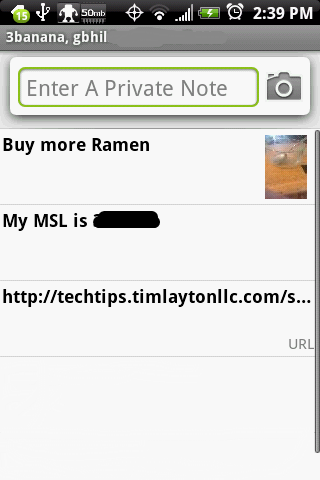
I’ll admit it. I’m forgetful, and it get worse every year. Smart phones are a life saver here, without them I’d never get anything done because I’d spend my life trying to remember the things I need to remember. I need a calendar that synchronizes. I need a to-do list manager. But what I need most of all is something that let’s me jot down bits of information on the go so I can sit later with a cigar and a nice espresso and fill out the calendar and to-do lists. That’s where 3banana Notes comes in. Follow along after the break to learn some more about the notepad with the silly name.
-
Android and videos, how to get started

Hello again everybody! This week we’re leaving all the techie stuff behind and we’re going to have some fun. Android phones are great portable media playesrs — we just have to get used to a different way of encoding and syncing our media. While there are lots of way to get it done, we’re going to focus on two that use free tools to make the most out of your Android multimedia experience. So put your ringer on silent, send the kids out to play in the yard and read along after the break.
-
Take Android screenshots without root
Hey everyone. Here’s a quick tip that often gets overlooked amidst the madness. Since everyone loves to show off their Android homescreen setup, Let’s talk about how to do it if you’re not rooted and not running a home replacement. This works for all devices regardless of any home customizations done by the handset maker. Hit the break to follow along.
-
Android Central’s Keyboard Roundup
Hey everybody! Grab a seat and settle in as we take a look at some of the cool replacement keyboards for our phones. One of the best things about Android is flexibility. Don’t like the way something’s done? Well then replace it!
Since we spend so much time and effort typing out mail and messages on our phones, the keyboard is a great place to start customization. Join us after the break as we compare the different ways to get your message across.
-
Starred items now in mobile search, too
Earlier this month Google released a great feature – marking your favorite search results with a star. Now Google has announced it is extending this feature to also work with their mobile site. If you’re running an Android, webOS, or Apple device and logged into Google, any result you star on your computer or your phone will appear at the top of the results. Something so simple sure can make a big difference. I can think of a lot of ways this could come in handy, especially when combined with Google’s location aware services. Nice work, Google, stuff like this is why we love ya.
-
Sprint releases development guide for the EVO 4G
Thanks to some tipsters we have had a look at the HTC EVO 4G development guide, and it’s chock full of goodies. It covers all the things that are going to make the EVO great. As you can see in the pic above, a good portion of the guide covers HDMI out functions, which is enough to want the EVO on it’s own. Some of the other things covered:
- API’s for a new location service
- controling the front facing camera
- detection and playback of online media ( both Adobe flash and HTML5 )
- tools and code to handle network transitions between 3G, 4G, and WiFi
While the document itself doesn’t mean much to most of us, once the talented developers out there get into it we can expect some really innovative applications to show up on the Market just about the time the EVO hits the shelves. My hat’s off to Sprint for getting this out the door and into the hands of the folks that want it and can use it this far in advance of the release of the phone. Makes my personal decision between the EVO and the Sprint Nexus One that much more difficult.
Thanks to everyone who sent this in!
-
Making sense of all these acronyms

Cellular technology can be broken down into two basic categories – GSM and CDMA. Both work well and provide the same function, but are different enough that they aren’t interchangeable. Lets have a look at each and try to clear everything up.
-
Sprint EVO 4G won’t do simultaneous voice-data
Get ready Luke Wilson and company, you have a new (well, old) target to go after. HTC has confirmed to us that the Sprint EVO 4G, which it manufactures, will not be able to use voice and 4G services at the same time at release. The full quote from HTC:
"If you’re using 4G for data, you can’t use CDMA for voice. Currently the only way to do simultaneous voice and data would be through a third-party VOIP solution. However, this is not do to strict hardware limitations, so it’s possible this could change with future updates."
We touched on this in our EVO 4G Q&A, but this certainly needs it’s own entry. HTC says that it’s not due to hardware limitations, so that leaves only one culprit — Sprint. We’re used to this with CDMA phones, and maybe it’s still something that’s "in the works," but the question remains — why would Sprint cripple (sorry, Phil, just couldn’t resist
) what’s arguably the best upcoming phone on the market? At this point all I can think is "Why, Sprint, why?" -
HTC Hero gets 2.1 upgrade April 26 – in Taiwan
Good news for HTC Hero owners, sort of. HTC has announced on Plurk that they will be rolling out the Éclair goodness for Taiwanese users on April 26th. My own source at HTC America can’t confirm or deny any release date for other countries, but this is official word from HTC finally.
If you haven’t already hacked 2.1 onto your Hero, this should be some welcome news. Just don’t count on it too much, ask a Motorola Droid user about release times for updates and how they can change. [engadget]