Author: Jolie O’Dell

  • 5 Features From Third-Party Apps Twitter Should Integrate

    When I called Twitter out in my post of the top 10 failures of 2009 for “failing to innovate,” what I probably should have said was this: Twitter has done a decent job of implementing features that we first saw being used by third-party apps.

    The concept of user lists? Sawhorse Media introduced those. Retweet functions? That was a user idea that had already been implemented formally by many mobile and desktop applications. And the hot Contributor API is something that CoTweet has been doing for a while. The geotagging API is hardly new, either. But instead of saying that Twitter failed to innovate, let’s instead name a few features we love from third-party apps that we think they should integrate themselves – maybe with a key acquisition or two.

    Sponsor

    Auto-completing Usernames

    Third-Party Apps That Do This: Twitdroid, DestroyTwitter

    It’s a rather simple feature, but it would make our lives a lot easier. When typing an @ reply or cc’ing a user, it helps to have a cheat sheet in the form of an auto-completion feature that remembers all your friends.

    Multimedia Uploading And Embedding

    Third-Party Apps That Do This: PowerTwitter, Twitpic

    The convoluted process of uploading media to a third party and getting your content synced up to your Twitter account can be frustrating, especially when bugs arise. And not being able to preview images or videos before clicking through is a pressure point, as well.

    Threaded Views for Conversations

    Third-Party Apps That Do This: Twitdroid, TwiToaster

    Being able to see what an @ reply is all about can turn into a trail of digital breadcrumbs 10 tabs long. Seeing a threaded conversation in a single click would be much more convenient.

    Management And Analytics

    Third-Party Apps That Do This: Bit.ly, TwitterCounter, Tweetmeme, DoesFollow, Twitter Karma

    I’m obsessed, you’re obsessed, we’re all obsessed with follower counts! Not to mention click-throughs, reciprocity, retweets, and all the metrics that make up the statistical side of Internet fame. Real-time measurement of Twitter activity would be worth paying for.

    Official Mobile And Desktop Applications

    Third-Party Apps That Do This: Tweetdeck, Seesmic, Tweetie, Twitdroid, TwitterBerry

    The single greatest opportunity for Twitter innovation (and yes, we’re resisting the very strong urge to make a portmanteau from those two words) is perhaps in the desktop and mobile app space. It’s one of the most clearly monetizable avenues for Twitter to pursue, and the “official” stamp of approval on an application would guarantee that app’s success. Moreover, there would probably be clear opportunities for an official app to come pre-loaded on laptops and mobile devices.

    Clearly, there’s a universe of features for Twitter to choose from. From social gaming to DM schedule reminders, oneforty is like a catalog of what Twitter could – and perhaps should – be doing next.

    What do you think – what Twitter features would you like to see launched in 2010? Give us your opinion in the comments.

    Discuss


  • Android Developers: Here’s Some Sample Code And Tutorials

    Ever since finding myself the happy owner of a Droid (+1 for early Christmas presents), I’ve found myself increasingly interested in the app market for Android-powered devices.

    As has been noted in many iPhone/Droid sudden-death-round comparisons, the latter languishes in quality and quantity of available applications. Perhaps in an effort to increase Droid’s competitiveness in the market, the powers that be have created a new section of resources for Android developers. Let the games (and other apps) begin!

    Sponsor

    In the new Resources tab of the online Android SDK documentation, devs can now access technical articles, some pretty detailed tutorials, a breakdown of platform versions, common tasks, troubleshooting tips, a community across groups/IRC/Twitter channels and a library of code for sample apps – just what a mobile/smartphone developer would need to get started.

    The list of sample code now includes:

    • API Demos
    • Bluetooth Chat
    • Contact Manager
    • Home
    • JetBoy
    • Lunar Lander
    • Multiple Resolutions
    • Note Pad
    • Searchable Dictionary
    • Snake
    • Soft Keyboard
    • Wiktionary
    • Wiktionary (Simplified)

    The Android dev team has also taken their most popular developer blog posts and turned them into a series of technical articles ranging in scope from backward compatibility issues and future-proofing apps to layout tricks and text-to-speech uses.

    Currently, around 10,000 applications exist in the Android Market as compared to the (roughly) eleventy bajillion apps in the Apple App Store. Hopefully, these resources will help this open-source mobile development platform take off, allowing Android’s available applications to become a selling point for Android-powered devices rather than a point ceded to Apple in the smartphone wars.

    Discuss


  • Turn Right at the Gas Station: Google Maps Gets More Human

    You’d think it was odd if you called me for directions and I told you to go 0.2 miles southeast and make a slight right onto Old Route 17.
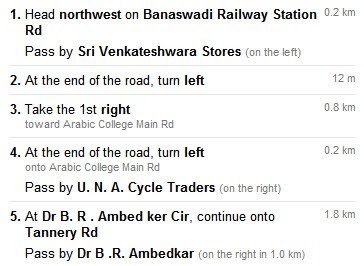
    You’d expect me to say something more like, “Start driving away from the library and take the second right just after the McDonald’s.” Google Maps India has just launched a hybridized version of directions that give geographically accurate distances and directions as well as landmarks most humans would also recognize. We can imagine this coming to the rural U.S. and Google telling us to “follow that-there little jog in the road where the big oak tree used to be before Jimmy Ray hit it with his daddy’s combine, bless his heart, for 2.3 miles.”

    Sponsor

    Although most urban Americans are comfortable navigating by street signs, in other parts of our country and the rest of the world, landmarks are a necessity to successfully reaching one’s destination. Other times, it’s simply reassuring to know that you haven’t actually missed a turn or your destination because you haven’t yet passed a given landmark.

    How many times has someone told you on the phone to “keep going straight until you pass the shopping center” or something of that sort, and it saved you a missed turn as well as a general sense of anxiety? In the words of UX Googler Olga Khroustaleva, “We found that using landmarks in directions helps for two simple reasons: they are easier to see than street signs and they are easier to remember than street names… Sometimes there are simply too many signs to look at, and the street sign drowns in the visual noise. A good landmark always stands out.”

    The point of the whole experiment was to give drivers a sense of confidence when exploring new territory. Ultimately, the Google team found that a combination of street names and distances as well as landmarks gave the best results and best satisfied users.

    Sree Unnikrishnan and Manik Gupta wrote on the Google India blog, “This effort was possible thanks to the large amount of landmark data that users like you contributed through Google Map Maker. Our new algorithm determines from available signals, which of these landmarks are most useful for navigation, based on importance and closeness to the turns that you’re making.”

    Here’s a look at the Google Maps directions design we all know:

    And here’s a version Google Maps India tried that added landmarks to other data to confirm directions:

    Finally, here’s what Indian travellers will see moving forward:

    Looks pretty sweet to us! What do you folks think? Would you like to see more Map Maker landmark data for driving directions all over the world, too? Let us know in the comments.

    Discuss