Author: PhoneDog.com – Latest videos, reviews, articles, news and posts

  • Android Market received 9,300 app submissions in March

    Android Market

    We all watched Steve Jobs boasting about the 185,000 apps in the App Store yesterday.  And while 185K is a huge and potentially intimidating number, it’s not entirely out of reach.  Last time we checked in on the topic, Google acknowledged that the Android Market had reached 30K apps, while AndroLib was calling it at around 35K.

    If you recall, back in December of 2009, Android Market had reached about 16K apps, quickly doubling to 30K by March.  Now, as data has been compiled to represent March statistics, we can see that 9,330 apps were submitted.  If you’re keeping track, it represents a 68% increase over the 5,332 new apps submitted in February – a “58.5% increase in the number of available applications as a whole,” according to BGR.

    There seems to be some controversy over whether such a rapid rate of growth in the Android Market is a good thing.  As the number of apps increases, things like duplicates, junk, and porn apps also increase, unnecessarily inundating the market.  Apple saw this happening and underwent a massive overhaul, banning over 5,000 apps, and more stringently regulating the application approval process.  In any case, if the 9,330 apps submitted in March are an indication of developers’ excitement about Android, I think it’s safe to say that – along with the line-up of super phones expected this summer – Android’s future is continuing to look bright.

    Anyone care to guess when Android Market will hit 50k apps?  Feel free to leave your thoughts in the comments!

    Via BGR


  • Palm Pre Plus and Pixi Plus coming to Europe

    PreCentral has spotted a promotional advertisement with a Palm Pre Plus standing in front of several important smartphones.  The theory here is since the Pixi never made it across the Atlantic, the poster depicts the European Pixi Plus (and with it, a release of the European Pre Plus as well).  According to Laurent Guyot, who is billed by Engadget as a “French PR” individual, the devices will launch on April 27th on the SFR network.

    Here’s my take on the matter – if you’re standing in front of the Motorola Milestone, Sony Ericsson X10, Nokia X6, and other important smartphones, than you’re pretty important and should be taken seriously.  It’s nothing more than a rumor until the devices launch, but given Palm’s determination to bring webOS to the masses, it makes sense to bring the flagship models to Europe.

    Via Engadget, PreCentral


  • Motorola CLIQ gets software update, still not Android 2.1

    Motorola CLIQ

    If you’re a CLIQ user, you’re probably aware that the device suffers from the occasional lag and wonkiness.  Combine that with the battery life issues and touchscreen accuracy problems, and you have quite the ordeal on your hands.

    The 1.4.8 software update claims to fix the following issues:

    • Improved battery life
    • Improved software performance and stability
    • Improved home screen
    • Improved widget response
    • Decrease in ‘Force Close’ error messages
    • Added support of .WMA and .WAV media files

    It’s not Android 2.1, but it’s still worth a look.  CLIQ users, get your download on and report back with your findings!

    Via Engadget Mobile


  • Apple to end ‘Get a Mac’ commercials?

    Get A Mac

    We’ve all grown accustomed to Apple’s “Get a Mac” ads and their hilarity, but if rumors prove to be true, we can all say goodbye to everyone’s favorite anti-PC commercials. The stars of Apple’s clever little TV tidbits are Justin Long and John Hodgman.  Long, during an interview with AV Club, was asked about the future of the ads, and he replied with:

    “You know, I think they might be done. In fact, I heard from John, I think they’re going to move on. I can’t say definitively, which is sad, because not only am I going to miss doing them, but also working with John.”

    Long’s answer isn’t solid evidence that the ads are no more, but it is a good indication of what to expect.  The ads were witty and could make you chuckle the first hundred times you saw them, but just like any commercial, they grew stale (just like Apple’s “There’s an app for that,” FreeCreditReport.com, and eTrade’s baby spots).  With other companies nipping at Apple’s heels, I’m sure they’re ready to retaliate and they probably have a few ads set to chop and hack at Windows 7, Windows Phone 7, and Google/Android.

    I’m curious to see where Apple takes it, and how creative they get this time.  Will they go simple again, or will they make something more visually pleasing, like the DROID commercials?   What would you like to see from them?

    Via BGR


  • HTC Incredible: Leaked manual, equipment guide, launch date confirmed

    HTC Incredible

    For the past few weeks now, the HTC Incredible faucet has been leaking at a steady pace.  But yesterday the floodgates opened, unleashing a plethora of information including official specs, a user manual, equipment guide, and more release date confirmation.

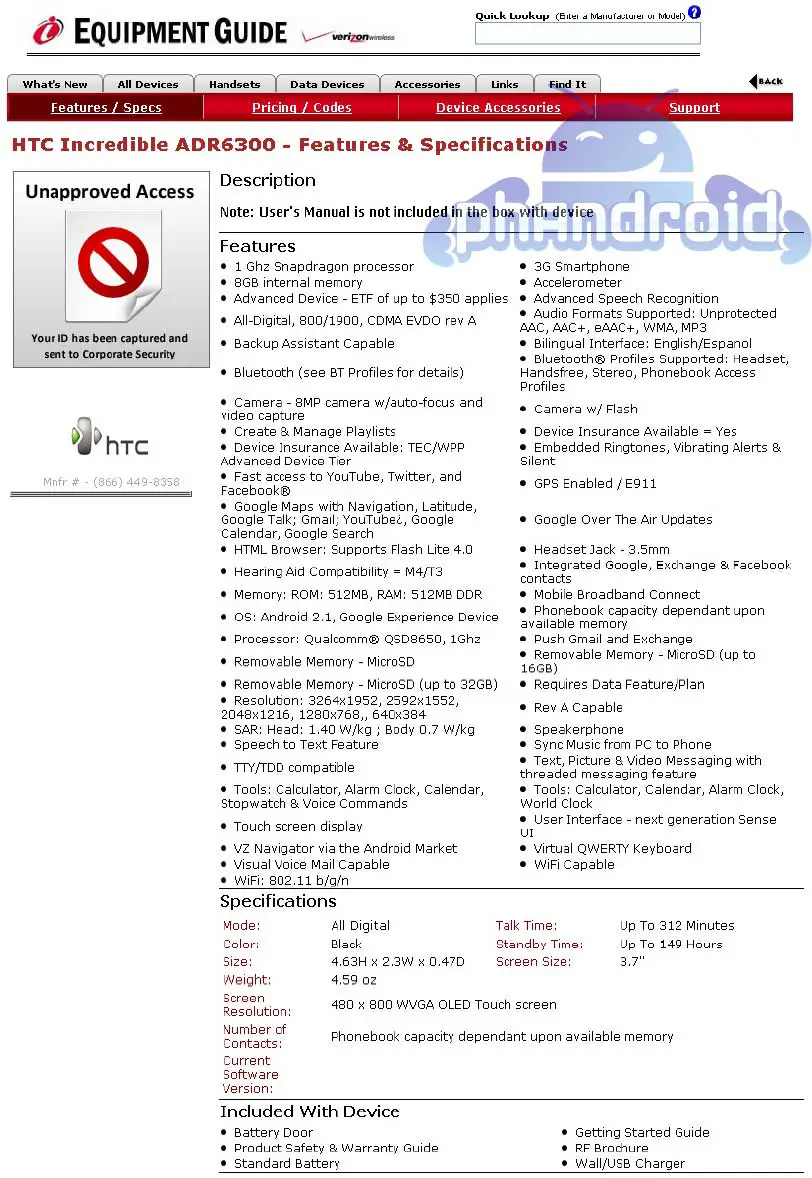
    Thanks (yet again) to the Android Forums, we now have a full 206 page user manual to peruse for those of you who are interested.  Follow the link to view or download the PDF (thanks to John at DroidDog for finding this).  In addition to the user manual, here’s a link to a screenshot of the equipment guide which displays a long list of “features and specifications” for the “HTC Incredible ADR6300.”  It also includes a list of items that come in the box.

    The now official specs are as follows:

    • CPU speed: 1 GHz (Snapdragon processor)
    • Platform: Android™ 2.1 (Éclair) with HTC Sense™
    • Memory: ROM: 512 MB, RAM: 576 MB
    • Display: 3.7-inch AMOLED touch-sensitive screen with 480 X 800 WVGA resolution
    • Onscreen navigation: Optical joystick
    • GPS
    • Sensors: G-Sensor, Digital compass, Proximity sensor, Ambient light sensor
    • Connectivity: Bluetooth® 2.1, Wi-Fi®: IEEE 802.11 b/g/n, 3.5 mm stereo audio jack, micro-USB (12-pin micro-USB 2.0)
    • Camera: 8 megapixel color camera with auto focus and flash
    • Expansion slot: microSD™ memory card (up to 32GB)

    Last, but certainly not least, the folks over at PhoneArena managed to uncover some Best Buy documents (see above) that lend further credence to the April 29 launch date (at least for Best Buy).  According to Phandroid, however, there’s still a good chance that the Incredible could launch at Verizon retail stores on April 25th.

    Eat your heart out VZW Android fans!  I’m not sure it’s possible for anything else to leak out (aside from pricing, of course) before the official launch.  Who’s getting excited?  Sound off below!

    Via Phandroid


  • Cellebrite image shows off Verizon’s Nexus One

    CelleBrite machines Nexus One

    If Verizon’s sponsoring an Android marathon to save the poor little tech-thirsty consumers, the HTC Incredible and Nexus One are neck and neck, approaching the launch finish line.  The two devices are arguably the most sought after Android-based phones expected to hit Verizon any minute now, and the only way for either of them to get ahead is a confirmed launch date straight from the mouth of Verizon (or possibly Google, in the case of the Nexus One).

    With the flood of rumors about the Incredible this week, it could be difficult for the N1 to gain ground, especially since we’re looking at an all-but-confirmed launch date of April 29 for the Incredible.  However, keep in mind it only takes but a small bit of code for Google to flip the proverbial switch that puts the VZW Nexus One up for sale at the Google store.  That being said, it looks like Android Central has uncovered another image of a CelleBrite device.  This time the image is displaying the “HTC Google Nexus One,” giving us hope that the imminent VZW N1 launch is upon us.  We are still without date and price, but remember, “good things come to those who wait.”

    Sing it with me folks, “CelleBrite good times, come on! Android celebration!”  Who do you think will win the race?  Sound off in the comments!

    Via Android Central


  • iPhone 4.0 OS event in review: Tent poles, OS holes, and people are disappointed

    The latest iPhone OS 4.0 announcements may have had a lot of Apple haters sitting back, smiling at their computer screens and feeling validated. But over at Today’s iPhone, the general mood in the comments of our event page has been downright glum. Despite the announcement of 4.0’s upcoming support for multitasking — iPhone users’ most-wanted feature — the rest just seemed disappointing.

    Not that iPhone owners would complain about getting stuff like a unified email inbox, changeable wallpapers, folder management, iBooks on the iPhone or social networking for gaming. Much of these “tent poles,” as Apple referred to them, are indeed features that have been sorely lacking in the OS. And so this will make some users happy. But others are frustrated. They see these offerings merely as Apple plugging up holes in its existing software. Instead of watching the company play “catch up,” they wanted to see new and exciting features and genuinely forward-thinking functionality. And this just wasn’t it.

    As if to rub salt in the wounds, it was announced that older iPhone 2G and 3G models, not to mention pre-iPod Touch 3rd generation devices, won’t be able to handle multitasking, and so therefore won’t be getting the new functionality, even if they upgrade to 4.0 (Remember the huge number of sales last year on iPhone 3G phones? The ones that were selling them for sub-$100 pricing? That means there’s a fairly big iPhone OS userbase out there who are now pretty ticked off.)

    At first, I was wondering the same thing as everyone else, “What was Apple thinking??” First, to hold the 4.0 preview event mere days after the iPad debuted risked overexposure in the media. Second, if they were willing to do that, then the details unveiled would have seriously needed to be spectacular to keep excitement alive. And it wasn’t. In fact, the preview event today may have actually angered more users than given them something to look forward to.

    The only rationale I can think of for this has everything to do with the iPad. Even though tablet owners aren’t scheduled to receive this update until the fall (after everyone else gets theirs in the summer), something needed to go out soon — not just to get new owners to hang in there, but also to tip the fence sitters over to the Cupertino side.

    The iPad’s impact on today’s announcement

    First, the presentation started off with iPad statistics, then segued into an announcement that more than hundreds of new features were coming. And yet, they only touched on 7 key areas today:

    • Multitasking
    • Folder management
    • Social gaming
    • iBooks support for iPhone
    • Enhanced email
    • Enterprise uses and security
    • Apple’s own in-app advertising model (iAd)

    Like the iPhone, one of the major criticisms of the tablet was its inability to multitask. I’m wondering if Apple wanted to get word out as fast as possible that the device — along with its “Mini Me” smartphone counterpart — would be getting this, so as not to impact critical Stage One tablet sales. And with all these new iPad owners, app management was going to take on a heightened priority. Gaming, email, enterprise uses — all these have been hyped a lot on the iPad. As for iBooks, well that was important to the tablet too, and now owners know that iBook purchases will be available on their iPhones as well.

    As for advertising, this is pretty much a no-brainer. With a windfall of iPad apps that will likely rain down upon the App Store, to join the hundreds of thousands of iPhone apps that are currently in there, of course Cupertino was going to place a big emphasis on new ways to monetize that and attract developers and partners. (The fact that it could take a potshot at AdMob in the process was probably just icing on the cake for them.)

    A look ahead

    There was a lot that was missing today, undoubtedly. But after a little time has passed, to let the facts sink in a little, I’m not as disappointed in the event as I was earlier on. Here’s why:

    I could be wrong, but if today’s announcements were really more about the iPad, then there are several iPhone-specific details that have yet to emerge. So that has me wondering about what might be addressed at the Worldwide Developers Conference. Every June/July, Apple uses the event to unveil its next smartphone and full SDK. And that’s when we’re likely to know some of the answers to questions like these:

    • Will it have a 1GHz A4 processor chipset, like the iPad?
    • Will it feature a front-facing camera?
    • Is there a new iteration that comes with a higher resolution display?
    • Is there a new form factor on tap? Finally?
    • What about different versions of the iPhone?
    • Will there be new carrier partnerships? (Like Verizon?)

    At this point, everyone knows that Apple’s dominance in smartphones is more precarious than ever — and no one knows that more than Cupertino. It’s a crucial year for its smartphone. But I do think it’s possible that the company might have some cards up its sleeves it hasn’t played yet. One thing’s for sure: It’s going to be a long wait these next couple of months to know if that’s true.


  • Palm CEO Jon Rubinstein discusses future of Palm with Fortune

    Jon Rubinstein

    It’s no secret that Palm is having trouble staying afloat.  The company, which debuted webOS and the Palm Pre at CES in 2009, have suffered from lackluster sales across the board, and have been a primary takeover target for some time.  Though he acknowledges that issues exist, CEO Jon Rubinstein continues to forge ahead.  In an interview with Fortune, he discusses some of the strategies that the company is undertaking to return to success.

    When asked about success in the smartphone marketplace:

    “I still believe that there’s going to be likely five successful players in this space.  It’s a huge and rapidly growing market.  And I think that having a small share of that market you can have a successful company. We just need to get up to scale, and that’s our number one goal.  It’s not profitability, it’s to get to scale. When we get to scale the economics of the business completely change. We went through that same thing at Apple, by the way.  I mean, it was a similar situation many, many years ago where you just didn’t have the economies of scale.  And once we crossed over that Apple became a cash machine.”

    When asked about partnering with Sprint at launch:

    “Hindsight is always 20/20, but you have to understand that we had a long-term relationship with Sprint. Sprint wanted to do an aggressive launch on webOS.  They were willing to invest significant marketing dollars.   But the quid pro quo for that is that we had to do an exclusive with Sprint. Now, if I sit today and I kind of roll back the clock and go, okay, now if I could have launched in October with Verizon, and done a shorter exclusive with Sprint, and the world would be completely different today, yeah, I mean, that’s easy to say. But you don’t know these things at the time. And Sprint has been a really good partner for Palm.  They continue to be a really good partner for Palm.”

    Check out the full interview here.  You’ll hear different things depending on who you talk to; some believe the blame falls on Sprint, while others chalk it up to Verizon, while others blame Palm across the board.

    My take on the matter?  I chalk it up to the following: (1) A terrible marketing campaign throughout the life cycle of the webOS devices, (2) poor marketing on Verizon’s side (when compared to other devices like the DROID) until recently, (3) the lack of a touchscreen slate-like device (think HD2 here) to compliment the portfolio, and (4) a lackluster App Catalog.  If Palm can fix those things (and they appear to be doing so as of late), then I could see them being successful long-term.

    What do you think?  Will Palm be successful in the long-term, or will they be purchased by another company?

    Via Fortune


  • New pictures of BlackBerry 9650 emerge, complete with ‘Bold’ branding

    We knew the “Bold” moniker was coming to the BlackBerry 9650, but there’s nothing like visual confirmation to prove it.  The gang at CrackBerry picked up a few new pictures, and sure enough, “Bold” is written in big letters on the back.  As a BlackBerry fan, it’s odd to see the Bold name on a device that looks so much like a Tour, but it makes sense, given the similarities in the two product lines.

    I don’t know about you, but I’m ready for an official release.  Could it be one of the rumored six devices that are “coming really soon?”  Let me know what you think!

    Via CrackBerry


  • Apple previews seven features in iPhone OS 4

    Noah and I just finished our live coverage of the Apple event in Cupertino (to check it out, click here).  In the presentation, Jobs outlined seven new “tentpole” features that will be included in iPhone OS 4:

    1. Multitasking

    First of all, the iPhone 3G won’t support multitasking.  According to Jobs, the hardware just “can’t handle it.”  Beyond that, the 3GS, newer iPod touch units, and the iPad will see the new features.  If you’re in an application and you want to multitask, you can bring up a dock at the bottom of the screen with the running programs (and switch from there).

    Scott Forstall showed off the new capabilities by demonstrating with Pandora, Skype, and TomTom.  What’s more, task completion will be enabled, so you’ll be able to exit out of that picture sharing program while it’s uploading.  In my opinion, it’s the most important feature that was demonstrated today.

    2. Folder

    Instead of having numerous apps scattered across your iPhone, OS 4 will offer the ability to place them in “Folders.”  By moving an app on another app, it automatically creates a folder and names it (though the name can be changed).  A nice organizational feature, if I do say so myself.

    3. Enhanced Mail

    One of my common complaints about the iPhone is being addressed in iPhone OS 4.  Mail improvements include the ability to configure more than one Exchange account, a unified inbox for all of your addresses, the ability to open an attachment with an app from the App Store, and the ability to view e-mails by thread.


    4. iBooks

    Quite possibly one of my favorite features on the iPad – iBooks – is finally coming to the iPhone.  Nothing new here, but it’ll be nice to have when I’m traveling.


    5. Enterprise

    Better data protection, mobile device management, and most importantly, support for multiple Exchange accounts.  Finally.


    6. Game Center

    If you like to play games on your iPhone, then the Game Center is going to interest you.  From what I can gather, it’s going to be a social gaming network of sorts, complete with achievements, leaderboards, and more.


    7. iAd
    Leave it to Apple to make mobile advertising interesting.  Claiming that apps are “where the opportunity to deliver advertising is,” iAd is intended to help developers create rich, app-like advertisements.  In the demo, the advertisement literally looked like an app within an app.  Very cool, and I’m sure it will make waves in the advertising industry.

    All in all, a good event.  What say you?  Pleased with the improvements in iPhone OS 4, or were you expecting more today?  Sound off in the comments section!

    (Images via Engadget)


  • Coverage from the Apple iPhone OS 4.0 event

    Meanwhile, in Canada, Jon Quach is at a Motorola launch event.


  • Noah’s iPad Review Pt 2

    Is the tablet revolution here? Apple iPad, reviewed by Noah. Part 2 of 2.


  • Rumor: MyTouch Slide resurfaces, coming to T-Mobile soon?

    myTouch Slide

    Remember the HTC MyTouch Slide–the phone all G1 using, physical QWERTY-loving folks have been holding out for?  Well it’s back.  This time the MyTouch Slide has surfaced via Radio Shack’s Direct2U system.  The only detail that can be seen from the screenshot is that the phone will be coming to T-Mobile.

    The rumored specs are as follows:

    • 1300 mAHr Battery
    • MicroSD memory cardslot (accessible without battery removal)
    • Optical trackpad with an integrated push button
    • Camera with LED flash
    • 3.5 mm Headset Jack
    • QWERTY keyboard (4 row Slide-out)
    • 320×480 screen resolution
    • ARM11 processor

    According to TmoNews the MyTouch Slide should be arriving on or around May 17th, which makes sense since it’s starting to show its face in inventory systems.  As the release approaches, perhaps we’ll start to see images of the phone that are better than what we saw back in January.

    Until then, think you can hold out that long for a new phone?  Leave your comments below!

    Via Engadget, TmoNews


  • HTC Incredible three weeks away?

    Best Buy HTC Incredible

    It’s difficult to blink these days without some new rumor about the HTC Incredible making headlines.  Yesterday, Aaron posted a brief screenshot of an e-mail to Verizon employees suggesting that “New Devices [will be] Launching Really Soon!”  But other then a few cryptic messages (perhaps to throw people off), there was absolutely no information as to what devices were being referenced.

    Later in the day, another document was leaked entitled “April Highlights” (see picture above), and as you can see, at the bottom of the list of “New Device Launches” sits the infamous HTC Incredible with a launch date of April 29.  There have been some conflicting reports as to whether the device will launch on the 25th of April or the 29th.  According to Engadget, Verizon phones historically launch on Sundays, which gives merit to the 25th.  On the other hand, AndroidandMe is suggesting that “several trusted sources” are confirming an April 29 launch.  A third possible option is that both launch dates are accurate and that the Incredible will launch on the 25th exclusively through Verizon and will come to BestBuy on the 29th.

    Regardless of the specific dates, if the time frame is accurate, some of us are looking at getting our paws on the Incredible in roughly three weeks.  So, who’s getting excited?  Leave your thoughts in the comments!

    Via Engadget, AndroidandMe


  • Commitment-Phobe’s Journey: Mobile HotSpot on moving day

    Smartphones step aside, Palm has given us something (more) to talk about.  While the Palm Pre Plus and Pixi Plus have always offered the Mobile HotSpot feature, Verizon announced on April 1 that this service would be reduced from $40/month to free.  That’s right, this coveted feature that turns the smartphone into a WiFi router for up to 5 users is now free.


    Upon hearing the news, I was in disbelief and had to confirm it with multiple websites before finally letting the truth of it all sink in.  I could never justify paying $40/month to turn my Pre Plus into a Mobile HotSpot, but free is a totally different story.  Whether traveling or just sitting at the local coffee shop, having a personal WiFi router is by far more convenient then dealing with the hassle and overpriced fees associated with hotel, airport and restaurant wireless access providers.  Embracing my new-found smartphone technology, I took the plunge (double and triple checking that there were no hidden fees or commitments) and added the Mobile HotSpot feature online, which thankfully confirmed the $0.00/month charge in print.  


    The timing of this free-of-charge feature could not have been more perfect.  As a military family, moving is something we are accustomed to and the end of March had us packing yet again.  Watching the packers and movers leave with all of our things less a few essentials, my family was prepared for our fun week of “camping” on the floor and slumber parties.  My fun came to a screeching halt when I realized that with the movers and terminated cable package went our internet connection.  How was I going to get any work done?  Was I going to have to rely entirely on my Pre Plus?  Was that even possible?  Then it dawned on me – my new Mobile Hotspot feature!


    Coincidence?  Maybe.  A cruel April Fool’s Day joke?  Not at all.  Too good to be true?  Absolutely … but it was true!  


    So how does the Mobile HotSpot work?  Like many things on the Pre Plus, setting up and using the Mobile HotSpot feature is beyond simple.  My Pre Plus already had the application preloaded and accessible through the launcher, so there was nothing to download.  All I had to do was add the feature online, open the application on my phone, turn the switch to the on position and set a password.  Done!  The whole process took all of three minutes.  I am still amazed by the simplicity and ease of set up and use.


    Not surprisingly, tethering devices through the Mobile HotSpot drains the phone’s battery life at a much faster rate.  For this reason, a nearby power source is a must.  This hasn’t been a problem for me since I have a car charger and the Touchstone charging dock, which is a must-have fun accessory for the Palm.  This incredibly sleek and functional accessory charges your phone through the use of magnetics.  No having to fumble with cords, plugs or opening the phone’s side door.  


    Another way to manage battery life while using the Mobile HotSpot is to set a password, or passphrase as it is called by Palm.  Otherwise, there is no way to control who connects to your WiFi and each additional connection obviously drains the battery that much faster.  For your monitoring needs, the phone conveniently chimes when a user connects and disconnects from the device and keeps an on-screen log of all connections.  Since battery life is a vital concern with smartphones in general and the Pre Plus in particular, I also want to note that turning off the phone’s WiFi receptor and Bluetooth features when not needed significantly conserves battery resources.  


    Last but not least, speed has been just fine.  I have to give a full disclosure up front that my test was by no means scientific, but running on Verizon’s 3G network does very well for the Pre Plus’ Mobile HotSpot feature.  To my pleasant surprise, I didn’t notice a difference between the tethering and my prior high-speed connection, and surfing the web was business as usual.  


    By and large, the Mobile HotSpot has always been a feather in Palms’ cap, but is the fact that this feature is now gratis, while remarkable yes, enough to change the smartphone game?  Will Palm be able to break out from the pack?  Let me know what you think.


  • Apple iPad: Adriana’s full review

    Overview

    What’s good: The iPad puts several key features (though not all) from netbooks, gaming devices, MP3 players, and e-readers and mashes them into a sleek form factor with a fun, intuitive UI. The addition of 802.11 N (in addition to a, b, g) gives users with high-grade routers some options for fast connectivity. The Wifi+3G model ships later in April, and offers more connectivity, since it connects via AT&T’s 3G cellular network. The tablet also comes with Bluetooth support and offers terrific battery life and excellent multimedia play.

    What’s bad: Lack of USB, built-in camera, sd card slot, swappable battery, Adobe Flash and HDMI port are dealbreakers for some consumers. While some of this may or may not be addressed by other companies (via accessories or third-party development), the end users’ costs could balloon beyond the iPad’s primary investment. And the lack of multitasking — the tablet’s biggest criticism so far — is still unavailable for now. With the Wifi model, the lack of GPS makes certain things, like Google Maps, slightly less usable. And some apps that will rely on GPS won’t work as well. The sheer size is also an issue for some users, who argue that the 9.5″x7.5″ measurements prevent this tablet from being truly portable.

    SUMMARY: Some people will feel that what the iPad lacks in features, it makes up for in fun, since users benefit from immersive experiences and interaction. But there’s a lot here that tech fanatics will sorely miss. Perhaps some would have been more forgiving of the “holes” in functionality, if the product didn’t have such a big $500 (and up) price tag. Even so, scores of consumers will probably flock to this — not because of the fact that it is more convenient than carrying around several other gadgets — but because of the creativity and lush experience of the iPad apps.


    REVIEW

    First, this tablet feels like a high-quality device. Its unibody construction makes it feel like a solid piece of tech. The back is rounded, so the sides that your hands actually grip (measured in depth at 0.5″) are narrower than the depth of the tablet at its center. This is done by design, so that it feels like a slimmer gadget when held. (Although the 1.5 lbs weight and narrow sides could cause slippage for the loose-gripped among us. If that describes you, you’ll definitely want to get a case for it.)

    On the exterior, there are very few inputs, ports or switches: 3.5-mm stereo headphone jack, speaker, microphone, on/off (sleep) button, volume, orientation lock (for portrait or landscape) and the sync/charge port.

    The size — at 9.5 x 7.5 inches — has been criticized as too big to be truly mobile. And for people who are looking for a pocketable solution, this is definitely true. But end users who tend to carry one or more books or magazines may not find the size a problem. And in my experience, carrying the one tablet versus two or three magazines has actually lightened my load.

    As for streaming multimedia, it loads really quickly and practically sputter-free. Part of that has to do with its 802.11N compatibility (a newer and faster standard than “typical” Wifi, which is 802.11 b/g). iPhones and older Macs don’t support the “N,” but the iPad does. It means that apps, downloads and streaming vids can practically scream if you have a compatible router. If not, the experience is still faster than what iPhone users are used to, thanks to the well-publicized 1GHz Apple A4 processor. (The iPhone 3GS has 600 MHz processor.) The iPad’s A4 chip isn’t as fast as processors on laptops and some netbooks, though. Then again, the tablet wasn’t meant to take on huge programs like Adobe Photoshop, Final Cut Pro or even Microsoft Office (though Microsoft has indicated some interest in developing a version for the tablet). For users in the real world, the processor speed is enough to keep the iPhone OS and its apps pretty zippy.

    Compared to some netbooks and most laptops, I also find that the iPad’s solid-state flash drive is a plus. (Some netbooks and specialized or customized laptops have SS drives as well, since it offers some benefits over HDD.) You can grab the device and not worry about shaking or jostling it. Obviously this was the way Apple was going to go, given the built-in accelerometer.

    But I do find the storage space to be measly, given the price tag. ($500 for 16GB, Wifi only? Up to $829 for 64 GB, Wifi+3G? That’s really steep.) I haven’t hit the upper limits yet, but it’s not hard to imagine that I will, given the number of video podcasts I subscribe to.

    It would’ve been great to have an SD card slot, for added storage. A USB port and a swappable battery would’ve been nice touches too. Sadly, these are lacking, even though Apple users know that removable batteries would go against Cupertino’s credo. Right or wrong, the company has moved away from them, even in its full-fledged, unibody laptops. As for the lack of SD card slot and USB — yes, it’s true that it would’ve marred the aesthetics of the tablet. And yes, it still would’ve been nice to have here. It could’ve partially made up for the lack of built-in camera. (If you could connect a web cam to this thing, at least it would’ve been an alternative.)

    Critics are theorizing that the camera may come in a future iteration, though, and that it was purposely held back in order to drive future sales. I can’t speak to that. All I can say is that I would’ve liked to have been able to vid chat with friends on this.

    (Note: Maybe not much help for video recording/conferencing, but at least for still pictures, some companies are creating apps that let users snap pics on the iPhone and send to the iPad. These aren’t elegant solutions yet, but there could be more development in this area.)

    There are other much-publicized missing features — like lack of multitasking and Adobe Flash support. There are stories are circulating about multitasking possibly coming to the iPhone OS via software update, and that Flash support might actually be addressed by third parties outside of Apple. I won’t pin all my hopes on these rumors, but given that the iPad has been under a lot of fire regarding these two “holes” in functionality, it’s worth keeping an eye on. For now though, the inability to run apps in the background means iPad owners — like iPhone owners (for now) — can’t stream Pandora or Slacker in the background while web surfing. The small percentage of sites that are HTML5-compliant do work very well, and I have no doubt that web development will go that way in the future, but for now, the lack of Flash means there are huge segments of the web users can’t access.

    In full sunlight, the display does exactly what you’d imagine a glassy surface would do: Reflect light. I’ve taken to closing the curtains when I’m in my reading chair and have nixed any fantasies about reading my iPad on a grassy knoll in the park. Lighting issues aside, in regular use indoors, the 9.7″ screen (at 132 ppi) offers crisp, clear full-color images and the sheer size alone is captivating enough. But when video comes into play, the experience is stunning.

    The display is glorious, at 1024 x 768 pixels. Yes, I said glorious. 720p HD video renders crisp and clear, with no glitches or artifacts. There have been some criticisms about the strange size, since it’s close but not quite wide enough in landscape mode to fit a widescreen movie. What results is letterboxing (with black bands across the top and bottom). This may be a sticking point for some people, while others won’t mind. The necessary adjustments to the form factor to accommodate a widescreen display, however — i.e., making the device shorter or wider — would’ve resulted in a clunkier device with a weird, skinny rectangular shape. Personally, I say no thanks, but others may feel differently.

    I do, however, wish there was an HDMI-out port, to connect the iPad to my television. But I understand why Apple may have decided against it: Given the device’s emphasis on multimedia, partners like ABC or CBS probably don’t want a solution that could compete with its own broadcast programming. So playing high-qaulity content on the iPad may be fine, but on a real TV? That’s a no-no. Of course, that’s just my own supposition. (There is, however, a VGA adaptor available.)

    The larger screen it does have has unleashed app developers, giving them have the space to create a different, more robust experience for users; in my opinion, it’s a richer, fuller and more unique experience than its counterparts designed for Apple’s smaller handsets. Some apps on the iPhone are a little clunky, with a lot of swiping and menus involved. On the iPad, the user can do more on one screen — and in many cases, there are also new inputs or features that iPhone/iPod Touch versions don’t have.

    So these aren’t just iPhone apps simply blown up and rendered larger. In some cases, they feel like completely different programs. At this point, there are well over 2,000 iPad apps available. And more are coming.


    Conclusion

    The iPad is not going to fully replace any of the gadgets you’re currently using. This device is clearly a convenience tool, a luxury item — not an essential piece of mobile equipment. (Although there are some businesses that are taking a hard look at the device, to see if it can fit that role.) So there’s a lot it can’t do. What it does do, however, it generally does beautifully. And for some consumers, there is a lot to be said for having a device that is a joy to use.

    So I ended my unboxing vid with the words, “Size does matter.” It was kind of a joke, but it’s actually true in this case. When it comes to content consumption, that’s the reason people buy big screen TVs. Or larger computer monitors. Or even hook up multiple displays. The extra real estate can increase the immersive experience, and even functionality. Overall, this is what I’ve found to be the case with the iPad.

    So that’s it for the review. Interested in how this iPad owner has been using her tablet so far in the real world? I’m writing up an overview in a companion piece at Today’s iPhone. Stay tuned.


    ***

    Note: There have been issues cited with the first iteration of the iPad. While I haven’t experienced these personally, it’s worth noting that there have been reports of the tablet overheating, having sync issues (with non-Mac, non-USB 2.0-compatible systems) and some Wifi connectivity problems, in which the iPad can’t locate weaker signals. If you’ve experienced this, please weigh in below and share your experiences with other PhoneDog readers.


  • iPad apps vs. iPhone apps: GQ, NPR & Epicurious

    Is the iPad really just a glorified iPod Touch? Adriana pits 3 iPhone apps against their iPad counterparts, to find out. 


  • AT&T: Unlimited iPad data to actually be unlimited

    Egads!  There’s nothing better than when “unlimited” means…oh, you know, unlimited.  To that end, AT&T spokesman Mark Siegel is on the record saying that anyone who spends $29.99 per month on the Apple iPad unlimited data plan will actually have…wait for it…completely unlimited data.  In other words, there will be no 5 GB cap like the one that’s levied on other devices by AT&T.

    So when you get your 3G iPad, be sure to stream those Netflix movies while you’re on the train.  Surf the web to your heart’s content.  Send all the pictures in the world to Mom.  Why?  Because you’re rocking unlimited interwebz, baby.

    Via BGR


  • iPad – Mirror’s Edge Review

    Noah checks out Mirror’s Edge for iPad, a side scrolling version of EA’s game. The iPad version is slick, smooth, and lots of fun, even if Noah sucks at it.


  • Report shows BlackBerry dominates in mobile content downloads

    BlackBerry survey

    Over the past year or so, we’ve all witnessed the rapid growth of the Android platform and steady progression of the iPhone user base.  Our RSS feeds are constantly crammed full of Android, iPhone, webOS, and Windows Phone 7 news, leaving BlackBerry struggling to make it to the headlines.  Everyone knows that RIM is a “sleeping giant” (according to Myxer) and that they lead in smartphone marketshare in the United States, but the lack of news regularly places them on the back burner.

    Myxer, a provider of multimedia download content and mobile entertainment, is here to remind us of how important they are.  They have released their monthly report for March, revealing some enlightening numbers about the BlackBerry platform and its users.  Myxer has a user base of roughly 33 million, which is built of users of all major mobile platforms (Windows Mobile, webOS, PalmOS, Symbian, iPhone, Android, and BlackBerry).  Their reports unveil that the majority of their users are BlackBerry users, and those users, on average, download more content than the users of other platforms.  Mixer’s BoomBox Report dives deeper into specific BlackBerry devices and download content along with some other demographics.

    Here are some of the returns provided in the report:

    • RIM continues to far outpace Windows, Palm, webOS, Android, iPhone and Symbian based on mobile visits, growing from a 58% market share in March 2009 to a 63% share in March 2010.
    • Not only does BlackBerry have the largest percentage of smartphone users in the US, but BlackBerry users are also the most active when it comes to downloading content, with BlackBerry accounting for 72% of the 22 million downloads by smartphones on Myxer in March 2010. 
    • When comparing the number of registered BlackBerry users on Myxer to the combined total of iPhone/Android users throughout the United States Blackberry has more users in 44 states.
    • The four states controlled by iPhone/Android include: Alaska, Hawaii, Lousiana, and Kentucky.
    • The BlackBerry Curve 8330 is the most active BlackBerry handset on Myxer, accounting for 4.8 million downloads in March 2010.
    • Android came in at 14% and Windows Mobile at 7% of the total smartphone downloads in March.

    This report goes to show that BlackBerry maintains a very strong presence on the back end of things, but if reports are true, RIM is going to have a tough battle to fight when users renew their wireless contracts.  If they want to keep their place at the top, I believe it’s time for RIM to take the plunge and overhaul their OS. (Since we know they’re in the process, we’ll just say they need to speed up production.)

    To download the full report, click here.  What do you think of these reports?  Sound off in the comments!