Author: Wen(WM)

  • What Could Be, and Should Be

    image

    As we all know the HTC Touch Pro, and Diamond where the best looking, and most innovative devices of their time, and it brought HTC Truly out into the general public, well this concept brings that back. The concept for the Touch Pro3, and Diamond3 was created by my buddy Livven, and wow did he do a good job.

    The Touch Diamond 3 is pretty much the same look of the original devices, but it is missing something. It does not have the D-pad, but what it should have is glowing buttons. If I was Windows designer, I would require all devices have the Windows menu button change colors, and it would be blue, green, red, and yellow. These colors would also be used for notifications, and when touch it all glows. That is pretty much my thought on that. The Touch Pro3 is also very cool, it’s pretty much the Diamond but with a Fuze keyboard, which is a bit of a letdown for the concept. I would have gone with the Touch Pro2’s keyboard, or maybe even a virtual slide out keyboard that is all on a big screen, and have 8 finger touch capability. This is possible, and would be really cool that your device slides out, and reveals a new screen that’s a keyboard.

    While my ideas are totally unnecessary, and most likely expensive, I think it does not take away from this great concept created by Livven.

    Comment below and tell me what you think of it. Don’t worry the HD3 concept is on its way.

    Read the thread


  • Tech World “UNITE” And Stay Connected

     image

    The world of Mobile tech is always a great and unpredictable world; well I made a new place for those that are considered “Tech Freaks.” This new group I created on XDA for those that are into Technology, and would like to talk to others like themselves. The group is mostly about mobile phones, mostly HTC devices, but you can start your own conversation, and see what people say about it.

    I would love to see how many people will join us and speak about their awesome love of technology. If you are interested in technology, please join the group, and I would be very happy because my personal goal is 2000 people in the group. If I get to that number I would be very happy, and might even throw in a giveaway item to one of the members.

    So please join me at XDA and let’s talk tech.

    Join the Group *Here*


  • Kin One, And Two In My Hands

    Pic101_2294Pic

    Well after a great whole month with the Droid Incredible, I had to let go, and now have the Kin One and Two in my hands. The device was delivered to me today with everything in tacked, and so far I have some positives, and a little negatives.

    Positive:

    The devices are very small, and are also very easy to hold. It loads very fast, and allows me to log into my Facebook, Myspace, Twitter, Windows Live, and Rss feed, which makes it the most connected device ever. The menu system looks great, but mostly due to the images taken from my twitter and facebook account and placed on my background.

    Negatives:

    This device has some negatives. The most notable is the really complicated, and hard to understand menu system. The device is a bit hard to navigate, and takes quite some time to get used to. The buttons are very hard to use, and it is also very easily missed and it leads you to the camera or power off.

    Well I will do some reviews, videos, and more with the device, but as usual I like to wait a bit before I give a review. I do that because then I have a great idea of what I am talking about, and can do it with great details. Look out for more this week.


  • LMT V.8 Multi-Touch To the MAX

    image

    The new world of Mobile technology was ever changed when the iPhone was released with the greatest Multi-Touch software. Well XDA member l3v5y has brought that and more to the Windows Mobile world. Him and a friend have created an application called LMT launcher, and what makes this application special is the ability to launch anything with the use of two finger gestures. It is a Multi-Touch based application launcher for the Windows Phone device the HTC HD2.

    The application is truly amazing and after using it for about one month now on my HD2, I love it, and here is what the creator had to say about it.

    Use the controller as a generic gamepad for e.g. FPSEce, morphgear or flash games. The controller is multitouch capable and converts the touches to key events. You can define the keys to be sent via registry value "ControllerKeys": Down, up, left, right, 1, 2, A, B, C, D, X, Y. The button "R" toggles between portrait and landscape mode and partial and full screen lock. The button "X" deactivates the controller mode. The registry value "ControllerVibrate" defines the vibrate status: 0=off, 1=default, >1=time in ms. To quickly install and configure LMTs controller with FPSEce and morphgear I made a fpse.ini file and a registry file for morphgear. The howto:
    FPSEce:

    • install FPSEce on internal memory
    • before first start replace the existing fpse.ini with the attached one
    • now start FPSEce
    • load a rom, start LMTs controller and have fun!

    Morphgear:

    • install morphgear and e.g. the generator plugin on internal memory
    • start morphgear and close it again
    • import the attached registry file
    • now restart morphgear again
    • load rom, start LMTs controller and have fun!

    These aren’t the perfect settings since I only patched the key inputs to work properly with LMTs controller but it’s a good base for further settings. If anyone has better settings, it would be nice if he could post them here… :-)
    Settings
    There are 3 blacklists available to exclude processes from taskswitching (BlackListSwitch), from the closeApp feature (BlackListClose) and to deactivate LMT when the process is the current foreground app (BlackListAll). Just add the full path to the process to the multistring. There is also 1 whitelist available: WhiteListBack. If Opera 9 is the current foreground app and you activate the internal command “Back”, LMT will send a special key to navigate back in Opera.
    With the registry value “SingleTouchGestureSupport” you are able to activate or deactivate the single touch gestures (Square, Diamond and Delete) and with the registry value “TapAndHoldGestureSupport” you can activate a special feature where you can draw all dual touch gestures with one hand: Just tap with one finger somewhere on the screen and draw "one part" of the multitouch gesture with another finger. Then release the tapped finger and the gesture will be recognized.
    Changelog 0.8

    • Fixed rotation feature
    • Controller button "R" now toggles between: Portrait (fg app touchable) -> Landscape (fg app touchable) -> Portrait (full screen lock) -> Landscape (full screen lock)
    • Added Mario feature in controller mode: The areas between A and B, C and D and X and Y will lead to both keyevents. When you e.g. run in Mario Bros. with button "C" and jump with button "D" you can run with "C" and then slide your finger right. Then "C" and "D" will be both pressed. Mario will run and jump… :-)
    • Fixed rotate and exit button in controller mode (no interference with fg app)
    • Added dword reg value "ShowOverlay": 0=overlays deactivated, 1=overlays activated with default time, >1=overlays activated with custom time (ms)
    • Optimized square gestures
    • Removed arrow gestures
    • Added 5 new mt gestures: Double Diamond and Swipe left/right, right/left, up/down, down/up
    • Added 1 st gesture: Diamond
    • Added \Windows\services.exe to BlackListClose
    • Set new defaults for gestures (see registry!)
    • LMT is now rotation arware and works also in landscape mode (only 270°)
    • Controller supports now real landscape mode (e.g. for flash games)

    You can try this out and download it over at XDA


  • Smoke Tracker… Helping you One App at a Time

    Smoke Tracker Helps You Stop Smoking

    If you smoke, you might have noticed how hard it is to stop, or how much of your cash goes into it, and so this app can help. The app created by an XDA member c0rnholio, who thought of a new way to help you stop smoking, and show you the cost of your addiction.

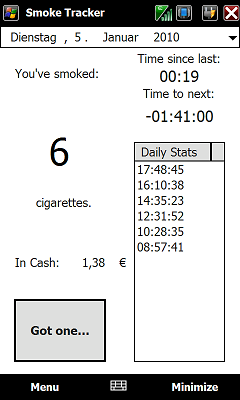
    The app is a freeware, and as you can see on the image to the left, it is not the most prettiest app out there, but you can see that it could be very useful. With the simple design, easy to read wording, and time to next smoke countdown, you can easily try to hold back and stay on track.

    I made a small program that helps me to keep an eye on how much cigarettes I smoke. It is made for people (like me) who want’s to reduce their tabaco consumption or stop smoking by reducing consumption over a period of time.
    It’s simple to use, so you wont be bugged by heavy usability. Just run it and click "Got one…" whenever you smoke a cigarette. The overall daily rate is stored in a xml file for each day. By using the calendar navigator you can track how much you smoked on which day.
    By setting up thresholds you can define audible alerts (2 .wav are included) and the colour of the counter gets red when the threshold exceeds.
    Threshold 1 plays "cough.wav", and Threshold 2 plays "smoke-that.wav".
    To Enable the "Smoke Advisor" (available since version 0.3) got to the settings page and enable it and set the average hours you smoke per day, so for example if you stand up at 08:00 in the morning and go to bed at 22:00 in the evening set the SA-Hours to 14. The "Smoke Advisor" works by calculating the time between each cigarette in corosponding to your daily target setting and the smoking hours. Now, if the timespan between you smoked the last cig and the moment you press "got one" is shorter than the calculated value you will get a warning which you can follow or ignore.
    To get the monay tracker to work, just go to menu->settings and write down the price per cig. If the .(dot) does not work when you try to enter a price, try a , (comma) instead and does so vice versa.
    Planned features for future version:

    – Add option to give reason why you smoked per cig (example: Bored, Angry, Stress, Daily routine, party, etc…)
    – Add option to support you smoking less by defining a timeframe for reduction

    If you have any comments or suggestions for more features, feel free to post here.
    If this program helps you reducing your cigarette consumption, feel free to donate some of the money you saved that way ;-)
    Enjoy it, as usual, it’s freeware!

    Download it


  • One Month With My HD2

    101_2135 by WMPerson.

    Having the HTC HD2 has finally made me happy. The first month of having my HTC HD2 was the worst, the device froze, and crashed a lot. I was shocked because the 1 GHz is supposed to help, but it was like the Touch Pro2. Well I stuck with it (I almost sold it and staid with my Droid Incredible, but now I love it) and its finally paying off.

    I have my phone in perfect homeostasis. It does not freeze (much, unless it’s coming from a lock to a video), it does not restart by itself, it does not die fast, it is the perfect device now. This device (if the software is just perfect) can be a great joy to use, and due to a slight effort by T-mobile to push it to the buyers, the device has some brand name in America.

    I took out Touch Flow AKA Sense UI from the device, and am running with SPB Mobile Shell Build 3.5.4(released last week). I have a different theme for it that looks just as flashy as Sense, but does not suck power, and energy like a Hummer H1. I also have a new ROM that has everything I need, and so I do not have anything else installed other than what the cook includes. As usual I do not have a case, because for me if I do not like how the device looks, I do not want to own it, and now the HTC HD2 looks like a model.

    I will be doing the Droid Incredible VS HTC HD2 tomorrow, and Kin Two Vs HD2 and others next week. We should also be back with our Podcast soon, maybe just Surur and I, also the occasional special quest, when we get some. If you like my awesome image above, and want to see what device I have at the moment, check out and bookmark my Flickr page:  http://www.flickr.com/photos/46647490@N04/ and even follow me on twitter @WMPerson for my latest.


  • Standalone Metro UI for the WP7 Hungry People

    Well this one is just a little much. It seems everyone has been having Metro fever, and now a new developer has even gone a little further to create his first WM application, and what did he choice? WP7 Metro. The theme created yesterday by an XDA member is one of many attempts at creating a Metro experience on less awesome devices. This application is created for QVGA devices, and is the first of many updates to come from this app.

    hi guys

    my first attempt.. i’m only learning wm programming.. so nothing big..

    tried to come up with a standalone app, givin u some sort of WP7 look.. QVGA only now, for WM6.5

    doesn’t do much.. just two pages for now..(will add more later if u like it)

    still beta…i’ll assume no responsibilities…

    u dont have customization options right now.. will work on it later (right now, semester ending :-) )

    things to do..
    just install the cab and run from the start menu…only one thing required.. install nitrogen first… in storage or device..
    i’d recommend u to disable all today items first (not needed but saves battery)

    video:
    http://www.youtube.com/watch?v=IFdRfekyPnw

    thanks to dwizzy130 for his small start menu app..
    borrowed some icons from Atualizado’s wad2 QVGA.. thanks to him..

    only tried it on my Jade (dont have any other phone) on megade2.0.g rom.. dont know how it’ll go on other roms..

    download and pls leave comments if u use it.. thanks.. (and sorry for my english.. not a native english speaker)

    You can try your luck with this app over at XDA


  • Paint Pictures With Windows Mobile

    image

    Windows Mobile like Windows XP and 7, allows you to do many things, and paint is one of the simplest but important application for the Desktop Windows, and now Windows Mobile users can get it. The application created on XDA is a new way to edit pictures, resize, and write things abut it all from your device. It is a freeware, and as such, it will be continuously updated, to added, and fix features.

    The features of this application is very similar to that of the computer version:

    Current features:
    * Drawing
    – Pencil
    – Rectangle
    – Circle
    – Callout
    – Text Typing
    – Line
    – Eye dropper
    – Stample tool – e.g. for watermarking your image, Stamping icons…etc
    * Image Editing
    – Resize
    – Crop
    – Convert to B&W
    – Convert to Sepia
    – Rotate Left & Right
    – File-type Conversion
    – One step undo is possible
    * Supported File Type
    – JPG (By saving JPEG image, you have a possibility to limit image size – good for preparing images for uploading to some WebSite that has file size limitation)
    – PNG
    – BMP

    You can paint the way to your devices heart over at XDA


  • New Porting Thread by Da_G

    image

    After the long week without any news on the WP7 port (mostly due to the stupid comments that is taking up the thread), Da_G has created a new thread to keep you updated. The new tread was created yesterday and has some words that I do not know, and really do not think I should know.

    One thing I do know is copy and paste: Thread

    HTC WP7 NBH Dump/Rebuild:
    NBHImageTool
    flash.store.bin Dump/Rebuild (dumped as os.nb in NBHImageTool):
    (tool creation pending)
    IMGFS Dump:
    Combine xidump with the attached cecompr_nt.dll supporting XPH
    IMGFS Build:
    Combine imgfsfromdump with the attached cecompr_nt.dll supporting XPH
    XIP/ULDR Dump:
    dumprom works well for this.
    XIP/ULDR Build:
    (tool creation pending)

    Warning Warning… Rant Coming

    If you are interested in the porting status, you can follow the thread daily. To many readers, you might not really know what the words are, or what is going on but here is something that is really annoying to me when trying to read the thread. “so…could somebody make a rom for all topaz devices with this and the mondrian rom now” and my favorite“Could someone make a rom for a titan (XV6800) ? heh… Yea, It’s about time I get a new phone…”. Really dude? I mean why would people care about your pursuit of a ROM for your device. The porting game, and ROM making game is not even close. Please for the life of the thread don’t post things like this:

    “Thanks guys, I want this one my device… any ETA?”
    ”Can A ROM be created for my HD2 NOW!!!!!!”
    ”When will the port come to the Touch Pro2, and Diamond 2? I want it?

    Okay I think I speak for everyone to say… we all want this, and you are not special that you need to post and mess up a whole thread just because you don’t want to wait and see what happens. If I worked the way most of those commenter’s worked, that thread would see at least 20 posts from me, but you know what, I know how to control my excitement.

    Also to help Da_G, here are some answers to your questions:
    ”Will this come to my device” Answer: Most likely know, if porting is successful, it seems only the HD2 will get it.
    ”When is the ETA” Answer: Have you ever tried porting something you know little about? no, well it is not easy, so don’t ask.
    ”Thank You” Answer: You are very welcome, and so is just about everyone that is reading the thread. So no need to say.

    Well from what I have seen those are the three most used responses, and the most annoying because it is killing the thread.

    Rant End

    I do not hope to offend anyone, just I thought it was best to add that little rant to the article because the newly created thread by Da_G has already seen some worthless post.


  • New Sense Theme, 10/10

    image

    Have you ever seen a theme that has more colors than a Dr.Seuss book? Well today is a new day, and a new theme for you. The theme made by an XDA member who managed to make a great looking theme, with a nice color match, a sleek design, and the nice wallpaper.

    I like this theme, it has a great look to me. I like the strip of color right on the calendar, and notification area, it reminds me of the speaker grill on the HD2. The wallpaper has a nice, simple, but yet elegant look that goes with the Zune colored clock. Everything simple looks great, and matches.

    The theme can be downloaded over at XDA, and just for fun, he has about 6+ more if you are not a colorful person, or if you like something a bit more green, blue, or boring, he has more themes which can be seen below.image image image


    Download a new look


  • Some Old SPB Theme But Looks GREAT

    image

    How many of you run SPB Mobile Shell? Now how would like the Touch Flow look for it? Well I do. Today while looking for a new UI due to Sense being very slow on my HD2, I came across this old good looking theme at XDA. The theme while old, is one of the best looking theme you can have for SPB (other than the Windows Phone 7 theme by MSKip).

    The theme is pretty simple. It changes the look of the bottom controls, the design and background, while adding some Sense like icons/widgets. This is all added with a simple CAB installation, and boom, your device has a sleek, fresh as life look.

    If you want to join me in the “Good looking Home Screen” group then download this, install and maybe comment your screen shot or something. 

    Current Group limits: Infinity


  • OverClock Your HD2 With LeoCpuSpeed

    Control CPU Speed of your HD2

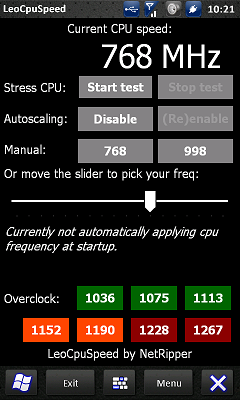
    Have you ever considered making your device go faster than what the manufactures tell you it does? Well you can with the HTC HD2 and LeoCPU Speed. The application is a very complicated but simple to use tweak that allows you to change the clock speed of your HTC device.

    I have used this before, and wow, it actually works, and it does it quickly. When I first started, I tried to see how low can it go. It does not work very low on the HTC HD2, but it does do high.

    I was able to over clock my HTC HD2 at the sounds to the highest 1228Mhz processor speed. That means my device almost hit the new processor speeds, but here is the problem. I went to the highest and it failed, and everything turned off. That means you can feel the power the HD2 has, and to conserve power, you simple turn it back or to the lower number.

    This application is pretty cool, and it allows you to do a lot.

    Try it out.

  • Zune HD vs Kin Two Video

    When the Kin was released, many (including me) thought it was a Zune phone, and from this comparison, you get a little confirmation of the similarity. The device got a video comparison from the guys at Pocketnow.

    The device is pretty cool, and I cannot wait to get mine tomorrow, to be able to do an HTC HD2 comparison, and even the HTC vs Droid Incredible comparison I had planned. 


  • ElCondor’s HTC Mondrian Concept

    image

    While people go gaga over the newly leaked Mondrian image, ElCondor has worked to produce an image from scratch for what this device should look like. The image above was created earlier today by my friend EC, who took all the current designs of the leaked Windows Phone 7 designs (LG, HTC) and put them together to form this image of what the device should look like.

    The image looks pretty cool, from what I see that screen looks bigger than the HD2. It actually has 3 instead of 5 buttons, which WP7 needs, but the HTC HD2 does not have. It has a slim body, which is always a plus, and all in what seems to be a metal wrap device.

    If I was to design the back of this device, I would love certain things to be included. The most important thing I would like to see in the back is maybe an all blue coloring (both back, and speaker grill like HTC Incredible), a 8MP 720p camera, a kick stand would be stupid, and lastly a nice looking logo that glows when on or when the device has a notification. Those are the features I would like for EC to add to his concept, and maybe HTC will pick some ideas out of that (glowing back would be the Sh**).

    What do you think of the concept? What do you think of my ideas? Would you like a Glowing back (maybe send that into HTC)? comment below.

    Concept image via:XDA


  • HTC HD2 With A little Android

    image

    I am sure many of you are just counting down till and Android post for the HD2 is available. I know you care because I have constantly seen comments by the readers asking when this would acquire, but here is a little sign of hope. The new partial port was made by an XDA user who managed to boot Herat, and play a 720p video playing on the HD2 with the help of Linux. What does that mean? Well what the video below and see.

    Pocketnow, xda-developers


  • Alternative HTC Mondrian Rendering

    image

    With all the information being leaked from the WP7 ROM, the name HTC Mondrian has became a big mystery to the Windows Mobile community. We have posted what seemed to be the original images (which if you ask me, it is just a stupid looking HD1 with three buttons)  from the leaked ROM, well Pocketnow has a different rendering of the device which to me looks like a silver HTC Incredible(Back cover looks just like it).

    I think from what I am seeing so far, someone has been playing, “let’s play the website by making a fake image, and saying it’s leaked” game. Yes, that is a mouthful, but that’s what seems to be happening.

    Do you really care much for either of these rendering? Do you think HTC would make something like this? Comment below.


  • Windows Phone 7 Thought: Jim T

    image Well the day is almost over, and here is the second to the last reader though that will be posted until further notice.

    I am, or was until Windows Phone 7 was announced, a big fan of Windows Mobile based on the following features which are important for my mobile needs:
    easy UI customization
    multi-tasking
    plethora of business class 3rd party apps
    available alternate browsers which did both the full / mobile web well
    the ability to purchase apps from multiple places
    open file system with included file explorer
    a wide variety of screen sizes / physical keyboards
    Copy / Paste
    I will reserve final judgement on Windows Phone 7 until the specs are finalized, and I have a chance to play with the new OS. I like the current 6.x and earlier WM interface customized with utilities such as Pocket Plus, and I multi-task applications daily. I have tried the slicker UI shells for WM, but usually return to the standard UI utilizing Pocket Plus enhancements. Since I prefer the larger screen devices (Toshiba e830, Dell X51v, HP210, Samsung Mondi), I rarely use a stylus. Even the standard Windows Today screen is finger friendly on a large screen.  With Pocket Plus, I can customize the Today screen to allow easy access to frequent tasks with a minimum of steps.  Both Resco Keyboard Pro, and SPB Keyboard are easy to use, and finger friendly particularly on the larger screen devices. Although both are finger friendly, and easy to use, SPB Keyboard is now my preferred input method because it is more customizable.
    From my perspective, the pendulum has swung way too far in the direction of how pretty, animated, and slick the UI’s are vs. does the device do what you want easily, quickly, reliably, and with the minimum number of inputs. It seems that no matter how feature deficient a device may be, how "locked down" the device is, or how many more steps it takes to perform a task, it is ok with the tech press as long as there are multiple animated transitions, and it looks "cool"  I realize MS had to make a major change to keep pace with the more modern, finger friendly, eye candy centric phone OS’s, and I do not have a problem with that per se.  Non-tech consumers today expect eye candy, finger friendly UI’s, and Microsoft desires to focus on consumers with Windows Phone 7 rather than their traditional business / enterprise focus with older WM versions. Unfortunately, IMO, they went too far, and threw the baby out with the bath water, Based on the limited info available, the things I liked about WM such as multi-tasking, and customizable UI’s have been discarded for extensive social network integration, and slickness.
    The Metro UI is certainly different, and less flashy than some other UI’s. Although not a huge fan of eye candy interfaces, Metro almost looks a little too bland aesthetically. With prior WM UI’s, if I wanted a different look, I could change the interface easily with numerous 3rd party options which will no longer be allowed with Windows Phone 7. Maybe Metro will look better when I see it on a device vs. the video demonstration. The Hub concept is also interesting, but I reserve judgement until I use it. Not sure whether the hub concept is the next step forward in UI design, or the next Edsel (for younger, and international readers, the Edsel was a late 50’s car that did not sell well, and was cancelled quickly).   I know I am probably in the minority, but I am disappointed with Windows Phone 7 based on:
    no / limited multitasking
    no UI customization
    no external storage cards
    all apps must be purchased from the Microsoft Marketplace
    no copy / paste
    no user accessible file system (apps can only see their directory) – this is the killer for me
    A further expansion of that last bullet point is needed. I use multiple HanDBase databases daily, and several spreadsheets. Due to the plethora of mobile devices I have, I always keep the latest version of data files on my home NAS, and on my website. With files in both locations, I always have access to the latest versions of all files no matter where I may be located,  no matter which device was used to perform the latest update, and regardless of which device I am using at the time. With the iPhone, and now with Windows Phone 7, I may be able to download the latest version to the device using a third party app, but the app on the phone may not be able to access the file due to the restricted file access.  I know HanDBase on the iPhone can not see / use HanDBase files that are loaded via a 3rd party FTP application from a NAS, and initial info indicates Windows Phone 7 may not be able to either.   I need the ability to upload / download files directly to a mobile device without being tethered to a computer, and all apps on the mobile device need the ability to see / use associated data files no matter which directory they are located in, or how they were loaded.   In addition to using a NAS and my website as repositories for the latest versions of data files, I frequently exchange files / CAB’s  between mobile devices, or between a PC and a mobile device using Bluetooth.  It is essential that my mobile devices offer a robust, non-restricted Bluetooth stack.
    I do reserve final judgement until Windows Phone 7 is released.  Hopefully, Microsoft will return the features I need.  If not, I may be switching to Android.