Category: News

  • Angry Birds Space Lands on BlackBerry 10: Rock Out with Slashbird!

    Angry Birds Space Slashbird

    For those of you who love the Angry Birds franchise and your new BlackBerry 10 smartphone, you’re in for a treat.

    Angry Birds Space is launching for BlackBerry 10 today and bringing with it a new character with a ‘Rock Star’ personality. While the birds have been defying gravity in space for some time now, an update to the game introduces us to Slashbird inspired by a certain guitar god. Music aficionados will likely see the resemblance!

    Angry Birds Space introduces you to new adventures on planets and in zero gravity, resulting in spectacular gameplay ranging from slow-motion puzzles to lightspeed destruction. With brand new birds, brand new superpowers, flying space pigs and a whole galaxy to explore, the sky is no longer the limit!

    Head to the BlackBerry World storefront today to purchase and download Angry Birds Space. It truly is an awesome game, and be sure to checkout Angry Birds Star Wars as well, which has been on the BlackBerry 10 platform since launch. Which Angry Birds character is your fav? Let me know in the comments.

    *Please note the app may take up to 24 hours to appear in the BlackBerry World storefront

  • Welcome to the complicated world of Android, Sundar Pichai

    Google’s Sundar Pichai does not have an easy job: he’s now overseeing both of Google’s key computing projects — Android and Chrome — while attempting to convince everyone that Google won’t play favorites with its Motorola division. Clearly, however, not all Android partners are created equal.

    Pichai’s appearance at D11 Thursday didn’t break a lot of new ground, save for the “pure Google” version of the HTC One handset that Pichai showed off to the crowd and the news that the curiously named Google Play Music All Access service is coming to iOS. He showed off the HTC One, curiously enough, in response to a question from All Things D’s Walt Mossberg about Google’s relationship with Android partners and specifically its relationship with Samsung, a company which dominates the Android world and which introduced a smaller version of its flagship Galaxy S 4 Thursday that Pichai claimed he first learned about on Techmeme this morning.

    If that’s true, then Google certainly has different relationships with different partners. Later in the session, Pichai said he was “very excited” about what Motorola has planned over the next six months. While we first heard confirmation of the Moto X Wednesday, the remaining products in what CEO Dennis Woodside called “a portfolio of phones” Wednesday are not something widely known beyond the rumor mills.

    There are a couple of interpretations here.

    1. Communication between Samsung and Google has dried up if the head of Android didn’t know (or didn’t care to know) that his most important partner was releasing a smaller version of its highest-profile phone until the rest of us did, the same day he was making a high-profile public appearance to show off a competitor-designed phone.
    2. Not only is Pichai aware of all the Android products that Motorola has planned for 2013, he’s had a chance to discuss the thinking behind the decisions made in designing the phones, even if the Android team isn’t doing anything special for Motorola, as both Pichai and Woodside insisted this week.
    3. This is probably most likely: Nothing has really changed and that Android continues to be a chaotic mess that Google makes a half-hearted attempt to stay on top of but which no one can really manage, given the sheer number of partners and devices involved. Google has certainly worked closely with Android partners in the past as they got their first phones out the door, including Samsung, HTC, and LG, so it’s not that surprising that Android leaders would have worked closely with Motorola as it reboots.

    It’s an interesting time for Pichai and Android as he assumes the guiding role vacated by Android founder and longtime leader Andy Rubin, who Pichai said “stepped back” two months ago to pursue other interests at Google. There’s a lot of “co-opetition” in the Android world at the moment, and Pichai has the fun task of dealing with it.

    Related research and analysis from GigaOM Pro:
    Subscriber content. Sign up for a free trial.

  • Specs for the HTC ‘T6′ phablet leak

    HTC_One_Back_HTC_Logo_TA

    A couple of days ago an HTC device, or shall I say phablet,  going under the codename T6 leaked. The full specs have leaked and it doesn’t appear HTC is leaving anything on the table. For starters, the display size is going to be 5.9-inches of 1080p beauty. We are assuming it’s LCD 3, but it’s unknown at this time. Expect the latest and greatest from Qualcomm in the Snapdragon 800 (MSM8974) with a clock speed of 2.3GHz. Surprisingly RAM is going to be 2GB as opposed to 3GB, but we will take it. An UltraPixel rear camera will be onboard, but the megapixels weren’t mentioned. We can only assume it will be the same 4MP lens found on the One, but who knows, maybe HTC is able to bump that up a bit. The front lens will come in a 2.1MP. Considering the size of this phone, it isn’t a shocker that the battery is 3,300mAh.

    Lastly, it is rumored to come with Key Lime Pie, which I am doubting will be the case. As to when we will see this bad boy, I wouldn’t expect it until the 4th quarter of this year, especially if it is indeed going to have Key Lime Pie. The next question is what will they call this thing?

    source: theunlockr

    Thanks Steve


    Come comment on this article: Specs for the HTC ‘T6′ phablet leak

  • Samsung Galaxy S4 sales seen reaching 80 million units

    Samsung Galaxy S4 Sales 2013
    Samsung’s flagship Galaxy S4 smartphone quickly became the fastest-selling Android phone in history when Samsung announced that channel sales had reached 10 million units in under one month. That breakneck pace will surely slow down over time, but industry watchers see Samsung’s latest hero phone racking up some pretty huge numbers — according to RBC Capital Markets analyst Mark Sue, Galaxy S4 sales will hit 80 million units this year.

    Continue reading…

  • Meet the latest ‘Nexus’ device: an HTC One

    Remember the days when Google Nexus-experience phones were slim pickings? The days of one “Nexus” branded device are now gone, as Google continues to pull new handsets into the family — granted, it is not really under the Nexus name, but they function as such. Now Chrome and Android chief Sundar Pichai announces that the pure Galaxy S4 unveiled at Google I/O will be joined by the HTC One.

    Appearing on stage at the All Things D D11 conference, Pichai was asked by co-host Walt Mossberg about his current hardware and responded “I’m carrying an HTC One in my pocket. This is running the core UI on Nexus phones as well”, in reference to hardware makers junking up current devices.

    Mossberg then prodded Pichai “are you going to sell that”? The response to this key question is “it’s going to be available on Google Play on June 26 for $599”.

    “This is the strength of Android, it can be customized. But we want a sense of commonality when you switch phones”, he went on to explain.

    Google has clearly made up its mind to try and end the long-standing contention that its mobile operating system is fragmented. The search giant wishes to unify things and is reaching out to hardware makers in an effort to pull this off. Customers will soon have a choice between the LG Nexus 4, Galaxy S4 and HTC One. You can watch the full video below.

  • Google searches now show nutrition information

    google-logo-640-80

    Google is still a search engine, which is easy to forget underneath the wave of other services they’ve gotten into recently. So today, Google’s unveiled a new feature in its core search engine; nutrition information. According to Google, you’ll be able to search for nutrition information such as “how much protein is in this apple?” or something more complex, like “how many calories are in a burrito?” Google will serve up the information you need and even give you the option to adjust serving sizes or see similar foods. Despite Google Health failing, Google is apparently still interested in keeping you informed about your health decisions. With the inevitable wave of big OEM smartwatches and pedometers, this is probably a smart step to stay ahead of the market for Google.

    The information in the searches pulls information from Google’s Knowledge Graph, which helps you find hard-to-access information in one convenient place. Google is still putting their rollout feature to work here, as not everyone will be able to access it immediately. According to Google, though, everyone should be able to try out the nutrition search within the next 10 days, in the US, at least.

    source: Inside Search

    Come comment on this article: Google searches now show nutrition information

  • Apple to double down on graphics in next-gen processors

    Apple A7 Graphics
    Apple has hired at least a dozen former graphics engineers from semiconductor maker AMD, MacRumors reported, citing new employees’ LinkedIn profiles. The company reportedly hired a number of graphics architects, hardware engineers and others after AMD laid off numerous employees this past January. Recent job postings reveal that Apple is building an advanced team of chip engineers for its Orlando Design Center, and is currently seeking a manager to lead the “Orlando GPU team” and “deliver high quality IP to specification and on schedule.” Apple debuted the iPad in 2010 with its first custom designed mobile processor, the A4 chip, and since then the company has continued to develop more of its technology in-house.

  • How to boot your Android phone or tablet into safe mode for troubleshooting

    safe_mode_androidAndroid is a relatively stable mobile operating system, but every now and then, performance issues arise. Safe mode is a great tool that you can use to troubleshoot these issues. Safe mode boots your phone running only the apps that came with the phone – that means no third-party apps. Therefore, if your phone runs without an issue when you’re in safe mode, it’s a pretty good bet that the problem isn’t system related, and instead a third party app you downloaded.

    Click through the break to see how you can enable safe mode to test if it’s a system problem or a third-party problem.

    Unfortunately, not all phones have the same method to enter safe mode. Most Jelly Bean devices use the first method below, but devices with older versions of Android and some newer devices (like the Galaxy S 4 and HTC One) use the alternate method further down the page.

    Method 1 (most Jelly Bean devices)

    1. Hold down the physical power button on your device.

    2. Long-press the “Power off” option that appears.

    device_options_safe_mode

    3. A dialog box asking you if you want to reboot to safe mode may pop up. Tap OK.
    (Note: If the box doesn’t appear, go on to the alternate method.)

    reboot_to_safe_mode_dialog_box

    4. When the phone reboots, you should see a “Safe Mode” watermark at the botom left of the screen, to let you know that you are in fact in safe mode.

    safe_mode

    Alternate Method (older versions of Android and some Jelly Bean phones)

    1. Turn off your phone.
    2. Once your phone is off, turn it on by pressing the power button.
    3. As your phone is booting, hold down both the volume up and volume down buttons (yes, both) and keep them held.
    4. Once your phone has booted, you should see a “Safe Mode” watermark at the botom left of the screen, to let you know that you are in fact in safe mode.

    Note: If the alternate method also doesn’t work, you can try holding down menu instead of volume up and down while booting.

    In safe mode, while you can’t use third party apps, you can uninstall them. So if your phone is giving you problems as bad as freezing and not letting you uninstall apps, you can uninstall the problem app/apps in safe mode. In addition, if you need to, you can backup your data or factory reset your device in safe mode .

    To exit safe mode, you just restart your device as you normally would.

    Happy troubleshooting!

    Come comment on this article: How to boot your Android phone or tablet into safe mode for troubleshooting

  • LG reportedly to have already produced a Nexus 5 prototype

    Nexus_4_TA_Back_Top_Crystalized_Pattern-630x354

    Despite being told that LG is not working on a Nexus 5, we naturally didn’t believe them, and according to a Korean site, Daum.net, LG has already produced their first prototype of the upcoming Nexus 5. The device has apparently been kept under very strict security, but Google’s Larry Page has seen the device. Exciting stuff, right? Unfortunately, there’s no details about specs, or if it’s going to have that fantastic camera or a less-than-1080p screen, or LTE or a microSD card slot. (Tip: Don’t hold your breath for the SD card) Google tends to release new hardware with the new major iterations of Android, so whenever they decide to show off that elusive Key Lime Pie, a new handset is bound to come with it.

    Also, according to Daum, LG has shipped 3 million Nexus devices. It’s not competitive with what the big dogs like Samsung and HTC have moved recently, but the Nexus 4 was never supposed to compete with those kinds of phones. Hopefully, if LG is secretly making the next Nexus, they’ll be able to avoid those early shipping disasters headaches this time around.

    source: Daum

    via: Unwired View

    Come comment on this article: LG reportedly to have already produced a Nexus 5 prototype

  • Surprised? Cloud providers bring in $2B in first quarter

    Given all the hoopla surrounding cloud computing it, it’s not surprising that revenue from cloud services is growing. Total worldwide revenue from top Infrastructure-as-a-Service and Platform-as-a-Service players hit $2 billion for the first quarter of 2013. That’s up a healthy 56 percent from the year ago period, according to Synergy Research Group.

    These numbers factor in AWS and Amazon’s Elastic Beanstalk on the PaaS side; Google App Engine; IBM’s SmartCloud and SmartCloud Application Services; Microsoft Azure and Cloud Services for Windows Azure; Salesforce.com’s Heroku and Force.com (but not its bigger Software-as-a-Service applications business.)

    Key takeaways:

    • Amazon Web Services remains alone atop the heap with  27 percent of total IaaS and PaaS revenue in Q1, up from 24.7 percent for the year-ago period.
    • Salesforce.com is second largest but it’s revenue share decline year over year to 6.8 percent from 7.9 percent.
    • North America accounts for more than half the worldwide IaaS/PaaS revenue.

    CIS Q113

    These figures won’t surprise folks who already see Amazon Web Services at a $2 billion-a-year revenue rate. Morgan Stanley thinks AWS alone will hit $24 billion in revenue in the next decade. While other players — Microsoft, IBM, Google and Fujitsu all saw slight growth.  Some of the major telcos – AT&T, NTT and Verizon — were off slightly year over year.

    These numbers beg the question of whether anyone can catch Amazon. Google just made its Google Compute Engine IaaS generally available, and Microsoft launched its Azure IaaS capabilities in April. Those well-funded entries along with VMware’s hybrid cloud service coming online, will pose more competition for the AWS monolith.

    AWS  boosters say the company’s 6-year-head start makes it invincible, but many workloads have yet to migrate: IDC estimates that just 5 percent of total IT spend is now in the cloud. That leaves lots of upside opportunity for the companies who delivers the best, most flexible and cost efficient services.

    Who that might be is up in the air, but one place you can hear all about the top candidates will be at GigaOM’s Structure where a list of cloud powerhouses including VMware CEO Pat Gelsinger, Amazon CTO Werner Vogels and Microsoft Server and Tools group president Satya Nadella will all be on hand to talk up their companies’ cloud strategies.

    cloudrevchart

    Related research and analysis from GigaOM Pro:
    Subscriber content. Sign up for a free trial.

  • Mermaid Hoax Show Blasts Ratings Records

    You might think that a show about mythical creatures would just be good for a laugh, or maybe for indulging in a fantasy about how awesome it would be if there were weirdly beautiful almost-people living in the ocean. And you’d be right. But you would also be correct in assuming that some people believe everything they see on television, and therefore a show about mermaids has become Animal Planet’s most popular event to date.

    “Mermaids: The New Evidence” brought in 3.6 million viewers last Sunday night, which broke all kinds of ratings records for the network. The show, which was a sequel of sorts to “Mermaids: The Body Found”, showed “video footage” of mermaids in the Greenland Sea and suggested that there was a government cover-up of the creatures. While it was done in a documentary style, the National Oceanic and Atmospheric Association released a statement to clear up the confusion:

    “Mermaids – those half-human, half-fish sirens of the sea – are legendary sea creatures chronicled in maritime cultures since time immemorial. But are mermaids real? No evidence of aquatic humanoids has ever been found.”

    Apparently, people really love fake versions of “reality”…which is fairly evident, considering the success of “found footage” type films and the barrage of “reality” shows on television.

    “The phenomenon of Mermaids has truly been a watershed – and a watercooler – moment for Animal Planet,” said Animal Planet president Marjorie Kaplan. “These extraordinary television specials have electrified, challenged and entertained television audiences and online fans alike.”

  • Featured Android App Review: Artflow – Sketch, Paint, Draw [Media & Video]

    Artflow-Sketch_Paint_Draw_TA_Splash_Banner

    Artflow Studio just released Artflow – Sketch, Paint, Draw for Android tablets, which will bring out your creative side. Of course if you’re already a creative person, you will love it too. Artflow is easy enough for the novice, but offers features for the pro as well. It has all the standard stuff like 50 different brushes/tools and color selections, but it also offers layers and advanced controls like smudging and brush flow. It even supports pressure sensitive pens like Samsung’s S Pen on the Galaxy Note 10.1 or the Galaxy Note 8.0.

    What I like most about Artflow is that the Holo-inspired layout and controls are very simple. Drawing and sketching apps can be a little intimidating for the casual user, but not with Artflow. Upon opening the app, you are given a completely white slate for your next sketch. You will find two menus, one at the right edge and the other at the left edge. Just tap on the “less than sign” at the middle right edge or the “greater than sign” at the middle left edge to open the respective menus.


    The right menu includes 50+ brushes and tools that you can fine tune to your hearts desire. For example, the simple brush tool allows for adjusting the size, flow, opacity, softness, and spacing. You will also find a number of ways to change the color. You can simply tap on any of the 14 predefined colors from the palette, slide the RGB percentages, tap on the color dial, or use the ink dropper. You can even change any of the predefined colors in the palette to whatever you want. The undo and redo options are also found here, and depending on the storage of your device, you will get unlimited undos. Finally you can get access to your previous projects as well as exporting your project as a PSD to email, Dropbox, etc.

    The left menu gives you options for layers, importing images from the gallery or other cloud services like Dropbox, and adding filters such as Sepia, Grayscale, and Solarize. Depending on your device you can have anywhere between 7 and 16 layers. I used the importing images feature for tracing. Just import the image and add a blank layer on top of it. You can trace over the image  and when you’re done, just remove the layer with the picture by swiping it away. If you still need to make changes, you can just hit the undo option to bring it right back.

    I am far from an artist, but Artflow did bring out whatever creative side is in me. Sometimes it’s just fun to sit around and sketch something even if it isn’t magnificent. I am using it on a Galaxy Note 10.1, and I found the S Pen implementation to be perfect. I gave it to my 9-year old niece over the weekend and she had a blast. In a couple of weeks, we are going to be on a long road trip, and my son will probably come up with some interesting masterpieces. Like I said, it’s the perfect sketching app for the novice or the pro.

    Now good quality sketching apps aren’t usually free. The good news is that Artflow is free to try, which will give you all the basics to find out what it’s all about. If you like what you see and feel like you want to get into more creativity, you can buy the Pro license for an in-app purchase of $4.99. I listed the differences between the Pro and free versions below. Also, check out my hands on video, Artflow Studio’s trailer video, and download links below. As always, let me know what you think.

    **If you are one of the first 10 people to comment below, you will receive a code enabling you to get the Pro license for FREE. Tell us what tablet you are using or anything else you want to say. Just make sure you are using a real email address so we can contact you.**

    Features (with pro license):

    • 50+ brushes and tools (including smudge tool)
    • Color adjustment (HSV, brightness & saturation and more)
    • Infinite undo and redo based on device storage
    • 7–16 layers (depending on device) with 10 different blending modes and global opacity
    • Separate flow and opacity control for brushes
    • Holo inspired, fast, fluid and intuitive user interface
    • Export to layered PSDPNG (with transparency) or JPEG
    • Pressure sensitive pen support (tested with SPen and ThinkPad pen)
    • Brush flow and size fade
    • Pressure simulation for touches
    • Create layers from imported images and photos

    Unlicensed version limitation:

    • 10 basic tools
    • 2 layers
    • Undo limited to 6 steps
    • No PSD export
    • Single banner advertisement in Gallery


    ArtFlow-Sketch_Paint_Draw_01
    ArtFlow-Sketch_Paint_Draw_02
    ArtFlow-Sketch_Paint_Draw_03
    ArtFlow-Sketch_Paint_Draw_04
    ArtFlow-Sketch_Paint_Draw_05
    ArtFlow-Sketch_Paint_Draw_06
    ArtFlow-Sketch_Paint_Draw_07
    ArtFlow-Sketch_Paint_Draw_08

    Click here to view the embedded video.

    Click here to view the embedded video.

    QR Code generator
    Play Store Download Link


    Come comment on this article: Featured Android App Review: Artflow – Sketch, Paint, Draw [Media & Video]

  • Here’s how Microsoft hopes to reignite interest in Windows

    Windows 8.1 Preview Start Button
    As we learned on Wednesday, Microsoft will indeed be bringing back the Start button for Windows 8.1. But Engadget, which has posted a lengthy preview of Windows 8.1, says that the Start button may not quite be what many users were expecting. According to the site, the new Start button isn’t “a return to fly-out menu trees” of older versions of Windows but instead makes it look “more like the Live Tiles are popping up on top of the desktop” when you click it. While this is sure to disappoint some users who were hoping for a Windows 7-type experience, Microsoft is hoping that it will make for an easier transition between the classic desktop view and the touch-centric Live Tile view on the Metro display. 

    Continue reading…

  • The Spirit of LeMons

    Spirit of Lemons

    If you’re not familiar, the 24 Hours of LeMons is an amateur racing series where some of the greatest automobiles in existence come together for a no-holds-barred endurance run. The cars cost $500, look (for the most part) like shit, and are in some cases, held together with little more than zip-ties and duct tape. Jeff Bloch, a Washington D.C. Police Officer by day, and the builder of this LeMons car by night, had a stroke of genius one day. It’s called the “Spirit of LeMons” and combines the chassis of an old Toyota truck, with the body of a 1956 Cessna aircraft. The result, as you can see, is glorious!

    Source: telegraph.co.uk/video

  • The Double Robotics iPad-Equipped Teleconferencing Robot Is Shipping

    doubleshipping

    It’s impossible to be in two places at once. But Double Robotics, a wheel-equipped robot with an iPad for a face, has finally made that possible.

    The company has begun shipping units of the Double to customers who pre-ordered and coughed up the $2,000 to get one. In fact, the first hundred are already safely in the homes and lives of their new owners.

    By September, the company will have shipped another 1,000 units, showing that even with a high price tag, hardware startups can still rake in the cash and run a sustainable business. But of course, this has to do with the fact that the Double has all kinds of valuable use-case scenarios that span across various industries.

    For example, we used the Double at CES to usher in a new kind of remote reporting. And we aren’t the only ones.

    The $2,000 price tag, which was a special pre-order price, will remain in place until June 6, for those who feel that they’d like to get in on the robotic goodness. After that, the price will go up to $2,499.

  • How to watch (or experience) TED all around the world

    Watch TED around WorldAcross the globe, anyone can watch TED Talks through TED.com, our YouTube channel, our mobile apps or our iTunes podcasts. (Have you checked out TED Studies on iTunes U?) Most recently, our new SmartTV app showcases TED in beautiful high definition through television set manufacturers like Samsung and telephone IPTV providers like TELUS, letting you browse our 1500+ talks on-demand.

    But our globe-trekking distribution team has also created many special TED offerings to help spread ideas with the help of local partners. Here — as we get ready for TEDGlobal 2013, themed “Think Again” — a look at the ways you can watch TED around the world, in no particular order.

    China: In China, there are multiple ways to get a dose of TED inspiration. Sina, one of China’s largest media companies (it owns Weibo, the Twitter of China), hosts TED Collections, eclectic playlists of talks around topics like Business, Education and Art. Youku, the second largest video site in the world after YouTube, has TED Shows — entertaining playlists of talks around themes designed for TV and movie fans. And NetEase, renowned for its Internet portal, offers TED Studies for universities.

    Canada and the UK: TED Weekends on the Huffington Post, which brings together bloggers who take ideas inspired by a TED Talk through different twists and turns, is available not only through the Huffington Post in the US, but also in Canada and the UK. Coincidentally, TED2014 — our 30th anniversary event — will take place in Vancouver.

    Japan: Public broadcaster NHK brings TED Talks to a national TV audience in Japan with the primetime series, Super Presentation! This program harnesses TED speakers’ persuasive ideas to help teach English, and empowers a new generation of independent thinkers. The show airs Friday nights at 11pm on NHK Education. Meanwhile, on June 15, Yahoo! Japan will begin offering TED Ideas in Business, a curated collection of talks designed to share wisdom in the workplace.

    Argentina: Starting on June 15, TED10, our cable video on demand programming, will be available through Cablevision, the largest operator in Buenos Aires. In fact, Cablevision represents TED’s first partnership in Latin America of many more that we’re working on this very moment.

    Brazil: TED is teaming up with the science and culture magazine Superinteressante to create idea visualizations — artistic representations of the underlying ideas in TED Talks. We’ll be bringing these visualizations to TED.com too. 

    Australia: What about the “big screen”? No, not that lovely plasma in your living room … the BIG screens that you see in places like Time Square. In two weeks — to coincide with TEDGlobal 2013 — TED Talks will be broadcast in outdoor venues around the world, from Federation Square in Melbourne to Big Screen Plaza in New York City. Curated for outdoor viewing and transient traffic, this little experiment is another big way we’re finding to spread ideas.

    Kazakhstan: Ideas Worth Spreading is a television series, which airs to a national audience on Bilim TV. The show takes the back-to-basics approach of airing TED Talks with clean introductory and closing slates, three times a day. Each evening during primetime, a TED Talk premieres in Kazakh with repeat broadcasts in Russian twice the following day.

    Korea: TED Collections are available in Korean through TV Cast, a video site of Naver, the country’s dominant search engine. And just last month TED10 became available on all major cable systems in Korea, thanks to a collaboration with Home Choice. In addition, Korea Telecom serves up TED Shows to a fast-growing audience for its IPTV platform.

    The Middle East: Soon MSN Arabia will join TED’s family by making TED Collections available in Arabic — covering 15 countries from Egypt to Algeria, Tunisia to Morocco. In partnership with the Saudi Arabian Ministry of Higher Education, this September TED Studies will be made available to all universities for free in the Kingdom of Saudi Arabia.

    Brazil: Here, TED Talks are brought to you via TED’s partnership with Netflix. TED Shows are also available on Netflix in the US.

    Spain: The new TV show Buenas Ideas TED is a 13-part television series airing on TVE “La 2.” Shot documentary style, the series shows the Spanish cast and crew unpacking ideas from TED Talks as they discuss them, interview guests and visit local sites. Airs Sundays at 15:00.

    Africa and beyond. Planning a trip to Namibia or Nigeria? Tune into the TED Radio Hour, an original 60-minute radio show (produced in partnership with NPR) that airs not only in the United States, but in Africa, parts of India, Australia, New Zealand, even literally up in the air with Delta Airlines. The TED Radio Hour – a sonic journey through ideas, inventions and fresh approaches to old problems – digs deeper into subjects broached on the TED stage. Hosted by Guy Raz, each episode looks at a central question, examining it through conversations with TED speakers and guests. Music and sound weave throughout each episode, bringing themes and concepts to life through vivid storytelling.

    TEDGlobal 2013 kicks off June 10-14 in Edinburgh, Scotland. Check out information about attending or watching from home with TED Live »

  • Google’s Music All Access app to arrive on iOS soon

    Google plans to bring its own streaming music app to iOS that will let the company compete directly against Apple’s own music offerings. On Thursday at the AllThings D conference, Google SVP of Android, Chrome and Google Apps Sundar Pichai said Google Play Music All Access app would be available for iOS in a few weeks, though he did not offer a specific date.

    The new Google Play Music All Access service was just announced at Google’s own developer conference earlier this month, but at the time, only for Android devices and the web. It’s a streaming music service that will cost $9.99 per month — though users signed up for trial service before June 30 get a discounted $7.99 per month rate. (It’s not clear if that will apply to iOS users should this launch on that platform prior to the last day of June.)

    Considering recent history, it’s fairly unsurprising that Google is offering this service on its competitor’s platform. The company has created a virtual Google layer of services on iOS: it’s offering everything from Google Now to Chrome, Gmail, YouTube,  and Google+ to iOS customers.

    But this move is particularly savvy considering Apple’s struggles with getting its own streaming music service off the ground. “iRadio” has been rumored unlikely to be ready for introduction at WWDC in a few weeks, which could push back its official debut until the fall at another Apple event. Granted, there are already plenty of other streaming music apps available for iOS users to choose from, but this move could let Google  pick up a few more users from its chief mobile competitor before Apple gets its musical act together.

    Related research and analysis from GigaOM Pro:
    Subscriber content. Sign up for a free trial.

  • HTC One with stock Android: $599 to cut your carrier’s control

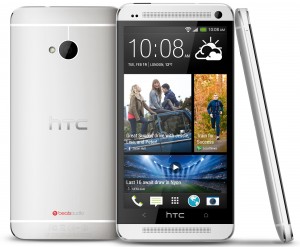
    After originally denying it would do so, HTC is indeed going to offer what it calls a “Nexus Experience” edition of its HTC One handset, confirming rumors of such a move. The unlocked phone running a plain version of Android 4.2.2 goes on sale June 26 for $599 without contract, according to Google’s Sundar Pichai, speaking at the D11 conference on Thursday. Google will sell the phone directly through its Google Play store, just as it will do for a Samsung Galaxy S 4 “Google Edition” phone.

    When rumors of this phone made the rounds, I liked the idea and I still do. Google can help HTC in one area it sorely lacks compared to Samsung: marketing. HTC is helping itself as well with a price that’s $50 lower than Samsung’s Google Edition smartphone. While I don’t mind Samsung’s plastic-based hardware — it helps allow for a removable battery and microSD card — the HTC One is indeed a well-designed and premium-quality phone with an aluminum frame.

    This new HTC One model will keep the 32 GB of internal storage — a Developer Edition is available with 64 GB but uses HTC Sense software — and will be released first in the U.S. The handset uses GSM networks, so it will work on both AT&T and T-Mobile’s networks. Here’s a rundown of the supported frequencies and technologies:

    • HSPA/WCDMA: 850/1900/2100 MHz
    • GSM/GPRS/EDGE: 850/900/1800/1900 MHz
    • LTE: 700/850/AWS/1900 MHz (US)

    Google will provide software updates directly, just as it does for its own Nexus devices. Effectively, there’s no need to wait for carriers to test and push software updates and HTC won’t be responsible either.

    HTC One BlackThere is a bit of a downside to this, however. Just like Samsung’s similar Google Experience model, any software features created by HTC for the One won’t be present: this phone will run plain old Android. Sure you can skin it or add custom software to your heart’s content, but you won’t get all of the camera modes and options provided by HTC Sense, for example. Some of these make the phone a better device, so there’s a small trade-off.

    It’s one I’d personally make however for either Samsung’s or HTC’s flagship because it provides total control over how the phone works and looks. So too do Nexus devices — are they going away?

    I suspect the Nexus program changes but doesn’t disappear. Instead of trying to design cutting-edge phones to show handset makers how to build a great Android experience, I think Google focuses on reasonably good Nexus phones that aren’t quite flagship models. What will make them appealing however — aside from the pure Android experience — is a lower contract-free cost in the $250 to $350 price range.

    Regardless of what Google does with the Nexus, I think it’s smart that HTC reversed course on this. The company has a chance to sell even more of its flagship smartphones, won’t likely have as many support costs, and gains the benefit of Google helping sell the phone.

    Related research and analysis from GigaOM Pro:
    Subscriber content. Sign up for a free trial.

  • Vine is taking over America

    Vine App Growth Analysis
    Just a few months ago, Vine was mostly dismissed as a painful hipster affectation. A service that revolves around taking 6-second video clips and sharing them with the world does sound like a flash in the pan. But something fascinating happened over the past couple of months: Vine became one of the biggest app market growth stories in recent history.

    Continue reading…

  • How To Moderate a Panel Like a Pro

    The panel discussion was invented by someone who liked to sit three feet above his audience, talk with five of his closest friends for an hour, and barely acknowledge that there are 100 other people in the room, usually sitting in uncomfortable chairs.

    But until the panel discussion disappears from the agendas of conferences and networking events, you may be asked to moderate one. Lucky for you, the bar is very, very low. If you can find a way to deliver a few fleeting moments of entertainment or interaction, you will be regarded as a rock star. If you can toss in some insight and controversy, they may erect a statue of you at the convention center.

    I’ve moderated more than 300 panel discussions at events like the Consumer Electronics Show, the Sundance Film Festival, and various Harvard Business School conferences. Here are a dozen guidelines to put you on the right track when you’re tapped to run a panel.

    Don’t prep with your panelists. Many moderators imagine they are running a Congressional hearing, not a panel discussion. They hold pre-panel conference calls, and write lengthy e-mails back and forth hashing out the terrain each speaker intends to cover. Avoid that as much as possible. Your goal is to be a group of smart, funny people on-stage having a dynamic conversation. That doesn’t mean that you as a moderator shouldn’t research your panelists and their work so that you can come up with appropriate questions. My advice is to send your panelists a single pre-event e-mail, listing three questions you plan to open with, and asking them if there are any other issues they think are important to cover. At the event, socialize with your panelists and make sure everyone has met one another, but resist the urge to talk about what you’re going to talk about on-stage.

    Sit with your panelists. It’s just not possible to run a good panel discussion by standing at the podium. Sit in the middle of your panelists, so you can easily make eye contact, and if needed, tap someone long-winded on the elbow and say, “Janet, those are fascinating examples, but can we get Bill’s take on this topic?”

    Moderators can’t also be panelists. Just as an orchestra conductor would never whip out his viola to play a solo, your job is to encourage your panelists to give great performances. Once you start chiming in or rebutting panelists, the balance gets thrown off. You just can’t play both roles at once. (And just as a conductor would, you also need to be firm about not letting certain panelists dominate the discussion.)

    No slides. Letting panelists show slides is almost certain death, and it radically reduces the role of the moderator. Exceptions: If panelists are talking about a visual topic, like retail store design, you can let each speaker bring the same number of example photos to show. If speakers are movie directors, letting everyone show a clip from their latest film, of a similar length, is fine. But letting speakers bring PowerPoints will usually gobble up your time and prevent any kind of interesting interactions from happening.

    State your objective at the outset. Don’t write a long-winded introduction. Two sentences will do. Why is this topic important now, and what do you hope to accomplish within the next hour. “With all of the publicity around Google Glass, everyone is thinking about wearable computing. Our objective with our time today is to share some of the thinking about how wearable displays like Glass will change the way we interact with others.”

    Never let the panelists introduce themselves. That’s the moderator’s job. Be as brief as you can, especially if the audience is holding a program guide with lengthier bios in it. Three lines is the absolute longest anyone’s introduction should be. No one cares where each panelist worked 27 years ago, or how you first met them.

    Involve the audience within the first five minutes. This lets your audience know that you’re aware of them, and it keeps your panelists from acting as if they’re in a bubble. You can ask a few people to introduce themselves just by name, title, and company, to get a sense for who is in the audience. I sometimes ask audience members to applaud or boo in response to questions. “Have you ever had a great idea for improving a process at your company? Please applaud.” “OK, now, have you ever found it difficult to get the necessary resources or support to actually improve the process? Please boo.” It livens up the room.

    Don’t go down the line every time. By the time the fifth panelist is answering the same question as four other people have answered, the odds they will contribute something interesting have dropped almost to zero. When you ask a question, two answers is plenty, unless a third person is dying to jump in. Instead, ask a related question, ask for a concrete example, or simply shift gears and ask your other panelists about something else.

    Invite panelists to ask each other questions. When you send out your pre-panel email, or when you chat with panelists on-site, ask them to think of one question they’d like to ask their fellow panelists. Often, these questions are sharper or more provocative than the questions on your list — and panelists are often more candid when one of their peers asks them a question, as opposed to the “official moderator.”

    High Altitude+Specifics+Audience. As you plan out what you want to do with your time, divide it into three roughly equal categories. “High altitude” are those questions where you give your panelists a chance to discuss what is happening in the world at a 30,000-foot level. Specifics are where you invite them to share funny anecdotes, war stories, or concrete examples — things that the audience can really relate to. Audience means not just leaving time for Q&A, but also coming up with creative ways to bring the audience into your conversation. After you’ve asked panelists about the worst hire they ever made, for instance, you might ask people in the audience to share their stories. If you have a panel of venture capitalists and an audience of entrepreneurs, try asking a few bold entrepreneurs to deliver their elevator pitches and get the VCs to suggest ways to improve it.

    Don’t ask panelists for “one final thought.” The lamest way to conclude a panel is by giving each panelist an opportunity for a concluding oration. Typically, they’ll recap what they’ve already said, or look to their notes and cough up some uninteresting musing they didn’t have time to get to (usually for good reason.) Use the time instead for a last question from the audience, or for something forward-looking. “What important new trend will we be talking about at next year’s conference?” “What’s your counter-intuitive, half-crazy prediction about the next five years in our industry?”

    You are an airline pilot. It’s your job to land this baby on time. Once you push past your scheduled end-time, audience members will get restless, and you’ll start getting dirty looks from the conference organizer. If you don’t have anyone in the room to flash you the “five minutes left” sign, set your mobile phone to vibrate in your pocket when the end is approaching.

    If you attend enough panel discussions, you already know that the worst ones feel like a plodding public access TV show — and you can’t switch the channel. The best feel like a fast-paced, unpredictable conversation between smart people on stage and smart people in the audience. Keep that goal in mind, and you’ll soon be modeling for that heroic statue.