Category: News

  • Meizu MX3 circuit board image hints at 5.5-inch or larger device

    meizu_mx3_circuit_board

    An image of a new circuit board for a smartphone Meizu is believed to be working on surfaced yesterday and some analysis seems to yield some clues as to the specifications for the new phone. We previously reported on a leaked render of a Meizu MX3, believed to be the successor to the MX2, which shows a phone with a thin bezel and reminiscent of the HTC One. Up until now, most speculation has been the device will come with a 5.1-inch full HD screen. The photo of the circuit board has led many to believe the device may actually come with a 5.5-inch or larger screen.

    Analyzing the photo of the circuit board, some believe it measures 75mm in width. If that is accurate and reports that it will have a full HD screen running at a 16:9 ratio are accurate as well, the screen would have to be at least 5.5-inch or more in size. The MX3 is expected to be equipped with an Exynos 5 Octa processor and 2GB of RAM. Mated to the large screen, this should put Meizu in competition with some of the other large, top-tier smartphones on the market.

    Readers of the forum where the image was originally posted also analyzed the image for other clues about the device. They believe the MX3 will support NFC, it is a toss-up as to whether the battery will be removeable, it is likely to support a microSD card, the battery should be in the 2200 – 2400 mAh range, and LTE support is not likely.

    Although it is doubtful the MX3 would hit the U.S. market, we will continue to watch for more news about the device.

    source: MyDrivers.com
    via: Unwired View

    Come comment on this article: Meizu MX3 circuit board image hints at 5.5-inch or larger device

  • Rayman Legends Is Now Coming To The PS Vita As Well

    Rayman Legends, the delightful Wii U platformer, was delayed to September so that Ubisoft could port t the title to the PS3 and Xbox 360 as well. Now the publisher is adding a fourth platform to the mix – Sony’s PS Vita handheld.

    It only makes sense, of course, as Rayman Origins was ported to the Vita. Of course, Rayman Origins also found its way onto the Wii, PC and 3DS. Out of those three, we’re likely to see a belated port hitting the PC at some point later this year. Still, the Vita port of Rayman Legends looks to play just like its big screen counterparts and it will most assuredly look beautiful on the Vita’s OLED display.

    Coincidentally, the touch screen on the Vita ensures that the handheld version of Rayman Legends will be the most similar to the Wii U version of the title.

    The vita version of Rayman Legends will also come with two exclusive costumes – a Prince of Persia costume for Rayman and a Sam Fisher costume for Globox.

    Rayman Legends for PS Vita will launch alongside the console versions of the title on September 3.

  • A Data-Powered Revolution in Health Care

    Thomas Friedman’s New York Times column, Obamacare’s Other Surprise, highlights a rising tide of innovation that has been unleashed by the Affordable Care Act and the Administration’s health IT and data initiatives. Supported by digital data, new data-driven tools, and payment policies that reward improving the quality and value of care, doctors, hospitals, patients, and entrepreneurs across the nation are demonstrating that smarter, better, more accessible, and more proactive care is the best way to improve quality and control health care costs.   

    We are witnessing the emergence of a data-powered revolution in health care. Catalyzed by the Recovery Act, adoption of electronic health records is increasing dramatically. More than half of all doctors and other eligible providers and nearly 80 percent of hospitals are using electronic health records to improve care, an increase of more than 200 percent since 2008. In addition, the Administration’s Health Data Initiative is making a growing supply of key government data on everything from hospital charges and quality to regional health care system performance statistics freely available in computer-readable, downloadable form, as fuel for innovation, entrepreneurship, and discovery.

    As Friedman describes, these trends, combined with efforts under the Affordable Care Act to change how we pay health care providers to better reward improving the quality and value of care, are creating a “new marketplace and platform for innovation.” Entrepreneurs and innovators across the country are developing and deploying new data-powered IT tools to help clinicians succeed at delivering better care at lower cost.

    read more

  • The Earth’s Many Faces Spotted On Google Maps

    Considering all the concern out there about privacy implications of facial recognition technology, it’s nice to see the technology being put to more creative, less troublesome uses.

    Design lab onformative has used its facial recognition algorithm to scan the Earth using Google Maps to uncover parts of the planet that appear to make human-like (or monster-like in some cases) faces. Here it is in action:

    Google Faces – searching for faces on Google Maps using face recognition from onformative on Vimeo.

    “One of human’s most characteristic features is our desire to detect patterns. We use this ability to penetrate into the detailed secrets of nature. However we also tend to use this ability to enrich our imagination. Hence we recognize meaningful shapes in clouds or detect a great bear upon astrological observations,” explains onformative. “Objective investigations and subjective imagination collide to one inseparable process. The tendency to detect meaning in vague visual stimuli is a psychological phenomenon called Pareidolia, and captures the core interest of this project.”

    Here are a few more examples of faces the algorithm has spotted:

    Earth Face

    Earth face

    Earth Face

    [via Geek.com]

  • System Scheduler lets you easily automate PC tasks

    If you’d like to automatically run an antivirus scan at a particular time, or maybe defragment your hard drive, then it’s usually very easy. And that’s because security packages and defrag tools almost always include a scheduling option, which allows them to carry out some preferred action even when you’re not around.

    Most programs don’t have this kind of feature, unfortunately, but automating them may still be possible, with just a little help from System Scheduler.

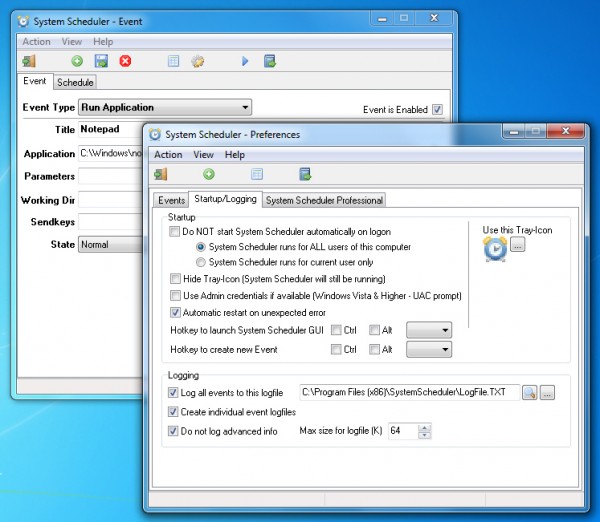
    You might use it to just launch certain programs at a defined time, for instance: once, every few minutes/ hours, daily, weekly, monthly, even yearly.

    You can also set up System Scheduler to display pop-up alerts, and again these can be one-off prompts or regular reminders about some important task.

    If you’re thinking this is much the same as Windows Task Scheduler, then you’re right, but System Scheduler does have a couple of useful extras.

    After launching an application you can also send it simulated keypresses, so helping you to automate all kinds of tasks. Sending something like “%FSc:\file.txt{ENTER}”. say, emulates an Alt+F keypress, then S for save, c:\file.txt as the file name, and the Enter key to finally save it. And you can expand on this to do whatever you like, perhaps opening your email client, creating a new message, attaching a specific file by name and then sending it somewhere.

    System Scheduler also includes a Window Watcher, an interesting tool which allows you to take action based on the presence or absence of a window. If a particular window exists then you could run another event to automate it, for instance. If a window doesn’t exist then you might fire up that application. If a program has hung then you can close and restart it, and there are plenty of other possibilities.

    And all this functionality is supported by a very lightweight scheduler, which consumed less than 2MB RAM when running in the background on our test PC.

    System Scheduler has its limits. And if you just want to launch tasks at particular times then you really should check out Windows Task Scheduler first. It’s more complex, but also far more flexible in many ways.

    If you need the extra automation possibilities exposed by System Scheduler’s “sendkeys” and Window Watcher features, though, we’d give the program a try. It’s a likeable tool, compact and easy to use, with no adware or other hassles. And although there’s a more powerful Professional version available (yours for $30), the Free build is fine while you’re getting started, and its license allows for both home and business use.

    Photo Credit: MR.LIGHTMAN/Shutterstock

  • Violent O.C. Crash Kills 5 Teens on Memorial Day

    Five Irvine, California teens were killed Monday evening after a violent crash that left a car in pieces.

    According to a Los Angeles Times report, three girls and two boys – apparently high school-aged teens – were killed in the crash, which took place in Newport Beach. The car the teens were riding in ran into the center divider of the roadway. It then veered off the road, struck a tree, and burst into flames. The impact of the car hitting the tree sheered the vehicle in half.

    Police arriving at the scene initially thought two vehicles were involved in the accident. Four of the teens were thrown from the vehicle during the crash, and one ended up in the back seat of the car. The four who were thrown from the car were pronounced dead at the scene, and the other was taken to a nearby hospital before being pronounced dead. Police are currently trying to use fingerprints to identify the teens. An investigation into the circumstances of the crash has also begun, including how fast the car was traveling and whether drugs or alcohol could have played a part.

  • Google Launches New Online Mapping Course

    Google wants you to teach yourself how to better utilize its various mapping products.

    Google has just launched registration on a brand new online mapping course that they say will allows interested parties to better “harness the world’s most comprehensive and accurate mapping tools.”

    It’s called Mapping with Google, and you can register today. The online courses will begin on June 10th and run through June 24th. Since the courses are made up of online videos and text lessons, students of the Mapping with Google program can complete it at their own pace.

    “Through a combination of video and text lessons, activities, and projects, you’ll learn to do much more than look up directions or find your house from outer space. Tell a story of your favorite locations with rich 3D imagery, or plot sights to see on your upcoming trip and share with your travel buddies. During the course, you’ll have the opportunity to learn from Google experts and collaborate with a worldwide community of participants, via Google+ Hangouts and a course forum,” says program manager Tina Ornduff.

    Anyone who registers will also get an invitation to access the new Google Maps, which the company just revealed a couple of weeks ago at Google I/O.

    Participants can choose to focus on Google Maps, Google Earth, or both. They’re also given the chance to complete a project for which they will earn a certificate from Google.

  • Why HTC may be doomed no matter how good its devices are

    HTC Samsung Rivalry Analysis

    Although its HTC One has received across-the-board acclaim as one of the world’s best smartphones, HTC still finds itself in dire straits. Businessweek’s Joshua Brustein has written what amounts to an advice column for HTC that ironically shows all the ways that the company may not be able to compete with rival Samsung no matter how good its devices are.

    Continue reading…

  • HTC video showcases their history of handhelds to smartphones

    HTC_One_Back_TA

    If you headed out for the Memorial Day weekend early on Friday and spent time away from the ‘net, you may have missed a new video posted to YouTube by HTC. The video picks up the HTC story in 1997 and shows the evolution of their handheld device technology from personal digital assistants to today’s latest and greatest smartphone from HTC, the HTC One. The devices are a mix of both their own branded devices and those carrying the name of other tech industry players. HTC also plays up some of the innovations they brought to the market like sliding keyboards for smartphones, the first Google Android smartphone, their HTC Sense skin for Android devices, and the first 4G Android phone. You can check out the almost 3 minute long video after the break.

    Click here to view the embedded video.

    Come comment on this article: HTC video showcases their history of handhelds to smartphones

  • Good News on Innovation and Health Care

    Ed. note: This is cross-posted from the HealthCare blog at HealthCare.gov. Read more about data-powered health care here.

    A recent New York Times column, Obamacare’s Other Surprise, by Thomas L. Friedman echoes what we’ve been hearing from health care providers and innovators: Data that support medical decision-making and collaboration, dovetailing with new tools in the Affordable Care Act, are spurring the innovation necessary to deliver improved health care for more people at affordable prices.

    Today, we are focused on driving a smarter health care system focused on the quality – not quantity – of care. The health care law includes many tools to increase transparency, avoid costly mistakes and hospital readmissions, keep patients healthy, and encourage new payment and care delivery models, like Accountable Care Organizations. Health information technology is a critical underpinning to this larger strategy.    

    Policies like these are already driving improvements. Prior to the law, nearly one in five Medicare patients discharged from a hospital was readmitted within 30 days, at a cost of over $26 billion every year. After implementing policies to incentivize better care coordination after a hospital discharge, the 30-day, all-cause readmission rate is estimated to have dropped during 2012 to a low of 18 percent in October, after averaging 19 percent for the previous five years. This downward trend translates to about 70,000 fewer admissions in 2012.

    Insurance companies are also now required to publicly justify their actions if they want to raise rates by 10% or more. Since the passage of the Affordable Care Act, the proportion of requests for double-digit rate increases fell from 75 percent in 2010 to 14 percent so far in 2013.

    Reforms like these have helped slow Medicare and Medicaid spending per beneficiary to historically low rates of growth.

    Mobilizing Use of Health Information Technology

    Last week, we reached an important milestone in the adoption of health information technology. More than half of all doctors and other eligible providers and nearly 80 percent of hospitals are using electronic health records (EHRs) to improve care, an increase of at least 200 percent since 2008.

    read more

  • Nest meet Glass, the learning thermostat lands on your eyes

    The Nest learning thermostat and Google Glass have had a love child and it’s called Glass Nest. Developer James Rundquist got his Google Glass unit earlier this month wanted to get his hands dirty with some Glassware development, he tells me in an interview. The result is a mash up between two of the most buzzy devices to hit the Internet of Things in 2013.

    Rundquist’s Glass Nest is an app for Google Glass that can control the Nest learning thermostat with voice controls, and enable the user to do things like check the temperature in your home hands-free, or turn the thermostat to “away-mode” when you’re leaving the house. The app is a functioning piece of glassware, and Rundquist has opened it up to a few other people who have both Glass and Nest — though, at this point that’s a very niche market.

    Nest 2G_3-4_Dramatic_autoawayHis small amount of users are giving him feedback, says Rundquist, and “so far everyone is loving it,” he says. The code is open sourced and up on Github, so anyone who wants to help, contribute to the project, or play around with the code can do so. Rundquist says he’d like to open up registration for the app to everyone who has both Glass and Nest if Google’s Mirror API terms of service become less restrictive around distribution or if Google gives the O.K. to the project.

    Rundquist lives in an apartment in Atlanta and after installing a Nest in his place he started thinking about how he’d like to check the temperature on his Nest from his new Glass hardware. He tells me that he built a different app before Glass Nest that pushed down the top images from imgur.com every ten minutes, but after about a day of use, he says he decided that wasn’t really what Glass was for.

    google glass sergeybrin

    As I wrote in this post in March, I think that using Glass to control the Internet of Things will be one of the most disruptive uses of Glass. Rundquist tells me that in his short experience experimenting with Glass, he see Glass apps more suited for passive and quick interactions — “less content consumption, more quick one off actions and passive information gain.” He says:

    I imagine some day it [Google Glass] will basically be a device that is like Google Now on steroids, always just showing you relevant information based on where you are, whats going on around you, conversations you are currently having.

    It will be interesting to see what Nest thinks of the unofficial Glass Nest app. Nest has taken a cue from Apple on a lot of its strategies, which makes its philosophy a bit more closed than Google’s mostly open ecosystem.

    Related research and analysis from GigaOM Pro:
    Subscriber content. Sign up for a free trial.

  • Mozilla, Foxconn Team Up On Firefox OS Tablet [Report]

    Foxconn is best known as the manufacturer of the iPhone, iPad and other Apple devices that begin with a lowercase “i.” The massive manufacturer may be diversifying its portfolio this year, however, with mobile devices that run Mozilla’s new Firefox OS.

    Reuters is reporting that Foxconn and Mozilla are planning to unveil a Firefox OS-based mobile device On June 3. The interesting bit about this new report is that Foxconn isn’t working on a phone, but rather a tablet. This would be the first time that Mozilla has shown how its Firefox OS would adapt to tablet computing as the non-profit has only shown Firefox OS running on smartphones thus far.

    The question now is – why go with Foxconn? It seems that Foxconn and Mozilla are hoping the relationship is mutually beneficial as Mozilla can sell more cheap devices in emerging markets while Foxconn can diversify its lineup. In regards to the latter, it seems that Foxconn is trying out new avenues of income after finding that unit orders from Apple for iPhone and iPad devices have been slowing down in recent months.

    The current report makes it seem like the Firefox OS tablets will be marketed and sold by Mozilla. So far, Mozilla has opted to partner with carriers and third-party manufacturers for its Firefox OS smartphones. It will be interesting to see if it decides to go the Google route and sell its own Firefox-branded devices in the future.

    It remains to be seen if Firefox OS will really take off, but the hardware is projected to appeal to emerging markets thanks to its inexpensiveness. Unfortunately for Mozilla, Google’s Android has also been encroaching on that turf for quite some time, and Apple may be offering a cheap iPhone alternative in the future as well.

    Mozilla’s advantage in low price may not much of advantage when Firefox OS finally launches to consumers later this year so it had better have a rock-solid OS that people will want to use over Android and iOS.

  • Fan Slaps Beyonce During Copenhagen Concert

    It’s a bold move to lay your hands on any celebrity, but throw in the fact that said celebrity is Beyonce–who, let’s face it, could buy and sell us all at this point or merely have anyone she doesn’t like rubbed out with no evidence that they ever lived on this planet–and you’ve got a scandal on your hands.

    Queen Bey was in the middle of a show in Copenhagen on Monday night when she reached out to slap fans’ hands in the audience and got a return smack…on the bottom. And in that cool way of hers, Beyonce said, “I will have you escorted out right now, alright?”

    No word yet on whether Beyonce will be pressing charges of any kind, but it’s safe to say that this guy will get off light if that’s all she does. The superstar is the mother of Jay-Z’s child, after all.

    Luckily for us, the whole thing was caught on video.

  • Hulk Hogan Burns Hand, Posts Pics on Twitter

    [Warning: This post contains graphic images]

    Wrestler Hulk Hogan is back in the news this week, and it’s not for another twist in his quest to remove descriptions of his sex tape from the internet.

    On Sunday afternoon, Hogan posted pictures of his swollen, burned hand. He claims that a radiator exploded on his hand:

    Hogan received treatment for his burns at the emergency room of Tampa General Hospital. He continued to chronicle his ordeal through pictures, even while having his hand cut on:

    Hogan later apologized for posting the graphic burned hand photos to Twitter, but he has not deleted the tweets:

  • Netflix to Stream The Killing Across the Pond One Day After It Airs

    U.S. audiences will see the third season of The Killing air this Sunday, June 2nd, on AMC. And Netflix users across the pond, in the U.K. and Ireland won’t have to wait very long after that to stream it themselves.

    Netflix has announced that new episodes of the show will become available to stream in the aforementioned markets just one day after they air in the U.S. on AMC. That means that season 3, episode 1 will be available to stream on Monday, June 3rd.

    The Killing was presumed dead after its first two season as AMC initially chose not to renew the series for a third season. Back in March, Fox Television Studios made a deal with Netflix to become the exclusive subscription-based streamer of the series. That deal with Netflix afforded the studio enough of an additional revenue stream to complete a third season of the crime drama

    Fox TV Studios president David Madden even said that the Netflix deal “played an extremely significant part in the studio’s strategy that enabled us to bring The Killing back for a third season.”

    “We’re thrilled to be bringing Season 3 of The Killing exclusively to our members in the UK and Ireland,” said Ted Sarandos, Chief Content Officer at Netflix. “The Killing is an incredibly gripping fan favorite so we wanted to make each new episode available as soon as possible.”

    In the U.S., The Killing will appear on Netflix, in its entirety, three months after the season finale airs on AMC. Though it’s not the day-after-for-each-episode setup that some may want, it’s still a shorter window between network and Netflix availability than is usually seen.

  • Connecting the Emerging World With Modular Infrastructure

    flexenclosure-web

    An example of a Flexenclosure eCentre modular data center that was recently deployed in Sudan. The private equity arm of The World Bank has invested in Flexenclosure in hopes of accelerating wireless communciations access in emerging markets. (Photo: Flexenclosure)

    Factory-built data centers are gaining traction as a tool for bringing IT operations to emerging markets. A unit of the World Bank said today that it will invest in provider of modular data centers in hopes of accelerating wireless phone access in parts of Asia and Africa.

    International Finance Corporation (IFC), the private equity arm of the World Bank, is leading a consortium that it investing $24 million (U.S. dollars) in Flexenclosure, a Swedish company that has developed pre-fabricated data centers ahnd power infrastructure, primarily for the telecom industry. The round also includes Flexenclosures existing investors,  the Swedish investment funds Industrifonden and Andra AP-fonden.

    The investment will support the deployment of Flexenclosure’s modular data centers, as well as the on-site power systems that can support wireless towers using a combination of solar and wind power and batteries. eSite can provide backup power in areas where the grid is unreliable, and stand-alone power in areas where grid power is unavailable and diesel generators are impractical.

    Boosting Emerging Economies

    IFC, which focuses its investment in boosting emerging economies and reducing poverty, sees the potential for Flexenclosure’s technology to extend the reach and reliability of communications in rural areas.

    “An estimated 800,000 cellular base stations in emerging markets rely on diesel generators for their power supply,” said Andrew Bartley, IFC’s Chief Investment Officer for Telecoms, Media, and Technology. “This is a great potential market for Flexenclosure’s innovative product offering. Its growth strategy is directly aligned with IFC’s goal to improve access to mobile-phone systems for people in rural areas in emerging markets while also reducing global greenhouse-gas emissions.”

    Flexenclosure, which was founded in 2001, has helped clients like Ericsson and Airtel expand networks into remote areas of Africa and Asia.

    Expanding in Asia, Africa

    “During the last year we have opened offices in Nigeria, Kenya, Pakistan, India, Malaysia and Dubai,” said Flexenclosure CEO David King. “Having IFC as a strategic investor will give us access to their global expertise and network, further enhancing our expansion strategy. We have an aggressive research and development program and are growing our sales operations in emerging markets.”

    The new capital will be used to further develop Flexenclosure’s eSite and eCentre technologies. Here’s an overview:

    • eSite is a family of energy-efficient hybrid power systems for base station sites in areas where grid power is unreliable or unavailable. The product can be configured to use solar panels and wind turbines, and can be used to reduce the use of diesel generators, or as a “community power” system to support not only a wireless station, but also provide power for mobile phones, water pumps and schools. eSite includes software that can manage multiple power sources to achieve the most economic approach.
    • eCentre is a prefabricated modular data centre solution to house and power data and telecom equipment. Optimized for energy efficiency and low total cost of ownership, eCentre includes power, cooling and security.

    Flexenclosure customers say the system can accelerate infrastructure deployment in areas where construction is difficult. One example is provided by MTN Ghana, a mobile network with 8 million sibscribers.

    “We have found that building a brick and mortar data centre in this and the adjacent countries is problematic because of faltering building standards, and a containerized solution is a lot quicker,” said MTN operations manager Max Maxted. “The situation is similar with for example MTN Nigeria and we see this solution as a very positive one.”

    Here’s a video that provides an overview of Flexenclosure’s eCentre enclosures:

  • Lambda Labs to release a facial recognition API for Google Glass developers

    google_glass_image_borrowlenses

    Lambda Labs is a startup company that released a beta facial recognition API for Google Glass last year. Co-founder of the company, Stephen Balaban, says that the next version of the API should be available to developers within a week. Since launching the beta, Balaban says the company sees over 5 million API calls per month and usage by over 1,000 developers. Not too bad for a startup making an API for a product that hasn’t even been released to the public yet.

    The new API will allow developers to integrate facial recognition like finding friends in a crowd or making intelligent contacts in your device based on the faces it can recognize. It might sound a little privacy invasive, but it doesn’t do the recognition in real-time. Glass snaps a picture, uploads the picture to a server that handles the recognition, then sends the notification back to the device. Still, it’s a pretty creepy, but cool, thought. Hopefully we’ll hear more about it in the near future.

    source: TechCrunch

    Come comment on this article: Lambda Labs to release a facial recognition API for Google Glass developers

  • Samsung NX300 Review – Classy Look, Powerful Features

    The new Samsung flagship camera from the NX series, the NX300 has been recently launched on the market and it brings a fresh new look to the lineup, along with some technical features that were never embedded into previous models.

    Although Samsung NX210 was a big step forward in terms of specifications in comparison with its predec… (read more)

  • Which Behaviors Must Leaders Avoid?

    If you want to empower, engage, or motivate others, don’t just focus on increasing your positive behaviors. Pay attention to what you need to stop doing as well. Why? Because people remember the bad more than the good. To quote from a previous HBR article, How to Play to Your Strengths, “Multiple studies have shown that people pay keen attention to negative information. For example, when asked to recall important emotional events; people remember four negative memories to every positive one.” So, which behaviors do leaders most need to avoid? Drawing on thousands of 360 qualitative interviews, here are our top three:

    Judgmental, non-verbal body language. No one, especially your successful colleagues, can tolerate perceived condescension. Research studies show that somewhere between 75 to 90 percent of our impact comes from our non-verbal communication, and tone is a key ingredient of this. Do you make comments to others in a way that sounds evaluative, harsh, or condescending? Often, this is not our intention but an in-the- moment reaction. Other non-verbal offenders include scowling, furrowed brows, quizzical looks (as if to say, ‘are you stupid?’), rigidity, and sarcasm. While seemingly small, each of these subtle darts creates a considerable amount of relationship damage.

    Interrupting and interrogating. There’s been a lot of buzz recently around how to have “conversations that drive innovation” and how to “create safe environments for employees to bring their ideas forward.” It’s almost impossible for people to feel safe if the boss takes up most of the airtime, cuts people off, or interrogates half-baked ideas. Yes, employees have a responsibility to communicate with clarity, but if you expect every idea to be buttoned up, fully thought out, or structured before someone speaks, your colleagues will assume that you’re not willing to invest the time to be a thought partner.

    Being inconsistent. Peers and staff often comment on how discouraging it is to see a colleague act in two very different ways — absolutely charming with the executive team and external clients while being disrespectful to those they work with every day. This inconsistency makes these behaviors even more memorable and egregious. Others have shared a different impact — the feeling of walking on eggshells at work, wondering who is going to show up: “smiling, charming, funny person” or “judgmental, intense, snapping person.” Over time, this drives passive aggressive responses from others in their attempt to avoid confrontation.

    Ultimately, loyalty and followership are the two things we cannot demand or set as an expectation. What is perceived as fear-based motivation, belittlement, or power play can yield real short-term compliance from others. But negative behaviors ultimately diminish the legacy we leave. Consider what behaviors you might need to stop doing so that you can have a positive, lasting impact.

  • Keeping a dual-Mac lifestyle in sync

    Relationships are a lot of work. You need to make sure you’re compatible, communicate well, and are on the same page for almost everything. Wait, you thought I meant personal relationships? Oh, sorry, I was talking about keeping multiple Macs in sync.

    I was gifted a really nice 27-inch monitor a year ago. Connecting that to my 2011 15-inch MacBook Pro essentially turned my laptop into a desktop Mac. Not that unplugging it and bringing it with me is a hassle. It’s getting it to recognize the monitor when I plug it in. I end up having to use GFXCardStatus to force the graphics card into Discrete mode (even if it’s there already) to get it to properly detect the external monitor. I also dual-boot this Mac into Windows 8 to play some games, so that just generates some extra hassles when reconnecting the monitor.

    At the same time, I did need a mobile platform. I’m getting a band together, and need a laptop to bring to rehearsals to record with. Plus, I wanted something light if I was leaving the house to write with. I also didn’t want to pay a lot for this muffler, err laptop.

    Fortunately, I still had my 2009 13-inch MacBook Pro kicking around. This is the tale of how I manage both laptops. Because everyone has two laptops floating around, right?

    crump-IMG_0365

    The Mac App Store

    The Mac App store has really eliminated my “OK, where did I put that serial number?” issues. While software packages like Microsoft Office aren’t there, I’m finding that around 90 percent of what I need is available in the Mac App Store. Pages ($19.99), Things ($49.99) and Evernote  (Free) are key to my workflow, so being able to easily reinstall them from the Mac App Store (along with a 5-device license) is a blessing.

    Screen Shot 2013-05-24 at 2.44.55 PM

    Office 365

    Sometimes (OK, often), iWork isn’t enough, and I need the full might and power of the Microsoft Office Suite. To make my life a lot easier, I just use Office 365, which gives me access to the Office suite on both OS X and Windows 8. It also comes with 20 GB of SkyDrive space (more on that later).

    Usually, I need Office when I’m on a fast roundtrip collaboration with a person who does not have iWork. While Pages does handle Word documents fairly well, I’m more comfortable keeping Word documents in Word. Also, I loathe Numbers and much prefer Excel. My issues with Numbers are lengthy, but it sums it up with that it kinda plays at being a spreadsheet, but doesn’t have nearly the power of Excel. So, it’s just easier to handle those tasks in Excel.

    The cloud

    Keeping the same programs on multiple devices is one thing. The important part is keeping the data in sync. For that, I rely on a handful of cloud services: iCloud, Dropbox and SkyDrive.

    iCloud

    iCloud has gotten kind of beaten up in the press lately, and to a certain degree, I admit the service has its good and bad points. So, I’ve separated out the pieces I have problems with (Documents in the Cloud) and instead focus on the parts that work for me (Bookmarks, iMessage, etc.).

    The biggest issue I have with Documents in the Cloud is the walled-garden approach. Simply put, a file I start in Byword ($9.99) can’t easily be moved into Pages or Word, without cutting and pasting. I also don’t expect this to change, so I’ve looked for other solutions for document syncing. One problem I’ve run into is completely forgetting what program I even created a file in.

    I also use Notes.app quite a bit. Its interface for capturing notes quickly is a little easier than Evernote’s. As an example, I was recently watching a band perform. This band is the same style of music I’m playing, and I took copious notes on their stage manner, song list and the like. I just felt more comfortable doing this in iCloud and Notes. Evernote for me still remains a place to store large bodies of notes with lots of text.

    SkyDrive

    My affair with SkyDrive started when I needed to edit Office documents on my Windows 8 partition. While Dropbox can handle this, I liked how it integrated natively into Windows 8. Also, it’s nice being able to edit Word documents in Skydrive’s web interface on a machine I might not have Office installed on. While I can use Google Docs for this (and for one spreadsheet, my band’s songlist, I do use Gdocs), I prefer the Office web apps. With my Office 365 subscription, SkyDrive also comes with 20 GB of storage. That also means I can use it to move my GarageBand songs between machines. One conscious decision I’ve made is to only have production-type files on Skydrive. This is where most of my working files reside.

    Screen Shot 2013-05-24 at 4.19.25 PM

    Dropbox

    Dropbox takes the place of flash drives for moving my files between computers. If I get a PDF in the mail I want to have on all computers, I put it in Dropbox. One exception to having work files on SkyDrive is most iOS text editors save to Dropbox, so I use that tool for any text files I’m working on. For the most part, these files are notes from meetings, or stories I’m working on that are in very rough draft and I don’t need to worry about niceties like formatting.

    Final thoughts

    A few months ago, I wrote about how I use Dropbox for some of the iCloud-type storage. Since then, I’ve started using SkyDrive quite a bit, and I like the separation between the digital junk drawer that’s my Dropbox folder, and the more organized, work environment in SkyDrive. While Dropbox would handle this well, the appeal to me is easy editing in a web interface via SkyDrive that I enjoy.

    Related research and analysis from GigaOM Pro:
    Subscriber content. Sign up for a free trial.