Category: News

  • No File! No Icon! Litl Is a Big Idea, but Still Cloudy [Personal Technology]

    One of the hottest ideas in the digital world now is the notion of dumping the traditional personal computer, where most programs and data are stored locally, for a stripped-down device that would operate primarily as a gateway to servers on the Internet, where your programs and data are accessed remotely. This approach is often called “cloud computing.”

    [ See post to watch video ]

    In fact, the original netbooks, the small laptops that have become very popular, were designed around this concept of relying mostly on the Web. They used low-end processors, shunned Windows, and had very little internal storage. But a combination of consumer sentiment and industry maneuvering pushed them back into the fold, so that today, most are simply cheap, small conventional Windows laptops.

    Now, a small Boston company, called Litl, is taking another shot at this idea, with a different twist. It is selling online a highly unusual laptop it classifies as a “webbook,” which attempts to meld cloud computing with a TV-like viewing experience—for the home. This shiny, colorful computer, named the Litl, is larger and more expensive than a typical netbook. It’s about the size of a small standard laptop, with a 12-inch screen and a weight of 3.4 pounds. It costs $699, or about twice the price of a netbook, at litl.com.

    Yet the Litl doesn’t use Windows, or directly run word processors, email, or photo or music programs. It can only perform those tasks via Web sites and services like Gmail or Flckr, Google Docs or Pandora Radio. About the only local program it has that can run without an Internet connection is a virtual egg timer. It has no hard disk or any other way for a user to store anything locally.

    The Litl’s user interface is a radical departure. There is no task bar or dock, no folders, no icons for files and programs; no traditional desktop. Instead, the Litl’s screen is filled with small cards that contain various kinds of Web content, from photos to news headlines, Facebook status and favorite Web sites. Click on a card, and its contents fill the screen.

    PTECH

    The Litl webbook

    And the Litl has another big difference from standard laptops or netbooks: something called “easel mode.” You can flip it around so the machine takes the form of an inverted letter “V,” with the screen facing outward. In that position, the machine can be used like a small Internet-based TV to display headlines, the weather, photo slideshows or videos from the Web. The company sells a $19 remote for controlling the computer in easel mode. You can also control it with a wheel built into the hinge.

    I’ve been testing the Litl and I have mixed feelings about it. Some of the bold concepts behind the machine are refreshing, including the cloud-computing idea and the very simple interface and operating system, which demand much less work and attention from the user than a traditional PC does. The company also is promising many improvements, delivered via frequent over-the-air updates, including iPhone-type apps developed by third parties. It even offers a two-year money-back guarantee.

    I was able to set up cards for Gmail and Yahoo Mail, and to send and receive messages. I also set up a card for Google Docs and was able to create and edit documents. I tapped into my Flickr account and could view slideshows of family photos I had previously uploaded. And I was able to watch TV shows via Hulu, both in easel mode and on my big-screen TV, once I connected the Litl to it.

    But, in my tests, I found the device a bit clumsy and unsatisfying to use. For instance, as you add cards for your favorite Web sites or headline feeds (called channels), it becomes more difficult to scroll through screen after screen to find the one you want. There is no easy way to organize things.

    In easel mode, when you see a headline that interests you, there is no way to click on it to read the whole story. Videos in easel mode too often stuttered. Worse, if you’re watching a video in easel mode, or through a TV, the Litl’s remote doesn’t let you pause, fast forward or back up. And the Litl doesn’t allow you to upload photos or videos to the Web.

    The battery life is awful. The company claims 2.5 hours. In my tests, it conked out in less time. The company says that isn’t a problem, because the machine is designed for home use and will likely stay plugged in.

    The company claims it is working on improving the Litl’s shortcomings. For instance, it plans a photo-uploading function and smoother video playback. So, it will likely get better. But, as of now, for $699, my feeling is that a standard laptop could perform many of these tasks in a more familiar, more versatile manner.

    Cloud computing may one day be the standard way of doing things digitally, but the Litl, at least in its current form, isn’t the answer.

    Find all of Walt Mossberg’s columns and videos online, free, at the All Things Digital Web site, walt.allthingsd.com. Email him at [email protected].

    Buy This Item: [Click here to buy this item]

    Read Original Article

  • Earn Money Shoveling Snow

    With all the kids on Winter break I’m sure a few are getting a bit restless and chances are the older ones are tired of being locked behind doors. Would they like to earn a bit of cash? If it has snowed in your area they may be able to earn a few bucks by shoveling snow.

    IMG: Sxc.hu

    IMG: Sxc.hu

    Items Needed:
    -shovel
    -warm clothes
    -gloves
    -salt rock

    1.  Practice on your own driveway/sidewalk to make sure you aren’t going to quit midway through. Trust me, I recently saw this happen with a kid that asked and got paid by everyone on the street…he won’t be getting hired again.

    2.  Dress warmly before going outside, toss out the salt rock in order to make sure you aren’t going to slip down any stairs. Now place your gloves on your hands and start shoveling. Don’t forget to push it off to the side and not into the middle of the road. The rest of the neighborhood hates when you do this, even if they don’t tell you.

    3.  Once you’ve done your walk/driveway head on over and ask your neighbors if they’d like you to do it. You’ll have to have a price prepared for when they ask. The best way to do this is by knowing the competitors price.

    -New York hires people to shovel their streets for $12 an hour.
    -My son does it for $15
    -Kid down the block charges $30 per drive

    So counties are giving out tickets if sidewalks aren’t shoveled this can be a bonus for kids that want to earn money, some may be willing to hire someone to do their walk so they don’t have to do it.

    Tips: Always do the job completely and be polite.

    Post from: Blisstree

    Earn Money Shoveling Snow

  • Does voice-to-text technology actually work?

    shoutoutNo matter how fast we learn to type, it’s never going to catch up to how fast we can speak. Luckily for us, technology might mean it doesn’t have to. Voice-to-text technology is entering more and more industries, and has the potential to make recording, dictating and communicating a whole lot faster.

    Take ShoutOUT, a new iPhone messaging app released to the App Store last week.  It’s taking advantage of huge improvements in voice to text technologies to make SMS on the iPhone a much easier prospect, especially for those on the go. What ShoutOUT wants to do is take over the SMS capabilities of your iPhone. It allows users to speak a text message, and then ShoutOUT’s computers transcribe the message and send it to whoever you specify.

    listenBut what’s potentially interesting about ShoutOUT is the same thing that’s on the minds of companies like Jott, Dial2Do, and even Google –- using your voice to make tasks that require typing, go a whole lot faster. Whether it’s reading news, taking notes, or even sending email, it can all be done faster with your voice. Not to mention all the upsides of an alternative to texting while driving, or even walking—you get run into by a texter on the street, you start to wish for better voice-to-text technology. Text, by virtue of being readable, is also easier to see at a glance, search through, and organize for later reference.

    The knock on all these services, from Dragon Dictation to Jott to Google Voice, is that there’s a huge learning curve to get to know the app, train it to your voice, and use it properly– and often the apps just don’t work. Some apps don’t understand punctuation, so you have to say things like “I went to work this morning comma had three meetings comma one of which went for three hours exclamation point”. It’s not exactly a natural way of speaking. But some people swear by them.

    There are a lot of apps out there trying to take advantage of your voice and improvements in speech recognition, and the possibilities are undeniably huge. But the question is, do any of the applications actually work?

    To find out, I signed up for several of the biggest players in the voice-to-text field, and gave them all a simple test: “Hello everyone, I’m David Pierce. I have three legs, two arms, fifty-one toes, and am more fun than a barrel of monkeys. I love to skydive, run around in circles, and wear my New York Giants shirt.” It’s got proper names, numbers, and some odd words, so it should be a decent comparative measure of how they do. Here’s a look at a few of the results:

    Jott

    Made by: Nuance Companies

    Cost: $3.95/month and up, depending on how you use it

    Use it for: Sending reminders to yourself, managing task lists, transcribing voicemail

    Message Transcription: “Hello everyone, I’m David Pearce. I have 3 legs, 2 arms, 51 toes and a more fun than a barrel of monkeys. I love to sky dive, run around in circles and wear my near giant shirt.”

    Dial2Do:

    Made By: Dial2Do

    Cost: Limited Free version, $3.99/month for unlimited use

    Use it for: Reading news, sending and receiving emails, sending reminders to other apps

    Message Transcription: “Hello everyone. I’m David Peirce. I have 3 legs 2 arms. 51 toes and more fun at the (?) of monkeys. I love the sky dust run around the tickles and run my near time shirt.”

    Google Voice

    Made By: Google

    Cost: Free (ad-supported)

    Use it for: Transcribing voicemail, managing SMS and voicemail online and by email

    Message Transcription: “Hello everyone, I did pierce. I have 3 lakes to Arms 51 toes and in more fun than available. Peace. I love to Scott, I’ve run around in circles and where my New York Giants shirt.”

    Dragon Dictation

    Made by: Nuance Companies

    Cost: Free App Store app, paid versions of Dragon Dictation desktop software.

    Use it for: Anything! Copy and paste to most other apps, on iPhone or computer.

    Message Transcription: “Hello everyone and it appears I have three legs to arms 51 times and more fun than dial up monkeys I love to skydive run around in circles and where my New York Giants shirt”

    ShoutOUT

    Made by: Promptu Systems

    Cost: $.99 app in App Store, pay-per-message approach for transcribed message

    Use it for: Replacing the SMS feature on your iPhone, texting while driving

    Message Transcription: “Hello everyone I’m David Pierce I do you like to to arms to see one toes in a more fun the girl monkeys I love to start I run around in circles and where my New York giants right”

    As is made all too clear, this technology is far from perfect. People speak too differently, in everything from speed to accent to pronunciation of certain letters, and creating a technology that works for all of them is an incredibly tall order.

    But the potential is great—Dial2Do and Jott let you do things like hear news, send tasks to yourself, and even update a blog; ShoutOUT might be able to make texting a little faster, and a whole lot less dangerous. There have been great improvements, but there’s still a long way to go before your voice can really replace your keyboard.

    My fingers are sure crossed.


    Buy This Item: [Click here to buy this item]

    Read Original Article

  • 5 O’Clock Roundup: Apple’s mysterious event, iPhone credit card reader

    Here’s the latest action:

    Apple’s Jan. 26 announcement? — Chasing the Financial Times, Fox News reports it has confirmed that Apple will announce a new product in San Francisco that day. Is it a tablet or an e-book reader? The tongues are wagging.

    mophieMophie plans credit-card reader for the iPhone — It looks cool, but this Mophie product might fall into the nice but totally unnecessary department. The company normally makes battery packs and cases, but this device gives you an alternative to typing your credit card into various apps by hand. It’s aimed at small business owners.

    Evernote hits 2 million users – The life-capture application has hit its second million in less than half the time it took to get its first million. Part of the reason is that it launched a popular app on the iPhone.

    CES rumor mill – The biggest U.S. tech trade show isn’t until next week, but the rumors are flooding out. Motorola is reported launching two new phones next week, including an Android-based phone, according to analyst Trip Chowdhry.

    The tragedy of One Laptop Per ChildOne more design has been shelved, prompting predictions that this effort to educate the world’s poor children through laptops is a failure.

    iPhone taking off in China? — The world’s most populous country hasn’t held out the welcome mat for the iPhone. But Apple may be having some success there with sales lately.

    User sues RockYou — RockYou acknowledged that it lost as many as 32 million usernames and passwords to a hacker. The first class action suit has been filed. Will there be 32 million more?

    tivoNew TiVO on the way?A packaging mishap may be a clue to whether TiVO is preparing to launch a new digital video recorder, sans dial-up modem and including a cable card slot.

    Seagate ex-engineer testifies against companyThe engineer claims that Seagate had access to trade secrets from Convolve when it designed noise-reduction technology into its hard drives which infringed the latter’s patents.


    Buy This Item: [Click here to buy this item]

    Read Original Article

  • USA Today’s top 10 most improved models of the decade, and what we think they should’ve been

    Cadillac CTS

    The USA Today’s Drive On team took some time out to pick the top 10 most improved models of the decade. To keep things valid the editors kept 2010 vehicles of the list.

    “Vehicles had to be currently available for purchase as a new model to be eligible for the list. Here they are, from the most vastly improved to the much better but not quite stupendous.”

    We couldn’t help but put together our own list – you can check it out after the jump

    1. Chevrolet Malibu
    2. Ford Mustang
    3. Toyota Prius
    4. Hyundai Sonata
    5. Nissan Altima
    6. Kia Sportage
    7. Cadillac CTS
    8. Mercedes-Benz C-Class
    9. Cadillac Escalade
    10. Saturn Vue

    Hit the jump to see what our list would be like.

    1. Chevrolet Camaro
    2. Ford Fusion
    3. Cadillac CTS
    4. Chevrolet Equinox
    5. Ford Mustang
    6. Lexus IS
    7. BMW 3-Series
    8. Mercedes-Benz C-Class
    9. Nissan 370Z
    10. Volkswagen Jetta

    – By: Omar Rana

    Source: USA Today


  • A Look At The Data Center That Crunched Avatar

    Sun / Intel This post is part of the IT Innovation series, sponsored by Sun & Intel. Read more at ITInnovation.com.
    Of course, the content of this post consists entirely of the thoughts and opinions of the author.

    You don’t often get to see the details of a massive data center. The companies that run them tend to keep things pretty quiet, as they view the datacenter as a competitive advantage. Thus, what happens in Google’s datacenters remains mostly a mystery. And yet, it seems that the folks at Weta Digital, famous for providing the computing horsepower behind major Hollywood blockbusters like Lord of the Rings and now Avatar are apparently willing to open up a bit and provide some details about its setup. What struck me as interesting wasn’t so much the hardware specifics, but how they had to switch from the industry standard cooling system of raised floors and air-cooling, because the machines were too close together to get the necessary bandwidth. So, instead, they went with water-cooled racks. Water-cooled data centers have been increasingly common over the past few years (and were typical with many old mainframes), but they’re still a technology that not all data center operators are comfortable with, and which many still think create more problems than they solve. So it’s always interesting to see another one in action.

    At the same time, as neat as it is to read about Weta Digital’s massive computing power (which apparently represents one of the 200 largest “super computers”) in the world, I’m still left wondering if the trend — even for amazing movie effects — isn’t moving away from such massive data centers. We’re seeing more and more what can be done on the cheap. And, no, it doesn’t come close to matching the stunning effects found in the blockbuster movies that Weta works on, but it does have all the symptoms of a classic innovator’s dilemma scenario, where the new stuff isn’t “as good” as the old stuff, but is improving at a faster rate, and quickly reaching a point where it’s “good enough” at significantly lower price points.

    Given the regular discussions around here concerning movie budgets, where do people think the technology is headed for movie special effects? Will it always be run in giant datacenters, or is there a place for making high quality (even blockbuster-type) films on cheaper hardware?

    Permalink | Comments | Email This Story


  • AT&T: landline phone service must die; only question is when


    In the heyday of the AT&T monopoly era, the telco’s legendary CEO John deButts had an acronym for the company’s main product. He christened it POTS, aka Plain Old Telephone Service, delivered over Ma Bell’s copper wire public switched telephone network (PSTN). A half-century later, AT&T says it’s time for POTS to die, and it wants the Federal Communications Commission to schedule its funeral.

    POTS and PSTN are “relics of a by gone era,” AT&T wrote to the FCC just before the holidays. “Due to technological advances, changes in consumer preference, and market forces, the question is when, not if, POTS service and the PSTN over which it is provided will become obsolete.” The company says it wants the agency to solicit public comments for “a firm deadline for the phaseout” of both, “and it should ask what that deadline should be.”

    Read the rest of this article...


    Buy This Item: [Click here to buy this item]

    Article

  • “Thriller” VIDEO, “The Muppet Movie” Preserved In U.S. Film Registry

    Michael Jackson’s groundbreaking music video horror flick has been immortalized among the nation’s treasures in the world’s largest archive of film, TV and sound recordings. Jackson’s 1983 short movie “Thriller,” featuring an unforgettable graveyard dance that helped revolutionize music videos, will live on in the U.S. National Film Registry.

    The 14-minute “Thriller” video is among 25 films the Library of Congress added to the registry on Wednesday. It is the first music video included in the 2009 list of cultural treasures that will be preserved for all time.

    “Because of the way the recording industry is evolving and changing, we thought it would be good to go back to the developmentof an earlier seismic shift, which was the development of the music video,” says Steve Leggett, coordinator of the National Film Preservation Board.

    Joining the King of Pop in the 2009 class are The Muppets, who have earned acclaim for their 1979 film The Muppet Movie — which featured the big screen debut of Kermit the Frog and Miss Piggy.


  • Most Popular Hive Five Topics of 2009

    Every week we pose a simple, focused question to the Lifehacker readership about a specific topic: Which is best? From netbooks and malware removal to home servers and wallpaper, here’s a look back at the most popular Hive Five topics of 2009.

    The Hive Five asks the question “Which is best?” in a variety of topics covering hardware, software, and sometimes even a combination of the two. Although sometimes it’s easy to predict the winner—Ubuntu has had its share of wins, to be sure—the real value in the Hive Five isn’t actually its ability to elevate a single winner to a pedestal but to highlight all the great options that are out there.

    Between the four runners up in each Hive Five and the other options highlighted in the hundreds of comments on both the Hive Five Call for Contenders and the actual Hive Five every week, it’s easy to discover new things. If ever you’re not sold on the winner of any Hive Five always make sure to read over the comments and see if any of them tip you off to a new and awesome product you’d never heard of.

    Five Best Netbooks

    Some months have elapsed since we asked you which netbook was best, but the newer models of the winner and runners up in that Hive Five are still the forerunners in the netbook market.

    Five Best Malware Removal Tools

    Nobody likes having their machine laden down with malware. Check out this Hive Five to find great applications for keeping things running smooth and malware free.

    Best Home Server Software

    Media files, data synchronization, and remote backups, oh my! Home computing has advanced to a point where it’s practical to run your own home server, and we’re running down the five best tools for the job.

    Five Best Linux Distributions

    There are many, many Linux distributions, and a lot of unique reasons to like them. Read on to see which open-source operating systems inspired our readers to provide our biggest Hive Five response to date.

    Five Best Wallpaper Sites

    Nobody likes staring at a boring desktop when they fire up their computer every morning. Keep your wallpaper fresh with the five most popular sites Lifehacker readers use to satisfy their wallpaper needs.

    Five Best Free Data Recovery Tools

    The best way to recover from unexpected data loss is to be properly prepared. With one of the following tools on hand, you’ll always be ready to save your data from the Reaper.

    Six Best Video Editing Applications

    You want to be the supreme ruler of your own virtual cutting room? Better break out the checkbook-your film-chopping powers aren’t going to come cheaply.

    Five Best Web Browsers

    It’s probably the most important and debated piece of software on the modern computer. See how your fellow readers get around the net, and vote for your favorite web browser.

    Six Best MP3 Tagging Tools

    A well tagged MP3 collection makes everything from organization to playback easier. Keep reading for a closer look at your fellow readers’ favorite tools for cleaning up their MP3 tags in this Hive Five.

    Five Best Antivirus Applications

    Computer viruses are increasingly sophisticated and pervasive. If you can’t afford to run your computer without some sort of antivirus software installed, check out these five popular options to protect your PC.

    Five Best Live CDs

    Live CDs (and DVDs) are versatile tools, allowing you to boot into an operating system without installing anything to your hard drives. Let’s take a closer look at the five most popular live CDs.

    Five Best Disk Defragmenters

    Your computer is a busy beaver, rapidly accessing and utilizing files all in the name of bringing you what you want, when you want it. Sometimes it needs a little help tidying up, and that’s where these five disk defragmenters come in.

    Five Best Portable Applications

    Whether you got a shiny new flash drive over the holidays or your old thumb drive is looking for a new lease on life, pack it full of goodness with these five killer portable applications.

    Five Best Instant Messengers

    Instant messaging has become so ubiquitous, an entire generation of internet users is probably unaware there was ever life without it. Check out the following five most popular instant messengers to to help you communicate across networks and the world.

    Five Best Free System Restore Tools

    Backing up data is a great way to minimize losses after a computing catastrophe. But what about restoring your actual system right away? Here are the five most popular reader choices.

    Five Best People-Search Engines

    Need to do a little online detective work? Track down anyone from long lost schoolmates to the new friend whose number you’ve lost with this assortment of powerful people-search engines.

    Five Best System Tray Applications


    The Windows system tray can be so much more than a parking lot for programs you don’t want cluttering up your task bar. Read on to see the five most popular tray tools readers can’t live without.

    Five Best Online Backup Tools

    Local backup is a useful and necessary part of securing your data against catastrophe, but with the advent of broadband and inexpensive online storage, you’ve got little reason to not back up critical files to the cloud as well.

    Five Best PDF Readers


    Adobe’s free PDF reader has long been a standard for handling its extremely popular document format, but you aren’t limited to using it to view your PDF files. Let’s take a look at five of the most popular PDF readers.

    Five Best Video Players


    We’ve come a long way since animated GIFs and video-game-style MIDI files were considered cutting edge computer-provided A/V entertainment. Take advantage of today’s high-quality video with one of these five most popular video players.

    Hive Five: Five Best Mind Mapping Applications


    Mind mapping is a great way to add structure to brainstorming sessions and visualize your ideas. Check out the applications your fellow readers use to do their best brainstorming.

    Five Best Windows Task Manager Alternatives


    The Windows Task Manager is a functional but basic tool for keeping an eye on what your computer’s up to. If you want to go beyond the built-in tool and for more in depth information and control, check out these five alternatives.

    Six Best Portable Operating Systems


    Why restrict yourself to merely carrying around your data on a thumb drive? Take your entire operating system on your flash drive with the excellent portable operating systems you’ll find inside this week’s Hive Five.

    Five Best Portable Apps Suites


    Once upon a time, easy remote computing was a pipe dream, now people routinely carry gigs of data around on flash drives smaller than a modest pack of chewing gum. Manage your apps and data with these portable application suites.

    Five Best Virtual-Desktop Managers


    Long before multiple monitors were popular (or financially feasible), there were virtual desktops-applications that allow you to swap your entire workspace with another for easy compartmentalization of your work. Here’s a look at five of the most popular virtual-desktop managers.

    Five Best Application Docks


    Remember the days of digging through folders of shortcuts and menus to launch applications? These days many users prefer customizable, attractive docks for launching and keeping track of their favorite apps. Here’s a look at five of the most popular docks.

    Five Best Time-Tracking Applications


    Where does the time go? Whether you need to know for billing purposes or just want a better idea of how your work day is split up, you can always answer that question with a good time-tracking application.

    Five Best Software Update Tools


    Rather than wait around for your software to notify you of updates (let’s face it, a lot of applications never will), these five handy tools keep an eye on your apps, alert you when an update’s available, and streamline the updating process.

    Six Best Exercise Planning and Tracking Tools


    Technology and exercise make an excellent pair; you can now track, plan, and graph your workouts more easily than ever. We’re here to take a look at six of the most popular tools for the job.

    Five Best Alternative File Copiers


    If you do any serious file copying on a Windows system, you’ll quickly discover that there are substantial limitations to the default file copier. Ease your file copying frustrations with these five alternative copiers.


    Which is Your Favorite Hive Five Topic from 2009?(polls)

    Have a favorite Hive Five topic from 2009 that wasn’t highlighted here? Let’s hear about it in the comments. If you have a topic you’d love us to cover in 2010, make sure to send an email with your suggestion to tips @ lifehacker.com with “Hive Five” in the subject line so we can add it to our list.

    Buy This Item: [Click here to buy this item]

    Read Original Article

  • John Mackey and the limits of “conscious capitalism”

    by Tom Philpott

    John Mackey: will the unfettered market bring him down? Photo: JOEM500, via Flickr

    Author’s note: In the original version of this post, I mistakenly wrote that Mackey had resigned from the Whole Foods board. Actually, he resigned from the chairmanship of the board, but retained his seat on the board. I regret the error.

    —————-

    Under pressure from a variety of shareholders, Whole Foods founder John Mackey has stepped down as chairman of his company’s board of directors. He will continue serving as CEO.

    Just before the announcement, The New Yorker ran a long and entertaining profile of Mackey by Nick Paumgarten. The two events—the publication of the New Yorker piece, quickly followed by Mackey’s board resignation—may not be coincidental. In recent years, buffeted by self-generated controversy, Mackey has sought to exert careful control over his media image. He makes a game effort with Paumagarten. “I no longer drink alcohol around journalists,” Mackey tells him. He adds: “I am not going to talk about my sex life,”  even though Paumagarten had not asked.

    Despite those undoubtedly wise precautions, Mackey emerges from Paumgarten’s gentle piece as a bit of a nut.

    We see him engaging in new-age babble, declaring “I am self-actualizing myself” and subjecting himself to something called “the Course.” We find him behaving like a jerk, alienating underlings (“executive-retreat volleyball games had to be scrapped, owing to Mackey’s intensity and his ill-disguised scorn for less capable teammates”) and sending fellow executives into grumpy exile. Mostly, we find him justifying his Randian faith in hyper-capitalism, as zealous as a Christian’s belief in the Resurrection.

    In green circles, the money shot is probably the bit about climate change—it turns out the founder of the iconic “certified organic supermarket” is a bit of a denier (don’t tell Paumgarten’s colleague Michael Specter). Paumgarten writes:

    One of the books on the list [of what Mackey was reading] was “Heaven and Earth: Global Warming-the Missing Science,” a skeptical take on climate change. Mackey told me that he agrees with the book’s assertion that, as he put it, “no scientific consensus exists” regarding the causes of climate change; he added, with a candor you could call bold or reckless, that it would be a pity to allow “hysteria about global warming” to cause us “to raise taxes and increase regulation, and in turn lower our standard of living and lead to an increase in poverty.” One would imagine that, on this score, many of his customers, to say nothing of most climate scientists, might disagree. He also said, “Historically, prosperity tends to correlate to warmer temperatures.”

    In one deft paragraph, Paumgarten skewers Mackey’s unfortunate recent foray into healthcare punditry, as well as his long-time hostility to labor unions:

    It sometimes sounds as if he believed that, if every company had him at the helm, there would be no need for unions or health-care reform, and that therefore every company should have someone like him, and that therefore there should be no unions or health-care reform. In other words, because he runs a business a certain way, others will, can, and should, and so the safeguards that have evolved over the generations to protect against human venality—against, say, greedy, bullying bosses—are no longer necessary. The logic is as sound as the presumption is preposterous.

    I think this captures the quintessence of Mackeyism: an earnest faith, backed up by his own personal virtue, that unfettered capitalism paves the way to social utopia.

    No doubt, Mackey himself is a benevolent corporate chief. The market values Whole Foods at $4 billion, yet the total value of Mackey’s Whole Foods shares is just $31 million. Nearly all founders of corporate empires manage to grab a much larger share of the loot than that. His annual salary as CEO: $1. And he has imposed a kind of austerity on his fellow execs: “No one at the company can have a salary more than nineteen times what the average team member makes,” Paumgarten reports. “On average, an S. & P. 500 CEO makes three hundred and nineteen times what a production worker does.” And for Whole Foods employees, “The health and retirement benefits are relatively generous.”

    Yet those policies are driven not so much by the market as by Mackey’s own personal beliefs—and the market could soon crush them. Mackey is losing control of the company; other, less loftily idealistic capitalists are moving in. As CEO, he’s the functionary of a corporate board he no longer dominates—one bound by law not to serve Mackey’s ideals, but rather to
    maximize shareholder profit. Writes Paumgarten:

    Last fall, as the recession deepened, Whole Foods’ sales, and its stock, suffered badly, and the company was forced to raise capital. Leonard Green & Partners, a private-equity firm, bought seventeen per cent of the business, and got two seats on the board. Yucaipa, a firm run by the grocery billionaire and Democratic Party donor Ron Burkle, bought a seven-per-cent stake and has been looking over Mackey’s shoulder.

    Thus while Mackey the capitalist ideologue does his best to take care of his workers, the capitalist sharks are circling. “We’re trying to do good. And we’re trying to make money,” Mackey tells Paumgarten. “The more money we make, the more good we can do.”

    But the investors now taking control of Whole Foods are likely more interested in the money than in the good. When profits falter, the “power of conscious capitalism” (the subtitle of Mackey’s book) succumbs to the power of unfettered capitalism. If I were a Whole Foods “team member,” I’d be seriously considering starting a union to protect wages and benefits. And as a backup plan, I’d be agitating for universal health care.

    Related Links:

    GoodGuide scanner makes healthy food shopping point and click

    Grist Exclusive: Will Whole Foods’ new mobile slaughterhouses squeeze small farmers?

    Pollan shoots down organic myths at Grist event


  • 4600 Polaroid photos make for a hell of a video journal

    A good idea if you can afford the cartridges: Mark Tasman took a picture of himself every day (or more often) for 10 years, and has put them all in order to create this video. Man, that would be an arduous process. I’d have to hire an underling.

    If you need more time-shifted beard action, try our slow-motion bearded high fives.

    [via Laughing Squid]


    Buy This Item: [Click here to buy this item]

    Read Original Article

  • Can the Cloud Help Drive Mobile TV Adoption?

    Open Mobile Video Coalition Mobile TV

    Globally, mobile TV buyers are a small population with just 115 million subscribers, according to Screen Digest. Compare that to 4.1 billion mobile phone subscriptions worldwide, and mobile TV is clearly a tough market.

    I’m not sure that the new devices (pictured) that will offer free over-the-air television delivery of broadcast channels to be shown off in a few days at CES, or Qualcomm’s attempts to bring its MediaFLO television service to cars will make a dent in the apathy around mobile television. However, today we learned that Microsoft is looking for someone to help it push its Xbox Live content to Windows Mobile phones, and last year AMD showed off a cloud service designed to let folks take their games on the run. Comcast could also broaden its Xfinity service to allow me to bring my TV shows with me when I leave the house.

    I wonder if these efforts from cable providers and content owners to deliver users’ content to them through the cloud, regardless of what screen or service they’re using, will drive adoption. Readers, what do you think?


    GridRouter by SmartSynch: The communications hub for the Smart Grid

    Buy This Item: [Click here to buy this item]

    Read Original Article

  • TenYears: Console Games Of The Decade

    It’s almost January 1st, 2010 and we’ve been mulling over our favorites of 2009 – and the previous decade. Here we present another installment in our “Of the Decade” lists.

    The aughts were a great time for gamers. The decade began auspiciously with the launch of the PlayStation2, and is ending quite nicely with a Nintendo victory that would have been thought impossible a few years ago. More people than ever are gaming, and the business has grown to enormous size. We’ve chosen the following games as the best representatives of this decade of gaming.


    Buy This Item: [Click here to buy this item]

    Read Original Article

  • HTC HD2 plays Tekken 3 using FPSECE emulator

    Not much to say here other than there’s a PlayStation emulator for the HD2 and it bloody well works! The original gangster of consoles, already emulated on other WinMo devices such as Toshiba’s TG01, has made its way to HTC’s finest thanks to version 0.10 of the First PlayStation Emulator for Windows CE. You can hit the read link to find out how to get it up and running on your own handset, and then we’ll naturally expect you to come back and tell us how good it felt to play Final Fantasy VII in a whole new way. The more impatient among you will already be watching video of the HD2 running Tekken 3 effortlessly after the break, so go join ‘em already.

    Continue reading HTC HD2 plays Tekken 3 using FPSECE emulator

    HTC HD2 plays Tekken 3 using FPSECE emulator originally appeared on Engadget on Wed, 30 Dec 2009 19:47:00 EST. Please see our terms for use of feeds.

    Permalink WMPoweruser  |  sourceXDA-Developers  | Email this | Comments

    Buy This Item: [Click here to buy this item]

    Article

  • How to Get $20 Billion for Using Electronic Medical Records

    Electronic Medical RecordsThe stimulus bill that Congress passed back in February said docs and hospitals that make “meaningful use” of electronic medical records would get big bonus payments from Medicare and Medicaid. The bill laid out a few basics about meaningful use — reporting quality measures, sharing information electronically — but didn’t get into much detail.
    The feds released plenty of details late today, in this 556-page proposed rule that lays out what doctors (a.k.a. “eligible professionals”) and hospitals will have to do to qualify for the money.

    On the off chance that you don’t have the time or interest to read 556 pages, we suggest you skip to Table 2 on p. 103, which lists the criteria docs and hospitals will have to meet in the first phase of the roll-out.

    The stuff there is largely what the people we talked to were expecting. Among the requirements: File prescriptions and submit insurance claims electronically; give patients electronic access to their health information; use computerized systems to enter at least some of doctors’ and nurses’ orders; track patients’ medications electronically; and record vital signs and lab test results electronically.

    Sharing electronic information between different medical practices and hospitals isn’t something that happens very often; the meaningful use guidelines seem to recognize this. When the program kicks in, in fiscal year 2011, doctors and hospitals only need to say that they “performed at least one test” of their system’s ability to “electronically exchange key clinical information.”

    Mike Valentine, EVP of the health records company Cerner, told the Health Blog that “they’re setting a much lower bar for interoperability and sharing” information, and a somewhat higher bar for the way docs and hospitals use electronic systems internally.

    The stimulus bill specified that incentive payments — which can top more than $40,000 for a single doctor over several years and could total more than $20 billion nationwide (see p. 449) — would be tied to meaningful use of certified systems. Now that there’s some clarification on meaningful use, one key question remains about certification: Just who is going to do it?

    The feds did release this proposed rule today regarding certification criteria. But Scott Decker, president of the EMR shop NextGen, pointed out to us that it’s still not clear what body will be doing the certifying.

    There is an existing certification group, but the feds haven’t said for sure whether that group will be the key for getting a stimulus-ready system. “The lack of a certification body at this stage is a problem,” Decker said.

    The proposed rules are, like the Health Blog, open for public comment. Final rules are expected next year.

    Image: iStockphoto


  • Apple Event on Jan 26 says Fox News and Financial Times

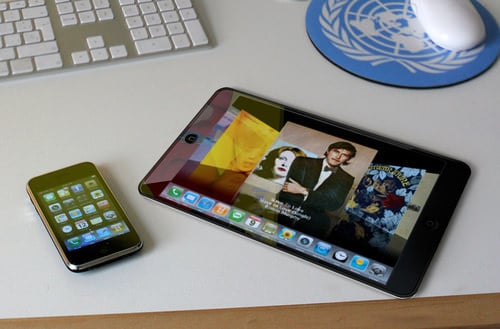
    Apple iSlate tablet mockup

    2010 will be the first year that doesn’t take part in MacWorld, but that doesn’t mean the company doesn’t have big announcements that need to be made. According to both the Financial Times and Fox News, they’ve been told by a “source inside Apple” that the company will be holding a special event on January 26th that will be focused on the mobility space. What does that mean? The iSlate / iGuide / iPad / Apple Tablet should become a reality.

    Now, we aren’t ones to spur unnecessary excitement, but lets look at the facts. The last iPod event was on September 9th, so we know that this won’t be focused on the iPod, although we wouldn’t be that surprised to see an iPod touch with a camera appear here. The MacBook Pro should be getting a spec bump based on new Intel architecture, but that wouldn’t be enough in and of itself to warrant a special Apple Event. The rumors and leaks have gone on long enough, and we think that January 26th will mark the day that Apple shows the world how tablet entertainment devices should be done.

    What do you think?

    [Photo Credit]


    Tags:
    ,
    ,
    ,
    ,
    ,
    ,
    ,
    ,
    ,
    ,
    ,
    ,
    ,

    Apple Event on Jan 26 says Fox News and Financial Times originally appeared on Gear Live on Wed, December 30, 2009 – 5:42:54


  • Apple nabs four of Engadget’s 10 gadgets of the decade

    Filed under: , , , , ,

    Our friends over at Engadget have selected their top 10 gadgets of the last decade (the naughts, as I like to call them), and Apple has come up big: four out of the ten choices are made by the company from Cupertino. The iPhone is on the list (of course), as is the iPod. The original Titanium PowerBook fills a spot for its “category-shaping design” and its influence on laptops since its release in 2001.

    Perhaps most interesting, Mac OS X is on the list right alongside Windows XP as a co-gadget of the decade. Engadget says that both operating systems provided fresh and clean restarts for their respective companies, and that while OS X took a little while to “become a usable daily OS” (ouch), it still helped to “set a new standard for computing.”

    Being the Apple weblog that we are, we might argue that Windows XP provided a solid update to Windows 98, while OS X offered up some actual innovation in the operating system market (and Apple still carries the banner on commercial UI innovation today). But we’re nitpicking on that one — 40% of their gadgets that shaped the decade were made by one company, and that’s good enough for us.

    TUAWApple nabs four of Engadget’s 10 gadgets of the decade originally appeared on The Unofficial Apple Weblog (TUAW) on Wed, 30 Dec 2009 20:00:00 EST. Please see our terms for use of feeds.

    Read | Permalink | Email this | Comments

    Buy This Item: [Click here to buy this item]

    Read Original Article

  • Premium Minoxidil 15% Azelaic Acid 5% Hair Regrowth, For Baldness, Hair Regrowth, Thinning – #1 Hair Growth Topicals – Fast growth, Thicker, Fuller!

    • Minoxidil is used as a long-term treatment for common baldness. Minoxidil is a topical solution which has been medically proven to help stop or slow hereditary hair loss in 4 out of 5 people.
    • Minoxidil Helps Reduce Hair Loss and Increase Hair Growth
    • Minoxidil encourages hair growth and hair loss stabilization, the exact molecular mechanism operating in the cells that result in hair growth from Minoxidil is not known. Some experts believe that Minoxidil dilates the blood vessels around hair follicles, increasing the nutrient supply and encouraging increased hair growth, however, this is still an unproven theory, as vasodilator drugs other than Minoxidil do not appear to promote hair growth.
    • Azelaic Acid is a naturally occurring substance found in whole grains that has mild antibiotic that properties to help clean the skin. There is also some trace amounts of azelaic acid in the human body. Even though it is an acid, it is extremely weak and it is not corrosive in nature. Additionally, Azelaic Acid is a saturated dicarboxylic acid found naturally in wheat, rye, and barley. It is a natural substance that is produced by Malassezia furfur (also known as Pityrosporum ovale), a yeast that lives on normal skin.
    • NOT FOR USE BY WOMEN

    Product Description
    * Minoxidil was first used in tablet form as a medicine to treat high blood pressure, but it was noticed that some patients being treated with Minoxidil experienced excessive hair growth (hypertrichosis) as a side-effect. Further research showed that by applying Minoxidil in solution form directly to the scalp, it could prove to be beneficial to those experiencing topical hair loss. Minoxidil is a topical solution which has been medically proven to help stop or slow… More >>

    Premium Minoxidil 15% Azelaic Acid 5% Hair Regrowth, For Baldness, Hair Regrowth, Thinning – #1 Hair Growth Topicals – Fast growth, Thicker, Fuller!