Category: Software

  • Space Commander – Flight Control clone reviewed

    Space Commander is a new version of a well known game – Flight Commander. Due to some copyright issue the developer (Color Stone Ltd) changed the graphical interface of the game and renamed the game to “Space Commander”. Space Commander gives you control of the air space where arriving Space-Shuttles and something like Space-Helicopter need your help. Show them the right route to the right landing zones and avoid collisions.

    Read the rest of the review at BestWindowsMobileApps here.

  • HTC Flashlight updated to remove start-up animation

    htcflashlight HTC Flashlight is a pretty cool app, and really takes great advantage of the powerful LED lights on the HTC HD2.  It does however come with an annoying start-up animation which does make it less useful.

    Aho77 has now released a version with this removed, meaning you get light when you need it, and not 30 seconds later.

    Download the cab here.

    Via Pocketnow.com

  • Dendreon Leans on California 9-1-1 Software Vendor to Keep Provenge Trains on Time

    Dendreon logo
    Luke Timmerman wrote:

    If Dendreon makes any information technology screw-ups with its experimental treatment for prostate cancer, it could be a matter of life and death for patients. That’s why the Seattle-based biotech company has turned to a custom software vendor with a reputation for supporting the California 9-1-1 system for 12 years with zero downtime.

    The Dendreon IT contract is held by Direct Technology, a Roseville, CA-based custom software developer with a 40-person office in Bellevue, WA. Direct Technology, formerly called DirectApps, has forged a close relationship with Dendreon over the past three years, under a contract that gives it full responsibility to support, operate, maintain, and enhance Intellivenge, the program that oversees administration of sipuleucel-T (Provenge). I heard about this from talking to Wud Pocinwong, a senior vice president with Direct Technology in Bellevue.

    Dendreon (NASDAQ: DNDN) has made headlines for years with its first-of-a-kind treatment that actively stimulates a patient’s immune system to fight cancer cells as if they were a virus. The drug has shown it can help men with terminal prostate cancer live a median of 4.1 months longer than a placebo, with minimal side effects. Dendreon stock has boomed on this finding, enabling it to raise about $630 million to build up the manufacturing and marketing muscle so this drug can reach the $1 billion-plus annual sales potential that analysts project.

    The opportunity is thought to be so lucrative because about 27,000 men in the U.S. die of prostate cancer every year, and many don’t want the side effects of chemotherapy alternatives. The FDA is reviewing Dendreon’s application to start selling the drug in the U.S., and the agency has a deadline of May 1 to make its decision. Part of that review will cover the Intellivenge tracking system.

    “It’s an indication of the trust that Dendreon has in the skills we have in supporting their business,” Pocinwong says.direct

    Keeping this system operating smoothly is no small task. The Dendreon drug isn’t just a vial you stick in the fridge and pull out when you need it.

    Instead, the Dendreon drug is based on certain white blood cells withdrawn from the patient. It starts when a patient goes to a doctor’s office and has blood withdrawn. The blood is sent a filtering center for a procedure called leukapherisis, in which certain white blood cells are isolated. Those cells are shipped again to a Dendreon manufacturing center. That’s where the cells are incubated with a genetically engineered protein found on prostate cancer cells, called PAP, that’s fused to an immune-boosting compound, called GM-CSF.

    The combination of drug and cells is left to incubate a couple of days. This is supposed to “teach” the patient’s own cells to recognize hallmarks of prostate cancer cells, and fight them like an invading virus. The revved-up cells are shipped back to the clinic, and re-infused into the patient. One month later, after three of these infusions, the patient is done with treatment.

    While this precious package of blood cells zig-zags around the country, it has a bar-code slapped on it so that doctors, the company, or the FDA can keep track …Next Page »


  • Free EnhanceMySe7en Software Makes Windows 7 Run Faster

    screen711 300x225 Free EnhanceMySe7en Software Makes Windows 7 Run FasterWindows 7 feels a lot more speedier than it’s predecessors, but if you still want to get the most out of it as you possibly can, than this software download can help. EnhanceMySe7en lets you easily access settings and tweaks to help make Windows 7 run faster. In addition, it will help a take care of your registry, your disk’s space and defragmentation, installed software, the HDD temperature, and more. For a free app, the amount of tweaks and tools it offers is pretty impressive. Additionally, there is also EnhanceMyXP available for Windows XP users, and EnhanceMyVista for windows Vista users.


  • MySpot Music App

    Pandora, Grooveshark, and now Spotify, are all popular music services that have a Windows Mobile app. Just recently an XDA member by the name of FryWalker has made an app for the service and even more recently updated that app. The application allows you to search and search music from MySpot’s own servers if you are a member, but thats not all:

    Features:
    > Full implementation of the Spotify search and top list functions
    > Play list support – easy access to all your favourite tracks (up to 150 tracks per play list)
    > Choose your own media player (CorePlayer 1.3.6 is recommended*, or either of the following: GSPlayer (free), PocketPlayer)
    > Album artwork shown by preference

    Please be aware: whilst mySpot is a beta release it may not function as expected all of the time. The service may be unavailable at times. Testing is continuously being carried out to improve the performance and usability. All user feedback is welcome during this stage.

    This application seems to be your only option if you use the service, but seems like a good choice that does it all. If you use the service download and install the application then give us a comment so we know how it went for you.

    Try it out

  • Gestix – Software de Facturação Online

    Gestix WebTuga

    A WebTuga, Unipessoal Lda fechou uma parceria com a Westix-TI Lda, tornando-se assim Gestix Provider e desta forma estar autorizado a fornecer a plataforma de facturação on-line Gestix a todos os seus clientes a um baixo custo.

    O Gestix é sem dúvida a melhor ferramenta para facturação e gestão de pequenas e médias empresas, facilitando os processos mais complexos e possibilitando o acesso à plataforma através de múltiplos postos de trabalho.

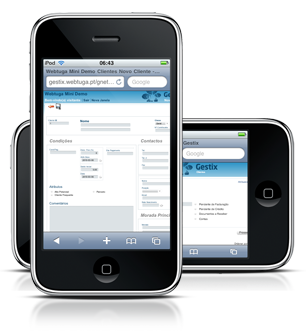
    Hoje em dia é necessário ter acesso a toda a informação através de qualquer parte do mundo. Com a solução Gestix poderá consultar a facturação em várias línguas e os detalhes dos seus clientes desde qualquer parte do mundo, bastando que para tal tenha uma ligação à Internet e um dispositivo com browser web.

    iPhone Gestix

    Poderá também utilizar o Gestix para CRM (Gestão de Relação com Clientes), gestão de stock e inventário e gestão de fornecedores. Tudo o que pode imaginar, pode ser feito com o Gestix.

    Este software está também já preparado com o SAF-T/PT (2010) que entrou em vigor a 1 de Janeiro de 2010.

    Se está à procura de uma solução de facturação então o Gestix é a ferramenta ideal para si. Temos disponíveis quatro versões do software, o Gestix Mini, Gestix Light, Gestix Business e Gestix Enterprise.

    Todos eles são bastante fáceis de utilizar e poderá a qualquer momento pedir a transferência da sua licença para uma versão superior do Gestix caso necessite de mais funcionalidade que não estejam presentes no seu plano.

    Clique no botão abaixo para obter mais informações acerca dos preços das licenças e das funcionalidade de cada uma das licenças. Poderá também testar as demos disponíveis no nosso site.

    Mais Informações do Gestix

    WebTugaGestix – Software de Facturação Online

  • XDAndroid gets Wifi working on Touch Pro2 Android CAB

    Well, the days are coming closer that an Android ROM will be available for the Touch Pro2. Recent build of Android for the TouchPro 2 and Diamond2 seems to finally get the very wonderful WiFi working.  Wifi and other new features that improve the speed and battery life of the phone while running Android.

    I have used this CAB twice since release and I most say. It is spectacular, fast, somewhat smooth, and come on, Wifi works.  There should be a new version coming out soon, and I am excited to see what will come next.

    Download the CAB here

    Whats Inside:
    NEW Mar 01 WiFi WORKING! (Except WEP)
    NEW Mar 01 New file system to match other handsets and avoid apps installing to system folder. “Android” folder, is now “andboot”
    NEW Mar 01 New D-pad fix, all directions work correctly, thanks Phh!
    2/27 **Removed 3/1 does not play nice with wifi** Overclocked Rhodium CPU
    2/27 Phone off/restart!
    2/24 Sleep enabled (Still working on FULL sleep. LED debug feature: Amber = On Green = Sleep)
    2/24 New XDAndroid personalized Haret start menu icon. (see screenshot below)
    2/22 New backlight control: Including on/off fading and brightness controll (disable auto backlight in WinMo first!)
    2/22 Eclair System.sqsh to enable Rhodium Gsensor
    2/22 Start menu Haret icon
    2/15 New edited rootfs to support Rhod100 fr/uk/de (Thanks majster-pl)
    2/11 02/07/10 Android.Eclair.2.0.1 XDAndroid Build
    2/11 Hardware keyboard landscape/portrait recognition.
    2/03 New Kernel: Allows Android to use almost twice as much available RAM!! Faster boot, faster Android, GOTTA TRY IT.
    2/03 New Touchscreen Calibration tool during first Haret boot (its during the first Haret! You cant miss it!)
    2/03 Rootfs for Tilt2 and Rhod210 Keyboard map! (Thank AdamWill for the remap and hours of sleepless testing!!)

  • Portal 2 Confirmed for Mac [Steam]

    If Matt had to change his pants over the Valve Apple teasers the other day, what will today’s wardrobe malfunction be? I only ask because the latest GameInformer confirms Portal 2 is coming to Mac.

    Scheduled for a fall release, Portal 2 will be a full-fledged Portal experience distributed to the Mac, presumably, by an all-but-confirmed Steam service for that platform. [MacRumors]


  • Microsoft Instant Voice translation

    It seems like Microsoft is keeping busy working on some things that might spill over to the Windows Phone world.  The new translator is one of the first in the world that translates your voice instantly to another language.  The Video over at Gizmodo shows it in action. It demos the over sized voice translator change the spoken German words into English. The software runs on Bings translating service and it gives you the same results as if you were typing into your computer. 

    Now you might be wondering why does this connect to Windows Mobile, why is the sky blue, why am I asking this questions. This could easily be part of Windows Phones 7 Series, for example. Android devices use your voice to search for content and what not. Not only can this be part of our next gen OS, but it will support many languages thanks to Bing’s wide and growing database, and with that it will give us a  chance to connect with other people easier.

    This is just something that shows the amount of effort Microsoft is putting into upgrading all their services, and with that 1Billion on mobile development, we can rest at night knowing that MS is thinking of a new way to “Integrate out life’s.”

    Via:GV

  • Jabra Stone Review

    Today we are reviewing the Jabra Stone  Bluetooth headset, a masterpiece of style and tech. This review is one of the first that was done, except for the video, almost completely while trudging through the deep Minnesotan snow. In the review I touch some very important features, good and bad of the Stone.

    Let’s begin.

    Package:
    The Jabra stone comes inside an all black, glass case. The box contains some very useful extras like the included USB charger, wall charger, manual, belt clip, and more things you might find that you need. The device and its charger are both in the front cover of the case where unusually everything is clearly labelled.

    The package of any device is one of the most important selling point, because it portrays the devices quality. The packaging of the Stone exudes quality and class.

    Design:
    The Jabra Stone, as mentioned before is a masterpiece of design. The look is innovative and very creative. The all black design and perfect curves gives it a sexy but still professional design. The all touch body is not as sensitive as I would prefer, but is still a one of a kind and it all fits in the palm of your hands.

    The headset does have one issue with the design. The headset, while flexible, does not fit perfectly into your ear. It has a loose design and it sort of shakes a little more than I would like. That makes it not ideal for wearing while walking or running.

    The headset is also only for the right ear, so if you like to switch things around once in a while, this device is not for you.

    Function:
    Like many Bluetooth devices. The Jabra Stone does the usual calling, music, and the whole 9 yards. The music streaming capability is  very smooth with crisp play back. The bass on the headset is perfect for the one ear listing.

    Call Quality:
    This is where the headset really shows it quality and makes it worth the price. The headset has one of the best call qualities I have ever tested. When used in a normal medium noise area, callers said I sound very clear and crisp even while talking at low volume. The device picks up a little noise when walking next to loud objects but luckily the receiver did not have too much to complain about.

    The place where the call quality really showed it’s down site was when it became windy outside. While walking on a windy street, the other caller said he could hear all the wind breezing through and that made it a little hard for him to understand me at times.

    Price:
    The price of this device while high, seems to be worth it for someone that wants a great device, and a decent Bluetooth headset. The unit is usually sold by AT&T or Jabra in the $120 range, but you could find it in the $90 range elsewhere.

    Conclusion:
    My final thoughts on the unit is this headset is great, Jabra really did a major job with the design, but that it does have its flaws. Overall however it is a great buy, and for $90, it is very well worth it for the person that has been searching for a new gadget.

    Ratings:4/5
    Package:5
    Design:4
    Function:5
    Call Quality:4
    Value for money:4

  • How To: Run Windows in OS X, the Right Way [How To]

    If you’re anxious about switching from a PC to a Mac, consider this: There are a multitude of ways you can virtualize Windows within OS X, and they all work uniquely well. Here’s how to choose the right one.

    There are three major virtualization products for Mac, and at their core, they’re all quite similar. Each creates a virtual machine, which is to say, crudely, a software implementation of a separate computer. When you install Windows in a virtual machine, Windows thinks it’s installed on a PC with a somewhat generic set of hardware. In fact, the hardware it thinks it’s installed on is a software construct, and any time Windows utilizes what it thinks is a hardware component, its requests are actually being passed through to your Mac’s real hardware.

    Anyway! What’s going on under the hood is conceptually similar among the most popular virtualization apps, but the ways they install, run and integrate Windows inside of OS X vary wildly. So, assuming you’re ready to take the virtualization dive, which app should you use? VMWare Fusion 3? Parallels 5? Sun VirtualBox? They’re all different, but in a strange way, they’ve ended up falling out of direct competition—each one is right for certain kinds of users. So which one’s right for you?

    If You…

    • Want to run Windows 7 within OS X, and basically nothing else?
    • Want to run Windows apps as if they’re part of OS X, visually and behaviorally?
    • Think a virtual machine should integrate into OS X almost completely, rather than live inside its own window?
    • Want to play 3D games in your virtual machine?

    Then You Should Use…


    Parallels 5! This is a paid solution, and while it’s a full virtualization suite—you can run Linux and other OSes from within OS X as well—it’s the one most purely dedicated to making running Windows 7 as seamless as possible. Installation is almost completely hands off, and once you’ve got it up and running, it can actually be themed to look more like OS X. This has the dual effect of making the OS look more natural when it’s running in windowed mode (where the OS is isolated to its own window, like an app), and making the so-called “Crystal” mode, which lets you run Windows apps as their own windows in OS X, and which integrates Windows menus into Apple’s operating system, such that it’s barely even clear that you’re not running native apps.

    Parallels’ strength lies in how thorough it is in trying to make Windows integration seamless. Windows 7’s system-wide transparency effects, powered by Aero, work fine out of the box with Parallels; you can enable OS X’s multitouch touchpad gestures for MacBooks in the OS with a simple options menu; pulling an installation over from a Boot Camp partition is just a matter of walking through a wizard; sharing files and clipboard items between OSes was trivially easy.

    DirectX support is legitimately good enough to actually run a mid-range game without terrible performance degradation. (Games like BioShock or Crysis will run, but unless you’ve got a top-end iMac, you’ll probably suffer from serious slowdowns. If you’re serious about gaming on a Mac, just install Windows natively using Boot Camp.) It’s kind of like magic!

    Parallels’ Windows powers are unsurpassed, but come at a cost. First, in dollars: It’s $80. Then, in features beyond Windows integration: There aren’t a whole lot of appliances—preconfigured packages that let you install other operating systems, like variations of Linux—as compared to VMWare, and there are stability issues; I’ve had to close down the entire virtual machine a number of times over the course of testing, and I couldn’t identify a particular trigger. One second I’d be seamlessly toggling between Internet Explorer and Safari, and the next I’d be trudging through a prolonged virtual machine restart routine.

    So yeah, it’s worth it, if you’ve got a handful of Windows apps you can’t live without, or if you want to play fairly recent games without booting into a separate partition. [Parallels]

    If You…

    • Want to experiment with more than Windows
    • Need bulletproof performance with Windows
    • Want to run Windows and Linux apps as if they’re part of OS X, albeit without too many interface flourishes?

    Then You Should Use…


    VMWare Fusion 3! VMWare’s virtualization software is a reliable option no matter what you want to do. The way it integrates Windows into OS X is fairly transparent, but not quite as aesthetically consistent as Parallels. Gaming performance isn’t as strong as in Parallels, though 2D rendering—like Windows 7’s Aero—runs a bit smoother in Fusion than in any other solution. As with Parallels, Fusion automates the Windows installation process to a degree, and makes importing a Boot Camp installation fairly simple.

    VMWare is a workhorse, and for most tasks—be it cross-platform website testing, running Windows versions of Microsoft office, or syncing with a Windows-only device like the Zune HD—it won’t let you down.

    Tinkerers will find a massive library of preconfigured appliances, so you can try out virtually any operating system you’ve ever heard of (as long as it’s freely available) with little more than a file download and double click. Fusion 3 costs $80. [VMWare]

    If You…

    • Need Windows emulation
    • Don’t want to pay anything for your virtualization software
    • Don’t need to do any serious gaming
    • Don’t mind rougher integration of Windows into OS X

    Then You Should Use…


    Sun VirtualBox! While the prior two options are paid, and not exactly cheap, VirtualBox is free. Totally. This means that, if you’ve got a spare Windows license, you can install Windows to run within OS X without spending an extra dime, and without suffering too much of an inconvenience as compared to VMWare or Parallels. (Full Windows 7 installation guide here)

    VirtualBox doesn’t have the same level of DirectX support as either Parallels or Fusion, so while gaming is theoretically possible, it’s probably not worth your time. There is a “Seamless” mode for minimizing the Windows desktop and running Windows apps as if they’re native OS X apps, but it’s neither as seamless nor visually integrated as Parallels’ or Fusion’s.

    But really, these are minor complaints. If all you want to do is run the odd Windows apps, try virtualization or configure or access some Windows-specific peripherals, VirtualBox will get the job done. It doesn’t have the polish of its paid competitors, but let’s be real here: We’re virtualizing an operating system. All solutions are by definition going to be less than perfect. VirtualBox will accomplish 85% of what Parallels or VMWare can do, in terms of running Windows apps or booting into alternative operating systems, at 0% of the cost. And for that, it deserves your attention. [VirtualBox]

    If you have more tips and tools to share, please drop some links in the comments-your feedback is hugely important to our Saturday How To guides. And if you have any topics you’d like to see covered here, please let me know. Happy virtualizing, folks.


  • Windows Phone 7 demo shows cross platform game coding, playing

    Here is another very interesting demo from TechEd Middle East.  It shows a game being started on the desktop, continued on the Windows phone 7 and then finished on an XBox.

    It also shows the coding process, including a glimpse of the sensor framework, and the promise that 90% of the code, presumably Silverlight and XNA, can be shared between the platforms.

    Impressed yet? Let us know below.

  • Another Windows Phone 7 demo shows 2 kinds of multi-tasking

    This Windows Phone 7 demo at TechEd Middle East shows 2 interesting features.

    The first is when the user switches to Internet Explorer, and the page is already loaded.  This indicated that at the very least Internet Explorer suspends or even better fully multi-tasks in the background.

    The next feature demoed is turning any web page into a tile.  The tiles can however also be active, pulling data directly from the internet, and clearly another route for developers to multi-task on Windows Phone 7.

    As of yet we do not know if Windows Phone 7 will allow full multi-tasking, but what has been shown already clearly shows, with clever developers, there will be a way to keep our phones constantly in contact with the outside world.

  • LinkedNotes: Create Wiki Style Linked Notes From Desktop

    There are so many note taking aplications – from desktop tools like Evernote to browser add-ins like Chromepad. But you have to be selective and pick the best one that suits your need.

    Feature rich note taking applications like Evernote may look good at the first glance but while you use them on a regular basis, you feel the need to switch over. Why? Because you need a program to increase productivity and do not want to dedicate an entire day learning how the application works.

    Linkednotes is the simplest of all note taking apps for Windows. It has a rich text editor and you can create wiki style notes and interlink them for quick navigation.

    Once the program is installed, start the application and create notes as you normally do. All the notes are called “pages” and they are hierarchically listed in the sidebar.

    linked-notes-wiki-style-note-taking

    You can create pages and subpages and then subpages of subpages and so on. The best part of LinkedNotes is that it autolinks to every page anchor text when a word is used.

    Confused? Ok let’s say you create have two pages – “Members” and “dates”. When you write a note on the members page and use the word “dates” the word dates automatically links to the “dates page”.

    As seen in the above screenshot, the program has linked to two pages from the Members page” when i wrote the words “project” and “dates”. This is useful, you don’t have to copy links and manually link to other notes. Just write the notes and use the page name as anchor.

    Other features includes importing and exporting notes from RTF and text files. You can also use the timestamp feature to append the current date and time at the end of your notes. This will let you remember when you had created a specific note.

    LinkedNotes requires Microsoft .NET to be installed and works on Windows XP, Windows Vista and Windows7. Thanks Ghacks.

    Techie Buzz Verdict

    Linked notes is extremely simple to use and I think besides using Chromepad, I will use it for some weeks. Yes, I know it’s very basic and there aren’t features like alarms and screen alerts, but some things just demand simplicity.

    Techie Buzz rating: 4/5 (Excellent).

    LinkedNotes: Create Wiki Style Linked Notes From Desktop originally appeared on Techie Buzz written by Amit Banerjee on Saturday 6th March 2010 09:57:41 AM. Please read the Terms of Use for fair usage guidance.

    Don’t miss these Related Posts:

    Join Techie Buzz on Your Favorite Social Networking Sites


  • A High-Tech Entrepreneur On the Front Lines of Solar

    Todd Woody (who seems to be writing for half the green business periodicals in the US) has an interview with (solar thermal power company) eSolar CEO Bill Gross at Yale Environment 360 – A High-Tech Entrepreneur On the Front Lines of Solar. Gross talks about how techniques from the software industry are being applied to continuously improve the performance of next generation CSP plants, how the Chinese market is moving much faster than that in the US, how eSolar tries to build smaller plants on private land close to cities to avoid the transmission bottlenecks plaguing remote locations currently and what is needed to make CSP cost competitive with coal fired power.

    Bill Gross is not your typical solar energy entrepreneur. In a business dominated by Silicon Valley technologists and veterans of the fossil fuel industry, Gross is a Southern Californian who made his name in software. His Idealab startup incubator led to the creation of companies such as eToys, CitySearch, and GoTo.com. The latter pioneered search advertising — think Google — and was acquired by Yahoo for $1.6 billion in 2003.

    That payday has allowed Gross to pursue his green dreams. (As a teenager, he started a company to sell plans for a parabolic solar dish he had designed.) Over the past decade, Gross has launched a slew of green tech startups, including solar power plant builder eSolar, electric car company Aptera, and Energy Innovations, which is developing advanced photovoltaic technology.

    But it has been eSolar, backed by Google and other investors, that has been Idealab’s brightest light. In January, the company signed one of the world’s largest green-energy deals when it agreed to provide the technology to build solar farms in China that would generate 2,000 megawatts of electricity — at peak output the equivalent of two large nuclear power plants. And last week, eSolar licensed its technology to German industrial giant Ferrostaal to build solar power plants in Europe, the Middle East, and South Africa. Those deals followed eSolar partnerships in India and the U.S.

    ESolar’s power plants deploy thousands of mirrors called heliostats to focus the sun’s rays on a water-filled boiler that sits atop a slender tower. The heat creates steam that drives an electricity-generating turbine. Last year, eSolar built its first project, a five-megawatt demonstration power plant, called Sierra, in the desert near Los Angeles.

    This “power tower” technology is not new, but what sets the company apart is Gross’ use of sophisticated software and imaging technology to control the 176,000 mirrors that form a standard, 46-megawatt eSolar power plant. That computing firepower precisely positions the mirrors to create a virtual parabola that focuses the sun on the tower. That allows the company to place small, inexpensive mirrors close together, which dramatically reduces the land needed for the power plant and cuts manufacturing and installation costs. …

    e360: Were there any particular lessons you were able bring from the Internet industry to the solar industry?

    Gross: The biggest lesson that we brought was — I don’t know if it was a lesson, but it was a philosophy — which is Internet-enable everything and put monitoring into everything.

    So we have a microprocessor in every mirror and we have statistics second-by-second on the status, position, reliability, pointing accuracy — everything — of every single mirror. We structured ourselves almost like an Internet company from the beginning to have logs of everything — every revolution of the turbine, every control from the control room, every Web cam image captured — so we could do data mining and data analysis on everything.

    We want the ability to make software upgrades and impact every power plant around the world. That’s probably one of the biggest differences between our technology and all other solar technology. If you [have] a big field of [photovoltaic] panels, those PV panels are there for 25 years. They’ll have that same performance, and there’s nothing you can do to change that.

    We can make a software upgrade and every power plant in the world can suddenly put out 3 percent more power potentially. And we found already a number of software improvements that we can make even over the past six months, which significantly boosts performance of an already-constructed power plant. There’s new improvements we can make to the actual hardware, too, but even without changing the hardware there are software changes that can make more power, so we’re really excited about that. …

    e360: At a time when some big solar power plant projects are bogged down in disputes over their environmental impact on desert ecosystems and their water consumption, eSolar so far has avoided such controversies.

    Gross: We have a strategy at eSolar to never impact pristine land. And the way we address that is several-fold. First, we have a higher output per acre, so we take a smaller footprint. Second, we’re economical at a smaller size. We can be fully economical at our 46-megawatt size. Those two things combined let us use a small enough footprint that we can locate on private land closer to population centers.

    So rather than needing 2,000 acres contiguous to make the economics work — which you almost only can find far away on pristine land or [federal] land — we can locate on only 200 acres very close to a city and we can buy previously disturbed farmland or other properties that’s already been developed so we’re not causing any disturbance to natural habitat. And that’s an important part of our philosophy. It gives us an economic advantage because we’re locating closer to transmission. That’s probably even a bigger factor.

    It takes years and years to build the transmission out to the pristine lands. [But] the power plant, for example, in Lancaster [California], is across the street from a transmission line. We didn’t have to build miles and miles of transmission, which takes years and years to get people to approve. …

    e360: Where do you see the next big innovations in solar thermal technology coming from?

    Gross: I feel we still need to get almost another factor of two in the reduction of energy costs to potentially compete with coal. We’re already close to competing with natural gas. It depends on the sunshine and the region. Another factor of two is going to require two things to make that happen: Approximately 25 percent of that can be gotten by adding [energy] storage, and 25 percent can be gotten by increasing efficiency and lowering costs by volume production.

    We produced 500 mirrors two years ago, 24,000 last year, and this year we’ll produce a million. So we’re going to get a quantity break just by going to a million mirrors from 24,000.

    And everything gets more efficient in the supply chains as you get up to those volumes. Anything that we buy in our lives that has dramatic cost reduction has seen a million — a million cars, or a million iPhones, or a million laptops. So far there’s only been thousands of heliostats. So finally this year we’ll cross the million number and that’s when we can get the price reduction to really be competitive with fossil fuels.


  • DeltaPoint Wins OEN Angel Investment

    Gregory T. Huang wrote:

    Portland, OR-based DeltaPoint has won $170,000 in the Oregon Entrepreneurs Network’s angel investment competition today. DeltaPoint is developing diagnostic software that performs “virtual biopsies” on suspected cancers, starting with breast cancer. The company was a finalist in the OEN event’s “launch stage” category. Portland-based Enjoy Life, which says it is the producer of the first authentic, premium Sangria in the U.S., took home $25,000 as the winner of the “seed stage” category.


  • Full MIX10 Session details for Windows Phone now available

    lg-panther We have been waiting a long time, but Microsoft has now finally revealed the Windows Phone MIX10 session details, which can be read below.

    • Silverlight Performance on Windows Phone

      Learn how to optimize your Silverlight code for Windows Phone. This session will discuss common bottlenecks using the graphics and managed stacks, and will highlight how to optimize startup and reaction

    • Distributing and Monetizing Windows Phone Applications and Games

      Windows Phone Marketplace will revolutionize distribution of Windows Phone applications, games, and content, and is designed to solve the two largest problems of the Windows Phone consumer-focused developer community: distribution and monetization. This session will provide application developers with the insights, tools, and processes necessary to begin distributing and monetizing their applications on the Windows Phone platform.

    • Development and Debugging Tools for Building XNA Games for Windows Phone

      This session covers tools available to the developer for building XNA games including debugging, emulation, and performance. Special emphasis is placed on best practices for managed code performance and .NET profiling tools you can use to optimize your games for windows phone.

    • Windows Phone Application Platform Architecture

      Windows Phone 7 Series represents a significant change from the past. The entire stack, starting with the operating system, user experience, and the application platform have been engineered to build a new class of phone that users will just love. This session will go under the covers and describe how to think about applications and games from the perspective of user experience, security, packaging, cloud services and performance. Details on the new application model, device capabilities, location, sensors, and other platform capabilities will be covered.

    • Building Windows Phone Applications with Silverlight, Part 2

      Together with part 1, these sessions give an overview of the functionality for Silverlight applications that is unique to the Windows Phone application platform. Part 2 will cover the new application model, updated control templates, themes, and services available to applications, including new Windows Phone web services.

    • Building Windows Phone Applications with Silverlight, Part 1

      Together with part 2, these sessions give an overview of the functionality for Silverlight applications that is unique to the Windows Phone application platform. Part 1 will cover new input paradigms including multi-touch, software keyboard, accelerometer and microphone, as well as the APIs to leverage phone applications like email, phone dialer, contact list and more.

    • An Introduction to Developing Applications for Microsoft Silverlight

      New to Silverlight? This is the session for you. This session will cover: how to get started building your first application, tooling, extensibility and deployment. We’ll also highlight the capabilities of Microsoft Silverlight on the PC, as well as support for Windows Phone.

    • Windows Phone UI and Design Language

      Windows Phone constitutes a dramatic new user experience paradigm. This session will provide prescriptive guidance, tips, and techniques on how designers & developers can build beautiful, compelling user experiences that are consistent with the built-in Windows Phone 7 Series experiences.

    • Overview of the Windows Phone 7 Series Application Platform

      The new Windows Phone is coming! Get a high-level overview of the new application platform and a complete picture of the developer story. Learn about the developer tools, the application frameworks, the support for Silverlight, and the support for XNA.

    • Designing and Developing for the Rich Mobile Web

      The Mobile Web has been a long time in coming, and now that it’s here, it’s a force that you and your business can’t afford to ignore. What has made all of this possible is the combination of ever-more-powerful devices, fast network connections, and highly capable mobile browsers. In this session, you will learn how to build sites that work well and look great on Windows Phone and across mobile devices. We’ll cover the core mobile Web scenarios, preparing content for mobile, and tips and techniques for debugging and testing your sites.

    • Building a High Performance 3D Game for Windows Phone

      This session will detail how to use XNA to develop 3D games for Windows Phone, with a special eye towards the special characteristics of Windows Phone application platform. Special attention will be placed on optimizing high-performance managed code games for the platform, to help you squeeze out every last drop of performance.

    • Building Windows Phone Games

      With the release of Windows Phone, game developers will be able to create amazing content rapidly through the power of Silverlight and the XNA framework. This talk will outline the basic application model of Windows Phone, enumerate Windows Phone core device characteristics, and walk through highlights of Silverlight and XNA Frameworks on the phone.

    • Changing our Game – an Introduction to Windows Phone 7 Series

      Major changes are coming to Windows Phone! This session goes in-depth on the design and features of Windows Phone and gives a comprehensive picture of what’s coming in this exciting new release.

    See the list at VisitMIX here.

  • Seattle’s Loss: DocVerse Bought by Google (Maybe as a Bridge to Microsoft)

    DocVerse
    Gregory T. Huang wrote:

    It’s the second notable Google acquisition in these parts, coming on the heels of Seattle-based Picnik getting bought by the search giant earlier this week. DocVerse, a collaborative-document software startup founded in the Seattle area in 2007 by former Microsofties and MIT alums Shan Sinha and Alex DeNeui, has been acquired by Google, according to a company blog post. Financial terms of the deal weren’t announced.

    Here’s the catch, from a Seattle perspective. DocVerse moved to San Francisco in the summer of 2008, mostly because its founders thought the Bay Area is the best place to grow a successful startup, and its investors were there. It’s hard to argue with their results. (Sinha gave Xconomy four reasons why the San Francisco area is for startups like what Hollywood is for moviemakers.)

    In a blog post today, Sinha talks about the deal and the culture fit between DocVerse and Google—a bit similar to Picnik CEO Jonathan Sposato’s comments on “how Google works” from earlier this week. “What impresses us the most about the Google team is that they all share the same philosophy—giving people the tools to work the way they want. From the moment we started talking with them, it was clear that there was a lot of shared DNA in how we approached solving people’s problems,” Sinha writes. “We’re looking forward to the opportunity to scale our vision at Google. Our first step will be to combine DocVerse with Google Apps to create a bridge between Microsoft Office and Google Apps.”

    This last bit is intriguing, from a big-company perspective. DocVerse’s software enables Web-based collaboration within Microsoft Office staples like Word, Excel, and PowerPoint. One question is whether Google really cares about the DocVerse product as a way to connect Office with Google Docs—or compete better with Office—or whether it’s just buying talent at this point. You can read the official Google blog post here.


  • Freeware Fridays | Top Tools Of the Week

    1. ComparePSD

    A great tool to compare a Photoshop document with respect to its layers and effects. You can compare two versions of the same Photoshop project with any set of layers or effects. This helps you choose the set of image attributes that render best output image.

    2. Double Driver

    A freeware driver backup solution to save your drivers for future use. The backup proves helpful in cases where any of your hardware is not working and you do not have the proper driver to fix it. Use the tool to backup your installed drivers after a successful operating system installation with all the hardware properly working.

    3. Geosense

    Get free GPS navigation on your laptop. This app is developed taking advantage of a built-in location sensing API in Windows 7.

    4. SoftMaker Office 2010

    An excellent alternative to MS Office Suite. Though this is not a free tool but its worth spending money for. A free beta version is also in place for the Linux users.

    5. TidyStartMenu

    Give your Start Menu a more organized and clean look. After prolonged use the start menu gets cluttered with loads of items which sometimes makes it quite annoying while looking for anything. This tiny program comes handy for organizing those items and making every item in it much easily accessible.

    6. Windows Right Click

    This is a nice freeware tool to extend the functionality of Windows right click. The right click button is the most used button while using the computer after left click. This tool has the ability to append most used shortcuts to tasks like copy to, open control panel etc to the right click context menu thereby making your time more productive.

    7. Saurabhorange Logon Screen Changer 0.4

    Try this nice little utility to change the background of the Windows logon screen. The tool is pretty basic and is compatible with Windows XP, Windows Vista and Windows 7. If you like to change the background screen for Windows 7 only you can try Tweaks.com Logon Changer for Windows 7.

    8. Free Registry Cleaner for Windows 7

    This is a light-weight tool that scans your Windows 7 registry and fixes errors in it.

    9. Windows Post-Install Wizard

    Whenever we need to re-install Windows, we have to use lot of CDs. Most of them for the applications and drivers that needs to be installed after Windows has been installed. If you are willing to create a single disc with applications and tweaks of your choice already embedded in it Windows Post-Install Wizard is the tool for you. The disc created using the tool comes with an option to select from the list of applications and tweaks after Windows has been installed and this option is often called Post Installation Wizard.

    10. Gmail Growl

    This is a free tool to get nice looking Gmail updates on Windows 7. Though there are some minor annoyances in this free tool I liked it very much as the updates were real-time and shown right on the tool’s Windows 7 taskbar icon. You can also compose mails using this utility.

    That is all for this week. Please share with us if you have come across some great tools that were released or updated during this week.

    Freeware Fridays | Top Tools Of the Week originally appeared on Techie Buzz written by Soumen Halder on Friday 5th March 2010 04:00:40 PM. Please read the Terms of Use for fair usage guidance.

    Don’t miss these Related Posts:

    Join Techie Buzz on Your Favorite Social Networking Sites


  • HTC eReader now available as stand-alone cab

    ereaderapp (1) HTC’s stylish e-reader is now available as a stand-alone cab, freed from the Sense UI.

    The main advantage is that the app can now be installed on any phone, independent of the version of Sense installed, and does not take up as much RAM as when installed in Sense.

    The can can be downloaded MobileUnderground.info here (needs registration).

    Via Pocketnow.com