Category: Software

  • GrandView and idea management software – Fallows and more

    James referenced a host of interesting modern software. Of the list he gave I can personally vouch for the very affordable OmniOutliner (which most closely resembles GrandView) and the terribly expensive MindManager. I’d also add Inspiration, which he omitted. Inspiration is still around, though it’s now marketed only to schools and no longer actively developed.
    There are several other OS X apps in this domain; Matt Neuburg used to write on this topic and Ted Goranson wrote “About this Particular Outliner” from 2003 to 2008 starting with a must-read history column. (Yes, one day there will be historians of software, who will write doctoral theses about the role of MORE 3.1.)
    There are so many fine designs in these old products. Perhaps we need software archeologists to resurrect them for modern reuse. If you know of old copies, don’t toss them out. Get them onto a hard drive. There will always be emulators to run them.


    My Google Reader Shared items (feed)

  • Crayon Physics Deluxe on the HTC HD2

    Crayon Physics Deluxe is a pretty cool game which brings crayon-like drawings to life in a goal-based physics simulation.

    The software was initially only available on the desktop and later the iPhone, but now a version has come bundled with some Samsung Omnia 2’s, which as usual means copies of the game are floating around for download to just about any Windows Mobile phone.

    Of course, just because you can download it does not mean it will run, and according to FuzeMobility the game will run nicely on the HTC Pure but not its sibling, the HTC Tilt 2.

    One device it does run very nicely on is the HTC HD2, as shown in the video above.

    The game is not available for purchase anywhere, however if you want to give it a try on your WVGA-screened device the download links are available at FuzeMobility here.

    Share/Bookmark

  • Shake to Send comes to Windows Mobile

    Some devices, like the iPhone, have pretty deficient Bluetooth stacks, and have had to come up with pretty creative ways to share files.  One app which allowed this is called Bump, which paired devices which were shaken at the same time.

    Shake_to_Send_201012224222 Jaxbot over at XDA-Dev has implemented the idea as seen on this video.  The software uses the G-sensor to detect the shakes, but can also be used manually on devices without, and uses a data connection for the pairing and sharing process.  Jaxbot intends to implement photo sharing also, and to improve the already nice looking UI.

    Read more about the app at XDA-Developers here, and download the app here, or using this Microsoft Tag (gettag.mobi) (links to mobile download page).

    Share/Bookmark

  • Elecont Weather 1.0.1029 and YouTube Video Review

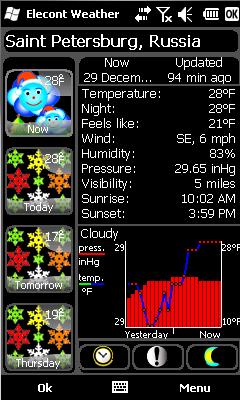
    Elecont Weather 1.0.1029 has been released with a new Windows Mobile 6.5 oriented gesture interface, new themes, and new colors.

    “Elecont Weather” is more than weather station for your Pocket PC or Smartphone. It produces accurate 10-day and hourly forecasts, warns you in case of high solar activity and severe weather (event of a severe thunderstorm, tornado, blizzard, hurricane, or other natural disasters). The most interesting feature is Barometer – a diagram showing the pressure changes during the past 24 hours. Now you always know the cause of headache if it is linked with changes in the air pressure. When Barometer detects pressure changes then it signals with a red color. “Elecont Weather” displays 10-day forecast with text descriptions separately for day and night time. You may find a lot of useful of weather parameters: “feels like” temperatures, chance of precipitation, humidity, visibility and much more. “Elecont Weather” has a global coverage (more than 51,000 locations). The data is provided by “WSI Corp.” (the world’s leading provider of weather-driven business solutions).

    You may find more and download “Elecont Weather” from our software store and receive the 30% discount.

    This post was submitted by elecont.

    Share/Bookmark

  • Sony Online Entertainment Gives Back With The Child’s Play Winter Charity Drive


    Sony Online Entertainment (SOE) is making it easy for players to support a good cause while playing one of their favorite online video games during the Child’s Play Winter Charity Drive. With new limited-time Child’s Play items available in EverQuest (EQ), EverQuest II (EQII) and Free Realms, participants can be charitable and receive fun in-game items in the process. The second annual fundraising effort is scheduled to run until January 17, 2010.

    Since 2003, over 100,000 gamers worldwide have banded together through Child’s Play, a community based charity grown and nurtured from the game culture and industry. Over 5 million dollars in donations of toys, games, books and cash for sick kids in children’s hospitals across North America and the world have been collected since its inception.

    This year, the charity has continued expanding across the country and the globe. With almost 70 partner hospitals and more arriving every month, you can be sure to find one near you in the continental USA and several other countries. You can choose to purchase requested items from their online retailer wish lists, or make a cash donation that helps out Child’s Play hospitals everywhere. Any items purchased through Amazon will be shipped directly to your hospital of choice, so please be sure to select their shipping address rather than your own.

    After last year’s successful campaign, SOE will continue its support of Child’s Play by donating $10 (up to $50,000 total) each time a player buys one of the Child’s Play items from the in-game Marketplace with Station Cash, SOE’s in-game currency. In addition, the EQ and EQII Child’s Play items are “giftable” this year, giving players the opportunity to purchase the EQ Child’s Play Anklebiter Doll or EQII Child’s Play Bouncing Baby Panda Cub for friends, family, and guildmates.

    “We were thrilled with the contributions our players allowed us to make to the previous Child’s Play campaign and with the addition of Free Realms this year, we are hoping to double our previous $21,000 donation,” said John Smedley, president of Sony Online Entertainment. “The support the video game industry has given Child’s Play over the years is fantastic, and we are humbled to be a part of it.”

    Child’s Play is a charity that is dedicated to providing children with toys and age-appropriate games at more than 70 hospitals worldwide. SOE’s players will be able to purchase the following items:


    EQ: Child’s Play Anklebiter Doll (500 Station Cash)


    EQII: Child’s Play Bouncing Baby Panda Cub (500 Station Cash)


    Free Realms: Child’s Play Triceratops (500 Station Cash)

    “With the help of industry initiatives such as this, Child’s Play is already over the million dollar mark and is looking to beat our record total of $1.3 million,” says Robert Khoo, Managing Director of Child’s Play.

    To participate in the SOE Child’s Play promotion, fund your SOE wallet with Station Cash or purchase Station Cash cards from participating retailers.

  • Y2K10 SMS date bug fix now available

    y10kbugfixed Apparently while the rest of us have been partying the happy hackers at PPCGeeks have been working through the night diagnosing and creating a fix for the Y2K10 SMS date bug.

    Ziggy471 & Scientific have posted a .cab which corrects this issue by creating this registry key:

    [HKEY_LOCAL_MACHINE\Software\OEM\SMS]
    "RecvTimeStamp"=dword:00000001

    Give the fix a download and report if it solved your problem.

    Via WMExperts.com

    Share/Bookmark

  • Y2K10 bug hits some Windows Mobile, other handsets

    y10kbug

    It seems some Windows Mobile handsets have been hit by a strange Y2K10 bug, with SMS’s apparently arriving from the year 2016.

    According the WMExperts.com the story is:

  • Messages received after 1/1/2010 may be dated as 2016
  • Effects WM6.1, WM6.5 and even non-Windows Mobile phones
  • It is ROM independent, meaning switching won’t help
  • All Some carriers seem to be experiencing this bug, but T-Mobile seems fine
  • HTC and LG are aware, but no official response yet
  • Apparently not all devices are affected, so it remains a bit of a mystery. My HD2 in UK does not appear to be affected, not those of the people I asked.

    Are your device affected by the bug?  Let us know below.

    Via WMExperts.com

    Share/Bookmark

  • HTC Steps back on HD2 free WM7 upgrade

    image

    We recently reported on the tweet from HTC Russia saying the HD2 will be receiving a free update, well HTC is stepping back from that tweet. In a new tweet from HTC Russia, they say the previous tweet they had on the HD2 getting a free upgrade to WM7 was posted by error and they do not have confirmation on that just yet.

    That tweet seems a little fishy, their are two ways you should take this. The first, this could just be a tweet that HTC is making because they do not want the news to be out so early even though they know it will happen. This could also be a genuine error and they are not actually sure about that this early. Either way, if you were going out today to get the HD2 because of the previous tweet then, you might want to rethink if you want to risk it, but I would, it is a great device and is also an HTC–by saying this, I mean it has XDA on its back, so if HTC cannot deliver an update, XDA will.

    Source:WME

    Share/Bookmark

  • iWork.com: One Part of a Much Grander Vision

    Very nearly one year ago I got my hands on Apple’s cloud-based document collaboration service, iWork.com, and now that the service is about to celebrate its first birthday, now seemed a good time to take a look at what’s happened in the last 12 months, and offer some guesses at what new features we might see coming soon. But as I started writing this article, I realized iWork.com is just one small part of a much bigger picture that sees Apple potentially changing what we have come to expect of Cloud computing — and what it means for just about anyone with a Mac.

    At the start of 2009, about the best online collaboration services were Google Docs and Office Live Workspace. Since then, the most exciting addition to that space is Google Wave. I do so much online collaboration I’ve tried all of the services mentioned here (plus many more), so back when iWork.com was first released it genuinely excited me. Here’s what I wrote back then:

    Apple has managed to strike the right balance between functionality and simplicity. Sure, there’s no online document editing, no way of seeing which users are currently viewing a document, no form of versioning or recording changes over time. Currently it’s not possible even to organize online documents into folders or logical groups (say, organized by Projects or Categories).

    But there’s also no need to install browser plug-ins to make it all work. You can share documents with anyone, regardless of their computer platform or OS. One of my favorite features is that I can share with colleagues and know they are not being forced to create accounts in order to use the service — unlike Microsoft’s draconian policy of requiring every Office Live Workspace user to have a Windows Live ID.


    Despite asserting in that article iWork.com was “set to become a crucial part of my workflow” it never happened because, after a few weeks of regular use, I grew frustrated with the lack of features I originally thought I could live without. (In fact at one point I considered buying a Mac for one of my colleagues just so we could both use iChat and Pages!)

    iWork.com has barely changed over the course of the year, but I’ve remained hopeful Apple would do something worthwhile with it. I love Google Wave, but I just know that if Apple put some real effort into iWork.com I’d switch to it in a heartbeat. Apple could do for online collaboration what it did for spreadsheets; turn an otherwise dull but inescapable business activity into something elegant, stylish and fun.

    That said, it’s got a long way to go. Google Docs is ‘limited’ only by comparison to locally-installed productivity software such as iWork or Microsoft Office. For a free online software suite that works in just about any modern browser, it’s an awfully tough act to follow. Microsoft, too, is doing good work with the new online versions of its Office software. (Say what you will about Microsoft, it knows how to make great productivity apps.) iWork.com looks pretty pointless next to those giants.

    Focused on its Future

    Cloud computing is now part of the landscape of online life. Web based collaboration is no longer the minefield of incompatibilities and faltering functionality it once was. What is absent is an end-to-end, platform-independent (but unashamedly-platform-enhanced) solution that’s dirt-simple to use — and gorgeous to look at, too.

    The good news is Apple is definitely not abandoning iWork.com; in fact, I suspect iWork.com is an integral future part of a much grander Cloud strategy. Last week Apple published a job listing for an engineer to join its Productivity (read: iWork) Team to work on a “…scalable rich internet application.” And though iWork.com has been somewhat neglected, Apple has busily pursued an aggressive Cloud computing initiative that began with MobileMe’s “Exchange for the rest of us” services in 2008 and one year later included a $1 billion server farm in North Carolina. Most recently, Apple bought Lala — very probably so it could acquire its media streaming technology.

    Apple is clearly focused on its future in the Cloud, and so far we’ve only witnessed its first awkward baby steps in that direction. I suspect iWork.com features more significantly in that strategy than anyone has guess.

    Users are starting to think of the Cloud less as a remote hard drive for family photos and more as a platform for realtime communication, collaboration and on-demand entertainment. I think Apple not only understands this shift in perception, but is positioning itself to make the most of it.

    So, as we start the new year and wonder what Apple has in store for us in 2010, consider this scenario; an iSight camera in every Mac, iPhone and iSlate, Exchange-services for everyone, fast over-the-air iTunes streaming, a vastly-improved iChat and iWork.com, and MobileMe to elegantly and effortlessly tie the whole gorgeous lot together. Owning a Mac suddenly takes on a whole new exciting perspective!

    What are your thoughts? Do you agree Apple has a far more sophisticated Cloud strategy than anyone previously thought? Or is this crazy talk?

  • Single Photo Tutorial: How to Make a Mask With Photoshop [Photoshop]

    Get it? Get it?? Yeah, I bet you got it. [tumblr via tumblr via Super Punch]


  • Great things of 2009 No. 5 – Windows Mobile 6.5

    Windows Mobile 6.5 was far from the Windows Mobile 7 we were expecting in 2008, but the late arrival of this OS update brought a much needed veneer to Windows Mobile which served to make the smartphone OS more palatable to both consumers and OEMs. Of course opinions are divided on each particular feature the software brought, but devices such as the HTC HD2 would be poorer for not having the actual native start menu and lock screen for example.

    Windows Mobile 6.5 brought much more than just UI improvements.  It also brought a new kernel with new memory management techniques which should allow software developers to make much better use of the massive memory Windows Mobile smartphones now ship with, and of course usual advances such as longer battery life and better stability.

    In 2010 we can expect further iterations to Windows Mobile 6.5 which will make the OS much more suitable for capacitive screens, and also more improvements in the bundled apps and also an increased rate of releases by Microsoft, culminating in the release of Windows Mobile 7 later in the year.

    Do any of our readers feel Windows Mobile 6.5 is a real advance over Windows Mobile 6.1?  Let us know below.

    Share/Bookmark

  • How-To: Replicating Coda’s Books Feature With Google Quick Search Box

    Espresso IconI recently made the switch to the newest version of the web development application Espresso. After having used Coda for all my previous web development needs, I’m naturally making some comparisons between the two. I’ll leave the blow by blow evaluation to others but thought it worth noting that the one feature I find myself really missing the most from Coda is the ability to quickly search through reference books. This surprised me a bit as I wouldn’t normally list this as a “killer feature” of Coda, but more than anything else I’ve found myself continuously cursing the lack of this option in Espresso.

    Thinking others might be feeling the same way I quickly threw together this Google Quick Search Box plug-in (ZIP, 742kb) that will let you send searches to reference sources for HTML, CSS, JQuery, PHP, MySQL, Python, and WordPress. You can start the query by entering text directly into QSB or by selecting text within Espresso itself, or any other application for that matter.

    It seems like a simple feature hardly worth mentioning but I’ve found that having the option to quickly check up on the details of a particular function, element, declaration, etc. is an essential part of the way I work. In Coda you can add your own reference books directly into the application associating each one with a particular code type, e.g. php, css, javascript.

    Coda Screenshot

    While in the code editor you can then select some text and choose “Look Up in Reference Books” from the contextual menu which will execute a search at the associated reference source using the text as the query. Unfortunately, one of the drawbacks to this approach is that you can’t quickly send queries to more than one source for a given code type. Nevertheless, over time I’ve really become dependent on being able to run these quick lookups.

    I figured the best way to close this gap in Espresso was by building a QSB plug-in. To install the plug-in just add the codex.hgs file into your ~/Library/Application Support/Google/Quick Search Box/PlugIns directory. Once installed you will need to restart QSB in order to access the new actions.

    QSB Screenshot

    Once you have everything working, just add any text into QSB (don’t forget to prepend with a space) press “tab” to pivot to an action and select a codex to search. Typing “codex” will bring up all available sources or you can just type the name of a specific source, e.g. WordPress, JQuery, and so on. Once you have selected the codex to be searched, press return to send the query. Alternatively, you can also start by sending text to QSB from within Espresso, or whatever other editor you’re using, by selecting the appropriate bit of code and choosing “Send to Quick Search Box” from the services menu.

    With the theory that a picture is worth a thousand words I recorded this quick video demonstrating the plug-in in action.

    Now that I have quick access to all my reference books I think I’ll be switching over to Espresso full-time. I’d be interested in hearing if anyone else has recently made the switch to Espresso and if so what they’ve been missing the most.

  • Omnia II apps continued

    The Omnia II is just about the most into it, app filled device I have ever used that had the pleasure to run Windows Mobile. The list of preinstalled apps are never ending and I just enjoy going through them and discovering something I have not used before. The video is just showing some of the good apps(they are all good) like the voice command, which is surprisingly good, even though my voice is hard to understand, and it takes no setting up at all. The other app that was talked about is the video editor that I love to use, it takes both your images, videos and song and puts everything together in the way you would like, and then make it into a MP4 format video with little memory used.

    Enjoy

    Share/Bookmark

  • Samsung Epix to get Windows Mobile 6.5 update in February 2010

    epix5 The original Samsung Omnia is still not on Microsoft’s Windows Mobile 6.5 updated list, but it appears Epix owners are a bit luckier, with the device apparently set to get the Windows Mobile 6.5 upgrade in February 2010.

    The update is likely a combination of serving business users and a desire to continue selling the current device.

    Read more at Microsoft’s updated list here.

    Via WMExperts.com

    Share/Bookmark

  • Logos Software Takes a Leap of Faith to the Mac

    Logos Bible Software shipped the first version of its Bible study software 18 years ago in December 1991 for the, at that time, brand new Windows operating system. Last year, Logos finally released version 1.0 of its software for the Mac and its story provides a great example of the growth of the Mac market and the strength of the platform.

    Just recently, Logos introduced an alpha release of version 4 which introduces feature parity with all 100+ new features in the Windows version. Along with a new iPhone app, Logos is making a big commitment to the Mac platform and it appears to be paying off.

    The exciting bit here is not so much another software release on the Mac, but the story of how one company made the move from Windows only to embrace the Mac and the iPhone.

    A Massive Digital Library, on your PC, on your Mac, on your iPhone

    Logos started out as a very simple piece of software meant to quickly search the text of the Bible. It has evolved into a complete digital library solution for studying everything from the Bible itself in the original languages and in numerous translations to commentaries, exegetical analysis, family trees of people in the Bible, maps and pictures of locations in the Bible and more. The library of books that are available to study and read in the Logos system is massive — over 10,000 titles. There are several different packages to choose from that include various collections of titles at different price points.

    The Logos 4 software runs on your Windows PC, on your Mac, and there is a companion iPhone app available as well. All of these versions will stay in sync with each other so you can pull up the titles you have purchased and see your favorites and personal notes wherever you happen to be studying. You can get a great overview of version 4 and how it works in a video introduction produced by Logos.

    The Journey to the Mac

    The effort to bring Logos to the Mac goes back several years, but the first abortive attempt was never finished. A renewed push came about four years ago. Dan Pritchett tells us that Logos approached the project with some trepidation about how Mac customers would receive a product from the Windows world.

    We decided that we wanted to put out the best Mac product that we could. The Mac market is sophisticated and sharp and very particular about their software. We couldn’t disappoint.

    Logos chose to build the application for the Mac from the ground up and make it a great native experience rather than do a simple port of the Windows app. In order to find the expertise to build great Macintosh software, Logos went straight to the source — Cupertino. Apple worked with Logos to help it find a partner with the right experience and the Logos for Mac project was launched.

    Was Moving to the Mac the Right Choice?

    It was challenging to work with an outside group on the Mac version while development on the Windows version continued internally. The end result was not too shabby, even if it did not have all of the extensive features of the Windows version.

    We’re ecstatic with the way the market has responded. The Mac world is hard to please. We were preparing for the worst: “You don’t get us, don’t understand us.” But the response has been really positive. The time we put into doing it right was well worth building it from the ground up. Our sales for the first quarter after the initial release were 122% above plan.

    That early success was enough to convince Logos to make a stronger commitment to the Mac. Since that first release, a Mac development team has been created in house and one of the Mac-enthusiasts on the Windows team has even switched over. One other benefit of the Mac?

    Our software worked way faster on the Mac. It not only works great, but it’s faster.

    What Does the Future Hold?

    The latest version, Logos 4, is being released quickly behind the Windows version with a goal of complete feature parity. The commitment to dual-platform releases means that installers for both Windows and Mac ship on the same CD. But the importance of the Mac does not stop at being included in the box. Dan told me that some of the design ideas from the Mac version were influencing the Windows version. Logos felt like they learned a lot about designing good software from the Mac effort, something that should come as no surprise to those of us that are used to excellent UI design on the Mac.

    One of the cool new features in Logos 4 is that the app will update in the background and pull in new features that are planned to be released over the next several months. While the Mac version is lagging behind Windows development, the gap is closing and this auto-updating feature will mean that Mac users will catch up.

    What Does this Mean for the Mac Market?

    I think there are two big lessons to be gleaned from Logos’ experience with the Mac. The first is that the Mac market is big enough to support even niche players that cater to a very particular group of customers. Logos took its Bible study software and made it work beautifully on the Mac by partnering with Apple directly and finding a partner that could help them make great Mac software. Once the concept was proven and the market response was measured, Logos quickly moved to bring Mac development in house and increased its commitment to the platform.

    The second important lesson here is that the cloud is having a profound influence on software development across platforms. The fancy syncing features of Logos 4 and the iPhone app that lets you access your entire catalog on the go are only possible with the advance of cloud computing, broadband, and mobile Internet. It is now possible to use the cloud as an easy way to move user data from an application on Windows to another application on the Mac that can share information. Switching platforms is facilitated by the cloud which makes it even easier for people to join the Mac crowd.

    Both of these trends bode well for the future of the Mac. We have a large sustainable market for software that can entice even niche players and new cloud computing technologies are helping reduce the dependence on proprietary Windows software.

    Other Logos Resources

  • Magic Sales for a Not-So-Magic Mouse

    Holiday spending has seen sales of Apple’s Magic Mouse soar. According to a report by NPD and covered today by AppleInsider, last month saw a twofold increase in Apple’s share of domestic mice sales. By the end of November, Apple had captured 10 percent of the market.

    NPD analyst Stephen Baker told AppleInsider:

    Sales in November were through the roof. The Magic Mouse had the best month for a mouse product from Apple that we’ve ever seen.

    It’s the first time Apple’s share of the domestic mouse market has ever reached double digits, and even more impressive considering the data was compiled from standalone sales. Units sold with new iMacs were not counted.

    While that’s fantastic news for Apple, I find myself wondering whether those new Magic Mouse owners aren’t going to be feeling somewhat disappointed because, despite its name, the Magic Mouse is anything but magical. For a company that gets so much of its user experience spot-on, it does keep missing the target with its pointing devices.

    Andy Ihnatko said it best:

    I can’t think of a single good Apple mouse released this millennium. Ideologically, they’ve all been covered with spray-glitter and rainbow stickers.

    When I got my Magic Mouse I admired its diminutive form factor and minimalist lines but it was clearly not an ergonomic design. That super slimline, ground-hugging shape took some getting used to. But aesthetic and ergonomic matters aside, I think the thorniest issue isn’t with the hardware at all. The problem, as I see it, is one of user perception.

    You see, users accustomed to the touchy-goodness of an iPhone or MacBook trackpad lament the lack of similar functionality in their supposedly ‘magic’ mouse. The major criticism is usually expressed in the form of common questions, like, Why is there no pinch to zoom functionality? Why do we have to click, when we could tap? Why aren’t more swipe-gestures supported?

    “It’s just a software fix,” reviewers on popular Apple tech sites have concluded, “Apple will likely add that functionality later in a software update.”

    Well, I don’t think so. In fact, I think Apple will intentionally avoid adding further touch functionality to this mouse, and I think I know why.

    Be Careful What You Wish For

    In the relatively short time since the Magic Mouse was released in late October, several third-party applications have appeared, both free and paid, that (ahem) ‘tap’ into the Magic Mouse software and foist upon the device all that pinching, swiping, multi-touch functionality people think they want. Well, I also thought I wanted those things…until I got them.

    Remember how, with the Mighty Mouse, you had to handle it with care because those side-buttons could be way too sensitive? They were so sensitive, in fact, many people disabled those buttons entirely because they proved such a nuisance. Turns out, having multifunctional touch-sensitive controls all across the surface of the Magic Mouse turns the thing into a far greater nuisance than its “mighty” predecessor ever was.

    I swiftly discovered that controls I wanted to trigger (say, a three-finger-tap) often wouldn’t register. I’d spend an inordinate amount of time obsessive-compulsively tapping the mouse with minimal success. Pinching and zooming was literally painful, transforming my hand into a deformed claw of knotted knuckles and cramp. Yet, for all my efforts, it still never zoomed in a controlled, predictable manner.

    Worse still, functions I didn’t intentionally invoke would trigger while I was doing something else entirely. It got to the point where simply moving the pointer across the screen — an action so natural and normal I normally give it no conscious thought — was now an event demanding deliberate care and attention. I tried two of the most popular apps and got the same results each time.

    In short , it’s not a software problem, but rather, a limitation imposed by the very form factor of the mouse. As long as Apple wants its flagship pointing device to be small, svelte and sexy, it’s just not going to be the right shape and size for full-fledged multi-touch controls.

    Software like MagicPrefs introduces hugely varied additional functionality

    Apple, I’m sure, did a lot of R&D to determine what were the most appropriate default touch controls for the Magic Mouse. Therefore, a feature’s absence is a deliberate choice. It makes perfect sense. One of the most celebrated aspects of Apple’s user-experience is its consistency; across all Macs the user experience is predictable and dependable. There are rarely unexpected (or unwelcome) surprises. Much of the time, that’s made possible by Apple’s minimalist, ‘less-is-more’ approach to interface design.

    That is why so many people disliked the Mighty Mouse. In trying to do so much it was just too unpredictable and ruined the user experience. And that is why the Magic Mouse is so limited. It’s better this way.

    I just wonder if all those new Magic Mouse owners will agree?

  • 6 Tips for Getting to Desktop Zero

    Many readers are likely familiar with the Getting Things Done craze of the past few years. This task oriented methodology has spawned a system for managing the chore that is email, with battle-cries of “Inbox Zero!” resounding around the Internet.

    While I’m not exactly an “inbox zero” kind of guy (close enough I suppose), I have found that the concept of “desktop zero” rings quite true with me. If you’ve ever seen a computer desktop covered in icons, we’re talking about the antithesis here. Read on to find out some compelling reasons to strive for desktop zero, and some tool tips on how you can easily achieve desktop zen.

    When I was young I bought a coin dish from a garage sale that read, “A clean desk is the sign of a sick mind.” (I added it to my already over-cluttered desktop in my room.) While I still find humor in that memory, the computer nerd in me is pretty particular about my digital workspace being neat and tidy. Just as inbox zero brings clarity, closure, and a sense of accomplishment to each day, so can keeping your computer’s desktop free of clutter and unnecessary files or folders.

    A Clean Starting Place

    I find it quite satisfying to boot up my machine, and have nothing but a hard drive “cluttering” my desktop. It feels like turning to a clean page in a Moleskin, or using a full-screen text application — there are just no (or very few) distractions to getting started with your work. Not to mention that if you need to drop a file there temporarily for quick use before deleting, it will be easy to find when not amongst dozens of other items.

    A Sense of Organization

    I’m quite particular about a sound data hierarchy to file things under, yet another place where my physical and digital lives are at odds with one another. If my desktop is littered with random files (email attachments, web downloads, the latest file lazily saved to the desktop to file later) and folders, it just means they aren’t in the place that I should be looking for them in the long term. Though on occasion I’ll relent and (temporarily) drop an alias (’shortcut’ for those of you new to Mac) of a folder on the desktop if it’s for a project I’m working in the majority of the time. At least that way, stuff it still in its proper place when I’m through.

    Revel in Your Wallpaper

    Here, we move from the arguably practical reasons to the more fun, and subjective. I love a great wallpaper image on my desktop. Sometimes it’s a great repeating vintage wallpaper pattern, or a too-cute-for-words picture of my kids, or a photo that I took and really liked. Every now and then it’ll do wonders to just zone out for a few while looking at a great image on a clean desktop.

    HUD Style Interfaces via Geektool

    If you’ve tooled around Flickr (with Mac on your mind) or followed the Featured Desktops on Lifehacker, you’ve seen them. A killer mash-up of geek chic, stunning design, and useful information result in some of the coolest desktop Head’s Up Displays you’ve seen. Some are as simple as using Geektool to push logs to the desktop, while others style the fonts, work along with the wallpaper, and sometimes even a custom theme to all of OS X. The results are generally nothing short of spectacular — and you’re not going to get there with a multitude of files strewn about.

    Sound interesting? Well it’s not hard to do. More than anything it’s a mindset. But having a process — and better yet, good tools — will help you clear that desktop in no time at all. Luckily there are many utilities and applications available to drill directly down to just what you want, wherever it may reside on your hard drive. But we’ll start simply first.

    A Temp Folder

    The things that tend to trip me up most, are those temporary files that I need for a short period of time and then forget about. If I’m just emailing a file or printing something, I drop it on my desktop, perform whatever action I need, and then usually delete it. However, sometimes it’s a bit of information that you may need for more than just a few days. At this point I’ll drop it into a folder named ‘tmp’ which resides in the root of my Home Folder. (example: ~/Nick/tmp) It’s as easy as that. Oh, and as an extra tip, add that tmp folder to your Dock as a Stack view for quick access!

    Fresh and Hazel

    If you don’t mind spending a few dollars, there are a couple of applications/utilities that I swear by for this kind of organization. (It’s worth mentioning that there are many applications that can fulfill these actions, but these are ones that have proven themselves to me.) Fresh ($9) hangs just off-screen as a transparent tab, where it gives quick access to recent files, as well as a ‘Cooler’, which functions very similar to my tmp folder idea above. Hazel ($21.95) can monitor files and folders and perform actions on them based on user defined rules. So perhaps you’ve got a temporary file on your desktop for 3 days, Hazel will see it’s been 3 days (based on a rule) and move it to your tmp folder where you can access it later on. Hazel’s terrifically powerful, and we’ve written about it before if you want to learn more.

    We all approach our workspaces differently, and get different uses out of different methodologies. It’s entirely possible that Desktop Zero is not for everyone. For me, it was an easy and rewarding change to make, but as with all things, your mileage may vary. If you’ve got an alternative method for keeping your desktop (or any portion of your computer) clean and tidy, we’d love to hear your secrets too.

  • HTC HD2 Sense UI to overlay Windows Mobile 7

    The code from which TouchFlo3D/HTC Sense in constructed will apparently still overlay Windows Mobile 7, with the software apparently already checking for the presence of the OS, even in current builds.

    XDA-Developers member CookieMonster found this code in Manila 2.5.1922 lua scripts (from 6c219600_manila on this occasion):

    if HomeMachineStatus.WM7Device.Value then
      IsWindowsMobile7Device = true
      PredefineItem = 1
      HomeItemCollection = HomeManager:GetHomeCollection(1)
    else
      IsWindowsMobile7Device = false
      PredefineItem = 0
      HomeItemCollection = HomeManager:GetHomeCollection()
    end

    This development is somewhat interesting, and raises interesting questions regarding user interface innovation in Windows Mobile 7.  Given that the Windows Mobile 7 UI will still be hidden below what every other OEM is using, will we see as flashy an interface as on the ZuneHD, or will things remain relatively pedestrian, as in Windows Mobile 6.5 now? 

    Let us know your thoughts in the comments below.

    Via Mobiletechworld.com

    Share/Bookmark

  • Windows Mobile 7 on track (as of October 2009)

    WMExperts forum member Interframe managed to extract some Windows Mobile 7 titbits from the 3 hours San Francisco Dev camp held by Microsoft in October this year.

    He recorded this exchange around the 2 hour mark.:

    Q: (roughly translated): "So Steve Ballmer went out and recently said "Windows Mobile 6.1 wasn’t what we wanted it to be, neither was 6.5", so with that in mind, when is 7 coming out?"
    …..
    (The WM7 developer added to what the others from the WM team had to say about the question)
    …..
    A: "I can give you a little inside information there Mike. I’m not gonna give you anymore than Loke gave you, but I can give you some context. My day job, is working on Windows Mobile 7. I own the calendar feature in fact. I had to try really really hard to convince my manager to let me come down here in San Fransisco and take a day off. All day long, working on 7, staying focused. Its on track.

    The reason its been delayed and you haven’t heard much about it is cause we had to go back to the drawing board with our strategy. Change things a little bit to be more competitive when we come out the door, so were not laughed at. We wanna make the same kind of impact the Zune HD made, if you look at Engadget and the blogosphere, people were very impressed with the Zune HD in many ways except for the lack of an app store.

    We wanna put out something that we’re all proud of, which is competitive on day one, we don’t wanna wait any longer."

    Other information extracted include: 

    • There won’t be an OTA update feature in WM6.5 (which should be obvious at this point) but they are serious about it for WM7
    • Definitely no Zune phone, but they are most certainly aware of trying to emulate that success with their new OS
    • Better graphics support in the OS and for developers too

    Interframe’s word-for-word transcript is available in WMExpert’s forums and the whole video is still on Ustream here.

    Via WMExperts.com

    Share/Bookmark

  • Word Works Around the Court

    Microsoft has just started offering something of a patch for its extremely popular Word software, allowing it to comply with the recent court ruling which banned the software giant from selling copyright infringing versions of the word processing product which contained a custom XML feature.

    Kevin Kutz, Microsoft’s director of public affairs, said in a statement last week that the firm had been preparing for the injunction decision handed down by the US Court of Appeals for quite some time, and was prepared. Kutz also said that he expected to have copies of the software with the offending features removed available for sale by the official injunction date, january 11, 2010.

    It now appears that this patch is available on Microsoft’s OEM Partner Center Website, under the heading – “2007 Microsoft Office Supplement Release (October 2009)”. The patch works so that once it is installed, Word will no longer read the Custom XML elements contained within DOCX, DOCM, or XML files. Microsoft also notes, very importantly, that the patch is required for all US customers.

    This creative workaround should put an end to a long-running dispute between Canadian i4i and Redmond, although Kutz has also hinted that this legal battle might yet take another turn, as the patch is indeed a workaroundCourtesy of itnews.com.au