
Blog
-
Samsung reportedly sets lofty goal for 2013: Ship 500 million cell phones
-
Papa Sangre gets a sound engine upgrade, The Nightjar coming to the US soon

If neither Papa Sangre nor The Nightjar mean anything to you, you’re missing out on some real iOS gaming greatness. Both are audio-only adventures for iOS from British developer Somethin’ Else. You don’t need any major gaming prowess to play them — just a good pair of headphones and the ability to listen (which a lot of women will say rules out most men then).
The two very immersive games follow a similar style. You use the iPhone, iPod touch or iPad’s screen to walk forward, and swipe to turn left or right, listening for sound clues to ensure you’re headed in the correct direction — towards something to collect or an exit, or away from some form of nasty scurrying around in the darkness.
Late last week Papa Sangre received a sound engine upgrade to make the 3D sound more effective, and a similarly updated version of The Nightjar will be rolling out shortly. The New Papa Engine, which uses binaural HRTF (Head Related Transfer Function) audio signal processing algorithms to be able to convincingly play mono sounds anywhere in a 3D space, is now available for developers to create their own apps too, so we can expect more similar audio games in the future, no doubt.
The Nightjar is my favorite of the two games and stars the voice of Benedict Cumberbatch (BBC’s Sherlock, Smaug in The Hobbit, and John Harrison in Star Trek Into Darkness). It’s only ever been available in the UK, but Something’ Else will finally be making it available everywhere from the 23 April.
And if you’re a fan of Papa Sangre, you’ll be pleased to hear that Somethin’ Else is going into full production on the follow up — called Papa Sangre 2 — next week, with a view to releasing it sometime this summer. There’s no real details about it yet, except that it’ll be shorter than the original, but longer than The Nightjar, and feature a new “Gyro Mode”.
-
Recuva now lets you directly scan folders for deleted data
 Piriform has released Recuva 1.46 and Recuva Portable 1.46, brand new versions of its free data recovery tool for Windows PCs. Recuva can restore both lost and deleted files from a wide variety of devices attached to the user’s PC, including hard drives, camera memory cards and MP3 players.
Version 1.46 contains one notable new feature — an option to scan folders for deleted items via the Windows Explorer context menu. It also promises better scanning of exFAT and FAT32 drives along with other minor tweaks and improvements.
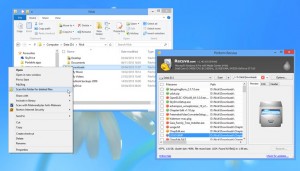 The new folder scan feature is only available in the main Recuva build — it’s not accessible via the portable version. The option is added to the program installer and selected by default — if left in place, users gain the ability to browse to a folder in Explorer, then right-click it and choose “Scan this folder for deleted files”. Recuva will then perform a quick scan and display the results of its search, allowing users to quickly recover files from known locations.
Recuva 1.46 also promised an improved deep scan tool for exFAT and FAT-formatted drives. It also adds new file extensions to the available filters (pictures, music, video, documents, compressed and emails).
The latest build also promises improved scan statistic accuracy, better usability of the folder browser and improved uninstallation of menu items when the program is removed. A minor bug in the secure overwrite tool for exFAT file systems has been fixed, and the update is rounded off by subtle tweaks to the recovery wizard and user interface.
Recuva 1.46 and Recuva Portable 1.46 are both available as a freeware downloads for PCs running Windows 2000 or later. Professional and Business editions are also available.
Photo Credit: Amy Walters /Shutterstock
-
Reuters – Thermo Fisher is Frontrunner for Life Tech
Thermo Fisher Scientific Inc. is emerging as the lead contender in Life Technologies Corp‘s auction, working on a bid that could value the genetic testing maker at as much as $12 billion, Reuters reported. Thermo Fisher, the world’s largest maker of laboratory equipment, is considering a bid of between $65 and $70 per share for Life Tech and is interested in buying the entire company.
(Reuters) – Thermo Fisher Scientific Inc. is emerging as the lead contender in Life Technologies Corp’s auction, working on a bid that could value the genetic testing maker at as much as $12 billion, three people familiar with the matter said.
Thermo Fisher, the world’s largest maker of laboratory equipment, is considering a bid of between $65 and $70 per share for Life Tech and is interested in buying the entire company, two of the people said.
It is expected to have a leg up over private equity bidders because it can squeeze more cost savings than a buyout firm can, as well as over rival trade buyers who may not want all of Life Tech or have not been as aggressive in their pursuit of the company so far, the three sources said.
Bids are due next week and it is still too early to tell the outcome of the auction, the sources said, asking not to be named because the matter is confidential.
Thermo Fisher and Life Tech declined to comment.
The post Reuters – Thermo Fisher is Frontrunner for Life Tech appeared first on peHUB.
-
Jelly Bean closes in on Ice Cream Sandwich
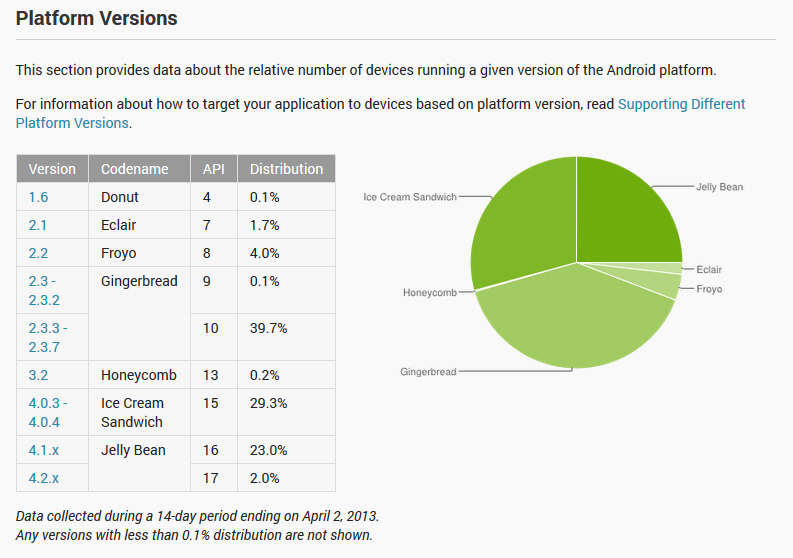
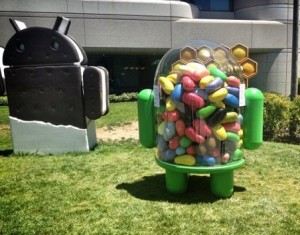 Jelly Bean may be the newest sweet in the family, but it is steadily gaining ground against its older brothers. Combined, Android 4.1 and Android 4.2 reached a 25 percent distribution level in the green droid realm, based on the number of devices accessing Google Play during the 14 days ending April 2.
Starting this month, Google has decided to alter how the data is collected. Google says: “Beginning in April, 2013, these charts are now built using data collected from each device when the user visits the Google Play Store. Previously, the data was collected when the device simply checked-in to Google servers”. Why? Because the company considers the new collection method to be more accurate and that it best represents “users who are most engaged in the Android and Google Play ecosystem”.
The change also has another implication. We simply cannot compare the data set provided by Google in March with the numbers released in April, as there is no longer a direct correlation between the two sets which determines the actual growth or decrease in usage of a certain green droid distribution.
In April, nearly five months after its release, Android 4.2 reached a 2.0 percent distribution level. The number is mostly influenced by sales of Google-branded devices — Galaxy Nexus, Nexus 7, Nexus 4 and Nexus 10 — and will likely grow once newer smartphones and tablets such as the Samsung Galaxy S4 are released.
Android 4.1, the first Jelly Bean iteration, runs on 23.0 percent of all green droid devices, nine months after Google released the operating system. It is worth noting that Android 4.1 Jelly Bean will likely grow in the distribution charts over the coming months as older devices receive a software upgrade and newer ones, such as the HTC One, are released.
Ice Cream Sandwich, version 4.0.3 to 4.0.4, reached a 29.3 percent distribution level in April. The operating system will likely lose ground against its younger siblings, as sales of new devices and even software upgrades skip over Android 4.0 altogether.
The tablet-only Honeycomb still runs on 0.2 percent of all green droid devices, a number which is practically insignificant per the overall scheme of things. Android 3.2 will likely maintain its distribution level for a couple of months down the road.
Gingerbread is still the green droid ruler with a combined distribution level of 39.8 percent, for version 2.3 to 2.3.2 and version 2.3.3 to 2.3.7. The former version runs on 0.1 percent of all green droid devices, while the latter takes up the number one spot in the charts with a 39.7 percent distribution level.
Android distributions older than Gingerbread, Froyo, Eclair and Donut, run on 5.8 percent of all green droid devices. It’s fair to assume that for each of the three sweets the distribution level will decrease over time, more for Froyo and Eclair rather than Donut.
Judging by the numbers associated with each distribution, the new data collection policy appears to skew the results in the favor of newer sweets. Over the past months Android 4.0 slowly lost ground, something that simply does not reflect anymore in the distribution level for April. The newest distribution level also makes Gingerbread less popular than before and Jelly Bean more popular. The apparent difference is very significant and, from my point of view, unrealistic had Google kept the previous data collection policy in April.
-
Reuters – Seibu Shareholder Opposes Cerberus Bid to Boost Stake
A major shareholder in Japan’s Seibu Holdings Inc. has supported the company’s stand against allowing private equity firm Cerberus Capital Management LP increase its stake in the railway and real estate group, the Nikkei daily said. Cerberus is trying, through a tender offer, to boost its stake in Seibu by four percentage points to 36.44 percent, the level at which it could veto major board decisions. Yoshiaki Tsutsumi is believed to own less than 1 percent of Seibu, but he also owns about 36 percent of NW Corp., whose interest of just under 15 percent makes it Seibu’s second-largest shareholder, the newspaper said.
(Reuters) – A major shareholder in Japan’s Seibu Holdings Inc has supported the company’s stand against allowing private equity firm Cerberus Capital Management LP increase its stake in the railway and real estate group, the Nikkei daily said.
Cerberus is trying, through a tender offer, to boost its stake in Seibu by four percentage points to 36.44 percent, the level at which it could veto major board decisions.
Yoshiaki Tsutsumi is believed to own less than 1 percent of Seibu, but he also owns about 36 percent of NW Corp, whose interest of just under 15 percent makes it Seibu’s second-largest shareholder, the newspaper said.
Quoting Seibu, the daily said Tsutsumi would not agree to Cerberus’s tender offer and had contacted Seibu to convey his stance. Tsutsumi has potentially made it harder for Cerberus to get its hands on the Seibu shares held by NW, it added.
The move comes as Seibu, which also operates hotels and department stores, is planning to go public again in a multi-billion dollar stock market listing originally planned for 2012.
The tender offer from Cerberus runs to April 23.
The post Reuters – Seibu Shareholder Opposes Cerberus Bid to Boost Stake appeared first on peHUB.
-
Forget in-memory — SiSense raises $10M for in-chip analytics
While the rest of the world is agog about big data and in-memory analytics, SiSense is taking a different tack. It’s rethinking business intelligence with higher-speed analysis on smaller (relatively speaking) data sets by taking advantage of multicore, 64-bit processors. The approach has been paying off with some impressive customer uptake, and on Wednesday SiSense announced a $10 million series B funding round from Battery Ventures along with Opus Capital and Genesis Partners.
Technologically, SiSense is trying to split the difference between just about everyone else doing analytics — expensive full-stack business intelligence vendors such as Oracle, Microsoft, IBM and SAP; big data and data warehouse vendors pushing massive scale databases; and next-generation, visualization-centric vendors such as Tableau and QlikView. It’s fast, it’s has its own columnar database and HTML5 visualization technologies, can scale comfortably up about 100 terabytes, and is designed for business users rather than advanced data analysts.
SiSense’s secret sauce is a processing architecture built for speed even on small machines such as laptops. According to CEO Amit Bendov, the company’s product, called Prism, can handle a terabyte of data on a machine with 8GB of RAM because it relies primarily on disk for storage. Data is only moved to RAM as necessary, and then Prism uses vectorization and optimized instructions (that do one thing only, but do it across all the data that fit the query) to handle as much work as possible in parallel on the processor.

Source: SiSense
“We say in-memory is not the future, it’s the past,” said Bendov. ”We’re already two steps ahead.” Using Hadoop or Teradata for a handful of terabytes, he added, is overkill, “like driving a Humvee to the grocery store.”
Eldad Farkash, SiSense’s co-founder and CTO, uses a different analogy — that of buying beer — to explain the technology’s underlying rationale. Latency to the CPU from the processor’s L1 cache is like grabbing a beer from the refrigerator, whereas using the L2 or L3 cache is like riding a bicycle to the corner store. RAM is the equivalent of driving a car to the grocery store, and accessing data from disk is like going to the brewery itself. Prism knows it will have to go to the grocery store, but it gets as much beer as possible from the fridge and corner store first.
 Once users are actually in the product and analyzing data, it’s a drag-and-drop experience to connect various data sources and points (although custom SQL is allowed, too). The actual analysis window features a canvas that can display numerous widgets (e.g. pivot tables, charts or dashboards) at once.
Bendov said SiSense’s revenue grew 520 percent in 2012 and its notable customers include Target, Merck, Samsung and Cisco. The new investment will be used primarily to bolster the company’s sales and marketing efforts — which thus far have been largely relegated to in-bound inquiries — and to support customers in different geographies (the company is based in Redwood Shores, Calif.). “Now’s the time to add oil to the fire,” he explained.
As impressive as it all sounds, though, SiSense’s biggest challenge might well be getting noticed above the fray that is the analytics space right now — especially among more well-known and arguably future-proof vendors and technologies. That said, being a low-cost option that users like and that actually works has proven remarkably effective in an era of cloud computing and bring-your-own-device, and SiSense appears to racking up users at a pretty rapid clip.
Any product that can prove its worth initially with the people who have to use it stands a good chance of sticking around and becoming a permanent part of IT budgets for years.
Feature image courtesy of Shutterstock user Iscatel.

Related research and analysis from GigaOM Pro:
Subscriber content. Sign up for a free trial.- The fourth quarter of 2012 in cloud
- Health care and big data in 2012
- The importance of putting the U and I in visualization


-
Call in podcast: Chromebook screenshot tips and the Facebook phone
Ready for another edition of the weekly call-in show where we answer your tech questions? We kick things off with expectations of Facebooks’s new phone and software and then get right into your questions. Several Chromebook topics come up as well as a tough choice between two new flagship phones.
To be a part of the show, just call in and leave a voicemail at 262-KCTOFEL. If you do, we’ll play back the question on the show and answer it. Or you can tweet me at @kevinctofel on Twitter. Each week, I’ll answer as many questions as I can while keeping the podcast to a manageable amount of time: 20 to 30 minutes at most.
Show notes:
Hosts: Chris Albrecht and Kevin C. Tofel- How much do all of the software customizations from Amazon, Samsung and others hurt Android share as a whole?
- Is there a way to capture just part of the screen on a Chromebook?
- Which would you buy: a Pixel or Google Glass?
- Can you use Office 365 on a Chromebook?
- Tough question: HTC One or Samsung Galaxy S 4?
SELECT PREVIOUS EPISODES:
Why the digital age needs an effective content licensing strategy
T-Mo’s no plan, SummlYahoo and everyone’s a paparazzi
IoT: Why the Hue internet lightbulb is a bright idea
Podcast: Facebook’s feedin’; Lean In’s meanin’; and everyone’s Hadoop-in
IoT: When devices can talk, will they conspire against you?
Call-in show: Why the “I’m leaving iPhone” trend?
Internet of things Podcast – Almond+’s nutty idea: Making sensor connectivity a snap

Related research and analysis from GigaOM Pro:
Subscriber content. Sign up for a free trial.- Analyzing the wearable computing market
- Tablets wars: Apple is from Venus, Amazon is from Mars
- The future of mobile: a segment analysis by GigaOM Pro

-
Emerging earnings: a lot of misses
It’s not shaping up to be a good year for emerging equities. They are almost 3 percent in the red while their developed world counterparts have gained more than 7 percent and Wall Street is at record highs. When we explored this topic last month, what stood out was the deepening profit squeeze and steep falls in return-on-equity (ROE). The latest earnings season provides fresh proof of this trend and is handily summarized in a Morgan Stanley note which crunches the earnings numbers for the last 2012 quarter.
The analysts found that:
–With 84 percent of emerging market companies having already reported last quarter earnings, consensus estimates have been missed by around 6 percent. A third of companies that have already reported results have beaten estimates while almost half have missed.
– Singapore, Turkey and Hong Kong top the list of countries where earnings beat expectations while earnings in Hungary, Korea and Egypt have mostly underwhelmed. Consumer durables companies recorded the biggest number and magnitude of misses at 82 percent.
– Asian firms missed earnings forecasts by 4 percent, Latin America by 6 percent and EMEA-based firms by 3 percent, Morgan Stanley estimate. (Note: MS include Australia in the Asian list but not Japan)
– Outside of EM, the picture is mixed: while U.S. S&P 500 companies have reported an aggregate earnings beat of 5 percent, companies from MSCI Europe have missed consensus by 4.2 percent.

All in all, the picture is not reassuring. But investors are still banking on the abundant global liquidity to come to the rescue. Late last month, Reuters surveyed more than 450 analysts and the consensus among them was for double-digit gains on emerging equities by end-2013 — see below for the graphic. Now markets just have to buck up or they risk missing that consensus as well.

-
MuleSoft rakes in more moolah to connect your applications to the world
MuleSoft wants to be the hub that connects your legacy on-premises applications with their mobile and web-based counterparts and now it has $37 million more in funding to achieve that mission. The Series E round, led by new investor NEA, brings total venture investment in the San Francisco company to $81 million.

MuleSoft CEO Greg Schott
MuleSoft also announced its new “Anypoint Platform” which it paints as the hub for connecting elderly on-premises applications to the shiny, newer mobile and web-based apps that companies increasingly turn to.
The company supports all the major publicly available application programming interfaces (APIs) — no mean feat since by its count there are about 13,000 of them now, up from about 100 in 2006. Back then, only new-fangled companies like Yahoo Amazon, and eBay offered APIs as a standard way to interact with their applications.
“The new enterprise feels different. You still have legacy stuff that needs to be connected to your newer SaaS and mobile platforms. Anypoint provides the blueprint to connect all that up,” said Ross Mason, MuleSoft founder and CTO said in an interview.
MuleSoft CEO Greg Schott siad the business of connecting all these enterprise applications represents a $500 billion opportunity, but one for which it must compete with a bunch of legacy vendors including Tibco and IBM (with its wild world of WebSphere). In some areas it also competes with newer companies like Apigee, but mostly it means that companies won’t have to turn as much to third-party systems integrators or hand code connections between its applications.
Salesforce.com is also a new investor in this round joining previous funders Hummer Winblad, Morganthaler Ventures, Lightspeed Venture Partners, SAP Ventures and Bay Partners.
The latest cash infusion will help the company build up its sales and marketing presence and to keep building up its product. “We’re investing extremely heavily, this is all subscription based revenue which means this is a cash-consuming businesses,” Schott said.

Related research and analysis from GigaOM Pro:
Subscriber content. Sign up for a free trial.- New challenges for the IT organization
- A near-term outlook for big data
- NewNet Q4: Platform mania and social commerce shakeout

-
Vodafone shares dip as Verizon denies $245 billion takeover rumors
Well, that was quick. On Tuesday, the buzz was that Verizon and AT&T were thinking of bidding an eye-watering $245 billion for the UK-based carrier Vodafone. If true, this would have represented the biggest M&A transaction ever.
However, late on Tuesday evening Verizon issued the following statement, which keeps alive the perennial possibility of Verizon buying out Voda’s stake in their joint venture, Verizon Wireless, but which is also pretty categorical on the latest rumor:
“As Verizon has said many times, it would be a willing purchaser of the 45 percent stake that Vodafone holds in Verizon Wireless. It does not, however, currently have any intention to merge with or make an offer for Vodafone, whether alone or in conjunction with others.”
The denial knocked down Voda’s share price by – at the time of writing – 2.2 percent on intra-day trading. That said, according to Bloomberg, the rumor brought a 6.1 percent bump on Tuesday, so for now it did more good (for Voda’s investors) than harm.
According to Reuters, the problem with the Verizon-buying-out-Vodafone’s-stake scenario is that the $115 billion transaction would land Voda with a $20 billion tax bill – hence the idea of carrying out a merger instead. Apparently that’s now not going to fly, so it’s back to the drawing board.

Related research and analysis from GigaOM Pro:
Subscriber content. Sign up for a free trial.- 12 tech leaders’ resolutions for 2012
- The future of mobile: a segment analysis by GigaOM Pro
- Mobile Q1: All Eyes on Tablets, T-Mobile and AT&T

-
Morning Advantage: The Myth of the Viral Video
Remember the Harlem Shake? The viral dance meme you performed with your colleagues or friends to be part of something bigger than yourselves? It doesn’t have much to do with Harlem, according to real people who actually live there, and it doesn’t have much to do with the power of crowdsourced virality either. In this smart takedown of the meme in Quartz, Kevin Ashton recreates the timeline of the dance’s popularity to reveal exactly how, in the wake of Oreo’s Super Bowl “win,” corporations pounced on the video’s potential to make money. The Harlem Shake itself, writes Ashton, “originated with a drunken man named Albert Boyce dancing at Harlem’s Rucker Park basketball court in 1981.” It then inspired an unsuccessful song, until a student named George Miller used it in a video. A few people copied him, and a version found its way onto Reddit, which prompted someone at Maker Studios to recognize its “pre-viral” potential. So began it’s “rapid replication,” which “was driven by media and marketing professionals, led and orchestrated by three companies: Maker Studios, Mad Decent, and IAC.” And as more people clicked, money flowed from Google’s ad structure, “where more searches and more views mean more dollars.”
If the meme proved successful for these companies, argues Ashton, it wasn’t exactly profitable for the originators of the dance itself. “Boyce, the no-collar black man on the corner who gave world culture a twist, gets a little credit and no reward. George Miller, the originator of the whole thing, gets nothing.” In other words, even though it seems like personal creativity is driving viral content, it probably has more to do with creativity in capitalism.
Reinventing Employee Onboarding (Sloan Management Review)
We all know the drill: On a new employee’s first few days, you immerse them in the ins and outs of how your company works. Paperwork, floor plans, benefits, etc. But new research suggests that it might be a better idea to target onboarding at their unique skills and how they can use them in their new role. When a business process outsourcing firm in India tested both models, employees were more than 32% less likely to quit their jobs during the first six months at the company if they received identity-focused onboarding. And these workers received customer evaluations that were more positive than their counterparts who received traditional onboarding.
Japan’s Answer to Jeff Bezos Sets Sights on Amazon, America (Wired)
In 1997, Hiroshi Mikitani founded e-commerce company Rakuten right around the time Amazon went public. His vision, however, goes against what he calls the “vending machine” model of sales, focusing instead on digital shops run by the people doing the selling. To put it mildly, Mikitani’s been successful: “Rakuten now handles more than one-quarter of all e-commerce business in Japan — more than twice as much as Amazon’s share in the country.” And with a 2010 acquisition of Buy.com, he’s planning on entering the U.S. marketplace with a focus on the human side of shopping online. “We are a bazaar,” Mikitani emphasizes. “We are not a supermarket.”
It’s OK
The Manager Who Kept a Six-Year Diary of Her Mistakes (Wall Street Journal)
TED Radio Hour: Making Mistakes (NPR)
Why Deliberate Mistakes Can Be a Great Career Move (Fast Company) -
Google Will Refresh Nexus 7 Tablet This Summer, May Drop Price To $149, Says Reuters

Google will refresh its Nexus 7 tablet this summer, launching a new version powered by Qualcomm’s Snapdragon processor around July, according to Reuters – which is about a year after it launched the original Nexus 7. The news agency said two unnamed sources also told it Google is aiming to ship between six and eight million of the tablets in the second half of the year.
Google has not released official sales figures for its $199 to $249 slate, which is made by Asus, but an analyst estimate pegged sales for 2012 at between 4.5 million and 4.8 million, suggesting Mountain View is hoping to grow Nexus 7 sales significantly this year – even by as much as almost double.
According to Reuters’ sources, the forthcoming version of the Nexus 7 will get some hardware improvements, with a higher screen resolution and a thinner bezel design both being mentioned. It will also use Qualcomm’s chipset in place of Nvidia’s Tegra 3 which was used in the original Nexus 7s. Qualcomm’s chip was chosen over Nvidia’s for “power reasons”, according to one of the sources. The slate will continue to be co-branded with Asus.
If Google is hoping to significantly ramp up Nexus 7 sales it’s possible it will drop the price to encourage adoption but Reuters’ sources said pricing is “yet to be determined and Google’s plans are fluid”. One option is for Google to retain the $199 entry level price. Another is to price the slate even lower, at $149, according to one of the sources. The old model would be discontinued. A key factor that could determine how Google ultimately decides to price the Nexus 7 is if Apple launches new iPads this year.
Reuters goes on to quote Fubon Securities analyst Arthur Liao noting that a ”zero-margin strategy” plays to Google’s core business strengths — underlining the reasons for Google to push the Nexus 7 price lower. “Ninety-seven percent of Google’s revenue comes from advertisement, so it needs to sell more mobile devices in order to reach more consumers,” he told the news agency.
Last fall Amazon refreshed its Kindle Fire line-up of tablets, including dropping the price of the old model to $159. So a $149 Nexus 7 would undercut Amazon’s cheapest slate — at least, for now. Last month Amazon was rumoured to be working on building a $99 tablet – a rumour the company denied, telling TechCrunch: “We are already at the lowest price points possible for that hardware.”
-
3 Bonus Games Added to Humble Mobile Bundle

Humble Mobile Bundle has done it again! Above and beyond the games we previously reported for the Humble Mobile Bundle with Android 5, they have gone and added another 3 games. As was the case last time, the additional games will not cost a penny if you have already purchased the bundle, and will cost a mere $5.57 (at the time of this post) for new purchases. This price will get you the original six bundle games, Contre Jour, Anomaly Korea, Plants vs. Zombies, Bladeslinger, The Rooma and Metal Slug 3, coupled with the additional 3 new games:
- Funky Smugglers
- Raiden Legacy
- Another World
Purchasing the Humble Mobile Bundle is as easy as always, simply hit the source below and:
- Choose an amount to donate.
- Choose how you would like to divide up your contribution (Amongst Developers, Charity, or as a Humble Tip).
- Enter your E-mail address.
- Choose whether to make the donation a gift.
Humble Mobile Bundle is known for its “pay what you want” sales approach, which means subscribers will have to unlock the pack by donating slightly more than the current average donated by other gaming fans. That means the software increases in price over time depending on when the user makes the donation.
The current price is a great deal for anyone looking for a wide variety of quality Android games at a reasonable price, but you had better get it fast before the price goes up.
Click here to view the embedded video.
Source: Humble Mobile Bundle
Come comment on this article: 3 Bonus Games Added to Humble Mobile Bundle
Visit TalkAndroid for Android news, Android guides, and much more! -
Genie Timeline Professional 2013 review
 If you like to keep your backups simple then image-based solutions have an obvious attraction. There’s no need to spend an age figuring out what to protect, and then change your settings regularly to suit some new application: you just back up everything, and so can always be sure you’re fully protected.
Don’t rule out file-based backups just yet, though. Genie Timeline Professional 2013 can be set up in just a few clicks; runs regularly to protect even your most recent files; keeps multiple versions of a document, allowing you to restore whatever you need; and that’s just the start.
Launch the program and the focus on ease of use is immediately apparent. There’s no need to browse to, or create a folder to hold your backups, for instance – just choose a drive (internal, external or network), and Timeline Professional 2013 will take care of everything else.
Deciding what to back up doesn’t have to be any more difficult. The program provides 13 tiles representing different types of files — “Pictures”, “Office Files”, “Email”, “Music” and so on — and all you have to do is check a box for each category you’d like to protect. (You may not even have to do that, as the most common options are checked by default.)
You don’t even have to schedule your backups, as the program will by default select different backup intervals for your files, depending on their type and size. And even the “advanced” options, encryption and compression, can be enabled with just a click.
This doesn’t always work quite as smoothly as you might hope. Checking a tile like “Pictures”, for instance, won’t necessarily protect all your images – only the formats the program recognises (bmp; jpg; jpeg; jpe; gif; tif; tiff; png; raw; dng; nef; cr2). You could edit this list to, say, add support for PSD files, but then you’ll have to know all the formats you might use, and suddenly the program isn’t quite so beginner-friendly any more.
Other backup categories have their limitations, too. The Email option only supports Microsoft tools, for instance (Outlook, Outlook Express, Windows Mail, Windows Live Mail), while you can save the bookmarks for the top browsers, but nothing more (the ability to save profiles would be very useful).
Still, if you want more control then clicking the “My Computer” tab displays a familiar Explorer-type screen, where you can manually select whatever files and folders you’d like to protect.
And there’s a new “Filter my selections” option which allows you to define file types which you’d like to include or exclude from the backup. So if you want to add support for, say, PSD, OGG and TS files (none of which are covered by the default selections) then filters allow you to do it in one place.
Arguably, having to do this at all makes Genie Timeline Professional 2013 much like any other backup tool. Still, at least you only have to set it up once, then you can sit back and leave the program to do its work, while you get on with more important things. (And we do mean “leave”: install the iPhone or iPad app and you can monitor your backup status wherever you are.)
Recovery
Disaster has struck, and you need to recover some files? There are several ways to go about it.
If the file still exists but you’d like to recover an earlier version, right-clicking it in Explorer and selecting “Show Versions” will display your options, and you can restore an older copy with a click.
The program also adds a Timeline Explorer view to Explorer. Choose a backup time and you’re able to browse everything it contains, restoring individual files as required. (These Explorer integrations can be disabled if you don’t want other users to have access to them.)
Genie Timeline Professional 2013 has an “Advanced Restore” option with even more powers. Again, choose a backup time and you can browse everything included in that job. There are sometimes so many files that it’s hard to find what you need, but this version now includes a filter where you can choose to see only deleted or new files, for instance, making your browsing a little more manageable.
“Advanced Restore” is further improved this time with the addition of a search box. If you’re looking for a specific file there’s no need to browse for it, just enter a part of the name and you’ll be presented with all available matches (including previous versions) and again you can restore individual files with a click.
Another option is simply to manually switch to your backup drive, where your files are available in their original folder structure (our fourth backup job stored test desktop files at D:\_Genie Timeline(4)\0\C\Users\Mike\Desktop, for instance).
And if you’d enabled Disaster Recovery, and prepared by burning a disaster recovery disc (available as a separate download for Genie Timeline Professional 2013 owners), then this may be able to help you get a broken PC working again by restoring your system folders. Boot from the recovery disc and a simple wizard walks you through the process.
There are some problems here. If you’ve chosen to encrypt your backups, for instance, you may not be pleased to find that all your file and folder names are still visible to anyone with access to the destination folder.
And restoration isn’t always as straightforward as you might like. If you’re at the Timeline Explorer, say, you can right-click and restore individual files, but not several files or folders in a single operation. And the new Search option locates files, not folders, and again only allows you to restore one at a time. (Recovering folders and multiple files is available via Advanced Restore, but that’s not always as convenient to use.)
For the most part, though, the process works very well. There are plenty of recovery methods, and once you understand how the program works, the most common situations — restoring an individual file or one or more folders — can be completed quickly and easily.
Settings and Options
As we’ve seen, Genie Timeline Professional 2013 is fine for simple applications, but what if you need a little more power?
One issue is the program’s inability to maintain more than one backup job. In an ideal world you might want one job to back up your documents every few minutes, say, while another saves your emails every day, and a third protects your downloads every week. But here there’s just one backup job, and if you want to do something differently then you’ll have to change its settings. Every single time.
Scheduling is at least reasonably flexible, though. If you don’t want to allow the program to decide, you can have backups run at regular intervals from 3 minutes to 24 hours, or on a weekly schedule.
Disaster Recovery backups provide even more control, as you can run them at anything from one day to six monthly intervals.
You can keep control of your backup size, both by setting an overall limit, and telling the program to delete files once they’re older than a defined number of days.
And although the program is extremely lightweight and didn’t noticeably affect other applications at all, there are some useful performance-related settings.
A “Game Mode” disables backups when you’re running full-screen applications, for instance.
You can prevent backups from starting as soon as your system boots, when they’re most likely to clash with other programs.
And if you just want to get a backup finished as soon as possible, Genie Timeline Professional 2013 finally allows you to turn on the high-speed Turbo Mode manually, a small but worthwhile improvement.
The program is easy to set up, then. Backups run smoothly, if a little slowly; restoration is straightforward, and there are some useful configuration options. The new features are conveniences, more than must-haves, and the inability to run multiple backup jobs will annoy many, but if your needs are simple then Genie Timeline Professional 2013 could still be a very good backup choice.
The software lists for $59.95 and is available for Windows XP, Vista, 7, 8.
Verdict: It’s lacking a few advanced features, but Genie Timeline Professional 2013 remains very easy to set up and use, and if you’re only looking for the backup basics then we’d give it a try.
We Like: Easy to set up and use, won’t slow down your PC, keeps multiple file versions, several restore methods, disaster recovery disc.
We Don’t Like: Can only run one backup job, slow backup speeds, encryption doesn’t conceal file and folder names, gets notably more complex as you move from the default.
Photo Credit: Balazs Justin/Shutterstock
-
BBC updates its news app

The BBC News app for iOS is pretty good but it’s always been rather buggy. The BBC debuted version 2.0 of the app late last night, and as well as bug fixes and improved response times, there have been a few other welcome changes.
Among the tweaks, the app now lets users copy story links to the clipboard, Twitter and Facebook integration has been improved, so it’s easier to share stories of interest, and pulling down on the screen refreshes the content.
There are bigger images on the iPhone home screen, and much improved integration with VoiceOver.
For iPad users, the portrait layout has been tweaked to show more headlines, and the BBC has added an extra font size to make for better viewing on the iPad mini.
Although the changes are all fairly minor, the end result is a much more polished app that — so far at least — hasn’t crashed on me once.
You can download the app from iTunes now.
-
Latest Android Distribution Reveals Gingerbread Down 4.4% and Jelly Bean Up 8.5%

The number of Android devices running Jelly Bean is on the rise. Last month we reported Gingerbread down by 1.4%, and Jelly Bean up by 3.2%. Just one month later we are happy to report a significant increase in devices running Jelly Bean of 8.5%, and decrease in devices running Gingerbread of 4.4%. Here are the latest stats:
- 1.6 Donut – 0.1%
- 2.1 Eclair – 1.7%
- 2.2 Froyo – 4.0%
- 2.3 Gingerbread – 39.8%
- 3.2 Honeycomb – 0.2%
- 4.0 Ice Cream Sandwich – 29.3%
- 4.1 and 4.2 Jelly Bean – 25.0%
This decrease in devices running Gingerbread is a great sign. With devices like the HTC One X, X+, XL, X+ USA, Droid DNA, Butterfly, Incredible 4G LTE, and EVO 4G LTE all receiving the Jelly Bean update, and the latest slew of devices being released with it straight out of the box, we should see another significant jump in devices running it by this time next month.
Source: Android Developers
Come comment on this article: Latest Android Distribution Reveals Gingerbread Down 4.4% and Jelly Bean Up 8.5%
Visit TalkAndroid for Android news, Android guides, and much more! -
Choose the right password manager to protect your accounts
 Here’s the contradiction: you need secure, unique and hard-to-remember passwords to protect your online (and offline) accounts from being hacked. However, remembering those secure, unique and hard-to-remember passwords is another matter entirely. Thankfully there is a solution, and it’s called a password manager.
There are dozens of password managers to choose from, but in this guide we’ll showcase four of the better ones, ensuring that you set safe, secure passwords without having to worry about remembering them.
Most password managers work like this: you set up an encrypted file, or vault, into which all of your unique passwords are stored. This vault is “locked” with a master password, so as long as you can remember that, you’ll always be able to access your other passwords.
Of course, a master password can be guessed, so the better password managers go further. Open-source favorite KeePass allows you to create special key files, which need to be provided with the password when unlocking the vault. You can also lock files to the current Windows user account and even use a special USB drive called a YubiKey to provide another level of authentication.
Speaking of providing secondary hardware devices to provide extra protection for your passwords, Sticky Password Free allows you to add any USB or Bluetooth device as a secondary form of authentication, thus increasing your vault’s security that little bit further.
Sticky Password also ships with browser plug-ins, so it can automatically fill web login pages as you visit them (KeePass requires you to drag-and-drop or use hotkey triggers). But the Free version is limited to just 15 passwords — for full functionality you have to pay $29.99 for the full version.
One worry with offline password managers is what happens if your encrypted vault is corrupt? Obviously you can manually backup your files, but 1Password for Windows and 1Password for Macboth let you sync your encrypted database to Dropbox for protection against data loss. Note both are trial versions only — the full version costs $49.99 per license.
Another way to avoid this potential calamity is to entrust your passwords (encrypted, of course) to the cloud, and if you’re happy to do so then take a look at cross-platform beauty LastPass, which works seamlessly across most major browsers, and also allows you to store other confidential information online too. It’s free, although you’ll need to purchase a Premium subscription if you’d like to be able to sync passwords with your mobile devices. or add support for YubiKey authentication.
LastPass can also detect when you’re signing up for a new site and offer to quickly generate a secure password for you – something the other tools also offer, but LastPass makes the process effortless.
LastPass also offers to review your existing passwords, alerting you to any insecure ones you can then quickly make secure with its help.
Ultimately which password manager you go for depends on your individual needs: Sticky Password offers the best blend of features and security for both online and offline use, but there’s a price tag attached. If you’re happy to store your passwords in the cloud, then LastPass wins for its ease of use, but for a portable, offline solution that won’t cost you a bean, KeePass is well worth considering.
KeePass 2.21 and KeePass Portable 2.21 are both available as free, open-source downloads for Windows (other platforms are also available). Sticky Password Free 6.0.9.439 is available as a function-limited free download for Windows, while LastPass 2.0.20 is available as a freeware download for Windows, Mac and Linux. Also available are LastPass for Windows 8, LastPass for Android and LastPass Tab Browser for iOS.
Photo Credit: marekuliasz/Shutterstock
-
For energy tech, the boring stuff (business model innovation) will be key
Tesla fan boys might be left scratching their heads after the electric car maker’s “big announcement” on Tuesday afternoon.
It wasn’t a new electric car model, new sparkly paint colors for its Model S or more planned locations for its Super Chargers. Instead, Tesla announced a new financing option for its Model S electric car that includes a sort-of lease/ownership hybrid, where customers can pay a monthly fee, get 10 percent off the car with funding from a couple banks, and then have the option to sell back the car after three years.
In essence, Tesla is attempting to innovate around its business model. The financing option could make the car more available to potential customers that don’t want to pay anywhere between $62,000 and $100,000 upfront for a luxury car. Tesla said the monthly payment could be as low as between $500 to $600, though many were quick to point out that the monthly payments could be much higher.

Tesla logo on the Model X
Traditional car companies offer these types of car lease deals all the time, but the problem is that because the market for electric cars is so new, it’s hard to know how to value an electric car as it ages. Electric car batteries — which make up the bulk of the value of the car — typically have a warranty for about ten years and degrade substantially over time. Picture how long your laptop battery lasts — Tesla uses the exact same type of batteries in its cars.
Given the battery uncertainties, it’s still unclear how much a five or 10 year old electric car would be worth after its batteries have degraded substantially. But with the three-year buy-back guarantee, Tesla is betting that it can determine the value of the car after three years, and that the value will remain high — around the price of a Mercedes S Class — at year three. Tesla’s CEO Elon Musk said both he (personally) and Tesla will guarantee the value of the car.

Another company that counts Musk as an adviser has also been trying new approaches to energy financing with significant success: SolarCity. SolarCity helped pioneer leases for solar panels for rooftops. The company gets a bank to cover the costs of the upfront solar system and then the customer pays a monthly bill (usually less than a utility bill) over a set time period, like 15 or 20 years.
The third party-owned solar panel business model has proved to be so successful that three fourths of the solar panels installed in 2012 were owned by third parties, rather than the home owner themselves. Solar financing companies are also one of the areas of the solar market that are becoming quite successful, in contrast to the solar cell makers that are increasingly being squeezed.
SolarCity held an IPO in December and is trading at double its IPO price. Sungevity has been growing steadily and raised a whopping $125 million in a combination of equity and project finance. Power giant NRG Energy is even considering getting back into the solar lease space.

And it’s not just Musk-associated companies that are delivering energy market innovation. Fuel cell maker Bloom Energy launched an electricity-as-a-service model for its fuel cells, enabling data center builders to pay for the fuel cell power over decades, rather than the upfront cost of the fuel cell farm.
In the energy world, new technology takes a long time to develop. But once those innovations become commodities — like solar cells or traditional lithium ion batteries for electric cars — it takes a business model innovation to get those technologies to market.

Related research and analysis from GigaOM Pro:
Subscriber content. Sign up for a free trial.- The fourth quarter of 2012 in cleantech
- Cleantech and investment in 2013
- Cleantech third-quarter 2012

-
CyberLink releases PowerDVD 13
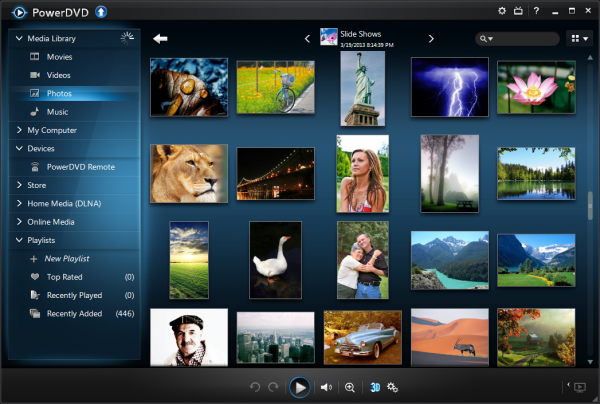
CyberLink has unveiled PowerDVD 13, the latest edition of its popular media player. And it’s an interesting upgrade with new features wherever you look.
New support for APE and AVCHD 2.0 1080p/3D extends your playback support, for instance, while everyone will benefit from a new focus on performance. The media player has been optimized to deliver an “instant start”, while new BD-Live Bypass technology means Blu-ray playback is 58 percent faster than PowerDVD 12.
A new Movie Library organises your MKV and MP4 files, DVD and Blu-ray discs in a single folder, with cover art, and links to more information on the movie. New conveniences include the ability to resume watching a movie just where you left off, and you can add comments and connect with friends via social media.
The playback interface has been revamped. There are more straightforward controls, which can instantly be hidden; it’s easier to find movie scenes; you can jump backwards and forwards through a video via the keyboard, and a new speed navigator helps you set fast or slow motion playback. (And if you’re still not happy, new configuration options allow you to customise the interface, change hotkeys, mouse wheel actions and more.)
PowerDVD 2013′s TrueTheater technology is now even available for Full HD video, automatically sharpening the picture, optimising colours and lighting for the best possible image quality.
And there’s also a new mini Music Player; an all-new subtitle engine with dual subtitle support; and various Windows 8 additions, including touch optimisation, and a Windows 8 edition of PowerDVD’s Mobile app.
As usual, PowerDVD 2013 comes in three edition. Deluxe ($54.95) is the base, with core media and DVD playback issues; Pro ($79.95) adds Blu-ray support, while Ultra ($99.95) includes 3D support, smart device syncing, full DLNA support, 7.1 audio and more.
Not exactly cheap, then, but PowerDVD 2013 does at least have some worthwhile new features to help justify the cost. The performance and interface enhancements are particularly welcome, and if you need a high-end media player then PowerDVD 13 is still worth a look.

