
Blog

  • Games for the weekend: Lili

    Games for the Weekend is a weekly feature aimed at helping you avoid doing something constructive with your downtime. Each Friday we’ll be recommending a game for Mac, iPhone or iPad that we think is awesome. Here is one cool enough to keep you busy during this weekend.

    LiliLili ($2.99, Universal) is an adventure game where a young botanist finds out that collecting the rare and exotic flowers she is looking for may also free an island plagued by mean spirits.  Built on top of the Unreal 3D Engine, the graphics of this game are only part of what makes this game fascinating. The rich character personalities and the way that the game uses random interactions to tell the story are sure to keep you engaged.

    Controlling the female botanist Lili is accomplished with a single touch control. Tap once anywhere on the screen and you’ll walk in the direction you are facing. Tap twice and you’ll run in that same direction. When in motion, a single tap when will stop Lili dead in her tracks. You look around the same way you control which direction Lili will go, by dragging your finger around the screen. Moving your finger on the screen in the direction that you are interested in exploring while tapping to move is an easy and natural gesture to master.  While you can look up, this will not make Lili jump or fly, her feet remain firmly on the ground like any well planted botanist’s feet would.

    Lili

    When Lili first arrives at Geos, an island she thought was uninhabited, she meets and becomes friendly with its local inhabitants know as Constructs.  The Constructs are made of wood and live to serve the island’s other inhabitants, the Spirits. One such Construct, the Trainer, informs Lili that most of the rarest flowers on the island grow on the backs of these Spirits. And these Spirits are mean.  As one would think, surrendering these rare and precious flowers is not something that the Spirits are going to do willingly.  After Lili gets the hang of how to battle the Spirits and take their flowers, she continues to consult with the Trainer who ends up being her guide throughout the game.

    Lili

    The game employs a quite clever, not aggressive, battle system where Lili must position herself on the backs of the Spirits in order to pick the flowers. The more advanced Spirit in the game will kick, throw bombs and grow thorns on their back in an effort to keep Lili from picking their flowers. To harvest the flowers, you tap and pull on their buds until they snap off of their stem. Tap and miss a flower will cause Lili to lose her grip and fall off of the Spirit.  The more flowers you take from each Spirit in each battle, the better your score will be.  If you do not like your performance, you have the chance to rematch the Spirit in an effort to earn a higher score, pick more flowers, and earn more gold coins.

    Lili

    As you explore the island, there are treasure chests, hidden flowers and mysterious rooms hidden behind locked doors that you can explore. Interacting with the inhabitants of the island exposes several mini challenges that you can complete as well as the main storyline of the adventure you learn from the Trainer.  There is a shop keeper, a mail courier, a gambler and even a key maker that each have their own way of helping Lili out.  Even the town’s bell ringer helps Lili find her way to a restricted and hard-to-reach forest within the corridors of the inner city.

    Lili

    The flowers Lili collects can be sold to the shopkeeper for gold coins, which are used as in-game currency.  Lili can use these gold coins to purchase items like food and potions that help her gain strength and fight the Spirits.  There are also items that Lili can purchase that will increase her ability to grip, run fast and stay hidden.  These three skills are also enhanced through powering up Lili’s character traits following each mission.  You can modify the game’s difficulty to make things easier or harder for Lili, and if things are not progressing fast enough for you, you can opt to bankroll Lili’s expedition through in-app purchases.

    Lili

    With a clever female heroine, large 3D environments to explore from a third-person perspective, and a serious search and find element where you uncover the secrets of a strange and mysterious land, the game has a definite Lara Croft Tomb Raider feel to it. Each character you encounter has its own unique personality that keeps the game interesting.  So if you are looking for an immersive 3D game with more of a passive-than-aggressive adventure feel to it instead of a shoot-them-all-before-they-shoot-you strategy, then Lili is just what you are looking for this weekend.

    Related research and analysis from GigaOM Pro:
    Subscriber content. Sign up for a free trial.

  • BlackBerry Adds BlackBerry Balance Features to iOS and Android Under BlackBerry Enterprise Service 10

    Since BlackBerry has begun supporting other mobile platforms under BlackBerry Enterprise Service 10, more and more policies have been made available to non-BlackBerry smartphones and tablets. The latest feature coming to iOS and Android devices managed by BES 10 are features that securely separate work data from personal data.

    Administration of mobile devices has really exploded in the past few years. Employees bringing their own smartphone or tablet into the workplace to access files on the secure corporate network has made every IT admin and CTO’s job more demanding with some workplaces seeing a huge increase in the number of the devices per person.

    Enter BlackBerry Enterprise Service 10, a straightforward, robust and secure system to provision and monitor mobile deployments of any scale. The latest feature to come to BES 10 is delivering the benefits of BlackBerry Balance to the other major smartphone platforms: Android and iOS.

    Click here to read the press release.


  • New Google/Motorola X Phone Rumors Point To Multiple Models And Aggressive Price Tags

    moto-leak-xphone

    Now that Sony, LG, HTC, and Samsung have all pulled back the curtains on their flagship Android smartphones, the rumor mill can churn with renewed focus on yet another nebulous device — Motorola’s secretive X Phone.

    Or rather, X Phones. According to Android And Me’s Taylor Wimberly, X Phone isn’t going to be a product name so much as it is a banner that multiple phones will fly under, and his sources assert that we’ve already seen the first of those devices in wild.

    (I think it goes without saying that you should take all this information with a hefty grain of salt.)

    The supposed culprit was captured on film earlier this week by the noted team at Tinhte, the Vietnamese site that thrives on getting their hands on unreleased gadgets well before the rest of us do. It was a fairly unassuming device — it bears a mild resemblance to the Galaxy Nexus when viewed dead-on, and sports a cleaner, rounded design that doesn’t quite jibe with many of Motorola’s recent angular design efforts.

    What’s more, its modest spec sheet prompted many (myself included) to dismiss its odds of being the fabled X Phone. To wit: it sports one of Qualcomm’s Snapdragon S4 Pro systems-on-a-chip, 2GB of RAM, a 4.65-inch display, and a 2,200 mAh battery. In fairness, that’s not a shabby device at all. That’s essentially what the Nexus 4 is working with, but it just didn’t seem flashy enough to be what Motorola and Google have been working on all this time.

    But if this new report holds true, that lack of next-gen horsepower could be because Google intends to sell this particular X Phone dirt cheap sans contract — $199 or so.

    Curiously, the original video of the device was yanked from YouTube, and the original post on Tinhte seems to have disappeared as well. That’s far from a confirmation that Tinhte has ruffled some major feathers, but it’s something to consider.

    Now to call this whole thing a little kooky would be putting it very mildly, but such an approach wouldn’t exactly come out of left field. One could look at the Nexus 4′s launch as a grand experiment of sorts, meant to see if the consuming public would be open to purchasing unsubsidized hardware directly from the people making it. The answer, clearly, is yes. The Nexus 4 isn’t exactly a mass-market success but demand for the device and its reasonably low price tag led to some notable woes for people trying to purchase the thing early on.

    Moreover, the more limited launch of a high-end device like the Nexus 4 could help Google gauge their ability to fulfill device demand in markets across the globe. Now that Google has more or less figured out what needs to happen to keep a global device rollout from going immediately south, it’s arguably better prepared to push out a solid phone at a crazy low price point. Only time will tell whether or not Google and Motorola truly plan to inundate the world with a horde of cheap X Phones, but with I/O on the horizon I imagine it won’t be long before the next chapter of the X Phone saga begins to unfold.

  • Injustice Battle Arena Quarterfinals End With Few Surprises

    After a week hiatus, the Injustice: Gods Among Us Battle Arena is back. Instead of making us wait four weeks to see each quarterfinal matchup, the Injustice team has dumped all four fights on us at once in preparation for the semi-finals a few weeks from now.

    First up, we have the much anticipated match up between Batman and Wonder Woman. Since the victors are decided by popular vote, it’s pretty obvious that Batman would win this fight. That being said, Wonder Woman puts up a great fight. Her stage is also a thing of beauty.

    In what is possibly the strangest matchup today, The Joker and The Flash face off. I would have figured that The Joker would win the most votes, but The Flash came through to earn himself a spot against Batman in the semi-finals.

    On the other side of the bracket, we first have Aquaman versus Green Lantern. While it was nice to see Aquaman come away with at least one win, he couldn’t stand up to the might of Hal Jordan.

    The final fight is by far the most unfair of the bunch – Superman versus Green Arrow. Green Arrow has some amazing trick arrows, but Superman was guaranteed to win.

    The results of the quarterfinals ensure that we’re in for a treat once the semifinals start up a few weeks from now. I’m especially interested in seeing that Batman versus The Flash fight. It’s sure to be exciting.

    Injustice: Gods Among Us hits Xbox 360, PS3 and Wii U on April 26

  • No, You’re Not Saving Starving Children by Sharing That Facebook Photo

    Facebook is not, nor will they ever be in the business of donating money to causes based on sharing content on the site. This is a fact, not a theory. But some people still fail to understand this. Even people who know that it’s probably a scam will sometimes share the status or photo anyway, simply using the “what could it hurt” excuse.

    And this is how viral scams are spread. If people simply stopped sharing content from like and share-whores, the problem would work itself out.

    Sadly, this is probably not going to happen any time soon. That’s why we have to bring to your attention the latest hoax spreading across Facebook.

    This one purports that Facebook is donating $1 to sick, starving children if you share a photo of them. This is simply not true.

    “I’m not asking you to like this, but please do share because Facebook donates $1 for these sick children for every single share,” says the image (via Hoax Slayer).

    Sharing hoaxes are some of the oldest types of hoaxes on Facebook. One recent hoax status suggested that a teenage boy needed life-saving surgery after being shot by his stepfather. Of course, the story was complete BS and all that sharing it accomplished was polluting people’s news feed. But it was shared – a lot.

    Of course, sharing a status isn’t as tempting as sharing a photo. Last month, a scam spread around Facebook that featured a doctored photo of Bill Gates holding a sign that said he would give $5,000 to everyone who shared the photo. The photo was shared hundreds of thousands of times before Facebook yanked it.

    Stop, think, and remember that Facebook doesn’t give out money based on shares. Nobody does. Just don’t click that share button.

  • Rumor: Upcoming Motorola “X” is not just one phone, but a new line of devices

    Motorola_X_Google


    You know about that mysterious Motorola X smartphone that we’ve been hearing more and more about? Well it’s possible that it’s a codename for not one smartphone, but rather the first of many smartphones. Rumor has it that Google is considering looking at other manufacturers line and introducing an X line of smartphones— kind of Samsung’s Galaxy or LG’s Optimus lines. Not only does this unify Motorola’s product line, but it also guarantees more cohesive product support for customers. For example, the first phone in this “X” line “will guarantee at least one “full Android version” update after the purchase of the phone” that is handled directly by Google Motorola, not the mercy of various wireless carriers out there.

    Oh and the news doesn’t stop there folks. Rumor also has it that this new “X” phone or line will be sold through “an unnamed online store”— which almost certainly points to the fact it will be sold in the Play Store for the masses, which by the way will be sold at a heavily subsidized priced like the Nexus 4 in order to get interest from consumers. And finally— the mysterious device(s) will be completely customizable by allowing the device’s color, RAM and internal storage to be completely configurable.

    Again this is pure rumor and speculation, but you can’t help but be giddy at the idea that this is the direction that the Motorola brand is potentially about to take. Maybe that rumored smartphone we saw a few days ago may hold more weight than we’d previously thought….

    source: Unwired View

    Come comment on this article: Rumor: Upcoming Motorola “X” is not just one phone, but a new line of devices

  • Report: IBM, EMC Among Suitors for SoftLayer

    A look at the racks inside the new SoftLayer Technologies DA5 data center in Dallas (click for larger version).

    A look at the racks inside a SoftLayer Technologies data center in Dallas (Photo: SoftLayer Technologies)

    Are we on the brink of another intense flurry of cloud hosting acquisitions? Reuters is reporting that tech titans IBM and EMC are bidding to acquire SoftLayer Technologies, one of the world’s largest hosting and cloud service providers. The news service doesn’t name its sources, but projects that a sale could fetch more than $2 billion. According to Reuters, SoftLayer has hired Morgan Stanley and Credit Suisse to run the sale process, which reportedly was kicked off with an offer from AT&T.

    SoftLayer has often been mentioned as one of the industry players positioning for either a sale or an IPO. The company is owned by private equity firm GI Partners, which combined it with The Planet in a 2010 merger that vaulted it into the top tier of global players in the hosting business. The company provides dedicated servers and cloud hosting to more than 25,000 customers.

    That huge customer base makes SoftLayer an attractive acquisition target for companies hoping to quickly boost their presence in retail hosting and cloud services. SoftLayer has a huge global infrastructure platform, managing more than 100,000 servers in 13 data centers  Dallas, Houston, San Jose, Seattle, northern Virginia, Singapore and Amsterdam. It also has a built-in revenue ramp up within its customer base, which includes a mix of tech-savvy startups and traditional dedicated server customers.

    The company has capitalized on that opportunity to build momentum for hybrid cloud installations featuring Flex Images, a service which allows customers to copy and store an image of a cloud or dedicated server, and then redeploy the image on either type of computing environment.

    It remains to be seen whether a deal materializes. But if  the Reuters report is accurate, it suggests that three of the world’s largest technology companies feel the need to accelerate their cloud businesses with a major acquisition. Should one manage to close a deal for SoftLayer, the other contenders may feel even greater pressure to line up a deal. That was the pattern in early 2011, when we saw three deals in short order – Verizon bought Terremark for $.14 billion, after which Navisite was acquired by Time Warner Cable, and CenturyLink snapped up Savvis for $2.5 billion.

  • Jacquelin Perry Dies; Post-Polio Expert Was 94

    Dr. Jacquelin Perry, an orthopedic surgeon who became famous for her work with post-polio patients, has died. The Lost Angeles Times reports that Perry passed away at her home in Downey, California on March 14. She was 94 years old and had been suffering from Parkinson’s disease.

    Perry was born in Denver, Colorado in 1918, and graduated from UCLA in 1940 with a degree in Physical therapy. She served as a physical therapist in the Army during World War II, where she treated patients with polio. After the war, she studied medicine at the University of California, San Francisco. Later, along with Dr. Vernon Nickel, Perry developed the “Halo,” the device that uses a ring screwed into a patient’s skull to lock the spine and neck.

    As a professor of surgery at the University of Southern California, Perry later took up the task of analyzing the biomechanics of walking, and developed an approach to treating gait defects. She later wrote a textbook on the subject, titled Gait Analysis, that is still used today.

    (Image courtesy Polioplace.org)

  • Galaxy S 4 to launch on select carriers starting in late April

    Galaxy S 4 Release Date
    Samsung (005930) pulled out all the stops at its Galaxy S 4 press conference last night at Radio City Music Hall in New York City. The company revealed a handful of new features in a Broadway-style presentation, however it failed to announce specific launch dates. Samsung only said that the Galaxy S 4 would launch on 327 carriers, six in the U.S., in 155 countries sometime next month. U.K. carrier Everything Everywhere announced on Friday that it will offer the smartphone beginning April 26th with preorders set to start on March 28th. AT&T (T) and T-Mobile both acknowledged that they will carry the Galaxy S 4 in the U.S. and have created pages that allow customers to sign-up to be notified with additional details. Verizon (VZ), Sprint (S), Cricket and U.S. Cellular also plan to offer the device later this year. Reports suggest that the Galaxy S 4 will cost $199 in the U.S. with a new two-year agreement.

  • Apple BootCamp 5.0 only supports 64-bit versions of Windows 7 and 8

    With release of OS X 10.8.3, the latest update for Mountain Lion, Apple upgraded the Boot Camp utility, which allows users to dual-boot Windows and OS X on a supported Mac, to version 5. Boot Camp 5 allows users to install either 64-bit editions of Windows 7 or 8 alongside their copy of OS X — by downloading Boot Camp Support Software 5, you’ll have all the drivers you need to run Windows on your Mac.

    One consequence of upgrading to Boot Camp 5 is that support for 32-bit versions of Windows – including XP and Vista as well as 32-bit iterations of Windows 7 and 8 – is no longer supported.

    Boot Camp 5 effectively ties Mountain Lion users into choosing Windows 7 or 8 as their alternative OS by dropping support for all previous versions of Windows. It doesn’t affect existing Boot Camp installations, so should you wish to install XP, Vista or a 32-bit version of Windows 7, make sure you set it up now before applying the OS X 10.8.3 update. Alternatively, go down the virtualization route by installing a copy in a virtual machine for free using VirtualBox.

    Boot Camp 5 not only supports 64-bit versions of Windows 7 and 8, it also now supports Macs with 3TB hard drives. It’s only available through the OS X 10.8.3 update, which also upgraded Safari to version 6.0.3. Therefore Macs running OS X Lion or earlier aren’t supported.

    Users will need to source their own copy of Windows 7 or 8 — you can download Windows 7 Home Premium SP1 64-bit as an ISO image here to work with a licensed product key.

    The Boot Camp Support Software 5 contains the latest versions of all Apple hardware drivers across its platforms — including Thunderbolt, USB 3.0, Apple Trackpad and all chipset, wireless, audio, Bluetooth, keyboard support and graphics. Also installed are the Boot Camp Control Panel for Windows and the System Task Notification item.

    Boot Camp Support Software 5 is a free 554MB download for Macs running OS X 10.8.3 or later — the drivers are installed after Windows has been installed using Boot Camp 5. Updated versions of Boot Camp Support Software 4 are also available for existing Boot Camp installations – visit Apple Support for details.

    Photo Credit: Joe Wilcox

  • DecoBeer for BlackBerry 10 and PlayBook Adds Free St. Patrick’s Day Fun to Your Photos

    DecoBeer is a fun photo app that gives you lots of stickers you can add to your photos. Developed by Keyspice, DecoBeer has a selection of St. Patrick’s Day themed stuff like leprechaun hats, pints of beer, shamrocks and more.

    Add various stickes to your photos to make them fun, then share them online. Select and position stickers using touch gestures to rotate, scale and flip the elements. Add as many elements as you wish then save them to your gallery or share them online.

    Click here to download DecoBeer for BlackBerry 10 and the PlayBook Tablet.


  • Happy birthday John Snow, father of modern epidemiology: A Q&A with Steven Johnson

    John-Snow-mainShanghai. New York. Tehran. Tokyo. Today, dozens of cities worldwide are each home to many millions of people. But those masses of humanity might not exist in such tight quarters if not for John Snow. (No, not that Jon Snow. This John Snow.)

    Snow was a 19th-century English doctor who’s credited with proving that cholera, a sometimes deadly infection that attacks the small intestine, spreads through contaminated water — and not by “bad air” as was generally believed at the time.

    Steven Johnson tours the Ghost MapSteven Johnson tours the Ghost MapAs described in Steven Johnson’s 2006 TED Talk, “The Ghost Map,” a particularly vicious cholera outbreak in 1854 at a popular water pump in London killed an astonishing 10 percent of the people who lived nearby. Snow created a map showing which people had consumed the water from the pump and whether they had gotten sick. His map helped convince local health authorities that his theory was the correct one, and by the next severe outbreak in 1866 they officially recommended that people boil water before drinking or using it, curbing the spread.

    March 15 marks the 200th anniversary of Snow’s birth, which the London School of Hygiene & Tropical Medicine and affiliates are celebrating in a series of meetings and exhibits. Our present to Snow? We spoke to author Steven Johnson about the impact the doctor has had on the sustainability of modern cities.

    When did you first discover the story of John Snow and his cholera map, and what was your first reaction to it?

    I first came to it as an information design story in Edward Tufte’s amazingly beautiful design books, and then I kept encountering it in other fields. I’d be reading about a history of epidemiology and I’d stumble across it, or I’d be reading about the history of disease and would stumble across it. I think that is what makes the story and Snow’s role in it so interesting — the way it connects to so many fields.

    What were other characteristics of the story that made you decide to write The Ghost Map?

    It turned out to fit my expectations or visions of a beautiful story about the interaction between different scales of experience. It’s a story in some ways about the collusion of bacteria and the flow of water: the clean drinking water, contaminated drinking water, and waste in this huge stinking metropolis — the biggest city the world had seen at that point, with two and a half million people. Between those two scales — basically the smallest form that life takes on the planet and in some ways the largest form, the metropolis — you have this individual who’s trying to make sense of patterns that are happening in the city and trying to connect them to patterns and behavior that is happening on a microscopic scale that he can’t even see. That’s crucial to the story — that he cannot see the bacterium. He has to infer its existence from the patterns he’s detecting in the streets of London.

    Once I actually sat down to research it, there were a number of things that I found that surprised me and that had not been in the traditional telling of the story. It’s conventionally told as: Snow made the map, he saw the pattern of death pointing to the pump, and he developed the waterborne theory. But in fact, he’d been working on the waterborne theory for a very long time. The map was a marketing vehicle for his idea.

    The other thing was the important role, which is very relevant today, of public data. The city had begun releasing more complex mortality reports a decade before the outbreak, and instead of just listing so-and-so died on this date, they would list so-and-so died of this age, this gender, this disease, this exact address. Whatever data they had, they would release in these reports. The whole premise was: You create more data, you release it to the public, and the city is filled with all these interesting amateurs who don’t work for the government who might detect patterns in it. Snow ended up using a lot of that data, in addition to his on-the-ground detective work to build a map, to build his case for the waterborne theory. It’s very much connected to the kind of open data, transparency argument of today. Snow was doing it without computers, but it’s the same idea. So that was a cool surprise.

    Finally, Henry Whitehead, Snow’s collaborator. I mean, almost nobody talks about him, and he was crucial to the story. The more I dug in, the more I realized that Whitehead had done all this work Snow really couldn’t have done, because Snow was not a great social connector. A lot of the investigation needed Whitehead’s social intelligence to track down additional data on people who had left the neighborhood. And there’s an argument that without Whitehead’s contributions, the authorities might not have come around to Snow’s theory. I love that because it’s a great example of multidisciplinary collaboration where you have two very different types of intelligence coming together to solve a problem.

    In your TED Talk, you mention that modern, massive cities that exist today wouldn’t be possible without Snow’s contributions to epidemiology. Can you elaborate?

    This is why the period is so interesting in a sense. There were all these people looking around London in 1854 and saying: This is not sustainable. Human beings are not meant to live in this state, two and a half million people is just too large for a city to work. And they were right on some level — certain things had to be figured out that hadn’t been yet.

    One of the biggest was how to deal with all the human waste that is created with two and a half million people so densely populated. [Snow helped make] it clear that the separating of drinking water and waste was an absolute imperative for the city to grow. Making it clear that that could happen — and conquering cholera within 12 years — is just a staggering achievement. And that became a blueprint for every big city in the world. It enabled us to build cities of 10 million and 20 million people without necessarily having to battle these diseases.

    Now, developing-world megacities are trying to figure it out with 25 million people. And we haven’t solved all those problems. But one of the things that is so important about Snow’s achievement is that it wasn’t all that long ago. You look back 160 or 170 years and you can point to how awful London was as a city, and compare it to the amount of progress we’ve made since then, and use it as a kind of inspiration for what we need to do now.

    That nicely leads to my next question. What are the main challenges these new megacities face?

    The root cause is that the growth in these megacities is coming in areas without traditional infrastructure. When you look at the favelas in São Paulo, you have millions and millions and millions of people without a traditional electric grid, without traditional sewage, in improvised communities. It may be that the way to deal this is to just build infrastructure and support them in a traditional way that we pioneered in the 19th century. Or maybe there are new solutions.

    Are there mapping tools that are the modern-day, John Snow/cholera equivalent that are helping solve some of these problems?

    There are actually. There are a million examples of things like this, precisely because we now have Google Maps where we can drop datasets and anybody can do new dynamic maps of interesting social problems. There were some great improvised maps that were created after the earthquake and cholera epidemic in Haiti.

    You just got back from TED2013 in Long Beach, California. What was the most memorable moment for you?

    There was a talk by Alastair Parvin about this kind of open-source Creative Commons kit for building small houses, where two people with a 3D printer can assemble one in 48 hours. It was really cool, and his point was about releasing tools so that anyone can build a structure in those developing world megacities that we are talking about. An overwhelming number of the houses are actually built by members of the community cobbled with existing materials. If you have this kind of technology, it helps produce more reliable housing. And I kind of thought, that is a great. That fits perfectly with the Ghost Map.

    Additional reading:

    Haven’t had enough John Snow? For more, check out the UCLA Department of Epidemiology’s John Snow archive, which has original writing and images, as well as other treats, or try these books:

    The Ghost Map: The Story of London’s Most Terrifying Epidemic and How It Changed Science, Cities, and the Modern World by Steven Johnson

    The Strange Case of the Broad Street Pump: John Snow and the Mystery of Cholera by Sandra Hempel

    Cholera, Chloroform and the Science of Medicine: A Life of John Snow Peter Vinten-Johansen et al.

  • If you think tech has changed, get a load of the new enterprise sales model

    In the traditional enterprise IT sales scenario, big companies cough up six or seven figures for new software licenses, server and/or networking gear every year and then spend the next nine months deploying that stuff. Or maybe not deploying it — the amount of “shelfware” at big accounts is probably mind boggling.

    But companies go through the motions because a: that’s what they’ve always done and b: they want to stay legal. That model may not be dead yet, but its days are numbered, at least according to some observers. What’s contributing to its decline is the increasing use of public cloud infrastructure like Amazon Web Services which together with Software-as-a-Service offerings pretty much obliterates the need for most on-site server and software upgrades.

    Trying-before-buying model gains steam

    And, more enterprise customers — not just startups anymore — have glommed onto the try-before-you-buy model that lets them download software, use it as they see fit, and when the time comes to deploy across company or to get support, all they have to do is pick up the phone.

    Oracle Exalogic ExadataSunil Dhaliwal, who founded Amplify Partners, a VC firm that backs infrastructure startups, sees a massive transition underway in how companies buy IT. “This threatens the big infrastructure and enterprise IT companies to their core. It’s even bigger than changes in the technology itself,” he told me recently. (GigaOM’s Stacey Higginbotham wrote about Amplify here.)

    The real deal, he said, is that enterprise customers are “very tired of getting the short end of the stick in their sales experience.”

    Enterprise customers arise

    Paul Santinelli, partner at North Bridge Venture Partners, agreed. Many companies just don’t have to install software for many core functions any more. Instead they try out things like Box for document sharing and storage or Okta for identity management. “You download it, try it and then buy it without ever meeting the sales guy,” Santinelli said.

    And, there’s a generational shift among IT buyers. Younger people are happy to download and try things and let business units make their own choices.

    That’s not the kind of sale companies like EMC, Oracle, IBM and even VMware — all with big well-paid sales organizations — want to hear about.

    Granted the transition will take time and the legacy vendors are not stupid — they see it happening but it’s hard for them to react fast. “This is not about them not getting it. EMC gets it. The problem is the classic Clayton Christensen Innovator’s Dilemma stuff — they have to make their quarters and you don’t do that by cutting your direct sales people,” he said. But companies like EMC, which Dhaliwal called the “best-ever factory for turning BC football players into highly-compensated sales guys,” will have to adapt eventually.

    Newer generations of IT buyers won’t want to relinquish the freedom of downloading specialized software from young, nimble vendors instead of locking into one or two huge vendors for a wide array of applications.

    Exception that makes the rule

    One thing that may mitigate against faster change is the current regulatory and compliance climate. Companies in the financial services industry, for example, must show that all their technology is up to date and fully supported. That explains why companies still pony up for Red Hat Enterprise Linux as opposed to CentOS, even though many see no substantive differences between the two.

    And vendors play right into that fear of being out of compliance. A VP with a large New York-based bank told me vendors like IBM and Oracle “give you full access to all their software to use or not but then come in with an audit or the threat of an audit to make sure you pay for every bit of it and try to lock you into an enterprise license agreement,” he said, indicating he is not at all pleased with that situation.

    But, regulations aside, change will come, Santinelli and Dhaliwal agreed. Enterprise buyers are so fed up with the old model that they’re willing to take risks.

    “One reason that OpenStack has gotten so much traction for something that’s not cooked is because it’s an alternative to [VMware] vCloud Director and companies don’t want to see vCloud as the new Microsoft CAL-style license lock-in,” he said.

    Microsoft is famous for using its client access licenses, which are often initially cheap or free for new products, to get companies using those products and then jack up the license prices. That’s just the sort of enterprise sales technique that companies resist.

    Financial services companies are locked into Oracle  – and its sales people — for now, Santinelli said. The top IT guy “will keep buying Oracle from a rep in a suit but many of the people who work for that guy are already running applications like Hadoop or Couchbase on a server under their desk or in a VM in the public cloud. Those people will likely replace that IT guy in 5 or 7 years. Then they’ll be buying software, compute and storage just like you buy electricity — on a monthly usage-based rate. They won’t need to own the power plant.”

    Feature photo courtesy of Shutterstock user Peshkova

    Related research and analysis from GigaOM Pro:
    Subscriber content. Sign up for a free trial.

  • Featured Android App Review: Get Free Apps [Entertainment]

    Get_Free_Apps_Splash_Banner

    I remember many moons ago, I used to wake up in the morning and one of the first things I would do is check what the free app of the day was in the Amazon appstore. After some time, I got fed up because I didn’t like having to worry about installing the Amazon appstore on all my devices. In other words, I would rather pay a couple of bucks to grab it from the official Google Play Store. This way all my apps are in one place and I get updates timely.

    Well if you’re like me, but you still like the occasional Free deal, you might want to check out Get Free Apps from OnaDevice. Get Free Apps features paid apps that you can download for Free from the Google Play Store. There is one catch, and it’s a small one. You have to still pay for it up front, but they will refund you the purchase price via Paypal. So in a sense, it’s a rebate, but one in which you really don’t have to submit anything, it happens automatically and fast. Your “refund” will hit your Paypal account within 20 minutes of purchasing the app in Google Play.

    The app is very easy to use. Upon opening it, the Current tab will be visible along with the app of the day. You can also go to the Next tab, which will show you the apps that will be featured soon. The last tab is the Settings area and this is where you need to agree to the terms and to enter your Paypal email address. This is for receiving payments so don’t worry, you don’t need to provide a password or anything like that.

    Going back to the Current Tab, at the bottom left, it will tell you the Play Store purchase price along with a line through it to symbolize that it will be Free for you. You will also see how many people grabbed the deal. There is a limited number of transactions, but right now they aren’t showing what that limit is. Obviously if it’s still available, the limit hasn’t been met. If you want the app, just tap “Download for free” at the bottom. You will get a message saying that it has been added to your queue and to proceed to the Play Store to make your purchase. After you make your purchase, just go back to the app and it will ask you if you made your purchase. You can click “yes” and you will receive a full refund of the purchased price in your Paypal account as well as a notification that it took place. The best part of all of this is you have a record of owning the app through the Google Play Store, so you will get the updates just like everyone else, and you’re free to re-download it to other devices. I’ve already tested it with two different apps, and I received the refund at just about 20 minutes from the time I made the Google Play purchase.

    Nothing could be easier, and when the featured app changes you will get a notification so you don’t have to keep checking. Right now, the app is at it’s infancy so unfortunately you won’t find deals on a daily basis, but instead, they might last a couple of days. As the app grows in popularity, you should find the featured apps to change more often. Examples of apps that have been featured is Asphalt 7, Where’s My Water, and Where’s My Perry. Today’s app is Angry Birds Premium and upcoming apps will include Falcon Pro, Cut the Rope, and 3D Mini Golf Challenge.

    You might be asking how OnaDevice is able to do this? They simply partner with the developers that want to promote their app in this manner. That’s where the limits come into play because a particular developer might limit the number of downloads.

    As you might imagine the app itself is also Free so give it a shot. It’s one of those apps that you leave on your device and only open once in a while. You simply wait for the notifications, and if the Free app of that day interests you, than grab it. If not, you simply wait for the next deal. Either way, it won’t cost you a cent, and over time you will have grabbed yourself some Free apps in the process. Take a look at their video below and hit one of the download links to get started. As always, let me know what you think,

    App instructions per OnaDevice

    1. Type your PayPal email in the “Settings” tab and save changes
    2. Press the “Download” button if the promoted app likes you. It links to the Google Play Store official’s app page
    3. Purchase the promoted app with your Google Wallet account. You pay $1, for instance
    4. Wait for 20 minutes till the system verifies your purchase. You can use the promoted app or even switch off the phone, but it’s important to not uninstall or force Get Free Apps to close meanwhile, and do not disable push notifications!
    5. You will receive a notification when the refund is made. Following the previous example, you get your $1 back :)


    Get_Free_Apps_01
    Get_Free_Apps_02
    Get_Free_Apps_03
    Get_Free_Apps_05
    Get_Free_Apps_04

    Click here to view the embedded video.

    QR Code generator

    Play Store Download Link

    Come comment on this article: Featured Android App Review: Get Free Apps [Entertainment]

  • Why Office 365 beats hosted Exchange for small business email

    Nearly six months ago, I voiced in on the Google Apps vs Office 365 debate and let it be known that (at the time) I fully believed Google Apps was the better platform in many respects. Fast forward to February 27, and Microsoft unveiled why waiting until the second (or third) try on a given product is usually a good bet. In all honesty, I think Microsoft has been on the right track with Office 365 for four to five months now, introducing quality features and fixing stability issues that plagued its reputation in the past.

    I’ll go so far as to say that the Office 365 ecosystem has been nothing short of respectable lately. My technology consulting company FireLogic steadily has recommended the suite as reliable alternative to Google Apps for some months now, and the results are extremely positive. Heavy Microsoft shops moving away from their legacy on-premise Exchange servers are itching for a new home, and the company seems to have a cloud of its own that is living up to even my stringent expectations.

    A big question that a lot of customers are asking now is: why shouldn’t we just move to hosted Exchange? And that’s an entirely valid debate to have. I’ve worked with countless customers over the years that have been on a bevy of providers from AppRiver to Intermedia to RackSpace, naming just a few. While the experiences were generally good to great, I just don’t think they match the value-added entirety that Office 365 brings to the table now.

    For Microsoft, time is generally on its side. Just two years ago, when Office 365 was formerly under the Business Productivity Online Suite flag, Redmond’s cloud suite was nothing short of a hodgepodge; loosely connected by company name only, and lacking a majority of the big features that companies rely on from traditional Exchange. Microsoft well understood that the underwhelming collective it was selling to the masses fell short. Redmond came full circle last month when it unveiled a true toe-to-toe alternative to on-premise or hosted Exchange, which is the modern Office 365 for Business.

    While price is certainly one factor where Office 365 reigns supreme compared to hosted Exchange offerings, this is not the only merit that takes it over the top. Businesses and organizations want the entire package — security, stability, functionality, scalability, and elasticity – in addition to a cost effective bottom line. I fully believe that Office 365 is finally delivering on the promise that Microsoft’s budding cloud vision entailed a few years ago.

    Hosted Exchange Providers can’t touch Office 365 on Price

    As a technology consultant by day, I know that price alone should not be the deciding factor on which platform a business chooses. But then again, cost does affect the bottom line, and it’s something that inevitably needs to be considered heavily. This is one area where Office 365 just blows the away competition. The chart below just exemplifies how well Microsoft has leveraged its tremendous weight in cloud economies of scale to bring Office 365 pricing down to extremely affordable levels.
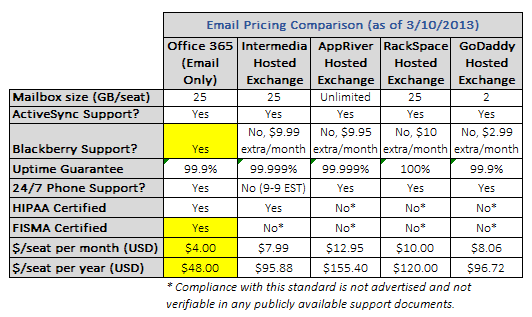
    A quick glance at the above comparison clearly outlines a few important items. Firstly, Microsoft’s pricing for Office 365 (at the Email Only level) is dirt cheap — a mere $4/person per month which equates to a lowly $48/person per year. That’s nearly half the cost of the next cheapest provider, Intermedia. But the advantages on cost don’t stop at the monthly price tag alone; Microsoft has the other big names beat on a few other key areas hands down.

    First off, while ActiveSync support for mobile devices such as iPhone, Android, and Windows Phone are a given these days, BlackBerry support (pre-BB10) is not a universal privilege. Of all five providers showcased in my comparison, only one, Office 365, has native complimentary BlackBerry email/calendar/contacts support out of the box. The other providers have nominal, but still extra, monthly fees tacked on for BB usage which could definitely have some sway in a final decision. Much of big enterprise, and some small businesses, still have large fleets of BlackBerries in use and having to pay a surcharge to continue using them is something many SMB owners don’t want to hear.

    When it comes to security compliance and certifications, Microsoft also has the third parties beat by a long shot. Other then Intermedia, which does have posted HIPAA compliance, the other providers are all either not advertising their credentials (which I doubt) or simply don’t have them under their belts. Office 365 boasts HIPAA and FISMA compliance, two important factors which make the suite 100-percent capable options for running in the public government sector or for healthcare-related institutions.

    Of course, there are a few providers that have Microsoft beat in a few aspects. For example, AppRiver has a slightly audacious claim that its hosted Exchange service affords “unlimited” email space. What the provider call unlimited, we all know is merely a glass ceiling that isn’t publicized. Similarly, RackSpace takes the same approach in its advertisement of a 100-percent uptime guarantee. I’ve heard from customers of theirs who have experienced outages, similar to this first-hand account, which Rackspace brushed off as not falling under their strict SLA terms. Whether or not the claims are a bit outlandish are up to your own discretion, but I prefer Microsoft’s down-to-earth, honest approach to advertised capabilities and uptime.

    Businesses want Security, and O365 delivers

    I’m not here to say that hosted Exchange providers aren’t secure. That isn’t the case by any means. But in a level playing field comparison, Office 365 holds a sizable advantage in presenting what has to be the single most secure email platform alongside the primary non-Exchange alternative, Google Apps. I put together another feature matrix that highlights the same providers I pinpointed in pricing earlier.
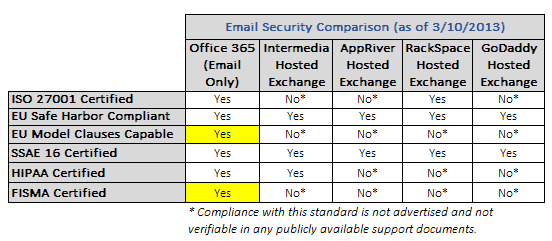
    The important differentiating factors here between Office 365 and everyone else happens to be EU Model Clauses capability, along with FISMA certification. EU Model Clauses is a contractual framework that was created by the EU to establish international data transfer standards. While most major providers fall in line with the commonplace EU Safe Harbor guidelines, only Office 365 advertises Model Clauses capability with customers.

    FISMA (Federal Information Security Management Act) is the other, much more important, credential that Office 365 has achieved. Specifically, this makes Office 365 fully acceptable for usage in any U.S. Federal Government agency. Google Apps is the only other large cloud email service to have attained this level of security. And government acceptance of Office 365 is subsequently on the rise. Microsoft has inked major deals with the City of Chicago, U.S. Department of Veteran’s Affairs, as well as the State of Texas to name just a few. While it could be partly due to Microsoft’s immense datacenter investment strategy and overall size, it still speaks numbers to their ability to handle some of the most delicate email needs within US borders.

    Is this to say that hosted Exchange providers like Intermedia and RackSpace aren’t suitable for small business? Not at all. They very well may be fully capable of meeting your own needs. But at nearly half the price of even the next cheapest option, Office 365 presents a true bargain when you take into account all of the security backbone you receive. The second best options of the given list are a tie between Intermedia and RackSpace; each respective provider has three different missing security credentials up against O365.

    On the Extras, O365 goes Above and Beyond

    If we were to end our comparison here, Office 365 would go home a solid winner. But some companies look for options above and beyond the plain-Jane features described above. And this is where Microsoft’s first party solution outshines the competition once more.

    Extras in the realm of cloud hosted email systems come in many forms. But the most popular ones being advertised today include SharePoint access, Lync capability, and download rights for some or all MS Office applications. Indeed, the disparities between providers are fairly wide, with some providers offering some extras in areas that others don’t, and vice-versa.

    But the consensus easily shows that Office 365 offers the widest array of possibilities out of the box. Let’s be clear and fair here to point out that my matrix in this area merely highlights if a provider affords access to a given flavor of value added service, and if so, what the associated cost happens to be. The comparison chart isn’t as apples-to-apples as the previous two, but it does show you the possibilities for all of the providers listed on various items that may be of importance to an organization.
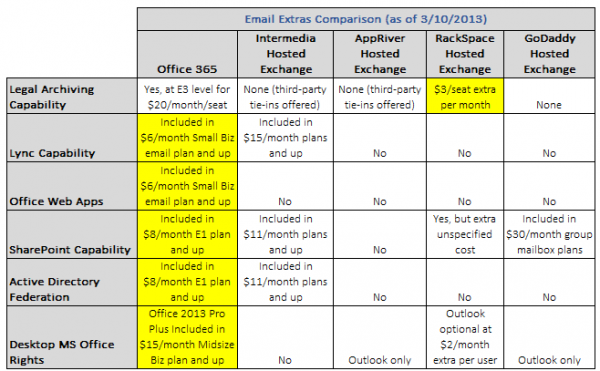
    Without a doubt, it’s fairly easy to see why Office 365 is the most flexible offering here. While the lowest Office 365 Email Only plan does not provide all of the extras listed in the chart, as a whole, some level of subscription of the suite provides each and every option you may desire on the scale. And that’s the key benefit that sits with Office 365; the choice is up to you. You can have as much or as little of the pie as you’d like — a winning combination of cloud elasticity and scalability alike.

    Microsoft doesn’t win on every category above, mind you. On Legal Archiving, 365 takes second seat next to RackSpace Hosted Exchange. This third-party provider has a quite excellent $3/seat extra per month plan that can provide full legal archiving and retention capability. However, in the grand scheme of the entire package that 365 provides, this is a small shortcoming which will likely be rectified as time goes on, seeing how Microsoft has every other provider beat on features and pricing for nearly every other aspect.

    The rest of the positives that Office 365 brings with it are pretty self explanatory. None of the hosted Exchange providers provide downloadable Office suite rights; the few that offer anything just pony up standard Outlook licenses, which are petty compared to having full Office download rights for just slightly more money through Microsoft (for multiple devices, too). Office Web Apps are another exclusive to 365, which are browser based versions of Word, Excel, PowerPoint, etc. Lync capability also comes in cheapest through 365, with the next best bet being Intermedia at a steep $15/month per seat.

    It’s keen to note that SharePoint offerings from the hosted Exchange providers are also expensive, when available. Office 365 comes with SharePoint Online access starting at the lowly $8/month E1 plan, and the next closest option is Intermedia which bundles SharePoint rights into its $11/month plans and higher. The same goes for Active Directory Federation and/or SSO capability – only Microsoft provides the purest SSO option in the form of Active Directory Federation Services which can tie natively into your optional existing on-premise AD domain. Intermedia offers a third party based directory sync option, but at a slightly higher $11/month per seat starting point.

    Is your business looking for future headroom with whichever direction you are heading in terms of email hosting? If so, I think Office 365 is the natural option that provides the greatest elasticity on features and scalability for your workforce. Price isn’t everything, but Office 365’s feature set and rock-bottom pricing is a tough option to say no to.

    The Finer Points matter, Too

    There are a few qualitative advantages that Office 365 carries over the various hosted Exchange providers; some of which may matter more to a prospective organization making the switch. It’s critical to bring these to light because too often we get lost in a purely price vs feature comparison only. These considerations are equally important when moving from a legacy email system and into the cloud:

    Continuous, gradual improvements vs “Big Bang” upgrades. Office 365 is on a similar, but not as radical, development cycle as Google Apps. The entire suite undergoes continual, evolutionary upgrades as opposed to hosted Exchange, which delivers the same traditional approach to on-premise legacy Exchange platforms: what you see is what you get (and will have) until the next major release — and even then you may not get moved without some friendly prodding of your provider. Most business owners I speak with prefer a consistent upgrade path that introduces new features and fixes slowly, as opposed to putting people through revolutionary shocks between major stepped releases.

    What level of uptime transparency does the provider have? Like Google Apps’ own Status Dashboard, Office 365 provides a very similar Service Health section within your control panel interface. I ran a quick check across a few of the hosted Exchange providers, and I couldn’t find any public information on service status or outages. They may offer intra-control panel dashboards for service status information, but be sure to ask about this if you are considering someone else outside of Office 365 or Google Apps.

    What level of integration do you want from your cloud email solution? It goes without saying that Office 365 is one of the most tightly-integrated cloud email offerings around next to Google Apps. While some providers of hosted Exchange offer bits and pieces of the same experience, none of them have the seamless full circle packaging across all aspects of the cloud services you may be subscribing to. This could be the difference between a simplified, easy-to-maintain platform and one with numerous phalanges that need to be separately controlled and serviced.

    How much control do you want over your platform? While the Office 365 online control panel provides access to about 80-percent of all the intricacies that the service provides, everything else can be directly accessed via the powerful PowerShell command interface. Hosted Exchange providers may be able to provide the same level of access, but generally, they need to keep the “reigns closer to the belt” due to the very nature of how hosted Exchange works. Office 365’s version of Exchange Online is built from the ground up for cloud usage, which makes it technically the more sound solution in most cases (but not all.)

    Don’t get lured in solely on offers for free migration by hosted Exchange providers. While migration costs can get costly depending on your current setup, keep in mind this one important fact: migrations are one-time fees, while recurring monthly fees are just that, recurring, and last for as long as you are on the platform. As you add more users to the service, you are increasing your monthly costs at the same pace. Hosted Exchange providers love to highlight their free migration services and sway the discussion away from their generally (sometimes substantially) higher monthly fees. Good business sense indeed, but as a consultant to my customers, I’m equally responsible for providing them with honest cost-minded recommendations for their ongoing needs.

    The points above are definitely things every organization needs to consider above the traditional feature/price matrix. Since switching costs are inherent to any cloud provider move, it’s always best to make the right decision up front and stick to a given platform for a number of years – instead of hopping and flopping between providers.

    Either Way you look, On-premise Exchange should not be on Your Shortlist

    We can debate the differences between Office 365 and hosted Exchange all day, but one thing that we can hopefully agree on is that on-premise Exchange just simply doesn’t have a place in the modern small business (50 seats or less.) Microsoft already nudged the SMB market away from on-premise Exchange by killing off Windows Small Business Server, and I’m certain that even the new Server 2012 Essentials offering is merely a placeholder to buy small businesses time as they make their way the cloud. Customers are even approaching us about moving Active Directory into the Azure cloud, which could bid servers farewell in the small business workplace entirely.

    The modern small business needs agility, flexibility, and a reduction in reliance on static servers that need painstaking ongoing maintenance to keep them operational. Are there situations where servers or on-prem makes sense? Sure — but I fully believe those scenarios are few and far between in 2013, and even less so going forward, especially for the SMB market.

    If your organization is planning a move to the cloud for its email needs, don’t fall victim solely on price-wars or steep promises. Do your homework, compare your options, and make your own informed determination. While I’m not writing off hosted Exchange entirely, most of my customers who have switched to Office 365 are quite happy on all levels including price, features, and elasticity for optional upgrade headroom. Sit down with your trusted technology consultant and lay all the cards out on the table.

    While I don’t want to blindly champion Microsoft’s first party offerings, with the new Office 365, they’re truly on to something pretty great.

    Photo Credit:  2jenn/Shutterstock

    Derrick Wlodarz is an IT professional who owns Park Ridge, IL (USA) based computer repair company FireLogic. He has over 7+ years of experience in the private and public technology sectors, holds numerous credentials from CompTIA and Microsoft, and is one of a handful of Google Apps Certified Trainers & Deployment Specialists in the States. He is an active member of CompTIA’s Subject Matter Expert Technical Advisory Council that shapes the future of CompTIA examinations across the globe. You can reach out to him at [email protected].

  • The Samsung Galaxy S 4 isn’t about the specs, it’s about the features and marketing

     Samsung_Galaxy_S_IV_TA_Hands_On-630x354


    You have to hand it to Samsung really. After getting the public to generate unprecedented buzz and pandemonium, Samsung certainly brought in the Galaxy S 4 with a bang thanks to its snazzy Unpacked 2013: Episode I event. Heck— the buzz and excitement caused not one, but two competitors to try and pour salt in Sammy’s coffee, yet Sammy wasn’t deterred. As opposed to the traditional unveilings and demos that we’re used to seeing at keynote events, Samsung instead thought about doing something ummm, “unique” or “different” to say the least by providing a variety of skits, dances and literally theatrics to introduce its new flagship. More importantly, Samsung used its brand name to be out of the box in comparison to its competitors: go into the heart of the Broadway, use one of the world’s largest stages complete with an orchestra, an MC and some sweet live performances to introduce something that is “unique” and different”.

    While those of us in attendance were quite impressed (and believe us, Rob Nazarian & I were certainly entertained at the event)— the Galaxy S 4 certainly poses a significant observation of not just the Galaxy S 4, but Samsung as a brand as we know it: Samsung is utilizing the features and more importantly— the marketing of its products to sell its brand. Make no mistake about it: Samsung has made a serious transition going from what was known as a relatively unknown Korean brand to a wannabe Apple competitor to what is perhaps the most exciting and controversial brand to date. The scary thing is this— not only is the transition a success, but everyone else is now playing catchup in terms of brand recognition and excitement.

    Let’s start off with the basics of why Samsung is focusing on its software and features that distinguish itself from the competition. As you’re already aware, the Galaxy S 4 smartphone comes with internals that have been seen in most, if not all other flagship phones already including the full 1080p display, 2 gigs of RAM and a quad-core processor (save for the octa-core processor to be found in select variants of the device). If you paid close attention to the Unpacked event, Samsung spent no more than 5 or so minutes highlighting the hardware and internal of the device, but instead spent over 45 minutes highlighting all the bells and whistles of its unique feature set.

    For example, Samsung spent an extraordinary amount of time highlighting its Sound and Shoot feature which more or less allows users to record audio clips to compliment any image that is taken with a smartphone— to the average user, this is something that is probably going to be useless, but Samsung spent a great amount of time and energy to make the feature truly compelling and meaningful… even if it’s not in reality. Another example is the fact that Sammy also took an extraordinary amount of time highlighting its revamped S Voice Drive feature– which is more or less a combination of bits and pieces of Apple’s Siri, Google’s Maps/Now/Navigation app and its original S Voice feature to make what supposed to be the most revolutionary and complete hands-free while driving app to date. I’ve only given two examples of what the Galaxy S 4 has to offer, but here’s a complete rundown of the Galaxy S 4′s feature set that was showcased at some point at yesterday’s announcement:

    • AirView
    • Smart Pause
    • WatchOn
    • Optical Reader
    • Group Play
    • Phototography: Drama Shot Photo Eraser, Sound and Shot, Cinema Photo, Dual Shot, Dual Recording, ChatON Video Chatting
    • ChatON Screen Sharing
    • S Translator
    • Adapt Display
    • S Health

    Samsung couldn’t have pulled off showcasing the compelling needs for the smartphone’s features without its topnotch research and marketing department. Don’t forget folks— Samsung isn’t afraid of spending money on its research and marketing departments— and it shows. Take a look at not just its extensive “4″ marketing campaign, but its highly successful campaign last year showcasing its Galaxy S III smartphone. While Apple spent an enormous amount of time and resources participating in a major legal battle against Samsung, Samsung instead spent an enormous amount of time highlighting what its Galaxy S III could do that the Apple iPhone couldn’t at the time, such as utilize true 4G LTE and enjoying the ability to share personal items with the simple tap of the device. The result is not only a Samsung loyal following that grew from this, but many iPhone users as well as other Android brand users jumping straight to the Samsung ship as well. The Korean giant spends an enormous amount of time observing the trends and seeing what people really want and the Galaxy S 4 as well as upcoming products are a reflection of that notion.

    So are the Galaxy S 4 and future Samsung products a reflection of cutting edge technology and innovation? Well no… not really. But that isn’t Samsung’s gameplan at this point. Samsung is taking aim at the general consumer at this point and showcasing how its products differ from the competition, even if it’s something we’ve already seen before. There’s a bigger picture too with Samsung’s plan: by doing this strategy, Samsung is using its marketing and special features in its devices to slowly distance itself not only from Apple and other Android manufacturers— but Google itself. If  the other brands haven’t paid much attention before, they may want to start doing so soon, very soon.


    Come comment on this article: The Samsung Galaxy S 4 isn’t about the specs, it’s about the features and marketing

  • Samsung succinctly shows off Galaxy S 4′s features, sans tap dancing [video]

    Samsung Galaxy S 4 Feature
    Amazing but true: Samsung (005930) can show off all the Galaxy S 4’s new features in under five minutes, and without elaborate dance numbers. In a video released Thursday, Samsung succinctly demonstrated several new features on its flagship smartphone, including its 5-inch full HD Super AMOLED display, its Air View feature that lets you interact with your phone just by hovering your finger over it, its Smart Pause eye-tracking technology that automatically pauses videos whenever you look away from your device, its Group Play feature that lets you zap music via NFC from one phone to another, and its dual shot video camera that can sync up and embed video taken with the front-facing camera into video filmed with the rear-facing camera. While some of these features might seem gimmicky, Samsung is certainly playing them up as key differentiators from competing devices. The full video is posted below.

    Continue reading…

  • Tictrac opens up to help make health tracking more mainstream

    Activity-logging wristbands, sleep trackers, heart rate monitors and the other accoutrements of the growing Quantified Self movement are all well and good. But, for now, it’s mostly just early adopter techies and health geeks who use them, and for the most part they don’t get a big picture view of their aggregated data and underlying patterns.

    But Tictrac has an answer to that in the form of a personal analytics dashboard that it launched in closed beta last year and opened up to the public this week.

    The startup integrates with about 50 APIs to enable people to pull in data from apps like Runkeeper, trackers like Fitbit (see disclosure below) and sleep monitoring tools like Sleepio. Once the data is ingested in Tictrac, users can see easier-to-understand visualizations of each data stream as well identify relationships between the different parts of their lives.

    “Our focus with Tictrac is around bringing together all lifestyle factors with respect to health,” said CEO and founder Martin Blinder. “What affects you in one aspect of your life will affect you in another.”

    Since launching in private beta a year ago, the company has mostly focused on being a consumer web service. But, Blinder said, Tictrac has started working with employers and health and fitness experts to make health tracking more accessible and helpful to those with (or at risk for) chronic conditions. It recently closed a deal with European telecom company Telefonica to support a corporate wellness program and other similar partnerships are likely ahead.

    On the site, Tictrac helps users organize their data around “projects” related to goals like losing weight or lifestyle changes like caring for a newborn. This week, the startup rolled out four new projects for asthma, diabetes, chronic bronchitis and blood pressure. Through those projects, health professionals and fitness coaches can tailor programs for their patients and clients and use the site to assess progress.

    For example, for a patient at risk for diabetes, a doctor could create a project that outlines activity and nutrition recommendations and then follow the patient’s activity, weight loss, eating habits and more.  Because Tictrac allows users to integrate their calendars, travel schedules, email and other non-health data, a doctor monitoring a patient with asthma could use Tictrac to identify potential lifestyle patterns related to when asthma attacks were triggered.

    Other startups and companies are starting to offer more sophisticated and social patient engagement and corporate wellness platforms. And Tictrac isn’t the only company looking to help consumers aggregate their health data to uncover insights. Earlier this month, for example, we reported that WebMD and Qualcomm Life have teamed up to offer a health hub that similarly enables people to sync and analyze data from multiple health tracking tools. But Tictrac (which has only raised an angel round but says it isn’t looking to raise more funding now because it’s earning revenue) is an interesting startup to watch because it makes the data easy to follow, visually compelling and meaningful.

    Related research and analysis from GigaOM Pro:
    Subscriber content. Sign up for a free trial.

  • Will You Miss Google Reader? Clearly, Many Will.

    I was out on leave when the news came out: Google is killing Google Reader. No! Why? No!

    Should Google kill Google Reader? Will you miss it? Let us know what you think or if you care in the comments.

    So here I am back to work. Immediately, I’ve already been using Google Reader like all day. The truth is, I was already using it every day while I wasn’t working as well. That’s because it’s one of the things on the Internet that I use the most. So, you can imagine, I’m not incredibly happy about the news. I mean, I don’t agree with Hitler on many things, but I think he has this one spot on.

    A little over a month ago, Google Reader users were experiencing some usability issues with the product, and Google didn’t seem to care much about fixing it quickly. Little did we know at the time that this was a foreshadowing of what was to come.

    On Wednesday, Google broke the news to the world. They did so in one of their regular “spring cleaning” announcements. By now, I’m used to these announcements. Usually, they’re about products that I’ve used little or not at all. Occasionally, they included something I used but could live without (like Picnik). Never before have the announcements involved something that I relied upon on a day to day basis.

    This is all Google had to say about it in the announcement:

    We launched Google Reader in 2005 in an effort to make it easy for people to discover and keep tabs on their favorite websites. While the product has a loyal following, over the years usage has declined. So, on July 1, 2013, we will retire Google Reader. Users and developers interested in RSS alternatives can export their data, including their subscriptions, with Google Takeout over the course of the next four months.

    Was it only 2005? I can hardly remember living without Google Reader.

    There was a separate post on the Google Reader blog. This was the first post to the blog since October 2011, which announced some Google+ integration. Perhaps that should have been taken as another clue. On the blog, Google software engineer Alan Green wrote:

    We have just announced on the Official Google Blog that we will soon retire Google Reader (the actual date is July 1, 2013). We know Reader has a devoted following who will be very sad to see it go. We’re sad too.

    There are two simple reasons for this: usage of Google Reader has declined, and as a company we’re pouring all of our energy into fewer products. We think that kind of focus will make for a better user experience.

    Usage is declining. I guess that’s not entirely unexpected, given the rise of social media. For the average person, I can see where it wouldn’t be incredibly hard to get by without Google Reader, even if they are accustomed to using it on a regular basis. For people who write for the web, however (which is still a pretty large number of people), there really isn’t another tool out there that does the job as well as Google Reader. At least not yet. Others see the situation as it is, and are working on alternatives, and or promoting their existing alternatives.

    There are petitions pushing for the saving of Reader. This one at Change.org has over 100,000 supporters. There are others at Change.org and elsewhere. This one at KeepGoogleReader.com has over 31,000 itself.

    The Twitterverse (one of many possible places Google will be pushing users with the killing of Reader) is full of complaints. Twitter, by the way, probably has a lot more to gain from this move than Google+, and many believe that Google’s move is really about Google+. It’s no secret that Google has been pushing to get people using its social network to consume and share content, and clearly, this is where Google’s efforts on this front are focused.

    This week, former Google Reader product manager Brian Shih spoke about Google’s move on Quora. Here’s a snippet of what he had to say about it:

    It turns out they decided to kill it anyway in 2010, even though most of the engineers opted against joining G+. Ironically, I think the reason Google always wanted to pull the Reader team off to build these other social products was that the Reader team actually understood social (and tried a lot of experiments over the years that informed the larger social features at the company)[1]. Reader’s social features also evolved very organically in response to users, instead of being designed top-down like some of Google’s other efforts[2].

    I suspect that it survived for some time after being put into maintenance because they believed it could still be a useful source of content into G+. Reader users were always voracious consumers of content, and many of them filtered and shared a great deal of it.

    But after switching the sharing features over to G+ (the so called “share-pocalypse”) along with the redesigned UI, my guess is that usage just started to fall – particularly around sharing. I know that my sharing basically stopped completely once the redesign happened [3]. Though Google did ultimately fix a lot of the UI issues, the sharing (and therefore content going into G+) would never recover.

    So with dwindling usefulness to G+, (likely) dwindling or flattening usage due to being in maintenance, and Google’s big drive to focus in the last couple of years, what choice was there but to kill the product?

    So, if you want to get your data out of Reader from Google Takeout, you can do so here. You have until July 1. In the meantime, us Google Reader die hards will have to hope Google takes note of these petitions and reconsiders (which is probably unlikely, if we’re being honest), and/or start exploring the alternatives. Lots of people have already compiled lists, including tools like: Feedly, Netvibes, The Old Reader, Bloglovin’, NewsBlur, FlipBoard, Pulse (which LinkedIn is apparently buying), Zite. Oh yeah, and then there’s Google Currents (at least for now), and of course, there’s not even a web version.

    Nothing I’ve used so far has been able to match Google Reader in functionality entirely, for my personal purposes. Some are better than others, and I won’t promote any one tool here, mostly because I’ve not settled on one myself. You can be sure that we’ll see more players enter the market in the time leading up to July 1, so the best alternative might not even exist yet. One intriguing possibility is an offering for Digg, who has already come out and said it’s working on one that will mimic Google Reader. That sounds promising. I’d love to see an identical clone, even if it has Digg’s logo instead of Google. This could be Digg’s ticket back to Internet relevance.

    Some services, which relied heavily upon Google Reader are just shutting down – namely FeedDemon. Founder Nick Bradbury wrote about the end of the service in a blog post, which he says was hard for him to write. He says:

    FeedDemon relies on Google Reader for synchronization, and there’s no decent alternative (and even if there were, it’s doubtful I’d have time to integrate with it, at least not without trading time away from my family – which I won’t do).

    That was the nail in the coffin for me. I hate to say goodbye to FeedDemon after a decade of working on it, but it’s time to say goodbye. When Google Reader shuts down on July 1, FeedDemon will also disappear.

    Some see the whole thing as a good opportunity for Google rivals like Microsoft and Yahoo to step up to the plate, and fill a void that Google is leaving behind.

    Some (including Hitler) have wondered what has happened to Google’s old stance about the open web – something that Google Reader and RSS both cater to. Google has historically been all about this, but doing away with Reader and pushing toward Google+ doesn’t seem to be a move in the same direction. That may or may not make sense from a corporate standpoint, but it’s certainly worth noting. As TechEye points out, Google’s move should make Internet censorship-heavy Iran happy, as many Iranians apparently use reader to get around some of the censorship.

    What About Your Web Traffic?

    Okay, I think the point has been made about how much this whole thing sucks for users. But there is another side of the coin, for which the outlook isn’t all that rosy either. As RSS feeds are still the primary way a lot of people get their news, that means Google’s move away from Reader has the potential to impact traffic to the sites to which users are subscribed.

    Hard core Google Reader users have racked up numerous feeds over the years. You have to wonder how many of the users, regardless of what alternative they transition to, will take all of their feed subscriptions with them. How many sites will lose subscribers over the whole thing. Some users will no doubt elect to just use social media instead of RSS. Will these people bother to subscribe to the Twitter, Facebook or Google+ feeds for all of the sites they were subscribed to? And even if they do, will these sites be pushing out every article to these channels the way they do through RSS?

    That brings up another interesting point. Will this move clutter up social media feeds, and lead to a lot more content being pushed from publications through social media channels? A site that only pushed a few articles per day to its Facebook followers may find itself posting every article. Then, of course, there’s another layer to that issue: how many Facebook users are looking at all of the posts from the pages they follow?

    Luckily, Facebook is in the process of rolling out changes that at least let users see all of the posts from the pages they follow if they choose to do so. Before, they were filtering that, so there was no guarantee all of a page’s followers even had the opportunity to see a post. Even still, the Facebook functionality is hardly an RSS clone.

    According to BuzzFeed, Google Reader is a much larger source of web traffic than Google+ to the network of sites it tracked. Here’s what their chart looks like:

    Google Reader Traffic

    Death Of RSS?

    The question of whether or not RSS is dead or dying has been around for years. Naturally, it has resurfaced in light of Google’s news. Is it dead? Clearly not, given the amount of outcry we’re seeing over the death of Google Reader, and the rush for alternatives from other companies. There is demand. It may not be a huge percentage of Internet users, but those that demand it are serious about it and loyal to the format. It’s become as fundamental to the web experience as search and email for some of us. It’s not dead.

    Is it dying? That’s not as easy of a question to answer. I want to say no, but Google turning its back on it is not a good sign. Part of me wonders, as I’m exploring alternative means for consuming RSS feeds, if it’s just a lost cause, and I should really be exploring different strategies for news consumption altogether (and don’t get me wrong, RSS is not my only news consumption habit). I don’t think I’m willing to accept the demise of RSS just yet though. If we all do that, then we truly are killing it. To my knowledge, there really isn’t a means of consuming news that is as comprehensive as RSS anyway – at least not one that meets my needs.

    Obviously I’ve made no attempt to hide how I feel about Google Reader’s demise, but there are some out there who think it might actually be a good thing. Some journalists have already abandoned RSS. Tech blogger Robert Scoble, once a faithful user, wrote about why he stopped using Google Reader all the way back in 2009. He had some valid points about flaws with Reader back then that still hold true today, but I don’t think many of us would say that Reader is flawless. Sure, there are things that Google could have improved upon, and you can’t rely solely on Reader if you don’t want to miss anything. For many of us, however, it’s just a major piece of the puzzle.

    All of this aside, by shutting down Reader, Google is driving people out of its universe, by driving them to alternatives. I find this move baffling, as in many cases, it will no doubt drive users to Google’s competitors. Considering all of the moves Google has made to keep users on Google properties, keeping Google Reader around seems like a no-brainer. Some of us spend a whole lot of time on that Google property. Possibly even more than any other Google property.

    While Google Reader may live to July 1, the app is already gone from the Google Play store.

    Is Google wise to kill off Reader? Will you miss it? What will you use instead? Is this the beginning of the end of RSS? Share your thoughts in the comments.

    lead image via: http://nooooooooooooooo.com/

  • Circle Pie for BlackBerry 10 and PlayBook: a Puzzle Game You Can’t Put Down

    Circle Pie is a puzzle game by Ivy Studio with simple game mechanics that make it a pleasure to play. Connect like colored dots without intersecting lines and filling the entire play board to win.

    The game sounds simple enough but after playing even a couple of levels you’ll agree that it clearly defines fun. It seems like no big deal, but as soon as you get stuck on a level and then solve it you’ll be hooked for life.

    Playing Circle Pie on a BlackBerry Playbook is ideal with friends too. You can either trade off levels, or trade drawing specific lines for a more intimate gameplay experience.

    Take my word for it, it’s as addictive as that game that Riker brought back from the pleasure planet Risa.

    Click here to buy Circle Pie for BlackBerry Playbook and BlackBerry 10.