In the old days, when a proposal was ready to go out from my university to NSF or NIH or whatever, a pile of paperwork was circulated around so as to get the needed cascade of signatures: principal investigator, department head, budget office, and so on. A couple of years ago, the office of research administration replaced this inefficient process with a new web-based system.
Such systems can be a great thing. Several years earlier, NSF automated its submission procedures via a system called “FastLane”, and in my opinion, it’s been a big success. Submission, reviewing, and reporting have become much easier. The system is pretty much self-explanatory, and there are good help pages for aspects that may be confusing.
But our new internal review software was different.
If you’re in the approval chain for a proposal, you get an email with a web link. When you click it, you have to authenticate yourself through the university’s Kerberos server. Then this display appears in the upper left-hand corner of the browser window (which is otherwise empty):
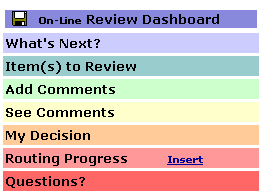
The first time I had to navigate this process, it completely baffled me. I tried everything I could think of, over the course of a couple of hours, and couldn’t get it to accept the approval I was trying to enter. I wasn’t trying to do anything fancy — all I wanted to do was the equivalent of signing the transmittal form; and I consider myself pretty good at figuring out difficult interfaces. But this one defeated me.
There was no page of instructions, and asking questions up through a couple of layers of bureaucracy failed to find anyone who had any clue what might be going wrong. When I took a break to go ask some questions, I discovered another wrinkle.
The web link in the original email is a fairly complex one:
https://www.pennera.upenn.edu/messaging/ReviewItem.asp?RoutedStepID=FOO
where FOO is something like “7FC01A8C4FF9C104E043A57B5062C104″.
When I gave up and decided to go for help, I deleted the email, figuring that I’d be able to get back to my “Items to Review” in this system just by signing on to the research-administration web site. That’s what I do (for example) in NSF’s FastLane system, or other systems of that kind that I’ve used.
Fat chance. If you don’t have the magic cookie, you apparently can’t get to the approval page. And I’d deleted the email. So when my first couple of hours of trial-and-error ended in failure, there was a delay while several more layers of bureaucracy tried to figure out how to reconstruct the link for me. (The details of this process were mercifully hidden from my view.)
Anyhow, after visiting the offices of a couple of administrators who also couldn’t figure out how to coach me through entering an approval, I went back to trial-and-error, and eventually I discovered how to accomplish the digital equivalent of the old-fashioned “sign on the line”.
Actually, somebody may have given me the crucial secret clue, I don’t remember… but in case you ever need to deal with a version of this particular system, I’ll reveal the trick to you now.
The first step is to click on “Item(s) to Review”, and then check the boxes that indicate you’ve reviewed them. That much I had tried dozens of times before — but the key insight is that after checking the boxes, you need to click on the little icon in the upper-left-hand corner, in order to “save your work”. That icon, in case it puzzles you as much as it puzzled me, is not a low-res image of a computer monitor serving as the program’s logo — rather, it’s a low-res image of a floppy disk, serving as the program’s Save button. “Save” = “floppy disk”, get it? This from a program that was introduced within the last couple of years, roughly a decade after the last floppy disk drive was consigned to a museum.
Then you need to click on “My Decision”. (This won’t work unless you’ve previously saved the result of checking off the “Items to Review”, by the way.) This will give you a menu of alternatives that includes “Approved”. And having selected “Approved”, you need to click on that floppy disk again., otherwise it’s all for nothing. (None of the other menu items will accomplish anything except to confuse you.)
OK, so I learned how to “sign on the line”, via what must be one of the least intuitive human interfaces ever designed. (And I speak with some authority on this question…) In the couple of years since then, I’ve been through the process many times.
But yesterday, there was something new. I authenticated myself, as usual, but instead of the familiar ugly little rainbow menu, I got a page reading in its entirety:
error ‘8000ffff’
/home/websec.asp, line 40
I tried several times, with the same result. So I figured that the server must be down.
Things still weren’t working this morning, but our business administrator had figured out (by trial and error) that the site aparently now works only with Internet Explorer. And sure enough, Firefox and Chrome get the error messages, but IE 8 works.
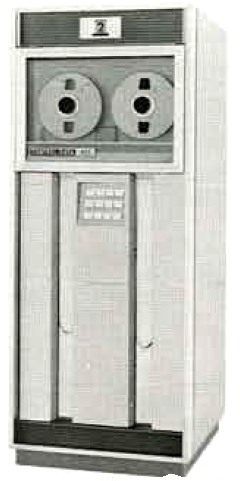 Amazingly, it seems that software development continues on this system, and they’ve now accomplished the extraordinary feat of making it even more opaque and difficult to use. I have a suggestion for the next iteration: maybe they should replace the “floppy disk” icon with a tiny image of a seven-track tape drive. And then they could add a chartreuse menu item labelled “Advanced Features” that lets you sign in octal. (Octal EBCDIC, of course.)