Author: Serkadis

  • Introducing the $1,500 Intel e-book reader

    Intel reader
    The Amazon Kindle costs $260. The Barnes and Noble Nook costs $260. The Sony reader is $300. Clearly there’s an established price point for what we call an e-book reader. Jumping into the e-book fray comes the Intel Reader, for fifteen hundred U.S. dollars. No WiFi, no associated book store, but it does include a 5 megapixel camera, and a host of features designed to make it the best choice for vision impaired people.

    From the VentureBeat review:

    The paperback-sized device is aimed at 55 million people in the U.S. who have eyesight problems and don’t want to be dependent on others for the pleasure of reading a novel, looking at a restaurant menu, or reading web site pages. It comes with a 5-megapixel digital camera that can be used to snap pictures of book pages. Foss said he was able to scan a 262-page book in a half hour and listen to the first chapter of the book while he was doing it. The device can read text in the DAISY format, plain text, as well as MP3 music files.

    Can the Kindle or Nook help a vision-impaired individual order from the menu at a restaurant? I think not. The ability to scan and read custom text makes the Intel Reader something very different from the current offerings of e-book readers. This is clearly a multi-purpose device designed to enrich the life of its user, not just be a portal to selling electronic books. The Reader can speak the menus aloud to the user, and the instruction manual comes as an audio CD, making this extremely friendly to visually impaired individuals.

    An optional book scanning system, the Intel Portable Capture Station, can be purchased, to allow home users to digitize books with ease. A lot of time and effort has gone into researching the ergonomics of the Reader and its accessories, since the target audience isn’t your normal fully-abled young-to-middle aged person.

    The Intel Reader boasts some custom made parts, but is otherwise fairly run-of-the-mill in terms of capacity and performance:

    The device has an Intel Atom microprocessor and two gigabytes of flash memory storage. It runs Linux software and some third-party software for scanning and reading aloud. With a fully charged battery, the device can read aloud for four hours. It can last for days on standby power. It can store about 500,000 pages of text or 600 pages of scanned book pages.

    Here’s a video of the Intel Reader in action:


    I think this is a terrific use of technology, and it demonstrates an impressive commitment from Intel in terms of research spending. I think this will create a lot of opportunities for the people who can afford to purchase it, and Intel deserves a lot of praise for cooking this thing up.

    But I think that we, the general Internet population, can do a lot more. Listening to books read aloud by crappy digitized computer voices doesn’t really do justice to a lot of printed materials — especially novels. When I read a book, I hear in my mind’s ear distinct voices for each character. I read faster during tense or exciting scenes. I experience the story in a way that the monotonous drone of a computer voice can never reproduce.

    Something like Project LibriVox can breathe real life into stories. We, the general Internet population, can donate a couple of hours of our leisure time to read a chapter — or a complete work — of a book so that others can enjoy the story in the dramatic manner in which it was intended. It’s a lot of work, I know: I recorded Thuvia, Maid of Mars by Edgar Rice Burroughs. But it’s also a lot of fun, and a very rewarding experience.


  • VESA Issues Mini DisplayPort Standard

    800px-VESA-Logo.svgEarlier this year (right at the beginning, in fact), we brought news that the Video Electronics Standard Association (VESA) might potentially make the Mini DisplayPort standard, meaning that manufacturers outside of Apple can now use it in their products without Apple’s approval, including rival computer makers, among others.

    The Mini DisplayPort (mDP) standard is described as a smaller form factor of the DisplayPort connector itself. The smaller connector is aimed at devices like thin portable computes and add-in cards that need to support multiple display interfaces. Hopefully, display and display accessory makers will adopt the standard, reducing the need to purchase expensive Apple-branded adapters.

    The new mDP is for Version 1, Revision 1a of the standard, though DisplayPort 1.2 including mDP is in the works, which will double the available bandwidth of the cable tech to 21.6 Gb/second. That would mean that multi-monitor support via a single cable would be feasible, as well as higher resolutions and improved color depth and refresh rates. 3-D displays necessary for demanding graphical applications could also be supported with the new version of the standard.

    As a result of this new standard creation by VESA, we could see a flood of mDP-toting computing devices, or we could see very little change at all. As with FireWire, many computer makers might opt to skip mDP or DP in favor of more established technologies like DVI and VGA, since they are more widely available and don’t necessitate a change to manufacturing processes. The one thing mDP has going for it is its size, and makers of MacBook Air competitors will probably be the first to bite, if anyone does.

  • Bing Maps Gets an Upgrade

    Microsoft announced that it has made some changes to Bing Maps. Changes include the color of the navigation bar, draggble routes, zoom bar changes, command parsing, embedding, dynamic computing, new navigation, speed, and Bing Maps will no longer stop at the international date line, but will wrap around the world continuously.

    Draggable routes is arguably the most significant change to Bing Maps. "This is a great (and much requested) feature added to Bing Maps allowing you to generate a route, then in the case that you need to change the route, you can simply grab any part of it and drag it to where you want the route to actually go," says Microsoft’s Chris Pendleton. "To use draggable routes, click the directions link in the welcome pane or the car icon near the bottom of the welcome pane. Enter a start and end, generate a route, then grab anywhere on the route to move the route line. The route will regenerate for you."

    With the zoom bar, you can now jump to specific zoom levels rather than just zooming in and out, and if you want driving directions or traffic info, you can enter specific commands in the search box like "Bellevue, WA to Space Needle" or "Seattle Traffic."

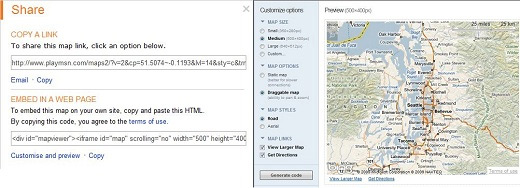
    You can now embed maps onto blogs or sites by clicking the share button when the map is where you want it to be. You can then copy the code or click the "customize view" link to bring up the embeddable map customizer.

    Embed Bing Maps

    As far as navigation, there is a new selection of features on the button bar with the following: 

    – "Welcome" loads the welcome pane

    – "Car" loads driving directions

    – "Star" loads My Places, formerly called Collections

    – "Envelop" loads the ability to share the map with someone via email, copy a URL or embed the map into a web page

    – "Printer" is for printing

    – "Traffic light" will load the traffic overlay

    Bing Maps Buttons

    "We’ve moved the processing power closer to the user," says Pendleton. "Using Microsoft’s ECN, we now have Bing Maps running in data centers in 7 locations around the world. This means wherever you are around the world, you will access Bing Maps from the closest geographic node to where you are physically located."

    In addition to that, the default Bing Maps home page dropped from 678kb to 484kb and Pendleton says it "zips through the pipes" much faster now.

    Related Articles:

    > National Geographic, Weather.com Befriend Bing

    > Google Makes Biggest Design Changes to Maps Yet

    > Google Updates Maps with New Dataset

  • Role of Information Security Manager

    As the Information Security Manager you will take responsibility for developing, maintaining monitoring compliance of all information security policy and procedures.

    The successful Information Security Manager will perform

    • security risk analysis and risk management,
    • perform security tests
    • manage internal audits on information security processes, controls and systems.

    You will take responsibility for developing and maintaining the organization’s project disaster recovery and business continuity plans for information systems and monitors changes in legislation and accreditation standards that affect information security.


    You will provide guidance and consultation on projects for IT Security related risks and issues.

    The successful Information Security Manager must be qualified to Degree level in a numerate subject (e.g. Computer Science, maths, engineering) and possess professional level Information Security Certification such as CISA/CISM/CISSP/SSCP. Will possess a minimum of 5 years experience in Information Security Management and be well versed with ISO 27001 accreditation.

    This is a guest post by Venu Potumudi, an Information Security Manager. The orignal text is published on Making of ISM

  • Review: Archos 5 Internet Tablet with Android

    archos5

    Short Version: After a handful of rapid-fire firmware updates, the Android-infused Archos 5 Internet Tablet has turned out to be quite a compelling device. The snappy web browser, marathon battery life, and nearly endless list of features and functions make Archos’ latest couch companion a worthwhile option if you’re shopping for portables. If you’re drawn to the Archos 5 Internet Tablet purely based on the fact that it’s running Android, though, you’ll likely come away disappointed as there’s no access to the popular Android Market.

    Features:

    • Screen: 4.8-inch 800×480 touchscreen
    • Storage: 32GB flash memory
    • Connectivity: 802.11b/g/n wireless, Bluetooth, GPS
    • Codec Support: MP4, WMV, MPEG-2, H.264, MP3, FLAC, OGG, AAC, WMA
    • Promised Battery Life: 22 hours audio, 7 hours video
    • Expansion: microSD
    • Other: Android OS, web browser, downloadable apps, FM receiver, optional DVR
    • Dimensions: 5.63” x 3.1” x 0.4” and 6.4 ounces
    • MSRP of $379.99

    Pros:

    • Jack-of-all-trades device handles audio, video, web surfing, radio, e-mail, GPS, media streaming, digital video recording, games, photos, and more
    • Impressive battery life — especially for audio and video playback
    • High-resolution screen works well for web sites and videos

    Cons:

    • The $380 starting price is compounded by having to pay to unlock extras like MPEG-2/WMVHD video playback, GPS subscription, and DVR functionality
    • Built-in Archos-branded app store is severely limited, and there’s no access to the more popular Android Market

    Review:

    I’ve been playing with the Archos 5 Internet Tablet for about a month now. I have the 32GB flash version, which is a gorgeous slab of electronics sized small enough to fit in a roomy pocket but large enough to keep next to your favorite armchair in lieu of a full size laptop.

    While the aesthetic appeal of previous Archos devices has traditionally been the subject of great debate, most would agree that this new one looks pretty nice inside and out.

    IMG_0397

    To say that the first couple weeks I spent with the device were worrisome would be putting it lightly. The UI was slow and clunky, the battery drained even when the tablet was in standby mode, and the web browser crashed out to the main screen during periods of moderate use.

    Then came a firmware update. Then another. And another. And suddenly everything worked.

    update

    I’m now happy to report that the tablet is much more stable, the battery life has greatly improved, and surfing the web and navigating the interface is sufficiently slick. I’m using firmware version 1.2.15 (Android 1.5) at the time of this review.

    The Archos 5 Internet Tablet does many things and, as with most portable media players, the big question is whether or not it can do each one of those things well.

    Basic Audio and Video Playback

    For audio and video playback, the device handles everything with ease. Videos look great on the crisp 4.8-inch screen and the 800×480 resolution renders downscaled HD videos and standard-definition videos phenomenally. Archos has really nailed down the core functionality of its portable media players. Music and videos come first, everything else comes second.

    I was skeptical of Archos’ claim of 7-hour battery life for video playback, so I set a playlist up to repeat indefinitely at 25% brightness and 25% volume just to see how close we’d get to that number. To my surprise, the tablet hit 6 hours and 15 minutes before petering out. That’s not too bad at all, especially considering I left the Wi-Fi connected the entire time.

    Audio playback is handled via a simple interface that displays album artwork. I found the built-in speaker to be too tinny to listen to anything other than spoken-word podcasts – playing actual music sounds much better through a pair of decent headphones. Battery life for music playback is pegged at 22 hours and, again, those claims held up pretty well. I managed about 20 hours and 30 minutes with volume at 25% and Wi-Fi turned on.

    And finally, just for good measure, here’s where I complain about Archos charging people $40 to unlock 720p WMV and MP4 playback. That functionality should always be included at no extra charge but Archos has been charging people for it for a long time now, so I give up.

    addons

    Web Browsing

    The built-in web browser is quick and responsive, thanks in large part to the 800MHz ARM Cortex A8 CPU that powers the tablet. The 800×480 screen renders full versions of web sites relatively faithfully, although the browser will default to the mobile version of most sites if there’s one available.

    Trying to use the Archos 5 Internet Tablet for web videos is, unfortunately, too hit-or-miss right now if one of your big goals is to watch YouTube videos all day. YouTube apparently tweaked their API recently, which caused videos handed off from the browser to Archos’ built-in video player to just freeze the tablet, requiring a reboot.

    IMG_0408

    There’s a standalone Dailymotion player included, and I’m currently having trouble getting those videos to work as well. There’s loose talk of a Flash 10 update coming to the device sometime but until then, browser-based Flash video is still pretty rough around the edges.

    Not to say that YouTube videos never worked on the device – they used to, at least. They even played back in HD (see this post on ArchosFans.com for proof).

    So if you’re planning on using the web browser for basic, straightforward stuff then you’ll like it just fine. It’s quick, the keyboard works great, and pages render nicely on the 4.8-inch LCD.

    Battery life is pretty solid as well. Under heavy testing (a website auto-refreshing every minute and a different site simultaneously scrolling through RSS feeds like a news ticker), the tablet managed to stay alive for five hours.

    Software

    And now for the Archos 5 Internet Tablet’s Achilles heel: software. Part of the allure of an Android device is access to the thousands of great free and for-pay applications found in the Android Market. Unfortunately, though, the Archos 5 Internet Tablet’s 800×480 screen resolution and lack of dedicated Home and Back hardware buttons place it outside the list of compatible devices for the current version of Android (1.5) that it’s running.

    That’s not to say that you’re completely out of luck. Archos has built its own app store into the device, called AppsLib. It’s a pretty clunky, slow-loading (sometimes freezing), repository with a mere handful of available applications (listed here) – a far cry from what’s available in the Android Market. There’s no Google Maps here, no Qik, no SportsTap, none of that stuff.

    IMG_0410

    That’s not entirely Archos’ fault and it’s possible that a future update might load Android 2.0 onto the device someday (which includes compatibility for 800×480 screens) but as of now, your options for new apps are very limited and the interface that’s used to deliver them is frustrating at best.

    What you’re left with is a mish-mash of pre-installed applications that range from quasi-useful to downright unrecognizable. Archos is a French company, so some of the stuff (like Dailymotion and Deezer for instance) will be of little to no interest to U.S. consumers.

    IMG_0413

    Here’s a list of what you get:

    • GPS (called NDrive): Actually works pretty well. Free 7-day trial and then $39 one-time unlock fee thereafter. There’s 3D navigation, turn-by-turn directions, quick satellite lock – turns the Archos 5 Internet Tablet into a serviceable GPS system for the car.
    • Quickpedia: Wikipedia front-end. Also includes location-based searches via GPS
    • Dailymotion: YouTube-like video portal from France
    • Browser, E-mail, Contacts
    • Craigsphone: Craigslist front-end
    • Twidroid: Twitter
    • AppsLib: Archos’ app store
    • High Paying Jobs: Guess!
    • Deezer: French streaming music site
    • eBuddy: Universal instant messaging client
    • DVB-T: Digital TV front-end that requires Archos’ “TV Snap-On” accessory (I don’t think it’s even available in the U.S., though)
    • DroidIn-Lite: LinkedIn front-end
    • ThinkFree Mobile: Microsoft Office file viewer
    • Moov: Application launcher
    • Yellowbook: Phonebook
    • Video: File playback, network streaming, and schedule TV recordings (with one of the required $80 or $140 DVR accessories)
    • Music: File playback, network streaming, FM radio
    • Photo: View local image files or grab them over a network
    • Games: 8 Flash games available, 13 “Playin TV” games available – additional 4-packs can be purchased from Archos for $10 apiece.
    • Media Club: Web TV (streaming weather/public TV stations, video podcast directory), Web Radio (streaming radio stations, podcast directory), Music (links to Jamendo web service), Archos Store (premium Media Club services)

    Conclusion

    Are you interested in an attractive, lightweight portable media player with great battery life that you can use mainly to consume audio and video files that have been directly downloaded or streamed across a local network? If so, you’ll like the Archos 5 Internet Tablet. You’ll get what you’re looking for along with the added bonus of a great web browser, pretty good GPS navigator, and a handful of somewhat useful software.

    If, however, you’re interested in an Android device with a large, high-resolution screen that you can use to watch YouTube videos, download cool applications, and surf complex websites in an attempt to replace your laptop or netbook, you’ll likely be disappointed. As with most jack-of-all-trades devices, it’s common to be a master-of-none. I’d say that Archos has sufficiently mastered the multimedia end of the portable spectrum, but there’s still plenty of work left to be done when it comes to the company’s Android initiative.

    This is Archos’ first stab at an Android device, and early adopters will likely be willing to put up with various shortcomings along the way. And, again, those looking for video and music features first and foremost won’t have too much to complain about here. But Android fans looking for a killer tablet for Android’s sake would be better off waiting to see what’s next.

    Achos 5 Internet Tablet [Archos.com]


  • Orange UK smashes single day sales record with the iPhone

    normal_iPhone3GS_9

    Here’s a bit of an odd one. The iPhone has been on sale in the UK since November 2007 when O2 began exclusively offering the original iPhone. But it was only today the record for single day sales for a sole handset was shattered as Orange began selling the iPhone 3G and iPhone 3GS. The specific number sold has yet to come out as the day is not yet done, but as of 4pm local time, nationwide sales surpassed 30,000 units. Why is this? Orange thinks it is all to do with its network which it says offers far greater coverage and reach than its competitors and is the focus of a new multi-million pound ad campaign entitled “You’re Covered,” as well as its Orange Wednesdays app which offers perks like 2-for-1 movie coupons. Of course we’re still waiting for Vodafone to start selling the iPhone as it announced it would in September, so we’re quite interested to see how long this record last. One more thing for UK iPhone users. As of today, O2 will legitimately unlock your phone provided that you adhere to the following conditions: Pay Monthly users can unlock at any time but must continue to pay until O2 for services until their term is up while Pay Go subs must have had their iPhone for 12 months and pay a £15 fee. If anyone is interested in this, just visit http://shop.o2.co.uk/update/unlockmyiphone.html to get this process started.

    Read

  • Google Launches Commerce Search to Boost Your Conversion Rates

    Google has launched a new product that online retailers may find incredibly useful for improving the product search on their site, and potentially increasing sales and reducing bounce rates. It’s called simply Google Commerce Search. Think Google Site Search, specifically tailored to e-commerce and product sites. Google couldn’t have timed such a release any better with the holiday shopping season arriving. 

    Do you think your sales could be improved with a better search feature? Discuss here.

    "Search quality is a big factor in changing visitors to buyers online, and in making customers happy too," Google says. "Visitors spend an average of just eight seconds before deciding whether or not to remain on a website, so having a good search tool is important for turning visitors into buyers. Google Commerce Search is hosted by and uses Google search technology to make online retail searching both fast and customizable — visitors to your online store can sort by category, price, brand or any other attribute."

    "E-store administrators can highlight special products or connect related ones so searching is easier for their customers," the company continues. "Google Commerce Search includes a built-in spellchecker and synonyms so if visitors can’t remember exactly how to spell the particular toy or perfume or anything else they’re hunting for, Google Commerce Search will make some suggestions. Choosing the right one is up to them, though."

    This clip will give you a good idea of how it works:

    Customization Features

    When a user searches for a product, results can be returned in a user-friendly e-commerce-style product page, where they can simply click the item they want and add it to their cart. The site owner has control over how it looks. You can filter results through parameters like category, brand, or price, and you can sort search results by any attribute.

    Results can be viewed in either a list view, which is more like a classic search results page, or grid view, which is more like the product page-style. You can control which product categories are promoted at the top or sent to the bottom of results.

    Promoting Specific Items

    Google Commerce SearchThe product also comes with a promotions feature, which lets you easily promote certain items, and cross-sell related products if you choose. It also comes with automatic spellcheck, stemming, and synonyms, so that if a user doesn’t get their query exactly right, it will help guide them to what they’re looking for. I probably don’t have to tell you that any minutia that you can control in guiding customers through the checkout process can be huge for improving sales and decreasing bounce rate. Speaking of that, you can link Google Commerce Search to Google Analytics, making it easy to track various metrics.

    Getting it and Keeping it Running

    Google says the product can be deployed in days, and that because it is hosted on the Google platform, retailers can scale to meet their higher-demand periods, like holidays, without having to worry about slowdowns or traffic spikes.

    "The hosted factor is a key feature in making GSC easy for administrators to use," Google says. "Because there’s no hardware (or software, servers, operating systems, cables, or any other equipment), admins can upload product information to Google Merchant Center and provide a few extra customization parameters – and Google Commerce Search utilizes that product feed to power their website store search."

    The same feed you use for Google Product Search can be used for Google Commerce Search. This can cut down on time and tech costs, as the company points out.

    Do you think Google Commerce Search boost your web sales? Tell us what you think.


    Related Articles:

    > Google Answers Bounce Rate Questions

    > Is Bounce Rate a Google Ranking Factor?

    > Google Talking Bounce Rate Again

  • The Clear Dilemma

    clearwireClearwire, as expected, said today that it’s managed to cajole $1.56 billion out of most of its previous investors to continue its buildout of the Clear WiMAX network. However, those doubling down on WiMAX (see chart) as the ideal fourth-generation wireless technology are likely throwing good money after bad. Even if we ignore the incredible writedowns these companies have had to make related to their first bet on Clearwire and WiMAX, the potential for return on the latest investment is still low. Why? Because Clearwire’s Clear service is stuck between a rock and hard place.

    The Rock

    Knowing that mobile broadband demand will continue to skyrocket, both Sprint and Clearwire  elected to build out WiMAX-based networks under the assumption that they could roll out nationwide mobile broadband before the cellular carriers could. But given that Verizon plans to cover 100 million people with a 4G Long Term Evolution network by the end of 2010 with AT&T to follow two years later, the WiMAX experience for many will be weighed against the cellular experience. And Clearwire can’t provide LTE for two more years, even it if wanted to. To compete, Clearwire, the cable providers reselling the service, and Sprint will have to create compelling packages and services that the cellular providers aren’t offering.

    People can debate the propagation qualities of the WiMAX spectrum, but for the average person choosing a mobile broadband provider, the services and the devices will be the selling point, not the network. Right now, Clearwire and crew are selling basic broadband with relatively few devices. And the larger strategy of providing connectivity to devices like e-readers is pretty risky given that WiMAX isn’t available nationwide. Sprint even lost out on providing mobile broadband for the Amazon Kindle recently when the e-reader went international. Amazon is instead using AT&T, which has a GSM network and arrangements to ensure the e-reader works around the world. When it comes to device connectivity, global standards and large coverage areas win.

    The Hard Place

    With Clearwire fighting the cellular carriers to provide true mobile broadband connectivity for consumer data plans and for M2M deals, some believe it has an opportunity to provide local mobile broadband for folks who want to travel in their towns, but aren’t real road warriors going from city to city. This is a fairly compelling case as it doesn’t require total nationwide coverage, and Comcast, which has begun to offer WiMAX subscriptions as part of its service bundles, has seen strong interest from consumers. But Clearwire faces strong competition in this market from Wi-Fi.

    Both AT&T and Verizon offer their customers free Wi-Fi for subscribers of their high-speed Internet services. Those with cable subscriptions may also have access to free Wi-Fi, and for those that don’t, there are plenty of sponsored hotspots and just a few hoops to jump through at places like your local Starbucks. If you’re going to be lugging your laptop around (and so far, that’s what most WiMAX modems are aimed at), you might as well find a place with Wi-Fi.

    Of course, for some people, WiMAX will be a credible option, possibly as a replacement for wired access (although I’m not excited about that opportunity). My husband, for example, is eager to see how well it works in Austin (coming in mid-November) as he can’t get DSL or cable service at his office, and existing cellular speeds are lousy. Clearwire is also part of an agreement attempting to use WiMAX as the network for utilities’ smart grids, although how Clearwire would monetize that is uncertain. However, given the billions it’s costing Clearwire and its backers to build out its network, I’m not sure the space between the rock and the hard place is large enough for a multibillion-dollar company to thrive.

  • An ‘Aha Moment’ About Ridiculous Trademarks, As Oprah And Mutual Of Omaha Fight Over ‘Aha Moment’

    Reader Trails writes in with news of the latest ridiculousness from the world of trademark law, where Oprah Winfrey’s Harpo Productions and insurance giant Mutual of Omaha got into a bit of a spat over the term “aha moment,” with both companies claiming rights over the phrase. Apparently Winfrey regularly uses the phrase “an aha moment” on her television program. Mutual of Omaha came up with a marketing campaign around “official sponsor of the aha moment” and attempted to trademark the phrase. Oprah/Harpo didn’t object to the original trademark application, though they later found out about it and legal proceedings began. While none of the press reports seem to point this out, it appears that Oprah had not trademarked the phrase herself, though, she did finally apply for the trademark on “aha moment” in June of this year (nearly a year after Mutual of Omaha’s application. The two sides have now “settled,” but this conceivably means that anyone else who uses the phrase in areas that potentially compete with Oprah or Mutual of Omaha might find themselves in trouble as well. Of course, it’s also worth noting that a graphics company in Florida appears to have filed for a trademark on “Aha moment” when used on clothing well before either Oprah or Mutual of Omaha.

    Either way, this should be yet another “aha moment” of how companies are using things like trademark law to tie up and limit language, which is not (at all) it’s original intended purpose.

    Permalink | Comments | Email This Story


  • Are Those With Chronic Hepatitis More Prone to Acne?

    For some individuals, living with chronic hepatitis can mean having a face full of blemishes. While many feel helpless over their skin’s appearance, the physiological connection between hepatitis and acne suggests that those with liver disease do have some control over preventing skin breakouts.

    by Nicole Cutler, L.Ac.

    Commonly referred to as pimples, whiteheads or blackheads, acne is characterized by small, localized bacterial infections usually on the skin of the face, neck and upper back. Although this skin condition commonly affects teenagers, there are other populations who are prone to dealing with an acne outbreak. Considering that a person with chronic hepatitis may not be able to effectively process toxins, many with this disease are not surprised that they are vulnerable to episodes of acne. However, the biological reasons behind acne in those with chronic hepatitis have little to do with filtering out toxins.

    About Chronic Hepatitis
    Chronic hepatitis is a progressive liver disease characterized by inflammation and/or destruction of liver cells. The most common cause of chronic hepatitis is infection with the Hepatitis B or C virus. Other causes of chronic hepatitis include alcohol abuse, exposure to plant and chemical toxins, a reaction to certain drugs and an autoimmune condition known as autoimmune hepatitis.

    Although there is no guaranteed cure for chronic hepatitis, there are several strategies people with liver disease use to stay healthy. Some of the most popular strategies include:

    1. Eliminating processed and fatty foods from the diet
    2. Minimizing exposure to environmental toxins
    3. Supplementing with milk thistle to protect the liver
    4. Completely abstaining from drinking alcohol, smoking cigarettes or doing drugs
    5. Finding a daily practice that relieves stress

    Because all five strategies improve the liver’s health, each of these lifestyle choices can also reduce the likelihood of developing acne.

    About Acne
    Otherwise known as acne vulgaris, common acne is the result of the skin’s pores getting clogged with oil (sebum) and bacteria. This usually results in blackheads (open comedones), whiteheads (closed comedones) and pimples (papules or pustules). There are many potential causes for acne. However, most experts agree that the most common causes include:

    1. Extra Testosterone – High levels of androgens (hormones that surge during puberty and are precursors to testosterone) cause the oil glands that lubricate hair shafts to increase sebum production. If anything blocks that hair shaft, sebum accumulates behind the blockage. Since androgen levels surge during puberty, teenagers are especially affected.

    2. Bacteria – The bacteria that causes acne, propionibacterium acnes, is a common inhabitant of the skin. This microbe only becomes problematic when it gets trapped in the hair shaft. Because of how sticky it is, sebum accumulation attracts these bacteria into the hair shaft – a combination that usually causes acne.

    3. Stress – Although stress doesn’t directly cause acne, it does slow down the immune system. When the immune system is hindered, its soldiers just below the skin (known as macrophages) are less able to fight off the bacteria that accumulate in the hair shafts. Additionally, sluggish macrophages are slower to remove dead bacteria, which enables pimples to take up residence for a longer time. Consequently, stress exacerbates acne and slows the healing time.

    4. Liver Congestion – When an adult’s liver is congested, inflamed or has endured excessive scarring, it is less able to perform all of its duties. Since one of the liver’s roles is neutralizing testosterone, depressed liver function often leads to higher levels of testosterone in the body. Thus, those with chronic hepatitis are prone to having higher levels of testosterone, which is one of the ways acne can proliferate.

    Chronic Hepatitis and Acne
    Although anyone can have an acne outbreak, those with chronic hepatitis are more susceptible to these skin lesions. Based on the causes of acne, this is because:

    · Those with chronic hepatitis often have a congested liver that fails to neutralize testosterone. This hormone imbalance increases sebum production, which attracts bacteria and clogs the pores.

    · Coping with a progressive illness without a guaranteed cure means that those with chronic hepatitis are often under a considerable amount of stress. Unfortunately, that stress takes its toll on the immune system – which inevitably exacerbates acne and slows healing time.

    By practicing liver wellness approaches for preventing the worsening of chronic hepatitis, those with this liver disease can lessen the severity of unwanted skin eruptions. By reducing environmental toxin exposure, skipping food filled with chemicals and fats, protecting the liver with milk thistle, abstaining from alcohol, cigarettes and drugs and relieving stress, those with chronic hepatitis can assist their liver in its neutralization of testosterone – a feat that will help keep skin intact and healthy.

    References:

    http://autoimmunedisease.suite101.com/article.cfm/autoimmunehepatitisi, Autoimmune Hepatitis I, Elaine Moore, Retrieved October 6, 2009, suite101.com, April 2006.

    http://www.acne.org/whatisacne.html, Acne in plain English – What is Acne?, Retrieved October 7, 2009, Daniel W. Kern, 2009.

    Werner, Ruth, A Massage Therapist’s Guide to Pathology, Lippincott Williams & Wilkins, Baltimore, MD, 2005; 25-29.

  • FFXIII’s November 13 announcement from Square Enix should not be one to miss

    When it comes to AAA news, no one does it like Square Enix. I’m not talking about their AAA titles, I’m talking about their habit of making Announce…

  • Orange Launch Day iPhone Sales Set a Record

    orange-logoToday is the day the iPhone stopped being an exclusive in the UK. Officially, as of 7 a.m., the device went on sale at Orange retailers across the UK, and the carrier is already claiming that the iPhone has gone over exceedingly well with consumers, despite already having been available to O2 customers since its initial launch.

    By the end of business today, the newest UK iPhone carrier on the block will have sold well more than 30,000 iPhones, according to gadget web site T3. Not bad for what’s technically a relaunch of an already available device. Compare that with Motorola’s claim of 100,000 Droid units moved in three days in the U.S. Properly framed and in context, the iPhone figures Orange is claiming are much more impressive, and show that hype aside, any competitor still has a long way to go to contend with Apple.

    Orange also claims that the impressive sales numbers represent a new record for first day handset device sales in the UK, at least regarding published results. The launch sales of the device have also helped Orange’s own Wednesdays app climb to the top of the Entertainment category charts, and achieve the No. 2 ranking overall in the free section of the App Store.

    Vodafone, which has yet to launch the iPhone, but intends to in early 2010, didn’t want to just sit back and let Orange have its day in the sun uncontested. The UK cell service provider is hoping to convince some would-be iPhone buyers to step back and wait until its own launch, by reporting that in tests (which I’m sure were completely unbiased), the Vodafone network is the fastest using the iPhone:

    “We’ve been out and about testing our network across the UK. Whilst our guys were watching the latest YouTube clips on the iPhone they found that Vodafone delivered the fastest download time for a 10-minute video.”

    Vodafone provided not a single scrap of statistical evidence to back up its claim, which is only fair since Orange didn’t provide any to support its claim regarding sales numbers, either.

    Orange recently came under scrutiny for its reported 750MB cap on data usage under its “Unlimited” plan, and for imposing bizarre restrictions on how network data may be used, restrictions that seemed, if taken at face value, to basically prohibit 90 percent of iPhone usage. Obviously, the company isn’t actually preventing its iPhone customers from doing things like using IM applications, and since no one’s had a chance to hit that 750MB limit as of yet, things appear to be going more than smoothly for the big launch.

  • Happy Day My Love: I will give you a free copy of Armored Core 3 for the PSP?


    Hello, we wish to inform you of the Yearly Award program that your Email Address has won an Award sum of Two Million Dollars {US$2,000,000.00} OR 1 copy of Armored Core 3 Portable for the PSP.

    From Lucky Day Award 2009
    International NL, Contact Mr,Jong Ranco, and click to see how to claim.

    Please place a comment in the box below including your social security number, PIN number, FAX Machine, Home Address! Mother’s Name and Email Address. All information is optional. 10 winners will be picked from a random drawing by Lucky Day Award! OK!

    We will pick ten random winners Thursday at noon. Greetings of the season.


  • Snow Leopard and Windows 7 still can’t crack the netbook problem

    By Tim Conneally, Betanews

    Yesterday evening, Apple rolled out the 10.6.2 update to its Snow Leopard operating system, which concentrated mostly on general bug fixes and stability issues as well as some issues in Mail, MobileMe and Safari. In all, there are more than a hundred improvements, and more than 40 security related fixes.

    But the big talk today is that this update officially terminates support for Intel’s Atom processor family. These low cost, low power processors have become the standard in many nettops, netbooks, MIDs, and ultraportables, and Apple has made a concerted effort to stay out of the way of most of these device categories.

    Because Apple has not created a netbook, for example, OS X users could install the operating system on their unsupported netbooks and create what is affectionately referred to as a “Hackintosh.” Atom-based machines from Asus, MSI, Dell, and HP have all been successfully converted into Hackintoshes with varying degrees of usability.

    Users running Snow Leopard on their Atom-based netbooks however, are now reporting widespread failure when attempting to install the 10.6.2 update. A development build of the update reportedly killed Atom support, but the blogger who discovered this fact later retracted his statement as speculation “until the final version of 10.6.2 is out.”

    Well, that blogger today has declared Atom officially unsupported.

    While only a small contingent of users have turned their devices into Hackintoshes, Apple’s blockage of Intel’s netbook-specific platform is symptomatic of a larger distaste for the form factor.

    Microsoft, for example, has gone back and forth with its promotion of netbooks, trying to keep on top of the category with “lite” or legacy versions of Windows while simultaneously preventing it from cannibalizing the market for the current, full versions of Windows.

    According to online shopping site Retrevo, Windows 7 Starter Edition (which was found in 23 of 28 new netbooks) actually lacks many features standard in Windows XP. The site asked 1,100 of its users if they were aware that Windows 7 Starter Edition lacked multi-monitor support, desktop personalization, and DVD playback, and 61% said they were not. Unsurprisingly, this made those same users reconsider Windows 7 Starter Edition as a positive quality of a new netbook.

    While the survey was more than a little loaded to generate a negative response, the point remains that our big OS makers still can’t figure out how to deliver a product to the netbook market that won’t be detrimental to their bottom line.

    Copyright Betanews, Inc. 2009


    Add to digg
    Add to Google
    Add to Slashdot
    Add to Twitter
    Add to del.icio.us
    Add to Facebook
    Add to Technorati


  • Netflix service now live on PS3

    If you’ve already received but haven’t tried out your free Netflix PS3 streaming disc yet, do it now. Sony and Netflix have announced that the movie s…

  • MENC Seeks Member Input on 21st Century Skills Map for the Arts Survey

    MENC seeks member comments on the 21st Century Skills Map for the Arts, part of the Framework for 21st Century Learning initiative spearheaded by The Partnership for 21st Century Skills.

    The arts — dance, music, theatre, and visual arts — are included as core subjects within the Framework for 21st Century Learning as well as in Federal law. America’s leading professional organizations for educators in these disciplines, including MENC, are involved in a project with the Partnership, the 21st Century Skills Arts Map, to demonstrate how an education in the arts develops essential 21st century skills.

    The entire arts education community is invited to review and provide comments on the draft of the 21st Century Skills Arts Map. All comments must be submitted through this survey:

    http://www.surveymonkey.com/s/9BGY99R

    The Review and Comment period ends December 11, 2009. For more information, visit 21st Century Skills Map for the Arts.


    Elizabeth Lasko, November 10, 2009. © MENC: The National Association for Music Education
     

  • Modern Warfare 2 Trophies still blocked?

    Reports have come in that those who’ve gone and played Modern Warfare 2 are having some Trophy trouble, specifically, not getting any. If you have b…

  • Modern Warfare 3 gets previewed by ONN

    All I know is the game better have dedicated servers or some PC gamers will have a brain aneurysm.

    [thanks for the tip, Max]


  • MacBook vs. MacBook Pro: Which Should You Buy?

    AppleGazette’s Kevin Whipps addresses the quandary over how to choose between a MacBook and a MacBook Pro, noting that it used to be that if you wanted a 13-inch Mac laptop (excluding the MacBook Air), the only option was the original MacBook. Now with a 13-inch aluminum MacBook Pro on the market, the decision has become more complex.

    Kevin allows that the 13″ MacBook Pro doesn’t give you a lot more value for your dollar, comparatively. I beg to differ, but there’s a large element of subjectivity in any such judgment, with many variables such as how much you value FireWire support (some of us a lot), how important a SD Card slot is to your needs, and whether the premium look, fit, finish, and durability of the Pro’s aluminum unibody construction justifies the 20 percent higher price.

    20 Percent Higher Price — 20 Percent More Value?

    Personally, I think these factors do add up to 20 percent more real value and then some, although Kevin has a point about the two machines being pretty much clones when it comes to core computing power. For example, it now appears that even Apple’s nominal 4GB maximum RAM upgrade spec for the MacBook is completely arbitrary. OWC is offering 8GB memory upgrade kits for the plastic unibody MacBook.

    The MacBook comes with a 250GB hard drive, which is more than respectable for standard equipment, especially since the 13″ MacBook Pro’s base $1,199 model comes with a more modest 160GB drive. With the MacBook, 320GB and 500GB drives are BTO options, but that bumps the price to MacBook Pro levels.

    The Case for the 15″ MacBook Pro

    Kevin actually includes the 15″ MacBook Pro in his comparison, noting that at 5.5 pounds, the unibody 15-incher is not a whole lot heavier than the 13″ MacBook and MacBook Pro units at 4.7lb. and 4.5lb. respectively, and offers much more expansive screen real estate at its 1440 x 900 resolution. Being a former 17″ PowerBook user who recently switched from the big, old ‘Book’s 1440 x 900 display to an aluminum unibody MacBook’s more cramped 1280 x 800 13.3″ screen, I have to agree, and the latest $1,699 entry-level 15″ Pro is especially price-enticing.

    However, note well that if you need the heavy-duty graphics support provided by the discrete NVIDIA 9600M GT GPU with 256MB of dedicated VRAM, you’re still going to have to pony up $1,999 for the middle-model 2.66GHz 15″ Pro. The $1,699 unit is essentially identical in power to the high-end $1,499 13″ MacBook Pro, and has only the integrated NVIDIA GeForce 9400M graphics chipset (which should be more than adequate if you’re not into high-end graphics or video, or serious gaming) that annexes up to 256MB of your system RAM for video support.

    A No-Brainer

    Personally, while I find the new polycarbonate unibody MacBook very attractive — a quantum improvement over the old, iBook-esque MacBook form factor — my recommendation remains if you can somehow scratch up the extra $200, the base 2.26GB MacBook Pro 13″ represents the zenith of value and power for the money that Apple has ever offered in a portable computer, and if you’re willing to go with an Apple Certified Refurbished unit, the Apple Store currently has them available for the same $999 price as the new plastic MacBook, with the same warranty and AppleCare eligibility.

    For me, it’s a no-brainer.