Author: Serkadis

  • Windows 7 launches tomorrow. Are you going to bite?

    windows-7

    Windows 7 has been a long time coming. In some ways it’s what Windows Vista was supposed to be back in 2006. It’s fast, super stable, but also clean and sleek. I love it and switch from OS X because of Windows 7. It has restored my faith in Microsoft and it feels good to be back on a Windows system after a five year hiatus. I don’t think I’m alone either.

    Reviews and previews of Windows 7 have been posted ever since the first public beta in January of 2009. Everyone seems to love it. I haven’t seen or heard of any major bugs or flaws in the operating system. Microsoft nailed this one and should be proud.

    Tomorrow, October 22, is the official launch date of Windows 7. Preorders are already shipping out from online retailers and I wouldn’t be surprised if the retail boxes are already on the shelves in some brick and mortar stores. In fact, TG Daily is reporting that Windows 7 has dethroned Harry Potter as Amazon’s most successful preorder item of all time. It’s clear that people want Windows 7.

    But do you? Seriously, I’m asking. Do you plan on purchasing Windows 7? I’m not saying you should pay full retail for the system as there have already been a few deals for the OS including a student discount and the Signature edition found in the Windows 7 Launch Party packs landing on eBay for cheap. Or you can snag an OEM version on the cheap too if you can manage without the retail box and documentation.

    But if you do have to pay full retail, at least Windows 7 rings up at a lot lower price than previous editions of Windows 7 with the most expensive Ultimate edition costing only $319, which is slightly less painful than Vista’s $399 MSRP.

    That’s still a good chunk of change though. I can tell you that Windows 7 does provide a significant usability boost over Windows Vista, but besides that, even I have a hard time justify the price. I know Microsoft and Apple’s business model are totally different, but Apple wins people over when it prices new operating systems for $29 while Microsoft charges more than a cost of a netbook. Apple also doesn’t have 17 different versions of the same operating system. Its K.I.S.S. strategy obviously means hardware and software.

    You already know how I feel about the OS. I’m using it right now and have enjoyed the free beta versions the entire time. I doubt anyone will actually line up at Best Buy for the chance to be the first tomorrow to purchase the OS. (Okay, maybe a few will) There’s a good chance that savvy Windows users already have the OS either through one of the beta programs or from one of those “torrent” sites I hear about occasionally…

    So what’s your plan? Is your computer getting a Windows 7 upgrade sometime soon or are you still going to live in the depths of hell that is Windows Vista.


  • Will the Pre Bask in a Verizon Ad Blitz?

    palmprePalm’s App Catalog took another step toward maturity as the company opened an online version of the store, allowing consumers (and, just as importantly, potential users) to browse through webOS offerings on PCs in addition to their handsets. While the move was entirely expected, it is sure to raise awareness of the platform among both consumers and developers. But the real test for webOS — and for Palm as a company — will come early next year when Verizon Wireless launches the Pre.

    The Pre’s momentum has dissipated since its June launch on Sprint’s network, and Palm last month had to raise roughly $313 million for working capital and general corporate purposes with a public offering of 20 million common shares of its stock. But while the company could get a boost from the Pixi — an affordable webOS handset aimed at younger users and scheduled to hit the market in time for the holidays — Verizon could play the role of Palm’s redeemer. The nation’s largest carrier operates arguably the best network around, and Verizon has consistently demonstrated its acumen at marketing smartphones.

    But it’s that latest factor — marketing — that’s a concern. Verizon is already promoting the Droid with an impressive ad blitz, and it’s likely to back the upcoming Storm 2 with some serious marketing muscle as well. It’s possible the Pre could get lost in Verizon’s suddenly impressive smartphone portfolio. If Verizon chooses to invest heavily to promote the Pre, the handset could be a huge hit. If not, Palm’s days may be numbered.


  • Windows 7: Vista without the crap

    By Scott M. Fulton, III, Betanews


    Download Microsoft Windows 7 Upgrade Advisor 2.0 from Fileforum now.


    Banner: Analysis

    Here is the essential information you need to know if you’re a Windows Vista user considering whether to upgrade to Windows 7: Yes.

    Up to now in Betanews, we’ve covered many of the individual new features of Windows 7 throughout its development stages; if you’re new to Betanews, then in this feature, we’ll present plenty of links to catch you up with each one. But this special feature is about the final analysis, and the big question that consumers and businesses will be asking now:

    As folks have asked me outright, why buy it? Some have qualified this a little more delicately: Why do we have to buy it? Or as some have put it more pointedly, if Windows 7 truly is “Vista Service Pack 3,” as I’ve observed before, then why didn’t Microsoft actually release the product for free, maybe as Windows 6.1?

    You should invest in Windows 7 if you value your time. The minutes upon minutes you’ve spent waiting for Vista to do its thing — to connect with the other Windows computer in your home network, to mount a removable device, to link to your handheld, to find your printer — are actually hours, and they’re worth money. If you were to place a reasonable dollar value on those hours, you’ll find that the upgrade price is worth the investment.

    Microsoft Windows 7 story background (200 px)On average, I spend 54 hours per week as an online journalist, and maybe another six hours using the computer for entertainment. By my calculations, over the months I was running Vista on one of my production machines, at least four minutes per hour on average was spent unproductively waiting for Vista to do something — to regain its Wi-Fi connection, to clear me as an administrator for some critical process, to refresh a directory listing, to reboot a crashed Internet Explorer, to cancel a search that became lost in a forest of meaninglessness, or to decide again that the monitor on my laptop was the only monitor on that laptop. Assume for the sake of argument that I didn’t use any other computers in this office, that my Vista-based laptop was my main production system. I would reclaim four hours per week in lost latency time alone, just by moving to Windows 7.

    In the over two months I’ve been working with the RTM build, I have not encountered even once any of the issues I’ve just listed — exercises in thumb-twiddling that characterized Vista as a product.

    But the ability for you to reclaim your lost time does not end there: Betanews tests on all the major brands of stable and developmental Web browsers, running on the three most recent versions of Windows, installed on the same machine with the same hardware, show that programs tend to run 17% faster on average in Windows 7 RTM than in Windows Vista SP2. That doesn’t make Win7 the fastest Windows ever made — XP Service Pack 3 is faster still, by another 16% over Win7, at least at running Web browsers. But a slightly slower execution performance level is a fairer tradeoff than a significantly slower one, for an OS that presents the improved security that Vista actually did provide, the improved stability that Vista didn’t quite provide, and the overall comfort level that Vista never even approached.
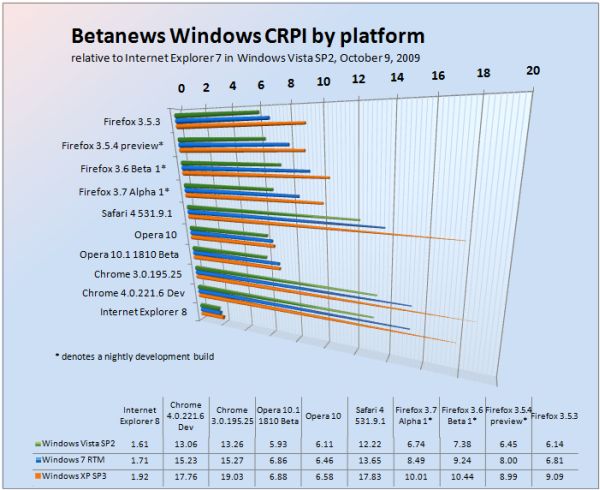
    Betanews Comprehensive Relative Performance Index October 9, 2009, broken down by Windows platform.

    Click here for a complete introduction to the Betanews Comprehensive Performance Index.


    Assume that any one of my computers runs on idle speed at least two-thirds of the time. That means for every hour of real-world usage, at least 20 minutes of that time is expedited by 17%. That’s at least another three-and-a-half minutes per hour of work or online play gained back, which equates to another three-and-a-half hours per week recovered. Add that to the four I’ve reclaimed in thumb-twiddling time, and I’ve gained back some 385 hours of productivity per year.

    That’s over six weeks of work. I can write a book in six weeks.

    After I told this to my wife, she suggested a new marketing slogan for Microsoft: “Buy Windows 7: Get Six Weeks of Your Life Back.”

    Next: Do you need a new computer for Windows 7?

    [FULL SEC DISCLOSURE:] Microsoft supplies Betanews with evaluation software, including Windows 7, through its MSDN developer support program. Microsoft also provides some technical expertise and insight to Betanews on request. In return, Betanews professionals participate in Microsoft testing programs, including with Windows 7, as well as other operating systems, tools, and applications.

    This relationship enables Betanews to thoroughly examine Microsoft software prior to its public availability. It does not contribute to, or color in any way, the opinions of Betanews or its writers. Scott M. Fulton, III is the author of this article, and as always, is solely responsible for his content. The opinions expressed here do not necessarily reflect those of Betanews or any of its other editors or contributors.

    Do you need a new computer for Windows 7?

    No.

    One of the most common questions I’ve received from everyday computer users since January 2007 has been, “How do I know when I’ve got all of Vista?” For most users, what ruined the entire Vista “experience” from the very beginning was its convoluted OEM logo compliance program, which left them with the sinking feeling that, no matter what SKU they chose, their OS would be incomplete. On top of that, the whole “Windows Experience Index” concept only served to remind them they were never getting as complete a package as some enthusiast someplace was enjoying — some Tom’s Hardware guy (someone like me) with dual graphics cards and eighty-six cooling fans. As a result, users instead complained about owning “half a computer.”

    The original intention of the WEI, I was told at the time, was to give folks incentive to upgrade. But since when does anyone, after being given a score revealing how much of a machine he doesn’t own, rush to the store to fill the gap? “That’s a nice Camaro you’ve just bought, Jack! Did you know it was exactly 0.65 of a Corvette?”

    Microsoft does not actively publicize this little-known fact, but from a technical standpoint, Windows 7 is a more suitable candidate for an XP replacement than Vista. It’s leaner, it’s better with memory, it takes fuller advantage of multicore processors, and it doesn’t inundate the user with nonsense.

    Any computer that was “ready for Vista” is effectively just as ready, if not more so, for Windows 7. While Vista’s engineers created barriers that precluded XP users from upgrading, for fear of missing the whole “experience,” no such barriers exist between Vista and Win7. Unfortunately, though, the lack of a direct migration path between XP and Win7 is both intentional and artificial.

    It is technically feasible for you to upgrade from XP to Windows 7 using a borrowed copy of Vista. We’ve done it in trials, with minimal cuts and bruises. That said, there are excellent reasons for you to avoid that course of action for yourself. Due to less standardized and less secure practices employed by software manufacturers including Microsoft during the XP era, the XP System Registry is an unfathomable hairball of convoluted associations, many of them broken. A set of XP Registry files can swell to several gigabytes of database code, although like DNA in the human body, only a part of it is actually usable — the rest lies dormant. Recreating the sensible part of the Registry even on Vista, let alone Win7, would require mere megabytes by comparison.

    After I wrote our story about XP-to-Win7 upgrades, I received numerous inquiries boiling down to: “You idiot! Why would you ever suggest anyone do this?” The answer at the time was this: There may be numerous instances where users simply cannot re-install all their working applications, for reasons including loss of the original CD-ROM, and my personal favorite, the inability for older apps to be installed in Windows given its new and more secure permissions structure. Since that time, XP Mode has been introduced to give folks who do have the old installer discs a way to re-install their older, less secure software in a secured XP virtual envelope (at least for users of Win7 Professional and Ultimate).

    Granted, not everyone is pleased with Windows 7’s current “SKU-ing” of its retail line-up, which isn’t much different from Vista’s. But the streamlining of the meaning of the Windows 7 compatibility logo, for both OEMs and customers, is most welcome: If there’s a Windows 7 logo, it runs Windows 7. Not half of it, not the half that’s minus the Aero “experience,” but all of Windows 7.

    Meanwhile, many very intelligent XP users who skipped out on the whole Vista debacle, may be considering whether to purchase a Windows 7 “upgrade” package, or a new computer with Win7 already on it. The dilemma for them has less to do with the operating system than with the state of their computer: Too many 2002-era single-core PCs out there have a single hard drive that’s littered with media files and documents that have never been offloaded, perhaps never even backed up. Many are running Office XP, because their businesses run Office XP (on Windows 2000), perhaps because they can’t install a newer version of Office without breaking their VPN software. Like bacteria cultures, their computers have become mossy, overgrown hives of inactivity, where sometimes the Internet works and sometimes it doesn’t.

    For these folks…it’s time already. The world has evolved, and it’s a lot nicer out here now. It’s time for that long-overdue visit to the toxic waste disposal facility.

    On the other hand, if you are running Windows XP on a modern, multi-core system, that’s well-managed with its data files on an independent drive from the system device, whose networking is fast and crystal-clear, whose media files are all well organized, and that’s secured by hardware and software firewalls along with non-intrusive anti-malware utilities, then is there a compelling reason for you to consider keeping the hardware and upgrading the operating system to Windows 7?

    I say there is: The genuine advances that the Vista kernel (especially the 64-bit kernel) made to system security are all present in Windows 7 (which even technically speaking is really Windows 6.1). The truly good ideas that Vista advanced, especially with regard to software access policies, are all present in Windows 7. But you’re not paying a significant performance penalty for them.

    In fact, with proper self-administration, you may be able to overcompensate for any performance hit: The poor performance with which many XP users are typically plagued, on account of lousy security software whose cost in aggravation and lost productivity is greater than any harm that malware could intentionally inflict on your computer, can be remedied with Microsoft Security Essentials. Although it’s basic, it’s free. And in Betanews tests of Security Essentials on a quad-core Win7 system, there was no performance hit. None. In fact, some of our apps were mysteriously faster with anti-virus turned on.

    How come? Windows 7 is better at managing parallelism than Vista, which is probably the biggest reason its speed is best appreciated on quad-core (or AMD triple-core) systems, and Microsoft (once again) knows the secret. It knows how threads can be used to better prioritize running applications, and that anti-virus does not have to be run with high or even regular priority. This is also why Security Essentials may have an architectural edge even against some commercial anti-virus products.

    Recently, some independent sources have claimed that the Windows 7 speed delta over Vista they observed is less than 17%. However, their tests were said to be run on single- or dual-core systems upgraded from Vista, with all applications intact. Possibly among those apps are third-party anti-malware utilities, whose working relationship with Vista has been poor enough. Break your dependence on bad anti-virus software (especially the brands pre-installed by dealers) and you’ll gain more than six weeks of your life back, easily.

    There will be some who will remain quite comfortable in their XP-driven environments for the next few years, and with good reason: It’s a pretty decent OS, when it’s well-maintained and well-secured. Nonetheless, the principal reason for users to consider replacing their old computers is because they’re old, tired, and single-core. The multicore era is upon us, and Windows 7 takes better advantage of multicore than its predecessor.

    Next: What Windows 7 doesn’t give you…

    What Windows 7 doesn’t give you

    One of the most important series that Betanews has ever run in over a decade of publishing has been our Top 10 Windows 7 Features. These are the noteworthy features we feel will give users reason to not only purchase but to appreciate the product. Some of our choices are changes from Windows Vista (for instance, a better Windows Explorer, and DirectX 11); others are features whose true usefulness may only be determined after the first year of deployment (Device Stage, Multitouch, third-party troubleshooting).

    But what that list does not cover is some of the baggage that Windows 7 removes, particularly from Vista. Here are a few examples of things that Windows 7 does not offer, the lack of which I’ve come to appreciate over the past few months of testing:

    • We’re done with the welcoming already. Back in 2006, Microsoft devoted quite a bit of Vista’s time and space to videos intended to make users feel happy and peppy about having installed Vista. It turns out somebody built a Web for all that, so now that Microsoft has offloaded that part of the process to the Internet, a big chunk of the installation time has been reclaimed.
    • Trips to Task Manager to clear crashed Sidebar gadgets. You can install “Sidebar gadgets,” as they’re still called, on the Windows 7 Desktop. But there is no equivalent for the Vista Sidebar in which to stow them (at least, not without hacking the Registry). This is a design choice that seemed peculiar to me at first, and it does create the slight inconvenience of maximized Windows overlaying certain gadgets that one might prefer to be omnipresent, like the clock or the news ticker. But then I realized there was a deeper architectural reason for the change: Back in Vista, almost half of my program crashes were caused by Sidebar gadgets running in the Sidebar, and most crashes that forced me to reboot were Sidebar-related. On the Win7 Desktop, the very same gadgets do not crash. There is apparently something about the context in which gadgets run which confused Vista, and which may confuse Win7; at least for now, this appears to bypass another serious Vista-era headache.
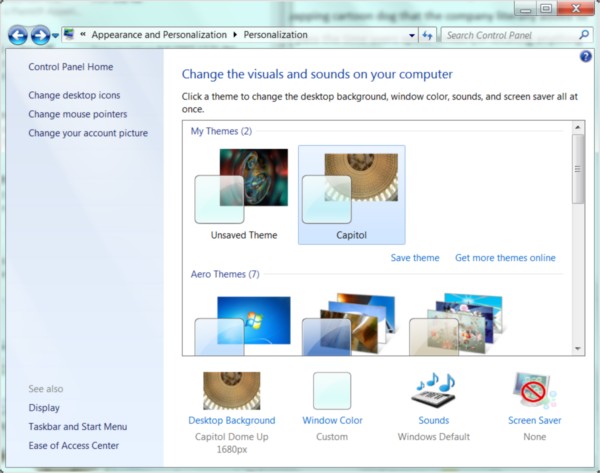
    • The more sensible Personalization dialog box from Windows 7's Control Panel.

    • The dialog box maze of “Personalization” options, which reminded me of playing a game of Clue every time I wanted to change the e-mail notification sound. There really is no reason why the customization of one’s desktop should be a process buried beneath a pile of hierarchical menus; and indeed, Microsoft’s designers discovered that the main reason why XP users’ desktops continue to feature bright blue skies on bright green grass, is because changing the scene seemed too hard. Vista brought the Personalization menu to a right-click on the Desktop where it belongs; but from there, the user was directed through a cavalcade of menus and dialogs. (And what exactly is the reason why “Change desktop icons” was under “Tasks” in Vista, but changing the desktop wallpaper was not?) In Windows 7, all your choices for themes and customizations are presented in glorious 3D, like ads for decorator fabrics in a home design magazine. At long last, somebody at Microsoft got the idea that seeing your choices makes more sense than combing through a list of their names.
    • Regular trips to the “Network and Sharing Center.” It’s actually unbelievable: The degree to which Windows 7 is capable of automatically finding its way in a workgroup, especially among other Win7 and Vista systems, is something I never thought I would see from Microsoft. In XP, the process of getting the right protocols installed, then the connections that used those protocols, then the network that used those connections, involved hours of trial-and-error and multiple reboots. And in Vista, the process was actually far worse: I have lost count of the number of times I had to re-install wireless networking on Vista-based laptops moved throughout this office. To date, for each Win7 laptop, Wi-Fi has been installed once and once only. In fairness, the layout of the Orwellian-entitled “Network and Sharing Center” remains about as convoluted in Win7 as it was in Vista. But not having to visit it nearly as often, is a true blessing.
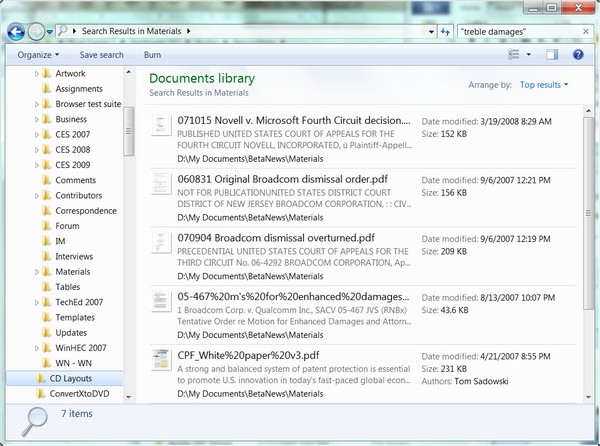
    • For the first time, Windows Search actually finds something we're looking for, in Windows 7.

    • Empty or meaningless search results. One reason why so many computing veterans remain skeptical that Microsoft will ever find any success with Bing is because they know that “Microsoft” and “search” put together has been a farce. Memories of the little yapping cartoon dog that the company literally added to XP, in order to more smoothly pass the time users spent not locating anything they were searching for, makes folks reticent to even try locating content on their hard drives. In an extraordinary epiphany, Windows 7’s use of Microsoft’s new Search 4.0 has made the quantum leap from pointless to invaluable. I maintain a huge library of documents that I don’t have time to keep sorted. Being able to find a set of Microsoft Word and/or PDF and/or HTML files based on a contained phrase, that accurately represented what information I actually possessed, in about a second, is something I was never able to accomplish with any Microsoft product ever made up until last August. In hindsight, I should have considered Win7 Search more thoroughly as a candidate for a Top 10 Feature.
    • Computers that don’t stay off. Windows XP was notorious for never really paying attention to what its drivers were saying about the motherboard’s power state. For most XP systems I’ve ever built, “off” never stayed off, and “hibernate” or “sleep” was a euphemism for “wait 15 seconds then come back.” I burned out a power supply just last month when, once again, an XP-based desktop popped back on a weekend while I was out of the office. Vista was better with power management, but not 100%: On almost every Vista system I’ve used or built, the “wake-on-LAN” feature is always considered turned on, even when the BIOS says it’s not. As a result, whenever I hibernate a Vista system, I always have to unplug the Ethernet cable or disconnect the Wi-Fi first (another delightful trip to the “Network and Sharing Center”). This problem has been solved ever since the final Technical Preview of Win7, and it literally means I no longer have to remove the power cable from my desktop machines to keep them in the off position.
    • Extra add-on apps you will never use (see: “the invention of the Internet”). The replacement of non-essentials like Photo Gallery with links to Windows Live Essentials is, yes, a promotional tool for Windows Live services, but it’s also a blessing for folks who want faster installation and less bloat, and who know the address for Fileforum. Games like Spider Solitaire and Minesweeper are still present, but that’s for long-time Windows users who expect to find them there since they were in Windows 95, and these games are very small programs anyway.
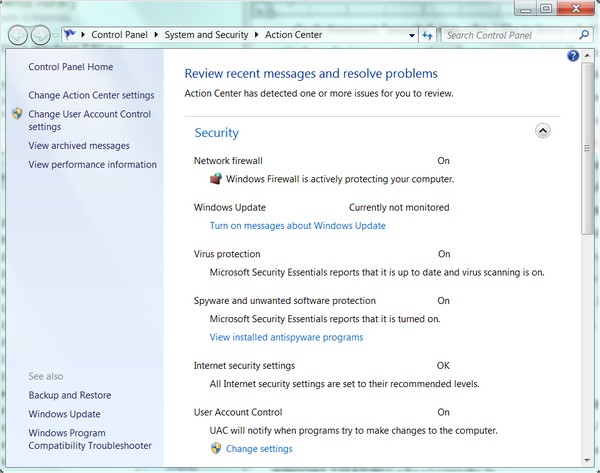
    • Action Center in Windows 7 shows security nags for Automatic Updates are (thankfully) turned off.

    • Incessant “security” nags. I like to know what’s going into my systems and when. So I never set anything from anyone to install automatically; I prefer to be notified of what’s been released, and I’ll make the decision whether to patch or not. Isn’t this dangerous? No more dangerous than Office 2007 Service Pack 2 installing itself automatically every single morning, which is what will happen if I changed the Automatic Updates setting on two of my XP-based desktops right now. Vista penalized me for making this choice, by flagging this with a yellow light in Security Center, but more revoltingly, by reminding me of the errors of my ways every 12 hours or so, with little blurbs emerging from my taskbar. In Windows 7’s Action Center — my pick for the #1 new Windows 7 feature — there are no more nagging blurbs to make me feel less secure about whether I’ll take a sledgehammer to my machine. And although Action Center does flag my choice with a yellow light, I can turn that light off and it will stay off, like a power switch (at least, like a power switch prior to the advent of Windows XP). In the screenshot, you’ll see the message, “Windows Update – Currently not monitored.” Yes! Thank you! It’s my choice, and I’m sticking with it.

    Typically I’ve agreed with my friends at Sophos with regard to security matters. Here is one notion with which I absolutely disagree: Nagging the user less about security makes the computer less secure. Bull socks. When an administrator makes a choice, and is willing to sign her name to that choice, the operating system should learn to live with it. In addition, the companies whose livelihoods used to matter on how insecure Vista made users feel, need to adapt to these changing consequences as well.

    Next: Is Windows 7 worth the money?

    Is Windows 7 worth the money?

    Let’s face the most obvious fact right up front: It’s still Windows. It’s an operating system married to a single, local System Registry for all software executable by the processor, which we have all come to realize is an inelegant model. It continues to depend upon device drivers to be installed from the outside world, rather than being able to receive instructions from the devices themselves — a feature that device makers would be more than willing to co-develop. Windows spends a great deal of its time making absolutely certain that nothing you’re running is stolen, and it doesn’t always do a great job of that. Installing the very latest version of Windows Live Messenger still requires you to hack the Registry and/or re-register a DLL from an administrator-authorized command line (and if you don’t believe me, here are the instructions to prove it).

    At a certain level, building a better Windows would be like Ford building a better Crown Victoria. It’s nice, but not worth throwing a party. As my friend and colleague, Betanews contributor Carmi Levy, observed earlier this week, the era when a new operating system makes a direct impact on people’s social calendars has long past. (There’s ample evidence that this era only lasted about three weeks.) And the era in which the model for software design is based around the operating system as the sole underlying platform is also on its way out, which is grave news not just for Microsoft but Apple as well.

    Scott M. Fulton, III head shotThe thing is, though, Windows isn’t going away anytime soon. I remember the onset of the era of solar and wind energy too — I seem to recall it was announced on a one-reel Encyclopedia Britannica film that my fifth-grade science teacher was splicing back together during the height of the Vietnam War. I do foresee the very real possibility that the underlying foundation of Windows could be completely replaced with a kind of operating system layer whose sole purposes are to manage a new class of hardware, and to run a user OS in a virtualization envelope. (Microsoft may not be the only company to produce this.) But that envelope will likely run Windows, so the operating system will probably be known as Windows, and from the user’s vantage point, it will be Windows.

    New operating systems may no longer be the stuff of rock concerts and Tupperware parties. Neither are new dishwashers, sinks, or toilets. Yet they are all indispensable parts of our lives.

    Even after reading this, one question probably still remains on many readers’ minds: If Windows 7 truly represents the level of functionality that Vista should have provided from the beginning, then shouldn’t Microsoft be paying for it and not the public?

    If Vista were an insecure system, then I would say yes. It was not. It was an annoying system, especially with “features” like the Black Screen of Death. But it was not Windows Me, the travesty of code that represents the absolute nadir of Microsoft’s development history, the “Disco Era” for Windows.

    Even then, however, I said Windows XP was worth paying for. XP — the first version, the one I said in hindsight was desperately in need of a transplant. The fact that I value my time (with a calculator) is just one reason. The fact that I value the developers’ time spent making this work, is the other. Yes, I’ve said Windows 7 is “Vista Service Pack 3,” and I stand by that. But in terms of the work Microsoft’s people are genuinely devoting to improving the quality of this product (whose quality needed improvement), I do believe it is worth the investment. Windows Me was not worth the investment; Windows 98 (pre-OSR2) was not worth the investment.

    But as anyone who’s done the work knows, cleaning up crap is a dirty job. Someone has to do it, and there are days I’m glad it’s not me. Windows 7 is cleaner, brighter, and sanitized for your convenience. And that’s worth the tip.

    [FULL SEC DISCLOSURE:] Microsoft supplies Betanews with evaluation software, including Windows 7, through its MSDN developer support program. Microsoft also provides some technical expertise and insight to Betanews on request. In return, Betanews professionals participate in Microsoft testing programs, including with Windows 7, as well as other operating systems, tools, and applications.

    This relationship enables Betanews to thoroughly examine Microsoft software prior to its public availability. It does not contribute to, or color in any way, the opinions of Betanews or its writers. Scott M. Fulton, III is the author of this article, and as always, is solely responsible for his content. The opinions expressed here do not necessarily reflect those of Betanews or any of its other editors or contributors.

    Copyright Betanews, Inc. 2009


    Add to digg
    Add to Google
    Add to Slashdot
    Add to Twitter
    Add to del.icio.us
    Add to Facebook
    Add to Technorati


  • Sequoia Accidentally Reveals (Potentially Illegal?) E-Voting Code

    For years, the big e-voting firms have refused to share their source code, repeatedly insisting all sorts of awful things would happen if the code was revealed. Of course, in the few instances where people actually did get access to the code, the only “awful things” that turned up were pretty massive security holes and weak programming. However, it looks like Sequoia may have inadvertently revealed its source code (found via Slashdot) due to an incompetent attempt to “remove” trade secret info:


    The Election Defense Alliance filed a public records request under California law for a copy of the final election databases from recent elections in Riverside County California. Riverside coughed them up, after sending them first to Sequoia for “redaction of trade secrets” and forcing EDA to pay a substantial amount for this “service.”

    As near as we can tell, instead of stripping out proprietary stuff of any sort, Sequoia simply committed vandalism: they stripped the Microsoft SQL header data off the top, expecting that this would ruin access to the data under any possible database utility and making the contents unreadable. [Note: confirming this is a high-priority task!]

    While they succeeded in ruining the files as data, they didn’t realize what a Linux user could do with the “strings” command: strip out unreadable characters and leave everything left as readable plain text. This in turn revealed thousands of lines of Microsoft SQL code that appear to control the logical flow of the election.

    So now there’s a project underway to analyze the code, which can’t make Sequoia very happy. But what may be even more interesting is that the folks hosting the code are suggesting that the way Sequoia buried its code in data files may violate federal election law concerning e-voting systems.


    It violates the federal rulebook on voting systems on several levels: the rules require that code be hash-checked to prove authenticity in the field for obvious reasons. If the real working code is buried in with the data, no such hash-checks are possible. The federal rulebook is also clear that code can’t be interpreted, apparently to avoid modification “in the field” (generally county or city election offices). There is also a rule barring “machine generated code” and since these data files are allegedly created (and managed) by the WinEDS application, the code in these files has to be “machine generated”?

    That can’t be good. Though it might further explain the resistance to ever sharing the code.

    Permalink | Comments | Email This Story


  • RIM tries a do-over of 2009 for next year

    By Tim Conneally, Betanews

    This month, Canadian smartphone leader Research in Motion has debuted two new handset “sequels,” which keep the name and form factor of their 2008 forebears, but update the experience slightly with minor upgrades. Last week, RIM unveiled the Storm 2, which improved upon the original Storm’s Surepress touchscreen, and equipped it with Wi-Fi.

    Today RIM has debuted the Bold 9700, the updated version of the Bold 9000 which had a rather problematic launch in 2008 with battery overheating issues, purported software problems, and delays related to AT&T’s 3G network.

    Like the Storm 2, the Bold 9700 doesn’t include any startling redesigns, instead concentrating on keeping the device as familiar as possible. The most notable change is the trackball, which has been replaced by a “touch sensitive trackpad.” The camera has also been bumped up from 2 megapixels to 3.2, standalone GPS has been replaced by integrated aGPS, and AT&T Visual Voicemail is now included in the package. Battery life of the device has also been substantially improved, going from 4.5 hours of talk time or 13.5 days of standby to 6 hours of talk time and 22 days of standby time.

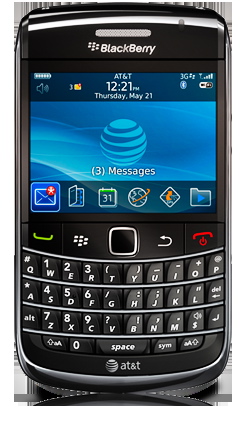
    BlackBerry Bold 9700: the sequel

    Other than that, the 9700 is practically the same as its predecessor. Its chassis is marginally smaller and lighter, but It features the same 624 MHz processor as the original Bold.

    Though the Storm and Bold are two of RIM’s flagship BlackBerrys, the Bold did not prove to be a major driver this year. The Storm was one of the four must-have smartphones this year, but outperforming it (and every other smartphone in the market at one point) was the BlackBerry Curve. That device is available on all four major carriers, and is more affordable than many of its competitors.

    The Bold 9700 will be available in “the coming weeks” for $199.99 with a 2-year AT&T contract and mail-in rebate. Capitalizing on the multi-carrier availability that made the Curve and Pearl so popular, the Bold 9700 is expected to break AT&T exclusivity and land on T-Mobile’s network in November. Though both AT&T and T-Mobile announced the Bold 9700 today, T-Mobile did not include its price.

    Copyright Betanews, Inc. 2009


    Add to digg
    Add to Google
    Add to Slashdot
    Add to Twitter
    Add to del.icio.us
    Add to Facebook
    Add to Technorati


  • Verizon Stores & Best Buy have BlackBerry Storm 2 dummy units, launch imminent?

    We just got word that Verizon Stores are now receiving their BlackBerry Storm 2 dummy units and training is finally available for retail associates. All that should mean that the Storm 2’s launch date is quickly approaching. November has been the target date for a while now, but with stores already prepping for the launch, availability will probably be early in the month.


  • Ning Launches Virtual Gift Feature

    Ning, the social platform that allows users to create their own social networks introduced a virtual gifts feature today for its 1.6 million networks and 36 million registered users.

    Ning Virtual Gifts offers a built-in revenue-generating feature for network creators, allowing them to create custom gifts and stores related to the topic of their network.

    At launch Ning is offering each user 100 credits in their gift store account, giving them the chance to send at least one virtual gift to a fellow member. Virtual gifts for all Ning Networks will be priced at 75 credits or $1.50 per gift.

    Ning Virtual Gifts

    "Ning Virtual Gifts brings members new ways to express themselves around the things they care about most," said Jason Rosenthal, senior vice president of Business Operations at Ning.

    "Our virtual gifts product is unique in that it can be highly relevant to the activity of each Ning Network – further empowering our Network Creators to capture their members’ imagination.  This is a first step in Ning building upon the inherent context in each Ning Network to drive new revenue opportunities for our Network Creators and Ning." 

    Ning Network Creators will have the ability to create custom virtual gifts, select their unique gift store inventory, and participate in a revenue share on the sale of virtual gifts. Transactions will be processed directly to Ning Network Creators via PayPal. Revenue will be split equally between the network creator and Ning after PayPal’s transaction fees.

  • Amazon Offers Payment Services for Charity Donations

    Amazon announced today that its Amazon Payments is now being accepted by a number of charities. Organizations include:

    – American Red Cross
    – UNICEF, Greenpeace
    – Nature Conservancy
    – Feeding America
    – Heifer International
    – Autism Society of America
    – International Federation for Animal Welfare
    – Children’s Miracle Network
    – United Way of King County

    Donate with Amazon Payments

    "As the holiday season approaches, we’re pleased to be able to provide Amazon customers a convenient way to support a range of nonprofit organizations," said Mark Stabingas, General Manager of Amazon Payments. "With Amazon Payments, nonprofit organizations now have a simple and cost efficient way to process online donations while leveraging the fraud detection and risk management controls that Amazon Payments provides as part of the service."

    Amazon customers can make donations quickly and securely using the information from their Amazon accounts. From now until January 10, they can go to amazon.com/holidaygiving to learn more about the process.

    "With a significant percentage of consumers making purchases online, it is a priority for Children’s Miracle Network to incorporate online giving into our fundraising efforts. Children’s Miracle Network has raised $3.8 billion for children’s hospitals over the past 26 years by making the donation process as simple and straight-forward as possible," said Brian Hazelgren, Chief Development Officer for Children’s Miracle Network. "Working with Amazon Payments allows us to build upon our successful ‘low-dollar, high-volume’ fundraising efforts in a time- and cost-efficient campaign."

    Amazon offers nonprofits a selection of what it says are easy-to-integrate and reliable solutions that enable one-time and/or recurring donations. There are also options for selling goods specifically for fundraising.

  • Drug Coupons Hide True Costs Of Medicines From Consumers

    As he makes his case for overhauling the American health care system, President Obama has used the analogy of patients getting a choice between a blue pill and a red pill. The blue pill is just as effective as the red pill, but costs half as much. If everyone would just choose the blue pill, the analogy goes, we could save our health care system a lot of money.

    Related Audio

    Morning Edition

    In the real world, that battle over blue and red pills is decades old and involves billions of dollars, but it’s invisible to most of us. 

    Serra stumbled onto the battleground because he’s got pimples — and a Solodyn Patient Access Card. “It looks like a little credit card,” Serra says.

    That white-and-blue piece of plastic is also a kind of weapon. It’s the drug company’s way of getting a patient like Serra to choose its name-brand product, even when it costs more, by subsidizing his high copay.

    Solodyn’s maker, Medicis, wouldn’t answer questions, but you can see how the system works from Serra’s experience.

    Serra, a paralegal, went to his doctor a few months ago for help with acne. She prescribed Solodyn. Serra told her he’d previously taken a generic drug called minocycline that worked well. The doctor told him that the two compounds are basically the same, but that you have to take the generic version in the morning and the evening. With Solodyn, you take one dose a day.

    Serra told her that if the name-brand medicine was going to cost a lot more, he’d prefer the generic. “And then she presented this card,” he says. She explained that it was a coupon, and that he should give it to the pharmacist for a break on his insurance copay.

    Without the card, Serra’s copay would have been $154.28. But when he got to the pharmacy, he presented his card. “They went to ring it up at the register,” he remembers. “And when it came up, the price was $10.”

    Insurance Companies Win A Round

    Eileen Wood is situated on one side of this war over red and blue pills. She works as vice president of the Capital District Physicians’ Health Plan, an insurance company in Albany, N.Y.

    Ask Wood about the war, and she’ll open the drawer in her file cabinet where she keeps zippered pouches of her least-favorite brand-name drugs. Among them is Minocin, an acne drug. She says a generic version of it costs about $50 a month. But a newer brand-name drug, Minocin Pac, costs $668.

    The difference? “It has these lovely calming wipes, so that when your skin’s all red you can pat this on,” Wood says. “It’s basically stuff you can buy over the counter.” She says the marketing is very slick.

    Minocin Pac may be an extreme example, but Wood says the only reason for such a disparity in prices is that insurance executives are the only people who see the full cost of the drugs. Patients don’t know or care, because the majority of patients have health insurance.

    Wood and her insurance colleagues went on the attack over copays. They instituted higher copays for expensive drugs with generic options as a way to encourage consumers to choose the cheaper option. In essence, they told customers that they could choose a drug like Minocin Pac and that insurance would even pay most of the cost — but with a $40 copay. If you choose the generic, you would pay only $10.

    The copay strategy worked so well that in 2003, more than half of all drugs picked up at pharmacies were generics.

    Drug Companies Fire Back

    The drug companies quickly caught on. They made a counterargument: that insurance companies shouldn’t be steering patients’ care.

    “We want treatment decisions to be based on what the physician feels is best for the patient, not just the cost to the patient or what another player may decide is in their interest,” says Sally Beatty of Pfizer, which makes Lipitor, the world’s most popular drug.

    Facing tight competition from generic drugs, Lipitor saw its sales drop after the insurance industry raised copays for name-brand drugs. By July 2007, sales were down 13 percent from the same quarter the year before.

    In the case of Lipitor, there is no approved generic substitute, no drug that is chemically identical. There are generics in the same class of cholesterol-reducing drugs, but tests show a small group of patients respond better to Lipitor. For some of those patients, a $40 copay stops them from getting the medication.

    By 2007, the pharmaceutical industry had mounted its counterattack: coupons to subsidize the cost of copays for consumers, like the one Serra used to buy his acne medicine — the one that brought his copay down from $154.28 to $10.

    Serra’s insurance company ended up paying $514 a month for his once-a-day Solodyn. Minocycline, the twice-daily generic, costs $109 a month.

    But Serra never saw those numbers. He saw a deal, and he likes deals.

    An investigation by Wall Street Journal reporter Jonathan Rockoff found that in the past year, drug manufacturers have broadly expanded their subsidy programs as copays and drug costs have risen. The Journal notes that copays do affect consumer behavior. Every 10 percent rise in copays seems to lead to a 6 percent decrease in spending on drugs.

    Wood says she understands the allure of the manufacturers’ coupons, but she says those coupons come with a consequence. If everyone started using coupons to get the more expensive drugs, “we’d have to raise premiums,” she says. “There’s no question about that.”

    Consumers like Serra don’t want to see premiums go up. But they’re caught between enormous insurance companies and enormous drug companies.

    Obama talks about choosing the blue pill over the red one, but the coupon cards make it hard to know which is which. It’s uncomfortably clear that these cards are not the biggest weapons in this war. Drug consumers are.

  • Snow Leopard Still a Better Ride Than Windows 7, Even for the Not-Rich

    ChannelWeb’s Steven Burke says that in the manifold comparisons of Windows 7 with Snow Leopard burning up the Web, what all the reviewers and pundits seem to be forgetting is that it’s not about the operating system, which he maintains is simply the engine that runs the PC. As Burke puts it, you don’t go into a car dealership and buy an engine. You buy a car, and in his opinion, starting October 22, there will be no better ride available for the money than Windows 7.

    Burke leans heavily on the initial purchase price angle, noting that an Apple Mac Pro desktop he cites as an example is nearly four times the price of an HP Pavilion, asking rhetorically whether anyone really believes the Mac is four times better than the HP Pavilion? I think some of us would argue that the value is there under the right circumstances, but it would’ve been more relevant to compare a mainstream Mac model such as the iMac or MacBook to their still admittedly cheaper, but not so dramatically so, Windows competition.

    Apple Ignoring “Economic Reality?”

    Burke accuses Apple and company CEO Steve Jobs of not considering “economic reality,” and having no interest in producing mass-market PCs, which is fair comment I suppose. However I’m constrained to observe that as Forbes’ Brian Caulfield pointed out last weekend, over the past year, banks have collapsed, PC sales have plummeted, unemployment has soared, and Steve Jobs went on mysterious medical leave for a liver transplant, but meanwhile Apple has thrived through all this with sales and earnings down less than everyone else in the industry and actually up year-over-year — on Monday reporting the company’s best quarter ever and a net quarterly profit of $1.67 billion on revenues of $9.87 billion. Consequently the question is begged as to who is and is not considering economic reality.

    Netbook Sales Soar But Profitability Fizzles

    NPD Group’s DisplaySearch Q2 ‘09 PC shipment data released last week estimated that netbook sales soared a whopping 264 percent year-over-year in the quarter, accounting for 22.2 percent of overall PC sales, but woefully for PC manufacturers and for Microsoft — only 11.7 percent of revenues. Overall PC laptop sales (excluding netbooks) declined 14 percent and PC laptop average selling prices dropped to $688 in Q2 2009 from $704 in Q1 2009 and from $849 in Q2 2008.

    Apple, on the other hand, eased prices somewhat on entry level MacBook Pro models in all three sizes while holding the $999 price point for its price leader white MacBook, and is still enjoying healthy sales and profits on its laptops. Even the most substantial MacBook Pro price cut — $400 on the base 15″ model — was partly compensated by substituting an SD Card slot for the preceding model’s ExpressCard slot, and leaving out the discrete NVIDIA GeForce 9600M GT graphics processor unit with its 256MB of dedicated VRAM in the new price-leader model, so I doubt that Apple has taken a major profitability hit. It’s more about marketing refocus.

    Burke says Jobs wants to build “Rolls Royces,” not “Fords” and for him it was never about putting a PC on every desktop, while Microsoft has always had more of a Henry Ford style mass production bent. Again, partially true I suppose, although it doesn’t hold up particularly well in the iPod and iPhone context, and I don’t think Mr. Jobs has anything against growing market share provided he can do it without compromising quality standards or profitability, as his “there are some markets Apple doesn’t choose to serve” comment a year ago attests.

    Simplistic Fixation On Initial Purchase Cost

    I don’t gainsay that Windows Vista was a gift to Apple that just kept on giving, or that Windows 7 will prove much stiffer competition for OS X, but I think Burke is overstating his case in contending that Apple’s market share gains over the past several years are now destined to evaporate. To borrow his own analogy, it’s the whole car, not just the engine, and many of us perceive the Mac as being not only a smoother, better-handling ride, but also a better value in a whole raft of contexts that transcend simplistic fixation on initial purchase cost. CNET’s Dong Ngo reports that Snow Leopard consistently beats Windows 7 in many general performance areas including boot up time and battery charge life in laptops, for example.

    Burke says PCs running Windows 7 are for “the masses” while Macs running OS X are for “the rich.” I’m not rich by the wildest stretch and neither are most of the other Mac-users I know. I do like to think that I appreciate value, a superior user experience, lower total cost of ownership, and elegance of form and execution, and that while Windows 7 will narrow the gap somewhat, it will fall well short of closing it.


    In Q3, NewNet focus turns to business models and search. Read the, “NewNet Q3 Wrap-up.”

  • Are White Spaces the Future of Mobile Broadband?

    iStock_000008266480XSmallClaudville, Va., is a small town of about 1,000 people that was served primarily by dial-up Internet service. But thanks to a group of technology companies it is now home to the nation’s first functioning white spaces network, an alternative form of wireless broadband. The white spaces trial network will offer both an alternate broadband network as well as a model by which the government might be able to better utilize scarce spectrum resources available to it for delivering ubiquitous mobile broadband.

    The creators of the network are Spectrum Bridge, Dell, Microsoft and the TDF Foundation. (Spectrum Bridge is backed by True Ventures, a venture capital firm that is an investor in the parent company of this blog, Giga Omni Media. Om Malik, founder of Giga Omni Media, is also a venture partner at True.) The network uses a fiber connection brought to the edge of the town, thanks to a TDF grant that provides a 2Mbps connection back to the web and relies on white spaces broadband for the middle-mile access to several Wi-Fi access points around town. With this setup, the town now has access to broadband, although with such limited backhaul, it’s still accessing the web through a straw.

    Neeraj Srivastava, director of technology policy in the office of the CTO at Dell, says that the intention isn’t to use white spaces primarily as middle-mile access, although since it can reach speeds of 100Mbps, it could fulfill that function. Instead, the plan is to use it for last-mile access and embed white spaces radios in laptops and devices along with Wi-Fi  and cellular radios if the end user wants one.  However, because there are no white spaces radios, the project is using Wi-Fi to bridge the gap.

    Srivastava predicts that white spaces radios are still years away, and said that before white spaces become more than a demo project, the FCC has to set final rules for using the spectrum without interfering with broadcast TV signals, a process that may take longer since the agency is so focused on its national broadband plan. After the FCC sets its rules, a standard needs to be developed and manufactures will have to produce chips for that standard. Then those chips will have to be tested and designed into devices, so we’re talking years rather than months.

    However, the spectrum has promise for delivering mobile broadband to more users for less, because it’s not licensed to a carrier. Instead, it sits in the channels between the digital TV bands; worries over interference with TV channels and wireless microphones caused the debate over white spaces to get nasty last year. To ensure that folks using white spaces for broadband don’t cause interference on TV delivery, the companies deploying the white spaces network had to build out a database that would scan for the broadcast signals.

    For this network, Spectrum Bridge provides that database, but CEO Rick Rotondo, chief marketing officer, says that aspects such as using a database to avoid interference might be a good model for freeing up other occupied spectrum to use for mobile broadband.  Given that folks believe we need between 150 and 400 MHz of spectrum to keep up with the demand for mobile broadband, how we adapt to the constraints of delivering broadband in between the spaces allocated for other services would help us use existing spectrum more efficiently and may also open the door to other allocations.


  • ViewSonic announces 12-, 13.3-, and 14-inch ‘ViewBook’ ultraportables

    4031677914_4c74190e95_o

    ViewSonic dove headfirst into the ultraportable notebook game yesterday, with the announcement of the “ViewBook” line of 12-, 13-, and 14-inch low voltage machines.

    The 13.3-inch ViewBook 130 (pictured above) looks to compete directly with Acer’s 3810-model Timeline offerings, while the 12-inch ViewBook 120 (video below) bears a striking physical resemblance to the Lenovo S12 series.

    The ViewBook line was announced in Taiwan but it’s not out of the realm of possibility that we would eventually see these machines in the U.S., since ViewSonic products are already represented reasonably well here.

    The ViewBook 130 will be available in three different configurations ranging from $24,900 to $31,900 New Taiwan dollars, which is roughly $767 to $983 U.S. dollars. That’s not to say that we’d see those actual prices stateside — I’d guess they’d be lower than that in order to stay competitive, perhaps between $650 and $900 or so.

    4030922209_e4b9766283_b

    Specs for the ViewBook 130 line include:

    • Intel ULV743 CPU at 1.3GHz, SU4100 at 1.3GHz, or SU7300 at 1.3GHz
    • 13.3-inch screen with 1366×768 resolution
    • 2GB of RAM
    • 320GB hard drive
    • HDMI/VGA output
    • Windows 7 Home Premium
    • Six-cell battery good for up to 8 hours

    The ViewBook 120:

    • Intel SU2300 CPU at 1.3GHz
    • 2GB of RAM
    • 250GB hard drive
    • VGA out, three USB ports
    • Windows 7 Home Premium
    • Six-cell battery good for up to 8 hours

    Pricing for the ViewBook 120 is pegged at around $22,000 New Taiwan Dollars, which is about $678 here. Again, though, that’s not to say that it’d be priced at $678 through U.S. retailers.

    Not much info on the 14-inch ViewBook 140, although my guess is that it’s likely similar to the ViewBook 130 from a features standpoint.

    [via NetbookNews.de (translated)]


  • Kobe Bryant on sports games: “It becomes almost like its own sport”

    LA Lakers superstar and NBA 2K10 coverboy Kobe Bryant sat down for a little chit-chat with USA Today and talked about his video gaming love. Yes, eve…

  • Survey Says: Companies Crave Internally Delivered SaaS — Hello, Internal Clouds?

    Business on a laptopWhile just 10 percent of U.S. companies have either adopted cloud computing or have immediate plans to do so, Software as a Service is being used by a whopping 68 percent, according to the results of a new cloud computing survey released by business service provider Avanade (PDF) today. Even more interesting: By a ratio of 4:1 (2:1 on a worldwide basis), respondents said they would prefer to have their applications delivered as services from internal platforms. Is SaaS the “killer app” for internal clouds?

    Security no doubt plays a role in this preference, but reliability probably does, too. The time companies have lost due to SaaS outages might be less than what they’ve traditionally experienced with in-house systems, but properly architected internal clouds offer inherently greater service availability (and customer service from trusted internal IT staff). Of the 502 respondents, 90 percent of SaaS users would classify their experiences as largely successful –- despite the fact that 30 percent reported experiencing service outage of 10 hours or more. “That says to me,” said Avanade CTO Tyson Hartman, “that even though the issues are out there, the benefit is so clear that either that type of outage is still better than what they were achieving internally, or is tolerable within their business parameters for [those applications].”

    Whether or not these internal clouds will get built is another question. By Forrester’s count, only 2 percent of enterprises have deployed them already, a dearth due largely to skepticism over sharing resources company-wide.

    Overall, the rate of current cloud adoption is lower than what recent surveys have shown, but they are far higher than other results if SaaS adoption is included. This discrepancy supports my theory (GigaOM Pro, sub. required) that it is best right now to take from cloud-adoption surveys what we can, but not to take them as gospel.

    One thing we can take from this survey is that despite IDC’s advice to use the cloud as a recession stopgap, the economic downturn is not driving much cloud adoption. Only 13 percent of Avanade’s respondents said the downturn has helped advance their cloud efforts. Hartman explained this statistic as indicative of an organic coming around to the cloud. “Part of it is just maturity around the industry’s awareness and customer awareness around what’s viable and the value,” he said, “and I think part of it is economically driven.”


  • Flu.gov Needs You

    With new content, tools, and resources added daily, Flu.gov provides information on H1N1 and seasonal flu, including symptoms and treatments, vaccines, tips for prevention, and live briefings.  At this critical time, the Department of Health and Human Services (HHS) needs your help in informing the public about this valuable resource.  Here are some simple things you can do to promote Flu.gov:

    1. Provide links from your website or blog to Flu.gov.
      Adding links to your homepage or health-related web pages is an easy way for you to direct users to Flu.gov for important H1N1 and seasonal flu information.  The Flu.gov site provides information for parents, health care providers, government organizations, schools, businesses and more. It also includes interactive tools for evaluating flu-like symptoms and — coming soon – more information about vaccination clinic locations.  There is also a handy myths and facts section where you can check and see if what your friend and neighbors are telling you about the flu and the flu vaccine is correct and in line with the latest guidance from the CDC, the FDA and NIH.
       
    2. Add a graphic to your website or blog.
      The Flu.gov graphics, available in both English and Spanish, are simple ways to show your support and use your website, blog, or social networking profile to share information.  The image serves as a link to the Flu.gov website, allowing your visitors to quickly find flu information.

    3. Reference Flu.gov on your online and offline products.
      When posting web content or creating print materials, adding references to Flu.gov is a great way to help spread the word.  With live briefings and daily content updates, the site is the one-stop resource for flu information.

    4. Print flu fact sheets and share the phone number for the national call center.
      For those Americans who may not have access to the internet, you can print the one-page fact sheets, available in multiple languages, and share the CDC-Info national contact center information to encourage individuals to speak directly with call center representatives for flu questions.
       

    The Flu.gov website is focused on centralizing and streamlining online content and tools to provide a better service for American citizens and public health partners, and represents a new model for online government collaboration. The new and improved site is a collaborative effort across government, including HHS, Centers for Disease Control and Prevention (CDC), Department of Education, Department of Homeland Security (DHS), and the White House. Please join our effort by sharing Flu.gov resources.

  • Explainers And Studies On Health Insurance

    Several news outlets seek to explain some of the unique aspects of U.S. health insurance.

    The Associated Press examines why the United States is “the only wealthy industrialized nation that does not have universal health coverage.” The U.S. health system “was shaped by a World War II government policy that imposed wage controls when much of the nation’s work force was off at war. Barred from wage increases, employers turned to health insurance benefits to attract workers, and job-related health benefits became a staple in the postwar years” (Drinkard, 10/20).

    A new study by Families USA finds that “[b]ecause health insurance and employment go together, this year’s devastating job losses have likely increased the ranks of the uninsured by four million people, including nearly 200,000 in Pennsylvania and New Jersey,” The Philadelphia Inquirer reports. Ron Pollack, executive director of Families USA, “said bills now being considered could improve the situation by expanding the Medicaid program to people with higher incomes, offering subsidies for some individuals who need to buy insurance on their own, and placing limits on out-of-pocket costs” (Burling, 10/21).

    Meanwhile, NPR‘s “Talk of the Nation” interviews Princeton economist Uwe Reinhardt, who “argues that health care should be looked at from an unemotional, economic perspective. Reinhardt explains the … the process by which the cost of care is negotiated between hospitals and insurance companies” (Shapiro, 10/20).

  • This is what a PS3 smashing into a Sony Bravia TV at 50 MPH looks like


    Watch. Smile. And enjoy the fact that you’ve witnessed such carnage without damaging your own gear. [via Gizmag]


  • House Lawmakers Laud New CBO Score Of $871 Billion, Including A Public Option

    A government-run public insurance option is in the House Democrats’ health overhaul measure which the Congressional Budget Office has “scored” at $871 billion over 10 years.

    The Washington Post: “The measure would include a government-run insurance plan that pays providers at rates tied to Medicare. … That so-called ‘robust’ public option is preferred by liberals because it would save the government money and could force private insurers to lower their own reimbursement rates, driving down the cost of health care overall. But the idea is opposed by many conservative Democrats from rural areas, where Medicare rates are well below the national average” (Montgomery, 10/21).

    The Associated Press/The Boston Globe: “The [CBO] figures were preliminary because no final decision on the design of the public plan had been made, said the aide, who requested anonymity in discussing the bill because the deliberations were private. The House bill with the strong public plan would extend coverage to 96 percent of uninsured Americans and significantly reduce budget deficits” (Werner, 10/20).

    CongressDaily reports that under the plan, hospitals would be paid Medicare rates and physicians Medicare rates plus 5 percent. “Leaders also asked CBO to score two other versions of a public insurance option. The second plan, which many Blue Dog Coalition members backed, would require the HHS Secretary to negotiate rates directly with providers, a change that costs the government more money. To bring the price tag under $900 billion, lawmakers combined that plan with an expansion of Medicaid and a reduction in the required actuarial value of the basic benefit plan (Hunt, 10/21).

    Bloomberg: “‘Whatever choice we make will reduce the deficit,’ (Pelosi) the California Democrat told reporters yesterday in Washington, ‘not only under 10 years but over 20 years’” (Rowley, 10/21).

    Reuters reports that the final CBO numbers on the other two plans are due this week as well, though a showdown with the Senate over inclusion of a public plan in the final piece of legislation is likely (Whitesides, 10/20).

    Meanwhile, The Hill reports that House Democrats are trying to rebrand the public option as a “Medicare for All.” Democrats see benefit in this strategy because it could help overcome the gap between party liberals, who support the public option, and moderates, who worry about its impact on private insurers. “Rep.  Mike Ross (D-Ark.) spoke out last week in favor of re-branding the public option as Medicare, startling many because he has loudly proclaimed his opposition to a public option” (Soraghan, 10/20).

    Politico: “Pelosi, who has long favored the most robust public option, made clear to members that part of her strategy was to strengthen her hand by taking a strong public option bill into the House-Senate conference. She left open the possibility of going with a different version of the bill if she couldn’t muster the votes” (O’Connor, 10/20).

    House leaders are being asked to post the health reform legislation 72 hours before voting on it, McClatchy Newspapers/The Miami Herald reports. “An unusual coalition of conservatives, watchdog groups and a handful of Democrats has joined the push by Rep. Brian Baird, D-Wash., to put the 72-hour measure into a binding rule for the House of Representatives. Similar efforts in the Senate haven’t gained much momentum” (Lightman, 10/20).


  • Harry Reid Faces Public Option Dilemma

    The Washington Post: “Senate Majority Leader Harry M. Reid is facing intensifying pressure from liberal lawmakers to revive a proposed government insurance plan before health-care reform legislation reaches the Senate floor, amid signs that moderate Democrats may be warming to the idea.” Although the Senate Finance Committee rejected two versions of this mechanism, “the idea has gained momentum in recent weeks as Democrats look to ensure that the policies Americans would be required to buy would be affordable.” The liberals are trying to convince Reid that the public option has enough votes to pass in the Senate. The real challenge is finding middle ground among all liberals and moderates like Sens. Kent Conrad, a North Dakota Democrat, and Olympia Snowe, a Maine Republican, to attract a large base for passage of the health care reform bill (Murray and Montgomery, 10/21).

    Roll Call: “Reid, speaking to reporters after Tuesday’s negotiating session, said the negotiators have yet to reach the point of actually merging the two competing Senate health care reform bills that are to be the basis of the final floor vehicle. But the Majority Leader said the talks thus far have been fruitful. “Reid would not talk about the particulars of discussions (Drucker, 10/20).

    ABC News reports on a press conference that Reid held with his negotiators with a video: “I hope to get something to the (Congressional Budget Office) soon, but that’s a relative term,” Reid said, adding that he’s working as quickly as he can and commenting briefly on the public option’s inclusion in the merged bill. “We’re leaning toward talking about a public option” (10/20).

  • Dr. John Kitzhaber On Reforming Health Care

    Kaiser Health News features an interview with former Oregon governor, Dr. John Kitzhaber. When he “was president of the Oregon Senate, the state’s languishing economy was tightening the screws on Medicaid outlays. But Kitzhaber, a Democrat, and others wanted to find a way to avoid having to drop residents from the federal-state health program for the poor and disabled, and they came up with a radical idea.” Its success “helped earn Kitzhaber, by then the governor, a national profile” (Moore, 10/21). Read entire story.