Author: Ian Barker

  • Facebook goes celebrity hunting to launch verified pages

    Facebook has announced that it’s introducing verified pages to help users find the authentic accounts of celebrities, businesses and other high profile subjects. Verified pages will have a blue check mark next to the name both at the top of the page and in search results.

    Given that Facebook has long been plagued by fake pages and that Twitter has had verified accounts — marked by a blue tick, funnily enough — since 2009, it’s perhaps surprising that the social network has taken so long to make this step. On its official blog announcing the news the company says, “Facebook proactively verifies authentic Pages and profiles, but if you believe that you’re being impersonated you can always report a fake account.”

    The blue tick is already starting to appear, with pages including those for teen heart throbs One Direction and Justin Bieber showing as verified. Coverage of tech companies is as yet rather patchy with Google’s page showing as verified whilst Microsoft’s and IBM’s currently aren’t.

    In line with Twitter’s approach of recent times, you can’t ask to have your page verified, Facebook decides whether you’re genuine or not. This may give the company some problems when dealing with celebrities who have a large local following in a particular country or region but who aren’t so well known internationally.

  • Motorola confirms X-phone launch for October

    Speaking at the D11 conference in California, Motorola CEO Dennis Woodside has confirmed the existence of the company’s long-rumoured X-phone. The device is to be called the Moto X and is set to launch in October.

    This is the first major product launch from the company since it was bought by Google in 2011. Woodside teased delegates saying, “It’s in my pocket but I can’t show it to you.” He did confirm that the phone will be packed with sensors so that it will be able to detect when it’s taken out of a pocket or when it’s travelling in a car, for example, allowing it to adapt its behavior. No details of exact specs have been released.

    The new phone will be assembled in a 45,000 square foot factory in Fort Worth, Texas — previously used to build Nokias. This will make it the first smartphone to be built in the US and 70 percent of the manufacturing will take place there, although many of the components, including processors and screens, will still be sourced from the far east.

    Making the phone in the US should give the company an advantage in terms of reduced shipping costs. It will also help to create a positive image by boosting the domestic manufacturing sector.

  • Symantec phases out PC Tools security software

    Symantec has dropped the PC Tools range of security software, leaving the Australian company that it acquired in 2008 to concentrate on its system tuning products.

    Buying PC Tools gave Symantec a budget brand with the Internet Security, Spyware Doctor and Spyware Doctor with Antivirus products slotting in below the more upmarket Norton range. Now as part of Symantec CEO Stephen Bennett’s restructuring of the company, the PC Tools security products are being quietly streamlined out of existence.

    Existing PC Tools security users will still receive updated virus definitions until their subscription expires. They’ll then be encouraged to move to an equivalent Norton product.  According to the FAQ for PC Tools users that’s been posted on the company’s website they’ll be able to, “…take advantage of our special offer to switch to Norton.”

    PC Tools Registry Mechanic, Performance Toolkit, File Recover and Privacy Guardian products are unaffected by the change, though it seems rather odd to leave the privacy product if the security focus is switching to the Norton range.

    Photo Credit: cybrain/Shutterstock

  • Facebook phone not coming to Europe

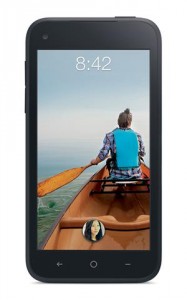
    European operators have been asked not to go ahead with the launch of the HTC First planned for this summer. The phone comes with Facebook Home which replaces the standard Android screens with its own social media interface.

    Home has been available for download to other Android devices too but hasn’t proved popular with users. UK mobile operator EE has issued a statement making it clear that Facebook is behind the decision not to launch saying, “Following customer feedback, Facebook has decided to focus on adding new customisation features to Facebook Home over the coming months. While they are working to make a better Facebook Home experience, they have recommended holding off launching the HTC First in the UK.” Orange in France has made a similar statement.

    Facebook confirmed the news saying, “While we focus on making Home better, we are going to limit supporting new devices and think it makes a lot of sense for EE and Orange to hold off deploying the HTC First in Europe.”

    Pre-orders for the phone will be cancelled whilst Facebook returns to the drawing board. EE has said it will contact customers who have shown an interest in the device. The decision is bad news for the social network which has seen its usage rates dropping in the UK and which needs to boost its mobile presence to gain advertising revenue.

  • The radio that knows where you live

    We’re used to the somewhat spooky way that websites track our every move. Notice how the adverts on various sites reflect the products you’ve been viewing elsewhere? You only have to look at a CD on Play and Amazon will be trying to sell it to you within hours. We’re used to the GPS tracker on our smartphones monitoring where we are all the time and pointing us towards local attractions too.

    Well now this technology is starting to spread to other devices too. The BBC has used the Thinking Digital conference to trial a perceptive radio. Developed by the BBC’s Future Media North Laboratory, the radio uses information about where you live to change the listening experience by referencing local places or weather conditions. It also monitors the background noise at your location so it can decide whether to boost certain sounds to enhance the listening experience. The idea is to provide an “immersive” broadcast that can reconfigure the content for each listener.

    It’s either a great idea or a creepy one depending on your viewpoint. And if it only broadcasts the things it thinks you want to hear how will you ever discover anything new?

    Another worrying aspect is, once your radio thinks it has your best interests at heart, how long will it be before your other domestic appliances start getting in on the act? Will your fridge reject anything that isn’t compatible with your diet, or insist on only local produce? Maybe your alarm clock will refuse to process the snooze button on work days. Or your TV will insist on you watching a set number of mind improving documentaries before it lets you tune into a soap.

    When your radio knows where you live it’s only a short step to other gadgets knowing where you are and what you’re doing all the time and trying to “improve” your life accordingly. What was all that stuff about Big Brother…?

    Photo Credit: Everett Collection/Shutterstock

  • It’s pronounced ‘jif’ — jot it?

    Do you say “gif”or “jif”? I’ve always been in the gif camp but Steve Wilhite the inventor of the Graphics Interchange Format (GIF) says it should be pronounced “jif”. Speaking to the New York Times in the run up to being honored with a lifetime achievement award at the Webby Awards he said he was “annoyed” that there was still debate about how the acronym should be pronounced.

    The Oxford English Dictionary accepts both pronunciations, but there’s long been debate about which one is correct, there’s even a Gif Pronunciation Page dedicated to the argument. It suggests that the reason for the “jif” sound is to associate it with the popular brand of peanut butter — a staple of programmer diets. Of course this only works in the US, here in the UK we think of Jif as a brand of lemon juice or a defunct product for cleaning the sink.

    But it doesn’t really matter how Wilhite thinks it should be pronounced. Words have lives of their own and how they’re said is determined by everyday usage. English often has little logic on these things — remember that next time your jirlfriend jives you a jift or you feel jiddy watching a jibbon swing through the trees.

    Twitter has been alive with the debate and the general feeling seems to be that it’s “gif” with a hard G, despite what its creator thinks. I say it’s time to live and let live. I say gif, you say jif, let’s call the whole thing off and use PNG.

  • BullGuard launches Premium Protection 2013 — guards the person as well as the PC

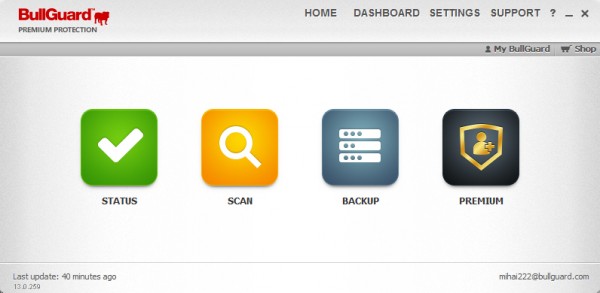
    Any old security suite can protect your PC with a firewall and an antivirus product so the big players are increasingly looking for new angles to try to get us to buy their products. BullGuard’s flagship offering already has parental controls, spam filtering and PC tuning tools, so the latest release — out today — goes for the personal protection approach.

    No, it doesn’t come with a goon in a dark suit and sunglasses to follow you around. It offers safeguards against identity theft and data leaks, plus it has social media protection. As an added bonus the amount of online backup space included with the package is increased to 25GB.

    The ID protection module provides an extra layer of defense, running in the background to alert you via email or text if personal information has been compromised. Social media protection allows parents to monitor their children’s Facebook profiles. It also has an app for the kids themselves to help them avoid risky behavior.

    It scans the protected profile and alerts both parents and offspring to signs of bullying, “sexting”, links to inappropriate content and more. The service works across tablets and smartphones as well as PCs.

    BullGuard’s Head of Product Management, Alex Balan says,

    The changing face of threats and the changing habits of users in the modern computing age means that consumers face an uphill battle when trying to stay one step ahead of malicious third parties. Our intention when developing Premium Protection was to address these concerns and recognize that it’s just as important to protect the person, as it is the PC. We’ve placed a strong focus on identity and social media protection, incorporating tools that can help guard against new threats alongside all of the ‘traditional’ protection required to help keep you (and your children) safe online.

    The software comes as a 3-PC license for $99.95 (£69.95 in the UK) and you can download a 30-day trial from the BullGuard website. Existing BullGuard Internet Security users will be able to upgrade to the new suite.

  • Unhappy Tumblrs look for safety nets

    Despite Yahoo CEO Marissa Mayer’s promise not to “screw up” Tumblr following its recent acquisition, the move has caused some disquiet in the user community.

    Posting on Tumblr, of course, many users are worried about the impact advertising may have on the Tumblsphere, others that Yahoo will change the ethos of the site. There was disquiet about rumors Yahoo would push to make it more family friendly by filtering content too — around 1 in 6 Tumblr pages is reckoned to contain porn. Despite assurances, and the fact that the circulating message about the clean up has been exposed as fake, there’s a lot of distrust out there.

    Already websites like www.bluegrownup.com are springing up with the aim of offering disgruntled Tumblrs a new home. There’s also a tool to help users migrate their blogs to WordPress.

    Personally I like Tumblr, though I don’t exactly fit its cool kid demographic. I’ve used it since 2010 and it’s the only blogging platform I’ve stuck with over a long period of time, mainly thanks to its ease of use and its ability to integrate content with other sites. If Yahoo can manage Tumblr in a sensitive way and preserve what’s good about it I’ll be happy to stay. It seems to have managed this trick with Flickr so there is hope.

    It’s worth considering what this means from the Yahoo side of things too. If you can locate a Yahoo user you won’t find them worrying about upcoming changes — Yahoo doesn’t inspire that kind of user loyalty. But Tumblr isn’t the only thing the company has bought recently and there’s a definite pattern to the acquisitions. Earlier this month it purchased Astrid — a smartphone daily organizer app — for an undisclosed amount. In March it bought news aggregation app Summly from British teen entrepreneur Nick D’Aloisio for $30 million. What these and Tumblr have in common is an emphasis on personalizing the web experience. They’re also all targeted heavily towards mobile devices.

    We can expect to see the impact of this shopping spree on the delivery of Yahoo’s news and other services. You can already detect change in the air with the new tablet-friendly Flickr layout, though as with any redesign there are some users who don’t like the new look. Whether all this will be enough to make people really care about Yahoo again only time will tell. In the meantime Tumblr users should probably sit tight for a while and see what happens.

    Photo Credit: fotoscool/Shutterstock

  • Why design makes the difference between good and bad apps

    The first stage of developing an app involves no technical skills at all, it’s also the hardest, and that’s coming up with an original idea. There are already thousands of apps out there so you need to make sure that what you’re proposing hasn’t been done before. Or at the very least that you have a new and original twist on an idea that will make it stand out from the crowd.

    It’s important to note that just creating an app isn’t going to make you money, research by Canalys in 2012 showed that some two-thirds of apps received fewer than 1,000 downloads in their first year. The store pages have many thousands of “zombie apps” which still appear on the websites but never get downloaded.

    Having a quality app that performs a useful function is therefore essential to success. If your app is good it’s more likely to stick on people’s devices. It’s reckoned that on average people only keep 20 or so apps on their phones at any one time so if your app doesn’t do something useful, or it doesn’t work properly, it will quickly be uninstalled. Plus you’re likely to get negative comments on the app store and elsewhere which will damage your reputation when it comes to any future releases you might make.

    There are so many apps that you may think all the best ideas have already been done. It’s true that the world probably doesn’t need another email app or Web browser. But if you can come up with something different — a novel way of using a hardware feature like the camera or GPS for example, or a way of presenting information in a friendlier format — then you can still find a market for new apps. A good example of this is the British Gas app for taking meter readings which uses the phone’s built-in flash as a torch so that you can see the meter’s digits clearly. For an app to succeed it really needs to solve a problem. Plus it’s best to focus on one thing and do it well rather than try to pack in too many functions and over complicate the software as a result.

    If you’re developing an app to complement an existing business, think about how it can improve the customer experience. We’ve already mentioned the meter reading app, another example might be an app for a lettings agency that uses the phone’s geo location feature to show details of properties available in the area.

    Once you’ve had the idea you need to familiarize yourself with the design principles of the OS you’re going to use. Apple, Android and other operating system suppliers like you to conform to their vision for how apps should look and how easy they are to use. Your app is more likely to succeed if you follow these guidelines. It also pays to stick with the look of the operating system. Windows, Android and Apple all have different visual styles and you should try to echo these wherever possible. This is where apps that have been developed for one system often fall down when they’re exported to others as they fail to adapt to the different appearance of the operating system. You don’t have to slavishly copy the look of the OS but you should at least try to make your app look at home on the device.
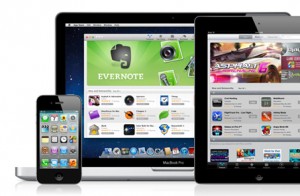
    Within the constraints imposed by the operating system you need to think about how design affects the way your app will work. Remember that in most cases you’re dealing with a small screen so it pays to keep things as simple and clean as possible. Packing in too many options will make the screen look cluttered and only serve to confuse the user. Try to decide which are the most important functions and make these the easiest to access. A good example here would be the pause button on a music player. Functions that are used less often — like changing the app’s settings — still need to be accessible but don’t have to be as prominent. Using keyboards on touchscreen phones can be fiddly so you should try to keep keyed input to a minimum.

    You need to ensure that it’s clear what all of the buttons and functions do. Many mobile users don’t get the best from their devices because they’re not sure how all of the functions work. Where possible use standard or easily understood symbols for functions. Examples would be an envelope for sending email, a handset for phone calls or a “hamburger button” (three short horizontal lines) for accessing program settings. If necessary you should think about including a help page in your app to explain what all of the functions are and how to access them. You can always link to a help page on the Internet rather than bulking out the app itself with this information.

    When you’re planning how the app looks, designing buttons and logos and so on, do think carefully about colour and contrast. The screens on modern mobile devices are capable of very subtle color variations, but remember that your app will often be used in bright sunlight or other difficult conditions. Using a high-contrast color scheme will make the screen easier to read in all circumstances. For the same reason it’s also good to define buttons with solid blocks of color rather than subtle shaded outlines.

    Consider The User

    The size of the buttons you need people to press is important too. It’s unrealistic to expect people to tap accurately on a tiny area of the screen — especially if they’re using the app on the move. Take account of the fact that your app has to be usable by those with fat fingers as well as people with more delicate digits. The same applies to the fonts used on screen, don’t be tempted to pack in more information by making the font so small that people will struggle to read it.

    Many development tools take a template-based path to creating the interface of your app. This makes it easier to ensure that everything looks as it should and that all of the elements of the app are in the correct places. The downside is that template-based apps can tend to look similar and it can be hard to find a distinctive touch in order to make your offering stand out.

    All of this may seem daunting. However, the key message is that design is important and it pays to take your time over it. The best apps are those where the developer has made an effort to understand both the style of the operating system and the needs of the users such that the finished result not only looks good but is also intuitive and easy to use.

    This article is adapted from The Instant Guide to Creating an App available now from the Amazon Kindle Store priced $3.06.

    Photo credit: Digital Storm/Shutterstock

  • SSDs claim a bigger share of the storage market

    Research company IHS iSuppli has released figures showing that solid-state drives are set to claim 33 percent of the storage market by 2017. Over this time total worldwide sales of SSDs are expected to rise from 31 million units in 2012 to 227 million.

    The growth is being driven by demand for ultrabooks and other slimline systems which need powerful, compact drives. Sales should also be helped by the falling price of flash memory and the faster performance and lower power requirements of SSDs. Increasing numbers of systems being launched with convertible and touch screen formats is likely to push things further too.

    IHS’s Fang Zhang reckons that conventional hard drives will still dominate due to their lower price and higher capacities. He says, “HDD shipments also will gradually pick up in the second half this year as Windows 8 and Ultrabooks gain traction among consumers, after failing to perform as expected upon launch last year.”

    New technologies are starting to become affordable too with hybrid drives that combine a small SSD for fast boot speeds and caching along with a larger hard disk for general storage. Overall though despite the rise of the SSD it looks like the conventional electro-mechanical hard drive will be with us for quite a while yet.

  • Yahoo buys Tumblr for $1.1 billion

    As has been widely rumored over the last few days, Yahoo has paid $1.1 billion for blogging platform Tumblr. In recent times this is the most paid for an Internet acquisition since Facebook bought Instagram for $1 billion last year.

    Founded by David Karp in 2007 from a bedroom of his mother’s New York apartment, the attraction of Tumblr has always been its clean interface and ease of use, which allows people to be up and blogging within minutes. The service has around 217 million users worldwide and is the 24th most popular site in the US according to research company Quantcast.  The company employs 175 people and claims to have more than 100 million blogs.

    Tumblr has been slow to attract advertisers though, earning $13 million in 2012 when it had hoped to have revenue of $100 million by 2013. Yahoo brings the opportunity to attract more advertising but this may be at the expense of the site’s sleek look. In the past Karp has been critical of the way other sites implement ads. Like Facebook and Google+, Tumblr already allows brands  to set up their own pages. At the moment Tumblr embeds sponsored posts into the main stream in a way that’s subtle but also effective — particularly on the smaller screens of mobile devices.

    A more overtly commercial approach isn’t likely to go down well with the free thinking creative types that Tumblr attracts. Initial reaction to the news on the web points to a lot of unhappy Tumblr users.

    Yahoo, headed by ex-Google executive Marissa Mayer, will be seeking to use Tumblr to sprinkle some corporate stardust on its aging brand by adding social media and a mobile-friendly platform. It will also be looking to the acquisition to attract younger users to other Yahoo products and get the company back in touch with the cool kids. However, this deal may invoke a sense of deja vu in anyone who remembers Yahoo’s purchase of Geocities in 1999. At the time Geocities was the third most visited site on the web but under Yahoo’s ownership it withered and died, shutting up shop a decade later.

    Mayer says on the new Yahoo blog (on Tumblr of course) that Tumblr will continue to operate as a separate company with Karp as CEO and she promises, “not to screw it up”.

    Addressing the Tumblr community David Karp says, “Our team isn’t changing. Our roadmap isn’t changing. And our mission — to empower creators to make their best work and get it in front of the audience they deserve — certainly isn’t changing. But we’re elated to have the support of Yahoo! and their team who share our dream to make the Internet the ultimate creative canvas. Tumblr gets better faster with more resources to draw from.”

  • Dell reports 79 percent drop in profits as PC sales fall

    Computer giant Dell has seen its net profits fall by 79 percent to $130 million in the first quarter of this fiscal year. This highlights the shift in consumer demand away from traditional PCs towards tablets. The company reports a decline of 9 percent in PC sales although revenue from software, services and new technologies was up by 12 percent.

    Commenting on the results chief financial officer Brian Gladden says, “We made progress in building our enterprise solutions capabilities in the first quarter and are confident in our strategy to be the leading provider of end-to-end scalable solutions. In addition, we have taken actions to improve our competitive position in key areas of the business, especially in end-user computing, and it has affected profitability”.

    Uncertainty surrounds the company thanks to a dispute between founder Michael Dell and two of the biggest shareholders. Michael Dell along with private equity group Silver Lake has offered to buy the company for $24.4 billion and take it private. At the same time promising to shift the business away from PCs towards mobile devices.

    However, the biggest shareholders argue that this valuation is too low. They have made a counter proposal to offer new shares to existing shareholders and install new management to run the business.

    The company, which Mr Dell started from his college dorm room, was held up as a model of innovation as recently as ten years ago but has since lost ground to cheaper far eastern manufacturers and to makers of mobile hardware. The drop in PC sales should strengthen the case to move the company away from its traditional PC focus.

    Photo Credit: Mopic/Shutterstock

  • UK apprenticeship scheme seeks to attract the young to cyber security

    Along with a number of major employers, e-skills UK  — an organization dedicated to inspiring future talent in IT — is developing a new apprenticeship scheme to build cyber security skills.
    The scheme highlights the need to attract a new generation of talent into an industry where at the moment only 7 percent of security professionals are aged under 29. It will give youngsters an opportunity to start a career and earn a wage whilst working towards an internationally recognized qualification.

    A number of major companies including IBM, BT and defense supplier QinetiQ are backing the scheme, with the first apprentices due to start later this year. Karen Price, the CEO of e-skills UK, says, “I am delighted that e-skills UK is working with a consortium of key employers to create the routes for young people to enter the exciting world of Cyber Security. These new apprenticeships will help tackle the skills shortage faced by this sector, including attracting more women, who are currently under-represented”.

    Bob Nowill, Director of Cyber and Assurance at BT, adds, “There are currently few structured routes for young people to enter the cyber security work sector and we are pleased to be contributing to this opportunity to proactively grow new talent which is directly aligned to the needs of industry”.

    The scheme will be supported by taxpayer funding via the UK Commission for Employment and Skills. It’s coordinated by the National Skills Academy for IT in order to ensure that it meets the required high standards.

    Will this be enough to tempt teenage hackers to go legit and become the next generation of security professionals? Only time will tell.

    Photo Credit: Lasse Kristensen/Shutterstock

  • Google+ gets major revamp, 41 new features

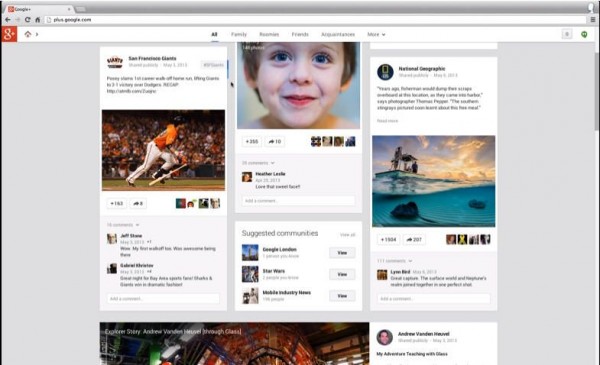
    The Google I/O keynote has revealed some major changes to Google+. Highlights include a new multi-column stream aimed not only at providing a cleaner design but also at offering greater depth to the user experience.

    The columns are customizable so that you can organize them to show the things that are most important to you. Tiles of information can be flipped to show alternative details and thanks to clever landmark recognition technology you can click on a picture to find more information about the location.

    Hangouts are heavily revised too with the focus on making conversations simpler and not just concentrating on video. Hangouts becomes a standalone app on mobile devices and allows you to create ongoing conversations that stretch back over months or even years. You can see at a glance who is taking part in the chat stream and what point they’ve read up to. The new Hangouts will also allow group video chat at no charge — take that, Skype!

    On the photo side Google+ now offers 15GB of free cloud storage for your images. It can pick the best pictures from a folder for you by weeding out duplicates, blurred pictures or poor exposures. It also analyzes shots looking for smiling people and family images in addition to using the landmark recognition mentioned above to pull out the best shots.

    There’s an Auto Enhance feature too that corrects a range of common photo problems. Google also introduced what it calls Auto Awesome in order to create good shots by combining other pictures. This allows you to, for example, ensure you get group shots where everyone is smiling.

    These changes make Google+ much more attractive in both looks and in function but will they be enough to boost its popularity? Let us know what you think.

  • Mobile malware threat continues to grow

    F-Secure has released its latest mobile threat report for January to March 2013. Highlights include an increase in threat families and variants of almost 50 percent over the previous quarter, and that Android is still the most targeted mobile OS.

    Android threats accounted for 136 of the 149 detected during the period, the other 13 being aimed at Symbian. No threats were reported for iOS, Blackberry or Windows Mobile. The report notes a particularly worrying trend towards the commoditization of malware, either by making premium rate calls or stealing bank details. 114 out of 149 threats found were profit motivated. The authors state:

    The Android malware ecosystem is beginning to resemble that which surrounds Windows, where highly specialized suppliers provide commoditized malware services. Two key examples of this trend surfaced in the first quarter of 2013 in the form of “Stels” and “Perkele” malware. Besides commoditization, targeted attacks and spam operations involving Android malware are also making strides in the mobile threat scene.

    There has been an increase in targeted attacks against particular groups such as human rights activists. Our old friend the 419 scam in the form of fake job offers remains popular too. The report breaks down threats by type with Trojans being by far the most common at just over 61 percent of all those detected.

    As the report notes these trends very much echo those seen on the Windows platform.

    In a way, Android is experiencing the same fate as Windows where its huge market share works in both good and bad ways. Such popularity certainly translates well in terms of sales, but it also appeals to the maliciously-minded crowds. Malware authors see plenty of opportunities yet to be explored on the relatively new and growing platform.

    Whilst the actual number of threats is still quite small compared to those seen for Windows, the findings do show that mobile devices are firmly in the sights of malware developers.

    Photo Credit: style-photography.de/

  • Which browser is safest? The answer may surprise you

    Web browsers are one of the main ways that malware finds its way onto your machine. Tests carried out by NSS Labs looked at the five major players, Chrome, Firefox, Safari, Opera and Internet Explorer to see which offers the best protection against more than 700 examples of real-world malware.

    And the safest is… (Drum roll and a long, reality TV-style pause…) Internet Explorer 10, blocking 99.96 percent of known malicious downloads. Chrome comes second on 83.16 percent with the other three trailing a long way behind at around 10 percent each. This might come as a surprise to all those people who have long shunned Microsoft’s browser in favor of third-party alternatives on the grounds that they were safer.

    So what’s the reason for the difference? Safari, Firefox and Opera all rely solely on URL blacklists to block potential attacks. Chrome and Internet Explorer both have additional “context agnostic malware protection” (CAMP). In IE’s case this is called “Application Protection” whereas Chrome names it “Download Protection”. Using CAMP technology means there’s more chance of false positives and so it relies on asking the user to make a choice to block or allow the download which potentially introduces a weak link in the chain.

    If you filter the CAMP element out of the results then Chrome performs no better than Safari and Firefox. However, IE 10 still turns in an impressive 83.17 percent block rate based on URL reputation.

    Now of course we technically aware types are careful about the links we click anyway. But it seems that if you’re worried about protecting your more vulnerable friends and relatives when they’re online you should encourage them to use IE 10.

    Photo credit: dohtoor/Shutterstock

  • McAfee launches cross-platform protection

    Security products that work across all of your digital devices from PCs to smartphones are nothing new — Norton One has been around for over a year — but now McAfee has joined the fray. LiveSafe includes virus protection, a password manager and encrypted cloud storage in a single package.

    The most interesting feature is the secure online Personal Locker that gives users 1GB of storage to hold their sensitive documents, financial records, IDs and so on. This is secured using biometric authentication with voice, face and device recognition. It works using Intel Identity Protection Technology. This is a hardware authentication mechanism that’s built into the latest Intel processors. To access a file you need to enter a PIN, take a photo for facial recognition and read two messages to confirm your voice.

    LiveSafe is compatible with Windows, iOS and Android and there’s no limit to how many devices you can use it on. It has a password manager that’s accessible across all devices so you’ll always be able to get at your online accounts on the move. There’s also a browser-accessible dashboard to allow you to control LiveSafe’s features from anywhere.

    LiveSafe is currently available at an introductory price of $19.99 for a one year subscription and will cost $79.99 a year after that. It will come pre-installed on Dell Ultrabooks and PCs starting in June.

    McAfee is a little late to the game here but the move away from providing trial versions on new PCs is clever and one other security companies will be watching closely. The Personal Locker should prove attractive to people who need access to private documents on the move too.

    Photo credit: Andrea Danti/Shutterstock

  • Is it time to give Linux another look?

    With recent stories highlighting Windows 8’s comparative lack of sales success  it’s understandable that people start to think about other operating systems. Assuming you don’t want to throw away your old hardware and sell your soul to Apple then the obvious alternative has always been Linux.

    The International Space Station likes it, yet Linux still has only a tiny share of the desktop market — 1.2 percent as at April 2013 according to analytics company Net Applications.

    Like most people who’ve spent their working lives around computers I’ve flirted with various flavors of Linux from time to time. Suse, Debian, Linspire, Ubuntu, Mint, Puppy, been there, tried those, resisted buying the T-shirts. Each time I’ve experienced the minor problems that take hours of trawling obscure, geeky forums to solve the odd little quirks that eventually drive me back to the comfort of Windows.

    But Linux continues to make steady improvements. The latest Ubuntu for example has a sleek interface with hints of Android. And most distros now have an installation process that doesn’t require you to have an in-depth knowledge of command line switches and another system on standby to look up problems.

    The underlying code behind the various distros is still evolving too. Linus Torvalds’  announcement at the weekend of the rc-1 version of the Linux 3.10 kernel promises some major improvements. Better support for 64-bit ARM chips, SSDs and AMD power management along with improved sound drivers being just some of the highlights. A final version of 3.10 is expected in around June or July.

    All of which might have you thinking about giving Linux another go. In the past the major reasons for not doing so have been down to software. That’s no longer an excuse for plain vanilla tasks. The open source office suites like LibreOffice are now just as good as their Microsoft counterpart. If you run some specialist software that’s only available for Windows you still have more of a problem. You could use Wine but emulators are never quite the same, are they?

    The other thing that puts many people off is the sheer number of different Linux flavors. What works in Windows’ favor is its ubiquity. There are minor variations between Home and Professional versions but mostly Windows is Windows, it’s familiar and even with the love it or hate it Windows 8 the furniture hasn’t moved around too much between versions. More importantly it just installs and works nearly all the time. Until you’ve tried out some alternatives you don’t realize what an impressive feat this is.

    So, back to the original question, is it time to give Linux another look? The answer is really down to how you use it. For day-to-day web surfing, creating documents and so on there’s no reason why you should find Linux any harder to use than Windows. The problem comes if you want to run some slightly obscure hardware or software or if you need to look for support. That’s when the average user is still likely to get out of their depth. That’s the difference that a massive corporation and a huge user base makes. The day when we all run Linux desktops might be coming, but it’s a long way off yet.

  • Are you a Free Infringer or a Digital Transgressor?

    The latest research commissioned by the UK telecoms regulator Ofcom shows that just a tiny proportion of the population is responsible for most online copyright piracy. What’s more these digital pirates are predominantly male and most could afford to buy the content if they wanted to.
    The research shows that just 1.6 percent of UK Internet users over the age of 12 account for some 79 percent of copyright infringements. Also that the top 20 percent are likely to be male and aged between 16 and 34. So much for what many people may have suspected already. More interesting is that the research has sought to create a sort of spotter’s guide to illegal downloaders by dividing them into a series of categories:

    Justifying Infringers make up 9 percent of digital pirates and account for 24 percent of infringed content.

    Digital Transgressors also make up 9 percent of pirates and account for 22 percent of infringed content.

    Free Infringers account for 42 percent of pirates, are responsible for 35 percent of infringed volume and account for 10 percent of all digital media consumers.

    Ambitious Infringers make up 39 percent of pirates and are responsible for 19 percent of infringed volume.

    The largest category, Free Infringers, apparently download stuff just because it’s free — mostly software and games. They spend the least on digital media and offer the fewest justifications for their behaviour. Digital Transgressors are younger, many of them students. According to the report they “showed the least remorse about infringing material, but also had the highest fear of getting caught”.

    The Justifying Infringers already spend a lot on digital media and are typically in managerial or administrative jobs. They justify their illegal downloading on the grounds that they “felt they had spent enough on content”.

    Kantar Media, which carried out the survey for Ofcom, points out that many people are confused by what is and isn’t legal. But it also suggests that people who consume digital media tend to do so via both legal and illegal channels. The question that is left unanswered by this report is what effect enforcement measures would have on downloading habits.

    Photo Credit: StacieStauffSmith Photos/Shutterstock

  • Live fast, stay protected

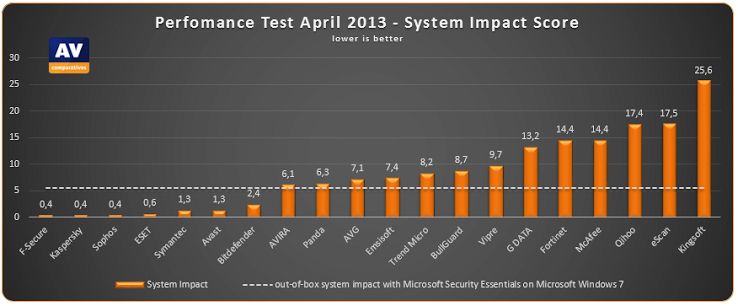
    Independent testing organization AV-Comparatives has released its latest performance tests evaluating the impact of security software on system performance. It carried out the tests on a 64-bit Windows 7 system and measured a number of everyday activities including copying files, installing and uninstalling applications and launching programs as well as running the PCMark 7 benchmarking suite.

    The results of these tests have been used to produce a system impact score measuring how much difference the various antivirus programs make compared to having no security installed at all. This makes for some interesting reading.

    At the top of the tree tied with impact scores of 0.4 (lower is better here by the way) come F-Secure, Sophos and Kaspersky. Second with a score of 0.6 comes ESET. Of what you might call the household names Symantec does best with a score of 1.3 whilst McAfee turns in a disappointing 14.4.

    Microsoft’s own Security Essentials scores a reasonable 5.6, behind BitDefender’s 2.4 but ahead of AVG’s 7.1 and BullGuard’s 8.7. Bottom of those tested comes Kingsoft with an impact score of 25.6. You can read the full results and the test methodology by visiting the AV-Comparatives  site.

    Of course all of this only tells you how the software impacts on your PC, not how well it protects you. As always with security there’s a trade off involved but if performance matters then the report will at least help you make an informed decision. You can find data on comparative protection levels elsewhere on AV-Comparatives to help you make up your mind.