
Author: Ian Barker

  • Spotify ‘nightmare’ is more of a sleepless night

    Spotify is the world’s most popular streaming music service with some 24 million active uses, around 6 million of those paying a subscription for premium services. I use Spotify all the time; it’s a great way of finding and sampling new music, and the company’s deals with major labels go a long way to legitimizing the streaming model.

    Yesterday though, Spotify acted to change its website player after a Dutch developer released a Chrome extension that allowed MP3s to be downloaded from the site. Google removed the Downloadify plug-in from its site before Spotify applied the fix to the player, which now uses an encrypted format.

    Robin Aldenhoven, the man behind Downloadify opines on his Twitter stream, “I could not believe it myself that they did so little to protect their library”. But he also supports Spotify’s obligation to copyright holders saying, “Google responded correctly to remove, but Spotify should not send DRM-free MP3s to users”.

    Of course, we all know that streaming services have long been vulnerable to this type of thing. There are plenty of freely available tools to allow the ripping of music from YouTube, for example, even though it’s a clear breach of the site’s terms of service.

    Although this latest issue might seem like a major problem for Spotify, I don’t think it’s really the “nightmare” that some bloggers call it.

    The vulnerability didn’t affect the service’s desktop or mobile clients, just the web player, which only launched last November. Plus you need to sign up for an account to be able to access Spotify so you are traceable and frankly there are easier ways to find free MP3s if you really want to.

    The real risk is that if this sort of thing happens too often the major record labels will lose faith in the Spotify business model — and indeed that of other streaming services — and may decide not to renew their license agreements. At the moment, it seems that the company’s fast action to plug this hole is enough to retain confidence. I hope it is, my nightmare would be if Spotify disappeared altogether.

    Photo Credit: Joe Wilcox

  • Smartphones hold the key to appiness

    How are you feeling? If you don’t have time to lie on the couch and work through your issues you can now turn to your Android phone to measure your emotional state. Cambridge University researchers have developed an app that combines smartphone data with user perceptions in order to track happiness.

    The EmotionSense app collects sensor information from the phone about where you are, how noisy the environment is, and who you’re communicating with. It then combines this data with your answers to questions about how you’re feeling in order to work out your emotional state.

    There are other mood tracking apps of course, but the Cambridge team believe this is the first time that user input has been combined with phone information. The app was developed as part of a project to use mobile phones as a means of improving health and wellbeing. It takes about eight weeks to unlock all the sensors and build up a full picture of what influences your moods.

    “Behind the scenes, smartphones are constantly collecting data that can turn them into a key medical and psychological tool”, Neal Lathia, lead researcher on the project team, explains. “Any smartphone now comes with numerous sensors that can tell you about aspects of your life, like how active you are, or how sociable you have been in the past 24 hours. In the long term, we hope to be able to extract that data so that, for example, it can be used for therapeutic purposes”.

    The team aims to collect a record of what drives people’s emotions and be able to work out when they’re likely to be at their most stressed. In the future this could lead to phones being used by doctors to routinely monitor patients. Dr Lathia explains: “Most people who see a therapist only have an appointment once every fortnight. Many, however, keep their phones with them most of the time. In terms of sheer presence, mobiles can provide an ongoing link with a person”.

    The app is available now to download free from the Play Store but to use it you must consent to your data being passed to the researchers. The team is working on versions for other smartphone platforms.

    Photo Credit: kaczor58/Shutterstock

  • Shopping, beer and bus shelters — the websites that sum up Britain

    In April of this year the British Library along with libraries in Scotland, Wales and Dublin gained powers to archive the whole of the UK Web for future generations of researchers. To mark the introduction of these regulations the library today announced a list of 100 sites it says will be essential reading for future generations.

    Lucy Burgess, Head of Content Strategy for the British Library says that the project aims to collect about a petabyte of data over the next decade. “We want to paint a diverse picture of what life in the UK today is like, for our great grandchildren and for future generations of researchers so they can understand how we lived, how we worked and how we felt. We’re talking about our culture and our digital heritage here and that’s what we exist to preserve”.

    Compiled by a panel of curators and experts, the list includes sites you might expect such as eBay, Twitter, Facebook, the national Health Service and the BBC along with the Meteorological Office (who said we Brits are obsessed by the weather?) and the Visit Britain tourism pages.

    The inclusion of the Beer in the Evening site reinforces another national stereotype and the fact that retailers Amazon and Argos are on the list underlines that there’s still some truth in Napoleon Bonaparte’s line about a nation of shopkeepers — or at least of shoppers.

    Our strange obsessions get aired too with the appearance of the Unst Bus Shelter site charting the history of a bus shelter on a remote Scottish island. Drab day-to-day details of the capital are captured on the crowd-sourced Sh*t London site, which encourages people to share random oddments of city life. There are also sites capturing street art and murals plus community blogs giving an insight into everyday British life.

    To prove that we’re not so obsessed with the Web that we’ve forgotten how to laugh at ourselves the list includes the Beano comic, the British Cartoon Archive and McGonagall Online, a site dedicated to the man widely touted as the worst poet in the English language.

    The library is keen to stimulate debate and find out what other UK sites people would like to see included. You can join in on the 100 Websites page or by using the #digitaluniverse tag on Twitter.

    Photo Credit: Anne Burgess

  • Motorola abused patent position EU says

    The European Union’s Competition Commission has ruled that Motorola Mobility (owned by Google) abused its position in the German mobile market by filing a patent injunction against Apple.

    Motorola won an injunction related to Apple products using data transmission technology in February 2012. The fruit-logo company offered to pay a licence fee for the patents but the companies failed to agree on a price. A number of Apple products, including iPad and severall iPhone models, were taken off sale in Germany during the dispute.

    The Commission argued that Motorola enjoined the injunction despite Apple’s willingness to enter into an agreement. Competition Commissioner Joaquin Almunia says:

    The protection of intellectual property is a cornerstone of innovation and growth. But so is competition. I think that companies should spend their time innovating and competing on the merits of the products they offer — not misusing their intellectual property rights to hold up competitors to the detriment of innovation and consumer choice.

    You can read the EU’s preliminary review online.  Motorola will have the opportunity to defend itself ahead of a final decision.

    Photo Credit: Lisa S./Shutterstock

  • Did you wink at me or are you taking a photo?

    As if the Google Gaze wasn’t enough to get you strange looks in the street, now there’s a new app for Google Glass users that lets you take a photo simply by winking.

    The Winky app was revealed yesterday by developer Mike DiGiovanni on his Google+ page he says:

    You might not think it’s hard to say “Ok, Glass Take a Picture” or even just tap a button. But it’s a context switch that takes you out of the moment, even if just for a second. Winking lets you lifelog with little to no effort. I’ve taken more pictures today than I have the past 5 days thanks to this.

    Currently Winky is only available as Android source code so it needs to be compiled before it can be used but since most Glass users are currently developers and other techy types that shouldn’t be a problem.

    So, next time somebody winks at you it’s important to check if they’re wearing a Google headset in order to avoid embarrassment. Aside from the fact that technology seems to be turning us all into twitching loons, there would appear to be endless potential for misunderstandings here, “Honestly, officer I was only taking a photograph”.

    Photo Credit: Vadim Ivanov/Shutterstock

  • Dutch cyber cops could be licensed to hack

    The Dutch government  has revealed plans to give the police extra powers to fight cybercrime. Under the proposed new law officers would be given the right to hack into computers, read emails, install spyware and delete files. They could also be authorised to tap VoIP calls and break into servers located outside the country if they were being used to host DDoS attacks.

    The country’s Justice Minister Ivo Opstelten says that the powers would be used under strict control and that the approval of a judge would be needed before the police could carry out these actions.

    Terrorism and child pornography are areas of special concern in the bill but it would also introduce penalties for the publication of stolen data. In addition the bill would make it a crime for a suspect to refuse to decipher encrypted files or hand over passwords during an investigation by police.

    Digital rights group Bits of Freedom  is opposed to the new law saying that it sets a bad precedent and that its preparation has been rushed.

    The bill is set to undergo revisions before being put to parliament at the end of the year. If it’s passed then no doubt other governments will be looking at how they too can kick down the doors of suspects’ computers.

    Photo Credit: Ivonne Wierink/Shutterstock

  • Mozilla takes on spyware maker

    The Mozilla Foundation is accusing Gamma International, a UK-based software group, of making a false association between one of its products and the Firefox name.

    Gamma International produces FinFisher, a program used by governments to obtain data in a covert way. FinFisher is often installed by disguising itself as an update to a well known program such as Firefox. Mozilla has now sent a cease and desist letter to Gamma claiming that its Firefox trademark is being violated and that the practice must end immediately.

    Alex Fowler in charge of privacy and public policy at Mozilla says on his blog,

    As an open source project trusted by hundreds of millions of people around the world, defending Mozilla’s trademarks from this type of abuse is vital to our brand, our users and the continued success of our mission. Mozilla has a longstanding history of protecting users online and was named the Most Trusted Internet Company for Privacy in 2012 by the Ponemon Institute. We cannot abide a software company using our name to disguise online surveillance tools that can be — and in several cases actually have been — used by Gamma’s customers to violate citizens’ human rights and online privacy.

    Mozilla has acted following a report from the University of Toronto’s Citizen Lab on digital spying. The report compares a legitimate install of Firefox with what the report’s authors claim is a FinFisher install. This, they say, comes labeled with version numbers, copyright details and descriptions from a legitimate Firefox version.

    Photo credit: olly/Shutterstock

  • The way we were — CERN recreates the first website

    You might think that complex experiments involving particle accelerators would be enough to keep the people at CERN (the European Organization for Nuclear Research) occupied. But of course in between all that nuclear stuff a CERN team led by Sir Tim Berners-Lee found time to create the first ever website.

    This must have been a somewhat frustrating experience back in 1993 when hardly anyone had access to a browser — rather like Bell inventing the telephone and not having anyone he could call. Now as we reach the 20th anniversary of the landmark event that gave birth to the Web, CERN has started a project to restore that first website.

    You can browse the first site itself at http://info.cern.ch/hypertext/WWW/TheProject.html but don’t expect any impressive graphical content — or indeed any graphics at all. Ultimately the project team hopes to restore the NeXT computer that hosted the site and run it on the original hardware, even using the same machine names and IP addresses. Thus preserving as many digital assets as possible from the first site.

    The Web has become such an essential of our everyday lives in recent years that it’s hard to imagine its very beginning was such a short time ago. This project will help preserve those humble origins for future generations so that they’re able to see just how far we’ve come. As Dan Noyes, Web manager for CERN’s communication group says on his blog, “The fact that they called their technology the World Wide Web hints at the fact that they knew they had something special, something big”.

    Photo credit: amasterphotographer/Shutterstock

  • Google changes search labels following EU investigation

    Following an investigation by the European Commission into whether Google unfairly promoted its own services, the search giant has agreed to make some changes to the way results are displayed.

    Google will more clearly label search results that link to YouTube, Google Maps and its other sites. The Commission has proposed that these changes run for a month whilst it collects public feedback. The EC will then decide whether to make them legally binding for five years, in which case an independent monitor would be appointed to oversee proper implementation.

    The agreement requires Google to clearly separate promoted links from general search results. The company will also need to show links to three rival specialized search providers in a location that’s clearly visible to users.

    In addition Google will need to offer websites the ability to opt out of specialized search results — such as news and shopping — whilst not affecting their ranking in a general search. This includes the ability to allow newspaper websites to control, on a page-by-page basis, the parts of their content that shows up in Google News searches.

    Google will no longer be able to include in its agreements with publishers any obligation that they source online search adverts exclusively from Google. Nor will it be able to restrict advertisers from running a campaign across rival platforms.

    Whilst these changes will only apply to Europe, regulators in other countries will no doubt closely monitor the effects and deciding whether to impose similar restrictions of their own.

  • Forget QWERTY it’s time for KALQ

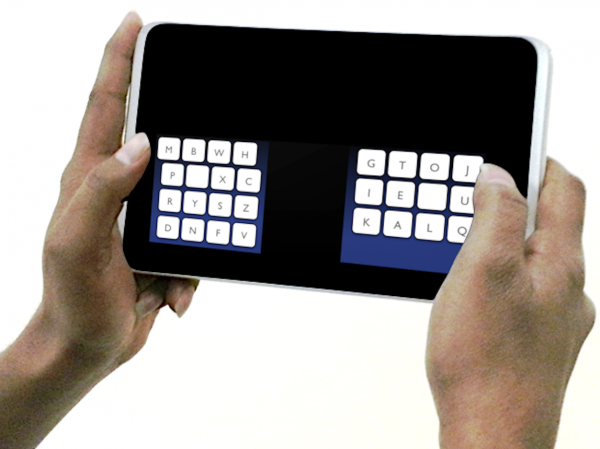
    Typing on touchscreen devices is very different from using a conventional keyboard and the traditional layout doesn’t help much. Researchers at the University of St Andrews, the Max Planck Institute for Informatics and Montana Tech have come up with a new layout that claims to allow tablet users to thumb type 34 percent faster.

    Named KALQ  after the order that the characters appear, it’s been developed to provide optimal character positions when typing on a tablet. By spreading the characters used in commonly typed words such as “on”, “see”, “you” and “read” which on a QWERTY keyboard would all need to be typed with one thumb, KALQ speeds up typing and minimizes strain.

    Dr Antti Oulasvirta, Senior Researcher at the Max Planck Institute for Informatics in Germany, says:

    The key to optimizing a keyboard for two thumbs is to minimize long typing sequences that only involve a single thumb. It is also important to place frequently used letter keys centrally close to each other.

    Experienced typists move their thumbs simultaneously: while one thumb is selecting a particular key, the other thumb is approaching its next target. From these insights we derived a predictive behavioral model we could use to optimize the keyboard.

    KALQ also has built in error correction that takes into account thumb movements and a statistical analysis of the text being typed. This enables uses to reach a speed of 37 words per minute as opposed to 20 on a QWERTY layout.

    The researchers will present their work at the CHI 2013 conference in Paris on 1st May and KALQ will be available as a free download for Android-based devices.

  • Why less is more in the Windows 8 Modern UI

    My Why I love Windows 8 piece last week generated a lot of comments and a good balance of pro and anti opinion. Thanks for taking the time to air your views. I received one particular comment concerning choice and that got me thinking that it was a subject which deserved a closer look.

    In the past Windows has imposed relatively few restrictions on its users. You want to launch a program? You can click the desktop icon, select it from the start menu, select an icon from the task bar, use a gadget or track down the folder where it’s stored and run it from there. You can even call up a command line if you want. It’s your choice. As is installing a third-party menu system or an Apple-style widget bar, the permutations are endless.

    The same goes for developers too. If you’re building a program you can make it look how you want. You don’t have to use the ribbon toolbar format, there’s no restriction on the size, shape or position of the buttons, the menu items don’t have to be in a particular order.

    Contrast this with other systems. Visit the developer site for Apple, or even for Android, and you’ll find there’s a whole raft of guidelines and recommendations all aimed at giving a consistent look and feel to programs and apps.

    Which brings us back to Windows 8. With the launch of the much discussed Modern UI we have for the first time in Windows an interface that requires developers to conform to a strict template. It also requires users to launch and control all their apps in the same way.

    Is this a good thing? Windows has always been about choice whereas other systems have imposed their developer’s vision more forcefully on the user. But if you give people too much choice don’t they just get confused? Isn’t it better to always have context menus and navigation controls in the same places? To have a one-stop location on the charms bar for settings and searches across all apps?

    If all programs are launched from the same place and can be navigated in broadly the same way then you have a huge step towards making a more user-friendly system. Ask yourself this, if you’d never seen Windows before wouldn’t the Modern UI approach seem much more logical than the old five ways to achieve the same end model?

    The problem of course is that people have seen and used and adapted to older versions of Windows and are resistant to change. As a result there’s been a lot of heated debate about the Modern UI way of doing things. This isn’t helped by the fact that the desktop has changed little and is still lurking just a click away allowing people to slip back into a comfort zone.

    Microsoft has made a bold move with Windows 8. It has provided an opportunity to re-evaluate how all Windows programs look and work. If that leads to improved usability at the expense of stricter development standards then in the long run it must be a good thing. It would be a shame if having come this far Microsoft were now to listen to the shrill voices and take a step back from the Modern UI approach.

    Photo Credit: Thomas Pajot/Shutterstock

  • BadNews for Google Play users

    Downloading apps from Google Play may get you some unexpected extra software. Mobile security specialist Lookout has uncovered a piece of code called BadNews which poses as an advertising network in order to push malware out to infected devices. By using the ad network as a front it bypasses the checks that prevent malware from getting on to the store.

    The BadNews code was found in 32 apps across four different developer accounts. Google has now removed the apps and suspended the accounts but it’s estimated that these apps have already been downloaded several million times. About half of the identified apps are in Russian and the payload is designed to commit premium rate fraud in Russia and neighbouring countries.

    Once installed on a device BadNews can send fake news messages and prompt the user to install more apps. It also sends information including the device ID and phone number back to its command and control server.

    The links pushed by BadNews include fake updates for a popular Russian social network and for Skype. In each case the links lead to the well-known AlphaSMS malware which results in fraudulent premium rate charges.

    This is an interesting development in mobile malware, because by delaying its actions via a server the app is able to slip past vetting procedures. This also allows the developers time to notch up some positive feedback for the app on the store before it triggers its infection, giving it chance to spread to more devices.

    To stay safe Android users should make sure their “Unknown sources” system setting is turned off in order to prevent drive-by installs and make sure they keep their security software up to date.

    Photo Credit: style-photography.de/Shutterstock

  • Apple loses out to premium Android tablets

    UK polling company YouGov has released the results of its latest Quarterly Tablet Tracker  for the first three months of 2013. It shows that consumers now see Android tablets as equal in quality to the iPad and as a result their makers are eating into Apple’s share of the premium market.

    Although it still has the largest slice of the UK’s tablet market, Apple has seen its share drop by 10 percent in the past 12 months. Despite the launch of the iPad Mini and 4th generation iPad, Apple now has 63 percent of the market compared to 73 percent this time last year.

    The main reason for the drop seems to be the emergence of strong new competitors which have taken sales not just from Apple but from the obscure budget brands too. Google’s Nexus 7 has grabbed 8 percent of the market in under a year, while the Kindle Fire has taken 5 percent. Since the beginning of 2012 Samsung has also more than doubled its share from 4 percent to 10 percent.

    There is some good news for Apple with the iPad Mini taking 4 percent of the market and generating the highest customer satisfaction scores.

    Looking at the overall picture, the Quarterly Tablet Tracker shows that 18 percent of the UK adult population (more than 8 million people) now own a tablet. This is an increase of 5 percent over the last quarter of 2012, no doubt fueled by the Christmas period.

    Of course Apple still has a huge share of the tablet market largely thanks to its head start. But that dominant position is only likely to slip further as the big-name Android makers raise their game.

    Photo Credit: Adam Radosavljevic /Shutterstock

  • Samsung is accused of posting fake HTC product reviews

    The Taiwanese Fair Trade Commission is investigating allegations that Samsung representatives posted fake reviews of rival HTC’s products online. Allegations of dirty dealing come from whistle-blowing site taiwansamsungleaks.org, which posted documents it claims are from a third-party marketing agency employed by Samsung.
    The documents reveal a raft of allegedly fake posts on popular Taiwanese gadget websites, prompting the leaks site to describe Samsung’s tactics as “evil”. The company is accused of hiring students to post negative comments about HTC smartphones.

    Now that the Fair Trade Commission is involved, Samsung could be fined more than $800,000 if found guilty of false advertising. In a statement to the media the company says:

    Samsung Electronics remains committed to engaging in transparent and honest communications with consumers as outlined in the company’s Online Communications Credo. We have encouraged all Samsung Electronics employees worldwide to remain faithful to our Credo.

    The recent incident was unfortunate, and occurred due to insufficient understanding of these fundamental principles.

    Samsung Electronics Taiwan (SET) has ceased all marketing activities that involve the posting of anonymous comments, and will ensure that all SET online marketing activities will be fully compliant with the company’s Online Communications Credo.

    We regret any inconvenience this incident may have caused. We will continue to reinforce education and training for our employees to prevent any future recurrence.

    HTC also issued a statement saying it is considering whether to take, “appropriate action” against its rival.

    All of this raises some interesting questions. Is paying someone to say bad things about your rivals widespread? If a company like Samsung is involved how many other technology giants are doing the same thing? And will you ever trust user reviews again?

    On the other side of the coin, have you ever posted a negative review of a competing product online? Or has your employer ever asked you to and what was your response? We’d love to hear from you on the comments thread.

    Photo Credit: zwola fasola/Shutterstock

  • Why I love Windows 8

    Fourth in a series. It seems to be fashionable at the moment to be negative about Windows 8. People like to whine about how the Modern UI gets in the way and how the rest of it is just Windows 7 with some of the furniture rearranged. Some analysts are even blaming Windows 8 for poor PC sales.
    Well, I’m sorry Windows 8 deniers, you’re wrong. I’ve used every major version of Windows since 3.1, I’ve been using Windows 8 since the Developer Preview versions and I think it’s Microsoft’s best effort yet.

    If you move beyond the culture shock of its different look, there are just so many things that Windows 8 does well. The first is how quickly it manages to boot up your PC. When I initially loaded the Developer Preview on the humble Intel Atom-powered machine I use as a test box I was startled to find it booted in less than half the time taken by my Windows 7 laptop with Pentium power and 50 percent more RAM. Okay, so this is down to a little conjuring trick which saves the system state on shutdown and allows the system to reload without starting core components one by one, but it’s still impressive.

    Another feature that makes me a fan of Windows 8 is its reliability. When your day job involves the constant round of installs and uninstalls that comes with reviewing software and hardware you become no stranger to the blue screen of death. Not in Windows 8, in almost a year of use I haven’t seen the BSOD once. This is due to Windows 8’s ability to allow individual programs to crash without taking down the whole OS.

    Some people bemoan the lack of a desktop Start button, but the Charms bar combined with the powerful search function more than compensates. I’m now reaching the point where using an older version of Windows feels quite alien and I automatically go to the bottom right corner of the screen expecting something to happen.

    Which brings us to the controversial Modern UI. Yes it’s designed for touch screens and it works best with one. But it’s still perfectly usable on an old-fashioned mouse and keyboard setup. The apps look good, they work well and if you want a conventional desktop it’s only a click away. Honestly, I don’t understand why people have a problem with it.

    I could go on about improved multi-monitor support, easy syncing of settings between machines, the quality of the built-in security, the ability to reset the system and more. There are many reasons why I love Windows 8, so let me end with an appeal. Don’t take my word for it, set aside your prejudices, curb your Luddite tendencies and take a fresh look, this really is a good operating system.

  • Symantec highlights 58 percent increase in mobile attacks

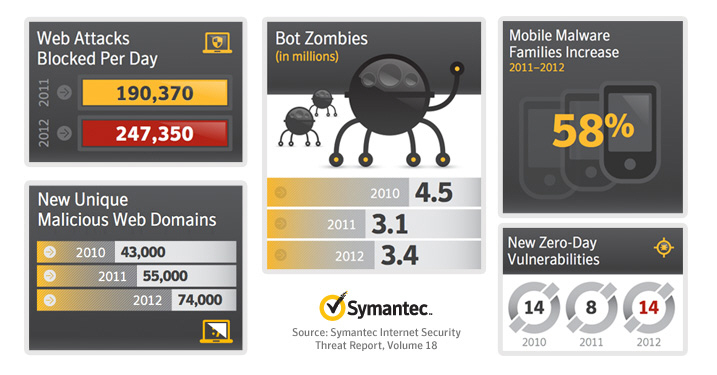
    Security giant Symantec’s 18th annual Internet Security Threat Report is out today and reveals that cyber criminals are increasingly scouring the Web for personal details in order to target their attacks. Armed with your information they can exploit security gaps in social networks and other sites to infect your system or steal your details.

    It’s not just your PC that’s at risk either; the report shows an alarming 58 percent increase in attacks on mobile devices with just under a third of these aimed at stealing data without the user’s knowledge. Android is the most targeted mobile platform as its open source nature makes it easier to hide malware in apps. The securer-than-thou smugness of Apple users receives a blow too as the report notes more than 600,000 Mac systems were infected by a single attack last April.

    When it comes to types of threat, the growth of ransomware continues with infections becoming more aggressive and harder to undo. Another scary statistic is that 61 percent of malicious sites are actually legitimate websites that have been compromised so you may be at risk even if you think you’re practising safe surfing.

    Symantec also highlights some common myths about security and you can read these as a handy infographic and access the full ISTR report here.

    Norton’s security expert Richard Clooke said, “The report results have shown that it is still crucial for Norton to continue to educate consumers on how they can help protect themselves from acts of cybercrime. Ransomware, for example, a scam which disables victims’ computers until they pay a ransom, continues to be a key theme and is now becoming more sophisticated than ever…”

    Of course all of this is aimed at boosting sales of Symantec’s security products, but it does underline that the threat landscape is an ever changing one and that we all need to be careful out there.

    Photo Credits: Slavoljub Pantelic/Shutterstock

  • Bing searches throw up more malware sites than Google

    We all know that search engine results can sometimes serve up malware, but if you’re using Bing you’re five times more likely to get malicious links than if you’re using Google.

    In an 18-month study, independent German lab AV-Test  discovered that all search engines sometimes serve up Trojans and other malware amongst their results despite the search providers’ best efforts to prevent it.

    AV-Test found 5,000 malware links across 40 million websites, so toxic search results are perhaps rarer than you’d think. However, it seems that developers are putting their efforts into SEO techniques so that their results appear higher up the rankings where users are most vulnerable to clicking without thinking.

    Google and Bing proved to be the safest search engines in the study, but of the two it’s Bing that’s more likely to give you a nasty surprise when clicking on a link, delivering 1,285 malicious results to Google’s 272. If it’s any consolation you can feel sorry for the Russians as their search giant Yandex delivered more than ten times as many infected sites as Google.

    Most of the infected sites exploit existing vulnerabilities so you can keep yourself safe by ensuring that your browser and security software are always up to date.

    Photo Credits: maraga/Shutterstock

  • Is it time to trust Microsoft with your PC security?

    Ever since viruses started to hit the headlines back in the 1980s, security for PCs has been big business. Products like Norton and McAfee have grown to household name status, and made their original developers very rich men on the back of it.

    This is mainly because Windows wasn’t built with security in mind and was adopted in such huge numbers that it made a tempting target. Until recently that is. With Security Essentials built into Windows 8 and active by default, and available free for users of older systems, the boys at Redmond have suddenly started to take security seriously.

    So is it time it throw off the shackles of your security subscription and trust Microsoft to do the job? The Consumers’ Association  in the UK certainly thinks so. In independent tests it rated Windows 8 as better than anything else at protecting against viruses and phishing attacks, with Microsoft Security Essentials a close second for those running earlier Windows versions. Their best buy paid suite, Bullguard, came in third with the best rated free alternative, Avira, a distant seventh. You can read details of how the tests were carried out here.

    Of course if you pay for a security suite you get all kinds of extras like a backup tool, parental controls, identity protection, password management and system tune up. But hold on, most of these things are included in Security Essentials too and they don’t seem to put the brakes on performance in the way that some of the third party suites do. For the elements that are missing, like ID protection and a password vault, there are plenty of free alternatives to be had.

    With Microsoft’s security solutions putting on a show of strength in this way it’s important to ask what the effect might be on the third-party security market. If these test results stand up to experience in the real world then the big security names are going to be left floundering to justify why you need to use their products. Maybe they’ll turn their marketing efforts on all those unprotected Macs out there instead.

    Photo credit: Julien Tromeur/Shutterstock