Author: jezlyn

  • Lenovo’s LePhone est la bombe

    Perhaps I should be happy that I didn’t have the budget to buy the Nexus One right away (oh yeah, as if I could buy this now… *rolling eyes*). Lenovo’s Android phone looks really awesome, and so does its optional keyboard accessory! When I heard about Lenovo’s hybrid laptop, the IdeaPad U1, I was really impressed with the innovative engineering behind it. It’s like what the DualCor cPC never became. No, actually, it’s way better than what the DualCor was going to be. Anyway, I would love to see the IdeaPad U1 in person, and this LePhone is a close second!

  • If you’re not interested in the upcoming Apple “tablet”, then just move along

    Otherwise hit up the link above and read the article at maxvoltar.com. Not only does it have links to other interesting posts about tablet predictions, it also has a pretty cool one of its own, as indicated by the diagram above.

    I’ve been avoiding writing anything about the new Apple tablet because there’s already a metric ton of articles (most of them utter crap) out there. In this case, I’ve been lurking, reading other people’s ideas and just biding my time. All will be revealed soon (though the announcement can’t come soon enough for me!).

  • Must-read for Dollhouse fans

    Great interview with Tim Minear about last week’s Dollhouse episode

    Don’t be a ninny, follow the link above, and then complain here that it spoiled you, mmmkay?

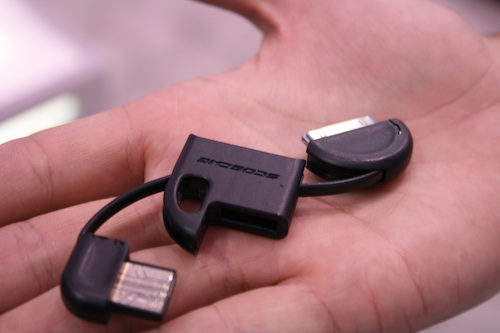
  • Cool accessory for iPhone/iPod for charging or syncing

    Scosche

    By Chris Scott Barr

    If you have an iPhone, it probably goes with you everywhere. But how many places do you take a cable to charge it? Since the iPhone is notorious for having less than spectacular battery life, it’s generally good to have a way to get extra juice to it when needed. Scosche was showing off their latest iPhone/iPod charge and sync cable at CES, which should be easy to keep on your person at all times.

    Looks like a pretty handy gadget to add to a mobile tech kit.

  • New “Near me now” feature from Google

    Last month, Vic Gundotra, VP of Engineering, demonstrated at the Computer History Museum the ability to search by using your location as the query. Starting today, you can try this yourself by going to Google.com in your iPhone or Android browser and clicking on “Near me now” once your location has been provided by your phone.

    “Near me now” was designed to address two user problems. First, we wanted to make it fast and easy to find out more about a place in your immediate vicinity, whether you’re standing right in front of a business or if it’s just a short walk away. For example, you may want to know what other customers think about a restaurant before you go inside (see quick video below) or what they have been raving about on the menu before you order. By selecting the “Explore right here” option, you can find out more about a place “right here” with just a few clicks.

    Check out the full post for more details, including a video.

  • The Visual Science Lab: New Year’s Walk. Getting into the new decade.

    Stumbled across this photographer’s blog, which I am going to add to my RSS feeds and hopefully keep up with regularly. I’m linking to this article in particular because it’s not only a great long-form photoblog entry, but it also talks about the photographer’s views on e-books near the end of the post. Great read. Please follow the link!

  • McRib!

    Yes! It’s back! And it’s all mine… :D

  • There’s an app for this – The Boston Globe

    Got linked to this article on The Boston Globe about useful iPhone apps. Not too much new info for most seasoned iPhone users, but I did see a few interesting pop-culture-y/literary apps near the end of the list. However, the main reason I’m blogging this is to posit that I would actually like an app for The Big Picture feature that The Boston Globe regularly puts out. That would be an awesome, inspiring photo gallery app to browse on the iPhone. Somebody please make this happen?

  • How to Capture an Idea | Tomorrow Museum

    One of the best things about living in this era is that there are countless options available to capture ideas, digital or otherwise. You may have a moleskine in your pocket, but you still jot an idea down on your iphone, depending on what the idea is, the rhythm of it, and what you plan to do with it.

    Cool article on Tomorrow Museum about managing information digitally and otherwise.

  • Dinner

    Inevitably I underestimate how big the tortilla is. :)

  • And this…

    See previous blog post to understand the “and this…” part. :)

  • Yes!

    Finally found my Griffin Clarifi case! Now I can take close up photos
    like this one.

  • Asus EeePC Keyboard finally gets a ship date/price

    I can’t help it, I want one of these things! It totally reminds me (not in aesthetics, mind you) of my Commodore 64, my first computer. I love that it has a 5″ touchscreen — multitouch, of course. And I didn’t know it would use a wireless version of HDMI to connect to an HDTV for monitor use. That’s nifty. However, with the non-inspiring specs listed in the original ZDNet post, I am disappointed. And so I’ll wait around and see if EeePC Keyboard 2.0 is ever released.

  • Interesting Photographer’s Backpack: Kata 3N1-33 Sling Backpack

    By accident I stumbled upon CrunchGear’s “” feature where they reviewed a ton of different gear bags for a week last December, big surprise. :) This Kata sling backpack was one of the bags that caught my eye. Even though I am now loathe to carry a ton of camera gear with me (I try to travel as lightly as possible now, only carrying my LX3 most times), this gear bag would be great for a trip where I want to carry a laptop and some SLR (digital or film) kit. Be sure to hit up the via CrunchGear link above to see the full review, including a product tour video from Kata. It’s funny because the reviewer didn’t see the bag working out for him (he said it looks like a big shoe box :) ), but I think for many photographers, this bag would be a great one to use.

  • Spring Design Alex hands-on (Update: video!) — Engadget

    Just recently read a post on jkOnTheRun that reported the Alex e-book reader will have access to Borders’ e-book store, which is good news for buying content. However, I’m linking to the Engadget post above because they have a short video showing the Alex in use.

    What I found very interesting was that near the end, when they showed how you can navigate an e-book using the touchscreen, I saw that the touchscreen mirrored part of the text on the e-ink screen (it was the same when they browsed to Engadget and were scrolling up and down with the touchscreen). So it seems that this device is able to get around the disadvantage of e-ink devices not being readable in the dark or dim settings (like reading in bed at night) by allowing reading on the touchscreen itself when you need a backlit screen. Cool idea!

    I was able to play with a Barnes and Noble Nook a weekend or so ago, and while it was cool to finally see it in person, I did notice that it was laggy when responding to touchscreen presses. It could be that the latest firmware addresses that, not sure. And I couldn’t figure out a way to turn off the touchscreen after I was done with it, just had to wait until the touchscreen timed out itself. Perhaps I just missed something in the controls. With the Alex, the power button turns the screen on and off. I admit that the Alex is probably a little unwieldy with the extra length due to the bigger touchscreen, but conversely, it might work better to have extra real estate to hold onto the device. I’m quite interested to see this device in person as well. So glad to see e-books and e-book readers taking off like this! It’s about damn time. :)

  • Monoprice external iPhone battery

    (photo courtesy of Monoprice.com)

    Sometime near the end of November, Josh Bancroft (@jabancroft on
    Twitter) extolled the virtues of an external battery pack for the
    iPhone from Monoprice.com. Since it was so cheap at $15, I decided to
    pick up three of them — one for the hubby for Xmas, one as another
    gift for my brother, and one for me. I haven’t had too many occasions
    to use it since Christmas because I normally have my iPhone in a
    Mophie air juice pack (or juice pack air…I always forget the order
    of the words in the name. *sheepish grin*).

    The Mophie battery case is a lot more convenient since it’s not a
    separate attachment, however it does add a noticeable thickness to the
    iPhone despite being the thinnest case of this kind. Whenever I take
    my iPhone out of the Mophie case, like right now, I’m amazed at how
    thin my phone is. :)

    Anyway, I would like to use the Monoprice battery more because I’d
    like to migrate back to my Griffin Clarifi case (if I can locate the
    damn thing) so I can more easily take close-up shots, since the 3G
    doesn’t have a macro mode ( :( ). I have reservations about using the
    Monoprice battery for the following reasons:

    1. It is so bulky. I hadn’t noticed that there was a product shot on
    Monoprice of the battery that shows how large it is in comparison with
    the iPhone (same width, but about half the length, and about 1.5x the
    thickness). If I had seen this, it would’ve given me pause, but I
    probably would’ve bought the batteries anyway because of the great
    price. I originally was under the impression that the battery would be
    small enough to leave on the phone while using it, so I was surprised
    when I saw the batteries in person. You can definitely still use the
    phone with the battery attached, but it’s unwieldy and I worry about
    damaging the dock port if the battery gets knocked around while on the
    phone.

    2. While the overall capacity of the Monoprice battery trumps that of
    the Mophie, the Mophie is able to recharge the iPhone a lot faster,
    according to my unscientific observations. I often run my battery down
    really low before switching on the Mophie battery. And since it’s easy
    to use the phone with the Mophie, I don’t mind switching it on as late
    as possible to try to conserve the Mophie and make the phone last
    longer through the day. Since the Monoprice battery is awkward to keep
    on the iPhone, having to wait for the iPhone to be charged enough so I
    can remove the Monoprice battery is less convenient.

    3. The charging lights on the front of the Monoprice battery are
    bright and annoying. The charging lights on the Mophie case are on the
    back, so I can use the iPhone without being unpleasantly distracted by
    bright, blinking, blue lights. To see the Mophie’s remaining charge
    level, I press a button that lights up a portion of four LEDs, similar
    to the battery charge indicators on a MacBook. I guess I’ll have to
    cover the Monoprice’s lights up with some gaffer’s tape or something.

    In general I’m glad to have another backup battery for my iPhone,
    especially one that is so affordable. I just wish it were more
    convenient to charge the phone with the Monoprice battery while I’m
    using the phone.

  • Samsung getting into the e-book reader game

    The Samsung E6 and E101 are the first eBook readers with electromagnetic resonance stylus that let you take notes and scribble as you read, with what Samsung claims is vastly improved functionality over competitive models.

    I like the slider form factor for this e-book reader, helps keep the device’s small footprint without sacrificing functionality. I also like the idea of being able to scribble notes directly on the screen. Of course, I am a Tablet PC enthusiast, so I guess I’ll always have some affection for gadgets that allow “inking” like this.

  • Word.

    Last week, I said one would be nuts to buy a new iPhone at this point in time, given what we have been hearing from Android and from Apple’s roadmap. Today, with the confirmation of the long-rumored Nexus One from Google, an upgraded HTC unit running the latest edition of Android, we saw the platform take another step further in become the true alternative to Apple, in a way that Blackberry and the Palm Pre and anything Microsoft powered have been unable to do.

    For iPhone owners who are happy with their platform, and think it’s amazing, the news of the increased competition may mean very little. They still have access to the most robust application store in the world. They still have excellent integration with their desktop machines, especially their Macs. And they can be confident knowing that the product will continue to be upgraded.

    But if you’re an iPhone owner who is either tired of the limited carrier choices, or if you’re simply curious about Android, or if you prefer Google’s applications and approach moreso than you do the Steve Jobs way, today’s announcement has to give you immediate pause. Not because it instantly vaporizes the iPhone’s lead, but because of the same reason we all should be watching the creep of the Chrome OS – because it’s not just about now. It’s about next.

    Not only did this article hit the nail on the head, it hammered the nail in with one strike. Please hit up the link to louisgray.com and read the rest of the blog post after you’re done reading mine. :)

    I am in this irritating limbo right now, where I am totally tempted to buy an unlocked Nexus One to play around with, but I know that a) the Apple tablet is coming in March, and b) the next iPhone will probably be announced/go on sale in June or July. Now, if I buy a Nexus One, I wouldn’t be completely migrating away from my iPhone. There are too many cool apps that I’d be leaving behind (a blog entry about them keeps forming in my head, but I haven’t gotten around to posting it yet :-/). I am just “Android-curious” and really want to get to know the platform myself, instead of vicariously through the various blog posts out there.

    Damn my budget. >:P Anyone got a loaner??