Author: Jonathan I Ezor

  • Palm’s Directors of Development “Really Thrilled” about HP deal

    Palm’s Ben Galbraith and Dion Almaer, directors of developer relations at Palm, took some time near the end of the third episode of their Palm Developer Podcast Series to talk not only about the Palm Developer Day event, but also the announced HP acquisition.

    After a bit of silliness (hawking HP printers, ink and even paper), they both spoke extremely positively about what the HP deal might mean for the company and its developer community.

    Ben: “We couldn’t be more excited about the possibilities that this merger opens up for developers. We are…really thrilled about what’s possible here….“If the deal goes through, we will be with the largest technology company in the planet.”

    Dion: “webOS is this amazing but very young operating system, and now, with a parent like HP, if all of this goes through, we’ll have the runway to do amazing things. You guys have kind of gotten in in the ground floor, and I think where we take things from here, is going to be an amazing fantastic way.”

    While they also pointed out that, “thanks to the legal system being what it is,” they couldn’t say much more, they seemed genuinely enthusiastic about HP and its plans for Palm. (Dion’s offer at the end of the video, “Use webOS, get a free HP printer,” should probably not be taken seriously, though.)

    The discussion starts at about 44 minutes into the video, after the break!

    read more

  • Book Review: Palm Pre for Dummies

    In less than 10 months since its launch, the Pre has generated a number of books (we’ve previously reviewed Palm webOS by Paul Allen and Edward C. Baig’s Palm Pre: The Missing Manual), and as with so many other things, it has also yielded a Wiley Publishing Dummies title: Palm Pre for Dummies, by Engadget’s Mobile Editor Chris Ziegler. Although the rapid pace of webOS development may have eclipsed some of the content (it came out in late 2009), it still serves as a useful introduction to the Pre and webOS. 

    read more

  • “My Palm Pre” Now Available for Preorder

    Author and friend-of-the-site Craig Johnston let us know that his new book My Palm Pre (co-written with Joe Hutsko) from Que is now available for preorder (you should pardon the expression) at Amazon and Barnes & Noble.  It should also be hitting actual bookstore shelves between May 10th and 20th. It looks to be a useful guide for new webOS users.

    Look forward to a full review once it is released!

  • Palm Pre screen tests: color great, touch accuracy not so much

    MOTO Development Group touch accuracy test results

    In two independent tests conducted by CNET and MOTO Development Group (not to be confused with Motorola) pitted the screen of the Palm Pre against several competitors, and we ended up with a mixed bag of results for the flagship webOS handset.

    We’ll start with the good, and that’s CNET’s test of color accuracy. CNET tested maximum brightness, black level, and contrast ratio electronically, displayed test pattern screens to check for errors and 24-bit compatibility, and then tooled around with games, photos, and the sun for some anecdotal evidence. The top-ranked screen came from the Motorola Droid, which had great colors, an impressive contrast ratio, and sharp text. Number two was the Palm Pre Plus (the Pre and Pre Plus have identical screens), which came in right behind the Droid. Color-wise, the Pre was spot on, with fuller tones than the iPhone 3GS, but not oversaturated like the Nexus One. While the Pre’s extra-bright backlight to produce some clouding, the Pre’s screen was hands-down the best outdoor sunlight performer.

    MOTO Development Group took a different aspect of screen testing: touch accuracy. Previously, they had a tester trace a diagonal grid across a number of smartphone screens to test their tracking accuracy. The results for most, with the exception of the iPhone, were disappointing. But we like consistency, and consistency goes hand-in-hand with robots. So MOTO rigged up a robot with a false capacitive finger and went about tracing a test pattern on the same phones again, this time with uniform speed and pressure. While the Palm Pre performed quite well under medium pressure (with the exception of the bottom and bottom right corner), once the robot eased up to the “light” level (narrowing pseudo-finger), things started to fall apart. Granted, tracking was nearly as bad as the Motorola Droid or the BlackBerry Storm 2, but to call the light results good would be quite the stretch. General rule: More finger contact = better tracking accuracy.

    [via: Engadget]

  • ZumoDrive for webOS: Cloud-Based Storage for Music and More

    One of the more exciting recent developments for webOS has been the ability to access real-time online storage from anywhere, to extend the non-expandable 8-16 GB of available on-device storage for the Pre and Pixi. First, Grooveshark enabled uploading of one’s music collection for access via its webOS software, and now, technology firm Zecter has released a new webOS client for its ZumoDrive remote storage service.

    It is, as mrkalel says, hot.

    read more

  • Palm Patent Application: Control Functions via Device’s Orientation

    Thanks to the U.S. Patent and Trademark Office’s rule that patents are made public 18 months after filing, we can now see Palm’s September 16, 2008 application for a patent for “Orientation Based Control of Mobile Device,” which shows some interesting near-future possibilities for both features and lawsuits.

    While admittedly written in somewhat difficult-to-follow language (as patents generally are), the application describes ways to control non-navigation features of a smartphone or other mobile device based on its orientation, but also potentially on the context (location, date and time, nearby devices, etc.). Some of the examples given in the application include a universal remote control program which figures out the nearest device and controls it when pointed at it; a theme park program that displays a map when the smartphone is placed face up on a flat surface; downloading a file automatically when the phone is pointed at a sign at a conference, and so on.

    For those who may be interested in what else Palm could have brewing on the patent front, Palm’s current U.S. patent applications can be viewed here and its issued patents here.

    via gorumors, Thanks Arnad!

  • Rapid Development: New Overclock for the Pre


    Some months ago, developers created and released a number of patches for the Pre that were meant to speed it up in various ways (known as CPU scaling and SmartReflex) beyond its standard 500 MHz processor speed. Unfortunately, the patches were somewhat unstable, and caused a number of users (myself included) to brick their Pres to the point of needing to run webOS Doctor and restore their Pres to factory status before they could be used. These patches were also incompatible with more recent updates to webOS, and are not recommended (as indicated by the “Dangerous” category into which they’ve been put in Preware).

    Over the past couple of weeks, though, there have been a series of forum posts describing and demonstrating new methods for accelerating the Pre that seem to be much more stable than the earlier efforts.

    UPDATE: caj208 has provided some important additional detail about the development effort and extensive testing process for these patches and scripts, which may address many potential users’ concerns. Definitely read his comments below for the full scoop. If you’re not following caj208’s webOS development efforts, you really should be.
     

    read more

  • Latest pReader Update Adds ePub Support

    pReader, a homebrew graduate that already supported Secure eReader and Secure Mobipocket formats for e-books (something that has substantially softened the impact of eReader’s own lack of webOS plans), reached another milestone this week when its author Jappus announced “experimental ePub support” with version 0.8 (for now available only via the app’s PreCentral Forum homepage).

    As e-book and Apple fans alike know, ePub is an open standard for e-books that Apple has announced will be the chosen format for its iBooks app on the iPad. Other e-book readers and stores already support ePub, as does Popelli Reader for webOS. pReader, though, is the first webOS appp to combine ePub support with compatibility for other secure formats, allowing users to read DRM-protected e-books from sites like Fictionwise. With this latest improvement, along with ongoing tweaks of other functions, its open-source status, and its continued $0 cost, pReader maintains its leadership among e-book reading programs on the Pre.


  • ScummVM Released as Homebrew; webOS Gaming Options Multiply

    As we reported in early January, one of the more exciting announcements of the webOS Internals team was the efforts to port the ScummVM virtual machine to the Palm Pre. This week, PreCentral user kayahr posted his port of the ScummVM as homebrew on PreCentral, which meant it is available via the PreCentral feeds in Preware and webOS Quick Install.  

    Scumm, the “Script Creation Utility for Maniac Mansion,” was the platform on which LucasArts and others wrote many classic games. ScummVM is a multiplatform, open-source architecture that was created to run the games on modern desktop, console and mobile devices, now including webOS:   


    Keep in mind that ScummVM is not a game itself, but a way of running existing games; users have to install and run ScummVM, obtain game files separately, then follow the instructions in the ScummVM homebrew description to sideload and play the game files on their Pres. Also, while some ScummVM games are free and downloadable via the ScummVM project Web site, others may be more difficult to obtain and load (especially those on 5.25” floppy disks!) and subject to possible copyright issues. Users may find old games in boxes in their attics, via eBay and other used game sources, or via other, more creative approaches, but they should be sure to check the compatibility list beforehand.

    Kudos to kayahr and the webOS Internals team for continuing to expand the functionality and fun of webOS!

  • Review: Nite Ize Backbone Case for the Palm Pre

    After 13 years of using Palm handhelds, my preference for cases is fairly clear: a pouch I can clip (not loop) to my belt, allowing easy access to the device while protecting it from drops, impacts and scratches. Along the way, I’ve noted a few common points of failure (especially the joint for the clip) of which to be aware. When I got the Pre, I tried a few cheap belt-clip cases, some with top flaps and others without, but when the fabric around the clip on the most recent one started to wear out, I sought a replacement. What made the search a bit more challenging was that, since my Pre has the Seidio Innocell 2600 mAh battery and the extended back it requires, a case made to closely fit the standard Palm Pre would be too shallow for my phone. I looked through the PreCentral store, and found a case that appeared to fit my needs: the $15.95 Nite Ize Backbone Case for Palm Pre.

    read more

  • Meta-Review: X-Plane: Apollo, Carrier, and Airliner

    Since Laminar Research’s launch of X-Plane 9 as one of the earliest official webOS 3D games during CES 2010, it has steadily pushed out versions of its other X-Plane games (already on iPhone) for the Palm Pre. As of February 15, the rest of the list includes X-Plane Glider; X-Plane Carrier; Apollo (lunar landing); Space Shuttle (a NASA space shuttle simulation); X-Plane Airliner; and the three latest: X-Plane Extreme, X-Plane Racing and X-Plane Helicopter (all listed here).

    While I was able to review X-Plane 9 when it came out, it seems a bit much to review each of the X-Plane titles separately, since there is a fair amount of crossover. Instead, we’re going to take a look at one each of the three basic types of X-Plane apps: the pure simulator (X-Plane 9, Glider, Extreme, Airliner, and Helicopter), the competition (Carrier and Racing), and the spacecraft simulation (Apollo and Space Shuttle). While the specific experience (aircraft, controls, etc) may vary somewhat, the overall approach will be similar within each of these categories.

    read more

  • webOS not on Google’s Buzz Roadmap

    The Internet was abuzz today with the launch of Google Buzz, a new integrated social networking technology for Gmail, Google Maps, and other Google tools. While Buzz is designed for both desktop and mobile users, it appears that for now, Google is not even considering webOS as a Buzz platform, at least according to this chart from Google’s Buzz for Mobile page:  

    Unfortunately, whatever technology is behind Buzz is apparently too smart (or requires too many device-specific components) to be fooled by the “iPhone Spoof” tweak in Jason Robitaille’s webOS Quick Install, which makes the Pre’s browser identify itself to Web sites as Safari for iPhone. While the spoof does help make some mobile Web sites show their iPhone versions (and others not), all it does with the Buzz.Google.com site is make it display the chart of supported devices as if it were one; it does not, though, make the Buzz features work on the Pre. However, this could just be early jitters, as @obigeorge seems to have it running on a Pre.

    What gives with the Windows Mobile Browser and the BlackBerry Browser, both of which are practically browsers-in-name-only, getitng included in the roadmap while webOS’s webkit browser, which shares technologies with both iPhone and Android (which work now) is left out? Inquiring minds want to know.

    Thank you to everyone who sent this in today!

  • “No Plans” for Official eReader App for webOS; Growing List of Alternatives

    Contrary to what Jason Robitaille wrote a few months ago, eReader may not be coming to webOS after all. jeffro77 reported the following recently in the PreCentral Forums that the eReader.com support folks wrote to say that "There are no plans to create a version of eReader that is native to the webOS platform."

    While eReader as well as a webOS version of Mobipocket Reader have been eagerly hoped for by webOS e-book fans, particularly those of us who have previously purchased secure e-books from sites like Fictionwise and eReader.com (now sister sites, owned by Barnes & Noble) and read them on our previous Palm phones and PDAs, this news is disappointing but not disastrous. That’s because there is a growing number of e-book reader programs for the Pre and Pixi.

    The most notable e-book application is homebrew graduate pReader by Jappus/MHWsoft, available for free in the App Catalog. pReader bypasses the current limits of the Palm SDK by converting e-books via the cloud [NOTE: CORRECTED] from their native format into a standard one readable by the Palm and Pixi, and the latest versions can decrypt most secure eReader and Secure Mobipocket format books. pReader is also great for unencrypted Mobipocket books, like those from the Baen Free Library or contained on the Baen CDs. The initial processing can be slow (although much faster than in its earliest homebrew versions) but once finished, books open quickly, and formatting and cover images are preserved. pReader is not the only choice for Pre/Pixi users seeking to do some reading. In the App Catalog, one can also find the free Shortcovers, which links to the Kobobooks.com (formerly Shortcovers.com) eBooks store/site, as well as the $4.99 Popelli Reader (also a homebrew graduate). For those users who use MotionApps’ Classic, the PalmOS versions of both eReader and Mobipocket Reader still work fine, including for secure e-books, which can be loaded either via USB mode or HotSync. One may also find unsecure e‑books in PDF, Word or HTML formats that can be read via the Pre’s browser and document viewers.

    Still, one hopes that the note jeffro77 shared via the forum is not the last chapter in the eReader story, and that other e-book options (such as a Amazon Kindle client like that currently available for the iPhone and iPod Touch) become available especially after Palm releases its PDK this spring. For now, pReader is probably the most versatile of the webOS e-book readers, and given its price (free, that is), it can’t be beat on value.

  • Scrabble and Monopoly: A webOS/PalmOS Shootout

    Among the new 3D games for the Palm Pre that hit the App Catalog last week were two old favorites from my PalmOS days: Monopoly and Scrabble. Having spent countless hours playing Handmark Monopoly and Niggle (the freeware game that evolved into Handmark’s Scrabble, which I installed for this test), including currently via Classic, thought it would be fun to compare the webOS versions to their PalmOS predecessors. My take? It’s a split decision.

    read more

  • Skiff e-Reader Software Shown on Palm Pre at CES

    Skiff model

    Somewhat lost in the intense excitement of Palm’s presentation at CES was a Pre-related demo by Skiff, the newly-formed Hearst spinoff which is teaming with Sprint to offer electronic versions not only of books but of newspapers, magazines and blogs. While Skiff is developing its own standalone e-ink Reader, it is not limiting its service to the device. Instead, Skiff will offer its content for PCs, tablet devices and (most relevantly) smartphones.

    As reported by Dan Costa on PCMag.com, Skiff was at CES last week, and demonstrated its reader for the first time, together with a prototype with color e-ink. It also, though, showed its software running on a Viliv tablet and a Palm Pre (a logical choice, given the company’s partnership with Sprint). While the article (and another piece by Engadget) did not provide launch dates for the Pre software, nor discuss whether non-Sprint Pres would be able to run Skiff, it is good to see yet another content player focus on the Pre as a delivery mechanism.

  • X-Plane: New Heights in webOS 3D Gaming

    During the launch of (official) 3D gaming for webOS at the Palm CES presentation, the games that got the most attention (and live demos) were Need for Speed Shift and The Sims 3 from EA Mobile. Among the new games, though, was another title which while less well known to most consumers is revolutionary in its own right: X-Plane ($9.99), by Laminar Research. (You can see the full description of X-Plane in PreCentral’s new App Catalog Gallery here.) For avid or even casual flight simulation fans, X-Plane for webOS is the real deal.

    read more

  • ScummVM Game Engine Coming to webOS

    Fresh on the triumph of getting Doom and Quake working and playable, the webOS Internals team is working on getting an entire existing game environment running on the Pre: ScummVM.

    For those that aren’t familiar with it, ScummVM is a multi-platform virtual machine for games developed using LucasArts’ SCUMM (Script Creation Utility for Maniac Mansion), and includes classic Lucasfilm games like Maniac Mansion, The Secret of Monkey Island, Sam & Max Hit the Road as well as games from Activision, Adventuresoft, SierraAGI (Leisure Suit Larry in the Land of the Lounge Lizards!) Humongous Entertainment (the Freddi Fish series) and many more. (The complete current ScummVM compatibility list is here.)

    More details – and a video – after the break!

    read more

  • Palm: Exchange Calendar Issue & Workaround Confirmed, OTA Fix Planned

    Palm has updated its support Web site with a confirmation of the Exchange/webOS calendar error and workaround previously discussed here:

    Palm has discovered that the turn of the year 2010 has surfaced an issue that affects customers who use Exchange ActiveSync (EAS) to synchronize their calendars. Data remains intact on the device; however, this issue prevents the data from being displayed correctly in the Calendar application. It impacts all versions of webOS.

    Customers synchronizing calendars using EAS are not able to see events from any calendar source on their webOS phone until they perform a manual workaround to correct the issue (see below for instructions). After performing the workaround, Calendar events from each source should display correctly.

    This manual workaround may need to be performed again if the issue resurfaces. Palm is actively working on a software update and will provide a new version for download over the air as soon as possible.

    The support article goes on to describe the year-shift workaround that others have found temporarily solves the problem.

    We’re glad to see that Palm plans an OTA update to address this issue, and will let you know as soon as it becomes available.

  • Playable Quake, OpenGL Demo and Native SDK Possibilities: Busy Day for webOS Internals

    Quake key maps

    What a difference a day makes. As of yesterday, the biggest recent news from the webOS Internals global team was the launch of Doom and a video of a non-playable version of Quake. Today, there are three new announcements from webOS Internals:

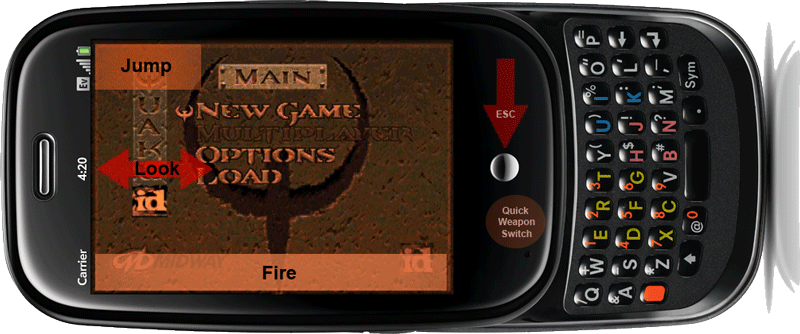
    First, Quake is now playable, with keymaps developed with help from user Jack87. As with the updated Doom, Quake launches through an icon rather than needing any typed commands in Terminal. The more complicated movements make Quake a bit more challenging to maneuver, but movement and sound work quite well. Both Quake and Doom are available via Preware.

    Second, on the webOSInternals YouTube channel, the team has posted a video of a demo OpenGL application (a triangle containing moving concentric circles) by bpadalino, further proof that Palm has enabled this graphic functionality in webOS 1.3.5, and hinting at upcoming gaming possibilities that are even further confirmed by…

    The third announcement, via Rod Whitby’s PreCentral forum post this morning where he details his discovery of a method for installing and running native Linux applications without the need for add-on services like webOSInternals’ own Upstart Manager Service. Rod points out that the ability to launch native Linux apps within webOS has implications well beyond gaming, in terms of advanced homebrew application development beyond that enabled by Palm’s current SDK. (PalmInfocenter posted a simpler explanation of what Rod and his colleagues discovered here.)

    Palm’s CES 2010 event is scheduled for this coming Thursday, and based on what the webOSInternals folks are discovering literally every day, 2010 looks to be a very exciting time both for webOS developers and for the users who have benefitted from their innovation.

  • Exchange Calendar Issue in 1.3.5, and Workaround

     
    As reported both in our forums and on Palm’s own support forum, there is an apparent bug in Exchange calendar syncing following the 1.3.5 webOS upgrade this past week. Users report (and I found as well) that when the Pre’s calendar hit January 1, 2010, all Exchange calendar data disappeared from view on the Pre (although some report that alerts continue to work, suggesting the data are there but just hidden). Users who do not use Exchange syncing are not reporting the same problem, and those that delete the Exchange account say that their calendar data reappears; adding back the Exchange account, however, makes it happen again. Note that the bug is on the Pre side only; the data remain untouched on the Exchange server.
     
    Fortunately, there is at least a partial workaround, first suggested by meandmypre in the PreCentral forum: go to Date & Time, turn off Network time, and manually reset the calendar to December 31, 2009. Check your Pre’s calendar; the Exchange data should be back. Now return to Date & Time and change it back to the correct date; the calendar data should remain visible. Unfortunately, if you have to reset your Pre for any reason, this fix will be undone, and you will have to go through the steps again to properly view the Exchange data in your Pre’s calendar.
     
    Hopefully, Palm will figure out the problem and push out a fix ASAP; we’ll keep you posted.


    Thanks to Jim for the heads up!