Author: Mark Wilson

  • Google’s new Hangouts messaging system makes it easier to keep in touch with friends

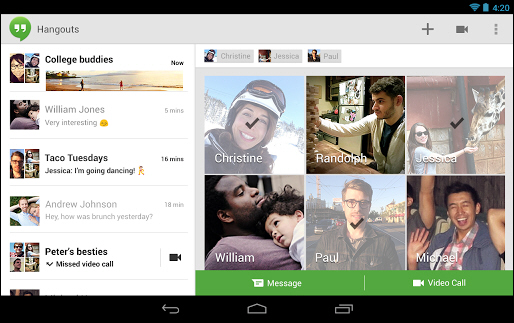
    There were a lot of big unveilings at Google I/O — an overhaul of Google+, updated maps, an on-demand music streaming service, and much more. But perhaps one of the most intriguing revelations was Hangouts.

    This name may well seem familiar, but it now refers to a unified messaging system that caters for iOS, Android and Chrome users. There are apps and extensions available for each of these platforms, and the idea is to bring all Google related communication into one place.

    This means that Hangouts serves as a replacement for not only its namesake service, but also Google+ Messenger, Google Talk and the original Hangouts video chatting service. In some respects this could be seen as Google’s answer to FaceTime.

    So at its heart, Hangouts is a messaging app, but it does go well beyond the basics. In addition to regular text based chats, there is the option of performing video chats, sharing files and sending one of scores of newly designed emoticons. As the name would suggest, Hangouts has the potential to be used as a group hangout for several people and it’s easy to invite other people to join a conversation once it is under way.

    As this is a cross-platform messaging system — and it’s likely that many users will be working with a browser extension as well as a mobile app — synchronization is extremely important. In Hangouts, it is not just messages that are synched, but also notification. This means you won’t be pestered by the same alert on multiple devices and you’ll be able to see your entire chat history no matter which device you have been using.

    You can find out more and download a copy of the apps and extension by paying a visit to the Hangouts review page.
  • BBC iPlayer ‘app’ hits the small screens of Windows Phone 8

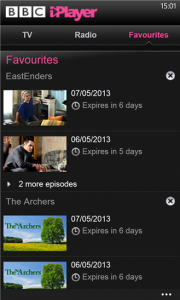
    BBC iPlayer has long been the go-to service for catching up on TV and radio shows. The web-based version has been available for years, and iOS and Android users have their own mobile versions to use on phone and tablets. Having been promised back in March BBC iPlayer is now available for Windows Phone 8.
    In terms of functionality, there’s little to differentiate this from its Apple and Google counterparts. The app has been a long time coming, but in reality the BBC iPlayer app is little more than a wrapper for the mobile iPlayer website.

    Both TV and radio content is available, and users can browse through programming using an EPG-style schedule, search through categories or check to see what is proving popular with other users. There is support for playing the radio in the background as well as Live Tiles

    Anyone still holding out for a release for Windows 7.5 should stop holding their breath — such an app has been ruled out due to platform limitations. Head of BBC iPlayer, Dave Price, explains:

    We’ve been unable to provide the same quality playback experience as on Windows Phone 8. This led to the joint decision not to make BBC iPlayer available on Windows Phone 7.5.

    But if you are packing a Windows Phone 8, the app can be used to catch up with the last seven days of programming over wifi or 3G.

    To get your fix of BBC programming, you can download a copy of the app from the Windows Phone store.

  • FatBatt maximizes the life of your PC’s battery

    Using your laptop on the move can mean having to dart from one power source to another. Whether you have a new laptop with a brand new battery, or an aging system with a battery that has seen better days, the amount of time you can use your computer without plugging in is of paramount importance. There are steps you can take to maximize the life of your battery, and it is also something that FatBatt can help you with.

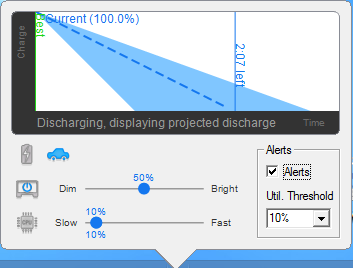
    There are several facets to the app. Firstly, it aims to give you an accurate estimate of how long your battery is going to last before you need to charge it up. This enables you to make informed decisions about how to use the time available to you, and how to manage your next charging session.

    But more than this, FatBatt provides you with tools that can be used to help maximize the life of your battery. If there are any applications that are draining resources, you will be alerted to them so you can close them down. One of the easiest ways to increase battery life is to reduce screen brightness and processor speed.

    With FatBatt this is reduced to a single click process so you can switch between home and away modes very quickly. It is also possible to adjust these settings based on where you are. This is achieved by network identity. When you are at home or in the office, for example, you’re probably going to be able to plug your laptop in whenever you need to, so there is no need for aggressive powersaving. But when you’re out and about, perhaps connected to a network in a particular coffee shop. more hardcore settings can be put in place so you can go for longer between charges.

    FatBatt is available for laptops running Windows 7 and Windows 8. The software costs $14.99, but you can download a free trial from the review page to see how you get on with it first.

  • Miranda NG is a multi-protocol IM client with style

    Perhaps the most frustrating aspect of instant messaging is the sheer number of different services and clients that are available. While there has been a degree of convergence over the years, there is still a high chance that if you want to be able to communicate with all of your friends, family and colleague through instant messaging, you’re going to need to have a few clients installed. This might not be the case if you try out Miranda NG, though.

    Out of the box there is support for a fairly impressive range of chat protocols — IM, GG, ICQ, IRC, Jabber, MSN and Yahoo — but this lit can be greatly expanded through the use of plugins. Amongst others, it is possible to add support for Facebook chat, Twitter, Skype and XFire.

    Available in 32- and 64-bit varieties, Miranda NG is a portable app that can be run from a USB drive. Development may have stalled with the apps predecessor Miranda IM, but this new branch is being constantly updated.

    But it is not just protocols that can be added through plugins — there are a raft of other features that can be bolted on. Just as with any IM tool worth its salt, there are also a number of skins available that enable you to personalize the look of the app.

    You can find out more and download a free copy of the chant client by paying a visit to the Miranda NG review page — there are 32- and 64-bit versions available.

    Photo credit: A1Stock/Shutterstock

  • Toasts&Tiles manages Gmail in Windows 8

    What do you do when you need to check your email? Fire up Outlook or Thunderbird? Launch Chrome and head over to the Gmail website? Having to do this throughout the day is a waste of time, and it’s a waste of time that Toasts&Tiles for Gmail aims to address. As you’d probably guess from the name, this is a Gmail client that includes support for toast notifications as well as live tiles.

    With the app running constantly in the background, you will be notified whenever a new email hits your inbox. There’s no need to keep manually checking, breaking away from what you’re doing and losing your train of thought — if there’s something you need to know about, the app will let you know.

    On the face of things this may seem like a very basic app, and in many respects it is. But the simple addition of toast notifications for up to three Gmail accounts can be a real productivity boost — and as there is support for Google Apps accounts, it’s something that’s likely to appeal to small businesses as well.

    The app can also be run in a docked mode that shows a useful summary of what is happening in your inbox. If you have more than one Gmail account configured, this mode displays details for each of your accounts and enables you to jump to any of them with a quick click.
    Simple but good-looking, this is a free email client that Gmail users should check out. Find out more and download a copy of the free app at the Toasts&Tiles for Gmail review page.

    Photo credit: Gina Sanders/Shutterstock

  • Hey, Gmail users, Mailbox for iOS is now available, without reservation or waitlist

    Gmail shows little sign of becoming any less popular, but any iOS user will find that dealing with a Gmail account on an Apple device is not the most pleasant experience. Mailbox was released to help address this fact and proved so popular that newcomers were greeted by a lengthy waiting list before they could get started. The app has now been updated in a number of key areas and, perhaps most importantly, anyone is free to jump right in and get started without the need to wait on a reservation list.

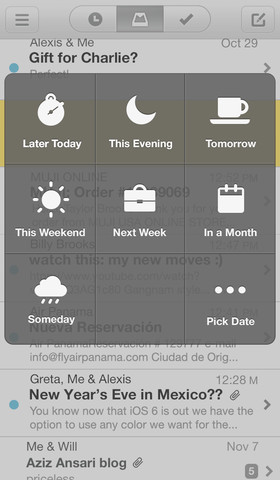
    This is obviously great news for people who have been waiting to try out the app, but there is also plenty for existing users to take advantage of. One of the major standout features of the app from its inception was the way in which emails could be dealt with using little more than a swipe; swipe one way to delete or mark as read, and the other way to snooze.

    The snooze feature has been enhanced in this latest release. Just as before it is possible to hide emails that you do not want to deal with immediately, but you are now able to deal with multiple messages simultaneously. The actual snoozing process has also been improved so that the options you are provided with are appropriate to the time of day and the day of the week.

    Another noteworthy change means that when in the neat conversation view, you can view email addressed by double tapping a message bubble. The latest update includes all of the big fixes and performance improvements you would expect. Check out Mailbox and see if its unique snoozing option can help you to achieve inbox zero and better manage your messages.

    You can find out more and download a copy of this free app from the Mailbox review page.

  • Clover 3 adds tabs and additional navigation features to Explorer

    What’s the one thing that is missing from Windows Explorer? Actually, there’s probably more than just one thing missing, but what is the most obvious? Tabs. They are now so ubiquitous in web browsers that it’s unlikely you give them a second thought; they’re just there and you use them. Why should your file browser be any different? This is an anomaly that the developers of Clover felt had to be put right with the latest release.
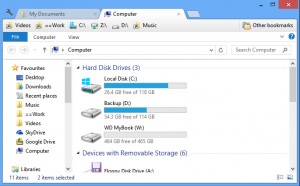
    Aside from the addition of tabs to Explorer — which means that it is possible to deal with multiple folders in a single window — there are a number of other changes in this latest released. For anyone concerned with aesthetics, support for themes means that the look of the program can be completely changed.

    But there are more important changes that are worth noting. To allow for easier navigation of files, new methods of interaction have been added. The folder bookmarking system has been updated so that by middle-clicking on a bookmark it is possible to load a folder in a foreground tab, and bookmarks can now be exported and imported.

    This is a handy option to have available if you use Clover on more than one machine, but it also serves as a useful backup mechanism.

    Another navigation option allows a double click to be used to skip up a directory level. Forget seeking out the Up button, now you can simply double click in an area of white space to jump to the parent of the current folder.
    Clover stands apart from many of the tools that are used to enhance Explorer in that it does not try to go too far. It focuses on doing a small number of things and doing them well.

    You can find out more and download the latest version at the Clover review page.

    Photo Credit: Milena_Bo/Shutterstock


  • Everything.me launcher dynamically adapts to what you’re doing right now

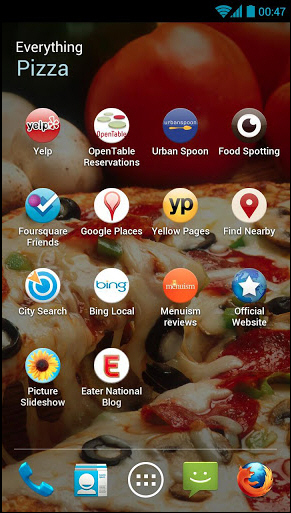
    Unlike iOS, Android devices can be very easily customized without the need to jailbreak or root them. This means that there is an ever-growing market in third-party launchers that enable phone and tablet users to try out a variety of new ways to access the apps they have installed on their device. While cosmetically different and packed out with a range of extra features, most launcher are generally fairly similar, but this same cannot be said of Everything.me which adapts itself according to what you are doing and where you are.

    The idea is simple. Launching apps and accessing information is now seen as being the same thing. Looking for a recipe you have stored in an app you use? Type ‘recipe’ and a list of corresponding apps will show up. In addition to this, you’ll also be shown a list of related websites so you can check out other recipes online. Breaking down, or at least blurring, the barriers between local apps and online services is an interesting approach.

    There’s also scope for tailoring search results to your current location. Look for restaurants and you’ll be able to find out what is nearby. As well as ensuring that you have easy access to the information you’re looking for, Everything.me also changes the appearance of your phone according to what you’re doing. Perform a search for ‘football’ and your background will change to the NFL logo.

    A launcher that dynamically adapts to what you’re doing can take a little getting used to; it feel strangely unintuitive to start with, but it doesn’t take long to become second nature. It’s really just a matter of retraining that memory muscle.

    But there is another option available in the form of smart folders, and these act as a sort of hallway house between dynamic homescreens and a more traditional folder-based launcher. Select a category — such as a shopping — and any apps that you have that fall into this category will be automatically added to the folder along with a list of associated online resources. Create a ‘social’ folder and you’ll find that Fourquare, Twitter, Facebook etc are all automatically grouped together for you.

    Everything.me is currently in beta but can still be downloaded from Google Play.

  • Can’t connect? oStream makes Facebook available offline

    Checking Facebook on the move is a great way to keep in touch with friends and keep up to date with what is going on. But when you are moving about you will invariably hit an area where there is poor signal, and you find that the official Facebook app can be a little on the slow side even at the best of times. oStream offers a possible solution by synchronizing your contents so it is available for offline reading.
    Even for those who will own up to being addicted to Facebook, the official Facebook app is far from being without problems. It can be slow and cumbersome to use, awkward to navigate — generally a bit of a pain. In addition to making your newsfeed available offline, oStream also has the added benefit of running much more quickly that the Facebook app — or many popular alternatives for that matter.

    The speed is at least in part due to the fact that synchronization takes place automatically in the background. Every 5 and 60 minutes different elements of your account download so the moment you fire up the app your news feed is available to read. If you are concerned about data charges, you can opt to only have synchronization take place over a wifi connection.oStream does not restrict you to passively consuming Facebook. Should you feel the urge to post a comment, want to update your status, or fancy sharing a photo, you can go through the motions even when you do not have a connection available. As soon as you are online your post, comment or photo will be uploaded for the world to see.

    While it is unlikely that oStream will become your default app for accessing Facebook — it is lacking a number of features that many people will find important such as messaging, support for events and page administration — but it is something that is certainly very handy to have installed for those times when a connection is simply not available.

    oStream is currently in beta and can be downloaded free of charge from Google Play.

  • Status Board brings a touch of Android to iPad

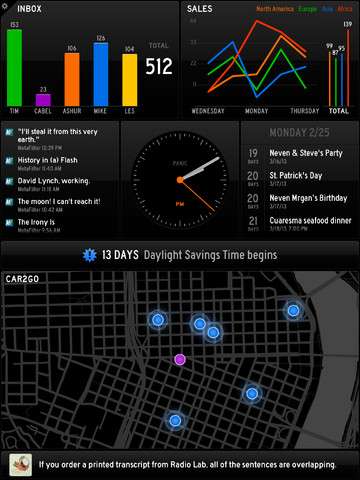
    When you pick up your iPad, it’s usually with a purpose in mind. You might want to see how many new emails you have, you need to check RSS feeds, or you want to have a scan through Twitter. Each of these activities requires an individual app, and that means that you need to hunt down the relevant shortcut on the home screen. But Status Board could change all that, by displaying the data you need to see in a handy dashboard that gives you a great overview of your data.

    This is a handsome app that almost feels as though it would be more at home on an Android tablet — it could be adapted into a perfect alternative launcher — but at the moment is only available for iPad users. There is a slightly retro feel to the app, which enables you to configure a series of customizable panels to display a selection of data.

    There are a number of options available here. You may opt to have an overview of your email inbox displayed in one panel, your Twitter feed in another and your most important RSS feeds in yet another. There are also pre-designed panels that can be used to display the weather forecast, the time and your calendar.

    Other panels with a greater degree of potential customization let you show off data in tables or graphs, or you can put your HTML skills to the test and design your own panels from scratch. Whatever the type of data you have to work with, Status Board has a way to show it off in an attractive and meaningful way.

    While you can leave the app tethered to the screen of your iPad, you can also hook up your tablet to a large screen TV via HDMI or AirPlay if you want to visualize your data on a larger scale — and don’t mind making an additional in-app purchase to unlock the option.

    At a fraction under $10, this might be an app purchase you hesitate before jumping into, but Status Board is unlikely to disappoint. You can buy a copy from the App Store.

  • Jam with Google Play Music Manager

    The cloud is now used for many things, from simply storing documents, to create and editing files online. Google Play, in addition to many other things, offers a place to store up to 20,000 tracks that can then be listened to online or with a range of mobile devices. This number relates only to songs from your “personal collection” and is in addition to any purchases you make. Google Play Music Manager is the tool you need to get everything up and running.
    Install and launch the app, sign into your Google account and you’ll be asked where you current music collection is stored. There is support for iTunes and Windows Media Player, but there’s also the option of just opting to work with files stored in My Music, or any other folder for that matter. If you have your music scattered across multiple folders, you can add them all to your Google library.

    Once your library has been created, you can opt to have any new files that you add to these folders automatically uploaded. This ensures that you always have access to all of your most recently ripped CDs and other music acquisitions without the need to remember to manually sync anything.

    Even if you have a relatively small music collection of just a few hundred tracks or so, you’re possibly envisioning a very lengthy wait while all of your music is uploaded for you. Well, unless you have particularly eclectic tastes, you should find that things happen much faster than you might expect — if Google already has a copy of a track you own available online, there’s no need for it to be uploaded.

    In practice, however, just how long it takes for your collection to be made available online will depend on its size, the types of music you like, whether your music files are ripped or purchased as well as the speed of your internet connection. The web interface for the music player is comparable to an online version of iTunes. It is a little limited, but it gets the job done.

    You can create playlists, listen to albums in their entirety or pick out individual tracks. In addition to the usual browse by album option, a large library can also be searched or you can filter tracks by artist, genre or alphabetize them.

    Google Play Music Manager is available free of charge for Windows, OS X and Linux.

    Photo Credit: CREATISTA/Shutterstock

  • Microsoft releases SkyDrive 3 for iOS

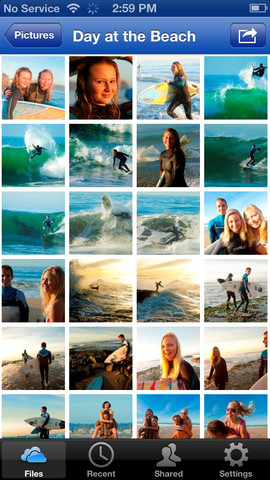
    There’s certainly no shortage of cloud storage services to choose from these days and Microsoft’s SkyDrive provides a fairly generous 7GB of space free of charge. The latest version of the iOS app sees compatibility extending to include not only the iPhone 5, but also the iPad Mini, and there are also a few new features to explore.

    The latest release comes after Apple blocked updates to the app following Microsoft’s launch of a subscription model. This could be one of the reasons that it is now not possible to sign up for a SkyDrive account from within the SkyDrive app — if you have an account already you’ll be able to sign in straight away, but if you need to create one, you will have to head over to the website to do so.

    Perhaps the most obvious change, although by no means the largest, is the new icon sported by the app. This new look continues through the UI, with a darker, cleaner feel now replacing the slightly dated look of the previous version.

    There have been improvements made throughout the SkyDrive app which mean that there is now better support for not only opening the files you have stored online in different apps you may have installed, but also better support for saving files from apps to SkyDrive.

    Other changes mean that full resolution photos can be downloaded and there is the usual selection of bug fixes.

    If you have an iPhone or an iPad, you can download a free copy of the SkyDrive app and take advantage of Microsoft’s cloud storage service.

  • The Next Apple TV to Be a $100 Screenless iPhone? [Rumor]

    According to an Engadget source, the next Apple TV will be a totally reimagined device built upon the hardware and software architecture of the next iPhone. And it’ll cost $100. More »


    AppleIPhoneSmartphonesHandheldsMicrosoft

  • Sony Patents the Solar-Charged Courier [Patents]

    Microsoft may have canceled their lovable Courier project, but Sony’s patent application for a dual-screened “Electronic Book With Enhanced Features” may pick up where Microsoft left off. More »


    MicrosoftPatentIntellectual propertySonyLaw

  • Now Writers Can Submit Books to the iBookstore [Apple]

    As previously teased, writers can now submit their own books to iBookstore. I can’t wait to submit my Jane Austen fan fiction! And neither can Mr. Jean-Luc PicDarcy [iTunes Connect via MacLife] More »


    IBookstoreAppleIPadArtsWriters Resources

  • LEAK: Samsung i897 May Be AT&T’s First Great Android Phone [Unconfirmed]

    The Backflip (AT&T’s first Android phone) was ambitious but ultimately not the kind of handset that competes with the Nexus One. Leaked info on the Samsung i897, however, implies that AT&T may be getting a pretty fantastic, unskinned Android phone. More »


    AndroidSamsung GroupHandheldsNexus OneAT&T

  • A Real, Working Hoverboard Exists [Hoverboards]

    I cannot overstate the significance of this news. French artist Nils Guadagnin has done the semi-possible: He’s recreated the hoverboard from Back to the Future II. And it totally works…so long as no one stands on it. More »


    FutureVisual ArtsPredictionsTwitterHill Valley

  • Foxconn Jumps Reach 15…Potential 16 Spotted On the Roof [Foxconn]

    While we recently published news of the 12th Foxconn employee to attempt a suicide, and then immediately updated the story with new of a 13th jumper, those reports are already dated. More »


    SuicideFoxconnAppleDeathChina

  • Comcast 105Mpbs Service Coming Soon for $200/month? [Unconfirmed]

    According to this ad on a Comcast customer bill, a new “Extreme” tier of Comcast’s cable internet, err, Xfinity service could roll out within the next week. More »


    ComcastCable televisionTelevisionUnited StatesCable

  • IRONY: Warner Bros. Sued for Pirating Anti-Pirating Technology [Piracy]

    In 2003, a company named Medien Patent Verwaltung showed Warner Bros. their technology to mark films in a way capable of tracing a pirated copy back to its origin theater. And allegedly, WB has been using the tech since…without paying. More »


    PiracyWarner BrosIntellectual PropertyServicesCopyright infringement