Category: News

  • Porsche 918 Spyder – CHRIS HARRIS ON CARS

    Porsche 918 Spyder

    The upcoming Porsche 918 Spyder has been the topic of debate for quite some time now and it’s not even on the road. The worlds first super car hybrid, the Spyder is said to pump out 887 hp and handle like no other road car that Porsche has ever built. Chris Harris of Youtube’s DRIVE Network recently had a chance (although a short one), to not only drive the new 918 Spyder, but do get up close and personal with the engineers behind it. Check it out after the jump.

    Source: Youtube.com/DRIVE

  • Last week on Pro: a guide for the cloud curious and social at work (literally)

    Following the epic, 3.5-hour long keynote at Google I/O this week, all eyes were on the Moscone Center as Google rolled out a series of new products, devices, and features. The three-day event was packed with announcements, including the launch of Google Music, big upgrades for Google+ and Google Maps, and a lot more — check out our full I/O event coverage to catch up on the big news and themes that emerged from the show.

    Meanwhile, over on GigaOM Pro our analysts focused on the cloud (also a major topic at Google I/O), writing a veritable how-to manual for companies considering a cloud implementation.

    Note: GigaOM Pro is a subscription-based research service offering in-depth, timely analysis of developing trends and technologies. Visit pro.gigaom.com to learn more about it.

    Cloud: Steps for finding the best route to the cloud
    David Linthicum

    Is your company considering a cloud implementation? Analyst David Linthicum provided a user’s guide for enterprise users making a transition to the cloud, emphasizing the need to create a “holistic plan and architecture” to avoid the chaos of an ad hoc system and the pitfalls of a failed cloud implementation. While there’s no single path to the cloud that will work for all companies, Linthicum analyzed responses from a series of end-user interviews about understanding a company’s requirements, identifying the tradeoffs of different types of cloud implementations (and major vendors in each category), and considering the economic benefits of switching to a cloud implementation.

    Connected Consumer: Defending the Apple Way
    Paul Sweeting

    Our colleagues over at paidContent have been following Apple’s recent ebook price-fixing conspiracy lawsuit. Now, analyst Paul Sweeting weighs in with his take on the situation, attributing Apple’s stubborn refusal to settle the case (as its five co-defendents have) to the company’s fears that “acknowledging wrongdoing in the ebook case, even implicitly, could constrain its ability to enter new media markets in the future.” While Apple’s rigid business policies are responsible for the success of its signature products, such as iTunes, Sweeting argued that this inflexibility has grave implications for Apple as it moves forward.

    Social: Social networks will displace business processes, not socialize them
    Stowe Boyd

    What would Margaret Mead have to say about Facebook? Analyst Stowe Boyd took a theory-based approach in his latest report, arguing that simply adding a social layer to existing business tools is ineffective and unlikely to work in the long term. Instead, Boyd presented the 3C model, an approach to categorizing business cultures and applying a “psychodynamic cultural model” to each type of business environment. Rather than analyzing a specific set of vendors or tools, Boyd provided a set of theoretical scenarios, a study of social network adoption in the workplace, and the arc of business culture, with specific applications to the software industry.

    Related research and analysis from GigaOM Pro:
    Subscriber content. Sign up for a free trial.


  • Disk Sorter Free can tell you what’s tying up all your hard drive space

    PC storage space is cheap these days, and if you’ve just bought one of the latest 4TB drives then the chances are you won’t be worried about filling it any time soon.

    It’s still important not to waste hard drive space, of course: the more clutter you have, the longer your file searches, virus scans, defrags and other system-wide operations will take. Understanding what’s stored on your hard drive is  a key part of PC maintenance, then, and Disk Sorter Free could be the ideal program to help.

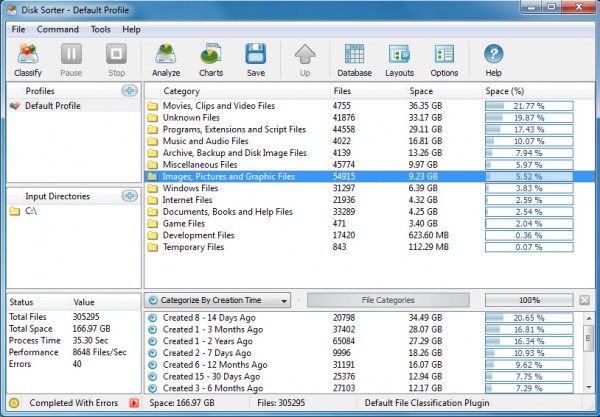
    As with many similar programs, Disk Sorter Free first allows you to specify a number of Input Directories (the folder trees you’d like to analyze). You can point the program at drives (C:\), folders of particular interest (C:\Users\MyName), or any combination of these, up to the limits of the free version (500,000 files, 2TB storage capacity).

    Click Classify > Classify and the program will go to work, quickly scanning your drive and organizing its contents into several common categories: “Movies…”, “Programs…”, “Music…”, “Archive…”, “Images…” and so on. These are sorted according to the amount of space they take up on your drive, and double-clicking any category will drill down to help you find out more.

    By default, for instance, if you’ve double-clicked the “Movies” category then you’ll see a further list of file types, again sorted by size. If this reveals that, say, half the space is taken up by MKV files, then you can double-click “MKV” in turn to see exactly what and where those videos are.

    Disk Sorter doesn’t have to organize its reports by extension, though. The program can also categorize your files by size, an easy way to identify particular groups (zero-length files, anything more than 1GB in size, and so on). And it can also classify files by creation, modification or last access date, handy if (for instance) you need to pick out files which have been created recently.

    The reporting is useful enough, but Disk Sorter goes even further. If you do manage to find a group of files which you don’t need, just select and right-click this, and you’ll find options to delete or compress your files, copy or move them elsewhere, and more.

    There are also some annoyances here. The filtering system is less than intuitive, for instance, and we had to play around with the program for some time before we figured out what’s going on. And if you choose an option which isn’t available in this free build (which happens a lot, at least initially) then you’ll quickly become very familiar with the “you can’t do that, would you like to upgrade?” dialog.

    Disk Sorter remains an unusually powerful tool for classifying, categorizing and reporting on your files, though, and if you really need an in-depth understanding of the contents of your hard drive then we’d give it a try.

  • NetDrive lets you mount FTP servers as regular drives in Explorer

    If you need to access an FTP server, perhaps to upload the latest version of your website, then you’ll probably reach for your favorite FTP client. But although that will transfer your files, it’s not exactly a convenient solution, particularly if you need to work with the server on a regular basis.

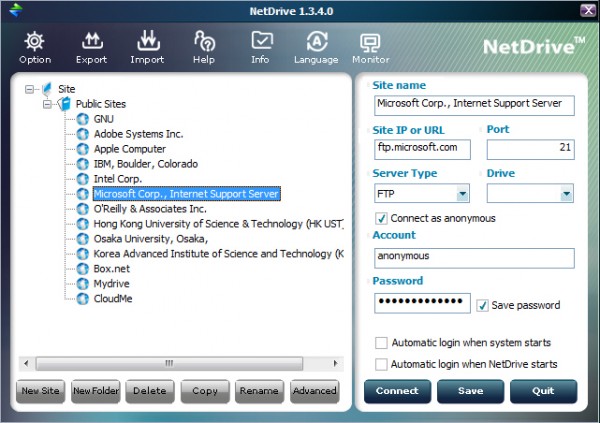
    NetDrive is a free (for personal use) tool which can greatly simplify this process. If you find you’re frequently working with a particular FTP or WebDav server then the program can mount it as a new drive in Explorer, and you’ll be able to access it — create, delete and rename folders, transfer and launch files — just like any other drive on your system.

    To help you get started, the program comes with a built-in library of public FTP servers (Box.net, Mydrive, Microsoft, Apple and more), each of which includes key details like the site name and type, port, user name and password. Choose the local drive letter you’d like to allocate to the server, click Connect, and an Explorer window will open at that site.

    This works very well, too. Performance is unsurprisingly a big issue, and it’s hard to forget you’re accessing a remote site when it takes several seconds to do absolutely anything at all. But otherwise there’s nothing else to do, no special rules to learn or remember. You can drag and drop files, create folders, select and right-click items and use all the regular menu options, just as you always would — very convenient.

    It’s just as easy to add your own sites to the program. This works much like any bookmarking system, so if you’ve several sites then you can create multiple folders to help keep them organized. And you’ll then add individual sites to each folder, again starting with the basics: the URL, port, login details and so on.

    You’re also able to customize each bookmark with a few key local elements, though. You can choose a local drive, for instance, to make sure it always uses the same one (important if you want to use the space as a backup destination, say). You can tell NetDrive not to save the site password, perhaps useful for security. And you can optionally set up NetDrive to automatically log on to these sites when the system starts, which means you may never have to worry about these low-level details again.

    And when you’ve finished, you can explicitly close the connection by clicking the Disconnect button within NetDrive, or just close your system as usual and the program will handle this automatically.

    We did run into one issue here. After a hard testing session, opening and closing multiple servers, allocating and deallocating a host of different drive letters, the program just stopped working. Every time we tried to connect a new drive it complained of initialization problems, recommending that we reinstall if they continued.

    This did only happen once, though, after we had intentionally tried to push the program to its limits. Rebooting fixed the problem immediately, and in more standard use NetDrive worked just fine, delivering simple and straightforward Explorer-based access to all our test FTP servers.

  • Gun control advocates now admit: IRS intimidation scandal proves Second Amendment needed to stop government tyranny

    In the face of the outrageous IRS intimidation scandal now sweeping across America, gun control advocates are changing their tune. All of a sudden, the idea that the federal government could engage in tyranny against the People of America is no longer a “conspiracy theory…
  • Adam Kokesh violently dragged from public protest by police, arrested for ‘resisting arrest’

    Freedom activist Adam Kokesh of Adam vs. the Man was violently dragged from a “Smoke Down Prohibition” protest in Philadelphia just a few hours ago. According to his Facebook page, Adam is being charged with “resisting arrest” but is refusing to be booked for the charge…
  • US government claims 100% ownership over all your DNA and reproductive rights; genetic slavery is already here

    The United States government claims 100% ownership over all your DNA and reproductive rights. This astonishing revelation has emerged from the fact that the U.S. Patent and Trademark Office claims the power to assign ownership of your DNA to private companies and universities…
  • First Lady Delivers Commencement Addresses at Bowie State, Martin Luther King Jr. Magnet High School

    First Lady Michelle Obama delivers remarks during the Bowie State University commencement

    First Lady Michelle Obama delivers remarks during the Bowie State University commencement at the Comcast Center in College Park, Md., May 17, 2013.

    (Official White House Photo by Lawrence Jackson)

    On Friday, First Lady Michelle Obama delivered the commencement address to the Bowie State University Class of 2013. Bowie State, which opened just two years after the Emancipation Proclamation was signed, “this school was founded not just to educate African Americans, but to teach them how to educate others,” the First Lady explained. 

    And since then, generations of students from all backgrounds have come to this school to be challenged, inspired and empowered. And they have gone on to become leaders here in Maryland and across this country, running businesses, educating young people, leading the high-tech industries that will power our economy for decades to come. 

    That is the story of Bowie State University, the commitment to educating our next generation and building ladders of opportunity for anyone willing to work for it. All of you are now part of that story. And with that tremendous privilege comes an important set of responsibilities — responsibilities that you inherit the moment you leave this stadium with that diploma in your hand. 

    Read her full remarks here.

    On Saturday, she traveled to Nashville to speak to the graduating class of Martin Luther King Jr. Magnet High School. The First Lady took the opportunity to talk to the students – all of whom are going on to higher education or the military – about some of the skills they’ll need as they make their way through college and through life: resilience, grit, and the ability to pick themselves up when they fall.

    read more

  • Google Hangouts “easter eggs” revealed, include ponies and dinosaurs

    Google_hangouts_easter_eggs

    Google Hangouts has a lot of cool features, including over 800 emoji characters to use. Apparently there are also six hidden “easter eggs,” including ponies, dinosaurs, and the ability to change the background of the chat window. Google employee Moritz Toxdorff posted the above image on his Google+ account, which explains how to use them. All you need to do to experience the magic is type in your desired code into the chat window, and press enter. Right now, these easter eggs only work on the Google+ client of Hangouts, but the Chrome and mobile clients should surely get them soon.

    Source: +MoritzTolxdorff

    Come comment on this article: Google Hangouts “easter eggs” revealed, include ponies and dinosaurs

  • HTC employee hints at an HTC One with stock Android

    HTC_One_Front_Main_TAAt the I/O, Google announced that a version of the Samsung Galaxy S 4 running stock Android will be for sale later this summer. Could a “Google experience” HTC One with stock Android follow? Leigh Momii, a Developer Evangelist at HTC posted a tweet possibly suggesting exactly that, stating “So you can pay $649 for a piece of plastic running stock or… You can wait.” Trusted developer LlabTooFer said on Twitter he was positive that the tweet meant that “this summer we will see HTC One Google Edition” or something similar.

    HTC employee Jeff Gordon replied to Android and Me, who initially reported Momii’s tweet, saying “HTC is not currently planning a ‘Nexus Edition’ of the HTC One.”  The key word in that statement is “currently,” as confirming a new version of their flagship phone would definitely hurt current sales for HTC.

    If this rumor turns out to be true, could this be the start of more and more “Google experience”  Android phones? Stay tuned to Talk Android as we hear more.

    Sources: Android and Me, @LlabTooFeR, @jetleigh

    Come comment on this article: HTC employee hints at an HTC One with stock Android

  • Kanye West Debuts “New Slaves” On The Side Of Buildings

    If you’ve attained a notable level of fame in the entertainment industry, and are a known commodity, it is becoming more and more commonplace to try and make an incredible splash when debuting a new product. If done correctly, the buzz can ensure the star remains relevant as the new stuff comes out. One such showman who has no problem getting people’s attention is hip-hop producer/artist mogul Kanye West. In order to get the interest meters ticking, the artist decided to introduce the new single from his upcoming new album in an unique way:

    By broadcasting the video on the side of buildings. Kanye’s Twitter reveals the details:


    Incidentally, that also serves as the first tweet for that particular account. Apparently those other first ones have already been deleted. Anyway, if you want a reminder of what Kanye’s previous Twitter existence was like, you can start here. As indicated, the video was shown on the side of 66 buildings in the following cities: San Francisco, Los Angeles, Miami, New York, Chicago, Toronto, Sydney, Paris, London and Berlin. The song, and this is coming from someone who isn’t a Kanye fanboy, is better than I expected it to be, that much is certain.

    The language, if you happen to be working this weekend, is NSFW, but you probably already knew that:

  • How cloud, big data and mobile will make the CMO the BMOC

    In every shift of technology, new companies emerge to dominate new spaces while incumbents falter (and sometimes fade away). Today’s epic shift to mobile, big data and real-time analytics will certainly change the corporate landscape. But the emergence of these new technologies is also inspiring major change in the C-level suite, and the biggest beneficiary will be the Chief Marketing Officer.

    Marketing becomes new revenue arm

    Traditionally, CMOs have dealt with the “soft skills” of marketing. They headed up cost centers filled with branding, advertising and campaigns that were expensive endeavors, producing benefits that were often difficult to measure. In this current shift, CMOs might not bring CIOs to their knees, but if corporate budgets could talk they would certainly favor the CMO. To wit: Gartner predicts that by 2017 the CMO will spend more on IT than the CIO. Why? Mobile, big data and real-time analytics are transforming the modern CMO’s organization from a cost center to a critical revenue-driving arm to reach and engage the customer base.

    Realizing that CIOs and CMOs probably hate stories of a battle raging between them, there is actually a peaceful, and logical, middle ground in which the two work together to harness the vastness of big data to create real-time – and importantly, actionable – analytics. While the CMO brings the marketing skills to the table, the CIO has the technical chops to deal with capturing, processing and integrating data to make it useful.

    Mobile transition requires new tools

    The CMO is in a particularly prime position in the increasingly important mobile channel, as the feedback loop is uniquely personal and immediate. The ability to measure, predict and act upon an end-user action has never been more precise.

    However, mobile is a different beast and legacy systems designed for the web rely on cookies to track user interaction. As we go more mobile, we enter a world devoid of cookies. New tools are required to match mobile users to their actions across multiple channels. Along with new tools, there needs to be a new partnership – the CMO and CIO united as a Dynamic Duo – working diligently together to deliver the cloud-based and back-office infrastructure required to pull actionable information from big data across all channels: bricks and mortar, web and mobile.

    New focus on data-driven outreach

    To get a view into what makes the CMO so potentially powerful, let’s turn to another battle, the one that happens on a quarterly basis across corporate America and beyond: The fight to make the quarterly earnings number. Typically, a CEO faced with a sales or earnings shortfall will turn to the CFO and the head of sales and say: “What can you do?”

    The honest answer is: short term, not much. They can jam the channel, which will make the next quarter’s number even harder to achieve. Or shovel product out the door at prices that wouldn’t otherwise make sense. But by the time the word gets to the field and actions kick into gear, there can be quite a lag in results. And, again, these results may have value only for the short-term.

    In the very near future – one that has already arrived for some organizations – the CEO turns to the CMO, who looks up from his or her laptop and says: “No problem. We should make that number by noon.”

    The CFO and head of sales turn and say in unison: “How?”

    “While you were talking I found an overstock of our Zing42 and sent an offer to 234,000 customers who have purchased this in the past, and statistically are ready to buy again, and to another 341,000 customers who haven’t purchased this yet, but show a high probability of doing so at the price point we are offering.”

    No hurried sales calls to the field asking them to stuff the channel. No broadcasting of sales and discounts that can tarnish an image or weaken a brand. But rather, an analytically-driven offer to a curated digital audience delivered via a simple mobile notification, or in-application offer, to thousands of people who are analyzed and selected to be eager buyers.

    This is the look of the CMO ascending: Powered by a cloud of mobile, big data and real-time analytics.

    Rob Lilleness is the CEO of Medio, a Seattle-based provider of analytics solutions for mobile computing. Follow him on Twitter @Robmedio.

    Have an idea for a post you’d like to contribute to GigaOm? Click here for our guidelines and contact info.

    Photo courtesy Pressmaster/Shutterstock.com.

    Related research and analysis from GigaOM Pro:
    Subscriber content. Sign up for a free trial.


  • US Airways Plane Makes Belly Landing At Newark Airport

    A US Airways flight was forced to make an emergency landing at the Newark, New Jersey airport early Saturday morning, around 1 a.m. EST, according to multiple reports. The aircraft would not lower its landing gear during its approach to the airfield, forcing the pilot to circle the airport in an attempt to reverse the problem. When this did not work, the pilot was forced to make a belly landing, which, according to ABC New York, was on one of the airport’s long parallel runways.

    The aircraft in question, a Dash 8-100, had 31 passengers on board, none of which were harmed during the emergency landing. Here’s an example, courtesy of Wikimedia, of what the plane looks like:

    Dash 8-100

    Over at YouTube, ABCNews posted their segment, which included some eyewitness video of the landing in question:


    From where I’m sitting, it looks like the pilot needs a bigger seat, what for his huge brass cojones, and all. For those of you whose imaginations aren’t quite vivid enough, here’s a clearer example of what this morning’s belly landing resembled:


    That, of course, is not from the US Airways landing.

    Further indicating the pilot’s impressive skill in executing such a landing without jostling the passengers to the point of injury, there’s this nugget from Yahoo news report, “Sparks flew upon landing, but the pilot managed to keep the airplane on the runway and the wings level.” From my limited point of view, it sounds like this pilot might be ready for the Top Gun competition. They’ve already got a cool pilot call sign going for them, and yes, I am talking about “Sparky.”

    Whatever the case, I hope US Airways gives the pilot a commendation. And a promotion.

    Lead image courtesy

  • Zach Galifianakis Discusses Why He Quit Drinking With Conan O’Brien

    As the actors who comprise The Hangover’s Wolfpack hit the press circuit in preparation for next week’s release of The Hangover Part III, there are sure to be some interesting stories and anecdotes from the group that is Ed Helms, Bradley Cooper, and of course, Zach Galifianakis. One such story was told by the host of Between the Ferns to the host of Conan, and it concerned why the bearded funnyman stopped fooling around with alcohol. While Galifianakis’ “rock bottom” story doesn’t go as low as some have before him, if it’s true, getting spit in the face can’t feel very redeeming, especially if it was your own drunk actions that caused the situation to escalate.

    The timing of his confession, because of how he told the story, I’m sure, fits with the tone of the high-anticipated release of the trilogy’s third and final chapter. If the conditions of the interview were different, this could have been a much more dramatic explanation of why Galifianakis cut down on his libation intake. Now, it should be noted that my use of “cut down” as opposed to “stopped.” In the beginning of the video, Zach says he stopped drinking, but after his story, Conan confirms “you decided to cut back,” to which Galifianakis responds, “yeah, cut back.”

    With that in mind, it’s up to you to decide whether he completely quit drinking or just slowed down. In other news, how does the idea of a vodka with sausage cocktail strike you?

  • Microsoft wants you to get to know Windows 8

    Speaking to the New York Times a couple of weeks ago, Tami Reller, Windows division CFO, admitted that the Windows 8 “learning curve is real” and said that Microsoft will be addressing the issue in Windows 8.1.

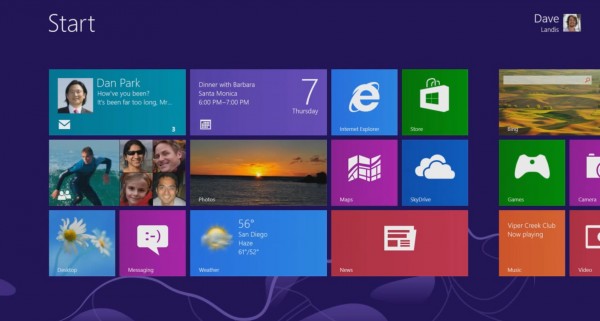
    Perhaps in response to that public admission, Microsoft has released a video showing how to use the polarizing operating system. Called “Get To Know Windows 8” it’s aimed at anyone who might be thinking of upgrading, or who needs a little guidance.

    The 3:25 minute video walks you through the Start screen, showing how to add, rearrange and remove tiles, and how to get to the desktop. It explains how to open the charms, as well as search, share photos, print content, and make adjustments to your PC.

    It’s actually very instructive, but it seems odd that it’s taken until now to release a video like this. And of course some would say it’s a failure of design that the operating system needs an instructional video in the first place.

  • The Cannonball Run: The Whole Damn Thing!

    Cannonball Run

    Burt Reynolds, Dom DeLuise, Roger Moore, Farrah Fawcett, Dean Martin, Sammy Davis Jr., Jackie Chan and Jamie Farr. These are some the greatest entertainers from the 1960′s, ’70s and ’80s and how they were all coaxed into making this film is way beyond me. This is The Cannonball Run, and if you consider yourself a car guy and haven’t watched this movie, well, turn in your membership card because all hope is lost. Also, if you’re young, and by that I mean under 30, do yourself a favor and check it out. It’s worth it, I promise.

    Source: Youtube.com

  • How to make Twitter the ultimate news ticker

    It’s been a tumultuous several weeks for Twitter, Reddit and the social web, during which we’ve seen both its great potential and confounding dark side. There was the recent AP account hacking – which instantly (but temporarily) drained some $200 billion from the stock market – the mass confusion of the Boston Bombings (and tragic repurcussions), and, well, insert-specious-news-rumor-of-the-day here. It calls to mind a famous arachnid-movie quote (by way of Voltaire): “With great power comes great responsibility.”

    It’s important to note that Twitter  is a platform, not a news service, and also that regardless, no one outlet can control the internet anyway: That’s the beauty and curse of the beast. So when news breaks it’s about two things: accuracy and distribution.  Right now we’re stuck with a drunk leaf blower in a flour factory. I’ll be the first to champion these tools as platforms for change, opportunity and knowledge sharing, but it has become clear we – and especially the reeling news media – are in need of a system that helps Twitter et al sort through the haze of breaking news and get the facts straight, faster. The current model and tools are not clearing things up – they are adding to the mess.

    A centralized, collaborative evidence table

    Sifting through the mountains of analysis on the bombings alone, I couldn’t help but think of the customized Twitter Nascar hashtag page that was put together in 2011, and how it tied in nicely with the New Yorker digital “evidence table” it describes for Reddit users. So one first step I propose is a one-stop place or system in times of important news or mass emergency. Literally just a single agreed upon place to gather the facts, or a system of checks and balances free from speculation. Like a central hub for help to be channeled and extra information provided – a bit like an active Storify stream.

    This feels like a simple fix to a complicated problem at the source. Clearly there are huge questions about who administers it, but one thing is clear: It must be solitary and held to a strict code that is pre-agreed upon, possibly among a cross-collaboration of the major newspapers. For instance, each might host the same page so traffic stays where the trust is with the user.  There is no speculation: Simple fact dissemination and information being released – only after  it is verified – so that the news-consuming public has a go-to source that is consistent.

    The ability to deal with errors

    Imagine if Twitter or Facebook could lower the relevancy of an incorrect tweet or post in real-time so that bad information was less likely to be seen. Reddit and pals is a more difficult kettle of fish because of their very nature.  We will need to help them help themselves by providing clear information in order for them to do what they do best – engage with it.

    The Atlantic wrote recently about the need to undo things on Twitter because it is currently a one-way system that, while capable of self-correcting over time, is pretty flawed when it comes to doing so in the moment. And so we need a system that enables users to revoke or modify what has been said so that it is instantly identifiable. Internet fundamentalists find this idea uncomfortable but many I suspect would cherish the ability to be alerted to incorrect information so the continued dissemination of knowingly false info can be minimized.  A technical nightmare sure, but something to work towards.

    A need for innovation and cooperation

    Right now big data is not being used or harnessed by news organization beyond visualization or longer-form pieces but I imagine a time (and not too far in the future either) when we see news outlets using Twitter and company in a much smarter fashion than simply looking at volume spikes and “first-grabs.”  So for instance, outlets might soon use data to predict, locate and activate “sleeper-unit” journalists (and trained citizen journalists) who are armed with Facetime technology – or simply volunteer individuals streaming through a phone that a news outlet is able to instantly locate via GPS. It’s interesting to note that Twitter has just appointed its first Data Editor who is charged with “explain[ing] how this phenomenon works.”

    We have two options when it comes to “fixing” truly crucial news and real-time mass events: 1) Assume that what we’re doing now works but will need a few tweaks, or;  2) Realize that our current system is no longer tenable and so needs a complete overhaul. Any honest appraisal will quickly come to the brutal truth that the current system is failing, and so needs to be rebuilt from the ground up. In the short term, we will need to move toward something like a system of “Flash tweets:” site-wide notifications, that simultaneously tweet, post, alert, offer a donation system, etc to news sites when major events transpire. I’d like to see a system like this fleshed out by the social juggernauts as they further flex their news muscles.

    Paul Armstrong is founder of  Digital Orange Consulting. Contact him via paularmstrong.net, or on Twitter @paul__armstrong or @TheMediaIsDying.

    Have an idea for a post you’d like to contribute to GigaOm? Click here for our guidelines and contact info.

    Photo courtesy Edward Meyer.

    Related research and analysis from GigaOM Pro:
    Subscriber content. Sign up for a free trial.


  • Photoshop for free? Adobe Photoshop Express hits Windows 8 and RT

    Not content with free versions of its cut-down photo editing software for iOS and Android, Adobe has released Photoshop Express for Windows 8 and RT. As this is available free of charge, it should come as little surprise that the app does not afford users access to an unfettered range of professional level image editing tools, but for quick and dirty tweaks and fixes, there are plenty of options.

    Taken a wonky photo? Getting things straightened up takes just a couple of taps and swipes. There are also tools for removing red eye, adjusting color levels and tweaking shadows and highlights. If you don’t feel like doing the hard work yourself, you can always turn to the auto-fix option to help take care of common issues in an instant.

    Simple controls appear as they are need to reduce clutter and helping to keep the interface as friendly and approachable as possible. With photo editing reduced to moving a slider here and there, things don’t really get much easier than this.

    As changes are made to an image, there’s a useful View Diff toggle that can be used to compare before and after versions of a photo. The obligatory sharing options are all present and correct.

    As is becoming increasingly common with free apps, the selection of bundled tools can be added to through in-app purchases. The Looks and Noise Reduction packs can be used to access additional filters and image improvement options, but it will set you back $4.99.

    If you fancy trying out the app on your photos, it can be downloaded free of charge from the Windows Store.

  • Ladies, You Can Resume Hanging Your Bras at Milwaukee’s Holler House

    There’s a tradition at a Milwaukee tavern/two-lane bowling alley called the Holler House where first-time female patrons remove their bra, sign it, and hang them from the rafters, which sounds like something I would support wholeheartedly. Apparently, others do too, because according to Marcy Skowronski, the 87-year-old owner of the establishment, the tradition has been going on from decades. The Holler House is famous enough to have its own Wikipedia page, and according to it, the bar’s bra collection exceeds 1000 pairs.

    There’s even a quaint documentary-style video showing off some of the collection:


    Anyway, this fun tradition was temporarily impeded by a killjoy of a city inspector, who deemed the rainbow of padded breast support adorning the Holler House’s rafters was, indeed, a fire hazard and ordered the decorations to be removed. Naturally, the reaction to such an unhappy decision was swift. After getting rebuffed by her local city hall, owner Skowronski changed tactics:

    so Skowronski did what any woman having trouble over bras would do– she called in more support. Alderman Bob Donovan heard Skowronski’s plea, strapped in for a fight, and called the media. Then under an increasing inferno of scrutiny, DNS decided that burning bras are a subject best left in the 1960′s. Donovan repeated to us what DNS told him over the phone: “we looked into this, and we’re going to rescind the order.”

    Skowronski was thrilled to hear the news, and started planning a bra re-hanging party.

    So what started out as a potential downer will, in all likelihood, end up as a business boon for the establishment, thanks the owner’s wise decision to plan an event around the bras and their reintroduction to the Holler House’s rafters.

    Lead image courtesy

  • How iPads, apps and YouTube can be a band’s best practice tools

    It started innocently enough. “Let’s get together and jam” lead to a rehearsal song list, and  the possibility of starting a band. I had about a week to organize and prepare for a mostly full band rehearsal. We don’t have a singer yet, so that duty, sadly, has fallen on me until we get someone. As noted on this site before, I’m a guitar player. By nature, I’m a very organized an prepared individual, and I wanted to get everyone prepared for the songs ahead of time. After I sent out links to YouTube clips of the songs to the other members, it was time to get to work.

    Here are the apps and devices I used that made my life a lot easier during this process.

    Practice, practice, practice

    One of the nice things about being the person everyone points to and says, “pick some songs” is, well, the songs I picked I already pretty much knew. However, there’s a huge difference between kinda knowing the song, and knowing it enough for a rehearsal. The first thing I did was create an iTunes playlist with the tunes. When I was driving around, I played nothing but those songs to get them stuck in my head.

    When it came to actually putting my fingers to the fretboard, I used AmpliTube on my iPad for 90 percent of my practice — the other 10 percent were with my live rig to get the sounds right. One nice thing with AmpliTube is it will load the songs from my Music.app playlists and let me play along to them, as well as speed up and slow down parts. If there was a part I found particularly tricky to learn, I used Riffstation on OS X to loop that segment while I used the AmpliTube Orange amps to play along. For the first set of rehearsals, I also didn’t worry too much about getting the solos note-for-note, and instead focused on catching the feeling of the solo. I used my Fender Squire USB guitar for most of my practicing since it easily plugs into my iPad and Mac.

    For what I was doing, I didn’t really care about my overall guitar sound; I just wanted to balance the volumes so I could hear both the song and my guitar equally. Then, I practiced. A lot.

    crump-IMG_0184

    Charting

    I was asked by the bass player to chart the songs for a cheat sheet during rehearsal. While there are plenty of programs that will let you chart songs, I found them to be too advanced for my needs. What I really just needed to do was have the lyrics and then put the chord changes over it.

    So, I used Pages ($19.99).

    I went to a lyric website, cut and pasted the lyrics into Pages, and then added the chords and beat markers over the lyrics. This worked fantastically. In addition to giving the bass player a cheat cheat, I also had something I could reference during rehearsals. If I couldn’t remember how the chorus went, I had my own little cheat sheet. I printed out charts for her and the drummer, and had my iPad ready for my reference.

    crump-Screen Shot 2013-05-17 at 12.49.24 PM

    Running the rehearsal

    Generally, I frown upon singers who use cheat sheets live, but in practice, obviously they are fine. Plus, I’m just filling in until we get a real singer (hopefully soon, I really can’t sing). I needed cheat sheets where I could see them while standing up, and I didn’t have a music stand that went that high. Plus, I wanted them right in my face.

    For my cheat sheets, I used the iKlip 2 ($39.99) from IK Multimedia. It’s a mic stand holder for your iPad 2, 3 or 4 in a fairly secure fashion. Note: it slides into the holder, so I’d be a cautious using it during gigs. Not because it’ll fall out, but it’d be easy for someone to just snag the iPad during breaks. So, if you use it, make sure you take the iPad off when you walk off stage.

    I was able to position my iPad with the iKlip so I could read the lyrics while warbling. A minor pet peeve is that I can’t get the iKlip to hold my iPad in the portrait position on the boom portion of the stand. Instead, I had to clip it on the main stand just under the boom.

    If a note about how we played something came up, I just edited the Pages document with the note. Usually, this is how long the solos were, or if we wanted to change how a bridge went.

    iklip2_main_image_450

    Final thoughts

    I’ve written before about how I continue to be amazed at the way technology continues to improve how I approach music. It’s been 20 years since I’ve run a rehearsal. Back then it involved a lot of cassette tapes, CDs and photocopies. While OS X continues to be a starting point for my music, I find now when it comes to rehearsals, everything I need is on my iPad. I also have all my music theory and chord books in the Kindle app, so if I need to learn a chord I’m not familiar with, it’s very, very easy.

    Related research and analysis from GigaOM Pro:
    Subscriber content. Sign up for a free trial.