Category: News

  • 888ladies’ new bingo mobile app lets members play and win anywhere!

    Bingo lovers needn’t limit themselves to playing their favourite game at the local bingo hall or on their home computer any longer – with 888ladies’ new mobile bingo app they can play to win wherever they go. Free to download on iPhone, and with Android versions on the way, the app is perfect for a quick game or two at lunch, for passing time on a commute, or even just relaxing on the sofa at home.

    Current members of 888ladies can use their existing account to play on their mobiles, as the bingo app synchronises with the information stored on their online account. Potential newcomers to 888ladies will be pleased to hear that setting up a new account is quick and easy too.

    The mobile bingo games work much like the online versions that experienced players will already be used to, with the only real change being the transition from point-and-click with a mouse to touchscreen technology, which actually works very well for bingo. Your brightly coloured bingo cards are lined up in a column, over which you can scroll up and down as the numbers are called. At the moment, players can choose from a selection of 90-ball games, but fans of 75-ball bingo will be happy to know that this slightly quicker version of the game should be available for mobile soon.

    The chat room features work more or less the same as they do online, despite the obvious difference in screen size, which says something about how well designed the app is. Navigating between games, account settings and chat is easy to get to grips with, and most players will become accustomed to the different features very quickly.

    The app doesn’t only offer mobile bingo either, in spite of its name – players can enjoy a number of fun instant games too, adding to the variety of the app, while also offering some respite from frantic number-checking.

    A great way for lovers of the game to enjoy bingo on the move, 888ladies’ bingo mobile app is also well worth a download for anyone with a passing interest who is looking for something convenient and enjoyable to play on their smartphone.


  • Hands on Tutorial: Sense 5 camera, HTC Zoe, and Video Highlights

    HTC_Zoe_and_Video_Highlights

    The HTC One is probably one of the highest quality phones you will ever hold in your hand, but the killer feature is the UltraPixel camera, and more specifically, HTC Zoe and Video Highlights. Sharing pictures is one thing, but sharing a well produced short video highlighting your child’s birthday or your vacation is something that most people never do because it’s just so complicated. HTC recognized this and created Zoes, which are 3-second video clips combined with 20 images. These Zoes will be used to create 30-second highlight videos that look like they were done by a professional editor. The best part of it all is that it’s completely automated and takes no effort on your part. I can’t sing enough praises for what HTC has done here. It’s simply the most advanced feature to ever be offered on a smartphone.

    HTC made things pretty easy, but you might find yourself a little lost on what exactly a Zoe is or how to get the most out of your video highlights. That’s where this hands on video tutorial comes in. We show you the basic camera software and how Zoe’s work. We show you how to categorize your media in events as well as how to do basic editing such as sequence shots, object removal, and video editing. Video highlight reels are created automatically, but you can still tweak things a little so we get into that as well. In no time you will be impressing your friends with some really cool videos of your next event. Hit the break for the complete walkthrough and don’t forget to share some of your greatness with us.

    Click here to view the embedded video.

    And here is an example of what you can expect. All six highlight clips are from the same event, but each one has a different predefined filter: Islandia, Burbia, Eifel, Vega, Avalon, and Polaris.

    Click here to view the embedded video.

    Come comment on this article: Hands on Tutorial: Sense 5 camera, HTC Zoe, and Video Highlights

  • How Will We Define A “Good” Google Glass Experience?

    google-glass

    Google Glass is getting closer and closer to becoming a shipping product. It’s already making its way out to early “Explorer” program pre-launch testers, and we’ll almost definitely see a lot more from Glass at Google I/O in mid-May. Drew already got his lucky mitts on an Explorer set, and provided some useful insight about how it operates, and how it might be useful as someone goes about their average day, but Glass, and how we think about its level of success or failure as a consumer product, are still big question marks.

    It’s too early to do a review of what Google has already made available, and that’s fine; this isn’t for sale yet, so no one out there is mulling the value of dropping something like $1000 on a pair as of yet. But when it does come time to evaluate Glass, there’s going to be very little to compare it to, and plenty of challenges in terms of making a judgement call about how useful it is or isn’t to the average potential buyer.

    An analogous experience might be the iPad, and its first round of reviews and impressions. People had created tablets before, including some aimed at the general consumer, but for the most part there was a lot of confusion about what to make of the product. TUAW recently put together a good collection of reactions to the original iPad that show most people were left scratching their heads. And Glass is a step beyond even what we saw with the iPad, and likely to generate even more skepticism and uncertainty.

    Apps and what third-party developers do with Google Glass will be a big part of how it’s received, because even based on recent statements made by Google Executive Chairman Eric Schmidt at the AllThingsD Dive Into Mobile conference this past week. Schmidt’s own comments about how he uses Google Glass didn’t exactly set the imagination alight, and mostly centered around basic functionality we’ve already seen. Being able to snap photos and check things like incoming messages definitely seems interesting, but it also doesn’t seem particularly revolutionary. That’s where a variety of third-party experiences will really help out.

    The problem with trying to provide an evaluation of Google Glass will be the same one with trying to provide a first impression or early review of the iPad: it involves a certain amount of trying to predict the future. With the iPad, at least we had the iPhone as a loose guide about where things might be headed in terms of third-party software experiences. With Glass, we’ll be charting almost entirely new waters with even less to navigate by. Not to say we shouldn’t try, just that five years down the road, the comparison of where Glass ends up compared to how we perceived it initially will probably be equally as amusing as the retrospective look at the iPad’s launch linked to above.

    Will Glass be judged as good based on its ability to entertain? Its power to keep our smartphones in our pockets? Its ability to deliver real-time information when we need it most? It could easily be all of the above. One thing’s for sure: trying to evaluate what is and isn’t a “good” Glass experience will be one of the more exciting undertakings the tech world has seen in a long while.

  • Twitter to kill off TweetDeck application on May 7th

    TweetDeck_Splash_Banner

    Back in March, we heard the announcement that Twitter was pulling the plug on TweetDeck in May. Well, now we’ve learned that TweetDeck’s final day will officially be May 7th, due to Twitter retiring their Twitter API 1.0, which TweetDeck relies on. On the 7th, TweetDeck will stop working the app will be pulled from the Play Store that day. Instead of updating the application, Twitter apparently think it’s a better idea to cut off the application entirely, hopefully convincing you to use their official Twitter application. If you’ve been putting off replacing TweetDeck as your daily Twitter app, now’s the time to start looking.

    source: Posterous

    Come comment on this article: Twitter to kill off TweetDeck application on May 7th

  • Review: The Bowers & Wilkins Z2 Airplay Speaker Is Bowm-Chicka-Wow-Wow

    Photo Apr 21, 4 40 25 PM

    Short Version:

    The Z2 wireless Airplay speaker from Bowers & Wilkins is a perfectly suitable option for those of us looking for a sightly, powerful, and compact speaker system. Anyone who’s already invested in Bowers & Wilkins systems before, like the Zeppelin Air or the A line should be especially considerate of the sexy little Z2, as it will fit in seamlessly with your current set-up in a relatively quieter room or space like a bedroom or bathroom.

    Features:

    • Airplay
    • Flexible Lightning Dock
    • Black and White options
    • 2x 3.5-inch full range drivers
    • 20 watt-per-channel stereo amplifier
    • Price: $399
    • Availability: April for black, June for white

    Pros:

    • Flexible dock keeps iPhone safe
    • Sleek, minimalist design
    • Powerful, crisp audio
    • Easy peasy setup

    Cons:

    • Only plays wirelessly, despite having the dock
    • Same remote as older generation B&W models
    • Doesn’t have the same recognizable design as the Zeppelin, if that’s what you’re into

    Long Version:

    The B&W Z2 is as easy on the eyes as it is on the ears. The dock sinks below the upper ridge of the round, compact speaker making it somewhat invisible from most angles. The rounded shape turns both drivers out to fill up the room, and it surprisingly fits a lot of power into a very smal package.

    The whole thing is no more than about 7-inches tall, a foot wide, and four inches deep, and the only thing you might notice is a small LED light on the bottom right of the device to signify pairing, on and off, etc.

    The Lightning dock is built onto a hinge so it bends as you insert and remove your iPhone 5. Of course, this excludes anyone without an iPhone 5 or new generation iPods from docking, since the 30-pin isn’t compatible and iPads are too wide.

    Setup is a breeze. Just download the Bowers & Wilkins Airplay Setup app and follow the handful of easy steps. Just be ready to have your wifi network info at the ready.


    When you’re done, you’ll be able to throw music from your phone to the Z2 (or from Z2 bedroom to Z2 kitchen or Zeppelin Air Living room or A5 bathroom or whatever combination you can afford) and achieve a much richer, fuller experience that follows you around your house and not the other way around.

    Of course, not everything is perfect. If you’re putting extra strain on your Wifi network while streaming to the Z2, especially if that extra strain is coming from the same device that’s streaming, there are bound to be a few drops or off moments. However, I’ve found the Z2 to be more reliable than the A7 I tested a few months ago, so there’s progress being made.

    On a brighter note, the Z2 offers a surprisingly excellent listening experience given its size. Whether it was to entertain at a loud party or have something pleasing on in the background, the Z2 always sounded great and had a deep but clear bass. It’s the cheapest offering to date from a company that’s been a pack leader in the wireless iOS audio world. And it lives up to its brand name.

    The remote isn’t changed at all from the A7 or original Zeppelin systems, which is annoying if only because it seems stagnant for a company that always seems to be cognizant of the maxim: “Iterate, iterate, iterate.”

    All in all, it’s a solid little speaker for a fair price, and worth some serious consideration from audiophile iPhone 5 owners and B&W loyalists.

    To learn more about the Z2 and it’s companion the Zeppelin Air, check out the video below, or feel free to read up the all-wireless A7 from B&W in our review right here.


  • Pitch in to make this Nexus 4 crowd funded dock a reality

    nexus 4 andock dock

    If you’ve been trying to find a great dock for your Nexus 4, the search may be over. German industrial engineer David Hawig has introduced his Andock, which is more of an entertainment hub than a dock on Startnext. The dock cradles the Nexus 4 horizontally and provides an HDMI out, NFC, and a fan for CPU cooling. I think it’s safe to say we’ve never seen a dock for mobile phones that comes with external CPU cooling. 

    The dock is showcased watching movies, playing high def games, and turning your Nexus 4 into an almost-replacement for your laptop. It’s fairly similar to Samsung’s smart dock with a few key differences.

    If you want to support the project, you can chip in a few extra bucks, or €79 ($103) to guarantee you’ll get one of these docks when they’re ready. Target price for retail is €89 ($116) with an extra €10 for international shipping. If you’re interested in backing the project, hit the links below.

    source: Startnext

    via: Phone Arena

    Come comment on this article: Pitch in to make this Nexus 4 crowd funded dock a reality

  • Does Apple Store discourage T-Mobile iPhone 5 sales?

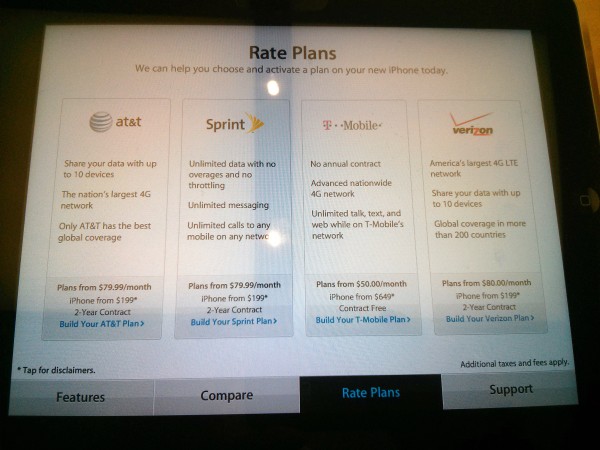
    Last night, I rushed off to the local mall intent on seeing movie “Oblivion”, but the 6:45 p.m. show was sold out. So I walked around and spent time inside Apple and Microsoft retail shops. At Apple Store, I had two objectives: finding out the cost of replacing a shattered iPhone 5 screen (not available, refurb phone is $229 option) and observing how the company sells T-Mobile models alongside those from AT&T, Sprint and Verizon. Pink’s unlocked phone costs less upfront compared to Blue, Red and Yellow and is financed for 24 months. Apple presents T-Mobile iPhone 5 as costing considerably more.

    Apple Store provides product information on iPads, which is a subtle way of promoting the devices. The marketing page presents 16GB iPhone 5 as selling “from $199” for AT&T, Sprint and Verizon and “from $649” for T-Mobile, which is technically true but also misleading. The $199 represents the big three’s upfront price. T-Mobile asks about half as much, $99.99, upfront. But Apple lists T-Mobile’s price as $450 more. Who wants to pay $649 when the others charge $199?

    By not showing consumers the real upfront price, Apple presents T-Mobile pricing unfairly by the metric most consumers care about — what does the thing cost me now. The big three’s pricing requires 2-year contract, T-Mobile’s 24 $20 monthly payments.

    The time period of consumer commitment, whether contract or monthly payments, is effectively the same to the consumer. For example, AT&T charges a $325 early termination fee, which amount goes down monthly (ETF divided by 24). T-Mobile interest-free financing is similar, in that the amount owed on the phone decreases every month of payment.

    By the way, Apple’s no-contract price is more than what T-Mobile charges ($579.99, whether all at once or over 24 months). Apple offers financing, too, through Barclaycard with approved credit. So purchasing option for “from $99.99” is available from Apple, but there’s no distinction made in the in-store marketing material most buyers casually see.

    The question to ask: Why doesn’t Apple present T-Mobile’s upfront price in the same manner as the other carriers? It’s easy to put: “iPhone from $99.99”, which is as accurate as “iPhone from $649”. Today, an Apple Store employee told me that the presentation is what T-Mobile wants because of financing and that Pink prefers to sell the phones directly, something I can’t independently confirm on a Sunday. Apple’s financing option isn’t interest-free, unlike T-Mobile’s, which could explain why the carrier might prefer to sell direct.

    Certainly, T-Mobile’s no-contract approach is mitigating factor. Last month, the carrier adopted new plan pricing that is considerably less than Blue, Red and Yellow. Additionally, T-Mobile started selling phones without subsidies, which is where the lower upfront pricing with monthly payments comes in.

    Subsidies are hugely lucrative for Apple and hide devices’ real cost to buyers. That $199 Jane Consumer pays for 16GB iPhone 5 isn’t the phone’s real cost, which is $649 to the carriers. They recover the subsidy by locking buyers into 2-year contracts and making data plans required. For example, 20 bucks a month on AT&T for puny 300MB. How funny. Apple marketing uses the unsubsidized pricing to whack-a-mole T-Mobile.

    Apple has no obligation to help T-Mobile sell phones, and no incentive either if Pink pays for inventory up front (which is logical presumption). If the one store clerk is correct, then Apple merely follows T-Mobile’s wishes.

    Bottom line: Regardless of why the presentation, there is direct benefit to the big three carriers, which are more important customers to Apple than T-Mobile. They move more volume and surely wouldn’t want Pink “from $99.99” alongside their “from $199” pricing. Upfront does matter to many potential buyers. If T-Mobile holds on to more customers and churns more from competitors, other carriers lose money. “From $649” puts Pink in the negative, rather than the positive.

    Perhaps T-Mobile really wants Apple to sell iPhone 5 this way in its stores. I can’t yet say. But I know this: As a buyer comparing prices inside Apple Store, T-Mobile’s iPhone 5 appears to cost considerably more than what Blue, Red or Yellow charge.

    Photo Credit: Joe Wilcox

  • Deep thinking on complex systems: A devops reading list

    As I wrap up my series digging into the relationship between complex systems, devops, anti-fragility and IT systems, I wanted to give you a set of resources that you can use to explore this subject in much more depth. As I hope you’ve picked up from the series (which I’ve linked in its entirety below), these concepts are critical to the new agility that many enterprises are realizing from service-based IT models.

    Getting started

    Before you do anything else, if you haven’t already read The Phoenix Project: A Novel About IT, DevOps, and Helping Your Business Win, by Gene Kim, Kevin Behr and George Spafford. If you don’t absolutely identify with the pain felt by the characters at the beginning of the book, or with the wisdom of the approach introduced by the end, then this concept probably won’t click with you. However, if you’ve spent any time involved in enterprise IT at all, I’m betting this book will hit home, both intellectually and emotionally.

    After that, the previous posts in this series provide some good background, as well:

    Complexity and anti-fragility

    Although I don’t love everything about Nasem Taleb’s Anti-Fragile: Things that Gain from Disorder, it is undeniably one of the most important books I’ve read in a while. The reason for this is that it articulates a key concept that is often missed by those of us that seek resiliency in systems: that there is a class of systems that show a behavior that actually gains from randomness. In other words, they tend to move toward a “better” state over the course of both positive and negative variation in their environments. The post on risk and anti-fragility that I link to above covers this concept in more depth, but the book explores the concept in many different contexts.

    The best book on complex systems that I’ve read to date remains Complexity: The Emerging Science at the Edge of Order and Chaos, by M. Mitchell Waldrop. The telling for the story behind the founding of the Santa Fe Institute, still considered the hub of complex systems science, Waldrop’s book covers much of both the concepts and the methods of exploring complex systems (and its critical subset, complex adaptive systems). It is a little out of date now, however.

    If you prefer to learn by doing, Margaret Mitchell’s ”Introduction to Complexity” course through the Santa Fe Institute is an excellent 101- level course on the subject, though tilted heavily toward the academic study of the subject,. The only focus on practical applications comes via interviews with famous complex systems scientists.

    Devops and continuous integration

    For devops, in particular, there are a lot of great sources available online, as well:

    I hope everyone has gained something from these posts. I certainly believe this shift in focus — from risk avoidance to anti-fragility, from a focus on stability to a focus on resilience, and from a focus on large-grained contextual systems to small-grained composable alternatives — will and is opening a whole new world of agility, experimentation and execution for enterprise IT. It’s a critical subject for every IT practitioner to understand.

    This is, of course, only a partial list of the many amazing books, web sites, blogs and events that I’ve used to explore this topic. I encourage you to add your favorites to the comments below, or share them with me on Twitter, where I am @jamesurquhart.

    James Urquhart is vice president of products at enStratius and a regular GigaOM contributor.

    Feature image courtesy of Shutterstock user Linda Parton.

    Related research and analysis from GigaOM Pro:
    Subscriber content. Sign up for a free trial.


  • Why DISH should be negotiating with Clearwire rather than bidding for Sprint

    DISH Network’s bid this week to acquire Sprint Nextel came as a surprise to most –  not least Japan’s SoftBank, which had  agreed last fall to buy a 70 percent stake in the company.

    In a presentation explaining his bold vision for the company, DISH’s CEO Charlie Ergen detailed plans to provide seamless mobile access to subscription TV content (based around DISH’s Sling and Hopper technology), and a plan to offer fixed wireless broadband to the estimated 40 million households that lack access to high bandwidth fiber or cable networks. Crucially, the latter would be accomplished using a combination of Clearwire’s 2.5GHz spectrum as well as satellite broadband.

    That’s the theory, but in practice commentators have questioned whether the leverage inherent in DISH’s bid – for what is a considerably larger company – will constrain the ability of a merged Sprint/DISH to invest in the Sprint network and implement these plans. Further, many expect that Masayoshi Son, the CEO of SoftBank, will outbid Ergen – despite his protestations to the contrary.  Ergen’s vision for DISH’s future is bold and exciting, but the question ultimately is whether Sprint is crucial to achieving it, and whether it can even work without Clearwire.

    Sprint not a requirement for mobile delivery

    With respect to the delivery of seamless mobile video, DISH already has most of the necessary technology available. After all, you can already use Sling on your mobile device today. The only real constraint is that the cost of wireless capacity makes it prohibitively expensive to watch mobile video on a metered 4G data plan. If DISH does indeed acquire Sprint, then it could potentially exempt Sling content from any data caps implemented for Sprint subscribers, thereby making seamless usage more feasible (and an attractive marketing point for potential new subscribers).

    Nonetheless, there is nothing unique about Sprint’s network that makes it a necessary component to that strategy: DISH could just as easily shop its AWS-4 spectrum to T-Mobile for instance, which could  deliver a similar offering.

    Wireless broadband crucial for success

    Unlike DISH’s mobile video plans, which are responding to potential longer-term shifts in video consumption, DISH’s ambitions to deliver fixed broadband to the home appear to be far more critical to the near-term competitive position of its satellite TV business. Importantly, the entire plan appears to be predicated on the use of Clearwire’s spectrum for a national deployment. In particular, DISH is at a substantial disadvantage compared to cable and telco TV solutions, which offer integrated broadband and video-on-demand capabilities.

    DISH has been attempting to acquire around 40MHz of spectrum from Clearwire since last summer, and it is hard to see where else it could hope to dig up that much spectrum for a fixed wireless broadband network, at a reasonable price – unless DISH uses its own AWS-4 spectrum. However doing so would limit Ergen’s leverage to strike a deal with a wireless operator. Alternatively, DISH could attempt to repurpose LightSquared’s spectrum, but that would be fraught with difficulties.

    The greater flexibility DISH has in realizing its mobile video plans vs its fixed broadband ones suggests it may be far more important for it to acquire some of Clearwire’s spectrum than to buy all of Sprint right now. After all, if Deutsche Telekom is willing to strike a deal with DISH after completing its merger with MetroPCS, then Ergen could deploy the 2.5GHz Clearwire spectrum on T-Mobile’s network.

    So the question is, might SoftBank agree to sell part of Clearwire’s spectrum to DISH, in exchange for DISH agreeing to withdraw its bid for Sprint? That would certainly be logical, but with two billionaires’ egos at stake, it’s never a given that the most rational outcome will prevail.

    Tim Farrar is president of Telecom, Media and Finance Associates, a consulting and research firm in Menlo Park, Calif., which specializes in technical and financial analysis across the satellite and telecom sectors.He blogs on wireless and satellite issues at tmfassociates.com; follow him on Twitter @TMFAssociates.

    Have an idea for a post you’d like to contribute to GigaOm? Click here for our guidelines and contact info.


    Related research and analysis from GigaOM Pro:
    Subscriber content. Sign up for a free trial.


  • Samsung and Apple file joint document for upcoming 2014 trial

    samsung_vs_apple


    It just seems like the “minor disagreement” between Samsung and Apple will never end. News has surfaced that the two manufacturing giants filed a joint case management document with the Northern District of California court which aims to regulate what is presented and argued against in the upcoming trial, such as the number of patents identified involved in select devices. For now, each company agrees that the case will be limited to 5 patents each, though Apple wants a maximum of 12 claims, while Samsung slightly disagree and wants to limit the claim to 8 instead. Additionally, the upcoming trial currently indicates there are 16 devices involved, with Samsung arguing it should be far fewer, of course.

    But regardless of what disagreements Samsung and Apple will make clear in court, we’re sure that Judge Lucy Koh will be eagerly awaiting to hear them.

    source: FOSS Patents

    Come comment on this article: Samsung and Apple file joint document for upcoming 2014 trial

  • Nexus 4 with 32GB of storage, LTE/CDMA, and Key Lime Pie could be revealed at Google I/O

    Nexus_4_TA_Front-450x481

    Could Google and LG be working on a 32GB Nexus 4 running Android 5.0, and sporting LTE and CDMA radios for Google I/O? According to SIDHTECH, this may well very be the case. They go on to speculate that a Nexus 5 at I/O is probably unlikely because the Nexus 4 was released last summer. However an updated Nexus 4 is more likely. 

    If this new rumor is true, this version of the Nexus 4 could work on Sprint and Verizon’s networks, it would have LTE , and more storage. I know a lot of readers were down on the Nexus 4 for a lack of some or all of these features. It also is reported to be launching with the Android 5.0, which is rumored to be called Key Lime Pie. Maybe this is Google’s and LG’s way of correcting a bad mistake in not offering these things from the beginning. If so, let’s hope they do a better job with the supply issue this time. 

    Source: SIDHTECH
    Via: TechnoBuffalo

    Come comment on this article: Nexus 4 with 32GB of storage, LTE/CDMA, and Key Lime Pie could be revealed at Google I/O

  • Forecast for the cloud: it will come in a million varieties

    It became popular a few years back to claim that the cloud would finally redeem the oft-mocked prediction famously (and likely apocryphally) attributed to legendary CEO of IBM Thomas Watson, Sr.: that ultimately there would be worldwide demand “for maybe five computers.” Some pundits asserted that with the emergence of super-scale computing offers from the likes of Amazon, Google and my company. Rackspace, all computing would inevitably move to these companies’ public clouds.

    Well, don’t let the momentum of these super-clouds confuse you. Despite the imposing presence (and market share) of such giants, I believe that there is plenty of space – and more importantly demand – for not a few, or 1o or 20 or even a hundred of clouds, but millions. The future is a multi-cloud, hybrid-cloud world. Customers will use, alone and in combination, public clouds, private clouds, customized clouds, specialized clouds, local clouds, high-performance clouds, low-cost clouds, high-reliability clouds, technology-specific clouds, application-specific clouds — any type of cloud you can imagine. The cloud will come in millions of flavors and locations.

    Amazon will be huge, but surrounded

    Amazon deserves a lot of credit for unleashing the potential of the cloud. It showed how instantly provisioned, low-unit-cost, pay-for-what-you-use computing could ignite a new wave of innovation. Amazon’s cloud was originally built to run amazon.com, and the company exposed that technology’s power to the world. There is no doubt the ideas they exposed will dominate the future of computing.

    Still, the cloud ultimately will be much bigger than any one company or any one cloud — or any five.

    Does that imply that big public clouds go away?  Of course not. They will be bigger than ever and serve enormous needs.  But the variety of requirements will grow much faster than their capability to serve them. Users will turn to hybrid-cloud architectures – using the right cloud for the right job – and as a result lower costs while improving reliability and performance.

    The hybrid-cloud era will be open

    The hybrid-cloud era is going to be powered by the open source cloud operating system — OpenStack. (Disclosure: My company, Rackspace, co-founded  OpenStack with NASA.) It will drive ubiquitous innovation and unlimited deployments far beyond the abilities of any one cloud provider. And it will spawn an entire open cloud ecosystem — from Open Compute hardware to open source services and capabilities like Hadoop and Cassandra.  This is the power of the open cloud, a world where you have the ability to run exactly the cloud you need, where you need it, how you need it.

    LET’S CUT ///The open cloud era is just emerging. Since Rackspace and NASA started OpenStack more than two years ago, the movement has been building from a tiny core of developers and companies. Since then the independent OpenStack Foundation has signed up 165 corporate sponsors and more than 8,200 registered community members in more than 100 countries. Clearly a wave is building.///LET’S CUT

    The use-cases are endless

    The cloud has put computing at the center of every business and non-profit institution — and even every individual’s life. In the business world, not just internet companies, but those in healthcare, manufacturing, education, you name it, companies use computing to generate the next level of customer engagement. Amazon runs the most dominant cloud today and is innovating at a rapid pace, launching new features and new locations. But can it possibly meet all the world’s needs – can it be, in a word, everything to everyone? Well, let’s see:

    • Does the world need a GPU-optimized cloud for graphics work?
    • Does Hollywood need a local cloud optimized to render and move large files easily?
    • Does Nigeria need a cloud to advance its society?
    • Does Exxon need a private cloud to run its applications in house?
    • Does the healthcare world need a cloud in each hospital?
    • Does the FBI need its own cloud (for obvious reasons!)?
    • Will databases need customized clouds to run optimally?

    The list could go on and on.  And new and particular use-cases are multiplying rapidly. There will always be new needs for the cloud — and there will be new clouds – millions of them – to meet those needs.

    Lew Moorman is president and CSO of cloud provider Rackspace. Follow him on Twitter @lewmoorman.

    Have an idea for a post you’d like to contribute to GigaOm? Click here for our guidelines and contact info.

    Photo courtesy Tartos/Shutterstock.com

    Related research and analysis from GigaOM Pro:
    Subscriber content. Sign up for a free trial.


  • Wrecked Metals

    Wrecked Metal

    Three carbs, solid axle suspension and a chopped roof. Yep, this just seemed like the right way to close out the weekend, don’t you agree?

    Check it out after the jump.

    KSP-PRODUCTIONS on Vimeo.

  • National Broadband Asset Map from Connected Nation

    Connected Nation has developed a national broadband asset map. Here’s a description from an email received from them…

    CNX is aggregating the nation’s assets to create an exchange, or marketplace, to bring together asset owners with those companies that need access to towers, rooftops, utility poles, and other real estate to expand broadband networks. CNX is streamlining site identification, acquisition, and transactions critical to the expansion of fiber, fixed wireless, and mobile broadband services.

    Similar to the Multiple Listing Service (MLS) in the real estate market, the CNX exchange allows public and private owners of assets (rooftops, steeples, real estate, towers, utility poles, dark fiber, Rights of Way) to represent those assets on an interactive and searchable national map.

    And according to the website, the CNX Map includes:

    • Network data from more than 2,500 broadband providers;
    • Publicly-owned assets at nearly 300,000 locations;
    • FCC  registered tower sites inclusive of 125,000 + assets;
    • 124,000 + schools;
    • 21,000 + libraries;
    • 38,000 + medial facilities
    • 52,000 + public safety locations
    • 33,000 + local government operations

    This sounds like a tool that would be helpful to communities, providers and the Broadband Development Office if that bill should pass in Minnesota. Although it also seems like information a State entity might want to gather themselves to provide to Minnesota residents, businesses and communities. One of the advantages touted on the website is public-private partnership and to that end, maybe it makes more sense to have the private sector expend resources to maintain this information.

    When I first read the information I was reminded of the fiber database, which would track (among other things) future construction plans so that broadband providers/builders could plan to deploy fiber around existing plans to minimize cost, construction and inconvenience – but it doesn’t sound as if that is a part of this database. This sounds more like an inventory of real estate assets, as they explain.

  • The week in cloud: SAP stakes cloud claim; legacy and new-look vendors arm for battle

    Here’s a news flash: despite all the gazillions of objects stored in Amazon’s S3 cloud (the latest official count is two trillion!) we’re very early in the cloud migration. Not really sure how meaningful that number really is, but still, two trillion!

    OpenStack Summit 2013

    OpenStack Summit 2013


    It’s earlier than you think

    IThere was tons of energy and more than 2,000 attendees at last week’s OpenStack Summit but most of those were vendors that have signed on to the effort and hope to make money off it. The proof of the pudding will come when actual end-user organizations that are not necessarily tech companies start adopting.

    451 Group analyst Carl Brooks estimates there are now a few hundred OpenStack projects in production now, 60 to 80 of which are in production. Of those 40 to 50 are run by service providers of which maybe 3 or 4 make money.

    SAP seeks cloud cred

    We all know that tons of startups and a growing number of bigger companies tap Amazon Web Services for storage and perhaps some compute loads, the vast bulk of corporate computing remains on-premises. We’re entering an interesting era in which the legacy powers — Oracle, IBM, SAP, are rushing to embrace cloud and reap fiscal benefits. SAP CEO Bill McDermott last week told the AP that the ERP giant “accelerated into the cloud in a big way about a year ago and already we’re making money on it.”

    SAP_ExecutiveBoard_McDermott_003Not to get all Clintonian here, but much here depends course a lot depends on how you define “cloud.” SAP is most certainly lumping in any and all revenue coming in via Software-as-a-Service implementations where the company gets paid via subscription vs. big lump fund payments for software licenses. SAP said cloud computing contributed nearly $37 million to its first quarter earnings.

    SAP’s favored child product, the HANA in-memory database, saw its year over year revenue triple to €86 million (or about $112 million) for its first quarter.

    Muddying the waters

    When the industry started down this path, AWS was the big, scalable public cloud — with an ever-growing number of services that startups used to write, test and then deploy shiny new applications. VMware plugged vCloud Director as the way for existing VMware customers (most big companies) to move their legacy applications to a VMware compatible cloud.

    Cutting to the chase, and vastly oversimplifying the case, it was one cloud for new apps vs. another for

    old applications.But things have gotten a lot more, um, nuanced, since then.  AWS has added more services to accommodate those older but still-mission-critical applications while VMware announced plans for its own public cloud (which it calls hybrid.) And VMware/EMC spinoff the Pivotal Initiative on Wednesday will talk more about its take on cloud computing.

    Photo courtesy of Flickr user ahockley


    Related research and analysis from GigaOM Pro:
    Subscriber content. Sign up for a free trial.


  • Why are bad email habits so hard to break?

    I love the idea of making email suck less.

    As a reporter, email is one of the most important tools of my job: for communicating with sources, my editors and colleagues, companies I cover, receiving news tips, and more. Admittedly, my current email work flow is pretty awful. And I know I should get better about managing my email, especially on my phone, where I check it roughly 500 times a day. Still, I can’t get myself to let go of my bad habits.

    It’s weird too: when it comes to mobile mail, today is one of the best times in recent memory to find a better solution. My Twitter feed has been filled with glowing reviews from many people who’ve tried Mailbox. And I love Taskbox’s motto: “make [email] something people don’t dread and people feel in control of.” So I gave Mailbox a go. The experiment lasted less than a week (it still tells me I have 22,200 unread emails). I also gave Taskbox a try for at least two weeks for my work email only (current unread email count a slightly less intimidating 722). Both seem like great products, but I realized I don’t have the patience to get into either of them. I don’t think it’s anything to do with those apps themselves — which plenty of people seem to love — but about the idea of change to a routine that is so critical to modern work — and life.

    My inability to stomach change is even more ridiculous because of how awful my current email work flow is both on my desktop and my iPhone. I use Gmail’s color-coded labels, which is plenty useful. But if I get an important email that I know requires my response but not immediately, I “star” it and mark it as unread.

    It was Andrew Eye, CEO of Taskbox, who jokingly pointed out to me how broken email is: if “the only way to stay organized in email is to lie to yourself” that you haven’t read something when you actually have.

    He’s right! But still — the idea of learning a new system of email, whether it’s by prioritizing items or “snoozing” them kind of freaks me out. I can’t miss an important email or misplace one even temporarily put it in a folder where I’m not immediately sure how to find it.

    And, no, I’m not completely averse to change when it comes to my digital life. I don’t participate in the massive freakout when Facebook makes one of its inevitable design changes. I was plenty adventurous about trying out several new calendaring apps; getting deadlines right is also critical to my job, but I was able to successfully switch over to Sunrise from my iPhone’s basic calendar app.

    But totally altering my mobile email routine seems like rebuilding the plane in mid-flight: there is never a good time for change.

    I don’t think I’m alone either. Email is something people are super sensitive to altering. Even Google had a rough time rolling out too many changes at once: at one point even the labels feature was too much for non-power users to adopt.

    Labels are standard now for a lot of email users, including me. And that gives me hope that some day I’ll find a service that’s able to drag me along to better email habits. But for the foreseeable future, I’ll be at inbox 22,000.

    Related research and analysis from GigaOM Pro:
    Subscriber content. Sign up for a free trial.


  • A new TED Playlist not for the faint of heart: GROSS!

    There’s something oddly satisfying about hearing something gross — something that automatically scrunches your face and makes you cover your eyes, though maybe opening two fingers so that you can sort-of, kind-of see. That’s why we created the new TED Playlist called GROSS!

    Included in this playlist: Marcel Dicke’s rousing case for why we should eat insects. Kees Moeliker on how discovering a live duck copulating with a dead duck changed his life. And Marcus Byrne’s love letter to the dance of the dung beetle, which allows it to roll poop over great distances.

    TED playlists are collections of talks around a topic, built for you in a thoughtful sequence to illuminate ideas in context. A new playlist is added every week. We hope you enjoy this installment.

  • Hey, Gmail users, Mailbox for iOS is now available, without reservation or waitlist

    Gmail shows little sign of becoming any less popular, but any iOS user will find that dealing with a Gmail account on an Apple device is not the most pleasant experience. Mailbox was released to help address this fact and proved so popular that newcomers were greeted by a lengthy waiting list before they could get started. The app has now been updated in a number of key areas and, perhaps most importantly, anyone is free to jump right in and get started without the need to wait on a reservation list.
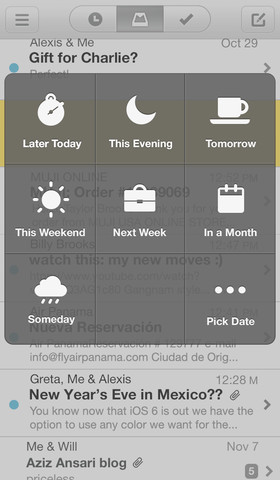
    This is obviously great news for people who have been waiting to try out the app, but there is also plenty for existing users to take advantage of. One of the major standout features of the app from its inception was the way in which emails could be dealt with using little more than a swipe; swipe one way to delete or mark as read, and the other way to snooze.

    The snooze feature has been enhanced in this latest release. Just as before it is possible to hide emails that you do not want to deal with immediately, but you are now able to deal with multiple messages simultaneously. The actual snoozing process has also been improved so that the options you are provided with are appropriate to the time of day and the day of the week.

    Another noteworthy change means that when in the neat conversation view, you can view email addressed by double tapping a message bubble. The latest update includes all of the big fixes and performance improvements you would expect. Check out Mailbox and see if its unique snoozing option can help you to achieve inbox zero and better manage your messages.

    You can find out more and download a copy of this free app from the Mailbox review page.

  • Windows 8 Build 9374 brings ‘Kiosk’ mode, confirms 8.1 name

    Microsoft continues to build and leak Windows Blue at a solid rate. Last month we toured build 9364, and now 9374 is out. There are plenty of rumors about where “Blue” is headed, including even, oh the horrors, bringing back the Start menu and adding a boot-to-Desktop option. With 9374 now out on the web (BN can not tell you where to find it, but I am sure you will stumble upon it if you look), I decided to see what changed.

    Before we go any further, just for the record, this installation is 32-bit only and you will need to choose “Custom” when running setup — an upgrade does not work. I installed in Virtual Box, and I recommend you use some sort of virtualization software as well. This leak is certainly not ready for prime time just yet.

    What is New?

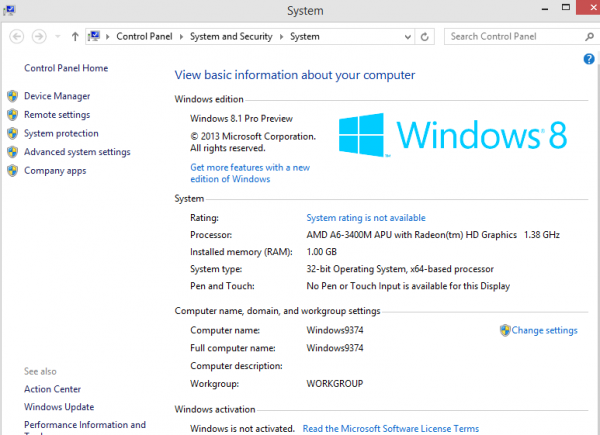
    First and foremost, you will notice that the version is now, indeed, listed as 8.1 Pro Preview. Honestly, you cannot miss this because the name is on the Desktop in the lower right corner and listed within the computer properties screen.

    Despite recent rumors, there is not, at least yet, any Start menu or a boot-to-Desktop option, though those may perhaps still be in the works. Personally, I do not miss those things and could care less if they are added or not, but many users will no doubt want them.

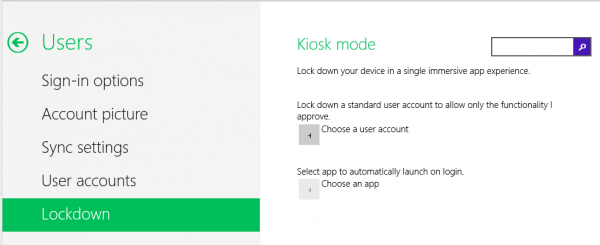
    The biggest addition to this latest build is the new Kiosk mode, which can be accessed from the PC Settings found in the Charms menu. The option is listed under the User setting. Kiosk mode allows you to lock down user accounts to certain functionalities that you choose and also makes it possible to set an app to launch upon Startup — possibly a reason for HTPC fans to finally move on from Windows 7, as 8 previously had no option for starting Windows Media Center upon boot (though some hacks existed to make it possible). Kiosk mode looks incomplete at this point. The feature is tailor-made for parental controls and also for computers located in retail locations that wish to have a dedicated store app.

    The Search option also is changed slightly, and no longer displays the app list behind it, but only the actual Search column on the right of the screen. This also looks incomplete — I could only access from the Start page, while the Desktop brought up only an empty column — no search box in it.

    Conclusion

    There is not really much to see here. Only the Kiosk mode and Search screen are really new, and neither feels complete at this point. Given that 9374 is a leaked build this is not a big surprise, and bugs are to be expected, too. The OS is certainly not ready for anything close to production use and should only be run on a test system or in virtual mode.

  • Pod-catch-up: Media mistakes, Sproutling and meet the Chrome Show

    In case you missed them, here are the GigaOM Podcasts from last week.

    More media, more problems and more music on Twitter

    (Download the Weekly Wrap Up)

    The internet of things may make parents less worried but more neurotic

    (Download the Internet of Things show)

    Introducing the GigaOM Chrome Show

    (Download the GigaOM Chrome Show)

    How Joey Coleman crowdfunded his work as a hyper-local reporter

    (Download the paidContent podcast)

    The pros and cons of using Hadoop

    (Download the GigaOM Research podcast)

    Related research and analysis from GigaOM Pro:
    Subscriber content. Sign up for a free trial.