Spotify has made its first connected car appearance. At Mobile World Congress, Ford and Spotify announced that the subscription music service will soon be available over the Sync AppLink platform and integrated with the Sync’s voice command system in Ford vehicles in the U.S., Europe and Australia.
According to Spotify Global Head of Hardware Partnerships Pascal de Mul, the updated iPhone and Android apps will soon be able to pair with the dashboard AppLink system, streaming music through the car’s entertainment systems. Users will be able to play their songs, playlists and radio stations and even be able to create new radio stations on the fly with simple voice commands, he said.
Ford has been loading up on music streaming apps in AppLink, making it a key initial focus of its connected car strategy. Its library of supported services includes Pandora, Amazon Cloud Player, MOG Music, Slacker, and Rhapsody as well as multiple radio station’s digital apps.
Ford CTO Paul Mascarenas said digital music streaming figures right into Sync’s sweet spot. Ford doesn’t have to explain the utility of the services to the driving public since music is already the most popular form of entertainment in the car. The integration of a streaming service into Sync is relatively simple. And since the content is audio only and can be manipulated through Sync commands, the apps all easily meet Ford’s requirements that no connected car app distract a driver from the road, he said.
At the show Ford also revealed it is adding AppLink connectivity to its EcoSport crossover SUV (pictured at top) just in time for its European debut. For also brought several apps Europe that were previously available in U.S. cars: Kaliki, Glympse and Aha Radio.
We got a chance to sit down with Mascarenas for a few minutes at MWC to get a quick update on Ford’s new open development platform, originally unveiled at CES. Though the program is barely more than a month old, 2500 developers have already signed up and downloaded the SDK. Many of those devs have already completed apps and have submitted them to Ford, and a few those apps actually received final approval, Mascarenas said. Mascarenas said Ford plans to announced those apps in the coming weeks.
Spotfiy doesn’t count since it began working with Ford before the development program was launched, Mascarenas said, but the program has opened up Sync to a lot of smaller developers who wouldn’t usually get Ford’s direct attention. Ford is now faced with a distribution and discovery issue. “If you go into an app store, there’s no easy way to find the apps that AppLink-enabled, Mascarenas said.
When the number of Sync apps was small, Ford could promote them individually. But there are now 63 AppLink-optimized apps, and that number will grow significantly as the apps start emerging from the developer program. Ford is working on ways to catalog them. Whether that means creating its own app store or portal Android or working with Apple and Google to spotlight connected car software, Mascarenas didn’t say. Ford could also go with the approach, GM appears to be adopting and create a catalog in the dashboard itself.

Related research and analysis from GigaOM Pro:
Subscriber content. Sign up for a free trial.
- Connected world: the consumer technology revolution
- CES 2012: a recap and analysis
- The future of mobile: a segment analysis by GigaOM Pro

 |
 |

 Call me crazy, but I love Mondays. Why? Because there is a new AOKP build coming just in time to kick off my week. The team behind the popular custom distribution Android Open Kang Project did not disappoint this time around either. Jelly Bean MR1 Build 4 made its way onto our

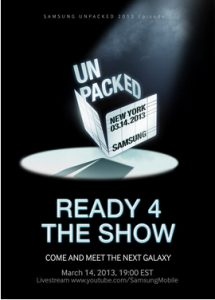 Samsung might have received a
 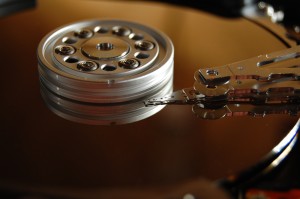 If you’re confident enough with hard drives to have tried editing them before at the sector level, then you’ll know that most disk editing software is, well, less than helpful. Open a drive and you’ll generally be presented with a basic hex view of your data, then left on your own to figure out what it all means. And okay, it’s true, sector editors are only for the most knowledgeable of PC users, but even experts could benefit from a little help, occasionally.
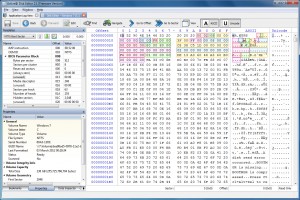 If you’re looking for particular data but aren’t sure where it is (the contents of a lost file, for instance), then a Find option will help you locate them. You can search for a specific ANSI, hex or Unicode sequence, and there are even options to use regular expressions or wildcards.

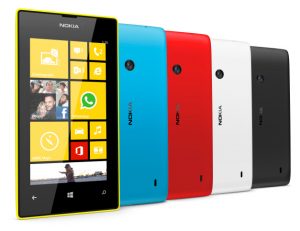 The Lumia 520 boasts a 4-inch display, at a resolution of 800 by 480, and is powered by a 1GHz dual-core Snapdragon processor. It comes with 512MB of RAM and 8GB of internal storage. A Micro SD card slot will allow owners to boost this by a further 64GB, plus users get the standard 7GB of free online SkyDrive storage. The 520 also sports a 5-megapixel rear camera capable of recording 720p HD video. The device comes in the usual range of bright colors – yellow, cyan, red, white and black.
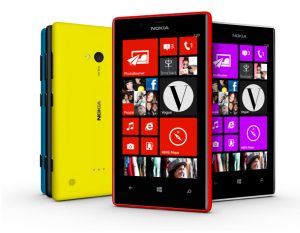 The mid-range Lumia 720 has a 4.3-inch display at 800 by 480 with a ClearBlack filter offering better outdoors viewing. It has a dual-core 1GHz Snapdragon CPU, 512MB of RAM, 8GB of internal storage and a microSD card slot. The biggest difference between this model and the 520 is in the photography department. The rear 6.7-megapixel camera has a f1.9 Carl Zeiss lens designed to let in more light, while the front-facing camera has a 1.3-megapixel HD wide angle lens which will allow self-shooters to pack more friends into the shot.