Category: News

  • Microsoft’s 128GB Surface Pro Sells Out At MS Online Store Just Hours After Launch

    surfaceproleft

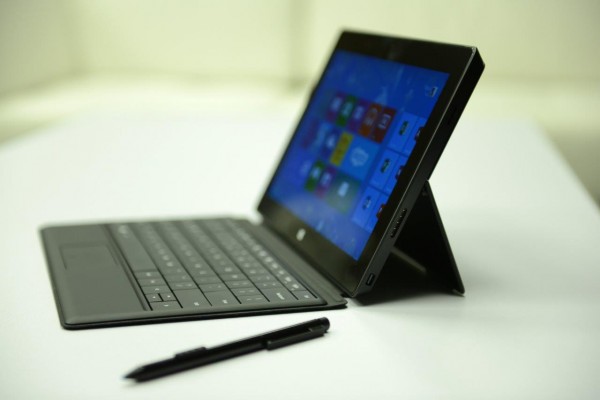
    Microsoft’s $999 128GB Surface Pro has sold out in the online Microsoft Store in the U.S. (via WinBeta), just a few hours after going on sale today, February 9. The 64GB version is still available as of this writing, and the Surface Pro is still likely in stock at physical retail locations like Best Buy, where it also went on sale today, although checking the stock levels via their online tool reports the Surface Pro as “Unavailable” across the board.

    The Surface Pro is Microsoft’s more powerful, Intel-powered Windows 8 tablet, which runs the full version of Windows 8 unlike the Surface RT and can handle full-fledged Windows desktop applications. In the TC review, John Biggs said that the Pro was a much more compelling device than the RT, in part because of its ability to run software that enterprise IT departments depend upon from legacy windows installations.

    The Surface RT sold out of the $500 32GB model within one day, but the Pro’s more expensive model has sold out even faster. That could indicate that users are placing a higher value on storage with the Pro, which is marketed as a device much more suited to getting serious work done than the Surface RT. The 64GB model remains in stock for now, and given that there’s only $100 price difference to trade up to double the storage capacity with the 128GB version, that’s not surprising.

    Storage was recently the subject of a number of back-and-forth reports regarding the Surface, with some claiming Microsoft left little room on-device for personal files once you accounted for the Windows 8 OS install. Ed Bott reported earlier todays on the actual storage numbers, which beat the original estimates by a fair amount, but the free space on the 64GB version still represents a 200 percent increase from the actual usable space on the base Surface Pro model.

    The 128GB Surface Pro is still available to order from the Microsoft Store online in Canada as of this publication date, and you may still be able to grab one by visiting a physical retail location.

  • Four ways to connect your instrument to GarageBand

    Apple’s (AAPL) GarageBand ($14.99) is a versatile, and cheap, recording program that lets you record song ideas and demo tapes on your Mac. Today I’m going to look at various USB options to plug your instrument into GarageBand. Fortunately, there are a lot of different devices out there that will let you perform this task. That said, I’m going to focus on a cross section of these input devices, not the entire spectrum. While I’m going to use guitars as a frequent reference point since that’s the instrument I play, any of these input devices should work on instruments that have a 1/4″ output.

    The devices

    Apogee Jam ($99): At 99 bucks, the Apogee Jam isn’t cheap, but it earns high marks for me. The great thing about the Jam is it comes with connectors for the Mac, and a 30-pin iOS cable. I’ve never had a problem with it and the audio quality is very, very good. The chief concern is with the two small, cables it’s easy to misplace them. To avoid that, I keep them both rubber-banded to the body of the Apogee. You can also buy replacement cables if you lose them.

    crump-garageband-jam

    Line 6 Pod Studio UX2 ($199): The Line 6 UX2 is a very versatile device. It will let you record two instruments at the same time (handy if you’re recording with a pal). It also has two XLR inputs if you want to mike your amps instead of directly inputting your guitar. But wait, there’s more: the UX2 also has more than 20 models of guitar and bass amps, and more than 20 models of guitar and bass cabinets. The amp models are based on Fender and Marshall amps. The UX2 is a good piece of gear to start building your budget studio around and is great if you’re recording multiple instruments at the same time.

    crump-garageband-UX2

    Ubisoft Rocksmith Real Tone Cable ($29.99): While the Ubisoft Rocksmith Real Tone Cable is primarily designed for the Rocksmith game (not available for the Mac, which is either a good or bad thing, depending on your view of learning devices such as these). I’ve found it to be a pretty decent USB guitar interface given the cost, and while it has no iOS connectivity, that’s not a deal breaker, especially since this article primarily deals with OS X. In the short time I’ve had it, it feels like a decent cable and I haven’t experienced any issues with it.

    crump-garageband-rocksmith

    USB Fender Squier Guitar ($199): Now, admittedly the USB Fender Squier guitar won’t let you plug in any instrument to GarageBand, it being a guitar and all. However. for $199, I’ve found it to be a great guitar. Since the Squier is Fender’s low-cost line, when I got mine I expected it to be extra low-budget, given the additional electronics for the on-board USB interface. Instead, I was quite happy with it and still continue to play it almost four months after I got it. The iOS interface is especially nice if you’re traveling and want to practice. It comes with the cables to connect the guitar to your Mac and iOS device.

    crump-garageband-Squier

    Connecting the devices to GarageBand

    Obviously step one is connecting the USB cable to your Mac. (Note: for best results plug them directly into your Mac; not into a USB hub.) After that, open GarageBand and go to Preferences and click on the Audio/Midi tab. Select your input device from the pull-down list.

    crump-garageband-input-screen

    After that go into your project and add a new track. Select Real Instrument from the selection screen if you are miking your amp, or using a keyboard. Select Electric Guitar if you want to use GarageBand’s built-in amps and effects.

    crump-garageband-input-screen-2

    Last, go the Track menu and select Show Monitoring for Real Instrument Tracks. This will ensure you can hear your instrument through the speakers while you play.

    Using Amps and Effects

    Unless you are miking your amp, you’re probably going to want to play around with GarageBand’s amps and effects. To do that, select the guitar track in the track listing on the left. On the far right, you can choose the amp you want. You can also choose from a number of preset sounds from a pull-down menu in the same area. You can also adjust the bass, treble, etc. from this screen.

    crump.garageband-inputs-screen=3

    How I use them

    For input devices, I float between the Rocksmith cable and the Apogee Jam. For the most part, choosing one comes down to which interface I can easily find at the moment. The Jam and the iOS cables may take up permanent residence in my gig bag so I can practice outside the house regardless of what guitar I happen to have with me (I tend to favor Les Pauls over Fender guitars).

    I don’t usually use the amps built-in to GarageBand. Instead I use the GarageBand plug-in for Guitar Rig and Amplitube. However, if you can’t afford either of these programs the included amps will do the trick. The presets are really helpful in quickly dialing in a sound.

    Related research and analysis from GigaOM Pro:
    Subscriber content. Sign up for a free trial.

  • Microsoft plans to completely unify Windows, Windows Phone app development platforms

    Microsoft Windows App
    One of the most appealing things about the direction Microsoft (MSFT) has been taking with Windows 8 is the prospect that applications downloaded on the PC platform could be transferred seamlessly to tablet and smartphone form factors. Or put another way, imagine how cool it would be to download a new Angry Birds game onto your smartphone and have it automatically downloaded onto your Windows-based tablet and PC as well. And according to a Microsoft job posting spotted by WMPoweruser, it seems that Microsoft is hard at work at making this sort of cross-platform unity a reality.

    Continue reading…

  • TED Weekends: Big data gets personal

    big_data_blogAt TED2011, Deb Roy shared his talk, “The birth of a word,” describing when he and his wife, Rupal Patel, brought home their baby boy for the first time. The pair sought to shoot a different kind of home video: in every room of their house, a camera recorded eight to ten hours of footage a day. Deb Roy: The birth of a wordDeb Roy: The birth of a wordAfter three years, Roy had roughly 90,000 hours of video and 140,000 hours of audio. But this wasn’t for sentimental purposes. Instead, they wished to study how a child learns language. The footage became a massive data set for Roy and his research team at MIT. Using unique data visualizations, they were able to track the many subtleties of a child’s learning process that they wouldn’t have been able to do in a lab.

    His team wondered: could this kind of analysis be applied to television or, say, Twitter to discover communication trends?

    These are the kinds of questions that today’s TED Weekends on the Huffington Post explores. Here, three of the great essays that are available now for your reading pleasure. 

    Deb Roy: The Birth of a Word

    Three trajectories came together in 2005 and took me to new frontiers of cognitive science (and subsequently, it turns out, the media industry).

      • The first trajectory: I began to see an unexpected connection between my research in robotics at MIT and theories of how children learn to talk, leading to studies of child language that I did with my wife and collaborator Rupal Patel over the past decade.
      • Second: The era of Big Data was dawning, and the far-fetched idea of video-recording everything that happens in a home had become a practical reality.
      • Third, Rupal and I learned that we were expecting our first child in July 2005.

    This confluence of events sparked an unusual study of child language featured in the first half of my TEDTalk. Read the full essay »

    Gayatri Devi: How Do I Improve My Memory? Forget More!

    Do you know what is essential for a good memory? The ability to forget. To completely and thoroughly forget. Forgetting, like breathing or sleeping, is physiologically normal. This is at odds with our modern compulsion to record and remember everything and is a perfect recipe for anxiety.

    Deb Roy, a cognitive science professor at MIT studying language, recorded 8-10 hours daily of the first three years of his son’s home life. He compiled a quarter million hours of audio and video, creating a 200,000 gigabyte “ultimate memory machine.” (Most computers store about one gigabyte.) Consider how much information each of us is exposed to in 24 hours, on streets, subways, screens and in sleep. Imagine recording and remembering all this. Thankfully, we were never meant to.

    Fact: We are evolutionarily programmed to forget. Our brains evolved over millennia with built-in forgetfulness. Our brain is engineered to remember tastes, smells, voices, touch and visions, not names. Our brain is engineered to solve problems (How do we keep track of cattle? Mathematics; How do I communicate? Language), not remember disjointed facts. A fact not linked to a sense, an emotion, or a concept is quickly forgotten. Read the full essay »

    Ben Hecht: Big Data Gets Personal in U.S. Cities

    Much has already been said about how big data is dramatically changing the way that organizations make decisions. Today, more data is being created from more places than ever before. Blogs, Facebook, YouTube videos, retailer loyalty cards, mobile phones, and sensors on buildings are producing tons of data daily. Private sector companies, in their real-time data warehouses, are storing, analyzing, and harnessing it to help them to better understand their customers, dynamically alter pricing based on real-time demand, and even change their business models. And, increasingly government is putting the wealth of data that it generates to work to increase efficiency, save dollars, and create more proactive policy. But, as Deb Roy highlights in his TED Talk, the true promise is where the numbers and patterns from this data connect and become personal — enabling us to understand and to respond to humanity and the world in ways previously unimaginable. This type of analysis has infinite potential for improving the human condition on an ongoing basis; and strengthening people’s commitment to our democracy. Already, in U.S. cities, we are seeing many promising signs of the transformative personal application of Big Data:

    Mass Personalizing of Government Data and Services: The movement towards open government data in the U.S. has already had huge implications for the relationship between citizen and government. Read the full essay »

  • The man behind Google Docs is now trying to reinvent the web app at Box

    When Sam Schillace first crossed paths with Box Founder and CEO Aaron Levie in 2006, it didn’t exactly go how Levie expected. Box wanted to buy Schillace’s document-collaboration startup called Writely, but shortly after discussing it, the team at Writely went dark. A few days later, Levie got to hear from the press that Google had purchased Writely instead.

    The rest, as they say, is history. Writely went on to become the foundation the foundation of Google Docs. Schillace went on to lead just about every product that falls under the Google Apps umbrella, leave for a stint to launch a new company, then come back as a member of the Google Ventures team. Box, well, it’s flush with cash and set for a 2014 IPO.

    Sam Schillace (Credit: Google Ventures)

    Sam Schillace (Credit: Google Ventures)

    But although their paths diverged, Schillace and Levie would find each other again. In 2011, while still with Google Ventures, Schillace joined Box’s technical advisory board along with then-Facebook VP Jonathan Heiliger, LinkedIn SVP Kevin Scott, then-Flipboard CTO Arthur van Hoff and some other notable Silicon Valley names. (Schillace calls himself “the dumb guy to make all the other guys seem even smarter.”) It was good camaraderie and a lot of fun, Schillace said, and “once a quarter they’d bring all their really hard technical problems to you.”

    Then, in mid-2012, Box COO Dan Levin asked Schillace to come on as the company’s vice president of engineering. He actually didn’t want to take the job initially, but when he realized the decision was really between continuing to have conversations with the smart people around him — both on the advisory board and within Box itself — he knew what he had to do. ”I really liked the people and I really liked the team,” Schillace told me.

    He officially joined the company in August 2012, and is now bringing his considerable expertise to bear on Box’s very pressing technical challenges. With crushing data volumes and millions of users, Schillace explained, “There’s a little bit of a success disaster we’re having to deal with here.”

    Laying the groundwork at Google

    It’s a good thing Schillace has some experience dealing with some difficult issues, in both technology and business. When he started Writely, even his co-founders thought it was a stupid idea; web browsers then were so primitive. There was no documentation, no standardization (even around how they handled HTML), and browsers were slow and underpowered. The only solution was to “just poke at the browser until it behaves,” Schillace joked.

    “The crown jewel of hard problems … is around collaboration,” he explained. Although the Google Docs team eventually rebuilt Writely as a native word processor, Schillace and Writely co-founder Steve Newman didn’t have that luxury. Because the browsers all behaved differently, they had to write some “hairy” logic to merge changes on the server and then send it back down to the user in a format that particular browser could understand. Sometimes, they’d run into what Schillace calls “edit fights,” where a browser would actually fight itself.

    “It was totally Wild West,” he said. “We had to invent a lot of stuff even to get it to even work a little.”

    Credit: Google

    Credit: Google

    Schillace also knows how to overcome, or at least manage, the non-technical issues that come as a company grows from a small team into something much, much larger. When he started at Google, his team was about 40 people. By the time he left, it had grown to 600.

    But despite its size, Schillace said, Docs was never a huge priority at Google because of its minimal effect on the company’s bottom line.

    “The only reason we managed to make Docs happen in the first place, really, was Eric Schmidt was such a big supporter and we were kind of tyrants because we were so feral and so much in the startup mentality,” he acknowledged.

    Hellbent on earning every dollar possible from their contracts, Schillace and his team worried much more about continuous execution than about following the rules. “Every once in a while we’d get in trouble and Eric would protect us and get us out of it,” he said. “We just sort of shoved through it and made it happen.”

    Fast-forward a few years and there’s “not a lot of room for the feral programmer at Google anymore,” Schillace explained. Because the company is so big, everything you do is under extreme scrutiny and it becomes impossible to recover from even small mistakes (e.g., Wave and Buzz) because there’s so much exposure. And as part of such a large company working on such large projects, it can become hard for individuals to stand out or to see the direct effects of their work.

    Building a better Box …

    Box, Schillace said, feels a lot like Google did when he first came on board there. It’s a big enough company (with nearly 700 employees) that everyone is doing real work, but not so big that all the problems have been solved. He thinks there’s a good two to four years of really fun stuff to work on, and the company can bring in smart people from places like Facebook and Google to help find the solutions.

    For Schillace personally, Box’s size also fits in with his current state of mind: He’s done with the emotional roller coaster of startups after spending more than 20 years building them. “When you’re initially a programmer, you learn to program with 10 fingers,” he said. “And then maybe if you go to management you learn to program with 10 people. And then if you go to the level of management that I’m at, you get to program with 10 teams of people.”

    But works that’s “fun” isn’t necessarily work that’s easy. Technologically, he said, the hardest problems at Box are dealing with the company’s scale. From a data volume perspective, it’s growing at 10 percent a month, which means it’s doubling roughly every seven months and growing by about a factor of four every year. Box’s storage capacity is into the multiple petabytes now, Schillace said.

    On the infrastructure side, that means Box is always working on the next generation storage of scale-out storage architecture. It takes between 6 and 12 months to build one, he explained, but they only last about 18 to 24 months.

    In the case of Box, though, its focus on real-time collaboration means mere storage capacity isn’t enough when designing a database. That’s why Schillace’s team ends up building a lot of its own technology to deal with the company’s unique needs. It’s able to buy a few things off the shelf and use some available open source tools, but, as Schillace said, “every company has its own set of tradeoffs you have to make, so you basically end up having to build this stuff yourself.”

    And as Box signs up more deals with companies that have tens of thousands of users — sometimes more — it has to make changes around caching and metadata to account for that many people potentially sharing a folder or a document. ”That does strange things to your product,” Schillace explained. “… All complicated by the fact that everything’s moving all the time.”

    A sample of Box's large-enterprise users.

    A sample of Box’s large-enterprise users.

    “The other technical problem is, ‘what’s the next generation of the web app itself,’” he noted. “Where do we go with that and what does that need to be in order to be successful?” At Box, for example, the user interface is starting to show signs of stress because of the number of users, meaning its search has to become more functional and certain pop-up menus and lists are getting too big to present.

    … and re-imagining content for the mobile world

    But even beyond building out Box’s current product to handle the company’s scale, a bigger challenge might be figuring out how to build a collaboration application in the age of powerful mobile devices and cloud computing. Schillace said he’s very proud of Google Apps (the couple of times a week he still gets thanked for it probably doesn’t hurt the pride), but it was essentially just a matter of building traditional office applications of the desktop world for the web, and he thinks Google’s anti-desktop dogma is a bit simplistic.

    “The interesting challenge is to have one foot in many worlds at once,” Schillace said — mobile, web and desktop, consumer and enterprise. ”We’re just at the beginning of this tidal wave of enterprise going from on-premise to the cloud … . I think all the boundaries and functionalities of that stack are still up for grabs.”

    A debate at Box, he said, is whether to build a full suite of editing applications a la Google Docs, or whether that’s “chasing the last war.” Rather Schillace is inclined to look at what a company like Evernote is doing to enable creation and collaboration “outside of that paradigm of word processor, spreadsheet, presentation.”

    hero_evernoteAll of this speaks to the evolution of documents. They used to be more like artifacts — things like properly formatted business letters with high latency, high transaction costs and “all this artifice around the structure of the document,” Schillace explained. Then the web came, reducing the focus on formatting and adding a collaborative element, but keeping in place a certain level or linearity. With the advent of Evernote and the erstwhile Google Wave, documents have become more abstract, mixing images, text, communications, web pages and whatever else onto a digital canvass.

    “Underlying all of this, what’s really going on is the business interaction you want to have,” Schillace said. “The point of the document is you usually either record something for yourself or to have an interaction with another human being. And I think we can gradually start peeling away layers of artifice and try to get down to the raw core of that interaction.”

    He thinks mobile devices with their small screens, portability and omnipresence in our lives might present the biggest challenge for achieving this goal. Users probably need a native way of interacting with documents that doesn’t involve opening a Word document and trying to read and edit it on a tiny keyboard. The right test, according to Schillace, might be if a co-worker has a question, “could I answer it while I was standing in line at the store in 30 seconds?”

    If someone is going to hit a homerun with the ideal mobile collaboration experience, building it probably won’t come easy and might not look too much like anything we’ve seen before. If there’s one thing Schillace has learned building six startups over 23 years, it’s that good entrepreneurs spot obvious, but futuristic opportunities and start building, knowing they “personally are going to suffer an enormous amount of pain because the world is not ready.”

    “The really radical stuff always looks stupid and crazy, ” Schillace said, “but the real disruptions always look like that.”

    Related research and analysis from GigaOM Pro:
    Subscriber content. Sign up for a free trial.

  • Kickstarter: The Coastliner Automatic Watch Is Brimming With Understated Retro Appeal

    coastliner


    Kickstarter occasionally has a watch project, but they’re relatively rare, and even when one does pop up, it usually isn’t impressive enough to turn my head. The Coastliner, a project going on right now, is definitely a noteworthy exception. From independent graphic designer-turned-watchmaker Tim Hadleigh working out of the U.K., the retro-cool Coastliner gets its design inspiration from American classic cars of the 1950s, and the result is a stunner.

    Hadleigh’s Coastliner marries a mirror-polish stainless steel case with a cream-colored dial, tapered needle minute hands and a sea-foam green second hand that acts like a cherry on top of the 50s-theme sundae. A brown calfskin strap, with green interior lining to match the second hand completes the look. The Coastliner’s appeal isn’t all on the surface, either; the watch is powered by an ETA 2824-2 automatic Swiss movement, visible through the exhibition window on the watch’s case back.

    The Coastliner’s face, with its small, sans-serif hour marker and the subtle relief design printed on the center may be my favorite part of the design, but every element comes together nicely. All of the elements of the fully functional prototype (save the sapphire glass and Swiss ETA movement) were designed and built by Hadleigh himself, who got his start in watchmaking as a hobbyist taking things apart, and eventually graduated to building his own designs, and even his own movements, by hand.

    The project is set up to fund a limited production run of 50 Coastliner watches. As of this writing, there was just one remaining at the discounted pre-order level of £375 ($592 US), with another 25 available at the full price of £750 ($1185 US). The prices are fair given how much work Hadleigh is putting into the production (a process he describes in detail for a previous watch he built on the Kickstarter page), and given the quality of the components. A lot of collectors hesitate on new or young brands, but if you’re a fan of supporting a new generation of makers trying to deliver high-quality products outside of the heavily entrenched legacy watch brands, the Coastliner is a good pick.

  • In short: The true story of Kid President, the danger of Dr. Oz

    Here, some staff picks of smart, funny, bizarre and cool stuff on the interwebs from this (and last) week:

    The true story of Kid President: Watch this behind-the-scenes video of everyone’s favorite new politician. [YouTube] And make sure to watch his pep talk, posted on TED last week.

    Michael Specter: The danger of science denialMichael Specter: The danger of science denialAn absolute must-read by Michael Specter, on the cult of Dr. Oz and the dangers of unverified “health benefits.” [The New Yorker] Don’t miss Specter’s talk on science denial.

    Alice Dreger, who gave a talk at TEDxNorthwesternU about her work with people on the “edge of anatomy,” interviews Joe Schwartz, 17-year-old son of New York Times writer John Schwartz, about his father’s new book, Oddly Normal. The book is about Schwartz Sr.’s struggle to raise Joe, who is gay. [The Atlantic]

    A gorgeous photo of a man feeding swans in Krakow. [This is colossal]

    Clay Shirky: Institutions vs. collaborationClay Shirky: Institutions vs. collaborationClay Shirky gives his rebuttal to Aaron Bady, in defense of MOOCs. [The Awl]. Watch Shirky’s talk on institutions vs. collaboration.

    The Scared is scared: A short film that resulted when the director asked a six-year-old what her film should be about. [Vimeo]

    Silence, wonderful silence. A blissfully curmudgeon-y piece on the last bastion of quietness in public life: The Amtrak Quiet Car. [The New York Times.] Also check out Julian Treasure’s 5 ways to listen better. (Start with … silence.)

    Sheryl Sandberg deems a 3-year-old slideshow from Netflix on office culture and hiring practices “the most important document ever to come out of the valley.” [SF Gate] Sheryl Sandberg: Why we have too few women leadersSheryl Sandberg: Why we have too few women leadersWatch Sandberg’s talk, “Why we have too few women leaders.”

    You can use a 3D printer to print a tiny version of yourself, or you can use it for something useful: like visualizing geometric proofs. Check out some equations turned into objects. [New Scientist] And check out our playlist of talks on the wonder of 3D printing.

    Ridiculous but beautiful photos of pigeons, aka “rats of the sky,” accompanying Carl Zimmer’s article on sequencing the pigeon genome. [The New York Times] Also check out Carl Zimmer’s TED-Ed lesson, sure to gross out your child, and probably you.

    Neil Harbisson: I listen to colorNeil Harbisson: I listen to colorGE Focus Forward announced the winners of its Filmmaker Competition, and the Grand Jury Prize Winner is about Neil Harbisson, a familiar face at TED. [Focus Forward Films]

    For the first time, MIT chemists are able to map the location of proteins inside cells to get a sense of what’s going on. [Web.MIT.edu]

    Watch Hello Kitty get launched into space by a 7th-grader. [Scientific American]

    “In the 21st century, it may be that no home will be complete without a computerized communications console.” Walter Cronkite predicts the future in 1967. [Kottke]

    Ascend and experience London from the top of the Shard with an interactive tool made by the Guardian UK. Look for legendary sculptor Antony Gormley’s flyover about the British Museum. [Guardian UK]

  • Android this week: Project Shield packs a punch; Optimus G Pro goes big; RunKeeper revamped

    This week didn’t bring any new pricing or availability details for Nvidia’s Project Shield, however the portable gaming device was featured in a new video. The Android-based handheld, designed and built around the company’s new Tegra 4 chip, pairs a 5-inch 720p touchscreen display with gaming controls similar to an Xbox 360 controller.

    At the end of the week, Nvidia showed off the Real Boxing game title on Project Shield, focusing on in-game lighting, graphics and general game play:

    Nvidia plans a continuing series of Project Shield videos, which will help to keep interest high. But regardless of how excited the Android and gaming communities could be based on demonstrations, success is likely to come down to the handheld’s price. I’m still hoping to see Project Shield debut at $250 or less, but many in the industry that I’ve spoken to expect a price at or north of $300.

    LG Optimus G ProIf Project Shield isn’t big enough for you, perhaps the LG Optimus G Pro is: Phone Arena captured an image of the phone and  compiled a list of specifications of this handset with 5.5-inch display.

    That’s as large as my Samsung Galaxy Note 2 phone, but LG is one-upping Samsung: The Optimus G Pro is expected to have a full HD screen with 1920 x 1080 resolution. Additional specs include a quad-core 1.7 GHz processor, 2 GB of memory, 13 megapixel camera 32 GB of internal storage and high-capacity 3,140 mAh battery. I’d expect the phone to run all day (and then some) on a single charge, even with the higher resolution display.

    Unlike the Optimus G Pro, I can’t run all day. When I do run, though, I tend to use mobile apps or a smartwatch to track my exercise. This week, RunKeeper for Android got a refresh that improves on what I think was already a great app.

    RunKeeper version 3 for Android has a new look and feel because the team used Google’s Android development guidelines for the redesign. The software also adds some new features including in-activity splits, a tab to view your personal goals and stats, improved audio cues in workouts and workout reminders. Many of these functions were already available in RunKeeper for iOS so it’s good to see the Android version catch up in this functionality race.

    Related research and analysis from GigaOM Pro:
    Subscriber content. Sign up for a free trial.

  • Weekly Address: Averting the Sequester and Finding a Balanced Approach to Deficit Reduction

    President Obama urges Congress to act to avoid a series of harmful and automatic cuts—called a sequester—from going into effect that would hurt our economy and the middle class and threaten thousands of American jobs. The President urges Congress to find a balanced approach to deficit reduction that makes investments in areas that help us grow and cuts what we don’t need.

    Transcript | Download mp4 | Download mp3

  • Let’s Move! Three Years of Working Towards a Healthier Generation of Children

    Ed note: this post was originally published on Let's Move's official blog. You can read it here

    First Lady Michelle Obama launched Let’s Move! on February 9, 2010 to unite the country around our kids’ health and create real support for families to live healthier lives. Since then we’ve seen substantial commitments from parents, business leaders, educators, elected officials, military leaders, chefs, physicians, athletes, childcare providers, community and faith leaders, and kids themselves to improve the health of our nation’s children. Thanks to these efforts, families now have access to more of the information they need to make healthier decisions for their children. Young people now have more opportunities for physical activity in their communities. Food in schools has been dramatically improved. And more Americans now have access to healthy, affordable food right in their communities. 

    Mrs. Obama Participates In A Tug Of War

    First Lady Michelle Obama participates in a tug of war competition at an activity station during a “Let’s Move! London” event at Winfield House in London, England, July 27, 2012. (Official White House Photo by Sonya N. Hebert)

    Later this month we’ll be celebrating Let’s Move!’s third anniversary by showcasing progress and announcing new ways the country is coming together around the health of our children. Until then, here’s a look back on what the nation has accomplished over the past 3 years.

    read more

  • Snapchat raises $13.5 million Series A led by Benchmark Capital

    Snapchat, the hot startup that allows you to send and receive photos or videos that sort-of-maybe disappear afterward, has raised a $13.5 million Series A funding round led by Benchmark Capital’s Mitch Lasky, putting the company’s valuation at $60 million to $70 million. The company’s growth hasn’t exactly been controversy-free, but has demonstrated the intense interest right now surrounding messaging apps that transcend the basic SMS.

    The funding news was first reported by The New York Times and TechCrunch and was confirmed to us by CEO Evan Spiegel on Friday evening. Om Malik reported in December that Snapchat was getting funded by Benchmark, the firm that was also one of the early backers of Instagram.

    “People are looking to communicate in a real way,” Lasky told the New York Times on decision to invest.

    The Times reported that Snapchat is now seeing 60 million photos or videos sent per day. Snapchat added video to its product in December, when it was seeing 50 million photos sent per day. Facebook has since rolled out Poke, its obvious competitor to the popular startup in December, but it’s unclear that Poke has really challenged Snapchat’s dominance in the disappearing content realm.

    Update: On Saturday, Lasky published a blog post explaining that he’s joined the board of Snapchat and believes the company has real staying power among mobile users:

    “We believe that Snapchat can become one of the most important mobile companies in the world, and Snapchat’s initial momentum — 60 million shared “snaps” per day, over 5 billion sent through the service to date — supports that belief. Snapchat’s ramp reminded us of another mobile app Benchmark had the good fortune to back at an early stage: Instagram.”

    Related research and analysis from GigaOM Pro:
    Subscriber content. Sign up for a free trial.

  • Amazing but true: AOL’s dial up business still makes over $150 million in quarterly operating income

    AOL Dial Up Business
    We were surprised last summer when we learned that there were still 3 million lost souls who were trapped in AOL dial-up hell, since we figured that dial-up Internet service had gone the way of POGs and Beanie Babies as ’90s trends that had been mercifully relegated to the dustbin of history. But as Business Insider’s Henry Blodget points out, AOL’s (AOL) dial-up subscription service is still the company’s major money maker and produced an operating income before depreciation and amortization of $158.7 million in the fourth quarter of 2012. Blodget notes that even though AOL’s dial-up business is still shrinking, it’s still producing “about $500 million a year… that AOL can use and is using to invest in other cool businesses (content and an ad network).” So take comfort, AOL dial-up subscribers: Your willingness to wait 45 minutes to watch a three-minute YouTube video is powering AOL’s other businesses to new and exciting heights.

  • Listen up! Spotify is now on Windows Phone 8

    The timing could not be better. Yesterday my wife received her shiny new Nokia Lumia 822 and today she can now use it to play music from the streaming service Spotify. Oh, she probably will not because, not her thing, but she could, and that is the important thing because the option was not available to her, or any other Windows Phone 8 customers, yesterday.

    Today Microsoft’s Michael Stroh proudly announces that Spotify has now found a home in the Windows Phone Store. The app is still in beta, which means users may experience a bit of a hiccup here and there, but customers can “instantly increases the size of your music library by millions of tracks, making it easy to discover new songs and artists. You can create your own playlists, or browse and indulge in the ones your friends put together”. It also features the ability to download playlists to your handset for listening at times when you are not within range of a connection. Tracks added from the phone app also show on your computer.

    The app is free. The service, however, will only be free during your 30-day trial. After that, you will need to cough up $9.99 per month to continue using it. If not, then your feature set will be limited, as it is for other mobile platforms.

    Spotify, however, is on par with rival services price-wise — in fact, the same exact price that Microsoft charged for its own Zune service, which is now Xbox Music. Others, like rdio, also charge that $9.99 fee — it seems to be the sweet spot. However, given its popularity, many customers may already pay for a premium Spotify account on their PC, making this a good deal for when moving from the desktop to the mobile environment.

    Photo Credit: Regissercom/Shutterstock

  • Michael Dell posts open letter to Dell customers, says buyout is best way to innovate for the future

    Michael Dell Open Letter
    Current Dell (DELL) customers may be worried about continued support for their products in the wake of Dell’s $24.4 billion deal to go private, but company founder Michael Dell is trying to set their minds at ease. In an open letter written to Dell customers on Friday, Dell said that his company’s “unwavering focus” would still be on “delivering a fantastic customer experience and creating value for your organization.” That said, Dell added that taking the company private was the easiest way to make sure that it would be able to “innovate, invest for growth and accelerate our transformation strategy.” Dell is reportedly planning to reinvent itself by developing a computer the size of a USB stick that’s capable of giving users access to every major operating system, from Windows to Mac OS X to Google’s (GOOG) Chrome OS.

  • Big changes at Eucalyptus: Mickos confirms departures of Wolski, Ziouani

    There’s some moving and shaking going on at Eucalyptus, a provider of open-source cloud technology. Co-founder Rich Wolski is stepping back from the company to spend more time back at the University of California, Santa Barbara. And, Said Ziouani, the former Red Hat exec who signed on two years ago to head up sales, is gone. Eucalyptus CEO Marten Mickos (pictured above) confirmed both pieces of news Friday afternoon.

    eucalyptus Mickos said Wolski’s transition back into academia was always part of the plan. Asked if there was a shake up going on, he said: “Anytime, Marten Mickos is CEO there is going to be change and adjustments.” Tim Zeller now heads up sales, he added.

    The company, which went commercial and closed its first venture capital round in April 2012, grew out of work by Wolski and others at UCSB — the company actually has 7 co-founders.

    It may be true that these changes are part of the natural ebb and flow of business. But it’s also definitely true that Eucalyptus competes with CloudStack, OpenStack and OpenNebula open-source clouds, as well as VMware’s proprietary vCloud Director. There are a half dozen different distributions of OpenStack alone from Rackspace; Cloudscaling; Piston Cloud (see disclosure), HP and others. The real question is whether there’s enough market demand to sustain that many choices for the long haul.

    In the words of one VC executive, there are too many “me-too” cloud stacks. “Demand is not there for 90 flavors of OpenStack plus Eucalyptus plus these others,” he said.  Perhaps rising demand for cloud computing will float all boats. But it’s as likely that there will be consolidation. Watch this space.

    Disclosure: Piston is backed by True Ventures, a venture capital firm that is an investor in the parent company of this blog, Giga Omni Media. Om Malik, founder of Giga Omni Media, is also a venture partner at True.

    Related research and analysis from GigaOM Pro:
    Subscriber content. Sign up for a free trial.

  • From pedicures to pet grooming, MyTime wants to be your online booking solution

    Getting local businesses on board with any kind of digital marketing or payment service can be a tough sales nut to crack. But how many people really want to call up a local hairdresser or nail salon to book an appointment if an online booking option existed? In our increasingly phone-averse society, online is usually far more popular.

    Which is why one entrepreneur has launched MyTime, a site that lets small businesses create profiles and sync their bookings calendars to allow customers to discover their sites and book appointments through the website, escehwing the potential pitfalls of local deal sites like Groupon.

    Entrepreneur Ethan Anderson, who was previously a product manger with Google and then sold his last startup Redbeacon to Home Depot in January 2012, started working on MyTime  about a year ago and just launched the site this week. MyTime has about $3 million in funding from GRP Partners’ Mark Suster, 500 Startups, Brian Lee, Jason Calacanis, David Tisch, and others.

    The site, which is starting out with businesses in L.A. but looking to expand, allows businesses to create a page for their company, sync up with Yelp reviews and ratings, sync appointment calendars, and set deals for particular slots to entice customers to less popular times. The service is free to join, but companies that let MyTime promote their offers through dynamic pricing, Google AdWords, Twitter ads, and other solutions give up 40 percent of revenue from bookings that come through the promotions (excluding existing customers). Anderson said about half the businesses so far have taken advantage of the marketing option.

    The site exists right now as primarily a desktop website that’s optimized for mobile, but Anderson said developing native apps is up next. He points out that while local review and ratings sites are common (think Yelp, Foursquare, etc.), the actual booking component is well widespread.

    “Our vision for the bsuinesses is that you connect your calendar once and then everything is taken care of. We bring your customers back, and we allow you to later connect with your consumers. And for the customer, it’s the ultimate convenience,” he said. “I feel like no one else has brought together the calendar and the pricing and the actual e-commerce experience. “

    MyTime local appointment booking screenshot

    Related research and analysis from GigaOM Pro:
    Subscriber content. Sign up for a free trial.

  • Should you buy Microsoft Surface Pro?

    Microsoft’s flagship tablet running Window 8 Pro goes on sale in Canada and the United States on February 9. The device is the most-important released to date running the operating system, for what it seeks to accomplish and means for Microsoft. Critics call Windows RT a failure (I disagree). Distribution is the problem, if any, and that’s easily remedied.

    Still, RT badmouthing puts Pro perceptions in a bad spot. Microsoft’s public relations team responded by getting devices out to reviewers and setting an embargo of 9 pm EST February 5. So four days before launch, a bunch of reviews exploded across the InterWebs around the same time. Younger reviewers from trendier tech tabloids tend to talk up Surface Pro while older fogies and those from more consumer pubs are more hesitant. I’m among the few old farts who get Surface and what Microsoft strives to achieve here. Then, again, I’ve covered the company for a long time.

    Some Basics

    I’ve used Surface Pro for about a week now as my primary PC and generally like the device. Hardware is top-notch and the design makes me feel good. I enjoy working on Surface and being seen with the slate at the local Internet café. Modern UI is a visual delight, generating happy-producing endorphins. But Surface Pro is quirky, too, much more than RT because of Windows 8 Pro and the amount of time users will spend moving from Desktop to Modern UI and back again. I discuss these attributes and others in my first-impressions review.

    By the way, don’t discount joy as a reason for buying a product. Apple doesn’t and makes beaucoup bucks selling pretty devices. Microsoft finally gives you opportunity to feel good about using Windows.

    Surface Pro specs. 10.6-inch ClearType HD Display with 1920 by 1080 resolution; 1.7GHz Intel Core i5 processor and HD 4000 graphics; 4GB RAM; 64GB or 128GB storage; 720p front- and rear-facing cameras (meaning they’re for video more than photos); accelerometer; ambient-light sensor; compass; gyroscope; Wi-Fi A/N; Bluetooth 4; USB 3; Windows Pro 8. Dimensions and weight: 10.81 x 6.81 x 0.53 inches and just under 2 pounds. Price: $899 (64GB); $999 (128GB).

    I recommend the 128GB model, which comes with about 90GB free space compared to 23GB for the other. Some advice to Microsoft: Copy Google and give Surface Pro buyers free cloud storage. Chromebook buyers get 100GB for 2 years, free. Surface Pro users deserve that much SkyDrive. It’s a low-cost add with high value, particularly for anyone buying the 64GB model.

    Three for One

    Surface Pro is unlike any Windows machine you’ve seen before. Its a tablet, touchscreen laptop and sketchboard, all wrapped up as one. I didn’t discuss these distinct and overlapping functions in my review, saving them for here.

    How well they work, or don’t, is crucial to evaluating the device. Core features and pricing put Suface Pro in competition with Windows ultrabooks or MacBook Air. Surface Pro sells for $899 or $999, without Touch or Type Cover, in line with $999 MacBook Air. Android and iOS tablets, as well as Surface RT, cater to a different audience, starting around $500.

    Do not look at Surface Pro like iPad. Apple’s slate does not and cannot compete with Microsoft’s. MacBook Air can. Anything you read on the web about Pro being an over-priced iPad is misinformation.

    The point: If you are shopping for a tablet that is affordable and generally good for running apps and consuming web content and playing casual games, Surface Pro isn’t for you. I recommend iPad 4 or Google Nexus 10 first, for their high-resolution screens and better choice of apps. Or Windows RT, which is great value with one of two style keyboard covers. However, if you’re shopping for a new notebook, a tablet that does more or the best Windows 8 experience, Surface Pro should be on your shopping list.

    Feel the Difference

    As a tablet, Surface Pro is an odd duck. Microsoft chose 10.6 inches for screen size. Typically slates this class are 9.7 inches (Apple and Sony) or 10.1 inches (Samsung). The size is well chosen. Displays 11.6 inches are more typical for Windows slates, and they’re awkward to handle for an length of time. The dimensions have no balance in the hands. By comparison, Surface Pro is comfortable enough to hold for extended periods, although it’s longer and narrower in portrait mode than I prefer.

    Something else: The display technology isn’t the same as other touch devices in this size or price class. Surface Pro has a digitized screen that supports touch and stylus, and with remarkable accuracy for both. You must understand: Surface Pro is not a version 1 product. Microsoft has built devices like this in-house for more than 12 years. Cofounder Bill Gates introduced the Tablet PC concept in 2001, and the first third-party commercial devices debuted a year later. Along the way, Microsoft built reference designs for its developers and OEM partners, so there is maturity here that you feel in the precession of touch or stylus.

    Tablet PC bombed rather than be the bomb for lots of reasons — disappointing device designs and over-dependence on the pen among them. Apple pushed past both with iPad, creating a handsome device and immersive software/services consumption experience. They say the pen is mightier than the sword, but not more than touch. The finger extends you.

    The point: Surface Pro supports pen and touch, and ships with a stylus. This makes the device as much drawing board as tablet or touchscreen laptop.

    Now comes the controversial topic: Use as a laptop. Surface Pro packs a built-in kickstand that combined with Touch or Type Cover easily converts the tablet into a notebook with touchscreen. Unlike Surface RT, which includes one of the keyboard covers for the price of some models, Pro doesn’t; buyers pay separately, which adds $129.99 to the base price.

    Several other reviewers complain kickstand and keyboard aren’t good enough, because they’re awkward to near impossible to use in the lap. That’s short-sighted perspective. At night, I sometimes sit the slate on my lap and work. While the default on-screen keyboard is too large for my tastes, typing more than satisfies. The high-resolution, precision-touch display changes everything. I can type just about as well on-screen as off, Microsoft’s keyboard is so responsive. No Android tablet or iPad that I’ve used compares.

    The point: Surface Po is a true laptop, in the sense it lays in your lap and provides great typing experience. Don’t forget other touch capabilities and the stylus. Reviewers hung up on kickstand and keyboard cover lap limitations miss the potential. Open your minds, people!

    Key Questions

    Surface Pro’s biggest shortcomings and also benefits are all about Windows 8. The first Q any prospective buyer should ask: Do I want Windows 8? If the answer is “No”, this device isn’t for you. There are other touchscreen tablets, such as the Samsung Series 7 slate (which costs hundreds more than Surface Pro), that run Windows 7.

    Next question: Do I need to run software you own? For many businesses the answer will be “Yes”. Users can install legacy hardware on Surface Pro, but they can’t on RT. This about change in system architecture — x86 versus ARM. If the answer is “No”, and might be for consumers or small businesses, compare both Surfaces side by side and consider RT instead for the savings. Screen resolution and storage capacity are lesser, but quality construction, overall design, kickstand and support for keyboard covers are the same. Stylus is out, but free copy of Office (Home and Student) is in.

    Another: Is Windows 8, meaning non-Pro, good enough? The answer is likely not for most companies but yes for some consumers or small businesses. There are other, OEM tablets running Intel processors that therefore offer the benefit of installing software you already own. For example, Dell sells the Latitude 10 tablet, running Windows 8, starting at $499. Screen resolution (1366 x 768), processor (1.8GHz Intel Atom) and storage (32GB) are all less. But the tablet is $400 cheaper and Windows 8 Pro is just an extra $24.50. Point: There are options, not that I would recommend them if you can afford Surface Pro.

    Overall, my Surface Pro gripes are about Windows. Stability and performance are excellent, but there are some usability gotchas going from Desktop to Modern UI and some real limitations to the newer motif. But software Microsoft can make better over time, if hardware’s enough — and it is.

    Only you can answer the question the headline poses. I’ll close with this: I think most new computers buyers, and even many looking at tablets, should strongly consider Surface Pro.

  • Verizon takes the crown for best customer care for fourth year straight

    Verizon Customer Care J.D. Power
    J.D. Power and Associates announced that for the fourth consecutive year Verizon (VZ) is the top national wireless provider when it comes to customer care. Verizon took the lead from T-Mobile in 2010 and hasn’t looked back since. The firm found that the carrier’s automated phone service and representatives are superior to its competitors. Verizon scored 766 points out of a possible 1,000, ahead of AT&T (T), Sprint (S), and T-Mobile who scored 759, 746, and 715 points, respectively. The study also found that MetroPCS (PCS) had the highest overall wireless customer care satisfaction among non-contract carriers, with an overall score of 733. J.D. Power and Associates’ report is based on a survey of 7,332 wireless customers during a period from July through December 2012.

  • Weekly Wrap Up: “We Can Make a Difference”

    Watch the West Wing Week Here.

    Here’s a quick glimpse at what happened this week on WhiteHouse.gov:

    Common-sense reforms: On Monday, President Obama traveled Midwest to Minneapolis to speak with local police, community leaders and folks who have experienced gun violence in their family. The President firmly believes “law enforcement and other community leaders must have a seat at the table.”

    With mounting support for universal background checks, President Obama is driving Congress to listen and take action. While pressing for background checks, the President did not let up.

    “We shouldn’t stop there. We should restore the ban on military-style assault weapons and a 10-round limit for magazines,” said President Obama. “And that deserves a vote in Congress — because weapons of war have no place on our streets, or in our schools, or threatening our law enforcement officers.”

    Watch the full speech here and read our blog post tracking the two weeks since President Obama released his plan for reducing gun violence.

    read more

  • A Twitter chat: How technology in schools can help bridge the skills gap

    The digital economy is demanding new skills from workers, but too many students finish high school unprepared for the future. To explore how emerging technology and new approaches to education could address that, this week, I moderated a Twitter chat with McGraw-Hill SVP Jeff Livingston and Rashid Davis, principal of New York’s Pathways in Technology Early College High School.  You can check out a Storify of the conversation here, or see an abridged version of the conversation below.

    We started the Twitter chat with some context. McGraw-Hill’s svp of College and Career Readiness Jeff Livingston pointed out that the topic is especially relevant now because, in addition to the changing economy, the high school diploma has lost so much of its value.

    At the same time, we’re seeing the emergence of all kinds of new technologies – like adaptive learning platforms and online courses.

    Science and technology skills are more in demand than ever before, but there are mismatches between what employers need and what students are learning.

    This didn’t come up explicitly in the Twitter chat, but it’s worth noting that a few recent surveys have highlighted this gap. A McKinsey survey in December found that only 42 percent of employers think students are prepared for work while 72 percent of educational institutions do. In a recent GE survey, C-suite execs said linking schools with business was one of their top priorities. Davis’ Pathways in Technology Early College High School, in New York, is one example of how that can happen. The school is backed by IBM and in six years, students get a high school degree, an associate’s degree and better chances for an entry-level position at IBM when they graduate. Chicago offers similar schools and educators in Maine, Massachusetts and elsewhere are also looking at the model.

    As the economy goes digital and the Internet becomes an even bigger part of lives, those with STEM (science, technology, engineering and mathematics) backgrounds will be well-positioned to succeed…

    But some pointed out that it’s important to remember that a STEM education doesn’t necessarily guarantee employment:

    … And others emphasized that focusing on STEM subjects shouldn’t come at the cost of learning “softer” skills.

    In addition to developing a more relevant knowledge base, some tweeted that students need more experience in the workplace and connections with working professionals. (Another little side note: more startups — like Careerosity, Mytonomy and ModernGuild — are trying different approaches to this.)

    The chat also highlighted how new adaptive learning technology and analytics platforms could personalize education so that schools can better assess what students actually know, not just how much time they spent in a classroom.

    That could potentially lead to new ways of structuring schools and organizing classrooms

    As schools and families explore these different options there will doubtlessly be plenty more debate but Livingston and Davis emphasized that students can start by creating a plan.

    Related research and analysis from GigaOM Pro:
    Subscriber content. Sign up for a free trial.