Blog

  • Software-Defined Power: The Path to Ultimate Reliability

    Clemens Pfeiffer is the CTO of Power Assure and is a 25-year veteran of the software industry, where he has held leadership roles in process modeling and automation, software architecture and database design, and data center management and optimization technologies.

    Clemens Pfeiffer Power AssureCLEMENS PFEIFFER
    Power Assure

    About half of all service outages in data centers today are caused by power problems, and that percentage is expected to increase as the electric grid struggles to meet a growing demand on an aging infrastructure. Part of the reason for this shift is that hardware has become remarkably reliable, and the virtualization of servers, storage and network components, or the so called “Software-Defined Data Center,” has made applications immune to single points of failure. Power problems, by contrast, are only partially addressed by the uninterruptible power supply (UPS) and backup generator.

    To enhance their business continuity and disaster recovery strategies, most organizations now operate multiple, geographically-dispersed data centers. While this investment is made primarily to protect against catastrophic events caused by major natural disasters, the arrangement can also afford greater immunity from power problems, whether caused by weather or disruptions on the grid.

    What is Software-Defined Power?

    Software-Defined Power is emerging as the solution to application-level reliability issues being caused by power problems. Software-Defined Power, like the broader Software-Defined Data Center (SDDC), is about creating a layer of abstraction that makes it easier to continuously match resources with changing needs. For SDDC, the resources are the servers, storage and networking equipment, and the need is application service levels. For Software-Defined Power, the resource is the electricity required to power (and cool) all of that equipment, but the need is exactly the same: application service levels.

    With Software-Defined Power, overall reliability is improved by shifting the applications to the data center with the most dependable, available and cost-efficient power at any given time. Software-Defined Power is implemented using a software system capable of combining IT and facility/building management systems, and automating standard operating procedures, resulting in the holistic allocation of power within and across data centers, as required by the ongoing changes in application load.

    It’s About the Applications

    Once configured with the service level and other requirements for all applications, the Software-Defined Power solution continuously and automatically optimizes the resource allocations as it shifts loads between or among data centers. Adding power to the already existing software-defined computing, storage and network components of an application environment makes it possible to abstract applications fully from an individual data center and its power dependency. This is what enables the shifting and shedding of application capacity across multiple data centers by adjusting the IT equipment and critical facility infrastructure required at each, resulting in the maximum possible application-level reliability at the lowest operating cost.

    Not only does shifting loads between data centers help increase reliability by affording greater immunity from power problems that cause unplanned downtime, it also creates wider windows for the planned downtime required for routine maintenance and upgrades within in each data center. This makes it easier to operate applications 24×7 with no adverse impact on either availability or performance from power-related issues.

    Follow-the-Moon Strategies

    In addition to the increased reliability, Software-Defined Power also pays for itself by minimizing energy spend and enabling participation in lucrative demand response programs. Power is the most dependable and available at night, which is also when rates for electricity are normally the lowest. So shifting the load to “follow the moon” can afford considerable savings.

    Shifting load to a distant data center also enables shedding that load locally. A best practice in Software-Defined Power, therefore, is to power down the servers until they are needed again. This same ability to de- and re-active servers can also be used to dynamically match capacity to load within a single data center on a regular schedule or in response to changing application demand.

    Because utilities pay exorbitant rates for wholesale energy during periods of peak demand, they are willing to pay commercial and industrial customers handsomely to reduce usage during these peaks. Software-Defined Power enables data centers to participate in these demand response programs without adversely impacting on application service levels. Organizations can even go one step further: By knowing about potential grid issues, IT and facility managers can take preventive action to shift applications to another data center in advance of any power problems.

    The combination of paying less for energy and wasting less to power (and cool) idle servers (including during demand response events) can result in savings of over 50 percent. And considering that the operational expenditure for energy alone exceeds the capital expenditure for the average server today, the electric bill for a full rack of servers can be cut by as much as $25,000 every year.

    Industry Perspectives is a content channel at Data Center Knowledge highlighting thought leadership in the data center arena. See our guidelines and submission process for information on participating. View previously published Industry Perspectives in our Knowledge Library.

  • Why the U.S. Poor Have the Same Length Workday as the Rich

    In 1890, the poorest 10% of male U.S. workers labored an average of 10.99 hours per day, while the richest worked 8.95 hours. A century later, the poorest’s hours had dropped to 8.83 hours a day, while the richest’s hours had barely budged, say Diego Restuccia of the University of Toronto and Guillaume Vandenbroucke of the University of Southern California. Over the course of 100 years, the poorest’s productivity rose dramatically, and their resulting higher hourly earnings allowed them to spend less time working and more time going to school, the researchers say.

  • Toyota Tundra Improved MPG, HP – G-Tek Fab SABM Kit Available

    If you are in the market to crank a little more HP while picking up some MPG gains, check out this custom stock air box modification from G-Tek Fab over at TundraGeeks.com. It just might be the solution you are looking for.

    Toyota Tundra Improved MPG, HP - G-Tek Fab SABM Kit Available

    A new stock air box modification kit is now available from G-Tek Fab. This kit could improve your truck’s HP and MPG.

    Dez, master fabricator, has developed a new stock air box mod (SABM) kit that improves HP and increases fuel economy. The kit especially works great for those truck owners who have lifted and/or added bigger tires to their truck yet feel they have lost power. In fact, that is the inspiration for the kit’s creation. Dez says, “For those that are not sure what the SABM is well its a Stock Air Box Mod that was developed back in 2007 when I first got my truck lifted. I loved the power when I first drove it but after lifting it and adding 37″ tires it lost its punch. I wanted to add a little power so the first thing I looked at was a possible modification to the stock intake.”

    The kit works with your stock air box and with a few simple steps you can add the power back. It is designed for the 2007/2013 Tundra 5.7, 4.7, 4.6 stock and TRD intakes.

    The kit includes:

    • Two 3″ 6063 aluminum flange pieces one with a foam gasket attached.
    • Two 4″x3″ aluminum flange rings one with a foam gasket attached.
    • One 5″ length of foam seal for the outside of the air box base.
    • One 7″ length of foam seal for the inside of the air box base.
    • One 4 ply silicone intake tube in black, red, or blue.
    • Two stainless steel 3-1/2″ hose clamps.
    • Complete set of step by step instructions.
    • One G-Tek Fab and one Tundra Geeks sticker.

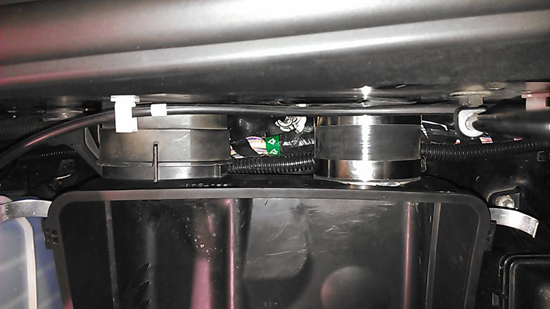
    The kit comes with a flange and flange ring for the motor compartment wall side with foam seal attached to them. The air box flange and ring has nothing on them but there are two strips of foam seal included to add to the steps on the inside and outside of the air box shown below. The air box flange has a flat spot to account for the small radius at the bottom of the air box.

    Toyota Tundra Improved MPG, HP - G-Tek Fab SABM Kit Available Install

    The kit (on the right) is clean and really blends into your engine compartment.

    The Install

    There are plenty of install threads on TundraGeeks to check out. Here is the basic install process from Dez:

    The install is very simple. All you need is a 3″od hole saw and a flat screwdriver to tighten the clamps. One flange inserts from inside the fender well and the other from the inside the stock air box. Slip the boot over the fender side flange and tighten the clamp. With the air box in place slip the other flange through the air box into the rubber boot and tighten the other clamp.

    I would have to think with some double-sided tape on the flanges, installation would be easier too. Remove the bottom half of the air box (you’ll need to for drilling anyways), then run the flange through the factory hole, and just stick it into place in the new hole you just drilled Simple enough.

    DYNO Testing

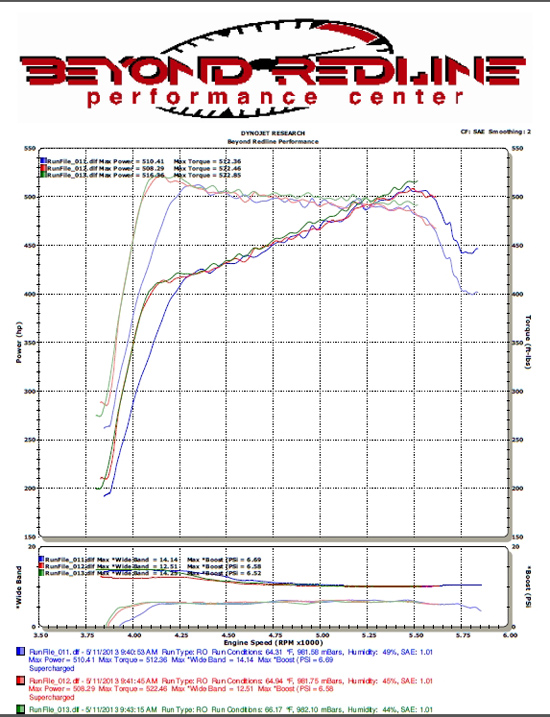
    Of course with any product like this, there has to be proof that it does indeed do what it claims. TundraGeeks member, and pretty mechanically handy guy I might add, MPToy07 took his single cab, super-charged Tundra in for a dynamometer test. Here is what he found:

    Toyota Tundra Improved MPG, HP - G-Tek Fab SABM Kit Available Dyno Testing

    The first run in blue showed 510.41 HP / 512.36 TQ, and had the highest boost pressure of 6.69 PSI.

    Second run in red was 508.29 HP / 522.46 TQ at 6.58 PSI boost, and a slightly higher ambient temperature (truck warming the surrounding area)

    Last run was in green with the SABM kit opened up, and showed 516.36 HP / 522.85 TQ at 6.52 PSI boost, and a slightly higher yet ambient temperature.

    So technically, total gain between the first run and last was only 6HP, BUT you can see the HP numbers going down as everything started warming up, then a decent size jump when the SABM kit was opened up and the truck allowed to breathe. It definitely helped in my case.

    MPG and HP Gains

    Scanning through the forums, it looks like the majority of truck owners are seeing single digit HP gains (8 or so) and 2-3 MPG increases. This is quite impressive for such a simple modification to the stock air box.

    Why does it work?

    Dez explains, “After the modification the first thing I noticed was tad bit of performance then I realized I was getting a little better gas mileage! This modification seems to allow the motor to run a little more efficient at the same time allowing it to gulp more air when you step on it.”

    Price

    The kit is being offered at an introductory level at $65 per kit plus shipping.

    The reality is that if this kit gives more bang for the buck then cold air intakes. Check out the kits here at TundraGeeks and let us know below what you think.

    Related Posts:

    The post Toyota Tundra Improved MPG, HP – G-Tek Fab SABM Kit Available appeared first on Tundra Headquarters Blog.

  • Who Should Actually Have Say on Pay?

    It’s say-on-pay season at American corporations. What shareholders have been saying, in overwhelming numbers, is yes! At 74% of the 1,471 companies that have voted so far in 2013, according to Equilar’s say-on-pay tracker, the “yes” percentage exceeded 90%. That’s up from 69% in 2012 and 2011. Only 31 companies (2%) have gotten sub-50% no-confidence votes in 2013.

    One key reason for shareholders’ positive tone is that the stock market has been doing well. Since say-on-pay hit the U.S. in 2011 (it was part of the Dodd-Frank Act), academic researchers have found that the chief determinants of how shareholders vote appear to be (a) stock performance, and (b) the voting recommendations of proxy-voting advisors ISS and Glass-Lewis, which are based in part on returns to shareholders over the previous three years. To a large extent, say-on-pay — which was introduced in the UK in 2002 and has spread to several other countries, most recently Switzerland — is a simple exercise in bandwagon-following.

    That’s not all it is, though. The size, growth, and design of paychecks do play into both the voting recommendations from ISS and Glass Lewis and the votes of shareholders. There is evidence that say-on-pay votes have led British companies to make executive paychecks more sensitive to poor performance. Say-on-pay votes do have an impact. The question is, what kind of impact?

    Say-on-pay is part of a big shift in recent years toward giving professional money managers more tools to affect the governance of (and in some cases discipline the managers of) corporations. Most of these theoretically increase the power of individual investors, too, but for the most part individuals aren’t a factor in corporate elections. Professionals appear to control somewhere around 60% of the shares of American corporations, and have an even higher percentage of the vote in corporate elections. (Individual investors tend not to vote, and while brokerage firms used to vote the shares of customers who didn’t get around to voting themselves — almost invariably siding with management — the SEC stopped allowing that practice three years ago.)

    Driving these changes is a widespread belief that more needs to be done to hold CEOs and boards accountable. That’s understandable. But it’s far from clear that professional money managers have what it takes to play the role of effective watchdog. When it comes to executive pay in particular, these people are a deeply compromised bunch.

    In the latest issue of the Journal of Economic Perspectives, economist Burton J. Malkiel argues that most of the gigantic growth in asset-management-industry profits since 1980 “is likely to represent a deadweight loss for investors.” His reasoning, as I discussed in an earlier post, is that active money managers as a group underperform the market indices and that, while active management does play a key role in setting stock market prices, there’s no evidence that today’s gigantic active management industry is doing that job any better than its much smaller precursor of three decades ago. American corporations outside the financial sector may have many flaws, but I’m pretty sure their increase in profits over the past few decades hasn’t been a “deadweight loss” to the economy.

    What’s more, the asset management industry — in particular the alternative-asset subset of hedge funds and private equity — has exported many of its pay practices into the corporate sector. The idea was to get away from paying CEOs “like bureaucrats,” as Michael C. Jensen and Kevin J. Murphy urged in a famous 1990 HBR article. It was a successful campaign: CEO paychecks came to consist mostly of stock options.

    This shift to financial-markets-based compensation had some of the promised impact — CEOs did become less risk-averse (bureaucrat-like) in their decision-making. But it also inflated what Mihir Desai has dubbed a “giant financial incentive bubble”. In Desai’s telling:

    Financial markets cannot be relied upon in simple ways to evaluate and compensate individuals because they can’t easily disentangle skill from luck. Widespread outsourcing of those functions to markets has skewed incentives and provided huge windfalls for individuals who now consider themselves entitled to such rewards. Until the financial-incentive bubble is popped, we can expect misallocations of financial, real, and human capital to continue.

    Say-on-pay has done nothing to deflate this bubble; executive pay has kept going up in the U.S. and UK. Which makes sense — most asset managers have a shared interest with CEOs in keeping top-of-the-scale paychecks high. If we wanted to have a real impact on executive pay levels, we should probably have employees vote.

    While highly paid hedge fund and mutual fund managers set the tone for the CEO-pay discussion, though, they do not as a rule get involved in the details of pay packages and say-on-pay votes. Instead, they mostly outsource the decision-making to Glass Lewis and ISS. The people who set the compensation policy guidelines at these two firms are not paid like CEOs or hedge fund managers, and lots of thought and empirical research go into their recommendations.

    They have, however, bought into the argument that the main metric of executive performance should be shareholder returns and that most executive pay should be in the form of stock. They’re supposed to represent shareholder interests, so this seems logical. But beyond the compensation bubble that stock-based pay has helped create, its incentive effects are also potentially perverse. As Roger Martin argued in his book Fixing the Game, stock prices are all about (often incorrect) expectations of future earnings. Linking top executives’ pay to stock prices thus rewards them more for creating high expectations than for running their company well. With banks there’s an even bigger problem: shareholders provide only a tiny percentage of their funding, and are thus motivated to encourage risk-taking that endangers depositors and taxpayers. So paying bank CEOs mostly in stock is a recipe for a financial crisis.

    The proxy advisers do attempt to counteract these forces somewhat, by frowning upon stock and option grants that aren’t linked to other performance metrics. But it’s not clear that their approach yields better results. One recent study by David F. Larcker, Allan L. McCall, and Gaizka Ormazabal found that the stock market reacts negatively when companies adjust their compensation policies to adhere to the proxy advisory firms’ recommendations. I’m not convinced that really proves anything one way or the other, but I do think the current state of knowledge about the impact of executive pay on corporate performance is muddled enough that standardizing pay practices to conform with what ISS and Glass Lewis think is best is probably a bad idea. Sometimes a board of directors will have a better sense than the stock market or a proxy advisory firm of how well a CEO is performing. Do we really want to make it impossible for boards to exercise discretion?

    It’s not that say-on-pay is necessarily a disaster. Unlike some other corporate-governance reforms, it hasn’t imposed major regulatory burdens on anybody (public corporations were already holding annual shareholder votes), and for the vast majority of companies it has been a nonissue. The votes are non-binding, and there’s at least a chance that they’re changing pay practices for the better.

    But it’s worth remembering that the explosion in American executive pay over the past three decades coincided with and was in part driven by an increase in shareholder clout. It may be that shareholders just had the wrong tools in the past, and say-on-pay will allow for a more surgical approach to governing CEO compensation. It’s also at least possible, though, that the shareholders have been the problem all along.

  • Apple sneaks out a brand new version of the iPod touch

    iPod Touch 6G Release Date
    In a somewhat curious move, Apple discontinued its fourth-generation iPod touch early Thursday morning and replaced it with a new model. The updated entry-level iPod touch is almost exactly like the standard fifth-generation model, but it sheds the rear iSight camera. It is also only available with one color option (silver) whereas other iPod touch models come in five different colors. Apple’s earlier fifth-generation models are available with either 32GB or 64GB of storage, but the new version ships with 16GB of internal storage. The new entry-level iPod touch costs $229 and is available for purchase immediately.

  • The Hidden Beauty of the Data Center

    Savvis_L05_DataCentre_power

    A close up of a row of lights illuminating equipment inside a Savvis data center in Slough, outside of London. (Photo of Savvis Slough Campus by Luben Solev).

    With the right perspective, the inside of a data center is a visual feast. Today we kick off The Illustrated Data Center, a regular series that showcases some of the most unique and visually striking data centers we have seen. We begin with a look at the world of blinking lights that keep the Internet running, followed by photos illustrating the “Four Cs” of the inside of a data center – Corridors, Cabling, Cooling and Containment. If you like data centers, we know you’ll enjoy the The Illustrated Data Center.

  • South Africa’s perfect storm

    Of all the emerging currency and bond markets that are feeling the heat from the dollar’s rise, none is suffering more than South Africa. A series of horrific economic data prints at home, the prospect of more labour unrest and the slump in metals prices are making this a perfect storm for the country’s financial markets.

    Some worrying data from the Johannesburg Stock Exchange this morning shows that foreigners sold almost 5 billion rand (more than $500 million) worth of bonds during yesterday’s session alone. Over the past 10 days, non-resident selling amounted to 10.7 billion rand. They have also yanked out 1.2 billion rand from South African equities in this time. And at the root of this exodus lies the rand, which has fallen almost 15 percent against the dollar this year. Now apparently headed for the 10-per-dollar mark, the rand’s weakness has eaten into investors’ total return, tipping it into negative return for the year.

    What a contrast with last year, when a record 93 billion rand flooded into the country on the back of its inclusion in Citi’s prestigious WGBI bond index.  That lifted foreign holdings of South African bonds to well over a third of the total. Investors at the time were more willing to turn a blind eye to the rand’s lacklustre performance, liking its relatively high yield and betting on interest rate cuts to help the duration component of the trade.

    As we wrote earlier this ye ar, the majority of these bond purchases by foreigners were made when the rand was much firmer. Even allowing for substantial currency hedging, calculations by UBS show that the currency is now well under levels at which longer-term bond returns would be in the red. The same likely applies to equity investments too –  in dollar terms South African stocks have lost over 13 percent, among this year’s worst performing emerging markets.

    Policymakers may have turned a blind eye to the rand’s falls over the past year,  reckoning on a net gain from a weak currency  to the export-reliant economy. But further weakness leading to a foreign investor exodus will quickly change the equation for South Africa, which has a current account deficit to finance, running at around 6.5 percent at present.

    Analysts at Citi write:

    From the pure macro point of view, it is still hard to believe in a sustainable rand rally amidst further deterioration of terms of trade (pressure on platinum, iron ore, gold prices), and some degree of contraction in volumes as well. Pressure on capital flows suggest medium term difficulty to finance the current account gap, and once again, negates any possibility of a major comeback in the rand.

    Markets are waiting to see how U.S. data is shaping up in coming days. A series of strong U.S. data is likely to fuel a further sell-off in emerging market currencies, with the rand at the forefront.


  • Data Center Jobs: Geist Global

    At the Data Center Jobs Board, we have a new job listing  from Geist Global, which is seeking a Sales Manager – U.S. Northwest  in Seattle, Washington.

    The Sales Manager – U.S. Northwest is responsible for developing a business plan and sales strategy for the market that ensures attainment of company sales goals and profitability, responsible for the performance and development of channel partners, initiating and coordinating development of action plans to penetrate new markets, willingness to participate in trade shows within assigned geographic region, and willingness to travel to other markets in assigned geographic region as the business grows. To view full details and apply, see job listing details.

    Are you hiring for your data center? You can list your company’s job openings on the Data Center Jobs Board, and also track new openings via our jobs RSS feed.

  • Feedly lets your RSS feeds live on after Google Reader’s death

    It’s common knowledge that Google is closing its Google Reader service, and that July 1 deadline is creeping ever closer. Now is the perfect time to switch to an alternative service and become acclimatized to a slightly different way of working, and the good news is that you can make the switch in minutes without having to perform any convoluted tricks, thanks to Feedly.com.

    There are two ways to access Feedly — if you’re on a desktop or laptop, you’ll need to install the Feedly for Firefox, Chrome and Safari plug-in, and if you’ve an Android or iOS mobile, you’ll want to install Feedly 15.0.1 instead (or in addition to) in order to access the service.

    Once that’s done, the hard part of migrating your feeds from Google Reader to Feedly is already over. It’s a simple case of browsing to feedly.com in your desktop web browser or opening the mobile app and signing in with your Google account. From here Feedly will seamlessly transfer all your feeds — including their organizational structure — across to its service.

    One of the reasons Feedly does this so effortlessly is because until now it too relied on the Google Reader service, but with that on the way out it’s moved quickly to set up its own backend so its seven million users — three million of which have switched since Google first announced it was dumping Google Reader — will enjoy top-notch RSS aggregation come Reader’s demise on July 1.

    To keep things as simple as possible, Feedly has introduced a new basic list view for your aggregated feeds, to closely match the basic, but simple, approach of Google Reader. You don’t have to stick with that though, as it also provides three more enhanced views for browsing your folders, including one that provides a newspaper or magazine style multi-columned layout with photos, headlines and straplines.

    Navigation is simple via the pop-out list from the left-hand side of the screen, and the mobile and web versions are designed to work in a similar way to make it easy to use Feedly across all your devices — yes, updating your feeds on one updates them on all. The web add-ins also provide a small bookmarklet that shows up in the bottom right-hand corner of screens making it easy to add new feeds, plus share stories via social media and mark them for reading later via Feedly’s own Saved for Later list.

    Even if you don’t plan to stick with Feedly, switching now is a good idea to give you more breathing space after Google Reader closes its doors, but we reckon you might find it difficult to tear yourself away once you’ve worked out all its ins and outs.

    Both Feedly for Firefox, Chrome and Safari, and Feedly 15.0.1 for iPad, iPhone and Android, are available now as a freeware downloads.

    No word yet as to the likely emergence of a Feedly add-on for Internet Explorer, one surprising omission on Feedly’s part.

    Photo Credit: Fer Gregory/Shutterstock

  • Apple Adds A New iPod Touch With 16GB Of Storage And No Rear Camera For $229

    ipod touch

    Apple today dropped a mid-cycle refresh of the iPod touch, its iOS-based iPod, with 16GB of storage on board and without a rear camera, for $229. This slots in its existing lineup between the refreshed, fifth-generation iPod touch, which has a rear camera (and a loop for attaching a wristband), and the iPod nano.

    The new iPod still has the same 4-inch Retina display you’ll find on the existing iPod touch and the iPhone, but it only comes in one color, black and silver, and it replaces the 16GB fourth generation leftover which Apple had offered since introducing the fifth-generation touch, presumably to fill the price gap between it and the 32GB $299 model of that lineup. The fourth gen models had been available for $199 for 16GB, and $249 for 32 GB, so this threads the needle between those two options in terms of price point.

    You’ll still get the front-facing FaceTime camera, with 720p HD video recording on this device, the same A5 processor, and the same battery life. The new iPod touch variant is actually .06 ounces lighter than the existing versions, however, which is probably the weight of the rear camera module component. It also boasts the same Bluetooth 4.0 and Wi-Fi capabilities as the fifth-gen device.

    As MacRumors points out, this refresh was actually predicted by KGI Securities’ analyst Ming-Chi Kuo, who has an impressive track record on products so far, though he also predicted an 8GB model, too. Still, the fact that he nailed the lack of a camera and the price point on the 16GB model is impressive.

    Apple has seemed more open to making changes that go beyond internal specs on products mid-update cycle, including the iMac, which got a VESA-compatible variant earlier this year. I suspect that Apple needed its component and manufacturing costs to get to a point where this version would become viable in terms of its margin expectations, and also that it probably benefitted from clearing the supply lines of the fourth generation model by waiting this long to introduce this variant, but it still might be indicative of a new way Apple is thinking about product releases.

  • Making music with your Mac or iOS device? Check out iRig HD and Amplitube Studio

    If you’re in the market for a way to hook your musical instrument up to your Mac or iOS device, and have a need to do multitrack recording on your iOS device, IK Multimedia has recently released two new products that may help you: iRig HD and AmpliTube Studio.

    iRig HD is an upgrade to the old iRig adapter, and Amplitube Studio is a $26 in-app purchase in the AmpliTube app. In this post, I’ll talk about my experiences using these new products and how they might integrate into my musical workflow. I’ve become quite a fan of IK Multimedia’s products over the last few years, and I was very curious to see how these new releases performed.

    iRig HD

    As I mentioned in a previous post, I’m strings-deep into band rehearsals. Aside: isn’t that new-band smell great? While I used my USB Fender Stratocaster for a lot of the practice time, I also used the iRig HD ($99) for a lot of it. I’m going to spend a lot of time saying nice things about the iRig HD, so I’m going to start by saying I wasn’t overly thrilled with its predecessor, the iRig.

    The iRig used your iOS device’s headphone jack for its input. As a result the sound quality was iffy. The iRig pretty much earned a spot in my truck’s glove box for use if I was buying a guitar and needed a tuner.

    The iRig HD solves a lot of those problems. Instead of using your headphone jack, the iRig HD ships with USB, 30-pin and Lightning connector cables. As a result, the audio quality is much improved. The only downside is that you won’t be able to also charge your device while using it.

    Unlike the Apogee Jam (which currently does not come with a Lightning connector), I found the iRig had a very solid connector to its main unit. It comes in two pieces: the main piece where you connect your instrument’s 1/4″ cable, and then the cable that connects this unit to your Mac or iOS device. The Apogee Jam’s connector was a tad flimsy. The iRig HD cable connector reminds me of the old Apple ADB connectors and fit snugly.

    Over the last two weeks, I’ve been using the iRig fairly often and haven’t had any issues with it. I think it’s well worth the $99 asking price, especially if you have an iPhone 5.

    irig_hd_connections_outline_335b

    AmpliTube Studio

    The other new product IK Multimedia will release on Thursday is an upgraded Amplitube app, with a new Studio module. Previous versions of AmpliTube had an in-app purchase for an 8-track recorder, but Studio turns your iOS device into more of a Digital Audio Workstation (DAW). While Apple has its own iOS DAW with GarageBand ($4.99), it’s a little limited. The in-app amps aren’t that good, and you have to remember to tell GarageBand to record more than a few measures if you want to record a full song. While GarageBand does support Audiobus now, it’s still a limited recording platform.

    AmpliTube Studio is a step closer. I much prefer AmpliTube’s amps over GarageBand’s, and having a better DAW within AmpliTube is a win for me. AmpliTube also comes with a decent little drum looper, where you can program intro, outro and verse drum loops. It ships with a set of Rock loops, and others are available via — you guessed it — an in-app purchase.

    The app uses a grid layout similar to GarageBand, and you can move, cut, copy, paste and punch-in. I was able to record several minutes of audio without any issues. While the audio quality certainly wasn’t pro-level, it was good enough to piece together song demos. The biggest problem I have, is trying to figure out where the Studio module would fit in my workflow. Just about every time I decide something I’m working on needs multi-track recording, I end up deciding to do it on my Mac with GarageBand. I think it will be fine if someone is on the road, and just wants to layer some guitars and vocals for a demo. What makes it very hard is there still isn’t a good way to capture multiple input sources on an iOS device.

    crump-IMG_0195

    Final thoughts

    I’m very happy with the iRig HD. It’s been a product I was eager to get my hands on since it was announced at the National Association of Music Merchants show (NAMM) earlier this year and the release does not disappoint me. It’s a product I can see myself using for quite some time.

    AmpliTube Studio earns high marks for a nicely designed product that works well. I’m just not sure how often I’d use it. That said, if I were a touring musician, using AmpliTube studio and a guitar on a tour bus sure would be convenient.

    Related research and analysis from GigaOM Pro:
    Subscriber content. Sign up for a free trial.

  • Understanding the needs of DFID’s website visitors

    I’ve worked for DFID for 6 years managing our website and intranet team. I’m based in our East Kilbride office and work closely with digital communications colleagues in London (both in DFID and across the UK government) and with our aid transparency and intranet teams here in Scotland. Now the focus of my work is on putting our new digital strategy into practice.

    Homepage of DFID website

    DFID’s homepage on GOV.UK

    We recently moved our website on to the single UK government website, which has provided both opportunities and challenges. GOV.UK is managed by the Government Digital Service (GDS) and recently won an award for Design of the Year. The opportunities are to make DFID’s policies, spending and results really clear and to place our work in the context of what the UK government as a whole is achieving worldwide.Feedback has been largely positive about the bringing together departmental websites and the clarity and presentation of the information. The challenges are to structure and link DFID’s content clearly and to ensure people can find the level of detail they need.

    One of the areas of my work I’ve always found particularly interesting is web usability testing. The GDS regularly tests the GOV.UK website with real live web users in lab conditions to see whether it is meeting their needs.  I recently observed the testing of the ‘worldwide’ section of the site. It enabled us to watch and learn how people search and navigate, what they click on and why, and how easy or hard it is to find what they need (as they give a running commentary). It never ceases to amaze me to see the different techniques people have for searching and browsing websites! It’s also illuminating and rewarding to see how familiar some of our audiences are with in-depth content that we publish.

    In our digital strategy, we’ve set a target of improving how people find and apply for funds and grants from DFID. We offer around 55 different grants that a wide variety of organisations can apply for to meet specific development goals. This is one of the most visited sections of our website, year in and year out, but there’s work to do to make the process of identifying the right fund and applying for it simpler, clearer and faster. I’m working with colleagues from other government departments and I will keep you updated on progress on this blog.

    Meanwhile, if anyone would like to give us feedback on our new website, or details of anything you can’t find, we’ll listen carefully and see how we can act on your suggestions. You can either post your comments below, or email us details at [email protected].

  • Motorola confirms X-phone launch for October

    Speaking at the D11 conference in California, Motorola CEO Dennis Woodside has confirmed the existence of the company’s long-rumoured X-phone. The device is to be called the Moto X and is set to launch in October.

    This is the first major product launch from the company since it was bought by Google in 2011. Woodside teased delegates saying, “It’s in my pocket but I can’t show it to you.” He did confirm that the phone will be packed with sensors so that it will be able to detect when it’s taken out of a pocket or when it’s travelling in a car, for example, allowing it to adapt its behavior. No details of exact specs have been released.

    The new phone will be assembled in a 45,000 square foot factory in Fort Worth, Texas — previously used to build Nokias. This will make it the first smartphone to be built in the US and 70 percent of the manufacturing will take place there, although many of the components, including processors and screens, will still be sourced from the far east.

    Making the phone in the US should give the company an advantage in terms of reduced shipping costs. It will also help to create a positive image by boosting the domestic manufacturing sector.

  • Linux Mint 15 — The best Linux distro gets better

    Linux users are a strange bunch. As a distro gets popular, it tends to lose credibility with the Linux elitists. It is much like an underground rock band. As the band gains mainstream success, the original fans view the band as “sell-outs”. For instance, Ubuntu, the most popular Linux distro, is viewed negatively by many as a beginner distro (Linux users only feel this way because of its success — Ubuntu is a wonderful OS). Linux Mint however, is the exception to the rule — it is revered by newbies and elite users alike. This is despite its long-held top spot on www.distrowatch.com and the fact that it is based on Ubuntu.
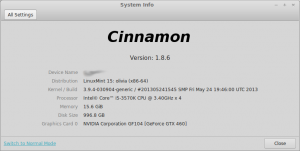
    On May 29, 2013, Linux Mint 15, codenamed “Olivia” was released. This is the newest version of Mint and is based on Ubuntu 13.04. While Linux Mint is built on Ubuntu, it removes what many users hate about that distro — the Unity desktop environment and integrated Amazon.com search.

    Instead of Unity, Linux Mint generally offers two desktop environments — Cinnamon and Mate (other environments such as KDE are usually made available later). Both of these are forks of Gnome. Mate is a fork of Gnome 2 whereas Cinnamon is a fork of Gnome 3. To clarify, a “fork” is when someone alters an existing program’s source code. A program is typically forked when someone is dissatisfied with the program in its existing state. For the purpose of this article and test, I am using Cinnamon as it is more “modern” than Mate.
    Cinnamon still offers a classic desktop interface — much like Windows 95 through Windows 7. The user clicks on a button in bottom left of the screen and is presented with a listing of the installed software. The programs are opened in windows and can be maximized or minimized.

    While many may find this to be boring, it adds to the allure of Linux Mint. This classic styled desktop interface is what makes Linux Mint so accessible — Windows users can jump right in.

    Linux Mint comes pre-installed with some wonderful programs including:

    • Firefox — for web surfing
    • GIMP — for photo editing
    • Banshee — for music
    • Pidgin — for instant messaging
    • xChat — for IRC
    • Libreoffice — for office work

    All of these are great choices. However, users can easily add additional software using the software manager or by installing .deb files from the web. I personally installed Google Chrome from the web and Audacious from the software manager. While the Linux Mint software manager is not as full-featured as Ubuntu’s, it is far less bloated and offers better performance. I prefer it to Ubuntu’s by far.

    What’s New in Olivia?

    One of the first new things I discovered was the new login screen with Mint’s MDM. It was very aesthetically pleasing with pictures of clouds —  the little things do matter. This polished login screen tells the user that this is a cared-for distro. According to Mint, this screen can be customized, including animations. However, I did not see a reason to do this on day one of using the OS.

    I also found a new feature called “Desklets”. These are just desktop widgets. I was excited for this new feature until I tried it. The first desklet that I added was a clock. It was a very basic widget that displayed a clock on the desktop. Unfortunately, it displayed the time in 24-hour format (we Americans call it “Army Time”) and there was no way to change it to AM/PM. It ignored the fact that I changed the system time to AM/PM — bummer. The second desklet I tried was an XKCD comic widget. I love the comic but I hate the desklet — it just took up space. Also, I found that each comic was being stored as a file in my Pictures folder, something I did not appreciate. I quickly removed both of these desklets. While the desklet feature is nice to have, I am disappointed with the quality of the launch day widgets. I’m sure they will get better but it was a poor first experience.

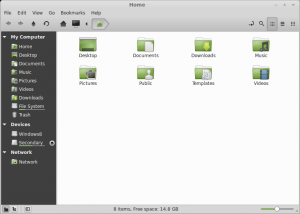
    Also new in Mint is a new version of the Nemo file manager. To those that don’t know, Nemo is a forked version of Gnome’s “Files” program. I normally consider myself a purist when it comes to Gnome programs. However, Nemo greatly improves upon the original — it is now vastly superior to Files. The UI is far better including a new bar that sits under each drive and tells you how much space is left. Again, it’s the little things that matter sometimes.

    Another new feature is a lock screen away message. This is a neat addition that lets you add an away message to your lock screen. I don’t see the point of this really. I guess if someone walks up to your workstation, they can read your screen to see where you are. However, most businesses frown at users getting up from their seats to go to a workstation (email or messaging should be utilized). Even if someone did walk up to your workstation, chances are, your monitor will be asleep/off. I found a bug with this feature as well. I set an away message when locking my computer. However, it did not clear the message when I unlocked it. So, an hour later when I walked away without manually locking, the system auto-locked. My previous lock message was now displaying. I could see a user putting “Out to Lunch” and then having that display all day long, whenever they leave their desk. Hopefully their boss doesn’t get mad!

    Conclusion

    Do I really think Mint 15 Olivia is the best Linux distro today? Absolutely and unequivocally. It just works and it works well. That is the most important aspect of any operating system — stability and dependability. Mint builds on the stability and foundation of Ubuntu and takes it a step further by polishing and perfecting the user interface and overall experience. The secret to Mint’s success is that it listens to and focuses on its users. If only all distros did the same…

    Photo credit: Volosina/Shutterstock

  • Samsung Galaxy S4 Mini is a sheep in wolf’s clothing

    On Thursday, South Korean manufacturer Samsung announced a new smartphone part of its upscale Android lineup, called Galaxy S4 Mini. The handset is marketed as a smaller variant of the company’s current green droid flagship, the Galaxy S4, but don’t expect any of the latter’s bells and whistles.

    The Galaxy S4 Mini is shorter, narrower, thinner and lighter than its predecessor, the modest Galaxy S III Mini. However, it can easily be compared to the Galaxy S II (the company’s older Android flagship) rather than newer halo devices when it comes to hardware specifications. It’s a sheep in wolf’s clothing and not the other way around.

    “We want to give people more choices with Galaxy S4 Mini, similar look and feel of Galaxy S4 for more compact and practical usages”, says Samsung CEO JK Shin. “The new Galaxy S4 Mini provides consumers with a new way to enjoy the flagship Galaxy S4 experience”. So let’s compare the two and highlight the commonalities.

    The Galaxy S4 Mini comes with a 4.3-inch Super AMOLED display with a resolution of 540 by 960; 1.7 GHz dual-core processor; 1.5 GB of RAM; 1,900 mAh battery; 8 MP back-facing camera; 1.9 MP shooter on the front; 8 GB of internal storage; microSD card slot; Wi-Fi 802.11 a/b/g/n; GPS with Glonass support; Bluetooth 4.0; NFC (Near Field Communication) in the 4G LTE variant; 4G LTE and HSPA+ cellular connectivity. The smartphone runs Android 4.2.2 Jelly Bean and comes in at 124.6 x 61.3 x 8.94 mm and 107 grams. There is also a dual-SIM version which is one gram heavier.

    The Galaxy S4 on the other hand sports a 5.0-inch Super AMOLED display with a resolution of 1080 by 1920; 1.9 GHz quad-core Qualcomm Snapdragon 600 or 1.6 Ghz Exynos 5 Octa processor; 2 GB of RAM; 2,600 mAh battery; 13 MP back-facing camera; 2 MP shooter on the front; 16 GB, 32 GB or 64 GB of internal storage; microSD card slot; Wi-Fi 802.11 a/b/g/n/ac; GPS with Glonass support; Bluetooth 4.0; NFC; 4G LTE and HSPA+ cellular connectivity. The handset runs Android 4.2.2 Jelly Bean and comes in at 136.6 x 69.8 x 7.9 mm and 130 grams.

    Bar the usual suspects (sensors, connectivity options and different size and weight), in the hardware department, the Galaxy S4 Mini has little in common with the Galaxy S4. The latter has a larger and higher resolution screen, faster processor, larger battery, bigger cameras and more internal storage.

    Both run Android 4.2.2 Jelly Bean with a similar TouchWiz experience. On top of the stock green droid version, the Samsung packs features like KNOX (separates personal and work content and beefs up security), S Translator, Link, Adapt Display, Adapt Sound, S Travel, S Health, S Voice and Story Album among others.

    The Galaxy S4 Mini arrives in two color trims, White Frost and Black Mist (obviously, shared with the Galaxy S4). There is no word yet concerning pricing or availability.

    The Galaxy S4 Mini’s strengths mostly lie in software features and design, both of which are quite similar to the Galaxy S4. Are the two traits attractive enough for those seeking a less expensive alternative to Samsung’s Android flagship?

  • With 1M new downloads in 3 months, Node.js momentum just keeps on keeping on

    It’s not surprising that Strongloop would tout the traction Node.js is getting in the market – the startup was founded a few months ago to bring commercially supported versions of the language to Red Hat Linux, MacOS, Ubuntu and Windows.

    But even more neutral observers give the server-side JavaScript framework its due. After all, the four-year-old Node.js is great for writing high-performance servers that need to handle APIs and fast data ingress and egress.

    Here’s a sampling of  Strongloop’s new fun facts about Node.js:

    • There have been more than 1 million downloads of the latest V.0.10 release in three months.
    • Big name users include Dell, General Motors, Dow Jones, Walmart, Yahoo and Airbnb.
    • Node is the second-most popular project on Github.
    • From 2011 till now, Indeed.com job postings for Node.js skills soared 22,500 (!) percent.

    For another, earlier take on why developers flock to Node, check out this Stacey Higginbotham post from 2011.

    Related research and analysis from GigaOM Pro:
    Subscriber content. Sign up for a free trial.

  • Has software version numbering spiralled out of control?

    Software versioning has changed a great deal over the years. It used to be that version 1 of an application would be released and it would be followed in around a year’s time by version 2. You might well find that updates would be released in the interim — versions 1.1 and 1.2 for example — but it didn’t take long for things to start to get more complicated.

    Minor versioning changes became more and more common, so you might well encounter versions such as 1.2.13. In many respects this was a good thing. It was easy to compare the version of an application you had installed with whatever the latest version was.

    If there was a discrepancy, the level of difference was indicative of how important updating was; being x.x.01 versions behind was obviously less of a concern than finding yourself x.1 behind.

    But things were bound to change. Microsoft decided that labelling its operating system 3.11 was not meaningful to users and introduced year based versioning. Windows 95 was a big change for the OS so this was as good a time as any to introduce a new numbering system.

    Going down this route was something of a double edged sword. From a software publisher’s point of view this system made it easier to highlight just how out of date your software was. Still using Windows 95 in 1999? You immediately knew that your operating system was Old. With a fully warranted capital O.

    It made the release of Windows 98 seem ultra-important; who wanted to be the one using an OS that was years out of date? But it wasn’t that simple, particularly when other publishers got in on the act.

    This seemingly straightforward numbering system masked the “real” version that was being used and made it harder to determine whether or not all of the latest updates had been installed.

    Then things turned crazy. Windows Me, XP, Vista: meaningless names that revealed nothing about the precise version that was being used. Again, this was a problem that was exacerbated when other software houses followed suit.

    But it wasn’t long before common sense returned. Windows 7 brought a semblance of order to things, but publishers of other software had other ideas. It was still the case that different publishers used different systems (this is true now, with some applications having regular numbers, others being named after years, and others bearing some arbitrary tag).

    When things started to get really silly was when the new “browser wars” kicked off. Web browsers, like many other types of apps, tended to receive major updates on a relatively regular basis, but there could be gaps of many months (or years in the case of Internet Explorer) between releases.

    But it was the battle between Firefox and Chrome that really started to make a farce of version numbering. Both browsers’ update cycles were dramatically accelerated, with a major new version scheduled every six weeks. This is why we find ourselves in the absurd position of having Chrome at version 27 and Internet Explorer at 10.

    Joking aside, is Chrome really 17 versions more advanced than Microsoft’s browser? I’m far from being a fan of IE, but it’s not that bad!

    Numbers seem to have become the most important aspect of product names with every company keen to appear to offer the newest and shiniest toy. It’s not just browsers who are guilty of this. Security tools are major culprits. You might think that the 2014 version of an app would be due for release in a little over half a year, but in fact some have been available for quite some time now.

    Returning to web browsers — but it is something found in other areas too — version numbers also seem to be getting longer and longer. 1.x.x is not detailed enough these days, it needs to be 1.xx.xx.xx.xx.7562. But how much of an improvement is this over version 1.xx.xx.xx.xx.7561?

    Version numbering is out of control. Minor changes that would have previously resulted in an incremental increase to version x.x.1 of an application are now fanfared into the spotlight and assigned a full number version increase. It is nothing short of insane.

    It’s not going to be long before version numbers start to hit triple figures, and for what? A new icon? A re-labelled menu option? Actually, we already have Office 365. A completely nonsensical name that conveys literally nothing about where this particular version of the office suite fits into the chronology of things.

    The desire to appear newer than the competition is understandable, but is it good for the end user? Have the faster development cycles resulted in better software or just more versions?

    It could be argued that big version number changes should be reserved for big changes, not used just because it’s time for an update. There is a real risk that ever increasing version numbers get confusing, turning software releases into a willy-waving competition between rival companies.

    Have version numbers been rendered meaningless? With automatic updates enabled do you need to know the exact version number you’re working with? Share your thoughts below.

    Photo credit: Jozsef Bagota/Shutterstock

  • File sharing? Streaming media? Remote access? Blogging? Weezo does it all

    In theory, a free online storage account sounds like it should be a great way to share files with others. And this can be true, at least sometimes, but there are complications. Like having to upload your data first, for instance. And then trusting its security to your service provider.
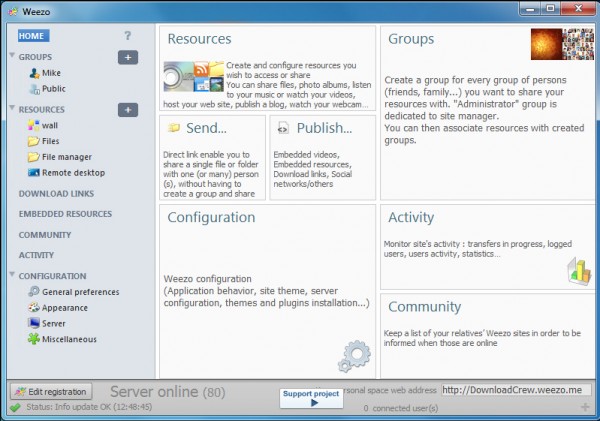


    If these are issues for you, though, you could try another option: installing Weezo and allowing it to run a secure server on your own PC, making selected files and folder available to whoever you like. This is far easier to get working than you might expect. And it’s just a small part of what this interesting free program can do.

    Weezo installation is surprisingly straightforward. Despite the fact that it’s installing and configuring Apache, you don’t have worry about the technical details. The installer normally handles the setup and configuration process for you with the absolute minimum of hassle.

    Weezo does its best to simplify remote access to your system, too. In particular, you don’t have to find a way to communicate your IP address to others. Create a Weezo account and you’ll be given a URL (YourName.weezo.net or www.weezo.net/YourName) which can be used to access whatever it is you want to share. (Although if you don’t want to do that, sharing your server IP address remains an option.)

    The next step is to decide what you’d like to make available, and there are plenty of options. You can create a Photo Album to share your latest photos with friends and family, for instance. Video and Music options give others access to your chosen files (and that’s instant access via streaming, too — no need to download). You can make your webcam available online, your bookmarks, create a basic blog, and more.

    There’s some depth to this functionality, too. A shared Photo Album, for example, isn’t just another thumbnail gallery. You can optionally allow visitors to download the originals (or not), add comments, even upload their own photos.

    You don’t have to use Weezo as a sharing tool, of course — it’s just as handy when kept for yourself. You might use the program as an easy way to stream your music collection, perhaps. You can also set up important files and folders so they’re available from anywhere, while a Remote Desktop allows you to take control of your system from over the internet (you can start up or shut down the system, run DOS commands, manage Weezo and more).

    Running any kind of server does introduce security issues, of course, but Weezo does its best to minimize them. Just the fact that it’s based on Apache is a good start. Whatever resources you make available will be password-protected. There are multiple authentication schemes to help organize things just as you’d like. And you can even enable SSL encryption for an extra layer of security.

    It’s not all good news. Although Weezo does a good job of getting the core server working, an unintuitive interface means configuring it afterwards can be a challenge, at least initially.

    Once you’re over the worst of the learning curve, though, life gets a lot easier, and on balance Weezo proves a versatile and effective file sharing and remote access tool.

    Photo credit: Modella/Shutterstock

  • Samsung Confirms 4.3″ Dual-Core Galaxy S4 Mini To Widen Access To Its Flagship S4 Brand

    00_GT-I9190_Front_white_Standard_Online

    Samsung has officially confirmed the Galaxy S4 Mini, following a brief leak earlier this month. The new handset takes the name of its current flagship smartphone, the Galaxy S4, but couples it with more mid-range specs to extend the reach of the flagship brand to a larger pool of consumers. It’s a strategy Samsung also deployed with its prior flagship, the Galaxy S3, taking the wraps off a Galaxy S3 Mini last year.

    Indeed, Samsung’s overall smartphone strategy is about producing scores of iterations at various price points and screen sizes in order to saturate the market with as much of its hardware as possible. A strategy that, coupled with its massive marketing budget, continues to be extremely successful for the Korean electronics giant, making it far harder for other Android OEMs such as HTC to compete with their far more modest device portfolios.

    As with the majority of Samsung’s devices, design wise you’d be hard pressed to distinguish the Galaxy S4 Mini from any other recent Samsung device. Its smaller size being the most distinguishing feature vs the flagship S4. The Mini has a 4.3″ qHD Super AMOLED display vs the 5″ pane on the flagship S4. At 4.3″ the Mini is not actually that small, certainly not compared to some of Samsung’s budget devices, but the target here is users who might not be comfortable with the phablet-sized screen of Samsung’s current flagship but still want something flashy enough to look like a flagship.

    Under the hood, the S4 Mini has a 1.7 GHz dual-core chip, rather than the quad-/octa-core of its big brother. There’s 8GB of internal memory and 1.5GB of RAM. The rear camera is 8MP and the front-facing lens is 1.9MP.  Samsung says it will be offering a 4G version of the device, as well as a 3G and dual-SIM version — based on what makes sense for each market.

    Features wise, Samsung says the S4 Mini supports “many” of the same features as found on the flagship S4 — including Sound&Shot, Panorama Shot and Story Album, on the camera software side. Other confirmed apps include Group Play, ChatON, S Translator and WatchON. The Mini clearly lacks the full gamut of software services poured onto Samsung’s flagship but most smartphone buyers aren’t going to be fussed about a few lacking apps, especially as the Mini’s price-tag should also be a bit more modest.

    There’s no official word on pricing or a full list of confirmed market availability — but expect the S4 Mini to land wherever the S4 has, and certainly to head to the U.S. and the U.K.

  • Rejoice! The Start button WILL return in Windows 8.1

    Ringo Starr admits he gets frustrated that all people ever want to talk to him about is The Beatles. The developers of Windows 8 must feel similarly annoyed that despite all the changes in the new OS, all anyone wants to talk about is the Start button.
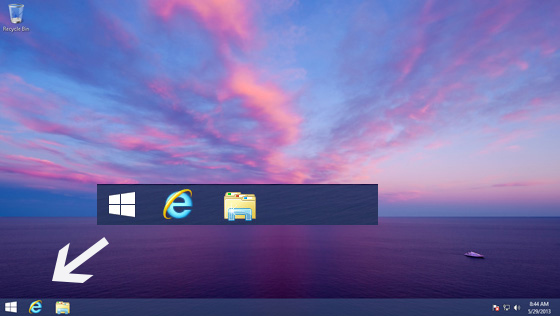
    Windows 8 gets a lot of things right, and a lot of things wrong, but the lack of a Start button and menu in the desktop is the one thing that seems to unite all the haters. It’s symbolic of how badly Microsoft judged our attachment to the status quo in its rush to embrace the future. Fortunately with Windows 8.1 Microsoft gets a chance to fix things and give us the OS we should have had in the first place.

    Windows 8.1 will sport a lot of tweaks, including additional tiles sizes, the ability to personalize the Modern UI, and split-screen apps. It also introduces new built in apps and Internet Explorer 11. You can find out more about what’s on offer here.

    But of course all anyone wants to talk about is the Start button, so let’s do that. Yesterday Microsoft blogger Paul Thurrott confirmed the return of the button in the Windows 8.1 Milestone Preview and showed the first screenshots of it.

    He also confirmed that boot to desktop was in the new build, and off by default. His posting was light and sadly pretty devoid of important details, like exactly what happens when you click that button.

    However, Mary Jo Foley at ZDNet says reliable sources tell her the Start button will have an option to go directly to the Apps List (the list you see in Windows 8.1 when swiping upwards) instead of the Start Screen when clicked or tapped. So instead of a Windows 7 style menu, you’ll get a full screen of programs you can launch. These icons can be ordered by name, date installed, or usage.

    While a lot of people will hate anything that isn’t a straight up Start menu, I actually like this approach, and provided Foley’s information is correct (and I believe it is) I think Microsoft has actually come up with a decent compromise. Tap the Start button, and select the program/app you want. Sounds like a Start menu to me.

    However, the beauty of the Windows 7 Start menu is you can launch other programs, and access folders and settings without losing sight of any open windows. The Apps page is full screen, which will — understandably — annoy some people.

    What do you think about the news that Windows 8.1 will reintroduce the Start button, and is the suggested compromise good enough in your opinion? Comments below please.

    Photo credit: kurhan/Shutterstock