Blog

  • Samsung Galaxy S 4 initial setup and changes to TouchWiz

    Samsung_Galaxy_S_4_Initial_Setup

    When you first turn on any Android phone, there are always a few things to set up like your Gmail account and location settings. The Samsung Galaxy S 4 is a little different since there are so many new features with the latest version of TouchWiz. To help users, Samsung added a quick settings menu that will appear during your initial setup of the device. This is where you will be able to turn on or off specific things like Air View, Air Gesture, Smart Scrolling, and so on. You will also have the opportunity to learn about each feature as well.

    This video guide we will show you the initial setup process as well as tell you about the major changes with TouchWiz. Most of what you have been used to in the past will be the same, but Samsung added some enhancements like an improved power toggle menu, a newer look to the settings menu, a brand new sidebar for multitasking, and a new quick launch menu as part of the stock Browser. We won’t get into the major software features in this guide, just the changes to the TouchWiz user interface for now. Don’t worry, we have plenty of guides planned, so keep an eye out. Hit the break for the full video walkthrough.

    Click here to view the embedded video.


    Come comment on this article: Samsung Galaxy S 4 initial setup and changes to TouchWiz

  • HTC One Review: The Competition Is Fierce, But HTC’s New Flagship Rises To The Challenge

    htc-one-review01

    Look, it’s no secret that HTC knows how to put together a nice phone. Despite the quality of its wares though, HTC spent most of 2012 releasing disappointing earnings statements and being outflanked by much larger rivals — what’s a company to do in a situation like that? The answer, according to CEO Peter Chou, was to double down on innovation and design in hopes of creating a device that would truly resonate with consumers that were already up to their necks in Android phones. That device was the HTC One.

    Even so, plenty of questions remain. Is it really all that it’s cracked up to be? Does the One really have a chance at changing HTC’s fortunes?

    To answer all of the above: yes. If you’re in a rush you can skip to my final thoughts here but make no mistake: the HTC One is the sort of device that deserves to be talked about.

    • 4.7-inch, 1080p Super LCD3 display
    • 1.7GHz Quad-core Qualcomm Snapdragon 600 chipset with 2GB of RAM
    • “Ultrapixel” rear camera, 2.1-megapixel front-facing camera
    • Available with either 32GB or 64GB of internal storage, no memory card slot
    • NFC
    • Sealed 2,300 mAh battery
    • 32GB model available for $199 with a two-year contract with AT&T and Sprint, while T-Mobile offers it sans contract for $579. The $299 64GB version is an AT&T exclusive.

    Test notes: Sprint has provided me with a pre-release version of the One to review, and HTC has given me an unlocked international model to play with. They’re nearly identical, but I’ll point out any pertinent differences as they come up.

    I was smitten with the One’s design from the moment I first manhandled the thing back in February, and that feeling has never really gone away — the One is a truly stunning device both to hold and to look at. Samsung could really learn a thing or two from these guys.

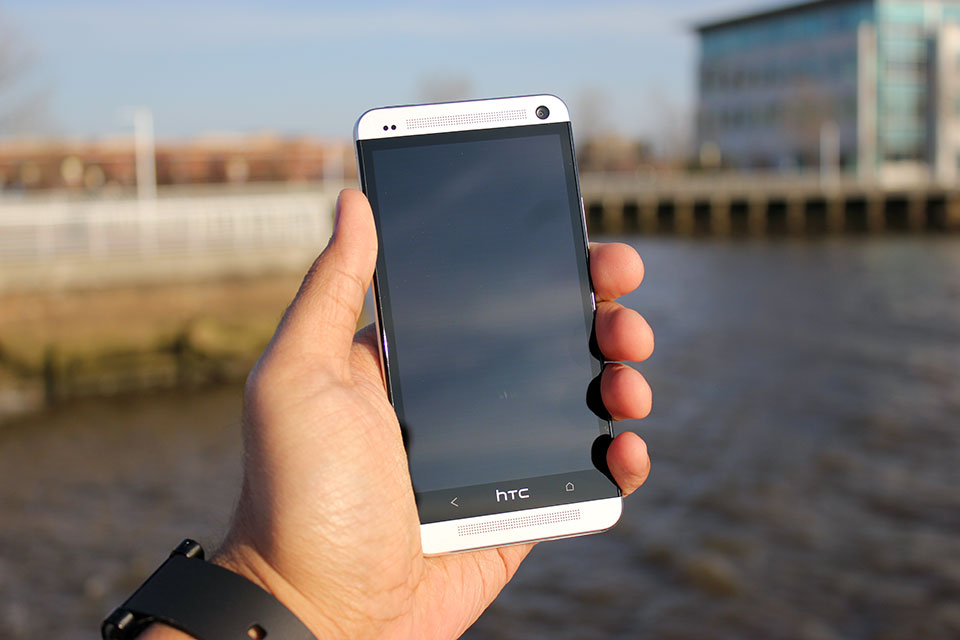
    Before I get too effusive with my praise, let’s take a quick tour around the device itself. The One’s face is dominated by a 4.7-inch 1080p Super LCD3 display that’s flanked on all sides by a thin black bezel. Sitting directly above and below the display are the One’s unfortunately named Boomsound stereo speakers (a small notification LED will occasionally blink at from the top grille), and the 2-megapixel wide-angle front-facing camera rests on the top-right corner of the device’s visage.

    The One’s sides and bottom are fairly nondescript — the volume rocker, microUSB port, and SIM slot are nestled along the right, bottom, and left edges respectively, while the top edge hosts a headphone jack and a sleep/wake button that doubles as an IR blaster for controlling your television.

    Phew. Now that I’ve run through the laundry list, permit me to gush a bit about how the One looks.

    To say that the One is understated in its design would be putting it mildly; the thing is terribly handsome in a stark, minimal sort of way. It’s worth pointing out, though, that the One isn’t actually that big a step forward from some of its predecessors when it comes to physical design. If anything, it represents the refinement of a design formula that HTC has been working on for the past 9 or 10 months with devices like the Butterfly and its American cousin the Droid DNA. Familiar elements like elongated speaker grilles, textured volume rockers, gently sloping backs, and highlighted camera pods seen in those earlier devices all make appearances on the One, but HTC has clearly upped the ante in terms of quality and construction this time around.


    The first thing you notice as you pick it up is how light it is — at 143 grams it’s only a hair heavier than the Droid DNA, and (thankfully) the One’s minimal heft belies just how sturdy it feels. That’s all thanks to the device’s unibody aluminum chassis, which HTC says takes somewhere around 200 minutes for a CNC machine to carve out the One’s frame from a single block of aluminum.

    That’s a considerable chunk of time for HTC to spend while some of its rivals spit out handsets like it’s nothing, but the end result is a device that feels as reassuring in your hand as HTC’s would-be savior should. That said, you still won’t want to toss the One around all willy-nilly. The white plastic polycarbonate that runs around the device is flanked on both sides by polished, chamfered aluminum edges that are prone to picking up scuffs and dings, though some people won’t care nearly as much about that as others.

    Samsung could really learn a thing or two from these guys.

    The One isn’t without its share of question marks, though. If you’ve used pretty much any popular Android device before spending some time with HTC One, then one little omission will probably stick out like a sore thumb. I’m talking of course about the lack of a third soft key — the company opted to stick solely with Back and Home keys separated by an HTC logo.

    If you go by the company line, the choice was made in an attempt to simplify how users interact with the One. I’d actually argue that dropping that extra button is more counterintuitive than anything else since most current Android users are likely familiar with the three-button layout, but it doesn’t take too long to readjust to the two-button lifestyle.

    And of course, HTC has once again seen fit to exclude a microSD card slot in its latest flagship handset. I can’t really be surprised at this point considering this is a recurring theme for HTC, and it’s not as big an issue as it was in other devices since HTC offers 32GB and 64GB versions of the One, but I’ve often looked to expandable memory as a hallmark feature of an Android device, and I’m sad to see HTC skipping them completely on its top-tier handsets.

    Both versions of the One I’ve played with come loaded with Android 4.1.2, but as always, HTC has done its level best to paint over the stock UI with its custom Sense interface. The Taiwanese company has been diligently trying to trim the fat from Sense for months now with largely positive results; Sense isn’t the kludgy, overwrought beast it used to be, and Sense 5 represents HTC’s biggest leap forward to date.

    Put very simply, Sense 5 looks great. Stock icons and the once-bubbly default keyboard and dialer have been designed to look flatter and less skeuomorphic, and HTC has dumped its usual font in favor of Roboto Condensed, which imbues the UI with a much cleaner vibe. The app launcher has gotten quite a facelift, too — a persistent time and weather widget lives at the top of the screen, and right out of the box you’re treated with a spacious 3×4 grid of applications. Tinkerers can easily fiddle with those particulars should they prefer a more densely packed grid like I do, and you can easily switch between ordering apps by name, recency of use, or whatever other convoluted scheme you can dream up.


    Of course, some changes are more drastic than others. Take BlinkFeed for instance — in one fell swoop, HTC has decided to try and reinvent the Android homescreen. The concept is simple: the way HTC looks at it, smartphones are content-consumption devices so BlinkFeed was designed to surface content based on your interests and your social connections with as few steps as possible.

    Getting Blinkfeed set up is painless enough — you can tailor your feed by selecting from some broad areas of interest (think gaming, music, politics, etc.), and by opting to receive content from your social networks, apps, and a handful of featured sources like ESPN, Vice, and Reuters (disclosure: some of Aol’s media properties are featured sources). From there, all of that stuff gets splayed out into a vaguely Flipboard-y grid for your immediate perusal, and all it takes to refresh your feed is a downward swipe.

    It all makes sense on paper, but Blinkfeed in practice leaves much to be desired. Why can’t I add my own content sources? Why can’t I just turn it off rather than manually disable each content feed and switching its default homescreen status off? The likely answer to both of these questions is a familiar one: it’s all about simplicity.

    BlinkFeed wasn’t necessarily designed with the power user in mind — we spoke to HTC’s Jeff Gordon just prior to the One’s launch, and he made the feature out to be a consummate time-waster, something people use when they find themselves stuck in a queue somewhere. That’s about the only time I bothered to use it to be quite honest; the rest of the time I would just fire up Flipboard or Twitter and get my content straight from the sources I wanted it from. Fortunately for me, more traditional Android homescreens are but a single swipe away, but you can only have up to four of them.

    The unlocked international model doesn’t have much in the way of bloatware — just a few preloaded apps like TuneIn Radio and a Kid Mode courtesy of the folks at Zoodles — but the Sprint variant doesn’t fare quite as well. Expect oodles of carrier-loaded apps that range in quality from mildly useful (Lookout Security is nice to have around) to the nearly pointless (do we really need the Sprint Music Plus store when Google Play is right there?). Most of them can be uninstalled without much trouble at all, and those that you’re stuck with (I’m looking at you, Sprint Zone) can be easily hidden thanks to the revamped app launcher.

    As you’d expect from a device that sports a cleverly-hidden IR blaster, the One also comes pre-loaded with a remote control app developed in partnership with Peel. I’ll be the first to admit that I’m no TV buff, so my experience with the remote control feature was short and sweet — the setup process was over in a matter of moments, and the One succeeded in turning my television on and changing the channel and volume a few times. After popping in my zip code and selecting my cable provider, the app also provided guide data for all the shows I don’t watch. While it’s unlikely to replace your actual remote, it works like a charm and that’s frankly a lot more than I was expecting.

    With the One, HTC has officially bowed out of the megapixel race. It’s easy enough to write off the word “ultrapixel” as a spurious bit of marketing fluff, but the One’s camera manages to prove that pixel size really does make a difference.

    Photos taken with the One look phenomenal when viewed on the phone’s crisp 1080p display — they’re nicely detailed and colors were vivid (perhaps a little too much so, more on that later). Sadly, a bit of that impact is lost when you transfer them to PCs or televisions. The shift towards fewer larger pixels instead of more smaller ones sounds like a good idea, and it mostly is, but there’s a sort of fuzziness apparent in some of the One’s photos that keeps my support from being full-throated. I suspect it’s an issue that won’t matter to a majority of users — the results are definitely more than adequate for [insert social network name here], and I’ve found the shots the One takes are still more pleasing than many of its competitors. If anything videos seem to fare little better; my test clips were all crisp and bright, and to my surprise the microphones blocked out plenty of background noise.

    Speaking of competitors, the camera sensors in most of them struggle in low light but the One manages to dodge those issues rather nicely. It’s surprisingly good at capturing light even when it’s in short supply and manages to do so without introducing much grain into the situation. It’s worth noting that the ability for the One’s sensor to pick up as much light as it does has an impact on color reproduction. Consider the comparison shot with the iPhone 5 above — the One captures more of the scene, but some details (like the tree branches in the bottom left corner of the photo) are lost because of overexposure.


    As far as the Camera app itself is concerned, it remains remarkbly clean and easy to operate. Switching between the front and rear cameras takes a single swipe, popping into Zoe mode takes a single touch, you see where I’m going. Beyond the simplistic interface though is an impressing array of settings — you can muck around with ISO, white balance, timer, scene modes, face detection, and even the review duration for recently snapped photos. Honestly, I find the idea of layering filters on top of perfectly good photos to be a little ridiculous, but the One has plenty of them for you Instagram-types to fiddle around with too.

    And then there are the aforementioned Zoes, those peculiar little three second video clips that HTC has started to push with the One. When I first played with the One, I was downright dismissive of the concept. I’m still not entirely sold on them, but I’ve grown just a little more appreciative of the notion. My biggest issue with them is how you’re supposed to manage the things. It’s simple enough on the One itself — the short clips are accessible from the Gallery app and you can use the HTC Share service to post them online for 180 days, but the real problem emerges when you try to pull them off the device through USB. Zoes are locally stored as very brief video snippets but as a series of stills as well, so pulling them off the One en masse feels a bit more labor-intensive than it should.


    Goodness, it seems like just yesterday that finding a 1080p display on a smartphone was a rare and wondrous event. These days nearly all the major Android players have worked those sorts of high-resolution panels into their new flagship phones — just look at the Optimus G Pro, Xperia Z, or Galaxy S4 to name a few.

    Even with such notable rivals to consider, the One’s 4.7-inch Super LCD3 panel is perhaps the best smartphone display I’ve ever seen. Text and high-res images were remarkably crisp (not a surprise considering the display sports a pixel density of about 474 ppi), and the colors are bright and accurately reproduced. While some displays pump up color saturation to lurid levels and others exhibit a pale cast, the One strikes a thoughtful balance between those extremes.

    I haven’t noticed any distortion or discoloration despite seeking out some of the most awkward viewing angles — in short, the One’s display is a real pleasure to ogle.

    One of my biggest issues with the 5-inch 1080p panel found on the Droid DNA was that it just wasn’t all that bright compared to the competition — it was perhaps the most notable miss for an otherwise impressive display. Thankfully, HTC has addressed that issue with the One. When screen brightness is cranked all the way up on both devices, the One’s display is noticeably more luminescent than its cousin and shines on the level of devices like the Nexus 4 and the iPhone 5. It may seem like a trivial upgrade, but the weather’s getting nicer and that bump in brightness has definitely helped outdoor visibility, too.

    Let’s just get it out of the way now: with a Snapdragon 600 chipset and 2GB tucked away in its handsome frame, the One was able to handle every task I threw at it with aplomb. Swiping back and forth between BlinkFeed and my more traditional homescreens were utterly seamless, as was scrolling down long webpages, and crafting ornate rococo structures in Minecraft Pocket Edition. If you’re the type that prefers numbers to anecdotes, the One’s five-run Quadrant average topped out in the low to mid 12,000s, handily blowing away devices like the Nexus 4 and the Droid DNA. Running Geekbench on the thing yielded similar results: the lowest of three trials was a 2728, which puts it on top of the performance heap again… for now anyway. It won’t be long at all before other devices start to catch up in terms of pure power, but there’s little question that the One will be able to handle nearly anything you load onto it and that’s really all that matters.

    All that power comes at a cost though. The One managed to stick it out for four hours and 21 minutes of our standard battery test, in which the device is made to run through an endless cycle of Google image searches over the wireless data connection with the screen lock turned off and display brightness set to 50%. Granted, less than 4.5 hours doesn’t sound all that great, but bear in mind that’s nonstop usage — in my experience, the One always managed to make it through a full work day’s worth of checking emails, firing off text messages, playing music through the Boomsound speakers, and playing the occasional game with at least a little juice left over.

    I won’t dwell too much on network performance for two reasons: your mileage will almost certainly vary from mine, and Sprint can be frustratingly sketchy in my particular corner of New Jersey. In case you were itching for a dose of Schadenfreude for the day, I was never able to pull speeds greater than 2 Mbps down and my upload speeds topped out at 3.5 Mbps — that’s not really the One’s fault but man, that really hurt. On the upside, call quality was just peachy on both version of the device I tested (you know, in case you actually wanted to use this thing as a phone).

    I need to take a minute here and touch on one of the most impressive features HTC has baked into the One, and it may not be what you expected. I’ve reviewed my fair share of phones during my tenure here at TechCrunch, and with few exceptions they’ve all mostly let me down when it came to sound reproduction and quality. The One simply doesn’t — it’s got the best speakers on any smartphone I’ve ever used. Granted, that’s not really saying much since most smartphone speakers are downright wimpy, but the One’s BoomSound speakers managed to pump out crisp, loud audio along with a surprising amount of bass too. The jaunty bassline in Paul Simon’s You Can Call Me Al was bright and easily discerned, and not once during my testing did the One fall prey to the dreaded muddy audio syndrome.

    I can boil the preceding 3,000 or so words into a few brief sentiments for you to chew on: the HTC One is easily the best device that the company has ever crafted, and it’s perhaps the single nicest Android phone I’ve ever used. Despite some minor faults, I haven’t so much as picked up any of the other Android smartphones scattered around my office during my time with the One unless I absolutely had to. It’s really that good.

    And yet, after releasing a smartphone to near-universal acclaim, HTC’s future is still unclear. As Matt pointed out a little while back, building the perfect phone just isn’t enough anymore. These days it seems like technical expertise and the achievements that stem from them can often be overshadowed by lavish ad campaigns and the ability to churn out devices at a breakneck pace. That said, the mobile industry has never really been what you could consider meritocratic — the market is fast and unforgiving, and there aren’t many companies that have learned that lesson as clearly as HTC has.

    There’s no question that the One will be facing some very serious competition in short order, but if you’re looking to pick up a new phone in the weeks or months to come it’s definitely worth your consideration. Trust me, you’ll find plenty to like here.

  • Inside BlackBerry Feature: Designing the new BlackBerry Q10

    BlackBerry Q10 Sketches

    BlackBerry Q10 availability is just around the corner and soon you’ll be able to get your hands on this much-anticipated smartphone. There’s a lot to be said about the attention to detail that has been put in to crafting this premium smartphone. With a rich heritage of building what some have called the best physical keyboard experience in the industry – the task of taking that experience to the next level for BlackBerry 10 was a welcomed challenge. Over the past few months, I’ve been working with the design team at BlackBerry to understand what goes into building the next iconic BlackBerry smartphone. Here’s what they have to say about designing the gorgeous new BlackBerry Q10.

    Feature post from the design team at BlackBerry:
    Designing the first physical keyboard smartphone powered by BlackBerry 10 presented us with an interesting design challenge. How do you evolve such an iconic design; one loved by millions upon millions of users around the world?

    The gesture based user experience that is core to BlackBerry 10 meant there was no longer a need for dedicated menu keys and the track pad. This allowed us to increase both the size of both the display (30 per cent larger) and the keypad while keeping the overall product approximately the same dimensions.

    The gesture based user experience that is core to BlackBerry 10 meant there was no longer a need for dedicated menu keys and the track pad. This allowed us to increase both the size of both the display (30 per cent larger) and the keypad while keeping the overall product approximately the same dimensions.

    The frets you see between the keys on the BlackBerry Q10 are thicker than those found on the Bold 9900. These thicker frets separate the keys and allow more room for precise key strikes and helping to build muscle memory, making the right keys easy to find.

    The white font feature on black keys is Slate Pro, and is part of the humanist genre which is simply the most legible sans serif style for processing information quickly. The open shapes, varying proportions, subtle stroke differences aid the reader and lend an organic, approachable feel to our User Interface (UI) design.

    Slate Pro is the work of Rod McDonald, a Canadian award-winning typeface designer and lettering artist. McDonald designed Slate Pro with the intent to have the typeface function well in print as on-screen.

    BlackBerry Q10 Keyboard

    We’ve heard incredibly positive feedback from our users in testing telling us they prefer this new keypad because it allows them to type faster with added comfort.

    In keeping with our premium products, meticulous attention has been paid to every detail of the design, the selection of each materials and processes used to build each unit. Here are some examples:

    • The stainless steel fret found across the back of the BlackBerry Q10 helps preserve the finish of the back cover by holding the phone off the surface it is resting on.
    • The glass-weave and soft touch coating used on the back cover is exclusive to the BlackBerry Q10 and have been years in development. By forming the glass weave in to a 3D shape, we have made it incredibly strong. The soft touch finish makes the BlackBerry Q10 easy to hold and feels beautiful in your hand while minimizing fingerprints.
    • Screen Shot 2013-04-23 at 10.47.48 PM

    • The keyboard frets have been designed with a chamfered edge so that they connect with the frame with incredible precision and accuracy
    • Screen Shot 2013-04-23 at 10.47.57 PM

    • The frame is carved out of solid block of forged, 304 stainless steel to make the BlackBerry Q10 strong and durable. Each frame takes 20 minutes to produce through a multi-step computer controlled machining process. The black PVD finish has been chosen to keep the frame from scratching as you keep moving with the BlackBerry Q10.

    Screen Shot 2013-04-23 at 10.48.05 PM

    There you have it an Inside BlackBerry look at designing the new BlackBerry Q10 smartphone. Is this the BlackBerry 10 smartphone you’ve been waiting for? Show your love for the design team by giving them a shout out in the comments below. Also if you have any questions about the design, we’ll try to get them answered.

  • My First Week with the New BlackBerry Q10

    BlackBerry Q10 on bench

    Even though I’ve been fortunate enough to have my hands on a BlackBerry Q10 for quite some time, it wasn’t until just last week that I made the switch and started using it as my “daily driver”. In order to describe my experience in one word … I needed to invent a new word. So, I’m coining the phrase “Awesotypetastic” to describe this iconic new device from BlackBerry.

    There are a ton of features that make this one of my favorite BlackBerry smartphones of all time, and as the first BlackBerry 10 device to feature a physical keyboard, it has some big shoes to fill.

    Since launch I’ve been covering just what an interesting and powerful new mobile experience BlackBerry 10 is. With features like peek, the BlackBerry Hub and BlackBerry Flow built-in, the BlackBerry Q10 combines a classic BlackBerry keyboard and the power of BlackBerry 10. This experience translates well onto the BlackBerry Q10 and it brings some new innovations to market that improve productivity and are enabled by the physical keyboard.

    After one week with the device here are three of my favorite new features:

    Instant Action

    From the home screen on the BlackBerry Q10, just start typing a command on the physical keyboard to initiate the action. For example, if you want to BBM one of your contacts type “BBM + ” to enter BBM and start your conversation. You can also do this for a number of other actions. I particularly found this useful when using the phone one handed.

    Instant Action Commands

    Keyboard Shortcuts

    BlackBerry fans will no doubt appreciate the return of keyboard shortcuts to the device. Simple things like hitting “T” to jump to the top while in the BlackBerry Hub, or hitting “C” to compose a new message add up and help you keep moving quickly and fluidly through the device.

    BlackBerry Q10 keyboard

    Timeless Design

    The BlackBerry Q10 is a serious machine. It is built solid with premium materials and components. As soon as I held the BlackBerry Q10 in my hand it was clear to me everything had been specifically chosen for the Q10 to make every inch purpose-built. It is slim, yet solid and the beautiful glass weave back cover on the black color variant is thinner, lighter and stronger than plastic. Combined with the optimized new darker background in apps like Contacts, Remember, BBM, Search, Text Messaging, Adobe Reader, the experience is stunning inside the software and out.

    BlackBerry Q10 profile

    There you have it my first impressions and favourite features of the BlackBerry Q10 device. For more information on BlackBerry 10 be sure to check out my top 5 things for BlackBerry Q10 post, and definitely check out our Meet the new BlackBerry Q10 post from launch. Do you plan on picking up a new BlackBerry Q10 when it becomes available in your region? Let us know in the comments below.

  • BlackBerry Q10 review

    BlackBerry Q10 review
    BlackBerry’s famous hardware keyboard is finally becoming available on the company’s latest operating system called BlackBerry 10 in the coming days, and the company’s new phone is called the BlackBerry Q10. Meshing up BlackBerry’s brand new OS with the same core features and specs of the BlackBerry Z10, the Q10 is the answer for die-hard BlackBerry fanatics. But considering how good the on-screen keyboard is on the Z10 — it’s the absolute best software keyboard I have ever used, in fact — is the Q10 even necessary in this day and age?

    Continue reading…

  • The BlackBerry Q10 Is A QWERTY Keyboard Smartphone Comeback Worth Waiting For

    blackberryq10

    The BlackBerry Q10 is, some might say, the BlackBerry OS 10 device that the company should have led with, ahead of its all-touch Z10. That’s because it sports a hardware QWERTY keyboard, something that has become a unique distinction among top-tier smartphones these days. BlackBerry tells me they wanted to nail the all-touch experience first, in part to prove that they could, but based on my last few days with the Q10, this is the phone that’s more deserving of the “flagship” moniker for the new BlackBerry fleet.

    • 3.1-inch, 720×720, 330 PPI display
    • 2GB RAM
    • 16GB storage, expandable via microSD (supports up to 32GB cards)
    • Dual core 1.5GHz processor
    • 8 megapixel, 1080p rear camera; 2 megapixel, 720p front camera
    • microHDMI out
    • Dual-band 802.11 a/b/g/n Wi-Fi
    • LTE or HSPA+, global roaming cellular connectivity
    • MSRP: Likely around $199 on a 2-year agreement

    Pros:

    • Solid industrial design
    • Good battery life
    • Hardware keyboard means business

    Cons:

    • App ecosystem still way behind
    • Display visibility suffers in bright light
    • Screen and bezel size hamper gestures

    The BlackBerry Q10 is proof that a handset can take cues from the past and still be a modern, attractive device. The PVD-coateed metal border that frames the phone won’t scratch easily, as it’s the same treatment used on high-end watches. The carbon/glass composite back is extremely light, yet flexible and strong enough to handle spills, and since it’s created using a process through which it’s cut from a giant sheet and then formed instead of injection moulded, no two backs will have exactly the same pattern. It’s lighter and smaller than the Z10, feels better in the hand and looks miles better, too.


    BlackBerry hasn’t reinvented the wheel with the Q10; you might have already seen one in the wild and mistaken it for a Bold, in fact. But the small changes pay big dividends. Straightening the top row of the keyboard and dropping the trackpad and hardware buttons provided room for a display that’s 30 percent larger than any previous BlackBerry QWERTY, for example, and yet typing actually feels better because of wider keys and bigger frets between the rows.

    My complaints when it comes to hardware design are limited, but the back panel has a bit of play, and will shift around a bit even when it’s supposed to be firmly clicked into place. It’s a little disconcerting given the overall fit and finish, but also doesn’t reveal itself awesome enough to be anything more than a minor annoyance.

    The BlackBerry Q10′s display is unique among modern smartphones in that it isn’t gigantic. Quite the opposite, in fact: at 3.1-inches, it’s the smallest screen of any flagship-priced device currently available on the market. Yet it’s also 30 percent larger than any of its QWERTY BlackBerry predecessors. And it’s a SuperAMOLED display, which translates to very nice color rendering, deep blacks, and good battery conservation.

    Overall, the display really impresses. It displays images and video with crisp, vibrant colors, and BlackBerry has even gone out of its way to tweak some user interface and core app elements to take advantage of the excellent black rendering, which also leads to battery life savings. But the display has its own downsides, too. It isn’t quite as densely packed with pixels as some of its top-tier Android competitors, for instance, and I noticed that in certain outdoor lighting conditions, owing partly to glare and partly to a weak backlight (which doesn’t auto-adjust), it can be fairly hard to make out what’s on the screen. Side-by-side with an iPhone in bright outdoor settings, the iPhone wins easily, every time.

    That said, the display is usable outside, and works surprisingly well for viewing photos indoors. Text rendering isn’t quite as nice on the Q10 as on Z10, but I also didn’t notice the same problems with surface grime accumulation that affected my Z10 review unit, so there might be a better oleophobic coating on this one.

    The Q10 is largely the same in terms of built-in software as the Z10, so I won’t go into as much detail about every single feature of BlackBerry OS 10 (check out my Z10 review for more on that). But it is worth highlighting the changes BlackBerry has made that take advantage of the Q10′s hardware keyboard, and also the trade-offs that sometimes result from those changes.

    The home screen arrangement has been tweaked slightly to make room for three rows of apps, and the toolbar size has been reduced as well as labels have been removed. There are new tooltips, which is great because it provides a smoother onboarding process for BB10. Text selection is made easier through refined cursor control, making it much less frustrating than it was on the Z10. Cut, copy and paste functions have been added to the dialer screen, and you can set account-specific notifications for incoming messages  as well as change vibration and volume patterns for alerts for specific contacts.

    Overall, BlackBerry has done a good job of taking in early user feedback and using it to actually improve BB10 in the areas where it was most lacking. The Q10 boasts BlackBerry OS 10.1, an update which will make its way to the Z10 within the coming weeks, bringing the same improvements over to that side of the fence, including the improvements above and crucial bug fixes for issues like the lack of calendar syncing for Outlook users. But the really impressive software features of the Q10 focus on the keyboard.

    The Q10 keyboard is always present, so it makes sense to make use of it whenever possible. BlackBerry has done this by introducing Instant Action, which allows you to start typing and then execute a variety of commands, in a variety of apps. there’s a huge list of keyboard shortcuts, but some highlights include being able to BBM contacts, Tweet, send emails and more all without opening the relevant app, from no matter where you are in the OS. It’s a remarkable time saver, and a good example of why the hardware keyboard still has something to offer in a world dominated by touchscreen displays.


    In general, software is improved, but since the Q10 uses the same touch-based gesture control as the Z10, but features a smaller bezel, it can be harder to execute Peek actions, or to navigate around the OS. Some improved sensitivity on the software side here would’ve helped the Q10′s software performance.

    The Q10′s camera is the same as the one found in the Z10, and as expected, performs in a very similar fashion. The big addition here is on the software side, since the Q10 with BlackBerry 10.1 now offers HDR. This is a feature that most OEMs have embraced lately, and also something I never find myself using on any mobile device. I’m also not a huge fan of it when used professionally by DSLR photographers. The addition isn’t hurting anything though, and will be welcome by those that appreciate it.


    Overall, the Q10′s camera is a solid performer. It won’t win any low-light awards, and that’s putting it lightly, but it can still manage to take some amazing shots, which look even more amazing with the slightly exaggerated color rendering of the OLED display. It also captures stills in 1:1 ratio by default to match the display, though you can set it to use either 16:9 or 4:3, too. Video is perfectly usable, too, and defaults to wide-screen capture.

    This is the one place where the Q10 doesn’t fare that much better than its counterpart the Z10. Despite the fact that BlackBerry has made a lot of noise about growing its own app marketplace to 100,000 titles, there still aren’t too many to write home about. Some big names have come on board, but crucial ones, like Netflix, Instagram and Vine, to name just a few, remain absent.

    The Q10′s app situation isn’t helped by the fact that it has such a unique screen size. The screen means that native BB10 apps have to be coded specifically to offer both Z10 and Q10 compatibility, which BlackBerry assures me is simple enough, but which still inevitably results in some fragmentation. Q10 users simply won’t see apps that aren’t designed for its display – unless they’re Android apps. Android ports still show up and can be downloaded and used.

    That’s a double-edged sword, however. I found performance to be unpredictable with Android ports; Songza, for instance, lacked its concierge feature when running on the Q10. Others had bizarre visual element distortions, and even when everything goes smoothly, it still requires scrolling through an interface designed to be viewed all at once.

    The Q10′s app situation is a reminder just how far BlackBerry has to go, and a signal that it will probably have a much more targeted audience than the general purpose Z10.

    Where the Z10 faltered with battery, the Q10 excels. BlackBerry claims that the Q10 can get up to 13.5 hours of 3G talk time, 354 hours standby time, 61 hours of audio playback or up to 9 hours of video. In testing video playback and solid browsing time, it managed to come just shy of that at around 8 hours continuous use, but the standby time is what’s really impressive. This phone sips power with the screen off when it’s in your pocket, harkening back to BlackBerrys of old. It isn’t quite as long-lived, but it’s still impressive for a modern smartphone.

    In actual usage, being neither extremely conservative or extremely power-hungry, the Q10 manages nearly two days of use in my testing, which is, again, very unusual for a smartphone. It boasts a larger 2100 mAh battery, compared to the Z10′s 1800 mAh unit. That means you can’t use the Z10′s external charger accessory to juice up the Q10′s battery, but BlackBerry offers the exact same device designed for the new phone’s battery, too.

    The BlackBerry Q10 is unique among smartphones, with its square display and hardware keyboard. And BlackBerry knows that it will appeal to a certain kind of consumer. What I found in using it, is that I actually gravitated towards tasks that were productive – zapping my inbox overload, typing up actual complete paragraphs for longer posts (I’ve never used another smartphone to do that), using the newly-ported Skype app to stay in touch with teammates. This is a business phone, and an unabashed one, and in a world where we often want our devices to do everything for us, a little focus is actually a very refreshing thing.

    That said, evaluate your priorities if you’re thinking about getting a Q10: the app situation is still dismal for BlackBerry 10, despite progress made since the official launch at the end of January. And the OS software itself still has some bugs, too: I experienced one black screen freeze that required a soft restart, and one issue where my cellular signal continually dropped until I turned cell traffic off and then on again. For those reasons, I still have trouble recommending it generally over the iPhone or a top-tier Android phone, if only because of the ecosystem that now surrounds those devices. But if you’re a BlackBerry lover, or if you long for the days when you could feel that keyboard under your fingers, the Q10 is very impressive device, especially from a company that more than a few people had completely counted out completely.

    The Q10 arrives in Canada and the U.K. first, beginning in early May (May 1st in Canada), with an expected rollout in the U.S. towards the end of May in the U.S. It’ll cost $199 on contract at Canadian carriers on a three-year agreement, and will run for $249 on a 2-year agreement in the U.S. That’s relatively steep, especially for a phone with 16GB of onboard storage, but I expect we’ll see discounts and special offers before too long, as we did with the Z10.

  • Facebook updates messenger app, adds new stickers

    facebook messenger

    Today, Facebook has updated their Messenger application to include stickers. Yes, you read that right. Emojis are boring, let’s start using stickers. There’s also support for new sticker packs and a sticker store. So if you’ve been enjoying using Messenger’s chat heads, you can now spice up some of your conversations with some stickers. Is it a huge update? No. But who doesn’t like stickers? Hit the download link below to check it out.

    QR Code generator

    Play Store Download Link

    Come comment on this article: Facebook updates messenger app, adds new stickers

  • Nokia reportedly scores deal with Verizon to carry next flaghip Lumia

    Nokia reportedly scores deal with Verizon to carry next flaghip Lumia
    It’s been a long wait for Verizon subscribers who double as Nokia fans, but they’re finally going to get a flagship Lumia phone on their network. Bloomberg reports that Nokia and Verizon have finalized a deal to bring the upcoming Lumia 928 flagship smartphone to Verizon’s network sometime later this year. An unnamed source confirms with Bloomberg that the Lumia 928 features “a metal body, 4.5-inch touch screen, 8-megapixel camera and wireless charging” and will be the first flagship Lumia to be sold exclusively by Verizon. Earlier leaked images of the Lumia 928 show that the device will also feature a PureView camera, Carl Zeiss optics and a xenon flash.

  • Use a custom kernel to turn your HTC One’s logo into a functional extra button

    HTC_One_Front_Bottom_Speaker_Capacitive_Buttons_TA

    Are you the proud owner of a new HTC One? Is your only complaint the weird button layout? Developer tbalden at XDA may be able to solve your problem with his new kernel tweak which turns the HTC button into a sleep button (which also enables the home button to wake the device) or a menu button, depending on your preference.

    This little tweak is possible since the digitizer of the HTC One extends a bit under the HTC button, which allows a different function to be assigned to it with a custom kernel. Currently, the hack isn’t 100% functional, and there’s been a tiny amount of weird behavior with it, but it’s definitely going to be a great mod as it’s further developed and tweaked. Hit the break below to check out the forum post to get the mod working on your shiny new phone.

    source: XDA

    Come comment on this article: Use a custom kernel to turn your HTC One’s logo into a functional extra button

  • A Google Glass rival emerges from an upstart in Japan

    TelepathyJapanese entrepreneur Takahito Iguchi wants people to see the world through other people’s eyes. But as a less ambitious jumping off point, he’ll kick it off with a world that looks like a Japanese manga cartoon. His device, called the Telepathy One, is the closest thing I’ve seen under development yet to Google’s Glass gadget, and at an event in New York City on Tuesday night, Iguchi and his team showed off prototypes (two working and several others just mockups) of the wearable image-streaming glasses to the media.

    Like with Google Glass, users wear the Telepathy One on the head, in front of the eye and wrapped around the ears. Telepathy actually has ear buds that fit into the ears, so you can presumably hear audio functionality when they add it in.IMG_0925

    Unlike with Google Glass, the Telepathy One has an optically projected small screen in front of the eye of the wearer, and a cell phone app controlled by the partner captures the images that the wearer sees in a tiny screen. The Telepathy team says the device will also be able to take photos or videos from the headset and stream those images to the partner’s cell phone app, but the prototype didn’t yet have that functionality.

    Iguchi emphasized that he wants the Telepathy One to enable users to share what they’re seeing with their loved ones. “You feel the love when your loved one is standing beside you,” said Iguchi, who flew in from Tokyo days before and half the time spoke to the group in English and half the time spoke in Japanese using an interpreter. The core functionality of the Telepathy One is social sharing of experiences in real time between people over distance, explained Iguchi. He pointed out that this is in contrast to some of the more open-ended apps that will come out of Google Glass.

    telepathy

    The first app that the Telepathy One will use is the Manga Camera app, which is a popular app in Japan that’s gotten 6 million downloads. For the demo, I put the headset on and the Telepathy team took photos of people around me, and the Manga-versions of those people streamed to the little projected screen in front of my eye.

    Sound a little weird? Well, that’s because it was a little weird. Seeing a bunch of strangers look like tiny black and white cartoons might not have the same type of pull as, say, seeing your best friend or partner as a goofy manga character. The prototype also wasn’t fitted comfortably enough to be able to see the image very well, so most people that tried the device on ended up holding it with their hand at a certain angle, looking up in an awkward manner, and practically squinting to see the image.

    SONY DSC

    The experience is also telling of the stage of development of the product. It’s in a really early stage. While the Telepathy team is shooting for a Christmas 2013 launch for the device, it’s far — far — from prime time. They’re still sourcing out suppliers for the components, and haven’t advanced enough to be able to give an estimated price on it (other than it’ll be cheaper than what Google is charging developers for Google Glass) or battery life time yet. There’s also a lot of planned functionality in the device that the team talked about but wasn’t even remotely there yet, like planned interfaces using audio, gesture, and touch (difficult things that are hard to get right).

    At the same time, I do like some of the choices that the Telepathy team have made. Choosing one functionality (social image sharing only) and trying to make it really simple, I think are smart. Iguchi likened the Telepathy One and Google Glass to the iPods of the world trying to create an entirely new type of industry that people don’t know yet that they want. The device that can break through this type of difficult market will need to have one killer app to define the need and win people over.

    The Telepathy One isn’t really a threat to Google. The team has 8 people working on the device, and formed the venture in January 2013. And as Iguchi said at the beginning of his talk while they’ve introduced their baby, it’s not really even born yet. The group introduced the Telepathy One at SXSW last month, and will be in Silicon Valley next month looking to connect with developers.

    Related research and analysis from GigaOM Pro:
    Subscriber content. Sign up for a free trial.


  • Netflix has already recouped its $100 million House of Cards investment

    Netflix may have already recouped House of Cards investment through subscriber growth
    Netflix spent around $100 million to produce the first two seasons of House of Cards, the original drama that stars Kevin Spacey as a comically oily United States congressman. But while this may sound like a big investment for the hugely popular content distributor, analysis from The Atlantic Wire shows that it may just be a drop in the bucket in the bigger scheme of things. According to The Atlantic Wire’s calculations, Netflix has already earned its $100 million back “by adding more than 2 million U.S. subscribers this quarter and another 1 million elsewhere in the world,” thus giving Netflix a strong incentive to produce more original content going forward. Netflix posted impressive earnings on Monday and announced that its subscriber base in the United States had risen to over 29 million, thus giving it more American subscribers than HBO.

  • Hey Silicon Valley, innovation isn’t all about you

    We always hear how smart and creative the Valley is. It’s home to hundreds of startups, thousands of apps and billions of dollars in venture money. You might think from all the hype that it has a lock on innovation.

    Kitchen-AId

    Not true. Companies in old-line industries — little brand names like Goodyear, which reaped $21 billion in net sales last year;  Brown Brothers Harriman, the country’s oldest and largest private bank; Whirlpool, the appliance conglomerate behind thWhirlpool, Amana, Kitchen-Aid, Jenn-Air and Maytag brands; and the Mayo Clinic, the 150-year-old hospital to the stars – know a little something about innovation too. Or they probably wouldn’t still be around.

    Executives at those companies tasked with keeping them stocked with new ideas for products and services were on hand in Boston Tuesday at an Imaginatik-sponsored event to talk about how they do what they do. Here were six things I learned.e

    1: Make innovation a priority and put someone in charge of it.

    No, you don’t have to dub this person a Chief Innovation Officer (CINO), but you’ve got to give him or her access to the top and the authority to be heard across all business units. A couple speakers invoked the name of Louis Gerstner, the former IBM CEO credited with turning that company around.

    When Gerstner came into IBM at the height of the dot.com boom, he wondered why IBM hadn’t come up with web servers or search engines. “When they looked inside IBM labs, it turns out it had but [those ideas] hadn’t been surfaced,” said James Euchner, VP of Global Innovation for Goodyear, Akron, Ohio.

    And given the ratio of failures to successes in any business, innovators should be allowed to try things and fail, said Whirlpool’s Global Director of Innovation Moises Norena. Lessons learned from failures, after all, can be invaluable.

    2: Think outside the box

    goodyear blimpWho could have predicted that a freezer manufacturer should also be in the garage organizer business? But that’s what Whirlpool figured out.

    “If you want to sell appliances that go in the garage, you probably need to help [people] clean that garage out first,” said Moises Norena, global director of innovation for Whirlpool, Benton Harbor, Mich. And thus,  Whirlpool’s Gladiator Garageworks line of storage organizers was born.

    New York-based Brown Brothers Harriman has done well in banking, where lending money has worked pretty much the same way for the last thousand years. “We don’t need to reinvent that wheel but we always want new services for our clients,” said Philip Swisher, SVP of innovation for the 200-year-old private bank, which manages $3 trillion in assets.

    Sure, $3 trillion is a lotbig, but BBH’s most direct competitor, State Street Bank is ten times bigger; so Swisher’s always on the lookout for new services.

    He encourages all of the company’s 5,000 employees to pitch ideas and use Intuit’s Brainstorm cloud platform for global collaboration. “All employees have access — it has no permissions by design,” he said.

    3: Research, research, research

    Mayo ClinicWhen most people go to the doctor, they want to see the doctor — or that’s the conventional wisdom anyway. But in most cases, they don’t really need to see a doctor, said Lorna Ross, design manager and creative lead for the Mayo Clinic’s Center of Innovation in Rochester, Minn.

    The center gathered a whole primary care team — nurses, pharmacists, a resident — to review patients every day and determine the best course of action for each. It turns out, that only 6 percent of those patients really needed a doctor. That’s admittedly a “controversial” finding for an organization that sees itself a patient care provider.  GigaOM’s Ki Mae Heussner recently detailed another medical practice with a similar holistic approach.

    But, if you think about it, most people go to the doctor about a problem and if that problem can be addressed by a nurse, physician’s assistant, pharmacist, most patients are happy. Better evaluation of the patient up front can ease the primary care bottleneck and cut costs, Ross said.

    4: Know how to deal with people, not just technology

    It may sound creepy but successful innovators need to be social engineers. “You have to know your corporate culture to affect change,” said  BBH’s Swisher. “You can’t ‘train’ an executive, but you can ‘brief’ one. I wear a suit every day because if I showed up in jeans and spiky hair no one would take me seriously and I don’t want to provoke the immune response.”

    BBH has remained private and has been remarkably stable since Brown Brothers merged with Harriman Brothers in 1931 — “we have an 80-year track record of no M&A,” Swisher said proudly. Initiating change in a way that doesn’t capsize that stable boat is his goal.

    5: But technology is important too

    Trends like the internet of things (IoT) and the maker movement are of keen interest to both Whirlpool and Goodyear, for example. While Norena said he doesn’t see huge demand from customers wanting program their washing machines from their iPads, he does see other opportunities — Whirlpool already has a smartgrid effort, for example. But he is intrigued by the notion of forging a connection between the food you’re cooking and the device you use to cook it.

    “What if you have a branded product you put in the microwave which reads the instructions — maybe it scans a code on the popcorn bag so itknows the size and type of corn and pops it optimally?” he asked.

    Euchner said Goodyear is trying to understand two things about the IoT. First, it has to make sure tire sensors will work reliably. Second, it has to figure out where all that intelligence ends up. Sensors are great for monitoring tire pressure and issuing alerts when the tires wear out. But, for vendors like Goodyear, the question is, who gets those alerts? The driver?  The car dealer? The manufacturer? If that data goes to a dealer, the car may end up with non-Goodyear tires, he said. Maybe not an earth shaker for the driver, but certainly not good for Goodyear.

    6: Be creative but careful

    Brown Brothers HarrimanIt’s good to improve existing products, but be careful of messing with success.  Norena and I discussed the popular Kitchen-Aid countertop mixer (pictured above left.) I don’t use mine as much as I should be cause it’s big and heavy and dragging it out of the cupboard is a pain even though it does the job better and more uniformly than my dinky hand-held mixer. Norena agreed but said it would be foolhardy to mess with something with so iconic.

    Mayo Clinic photo courtesy of  Flickr user -Tripp-

    Related research and analysis from GigaOM Pro:
    Subscriber content. Sign up for a free trial.


  • Salesforce.com seeks more advertising, marketing revenue from social

    At a glitzy Salesforce.com event in San Francisco on Tuesday, it became clear that the coming connection between customer-relationship management tools and social-listening and social-advertising features isn’t just a neat upgrade for Salesforce users. It’s an attempt by Salesforce to get business from advertising and marketing agencies that want to do a better job of targeting specific customer segments.

    The big-picture goal is to carry out on an “incredible new vision for what it means to market and how to transform your company and just get much closer to your customers,” to use the words of Salesforce CEO Marc Benioff.

    At least for one marketing and advertising company on hand to talk up the Salesforce news on Tuesday, the integration between the CRM and social publishing is a welcome improvement.

    “What Salesforce talked about today is something we had to do a little bit more manually before but just one more step in the evolution of our craft,” said Jonathan Nelson, CEO of Omnicom Digital.

    It does seem that contacting leads on social media in response to what people say could bring about more deals and turn whiny users into advocates. What Salesforce is trying to do here is make the most of its CRM service — and also grow it — to help advertisers and marketers do their jobs better. Salesforce has already signed up WPP Group, Mindshare, Resolution and other big companies, and if results beat out other options, the more than $1 billion Salesforce spent on the two social listening and publishing companies enabling the new CRM-publishing connection could pay off.

    Related research and analysis from GigaOM Pro:
    Subscriber content. Sign up for a free trial.


  • VMware boosts quarterly revenue and sees a good year ahead

    VMware executives told investors Tuesday that they were pleased with the company’s performance in the first quarter of the year, boasting $1.19 billion in revenues, up 13 percent year over year, even as profits slipped 9 percent to $174 million. Earnings per share of 74 cents exceeded analyst expectations on average by 4 cents.

    Adoption of products slated for release later this year have executives feeling hopeful about seeing this year’s total revenues. They should come in 14 percent to 16 percent ahead of last year when taking into account the removal of revenues and costs related to the Pivotal Initiative, Chief Financial Officer Jonathan Chadwick said on a call with investors. Last year’s revenue came in at $4.6 billion.

    Following on VMware’s $1.26 billion acquisition of network-virtualization player Nicira, VMware will ship its NSX software, drawing on elements of Nicira software, in the second half of the year. NSX will lower customers’ capital and operational expenditures and “transform network operations in a non-disruptive manner,” said President Carl Eschenbach.

    Eschenbach also said the vCloud Hybrid service will launch on May 21.

    Rather than expecting a negative impact from the OpenStack movement, VMware CEO Pat Gelsinger said he sees OpenStack as offering “an expanding addressable market for VMware.”

    Related research and analysis from GigaOM Pro:
    Subscriber content. Sign up for a free trial.


  • iTunes still dominates market for video downloads

    iTunes still dominates market for video downloads
    Apple’s iTunes has long dominated the market for online music purchases and it seems that it holds a similar stranglehold on the market for online movie and TV show purchases as well. New data from the NPD Group shows that iTunes accounts for 65% of all online movie downloads and 67% of all online TV show downloads, putting it significantly ahead of both Amazon Instant Video, which accounts for 10% of movie downloads and 8% of TV show downloads, and Xbox video, which accounts for 10% of movie downloads and 14% of TV show downloads. NPD analyst Russ Crupnick says that iTunes has stayed on top of the online video market because “Apple has successfully leveraged its first-mover advantage and of iTunes, iOS and the popularity of iPhone and iPad” to secure an enduring market advantage.

  • Why facial recognition software isn’t ready for prime time

    In the wake of the manhunt for the Boston bombers, opinions are divided on whether facial recognition technology helped or hindered the search. Headlines like “Why Facial Recognition Failed” (Salon.com) are echoed in a statement from the Boston police commissioner, who told The Washington Post that the technology “came up empty.”

    The opposite interpretation can be found at Technorati (“Facial Recognition Technology Helps Identify Boston Marathon Bombing Suspects”). So who is right, and were today’s facial recognition techniques up to the task?

    The high-tech video intelligence methods hyped in the media during the manhunt may be available for use by investigators, but that doesn’t mean they’re effective or actually used by law enforcement. Neither San Francisco nor San Jose police use facial recognition, for example, and an FBI biometric system planned for introduction in California and eight other states next year apparently only makes exploratory use of face recognition, relying instead mostly on the trusty fingerprint.

    Jim Wayman, director of the National Biometric Test Center at San Jose State University, said automated facial recognition didn’t fail in the Boston case: it simply wasn’t used. Contrary to reports like that of San Francisco’s ABC7, Wayman said video intelligence company 3VR’s products were not used to find the Boston bombing suspects.

    3VR did not respond to our request for comment. The FBI also has no large-scale automated face recognition system, according to Wayman.

    The essential problem with face recognition is getting an algorithm to correctly match degraded cell phone or surveillance images with well-lit, head-on photos of faces. While this is effortless for the human brain (unless you have prosopagnosia), hair, hats, sunglasses, and facial expressions can throw off automated recognition methods. Of course, before you can even get to the matching stage, you have to identify a suspect, and hope their face is included in driver’s license, mugshot, or other databases.

    Face_recognition_with_hopfield_network

    What video surveillance more broadly was useful for in the Boston case was tracking the movements of the suspects. This still required a considerable human effort: the Post reports one agent watching the same video clip 400 times.

    The next development step for facial recognition, both academically and commercially, is 3D, using shadows and facial landmarks to create best-guess models of faces. Face recognition challenges organized by the National Institute of Standards and Technology have expedited improvements at a Moore’s law-like pace, but the nuances that impede computers, like image alignment, occlusion, and face angle, remain a problem.

    Better and cheaper (and more ubiquitous) cameras should address the issues of grainy and blurry images; an international standard requires a resolution of 90 pixels between the eyes for facial recognition algorithms to work, says Wayman, whereas the images released of the Boston suspects had 12-20 pixels. A database with which to compare is still required, however; identifying and tracking a face across video streams would be much more useful.

    And even when facial recognition technologies improve and mature, the question still remains: should they be ready for prime time, in a way reminiscent of Minority Report? Wayman said currently employed systems that compare live people to their passport photos at airports still have a false negative rate of about 15 percent. If performance in such controlled situations is so fickle, it seems there is still a lot of work to do before these systems can automatically, and accurately, pick out faces of interest from surveillance footage.

    Image via Wikimedia Commons user Mrazvan22

    Related research and analysis from GigaOM Pro:
    Subscriber content. Sign up for a free trial.


  • Rugged Galaxy S 4 Coming Soon According to Samsung

    us_cellular_samsung_galaxy_s_4

    In a not-so-veiled attempt at bringing multiple versions of the Galaxy S 4 to the world, it’s not surprising that Samsung is planning on bringing a rugged version out. That’s right folks, all of you who are prone to dropping your phone, flinging it across the room, or accidentally spilling water on it can rest easier. It’s a peace of mind knowing that you can purchase the flagship device and have it hold up against all the abuse thrown at it. According to Young Soo Kim, President of Samsung Gulf, we’re just weeks away from seeing a waterproof and dust proof version of the GS4.

    As nice as that sounds, we have yet to hear about which markets will see the device or even how much it will cost. Of course we’ll know more when the device actually gets announced.  Even as such, this should entice those clumsy people, myself included, into purchasing Samsung’s latest flagship device. Even if it doesn’t,well, at least it will lead to multiple GS4 beating videos being posted to the internet. I can hear the squeals of joy now.

    source: Techview.me
    via: Phone Arena

    Come comment on this article: Rugged Galaxy S 4 Coming Soon According to Samsung

  • President Obama Welcomes Amir Hamad bin Khalifa al-Thani of Qatar to the White House

    President Obama today met with Hamad bin Khalifa al-Thani, the Amir of Qatar, a nation the United States works with on a range of issues, including security, military cooperation, commerce and trade. 

    In remarks following the bilateral meeting in the Oval Office, the President praised  Qatar as "a center of innovation" and said the country has shown enormous progress ranging from education to health care under the Amir's leadership. 

    But President Obama said that most of the leaders' conversation was focused on security issues in that region, relating to U.S. interests and those of the entire world:

    "We had a conversation about the situation in Syria. And obviously we've been cooperating closely with Qatar and other countries in seeking to bring about an end to the slaughter that's taking place there; the removal of President Assad, who has shown himself to have no regard for his own people; and to strengthen an opposition that can bring about a democratic Syria that represents all people and respects their rights regardless of their ethnicity or their religious affiliations. And I'm very pleased that we are going to be continuing to work in coming months to try to further support the Syrian opposition, and we'll be closely coordinating our strategies to bring about a more peaceful resolution to the Syrian crisis.

    We also had an opportunity to discuss the situation in Egypt, where we both very much want to see success on the part of Egyptian democracy. And both of our countries are committed to trying to encourage not only progress in this new democracy, but also economic progress that can translate into actual prosperity for the people there.

    We had an opportunity to discuss the situation with respect to the Israeli-Palestinian conflict, and we both agree that peace is in the interest of everyone — a secure Israel side-by-side with a sovereign Palestinian state. And we exchanged ideas about how we can advance those negotiations, and I've shared the importance of providing support to President Abbas and the Palestinian Authority so that they can be in position to have fruitful negotiations with the Israelis that can bring about, in a timely fashion, a two-state solution.

    And I had an opportunity to thank the Amir for the strong support that his country has provided to our efforts in Afghanistan, including the efforts that he has personally been involved with in getting a dialogue between the Afghan government and the Taliban that might potentially result in some sort of political reconciliation. 

    These are all very difficult issues and neither of us are under any illusions that they will be solved overnight.  But what we agree with is that if our two countries are communicating frankly and constructively, and pursuing common strategies, that we can be a force for good for the entire region and for a vision of a Middle East that is democratic, that is prosperous, that is tolerant, that is representative of all peoples, and that is a force for good around the world."

    read more

  • As the iPhone matures, Apple looks to older versions to drive growth

    Nearly six years into its life, the iPhone is still Apple’s most important product, but it is no longer a rocket engine propelling Apple to spectacular growth. The company sold 37.4 million iPhones between January and March, which is just 6.5 percent more than the same quarter a year ago. It seems pretty clear the days of more than doubling unit sales nearly every quarter are over.

    This was bound to happen eventually: Apple is facing stiffer competition than it ever has in smartphones, especially overseas with lower-priced devices that run Android. The competition is getting better at the high end as well, and is also releasing new smartphones seemingly every few months. And at the same time, Apple’s been selling the iPhone in more established markets for almost six years.

    This doesn’t mean the iPhone is doomed or dead. We’ve just entered a new era of the iPhone — one where the company relies more than ever on older, cheaper devices to continue to expand the ranks of iPhone customers. On Tuesday, CEO Tim Cook gave the example of how this is working in the Greater China region, where the nearly three-year-old iPhone 4 is popular:

    China has an unusually large number of potential first-time smartphone buyers and that’s not lost on us. We’ve seen a significant interest in iPhone 4 there and have recently made it even more affordable to make it even more attractive to those first-time buyers. We’re hopeful that helps iPhone sales in the future.

    And, he added later, that’s not limited to China: “We’re continuing to do that in other markets. We believe the [iPhone 4] for the price point we’re offering is an incredible value for people that allows people to get into the ecosystem with a really, really phenomenal product.”

    Cook didn’t reveal exactly how many iPhone 4 devices Apple sold in the China region (or anywhere for that matter), but recent data from Consumer Intelligence Research Partners shows that preference for cheaper iPhones is a broad theme among recent purchasers in the U.S. too. According to its survey data, the iPhone 4 and iPhone 4S accounted for 47 percent of all the iPhones sold between January and March. The latest model iPhone 5, while still the top seller, represented the lowest ratio of late-model iPhone to older model iPhones Apple has seen. By comparison, the iPhone 4S was still accounting for 73 percent of iPhone sales two quarters after its debut.

    If interest in the brand-new iPhone is declining that quickly, barely two quarters into its life, then Apple has two choices if it wants to keep the iPhone growing. It can roll out new devices more often or try to drive volumes with cheaper models.

    Since Apple is a bit of a perfectionist when it comes to details and doesn’t seem the type to pump out products that could lead to brand dilution, the most practical move seems to be the one Cook is pursuing now: relying on the status and cachet attached to the iPhone name and offer older model devices to people who can for the first time afford an Apple product.

    This is not unlike the company’s iPod strategy: the original iPod in 2001 cost $399, and over the years the company expanded the lineup with more models and storage size choices and brought down the price all the way to the current $49 impulse-buy level price of the iPod nano. It famously provided a much-needed halo-effect for Apple, where first-time customers bought into the iTunes ecosystem, and then the Mac, and in later years the iPhone and possibly iPad. Apple wants the same thing from brand-new customers who pick up an iPhone 4 for free on contract or at a very low price: that those new buyers sign up for iTunes, download some apps, music and TV shows, and store their documents in iCloud — as Cook puts it in the quote above, “get into the ecosystem.”

    The iPod eventually gave way to the iPhone as the growth driver for Apple. So with the iPhone maturing, the billion-dollar question is what comes next for Apple after the iPhone? That’s what’s not clear yet. Cook telegraphed new products coming “this fall” and “throughout 2014″ but of course didn’t explain whether those were mobile computing products or TVs or whatever.

    In the meantime, while it may not be a completely parallel replacement for the iPhone, the iPad is just three years old and still growing; not to mention the iPad mini which is also just two quarters old. At this point, the countdown is on for when it replaces the iPhone as Apple’s most important product.

    Related research and analysis from GigaOM Pro:
    Subscriber content. Sign up for a free trial.