 |
Sustainable development has been the catchphrase of the environmental movement for over 20 years and rarely are underlying motives questioned. After all, a majority of people want a healthy future, free of pollutants and global warming where the earth is protected for… |
Blog
-
The dark underbelly of sustainable development: Agenda 21
-
Oregon set to ban GM salmon and mandate GMO labeling

All across the country, people are rising up and demanding that the foods they eat be properly identified and honestly labeled. And the constituency of the state of Oregon is no exception, where a trio of legislative bills recently introduced would require that all genetically… -
How extra virgin olive oil protects against Alzheimer’s

According to the National Institutes of Health (NIH), Alzheimer’s disease (AD) — which robs people of the ability to think, remember and reason — is an irreversible, progressive disease that eventually destroys even the ability to carry out the simplest tasks. The… -
AG Holder grants secret powers to collect files on innocent Americans

During his tenure as head of the FBI, J. Edgar Hoover used the power of his office and his agency to intimidate and harass political dissenters, silence activists and to collect secret files on scores of political opponents and U.S. citizens in general. Hoover died in… -
GMO plague: Charts show worldwide GE crop fields cover entire size of U.S., and then some

The amount of land currently being used to cultivate genetically-modified organisms (GMOs) is the highest it has ever been throughout the world, according to a new report. Data compiled by the International Service for the Acquisition of Agri-biotech Applications (ISAAA… -
Dodgeball now banned in public schools as nanny state goes insane

The nanny state mentality is becoming more institutionalized in America as evidenced by the recent decision to ban the age-old gym class game of “Dodgeball” in one New Hampshire school – though trust me, others will follow suit. In an incredible four to one decision… -
Flu vaccine causes 1,400 percent increased risk of narcolepsy

Speculation that an emergency vaccine widely administered for H1N1 (swine flu) may have caused a sharp uptick in cases of narcolepsy has been confirmed following the release of a new study out of the U.K. As reported in the British Medical Journal (BMJ), individuals… -
Texas teachers enroll in free concealed firearms training classes to prepare for potential mass shootings

The mass shooting that the federal government and mainstream media claim took place at Sandy Hook Elementary School in Newtown, Connecticut, back in December has prompted teachers everywhere to reconsider their own role in preventing potential future shootings from taking… -
Mirage of ‘care’ in Obamacare fades as system plunges toward ‘third-world experience’

A key component of the government healthcare takeover known as Obamacare is already shaping up to be a complete failure, according to reports, and it has not yet even come into effect. An official in charge of the Obamacare insurance exchange program recently told guests… -
Fat burning accelerated by calcium and vitamin D intake

A Shanghai study entitled “Calcium plus vitamin D supplementation facilitated Fat loss in overweight and obese college students with very-low calcium consumption: a randomized controlled trial” was posted in Unbound Medline PubMed on January 8, 2013. Keep in mind… -
Avast! Internet Security 8 review

Avast! 8 is the latest generation of avast!’s security range, and as usual it’s available in several different packages, from the basic avast! Free 8 to the do-everything Premier build.
If you just want solid, standard all-round protection, though, avast! Internet Security 8 could be the best option. It takes all the core security suite basics — antivirus, browsing protection, firewall, spam filter — and extends them further with some useful new tools, making for what seems to be an appealing mix.
How does it feel in real life, though? We took the suite for a test run, to find out.
Avast! Internet Security 8 arrived in the form of a 135MB download, which unfortunately will install the Google toolbar by default. You can easily avoid this by choosing the “Custom Installation” option, but this is still the kind of issue we’d expect from dubious freeware, not commercial products from big-name companies.
Installation is at least quick, though, with the program telling us it was done after only around 40 seconds, and not even requiring a reboot. It was time to explore.
Interface
Avast! Internet Security 8 opens with a new touch-enabled Windows 8-style home page; six chunky tiles provide access to its various function areas (“Scan”, “Firewall” and so on), while a summary box displays your current protection and highlights any problems.
This screen is really just a front end, though, so if you choose one of the options (or simply click the Security tab) then you’ll find an interface which looks very similar to previous avast! editions.
A left-hand summary tab gives a more detailed view on how your system is doing. This now includes figures for all eight shields, as well as tooltips with more information (hover your mouse cursor over “File System Shield” displays the last scanned and infected files, for instance).
And the other tabs also provide quick access to common actions (launching a full system scan, say), useful settings and system information.
One small annoyance is that you can’t maximise the program window any more (if you want to avoid scrolling then you can manually resize it, but that’s not exactly convenient). But that aside, the avast! Internet Security 8 interface works well, providing easy access to its functions and a good summary of your current protection status.
Scanning
Avast! has never had the fastest scanning engine around, but this edition does see one or two interesting performance optimizations. For example, it will by default now scan files in the order they’re stored on disk, rather than spidering through folders, and this should help keep seek operations to a minimum.
The end result was still a fairly average 19:22 for the first full scan of our test system. This dropped by a third once avast! began to make use of its persistent cache, though, while Quick Scans were completed in under 5 minutes, and in general we found the program to be noticeably faster than the previous edition.
Scanning accuracy is more important, of course, and the program detected 95% of the test malware in our own small test. The independent testing labs tend to give avast! more mid-range ratings (AV-Test’s “Average Protection 2012″ chart placed avast! Free 11th out of 20), but avast! 8 improvements – an enhanced behaviour shield, more frequent updates and more – may help lift it in the rankings.
One notable plus with avast! 8 is that it can now scan emails even if you have SSL/ TLS security enabled in your email client. Although some people have reported problems with this, it worked well for us.
But whatever you’re doing, avast! has its usual minimal impact on system performance. Even when scanning, the suite typically only has three processes running, consuming perhaps 50MB RAM at most and little CPU time: it’s not going to slow you down.
Phishing, firewall and antispam
Run a web search and avast! Internet Security 8 checks the results with its WebRep tool, highlighting sites which other avast! users have rated poorly. And a toolbar icon displays the same information when you’re at the site — green for safe, yellow for uncertain, red for risky — allowing you to see at a glance when you might need to be careful.
Of course user ratings can only give you a very general picture of a site, so avast! Internet Security 8 also has a separate antiphishing module which tries to detect and warn you about scam sites. This delivered average results in testing, picking up only around half of sample sites, but the program did do better with web-based malware. Detection rates were excellent and all forced downloads were blocked.

Avast! Internet Security 8 includes additional protective layers, too. Suspect programs are launched in a sandbox, an isolated environment which limits any damage they might be able to do. And the suite also comes with the SafeZone, a virtual desktop with its own custom browser, separate from the rest of your system. Do your internet shopping or banking here and you’ll know your details are safe from monitoring by keyloggers and similar stealthy malware.
Elsewhere, the firewall does a competent job of hiding you online and protecting your system from network attacks, all without any hassles from alerts. But it can also be disabled easily — just set the “avast! Firewall” service Startup type to “Disabled”, and reboot — and while the suite recognizes the problem, it’s not smart enough to spot the cause, or resolve it. We’re not sure how important this is (if you’re infected by malware which can stop services then you’re already in big trouble), but it’s still an issue we’d like to see fixed.
Fortunately the spam filter does rather better, its 94 percent detection rate being above what we’d expect from a security suite. The program did also falsely flag 5% of our legitimate emails, but that can be addressed in several ways (tweaking filter sensitivity, adding addresses to your whitelist and more), and on balance it works well.
New tools
There’s no backup component here, no parental controls, but avast! Internet Security 8 has been extended with a couple of lesser tools.
Browser Cleanup is a simple program which tries to identify and help you remove IE or Firefox addons which “either have a poor reputation amongst [avast!] users or which engage in aggressive tactics to manipulate your settings”.
While this sounds good, we’re not sure that it’s highlighting the worst offenders (on our PC it picked up on Firefox’s popular “YouTube Ratings Preview” extension, as well as the Winamp Toolbar), and experienced users probably won’t be impressed. But security novices may find the program useful, especially as it resets browser settings after removal, and on balance it’s a small plus.
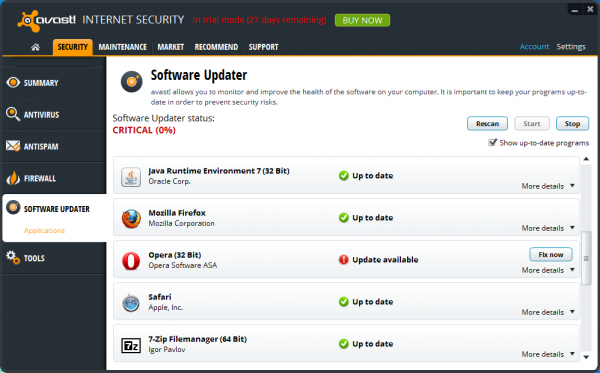
Software Updater is a more promising addition, a handy tool which scans the software installed on your PC and then checks for any missing updates. While it doesn’t cover everything, there’s a sensible focus on the components which really matter — browsers, Flash, Java, Adobe AIR, Adobe Reader, iTunes, uTorrent and so on — and the program correctly detected and highlighted outdated software on our test PC, installing most new updates with a click.
We say “most” because there were occasional issues, as for instance all Chrome updates just failed with an error. But even here, Software Updater still helps, by first alerting you to the update, and then providing a “click here” link which takes you to a web page with more information. It’s definitely a positive addition to the suite, and we’ll be interested to see how it improves in future.
Verdict: avast! Internet Security 8 isn’t the best security suite around, but it’s a solid mid-range product which improves on the previous edition in a number of ways, and is a worthwhile upgrade for avast! fans.
We Like: Lightweight; improved scanning performance; effective firewall; SSL email scanning; high spam detection rate; excellent sandbox and SafeZone; highlights missing software updates.
We Don’t Like: Scanning speeds could still be faster; firewall can be disabled; some legitimate emails flagged as spam; Software Updater can’t always install updates.
Available for Windows XP, Vista, 7 and 8, all 32 and 64-bit editions. MSRP: $49.99.
Photo Credit: Andrea Danti/Shutterstock
-
The complete listing of Google’s April Fools Jokes for 2013

Google started a little early this year with a couple today, but we can only assume there will be a lot more April Fools jokes starting tomorrow. Make sure to bookmark this page as we will update it regularly as they appear. If it’s anything like last year, expect this page to be filled up with a lot of crazy antics by this time tomorrow from our favorite Mountain View company. Hit the break to get started.
YouTube Shutting Down
Google kicked things off today with a video announcing that YouTube will no longer accept anymore entries starting midnight tonight through 2023. Why? Well after 8 years of uploads, it’s now time to go through all the videos and pick the winner of the best video. Of course it’s going to take a long time to go through each and every video to find the best one. They figured 10 years will be enough time to to declare the winner, but the problem is that you won’t be able to view any of the current videos when midnight strikes. The site will reopen when the winner is announced in 2013. Check out the video announcement below, which includes some cool cameos. I wonder which video would win?
Click here to view the embedded video.
Google Treasure Maps
This one isn’t just a joke, but it’s also a fun activity as well. Turns out the Google Maps Street View team found a treasure map belonging to the infamous pirate, William “Captain” Kidd. Just like any other treasure map, it has a bunch of encrypted symbols that need to be deciphered. The map is accessible to all by clicking here or on the “Treasure” button in the top right corner of the desktop version of Google Maps. So far no mobile version that we know of. They encourage everyone to work together by utilizing this Google Maps G+ page, which will hopefully result in figuring out Captain Kidd’s buried secrets.
Click here to view the embedded video.
Google+ Emotion
Google+ Photos has a new enhancement in that you can now add stylized emotions to your photos. Just open any of your Google+ pictures in the lightbox and click on the smiley face at the top left. Google will automatically analyze the photo and put emotion icons on top of each person in the photo. Just hit the smiley face again to revert back to your original photo.

Introducing Google Nose
Google Nose Beta is now live and it allows you to search for smells. The mobile aroma indexing program now has a 15 million scentabyte database of smells from around the world. By intersecting photons with infrasound waves, Google Nose Beta temporarily aligns molecules to emulate a particular scent. So if you don’t have time to stop and smell the roses, let Google Nose Beta bring them to you.
Click here to view the embedded video.
Gmail Blue
Gmail Blue was part of the initial conception for Gmail when it was launched, but the technology just wasn’t there yet. The wait is over and Gmail Blue is here. It’s the same Gmail as before, just blue. I have no idea how I got along with out it.
Click here to view the embedded video.
Improved Google Play Developer Console
You will need a Google Play Developer account in order to see this one. When adding a new app to Google Play, don’t just click on “Add New Application”. Why not try Google’s new option, “Add New Awesome Application”? By going for the latter, Google will help you build a new app based on “advanced machine learning algorithms” as well as numerous Google Employees.


Google Analytics now showing Space Station Traffic
The real time section of Google Analytics is now showing traffic from the International Space Station.

Google Easter Egg
Since Easter falls on the day before April Fools, we thought we would share this one for you. Just click this link in your desktop browser and you will get a 3D rotating Easter Egg. You can do this in Chrome Beta for Android if you enable experimental WebGL support via chrome:flags.

Google SCHMICK
Google’s Australia Blog announced SCHMICK, which stands for Simple Complete House Makeover Internet Conversion Kit. It’s a new addition to Street View that lets you decorate your house with a number of pre-defined improvements.
Before

After

Come comment on this article: The complete listing of Google’s April Fools Jokes for 2013
Visit TalkAndroid for Android news, Android guides, and much more! -
Technology is king, so why are so many IT departments playing backseat roles?
Today’s IT departments face an identity crisis. Technology is an integral part of every single business process, and has come to dominate the lives of consumers who are routinely shopping online, downloading information, and browsing the Internet.
Yet ironically, in an era when technology rules, IT departments are losing ground fast: The forces of cloud computing, social media, and information management are evolving rapidly, and business managers are discovering and adopting new technology before IT departments even have a chance to master it. Gartner Research predicts that by 2015, 35 percent of most companies’ technology-related expenditures will be managed outside the IT department’s budget.
In order to thrive and have an impact in today’s businesses, IT departments must stay relevant. They must become service-oriented organizations. That means deploying user-centric and agile solutions that meet the business needs of the organization and individual departments. That means delivering IT as a Service (ITaaS), and becoming a team of service-oriented experts.
SaaS: An often too-quick fix
The increased availability of Software as a Service applications (SaaS) makes it easy for individual departments to “go rogue” within an organization. Employees sign up for inexpensive outside-the-firewall public-cloud SaaS apps because they are convenient, easy-to-use, and address immediate needs – and because they believe they can meet their business needs better and faster than their IT department.
But users inevitably run into problems and end up going to IT for help. They may need to integrate the public-cloud application with another internal service, and/or import or export data. Then IT staff find themselves in an awkward position. They have to quickly master the application, understand the problem, and solve it. Along the way, they will likely identify risks associated with the use of this product – including critical security issues. Had they been involved right from the start, they could have provided real strategic value instead of simply putting out fires.
The lure of the public cloud
Likewise, developers are under the gun to conceive, prototype, and test applications, and then to get them into production. They often turn to public cloud providers for initial prototyping, testing, and even final deployment. The cloud offers a easy, self-service platform that developers can control and works the same across the development, testing, staging and live deployment phases. This practice relegates the IT department to the sidelines, and can minimize its value to that of maintaining legacy systems and infrastructure.
Breaking the vicious cycle
IT departments that remain passive legacy-system babysitters will be caught in a vicious cycle. Today, it is the CIO’s responsibility to bring awareness in the organization about the hidden dangers of decentralizing IT. There are four major ways to elevate IT’s role within the business, transforming it from being an old-school roadblock to a visionary service-oriented enabler:
- Be proactive to build internal relationships. The IT department is uniquely fundamental across all areas of an organization, and must capitalize on that. IT staff must show others how well it understands the business, helps users visualize what is possible, and how IT will enable them to achieve their goals.
- Evangelize how central IT safely, responsibly and responsively serves the organization. If business departments are implementing a SaaS app to solve a problem or if developers are deploying code to a public cloud during prototyping and testing, the IT department should, for instance, demonstrate how the cloud can be unpredictable in accessibility and performance, and be rife with security issues. Make the case that IT always puts the business first, safely and securely.
- Become SaaS experts. Even if a department is convinced that a public-cloud SaaS app can solve a specific need, it is critical for IT to be involved from the beginning. The requesting department can judge which apps can best solve their problem and provide the most value, but IT can consider the security, governance, and interoperability angles.
- Provide a self-service platform for the company’s developers. A good enterprise-ready Platform as a Service (PaaS) will convert a static infrastructure into a dynamic powerhouse. An enterprise-ready PaaS will support any application written in any language and framework on any infrastructure that IT has access to. From development through production, the developers can control a self-service platform, which is safe and secure.
The new IT: Win-Win-Win
This new service-oriented central IT model can deliver new benefits, including lower costs (by eliminating duplicate projects among different departments), more interoperability between differing SaaS applications, improved cohesion among departments, and reduced security risks.
Faster time to market for internal applications dramatically impacts the development side in an organization. An enterprise PaaS provides a common platform environment throughout the cycle and eliminates inconsistencies between development and final deployment. With PaaS, developers can now use the “right tool for the right job,” because any language and framework can be deployed in production.
Bart Copeland is CEO of ActiveState. You can read his blog posts here; follow him on Twitter @Bart_Copeland.
Have an idea for a post you’d like to contribute to GigaOm? Click here for our guidelines and contact info.
Photo courtesy aceshot1/Shutterstock.com.

Related research and analysis from GigaOM Pro:
Subscriber content. Sign up for a free trial.- How HR can make the case for workforce analytics
- Examining the rise of crowd labor platforms in 2012
- IT spending update, third quarter 2012


-
Intelligent Content: Soon your media will know you better than you know yourself
With the introduction of analytics into the visual design of written content, we are on the cusp of an era of incredible evolution: one where the design of information changes in real time in response to data about the readers consuming it. New technologies from Amazon, Apple, Google, WordPress and Tumblr already provide a preview of Intelligent Content. In essence, it won’t be long before the media we consume knows us better than we know ourselves.
Content that reacts to being read
Around 1952, computer scientist Grace Hopper introduced new thinking about compilers –machine-independent software that would translate code written in human language into computer friendly binary ones. John Von Nuemann took Dr. Hopper’s work to a new level in his unfinished masterpiece “The Computer and the Brain,” which theorized that massive versions of compilers would eventually result in computers so intelligent that no human mind could keep up with them.
In a way, books and magazines of the future will act as sort of human compilers, translating your reading desires into pure machine language that tells the publisher how to present the material for faster and more pleasurable absorption. It’s difficult to comprehend what these experiences will be like once machines themselves begin creating material for humans. The content itself will be designed to gather information about the reader, mash it up with data about others interested in related subjects, authors, or publishers, then decide what content to present to you next. This is what we mean by Intelligent Content
Curation will guide content
Some argue that readers no longer want curated content, however we believe people always have and always will look to trusted sources for guidance, and that’s where books and magazines will continue to add value. In a world where people are already inundated with information, it’s only going to get worse as we get more and more smothered by everyone else’s stream of consciousness, courtesy of Twitter, Instagram, Pinterest, Facebook and whatever is next.
So the short-term impact of the Intelligent Content movement will feel something like the music industry since 2000. MP3′s meant the end of curated CDs. Now, playlists are compiled and shared with the help of Pandora, Spotify or Songza. Thus magazines and books could soon become the Pandora of dynamic content, with artificial intelligence applets that choose and adapt content, then tailor it to the reader’s context and taste. We see the beginnings of this with Flipboard, but it will only get more advanced.
Experimenting outside the print paradigm
Massive waves of disruption always bring opportunity. Publishers like Hearst and Conde Nast continue to experiment with and push the boundaries of enhanced reading experiences on tablets, but many other publishers still obey the rules of printed media, requiring you to “flip” through virtual pages as the primary mode of navigation. WordPress and Tumblr appear to be closest to offering an always-on and continuously updated experience based on analytics about the reader. The flexibility and customization they offer provide a glimpse into how written and visual content will eventually be continuously reconfigured and redesigned by the moment to accommodate data gathered about what you like to read.
Our future might be filled with mash-ups of video, audio, real-time updates, new navigation interfaces and even content that interacts with a reader’s environment (such as augmented reality). Digital publishers can experiment with new hyper-responsive designs as well as back-end databases that mine your other web activities to determine what you’ll like. For example, Quartz (qz.com), a digital only news site launched in September last year, uses WordPress and responsive design to customize the reader’s experience on a device level. Companies such as Gravity, Contextly and Sailthru offer digital publishers new tools to create more personalized experiences based on a visitor’s profile and previous reading behavior.
The algorithm will be the new editor
In the long term, the algorithm will likely replace the editor and curator. Quick and automatic branding and positioning of the book or magazine on a glowing electronic slab will become more important than the most sage human editor. For focused, long-form content, algorithms will sort out content discovery, delivery and presentation. Google already conquered discovery with algorithms, and now content aggregators such as Zite and Prismatic offer readers an elegant, gated magazine-like design using data from the reader’s social networking profiles, past reading habits and current location.
Using big data to create content on demand
Intelligent Content can also help publishers create content in a more cost-efficient way. One of the main challenges publishers face is predicting which content will be popular. Analyzing the big data that comes from reading and search behavior will help them predict which articles will bring in a much-needed audience.
Recently, researchers at MIT developed an algorithm that can predict topics that will be trending on Twitter hours in advance. Similarly, startups such as Content Fleet and Parse.ly use algorithms to identify emerging popular topics on search engines. This way, a publisher will be able to create content with almost a certain return on investment.
Publishers who recognize the design- and data-driven future of Intelligent Content will have a head start. They can experiment now with new ways to deliver content and measure how its readers engage with it. That data in turn can help them deliver even more engaging content experiences, ultimately preparing them for a future of Intelligent Content.
Roger Wood is a product designer and statistician, and founder of the (Art+Data) Institute. Evelyn Robbrecht is a Content Design Fellow at the Institute; previously she helped launch the mobile and new media department of Sanoma Media Belgium.
Have an idea for a post you’d like to contribute to GigaOm? Click here for our guidelines and contact info.
Photo courtesy of Viorel Sima/Shutterstock.com.

Related research and analysis from GigaOM Pro:
Subscriber content. Sign up for a free trial.- What’s driving the next phase of the e-commerce evolution
- GigaOM Research highs and lows from CES 2013
- How HR can make the case for workforce analytics

-
My Drunk Kitchen sobers up as Hannah Hart gets ready to hit the road
I’m in a Burbank studio filled with boxes of T-shirts, because Hannah Hart, the YouTube star who first rose to fame with her celebrated My Drunk Kitchen series, has been taking a break from every creator’s favorite part of the crowd-funding experience — packaging up the perks — for an interview.
But our interview is now technically over, and even though Hart’s arm is in a sling from a dance contest-related injury, she’s right back at work.
“You want to stay and help?” she asks, and moments later I find myself affixing return address labels to envelopes, passing them down the assembly line to be stuffed with t-shirts.
Like at least 10,300 people before me, I’ve just discovered, it’s hard to say no to Hart.
The T-shirts, thank you notes and “E-Polygamy Certificates” we’re packaging up are bound for those who helped Hart raise over $222,000 on Indiegogo for an international tour bringing her face to face with the fans.

Beginning this April, Hart and a two-to-three person production crew will board an RV and begin traveling from Los Angeles to Canada, cooking in the kitchens of strangers, volunteering at food banks and in general spreading the Hart brand from coast to coast.
The inspiration for the tour, Hart says, came directly from the audience: “Ever since My Drunk Kitchen started, the community of ‘Hartosexuals’ — the audience, fans of the show — have said, ‘oh, I want you to come and cook in my kitchen, dude!’ Or, ‘you should do a travel show — I’d watch you do Anthony Bourdain any time!’.”
While that audience might have come as a result of Hart’s breakout work as the star of her series My Drunk Kitchen, this is not the My Drunk Kitchen Tour — instead, all information can be found at HelloHarto.com. That’s because this is the second phase of Hart’s web video journey.
The first phase began in 2011, when Hart got drunk at home one night and made a grilled cheese sandwich; the funny free spirit cooking sauces while sauced quickly grew a fanbase and was picked up by The Collective for representation.
But while My Drunk Kitchen has been a web hit, it has never had sponsorship, for one specific reason according to Hart: The word drunk, which scares off potential brands.
While MDK is only one part of Hart’s current YouTube output, it’s still the show she’s known best for — hence the new emphasis on the Harto brand. “The dedicated community who watches the the channel — they are the ones who know that it’s a Harto channel. The outside world thinks it’s a My Drunk Kitchen channel,” Hart says.
How do you go about this sort of rebranding? “Slow and steady wins the race,” she says. “I’m doing an entire tour around the world called Hello Harto.”
In recent months, Hart has spearheaded volunteer efforts at Los Angeles local food banks, bringing in fans to help organizations like the Los Angeles Food Bank. It’s something she wants to continue on the tour — however, thanks to the “D-word,” they’ve even had difficulties finding food banks to work with.
But during my initial interview with Hart, the production team finds out that the food bank network Feeding America has agreed to make introductions to local food banks along their tour stops — but with the stipulation, according to tour producer Pearl Wible, that Hello Harto and My Drunk Kitchen are separate entities.
“That makes it so much easier for us, because instead of having to explain to all these separate people what we’re about, we can work with organizations that will hoepfully be excited to work with us,” Hart said.

Hart, adding labels to envelopes for Indiegogo perk deliveries.
The Hello Harto tour is a clear turning point for Hart and her online presence. Hart says that while “My Drunk Kitchen will always be My Drunk Kitchen. It’s a funny joke,” the Harto brand is much bigger than that.
“Does this mean that in two years, My Drunk Kitchen will be a footnote on your Wikipedia page?” I ask.
“Absolutely,” Hart says, certain. “100 percent.”

Related research and analysis from GigaOM Pro:
Subscriber content. Sign up for a free trial.- How consumer media will change in 2013
- Examining the rise of crowd labor platforms in 2012
- The state of cross-platform media measurement

-
Rumbleseat -The Sadies

They’re rockabilly rock-n-rolla’s who happened to love everything that has to do with hot-rods. The Sadies music isn’t new, it isn’t groundbreaking, and it won’t make you change your lifestyle. It does however possess a great vibe that you’ll want to transfer directly to your cars audio system as it’s simply perfect for cruising.
Source: Vimeo.com
-
HTC One X to receive Sense 5 and 4.2 over the summer

Naturally when a new device comes out, owners of the previous generation of the device are left wondering if they’ll ever see the new software features on their current phones. And, after seeing the cool stuff Sense 5 can do, I can imagine there were some envious One X owners after HTC took the wraps off the One.
Well, good news if you do own a One X. The latest leak from a trusted Twitter user, @LlabTooFeR, says that the international One X will be receiving Android 4.2.2 and Sense 5 in one update as soon as June or July. Supposedly, other members of the family will get the same update, (One S, One X+, Butterfly) but no time frame was given for those devices. I imagine HTC is realizing that to play with the big boys, you have to keep some of your older devices updated, and this is a big first step in the right direction.
We’ll be sure to keep you updated as soon as we hear anything else about these updates.
source: Gotta Be Mobile
Come comment on this article: HTC One X to receive Sense 5 and 4.2 over the summer
Visit TalkAndroid for Android news, Android guides, and much more! -
Latest filing from Samsung on infamous patent suit confirms Apple could get more than the original $1.05 billion award

I’m sure you’re all too familiar with the huge patent battle between Samsung and Apple that ended with Apple being awarded $1.05 billion in damages. Then, the damages were reduced to about $600 million, and then Apple claimed mistakes were made in calculations, etc… It’s been a long, drawn out process.
Now, the second trial concerning 14 devices that infringed on Apple’s patents will be opened up again for a second verdict. Samsung wants the jury to review whether or not those devices infringed on Apple’s patents in the first place to attempt to reduce the damages, but by doing so, Samsung admitted that Apple could “seek even more damages on these products in the new trial.” So that $600 million could come way down… or it could back up to $1 billion in damages again. Obviously Samsung’s lawyers feel pretty confident they can make a better case this time around.
As a side note, Samsung also said Apple’s claims for reinstating the $85 million Judge Lucy Koh took away were ”procedurally improper and substantively incorrect.” Like with all the other patent trouble, we’ll be sure to keep you updated as soon as anything else comes out of the courtroom between these two.
source: FOSS Patents
Come comment on this article: Latest filing from Samsung on infamous patent suit confirms Apple could get more than the original $1.05 billion award
Visit TalkAndroid for Android news, Android guides, and much more! -
Between Easter and Cesar Chavez, Google chooses the labor leader

In what will surely be viewed as a controversial, yet likely politically correct decision, today the Google homepage is running with a Doodle portraying deceased labor leader Cesar Chavez, in honor of what would have been his 86th birthday. Chavez passed away back in 1993, but his work and memory have lived on. In 2011, President Barack Obama proclaimed March 31 as the official Cesar Chavez day.
While the Easter holiday is celebrated by Christians around the world, the holiday is just that — one religion only. On the other hand, I think we can all, no matter what your denomination, relate to an activist farm worker who stood up for the civil rights of humans of all backgrounds.
The decision by the search giant, which incidentally has not run an Easter-dedicated Doodle since 2000, will certainly be controversial and could lead to the religious wing arming up against the company. But that wing of society arms against many things.
Chavez, a Mexican-American born in Arizona in 1927, has been memorialized in such places as the National Portrait Gallery in Washington DC and been awarded the Presidential Medal of Freedom, though it was sadly given posthumously.
I have no doubt that Google’s decision today will stir some controversy and rankle a few feathers. I also have absolutely no doubt that choosing to pay tribute to a man who stood up for humans everywhere, as opposed to honoring a holiday that was simply derived from Pagan traditions and incorporated into modern times is the right thing to do.
-
Is using Chrome OS like going to prison?

Now that’s a question I never expected to ask on Easter morning. But instead of waking up to egg hunts, I’m haunted by Brian Fagioli’s Google+ Chromebook Community post overnight. He stirs up the hornets nest today.
“Using Chrome OS is a lot like prisoners in jail making alcohol in the toilet”, he writes. “Even when you are limited, you will find a way. While it is fun to find a way to do things despite the limitations of Chrome OS, the question remains: why do we choose to put ourselves in jail?”
Fagioli isn’t some troll tweaking Chromebook users. He purchased the Samsung Series 3 Chromebook — that’s the ARM-based model selling for $249 — in January. This morning I asked if he is satisfied with the computer. “Yeah I love it”, he answers. “I use it for personal use but the limitations caused me to install ubuntu in dual boot. Chrome OS won’t let me access file sharing on my home network or even print to my home printer”.
His satisfaction is important context for the rest of his questions: “Why did you choose to buy a Chromebook or Chromebox instead of a Windows or Mac or full blown Linux computer? Why did you choose to limit yourself? Was it just the low price?” The latter two are leading and likely will affect direction of the responses. Nevertheless, he genuinely asks.
“What limitations?” Frank Camuglia asks. “There’s nothing I can’t do on my Chromebook. I think what you don’t understand is that what works for one, doesn’t always work for everyone”.
Fagioli answers:
I own a Samsung Chromebook and love it. However, I can’t connect to a printer without buying a special printer or leaving a desktop running to connect to the printer. I can’t do file sharing with my home network. For instance, if I have family photos on a desktop on my network, I cannot access them with my Chromebook. I can’t connect to IRC without using a web service which, could be logging your conversations. The music player app is very basic. The Samsung Chromebook is $249. A new, better specced laptop can be had for $299 that can run full blown Linux or windows and chrome browser.
“Any OS is a jail”, Falko Löffler asserts. “Ten years ago a Mac user was hearing the exact same thing: Why don’t you use a Windows machine? There’s much more software, it’s much cheaper and there are no compatibility problems. Why bother trying to desperately find a workflow on something exotic like this — OS X thing that no one will use in a few years from now.”
I’ve been a tech journalist for nearly 20 years now, and can atest based on experience that Löffler absolutely is right. But I’ll go further. The Google community of users — that’s more than just Chrome OS or Chromebook — feels a lot like those rallying for Macs, 10 to 20 years ago. There’s similar enthusiasm and sense of actually being a community. The character also reminds of Firefox users, but more before Chrome’s recent rise in popularity.
Michael Romaniello: “Watching my kids use the mini Mac just to go online and watch YouTube and check Facebook, now i don’t worry about a virus when there online. They also use them to watch Netflix. Can’t beat the price. I brought one for myself after using theirs, easy to use and update”.
That’s no answer for Fagioli, who asks: “Are you doing your kids a disservice by dumbing down their computing? I understand it’s easier for you to not worry about viruses but you are hindering their computer education”. I’ll answer that, following on Löffler. Not long ago, that was a common Windows PC rebuttal against Macs — that using them didn’t train kids for the future. I laugh because a Linux user asks this? Linux would prepare kids for what?
“They still use windows computers in school, and still use the mini mac at times when they need something the Chromebook doesn’t do”, Romaniello answers Fagioli. “The way kids today pick up on new technology i’m not worried at all”.
Jerry Daniels, who uses Chromebook Pixel, is right: “I heard the same arguments about Macs crippling a kid’s tech background and it’s total bullshit. All people with a real tech background know this”.
“In my school district they are going Apple in a big way. Students and some teachers are getting iPads”, Gordon Sroufe writes, directed to Romaniello. “Cost, eventually, will be millions. Chromebooks would have been a better choice for students can reach educational software like Edmodo and faculty can get to power school for admin chores”.
There are currently 4,573 members of the Google+ Chromebook Community. What surprises me in scanning the members: How many of them work for educational institutions — one of Google’s target markets for the computers and an Apple stronghold.
William Dove captures my sentiment:
It’s not limiting yourself. It’s simply preparing yourself for the future. I’m sure some of us still have Windows or OS X machine to tackle the things the Chrome OS can’t but how often do you really need to use it? This is the future of computing, rather we like it or not. Google just happens to be way ahead of it’s time. Ten maybe even 5 years from now, the use of hard drives will not be needed and only come for those that chose to have one to. That’s why I’m choosing to get one.
Chrome OS and Chromebook are definitely controversial topics among BetaNews readers, and a Chromebook Community obviously is filled with enthusiasts. Then there is Fagioli’s forceful and poignant metaphor. So I ask: Is using Chrome OS like going to prison? Comments await your answers.
Photo Credit: Liv friis-larsen/Shutterstock

