Blog

  • Opera browser takes a radical left turn with Opera Next 15

    Opera Software has unveiled Opera Next 15, the first look at a major new direction for its cross-platform web browser. Opera Next 15 — which installs alongside the existing stable version, Opera 12.15 — sees the browser jump not one, but three version numbers, such is the radical nature of the new release.

    The major news surrounding Opera Next 15 is the switch from its own Presto proprietary web rendering engine to Google’s open-source Chromium engine. But other changes include a revamped user interface, overhauled Speed Dial page, new Discover and Stash features, plus the dropping of all integrated email features, which will be available as a separate product, Opera Mail, also available in pre-release form.

    Fire up Opera Next for the first time, and it’s apparent that major changes are afoot. The user interface has been rebuilt from the ground up, designed to integrate more deeply with the OS it’s running and provides a more modern, sleek look compared to previous Opera builds.

    Another visible change is the implementation of a unified address and search bar, echoing that found in Chrome and Safari as opposed to the separate bars still used by Firefox.

    The Speed Dial page has also been improved, with users now able to file shortcuts into folders (simply drag one on top of another to create a folder). A new search field also provides users with a quick and easy way to filter Speed Dial entries. The move could be interpreted as signaling the possible integration of Speed Dial shortcuts and bookmarks into a single entity.

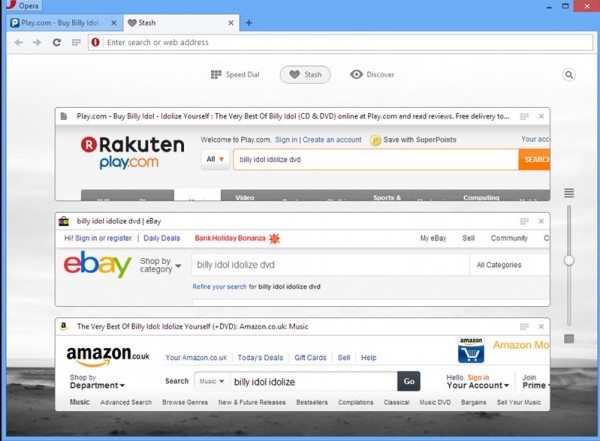
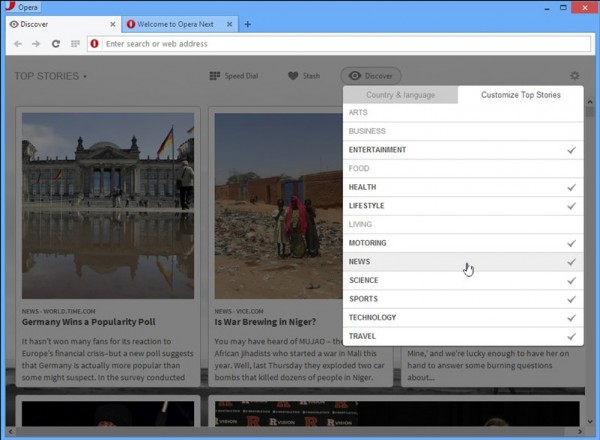
    Two new features added to Opera Next 15 are Discover and Stash. Discover provides users with a place where they can set localization and other preferences in order to be fed relevant content — including news — from a single place. Meanwhile, Stash is designed to make comparing websites easier by allowing users to press a heart button in order to collect together a group of related sites for comparing. Users scan quickly scan the Stash via a resizable page preview, or search all sites within the Stash using keywords.

    At the present time, a number of features are missing from this version — including the Opera Link bookmarks/Speed Dial sync tool, bookmarks themselves and the Opera Sidebar — an acknowledgement that porting features across to the new build is an ongoing process. The Opera Next changelog states “As Opera has recreated its desktop browser, the Next builds will introduce features selectively and iteratively”.

    A New Engine
    Opera’s “engine swap” was announced in February when the company announced it would be dropping support and development of its own Presto engine in favor of Google’s open-source Chromium engine. In April Google announced it was forking development on this engine — more commonly known as WebKit — in favor of building a new engine called Blink. Opera previously confirmed it would be following Google down the Blink path, and it’s the Blink engine that’s been implemented in this release.

    Aside from providing a “standards-compliant and high-performance” browser, the switch also sees Opera revamp its Opera Turbo mode for loading web pages quickly over slow connections. Retitled, “Opera Off-Road”, the feature gains support for the SPDY protocol and promises even faster loading of webpages over slow networks.

    The move was made to free up resources to allow Opera to develop more new features and build new products. It’s already made good on both of these promises with the radical revamp of Opera Next here, plus the launch of Opera Mail as a standalone product.

    Opera Mail basically mirrors the functionality found in the integrated tool from previous versions of Opera, but adds new labeling, filtering, threads and multiple tab support to go with the promise of a fast, sleek “lightweight” mail client.

    Both features are still very much in preview mode, but experienced users impatient to see what’s coming in Opera’s future can download both now. Opera Next 15.00 and Opera Mail 1.0.1033 are both available as freeware downloads for Windows and Mac. Linux versions are in development, but not yet available.

  • Symantec phases out PC Tools security software

    Symantec has dropped the PC Tools range of security software, leaving the Australian company that it acquired in 2008 to concentrate on its system tuning products.

    Buying PC Tools gave Symantec a budget brand with the Internet Security, Spyware Doctor and Spyware Doctor with Antivirus products slotting in below the more upmarket Norton range. Now as part of Symantec CEO Stephen Bennett’s restructuring of the company, the PC Tools security products are being quietly streamlined out of existence.

    Existing PC Tools security users will still receive updated virus definitions until their subscription expires. They’ll then be encouraged to move to an equivalent Norton product.  According to the FAQ for PC Tools users that’s been posted on the company’s website they’ll be able to, “…take advantage of our special offer to switch to Norton.”

    PC Tools Registry Mechanic, Performance Toolkit, File Recover and Privacy Guardian products are unaffected by the change, though it seems rather odd to leave the privacy product if the security focus is switching to the Norton range.

    Photo Credit: cybrain/Shutterstock

  • Mystery for the day: Who’s buying ST-Ericsson’s geolocation business?

    In the course of breaking up, sometimes it’s simpler to shed shared assets. Ericsson and STMicroelectronics are in the process of doing just that – having already decided which partner gets what out of their cash-haemorrhaging joint venture, ST-Ericsson, the companies are now seeing what they can get for the leftovers. And in this case, part of that portfolio entails ST-Ericsson global navigation satellite system (GNSS) business.

    The ST-Ericsson GNSS portfolio includes handset receivers for interacting with both the U.S. GPS system and Russia’s GLONASS. On Tuesday, the companies said they had signed a “definitive agreement” to sell the assets and intellectual property surrounding this business. That includes 130 staffers in Daventry (UK), Bangalore (India) and Singapore.

    The deal will apparently “reduce the joint venture’s cash needs by approximately $90 million.” There is, however, one rather important detail that’s missing.

    Who’s buying?

    ST-Ericsson is being almost entirely opaque on this point, saying only that the team has “found a new home at a leading player in the semiconductor industry.” Which leaves us with something of a guessing game.

    The current crop of ST-Ericsson GNSS receivers are part of the joint venture’s NovaThor system-on-a-chip platform, but that’s now been cancelled due to the break-up. And ST-Ericsson has never publicly disclosed its other GNSS customers.

    It may or may not be relevant to note that one of the more recent ST-Ericsson GNSS receivers, the CG1960, has a very small form factor and has been tailored for low-powered applications, such as in smart watches and cameras. With wearables set to be a boom market, this technology could be quite attractive to certain players.

    It’s unlikely Qualcomm is the buyer, as it already has a rich GNSS product portfolio. Samsung has been using SkyWorks in the last year or so. It could possibly be Texas Instruments, which is making a big push into embedded systems, including wearables.

    But really, your guess is as good as mine.

    Related research and analysis from GigaOM Pro:
    Subscriber content. Sign up for a free trial.

  • CCleaner now better at cleaning up after Internet Explorer 10

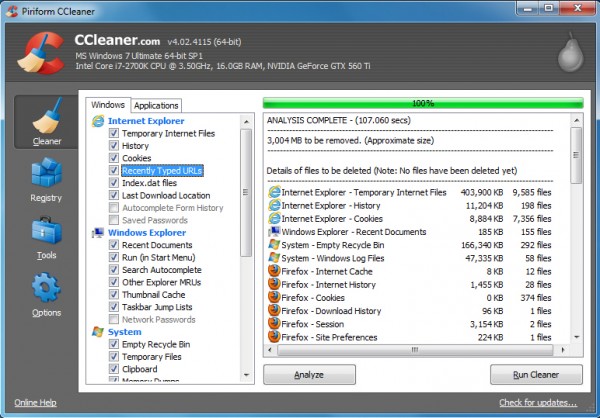
    Piriform Ltd has announced the release of CCleaner 4.02, and while it’s flagged as a minor release, the build includes plenty of worthwhile improvements.

    Internet Explorer 10 included several low-level changes in how the program stored its data, for instance, which meant CCleaner didn’t handle it quite as well as previous releases. But that situation was never going to last for long, and this build now includes improved IE10 history, cache and DOMStore cookie cleaning for better results all round.

    CCleaner 4.02 also now includes support for cleaning Virtual Clone Drive, PDFCreator, PDF Architect, Adobe Fireworks 6.0, Nero 12 Platinum HD Suite and Foxit Reader 6.0.

    There’s a scattering of smaller but still worthwhile improvements covering several popular applications, including Firefox, Chrome and Freemake Video Converter.

    Elsewhere, CCleaner 4.02 reportedly has improved drive detection in File Finder.

    And of course there’s the usual complement of very small GUI improvements and minor bug fixes.

    CCleaner 4.01 was already an excellent program, then, but it’s safe to say that CCleaner 4.02 is even better, and if you don’t have a copy already (or your auto update isn’t working) then that’s a situation you should rectify right now.

  • Microsoft: Social networking is underestimated in the workplace

    According to a new survey conducted by research firm Ipsos for Microsoft, many employers are at odds with their employees when it comes to social networking.


    The global survey, among 9,908 information workers in 32 countries, found that while 46 percent of employees believe social tools help with productivity, 34 percent of companies undervalue the benefit of such technology in the workplace.

    As a result, 17 percent of respondents say they ignore their organization’s IT policy and install social tools on their work computers or phones, and 31 percent say they would be willing to spend their own money to buy social tools to help them do their jobs.

    The survey found the tools were most used for communicating with colleagues (68 percent), sharing and reviewing documents (50 percent), and communicating with customers and clients (47 percent), but they were also useful for growing a professional network (36 percent) and finding an expert or information within their own company (29 percent).

    Perhaps the most damning aspect of the survey was 39 percent of respondents felt people in their organizations just didn’t collaborate enough.

    “Just as email accelerated the pace of business in the ’90s, enterprise social will be the driver of greater agility and transformation in the 21st century workplace,” Kurt DelBene, president, Microsoft Office Division believes. “As we look ahead at how collaboration and communications continue to evolve, we believe the tools people use today — email, instant messaging, voice, videoconferencing, social — will come together and be deeply integrated into apps in ways that will speed collaboration and truly transform the way people work”.

    To go with the survey, Microsoft has launched a new site called The Worldwide Water Cooler, which allows people from any country to have their say on social tools and workplace collaboration.

    Photo Credit: ra2 studio/Shutterstock

  • Now desktop users can find out what’s next for Opera, too

    In February of this year, Opera announced a major revamp of its browser portfolio that involved ripping out and replacing some key components – in a nutshell, the innards of Opera’s new browser now resemble Google’s Chrome a heck of a lot more than they previously did. The first version of the browser to make an appearance was that for Android: it came out in beta in March, and arrived in full a week ago.

    Now it’s the turn of Windows and OS X users. Again, this is a beta we’re talking about (although Opera calls it a “Next version”), but it does show off what is to be expected in the full release of Opera 15.

    Those features should mostly be familiar from the Android version, but here’s a quick run-down anyway:

    • Speed Dial – For those unfamiliar with Opera, this pretty much refers to bookmarks. And, like bookmarks, they can now be organized into folders. Speed Dial also seems to give Opera a chance to earn some cash from partners such as Twitter and Facebook, whose services it puts front-and-center in this feature.
    • Discover — This feature is a bit like Google Currents, in that it brings up articles according to the user’s tastes.
    • Stash — This one’s new: a read-later facility designed to reduce the necessity of having tons of tabs open at once. Just click on the heart button to “stash” a page.
    • Search — You can now search from the address bar in Opera, same as in Chrome and co.

    The look of the browser has also been refreshed to make it more platform-appropriate and, of course, there are big changes under the hood. Opera 15 uses the Chromium engine and its “Off-Road” data-squeezing mode – previously known as Turbo – now supports Google’s SPDY protocol.

    The only other major thing to bear in mind for existing Opera desktop users is that the new version doesn’t have an integrated mail service. The M2 mail application has now been hived off into a standalone version, the first release candidate for which can be downloaded from here.

    In a blog post on the new features, Opera web evangelist Bruce Lawson said the decision to split off M2 was made in order to reduce the footprint of the main program, and also because “not all current Opera customers use M2″.

    Related research and analysis from GigaOM Pro:
    Subscriber content. Sign up for a free trial.

  • Mozilla Archive Format offers a better way to save web pages

    When you’re busy with some online research then you’ll often want to save interesting web pages for easy reference later. So it’s a pity that while every browser has some kind of “Save As” function, the end results are usually unimpressive, awkward to share with others, and may not even bear much resemblance to the original page.
    This is such a fundamental requirement that you might have thought the big-name browsers would have come up with a solution already, but while we wait you can always try Mozilla Archive Format, a Firefox add-on which extends the usual “Save Page As” function in several very useful ways.

    If you’re engaged in some major research session, for instance, you no longer have to save each page individually. Mozilla Archive Format allows you to save the current page, selected tabs or everything in just a few clicks.

    The add-on’s “faithful snapshot” feature helps to ensure the saved documents look and feel more like the original pages, too (there’s even support for saving embedded audio and video).

    The pages can be saved in a compressed single file format, saving disk space and making them easy to share with others. And better still, they’re only zip archives, so you don’t need to have a copy of Mozilla Archive Format available to read them: they’re easily accessible anywhere, on any platform.

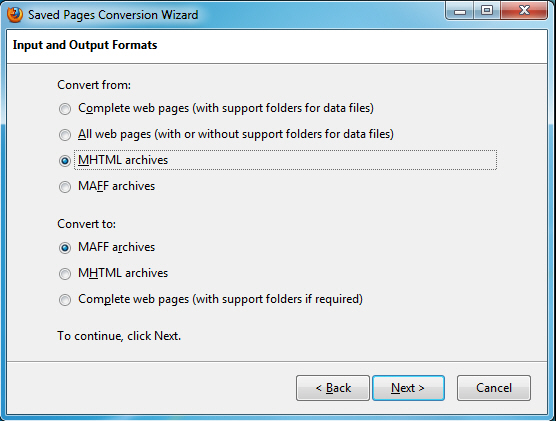
    Of course if you’re used to working with MHTML files then moving to a new format might cause problems. No need to worry, though — Mozilla Archive Format not only reads and writes MHTML files which are fully compatible with other browsers, it also includes a tool to convert your saved pages between the two formats (and several others).



    There are other common-sense improvements, too; the title of a page is used as the default file name when you’re saving, for instance.

    And best of all, while Mozilla Archive Format delivers plenty of extra functionality, it’s still extremely easy to use. When you need to save something, just click Save Page As and choose whatever new format you need.

    Photo Credit: sheelamohanachandran2010/Shutterstock

  • The Monsanto 71 – ‘Sellout’ senators shame themselves by siding with Monsanto on GMO labeling bill

    The U.S. Senate recently had an opportunity to vote on a farm bill amendment that would have supported the rights of states to mandate GMO labeling laws. The amendment, S.AMDT.965, was introduced by Sen. Bernie Sanders with the aim “…
  • Natural News ditches Facebook, switches to Disqus for comments engine to avoid Facebook censorship and intimidation of moms

    Due to Facebook’s outrageous campaign of censorship against anyone attempting to post comments or photos about autism, GMOs, vaccines or the Second Amendment, Natural News has made an executive decision to ditch Facebook for its comment system. Effective immediately…
  • White House witch hunt of journalists spearheaded by CIA head John Brennan, says leaked email

    The web of corruption, lies and deceit surrounding this White House and the Obama Administration in general continues to expand, as even the head of the Central Intelligence Agency (CIA), perhaps the world’s most powerful spy bureau, may have played a role in violating…
  • Myrtle tree oil: An all-around wonder remedy for wrinkles, depression, infectious disease and neurological disorders

    Famous for its superior antibacterial, antifungal and antiviral properties, oil from the lemon myrtle tree knocks out stubborn salmonella and staph organisms while providing a variety of cosmetic uses. Not only does it soothe wrinkles and blemishes, but also calms nervous…
  • Trace mineral lithium really does curb violent crime, depression and suicide

    The word lithium frequently conjures images of catatonic psychiatric patients and side effects so severe that premature death is commonplace. But naturally occurring lithium is a far cry from pharmaceutical grades. Found in the soil, water and certain foods, it is an…
  • Is it organic?

    Making healthy food choices is important. But, sometimes it’s really tough to be sure that you are getting what you intended to get. Let’s say, for example, that you have made a decision to eat primarily organic foods. Well, how do you know it’s organic? The obvious…
  • Confirmed: US government records ALL private telephone calls

    There is no such thing as privacy in America anymore, as evidenced by the fact that our own government violates the Constitution’s Fourth Amendment on a daily basis – for our own good, of course. In an inadvertent admission that likely made his former bosses cringe…
  • Healthy Father’s Day gifts

    While dress ties and baseball game tickets are always a nice gift, take this opportunity to show how much you love and care for Dad by giving him something that improves his health. Here are a couple ideas that are sure not to disappoint him on Father’s Day and will…
  • Yet more evidence of the amazingly versatile power of probiotics: Probiotic microflora found effective in weight loss efforts

    Much has been made of the amazing power of probiotics in not only boosting the digestive and immune systems but in whole-body health. Now it appears that those symbiotic, friendly little bacteria have the ability to help us lose fat, particularly from the abdominal region…
  • Facebook wages censorship war against moms of autistic children who protest GMOs: Exclusive interview with Andrea Lalama

    When Facebook suspended the account of a mom of two autistic children who held anti-GMO signs at the recent rally, it became national news. Drudge Report linked to our Natural News story which documented Facebook censoring multiple accounts for sharing a photo Facebook…
  • Wrigley’s selling caffeine gum to children

    With Wrigley gum sales declining in record numbers, marketers have been looking for new ways to appeal to gum chewers, especially children. On April 29th, Wrigley launched a new line of energy chewing gum called Alert. With each pellet of gum containing 40 milligrams…
  • Public outcry positively impacts legislation for parental rights on vaccinations

    Citizens’ protests have recently impacted two important pieces of legislation. On May 6, 2013 New York legislators planned to propose laws to allow physicians to give minors the vaccinations for Hepatitis B and HPV without parental consent. In response to public outcry…
  • Breast cancer overdiagnosis skyrocketing as women everywhere receive dangerous and unnecessary mammograms

    The studies just keep rolling on in with more and more evidence showing that the breast cancer screening ritual known as mammography is not everything that it is cracked up to be. One of the latest studies published in the New England Journal of Medicine (NEJM), for…