By Scott M. Fulton, III, Betanews
Download Microsoft Windows 7 Upgrade Advisor 2.0 from Fileforum now.

Here is the essential information you need to know if you’re a Windows Vista user considering whether to upgrade to Windows 7: Yes.
Up to now in Betanews, we’ve covered many of the individual new features of Windows 7 throughout its development stages; if you’re new to Betanews, then in this feature, we’ll present plenty of links to catch you up with each one. But this special feature is about the final analysis, and the big question that consumers and businesses will be asking now:
As folks have asked me outright, why buy it? Some have qualified this a little more delicately: Why do we have to buy it? Or as some have put it more pointedly, if Windows 7 truly is “Vista Service Pack 3,” as I’ve observed before, then why didn’t Microsoft actually release the product for free, maybe as Windows 6.1?
You should invest in Windows 7 if you value your time. The minutes upon minutes you’ve spent waiting for Vista to do its thing — to connect with the other Windows computer in your home network, to mount a removable device, to link to your handheld, to find your printer — are actually hours, and they’re worth money. If you were to place a reasonable dollar value on those hours, you’ll find that the upgrade price is worth the investment.
 On average, I spend 54 hours per week as an online journalist, and maybe another six hours using the computer for entertainment. By my calculations, over the months I was running Vista on one of my production machines, at least four minutes per hour on average was spent unproductively waiting for Vista to do something — to regain its Wi-Fi connection, to clear me as an administrator for some critical process, to refresh a directory listing, to reboot a crashed Internet Explorer, to cancel a search that became lost in a forest of meaninglessness, or to decide again that the monitor on my laptop was the only monitor on that laptop. Assume for the sake of argument that I didn’t use any other computers in this office, that my Vista-based laptop was my main production system. I would reclaim four hours per week in lost latency time alone, just by moving to Windows 7.
In the over two months I’ve been working with the RTM build, I have not encountered even once any of the issues I’ve just listed — exercises in thumb-twiddling that characterized Vista as a product.
But the ability for you to reclaim your lost time does not end there: Betanews tests on all the major brands of stable and developmental Web browsers, running on the three most recent versions of Windows, installed on the same machine with the same hardware, show that programs tend to run 17% faster on average in Windows 7 RTM than in Windows Vista SP2. That doesn’t make Win7 the fastest Windows ever made — XP Service Pack 3 is faster still, by another 16% over Win7, at least at running Web browsers. But a slightly slower execution performance level is a fairer tradeoff than a significantly slower one, for an OS that presents the improved security that Vista actually did provide, the improved stability that Vista didn’t quite provide, and the overall comfort level that Vista never even approached.
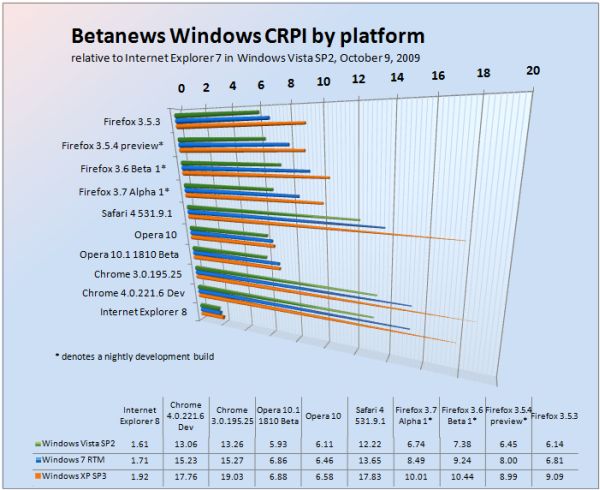
Click here for a complete introduction to the Betanews Comprehensive Performance Index.
Assume that any one of my computers runs on idle speed at least two-thirds of the time. That means for every hour of real-world usage, at least 20 minutes of that time is expedited by 17%. That’s at least another three-and-a-half minutes per hour of work or online play gained back, which equates to another three-and-a-half hours per week recovered. Add that to the four I’ve reclaimed in thumb-twiddling time, and I’ve gained back some 385 hours of productivity per year.
That’s over six weeks of work. I can write a book in six weeks.
After I told this to my wife, she suggested a new marketing slogan for Microsoft: “Buy Windows 7: Get Six Weeks of Your Life Back.”
Next: Do you need a new computer for Windows 7?
TOP 10 WINDOWS 7 FEATURES:
[FULL SEC DISCLOSURE:] Microsoft supplies Betanews with evaluation software, including Windows 7, through its MSDN developer support program. Microsoft also provides some technical expertise and insight to Betanews on request. In return, Betanews professionals participate in Microsoft testing programs, including with Windows 7, as well as other operating systems, tools, and applications.
This relationship enables Betanews to thoroughly examine Microsoft software prior to its public availability. It does not contribute to, or color in any way, the opinions of Betanews or its writers. Scott M. Fulton, III is the author of this article, and as always, is solely responsible for his content. The opinions expressed here do not necessarily reflect those of Betanews or any of its other editors or contributors.
Do you need a new computer for Windows 7?
No.
One of the most common questions I’ve received from everyday computer users since January 2007 has been, “How do I know when I’ve got all of Vista?” For most users, what ruined the entire Vista “experience” from the very beginning was its convoluted OEM logo compliance program, which left them with the sinking feeling that, no matter what SKU they chose, their OS would be incomplete. On top of that, the whole “Windows Experience Index” concept only served to remind them they were never getting as complete a package as some enthusiast someplace was enjoying — some Tom’s Hardware guy (someone like me) with dual graphics cards and eighty-six cooling fans. As a result, users instead complained about owning “half a computer.”
The original intention of the WEI, I was told at the time, was to give folks incentive to upgrade. But since when does anyone, after being given a score revealing how much of a machine he doesn’t own, rush to the store to fill the gap? “That’s a nice Camaro you’ve just bought, Jack! Did you know it was exactly 0.65 of a Corvette?”
Microsoft does not actively publicize this little-known fact, but from a technical standpoint, Windows 7 is a more suitable candidate for an XP replacement than Vista. It’s leaner, it’s better with memory, it takes fuller advantage of multicore processors, and it doesn’t inundate the user with nonsense.
Any computer that was “ready for Vista” is effectively just as ready, if not more so, for Windows 7. While Vista’s engineers created barriers that precluded XP users from upgrading, for fear of missing the whole “experience,” no such barriers exist between Vista and Win7. Unfortunately, though, the lack of a direct migration path between XP and Win7 is both intentional and artificial.
It is technically feasible for you to upgrade from XP to Windows 7 using a borrowed copy of Vista. We’ve done it in trials, with minimal cuts and bruises. That said, there are excellent reasons for you to avoid that course of action for yourself. Due to less standardized and less secure practices employed by software manufacturers including Microsoft during the XP era, the XP System Registry is an unfathomable hairball of convoluted associations, many of them broken. A set of XP Registry files can swell to several gigabytes of database code, although like DNA in the human body, only a part of it is actually usable — the rest lies dormant. Recreating the sensible part of the Registry even on Vista, let alone Win7, would require mere megabytes by comparison.
After I wrote our story about XP-to-Win7 upgrades, I received numerous inquiries boiling down to: “You idiot! Why would you ever suggest anyone do this?” The answer at the time was this: There may be numerous instances where users simply cannot re-install all their working applications, for reasons including loss of the original CD-ROM, and my personal favorite, the inability for older apps to be installed in Windows given its new and more secure permissions structure. Since that time, XP Mode has been introduced to give folks who do have the old installer discs a way to re-install their older, less secure software in a secured XP virtual envelope (at least for users of Win7 Professional and Ultimate).
Granted, not everyone is pleased with Windows 7’s current “SKU-ing” of its retail line-up, which isn’t much different from Vista’s. But the streamlining of the meaning of the Windows 7 compatibility logo, for both OEMs and customers, is most welcome: If there’s a Windows 7 logo, it runs Windows 7. Not half of it, not the half that’s minus the Aero “experience,” but all of Windows 7.
Meanwhile, many very intelligent XP users who skipped out on the whole Vista debacle, may be considering whether to purchase a Windows 7 “upgrade” package, or a new computer with Win7 already on it. The dilemma for them has less to do with the operating system than with the state of their computer: Too many 2002-era single-core PCs out there have a single hard drive that’s littered with media files and documents that have never been offloaded, perhaps never even backed up. Many are running Office XP, because their businesses run Office XP (on Windows 2000), perhaps because they can’t install a newer version of Office without breaking their VPN software. Like bacteria cultures, their computers have become mossy, overgrown hives of inactivity, where sometimes the Internet works and sometimes it doesn’t.
For these folks…it’s time already. The world has evolved, and it’s a lot nicer out here now. It’s time for that long-overdue visit to the toxic waste disposal facility.
On the other hand, if you are running Windows XP on a modern, multi-core system, that’s well-managed with its data files on an independent drive from the system device, whose networking is fast and crystal-clear, whose media files are all well organized, and that’s secured by hardware and software firewalls along with non-intrusive anti-malware utilities, then is there a compelling reason for you to consider keeping the hardware and upgrading the operating system to Windows 7?
I say there is: The genuine advances that the Vista kernel (especially the 64-bit kernel) made to system security are all present in Windows 7 (which even technically speaking is really Windows 6.1). The truly good ideas that Vista advanced, especially with regard to software access policies, are all present in Windows 7. But you’re not paying a significant performance penalty for them.
In fact, with proper self-administration, you may be able to overcompensate for any performance hit: The poor performance with which many XP users are typically plagued, on account of lousy security software whose cost in aggravation and lost productivity is greater than any harm that malware could intentionally inflict on your computer, can be remedied with Microsoft Security Essentials. Although it’s basic, it’s free. And in Betanews tests of Security Essentials on a quad-core Win7 system, there was no performance hit. None. In fact, some of our apps were mysteriously faster with anti-virus turned on.
How come? Windows 7 is better at managing parallelism than Vista, which is probably the biggest reason its speed is best appreciated on quad-core (or AMD triple-core) systems, and Microsoft (once again) knows the secret. It knows how threads can be used to better prioritize running applications, and that anti-virus does not have to be run with high or even regular priority. This is also why Security Essentials may have an architectural edge even against some commercial anti-virus products.
Recently, some independent sources have claimed that the Windows 7 speed delta over Vista they observed is less than 17%. However, their tests were said to be run on single- or dual-core systems upgraded from Vista, with all applications intact. Possibly among those apps are third-party anti-malware utilities, whose working relationship with Vista has been poor enough. Break your dependence on bad anti-virus software (especially the brands pre-installed by dealers) and you’ll gain more than six weeks of your life back, easily.
There will be some who will remain quite comfortable in their XP-driven environments for the next few years, and with good reason: It’s a pretty decent OS, when it’s well-maintained and well-secured. Nonetheless, the principal reason for users to consider replacing their old computers is because they’re old, tired, and single-core. The multicore era is upon us, and Windows 7 takes better advantage of multicore than its predecessor.
Next: What Windows 7 doesn’t give you…
TOP 10 WINDOWS 7 FEATURES:
What Windows 7 doesn’t give you
One of the most important series that Betanews has ever run in over a decade of publishing has been our Top 10 Windows 7 Features. These are the noteworthy features we feel will give users reason to not only purchase but to appreciate the product. Some of our choices are changes from Windows Vista (for instance, a better Windows Explorer, and DirectX 11); others are features whose true usefulness may only be determined after the first year of deployment (Device Stage, Multitouch, third-party troubleshooting).
But what that list does not cover is some of the baggage that Windows 7 removes, particularly from Vista. Here are a few examples of things that Windows 7 does not offer, the lack of which I’ve come to appreciate over the past few months of testing:
- We’re done with the welcoming already. Back in 2006, Microsoft devoted quite a bit of Vista’s time and space to videos intended to make users feel happy and peppy about having installed Vista. It turns out somebody built a Web for all that, so now that Microsoft has offloaded that part of the process to the Internet, a big chunk of the installation time has been reclaimed.
- Trips to Task Manager to clear crashed Sidebar gadgets. You can install “Sidebar gadgets,” as they’re still called, on the Windows 7 Desktop. But there is no equivalent for the Vista Sidebar in which to stow them (at least, not without hacking the Registry). This is a design choice that seemed peculiar to me at first, and it does create the slight inconvenience of maximized Windows overlaying certain gadgets that one might prefer to be omnipresent, like the clock or the news ticker. But then I realized there was a deeper architectural reason for the change: Back in Vista, almost half of my program crashes were caused by Sidebar gadgets running in the Sidebar, and most crashes that forced me to reboot were Sidebar-related. On the Win7 Desktop, the very same gadgets do not crash. There is apparently something about the context in which gadgets run which confused Vista, and which may confuse Win7; at least for now, this appears to bypass another serious Vista-era headache.
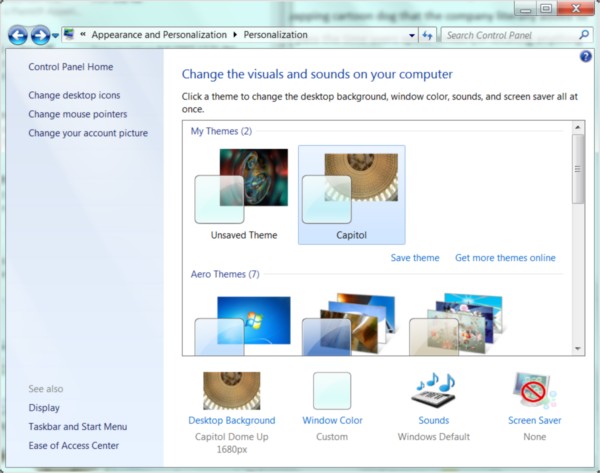
- The dialog box maze of “Personalization” options, which reminded me of playing a game of Clue every time I wanted to change the e-mail notification sound. There really is no reason why the customization of one’s desktop should be a process buried beneath a pile of hierarchical menus; and indeed, Microsoft’s designers discovered that the main reason why XP users’ desktops continue to feature bright blue skies on bright green grass, is because changing the scene seemed too hard. Vista brought the Personalization menu to a right-click on the Desktop where it belongs; but from there, the user was directed through a cavalcade of menus and dialogs. (And what exactly is the reason why “Change desktop icons” was under “Tasks” in Vista, but changing the desktop wallpaper was not?) In Windows 7, all your choices for themes and customizations are presented in glorious 3D, like ads for decorator fabrics in a home design magazine. At long last, somebody at Microsoft got the idea that seeing your choices makes more sense than combing through a list of their names.
- Regular trips to the “Network and Sharing Center.” It’s actually unbelievable: The degree to which Windows 7 is capable of automatically finding its way in a workgroup, especially among other Win7 and Vista systems, is something I never thought I would see from Microsoft. In XP, the process of getting the right protocols installed, then the connections that used those protocols, then the network that used those connections, involved hours of trial-and-error and multiple reboots. And in Vista, the process was actually far worse: I have lost count of the number of times I had to re-install wireless networking on Vista-based laptops moved throughout this office. To date, for each Win7 laptop, Wi-Fi has been installed once and once only. In fairness, the layout of the Orwellian-entitled “Network and Sharing Center” remains about as convoluted in Win7 as it was in Vista. But not having to visit it nearly as often, is a true blessing.
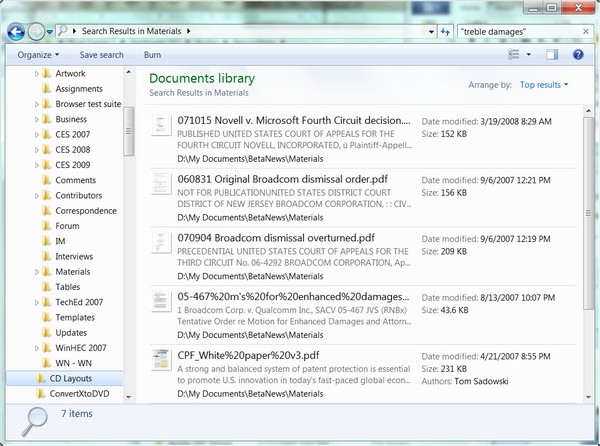
- Empty or meaningless search results. One reason why so many computing veterans remain skeptical that Microsoft will ever find any success with Bing is because they know that “Microsoft” and “search” put together has been a farce. Memories of the little yapping cartoon dog that the company literally added to XP, in order to more smoothly pass the time users spent not locating anything they were searching for, makes folks reticent to even try locating content on their hard drives. In an extraordinary epiphany, Windows 7’s use of Microsoft’s new Search 4.0 has made the quantum leap from pointless to invaluable. I maintain a huge library of documents that I don’t have time to keep sorted. Being able to find a set of Microsoft Word and/or PDF and/or HTML files based on a contained phrase, that accurately represented what information I actually possessed, in about a second, is something I was never able to accomplish with any Microsoft product ever made up until last August. In hindsight, I should have considered Win7 Search more thoroughly as a candidate for a Top 10 Feature.
- Computers that don’t stay off. Windows XP was notorious for never really paying attention to what its drivers were saying about the motherboard’s power state. For most XP systems I’ve ever built, “off” never stayed off, and “hibernate” or “sleep” was a euphemism for “wait 15 seconds then come back.” I burned out a power supply just last month when, once again, an XP-based desktop popped back on a weekend while I was out of the office. Vista was better with power management, but not 100%: On almost every Vista system I’ve used or built, the “wake-on-LAN” feature is always considered turned on, even when the BIOS says it’s not. As a result, whenever I hibernate a Vista system, I always have to unplug the Ethernet cable or disconnect the Wi-Fi first (another delightful trip to the “Network and Sharing Center”). This problem has been solved ever since the final Technical Preview of Win7, and it literally means I no longer have to remove the power cable from my desktop machines to keep them in the off position.
- Extra add-on apps you will never use (see: “the invention of the Internet”). The replacement of non-essentials like Photo Gallery with links to Windows Live Essentials is, yes, a promotional tool for Windows Live services, but it’s also a blessing for folks who want faster installation and less bloat, and who know the address for Fileforum. Games like Spider Solitaire and Minesweeper are still present, but that’s for long-time Windows users who expect to find them there since they were in Windows 95, and these games are very small programs anyway.
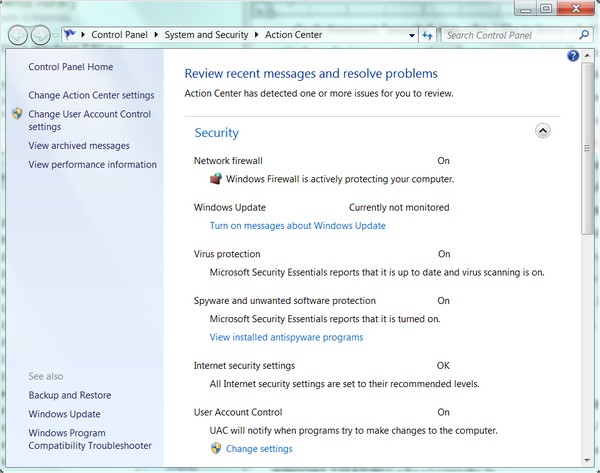
- Incessant “security” nags. I like to know what’s going into my systems and when. So I never set anything from anyone to install automatically; I prefer to be notified of what’s been released, and I’ll make the decision whether to patch or not. Isn’t this dangerous? No more dangerous than Office 2007 Service Pack 2 installing itself automatically every single morning, which is what will happen if I changed the Automatic Updates setting on two of my XP-based desktops right now. Vista penalized me for making this choice, by flagging this with a yellow light in Security Center, but more revoltingly, by reminding me of the errors of my ways every 12 hours or so, with little blurbs emerging from my taskbar. In Windows 7’s Action Center — my pick for the #1 new Windows 7 feature — there are no more nagging blurbs to make me feel less secure about whether I’ll take a sledgehammer to my machine. And although Action Center does flag my choice with a yellow light, I can turn that light off and it will stay off, like a power switch (at least, like a power switch prior to the advent of Windows XP). In the screenshot, you’ll see the message, “Windows Update – Currently not monitored.” Yes! Thank you! It’s my choice, and I’m sticking with it.
Typically I’ve agreed with my friends at Sophos with regard to security matters. Here is one notion with which I absolutely disagree: Nagging the user less about security makes the computer less secure. Bull socks. When an administrator makes a choice, and is willing to sign her name to that choice, the operating system should learn to live with it. In addition, the companies whose livelihoods used to matter on how insecure Vista made users feel, need to adapt to these changing consequences as well.
Next: Is Windows 7 worth the money?
TOP 10 WINDOWS 7 FEATURES:
Is Windows 7 worth the money?
Let’s face the most obvious fact right up front: It’s still Windows. It’s an operating system married to a single, local System Registry for all software executable by the processor, which we have all come to realize is an inelegant model. It continues to depend upon device drivers to be installed from the outside world, rather than being able to receive instructions from the devices themselves — a feature that device makers would be more than willing to co-develop. Windows spends a great deal of its time making absolutely certain that nothing you’re running is stolen, and it doesn’t always do a great job of that. Installing the very latest version of Windows Live Messenger still requires you to hack the Registry and/or re-register a DLL from an administrator-authorized command line (and if you don’t believe me, here are the instructions to prove it).
At a certain level, building a better Windows would be like Ford building a better Crown Victoria. It’s nice, but not worth throwing a party. As my friend and colleague, Betanews contributor Carmi Levy, observed earlier this week, the era when a new operating system makes a direct impact on people’s social calendars has long past. (There’s ample evidence that this era only lasted about three weeks.) And the era in which the model for software design is based around the operating system as the sole underlying platform is also on its way out, which is grave news not just for Microsoft but Apple as well.
 The thing is, though, Windows isn’t going away anytime soon. I remember the onset of the era of solar and wind energy too — I seem to recall it was announced on a one-reel Encyclopedia Britannica film that my fifth-grade science teacher was splicing back together during the height of the Vietnam War. I do foresee the very real possibility that the underlying foundation of Windows could be completely replaced with a kind of operating system layer whose sole purposes are to manage a new class of hardware, and to run a user OS in a virtualization envelope. (Microsoft may not be the only company to produce this.) But that envelope will likely run Windows, so the operating system will probably be known as Windows, and from the user’s vantage point, it will be Windows.
New operating systems may no longer be the stuff of rock concerts and Tupperware parties. Neither are new dishwashers, sinks, or toilets. Yet they are all indispensable parts of our lives.
Even after reading this, one question probably still remains on many readers’ minds: If Windows 7 truly represents the level of functionality that Vista should have provided from the beginning, then shouldn’t Microsoft be paying for it and not the public?
If Vista were an insecure system, then I would say yes. It was not. It was an annoying system, especially with “features” like the Black Screen of Death. But it was not Windows Me, the travesty of code that represents the absolute nadir of Microsoft’s development history, the “Disco Era” for Windows.
Even then, however, I said Windows XP was worth paying for. XP — the first version, the one I said in hindsight was desperately in need of a transplant. The fact that I value my time (with a calculator) is just one reason. The fact that I value the developers’ time spent making this work, is the other. Yes, I’ve said Windows 7 is “Vista Service Pack 3,” and I stand by that. But in terms of the work Microsoft’s people are genuinely devoting to improving the quality of this product (whose quality needed improvement), I do believe it is worth the investment. Windows Me was not worth the investment; Windows 98 (pre-OSR2) was not worth the investment.
But as anyone who’s done the work knows, cleaning up crap is a dirty job. Someone has to do it, and there are days I’m glad it’s not me. Windows 7 is cleaner, brighter, and sanitized for your convenience. And that’s worth the tip.
TOP 10 WINDOWS 7 FEATURES:
[FULL SEC DISCLOSURE:] Microsoft supplies Betanews with evaluation software, including Windows 7, through its MSDN developer support program. Microsoft also provides some technical expertise and insight to Betanews on request. In return, Betanews professionals participate in Microsoft testing programs, including with Windows 7, as well as other operating systems, tools, and applications.
This relationship enables Betanews to thoroughly examine Microsoft software prior to its public availability. It does not contribute to, or color in any way, the opinions of Betanews or its writers. Scott M. Fulton, III is the author of this article, and as always, is solely responsible for his content. The opinions expressed here do not necessarily reflect those of Betanews or any of its other editors or contributors.
Copyright Betanews, Inc. 2009


 Palm’s App Catalog took another step toward maturity as the company opened
