Blog

  • Microsoft Research’s Blink adds burst-shot mode to Windows Phone 8

    In the camera department, Windows Phone 8 is an interesting piece of kit — users have access to a high number of customizable options and there is even support for add-ons, or lenses, as Microsoft likes to call them. But one major feature is still missing to nail that perfect picture, namely burst-shot mode.

    The software giant’s research arm, Microsoft Research, has introduced a new app for Windows Phone 8 devices, dubbed Blink, that fills the gap in the otherwise competent camera bag. Blink works both as an individual app as well as a lens, and allows users to snap a significant number of shots, all in one go, and save the best one afterwards.

    The app starts taking pics before you even press the camera button and stops moments after releasing it. Users are presented with all the snapped photos in a bottom row and can navigate between them by swiping left and right. Support for on-screen autofocus is also present.

    Blink features “advanced image stabilization technology” which, according to Microsoft Research, “removes camera shake”. Based on my own testing, the best results are delivered when holding the device still. When following a moving target the pics suffer from motion blur in out-of-focus areas.

    As one reviewer points out, “the picture quality of the images does not match my normal photos. The app has no access to things like flash. I doubt it does facial recog”. Indeed, Blink snaps pics at a low resolution of only 1280 by 720, instead of the maximum one supported by the smartphone. Users cannot take advantage of the built-in flash, nor does the app display the usual face detection rectangle when taking portrait pictures.

    Basically Blink gives the impression of a technical exercise with the sole aim to prove that burst-shot is available for Windows Phone 8 devices. The app could use more features, some of which I mentioned above. Blink would undoubtedly be much more useful as a built-in feature, readily available from the default camera software, not as a lens or individual app.

    Blink is available to download from the Windows Phone Store.

  • ‘Infinite’ cloud storage service Bitcasa set to leave beta

    There are no shortage of services that can backup your data to the cloud, but now the likes of Carbonite and Crashplan have a bit more competition in the market.

    Over the weekend, Bitcasa, which has generated a lot of buzz recently, sent out an email to its early testers to alert them that the service would be leaving beta on Tuesday February 5th.

    “Thank you for participating in the Bitcasa beta!” the email begins. “We have amazing product updates coming on Tuesday, and exclusive pricing for our faithful testers. Stay tuned for details in your inbox next week, but rest assured, we heard your feedback, and you will be handsomely rewarded for helping us out!”

    The service will offer 10 GB of free storage or unlimited space — “infinite” as Bitcasa prefers to call it — for $10 per month. However, as you saw above, beta testers will be getting a “bonus”. The app is available for Windows, Mac, Linux and Android. There’s also a modern UI version for Windows 8 customers.

    I have been testing Bitcasa for sometime now and have found it to be pretty simple. A folder is added to the Explorer window and the program can be set up to mirror your entire computer or just individual folders of your choosing.

    Bitcasa is just one more player in a sea of competition, but its functionality and pricing should make it competitive. The beta is still open to the public so, if you want to take advantage of whatever deal the company plans to offer to early users, you may want to sign up for an account today.

  • British Telecom cuts its broadband prices and announces BT Cloud, a new online storage service

    BT has said it will end traffic throttling, remove usage caps on all but its entry level broadband packages, and slash the price too.

    Its new Totally Unlimited Broadband offering will be priced from £16 a month for 16Mbps copper broadband, £23 for 38Mbps Infinity, and £26 for 76Mbps Infinity. New customers will also get the first six months free.

    In addition, the provider is rolling out a new online storage service. BT Cloud is available for all consumer broadband customers, with standard users getting 2GB of free storage, and Infinity 76Mbps and Unlimited customers receiving a much more generous 50GB allowance.

    Making the announcement, John Petter, managing director of BT’s Consumer division, said: “We believe we have boosted our broadband offering by moving our best broadband deals to totally unlimited. Customers told us that they wanted to be able to enjoy catch-up TV, streamed films and other bandwidth-eating applications without having to worry about going over their limit or being slowed down by their ISP. But we wanted to make that really affordable too, without the sort of traffic management Virgin Media, TalkTalk or EE customers may find themselves subject to. Unlike Sky, we’re extremely confident that our network can stand up to the extra bandwidth demands from totally unlimited products everywhere across the UK”.

    Photo Credit: T. L. Furrer/Shutterstock

  • Morning Advantage: How to Retain Your Also-Rans

    Start my not calling them “also-rans”.

    It’s a good problem to have: multiple really qualified internal candidates, all competing for the same job. Unfortunately, you can only promote one of them. So how do you make sure you retain the talented employees you didn’t promote? The Australian School of Business offers some advice, including: make sure you’re offering multiple career paths; encourage employees to move laterally, to make themselves even more valuable later on; and be willing to create bespoke posts for really talented people. A new position can create value for the company while offering the employee both a morale boost and a chance to grow.

    If it’s not in your power to do any of that, you can at least offer them some targeted mentoring to improve their chances of getting the job next time. And of course, make sure you deliver the bad news to the employees who didn’t get the promotion in person and in private, before they hear it elsewhere.

    GIVE ME YOUR TALENTED, YOUR SMART, YOUR ENTREPRENEURIAL MASSES

    The Economic Case for Immigration (The New York Times)

    “Immigrants are 30 percent more likely to start new businesses than native-born Americans,” writes David Brooks in this column, and he’s not talking about convenience stores. “A quarter of new high-tech companies with more than $1 million in sales were also founded by the foreign-born.” Another study found that 262 jobs for the US-born were associated with every 100 immigrants in science and tech fields. Even on the low end of the economic spectrum, economists are increasingly convinced that immigrants don’t lower wages for native-born Americans.

    RAISED ON PROMISES

    Young People in the U.S. Still Believe (Gallup)

    A large percentage of American youth believe their lives will be better than their parents’. Some 43% of fifth- through 12th-graders say they’re very likely, and 52% say they’re somewhat likely, to have a better standard of living, live in better homes, and receive better educations. But only half of adults share the belief that young people’s lives will be better than their parents’, Gallup says. —Andy O’Connell

    BONUS BITS:

    Can’t Buy Me Love

    Money Lessons from The Beatles (Bankrate)
    The Volker Way: Lessons from the Last Great Hero of Modern Finance (Foreign Affairs)
    US Alarmed by Europe’s Data Protection Act (Ars Technica)

  • Lock down almost any PC with Deskman

    If there’s an aspect of your PC which you don’t like then it can normally be changed very quickly: a right-click option here, maybe launch a Control Panel applet there, install a new program perhaps, and the system should soon be more suited to your needs.

    But while this configurability is great on your own computer, it’s a real problem when you want a PC to be much more restrictive: a system which you’ll install in a school, say, or a business. What you’ll probably want to do then is set up some basic configuration, and make sure your users can’t do anything to change it — and that’s where Deskman comes in.

    The compact commercial tool (priced from $60) appears deceptively simple at first, with the bulk of its functionality available in just a single dialog box. Is that it, you might wonder? Browse through the tabs, though, and you’ll be surprised at just how much the program can do.

    You might start by building a Safe Start Menu, for instance, with only the applications you’d like your users to access. The regular Start Menu can then be hidden (although it still exists, if you need to use it yourself later).

    And because of course users might try to launch programs in other ways, Deskman also provides a Freeze option which allows you to define exactly which programs can be run.

    If browsing is an issue, then you can turn it off entirely, or restrict users to visiting just specific sites which you define.

    And you can set up your preferred desktop with your own choice of application icons, shortcuts and more, and the program will maintain and restore this for you, no matter what your users might try to do.

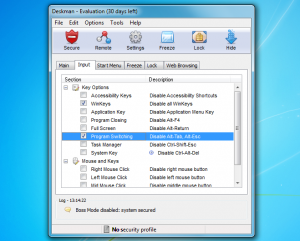
    More experienced users will of course try various tricks to get around this, but Deskman has options to block them all. So you can disable or limit Task Manager, for instance; disable the Windows keys, Alt+Tab and all the other system keypresses; hide the system tray, application buttons or the entire taskbar; restrict access to Control Panel, Explorer and a whole lot more.

    And while the sheer volume of options means it’ll take a while to set up Deskman properly, the mechanics of the process isn’t difficult. For the most part you’re just working your way through a tabbed dialog, checking boxes next to a restriction you need, and the program will then apply these with a click.

    Deskman may initially feel a little expensive, then, but if you really need to protect a computer then it’s well worth the investment: the ability to preserve your system setup without you regularly having to manually restore it will save you a great deal of time and hassle. It’s a very powerful tool with a lot of options, and there’s a 30-day trial available so you can sample them for yourself.

    Photo Credit: Kutlayev Dmitry/Shutterstock

  • Beyonce Halftime Show: She Broke The Super Bowl

    Beyonce appears to have won over quite a few of the haters who were complaining about her lip-synching scandal at the inauguration with the insanely energetic, sweat-filled workout she gave us at the Super Bowl’s halftime show; Twitter and Facebook are teeming with posts about the performance, which has apparently sucked all the energy from the Superdome.

    Perhaps it was the huge screens filled with images of multiple Beyonces, or the skin-tight outfit she was rocking, or the sudden appearance of Kelly Rowland and Michelle Williams onstage despite rumors that they wouldn’t be able to appear for the much-touted reunion, or the band full of lovely ladies, one of whom was playing a guitar that shot sparks from both ends…any one of those things could have easily caused a power outage. Of course, as soon as the lights went down, the internet lit up with comments, jokes, complaints, and speculation. Something this big happening at one of the biggest events of the year is bound to get people talking, and as fans start to squirm in their seats after nearly a half-hour of downtime, let’s check in to see what everyone’s saying.

    beyonce super bowl

  • BlackBerry 10′s Big Game Ad

    BlackBerry Z10 commercial

    Whaaat is going on here?

    The new BlackBerry Z10 cannot set you on fire, give you elephant legs, cause you to disappear into a cloud of rainbow smoke or turn a speeding truck into harmless rubber duckies. But with only 30 seconds, on the world’s largest advertising stage it’s quicker to show you what it can’t do. In a fun and creative one-time spot that aired this Sunday, BlackBerry introduced the new BlackBerry Z10.

    The fast and elegant BlackBerry 10 device symbolizes a restart for the company, which has completely re-designed, re-engineered, and re-invented its products and its brand. BlackBerry 10 features many advances that are designed to make it stand out. With communication and agility at its core, BlackBerry 10 is for people who need to Keep Moving, which is the new tagline and mantra for the company.

    For the big game, rather than run an ad that is expected for the tech category – one that showcases the features of the product – we decided to have fun and challenge the status quo. We knew that for this event, it was important to spark a conversation about BlackBerry 10 and to make people curious enough to find out more. We’ve got the great benefit of having one of the largest social networks in the world with 30 million fans on Facebook and Twitter, and we wanted to drive people both there and to our website to discover what makes BlackBerry 10 stand out.

    Frank Boulben sat down with the Inside BlackBerry Blog crew to talk about the commercial:

    [ YouTube link for mobile viewing ]

    We’re four days after the launch of BlackBerry 10 – our largest product introduction ever. The response to the product has been tremendous and we’re building off that momentum on the largest advertising stage of the year.

    Don’t forget to check out BlackBerry.com to see what BlackBerry 10 can do.

  • StormFly Wants To Childproof Your Computer With Its Ubuntu-Booting USB Bracelet

    stormfly

    When I was but a wee lad, I hosed my share of family computers simply because I wanted to help out — once I tried to free up space on a 6GB hard drive by deleting anything larger than 1MB. You can imagine how well that played out.

    I wouldn’t be surprised to hear that the founders of Barcelona-based Now Computing went through something similar, because they’ve just recently launched a Kickstarter project for a device that should ensure it never happens again.

    At its core, the $59 StormFly is little more than a 16GB USB 3.0 flash drive with a bootable version of Ubuntu that someone (ideally a kid) can wear on their wrist. After a little bit of setup (mostly changing the boot sequence in a PC’s BIOS), those little ones whip the USB bracelet off their wrists, plug it into a PC or a Mac, and do whatever it is that kids do on computers these days without having to worry. Thankfully, since the StormFly’s user never has access to the OS that’s actually installed on the host computer, there’s no way for them to royally screw things up by mucking with other people’s settings or downloading things they really shouldn’t be.

    Not a bad proposition, especially when parents are exposing children to technology earlier and earlier these days (for better or worse).

    Granted, this is the sort of thing most of you readers could probably cobble together in under an hour, but not everyone can be bothered to put together a custom computing environment for their kids. StormFly is about more than just a bit of hardware that you wear though — young ones are prone to lose things, which is why StormFly also features an encrypted online backup component… for an additional monthly fee. In the event that its user misplaces their USB bracelet, StormFly can ship out a replacement unit that has all of a user’s data back where it was within about 24 hours.

    There are, however, some issues to be found here. Perhaps most concerning its the project’s tagline — the team claims multiple times that the StormFly is “like a PC on your wrist,” which seems a bit misleading. To their credit, the project’s description puts a finer point on what the thing actually is (a USB 3.0 flash drive with Ubuntu loaded onto it), but it’s a questionable move that’s already caused some heated debate in the project’s comments section. Still, it’s a neat enough project, and it’s slowly been picking up steam — StormFly has currently hit $14,000 in pledges after only a few days, so it’s certainly got a shot at becoming a real product.

  • Vice President Biden and Dr. Biden Visit Landstuhl Regional Medical Center in Germany

    Vice President Joe Biden and Dr. Jill Biden visit with medical staff

    Vice President Joe Biden and Dr. Jill Biden visit with medical staff during a visit to Landstuhl Regional Medical Center, in Landstuhl, Germany, Feb., 3, 2013. (Official White House Photo by David Lienemann)

    Today, Vice President Joe Biden, Dr. Jill Biden, and Deputy Secretary of Defense Ashton Carter visited with Wounded Warriors and their medical caretakers at Landstuhl Regional Medical Center (RMC) in Landstuhl, Germany. 
     
    Landstuhl RMC is the largest U.S. military hospital outside the United States. It serves American servicemembers and their families who are stationed in Europe. Landstuhl RMC is also the nearest medical trauma center treating wounded U.S. servicemembers coming from Afghanistan. The center treats wounded coalition military members serving alongside U.S. forces in Afghanistan as well.
     
    The Vice President, Dr. Biden, and Deputy Secretary Carter thanked the combat-injured U.S. soldier for his service to our country and thanked his wife and their young son for their sacrifices. They also spent time visiting with two wounded soldiers serving in Afghanistan who were from the Republic of Georgia. Of the fifty-nation coalition providing forces in Afghanistan, the Republic of Georgia is the largest non-NATO contributor, providing over 1,560 forces who primarily serve in Afghanistan’s volatile Helmand province.
     
    The Vice President, Dr. Biden, and Deputy Secretary Carter also took time to specially thank on-duty medical caretakers in the surgical wards and the intensive care unit for caring for our Wounded Warriors. Vice President Biden said, “Even if there were no Wounded Warriors here to visit today, we wanted to stop by and visit with you to say thank you for all that you do for them. What you do is truly breathtaking. And because of you, our Wounded Warriors can return home alive to their mothers and fathers, to their wives and husbands, and to their sons and daughters.”
  • ‘House of Cards’ is just that for big media companies

    The new made-for-Netflix drama “House of Cards” is aptly named for what it represents — a fundamental shift in entertainment creation, distribution and consumption. The political thriller is by no means the first made-for-web TV show. But the production values, storytelling and intrigue meet, and in some ways surpass, those found from cable network productions. Yes, even Showtime’s popular “Homeland”.

    I predict that Netflix has here what HBO did with “The Sopranos” in 1999, an industry-changing series. The D.C. drama, starring Kevin Spacey and Robin Wright, shows how the entertainment industry is a house of cards new media distribution can topple. Good content can go to the web first, or only there.

    Crime Family

    HBO was no studio startup when Tony Soprano sat in the psychiatrist chair 14 years ago, but had no real success producing television series (more mini-series and made-for-pay-cable feature films). The drama’s popularity demonstrated the value of pay cable, and bolstered the appeal and economics. All the cable productions that followed — even “Mad Men” or “Walking Dead”, from non-premium subscription network AMC — owe homage to “The Sopranos”.

    Like HBO, Netflix depends on licensing deals with Hollywood studios, but the new media company also threatens long-established distribution channels. “House of Cards” spotlights the economics, suddenly showing how Netflix could be something like the Google of entertainment. The search giant’s business model is about giving away stuff for free — or at most for less cost — than competitors.

    From that perspective, Google lowers the value of everything it touches. Why should people pay for something they can get for free? But that’s a simplification. Free isn’t often good enough. The stuff given away by Google has value — or is valuable enough.

    People will always pay, and this is especially true for entertainment, when there is value. Why else do subscription services like HBO remain so popular? (Okay, that and some damn good content-distribution contracts.) That said, Netflix is just $7.99 a month, available to pretty much anyone — no cable or premium network subscription required. Like Google, Netflix changes the economics by streaming movies and TV shows — that’s nothing new. Producing dramas that are as good as those from HBO or Showtime raises the stakes.

    Netflix seemingly bites the hand that feeds it, but that’s another simplification. People didn’t stop watching network television because of pay-cable dramas like “The Sopranos”. TV simply got better, and I’d argue across the board. A new golden age of television started around 2004, with debut of dramas like “Lost”, and continues today (Yes, there are early exceptions, like “The West Wing”, which is same vintage as “The Sopranos”, or many Fox dramas).

    Network programs are better, but more importantly, cable is changed. Most major cable-only networks, even the non-premiums, produce in-house dramas, not just mini-series. If successful, “House of Cards” could — I predict will — lead to a surge in TV shows produced directly for the web. The series is that good.

    Political Intrigue

    Netflix has a real winner that smartly, and too accurately, captures Washington’s political intrigue — from the Capitol dome to the newsroom. “House of Cards” is based on a 1990 BBC program, which also is available on Netflix. So, you can watch both and compare, which I may do. Besides great acting and storytelling, the original Netflix series does something else quite dramatic. There is no serialization. All 13 episodes are available at once, for people to watch at their own pace. That’s simply brilliant.

    “The world of 7:30 on Tuesday nights, that’s dead”, series director David Fincher says. “A stake has been driven through its heart, its head has been cut off, and its mouth has been stuffed with garlic. The captive audience is gone. If you give people this opportunity to mainline all in one day, there’s reason to believe they will do it”.

    That’s how many people watch TV shows on Netflix, or even Amazon Prime, today. It’s the next thing beyond the DVR. Rather than time-shift by recording, watching and fast-forwarding commercials, people can watch what they want when they want and how much they want. Granted, this isn’t new, whether programs are rented, purchased or consumed for free from the Internet.

    The earth that shakes media distribution’s house of cards is something else: Releasing all episodes of a series simultaneously, turning the concept of serialization on its head. My wife and I watched the first two “House of Cards” episodes late last night and probably more today.

    For Netflix, the approach makes loads of sense, because the business model is different. For traditional television programming, the idea is to get people to come back and to pull them away from competing networks. Like websites that measure value by the amount of time people stay on them, Netflix wants viewers to stay put. Why not 13 hours straight, then present them even more reasons with other programming that is either original or otherwise not available elsewhere.

    Take “Annika Bengtzon: Crime Reporter“, which I recently watched on Netflix. The producers filmed six 90-minute movies back-to-back over the course of a year. Only one released to theaters in Europe. But all are quite good and available on Netflix to watch on your time, which I did when sick with the flu earlier this month. The production concept is similar to “House of Cards” — make them all, then release them all, at the same time. I highly recommend the book-based Swedish series, by the way.

    The question, looking ahead 12 to 36 months: What next, and from where? I’d pay for MAX Go, as a separate streaming service, just for the original programming. Cut cable’s cord. Wouldn’t you? Today you can taste the future. “House of Cards” debuted February 1, and for the month the first episode is available to everyone, even non-subscribers.


  • Track Tested: 2013 Chevy Corvette 427 Convertible

    2013 Chevy Corvette 427

    With all the hoopla surrounding the recently released 2014 C7 Corvette, it seems that people are forgetting just how good the outgoing C6 actually is. To cap off their final production run Chevrolet has seen fit to release the final edition by way of the Corvette 427. That means 505 hp, an almost 200 mph top speed and a roof that disappears at the touch of a button. The other thing to consider is that dealers will be HEAVILY discounting the current crop of C6 Vette’s currently on the market, so if your interested, now is the time to act!

    Source: InsideLine.com

  • New playlists: “Our brains: predictably irrational” and “What’s wrong with what we eat?”

    BrainTED playlists are collections of talks around a topic, built for you in a thoughtful sequence to illuminate ideas in context. This weekend, two new playlists are available: “What’s wrong with what we eat?” and “Our brains: predictably irrational” — and a bonus! A TED primer of 11 classic TED Talks. Think of it as “TED 101.”

    Our brains: predictably irrational
    We humans are amazing specimens of reason, but our brains are also remarkably buggy. We make absurd choices, behave inconsistently, and are constantly irrational. Watch 11 talks on just how fallible we can be.

    What’s wrong with what we eat?
    Are you eating the wrong stuff? What exactly is the junk you’re putting in your body? What about people who don’t even have enough to eat? 5 talks on our problematic eating habits.

  • San Francisco and Baltimore Mayors Put Service on the Line for Super Sunday

    Ed note: a version of this post was first published on serve.gov, the official site of the Corporation for National and Community Service. You can read the original post here.

    Today is game day, and as the Baltimore Ravens and San Francisco 49ers get ready to take the field, the mayors from those cities are taking a different approach to the traditional, friendly wager. This year, the focus will be on volunteering and community service.

    San Francisco Mayor Edwin M. Lee and Baltimore Mayor Stephanie Rawlings-Blake have agreed that the winning mayor would host the mayor from the opposing team for a day of volunteer service with AmeriCorps members. This service project will be done in partnership with the Corporation for National and Community Service (CNCS), the federal agency that administers AmeriCorps. (Click here to watch a video announcing the challenge on the "Today Show.")

    The mayors' friendly wager further elevates the role of community service within the Super Bowl's activities. As part of the official events, the Super Bowl Host Committee also hosted a community service effort yesterday, Super Saturday of Service, in which local volunteers revitalized five New Orleans playgrounds. AmeriCorps members serving with Habitat for Humanity New Orleans and Habitat for Humanity Baton Rouge participated. AmeriCorps members also took part in service activities organized by Rebuilding Together.

    read more

  • BULLRUN now on HULU!

    Bullrun On HULU

    The BULLRUN Rally is one of those events that’s on the bucket list of every automotive hoon out there. You take some of the best cars in the world, add in a few great hotels and parties and then wrap it all together in a 3,000 mile road trip that’s full of fun and debauchery. However if BULLRUN’s price is out of your league, then have no fear as you can now get your BULLRUN jollies on HULU! In short it’s a blast… Oh, and believe me as I know this for a fact. You see I’ve done it 3 times.

    Source: HULU.com

  • Backed Or Whacked: Life, Liberty And The Pursuit Of Laziness

    Backed or Whacked logo

    Editor’s note: Ross Rubin is principal analyst at Reticle Research and blogs at Techspressive. Each column will look at crowdfunded products that have either met or missed their funding goals. Follow him on Twitter @rossrubin.

    Last week’s Backed or Whacked covered light-related products that could be controlled by a smartphone. Beyond making their way in the dark, though, modern humans have many other basic needs — maintaining well-being, feeling secure, and enforcing as much control over their domain as possible while exerting as little effort as necessary. The ability to achieve them with the aid of a smartphone, though, has arrived relatively recently, and the ability to crowdfund them via Indiegogo as per all of this week’s projects, even more recently.

    Backed: Amiigo. Amiigo, which is Spanish for “friend in good shape who spells poorly,” is a chevron-shaped shoe clip that monitors movement, enabling you to know precisely how many calories you’ve expended repeatedly lifting the Boston Creme donut until it has been reduced to sugary crumbs. Amiigo enters the increasingly crowded contest for survival of the fittest begun by early entrants such as Nike+ and Fitbit. However, the trendy joint between the hand and forearm is where all the wriststers hang out these days. These include the Nike+ Fuelband, Jawbone UP, and other forthcoming entrants such as CES debutante Fitbit Flex and the HAPIwatch from HAPI Labs. To enter that club, the Amiigo shoe clip neatly docks into a wrist strap.

    What the Salt Lake City-based team is counting on to set Amiigo apart from these rivals is more intelligence regarding the specific type of activity you’re doing. The idea of diving deeper into the nature of your exertion has been previously espoused by the developers of the $199 Basis, which employs fancy sensors to monitor the body’s reaction to exercise beyond motion detection. Amiigo, which has more than tripled its $90,000 funding goal with about 25 days left in its campaign, dispenses with the extra hardware and is due to ship to Indiegogo backers in June for about $99.

    Backed: iSmartAlarm. ADT has run a legitimate business securing people’s homes and businesses. Recently, however, bigger bosses like AT&T, Comcast and Verizon have told their capos that they want into the protection racket, see? Extracting a monthly fee for peace of mind, though, has heretofore taken place mostly within the customer base of those in multi-room dwellings. There have been a few alternative approaches, though, like the apartment-friendly but nonetheless professionally monitored SimpleSafe system.

    For those who are comfortable handling alarms — false and otherwise — themselves, though, Raymond Meng’s team proposes iSmartAlarm, which includes a base station/siren reminiscent of the old Power Mac G4 Cube. iSmartAlarm, set to ship in April and starting with a basic package of only $79 with no monthly fees, has big plans for expansion. The company eventually seeks to include features such as sprinkler controls and GPS pet trackers.

    For now, though, it is starting off with the basics — window/door-open sensors, motion sensors and, most importantly, that inert sign that scares away the bad guys. Should brazen intruders disregard the latter, the system can initiate taking successive photos of the perp and will send alerts to the smartphone owned by you or the vigilante of your choosing. iSmartAlarm’s campaign has been plodding along with over $30,000 raised of its $50,000 target with about 20 days to go.

    Backed: Tethercell. Now that the crowdfunding world has provided the gear to convince you of your health and safety, it’s time to take it easy. Perhaps you want to turn on that FM radio on the porch a few feet away, but the thought of leaning forward displeases you. Debuting at CES along with the ultra-thin, time-telling bangle CST-01 that a future Backed or Whacked will discuss in more depth, the Tethercell may be your only hope.

    Designed by aerospace engineers, the cylindrical device stuffs a Bluetooth radio into a AA battery shell, leaving enough room in the cavity to insert a AAA battery. You give up some device stamina, but gain the ability to remotely enable and disable all kinds of products either manually or according to a schedule. Tethercell can also alert you when the AA batteries in a device are running low.

    Adding Bluetooth to products never intended to be controlled by a smartphone creates a wonderful twist on backward compatibility. While a shrinking number of devices that you might want to activate remotely take standard cells these days, the campaign’s Indiegogo page depicts small lamps, radios and baby monitors as examples. As Tethercell also works with some videogame controllers and many toys, the non-confrontational parent wishing for their kids to turn that damn thing off and pick up a book already can still pick one up for only $35 (although pairs are also proving popular). Recently charged above 47 percent of its $59,000 goal capacity, the Tethercell campaign has about 20 days’ worth of juice left.

  • avast! 8 beta is available — get it NOW!

    AVAST Software has released the first public beta of avast! 8 (or the first official one, anyway). Downloads are available for avast! Free Antivirusavast! Pro Antivirusavast! Premier Antivirus andavast! Internet Security.

    The immediately obvious change is avast’s clean new GUI. The home page presents a simple front end to each product, dividing its functionality up into six tiles, but clicking one of the tabs at the top of the screen allows you to quickly drill down into the detail.

    Explore the menus a little further and you’ll quickly spot several new tools. Perhaps the most important is the Software Updater, which will check your installed applications for missing updates. We’re not sure how many programs are supported, but already it’s covering the most important candidates: Adobe Reader, Flash, Java, all the main browsers, and so on.

    Elsewhere, Browser Cleanup aims to help you remove annoying addons from your browsers (although this only appears to work with IE and Firefox at the moment, at least on our system), AccessAnywhere allows you to set up remote access to your PC, while DataShredder will securely wipe files, drives or partitions. The last two will only be included as a part of the new avast! Premier product tier, though, so keep that in mind when you’re deciding what to download.

    And of course there have also been improvements to the core protection technologies, so for instance FileRep and WebRep are now better able to identify and new threats in near real time.

    Keep in mind that this is a beta, and even by those standards it has plenty of problems. In particular, there’s no Windows 8 support yet, and Facebook registration is buggy: you’re better off registering with an email or skipping it altogether.

    In our brief tests we’ve also noticed performance issues and some product instabilities. And the official avast! forum announcement talks of several other issues, including broken profile detection with the firewall, stability issues with Outlook plugins, and a significant Data Shredder bug (it can’t shred files or partitions: oops).

    This is only to be expected with betas, though, so isn’t any particular cause for alarm. So if you want to install avast! Free Antivirus or avast! Internet Security then go ahead (apparently they can be installed over an existing version, keeping your current settings), just expect occasional problems as you explore the new features.

    Photo Credit: almagami/Shutterstock

  • BlackBerryCool Talks BlackBerry 10 With CTV News

    BlackBerryCool Kyle McInnes CTV Interview
    Click the image or this link for the clip.


  • Where Kim Dotcom and Mega have the edge on Dropbox and Box.net

    As a world (in)famous technologist with the literal last name “Dotcom,” Kim Dotcom is a man whose swag is matched only by the damages sought against him by the U.S. government. His filesharing site Megaupload was long the ire of record companies and movie studios, who say it was a massive and sprawling repository of pirated content.

    If the accusations are true, it was one of the more successful pirate operations in history. At its peak, Megaupload saw approximately 7 percent of internet traffic and grossed over $150 million in annual revenue. But Megaupload’s incredible run ended in the fall of 2012 when the FBI forcefully took down the site and sought Kim’s extradition from New Zealand to face a litany of criminal charges.

    Of course, you can’t expect to keep a guy with the last name Dotcom down, and sure enough he recently announced the relaunch of a Megaupload redux dubbed Mega. Only Mega is a security- and privacy-conscious file-sharing service that audaciously targets storage industry magnates like Dropbox and Box.net.

    And loathe as some of us may be to admit it, he just may be on to something. Mega differentiates itself by embracing client-side encryption: generating and storing the keys on a user’s local machine rather than encrypting everything in the cloud. The result of such client-side encryption is not only a far more secure product – and a security practice the industry should embrace – but a significant reduction in cost and legal liability for Mega and other cloud storage providers that use this architecture.

    How Mega is different

    Security is one of the biggest inhibitors to cloud adoption. Yielding sensitive data to a third party over the public internet continues to be a dealbreaker for many medium- to large-scale enterprises, with their desire for privacy and concerns of regulatory and legal exposure.

    In the movement to the cloud, data is exposed at two points to attack or compromise: in-flight (when it is being transmitted over the security no-man’s land of the public internet) and at-rest (when it physically sits on servers within the cloud system). In both instances there are a myriad of threats that could allow that data to be stolen or compromised.

    Mega employs cryptography to protect data in-flight and at-rest. Now by all means, using encryption to protect data in-flight isn’t really game changing. Similar to most security-conscious sites, Mega wraps communication between its users with Secure Socket Layer (SSL) encryption.

    But Mega is unique in its approach to handling encryption at rest. Rather than encrypting and storing keys for a client’s data within Mega’s infrastructure, Mega pushes their cryptography back to their users. So Mega users encrypt their own data prior to sending it to Mega’s servers, and store keys locally such that even Mega can’t read their data – or be forced to yield it to authorities.

    While this sounds like a feature tailored solely to the needs of a company that will frequently find itself at the end of a subpoena, the desire to have users keep their own keys and send data in the form of encrypted “ciphertext” (rather than unencrypted “plaintext)” is actually one shared by mainstream small businesses and enterprises alike.

    Benefit for providers

    Having cloud providers hold ciphertext and having users handle their own encryption and keep their own keys makes sense on both sides of the fence.

    In an architecture where customers are responsible for their own encryption and key management, significant legal liabilities are lifted from the service provider. Customers would assume personal liability for the selection and correct implementation of encryption algorithms – a critical concern for compliance regulations like PCI-DSS that incorporate strict rules on cryptography.

    By having their customers manage keys locally, service providers can also significantly reduce costs. Many modern PCs incorporate a Trusted Platform Module (TPM) – a hardware device that can safely store cryptographic keys for prolonged periods of time. Storing keys locally on a TPM is relatively costless for the customer, but safely storing keys en masse in the cloud requires the use of expensive key management servers.

    The cost of encryption

    Encryption is also still not a costless process. By pushing customers to encrypt and decypt their own data, cloud providers can also redirect the significant compute time required to handle cryptography towards providing a higher quality of service for their customers.

    For customers, sending only ciphertext to the cloud and keeping keys locally has real benefits beyond peace of mind. If a cloud services provider is ever hacked, that customer’s data will be encrypted in a way that can’t be decrypted using its service provider’s security infrastructure. There’s no master database of passwords that an attacker can break into. Customer data on the service provider remains locked in ciphertext and encrypted using one of any number of symmetric key algorithms.

    It’s important to note, though, that there are consequences for moving to a client-side encryption architecture. For instance, when customers send only ciphertext to the cloud, popular means of reducing the on-disk footprint of data such as deduplication (in short, a process where copies or parts of files are deleted and data is instead “pointed” towards a single instance) are generally rendered impossible.

    It’s also important to note that, for the server to dedupe data encrypted by the client, the client must yield sensitive information about the plaintext at various points during its encryption. The fact that Mega seems to perform client-side encryption with deduplication is a red flag to many security cognoscenti, and may even be a sign that Mega has more visibility into its clients; data then it otherwise claims.

    Holes in Mega’s strategy

    Mega’s security infrastructure is far from perfect. Their decision to handle cryptography in browser-based Javascript has already earned wide-spread criticism, and due to implementation issues in how Mega creates keys for users,  hackers could work around encryption and access plaintext data (what’s called a “side-channel attack”).

    Regardless, to give credit where it’s due, Kim Dotcom’s decision to push encryption to the client is an impressively forward-thinking maneuver that should be replicated by Dropbox and other cloud storage providers. Client-side encryption makes financial and legal sense for customers and service providers, helping to enable even regulatory compliance-bound customers to embrace cloud computing at scale.

    Andrew “Andy” Manoske is an Associate at GGV Capital, a Sand Hill and Shanghai-based venture capital firm. Prior to GGV, he was a product manager at NetApp and managed the design of security features across the company’s entire product line. Follow him on Twitter @a2d2.

    Related research and analysis from GigaOM Pro:
    Subscriber content. Sign up for a free trial.

  • How to build better products

    A friend who is a Google engineer once thought of a great idea for a browser extension. So he set to work and over the next few weeks he had built a prototype. It then occurred to him to check whether anyone had already made a similar product.  Sure enough, a quick search turned up pages and pages of results for existing implementations of his concept – there was even a wiki to track the various incarnations!

    It turns out this situation is common. Spend even a little time creating products and you quickly learn that every idea has been done before in some form or another. So to find success with your product, you need to rely on superior execution to make your product stand out and succeed. How do you execute on delivering the best engineering implementation?  Here are a few tips for each phase of software development.

    Feature planning

    Many times when a product has an edge over competitors, it can be attributed to the use of a new technology that is only recently available, and that has not (yet) been utilized by others.  For example, the increased computing power of smartphones enabled Instagram to perform sophisticated image processing that before may have required a desktop computer. In the case of my company, Minted, as browser rendering became more powerful, we were able to expand our in-browser editor to include curvilinear text, text that follows a path, and drag-and-drop edit boxes.

    So it’s crucial to look for opportunities to leverage new developments in technology, which can often open doors to new features that distinguish your product from the competition. When you discover such technology, assess which resources will be taxed by using it, such as high memory usage, or broadband internet speeds, and confirm that this matches the resources of your demographic.  For example, if you know that you’d like to use a technology that depends on HTML5, and you read a stat that HTML5 adoption has spread to 75 percent of North American users, going that route can unlock a novel feature that substantially improves your product.

    Prototyping

    When you are not yet sure of your feature set, and still at the stage where you’re playing with prototypes, there are two common pitfalls that can happen. Interestingly, they are the opposite of each other.

    The first is that people sometimes make technical choices that are good for prototyping but will need to be rewritten down the line in order to scale the product. This is what led to a single .NET project within Google’s Linux infrastructure, which required custom attention until it was ported, and how new PHP-based projects still come into the world these days. The authors figure that if their project is successful to the point where it needs to be scaled, it’ll be a great problem to have –and they’ll deal with it then.

    The trouble with that rationale is that it assumes in the future you and the rest of the engineering team will somehow have a lot more time and resources, and can comfortably rebuild the product with a more scalable architecture. But that’s usually not realistic — when your project takes off, you’ll have less time than ever. The reality is that it can take months or years to fully rebuild a product, and in that time your features inevitably stagnate and your userbase can defect to competitors out of impatience.

    The second common pitfall is the opposite, where developers absorb the lesson of scalability so thoroughly that they become hung up on preparing for it. So from the beginning they devote precious time searching for and hiring a scalability expert. Or even though they have a perfectly good database in MySQL, they spend an inordinate amount of time researching Cassandra and Reddis just in case their pre-alpha product explodes in popularity.  It can quickly turn into a form of procrastination that delays the product.

    My recommendation for avoiding both mistakes is the same. Pick technical solutions from the beginning that are known to have scaled with other products in the past without causing enormous customization or pain. It doesn’t have to be the most optimally scalable solution – just one that is known to have worked well enough for others. Make sure there are large userbases running on the technologies that you’ve selected. And of course confirm it’s an actively supported technology with an ecosystem of developers, so that you’ll be able to hire people versed in it when the time comes. Once you’ve done these things, stop obsessing over other alternatives and turn your attention toward actually making a good product.

    Fine-tuning

    Once you’ve gone past the prototype phase and decided on your feature set, it’s time to polish the product.  Remember the equation for determining how your end user will relate with your product:

    User satisfaction = Rewards from using your product – Irritations

    If you’ve addressed the first two points, you’ve already used advancing technology and prototyped an enjoyable product.  But almost as important is the second part of the equation: reducing user irritations.

    When users engage with a product, there are many opportunities for them to experience minor annoyances that collectively add up. For instance, maybe a button doesn’t give feedback and so the user is confused about whether he should press it again or wait. Or maybe a page takes longer than expected to load. If your users can’t find the right UI flow, they get annoyed and seemingly minor irritations add up, until the user crosses an emotional threshold and gives up on the product, or at least for that session. That’s never good.

    The most polished experiences are usually achieved through a combination of:

    • analyzing metrics and taking actions to improve them
    • observing usability tests
    • improving pain points of personally using the product

    Let’s go through these one at a time:

    Typical metrics include latency, error rate, and business goals, such as retention or conversion.  For reducing latency on web pages, make sure you’ve run YSlow and followed Steve Souders’s best-practices for javascript, CSS, and HTML.  Remember to keep yourself honest by continually checking real-world latency via profiling tools such as NewRelic, and automatically collate users’ crash and bug reports on your servers.

    For UX flow, I’ve found the books “Don’t Make Me Think” and “Rocket Surgery Made Easy” to be helpful in describing the process for finding usability flaws.

    Finally, the most polished user experiences often come from teams who avidly use the product themselves (or who have honest family and friends that do). When the engineers, product managers, QA, and user experience designers are confronted on a daily basis with the effects of friction in their product, it inevitably leads to the rough edges getting smoothed out, giving your product that extra edge that can make the difference.

    Niniane Wang is the CTO of Minted. She previously managed engineering teams at Google and Microsoft. Read more of her writing at Niniane’s blog, or follow her on Twitter @niniane.

    Photo courtesy of everything possible/Shutterstock.com.

    Related research and analysis from GigaOM Pro:
    Subscriber content. Sign up for a free trial.

  • Hennessey Venom GT 0-200 Runway Test

    The Smoking Tire Venom GT

    Not too many of us have actually been over 200 mph, unless that is, you were flying at over 36,000 feet. Matt Farah of The Smoking Tire and DRIVE’s TUNED recently took an opportunity to break this barrier by climbing behind the wheel of John Hennessey’s insanely fast Venom GT, a car that recently ran its way into the record books. What’s even crazier though is that he did this in the Venom GT Spyder because his helmeted head wouldn’t fit in the coupe! Click through to check out the video.

    Source: TheSmokingTire.com