Author: Serkadis

  • Mary Leakey Doodle Hits The Rest Of The World

    Yesterday, as the day had already changed in some parts of the world, Google began showing a doodle honoring the 100th birthday of archaeologist Mary Leakey. Now that it is February 6th in the rest of the world, other countries can now see the doodle.

    Mary Leakey was an archaeologist and anthropologist from Britain, who discovered the first fossilized Proconsul (extinct ape believed to be ancestral to humans) skull. She also discovered the Zinjanthropus (Paranthropus, a genus of extinct hominins) skull.

    She was born on this day in 1913, and died at the age of 83 in 1996. She attended University College London, was married to Louis Leakey, and had three children: Richard Leakey, Philip Leakey, and Jonathan Leakey.

    Google has run several other doodles this week in different countries, including one for the Canadian penny in Canada, Sri Lanka Independence Day in Sri Lanka, Josef Kajetán Tyl in the Czech Republic, and Manuel Álvarez Bravo in Mexico.

  • Surface Pro first-impressions review

    Surface Pro is magnificent. A classic. It’s the Windows experience you longed for but were denied. The tablet is a reference design for what — and what not — Microsoft OEM partners should achieve. The device is the past and future, pure personal computer and post-PC. Simply put: Surface Pro is jack of all trades, both master of many, and (gulp) none. Capabilities astound, yet quirks abound. But even they are endearing, giving Windows 8 Pro personality and dimension.

    For the past five days, I’ve had the privilege of using Surface Pro, which goes on sale February 9, as my primary PC. That’s not enough time to fairly evaluate the tablet, which is why I write a first-impressions review. I’ll add much more as my month with the device progresses. For now, I will share my early reactions, while offering context about Microsoft’s objectives for the product and how well it achieves them. Unquestionably, Surface Pro isn’t for everyone. But it could be for you.

    Before We Start

    I should begin by giving some personal context. For June 2012, I planned to spend the month using an Android tablet — ASUS Pad 300 — as my primary PC. Then, unexpectedly, as May closed, Google and Samsung announced the Series 5 550 Chromebook. I spent the next month on that computer and never looked back.

    For February, I prepped for the Android experiment again, this time with Google Nexus 10. But, again, a surprise switch; I got Surface Pro for review on January 31. So the grand tablet as primary PC is on again with different device and one likely to darkly color any future Android adventure.

    I come to Surface Pro from a perspective probably unique to most other reviewers — Chrome OS and working solely in a browser for the past seven months. I’m also new to Windows 8, which will get separate review in a few weeks. My experience with the operating system was brief — the Consumer Preview on an 11.6-inch Samsung slate for a few weeks in April 2012.

    So I bring fresh eyes to hardware and software but with muscle-memory experience using Windows the way we all remember it. Hopefully my unusual starting place brings fresh perspective. I believe so, but you tell me after reading the review.

    Which? Pro or RT?

    Surface is not one but two tablets, selling at juxtaposed prices, aimed at different market segments and using distinct system architectures. Anyone considering Surface should ask which is better choice, hence why my review starts with question: Which one? Surface Pro stands out from RT in three distinctive ways: Speed, screen and software. I’ll explain how in this section and the next.

    Surface RT competes with iPad and costlier Androids and like them uses ARM architecture. The operating system, Windows RT, looks like 8 Pro but appearances deceive. Both present two motifs — the more traditional Desktop and newer Modern UI. But only on Surface Pro can users expect to install and use legacy applications coded for x86 chips. If you have need to run any Windows software, Pro is the only choice. RT users can expect to get apps from the built-in Windows Store — some of which run in Desktop mode, Office 2013 being one of them.
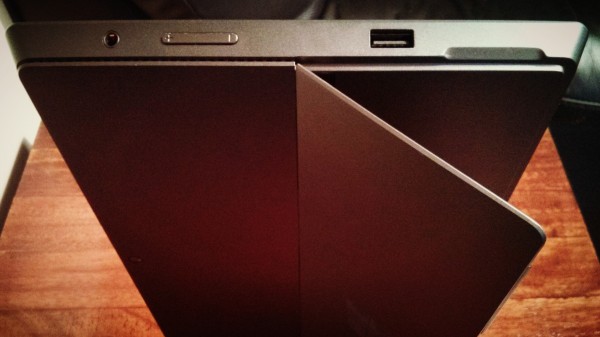
    Pricing matters. The two tablets look similar at first glance, but Surface RT is considerably slimmer and lighter — about the same as iPad or Nexus 10. Price starts at $499 versus $899 for Surface Pro. Microsoft prices the thinner tablet against iPad and the other meets MacBook Air and Windows ultrabooks. Contrary to FUD spewed by the Apple Fanclub of analysts, bloggers, journalists and other writers, Surface Pro is not overpriced and doesn’t compete with iPad. Stated correctly: iPad can’t compete with Surface Pro. Performance and broader capabilities simply aren’t comparable, which is one among many reasons why the new 128GB iPad, which went on sale today for as much as $929, is overpriced compared to Microsoft’s flagship tablet.

    Surface Pro specs. 10.6-inch ClearType HD Display with 1920 by 1080 resolution; 1.7GHz Intel Core i5 processor and HD 4000 graphics; 4GB RAM; 64GB or 128GB storage; 720p front- and rear-facing cameras (meaning they’re for video more than photos); accelerometer; ambient-light sensor; compass; gyroscope; Wi-Fi A/N; Bluetooth 4; USB 3; Windows Pro 8. Dimensions and weight: 10.81 x 6.81 x 0.53 inches and just under 2 pounds. Price: $899 (64GB); $999 (128GB).

    Surface RT specs. 10.6-inch ClearType HD Display with 1366 by 768 resolution; Nvidia T30 processor; 2GB RAM; 32GB or 64GB storage; 720p front- and rear-facing cameras; accelerometer; ambient-light sensor; barometer; magnetometer; Wi-Fi A/N; Bluetooth 4; Windows RT. Dimensions and weight: 10.81 x 6.77 x 0.37 inches and just under 1.5 pounds. Price: $499 (32GB); $599 (32GB with keyboard cover); $599 (64GB); $699 (64GB with keyboard cover).

    Keyboards. Microsoft offers two different keyboard covers, Touch and Type, which retail separately for $129.99. Type keys are more traditional and physically prominent. Touch Keyboard is more recessed and my preference.

    Value proposition. RT comes with Office 2013 Home and Student, while Pro, which uses digitized display, has a stylus. From that vantage point, Surface RT is hybrid device — touch and keyboard, tablet and notebook alternative — while the costlier model is more tribrid, by adding the stylus.

    For anyone looking for value, the lighter model makes sense. Everyone else, particularly those wanting benefits of touch, keyboard and existing software, should chose Pro.

    For those buyers wanting better battery life, Microsoft claims 9 hours (or more) for RT and 4 to 5 hours for Pro.
    In retrospect, Microsoft chose wrongly by releasing Surface RT first, October 26 concurrently with Windows 8. Particularly looking at the tepid computer lineup from partners, Surface Pro would have really stood out and sold better than RT — or so I believe. Also, the market better accepts perceived price cut than increase. Surface RT released now would look like a bargain compared to the costlier tablet.

    Scratching the Surface

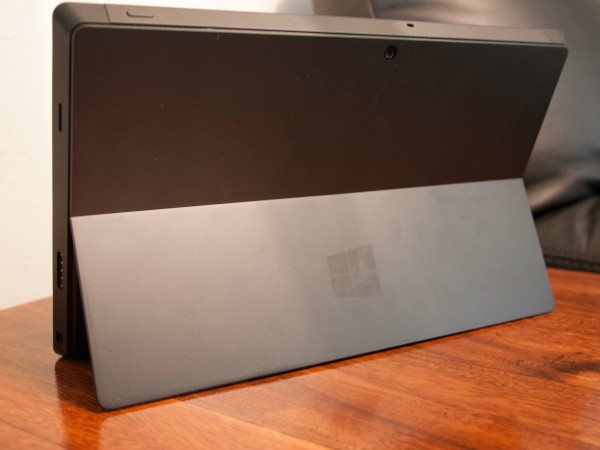
    Hours after unboxing Surface Pro, I handed it to my wife. She spoke the words I had thought in first reaction: “Heavy” and “fast”. They stuck with me for the past five days, as I adapted to the tablet’s heft and its speed spoiled me. The slate weighs 907 gram — that’s the aforementioned 2 pounds, Americans and Brits. Nexus 10 is 603 grams (1.33 pounds). But the VaporMg chasis gives extra sense of heft and also ruggedness. The case is considerably thicker than most other tablets, but tapered such it seems to disappear. The design approach reminds of some Lenovo ThinkPads.

    In the hand. The tablet’s weight and heft will trouble some users. My concerns dispatched within a few hours. But the real test is to come. Prolonged use over several weeks will reveal much.

    Heft is well-packaged. Surface Pro is a luxury car, a classic sportster with defined lines and metal exterior. By comparison, my ARM Chromebook looks and feels like a fiber-glass Ford. Better: Yugo to Aston Martin. There’s something Euro-car about the smoky exterior and boxy, slanted sides. Surface Pro’s handsome, rugged design is a Siren’s call to the hands. To touch, to feel, to caress.

    Fast setup. The tablet sets up in seconds if you’re a fast typist. Process is little more than powering up, connecting to WiFi, entering in Microsoft Account ID and choosing default or advanced setup (former for me). The process is similar to other portables running Windows 8 Pro. But from there, Microsoft’s tablet pulls ahead.

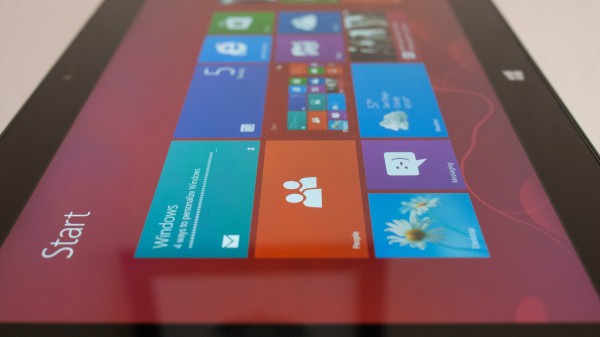
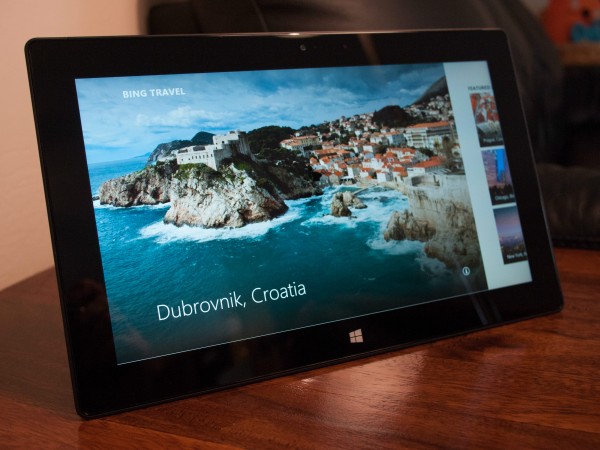
    Stunning screen. The display is beautiful — exceptional for the size class, and that conceding iPad 4 and Nexus 10 have higher resolution; but they aren’t digitized. Microsoft maximizes the enjoyment by providing beautifully designed stock Start screen apps. I haven’t seen them look better on any other Windows slates (Hey, I hang out at Microsoft Store doing some Windows shopping).

    The screen is 400 nit, but feels brighter. That’s comparable to MacBook Air (hint, hint again about the competing product).

    Performance. Then there is the speed. The beast roars and runs fast. Windows Experience rating is 5.6, held back by the graphics processor. The sold-state drive is 8.1 and 1.7GHz Intel Core i5 processor is 6.9 — on a scale of 9.9. But overall responsiveness feels like a 10. For sense of speed in the real world, which is the best benchmark: Adobe Photoshop Lightroom 4 installed in less than 60 seconds (before the required reboot).
    Real storage space. My Surface is the 128GB model, and I received it with about 90GB free space. I recommend using it for apps and storing data in the cloud. Microsoft SkyDrive is easily accessible from the Start screen. The 64GB model only has 23GB of free space, which won’t be enough for data and the demanding apps I expect most users will install. Pay the extra $100.

    Big benefits. There’s something to be said for maturity. Youngsters tend to believe they know better, that they’re more modern. But Android and iOS, even Chrome OS, are new kids in town. By comparison, you can feel the maturity in Windows 8, on Surface Pro with Intel Core. Performance is smooth, software responsive and feeling of solidness everywhere. Software, hardware and services integration is tight — the best I’ve seen on anything. Yes, more than Mac laptops or tablets.

    Simple example of maturity related to usability: The Start screen presents different options for my Epson Artisan 730 WiFi printer — including driver update. Windows 8 Pro found the networked peripheral and provides what I need to use it, unprompted.

    Surface Pro is the computer you waited for and proves that Microsoft should have designed and sold its own PCs long ago, and leaves me feeling something strongly: Microsoft CEO Steve Ballmer is indebted to former Windows & Windows Live president Steven Sinofsky and should be careful about who’s fired next.

    You Need to Read This

    Surface Pro is the most important platform product to come out of Microsoft since Windows NT 4. The operating system was foundational for what followed, Windows 2000 and XP, particularly. NT 4 represented in-house developers’ thinking about what a modern OS should be and the capabilities that should extend to developers. The same could be said of Windows 8 and RT, but more. Microsoft seeks tighter integration between software, hardware and services. Surface Pro culminates all three, providing existing customers a lifeline to the past while extending forward to new digital lifestyle — anytime, anywhere computing.

    Like Windows NT 4, Surface Pro is a transitional product. Microsoft’s platform goals are more about Modern UI and doing away with the Desktop motif. But the company has a longstanding tradition, unlike Apple, of ensuring backward compatibility for older apps — and to a fault. This approach has often held back future Windows development. Surface Pro runs older apps via the Desktop, while offering the familiar keyboard experience many longstanding PC users demand. But tablet size, touchscreen, Modern UI, cloud service integration and other attributes push forward. Windows 8 Pro and this tablet together seek to be the best of the past, present and future. It is a haughty ambition.

    Windows 8 and RT fulfill design ambitions Microsoft tried to bring to market in the 1990s. Modern UI derives heritage from the Active Desktop, which the software giant released before its time. Internet pipes reaching businesses, or even consumers, weren’t fat enough in the late 1990s, and there wasn’t enough quality content. But Microsoft had the right idea. Live titles transform the desktop into a living, breathing thing. It responds to you, anticipates you. I simply cannot express the sheer value, when set alongside aspects of the overall user interface.

    The best user interfaces make products more human, more approachable and responsive. The human body doesn’t have one UI, but many working together, giving dimension to living — sight, sound and touch, primarily. The best products are similar. Visuals are important because they appeal to sight, and the eyes are the main tool by which we take in the world around us. Modern UI is beautiful, as are many of the active — seemingly living — cues it provides. There, Live titles add richness and movement to Surface Pro running Windows 8 Pro.
    But humans are primarily tool users. We look and then touch. Keyboard and mouse are unnatural constructions, even though they are so familiar to a generation of PC users. But touch is more natural and extension of you. There’s more intimacy involved with touching something on the screen than interacting with it via keyboard and mouse.

    Surface Pro’s screen is the most accurate I’ve ever used. Even touching text in this document hits the right spot every time. Cutting and pasting is easiest on any touch device tested. The little circle that marks the finger’s touch looks good and works even better. Dragging it with my finger highlights text. Accurately.

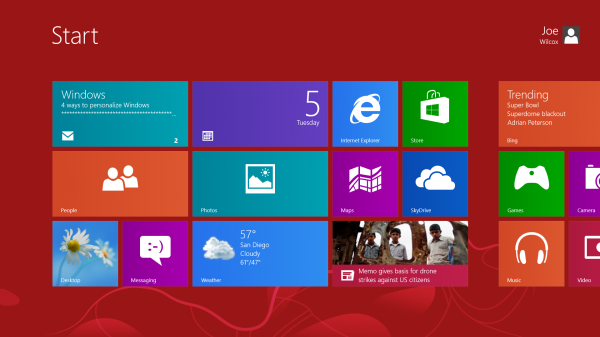
    But where touch brings Surface Pro alive is the Start screen chock full of tiles with content in motion. The user experience is far superior to Android or iOS. The desktop looks so alive, so quickly responds to touch, I could swear that it breathes.

    Beneath the Surface

    More than Surface RT, Pro users will spend time in Desktop mode. Apps and usability across motifs matter much, but more function of software than hardware.

    Windows 8 reviews. My colleague  posted a lengthy Windows 8 review in October, while developer Robert Johnson delivered a compelling series:

    I highly recommend these four for getting a good sense of what to expect from Windows 8 Pro. My perspective here is more about usability on Microsoft’s tablet and how it matches up to the design goals laid out in the previous section.

    Apps availability. Microsoft is with Windows 8 where Apple was with OS X in 2001 — presenting developers and users with dual-motif. But integration between Desktop and Modern UI is much tighter and moving between them smoother than was the Mac environments.

    Apple struggled to get developers to create apps — thanks largely to Windows XP, which released the same year. Microsoft sees similar developer distraction from Android and iOS. If it’s any measure, major apps took nearly four years migrating to OS X. Windows has an advantage — a built-in app store that promises developers payments rather than piracy.

    Tragically, the app selection isn’t sufficient and won’t be for some time. That makes the software you have now all the more important and another reason why Surface Pro is better choice than RT. My colleague Martin Brinkman writes regular column “Best Windows 8 apps this week”. On Friday, he reported 27,282 apps available from Windows Store — the majority of which won’t matter much to hardcore Pro users. They’ll want productivity apps and real PC games.

    I hope that with Surface Pro’s actual release more apps will go native. But it’s hard to imagine developer enthusiasm when Microsoft misses with Office 2013, which can be accessed from Modern UI Start screen but runs in Desktop mode. The company sets a terrible example for developers and does deep disservice to customers. Office, as the primary productivity program I expect Pro’s target market will use, should be fully usable from the new motif. The few native Windows apps Microsoft provides are simply exquisite and demonstrate what Office could have been as Modern UI flagship application.

    Some of the Desktop apps turn the stomach. Chrome is butt ugly. I blame Google developers for making no real effort to support Surface Pro, and I understand there is some bad blood because of third-party browser restriction on Windows RT. Surface Pro’s magnificent display makes Chrome look all the worse, while Internet Explorer is a gem. Fonts are major reason.

    Generally, Google is a lost cause on Surface Pro. The search giant develops beautiful apps for competing iOS but largely ignores newest Windows. How strange is that? I resort to accessing Gmail and Google+ in Internet Explorer 10 on Modern UI. The services stun, they look so good on Surface Pro’s screen.

    Desktop Mode. Functionally, the two motifs demonstrate fine workmanship — they so seamlessly mesh. Usability is another matter. Moving from one motif to another is jarring, in part because the one is so exquisite and expansive. Where Modern UI feels alive, Desktop is dead — dull, uninviting. It’s a graveyard, by comparison. I don’t want to work there.

    While the more familiar motif, Desktop doesn’t respond to the user the way Start screen does. Touch is often rejected, rather than welcomed. The touch accuracy I praised earlier is for Modern UI. In the other motif I sometimes struggle to get even the close button to respond. From that perspective, Surface Pro disappoints, particularly since the whole point is backward compatibility to existing apps. Which run where? In the graveyard.
    While Microsoft reaches for the future, Desktop can’t escape Windows’ past. On February 1, I received the Nexus 4 ordered from Google Play for my wife. On Groundhog Day, I prepared her Galaxy Nexus for sale and used it as opportunity to look at Surface Pro media transfer capabilities. Windows 8 Pro easily detected the handset and offered several tools via Desktop mode. I dragged the DCIM folder with photos to the desktop. While looking over pics, I wanted to post one to Google+. The file manager presents “Share” as one default option in the menu bar. Excellent! But the Share feature is for enabling access to other users, not posting to social networks or emailing, which is what I intended. Surely some commenters will bark: “What did you expect? This is how Windows works”. Yes, but sharing now means something quite different to many people.

    There are reasons then why in the previous section I refer to Surface Pro as a transitional product and allude to Windows NT 4. Microsoft’s tablet offers many compelling features and represents a vision for the future, which likely is Windows 9 running on the device. For the present, users must contend with two motifs and sometimes conflicting (and confusing) ways of working. That said, the shortcoming — quirks, if you will — give the product personality and dimension. iPad and iOS are flat, manicured landscapes by comparison. Surface Pro and Windows Pro are together the jungle — rich and lush throughout but not free of barren areas.

    The point: I much prefer working on Surface Pro, and even the Desktop graveyard has its charms. But do bring along a keyboard.

    How I Surface

    Microsoft’s tablet challenges me, because I come from a different place than the target customer. As mentioned about 2,500 words ago, I moved from Chromebook, working in a browser for about seven months. Google’s motif is fairly contained, with most mouse movement restricted to tabs across the top of the screen. Surface Pro demands more work with fingers going every which way, such as pulling down a thumbnails of open web pages rather than simple tabs.

    Modern UI. To my surprise, I find all the movement kind of refreshing, even fun, like using more of my senses — and fingers as tools — to get work done. Additionally, I find Modern UI absolute joy to use — on this machine. Yes, the motif demands more work, such as seemingly endless scrolling left or right. But the design appeals and draws me in. It’s immersive and as previously expressed alive.

    There is something about Modern UI that is different on this computer. I’ve spent some time at my local Microsoft Store using Windows 8 or RT on various PCs or tablets. My reaction, like when using the Samsung slate last year, was ho-hum. But Modern UI enthralls here, and I largely credit Surface Pro’s bright, crisp display and smooth, speedy performance.

    Touch and type. I interact with Surface Pro using fingers on screen or keyboard in both motifs. The tablet has a kickstand that tilts the display back at a satisfying angle. I attach the Touch Keyboard, which gives audible electronically-generated sound when tapped. I adapted to the keyboard in less than an hour of typing this review, which I started writing on WordPress in IE10 almost immediately.

    During the workday, Surface Pro rarely leaves the desk, although over the month will go on jaunts to the coffee shop to see what shakes up. At night, I sometimes sit the slate on my lap and work. While the default on-screen keyboard is too large for my tastes, typing more than satisfies. Here we go with another benefit of the screen. I can type just about as well on-screen as off, Microsoft’s keyboard is so responsive. No Android tablet or iPad that I’ve used compares.
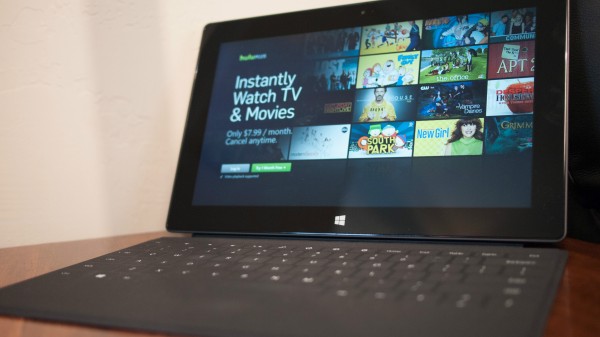
    I simply can’t express the importance of this benefit, which works in concert with another: Surface Pro’s screen is viewable from pretty much an angle — clear and crisp, with no distortion. As a hybrid device meant as tablet and laptop, the latter concerns. Kickstand and Touch Keyboard aren’t lap friendly. But Surface laid in the lap is highly functional with touch keys and brilliant display. I can work this way, and so can you. It’s superior to iPad or, say, Nexus 10 similarly used.

    I interchangeably use trackpad and touchscreen. Microsoft makes a Surface mouse, but I don’t need it, and neither should you if you really give touch a chance.

    Battery life. I can’t get give comprehensive report on battery life. Several discharges in different usage situations will be necessary. That said, while writing this review, I unplugged the power cord at 9 am PST today. Ninety minutes later, set to “balanced mode”, Windows 8 Pro reported 55 percent charge left, or 3 hours 5 minutes. At 12:30, 36 percent and 90 minutes remaining. At 1:30, a message flashed across the screen warning just 10 percent charge remained. Fifteen minutes later, with 8-percent warning, and Windows claiming 23 minutes usage time left, I plugged in. Likely then, charge would have gone 5 hours. That’s on par with marketed battery life.

    Challenges. Being fresh to Windows 8, I don’t know fully where usability ends and my ignorance begins. For example, the group chat service we use at work doesn’t have a Windows 8 app. So I use IE10. Problem: I get no notifications, and the service disconnects when I work in other tabs. Same can be said for Gmail or Google+. Now matters would be much better if I lived a Microsoft lifestyle connected to more of the company’s services and other devices. Start screen would display much of what I need.

    Users spending more time in the Desktop graveyard can expect typical third-party apps and services support. As for Metro UI, Surface Pro isn’t the problem but application maturity, which will come over time.

    Wrapping up, potential users will want to weigh applications against everything else, what’s needed or wanted. Surface Pro demands changes to longstanding habits and will jar some users traversing the two motifs. Adapt if you can and be rewarded but expect some usability penalty along the way.

    Surface Pro is Jack of all trades, attempting to be many things and doing some better than others. Imperfections glare because the broader experience is so clean — and fun. There are shortcomings, but returning to the auto analogy they are easily overlooked. Idiosyncratic is the word sometimes used to describe the best, classic cars, which are appreciated more for their beauty and handling.

    Surface Pro’s shortcomings, like those of classic cars, add character. In a sea of sameness, where so many PCs or tablets are hard to tell apart, Microsoft’s slate stands out. If only other device manufacturers made as much effort as Microsoft to truly innovate. By that measure, Surface Pro achieves greatness, faults and all.

    Photo Credits: Joe Wilcox

  • Bing Launches Video Results In Windows 8 App

    Bing announced today that it has released an update to its Windows 8 app that includes touch-friendly video results, in addition to web and image results. The update is available in 12 countries.

    The video results, of course, feature infinite scroll.

    Infinite Scroll

    “Scrolling through one giant page of video results is a nice start, but we don’t stop there,” says Bing senior product manager Sara Borthwick. “Who wants to wait for a video to load before finding out if tit’s worth watching? We don’t that’s why this update includes our exclusive Smart Motion Thumbnails that let you watch a preview of results without having to wait for the video to load. Simply tap a video result thumbnail with a play icon in the lower right hand corner, or mouse over the thumbnail image, to start the video preview. Tap again or mouse away to stop the preview video. Click on the text description to the right to go to the full video.”

    “If the search results aren’t exactly what you were looking for, Bing has made finding related searches even easier,” adds Borthwick.k “Just place two fingers on the search results screen and pinch to get related search queries. This feature is called Semantic Zoom and is also available for the web and image results.”

    Frankly, I find it a little odd that this wasn’t included with the app to begin with. Windows 8 is, after all, Microsoft’s creation. Better late than never, I suppose. There was always Bing.com anyway.

  • Harvard Professor Says Google’s Ads Are Racially Discriminating

    Harvard professor Latanya Sweeney has put together a report saying that Google is racially discriminating with some of its ads. Google, of course, says this is not the case.

    Still, it’s an interesting, if incomplete study. Here’s the abstract:

    A Google search for a person’s name, such as “Trevon Jones”, may yield a personalized ad for public records about Trevon that may be neutral, such as “Looking for Trevon Jones? …” or may be suggestive of an arrest record, such as “Trevon Jones, Arrested?…”. This writing investigates the delivery of these kinds of ads by Google AdSense using a sample of racially associated names and finds statistically significant discrimination in ad delivery based on searches of 2184 racially associated personal names across two websites. First names, previously identified by others as being assigned at birth to more black or white babies, are found predictive of race (88% black, 96% white), and those assigned primarily to black babies, such as DeShawn, Darnell and Jermaine, generated ads suggestive of an arrest in 81 to 86% of name searches on one website and 92 to 95 percent on the other, while those assigned at birth primarily to whites, such as Geoffrey, Jill and Emma, generated more neutral copy: the word “arrest” appeared in 23 to 29 percent of name searches on one site and 0 to 60 percent on the other.

    On the more ad trafficked website, a black-identifying name was 25% more likely to get an ad suggestive of an arrest record. A few names did not follow these patterns: Dustin, a name predominantly given to white babies, generated an ad suggestive of arrest 81 and 100 percent of the time. All Ads return results for actual individuals and ads appear regardless of whether the name has an arrest record in the company’s database. Notwithstanding these findings, the company maintains Google received the same ad text for groups of last names (not first names), raising questions as to whether Google’s advertising technology exposes racial bias in society and how ad and search technology can develop to assure racial fairness

    Racial discrmination?

    It goes pretty in depth. You can read the full report here (pdf).

    The Huffington Post picked up the story, and shares a statement from a Google spokesperson:

    “AdWords does not conduct any racial profiling,” the spokesman wrote in an email. “We also have an ‘anti’ and violence policy which states that we will not allow ads that advocate against an organization, person or group of people. It is up to individual advertisers to decide which keywords they want to choose to trigger their ads.”

    Sweeney acknowledges in the report that the study ultimately raises more questions than it answers, and says that the paper is just a start, and that more research is needed. However, after all of her research, she concludes the paper saying, “There is discrimination in delivery of these ads.”

  • Eric Schmidt Ties Search Rankings To Verified Profiles In Upcoming Book

    It’s become pretty obvious that Google is looking to put user identity at the forefront of a number of its products, and that includes search. Nothing new there.

    Eric Schmidt apparently talks about this in his upcoming book, and notes flat out that profile verification will be directly tied to search engine rankings. The Wall Street Journal has a few quotes from the book (hat tip to Search Engine Watch), including this one:

    “Within search results, information tied to verified online profiles will be ranked higher than content without such verification, which will result in most users naturally clicking on the top (verified) results. The true cost of remaining anonymous, then, might be irrelevance.”

    Seems pretty clear cut. Google, as you may know, has been pushing authorship for quite some time now, and Google’s Matt Cutts recently made comments indicating that this will be a much more significant signal going forward. Here are some quotes from a webmaster hangout he participated in:

    “In the short term, we’re still going to have to study and see how good the signal is, so right now, there’s not really a direct effect where if you have a lot of +1s, you’ll rank higher. But there are things like, we have an authorship proposal, where you can use nice standards to markup your webpage, and you’ll actually see a picture of the author right there, and it turns out that if you see a picture of the author, sometimes you’ll have higher click through, and people will say, ‘oh, that looks like a trusted resource.’ So there are ways that you can participate and sort of get ready for the longer term trend of getting to know not just that something was said, but who said it and how reputable they were.”

    “I think if you look further out in the future and look at something that we call social signals or authorship or whatever you want to call it, in ten years, I think knowing that a really reputable guy – if Dan has written an article, whether it’s a comment on a forum or on a blog – I would still want to see that. So that’s the long-term trend.”

    “It’s just the case that that picture is just more likely to attract attention. It’s just a little more likely to get the clicks, and you now, it’s almost like an indicator of trust.”

    “The idea is you want to have something that everybody can participate in and just make these sort of links, and then over time, as we start to learn more about who the high quality authors are, you could imagine that starting to affect rankings.”

    Schmidt’s book, which he co-authored with Jared Cohen comes in April. It looks like he just gave SEOs and webmasters a reason to read it.

  • Pingdom: Facebook Could Be Bigger Than Any Country On Earth By 2016

    Pingdom has put together some stats and charts today with the goal of proving that Facebook may be able to become the biggest “country” on the planet (in terms of population) by the year 2016.

    Noting that Facebook already overtook the U.S. three years ago, Pingdom points out that China and India are still ahead of the social network. Stats they use to set up their case: 2.4 billion Internet users in the world, 41.6% of them were Facebook users by the end of 2012 (compared to 4.4% in 2007), and Facebook penetration was 14% by the end of 2012 (up from 5.3% in 2009).

    Populations

    “As you can see, we made two different projections,” Pingdom says of the above graph. “The first projection is based on a model that assumes Facebook to have a yearly growth rate that declines by 10% per year. For the other projection, we were a bit more cautious and assumed a growth of 6% per year. That may seem high, but Facebook increased its user base by 18% in 2012 alone.”

    They go on to say that Facebook has a low penetration rate in large parts of the world, like Africa, India and Russia, and that it is only used by about 5% of the population of those countries.

    “As the Internet penetration rate rises in these regions, the Facebook penetration may follow,” says Pingdom. “Also, Facebook is still blocked in China. If this changes in the future, the world’s largest online market opens up to Facebook.”

    On a related note, Pew has put out some survey results indicating that about 1 in 4 American Facebook users plan on using Facebook less in 2013.

  • Facebook Launches Lookalike Audiences Targeting For Advertisers

    Facebook is now offering advertisers a new feature called Lookalike Audiences, which enables direct marketers to target audience segments with similar customer profiles to those they have uploaded themselves with Facebook’s Custom Audience feature.

    “With Lookalike Audiences, advertisers can expand their reach to specific geographic areas or audiences who are not already fans of the company’s page while still maintaining the desired demographic profile of their existing audience using Facebook’s algorithms,” a Facebook spokesperson tells WebProNews. “When using Custom Audiences, the data is hashed so no information is shared between the advertiser and Facebook.”

    Lookalike Audiences is currently in beta in Facebook’s Power Editor tool for advertisers. According to Inside Facebook, advertisers in the beta are seeing lower costs per action than with traditional targeting options. Brittany Darwell reports:

    Lookalike Audiences can be created after an advertiser has uploaded a list of first-party data, such as customer email addresses, phone numbers or user IDs to make a Custom Audience. Facebook’s algorithms analyze the Custom Audience and produce another audience segment that is likely to have a similar customer profile. The advertiser can then create any Facebook ad type and target it to the Lookalike Audience. No personally identifiable information is shared back with advertisers and Lookalike Audiences can only be used within Facebook, not exported for email marketing or other ad targeting.

    In other Facebook ad-related news, the company has reportedly agreed to implement the AdChoices industry standard icon on its display ads served through the Facebook Exchange, following complaints from advertisers.

  • Pew: 1 In 4 Plan To Cut Back On Facebook Use In 2013

    Pew Research Center’s Internet & American Life Project has released some findings from a survey about American Facebook users. The data comes from just over 1,000 adults in the continental U.S. via telephone interviews, so that’s roughly a millionth of Facebook’s user base. Stats are weighted to correct known demographic discrepancies, Pew says.

    According to the survey, one in four users say they plan to cut back on Facebook usage this year. 3% of them say they plan to spend more time on the site, 27% say they plan to spend less time on the site, and 69% say they plan to spend around the same amount of time on the site.

    “Young adults are the most likely forecasters of decreased engagement,” says Pew. “Some 38% of Facebook users ages 18-29 expect to spend less time using the site in 2013, although a majority of users across age groups anticipate that their Facebook usage will remain largely stable in the year to come.”

    Facebook time

    Two thirds of online American adults are Facebook users, according to Pew, and 61% of current Facebook users say that at one time or another in the past they have voluntarily taken a break from the social network for a period of several weeks or more. 20% of the online adults who don’t currently use Facebook say they used to. 8% of those who don’t use it say they’re interested in doing so in the future.

    These are the most popular reason researchers were given for why people took breaks from Facebook:

    Pew - Reasons for Facebook breaks

    Perhaps more telling are the verbatim reasons Pew shares:

    “I was tired of stupid comments.”

    “[I had] crazy friends. I did not want to be contacted.”

    “I took a break when it got boring.”

    “It was not getting me anywhere.”

    “Too much drama.”

    “You get burned out on it after a while.”

    “I gave it up for Lent.”

    “I was fasting.”

    “People were [posting] what they had for dinner.

    “I didn’t like being monitored.”

    “I got harassed by someone from my past who looked me up.”

    “I don’t like their privacy policy.”

    “It caused problems in my [romantic] relationship.”

  • 128GB iPad Is Now Available In $799 And $929 Models

    It seems like only last week that rumors were going around about a possible 128GB iPad. Actually, it was only last week. Apple quickly put the rumors to bed and made the announcement. Now, here we are a week later, and they’re already available to buy.

    The device is a 128GB version of the fourth-generation iPad with Retina Display. It comes in both the Wi-Fi and Wi-Fi + Cellular models. Previous versions came with 64GB of storage.

    “With more than 120 million iPads sold, it’s clear that customers around the world love their iPads, and everyday they are finding more great reasons to work, learn and play on their iPads rather than their old PCs,” said Apple SVP of Worldwide Marketing, Philip Schiller, when the product was announced. “With twice the storage capacity and an unparalleled selection of over 300,000 native iPad apps, enterprises, educators and artists have even more reasons to use iPad for all their business and personal needs.”

    The devices are available in black and white, and they cost $799 and $929 for the Wi-Fi and Wi-Fi + Cellular models, respectively. They’re available here.

    128GB iPad

  • Matt Cutts Talks Referer Spam In Latest Video

    Google’s Matt Cutts is back online, and cranking out the Webmaster Help videos. He tweeted a link to the second of the latest series today, and this one is about referer spam coming from a YouTube video.

    The user-submitted question is:

    Why does a certain YouTube video appear to be visiting my blogspot blog? Take this video for example, it keeps appearing in my Blogger Dashboard as a referral..

    Cutts says they looked at the video, and found in the comments that there were multiple people complaining about the same problem – that the video spammed their blog.

    “This is an instance of what we call referer spam,” he says. “A referer is just a simple HTTP header that is passed along when a browser goes from one page to another page, and it normally is used to indicate where the user’s coming from. Now, people can use that, and change the referer to be anything that they want. They can make it empty, or there are some people who will set the referer to a page they want to promote, and then they will just visit tons of pages around the web. All the people that look at the referers see that, and say, ‘Oh, maybe I should go and check that out.’ And the link – whenever there’s a referer – it doesn’t mean that there was necessarily a link, because you can make that referer anything you want, so there are some people who try to drive traffic by visiting a ton of websites, even with an automated script, and setting the referer to be the URL that they want to promote.”

    He notes that some of the other comments on the YouTube video say that its creator is well known, and has no reason to spam people. Cutts notes that it doesn’t necessarily have to be coming from the actual creator.

    “The thing to know is that there’s no authentication with referer. Anybody can make a browser, and set the referer,” he says. “You can’t automatically assume it was the owner of that URL if you see something showing up in your dashboard.”

    Basically, you should just ignore it, he says.

  • Go Daddy ‘Nerd Sex Symbol’ Is No Stranger To The Ladies

    Apparently the guy in that GoDaddy Super Bowl ad is now a “sex symbol“. I’m not sure exactly what qualifies one for that title, but I suppose making out with a supermodel in front of an audience of millions helps.

    The man’s name is Jesse Heiman and the esteemed CNET points to his IMDB page and his Facebook profile:

    Jesse Heiman

    Based on his various public Facebook photos, he does seem to be somewhat popular with the ladies:

    Heiman

    Heiman

    Heiman

    Heiman

    Heiman2

    Heiman

    Heiman

    Then, of course there’s his claim to fame:

    Heiman has also appeared as “Computer Guy” in Noobz, “Water Fountain Drinker” in an episode of Parks And Recreation, “Stumbling Student” on Suburgatory, “Nerd” on Awkward, “Nerd” in Detention, “Hotdog Buying Guy” on How I Met Your Mother, “Member of Wil Wheaton’s Entourage,” and even “Student” in The Social Network.Other roles include: “3rd UFL Enthusiast,” “Member of the Highschool Video Club,” “Mondo Gelato Customer,” “Chemistry Class Student,” “Prey,” and “Nerdy Guhy”. He once played “Party Guy” in Privileged.

    The Go Daddy ad was created by the Deutsch NY agency, which was also responsible for some other Super Bowl spots, like the controversial VW ad.

  • Vitamin D, omega-3 may help clear amyloid plaques found in Alzheimer’s

    A team of academic researchers has pinpointed how vitamin D3 and omega-3 fatty acids may enhance the immune system’s ability to clear the brain of amyloid plaques, one of the hallmarks of Alzheimer’s disease.
     
    In a small pilot study published in the Feb. 5 issue of the Journal of Alzheimer’s Disease, the scientists identified key genes and signaling networks regulated by vitamin D3 and the omega-3 fatty acid DHA (docosahexaenoic acid) that may help control inflammation and improve plaque clearance.
     
    Previous laboratory work by the team helped clarify key mechanisms involved in helping vitamin D3 clear amyloid-beta, the abnormal protein found in the plaque. The new study extends the previous findings with vitamin D3 and highlights the role of omega-3 DHA.
     
    “Our new study sheds further light on a possible role for nutritional substances such as vitamin D3 and omega-3 in boosting immunity to help fight Alzheimer’s,” said study author Dr. Milan Fiala, a researcher at the David Geffen School of Medicine at UCLA.
     
    For the study, scientists drew blood samples from both Alzheimer’s patients and healthy controls, then isolated critical immune cells called macrophages from the blood. Macrophages are responsible for gobbling up amyloid-beta and other waste products in the brain and body. 
     
    The team incubated the immune cells overnight with amyloid-beta. They added either an active form of vitamin D3 called 1alpha,25–dihydroxyvitamin D3 or an active form of the omega-3 fatty acid DHA called resolvin D1 to some of the cells to gauge the effect they had on inflammation and amyloid-beta absorption.
     
    Both 1alpha, 25-dihydroxyvitamin D3 and resolvin D1 improved the ability of the Alzheimer’s disease patients’ macrophages to gobble-up amyloid-beta, and they inhibited the cell death that is induced by amyloid-beta. Researchers observed that each nutrition molecule utilized different receptors and common signaling pathways to do this.
     
    Previous work by the team, based on the function of Alzheimer’s patients’ macrophages, showed that there are two groups of patients and macrophages. In the current study, researchers found that the macrophages of the Alzheimer’s patients differentially expressed inflammatory genes, compared with the healthy controls, and that two distinct transcription patterns were found that further define the two groups: Group 1 had an increased transcription of inflammatory genes, while Group 2 had decreased transcription. Transcription is the first step leading to gene expression.
     
    “Further study may help us identify if these two distinct transcription patterns of inflammatory genes could possibly distinguish either two stages or two types of Alzheimer’s disease,” said study author Mathew Mizwicki, an assistant researcher at the David Geffen School of Medicine at UCLA.
      
    While researchers found that 1alpha,25-dihydroxyvitamin D3 and resolvin D1 greatly improved the clearance of amyloid-beta by macrophages in patients in both groups, they discovered subtleties in the effects the two substances had on the expression of inflammatory genes in the two groups. In Group 1, the increased-inflammation group, macrophages showed a decrease of inflammatory activation; in Group 2,  macrophages showed an increase of the inflammatory genes IL1 and TLRs when either 1alpha,25-Dihydroxyvitamin D3 or resolvin D1 were added.
     
    More study is needed, Fiala said, but these differences could be associated with the severity of patients’ nutritional and/or metabolic deficiencies of vitamin D3 and DHA, as well as the omega-3 fatty acid EPA (eicosapentaenoic acid).
     
    “We may find that we need to carefully balance the supplementation with vitamin D3 and omega-3 fatty acids, depending on each patient in order to help promote efficient clearing of amyloid-beta,” Fiala said. “This is a first step in understanding what form and in which patients these nutrition substances might work best.”
     
    According to Fiala, an active (not oxidized) form of omega-3 DHA, which is the precursor of the resolvin D1 used in this study, may work better than more commercially available forms of DHA, which generally are not not protected against the oxidation that can render a molecule inactive. 
     
    The next step is a larger study to help confirm the findings, as well as a clinical trial with omega-3 DHA, the researchers said.
     
    The Alzheimer’s Association contributed to the initial phase of the study.
     
    Fiala is a consultant for the Smartfish Company that is producing a drink with an active form of omega-3 DHA.
     
    Additional study authors include Guanghao Liu, Larry Magpantay, James Sayre, Avi Siani, Michelle Mahanian, Rachel Weitzman, Eric Hayden, Mark J. Rosenthal, Ilka Nemere, John Ringman and David B. Teplow.
     
    For more news, visit the UCLA Newsroom and follow us on Twitter.

  • Google Releases Toolbar PageRank Update

    Google updates toolbar PageRank about four times a year. They updated it in November, and August before that. Now they’ve updated it again – the first update of 2013.

    People started noticing the update on Monday. As usual, webmasters are taking to Twitter to express their comments on the ups and downs.

    It’s become pretty well known in the industry that toolbar PageRank is not the most helpful indication of how Google views a page, though actual PageRank is certainly still an important signal (Matt Cutts even referenced it in the latest Webmaster Help video).

    As usual, here’s the obligatory Matt Cutts video discussing toolbar PageRank:

    [via Search Engine Roundtable]

  • Mary Leakey Honored With Google Doodle

    Mary Leakey is being honored with a Google doodle in parts of the world where it is already February 6th (like Australia).

    Leakey was a British archaeologist and anthropologist, who discovered the first fossilized Proconsul (extinct ape believed to be ancestral to humans) skull. She also discovered the Zinjanthropus (Paranthropus, a genus of extinct hominins) skull.

    Leakey was born on February 6, 1913, which obviously, makes this her 100th birthday. She died in 1996 at the age of 83. Here’s a look at Google’s Knowledge Panel for Leakey:

    Mary Leakey

    Simon Rüger shared this doodle video with us:

    Google has run a number of other doodles already this week in different parts of the world. There were at least four on Monday, including the Canadian penny, Sri Lanka Independence Day, Josef Kajetán Tyl and Manuel Álvarez Bravo.

  • Dell Finally Announces $24.4 Billion Deal To Go Private

    Dell finally announced its privatization deal today. The company is being acquired by founder Michael Dell and investment firm Silver Lake.

    Dell stockholders will receive $13.65 per share in cash in a transaction valued at about $24.4 billion. The transaction represents a premium of 25% over Dell’s closing share price of $10.88 on Jan. 11, 2013, the last trading day before rumors of a possible going-private transaction were first published, as well as a premium of about 35% over Dell’s enterprise value as of that day, and implies a 37% premium over the average closing share price during the previous 90 days ending January 11.

    Michael Dell said, “I believe this transaction will open an exciting new chapter for Dell, our customers and team members. We can deliver immediate value to stockholders, while we continue the execution of our long-term strategy and focus on delivering best-in-class solutions to our customers as a private enterprise.”

    “Dell has made solid progress executing this strategy over the past four years, but we recognize that it will still take more time, investment and patience, and I believe our efforts will be better supported by partnering with Silver Lake in our shared vision,” he adds. “I am committed to this journey and I have put a substantial amount of my own capital at risk together with Silver Lake, a world-class investor with an outstanding reputation. We are committed to delivering an unmatched customer experience and excited to pursue the path ahead.”

    “Michael Dell is a true visionary and one of the preeminent leaders of the global technology industry,” said Egon Durban, a Silver Lake Managing Partner. “Silver Lake is looking forward to partnering with him, the talented management team at Dell and the investor group to innovate, invest in long-term growth initiatives and accelerate the company’s transformation strategy to become an integrated and diversified global IT solutions provider.”

    Michael Dell will continue as Chairman and CEO. The transaction is subject to regulatory approval.

    Update: Microsoft has released the following statement:

    “Microsoft has provided a $2 billion loan to the group that has proposed to take Dell private. Microsoft is committed to the long term success of the entire PC ecosystem and invests heavily in a variety of ways to build that ecosystem for the future.

    “We’re in an industry that is constantly evolving. As always, we will continue to look for opportunities to support partners who are committed to innovating and driving business for their devices and services built on the Microsoft platform.”

  • AOL’s Advertising.com Is Now Just AOL Networks

    AOL announced today that its Advertising.com group has been rebranded as AOL Networks, and is aligned with its parent AOL brand. The company believes the move will help stakeholders better understand its assets.

    AOL Networks CEO Ned Brody (pictured) says, “AOL Networks will continue to offer global advertising solutions that help increase yield through a rich and broad set of platforms, formats, and technologies. We have heard from many clients that there is an increasing number of systems and partners they need to do business with to accomplish their online marketing objectives. The group’s mission has always been to simplify digital advertising at scale.”

    “AOL is synonymous with premium,” he says. “And in the network space, there is a real need for premium experiences. With our established leadership in video, performance and now programmatic, plus AOL’s foothold in premium advertising, we are better positioned than ever to define and own a transcending solution.”

    The Advertising.com brand will continue to live on under the bigger AOL Networks brand. It has a network of 596 million global unique visitors. Other AOL Networks brands like The AOL On Network, goviral, ADTECH, and Pictela, will continue to operate under their existing names.

    CMO Allie Kline says, ““Given the synergies between our offerings and customers, and those of our AOL parent, it made the most sense to align the brands more closely together.”

    The new gateway for the AOL Networks brand is simply AOLNetworks.com. That launches today.

  • Twitter Reportedly Buying Social TV Analytics Company Bluefin Labs

    Business Insider is reporting that Twitter is buying Bluefin Labs for an unknown amount of money, but speculates that it is between $50 and $100 million (or higher).

    All Things D reports that Twitter is buying Bluefin, but says the deal isn’t done yet.

    Bluefin is a social TV analytics company offering solutions for TV networks and operators, as well as brands and ad agencies.

    “We’ve always known that TV drives conversation,” the company says on its site. “Now, with public social media, what consumers say about the shows and commercials they watch on TV can be measured and mined for insights. Bluefin’s flagship product suite – Bluefin Signals – puts new and actionable analytics at the fingertips of brands, agencies, and TV networks.”

    If you follow Twitter’s blog at all, you know that Twitter has been very interested in the Twitter conversation surrounding television events. Here are some stats the company dropped after the Super Bowl on Sunday:

    The game is over, the confetti has descended, and #RavensNation is celebrating their big victory. During the Sunday matchup between the @ravens and @49ers, the roar of the crowd was comprised of 24.1 million Tweets about the game and halftime show (this leaves aside the ads, about which more below). By the beginning of the second half, the volume of Tweets had already surpassed last year’s Tweet total.

    The moments generating the biggest peaks of Twitter conversation (measured in Tweets per minute, or TPM) during the game:
    – Power outage: 231,500 TPM
    – 108-yard kickoff return for Ravens TD by Jones: 185,000 TPM
    – Clock expires; Ravens win: 183,000 TPM
    – Jones catches 56 yard pass for Ravens TD (end of 2nd quarter): 168,000 TPM
    – Gore TD for 49ers: 131,000 TPM

    Of course this is just one of many popular television events that take place throughout any given year. On top of that, Twitter is getting a lot more mention on TV than even Facebook, at least during the Super Bowl, as Matt McGee at MarketingLand found the other night.

    Twitter recently hired a head of TV, and teamed up with Nielsen on a TV Ratings metric. Last year, word even came out that Twitter was in talks to bring original shows to Twitter itself. The company has recently made video within Twitter more of a thing, making embeddable tweets richer, and launching Vine, for example (and they always say the porn industry innovates on the web).

    Business Insider shares an old presentation from Twitter about driving discovery and engagement with TV, calling it “the deck that explains why Twitter just bought Bluefin Labs”.

    Neither company has commented on the acquisition.

  • Nvidia’s Project Shield in action: Borderlands 2 on a handheld

    One of the more surprising and interesting announcements out of last months Consumer Electronics Show was Nvidia’s Project Shield, a handheld gaming device powered by the company’s new Tegra 4 chip. Looking like a large Xbox 360 controller, Project Shield includes a 5-inch 720p display and runs on Android. It’s one of Nvidia’s first forays into building its own complete consumer devices; the only Nvidia products on store shelves now are graphics cards for PCs.

    Although Project Shield was demonstrated on stage at CES, Nvidia is planning a number of weekly follow-up videos to show off the product. The first is now online and while it’s clearly an attempt to market the handheld and highlight the Tegra 4 chip capabilities, I think it’s worth sharing for two reasons. First, few people have really seen this device in action and second, the product may be the best yet at bringing true PC gaming to portable devices.

    This particular demo focuses more on streaming a game from the PC to Project Shield, so I doubt the Tegra 4 chip is working hard; the device is essentially a remote client to the local computer or Wi-Fi. Still, there doesn’t appears to be any lag at all, which is both impressive and necessary for this type of gaming solution.

    I’m definitely interested in seeing demonstrations of how Android games look and run on Project Shield because gamers aren’t always near their PC for game streaming. Prior games optimized for the Tegra 3 were impressive and I expect more of the same on Project Shield.

    Related research and analysis from GigaOM Pro:
    Subscriber content. Sign up for a free trial.

  • New Relic raises $80M from Insight, T. Rowe Price. Aims for 2014 IPO

    Data Nerd Express_Lew CirneHaving spent last few decades building startups, Lew Cirne, founder and chief executive of the San Francisco-based software company, New Relic, knows one thing: building a company takes a long time and often needs patient and deep pocketed investors. And while sales for his company are growing at rapid clip, he just raised $80 million in funding from Insight Venture Partners and T.Rowe Price to turbocharge his way towards a 2014 public offering.

    Previous investors including Benchmark Capital participated in this round as well. Insight and T. Rowe Price accounted for three-fourths of the latest round of funding. The company has so far raised about $115 million, and after this round is valued at $750 million. Cirne had previously started Wily, which he sold to CA for $375 million. He started New Relic to offer network application monitoring as a cloud-service back in 2008. He declined to share the company’s revenues but they are estimated to be in the range of tens-of-millions of dollars.

    “We are aiming to eventually go public and all the pieces are in place for us,” Cirne said in a conversation. Cirne is betting that company will keep the current trajectory and will go public, perhaps as soon as 2014. He wants to take a page from the play book of single-product companies VMWare and Salesforce which took relatively simple, but fast-growing products  – virtualization software and on-demand CRM – to build large software companies.

    “We are at a point we have a large market and have a strong story so we want to put the foot on the gas,” said Cirne. According to him, the company tripled its revenue growth in 2012 and doubled its customer base during the year. New Relic customers include Comcast, Sony, ESPN, Nike, and E*Trade.

    New Relic is one of the growing number of startups that are capturing the upside presented by technological shift to the cloud and the mobile. “Our next area of focus is mobile, and mobile visibility,” Cirne said. “Virtually every one of our customers is asking for more mobile intelligence.”

    The company recently announced a brand new iPhone app that is getting positive reviews from New Relic customers. In addition, the company is looking to expand its presence in Europe and also ramp-up its sales efforts. The company currently has 200 employees and it plans to add another 100 in next few months.

    When I asked Cirne if he is going to go out and make acquisitions, he said his preference is to build products in-house but again, he knows time is of essence and will be opportunistic because “sales are very important to us as well.” With a valuation of $750 million it has some flexibility when it comes to making acquisitions.

    My colleague Derrick Harris wrote about Cirne’s management strategy and how he turned New Relic into a sales machine. New Relic was named to the GigaOM Structure 50 list in 2011 and was one of our picks for cloud  startups to watch.

    Related research and analysis from GigaOM Pro:
    Subscriber content. Sign up for a free trial.

  • A safer next-gen battery is used with solar panels for the first time

    The unnerving capability of lithium ion batteries to catch on fire emerged as headline news last month, as Boeing was forced to ground its futuristic 787 Dreamliner FLEET after two batteries caught on fire. But the next generation of lithium ion batteries are promising to be safer, and a few of them are already starting to be used in real-world situations in the power grid, electric vehicles and gadgets.

    Six-year-old startup Seeo — which is backed by Vinod Khosla, Google Ventures and others — has installed its first battery system to act as energy storage in conjunction with a solar panel system developed by SunEdison, according to Seeo CEO Hal Zarem, who I interviewed last week. The solar battery installation is a trial for now, but a sizable one: on the level of kilowatts and tens of kilowatts, explained Zarem. For comparison’s sake, the Nissan LEAF uses a 24 kilowatt hour battery, while an average cell phone will use 2,000 to 3,000 milliamp hour batteries (far smaller than a kilowatt hour of capacity).

    SeeoBatteries, like the one Seeo has installed for SunEdison’s solar system, can act as storage for the energy produced by solar panels, so that when the sun goes down (or behind a cloud) the battery can then offer up the stored power. Utilities, building owners and even home owners are starting to see the benefits of having battery storage systems connected to solar systems, because power can be far more smooth and reliable. Likewise solar installer SolarCity has been working with Tesla’s batteries to sell a home battery system with its solar panels in certain markets.

    The next-gen tech

    So what makes Seeo’s batteries safer? It largely involves improvements to the electrolyte, or the medium that shuttles lithium ions back and forth between the cathode and the anode to charge and discharge the battery. Traditional lithium-ion battery electrolytes are mostly made of liquids, while Seeo is using a solid dry polymer based electrolyte, which feels like plastic to the touch.

    The polymer is non-flammable and when combined with using lithium foil as the anode, the battery can be ultra light weight and also have a high energy density, or amount of energy that can be stored per a given weight. During an interview at Seeo’s headquarters last week I picked up and compared two battery packs — one made by Seeo, and one that used traditional lithium ion batteries — and the Seeo battery felt about three times lighter.

    If traditional lithium ion batteries are overcharged they can have a margin of error in the danger zone of about 20 percent above the max voltage of the battery, explained Zarem. In contrast, Seeo batteries have a margin of error of 100 percent over the voltage. The batteries also won’t burst into flames if something penetrates it (for example, during a car crash).

    Seeo isn’t the only one working on solid electrolytes for batteries. It’s actually a growing field for innovation, and startups like Sakti3, and Imprint Energy are working on this technology, as are researchers at Oak Ridge National Laboratory.

    What’s next

    Seeo has just started commercializing its technology and working with customers to test out its batteries. The company has built out a pilot production line at its headquarters in Hayward, Calif., which can make 4 MW hours worth of batteries using traditional manufacturing machines like coaters. I toured the company’s pilot line last week and the team is indeed heads down churning out small levels of Seeo batteries.

    SeeoBut to get to the next-level of manufacturing, which involves hundreds of megawatt hours — the kind that could start to actually change the game for solar energy storage, or electric vehicles — Seeo plans to build a new factory somewhere in the U.S. this year, close enough to the Hayward site to create easy collaboration. It could end up being built in Hayward, says Zarem, but the company is still in the process of figuring out the best location.

    Seeo could have to raise some sort of funding to get such a plant built, and probably has already started raising such funding. But on that funding note Zarem wouldn’t comment. Raising funding could be difficult in 2013, after so many advanced battery companies, like A123 Systems, struggled in 2012. Eventually Seeo also wants to build an even larger plant, but that would likely be developed outside of the U.S., in a low cost manufacturing part of the world, said Zarem.

    Along with Google Ventures, and Khosla Ventures, Seeo also has investors Chinese firm GSR Ventures, and Presidio Ventures, a fund managed by Japanese giant Sumitomo. So clearly, Seeo has some strategic connections in overseas markets.

    Seeo’s Zarem has an interesting perspective on the past couple of years of battery innovation. A generation of large battery factories were built out in recent years, he said, some using U.S. government funds to meet an anticipated market for electric cars (like A123 Systems). Unfortunately that electric car market didn’t emerge as quickly as expected, but it’s coming, as is energy storage for clean power.

    Sometimes the companies that are the first to market either aren’t the right ones, or they’re too early, says Zarem. Of course, he’s hoping that Seeo has timed it just right.

    Related research and analysis from GigaOM Pro:
    Subscriber content. Sign up for a free trial.