Over the weekend I had a big choice to make. As I mentioned Monday, I got a BlackBerry Tour on Saturday. After I set up all the technical aspects, I was left with a decision over which theme to choose. I went through a bunch of our theme reviews, and eventually cape upon something interesting. Apparently, I said that I’d load up the Aliencology theme once I got a Tour. So, true to my word, that’s what I picked. It’s just as awesome as I remembered. But, I still want to find alternatives. It’s not perfect, at least for me. I think there’s a perfect BlackBerry theme for everyone, and that’s part of the purpose of this feature. Let’s see if you find yours this week.
Author: Serkadis
-
What are the odds the Sony Daily e-book reader will be available before Christmas?

I’m in charge of writing the e-book gift guide, but it’s sorta hard to recommend items that haven’t been released yet. That IREX reader, the nook, and the Sony Daily Edition Reader are all missing in action. Thanks, guys. Today we take a minute to ask, “Where’s the Sony Daily?”
It goes on sale (well, for pre-order) today on Sony’s Web site, but Sony says it won’t actually be shipping till sometime between December 18 and January. It won’t actually be in stores till January.
So it’s safe to say that Sony is cutting it pretty close if it wants it to be a big Christmas seller.
Things that should eventually help Sony: it’s partnered with Best Buy and Wal-Mart to sell the device there when(ever) it comes out. My elitist New York quick-take: is Wal-Mart really the place to sell a $399 e-book reader? I understand Wal-Mart is a fantastic retail partner, but I don’t really associate the Wal-Mart crowd with reading (more like affordable clothes and groceries), and with reading new-fangled e-books at that.
So, in summary, don’t be surprised if you can’t get your hands on a Sony Daily in time for Santa Claus this year. I understand waiting a few more weeks doesn’t really make a difference to you and I, but it’s the world for Sony.
-
Anachronistic Twitter Client Released for Classic Macs
 If you’re still running an old Mac PowerBook 550c or something similar, it must be really annoying to not be able to use Twitter via a native client. That’s probably your No. 1 concern, in fact, on your OS 8.1-running machine. You could always use the web interface, but that’s not really a fair solution, is it?
Now, thanks to Grackle68k, Mac users who are still running Macintosh System 6, 7, 8 and 9 can have a dedicated Twitter client of their very own. Personally, I think the release of this app was just timed to steal the spotlight away from Seesmic for Windows. Obviously this is much bigger news!
Twitter is available to pretty much any platform, and that’s no accident. The technology behind it is relatively lightweight, with clients only really needing the ability to make API calls to be completely functional. The memory footprint of clients differs depending on what developers choose to add on the client side of things, but little is needed to make one actually functional.
That’s the idea behind Grackle68k, a labor of love for a small group of programmers who realize that there’s still quite the classic Mac enthusiast crowd out there who actually use their well-aged machines for some basic tasks in addition to just keeping them running (myself included). The program lets you tweet, but if you want it to remember who you are on each startup, you’ll have to break out the ResEdit and make a change to a resource by adding your login information. It’s an added step, true, but a fun one that should bring back memories, so hey, I’m not gonna complain.


-
Nokia’s N900 arrives in U.S., bodes the death of Symbian on N-series phones
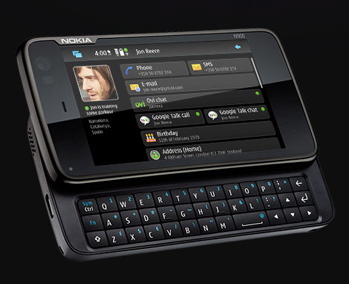
Nokia’s intriguing N900 “pocket computer” has officially launched in the United States. The device, a smartphone that evolved out of Nokia’s Mobile Internet Device (MID) family, signifies a new era for the Finnish mobile tech leader.
Vice President of Nokia retail sales, Alessandro Lamanna summed it up in a prepared statement today: “Consumers from every segment of the population are looking for more out of their mobile device – more power, more ability, more connectivity.” So in order to deliver these results, Nokia paired the 600MHz TI OMAP 3430 chipset with the Linux-based Maemo platform, and locked it up inside a 3G phone with a 3.5″ touchscreen and QWERTY keyboard.
According to one report, Nokia said that by 2012, Maemo will have fully replaced Symbian as the operating system powering its top-end N-series devices. The N900, according to this report, marks the beginning of this transition because it is targeted at the enthusiast and developer crowd who will grow the Maemo ecosystem before it starts being marketed to the mainstream consumer. By then, Symbian will then be relegated to the mass market E- and X-Series devices.
We’ve sent an inquiry to Nokia to find out how true this report actually is, because it could have a significant impact on the smartphone market in the long term as Linux-based platforms are poised to dominate the mobile sector.
And if there was any doubt as to whom the N900 and Maemo appeals to, check out this video:
The Nokia N900 is available for $649 through Nokia’s flagship stores in New York and Chicago, and on the Web at nokiausa.com and Amazon.com. It is compatible with AT&T’s and T-Mobile’s networks in the United States.
-
Sony Pictures Having Its Best Box Office Year Ever… Still Blaming Piracy For Killing The Business
Sony Pictures’ CEO is Michael Lynton, the guy who recently claimed that “nothing good” has come from the internet, and that piracy is killing the movie business. He made that statement less than a month ago. And yet, as Dave Title points out, Sony Pictures just announced that its international box office results have already set a new record for the year, hitting $1.63 billion. The company is bragging about this new record — as it should. But it does seem a bit disingenuous to brag about revenue records just weeks after claiming that piracy was destroying your business and asking for government help to protect the business model. Someone might notice that these two things do not seem to agree.
Permalink | Comments | Email This Story
-
Subsidized Mobile Internet Devices a Not-so-Nuts Proposition for Carriers?
 Subsidies for high-end smartphones can be a Faustian bargain for mobile operators, but there are riches in the coming wave of connected devices, according to figures released today from In-Stat. More than 60 percent of all netbooks and other Internet-enabled mobile devices will be sold through operators and their partners by 2013 as more services are bundled for multiple gadgets, the market research firm predicts.
Those devices are increasingly likely to be sold with 3G and 4G data contracts, In-Stat said, resulting in recurring monthly revenues for carriers. The percentage of netbooks and smartbooks sold with a mobile contract will increase to 49.5 percent in 2013 from 31.5 percent this year. And while subsidies for superphones like the iPhone can exceed $300, the business model for subsidized mobile Internet devices can be a very attractive one for carriers, according to In-Stat analyst Jim McGregor:
“In the U.S., carriers are charging up to $60 per month for a two-year contract with the subsidized purchase of a netbook,” McGregor said in a statement. “While the subsidy costs the carrier $50–$100, it generates $1,440 or more in service fees over the life of the contract.”
Success with netbooks is encouraging U.S. carriers to venture into the notebook space, In-Stat said, following the lead of some Asian operators. Providing connectivity to all those gadgets is likely to be a crucial way to shore up the bottom line as voice revenues continue to decline.


-
Yahoo Go Is A No Go

Before there was an iPhone, Android and App Store, there was Yahoo! Go. Launched in 2006, Yahoo! Go was an application offered news, mail, weather, traffic, and Yahoo! search from a mobile device. Today, Yahoo is announcing that Yahoo! Go will be shutdown on January 12, 2010.
The app seemed to be ahead of it’s time when it launched but now is useless thanks to Yahoo creating prettier, more powerful, personal content-focused apps that specialize in products, such as Flickr, Yahoo Finance and Yahoo Messenger. Yahoo released three versions of Yahoo! Go but hasn’t released a new version in the past year. The last iteration of the app included a mobile widget platform and was available on select Nokia and Windows Mobile devices
-
BlackBerry App World Available in South Africa

The second most important announcement for South Africa after FIFA World Cup 2010
In the rest of the world (outside Canada and the U.S.), soccer seems to be an incredibly popular sport. As a North American, I don’t understand any game played without a large amount of protective gear and cheerleaders, so you’ll have to excuse me for my ignorance. David Beckham? He plays soccer, right? He’s married to Posh Spice. That’s about all I know.
ANYWAY – South Africa is hosting the FIFA World Cup 2010 in 9 host cities, and one great way to keep track of how your team is doing is by using ScoreMobile – available today in BlackBerry App World™!“But Alex, BlackBerry App World isn’t available in South Africa.” SURPRISE – it is available now! Visit http://worldwide.blackberry.com/za/appworld today to download BlackBerry App World to your BlackBerry® smartphone.We’re really happy to announce another launch and we’ll continue to bring BlackBerry App World to every country where BlackBerry smartphones are available. -
PDC 2009: Live from the Day 2 keynote
By Scott M. Fulton, III, Betanews
Microsoft’s Windows division president Steven Sinofsky is the headliner for today’s Day 2 keynote at PDC 2009, and Betanews has its usual front-row seat.
11:04am PT: Promise of discussion on Windows Mobile at MIX ’10 next March 15-17 in Las Vegas — notice once again that the number “7” is omitted from the reference to this product. Keynote ends 35 minutes over schedule.
11:00am PT: Outlook Social Connector — a plug-in involving Microsoft and partners including LinkedIn, enabling information from individuals’ social organizations and networks to be displayed in a meaningful context in Outlook. “This is a general SDK,” meaning developers will be expected to deploy it.
10:37am PT: Office Mobile Clients for Windows Mobile 6.5 betas available today in Windows Mobile Marketplace.
10:37am PT: Office 2010, SharePoint 2010 public betas go live now…today was apparently the original release date to begin with.
10:23am PT: SharePoint now taking the stage, this is where we’ll see the only real Office 2010 information. A lot of talk first about what Microsoft is focused on, which is a little bit of a downer coming off of some very impressive Silverlight 4 demos.
10:18am PT: Final release of S4 shipped first half of next year.
10:17am PT: Sinofsky: How S4 will be shipped: Public beta will include all features demonstrated today, tooling support for VS 2010. Now available for download.
10:15am PT: Multitouch features with basic features, zoom in, zoom out.
10:14am PT: Photos dragged-and-dropped from the outside can be loaded into the application live, then tagged, prior to being sent to Facebook.
Photo of the audience, plugged into the system, app will ask whether to upload the photo to Facebook — all within about 10 seconds.
10:10am PT: Brian Goldfarb is showing an S4 application that utilizes Facebook, but which uses its own chrome to develop a real, custom app on top of custom Facebook apps. Can also take advantage of COM automation to right-click data from Facebook, then add to the Outlook calendar. Access to the Outlook inbox, with virtual wall on the right “to contextualize who I’m talking to.”
10:07am PT: Google Chrome being added to S4’s list of supported browsers.
10:05am PT: Window “chrome” of the application can be customized with out-of-sandbox support, cross-site networking, keyboard support in full-screen mode, more hardware device access. Access to any COM automation object installed on the system, using the _dynamic_ keyword in C# to call new methods found on system. For example, Office 2010 calendar can be queried, PivotCharts brought up from Excel.
10:04am PT: S4: Ability to build trusted applications that run outside the sandbox on Windows and the Mac, user consent dialog is provided automatically.
9:48am PT: UDP multicast support enables P2P networking, improvements to support for WCF, including RIA services. Transfer data 600% faster using internal transfer protocols instead of HTTP.
9:47am PT: Brush demo can be used with live video — a YouTube video can be jigsawed live, while video and sound are playing.

Sinofsky’s been rick-rolled…but he gets his revenge! A “rick-roll” video from YouTube is sliced and diced into live jigsaw pieces using Silverlight 4.
Compile in assemblies once, run in both Silverlight and .NET 4 — compile once, run in both places.
9:45am PT: Text can be dragged and dropped from a browser to the application. Print Preview works, including with custom Print Preview dialogs. S4 will now write directly to the printer, has a print API.
HTML control is hosted within Silverlight app. HTML image can be converted into a brush — the entire HTML page can be used as a brush, so that the page can be converted into, say, a jigsaw puzzle, the pieces of which can be juggled around the screen.
9:43am PT: “And _now_ the iPhone works,” says Sinofsky.
Rich text control that ships in S4: Arabic, Hebrew, Kanji character sets all within the text editor. Custom context menu after right-click. Can paste and insert text, pictures, and DDE-like controls into a Silverlight app, such as a Data Grid control from Excel. Can cut and paste from Data Grid control back into Excel.
9:41am PT: HTML hosting support is coming, model/view development.
9:40am PT: IIS media tool, new version will enable streaming of media directly to Apple iPhone. Yes, you read that right. Video can be encoded once using smooth streaming, target clients using the iPhone.
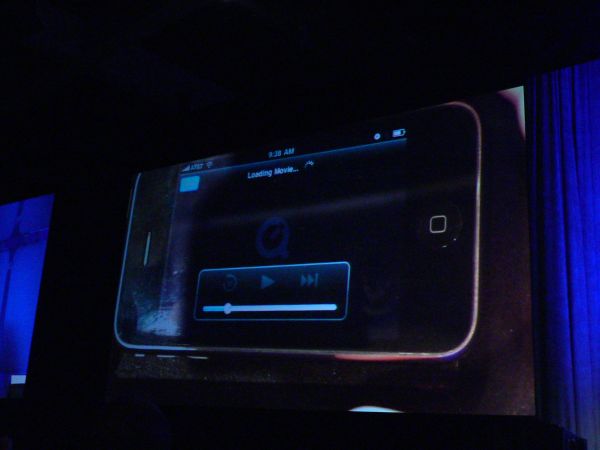
Well, that could have gone a lot better. Brian Goldfarb rushed to the stage to give Steven a fourth iPhone. That one would link to the network, but once it accessed the Silverlight-based Vancouver Olympics site, the video would not load.
Demo tried using four different iPhones, the first three of which could not pull up the network using the router. The fourth did pull up the network, but the video from the Olympics Web site would not pull up in the Safari browser. Took several minutes, but Sinofsky refrained from making any silly Apple comment.
“We believe you, Scott!” yelled one attendee.
Printing / rich text / Clipboard access / right-click support for context menus / mouse wheel support are all coming to Silverlight 4.
9:34am PT: Demo of Vancouver Olympics site with Silverlight player, with instant seek.
9:33am PT: Open-source library for barcode reading, can immediately look up the prices of any object scanned from the barcode scanner, pulls up distributors or retail sellers.
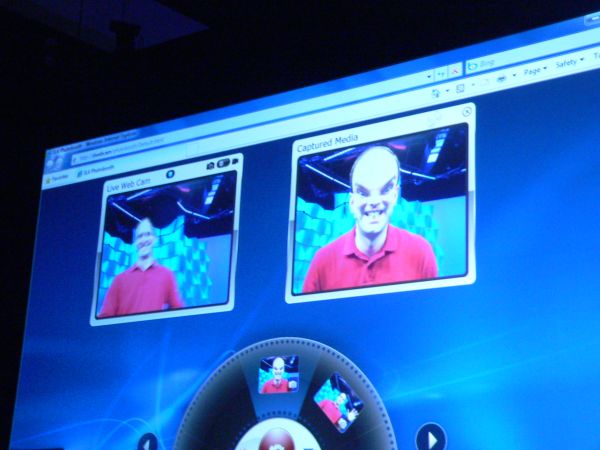
9:32am PT: New Silverlight 4 will allow access to webcams and microphones on the user’s machine. Demo now: Webcam application that captures live video, can do live effects with bulge, distortion. Integration with Twitter enables the result to be live-integrated into Twitter profile, so a picture just taken becomes the user’s Twitter icon.
9:28am PT: Silverlight now installed on an estimated 45% of the world’s Internet-connected devices. PDC is about Silverlight 4, first news.
9:25am PT: Corp. VP Scott Guthrie now takes the stage to talk Silverlight, now showing the video of Sketchflow feature in Expression Blend (not a particularly new video for many).
 9:22am PT: The test distributions of “Microsoft PDC laptops” will likely come with promises that the users will be communicating telemetry with the company.
9:21am PT: Lot of new APIs in Windows 7, and IE will take advantage of these APIs. Videos of demos will soon be available on Microsoft Channel 9.
9:19am PT: Maps re-rendering will use 60 fps rather than 2 or 3, by moving to Direct2D from GDI.
9:18am PT: CSS selectors test, using CSS3.info — passed 572 out of 578 (a variation of the SlickSpeed test) for CSS selectors used in rendering.
IE rendering engine will support rounded borders in CSS.
Rendering engine will use hardware-acceleration in DX9 mode (not DX10), using Direct2D. Highly resolved text with much resolved clarity.
Sub-pixel positioned text using DirectWrite. Zooms used to be jittery in GDI, nice and smooth as we move to Direct2D. Smooth realignments — “changes without you having to do anything different with your site.”
9:14am PT: Different Web sites have tremendous differences in how they handle JavaScript, CSS, and HTML parsing. Their profiles make everything different.
IE9 is getting close to Firefox 3.6 performance, not overtaken just yet. “It’s getting really close to being a wash.”
9:13am PT:
9:13am PT: JavaScript performance. IE9 is up to 32 on the Acid3 test, from 20. Audible groan from the audience.
9:12am PT: We continue to want to be responsible about building Internet Explorer.
First IE9 news: Three weeks into the project, we’re focused on these areas:
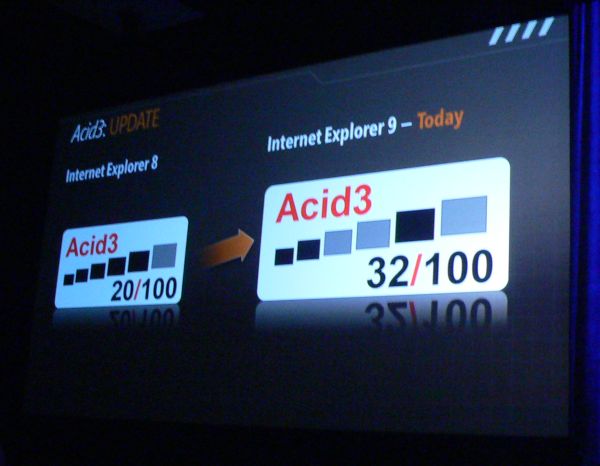
Standards: Acid3, we’re not ahead of that, we need to do a better job. There are new and emerging standards like HTML5, and we want to be responsible about how we support that, we don’t want to generate a hype cycle among developers.
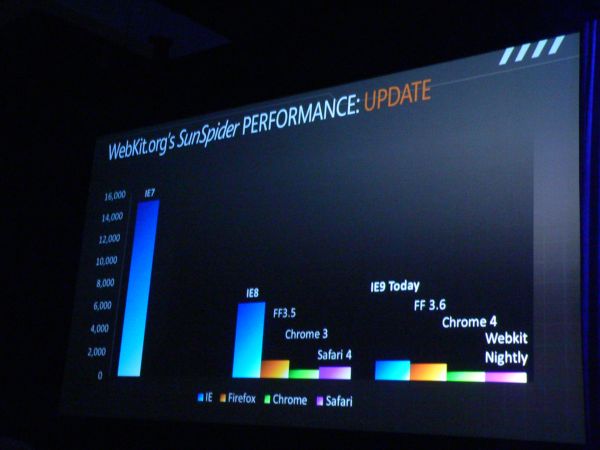
9:10am PT: Biggest applause of the day comes from this:
Sinofsky is now talking about a partnership project with Acer where it puts its own team through the process of actually building a laptop computer, just to see how one is built — what laptop engineers actually go through. In learning the system that Acer goes through, Microsoft built its own limited run of PDC’09 laptops.
They will be giveaways to PDC attendees. About a minute of applause from that. “But please hang around for the rest of the talk,” said Sinofsky. “We had a little problem, something like that, about four years ago, so please stay seated.”

Folks realize they’re being given free laptop computers. Yay. Applause, then what’s the catch. No catch so far, so more applause. Then more. One of the longest stretches of applause in PDC keynote history.
9:04am PT: Everybody’s jumping on the taskbar bandwagon, says Angiulo, and here again Microsoft gives credit to Mozilla for being quick to integrate previewing features into Firefox 3.6 (Beta 3 was just made available, by the way).
9:03am PT: Dell netbook uses an infrared data center to detect body heat, then powers itself back up when someone walks by.
Earlier, Angiulo demonstrated the differences between DirectX 11 processing power and DX10, mainly by means of offloading much of the computing power from the CPU to the GPU. Demos of moving thousands of “star” objects simultaneously in a simulated galaxy formation, with gravity and physical forces between them, all in a 40+ Gflops operation running on a $400 graphics card rather than a $15,000 computer.
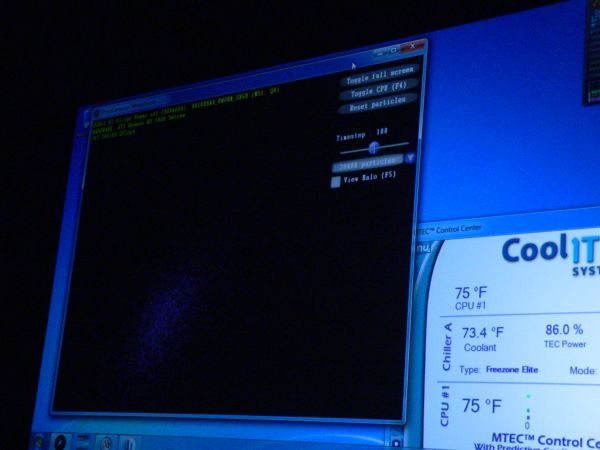
8:58am PT: Windows engineer Michael Angiulo demonstrates how engineers of new small computers, such as netbooks, can do their part to accelerate Windows 7. After reminding everyone of the first generation UMPC (gagh!), he pulls out a pair of Windows 7 netbooks. But one has a bunch of branded background software loaded, and the other (by Sony) does not. The Sony model runs 30% faster, boots faster, and has 50% better battery life, simply by getting all that bloatware junk software out of the boot path.
8:53am PT: Moving now to examples of people trying to align their windows, one user talks about side-by-siding his windows, looking for where the window tiling feature is located…no, it’s not that one…
Then another user snaps a window to the side using Aero Snap in Windows 7. “That is _way_ easier.”
Aero Peek: “Hey, get all that!” says the user. “I can dig that! Good job, people.”
8:50am PT: Discussion now about the UAC usability studies. We saw videos of some of these studies last year, but users are talking about not wanting things popping up in their faces constantly.
User is asked during an Adobe Flash installation what he just clicked on, and he made up a response about where the program is going on the drive. Another user is asked what the UAC prompt that he just received meant, and he answered, “It means that people…are happy with it now.” [?]
8:43am PT: Video about how Microsoft programmers are held directly responsible for the errors of their ways, by way of a kind of “agony chair” that shocks, stuns, or stabs the individual developers discovered using the Watson logs to have been responsible for a specific problem.
Uh-huh.
8:40am PT: Anecdote about how Microsoft used to handle reliability problems in the Windows 3.x era using Dr. Watson (hands up if you remember that?), and how engineers pre-Internet developed the Watson system for “testosterone-based bug fixing” — folks watching the Watson logs coming in over the BBS and responding to the most interesting and serious problems.
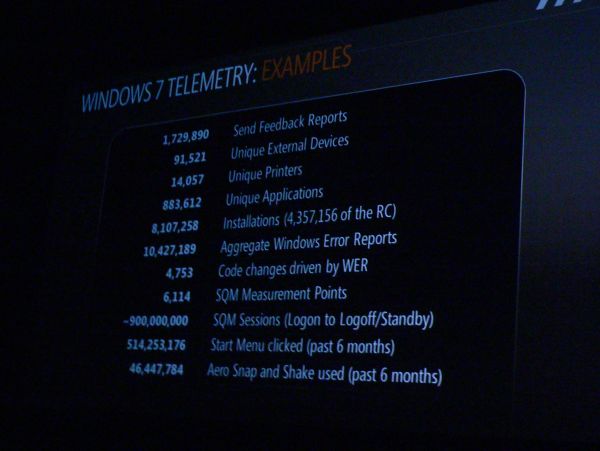
The sheer number of telemetry items returned from Windows 7 testers during the beta process.
8:38am PT: The value of the “Send Feedback” button, learning from clients what drivers were loaded, whether the installation of drivers and services were successful.
Software Quality Monitor (“squim”) is designed to be opt-in for customers, but Sinofsky admits customers were “opted in automatically” during the preview and beta processes.
 8:35am PT: At the moment, Sinofsky is going through a history of the Windows 7 launch, and lessons learned at Microsoft about being responsible about how to disclose information about the product. “You should expect us to have learned that lesson about responsible disclosure, and to continue as we move forward.”
 -
Massive HTC HD2 review by GSMArena

GSMArena published a 4 page “preview” a few days ago, and have now followed up with a massive and very detailed review of the HTC HD2, which includes many examples videos, many screen shots and esoterica such as the frequency response curve for the audio output on the smartphone.
At the end they concluded:
HTC HD2 has it all to be a winner – groundbreaking hardware, inventive software, high performance and solid design. HTC have struck the right balance with the HD2 and they are certainly giving the competition a run for their money.
Thanks to the capacitive screen the HTC Sense delivers almost unsurpassed Windows Mobile experience complete with multi-touch gestures. It seems the Snapdragon platform is what the now aged Windows Mobile platform was meant to run on. If only we had that kind of hardware and software a couple of years ago, nobody would have even considered the iPhone seriously.
But we didn’t and we don’t suppose Snapdragons are going to become mainstream any time soon. So from a broader perspective, Windows Mobile is still just another runner-up in the run for the ultimate all-touch smartphone. The impressive user-experience on the HD2 is hardly indicative for the OS by itself.
So if you get our drift, it’s not Microsoft, but HTC that deserves the user experience award for the HTC HD2. Their Sense UI and TouchFLO 3D have blended exquisitely well delivering an unmatched social networking integration (save perhaps for the HTC Hero) and touch experience easily equalling that of the iPhone.
But even though it’s such a powerful package, the HD2 has it flaws too. The camera is below par, video recording is kinda poor, the limited internal storage is a real bugger and the its sheer size does push the limits of user comfort. That last thing will perhaps be a deal breaker for many users.
What is more, the HD2, just like its predecessor, does not justify its HD moniker. It doesn’t capture HD videos (but we knew that beforehand) and worse yet, it cannot even play any right. Samsung Omnia HD does these things with a substantially lower clocked CPU, so we guess Snapdragon doesn’t equal HD automatically either.
But still Snapdragons are still quite rare on the phone market and until more of those appear next year, the Toshiba TG01 and the Acer neoTouch will always remain two opponents the HD2 should consider. Both of them feature less UI customizations, resistive touchscreens and less RAM. But what works in their favor is they both are nearly 200 euro cheaper than the HD2 with its 550 euro price tag. That alone makes them worth checking out. But as we said, HTC have done a tremendous job of making Windows Mobile more usable and the added value of their product is well worth the extra bucks.
Toshiba TG01 • Acer neoTouchThe final threat for the HD2 success on the Windows Mobile ring is the more lightweight Samsung I8000 Omnia II, which should definitely be the weapon of choice for all those of you that find the HD2 just too big.
It might not have the brute processing power of the HD2, nor the RAM count, but the actual handling and response are perfect. The 3.7" AMOLED screen, another fully customized UI, huge internal storage, DivX/XviD support out of the box and all kind of software goodies make the I8000 Omnia II a force to be reckoned with in the smartphone field this holiday season. Not to mention it’s got a nicely capable camera and it currently goes for some 150 euro less than the HTC HD2.
Samsung I8000 Omnia II
So there you go. There is no shortage of options out there but we’ll gladly take the HD2 just as it is. On some counts it would be a decision against good reason, we admit, but the passion for gadgets is rarely one of logic, and always one of the heart.
Read their full review here.
Thanks MobilePaddy for the tip.
-
The Pirate Bay Logo Gets Trademarked by a Private Company
 The Pirate Bay may not be the world’s largest BitTorrent site, but it’s definitely the best known. So much so that even people who never visited the site itself are familiar with its logo. But, in keeping with their anti-IP stance, the logo wasn’t copyrighted or trademark by the owners, something that a Swedish online retailer saw as an opportunity to make some cash, so it officially registered a slightly altered logo with the PRV, Sweden’s Patent and Registration Office, stirring quite an uproar.
 The issue has been resolved fairly quickly, with Sandryds backing down on the claims that the company already pretty much admitted were bogus. A while back, after noticing that the logo had no copyright protection whatsoever, something that the Pirate Bay actually takes pride in, Sandryds decided to register the logo for itself. It submitted its own version to the PRV in a slightly modified color and with the words Pirate Bay written as “Pirate bay.” Seeing that the logo hadn’t been registered by anyone else, the PRV actually awarded the company the trademark.
“The idea is to sell USB drives using this brand,” a company spokesman told a Swedish news outlet. “We saw that it was not already allocated to someone else. It was not registere… (read more)
-
Holiday Buying Guide: Picking the Right Digital Camera

With Black Friday rapidly approaching, the time of the year for spending is upon us. Although I’m sure all of us Mac lovers are considering which Apple product we’ll be blowing our budget on (mine will be a Magic Mouse), there are also the other gadgets in our lives to consider.
One of the most important gadgets for Mac users is often the digital camera, what with all those wonderful iLife tools we can use to manipulate and share the photos and videos we take with our digital cameras. As such, here’s a quick guide on picking the right digital camera for you.
Rules to Remember
1) The inverse law of megapixels
Despite what the guy at the Best Buy tells you, more megapixels does not mean better photos. In fact, in this day and age the opposite is true. This is because the more megapixels you pack onto a camera sensor, especially the tiny sensors found on most point and shoot cameras, the worst they become at picking up light. Nowadays you can’t buy a camera with fewer than six or seven megapixels, which is more than enough for most, and you will actually hurt your picture quality if you buy small cameras with more than 10 or 12 megapixels.2) Think about where you shoot
Most people don’t stop and think about the type of photos they take before they buy, not realizing that there are tradeoffs to be made. For example if you take a lot of photos in low light conditions, buying a camera with a larger sensor and whose lens can open up wider to pick up more light, like the Canon S90 or Panasonic LX3, makes a lot of sense, but such cameras also mean giving up zoom range. The opposite is true if you like to get close to your subjects. You can pick up a pocketable point and shoot with a 12x zoom like the Panasonic DMC-ZS3, but you’re going to give up low light capabilities. If you want the best quality in all conditions you’re going to have to give up portability and carry around a large DSLR.3) Don’t forget the accessories
Even if you’re not spending a ton of money, a few simple accessories can improve your photography experience. I almost always recommend picking up an extra battery. There’s nothing more annoying than having your camera die on you in the middle of a trip or family event. Another useful accessory is a tripod, which doesn’t necessarily need to be a gigantic. Picking up something like a Gorrilla pod, which is both cheap and small, can let you stabilize the camera when taking shots with a long exposure, like a night scenery shot, and also lets you set up the camera better for self-portraits.4) Decide how serious you are about photography
If you’re truly a point and shoot photographer, then it’s important for you to pick up a camera with a good automatic mode and wide selection of usable scene modes. If you’re more advanced, or want to learn how to take more control of your camera, then expect to pay more for a camera with full manual controls. If you’re a serious photographer or if you’re ready to take the leap to the highest level of photography, then it may be time to invest in a DSLR, which allows you to swap lenses for various photographic situations.5) Don’t cheap out
We’re Mac users for a reason. We recognize quality and are willing to pay more in order to get the best. The same is true with digital cameras. The universe of cameras under $150 is enormous, and they’re all almost the same. By paying a bit more, I’d say more than $200 for a point and shoot, you’ll find a significant increase in photo quality and features. That’s not to say that every camera under $150 is poor and every one over $200 is good, you’ll still need to do research, but there’s less chaff to sift through at higher price points and a better chance of picking up something you’ll be happy with.Cameras to Consider
The cameras below are widely seen as solid performers in their class. If you’re still bewildered by the options out there, these are a good place to start your research.
 Canon PowerShot SD780 IS
Price: $199
This is a good fit for anyone who wants a reasonably adept camera in a small and slim package. The price is reasonable too, but don’t expect wonders from the tiny sensor in this camera. Expect to use the flash in even slightly dim conditions. On the plus side, you do get face detection, HD video recording and image stabilization.
 Panasonic Lumix DMC-ZS3
Price: $270
Stepping up a bit in price over entry-level point and shoot cameras, the ZS3 is still a very good value considering what you get. That is an extremely impressive zoom range, from wide angle for scenery shots all the way up to a 300mm zoom for getting close to subjects far away. HD video is also a big plus here, with the ability to zoom while recording, something that not all cameras can do. Not all is perfect, however, as the ZS3’s sensor is tiny, which combined with a less than impressive maximum aperture means that this camera struggles in low light situations. If you’re looking for small and versatile, however, the ZS3 hits the sweet spot in a lot of places.
 Canon S90
Price: $430
Canon’s newest addition to their high-end point and shoot lineup offers quite a few features that will get advanced amateurs excited. First up is a significantly larger sensor than that found in most point and shoot cameras. Combined with a lens that sports an f/2 aperture at the wide end, this means the camera struggles much less than typical point and shoots in low light situations. You also get a full range of manual controls and an interesting click wheel around the lens that can be assigned to a variety of functions. The S90 doesn’t come cheap, however, and it is missing some features like HD video that you can find on much less expensive cameras.
 Nikon D60
Price: $640
DSLR’s like the D60 combine a huge sensor for even better low light photography, with the option to switch lenses to match your particular situation. Be ready to continue spending, however, as in this world it’s the quality of your glass (lenses) more than the camera itself that will dictate the quality of your photos, and lenses don’t come cheap. The D60 is a good choice for those just entering the world of interchangeable lenses as it’s available at a reasonable price and it offers a more gradual learning curve than other more advanced DSLRs. That said, it does lack one of the new sexy features that you are beginning to see on DSLRs: video recording. If that’s a must for you check out the Canon T1i.

-
TELUS releases the BlackBerry Storm2

Just a quick little heads up for our Canadians brothers and sisters that at this moment may or may not be doing battle with polar bears on glaciers the size of Manhattan — TELUS has released the BlackBerry Storm2. Retailing for $599.99, the Storm2 is also available at the subsidized price of $199.99 provided one is willing to take on a 3-year contract with a minimum of a $50 voice and data plan. So what’s it going to be, Canada? Yay or nay?
-
MSI launches 21.5-inch Wind Top AE2220: 1080p and multi-touch starting at $750

Ooh la la, this looks to be an interesting machine right here. Starting at $750, MSI’s latest “Wind Top” all-in-one features a big 21.5-inch 1920×1080 multi-touch LCD, NVIDIA ION graphics, Windows 7 Home Premium, and a wireless mouse and keyboard set.
That’s pretty aggressive pricing an attractive all-in-one with a big multi-touch display.
Full feature list includes:
- Intel Core 2 Duo T6600 CPU at 2.2GHz or Pentium dual-core T4300 at 2.1GHz (depending upon configuration)
- NVIDIA ION, NVIDIA GeForce 9300 chip with 256MB of RAM
- 4GB of DDR2 RAM
- Double-layer DVD burner (Blu-ray optional)
- Wi-Fi (b/g/n), webcam, card reader
- VGA and HDMI outputs. 6 USB ports
- Wall-mountable (VESA)
- 5.1-channel surround sound
- Windows 7 Home Premium
- Optional TV tuner
Various configurations are slowly appearing on online retail sites (this one on ZipZoomFly.com, for instance) so we should start seeing increased availability soon.
-
Hydrogen Company to Deliver $1 Million Scholarship Program to HS Seniors
Industry leader Proton Energy Systems will be working with the Hydrogen Education Foundation (the charitable arm of the National Hydrogen Association) to deliver $1 million total in scholarships to high school seniors who pursue higher education in science or technology.
I’ve talked about Proton Energy Systems before as one of the world leaders in building hydrogen generators for the scientific community as well as H2 refueling stations. Proton currently has about a dozen hydrogen fueling stations operating throughout the United States.
The Proton Energy Scholarship program will make its awards to students based on “…academic performance, strength of application, commitment to further education in a science or technology related field, financial need and demonstrated leadership, work ethic and community involvement.” Applications are due by Feb. 10, 2010.
According to Jeffrey Serfass, President of the Hydrogen Education Foundation, “We are thrilled that Proton chose the Hydrogen Education Foundation to administer this exciting new program. We look forward to identifying and awarding star students who will help us address the global energy and environmental challenges ahead.”
More rules and news can be found at the Proton Energy Scholarship website including questions and answers and how to apply. The high school seniors of today will be the chemists and engineers of tomorrow solving the complexities of building a hydrogen infrastructure for cars. So it’s good to see the business community step up and put money towards education in this kind of transformational technology.
-
PS3 FW 3.10 update coming today
Now that the PS3 has turned three years old, Sony has something big to celebrate with. Heads up, Sony has now confirmed that FW 3.10 will be going l…
-
Music Card: Credit card-like MP3 player with built-in speaker (video)

Japan-based gadget maker Strapya is offering the so-called Music Card MP3 Player (the link leads to their English store), an MP3 player that houses a speaker and an earphone plug but is still just 5mm (0.20″) thin. Sized at 5.4×8.6cm, the player weighs 20g.
Strapya says the headphone jack is just 2.5mm and ships fitting earphones with the player itself, but they’ll also give buyers an adapter so they can use their 3.5mm headphones as well. You can connect the player to your PC or Mac via USB and store MP3 or WMA files in its 2GB internal memory. If you don’t use the built-in speaker, you can listen to music for about 15 hours before the battery needs to be recharged.

Strapya is selling various versions of the Music Card (gold credit card, three chocolate bar-type models, vintage camera (?), and cassette tape). The player costs $26.40, with Strapya shipping ready to ship it worldwide.

Here’s the weird – but official – promo video for the device (subbed in English):
-
Kmart pre-Black Friday Thanksgiving sale
 Yeah, seriously. Who wants to wait for Black Friday? Not Kmart! Even though the store will indeed be having a Black Friday sale, you’ll also be able to get your gravy-covered mitts on a bunch of goodies Thanksgiving day. So choke down that turkey, scoot your chair back, and head to the store before the tryptophan has a chance to kick in. Here’s a list of the geek-centric items:
Blank Media
Maxell 50-Pack DVD+R or DVD-R Media – $9.49
Digital Cameras
Fujifilm A170 10.2MP Digital Camera – $69.99
GE A1250 12.2MP Digital Camera – $69.99
Kodak M341 12.2MP Digital Camera – $129.99
Vivitar V8025S 8.1MP Digital Camera – $49.99
Digital Media Cards
SanDisk 2GB microSD Memory Card – $6.49
SanDisk 2GB Secure Digital Memory Card – $6.49
DVD Players
Curtis Compact DVD Player – $17.99 *
GPX 8″ Portable DVD Player w/ Remote – $79.99
Electronics
Audiovox Under-Cabinet 10″ HDTV & DVD Player – $179.99
Belkin HDTV Starter Kit – $34.99
Coby 1.5″ Digital Photo Keychains – $9.99
DieHard Batteries (8 AA or AAA, 4 C or D, 2 9V) – $5.50
GPX Under-the-Counter AM/FM CD Clock Radio – $24.99
Jazz T55 Digital Camcorder – $49.99
Kodak 7″ Digital Photo Frame – $49.99
Kodak 8″ Digital Photo Frame – $99.99
Maxell Headphones (Assorted Colors) – $2.79
Memorex Ambient iPod / CD Shelf System – $79.99
Net 10 Motorola Prepaid Slider Phone – $29.99
Pandigital 7″ Digital Photo Frame – $49.99
Portable Karaoke System w/ Microphone – $29.99
RCA iPod Docking CD Shelf System – $59.99
Sakar iSpeakers for MP3 Players B1G1F – $9.99
Sony BDP-S360 Blu-ray Player – $149.99
Vtech DECT 6.0 Cordless 2-Handset Phone – $29.99
Wireless Gear Bluetooth Car Kit – $19.99
GPS Systems
Magellan RoadMate 1440 GPS Navigation System – $119.99
TomTom One 130 Portable 3.5″ GPS System – $79.99
MP3 Players
GPX 4GB Portable MP3 Player – $24.99
Mach Speed 2GB Clip MP3 Player – $11.99
Portable USB Storage
PNY 8GB USB 2.0 Mini Flash Drives – $9.99
SanDisk 2GB USB 2.0 Flash Drive – $6.49
Televisions
AOC Envision 24″ Widescreen 1080p LCD HDTV – $229.99
Element 40″ Widescreen 1080p LCD HDTV – $549.99
Samsung 50″ Widescreen Plasma HDTV – $699.99
Sylvania 32″ LCD HDTV w/ Built-in DVD Player – $349.99
Venturer 17″ Widescreen LCD HDTV – $119.99
Video Games
A Boy and His Blob for Nintendo Wii – $29.99
Assorted Nintendo DS Video Game 2-Packs – $14.99
Assorted Nintendo Wii Video Game 2-Packs – $14.99
Assorted Sony PS2 Video Game 3-Packs – $9.99
Assorted Sony PS3 Video Game 2-Packs – $24.99
Assorted Xbox 360 Video Game 2-Packs – $24.99
EA Active for Nintendo Wii – $39.99
Forza Motorsport 3 for Xbox 360 – $39.99
Guitar Hero Metallica for All Platforms – $39.99
Guitar Hero Smash Hits for All Platforms – $39.99
Guitar Hero World Tour for All Platforms – $29.99
Guitar Hero World Tour Guitar Bundle for PS3 – $49.99
Guitar Hero World Tour Guitar Bundle for Wii – $49.99
Guitar Hero World Tour Guitar Bundle for Xbox 360 – $49.99
Halo 3 ODST for Xbox 360 – $39.99
Jillian Michaels Fitness Ultimatum 2010 for Nintendo Wii – $29.99
Nintendo Wii w/ Free $25 Nintendo Gaming Coupon – $199.99
Sony PSP 3000 Core System w/ Free $25 Gaming Coupon – $169.99
Sony PSP Gran Turismo Pack w/ Free $25 Gaming Coupon – $199.99
Wii Fit Plus with Balance Board for Nintendo Wii – $99.99
Kmart Thanksgiving Black Friday Ad [BlackFriday.info]
See more Black Friday posts here…
-
NewTek’s new mobile HD video production vehicle. As opposed to those unmobile HD video production vehicles.
 Is CrunchGear gradually turning into a car blog? We test drove a Chevy Volt concept, saw the Subaru snowtank, and tested the Telsa Roadster Sport. I sense a disturbing trend… But at least this next car we looked at is 100% geek through and through. It’s the world smallest HD video production studio, crammed inside of a Mini Cooper.
This rolling HD rig is a Clubman S with a turbocharged 16-valve engine. It’s a part of NewTek TriCasts America: Stream or Die Tour, a coast to coast trek showcasing NewTek’s new line of HD video gear. Setting out to prove that you no longer need massive production trucks to do on-the-spot video streaming, NewTek put their new TriCaster XD300 unit along with the rest of a HD studio in 9.2 cubic feet of cargo space. It’s capable of taking three HD video streams, manipulating them just as you would in a full-sized studio, and streaming them live in glorious glorious high definition.
For podcasters or anyone who wants to stream to the internet, the XD300 allows you to do so in HD essentialy as a one-man show. You can manipulate the video / audio in real time using the included control surface even while the cameras are rolling. You can expect these units before the year is out.
-
-
Jenzabar Finds ‘Expert Witness’ Who Will Claim Google Relies On Metatags, Despite Google Saying It Does Not
It’s been widely known for years that Google does not use metatag description comments in ranking its search results. Indeed, this simple fact is part of what made Google more reliable than other search engines, since many website owners used fake metatags to “optimize” their results in search engines. While this was quite obvious for many years, Google had never publicly admitted it (it doesn’t like to talk about its algorithm) until just a few months ago. Still, the company was just confirming exactly what was widely known for the better part of a decade or so.
And yet, for years, people would bring trademark infringement lawsuits, insisting that metatags represent some sort of trademark violation. In one recent case, that we’ve discussed, the CEO of software company Jenzabar, Ling Chai, has sued the makers of a documentary about the Tiananmen Square uprising. Chai had been involved in the uprising and doesn’t like how the filmmakers portrayed her role. The filmmakers, on their website, mention that Chai works for Jenzabar, and included the word “Jenzabar” in the metatags, which Jenzabar insists violates its trademarks.
The documentary makers brought on Public Citizen lawyer Paul Alan Levy, who noted in a blog post the simple fact that even Google says it does not rely on metatags, and in response, Jenzabar tried to block his being brought into the case, by saying that Levy’s pointing to the Google blog post was hearsay.
Now, the company has gone even further. It’s found an “expert witness” who will claim that metatags do, in fact, influence Google results, even as the company itself insists they don’t. The guy in question, Frank Farance, claims in his affidavit that “metatags are used by every Web search engine to determine search results and rankings.” It’s not clear how he has expertise in this particular realm or how he knows that Google uses metatags when pretty much everyone in the space has known for years it does not and Google itself has publicly denied using metatags to rank results.
Permalink | Comments | Email This Story


