Author: Serkadis

  • How Will We Keep Supercomputing Super?

    jaguar500Cray’s Jaguar supercomputer is the fastest machine on the planet, according to the Top 500 list of supercomputers published today by four researchers in the computing industry. It marks the first time that Jaguar beat out IBM’s Roadrunner on a performance basis, achieving 2.3 petaflops, or about 2 million billion calculations a second. However, a deeper look at the list shows that the trend in supercomputing is not only one of faster machines, but a steady erosion of how super supercomputing actually is, as exemplified by dedicated vendors such as SiCortex being shut down and venerable players like SGI filing for bankruptcy before then getting acquired.

    Increasingly, many of the parts that make up a supercomputer — from the types of processors used to the networking cables — are the same as those used in everyday corporate computing. As the chart makes clear, the number of different processors used to build supercomputers has been shrinking. This is partly due to Moore’s Law, which enables the x86 architecture (the same type of chips inside your computer) to make steady performance gains, but is also a function of how cheap mass-produced chips are. And because most supercomputers are built for the government, getting as many flops for the dollar is essential. Even on the networking side, Ethernet is making strides when compared to more expensive, proprietary networking technologies such as Infiniband.

    superarchitecture

    However as the search for faster computers continues (the goal is to build an exascale machine by 2018), cramming millions of x86 chips into a giant system isn’t going to cut it on either the power consumption or the real estate front. That’s why when it comes to chips in supercomputers, expect to see more graphics processors, which offer screaming performance for certain tasks at a price that’s relatively cheap thanks to the fact that GPUs are found in most consumer computers. For example, the fifth-most powerful system on the Top 500 list is a Chinese supercomputer that uses GPUs from AMD.

    As I explain in a GigaOM Pro piece about the quest for the exascale grail (sub. req’d.), building a supercomputer that can deliver a billion billion  (or quintillion) calculations per second is going to force designers to change the way they think about putting these supercomputers together. GPUs are the first step in that process, although more esoteric technologies may emerge.

    But for now, as supercomputers and high-performance computers use more mainstream and commodity parts, it makes it that much harder to distinguish the specialty high-performance computing vendors from those offering corporate computing products. Rackable, which purchased SGI and took the SGI name, builds its products with a corporate buyer in mind, for example. And as the underlying hardware for high-performance computing becomes more like the hardware used in corporate data centers, firms like Microsoft are trying to take advantage of the familiar architectures (as well as the ever-increasing need for higher-performance computers at the corporate level), with the Redmond giant today releasing products that will allow folks to run Microsoft Office Excel 2010 on a distributed HPC cluster as well as a version of Windows HPC Server 2008 designed to run on large clusters.

    So as supercomputers have become less super, they have also become more accessible for corporate computing. Microsoft, Intel, SGI/Rackable and others are trying to take advantage of this. However, as the industry strives to build machines that can achieve exascale performance, it’s unclear if these commodity and common architectures can scale out linearly without consuming incredible amounts of power and taking up huge amounts of space. So we may see supercomputing become more super and less mainstream once again.


  • Motorola DROID giveaway!

    Motorola-DROID-giveaway-2

    Uh oh… we’re not sure if you’re ready for this, guys. Since we were the first ones to take you up close with the Motorola DROID, we thought it would be fitting if we ran the hands down best Motorola DROID giveaway — we’ll be giving away (5) brand new Motorola DROID handsets for Verizon Wireless. Motorola doesn’t answer our emails and Verizon declined (nicely), so we paid for these out of our own pockets. We’re going to make the contests fun and exciting but don’t worry, you won’t have to jump through hoops. Plus, there is word in the BGR BlackBerry Messenger group that we’ll be giving away some BlackBerry 9700s shortly? Stay tuned!

    UPDATE: Just to be super, super clear… dropping a comment here doesn’t enter you into any of the giveaways. It does, however, tell us how excited you guys are about them, and we’ll have more information shortly.

  • Gift Guide 2009: Pocket Camcorders

    Intro

    Pocket-sized camcorders continue to grow in popularity thanks to falling prices, shrinking form factors, and enhanced video quality. While there are plenty on the market to choose from right now, this guide will focus on models selling for less than $150. That seems to be a good price ceiling that allows you to get plenty of features without spending too much.

    Flip Minoflipmino

    Flip Mino: $149.99 (TheFlip.com)

    Flip’s line of compact digital camcorders arguably broadened the mass appeal of such devices thanks to simplified controls, pocket-friendly form factors and, perhaps above all, easy-to-use built-in software and streamlined YouTube uploading. While many of its competitors now offer similar features at lower price points, Flip cameras are still wildly popular.

    Features:

    • Storage: 2GB (not expandable)
    • Resolution: 640×480
    • LCD Size: 1.5 inches
    • Zoom: 2x digital
    • Battery: Rechargeable lithium-ion (not replaceable)
    • TV Output: Composite AV

    PROS: Stylish, customizable, super easy to use, tiny form factor, built-in software

    CONS: Expensive, no way to add storage, no way to replace battery

    Product Page

    Creative VadoVADO

    Creative Vado: $99.99 (Creative.com)

    Taking its cues from the aforementioned Flip Mino, the Creative Vado matches it almost spec for spec while featuring a larger LCD and smaller price tag. Sure, it may not come in as many colors and designs but if you’re looking for Flip’s portability and ease of use at a much lower price, the Vado is a good place to start.

    Features:

    • Storage: 2GB (not expandable)
    • Resolution: 640×480
    • LCD Size: 2 inches
    • Zoom: 2x digital
    • Battery: Rechargeable lithium-ion (replaceable)
    • TV Output: Composite AV

    PROS: Flip Mino features for $50 less, replaceable battery, relatively big 2-inch LCD

    CONS: No way to add storage, bland color options

    Product Page

    Kodak Zx1Zx1

    Kodak Zx1: $149.95 (Kodak.com)

    Kodak’s newest addition to the world of pocket camcorders is the Zx1, capable of recording 720p video at up to 60 frames per second. The camcorder comes with two AA rechargeable batteries, which means it can use standard AA batteries in a pinch. You can even purchase Kodak’s rechargeable lithium-ion battery pack to use instead.

    Features:

    • Storage: 128MB (expandable via SD/SDHC)
    • Resolution: 1280×720
    • LCD Size: 2 inches
    • Zoom: 2x digital
    • Battery: Rechargeable lithium-ion (replaceable)
    • TV Output: Composite AV and HDMI

    PROS: 60 FPS HD video on the cheap, multiple battery options, dual video outputs

    CONS: Not much built-in storage, ships with nickel-metal hydride batteries

    Product Page

    Sony Webbie HDWebbie

    Sony Webbie HD: $149.99 (SonyStyle.com)

    Sony’s Webbie HD pocket camcorder features a cool swiveling lens, individual movie and still photo buttons, and more-than-720p-but-not-quite-1080p resolution. Initially priced at $169.99, the Webbie HD line has now been discounted to $149.99 for the holidays.

    Features:

    • Storage: None (expandable via Sony Memory Stick PRO/PRO Duo)
    • Resolution: 1440×1080
    • LCD Size: 1.8 inches
    • Zoom: 4x digital
    • Battery: Rechargeable lithium-ion (replaceable)
    • TV Output: Composite AV and Component AV

    PROS: Swivel lens for self portraits, separate still photo and video recording buttons

    CONS: No built-in storage, uses proprietary Memory Stick format, odd resolution

    Product Page

    Insigniainsignia

    Insignia NS-DV1080P: $149.99 (InsigniaProducts.com)

    Best Buy’s house-brand, Insignia, has managed to put together a portable camcorder that shoots full 1080p video and sports a big 3-inch flip-out LCD – all for $149.99. You also get a front-mounted video light, although I can’t make any claims as to how useful it actually is.

    Features:

    • Storage: 90MB (expandable via SD/SDHC)
    • Resolution: 1920×1080
    • LCD Size: 3 inches
    • Zoom: 4x digital (in 720p mode)
    • Battery: Rechargeable lithium-ion (replaceable)
    • TV Output: HDMI

    PROS: Full 1080p HD video for $149.99, big LCD screen, video light

    CONS: 4x digital zoom only works at 720p resolution

    Product Page

    CompareComparison Chart:

    CAMCORDER

    FLIP

    CREATIVE

    KODAK

    SONY

    INSIGNIA

    PRICE

    $149.99

    $99.99

    $149.95

    $149.99

    $149.99

    STORAGE

    2GB

    2GB

    128MB

    None

    90MB

    EXPANDABLE

    No

    No

    SD/SDHC

    Memory Stick

    SD/SDHC

    RESOLUTION

    640×480

    640×480

    1280×720

    1440×1080

    1920×1080

    LCD SIZE

    1.5”

    2”

    2”

    1.8”

    3”

    ZOOM

    2x Digital

    2x Digital

    2x Digital

    4x Digital

    4x Digital

    BATTERY

    Lithium-ion

    Lithium-ion

    Rechargeable Ni-MH AA

    Lithium-ion

    Lithium-ion

    TV OUTPUT

    Composite

    Composite

    Composite and HDMI

    Composite and Component

    HDMI

    MODEL

    Mino

    Vado

    Zx1

    Webbie HD

    NS-DV1080P


  • American Airlines Fires Designer Who Reached Out To Disgruntled Customer

    A few years back, I remember seeing a fascinating study that showed that how a company responds to a problem or a mistake is more important to customer loyalty than not making any mistakes at all. That is, customers felt more loyal to companies that screwed up, but handled it well, than companies that never screw up at all. If you think about this, it makes a fair amount of sense. At some point or another everyone screws up. Everyone makes a mistake. Customers recognize this. But if a company never makes a mistake, then customers may still wonder how they’ll be treated when that future mistake comes. However, if the mistake has been made, and the response was good, the customer is confident that future mistakes will be handled well also.

    Of course, the converse situation is true as well. If a company screws up and then screws up the response as well, it causes tremendous harm to a brand — often in ways that cannot easily be redeemed (if at all). Brendan writes points us to a story of American Airlines seeming to go out of its way to respond poorly to a situation — after someone from the company had first responded well. It started with a blog post written by Dustin Curtis, complaining about the poor user interface design of American Airlines website (including a suggested redesign). He didn’t expect much of a response, but actually received a nice and detailed email from a user design person at American Airlines explaining why it was often tricky to good design at large companies, due to all of the different interests, but says that some good stuff is coming, even if it may take some time.

    Now, that’s a good response. It’s human. It explains the situation without PR/marketing speak that a recipient would know was bogus. It is the type of response that makes someone feel good about American Airlines (mostly). So, how did AA respond?

    It fired the guy.

    Apparently, higher level folks at American Airlines didn’t like the fact that an employee was actually being open and honest with a customer, took the text from Dustin’s post (he hadn’t named the designer), searched through the email system, identified the guy… and fired him… and threatened to sue the guy if he spoke to Dustin again. As Dustin notes:


    When I first learned about this, I was horrified. Mr. X is actually a good UX designer, and his email had me thinking there was hope for American Airlines. The guy clearly cared about his work and about the user experience at the company as a whole. But AA fired Mr. X because he cared. They fired him because he cared enough to reach out to a dissatisfied customer and help clear the company’s name in the best way he could.

    The guy’s original response was an example of an excellent interaction with a disgruntled customer. It was honest. It responded to his concerns. It was real. It was human. It made Dustin actually reconsider his view of the company. Then, in firing the guy, American Airlines didn’t just wipe out that goodwill, it pushed negative feelings well beyond where things had been before. It made it clear that American Airlines does not value honesty. It showed that American Airlines did not value actually engaging with disgruntled customers. It showed that American Airlines did not value trying to make disgruntled customers happy. And, as such, it’s also probably giving a lot of people very good reasons not to be customers of American Airlines at all.

    Permalink | Comments | Email This Story


  • After Unsuccessful Execution, Ohio to Change its Lethal Injection Protocol

    Ohio is poised to become the first state in the country to change to a single-drug lethal injection. The new protocol comes in the wake of several botched executions, including the state’s unsuccessful attempt to execute Rommell Broom in September.

    read more

  • Egypt Applies For First International Domain Name

    Egypt said Monday it is applying to use Arabic characters for the first time in its entire Internet domain name.

    The move by Egypt comes as the Internet Corporation for Assigned Names and Numbers (ICANN) formally opens the process allowing countries to apply for "internationalized" domain names or IDNs, where scripts such as Arabic or Chinese will be used in the last part of an address name.

    Representatives of Saudi Arabia and Russia also announced at the Egypt Internet Governance Forum that they have also applied for IDNs under the "ccTLD Fast Track" process.

    "The Internet now speaks Arabic," said Egypt’s Minister of Communication and Information Technology. During a news conference earlier today he announced his country’s IDN application, saying, "This proves that ICANN is interested in the multilingual development process of the Internet and we’re thankful to be one of the first to apply for an Arabic IDN."

    Today’s launch of the IDN application process follows ICANNs announcement a few weeks ago, at its meeting in South Korea, that it has agreed to the gradual introduction of Internationalized Domain Names.

    Initially, IDNs will only be allowed on a limited basis involving country codes, which are designators at the end of an address name. Those countries can now apply to use IDNs in their own language scripts for those "country code" top-level domains (ccTLDs). Eventually, the use of IDNs will be expanded to all types of Internet address names.
    Rod-Beckstrom.jpg
    "The opening of the IDN application process today will go down in history as a major step in Internationalizing the Internet," said Rod Beckstrom, ICANN’s President and CEO.

    "More than half of the world’s Internet users do not use a Latin-based script for their native language, so this marks the beginning of a process that will make the Internet more accessible to millions of those online users today and potentially billions tomorrow

    Related Articles:

    >ICANN Approves International Domains

    >Respected Security Expert Becomes ICANN CEO

    >ICANN Becomes More Independent


  • Here are your 3 Tekken art book winners!

    tekken1

    Greetings, everyone. Our little contest for one of three Tekken art books ended today at noon EST. So, presenting our winners!

    Kyle

    Paul G

    Mario

    I ran the comments though random.org’s random number generator and your comments showed up.

    So if the winners could e-mail me their address at nicholas at crunchgear dot com I’ll have the art book mailed out this week.

    Godspeed, everyone!


  • This Is Your Phone Calling: Get to the Doctor

    camera4Could your smartphone one day notify you that you are in the early stages of a life-threatening disease — long before a doctor does? Strong signs indicate that mobile phones will become capable of that and many more types of medical diagnostic tasks. The race is on at UCLA, UC Berkeley and other organizations to imbue cell phones with imaging and microscope-like functionality that could turn them into lifesavers on a grand scale. Commercial companies offering $10 hardware parts aimed at these applications and more are starting to take shape. Here are more details on the escalating and exciting development of the pocket doctor.

    Mobile phones could have a bright future in simple but powerful medical applications aimed at poverty- and disease-stricken parts of the world, as well as at average Joes and Janes. For example, researchers at UCLA have developed a phone-based imaging technology called LUCAS (Lensless Ultra-wide-field Cell monitoring Array platform based on Shadow imaging) that has the potential to monitor the condition of people with HIV and malaria. Phones with LUCAS onboard can capture an image of a blood or saliva sample then illuminate it with short wavelength blue light in such a way that a remote doctor can make a diagnosis.

    camProfessor Aydogan Ozcan at UCLA is behind LUCAS and is one of the leading researchers working on imaging applications for mobile phones. You can visit his research group’s web site here. Just last week, Ozcan and his team made waves with a $10 part for mobile phones that can act like a microscope, without a lens (see the photo here). The hope is that the technology will allow early disease detection and that it could be built into most cell phones. Ozcan has formed a commercial company, Microskia, to spread the technology, as The New York Times recently reported.

    camera2Ozcan isn’t the only researcher who foresees mobile phones notifying us that we are sick as soon as the earliest signs of disease appear. Berkeley researchers have developed a cell phone microscope, CellScope, that is aimed at making on-the-go diagnoses. Berkeley researchers also foresee cell phones becoming capable of imaging early stage tumors directly on the phones, as seen in the simulation of a breast cancer tumor at left (and as discussed in the video below).

    camera3Emerging open-source apps also are aimed at mobile phone-based medical applications. EpiSurveyor is an ambitious, open-source, database-driven platform for gathering and sharing medical data using mobile phones. It’s widely used in Africa and Indonesia, and its developer, Dr. Joel Selanikio, has won prestigious awards for it. He developed it because he noticed that cell phones are in use even in the poorest parts of the world.

    Among the huge drivers for innovation surrounding medical diagnostic and data collection tools for mobile phones are the sheer ubiquity of the devices, and how they are always with us. It’s entirely likely that, over time, mobile phones will become the most commonly used tools for medical diagnostics — our pocket doctors.


  • IT Risks vs. Information Risks

    As an Information Security professional I think it is increasingly important to understand the difference between IT Risk and Information Risks. You should also understand the advantages in enabling business strategies by ensuring that you brand each one of these risks accordingly.

    Here are my high level definitions:

    • IT Risks – The probability that a vulnerability of an information technology solution or asset will be exploited and the likely damage from the exploitation.
    • Information Risks – The probability that information/data can be exploited and the likely damage from the exploitation.

    While these may seem similar to the layman, they should clearly be viewed and positioned differently by the Information Security professional. Here’s why:

    • IT Risks should have a focus on technology, while
    • Information Risks should not have a focus on technology


    By clearly positioning the two as different, it is easier to delineate responsibilities when partnering with the business on managing risks. Knowing who owns what always increases your chances of being successful. IT risks given their technology orientation, will rightfully so land more on the plate of IT professionals plate to manage vs. the business. Information Risks should accordingly land more so on the business side. When I say “land” from a responsibility standpoint, I mean from a custodianship standpoint, not who is ultimately (final review /approval) accountable. The business is always ultimately accountable for managing risks.

    By leveraging these two definitions, not only are you able to better delineate responsibility, it ensures that vulnerabilities in non-technology related areas are more effectively addressed through the lens of “Information Risk”. For example, if one solely focuses on IT Risks related to privacy breach you can too often over look the many vulnerabilities related to privacy risk on things like supervisors approving inappropriate access to personal information or poor physical security to offices containing personal information.

    You may encounter different terminology for the above two risks. Don’t get hung up in terminology. You can call these two things anything you want. Some call IT Risks -(Technology Risks), some call Information Risks – (Data Risks), some even call Information Risks – (IT Risks). Just know that one of these deals with the risk associated with technology being exploited, which of course can have an impact on information, but also on a lot of other things. The other is focused solely on the information and data, and should not be solely tied to technology factors.

    This is a guest post by Mark Brooks, a consultant and leader in the field of global information risk, security, and compliance.

    The original text is published on IT Security Blog. Mitigating Risks. Enabling Business Strategies

    Related Posts

    Role of Information Security Manager
    Template – Corporate Information Security Policy
    Risk Assessment with Microsoft Threat Assessment & Modeling
    Example Risk Assessment of Exchange 2007 with MS TAM

  • HELP Committee Chairman: Senate Will Work Weekends On Health Bill

    Sen. Tom Harkin, D-Iowa, chairman of the Health, Education, Labor and Pensions Committee, said Monday that the Senate will work weekends in December to try to pass a health care reform bill, The Hill reports. During an interview on the Bill Press Radio Show, he also predicted “that the Senate will have the 60 votes needed to call up the healthcare bill this week.” Harkin added that Senate Democrats are expecting Republicans to try to read the whole bill on the floor and that Democratic leadership will likely keep the Senate in session this weekend to let them read through the bill 24 hours a day (O’Brien, 11/16).

    USA Today On Politics blog: Also during the radio program, Harkin said the Senate’s vote “to allow the debate to start likely will take place this Friday, but it won’t be until after Thanksgiving that the Senate will entertain amendments. … ‘That’s when it will all begin,’ he said of Nov. 30.”  Harkin said he expects a vote on the bill “shortly before Christmas.” A House-Senate conference committee would then begin their work on crafting a final bill in early January “with the goal of getting it to the president by mid-January.” Harkin also reiterated that Senate Democrats are awaiting a revised cost estimate from the Congressional Budget Office that combines elements from both the Senate Finance and Senate HELP bills (Kiely, 11/16).

    Bloomberg: But Senate Majority Leader Harry Reid’s Spokesman Jim Manley said Monday that there will be no Congressional Budget Office score of a Senate health care reform bill today, “although it may come tomorrow or Wednesday, Manley said.” He also said Reid hopes to bring the legislation to the floor “as soon as possible” after receiving the score (Jensen and Litvan, 11/16).

    In the meantime, Senate Democratic press secretaries are circulating talking points on health care reform labeling Republicans as “defenders of the status quo,” Hotline On Call reports. The talking points say “GOPers and opponents of the bill are showing ‘panic and desperation’ as momentum for the measure builds, and Dems will say their foes are siding with an insurance industry that is actively mobilizing to defeat the measure” (Wilson, 11/16).

  • PDC 2009 Day 0: Vista is through

    By Scott M. Fulton, III, Betanews

    The architects who redeveloped the thread scheduling system for Windows 7 and Windows Server 2008 R2 realized that during the Vista era, they made some design decisions in favor of simplicity, especially for developers. But that simplicity came with a performance hit, especially from processes running in multicore processors — the more the cores, the bigger the hit.

    We all saw that with Vista. In overcoming these deficiencies, it’s apparent from listening to the architects themselves, speaking on “Day 0” of PDC 2009 in Los Angeles (the day before the big keynotes), that they had come to loathe Vista’s problems just as much as everyday users.

    During a full but not overflowing all-day session beginning this morning, key architects including Microsoft’s Arun Kishan unveiled changes made to multithreaded scheduling, including to systems such as hyperthreading (SMT), introduced some years ago by Intel. Hyperthreading added some performance to the earliest single- and multicore processors, by creating two logical processors (LPs) per core. But as threads accumulated, latencies increased.

    So the architects leveraged concepts originally created for the Windows Server 2008 core (not R2), including core parking. Here, a new scheduling algorithm determines when logical processors aren’t being used, and can “park” those LPs, leaving one open. LPs can also be moved to working cores for better efficiency.

    Then the timing system was improved so that more of these processes from collected, gathered together threads on LPs can be executed during a system tick. Only core 0 gets the tick now, saving situations where tick messages flood multicore systems; the new scheduling algorithm can manage efficiency without burdening cores above #0 with the time.

    The dispatching thread in Vista has been scuttled entirely, replaced by a two-phase algorithm that brilliantly manages to maintain interoperability and compatibility.

    The lectures are ongoing as I write, so stay with us on Betanews for more complete details as this week at PDC 2009 gets under way.

    Copyright Betanews, Inc. 2009


    Add to digg
    Add to Google
    Add to Slashdot
    Add to Twitter
    Add to del.icio.us
    Add to Facebook
    Add to Technorati


  • 80% of Consumers Would Not Pay For Content

    As you’ve more than likely heard by now, News Corp. CEO Rupert Murdoch in an interview last week talked about the possibility of blocking search engines from indexing News Corp. publications’ content. While this may or may not actually happen, it is one of the latest (and biggest) examples of a publisher taking the position of search engines hurting them rather than helping them.

    In an informative piece at Search Engine Land, Danny Sullivan interviews Google News business product manager Josh Cohen about how Google handles paywalls. "For me, I find it puzzling publishers believe they have to make a choice," says Sullivan. "They can have their paywall AND Google traffic combined, via Google’s First Click Free program. Are there many publishers who simply aren’t aware of this program?"

    "First Click Free is only one example of the ways that publishers can make subscription content available," says Cohen. "They can do previews, they can block it in different ways. I think there are a lot of those questions about the nuts and bolts of how you can work with us, subscriptions just being one of them."

    Sullivan highlights the following ways in which Google handles free and paid news content. They boil down to four basic scenarios: free content, first click free, subscription, and preview. First Click Free puts content behind a paywall, but Google indexes it and makes it searchable, and users can get to it from Google and read the entire article for free, but can’t access other stories from the site without paying, unless they go back to Google and start over.  The subscription option puts the content behind a paywall, and Google indexes the whole article and makes it searchable, but people can only read the whole thing if they pay. The preview option puts the content behind a paywall, and Google does not index the entire story, but only a preview. People can then pay to read the whole thing.

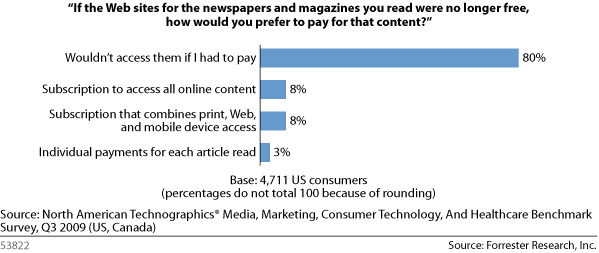
    There are many talking points on these options, and Sullivan does a wonderful job of going through them with Cohen. The real question, however, is whether or not it is worth it to even have a paywall. If the latest research from Forrester is any indication, offering only paid content is not the wisest decision, because 80% of consumers wouldn’t access news sites if they had to pay.

    Forrester - Would You Pay for Content?

    Forrester’s Sarah Rotman Epps says the data suggests two things:

    1. Publishers should continue to offer free, ad-supported products to the 80% of consumers who won’t pay for content online; and

    2. Publishers should offer consumers a choice of multichannel subscriptions, single-channel subscriptions, and micropayments for premium product access.

    As she says, consumers want choice. "The need for a multichannel product and pricing strategy is further reinforced by the ‘what if’ scenario of print being discontinued," says Epps. "When we asked consumers, ‘If the publications you read were no longer available in print, how would you prefer to access that content?’ we found that no single channel dominated responses."

    37% of US consumers said they’d prefer to access content via a web site, 14% said by mobile phone, 11% said by laptops and netbooks, and 3% said by eReaders. 10% said by PDF by email.


    Related Articles:

    Obvious: People Don’t Want to Pay for Online News

    > Murdoch On Blocking Search Engines: "I Think We Will"

    > Google Okay With Blocking News Corp.

  • Windows Marketplace for Mobile launches on WinMo 6.0 and 6.1

    By Tim Conneally, Betanews

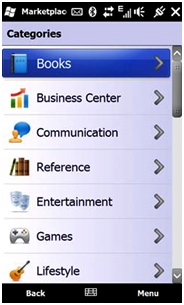
    Windows Marketplace for Mobile launched exclusively with Windows Mobile 6.5 in October, and unified the vast Windows Mobile application ecosystem under a single umbrella.

    Windows Mobile Marketplace...now with Business Center!

    Prior to launch, Microsoft announced that users running Windows Mobile 6.0 and 6.1 would eventually have access to the new app marketplace, but did not provide a specific date.

    That date, it would appear, is today.

    Following up on last week’s addition of the Web-based Marketplace, the Windows Mobile team has unveiled support for all Windows Mobile 6.0+ devices. To get the Marketplace app, users can point their mobile browser to mp.windowsphone.com to start downloading.

    We’re in the process of checking it out now, and we’ll let you know how it goes. If you’ve already gotten your hands on it, let us know what you think!

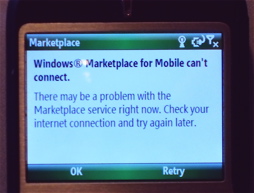
    Cannot connect to Windows Marketplace for Mobile (Wi-Fi only WinMo 6.0 device)

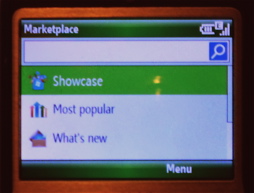
    Windows Marketplace for Mobile...on Windows Mobile 6.0

    Current Status: Up and running, initial selection for Windows Mobile 6.0 devices is decent (I only count 84 apps), app profile pages port nicely down to the smaller screen.

    Copyright Betanews, Inc. 2009


    Add to digg
    Add to Google
    Add to Slashdot
    Add to Twitter
    Add to del.icio.us
    Add to Facebook
    Add to Technorati


  • Samsung announces 3G-equipped ‘Go’ netbook for AT&T

    go-open-620

    The nation’s “fastest” (and often most frustrating) 3G network (i.e. AT&T) is adding another netbook to its lineup of 3G portable devices, the Samsung Go. So what exactly is said Go? Well, according to Sammy, it’s “a compact and lightweight netbook with instant access to broadband speeds powered by the nation’s fastest 3G network and the Microsoft Windows 7 Starter Edition operating system.”

    Don’t you just love the redundancy – “compact and lightweight netbook.” Ahem, isn’t a netbook compact and lightweight by definition?! Anyhoo, the creatively named Go weighs in at 2.8 lbs. and features a handsome midnight blue “soft texture” design, complete with rounded corners and a pebble-style keyboard.

    Not to be confused with those old-school netbooks of yesteryear, the Go comes with a LED-backlit, borderless glass display that is purportedly “scratch resistant and provides users with photo-like image quality, greater viewing angles and better text legibility, reducing eye strain and boosting productivity.”

    Here are the rest of the Samsung Go’s specs:

    • Operating System: Microsoft Windows 7 Starter Edition
    • Processor: Intel® Atom™ processor N270
    • Webcam: 1.3 MP
    • Storage: 1GB of system memory, 160 GB HDD
    • Battery: 4-cell (4000 mAh) – up to 4 hours on a single battery charge
    • I/O Ports: 3 USB 2.0 ports, external VGA port, headphone/speaker/line-out port, microphone-in jack
    • Communication: WWAN: Option GTM382W module (based on Qualcomm MSN 7225) / HSPA (7.2/5.1 Mbps): 850/1900/2100 MHz / GSM/GPRS/EDGE: 850/900/1800/1900 MHz / SIM lock (device locked to AT&T network)
    • WLAN: 802.11 b/g WiFi
    • Other: Ethernet (10/100 Mbps)
    • Display: 10.1” 1024 x 600 pixel resolution
    • Dimensions: 10.3” x 7.3” x 1.1”

    But enough about the sexy Go for the moment…how ’bout we take a look at the AT&T side of things. With regards to data plans, AT&T offers two DataConnect plans for netbooks: a 200MB plan option for $35 / month OR a 5GB plan for $60 / month. Like the rest of AT&T’s DataConnect plans, Go owners will also get free access to AT&T’s more than 20,000 Wi-Fi hot spots nationwide.

    Finally, the info you’ve all been waiting for: The Samsung Go will be available starting November 22 through AT&T retail or online at www.att.com/netbooks for $199 (after MIR and purchase of a 2-year AT&T DataConnect service agreement – prices start at $35 per month).


  • Review: Razer Naga MMOG Laser Gaming Mouse

    naga10

    Short version: A comfortable mouse whose main gimmick will take hours upon hours of dedication on your part to fully exploit.

    Like a dork, I looked up the word “naga” in Wikipedia, and it turns out that it refers to “a deity or class of entity or being, taking the form of a very great snake—specifically the King Cobra, found in Hinduism and Buddhism.” That would explain the snake-like logo of the Razer Naga ($80, available now), a new mouse that’s aimed at people who play MMOs, specifically World of Warcraft and Warhammer Online. The biggest feature: 12 buttons on the left-hand side of the mouse.

    Unlike last year’s SteelSeries World of Warcraft Gaming Mouse, the Razer Naga doesn’t come with the full Blizzard licensing. If that matters to you you’re a fool. And also unlike said SteelSeries mouse, the buttons here don’t stick like an old Sega Genesis controller after using it for a few hours.

    It works, out of the box, with both Windows (tested on Windows 7) and Mac OS X (tested on Snow Leopard). Thank you, Razer. No need for my fellow Mac users to spring for a third-party driver just to use the mouse!

    So let’s do this. I tested the mouse using World of Warcraft over a period of two weeks. That may seem excessive, but this mouse absolutely has a learning curve. The documentation that comes with the mouse—I actually read the instruction manual!—says to expect up to 18 hours to get used to the mouse. Yes, 18 hours. As Doug said in our chatroom, you might as well learn Russian.

    The mouse’s raison d’être is the 12 buttons on the left-hand side, where your thumb would normally rest. The 12 buttons are designed to replace any number of keyboard keys that you’d use to play the game. You know, 1 is regular attack, then 2 through whatever for your spells and whatnot.

    My latest character, an Affliction Blood Elf Warlock, has the following key-mapping:

    1: Shoot

    2: Shadow Bolt

    3: Immolate

    4: Corruption

    5: Curse of Agony

    6: Life Tap

    7: Drain Life

    8: Health Funnel

    9: Drain Soul

    0: Rain of Fire

    -: Fear

    =: Howl of Terror

    These spells and abilities are mapped over to the 1-12 buttons on the mouse.

    Razer has created an AddOn for both games that rearranges your on-screen icons, à la Bartender, to better visually correlate the 12 mouse buttons to your spells and abilities. (Here’s a screenshot of the interface AddOn. It’s the squares on the right-hand side.)

    As I said, using the 12 buttons effectively will absolutely take you several hours, especially if you’ve been playing the game for a long time. It’s like trying to write your name with your left hand when you’re a righty.

    I had gotten used to running close to a mob, then taking taking my middle finger off the “W” key, then hitting 4, 5, 6, 3, and 1 till the mob died. (See the above key-mapping for what those numbers translate to.) Now all of a sudden your left hand stays on the WASD keys, while your right thumb has to navigate the little button patch on the mouse.

    After about of week with the new playing scheme, I had more or less acclimated myself. I now quest with the 12 buttons just fine, but I still find myself going back to the ol’ keyboard when PVPing. I find that the frantic nature of PVP doesn’t really lend itself to the 12 buttons. Practice makes perfect, of course, and you may be more patient than I am, but I couldn’t get used to PVPing with the 12 buttons even after several days.
    And to allay a fear I read somewhere, no, I really didn’t find that pushing one of the 12 buttons would cause the mouse to move a great deal, if at all. It’s not as if you need to exact an incredible amount of force on the buttons to get them to click.

    So it’s a fine mouse, yes, but you really do need to be prepared to fully re-train yourself on how to play the game.

    Is it any better than using the plain on’ keyboard keys? Meh, I wouldn’t say so, and I expect that many of you are already used to your current setup. Still, it’s a fine mouse in its own right, and its use to you is 100 percent dependent on your willingness to learn how to effectively use it.

    Product Page


  • MACTA & NTIA/RUS RFI on broadband stimulus programs

    The National Association of Telecommunications Officers and Advisors (NATOA) is preparing comments to send to the NTIA/RUS on how best to administer the second round of funding for the programs in order to improve the applicant experience and maximize the ability of the programs to meet Recovery Act objectives. (As you may recall, the NTIA/RUS requested such comments.)

    Jodie Miller, MACTA Legislative co-chair and NATOA board member, is inviting folks in Minnesota to send feedback to her to help inform the NATOA comments to the NTIA/RUS. The goal is to incorporate as many Minnesota perspectives as possible. If you have a comment, please send it to her before November 20 [email protected].

  • Mainstream Press Waking Up To The News That Musicians Are Making More Money

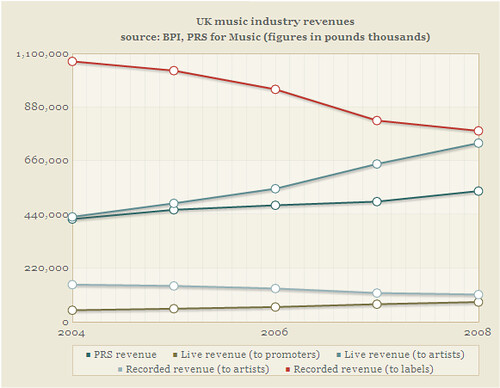
    I believe that we were the first publication to report on the study released by PRS in the UK, way back in July, indicating that overall music revenue was up, even as the sale of recorded music was dropping. It showed how live revenue was making up a good part of the difference, and other aspects of the business were making up more than the rest. While we’ve pointed to that study numerous times in the meantime, we’ve been quite surprised that no mainstream press picked up on this seemingly remarkable news — as it went against the prevailing favored narrative (as pushed by the RIAA) that the music industry was in trouble. Especially when combined with the recent Harvard study by Felix Oberholzer-Gee and Koleman Strumpf, that also showed that revenue in the overall music ecosystem was significantly higher today than in the past, it really was quite amazing that the press (and politicians) continued to spread the lie that the music industry was in some sort of trouble. It’s not. It’s only the business of selling plastic discs that’s in trouble.

    The good news is that the mainstream press seems to finally be waking up to this. As a bunch of you sent in, the Times Online in the UK has published a nice study highlighting the PRS numbers, complete with some very nice charts, showing that musicians themselves are making more than ever. The other interesting part: for all the talk about how recorded music sales losses are hurting artists, the chart proves the point we’ve made over and over again: musicians see such a tiny part of recorded music sales that this has had almost no impact on their revenue at all. The amount of money musicians make from recorded revenue has remained just about constant.


    Source: Times Online Labs blog


    It’s great that the press is finally starting to dig into this — and the Times Online even admits that perhaps it should not have let Lily Allen claim in its own pages how much “harm” was being done to artists due to file sharing, because the numbers simply don’t support it (of course, we pointed this out when the whole Allen mess was going on…).

    Now, some people have raised some concerns over the numbers — specifically, there have been some claims that the “live” numbers are distorted due to so-called “heritage” acts and legacy acts, who have been around forever and still pack large stadiums with increasingly higher ticket prices. And, indeed, that almost certainly has some impact on the numbers. It would be nice to see a similar report that starts to break out some of the details — and we’ve been talking to a few people who are trying to dig deeper into the amount of “live” and “alternative” revenue streams to better understand where the money is going. Hopefully we’ll have more complete data soon, but the initial things I’ve seen suggest that the original point remains true. Artists across the entire spectrum of the industry are making more in live revenues than they have in the past — and, in part, the increase in live revenue is due to file sharing. In talking to different musicians, we’ve been hearing plenty of stories about how they’re strategically pushing free versions of their songs on local audiences before embarking on tours or even individual shows — and they’re seeing larger turnouts than in the past because of it.

    Hopefully, with more mainstream publications finally picking up on this, both the press and politicians will begin to recognize that the only real “crisis” in the music industry is for those who have stupidly relied on selling plastic discs for way too long. There are plenty of revenue opportunities for musicians, and because of that (in combination with better and cheaper tools for music creation), the actual music industry is thriving at levels never seen before.

    Permalink | Comments | Email This Story


  • Apple Set to Release “Concierge” App to Make Scheduling Appointments Easier

    retail-reservationsScheduling a Genius Bar or One to One training session appointment has never been that difficult. Just go to Apple’s web site, enter some information, and you’re done. But a new rumor over at AppleInsider suggests that it’s about to become even easier, thanks to a new in-house developed iPhone app that could be forthcoming soon from Apple.

    News of the app comes via a “source that has proven reliable in the past,” though no further information is given. The app is said to be able to create appointments for both Genius Bar and One to One, and to view membership details for programs that require a subscription. No word yet on a street date for the app.

    Presumably the app would allow users to make any kind of reservation currently only available online, including a personal shopping appointment. Although the web site system currently employed is easy enough to understand and use, I imagine a dedicated iPhone app designed by Apple would make the process so easy and intuitive that I’d probably actually use it far more than I currently do, particularly for personal shopping when new products launch.

    MacRumors corroborates the report via separate sources, so it seems likely that the Concierge app will be forthcoming. I’d expect it to appear before the holidays, so that shoppers can take advantage of it pre-gift giving, and people on the receiving end of Apple products can use it after the holidays to schedule appointments.

    The Concierge app would be the latest move in a series of efforts focused on improving Apple’s retail performance, including in-store pickup for holiday shoppers, more and improved stores, and the new EasyPay touch system.


  • So EA Sports was right: Manny beats Miguel

    mannywins

    Short and to the point: Manny Pacquiao beat Miguel Cotto in round 12 on Saturday night via TKO. So EA Sports’ prediction was right in that Pacquiao won the fight.

    And where was EA Sports’ UFC prediction? Oh, that’s right: it told Dana White to take a hike when he approached them about making a UFC video game back in the day. Smart move, EA.


  • What if OnLive Came to the iPhone?

    iphone_onlive

    OnLive made a lot of noise when it first appeared on the scene way back in March at the Game Developer’s Conference of 2009. It’s a service that’s said to be able to make a gaming machine out of any computer that can run the latest browsers, which would effectively end the madness that is PC gaming hardware upgrades. And now, it looks like it might be able to work on the iPhone, too.

    What OnLive does is bypass the normal hardware barriers involved in PC gaming by streaming the game live to a user’s browser window from a server farm located nearby. The server farm deals with the game’s performance demands, and all the end user needs is a good enough connection to stream the content smoothly.

    It’s a setup that sounds too good to be true, and many remain skeptical about whether or not OnLive will be able to deliver what it has promised. There was supposed to be an external beta this past summer, but that’s been delayed, which doesn’t exactly inspire confidence.

    Still, if the service works, it will revolutionize the way gaming is done. The system has strong support from game publishers, which makes sense because without the hardware barriers, they stand to broaden their audience considerably. If that audience were to also include iPhone users, you can imagine that even more game companies would fall in line behind OnLive.

    The company recently demoed an iPhone app that allows users to play full games alongside users of the PC OnLive service, or players using the company’s MicroConsole, a standalone device which connects to a display or TV — yes, even without the modern convenience of buttons, joysticks and bumpers. Presumably, onscreen controls allow you to manipulate the in-game action, although a report at Engadget Mobile doesn’t go into detail about how exactly it works, nor does a blog post at OnLive. Needless to say, your PC gaming friend will probably be able to school you at Modern Warfare 2 unless you’re some kind of touch control prodigy.

    When the app does see release, which won’t be for a while, OnLive CEO Steve Perlman says it won’t allow you to game right away. Initial versions will allow you to monitor gaming stats and spectate, so you can watch live gameplay without taking part. Interactivity is planned down the road, but control kinks and other issues have to be addressed before it goes live to the masses.

    What do you think? Would you take advantage of full-version gaming on your iPhone if you had the ability to? I foresee a very limited catalog of titles that this sort of thing would work with, but if it does become a reality, and it becomes popular, developers might design custom gaming experiences for people who access games via OnLive on their iPhones.