Author: Darrell Etherington

  • Google Gets Its Act Together: New Nexus 4 Orders Reaching Customers In As Little As 48 Hours

    n4-product-hero

    Google is apparently doing a good job of improving its supply stream issues and making good on promised delivery times for customers for new Nexus 4 orders – better than good, in fact. UK customers are reporting this morning (via CNET) that the Nexus 4 devices they ordered when Google released its latest crop of phones this past Wednesday are already arriving at their doorsteps, less than 48 hours later.

    Google had predicted that phones would take 1 to 2 weeks to arrive at the homes of those placing new orders when the phones went on sale, but it clearly seems to have done something right, either on its end or in terms of getting LG to deliver more consistently. A 48 hour turnaround not only blows that out of the water, but also represents a 180-degree change in direction from the lengthy six-, seven- and eight-hour waits customers were running into just before the new year.

    U.S. orders also went live again earlier this week, but no word on whether or not those devices are being shipped out yet. Let us know if you’re receiving or have received your new Nexus, but from the looks of what’s happening in Britain, Google has learned a few lessons about being the purveyor of an in-demand piece of hardware, and looks to actually be able to manage supply. Which isn’t to say it’s able to meet demand yet; in fact, we’re probably still fairly far off from that, given how quickly the Nexus 4 sold out and how stock continues to be a bit of a mixed bag internationally, I doubt that Google has reached supply equilibrium quite yet.

  • HBO Go Could Come To Apple TV By Mid-2013

    hbo-go

    Apple might not need to make a TV set to make a big splash in the television market: a brand new report from Bloomberg claims that the company is negotiating with Time Warner Inc. to bring HBO Go to Apple TV by the middle of this year, citing two people familiar with the plans. That would still mean that the ability to watch HBO shows on Apple’s set-top box would be limited to people who already subscribe to the network in cable and satellite packages, but it’s a promising step.

    HBO Go currently provides mobile access to HBO shows and content, which would mean that Apple TV users who are also subscribers would have access to the more than 600 hours of video currently available on the service, which includes hit shows like Game of Thrones and True Blood. The move wouldn’t be unprecedented, as Apple already currently offers Hulu Plus and Netflix access on the platform, and HBO Go is already on Roku and Xbox.

    And in the end, it would still mean that customers are shackled to traditional cable and satellite distribution methods, even if the delivery mechanism for their HBO content is actually Apple’s standalone streaming video player. But turning the Apple TV into a platform with access to a broader content library is a key step in making it a better value proposition for consumers: AirPlay is a good selling point, but content options are more plentiful on other devices, even given the fact that the iTunes library is among the largest for digital video.

    Many have wondered also whether Apple would open up the Apple TV to third-party apps in a way similar to how it’s running on the iPad and iPhone. This sounds like just another hand-selected partner, however, so it’s unlikely we’ll see an opening up of the platform anytime soon.


  • Best Buy Closing 15 Big Box Locations In Canada, To Be Replaced By Smartphone And Tablet-Focused Micro Stores

    best-buy

    Best Buy Canada announced today that it will be closing 15 locations across the country, including seven Best Buy-branded locations, and eight stores bearing the Future Shop moniker (a Canadian electronics reseller Best Buy acquired in 2001). The store closures will result in 900 layoffs, but those employees will have first dibs on jobs at smaller outlets focused on mobile device sales the retailer plans to open in place of the closing stores.

    While the closures only affect 15 of the 228 locations operated by Best Buy under the Future Shop and Best Buy brands, that still makes up around 10 percent of their total sales floor surface volume, according to the National Post. Sales for Best Buy fell 6.4 percent internationally over the course of 2012, the company reported during its most recent quarterly earnings report. Sales also dropped 8.2 percent in the quarter ending in November of last year in Canada and China, so there appears to be a continuing decline overall in those markets.

    The closure and launch of smaller stores reflects a preference to target the growing mobile phone and tablet market, over legacy products like TVs and computers that carry smaller margins and have higher carrying costs. Best Buy locations have massive sales floors, but also huge warehouses and stock rooms to house the goods that populate those floors since shelves can only hold so many TVs at once. Best Buy Mobile locations, by comparison, have far smaller physical footprints and drastically reduced requirements for storing in-stock items.

    The retailer has been beefing up its online store at the same time as it is trimming back brick-and-mortar, adding entirely new categories of goods to its web-based selection, including sporting goods, outdoor items and various lotions, most of which are available online only, so it’s no surprise to see them shed costly real estate.

  • CES Awards The DISH Hopper “Best Of CES” After All, Drops CNET As Awards Partner

    HopperSling_3qtr_Left_elevated_Joey_Clipped

    CES today issued a press release announcing that DISH’s Hopper with Sling technology built-in is the “Best of Show” after all, an honor it will share with existing winner the Razer Edge for the 2013 show. The decision follows the revelation that CNET was ordered to remove the Hopper from consideration after CNET parent company CBS asked them to. CBS is currently involved in litigation with DISH over Hopper functionality.

    Along with the granting of the award, CES also announced that it will launch an RFP seeking a new partner for the “Best of CES” awards “soon”, since it isn’t confident that relationship with CNET will continue to be beneficial for the CES brand.

    “CES has enjoyed a long and productive partnership with CNET and the Best of CES awards,” CEA SVP of Events and Conferences Karen Chupka said in the release.  “However, we are concerned the new review policy will have a negative impact on our brand should we continue the awards relationship as currently constructed.  We look forward to receiving new ideas to recognize the ‘best of the best’ products introduced at the International CES.”

    The DISH Hopper with Sling can record and play back programming within a 24 hour window after its airing, without commercials, which is the source of CBS’s legal dispute with DISH. CEA joined up with other tech organizations last week to file a brief in support of DISH around the Hopper, as the company is clearly eager to distance itself from the editorial decision made by CNET and its parent company, which came under fire from other media organizations (ours included) and tech industry watchers alike.

    CEA came out in strong support of the DISH Hopper in a statement from Gary Shapiro included in the release:

    We are shocked that the ‘Tiffany’ network which is known for its high journalistic standards would bar all its reporters from favorably describing classes of technology the network does not like. We believe that the DISH Hopper DVR is fully covered by the Supreme Court’s ruling in Sony Corp. of America v. Universal City Studios Inc. The simple fact is making television easier to watch is not against the law. It is simply pro-innovation and pro-consumer.

    The fallout for CNET has already resulted in the departure of Greg Sandoval from the network, who resigned his post, citing a loss of confidence in CBS’s commitment to editorial independence as his reason for leaving.

  • Twelve South’s New SurfacePad Gives Your iPhone A Smart Cover

    SPiPhone_stand_gallerymain_1

    Twelve South announced a new iPhone accessory today, one that probably looks familiar if you’re aware of Apple’s Smart Cover and Smart Case products. The SurfacePad for iPhone is a sheath of Napa leather that wraps around your phone and provides basic level protection while adding a minimum amount of weight and thickness.

    The company is clearly selling this as a fashion accessory, given the way they’re marketing it. It’s a nice looking addition anyway, and the thin cover should protect both front and back from scratches and scrapes, something that the iPhone 5 could use. It adds only 1.77 mm to your device’s thickness, and sticks onto the iPhone with a residue-free adhesive to make sure it isn’t going anywhere once applied. The front cover also folds back and doubles as a stand, hence its resemblance to Apple’s Smart covers and cases for iPad.


    The SurfacePad comes in black, white and red, and is available for both iPhone 4/4s and iPhone 5 form factors. It’s less bulky than most folio type cases, if that’s your thing, and it retails for $34.99, which hardly breaks the bank, especially for a genuine leather case. It’s available to order now from TwelveSouth.com.

  • Apple Reportedly Discontinuing Mac Pro Sales In Europe Starting In March [Update: Confirmed]

    Image (1) MacPro_3D_Box_34Whit49c4ea2009c5a-620x465.jpg for post 169301

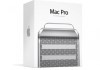
    Apple’s Mac Pro has been on the chopping block for a long time according to many industry watchers and pundits, and as of March it will actually get the axe in Europe. But the Pro’s debatable market appeal isn’t what’s causing the termination of sales in that region: the existing models simply don’t comply with Europe’s new regulatory standards for consumer electronics, according to 9to5Mac.

    Those revised standards go into effect March 1st, and any products that don’t comply will have to be removed from sale. That doesn’t apply to existing stock, so Mac Pros that are already in store inventory could continue to rattle around sales channels for a while and go out to consumers.

    The change in regulations doesn’t prevent Apple from selling a new Mac Pro in Europe, however. Apple made some changes to its Mac Pro last year, but those tweaks were far from extensive, and in fact looked likely to have had more to do with maximizing supply chain value than with improving the lineup. Apple’s Tim Cook has said that a new Mac Pro will be unveiled later in 2013, so there’s a chance Europe will have to go without for at least a little while.

    An inability to sell the existing design in Europe could light a fire under Apple’s product development cycle for a new machine, but with Mac sales down considerably last quarter, it’s unlikely that the Pro, one of the most specialized and niche Macs in the lineup, is a top priority for Apple at this point regardless of these changes to European regulations.

    Update: Apple has confirmed to The Loop that sales of the Mac Pro will indeed stop on March 1.

  • iOS 6.1 Adoption On Track To Be Fastest Yet Says Onswipe, With 22% Of Users On Board In 36 Hours

    ios6-users1

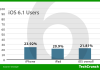
    iOS 6.1 arrived just a couple of days ago, bringing little beyond support for new international LTE carriers and movie ticket purchasing via Siri in the U.S., but it’s already been installed on a significant percentage of active iPhones, iPads and iPod touches out there. Onswipe, creators of touch templates for web-based content, have seen adoption of iOS 6.1 rise quickly, from 11.35 percent within the first 24 hours, to 16.92 percent this morning, and up to an impressive 21.81 percent as of 3 PM ET today.

    Onswipe is gathering data from over 13 million monthly active users on iOS, which itself represents considerable growth, a 3 million user climb from last month’s 10 million total active users. That means its numbers represent a pretty significant statistical pool to draw from to gather these results. Onswipe CEO Jason Baptiste explained in an interview that his company’s expanded reach is giving the company an even better idea of what’s happening with iOS adoption curves, and that this time around, people are upgrading faster than ever.

    Consider that when Apple released its iOS 6 update, it took a week for 44.58 percent of users to get on board. iOS 6.1 is growing at a faster rate, and looks to be on track to top that should its momentum continue. Why? According to Baptiste, it’s likely due to the fact that Apple’s over-the-air update mechanism has been out in the wild for a while now (it’s been built-in to iOS since iOS 5 arrived in October, 2011), meaning users have had time to get comfortable with it and know more or less how the process works.

    The fact that users are comfortable enough with the OTA update mechanism to upgrade almost immediately is great news for developers, both of native apps and of web-based mobile-friendly platforms like Onswipe’s since it means that they can create experiences that will be the same for a larger number of customers at once, without having to take into account different software versions with idiosyncratic quirks. Android, by comparison, has just 10 percent of users on Jelly Bean, which was released in July 2012, so it’s clear that Apple’s still way out ahead of the competition in terms of making sure developers don’t face a fragmentation issue.

  • Nokia Starts Rolling Out Windows Phone 7.8 To Lumia Owners, Will Continue Over The Coming Weeks

    lumia900_465

    Nokia has announced via its Conversations blog that the long-awaited Windows Phone 7.8 update, which brings a few of the features from Windows Phone 8 to older hardware, has begun rolling out as promised to owners of Nokia 510, 610, 710, 800 and 900 owners and will continue to do so over the next few weeks through February, pending operator approval.

    Features included in the update include the ability to resize Live (and inert) tiles on the home screen, new options for configuring the lock screen like fetching a changing daily background image from Bing and child lock features, and additional theme colors, as well as new languages. It’s not a huge step up, but it is a way to breathe new life into older devices left out in the cold in the wake of Windows Phone 8′s arrival, and that might bring some comfort to buyers of devices who were looking for something new.

    Owners of one of the devices listed above should get notified via their smartphones once their carrier has approved the update and it’s available to install. Notifications must be on for this to happen, Nokia points out, which is managed via “Settings > Phone Update > Notify me when updates are found.”

    Nokia is the first confirmed manufacturer to announce the rollout, but other OEM partners including HTC are said to be getting the update by month’s end as well, so keep an eye out if you’re running these older devices.

  • BlackBerry Bluetooth Mini Stereo Speaker Gives You A Speakerphone That Goes Anywhere For $79.99

    bb-speaker

    BlackBerry’s accessories are almost as interesting as its first BB10 shipping hardware, and in addition to an external battery charger, they’ve also got a Bluetooth Mini Stereo Speaker/speakerphone that’s extremely portable, delivers decent sound and won’t cost you an arm and a leg at $79.99. Plus, the unique design means it clips onto your sun visor in the car for hands-free communication.

    The sound quality from the speaker is decent, much better than a lot of more expensive devices (though I’d still prefer a Jambox for audio fidelity), and it can actually go quite loud. Not room-filling or anything, but plenty loud for private listening. But the main advantages are the fact that it acts as a very good Bluetooth speakerphone, charges via micro USB (and can be charged with your external Z10 charger), can go weeks without a charge and has a 3.5mm headset jack, which essentially makes it a Bluetooth receiver for use with a stereo or headphones.


    The hardware accessory market is a place where it’s hard to compete with platforms like iOS and Android, and that’s likely why BlackBerry is taking an early interest in doing things itself. And they’re off to a good start in that regard, if my experience with this speaker is any indication.

  • BlackBerry External Battery Charger Bundle Means The Z10 Can Live Longer Away From Outlets For $49.99

    IMG_6396

    BlackBerry didn’t only unveil the Z10 today, it also introduced a couple of accessories, including the Battery Charger Bundle for the LS1, the Z10′s 1800 mAh battery. The external charger is extremely slim and portable, and houses a covered slot for a spare battery (which is included in the bundle), as well an integrated micro USB cable that slides nicely into the case when not in use, all of which will run you $49.99.

    Honestly, the charger is one of may favorite things about the new BlackBerry announcements today. It daisy-chains with the Z10 itself so that you can charge both at once, with power directing to the phone first and backup battery second, and it has a light that blinks yellow while depleted and charging, green while more full and charging, and solid green when completely topped off. It can also be used as an external charger for any micro USB device, so if you’ve got an Android tablet as well as the Z10, you’re set.

    It also effectively doubles the battery life of the Z10 itself, which is good considering that I found that wasn’t one of the Z10′s strongest suits in my comprehensive review of the new BlackBerry smartphone. It’s available [DATE] for $49.99, and if you’re getting a Z10, it’s basically a necessity.

  • The Blackberry Z10 Is A Solid First Offering For BB10 Hardware, But The App Gap Looms Large

    z10-13

    This is either beginning or the end for BlackBerry (formerly known as RIM). This is BB1o day, when BlackBerry debuts its smartphone running its latest software. The company’s hopes are resting on this bold new device, and to some extent, a nation’s as well. I’ve been using the BlackBerry Z10, RIM’s flagship BB10 handset, for a week now, and in that time I’ve been putting this new smartphone through its paces.

    I can safely report that based on my experience, BlackBerry has come a long way, but BlackBerry still has a very long way to go, and whether or not users will continue to stick around for the remainder of that journey will depend a lot on how fast the app ecosystem can grow.

    • 4.2-inch, 1280 x 768 display with 356 ppi
    • Dual core 1.5 GHz processor, with 2GB of RAM
    • 16GB internal storage, expandable with MicroSD cards up to 32 GB in size
    • User-replaceable 1800 mAh battery
    • 8MP rear camera with 1080p video recording, 2MP front camera with 720p video recording
    • Runs BlackBerry 10 OS

    The Z10 hardware is a departure from BlackBerry devices of old, and actually inherits very little design language from anything RIM has put out before, except the BlackBerry PlayBook. That’s a good thing, in my opinion – the hardware feels fresh, and also manages to come across as noticeably distinct from Android OEM devices or the iPhone.

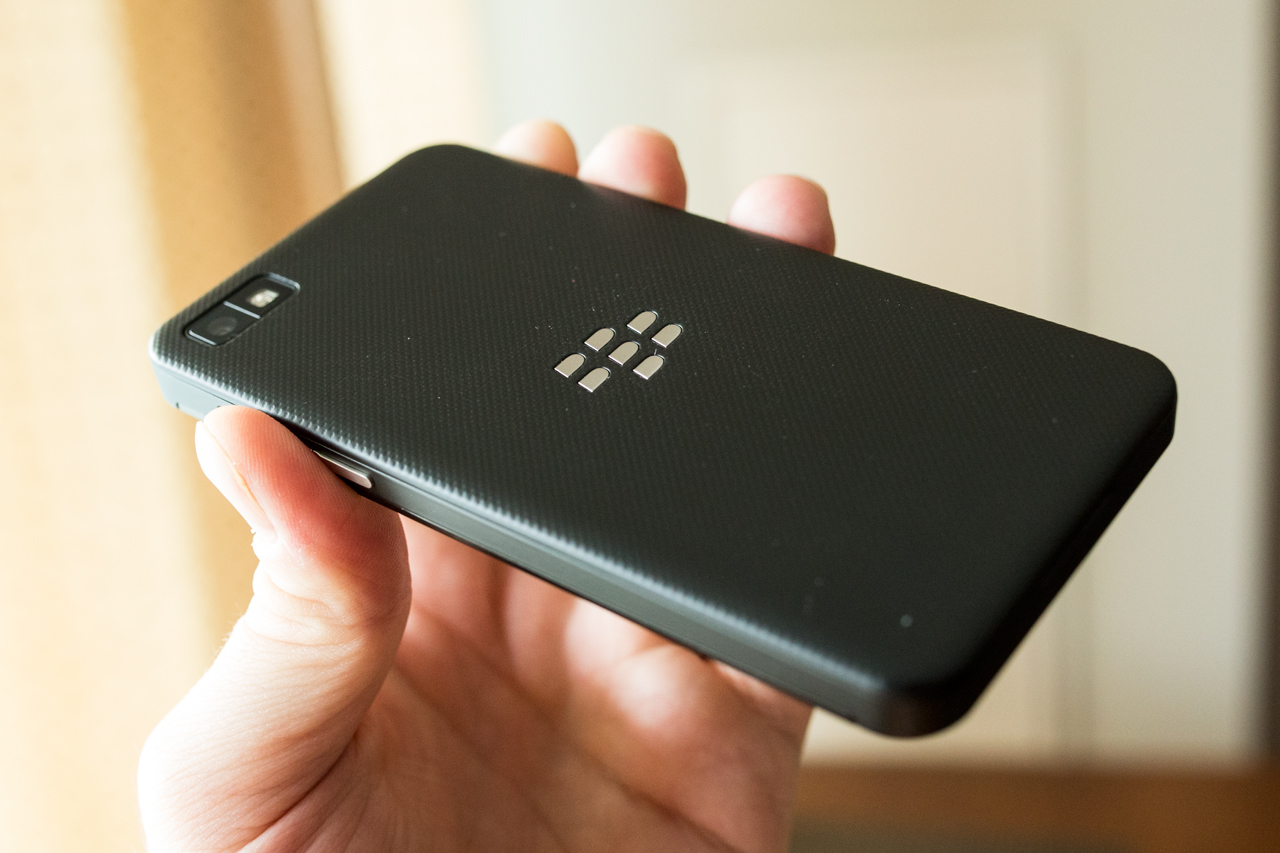
    As for the actual look and feel, the Z10 definitely impresses overall. It doesn’t feel overly big at 130mm by 65.6mm by 9mm, which makes it slightly thicker and larger in surface area than the iPhone 5, and pretty close to the Nexus 4. It’s a light device, since it’s mostly made of plastic, but it doesn’t feel cheap; the pebbled back cover has a pleasant feel in the hand, and it’s practical too, since it’s slightly grippy. That also means that when you set it down on a smooth surface, it won’t slowly edge its way off, something both the iPhone 5 and Nexus 4 are guilty of in my experience.


    The Z10 lacks any physical buttons on its front, owing to the gesture-based nature of the BB10 operating system, and has a wake/sleep/power button located on the top center of the device, as well as volume up/down buttons on the right side (which also both double as hardware shutter triggers for the camera) and a play/pause button between those. There are three ports on the device: a micro HDMI slot for A/V out, a micro USB port for data transfer and charging, and a 3.5mm headphone jack on the top left, just next to the sleep/wake button.

    Other hardware features include the trademark BlackBerry notification LED, which flashes a dire red to indicate there’s something new to check out in terms of messages, updates, etc., and a micro SD slot and micro SIM card slot under the back cover, which pops on and off easily but doesn’t feel at all loose when attached. The supplied 1800 mAh battery doesn’t last very long under normal usage conditions, but more on that later.

    BlackBerry 10 is a completely new mobile OS, and that means there’s a lot of new ground to cover when reviewing its software. But it’s possible to break down what’s new into a few key areas that will make the most difference to the average user.

    Gesture-based Navigation System

    BB10 is all about swiping to navigate. You swipe up to wake the devices, swipe right to check out BlackBerry Hub and view your notifications, swipe left to access your currently running apps and the home screen, and swipe down to check out both system-wide and app-specific settings. It’s different from what most users will be used to on either iOS or Android, but some aspects will be familiar to webOS users. Overall, while it’s different, it’s a surprisingly intuitive experience, and one that exceeds the tacked-on touch experience of BB OS 7 and earlier.


    Gesture controls took me virtually no time to get used to, and in fact, I found that going back to Android and iOS devices after extended use, I was trying to use the same gestures to do things like unlock devices. The so-called “Peek”, which lets you swipe and hold to view notifications and then quickly dismiss them was likewise something that quickly became second nature.

    It wasn’t all good, though. I found it was easier to accidentally activate the screen and even unlock it (without password protection) with the touch sensitive screen than with a hardware unlocking button. I also wasn’t crazy about the fact that swiping up to return from the notification hub brings you to the active apps screen, meaning you always have to swipe left one more time to get to apps. This is made somewhat better by the fact that you can tap a line of dots at the bottom to access specific pages of apps directly, as well as Hub and your active apps screen, something which you can’t do on stock Android or iOS.

    Accounts & Sharing

    One of the best parts of BlackBerry 10 is the fact that you can share directly to a number of different services thanks to account integration. Sign in at the system level with your Facebook, Twitter and Foursquare credentials, and set up Evernote to share and access notes content directly from that service. BBM sharing is also present throughout, as well as Bluetooth (the Z10 has low-power Bluetooth 4.0 on board) and NFC. Sharing options in BB10 are one of BlackBerry’s strong suits with this new product, and I’m sure they’ll add more services as users express a need for them, too.

    BlackBerry Hub

    I mentioned it already above, and users of other BlackBerry devices and the PlayBook will likely be familiar with the basic concept already, but Hub is technically new to BB10 and it works well as an aggregated inbox displaying all new activity from your phone, including new emails, texts BBMs, @ mentions on Twitter, third-party app notifications and more. It’s definitely useful, but is it more useful than Notification Center or Android’s pull down notification area? That’s debatable. It’s more of an actual destination within your phone, something you can live in and work from, but that can actually be counter-intuitive at times, like when you’re looking at a Twitter mention, and the back button takes you to Hub, not the Twitter home stream. But it also comes in handy, like when it provides contextual info on meetings, including information on attendees.


    Keyboard

    BlackBerry went with a touchscreen device as the first to market for BB10, but the software keyboard they created is designed to help convince hardware keyboard fanatics that there might be a better way. It features a unique prediction engine that lets you swipe up as you type to autocomplete words, and predicts the next term based on probability. In practice, that sounds very cool, but practically speaking, I found little use for it. It took more time to verify that a word was indeed what I wanted to type than it would have to just complete it myself, and when I would try to let go and trust it, often it would require that I go back, delete and replace owing to a mistaken prediction. When you enter your social media and email credentials, BB10 digs through your content to try to learn your typing style for better predictions, but that didn’t improve things noticeably for me.

    Luckily, you lose little by ignoring that feature and typing as you might be used to on an iPhone or Android device. And that’s when the keyboard really shines. It’s fast, responsive, and less prone to errors and typos thanks to wide virtual keys and a learning feature that detects when you’re repeatedly hitting one letter when you mean to hit the one next to it and remaps the key to stop that mistake from happening. This may well be the best stock software keyboard in the business, to make a long story short.

    Active Frames

    BB10 does true multitasking, which in itself is impressive (though that might contribute to the sub-par battery performance I experienced), but Active Frames are its real unique contribution. These provide reformatted info for native BB10 apps when they’re active but minimized, sort of like a cross between live tiles and Android’s widgets. They might show your latest checkin, for instance, for the Foursquare app, or display recent status updates for BBM. Active Frames are great when they’re available and well-implemented, which unfortunately isn’t often. BlackBerry needs to somehow make sure that third-party developers are making good use of Active Frames, since I found most apps didn’t provide any info when pinned to the multitasking screen, which is likely due at least in part to the fact that apps ported from Android through one of two methods can’t even offer Active Frame functionality.


    BBM

    BBM recently got voice chat, and now it has video chat, too. Both of these work over Wi-Fi and cellular, and both worked quite well in my testing, on both kinds of connections. Overall, BBM is still the single best messaging platform integrated into a mobile OS, easily beating iMessage in terms of reliability, but voice and video are huge steps towards modernizing the service, and very welcome additions.


    One of the most impressive features also comes via BlackBerry Voice: OS-wide screensharing. You can actually tap a button to let the person you’re video-chatting with see everything you’re doing on your own device, not just media or pictures. It’s like having the full power of a desktop Skype call on your mobile, but for free and built into the OS at the system level. Easily one of my favorite features of BB10 and the Z10.

    Camera

    BlackBerry has talked up BB10′s camera features, and the Z10 packs a camera with table stakes specs for the current smartphone market. It performs well, and provides images comparable to a lot of the devices out there currently, though they might not be quite up to par with iPhone 5 images. But the real story is the software, anyway, which includes the much-vaunted TimeShift feature for selecting faces independently from the rest of the shot.


    TimeShift works very well, and seems like magic when it does. Basically your phone takes a rapid series of photos, then auto-detects faces in the picture series (be warned, this doesn’t work reliably in very low light conditions), and then lets you select which face to use. The interface for using it is excellent and intuitive, and it does a great job of handling even changed head positions without making the final photo look bizarre. TimeShift is awesome, but it’s also a feature developed by an outside company that has since been purchased by Nokia, which means we likely won’t see it evolve much on BlackBerry’s mobile platform. Even as-is, it’s impressive, but I’m not sure how much I’d end up using it in practice: mobile photography is useful because it’s quick and casual, and I’m not generally inclined to fuss that much over editing those pics after the fact.

    On the video side, HD video recording is great, and there’s a neat feature called Story Maker that arrives as a new standalone app for BB10 which lets you basically create quick movies (complete with video clips, still shots, transitions, titles and soundtracks) about as easily as you can modify photos on Instagram. It’s a neat trick, but once again, perhaps of limited daily usefulness.

    Browser

    BlackBerry is proud of the BB10 browser, which does score very high on the HTML5 test. That’s impressive, and this is definitely the best web browsing experience I’ve ever had on a BlackBerry device. Note that the default search engine is Bing, but you can also set it to Yahoo or Google if you prefer. The browser renders websites very quickly, there’s a “Reader” mode that quickly reformats text-heavy pages, and the omnibar approach that combines search and URL fields into one is my preferred way to do it on mobile devices. Solid all around, in other words.

    BlackBerry Bridge & BlackBerry Link

    BlackBerry has released a couple of pieces of software that help the Z10 connect to other devices, including its own PlayBook and desktop computers. Bridge, if you have a PlayBook, works as it did in previous versions, providing remote control and network sharing. Link on the desktop is an improvement over previous BlackBerry syncing software, but it’s still not a complete smooth experience, but arguably desktop syncing isn’t as important as it once was for mobile devices.

    Voice Control

    The Z10 manages a trick that has been mostly Siri’s territory, offering built-in voice commands for tasks like texting, BBM, sending an email, calling and posting social network statuses or updates. It does this with around as much effectiveness and accuracy as Siri, if not more, but it lacks the ability to go deeper to search for local hotspots, make reservations or more. This is another area where BlackBerry’s efforts look like playing catch-up, but don’t quite go far enough to match what’s already available elsewhere.

    Maps

    BlackBerry Maps are powered by TomTom, the GPS navigation hardware and software company. And that’s probably why they offer turn-by-turn voice guided driving directions, but they don’t offer much beyond that. Points of interest are fairly limited compared to the competitor’s offerings, there’s no walking directions or any kind of public transit, and the maps themselves aren’t all that nice to look at. Maps may be a sore spot for Apple right now, but BlackBerry’s offering is worse, and that’s not good. Third-party apps could make up this deficiency, but as it stands, there’s very little out there to improve the situation.

    And so we come to BlackBerry World, which is a crucial area for consumers looking at BB10 as a real contender to the existing mobile platforms out there. And unfortunately, this is where BB10 shows its weakness. The platform is otherwise solid, and an impressive effort for a company that until now lagged considerably with its smartphone devices, but the app gap can’t be denied by even the most steadfast BlackBerry supporter.

    Even given launch partners whose apps weren’t available while I was conducting my review, there’s simply very little to work with here. The top charts are still littered with apps that are either naked in their cash grab attempts, weak clones of successful titles on other platforms, or just plain underwhelming. BlackBerry has done a lot to encourage developers to come to BB10, but I think this might simply have been a bridge too far. And that’s unfortunate, because all else being equal, it’s going to make the decision for a lot of consumers.

    Some of the apps that are there are good, and BlackBerry has clearly done their best to launch with as many quality, big-name partners as they could manage. But it’s the same situation that Windows Phone faces, yet potentially even worse: BlackBerry may have attracted a fair number of apps to the platform through their portathon and other efforts, but if the App Store and Google Play have proven anything, it’s that you have to crack millions of eggs to make a decent omelette in the mobile software game. Numbers are one thing, but the quality gap is what strikes you when you navigate to the apps section of BlackBerry World.


    The Z10′s display is strong, with resolution and pixel density right up there with the best in iOS and Android competitors (and exceeding most). It does seem a tad washed out and muted in terms of its color rendering compared to the best in iOS and Android displays to my eye, however, but that’s a very minor quibble. Brightness also isn’t the best, and I found I had to turn it up completely to get it where whites didn’t seem too dim, plus there’s no option to disable auto-brightness at all, which is likely in the interest of drawing out battery life, but frustrating nonetheless. Another place where a lack of user control shows: you can’t disable screen lock, instead maxing out at a 5 minute window after which it turns off automatically.

    The display itself is an achievement, however, for BlackBerry, which has been nowhere near the top of the market in this regard for years. Text renders very crisply, as you can see from the screens above, and it has very good touch response. I did notice the screen felt a tad gritty faster than my other touchscreen devices, however, and had to be wiped down more frequently with an eyeglasses cloth.

    This is the part that BlackBerry users aren’t going to like; battery life on the Z10 isn’t anywhere close to what you’d get on your BB7 or earlier hardware, which is likely the price BlackBerry had to pay to get everything up to snuff with the competition. In my testing, I found that playing locally stored video on a constant loop, while connected to a cellular network and running a few apps in the background, the Z10 managed an impressive 9 hours of battery life, and while doing a browser test that performed a loop of random Google image searches on Wi-Fi (made more difficult by the fact that I couldn’t turn off screen lock), it managed 5 hours and 45 minutes.

    But in real-world use, I found it hard to get through a standard day without the Z10 running dry. Left untouched, the smartphone seems to sip battery, but once you start using it for any length of time, it gets quite warm (warmer than my iPhone 5 or Nexus 4 by a long shot) and mows down battery quickly. Keeping track of how much it’s using isn’t easy, either; there’s no way to monitor battery performance beyond a basic visual icon, and no detailed battery info in system settings.

    With the Z10, BlackBerry has created a smartphone that’s worthy of being mentioned in the same conversation as the latest Android devices and the iPhone. That alone is an accomplishment for a company that has seemed on the verge of extinction for quite a while now. But a lot of what they’ve provided with this flagship device is narrowing, or at best, eliminating the feature and hardware gap between it and the two mobile platforms that have legions of users already, including a number who have already migrated away from BlackBerry devices.

    BlackBerry 10, and by extension the Z10, need to be Cinderella stories to bring BlackBerry back from where it is now, and while extremely solid and with a few very impressive features, I’d be hard-pressed to say there’s anything here that will necessarily convince an Android-loving BlackBerry convert to come back to the platform. Thanks to BlackBerry Balance, the BlackBerry Enterprise Server-dependent feature that I wasn’t able to test but that silos work and personal life on one account, I imagine a number of enterprise IT departments will embrace it. And it’s still a good mobile OS, good enough that it should also slow the tide of users flowing away from BlackBerry. But based on my testing, it’s not yet close to being a conversion experience for those already on other platforms, and that’s exactly what BlackBerry needs.

    More than RIM’s name changed when they launched this phone. However, even more needs to change – app availability and batter life being tantamount – before this can truly right BB’s sinking ship.

  • DeltaMaker Goes To Kickstarter To Fund A 3D Printer That’s All About Showing Off The Work

    deltamaker


    Another day, another 3D printer on Kickstarter. But the DeltaMaker, which launched its campaign this week, is a little different from some of the others we’ve seen to date. It’s not the cheapest, and it’s not the one with the most recognizable branding, but it is relatively affordable and has a slightly different mission than most, with a design intended to shine in public spaces, rather than hidden in an industrial workshop.

    DeltaMaker’s founders believe that the process of digital printing is at least as interesting and valuable as the products it creates, and their backgrounds reflect their interest in the actual engineering that goes into printing a 3D product and the hardware required to make that happen. The Orlando-based company consists of Zach Monninger, a mechanical engineer and MBA; Craig Rettew, an electrical engineer; Robin Lopez, an aerospace engineer; and Bob Houston, a software engineer. If ever there was a group of people who were all about the process, this is it.

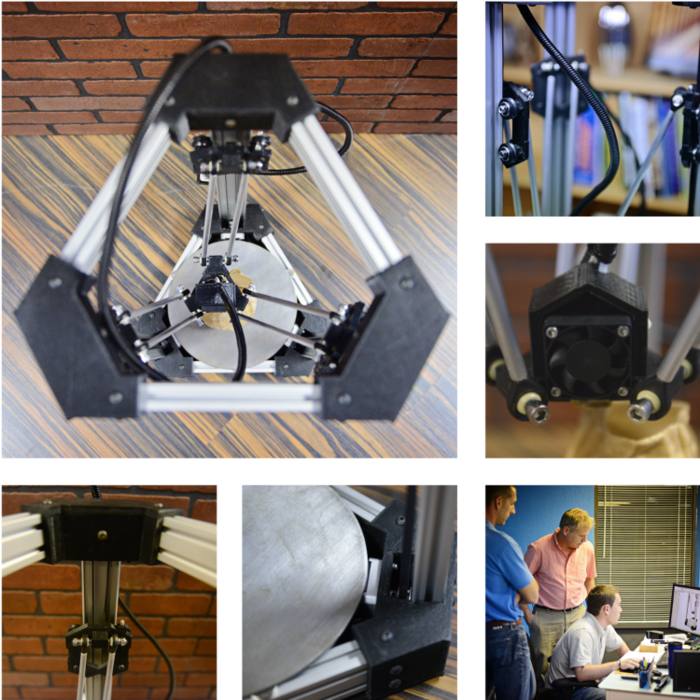
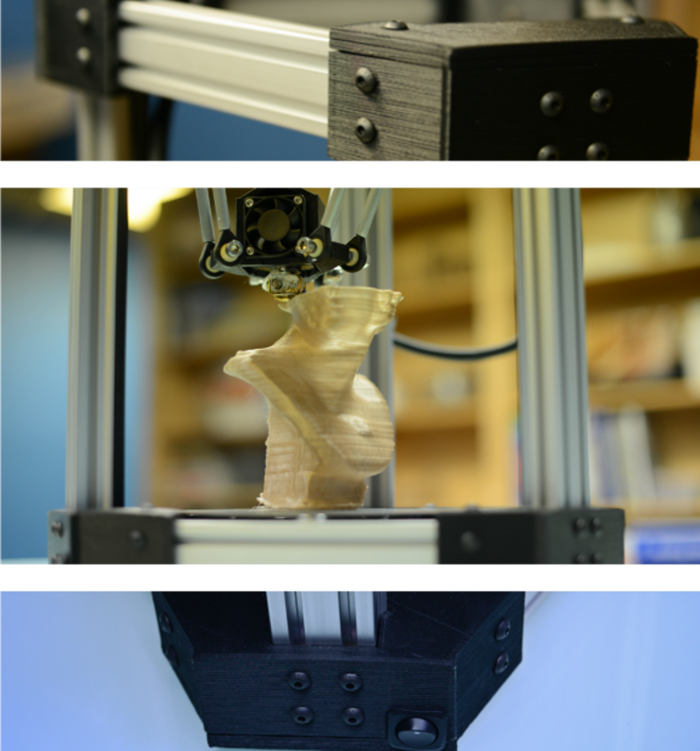
    DeltaMaker gets its name from the fact that it’s a so-called “delta robot,” which is a three-armed design used in industrial and manufacturing applications of all stripes, since it can precisely position the business end (or extrusion head, if you want to be technical) along X, Y, and Z axes. The delta robot design is not only functionally effective, it also makes for a visually interesting printing process, one that DeltaMaker suggests will play well in your tastefully decorated sitting room, in classrooms and in waiting rooms and gallery spaces everywhere. The idea is not just to educate, but also to entertain; the founders envision a 3D printing process captivating the attention of a group of kids waiting to see the dentist, or keeping guests entertained at a dinner party if your table conversation gets dry.

    Accordingly the DeltaMaker is relatively simple in its design, keeping things basic with a tall aluminum structure that’s only 9-inches in diameter, and a 360-degree viewing angle of the building chamber itself. That design likely won’t change too much from current prototype to shipping product – it’s already on its 4th revision and the team says they’re in the final stages of detail engineering.

    As for pricing, the early bird pledge level of $499 for a fully assembled, working unit sold out incredibly quick. Now, you can get in at a minimum of $1,099, but those are also special tiers. Even if you come very late to the game, pricing for Kickstarter backers tops out at $1,599 for a fully assembled unit, which is still not too expensive for the 3D printer category.

  • Apple’s 2013 Supplier Responsibility Report Includes 72% Bump In Audits For 2012, 97% Increase In Training

    accountability_audits_2x

    Apple has released its 2013 Supplier Responsibility Progress Report, and it features a number of updates from last year, including Apple’s decision to join the Fair Labor Association (a notable first), and conduct audits of its suppliers in tandem with that outside watchdog organization. The results seem to be a tightening of Apple’s code of conduct for suppliers all around, in terms of monitoring, penalties and programs to improve conditions.

    Apple conducted 72 percent more audits in 2012 than it did in 2011, for example, totaling 393 audits across facilities employing 1.5 million workers. All types of audits increased for the year, including firs-time, repeat, process safety assessments and specialized environmental audits, but the last one took the biggest jumps vs. previous years. In 2012, Apple conducted 55 focused environmental audits, which is a 293 percent increase over the number it ran in 2011. The Mac maker works with outside associations in this area, too, just as it does with the FLA regarding labor, including the Natural Defense Council, the EPA and the Institute of Public and Environmental Affairs.

    The supplier audits also actually resulted in more severe punitive action than usual. Apple has faced criticism in the past for doling out corrective measures that seem rather toothless – most often putting suppliers “on probation,” meaning they’ll be watched more closely for future violations. But one supplier fell afoul of Apple’s measures to protect against underage labor, with 74 cases counted at a single facility. Apple terminated the relationship with that offending party entirely, proving that there are real consequences for companies that ignore its code of conduct and local labor laws.

    Apple also came down harder on companies for compliance with working hour regulations, and changed its policies and practices in monitoring them to be more effective. In 2012, Apple started doing real-time work hour tracking on a weekly basis for over 1 million of the employees at its supplier companies, and publishing data on its progress every month. That led to a 92 percent compliance rate with its 60 hour maximum work week, as laid out in the Apple Supplier Code of Conduct, and Apple says overall work weeks averaged less than 50 hours.

    Another area of improvement for Apple was in participation in its training and education programs. There were 1.32 million workers trained on local laws, worker rights, health and safety and Apple’s own Code of Conduct during 2012, a 97 percent increase over 2011′s 670,000. Apple also provided more free educational opportunities to workers than ever before, with 201,000 cumulative participants in those programs, up 235 percent from 60,000 in 2011.

    Apple’s transparency definitely improved over the course of 2012 when it comes to its efforts around supplier responsibility and maintaining healthy and safe work environments, and that’s something Apple CEO Tim Cook clearly undertook as a conscious effort. That’s not to say that Apple didn’t have its fair share of labor issues during the year (issues around the demanding requirements for building the iPhone 5 come to mind), but especially in the way that Apple has allowed disinterested third parties to come in and aid with its monitoring efforts, 2012 was definitely the most significant year yet in terms of improvements made to its stance on supplier responsibility.

  • Pebble Smart Watch iPhone And Android Apps Now Available, Just In Time For First Shipments

    PnOiadU

    Pebble, the Kickstarter darling and connected smart watch, announced just yesterday that its product was now beginning to ship out to backers in limited quantities, but its iPhone app had yet to be approved. Today, the company announced to its Kickstarter backers that both the iPhone and Android apps are available now, which means they’ll be fully functional for users of both types of devices when they arrive at backer doors.

    Of course, the apps won’t do anything on their own without any hardware to talk to, but at least the icon is very attractive, and it’s something to help soothe the pain of having to wait so long to actually get your hands on the Pebble itself. When you do get hardware, you’ll be able to update your Pebble software, install and remove custom watch faces for the device, and also send test messages to the watch for troubleshooting purposes. The Pebble team says that they’ll be updating the free app on a regular basis, presumably with more features.

  • Apple Patents Smart Shoes That Feature Embedded Sensors, And Alarms For When You Need New Ones

    Image (1) shoesuntied.jpg for post 195299

    Apple has been dabbling in wearable tech, at least when it comes to the U.S. Patent Office, and a new application uncovered Thursday by AppleInsider adds to that growing category. Apple has filed for a patent covering so-called “smart shoe” systems which feature sensors that can track wear and usage and tell you when you need to replace them, charting your progress on a companion app for a mobile device, or via built-in LED lights, speakers or displays.

    In its description of how this would work, Apple suggests embedding the processor and other electronics in the shoe’s heel, where there is plenty of room to house such components. Sensors can be housed in the sole, heel, and all along the shoe at points where detecting where provides a good indication of how worn out a shoe is getting. The sensors could include simple pedometers, activity or motion detectors that can translate any kind of motion into a timed unit of use (which can tell a user if they’re past the 500 hours recommended for a walking shoe, for instance), or a body bar that can detect weight and resistance to give more of a qualitative measure to use.

    The power for the sensors can either be supplied by a built-in battery, or from a generator that uses the actual motion of walking to recharge an energy store. Why not harness kinetic energy when the whole point of what you’re making is to track movement to begin with?

    Apple has applied for patents related to shoes before, like the one it was granted last January for embedded sensors in clothing that could inform your workouts. The idea is that the best way to craft workouts to actually help people achieve their goals is by monitoring their actual activity as reported by the garments closest to their bodies, rather than through depending on individuals to report their own habits accurately. Today’s shoe patent filing isn’t focused on health quite as directly, but it could be used in tandem with that kind of system to provide a holistic view of workout and activity habits, including how fast and often you’re wearing out your footwear.

    While many companies are looking at wearable computing in the form of smart watches or glasses-based heads-up interfaces (Apple included), there seems to be a background current at Apple devoted to more subtle and invisible incarnations of on-body tech. As with any patents, there’s no guarantee we’ll ever see these inventions ship, but wearable computing is bound to be a growing concern for any major consumer electronics maker in the next few years.

  • Samsung Galaxy Note 8 Reportedly Caught On Camera, Inherits Design Language Of Galaxy Note II

    tab4_b_7733

    Samsung’s Galaxy Note 8 is rumored for an official unveiling at Mobile World Congress next week in Barcelona, but this week it’s been the subject of a lot of rumors and speculation ahead of release. Today, there’s a new leak from Italy’s DDAY.it that purports to show the Galaxy Note 8 in action in the hands of an actual user. The pics are a lot more convincing than the SamMobile leak of a brochure shot of the same from earlier in the week, with a design that’s reminiscent of Samsung’s most recent smartphones.

    The Galaxy Note 8 that’s apparently depicted in these photos looks essentially like a blown up Galaxy Note II, with a rounded rectangle shell framing an 8-inch display. Down at the bottom of the bezel you see a physical home button, framed on either side by a back button and what looks like a multitasking button as touch-sensitive keys. You can also see a front-facing camera, as well as a rear camera without a visible flash. There’s also an S-Pen holster integrated into the bottom right of the rear casing, as you can see in the first image above.

    The Galaxy Note 8 is supposedly going to arrive with 2GB of RAM on board, with the front camera pegged at 1.3 megapixels, and the rear at 5 megapixels. The display is supposed to be around 1280 x 800, which, while not mind-blowingly dense, still beats the iPad mini with 189 ppi vs. 163 ppi for Apple’s smaller tablet. A report from earlier this week suggest it will have a 1.6GHz quad core processor under the hood.

    A MWC unveiling makes sense for this device, since Samsung showed off the Galaxy Note 10.1 with S-Pen at the event in Barcelona last year. And this design, while different from the SamMobile leak from Tuesday, bears a striking similarity to that device, meaning one or the other likely represents a slightly different pre-production design.


  • Apple’s Tim Cook Sees “Huge Opportunity” For iPad In Mac Cannibalization

    ipad-with-ipad-mini

    Apple CEO Tim Cook responded to questions about the issue of potential cannibalization of Mac sales by iPad devices on today’s earnings call, a question made more timely by the fact that Mac sales were down considerably on the quarter. He reiterated that supply constraints are leading to fewer sales, but also tackled cannibalization as a broad topic, noting that there is opportunity there for the iPad in a couple of important ways.

    Cook reiterated that Apple “never fear[s] cannibalization,” since it’s always better to cannibalize your own products rather than have someone else do it to you. But then he went on to address the larger picture, talking about the PC market in general. ”On iPad in particular we have the mother of all opportunities here, because the Windows market is much larger than the Mac market,” he said. “I’ve said in the past that I believe the tablet market would be larger than the PC market at some point and I still believe that.”

    Another point he made sure to bring up was the so-called “halo effect” that the iPhone has been shown to have, whereby first-time buyers of Apple devices who pick one up tend to then purchase other products. The iPad, too, has plenty of potential to trigger that phenomenon.

    “If someone buys an iPad mini or an iPad and it’s their first Apple product, we have great experience over the years knowing that there’s a great percentage they’ll buy another iPad product,” he said. “We’re very confident that that will happen and we’re seeing some evidence of that on the iPad as well, so I see cannibalization as a huge opportunity.”

    Cannibalization is something Apple has always embraced, but that’s because the products that replace it always tend to rack up way more sales than the ones they’re pushing to the periphery. The Mac may be on the decline, but as long as the iPad continues to shine, it’s true that that’s likely of limited concern to Apple and its top brass.

  • Apple’s Tim Cook Says iPhone And iPad Supply Component Order Cut Rumors Don’t Tell The Whole Story

    iphone5-camera

    Apple CEO Tim Cook took time on the company’s earnings call today to comment on a specific rumor, which is an extreme oddity for Apple’s top-tier executives. He prefaced it by saying he doesn’t want to make a habit of addressing rumors, but went on to comment on recent reports that iPad and iPhone part order volumes have been cut owing to weak demand.

    “I know there’s been lots of rumors about order cuts and so forth,” he said. “I would suggest it’s good to question the accuracy of any kind of rumor about build plans, and even if a particular data point were factual, it would be impossible to interpret that data point for what it means for our overall business.”

    Cook ended his discussion of the issue by summarizing that a “single data point is not a great proxy for what’s going on.” The intent was clearly to defuse the ability of supply chain reports to affect analyst outlooks on the company and subsequently stock price, since the recent outburst of these kinds of stories coming from suppliers are likely a key component of recent stock price volatility.

  • Apple Sells 4.1M Macs In Q1 2013, Down 21% Year Over Year And 16% From Previous Quarter

    index_hero

    Apple’s Mac sales for its first fiscal quarter of 2013 were not very impressive, despite high holiday appetite among consumers and new models. The company moved 4.1 million Macs in total, including notebooks like the new 13-inch Retina MacBook Pro released last quarter, and all-in-ones like its refreshed iMac line, which also made their first appearance during Apple’s fiscal Q1.

    Apple introduced a slew of new Macs during the past quarter, in fact, including brand new 21.5 and 27-inch iMacs with ultra thin new cases, a brand new Mac mini with faster processors and a quad core options, as well as the new 13-inch Retina MacBook Pro, the second in Apple’s line of notebooks with HiDPI displays capable of smooth on-screen graphics rendering that makes digital graphics mostly indistinguishable from high-quality prints. Despite the new hardware, Mac sales dipped year over year after experiencing decent growth last holiday season.

    Mac sales missed the previous quarter’s 4.9 million Macs by 800,000 units, or 16 percent, and also fell short of 2011 holiday sales of Apple’s computer hardware by 1.1 million devices, missing last year’s sales by 21 percent. Macs may make up a relatively small portion of Apple’s overall sales, but the numbers this time around show that interest is dwindling fast in traditional computing form factor.

    It should be noted that while Apple’s newest Macs were introduced during the quarter, many of them weren’t actually available for most of the reporting period, including the 27-inch iMac, which only began shipping out to customers in mid-December. Still, the 13-inch Retina MacBook Pro and revamped Mac mini were out and out and available around a month into the quarter. Supply issues might be to blame for the low numbers, but it could also be that more users are opting to buy iPads, since iPad sales were up year over year.

    Apple also had one less week in this reporting period versus the year ago quarter, with 13 weeks instead of 14, so that could account for some of the variance, but not all. And while unit sales dropped over 20 percent, revenue from those sales took a lesser hit – it declined 16 percent from fiscal Q1 2012.

  • Almond+ Wireless Router And Smart Home Hub Hits Kickstarter, Pre-Orders Start At $95

    almond+-router


    The Almond+, a successor to Securifi’s popular Almond home wireless router, made its Kickstarter debut today after making its first hardware demo appearance at CES this year. The router adds 802.11ac network compatibility to the Almond’s existing basic, no computer necessary touchscreen hardware, along with support for Z-Wave and ZigBee based smart-home devices and appliances, making it a standalone central control hub for the connected home.

    The appeal of Almond and Almond+ routers lie in their ability to take a device that has remained largely unchanged in terms of user interface, and update that hardware for a world where users have generally moved beyond having to enter IP addresses into browser address bars just to configure their device. The original Almond was the first router that brought complete setup via touchscreen input to the device itself, which while already handy, will probably become more so as the trend towards mobile computing continues.

    The Almond+ takes that leap forward and adds another, building in support for ZigBee and Z-Wave wireless home automation standards, which means that the router can also directly control Phillips Hue light bulbs, for instance, and SmartThings-compatible devices. The ZigBee and Z-Wave standards are those with the most early traction, so Almond+ should work with hundreds of devices and sensors right out of the box. Even at its retail price of $99, the Almond+ beats out the competition in terms of standalone home automation hubs on price, plus it includes the 802.11ac-compatible router, which will come in handy as more CE devices build in that successor to 802.11n Wi-Fi.

    Another advantage of the Almond+ is arguably its design, though the bold colors and boxy look might not fit your particular taste. Personally, I can easily see throwing one of these things on the wall and actually enjoying its presence there, which is a different strategy from many other router maker’s approach of “make this as invisible or bland-looking as possible.” And at $99, it’s a fair-priced device that has a lot of future-proof features, since it’s unlikely that home electronics companies will abandon both ZigBee and Z-Wave given that companies like Philips are already on board.

    The really nice thing about the Almond+ is that it’s being made by Securifi, which has already built out a supply chain for the original and distributed thousands of them through Amazon. That means that you’re more than likely to actually receive a product that resembles what you see on the Kickstarter page today, which is not something you can say for every crowdfunded gadget.