Author: Nick Peers

  • Firefox 19 debuts a built-in PDF viewer and other improvements

    Mozilla has released Firefox 19.0 FINAL for desktop. There are only two notable new features in this new build, but after months stuck in beta, Mozilla has finally enabled its built-in PDF viewer, which allows users to view PDFs directly in the web browser without having to use a third-party viewing utility.

    The other major new feature is a security one, with the Firefox Awesomebar now set up to alert users if the default search provider has been changed. In the meantime, Firefox 19.0 for Android — due for release imminently — will introduce support for themes, plus lower its system requirements to extend its reach to as many as 15 million more smartphones.

    The new inline PDF viewer has been available in Aurora and Beta builds for a number of months, but Mozilla has finally pushed it through to the final build, despite the fact Mozilla has acknowledged the existence of “several UX/rendering/stability concerns”, which it believes can be quickly hotfixed should any issues become major.

    The PDF viewer, which should automatically kick in when a link to a PDF file is clicked, provides users with a number of useful tools via a toolbar at the top of the page — users can quickly move between pages, plus access a slide-out pane that provides thumbnail page views and access to any outlines embedded into the PDF document. In addition, users can access zoom, print and download the document via conveniently situated buttons, plus switch to “Presentation mode” to view the document in full-screen mode.

    Users can disable the new inline viewer in favor of their previous settings by opening the Firefox menu and selecting Options > Options. Switch to the Applications tab, scroll down to Portable Document Format (PDF) and click the Preview in Firefox dropdown menu to switch to another option, such as a third-party plugin, download file or “Always Ask”.

    The other new feature in Firefox 19 FINAL is security related — Firefox will now alert the user and offer to automatically reset the default search provider if it’s changed by a third-party tool or through the about:config dialog.

    Other changes in Firefox 19 include startup performance improvements, HTML5 enhancements involving various CSS properties and some developer tweaks, including a new Browser Debugger for add-on and browser developers. This feature is experimental and is currently disabled — users can switch it on via the about:config menu — set devtools.chrome.enabled and devtools.debugger.remote-enabled to true. Once done, restart Firefox and the feature will be accessible via the Firefox > Developer menu.

    The principle change coming in Firefox 19 for Android is support for themes, allowing users to customize the browser’s look and feel. Version 19 also sees a lowering of Firefox’s system requirements. Previous builds required an 800MHz processor, but Firefox 19 will now run happily on 600MHz devices, along with 512MB memory and a HVGA (480×320 pixels) resolution. This extends the browser’s reach to more low-end phones, including HTC’s Wildfire S and the LG Optimus One.

    Firefox 19.0 FINAL is available now as a free, open-source download for Windows, Mac and Linux.
  • Piriform updates Defraggler, adds Quick Defrag scheduling

    Piriform Software has released Defraggler 2.13 and Defraggler Portable 2.13, brand new builds of its freeware Windows defragmentation tool. Version 2.13 adds support for Quick Defrag scheduling, Fragmentation Threshold options when scheduling and support for external 3TB drives.

    The update comes four days after Piriform updated its free data-recovery tool, Recuva 1.45 and Recuva Portable 1.45, with the promise of better reliability when deep-scanning NTFS drives as well as improved performance when securely overwriting data.

    The notable improvement in Defraggler 2.13 is a new option for creating a scheduled quick defragmentation of the hard drive to tidy things up. Also added to the scheduled tool are two options, the first closing Defraggler when the defrag completes, and the second to allow the user to set a fragmentation threshold, which can prevent scheduled defrags taking place if the specified figure (as an overall percentage of the drive) hasn’t been reached.

    Version 2.13 also adds support for external 3TB drives, drives with allocation units greater than 4KB, and the ReFS filing system as found in Windows Server 2012. It’s rounded off with the usual mix of updated translations, GUI and usability tweaks and minor bug fixes.

    The Recuva 1.45 update also adds support for external 3TB drives as well as hard disks with 4KB sectors. More critically, perhaps, it promises improved secure overwrite performance when wiping hard drives as well as better reliability when recovering data using the NTFS Deep Scan tool.

    The paid-for Pro version gains an option for creating VHD drive images for recovery purposes, while a minor bug with opening VHD images in Windows has been fixed. The update is again rounded off with minor tweaks to the user interface.

    Defraggler 2.13, Defraggler Portable 2.13, Recuva 1.45 and Recuva Portable 1.45 are all available as free-for-personal use downloads for PCs running Windows XP or later.

  • Manage your money with HomeBank 4.5

    Worried about your finances? Struggling to work out where your money goes each month? In these austere times, one of the most effective ways in which you can save money and give yourself a little more peace at night is to track your spending. Noting every incoming and outgoing allows you to know exactly where you stand at any given moment, and you’d be surprised at how quickly the money you save starts to pile up.

    Doing this by hand can be a chore, but thankfully there are tools out there that can automate and simplify the process. And if finances are tight, the first smart decision is to choose a program that’s completely free. Enter, stage left, HomeBank 4.5.

    HomeBank is a great tool for those just starting out in personal finance management because it’s not overly complicated – it has all the key features you need to record, track and budget, but it doesn’t overwhelm you in the process. It’s a cross-platform tool, but designed primarily for Windows, so will run best on that platform.

    Once installed, launch HomeBank and select Manage > Accounts to get started. Enter details of each of your accounts — HomeBank can track current and savings accounts, credit cards, assets and liabilities such as loans. That includes entering an opening balance — choose a suitable starting date, which can be in the past.

    Once set up, select Manage > Scheduled/Template… to enter details of all recurring transactions, whether it’s salary being paid into your account or regular outgoings such as your rent or mortgage, insurance premiums or utility bills.

    Once these are set up, open the Transactions menu to choose how they’re recorded in HomeBank. You can have them paid “automatically” on a particular day by selecting Set Scheduler…, but we’d suggest choosing Process Scheduled… The latter option will automatically process all scheduled transactions for the rest of the month, letting you see how much money is left over.

    From here, you then record individual transactions, such as cash withdrawals or one-off transfers between savings and other accounts via the Transactions menu. Alternatively, double-click an account to view its transactions and enter new ones – doing so from here reveals two new options: Inherit, and Create Template. Inherit is a good choice for repeating a previous transaction (select it and click Inherit), while Create Template lets you set up recurring transactions that aren’t regular, such as cash withdrawals.

    It’s all very straightforward — the program has a full online help file should you need clarification – and as your finances start to take shape you can view how your spending’s progressing using a variety of reports and graphs. From here you can also set up budgets to rein in your spending and ensure you end each month in the black.

    HomeBank 4.5 is a free, open-source download for Windows, with Mac and Linux builds also available. Version 4.5, which was released last month, introduced a portable edition option in the main installer, support for split categories in transactions, a new “Where your money goes” main window report, and new filters for the account window.

    Photo Credit: Kristijan Zontar/Shutterstock

  • GIMP 2.8.4 Portable debuts for Windows and OS X

    Popular open-source, cross-platform image editor GIMP 2.8.4 Portable has been released for Windows PCs alongside the Mac binary of GIMP 2.8.4 FINAL. The updates appear less than a week after the Windows and Linux binary builds were released.

    The update was a minor one, but many of the changes applied to the Mac build, including the moving of the program’s gimpdir to the ~Library\Application Support folder.

    Those upgrading from GIMP 2.8.2 to 2.8.4 will need to open the Terminal application (it’s under Applications\Utilities) and type the following command before launching GIMP 2.8.4 for the first time:

    mv ~/Library/GIMP ~/Library/Application\ Support

    Once done, you should be able to use GIMP with all existing preferences intact.

    The portable build of GIMP allows Windows users to run the application without having to install it. It’s accessible as a standalone portable build, or can be installed through the PortableApps.com Launcher, a useful tool for organizing and accessing portable apps from a custom Start menu that appears above the Taskbar Notification area.

    Those coming to GIMP for the first time may be put off a little by the app’s use of multiple floating windows and toolbars. The good news is that since version 2.8, released last May, a single-window mode is available that groups everything together in a single window for ease of use and access. The option can be found under the Windows menu.

    The GIMP community has also revealed a preliminary list of ideas it hopes to work on at Google’s Summer of Code 2013 program should it participate, all of which will appear in a future release, potentially GIMP 2.10. They include improved selection tools, a collection of sophisticated image slicing tools for web designers, a full-featured OpenEXR plug-in and, most critically, the porting of more plug-ins to GEGL (Generic Graphics Library), which supports higher bit depth images and non-destructive editing.

    GIMP 2.8.4 FINAL is a free, open-source download for Windows, Mac and Linux. GIMP 2.8.4 Portable is a free download for Windows only.

  • PhotoSketcher 2.4.0 supports Windows 8

    Lyon programmer David Thoiron has released FotoSketcher 2.40, a major update to his freeware Windows app for quickly converting photos into works of art with just a few clicks. Version 2.40 debuts an improved user interface, new scripting engine for creating multiple effects and official support for Windows 8.
    FotoSketcher 2.40, also available as a portable build, allows users to import JPEG, PNG and BMP files and – using a simple Drawing Parameters dialog – convert them into different artistic styles, from pencil sketches to full-blown watercolor and oil paintings.

    Version 2.40 debuts a revamped user interface, which includes reorganized menus, new menu icons and no third-party code. It also comes with a brand new script engine – invoked via the [F5] key – that can be used to automatically apply multiple effects to a single image without having to learn any lines of code. The user simply sets up an effect, adds it to the scripting list, then moves on to the next effect or tweak.

    FotoSketcher 2.40’s image merge function has also been made more powerful, with the addition of support for multiplication of both source and target images. DPI support has also been extended to the JPEG file format.

    Users can now save pictures during processing, while the app promises better directory management through keeping track of directories chosen for opening, saving and selecting manual brushes. FotoSketcher 2.40 should also now automatically save the last texture, text and frame parameters used, although Windows 7 and 8 users may have to run FotoSketcher with administrator privileges for this function to work.

    The update is rounded off with official support for Windows 8, new translated terms for the script functions and various unspecified minor tweaks and bug fixes. FotoSketcher 2.40 and FotoSketcher 2.40 Portable are both available as freeware downloads for PCs running Windows XP or later.

    Photo Credit: Picsfive/Shutterstock

  • LastPass improves security and launches new Windows 8 app

    Browser password manager LastPass 2.0.20 has been released for all major web browsers. The new release, also available for 64-bit versions of Windows is accompanied by the LastPass for Windows 8 app, which gives users access to their LastPass account directly from the Modern UI interface in Windows 8.

    Version 2.0.20 now automatically calculates the user’s security score and displays it next to the Security Challenge link in the user’s vault. It also extends support — albeit in beta — to the Maxthon web browser.

    The new build also adds a new preference that permits users to clear login credentials filled in automatically by LastPass on logging out of the service. Also added is faster login through performing hashes through binary components of the app, while password iterations are now recommended to be at 5000 for greater security.

    Also improved is accessibility to the Generate Secure Password tool from the LastPass toolbar, while the LastPass Sentry online test now offers an option for checking usernames to see if they’ve been used as part of browser hacks. There’s also a fix for NTLM authentication in Internet Explorer.

    A number of new Enterprise features have been added, including the extension of SAML Support to include Box.com, Zendesk and SalesForce among others. Enterprise users can now see security scores for all users in the organization to see which ones aren’t following the best practices.

    The new Windows 8 app works in much the same way as the standalone LastPass Tab Browser app for iPhone and iPad, providing users with full access to their vault, plus bundling a built-in browser for quickly accessing websites on the go. Users can also opt to copy passwords to the clipboard for manually logging into other web browsers.

    LastPass 2.0.20 is a free download for all major browsers, including Internet Explorer, Firefox, Chrome, Safari and Opera. Also available are standalone tools, LastPass for Windows 8, LastPass for Android and LastPass Tab Browser for iPhone and iPad. Users can upgrade for additional tools, including the ability to access their LastPass vaults from mobile devices.

    Photo credit: Gunnar Pippel/Shutterstock

  • LibreOffice 4.0 arrives — get it NOW!

    The Document Foundation released LibreOffice 4.0 FINAL. The open-source, cross-platform productitivty suite, which is based on OpenOffice, has evolved to the point where the developers are happy to assign a major new version number.

    Version 4.0 includes a number of relatively minor new features, but the big changes will come under the hood, marking the first radical development in the program’s API since the app it was built on — OpenOffice — was first released. Other changes include support for Firefox Personas, integration with CMS and online storage providers, plus support for importing both Microsoft Publisher and the latest VISIO documents.

    While the new API won’t in itself manifest itself visibly to end users, the hope is that it will facilitate more radical changes to LibreOffice going forward. It also marks the beginning of LibreOffice’s evolution into a separate animal.

    Besides a new API, LibreOffice 4.0 debuts a new graphics stack based on XML UI definitions, which, according to The Document Foundation, will lead to “new UI widgets, cleaner looks and new opportunities to handle new tools and improve our interface”.

    The new build also promises to integrate with a wide range of Content Management Systems and online document storage providers via the CIMS standard.

    Another major behind-the-scenes change is LibreOffice’s licensing, which now adopts a dual licensed approach, ostensibly to make future versions of LibreOffice’s tablet build — due later this year or early next on iOS, Android and Windows Phone 8 — more compatible with mobile store restrictions.

    Visible Changes

    Despite the lack of major changes, there are a large number of minor additions and improvements to LibreOffice 4.0. Users of Writer, the suite’s word processor, will find the tool now supports first page header and footers as well as left and right ones — users can now untick a box marked “Same content on first page” in the Page Style dialog to set this up. Note, only OpenOffice’s native ODF format currently supports this.

    Writer also introduces a new LibreLogo toolbar, which will allow programmers to produce a Logo-like, Python based programming environment for creating vector graphics using LibreOffice.

    Other tweaks in Writer include support for attaching comments to document text ranges as well as allowing extra word boundary characters for the purposes of generating word counts. Writer can also now import ink annotations from DOCX and RTF documents generated on Tablet PCs running Microsoft Word. Users will also find clicking on fields selects them rather than placing the cursor before them.

    Calc users should see improved performance – particularly when opening larger files. This is due in part to an option that allows files to show the values of formulae in ODS and XLSX files as they were when the file was saved, rather than being recalculated in OpenOffice.

    Other improvements include the automatic rotation of chart axis labels if they overlap each other,  doubling of the supported size limit of uncompressed ODF files to 4GB and improvements to the XML Source dialog when importing arbitrary XML content.

    Also promised is better quality rendering and print/PDF export of charts, support for new conditional formats (including date formats) and better conditional format dialogs, new icon sets and the ability to export a single chart as a JPG or PNG image. Finally, the Pivot table now supports multiple selections in the page field.

    Notable tweaks to Impress, the suite’s presentation tool, include a new Impress remote control app for Android phones (currently restricted to Linux builds of LibreOffice), much accelerated multimedia previews and Presenter Console RTL support.

    The Draw vector graphics tool now uses supersampling to improve the quality of page previews, and adds several Linecap improvements, shear transforms for GraphicObjects and the addition of the Circles and Ovals toolbar already found in Impress.

    Linux Base users can now access their Thunderbird address book from within the database app thanks to a new mork driver implementation on non-Windows platforms, while the AutoFilter portion of Forms no longer treats values as patterns.

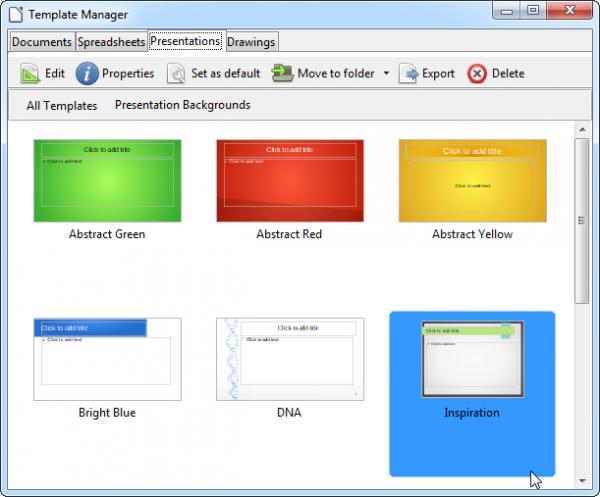
    New import files include support for Microsoft Publisher publications, plus extended support for Visio files up to Visio 2013. GUI enhancements include a new templates manager and support for using Firefox Personas (access this feature via the Tools > Options… > Personalization > Select Persona dialog).

    Despite, or perhaps because of, all these major changes, LibreOffice has been reduced by around 20MB in size. LibreOffice 4.0 FINAL is available now as a free, open-source download for Windows, Mac and Linux.

    Photo Credits: Yuri Arcurs/Shutterstock

  • GIMP 2.8.4 adds improvements and polish to the popular image editor

    Popular open-source image editor GIMP 2.8.4 FINAL has been released for Linux and Windows, with a Mac binary build due for release imminently. Version 2.8.4 is a minor stability release, but does contain a number of interesting improvements, including more responsive drawing — particularly with the brush outline tool — plus better names for the default filters when saving or exporting.
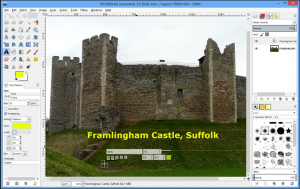
    GIMP 2.8.4 will also be the second OS X release that runs natively on the Mac — 2.8.0 and earlier required X11, and many improvements in this release are aimed specifically at that platform.

    Aside from the improved responsiveness and filter tweaks, other user interface changes include GIMP now remembering the maximized state of windows across sessions, allowing the text tool to start on a non-layered image and various other fixes for text style attribute handling.

    Plug-in improvements include better default values being set in the Drop Shadow script and a major round of bug fixes for the BMP plug-in.

    Platform-specific improvements concentrate on the OS X platform — the gimpdir has been moved to the user’s Library\Application Support folder, while the system screenshot tool is now used when creating a new image from a screenshot. Plug-in windows should now automatically appear on top, and users can now select their chosen language via GIMP’s Preferences dialog.

    One addition to the Windows installer is the addition of a Brazilian-Portuguese translation.

    The stability update builds on the major 2.8.0 release from last year, which saw GIMP radically overhaul its user interface with such elements as a new ‘single-window’ mode, multi-column Dock windows, a brand new Cage Transform tool and the ability to organise layers into groups.

    GIMP 2.8.4 FINAL is available now as a free, open-source download for Windows, Linux and — coming soon — Mac OS X.


  • Record Skype voice or video calls, for free

    Ever wanted, or needed, to record a voice or video conversation in Skype? There are plenty of tools out there that will do that for you, but there’s usually a catch. They either cost money or, if they are free, there’s often a limit to what you can record.

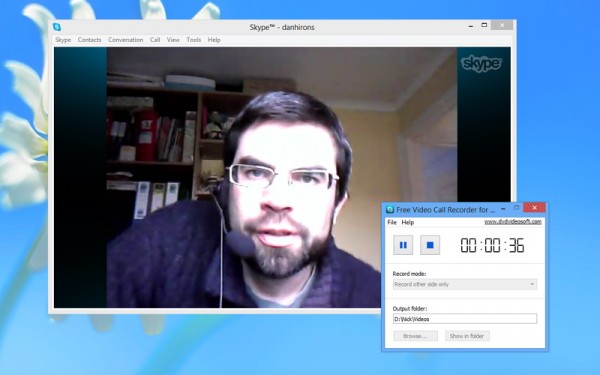
    Thankfully, there’s a free app just launched for Windows users that allows you to easily record voice and video calls from Skype completely for free, with no limits or catches. It’s ridiculously simple to use, and it’s called, rather aptly, Free Video Call Recorder for Skype 1.0.2.115.

    Free Video Call Recorder for Skype, which comes from the DVDVideoSoft stable, takes call recording to new levels of simplicity. All you have to do is choose what you want to record: both sides of a video conversation, your opposite number’s video feed only or just your audio chat. Pick a suitable folder and you’re good to go: just hit the record button to start, then hit pause should you want to miss out a bit, or stop to finish the recording.

    Video recordings also stop automatically when you hang up, and won’t start until the video connection has been made; audio recordings are started and stopped manually. Audio conversations are stored in MP3 format, and video chats in MP4 format, but there’s no record of them in Free Video Call Recorder for Skype; instead you need to open up the folder they’re stored in and double-click them to review.

    The app is clearly a no-frills one, but it’s effective and does the job admirably. We’d like to see the user being able to choose a different video format in case MP4 doesn’t cut it, but other than that there’s little to complain about here. You should probably let your chat partner know you’re planning to record your conversation with them, though — the app doesn’t integrate in any way with Skype, and is to all intents and purposes invisible to it, so there’s no warning relayed on your behalf.

    Free Video Call Recorder for Skype 1.0.2.115 is a freeware download for PCs running Windows Vista or later (sadly, it’s not XP compatible).

  • BurnAware 6.0 released — offers an updated authoring engine, disc error checker and more

    Windows disc-burning tool BurnAware 6.0 Free has been released. This major update, also available with additional features as BurnAware 6.0 Premium (rebadged from Home Edition) and BurnAware 6.0 Professional, comes with an updated burning engine and a number of new features, including a new tool for checking discs for read errors.

    BurnAware 6.0 also ships with a number of improvements, including the grouping of all burning elements at the bottom of the main form, and a number of notable bug fixes.

    BurnAware 6.0 adds a new View menu to its roster, allowing users to view the basic options in normal or large size. The new menu is joined by a brand new Verify Disc tool that scans discs for read errors.

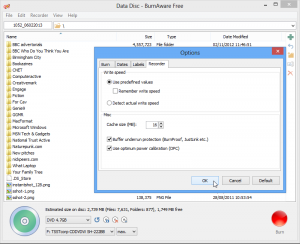
    Also added is an option to burn an 800MB CD from the Disc Type drop-down list, plus users can now select the cache size (press [F10] and then set the size via the Recorder tab). BurnAware 6.0 also adds support for importing multi-extent and UDF embedded files, and there’s a new log window accessible from the Copy Disc and Copy to Image tools.

    The program’s burning engine has been updated, and the user manual has been rewritten from scratch to reflect all the changes in this new build. BurnAware 6.0 is also now capable of locking the burning drive for exclusive access when burning using the SCSI Pass Through Interface (SPTI). Version 6.0 also promises better optimized data transfer and buffering during the burning process.

    The update is rounded off with five notable bug fixes: problems causing potential read errors in produced disc images, write errors at the end of the burning process on DVD-R/-RW discs and with ejecting discs at the end of the burning process have all been resolved, along with fixes for BD-R disc burning errors on certain Pioneer drives and the “A general error occurred” error that occasionally appeared while Blu-Ray disc images were being prepared.

    BurnAware 6.0 Free is available as a free-for-personal-use download for PCs running Windows XP or later. Users wanting direct disc-to-disc copying capabilities and the ability to extract audio tracks and recover files from discs should download the 10-day trial of BurnAware 6.0 Premium, while a 10-day trial of BurnAware 6.0 Professional adds an option for burning a single ISO to multiple drives simultaneously to its commercial-use license. The two packages cost $29.95 and $39.95 respectively.

    Photo Credit: AISPIX by Image Source/Shutterstock

  • Get live TV and PVR working in XBMC

    When Team XBMC recently announced the launch of XBMC 12.0 FINAL, fans of the media center alternative rejoiced. Version 12.0 didn’t just extend to support to even more platforms — including the Raspberry PI and Android — it also introduced a number of new high-end features too, including support for HD audio as well as live TV and PVR.
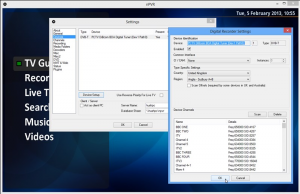
    PVR — in case you didn’t already know — stands for Personal Video Recorder, and allows you to turn your PC into a tool for recording all your favorite TV shows. However, while XBMC 12.0 adds support for PVR, it takes a little setting up. Here’s what you need to do.

    The key thing to understand is that live TV and PVR capabilities aren’t actually built into XBMC 12.0; instead, it’s been designed to work in tandem with various third-party tools that offer this functionality. That means you’ll need to install an additional program if you plan to use this functionality with XBMC.

    There are a number of third-party options available to you depending on which platform you’re running XBMC on, but we’d recommend NextPVR if you’re running Windows and MythTV if you’re running Mac or Linux.

    Configure the Back-End

    In this guide we’ll focus on using NextPVR: once installed, launch the program. Right-click in the program window and choose Settings. Switch to the Devices section and verify your TV tuner card has been detected. Select it and click Device Setup.
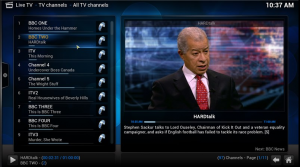
    Now set the Type Specific Settings dropdown menu to your country and — if known — transmitter. UK and Australian users should tick the Scan Offsets box as recommended. Finally, click Scan. Wait to see what channels are picked up — if some are missing and you’re sure the tuner is connected to a powerful enough aerial or transmitter, you may find the configuration file for your chosen region is outdated. If you know what the correct frequencies are (UK users can click here) you can manually update the transmitter configuration file yourself — you’ll find it in the appropriate folder under C:\Users\Public\NPVR\Tuning — or you can simply select All Regions — Frequencies from the Region dropdown list in NextPVR and scan using that setting. The latter option is simpler, but much slower.

    Once the channels have been successfully scanned and are in place, switch to the Decoders tab and verify decoders have been set for MPEG2 Video and — if applicable — H.264 Video. Once done, check the other tabs for any key settings (you may wish to choose a different directory to store recorded programs in under Recording, for example) click OK and close NextPVR.

    Set Up XBMC

    With the TV tuner and PVR now setup, you can install and launch XBMC. You’ll be told that PVR has been enabled without any add-on, then prompted to select one. Pick NextPVR from the list and you should find it works out of the box, giving you access to live TV through XBMC’s Live TV menu while also allowing you to configure (and later watch) recordings directly from XBMC too. If subtitles are appearing on-screen, you can switch these off from within XBMC itself: click the sound icon on the live TV playback controls and disable Subtitles.

    XBMC 12.0 FINAL is available now as a free, open-source download for Windows, Mac and Linux. Live TV and PVR services require a compatible TV tuner plus separate free back-end tool such as NextPVR 2.5.9 for Windows, or MythTV 0.26 for Linux and Mac.

    Photo Credit: holbox/Shutterstock

  • Keep your passwords safe from prying eyes with KeePass 2.21

    Open-source password management tool KeePass 2.21 has been released. Version 2.21, also available as a standalone portable build, adds a number of new features, including a hex viewer mode, support for a user-defined group separator in the Generic CSV Importer and various tweaks, improvements and bug fixes.

    KeePass is designed to act a single, central repository for a user’s sensitive data, from logons to credit card details. This information is encrypted with a single, master password, allowing the user to securely lock away their personal details when not required.

    KeePass 2.21 makes it easier to import group trees into the program using its Generic CSV Importer tool by adding support for user-specified group separators. The internal data viewer has also added a hex viewer mode, which is automatically made the default view for unknown data types.

    The tools support for storing special keycodes has been extended with the addition of {WIN}, {LWIN}, {RWIN}, {APPS} and {NUMPAD0} through to {NUMPAD9}. Also added is an option — enabled by default — to additionally show references when showing dereferenced data.

    KeePass is also a little more robust — when another application window hangs, the auto-type association editing dialog doesn’t hang with it. Version 2.21 also warns the user when another app attempts to switch from the secure desktop to a different one — clicking OK returns to the secure desktop.

    When opening the icon picker dialog, KeePass 2.21 ensures the currently selected icon is visible, plus adds OK and Cancel buttons to the dialog. The app also comes with improved importers for other programs including Password Safe and AnyPassword Pro, and prefers the .NET Framework 4.5 if it’s installed on the user’s computer.

    Bugfixes include the UI updating correctly after multiple databases have been locked and the Save Changes dialog is cancelled, plus the ‘&’ character is now displayed correctly in various texts: dynamic menu texts, dialog banner texts, tooltips and more.

    KeePass 2.21 and KeePass Portable 2.21 are both open-source free downloads for PCs running Windows 2000 or later.

    Photo credit: marekuliasz/Shutterstock

  • Get better security and stability with Opera 12.13 FINAL

    Norwegian browser developer Opera has announced its first release of 2013. Opera 12.13 FINAL is a security and stability release with a couple of notable bug fixes. The release, also available as a separate 64-bit build for Windows 64-bit users, comes just 48 hours after Opera 12.13 RC2 was released for public testing.
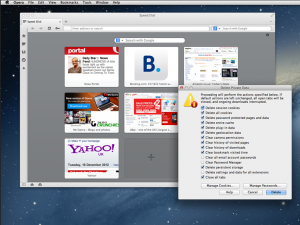
    Bug fixes include a resolution that saw no webpages being loaded on startup if Opera is disconnected from the internet, plus one that led to internal communication errors appearing on Facebook.

    Linux and Windows users will also discover a new standalone update checker has been introduced in Opera 12.13 — this is part of a planned upgrade of the entire automatic update system. Windows users will also be pleased to discover that there’s improved protection against third-party hijacks of the default browser search, including a one-time reset.

    The update also includes four security fixes: one where manipulation of DOM events could have been used to execute arbitrary code, another that saw the potential use of SVG clipPaths for executing arbitrary code and a third where CORS (Cross-Origin Resource Sharing) requests could omit the preflight request that was used as protection as Cross Site Request Forgery (XSRF) attacks. A fourth fix is described merely as a “low severity security issue”.
    Opera 12.13 FINAL is available now as a freeware download for Windows, Mac and Linux. Windows 64-bit users may prefer to install Opera 12.13 FINAL (64-bit) instead.

  • Diagnostic and benchmarking tool AIDA64 adds support for new processors, including Intel’s Atom Z2760

    Budapest developer FinalWire Ltd has released AIDA64 Extreme Edition 2.80.2300 and AIDA64 Business Edition 2.80.2300, new versions of its streamlined Windows diagnostic and benchmarking tools. The Extreme Edition is aimed at home users, while the Business Edition is designed to work with small and medium scale enterprises.
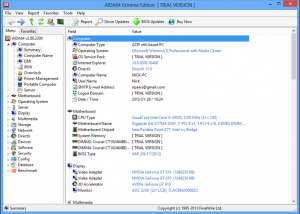
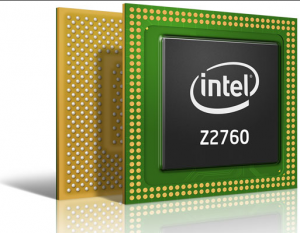
    Version 2.80 is a relatively minor upgrade, refreshing and improving the benchmarking and diagnostic tool’s support for newer technologies, including the Intel Atom Z2760 and OCZ Vector SSD.

    FinalWire is keen to promote the fact that AIDA 2.80 now boasts optimized benchmarks for Intel’s low-powered Atom 2760 (“Cloverview”) processor. It also adds preliminary support for AMD’s upcoming “Richland” APU and Intel’s next-generation Atom processor, codenamed “Valleyview”, which Intel promises will double the performance on its low-powered chip range when it debuts towards the end of the year.

    In addition to extending support, AIDA 2.80 also improves its support of Intel’s “Haswell” range of APUs and its “Lynx Point” PCH. There’s also support for APP SDK 2.8, OpenCL 1.2 Update, OpenGL ES 3.0 and Simple Firmware Interfaces.

    SSD controller support has also been extended to include the OCZ Vector and Indilinx Barefoot 3 SSD ranges. Version 2.80 also adds details for a selection of newer GPUs, including the AMD Radeon HD 7470 and 7870 “Tahiti LE”, and nVIDIA’s GeForce GT 635M and GTX 680MX.

    Since AIDA 2.0 was released, the tool has added support for Windows 8 and Windows Server 2012 RTM editions, integrated enhanced UPS support, plus added support for numerous other chipsets, processors, SSD drives and motherboards, along with updated standards such as ACPI 5.0 and CUDA 5.0.

    Free function-limited trials of both AIDA64 Extreme Edition 2.80.2300 and AIDA64 Business Edition 2.80.2300 are available to download for PCs running Windows 95 or later. Hardware system requirements are minimal, and the full versions can be purchased with prices starting at $39.95 (Extreme Edition) and $79.95 (Business Edition).

  • CCleaner 3.27 adds support for Internet Explorer Metro in Windows 8

    Piriform has released CCleaner 3.27, a minor update for its popular Windows free cleaning tool. CCleaner 3.27, also available in portable form, basically adds updates for major new browser releases, including support for Internet Explorer Metro in Windows 8.

    The release is joined by Speccy 1.20, a minor update of Piriform’s system information tool, which adds version number detection for a number of major apps.

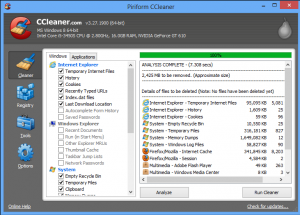
    The key improvements in CCleaner 3.27 are aimed at improving support for Windows 8 users. Version 3.27 adds support for cleaning both the cache and history in Internet Explorer Metro, the full-screen app found in the Windows 8 Modern UI.

    The update also adds support for the latest stable build of Google Chrome — v24 — and improves compatibility with Firefox 17 and newer builds, including the latest stable release. Other enhancements include better compatibility with Google Chrome extensions, improved Unicode text support and a new Burmese translation. The update is rounded off with the usual GUI tweaks and bug fixes.

    The update follows hot on the heels of the release of Speccy 1.20.446, which adds a number of new features, including the ability to detect the versions of Internet Explorer, Java and Windows PowerShell. Speccy 1.20 also claims better detection of SSD and larger hard drives, plus improved anti-virus detection of server OSes.

    Both CCleaner 3.27 and CCleaner 3.27 Portable, plus Speccy 1.20.446 and Speccy 1.20.446 Portable, are available now as freeware downloads for PCs running Windows XP or later.

    Photo credit: Goydenko Tatiana/Shutterstock