 File-sharing Dropbox has updated its desktop client for Windows, Mac and Linux with the release of Dropbox 2.0 FINAL. The new build debuts a major revamp of the user interface, accessed when the user clicks the app’s menu bar or Taskbar Notification area icon.
At the present time, the new menu system is only available to Windows users running XP or later, and Mac users running Snow Leopard (OS X 10.6) or later — it has not yet been implemented in the Linux build.
The new menu is more graphically pleasing affair than its predecessor, displaying a summary of recently changed or shared files complete with file type icon or thumbnail preview for identification purposes. Rolling the mouse over an item reveals a Share button, which whisks the user off to the Dropbox website for setting up a public file-sharing invite.
Users should also get notifications when other Dropbox users share items with them — in the case of files, it’s a straight link to the file itself via the Dropbox website, while folder invites can be accepted or declined from here. Once accepted, shared folders are accessible from the user’s own Dropbox folder.
The new build also provides real-time notification of invites and other sharing functions — via the program icon in Windows and the Notification Center in OS X, while shortcuts at the top or bottom of the pop-up menu provide quick and easy access to the user’s locally hosted Dropbox folder as well as their Dropbox account online.
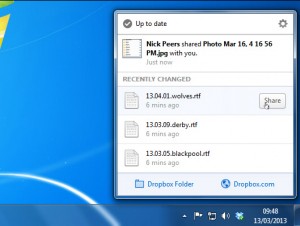 Features displayed on the old menu bar — including how much space is left in a user’s account as well as the current sync progress — have been relegated to a new settings button. The update also fixes a bug where discrete graphics would be enabled on OS X laptops along with other small, unspecified bug fixes. Support for Brazilian Portuguese has also been added with this release.
In itself, the new features — while pleasing on the eye — don’t offer an awful lot to get excited about, but highlight Dropbox’s new focus on sharing as well as backup and syncing. They follow similar functionality appearing on recent updates to the mobile versions of Dropbox, including Dropbox for iOS 2.1.3 and Dropbox for Android 2.3.3.
Dropbox 2.0 FINAL is a freeware download for Dropbox users running Windows, Mac or Linux.
Photo credit: mojito.mak[dog]gmail[dot]com/Shutterstock

 Ellora Assets Corporation has released
  Bopsoft has released
 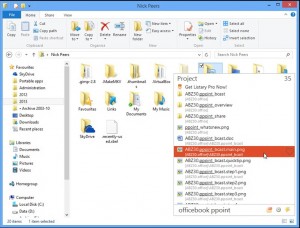 upport for many third-party file explorer tools has been updated to support the latest versions and add new tools, such as FreeCommander XE, XnView and Clover. The program now also checks for updates automatically — a timely addition as both skin and custom action support for Pro users is planned for version 4.1.
 There are many reasons why you’d want to hide your internet IP address. The most common one is that you’re trying to access services or web sites restricted to a specific country or territory — this might be to catch up with UK BBC TV’s shows via iPlayer or for more fundamental reasons, such as bypassing a country’s censorship restrictions.
 There are other restrictions for free users to be aware of: first, you can only connect through six countries: the US, Germany, Russia, Ukraine, Panama and Singapore (four of which permit the use of P2P). Second, you can only download 2GB per month, and the connection speed may be limited to 512Kbps.
 Berlin software developer Ashampoo GmbH has released
 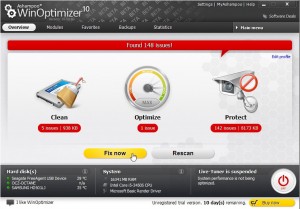 While WinOptimizer 9 came with support for Windows 8, version 10 promises enhancements for users of Microsoft’s latest operating system. There’s a revised task scheduler, and Windows 8-tailored tweaks to go with compatibility improvements.
 Norton has refreshed its entire 2013 security range with the release of
  Open-source Windows defrag tool
  All file fragmentation reports are no longer stored on the root directory of each analyzed drive; instead they can be found in the Reports sub-folder inside the program’s own folder.
 Oracle has released
  Performance issues with IPv6 networking over bridged adapters have been resolved through fixing a TCP pseudo header checksum computation, while a small memory leak affecting VBoxService.exe in the Guest Additions has also been closed.
 Amazon has launched
  Aside from adding support for iPad users, Amazon Cloud Player 2.0 adds one more feature in the form of an option under Settings for users to manually set the cache size for music previously streamed or downloaded. Music stored in the cache can be played offline, and a 500MB cache is set by default – users can now adjust this to a number of presets from 50MB to Unlimited (Amazon Cloud Player will always leave at least 10 per cent free space on the device), plus clear the cache with a single tap.
 Astonsoft Ltd has released
 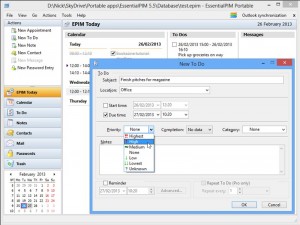 EssentialPIM for Android users also gain new features with the 1.8.2 release. These include a new Calendar module, which now syncs with EssentialPIM’s own Calendar module in Android as opposed to the native Calendar app. At the present time, Agenda and Day views are available, with more to follow.
 Piriform Software has released
 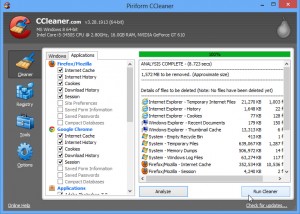 Piriform has also announced that the next release of CCleaner will be version 4.0, which will add system monitoring tools and file-finding capabilities alongside a minor interface refresh and will also debut a brand new program icon. Piriform also claims to be finalizing details of other “exciting” releases. It appears these may be brand new tools to add to its stable, which currently include
 Mozilla has released
  Open-source, cross-platform EPUB creator
  Apple has released
 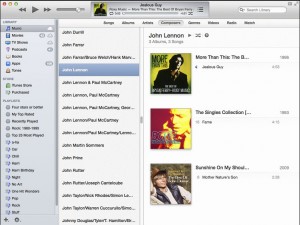 Apple also promises that the update improves iTunes’ responsiveness when syncing playlists containing a large number of songs. The only documented fix applied is one that resolves issues whereby some users’ libraries weren’t showing their purchases from the iTunes store.
 Spanish security company Panda Security Ltd has released
 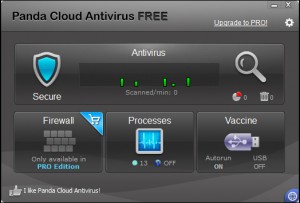 The update follows on from the release of Panda Cloud Antivirus 2.1, which added anti-exploit technology to both free and Pro versions, providing users with protection against malware that exploits so-called zero-day vulnerabilities in unpatched software such as Java, Adobe and Microsoft Office. Like traditional signature-based malware, suspicious files are sent to the cloud for analysis, but in this case their behavior is tracked to determine whether or not they pose a potential risk.