Author: Nick Peers

  • Get ready for World Backup Day

    March 31 is World Backup Day. It’s when you’re reminded of the importance of having a backup for all of your precious data and settings. Anyone who’s confronted the horror of data loss full on should know the importance of having at least one backup copy of all their key documents, photos and other files and settings, but why wait until you’re faced with the prospect of losing irreplaceable data or shelling out hundreds, even thousands, of dollars to get it back?

    Windows ships with a relatively effective backup tool, but it’s blunt and not particularly flexible to your exacting needs. Instead, you should turn to the plethora of third-party backup utilities if you’re serious about protecting your data from harm. And to celebrate World Backup Day, we’ve put together a selection of amazing deals on backup software that could save you money as well as put your data in a safer place this Easter.

    Our headline deal this World Backup Day gives you the chance to purchase O&O DiskImage 7 Professional for just $9.95 this holiday Sunday and Monday. The powerful tool provides you with everything you need to back up both selected data such as individual files and folders, plus take a drive image of entire partitions and drives for complete peace of mind.

    While’s it’s still not a tool for complete beginners, O&O DiskImage does provide some hints and tips to guide you towards protecting your data, and version 7 makes things friendlier with a redesigned dashboard-style interface.

    The $9.95 price represents a massive 67-percent discount on O&O DiskImage’s normal MSRP of $29.95, and is available for just 48 hours from 00.01 GMT, Sunday March 31 to 23.59 GMT, Monday April).

    More Great Offers

    If O&O DiskImage doesn’t tempt you, why not check out some other great deals from our comprehensive backup range? If you’re looking for a backup tool that does things with the minimum of fuss, check out Genie Timeline Professional 2013 at just $29.95, which is half its MSRP.

    Your purchase gives you a 1-PC, non-expiring lifetime’s license to one of the simplest and fuss-free backup tools on the market. Launch the program, select your backup drive and then simply choose between ticking category boxes like Documents, Email and Bookmarks from the Smart Selection tab, or manually choosing individual files and folders to back up via the My Computer tab.

    Once done, that’s it: just leave Genie to do the rest of the hard work for you, updating your backups as files are changed and your PC sits idle. A built-in Restore tool makes recovering individual files as well as your entire backup a doddle too.

    If you like the basic concept, but want that little bit more control over your backups, such as being able to back up the Registry or key Windows settings, then check out Genie Backup Manager Home 9.0 instead. It’s also available for $29.95, a 40 percent saving on its MSRP.

    Imaging your entire hard drive doesn’t just allow you to recover data, it also enables you to restore your entire system quickly in case of disaster, even if you’re forced to replace your PC’s hard drive. We’ve got some great deals on drive-imaging tools this Easter weekend: get the renowned Norton Ghost 15 for just $39.99, a saving of 43 percent on its MSRP for a single-computer, single-year licence.

    Alternatively, you can pick up Paragon Backup & Recovery 11 Home for $31.96, a saving of 20 percent. Or if finances are extremely tight, check out our fantastic deal — 46 percent savings on MSRP — on True Image 2013 by Acronis.

    For just $26.99, True Image offers comprehensive backup tools covering individual data and entire drive images, plus comes with a Try&Decide feature for testing software without affecting your main PC installation. There’s also file-sync support for keeping files updated across several PCs and access to True Image Online, a subscription-based cloud backup service for storing your files securely over the internet.

    Speaking of cloud-based backups — a great complementary way of creating a backup that’s stored securely away from your computer — we finish our roundup of selected deals with an amazing offer on AVG LiveKive. Until 23.59 on Monday, you can pick up AVG LiveKive 25GB, which offers up to 25GB online storage space for a whole year, for the amazing price of just $16.95, a saving of 66 per cent on its MSRP. By way of comparison, that means you’re paying the equivalent nominal sum of just $1.42 a month for the security of keeping your precious files protected (and synced with all your other devices).

    All of these great deals mean there’s no excuse not to mark World Backup Day by taking the plunge and investing what is a very small sum on keeping your precious files and settings backed up. Particularly when you consider the potential cost of actually having to pay to have your data recovered.

    Photo Credit: Andy Harbin/Shutterstock

  • Use OpenElec 3.0.0 to build your own XBMC media center PC

    Got a lot of media stored digitally? Want access from a range of devices, including your computer, mobile and smart TV? One of the best tools for the job is the wonderful, and open-source, XBMC 12.1. It’s capable of so much, acting as a media center, DLNA-compatible server an, from version 12, PVR for live TV on your computer.

    Next to XBMC, just about every so-called smart media box out there pales under its radiance. If only you could build your own XBMC-based smart box, eh? Actually you can: all you need is a spare PC and the wonderful OpenELEC 3.0.0.

    OpenELEC 3.0.0 is a complete Linux-based distribution based around XBMC. Boot up a PC running OpenELEC, and within seconds you’re at the familiar XBMC desktop, with all your media within arm’s reach. The concept isn’t new — there are plenty of Linux-based XBMC distros out there, including XBMC’s own XBMCbuntu, based around Ubuntu.

    What makes OpenELEC stand apart from the competition is its size — or lack of it. By focussing solely on providing a platform for running XBMC and nothing more, OpenELEC weighs in at a maximum 125MB when installed. That’s megabytes, not gigabytes, which is why it’s optimized for smaller removable media like SD cards and USB thumb drives, leaving your hard drive free to store all that media on.

    Installation is refreshingly simple — all you need is a PC that supports USB booting, and a spare USB thumb drive (256MB or greater) to place the installation files on. Then it’s a case of picking the right version to download — you’ll find customised builds for ION/ION2, Intel and Fusion GPU chipsets, the Raspberry Pi and two “generic” builds to cover just about any laptop or desktop out there.

    The file you download will be in .tar.bz2 format. Extracting your installation files from here may be a bit fiddly — Windows users will need a third-party tool such as IZArc to do so. Once done, Windows users can simply double-click the create_livestick file and follow the prompts to create the USB boot drive; Mac and Linux users should follow the instructions at theOpenELEC wiki.

    Now switch to your media center-to-be, insert the USB stick and boot from it to install OpenElec itself, again following the simple prompts. You can install to the internal hard drive or any removable drive – as we said earlier, picking a SD card or second USB thumb drive allows you to separate your media from OpenELEC itself.

    Once the installation process is complete, you can boot OpenELEC proper. You’ll see it’s incredibly fast — another benefit of such a small footprint — and delivers you direct to the familiar XBMC desktop. The new version, OpenELEC 3.0.0, is actually the first official stable release, and based on the very latest version of XBMC: Frodo, v12.1. That means if it works in XBMC, it’ll work in OpenELEC too. Your media experience will never be the same again.

    OpenELEC 3.0.0 is available as a free, open-source download for use on a secondary PC. The installer can be run on Windows, Mac and Linux to create the required USB thumb drive installer. XBMC 12.1is also available as a free, open-source download for running on a primary Windows, Mac or Linux computer.

    Photo Credit: Baranova Alona/Shutterstock

  • Screenshot Captor 4.00 supports webcams, adds free-hand painting

    Donationcoder.com has released Screenshot Captor 4.00 and Screenshot Captor Portable 4.00, brand new versions of its powerful screen-capture tool for Windows PCs.

    Version 4.00 builds on features introduced last year in version 3 with the addition of support for capturing images from webcams, a new — and dockable — QuickCapture bar, extended Undo support and rewritten image uploader tool.

    The most visible new feature in Screenshot Captor 4.00 is the new floating quick-capture bar, which can be docked to the top or bottom of the screen where it hides minimized until the user rolls the mouse over it. The bar provides convenient access to all the program’s capture functions, plus shortcuts to the main program window, screenshot settings and the program’s main user preferences.

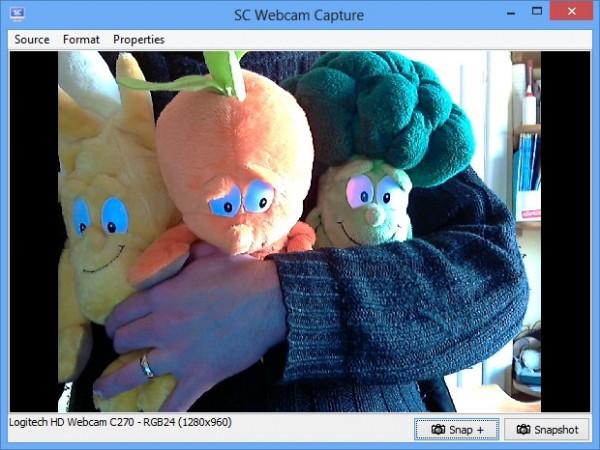
    Another major new addition to Screenshot Captor’s arsenal is support for capturing still images from webcams. Users can switch between different webcams, choose the capture resolution and access the webcam’s own configuration tools. Support for capturing video is available through the ESR add-on.

    Version 4.00 also introduces freehand painting and annotation tools that, like objects, can be edited after the image has been saved. Undo support has also been widened to include most object manipulation actions, and users can now specify custom comments in the pop-up dialog that appears after a screen capture.

    Screenshot Captor 4.00 also overhauls the image uploader tool introduced in version 3 to make it significantly easier to use with supported accounts – currently ImageShack and imm.io. Users can also select the open-source ShareX tool (a separate download) should they wish to upload to other services.

    Other notable improvements include the ability to save and load custom configuration files, allowing users to easily switch between different profiles for different applications. Users can also now save all selected images to an animated GIF.

    A new Quick Expand Canvas item has been added to the Edit menu, and users can now define their own custom list of preset sizes for resizing and scaling. Also added to the resizing and selection dialogs are percentage options.

    The SaveAs dialog now remembers the last file format and directory used, and Screenshot Captor has a new option that should improve its accuracy when selecting active windows.

    For a full list of new features, improvements and bug fixes — all comprehensively documented — see the program’s version history.

    Screenshot Captor 4.00 and Screenshot Captor Portable 4.00 are both available as a free-for-personal-use downloads, but users will be periodically prompted to register for a free download key. Donating $25 to Donationcoders.com entitles the user to a single, universal (and non-expiring) product key for all of its products.

  • System Mechanic 11.7 ekes more performance from your PC

    Iolo Technologies has released System Mechanic 11.7 Free andSystem Mechanic 11.7, a minor update to its popular Windows system optimization tool that delivers refinements to existing technologies in order to eke more performance out of PCs.

    Version 11.7 comes with three major new features, aimed at the paid-for versions of the software: streamlined startup speeds, more machine-oriented optimisation and Direct Expert Connection.

    System Mechanic 11.7’s promise of faster start-up times is delivered via enhancements to System Mechanic’s boot-optimization technology, which iolo promises will make Windows ready for use much quicker than with previous builds of the program. This builds on previous enhancements including one where the user is given complete control over what boots when — for example, creating “black out” times where no boot-time operations are performed.

    System Mechanic already makes use of special Tune-up Definitions, which allow it to pass on research findings on performance-related issues to the program that in turn deliver improved performance on the user’s PC.  Ongoing testing has allowed iolo to now inject more personalized recommendations into its definitions, which in turn means performance can be focused into the individual setup and profile of the user’s PC.

    The final new feature is the Direct Expert Connection, which sees iolo’s collective powers being delivered direct to the desktop, allowing computers to benefit even more quickly than before from the latest cutting-edge performance data.

    The enhanced features build on other recent improvements — version 11.5 extended Windows 8 support, introduced cloud-based Guided Recommendations based on advice from other System Mechanic users, and dropped per-PC licensing restrictions, for example.

    System Mechanic 11.7 Free is available as a free, reduced-functionality download, while both System Mechanic 11.7 and System Mechanic Professional 11.7 are available as free trial downloads for PCs running Windows XP or later. The 11.7 update is free to all registered users of System Mechanic 11.

    You can purchase both for a significant discount through the Downloadcrew Software Store: System Mechanic 11.5 costs $24.95, a saving of 50% on the MSRP, while System Mechanic Professional 11.5 can be bought for just $39.95, saving you 43 percent.

     Photo Credit: studio online/Shutterstock

  • Google releases Chrome 26 — get it NOW!

    Google has released Chrome 26 FINAL for Windows, Mac and Linux. The latest release proffers three relatively minor new features, including improved spellchecking, plus 11 specific security fixes.

    The most notable changes in Chrome 26 are improvements to the spell-checker tool. All supported dictionaries have been refreshed, while Korean, Tamil and Albanian support have all been added. Those using the Google Sync feature will be pleased to learn that any custom words added to the dictionary can now be synced to other devices along with other settings.

    Also tweaked is the “Ask Google for suggestions” spell-checking feature. The feature — powered by the same technologies found in Google’s search engine — now supports checks for grammar, proper nouns, homonyms — words with the same spelling or sound, but a different meaning — and context-sensitive spell-checking, albeit only in English at present.

    At the present time, only basic support is implemented in Windows and Linux, with the features expected to roll out over the next few weeks. Mac support should follow soon. The Ask Google for suggestions feature isn’t switched on by default – right-click inside a text box and enable it from the Spell-checker options sub-menu.

    Also added in version 26 is a Windows-only feature that allows users to now save desktop shortcuts for individual user profiles on the desktop allowing users to quickly launch Chrome with their user settings applied. The option appears when creating a new user, and the shortcut places the user profile icon on top of the default Chrome icon for easy identification.

    The final new feature is the addition of an asynchronous DNS resolver on Mac and Linux platforms – the feature is already present in the Windows build. The asynchronous DNS resolver is used to help speed up DNS resolution time – the time taken for a typed web address to be translated into its actual four-digit IP address before the site can be loaded.

    11 specific security fixes and “rewards” have also been implemented in Chrome 26, including two rated high: one ensures isolated websites are run in their own process, while the other fixes an issue — “use-after-free” — in Web Audio. Google Chrome 26 FINAL is available now as a free download for Windows, Mac and Linux.

  • CCleaner 4.00 adds two new features but limits one to Pro version

    Piriform has released CCleaner 4.00 and CCleaner Portable 4.00, major new release of its popular free cleaning tool for Windows users. Version 4.0 includes two new tools, but for the first time restricts one of these to paid-for users with Pro licenses only.

    Version 4.0 also debuts a new program icon and tweaked user interface, added support for cleaning additional programs and the usual raft of performance and stability tweaks, including unspecified improvements to the program’s internal architecture for better performance.

    CCleaner 4.0 adds two new tools to its armory, only one of which is available to those running the free version. This is a Duplicate File Finder, accessible from the Tools section of the program. Users select what criteria to match by – including name, size and last modified date – what to ignore and which drives, folders and wildcards to both include and exclude from the search. Users then click the Search button to review and manually select which copy or copies of each duplicate file to delete.

    The second new feature is a browser and system monitoring tool, but this is restricted to Pro users only.

    The Registry Cleaning tool has been optimized and improved, while Drive Wiper should also now benefit from improved performance. The Startup item detection algorithm has been improved, as has the 64-bit CCleaner build for Windows 7 and 8.

    Cleaning support has been extended to Samsung Kies along with the latest versions of Avast! Antivirus (v8), Adobe Photoshop (CS6) and Real Player (v16). The update is rounded off with the usual mix of unspecified performance improvements and bug fixes.

    CCleaner 4.00.4064 and CCleaner Portable 4.00.4064 are both available as free-for-personal-use downloads for Windows PCs running XP or later.

    Photo Credit: Goydenko Tatiana/Shutterstock

  • ISO Workshop makes it easy to manage, convert and burn disc images

    Glorylogic Software has released ISO Workshop 4.0, a major update of its disc image management, conversion and burning tool. Version 4.0 broadens the tool’s ISO format support to cover six different disc types: CD, DVD, Blu-ray, Bridge, DVD video and bootable.

    The program also tweaks the existing user interface, adding new buttons to facilitate creating folders and editing files within ISO images. Other buttons have been added for loading and extracting files from ISO images.

    ISO Workshop 4.0 also comes with an updated disc-burning SDK and promises resolutions for problems opening certain image formats as well as compatibility issues with other, non-specified burning tools.

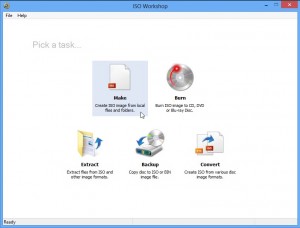
    ISO Workshop’s big selling point is its simple, unfussy interface. There are five options available — users can both create new image files from scratch and burn existing image files to disc. ISO Workshop supports all common image file formats, including ISO, BIN, NRG and MDF, and there’s an option for converting images to ISO or BIN format.

    Users can also extract individual files and folders from image files without having to burn them to disc or mount them using Windows 8’s native tool or a third-party utility such as Virtual CloneDrive. A fifth option — Backup — allows users to create image files from physical discs.

    The program promises to work with most major optical disc formats, including Blu-ray and most writable DVD formats, and claims to support all types of recordable drives. ISO Workshop 4.0 is a freeware download for PCs running Windows NT or later, including Windows 8.

    Photo Credit: AISPIX by Image Source/Shutterstock

  • You CAN use Office 2013 Trial for more than 30 days — how’s 180?

    DiSTANT X has released Office Trial Extender 1.0.0.7, a new build of its tool for legally extending the trial period for Microsoft Office 2010or later to a maximum of 180 days. The new version adds support for the latest Office 2013 release, renames itself Office Trial Extender and ensures all its files are digitally signed.

    The tool works by resetting your Office trial to 30 days, and can be used a maximum of five times, giving you a theoretical maximum trial period of 180 days — with caveats, as we discuss below.

    Now Microsoft is in the process of switching to a subscription system – Office 365 – with its products, it’s important to understand there’s a particular procedure you need to follow should you want to road-test Office 2013 for up to 180 days. The key fact is that you need to obtain a trial product key rather than sign up using your Microsoft Windows ID. Don’t worry, our download link for Office 2013 takes you to the correct part of the Office web site where you can obtain this serial code by email.

    After installing and activating Office, use it as usual until your trial period runs out. When it does, install Office Trial Extender if you haven’t already and launch the program, clicking Yes when prompted to restart it with administrative privileges. Click the Rearm button for your trial version of Office, then read the warning. Make sure all instances of Office aren’t running — any open documents may be corrupted by the process – then click Yes to reset your trial to 30 days.Remember, Office Trial Extender doesn’t add 30 days to your current trial period; instead, it resets it back to 30 days. That means to get a full 30 days extra you need to wait until the trial expires before using it.

    Office Trial Extender can be used up to five times in total to extend the subscription to a maximum of 180 days, which should be ample time enough for you to decide whether or not to purchase the full version, or invest in an Office 365 subscription.

    Office Trial Extender 1.0.0.7 is available now as a freeware download for Windows. Also available are Office 2013 Professional Plus and Office 2010 Professional as free trial downloads.

    Photo Credit: olly/Shutterstock

  • Better late than never, Free Studio 2013 v6.1 supports Windows XP

    DVDVideoSoft Ltd has released Free Studio 2013 v6.1, a minor update for its freeware media tools bundle for Windows PCs. The tool, which provides a front end of no less than 48 different tools for recording, downloading, converting and editing both audio and video, comes with the promise of unspecified improvements and new features.

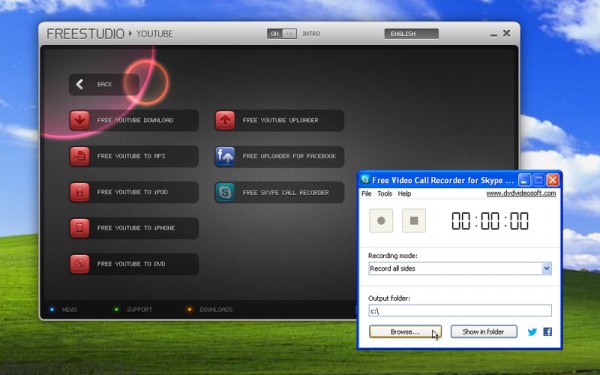
    Notable changes include adding Windows XP support to the recently released Free Video Call Recorder for Skype, which is now also available in additional 12 languages, including Chinese, Dutch, German, Portuguese, Russian and Spanish.

    Free Video Call Recorder for Skype isn’t included with the main Free Studio package, but a shortcut is provided within the Free Studio main interface that either points to the download link or launches the program once it’s been installed separately.

    The various YouTube tools have also been updated in Free Studio 2013 6.1, with the promise of improved performance through proxy connections, plus increased links detection speed and addition of presets for the fourth-generation iPad.

    Other applications within the suite have also been updated, but no release notes have been made available, suggesting only minor tweaks and bug fixes have been applied here.

    The minor update follows on from version 6.0, which introduced a new interface for its YouTube downloader, reworked Uploader to Facebook component and fixed a problem with mistimed videos during editing with Free Video Dub.

    FreeStudio 2013 v6.1.0.320 and Free Video Call Recorder for Skype 1.1.0.319 are both freeware downloads for PCs running Windows XP or later. An annual ad-free subscription with the promise of improved download speeds — dubbed the Rocket Subscription — is available for $9.99.

  • SugarSync now a little sweeter on Mac and Windows

    Cloud backup, sync and sharing tool SugarSync 2.0.9 has been released for Windows and Mac. The tool, which provides desktop access to SugarSync cloud storage, has gained three notable feature improvements alongside general performance and stability tweaks.

    Chief among these are drag-and-drop improvements alongside better visibility of features for showing folders from a specific computer. Windows users also get to choose which drive letter to assign to the SugarSync virtual drive.

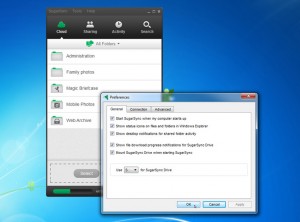
    SugarSync 2.0, released last month, added a number of new features, including an option to view which folders are synced with which computer. After users complained of difficulty accessing this feature, version 2.0.9 has made the Device Filter more visible. Now users will see “All Folders” displayed prominently below the application’s four navigation tabs: clicking this reveals options for selecting a different computer to view alongside an option for viewing cloud-only folders.

    Version 2.0.9 also debuts significant improvements to the application’s drag-and-drop capabilities. Now users can simply drag a folder on to the Sharing or Cloud tabs and wait — after a brief pause the app will automatically switch to the appropriate view if it’s not already visible.

    The final improvement concerns Windows users: version 2.0 introduced support for mounting the SugarSync cloud drive as a virtual drive. Version 2.0.9 allows users to designate a specific drive letter for the virtual drive — the option can be found on the General tab of SugarSync’s Preferences dialog.

    The update is rounded off with a range of unspecified bug fixes, which SugarSync claims will improve stability, plus address various formatting and display issues. SugarSync 2.0.9 is available now as a freeware download for Windows and Mac users. SugarSync for iPad and iPhone, and SugarSync for Android are also available. SugarSync offers a free 5GB storage plan, as well as paid-for plans, with prices now starting from $7.49 a month ($74.99 a year) for 60GB.

    Photo Credit: Picsfive /Shutterstock

  • Skitch for Desktop 2 gets a major UI update and new share feature

    Evernote Corporation has unveiled Skitch for Desktop 2.0 for Windows, a brand new version of its photo annotation and sketch tool. The new version boasts a major update to its user interface, plus offers streamlined sharing options.

    Skitch is designed to be used in conjunction with Evernote, allowing users to store annotated photos within their notes for future viewing and editing. Images can also be saved to the user’s hard drive.

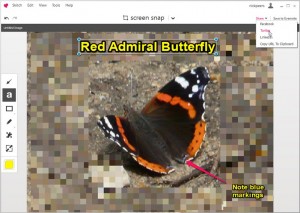
    Skitch 2.0 shows off a majorly streamlined user interface, with minimalist controls and a stripped back feel. One tool brought front and center is the capture menu, allowing content to be added to the sketch quickly and easily, whether through a screen capture, or via a new file or pasted in from the clipboard.

    Also prominently featured are the undo/redo buttons to the left, and a new Share button to the right. The Share button — a new feature in Skitch 2.0 — works in conjunction with the user’s Evernote account. The button provides quick and easy links for sharing sketches via Twitter, LinkedIn and Facebook. Users must be signed into their Evernote account in Skitch before the feature is accessible.

    Evernote also promises the stripped back interface is accompanied by streamlined performance and better stability over the previous release. It now closely resembles that found in the Mac build, which is currently at version 2.0.5.


    Skitch for Desktop 2.0 is available now as a freeware download for Windows and Mac. Also available are Skitch for iOS 2.0.5 and Skitch for Android 2.0.6.1.

  • XBMC 12.1 better supports Apple TV 2, iO6 and AirPlay

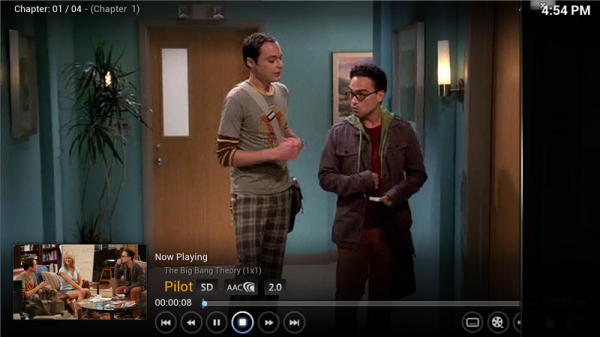
    Team XBMC has released XBMC 12.1 FINAL, a major maintenance update for its open-source, cross-platform media server/center. Version 12.1 includes AirPlay optimizations, iOS 6 support on the AppleTV 2 and enables the full iPhone 5 resolution.

    XBMC also recently unveiled the early developmental version of XBMC 13, codenamed “Gotham”. Early development for version 13 includes support for the UPNP “Play using…” feature, library improvements with new TV Show and Music Video tags as well as inbuilt support for alternative media art.

    Many of XBMC 12.1’s fixes revolve around Apple devices. OS X users gain support for using their Mac’s native audio output device, plus hardware decoding in OS X. The volume buttons have been remapped to control the OS X volume rather than XBMC’s own volume control – a tweak replicated with the new Android build. AirPlay support has also been improved, with more reliable discovery of XBMC implemented.

    Apple TV enhancements include support for iOS 6 on Apple TV 2, plus a fix that ensures XBMC doesn’t crash when listed on the Apple TV top shelf. The Raspberry Pi build sees the player optimized for more efficient playback, improved subtitle support and unspecified crash fixes.

    There’s added support for additional Xbox 360 controller types as well as broader, more intelligent support for CEC devices, which enable users to control XBMC via their TV remote using the HDMI cable connected to their XBMC device.

    Seven new languages — primarily Asian — have been added, while problems with several add-ons due to broken binary read/write in XBMC’s Python interface have also been resolved. The update is rounded off by a large number of stability improvements and crash fixes across all supported platforms.

    XBMC 12.1 FINAL is available now as a free, open-source download for Windows, Mac, Linux and Android. For a guide to configuring it to work with a TV tuner — a feature introduced in version 12.0, click here.

  • Dropbox 2.0.2 and Microsoft SkyDrive 2013 stomp the bugs

    Cloud storage providers Dropbox and Microsoft SkyDrive have both released minor maintenance updates for their desktop applications. Both Dropbox 2.0.2 and the Windows version of Microsoft SkyDrive 2013 v17.0.2006.0314 are minor maintenance releases with no new features.

    Both updates are the first since major releases — Dropbox 2.0introduced a new sharing-friendly user interface, while SkyDrive 17.0 allowed users to selectively sync folders and sub-folders to specific devices.

    Platform-specific fixes for Dropbox 2.0.2 on both Windows and Mac centre around the new menu. For Windows users, one bug preventing the pop-up tray appearing at all has been squashed alongside another that “broke” the menu when the user pressed [Alt] + [F4]. A third bug fix ensures the pop-up menu is positioned correctly on-screen even after the user changes display resolution.

    In OS X, fixes for similar issues with the dropdown menu have been implemented, including an issue when plugging in an external monitor as well as another that meant the menu didn’t appear if Dropbox’s Login Item was set to Hide.

    Another bug fixes include one that affected the Camera Uploads feature in Windows, as well as a platform-wide issue whereby a notification’s time label was incorrect. The update is rounded off by a number of unspecified performance improvements and further bug fixes.

    Also released is Microsoft SkyDrive 2013 build 17.0.2006.0314 for Windows users. The update comes with no release notes, but is the first update of the 2013 release that debuted last November, so is likely a maintenance release, fixing bugs discovered since version 17.0 made its first appearance. In addition to introducing selective sync, version 17 also made it possible to share items direct from the OS X or Windows context menu.

    Dropbox 2.0.2 is a freeware download for Windows, Mac and Linux. Microsoft SkyDrive 2013 v17.0.2006.0314 is available as a freeware download for Windows and Mac. Also available is a dedicated Dropbox for Windows 8 app; the SkyDrive app is built into the OS.

    Photo Credit: ARENA Creative/Shutterstock

  • Better manage your files with DropIt 5.0

    Open-source Windows file management tool DropIt 5.0 has been released. Also available as a 64-bit build and in portable form, DropIt allows users to process folders and files quickly via drag-and-drop, with up to 15 different actions (including move, copy, send by mail and upload) supported.

    Version 5.0 improves the way DropIt handles relative paths, tweaks the main context menu and Options windows and promises better performance, minor feature additions and a number of bug fixes.

    Once installed or launched, DropIt displays a floating icon on your desktop. Drag a file on to this icon, and DropIt will ask you what you want to do with it: 15 actions are supported, including copying or moving the file to a specific location, opening it in a particular application, attaching it to an email, copying it to the clipboard or changing specific properties.

    DropIt can make any of these actions the default for your files based on their properties: name, size, date, properties, content or regular expressions. You can save sets of associations in profiles and then associate a profile with a particular folder, allowing you to place files in folders and wait for DropIt to automatically process them for you at a specified time.

    After a short period, you can even drag an entire folder packed full of different files on to the DropIt floating icon and the program will automatically process them according to whatever filters and actions you’ve defined.

    What’s New

    Version 5.0 represents a major update, with a number of improvements and new features. Top of the list is the fact that relative paths in destination folders are now relative to each loaded file.

    Additions include %Counter% and %UserInput% abbreviations for adding file enumeration and customized input when processing files. A Duplicate button has also been added to the Associations context menu to allow new associations to be created using existing ones as a template.

    Filtered text is now highlighted in HTML lists, and support for creating PDF and XLS lists has also been added to the program. Users can now set different HTML themes for each new Create List association created.

    Folders can now be processed as files if required, and a list of loaded items is now displayed in the Processing window. Users can now define a minimum size when scanning folders, and profiles can be exported via the context menu.

    Two options, considered redundant, have been removed: “Check moved/copied files integrity” and “Enable associations for folders”.

    Improvements have been made to the performance of various actions as well as the Options dialog and context menu, while the Compress action now merges items added to existent archives.

    Also improved are the process that loads all dropped files at the beginning and support to Import profiles from the context menu.

    DropIt 5.0DropIt 5.0 64-bit and DropIt Portable 5.0 are all available now as free, open-source downloads for PCs running Windows XP or later.

    Photo Credit: Liv friis-larsen/Shutterstock

  • Get more Firefox options with Pale Moon Commander and Configuration Mania

    There’s only so much tweaking you can do from within Firefox’s own Options dialog. All the really juicy stuff is hidden away, accessible only by typing about:config into the Address bar, heeding the warning and then attempting to navigate the bewildering list of preferences from accessibility.accesskeycausesactivation to zoom.minPercent. This is fine for occasional tweaks, but if you’ve a hankering for some real deep-seated changes, you’ll want to consider a more user-friendly alternative.

    If you’re a Windows user running Firefox or its performance-enhanced variant, Pale Moon, then the answer lies in installing the free Pale Moon Commander 0.6add-in. Also available for Windows, Mac and Linux, is Configuration Mania 1.6, aimed squarely at Firefox itself.

    Once installed, Pale Moon Commander is accessible via the Firefox > Options menu by selecting Advanced options… You’ll see its dialog box is modeled on Firefox’s own Options dialog for familiarity purposes, with six sections recognizable by their brightly colored buttons: Graphics, Network, Performance, User Interface, Security, and Other.

    Select one and its contents are further divided, again like Firefox, into tabs. From here it’s a case of ticking some options, choosing others from dropdown menus and entering figures for others. Nothing is documented, however, so you need to know what you’re doing. And remember the warning that accompanies about:config itself — these are low-level settings that can really screw up your browser.

    Should things go spectacularly wrong, Pale Moon Commander 0.6 does add a Reset tab under Other, but clicking Reset All Preferences effectively returns your browser, and any installed add-ins, to their factory defaults, so use with extreme care.

    Mac and Linux users looking on with a feeling of impotent jealousy can relax. There’s an alternative add-in for all flavors of Firefox called Configuration Mania 1.16. It’s a more established tool, again accessed via the Options sub-menu, but opts for a different design, sporting six tabs with sub-sections serving to further break down all the tweaks in each.

    Again there’s no documentation, but you can at least right-click a setting and opt to search for its entry in the MozillaZine Knowledge Base for enlightenment. It also has a reset button, but this can be used selectively on tabs.

    While there’s plenty of overlap, both add-ons have tweaks not found in the other tool, and both can happily co-exist too. Pale Moon Commander is optimized for the Pale Moon browser, but will work with Firefox, while Configuration Mania is aimed squarely at Firefox users. Just make sure you back up your Firefox configuration before you begin.

    Pale Moon Commander 0.6 is a freeware download for Windows machines running Pale Moon or Firefox, while Configuration Mania 1.16 is a free open-source download for Firefox across Windows, Mac and Linux.

  • Apple BootCamp 5.0 only supports 64-bit versions of Windows 7 and 8

    With release of OS X 10.8.3, the latest update for Mountain Lion, Apple upgraded the Boot Camp utility, which allows users to dual-boot Windows and OS X on a supported Mac, to version 5. Boot Camp 5 allows users to install either 64-bit editions of Windows 7 or 8 alongside their copy of OS X — by downloading Boot Camp Support Software 5, you’ll have all the drivers you need to run Windows on your Mac.

    One consequence of upgrading to Boot Camp 5 is that support for 32-bit versions of Windows – including XP and Vista as well as 32-bit iterations of Windows 7 and 8 – is no longer supported.

    Boot Camp 5 effectively ties Mountain Lion users into choosing Windows 7 or 8 as their alternative OS by dropping support for all previous versions of Windows. It doesn’t affect existing Boot Camp installations, so should you wish to install XP, Vista or a 32-bit version of Windows 7, make sure you set it up now before applying the OS X 10.8.3 update. Alternatively, go down the virtualization route by installing a copy in a virtual machine for free using VirtualBox.

    Boot Camp 5 not only supports 64-bit versions of Windows 7 and 8, it also now supports Macs with 3TB hard drives. It’s only available through the OS X 10.8.3 update, which also upgraded Safari to version 6.0.3. Therefore Macs running OS X Lion or earlier aren’t supported.

    Users will need to source their own copy of Windows 7 or 8 — you can download Windows 7 Home Premium SP1 64-bit as an ISO image here to work with a licensed product key.

    The Boot Camp Support Software 5 contains the latest versions of all Apple hardware drivers across its platforms — including Thunderbolt, USB 3.0, Apple Trackpad and all chipset, wireless, audio, Bluetooth, keyboard support and graphics. Also installed are the Boot Camp Control Panel for Windows and the System Task Notification item.

    Boot Camp Support Software 5 is a free 554MB download for Macs running OS X 10.8.3 or later — the drivers are installed after Windows has been installed using Boot Camp 5. Updated versions of Boot Camp Support Software 4 are also available for existing Boot Camp installations – visit Apple Support for details.

    Photo Credit: Joe Wilcox

  • Turn off Windows 8’s most annoying features with Skip Metro Suite 3.0

    What are you doing, standing there tentatively at the edge of the pool? Come on in, the water’s lovely and warm. What, it’s not as lovely and warm as the last pool you were in? Someone says it’s as bad as the pool you were in before that? Poppycock. It’s nowhere near as rubbish as that. What’s that hulking great thing in the corner, you say? Ignore it, you don’t need it.
    All of this is a rather convoluted way of saying Windows 8 is not as bad as everyone is making out. But there is that one rather large elephant in the room in the form of the Modern UI, or whatever Microsoft’s calling it these days. But here’s the trick: you can ignore it all with the help of a free — and now portable — tool called Skip Metro Suite 3.0.

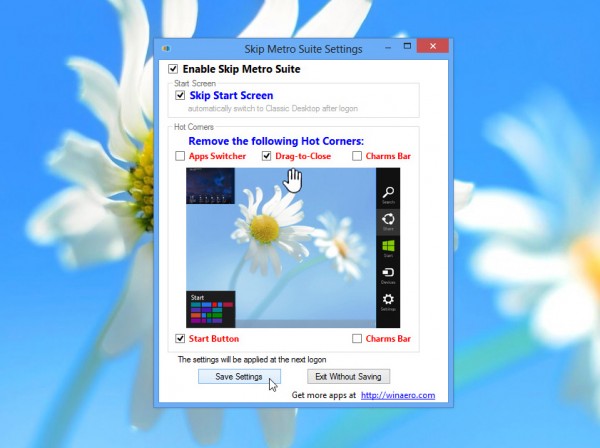
    Skip Metro Suite 3.0 allows you to do two principal things: first, you can bypass the Start screen entirely, so after Windows logs on you find yourself at the more familiar looking Windows 8 desktop. Sure, there are changes, but on the whole we like them. There are plenty of new features and improvements here to justify the update.

    Second, Skip Metro Suite 3.0 lets you selectively disable the hotspots at the edge of your screen, aimed at touchscreen users wanting quick access to the Charms bar, task switcher or Start menu. Disabling these means your mouse is free to roam at will into the corners of your screen without worrying about triggering something.

    And you can still access these elements by using their keyboard shortcuts: [Win] for the Start screen, [Win] + [Tab] for the task switcher and [Win] + [C] for the Charms bar. In short, the Modern UI is kept out of sight (and largely out of mind) – it’s there if you need it or want to explore it, but it won’t get in the way of your day-to-day.

    Everything’s achieved via a simple interface — just tick the options you want to disable, save your settings, reboot and they’re implemented. Better still, version 3.0 of this useful tool has been completely rewritten from the ground up, converting it into a tiny, standalone portable app with no third-party dependencies. Just fire it up each time you want to tweak (or reverse your changes).

    Version 3.0 also claims to have squashed all previous bugs and issues by being rewritten from scratch, and in lieu of an uninstaller utility comes with a new option for disabling the program entirely, so Windows 8 is free to perform as Microsoft envisaged.

    It’s all very useful, but it’s worth noting that you’re still left without the traditional Start menu (the [Win] + [X] menu is okay, but no real substitute). If you’re looking for all the features of Skip Metro Suite and the old Start menu, install the Classic Start portion of Classic Shell 3.6.5 instead.

    Skip Metro Suite 3.0 is available now as a freeware download for PCs running Windows 8.

  • Skype 6.3 for OS X and Windows are available

    Microsoft has released Skype for Windows 6.3 and Skype for Mac 6.3. Despite identical version numbers, both builds are independent of each other, and are released separately.

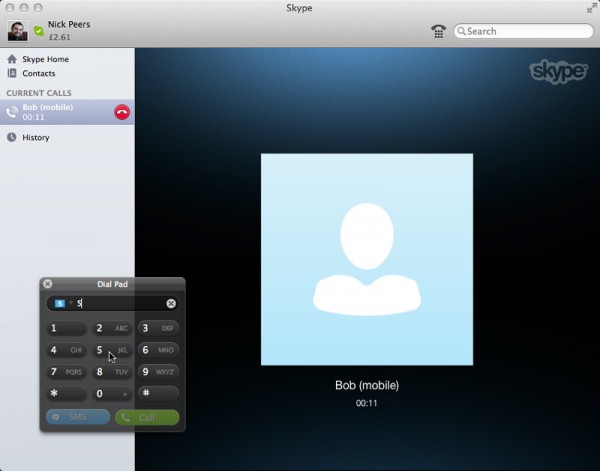
    While the Windows version is a straight maintenance release, Mac users gain a couple of new features: an in-call DTMF dial pad and the ability to view a slideshow of other participants in a group call when the user is the current speaker.

    When speaking in a group call — a feature limited to Skype Premium users — the user will see a slideshow of their fellow participants in one of two places: the call monitor or  – if someone else is screen sharing — in the main call view.

    The new in-call DTMF dial pad — triggered by clicking the dial pad in the call toolbar — allows users to generate DTMF tones when calling lines that use automated systems. DTMF support is already present in the Windows version.

    Notable resolved issues in Skype for Mac 6.3 include ensuring the participant list in a large group conversation shows correctly even when continually resizing the Skype window, and users will no longer be sent New Message notifications when the user returns from an offline status with “Do Not Disturb”. One known issue — birthday notifications failing to work — remains unresolved.

    Skype for Windows 6.3 contains more than a dozen notable fixes, including the correct display of tooltips on non-32bit monitor setups, ensuring all profile edits are saved and no longer freezing the program when opening a snapshot gallery containing a large number of pictures.

    Other fixes largely concern problems displaying certain screen elements, but as with Skype for Mac 6.3, an issue with birthday notifications remains unfixed.

    Skype for Windows 6.3 and Skype for Mac 6.3 are both available as freeware downloads. Other versions have also recently been updated – Skype for Windows 8 1.5 now supports file-sharing, for example, while you can also download Skype for iPhone 4.6Skype for iPad 4.6, and Skype for Android 3.2.

  • JAlbum 11 adds support for video clips alongside photos

    Web gallery creation tool JAlbum 11.0 has been released for Windows, Mac and Linux. Version 11.0 allows users to combine video with photos for the first time using the program. Features include support for over 160 video formats, tools for rotating and trimming clips, and preview image generation.

    Version 11.0 also improves existing photo-editing tools, updates existing skins and includes a number of developer-friendly improvements, bug fixes and general tweaks.

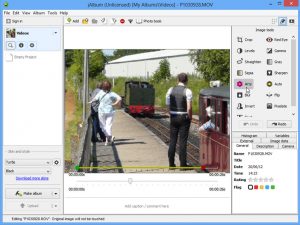
    The key new feature in JAlbum 11.0 is support for video clips in addition to existing support for photo. Clips can be imported from a wide variety of formats via drag-and-drop, and JAlbum is capable of automatically detecting and adjusting video orientation on import. Users can then double-click individual clips to edit them — in addition to using the existing image tools on offer, videos can also be edited by trimming the start and end points. Users can also choose a preview image by using the slider beneath the video itself.

    Video support can be enabled or disabled under Preferences, and users can configure which video formats are supported by the program via the Advanced tab. All videos are converted to MP4 format prior to uploading to the web for maximum compatibility, and all published albums containing movies are automatically tagged with “video”.

    Other changes to version 11.0 include the bundling of the Arty and AutoCorrection image tools with JAlbum itself. All images — not just those imported directly from digital cameras — can now be rotated too. There are also minor updates to the Turtle, Base, Mr.Burns and Lumen skins.

    Developers gain a new API for unzipping and downloading, plus closeupPath for supported videos has been set to slide page, which enables embedded video. Also added are videoWidth and videoHeight variables, available when video support is enabled. A fileCategory variable introduces file category support, and the blur filter now accepts defined radius and strength.

    Version 11.0 is rounded off by a number of bug fixes, new program icons and a new 128×128 web icon set. JAlbum 11.0 is a free-for-personal-use download for Windows, Mac and Linux. Published web albums are ad-supported — users can purchase a license or JAlbum hosting account to remove these. Licenses start from €27 for non-commercial use — a current saving of 30 per cent on the MSRP.

  • MediaPortal 1.3.0 supports Windows 8

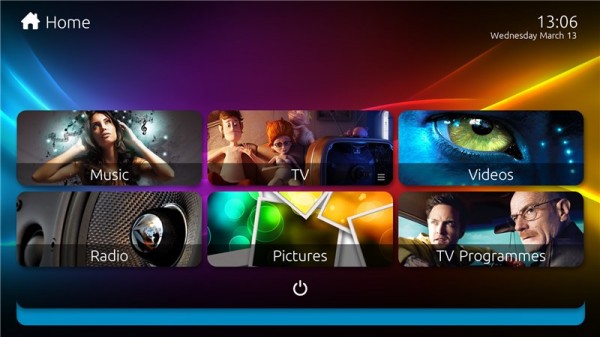
    Open-source Windows media-center tool MediaPortal 1.3.0 has been released after an extended period in Release Candidate mode. Version 1.3.0 debuts a fresh new skin, optimized for widescreen full HD displays, and also adds support for unencrypted Blu-ray disc playback.

    The new build also adds official support for Windows 8, improved settings dialog within MediaPortal itself and an option to install LAV filters, ensuring playback of most media formats.

    The new Titan skin is the first default skin optimized for a widescreen, 1080p HD display. The developers — Team Titan — have also created the Titan Extended extension, which adds support for many community plugins, including its own Titan Skin Updater for implementing future changes and bug fixes to the skin.

    MediaPortal 1.3.0 also improves its built-in skin engine, which will allow developers to offer multiple themes for each skin, including font, color and layout changes. Also added is a new menu-button control, support for user-definable skin settings and custom coloring.

    Version 1.3.0 is also the first release of MediaPortal to offer any form of native Blu-ray support, with support for menus and extras as well as playback of the main feature, although only unencrypted discs are currently supported.

    The new build also offers a fix for stuttering video playback through the inclusion of the MediaPortal Audio Renderer (MPAR). It aims to simplify the process of keeping video and audio in sync, and in addition to offering perfectly smooth playback will allow users to speed up the video stream to counter lower screen refresh rates.

    When first installed, MediaPortal 1.3.0 offers to install the LAV Filters extension by default — this plug-in includes most of the audio and video codecs required to play even obscure media files, and supports major video acceleration standards including DXVA, Intel QuickSync and NVIDIA CUDA. All codecs and filters can also be configured directly from the MediaPortal Configuration interface.

    Speaking of configuration, version 1.3.0 also integrates almost all available MediaPortal options within the main program’s own Settings section to minimize the need to exit the program and access the Configuration tool.

    The My Videos section has also been extensively reworked, with view screens for Folders and Database, movie and actor information screens and a configuration + scan option. Text file support for videos has also been added, allowing users to place a simple text file with the IMBid number next to its corresponding movie file.

    MediaPortal 1.3.0 is available now as a free, open-source download from Team MediaPortal for PCs running Windows XP SP3 or later.