Author: Tim Conneally

  • Steve Jobs: Why Flash sucks

    By Tim Conneally, Betanews
    Today, just as Adobe released a preview of Flash Player for Mac OS X that features H.264 video decoding, Apple CEO Steve Jobs released a letter called “Thoughts on Flash,” which explains the many reasons why there’s no Flash support on any of Apple’s mobile devices, and why H.264 is a better format.

    The letter is emblematic of Apple’s increasingly verbal approach to the frantically interested but highly misunderstanding public: “Adobe has characterized our decision as being primarily business driven — they say we want to protect our App Store — but in reality it is based on technology issues. Adobe claims that we are a closed system, and that Flash is open, but in fact the opposite is true. Let me explain.”

    Jobs then explains in very plain detail six different reasons why Flash is a technological weakness in Apple’s mobile realm. Those reasons may be broken down into very simple bullet points:

    • Flash is a closed, Adobe-controlled system.
    • H.264 is a “more modern format” for Web video
    • Flash would make iPhones, iPods, and iPads less reliable.
    • H.264 video consumes about half as much battery as Flash video.
    • Flash was not designed for touch interfaces.
    • Flash is cross-platform and not Apple optimized.

    Apple has made these points in the past, just not as a single list straight from the CEO’s own pen.

    Steve Jobs -- iAdJobs concludes his letter by saying, “Flash was created during the PC era — for PCs and mice. Flash is a successful business for Adobe, and we can understand why they want to push it beyond PCs. But the mobile era is about low power devices, touch interfaces and open Web standards — all areas where Flash falls short…New open standards created in the mobile era, such as HTML 5, will win on mobile devices (and PCs too). Perhaps Adobe should focus more on creating great HTML 5 tools for the future, and less on criticizing Apple for leaving the past behind.”

    Don’t be misled, this letter was written with the consumer in mind (specifically, the ones who read the New York Times interview with Google’s Andy Rubin this week.)

    In his interview with the paper, Rubin made a powerful statement about Android and Flash: “[Being open] means not being militant about the things consumers are actually enjoying.”

    Because Google’s Android operating system will offer full Flash 10.1 support in the “Froyo” (2.2) release, Rubin simply said Google is giving people what they want.

    Jobs’ letter, by contrast, is telling the public that “what they want” may not be the best for the iPhone.

    Copyright Betanews, Inc. 2010


    Add to digg
    Add to Google
    Add to Slashdot
    Add to Twitter
    Add to del.icio.us
    Add to Facebook
    Add to Technorati


  • A gentle hands-on with Mozilla’s first browser for Android

    By Tim Conneally, Betanews

    Fennec for Android homescreen iconAndroid apps crash. There’s no other way to say it. If you spend a lot of time installing and testing new apps on Android devices, you know it.

    So when Mozilla officially rolled out its first public version of the Fennec mobile browser for Android with various warnings that it is a very early “pre-alpha,” with experimental features that could require hard resets, I thought I knew what I was in for.

    Despite those warnings, Mozilla has actually created a version of Fennec for Android 2.0+ that is relatively stable for something so new. I used it all day today and it never crashed.

    Now, we’ve tested Fennec since it was only an Alpha release on Maemo in late 2008; and the first beta of that version launched just over one year ago, so Fennec is not exactly a brand spanking new concept here. But according to Mozilla’s Vladimir Vukicevic, “About three months ago we had nothing working or even building on Android.”

    The problem is that it’s stable like a tank…meaning it’s also big and slow.

    “Memory usage of this build isn’t great — in many ways it’s a debug build, and we haven’t really done a lot of optimization yet,” Vukicevic said yesterday. “This could cause some problems with large pages, especially on low memory devices like the Droid.”

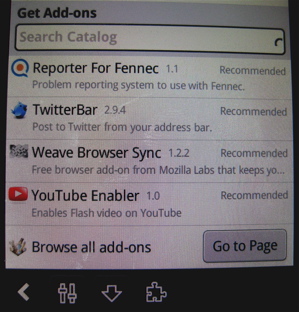
    Fennec for Android suggested add-ons

    This alpha build consumes a giant 31.67 MB of space, where the Opera 5 Mini Beta takes up only 1.8 MB. With Mozilla’s trademark add-ons, Fennec can grow to even greater size. And yes, it is quite slow.

    That said, there are a few major things to note about Fennec for Android 2.0.

    Design

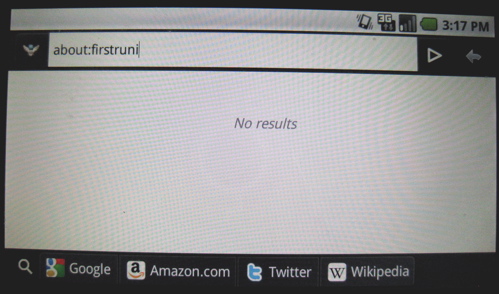
    Blank home screen, landscape, with add-ons, Fennec Alpha on Android

    When you open Fennec, all you get is the multi-purpose address bar across the top which has the Wyld Stallyns-esque title of “Awesome Bar.” It can be a search field, address bar, or even a status update field with the proper add-ons.

    The navigation and favorites bar runs down the far right side of the browser.

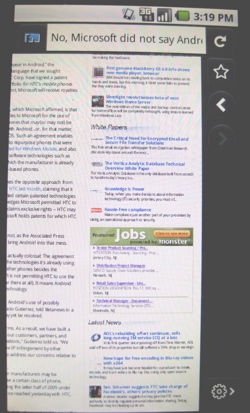
    To access either browser tabs or the navigation buttons, you have to scroll to the far left or far right of the screen. When you first load a page, it’s zoomed out to fit the browser so these controls are just out of view and accessible with a slight drag of the finger. But when you zoom in, it takes a bit more pulling to get to the sides. Zooming is quite unreliable at this point and it is so far only accessible by erratically double-tapping. On the Motorola Droid, the “back” and “menu” buttons have no effect on the browser at all, and the Alt key does not change the text over to the secondary keyboard. There is no soft key support on the Droid. Nexus One users can expect the virtual keyboard, however.

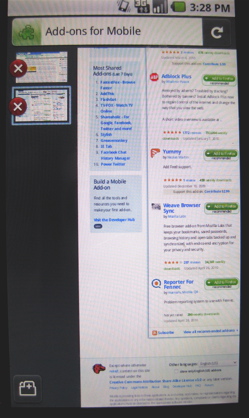
    Browser tabs run down the left side of the screen on Fennec for Android

    Weave Sync

    This browser add-on for Firefox is essentially the same as Opera Link. It takes your bookmarks, saved passwords, open tabs, and browsing history and keeps them synched and encrypted between your desktop and your mobile device. With the Fennec Alpha, this is enabled, but as an experimental feature.

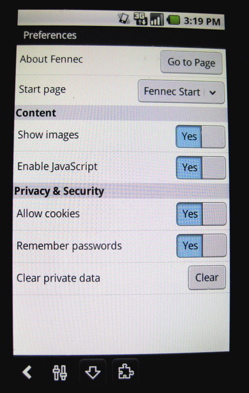
    Fennec Alpha for Android Settings

    Though Weave Sync is problematic and perhaps the number one complaint about the alpha thus far, it can be made to work.

    HTML 5

    I spent a good deal of time on HTML5demos this afternoon with Fennec, and found that it supports the following HTML 5 tags: geolocation, canvas, offline, events, and postMessage (both same domain and cross-domain) like Android’s native browser.

    An SQL database query repeatedly hangs, where Android’s native browser loads it up quite quickly.

    Interestingly, though, Fennec supports the contentEditable tag which enables rich in-browser text editing. This was heretofore unsupported by any of Android’s available browsers.

    It’s Android or Nothing

    Now that Maemo has morphed into Meego, and development on Firefox for Windows Mobile has been halted, the only mobile platform that Mozilla is actively supporting with Fennec is Android. Tristan Nitot, president of Mozilla Europe, said versions for iPhone and BlackBerry are not likely to ever come to fruition, and development on Symbian platforms is uncertain at present.

    Fennec for Android alpha download link

    To download Mozilla’s Fennec alpha directly onto your Android 2.0+ device, simply scan the QR code above. Custom ROM images are not supported with the present build and only a few Android devices have been thoroughly tested, so compatibility still varies.

    Copyright Betanews, Inc. 2010


    Add to digg
    Add to Google
    Add to Slashdot
    Add to Twitter
    Add to del.icio.us
    Add to Facebook
    Add to Technorati


  • AOL’s rebuilding effort continues, sells long-running IM service ICQ at a loss

    By Tim Conneally, Betanews

    Russian Internet investment firm Digital Sky Technologies will be acquiring ICQ from AOL Inc. for $187.5 million, the companies announced today.

    Former Internet service provider AOL purchased ICQ creators Mirabilis Ltd. for $407 million in 1998. At the time, the free ICQ chat client was one of the most popular pieces of free software available.

    Just a month prior to AOL’s acquisition of ICQ, New York Times writer Michelle Slatalla wrote, “The program transforms Net surfing from an essentially solitary endeavor into a social activity. One moment, I was sitting alone in my dark office, typing away at 2 a.m. Then ICQ informed me that one of my brothers…had come on line.”

    ICQ and its ilk of instant messaging clients were connecting people long before there were social networks that bind us to every distant family member and random acquaintance we’ve ever made. At the time it was still novel, and AOL’s purchase of Mirabilis constituted the largest foreign acquisition of an Israeli software company of all time.

    But twelve years and a generation of Web users later, standalone instant messaging clients are facing the growing challenge presented by clientless platforms such as those found in Facebook and Gmail and services such as Twitter, which are extremely popular on mobile devices. Reportlinker ties the growth of mobile social networking directly with the growth of mobile instant messaging.

    ComScore’s February 2010 Media Matrix said ICQ had more than 32 million unique monthly visitors. Twitter, by comparison, now has 180 million unique visitors per month.

    “As AOL continues its turnaround effort, we’re fortunate to find a great home for ICQ with DST,” Tim Armstrong, Chairman and Chief Executive Officer of AOL said in a statement today. “DST is a leading innovator in the Internet investment space and has a significant presence in the markets where ICQ is strong.”

    The final selling price could actually be a low-ball for AOL. It was rumored that the company was actually seeking between $200-$250 million for ICQ at the end of last year. In AOL’s earnings report today, the company said that its earnings fell by 59% in the first quarter against declining advertising and subscription rates.

    AOL is still in a period of recovery from its spin-off from Time Warner Inc. and is attempting to streamline its business into one driven almost entirely by advertising. At the end of 2009, a filing with the US Securities and Exchange Commission showed that this split will shrink AOL’s workforce by 33%, and in February, the company sold buy.at for approximately $16.4 million in cash. Currently, it is seeking “strategic alternatives for Bebo, which could include a sale or shutdown of Bebo in 2010.” AOL purchased the social network just two years ago.

    Copyright Betanews, Inc. 2010


    Add to digg
    Add to Google
    Add to Slashdot
    Add to Twitter
    Add to del.icio.us
    Add to Facebook
    Add to Technorati


  • Windows Embedded Standard 7 released, is it ready for TV yet?

    By Tim Conneally, Betanews

    First announced just two weeks after Windows Embedded Standard 2009 was released, Windows Embedded Standard 7 has at last been released to manufacturers, Microsoft announced today. The company says that new devices built on the platform should be arriving soon, and that we should expect to see some “exciting developments” in Windows 7 consumer devices at Computex in June.

    Though Windows Embedded Standard 7 can be used in dozens of different environments such as digital signage, thin clients, and industrial control systems, Microsoft has emphasized the value of this version to connected set-top boxes, TVs, and media players.

    Get Microsoft Silverlight

    DCSIMG

    “The addition of the Windows Media Center feature in Windows Embedded Standard 7 is driving the set-top box, connected media device and TV markets by providing OEMs with opportunities to develop uniquely branded experiences and service providers with capabilities to explore additional revenue streams with unique content through a centralized media hub in the home,” Kevin Dallas, general manager of the Windows Embedded Business Unit at Microsoft said in a statement today.

    While the video shown above does present a compelling user experience, Microsoft’s list of Windows Embedded Standard 7 partners today included: AOpen Inc., C-nario, DT Research Inc., Micro Industries Inc. and YCD Multimedia (for digital signage) HP and Wyse Technology (for thin clients) and Heber Ltd. for industrial control systems. There were no home entertainment product partners even mentioned today. Microsoft’s Embedded Group lists 28 different companies as OEM partners for set-top box production.

    Copyright Betanews, Inc. 2010


    Add to digg
    Add to Google
    Add to Slashdot
    Add to Twitter
    Add to del.icio.us
    Add to Facebook
    Add to Technorati


  • Introducing the first Symbian^3 device, Nokia N8

    By Tim Conneally, Betanews

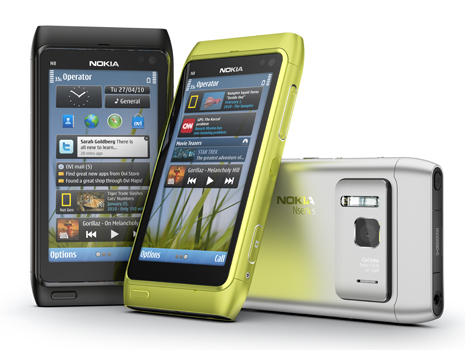
    Nokia N8

    The Symbian Foundation’s 100% open source mobile operating system Symbian^3 has officially made its debut today on the new Nokia N8 handset.

    Unlike Google’s Android, which launched on a mid-range smartphone in late 2008, Symbian^3 is being ushered into the market on a device with cutting-edge equipment.

    The N8 is built from a single piece of anodized aluminum and has a 3.5″ (640 x 360) OLED touchscreen. It has a 12 megapixel camera with 28mm wide-angle Karl Zeiss optics, a xenon flash, and the ability to capture 720p HD (16:9, 25 fps H.264/MPEG-4) video. There is also a forward-facing VGA camera for video calling.

    It has 16 GB of internal memory, and a MicroSD slot with support for cards up to 32 GB in size.

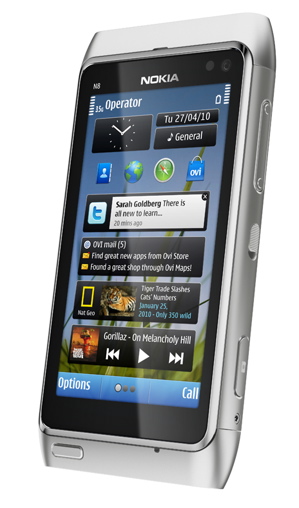
    Nokia N8

    In terms of wireless standards, the Nokia N8 supports quad-band GSM and WCDMA 850/900/1700/1900/2100, Wi-Fi with support for 802.11n, Bluetooth 3.0, GPS and A-GPS receivers, and an FM radio/transmitter.

    Physical I/O on the device includes Micro USB with support for USB on-the-go (a.k.a., phone-to-phone connections) HDMI, and a 3.5mm AV jack. It also includes an accelerometer, proximity sensor, ambient light detector, and magnetic compass.

    Despite all of the top-notch accessories, the N8 is reportedly based on a 680 MHz TI OMAP processor with 256 MB of RAM. It’s by no means a weak foundation for Symbian^3, but it’s not quite up to the latest gigahertz-level ARM processors being employed by other high-end smartphone manufacturers. We’ve contacted Nokia this morning to find out exactly which chip the device is based upon, and we’ll let you know what we find out.

    The N8 will be available for €370 in the third quarter of this year, reflecting Nokia CEO Olli-Pekka Kallasvuo’s statements last week that the company “will not ship [Symbian^3] before the quality meets the end user’s needs and demands.”

    However, Nokia’s video preview today shows a bit of what users can expect from Symbian^3 when the N8 is released later this year, including a three-screen home screen layout with drag-and-drop personalization, multitouch, 3D gaming and a unified social networking and Ovi service interface.

    Copyright Betanews, Inc. 2010


    Add to digg
    Add to Google
    Add to Slashdot
    Add to Twitter
    Add to del.icio.us
    Add to Facebook
    Add to Technorati


  • Marvell unveils 1GHz chips that consume just 1 watt of power

    By Tim Conneally, Betanews

    Chipmaker Marvell today debuted a new processor in its Armada family, designed for plug computing, for home, small business and industrial automation, and applications demanding ultra low power consumption.

    The Armada 310 system-on-a-chip is built with an ARMv5 processor between 500MHz and 1GHz that consumes less than 1 watt of power. Fixed on a 15 x 15mm FCBGA (Flip Chip Ball Grid Array), the Armada 310 offers tons of i/o options, such as two Gigabit Ethernet MACs, two SATA 2.0 ports, two PCIe ports, USB 2.0, and DDR2/3.

    Early last year, Marvell debuted its Plug Computing initiative with the release of its SheevaPlug development platform. The idea behind the initiative is that low-cost, low-power CPUs can be embedded all over the place to help manage and connect devices with each other. Marvell’s SheevaPlug wiki describes the plug computer as “a cross between an embedded platform, typically found in smaller devices like mobile phones, and larger notebook computer.”

    A popular consumer solution that works with Marvell’s design is the Pogoplug, a tiny server that connects to any USB storage device and makes their contents available on the Web. The little pink box can do this with just 5 Watts of power.
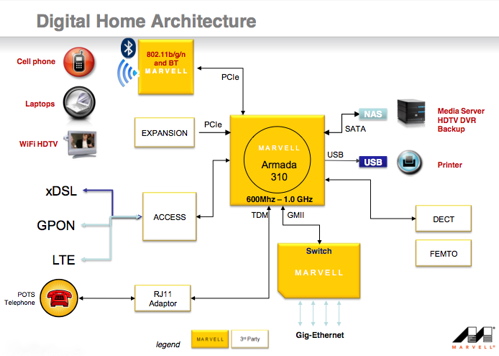
    Armada 310 Digital Home

    But now, the Armada 310 can do this sort of computing with just a single Watt of power, and though it’s ideally suited for plug computers, it can be employed in any number of smaller form factors, such as routers, microservers, dongles, PC cards, industrial, and medical systems.

    “By integrating extensive connectivity capabilities into a highly scalable ARM-based SoC, the ARMADA 310 offers designers the opportunity to create small-form factor, high-performance, devices that easily link to other systems and outside networks,” Tony Massimini, Chief of Technology at Semico Research Corp. said in a statement.

    The Armada 310 system on a chip is selling to manufacturers right now for less than $15 when purchased in bulk quantities. Marvell told us that we will begin to see solutions running on the chip in the second half of this year.

    Copyright Betanews, Inc. 2010


    Add to digg
    Add to Google
    Add to Slashdot
    Add to Twitter
    Add to del.icio.us
    Add to Facebook
    Add to Technorati


  • Another service named ‘Buzz?’ What gives?

    By Tim Conneally, Betanews

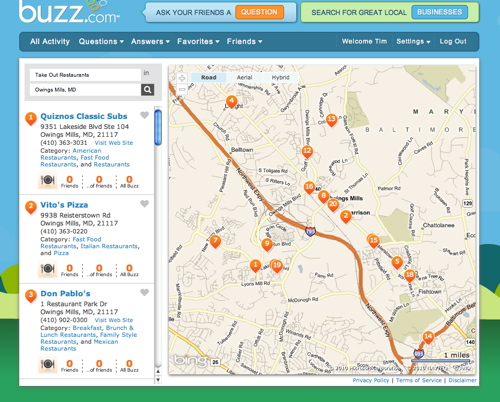
    Today, AT&T Interactive launched Buzz.com in beta, the company’s answer to entertainment search and recommendation site Yelp. If you think you’ve seen it before…well, you haven’t — not this, anyway.

    The word “Buzz” was employed liberally throughout the 1990’s to describe successful alternative rock groups. Pretty much any non-pop band that sold 500,000 albums in that era was classified as a “buzz bin” artist by MTV. By 2004, it was worn out.

    However, the term happens to be quite useful in describing a topic’s presence in social media, and therefore it has been taken as the name of several also-ran social media services in the post-2.0 Web.

    In 2008, Yahoo launched a service called Buzz which was a social news sharing service in the vein of Digg. Earlier this year, Google debuted the microblog Buzz which is a service in the vein of Twitter.

    “We recognize that people are already having conversations online about the best places to go and businesses to call. Buzz.com makes it even easier to discover the businesses your friends recommend,” said Charles Hornberger, the site’s General Manager. “Although the site is still in beta, we’re very excited to open it up to anyone who wants to see how we’re approaching ‘social search’ for the local marketplace.”

    AT&T's Buzz.com

    The service is based on local listings from AT&T’s YellowPages.com and includes more than 21 million business listings which can be accessed either from Buzz.com or the mobile version m.buzz.com. Business listings include the usual phone book style information, the ability for users to “favorite” them, or place 160-character comments in a field called “I like this place because…”

    Right now, the trait that differentiates Buzz.com from other social search services is the system of asking and answering questions. If you want to know what your friends recommend in a certain location, you just fill out the “What’s your favorite ____” field, and the question is then posted on your Facebook feed for your friends to answer.

    Buzz.com is accepting beta testers now.

    Copyright Betanews, Inc. 2010


    Add to digg
    Add to Google
    Add to Slashdot
    Add to Twitter
    Add to del.icio.us
    Add to Facebook
    Add to Technorati


  • 3G iPads, new AT&T data plans, arrive on April 30

    By Tim Conneally, Betanews

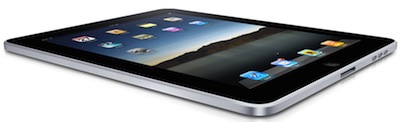
    iPad slanted
    In light of all the controversy about the lost iPhone prototype which was found and reportedly sold to the media, there was a brief loss of focus from Apple’s iPad tablet yesterday.

    Don’t worry, it’s back.

    Today, Apple announced that the 3G-equipped iPad will be available in U.S. retailers on April 30 at 5:00pm. Customers who pre-ordered their 3G iPads should expect them on their doorstep the same day.

    The 3G-equipped iPads are a little more than $100 more expensive than their Wi-Fi only counterparts, and have a suggested retail price of $629 for the 16GB model, $729 for the 32GB, and $829 for the 64GB. And since they will require a mobile data plan from AT&T, the wireless network operator will begin selling prepaid data packages tomorrow as well.

    AT&T has not yet announced the details of these prepaid data plans, but we expect to hear from the carrier in the next few hours. We’ll update this story with statements from AT&T as they arrive.

    Copyright Betanews, Inc. 2010


    Add to digg
    Add to Google
    Add to Slashdot
    Add to Twitter
    Add to del.icio.us
    Add to Facebook
    Add to Technorati


  • Palm’s browser-based webOS development tool leaves beta

    By Tim Conneally, Betanews

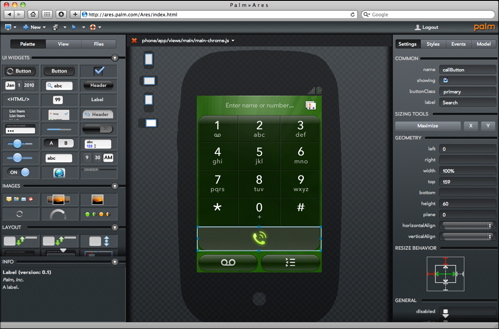
    Palm Ares

    In addition to its more traditional Mojo software development kit for WebOS, Palm introduced a novel browser-based development environment for webOS last December called Project Ares. Users can drag-and-drop to create apps in Ares, and then hit “launch” in the browser to package, upload and launch homemade apps on a USB-connected Pre or Pixi.

    Today, Palm alerted developers that the first full version of Project Ares has launched.

    Ares 1.0 includes, as Palm says, “lots and lots of new features.,” including Components, which are widgets that access low-level functions (service calls, sensors, etc.) without any user interface. These components can be dragged and dropped onto the design canvas where they become icons at the bottom of the screen that can be selected, configured, and called in a single line of code.

    Registered Palm developers can simply sign in to the Ares website to start working with it. Having the full SDK installed is recommended, but not mandatory.

    Copyright Betanews, Inc. 2010


    Add to digg
    Add to Google
    Add to Slashdot
    Add to Twitter
    Add to del.icio.us
    Add to Facebook
    Add to Technorati


  • Fourth-gen iPhone prototype leaks, looks like an EVO 4G copy

    By Tim Conneally, Betanews

    Apple’s aloofness is world famous. The company doesn’t exactly buddy up to the media like Microsoft does, and it doesn’t keep a running dialogue with the public like Google does. It communicates directly with only a handful of reputable media outlets, and uses a predictable routine of product launches where it can address the public in measured doses.

    One of these doses is Apple’s Worldwide Developers Conference (WWDC) expected to take place on June 28, 2010. In 2007, this was the event that Apple used to debut the original iPhone and its availability on AT&T. Then in 2008, Apple used WWDC to unveil the iPhone 3G. In 2009, it was used to unveil the 3G S. It is essentially Apple’s annual “iPhone event.”

    So with WWDC just a few weeks away, an interesting “leak” of the next version of the iPhone has turned up on the popular gadget blogs Gizmodo and Engadget.

    Apparently, this fourth generation iPhone prototype disguised as an iPhone 3G S was found in a San Jose, California bar, and according to blogger John Gruber, Apple wants it back.

    Of course, the authenticity of the whole story is in question because these blogs are privileged enough to have advance knowledge of Apple’s products and could have known about this update, but were legally bound to nondisclosure. Frequently, these sites use unauthorized leaks as a loophole to talk about a product they already know about, but cannot break themselves.

    The model has a slightly smaller screen than the iPhone 3G S and weighs 3 grams more. The edges are all much more severe than previous iPhone models, making it flatter and thinner overall. Reportedly, it has a front-facing video camera in addition to an improved rear-mounted camera with a flash, a micro SIM port, a noise-canceling mic, redesigned power and mute buttons, a larger battery and smaller internal components.

    The storage capacity has not yet leaked, and the phone has not yet been shown running. If this is what the fourth generation iPhone will look like, it is only a moderate change in design for the handset; but one which makes it look more like the HTC HD2 and EVO 4G.

    Copyright Betanews, Inc. 2010


    Add to digg
    Add to Google
    Add to Slashdot
    Add to Twitter
    Add to del.icio.us
    Add to Facebook
    Add to Technorati


  • Adobe now taking beta testers for Flash Player 10.1 and AIR 2.0 for Android

    By Tim Conneally, Betanews

    Even if Apple CEO Steve Jobs says nobody will be using Adobe Flash in the future, and that the world is moving to HTML5, there’s still a place for Adobe’s browser plug-in on Android, the fastest growing mobile platform out there.

    After putting Flash 10 on the HTC Hero last year, Adobe is ready to test the next iteration of Flash on all Android devices. Over the weekend, the company began accepting beta testers for the Android versions of Flash Player 10.1 and AIR 2.0.

    “There are going to be so many interesting things that you will be able to do on Android and there are also going to be many new skills that you will need to learn, especially if you are new to mobile design.” Flash Evangelist Lee Brimelow wrote in the Flash Blog over the weekend.

    To have access to Adobe Labs and participate in the betas, you must first sign up to be an Adobe.com user (The signup pages are located here and here,) and you will be notified when the betas will be available.

    The actual date that the beta will begin has not yet been specified.

    Copyright Betanews, Inc. 2010


    Add to digg
    Add to Google
    Add to Slashdot
    Add to Twitter
    Add to del.icio.us
    Add to Facebook
    Add to Technorati


  • HTC announces Verizon’s newest Droid

    By Tim Conneally, Betanews

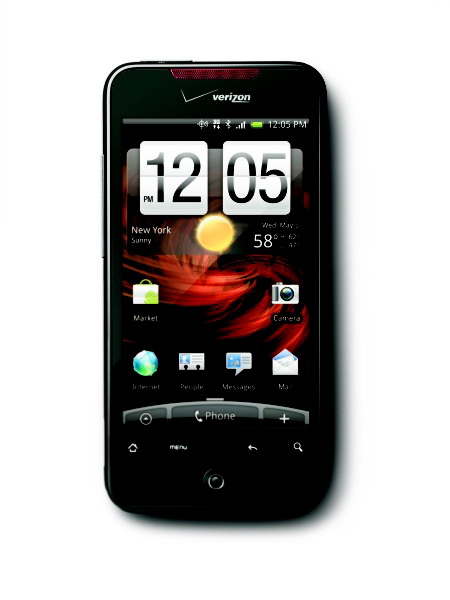
    Droid Incredible

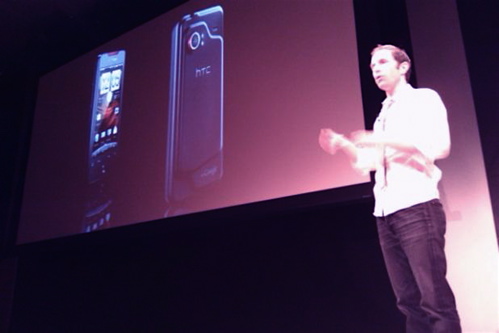
    At the 99% Percent conference in New York City today, HTC officially took the wraps off of its latest Android handset, called the Droid Incredible on Verizon Wireless.

    The device was accidentally leaked by Verizon Wireless, which posted a Web site showing the device and its availability earlier this week, so not much of today’s announcement was a tremendous surprise to fans of HTC’s smartphones.

    HTC Incredible debut (pic: HTC)

    The Incredible has a 1 GHz Qualcomm Snapdragon processor, a 3.7″ (480 x 800) AMOLED screen, Android 2.1 operating system with the latest HTC sense user interface, 8 megapixel LED flash camera, Wi-Fi, and CDMA radios. The price tag is $199.99 with a two-year contract with Verizon Wireless and mail-in rebate.

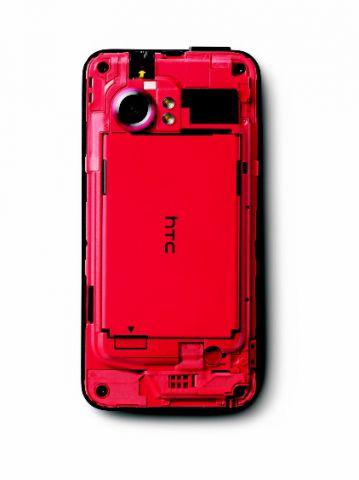
    Like the HD Mini and the HTC Desire, the Incredible’s chassis beneath the back panel is vibrantly colored. This is something of a trademark of HTC’s wholly-owned design firm One&Co, which made Microsoft’s striking Arc keyboard and mouse peripherals and the original HTC Touch Diamond.

    Droid Incredible

    Pre-orders of the Droid Incredible will begin on April 19 on Verizon’s Web site.

    Copyright Betanews, Inc. 2010


    Add to digg
    Add to Google
    Add to Slashdot
    Add to Twitter
    Add to del.icio.us
    Add to Facebook
    Add to Technorati


  • Hands-on with the WebStation Android Tablet

    By Tim Conneally, Betanews

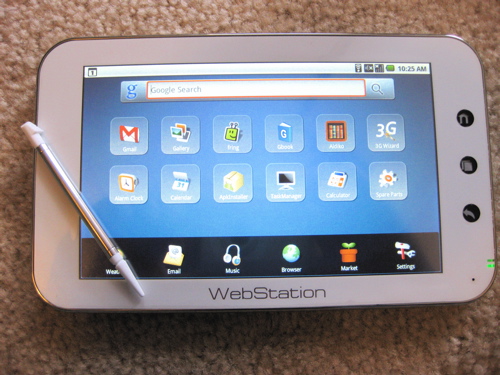
    Camangi Webstation with Stylus

    Expectations are a very dangerous thing indeed. As a user, if you expect a new device to do something — however unrealistic that expectation may be — you are bound to be disappointed when you find that it doesn’t.

    With Internet tablets, it’s not really clear what users should expect when they pick one up for the first time. A couple of years ago, they were built on truncated versions of desktop operating systems, so users based their expectations on their desktop experience. Now, tablets are being built upon mobile operating systems, and expectations are shifting.

    So I’m just going to start out by saying the Camangi WebStation seriously disappointed me at first. It did not live up to my expectations of what an “Android Tablet” should be. If I was expecting a device with a different purpose, I would surely not have been as disappointed as I was.

    Here’s what hit me about the WebStation when I first powered it up: There are only eight full-fledged apps built in, there’s no Android Market, there’s no YouTube…and the 7-inch touchscreen is resistive.

    If you would have asked me to describe a tablet computer five years ago, a stylus would have probably been the second thing in my description. But because this is 2010, and this is an Android device, I had just assumed it was designed for fingers.

    You can use it with your fingers, but it’s nowhere near as responsive as it is when you use the stylus.
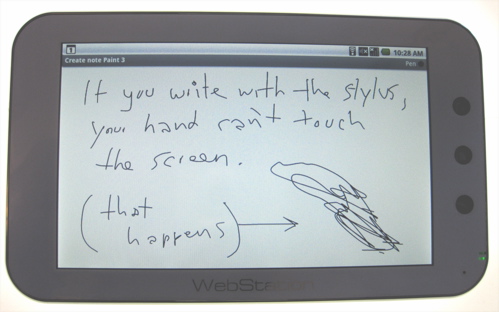
    Note Everything on WebStation

    The chassis is plasticky but mostly solid. The corner where the WebStation’s built-in microphone is situated has quite a bit of give to it, and if that were shored up, then it would actually be a very sturdy handheld. It’s just a tiny bit thicker than the iPhone, Nexus One, and Motorola Droid, so it does not feel flimsy.
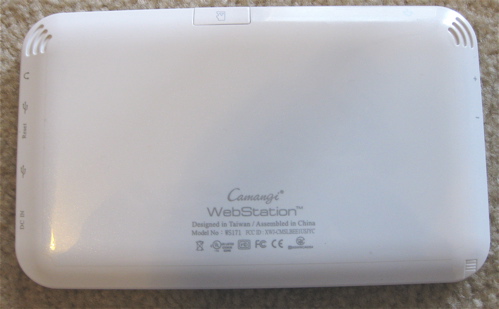
    Camangi Webstation (back)

    Unfortunately, though, the chassis layout is poor, and the swap from landscape to portrait mode is completely counterintuitive.

    Instead of flipping the device into portrait mode with the “home,” “menu,” and “back” keys across the bottom where you’d expect them to be, they have to be flipped the opposite way so they’re at the top. If you set the device up in portrait mode with the supplied kickstand, the USB 2.0 and mini USB ports are free for use along the top, but the volume rocker switch located on the opposite edge is completely inaccessible.
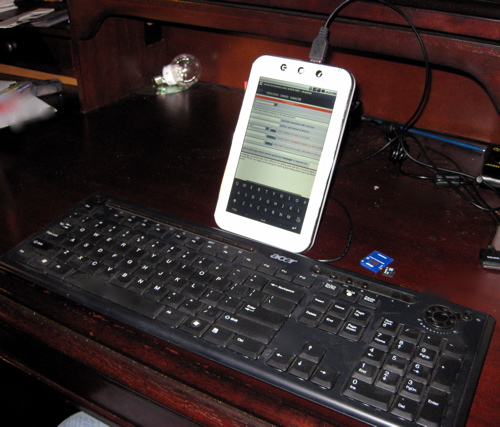
    Camangi Webstation with USB Keyboard

    USB ports are an attractive feature on this device, and you can hook up common peripherals to enhance your experience. Device support, however, is unpredictable at best. A USB keyboard and mouse were both immediately recognized and usable; but a USB webcam, USB-to-DVI converter, and Skype headset were not. WebStation has 802.11b/g wi-fi and an app for detecting USB dongles, but no built-in 3G wireless. The app recognized a Qualcomm 3G modem I tested with it, but I could not establish a connection.
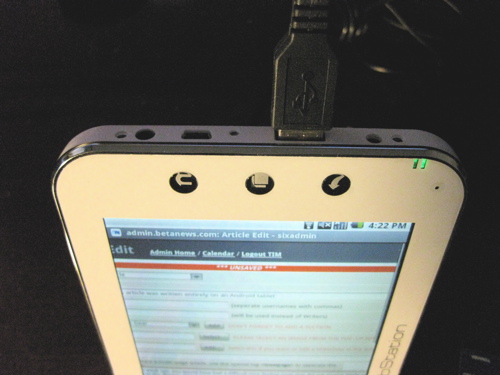
    USB connections could be a saving grace

    The WebStation’s home screen has a Google search bar across the top, and a dock across the bottom. The middle section of the screen is where twelve app icons or shortcuts are arranged; and when you add more, the screen is paginated. Unfortunately, the home screen does not have a portrait layout, and if you tilt the WebStation on the main screen, nothing happens.

    The browser, media player, photo gallery, and e-mail client on the WebStation are all from “Cupcake” (Android 1.5), and work just about the same. However, every single site the browser pulls up is first rejected as an untrusted source (even Google and Gmail!). So you have to click through and accept every one. For Web services that are usually Android apps like Twitter and Facebook, this quickly becomes tiresome.
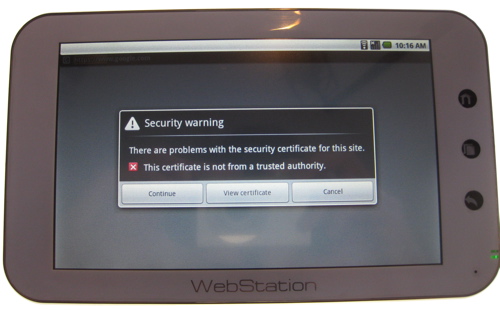
    Camangi Webstation Gmail error

    As I said before, Android Market is not available, so you can only download .apk packages from Camangi’s WebStation site or from other third-party Web-based app stores. On one hand, this puts a huge damper on the WebStation’s usability; on the other, it prevents it from getting apps it cannot handle. Since this is an international device, it also is subject to different Market rules in different countries. Omitting Android Market altogether simplifies this for the company.

    But it makes installing apps a supreme hassle. I tried to install a number of indispensable apps like Opera Mini and Pandora, and none of them worked. The only apps that worked were the ones that also happened to be available in Camangi’s store. This is rather unfortunate, because the two real third-party apps WebStation includes are pretty much the best parts of the device, if more apps were easy to obtain, the device could conceivably be much more enjoyable.

    The WebStation includes the Aldiko e-reader software and the Fring VoIP client as the main third-party applications.

    It wasn’t until I started using these that I realized WebStation can’t really compete in the arena of tablets, but when you look at it instead as an e-reader, it’s actually pretty decent.
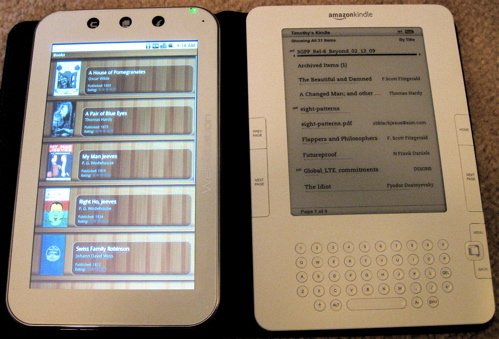
    Aldiko vs. Kindle

    The Aldiko app alone is enough to make a strong e-reader, but WebStation also includes a shortcut to the Google Books Web app on its home screen, so a lot of free content is easy to reach. Aldiko is linked to Feedbooks.com, O’Reilly EBooks, All Romance Ebooks, and Smashwords for free downloads, and it supports e-books encoded in epub, lit, pdf, mobi, rtf, txt, html, fb2, prc, odt, cbr and cbz. Any titles downloaded within the app are saved to the WebStation’s included 8 GB microSD.
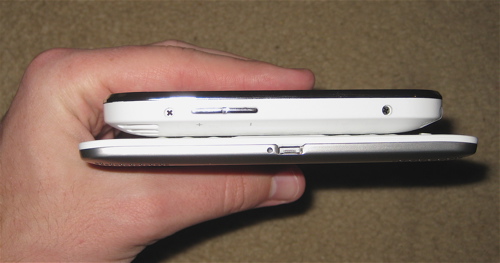
    Camangi Webstation and Kindle 2 thickness

    In terms of actually reading on the WebStation, it’s quite good. It rests easily in the hand or it can be stood up if you’re reading while on the treadmill or cooking. It is a lot thicker than Amazon’s Kindle 2, and its four-hour battery life can’t even hold a candle to the Kindle’s week long charge. However, the full-color backlit screen, full Web browser, and ability to install third-party software make the WebStation a bit more useful as a communications tool, an area where the Kindle 2 is still weak.

    With all this taken into account, I don’t actually think of the Camangi WebStation as a competitor in the burgeoning Android Tablet market, where big PC manufacturers like Asus, HP, and Dell will soon be launching products. Instead, it belongs in the Android e-reader market alongside the Barnes & Noble Nook and Spring Design Alex. At least among those, it’s competitively priced ($275 through Amazon.com) and comparably specced.
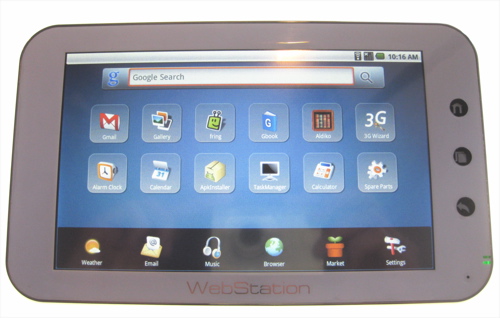
    Camangi Webstation homescreen

    (624 MHz Marvell PXA303, 128 MB Mobile DDR, 256 MB NAND Flash, included 8 GB microSD)

    Copyright Betanews, Inc. 2010


    Add to digg
    Add to Google
    Add to Slashdot
    Add to Twitter
    Add to del.icio.us
    Add to Facebook
    Add to Technorati


  • Spring Design’s Android-based Alex e-reader ships tomorrow

    By Tim Conneally, Betanews

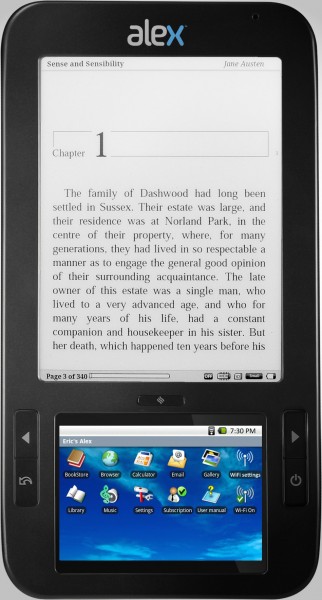
    Alex eBook Reader
    Spring Design’s Android-based, dual-screen e-reader named “Alex” made a sudden and noticeable splash when it was announced one day before book retailer Barnes and Noble debuted its Android-powered Nook e-reader, and then Spring Design sued them over it.

    We had a look at a pre-production model of Alex at CES last January, and Spring Design started taking orders for the $399 e-reader in February.

    The company has just announced that those orders will begin shipping tomorrow.

    The 11-ounce Android-powered e-reader supports ePub, PDF, HTML, and TXT documents on the upper e-paper screen, and the lower full-color touchscreen offers full Web browsing over Wi-Fi connectivity. Spring Design today said that there will be a model that supports EV-DO rev. A 3G wireless, and a multi-language model for international markets.

    Copyright Betanews, Inc. 2010


    Add to digg
    Add to Google
    Add to Slashdot
    Add to Twitter
    Add to del.icio.us
    Add to Facebook
    Add to Technorati


  • T-Mobile: After KIN, Sidekick lives on life support

    By Tim Conneally, Betanews

    Microsoft’s debut of the KIN yesterday has tech pundits talking about Microsoft’s mobile strategy, about the future of Windows Phone, and about the state of the “dumbphone” in general. It’s a compelling product. And because KIN comes from Sharp and Danger’s parent company Microsoft, the KIN drew a lot of comparisons to the Sidekick straight away. Yesterday, I called KIN the “Sidekick of the 2010s,” Ars Technica called it “Sidekick’s next of KIN,” and Wired said Microsoft wants to “update the Sidekick’s M.O. for a new decade.”

    But does this mean the T-Mobile Sidekick is finished?

    Since KIN is coming to Verizon, T-Mobile today said it is looking toward future devices that will keep the loyal Sidekick user base happy.

    “Since its launch in 2002, the T-Mobile Sidekick has been one of our most popular and successful family of devices in T-Mobile history. This success is largely due to its loyal base of Sidekick fans for which we will continue to innovate and deliver an exceptional experience,” reads a statement from T-Mobile today. “As Sidekick evolves, we are planning for moves toward new hardware and software platforms, which we expect will provide customers with a fresh, exciting user experience while maintaining the important features that contribute to a great messaging device.”

    T-Mobile says it will continue to support all the legacy Sidekicks, but it is working toward the next iteration of the experience. That could mean the KIN is coming to T-Mobile, or it could mean something completely different could replace the carrier’s popular messaging phone.

    Copyright Betanews, Inc. 2010



    Add to digg
    Add to Google
    Add to Slashdot
    Add to Twitter
    Add to del.icio.us
    Add to Facebook
    Add to Technorati


  • Apple’s Macbook Pro family gets a straightforward, hypeless upgrade

    By Tim Conneally, Betanews

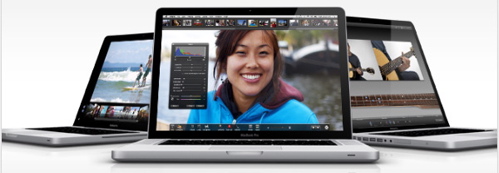
    MacBook Pro update 2010
    Since Apple is now a self-proclaimed “mobile device company,” its trusty line of notebook computers received an update today with none of the commotion that the iPad and iPhone recently earned. Still, Apple’s entire 2010 line of MacBook Pro notebooks has been updated with new CPUs and graphics processors, and a longer promised battery life. It may be small, but it is by no means insignificant.

    The big news about Apple’s notebook refresh last year was its overall drop in price. Cupertino got rid of the Macbook Pro’s ExpressCard slot and removable battery, but offered a two-hour bump in battery life for several hundred dollars less than previous models. It was advertised as Apple’s “most affordable lineup ever.”

    Today’s update improves the lineup in the following ways:

    13″ MacBook Pro: All now include Intel Core 2 Duo Processors, 4GB RAM, Nvidia GeForce 320M Graphics Processor. The 2.4GHz model with 250GB HDD costs $1,199, and the 2.66GHz model with 320GB HDD costs $1,499.

    15″-17″ MacBook Pro: All models now include the Nvidia GeForce GT 330M discrete graphics card and the Intel HD integrated graphics processor for balanced performance. These can now be switched automatically while in use. Additionally, the processors have been switched from the Intel Core 2 Duo to the 32nm Intel i5 and i7.

    The 15″ MacBook Pro comes in three configurations: 2.4GHz Core i5, Nvidia GeForce GT 330M and 320GB HDD ($1,799); 2.53GHz Core i5, Nvidia GeForce GT 330M and 500GB HDD ($1,999); and 2.66GHz Core i7, Nvidia GeForce GT 330M and 500GB HDD ($2,199).

    The 17″ MacBook Pro can be purchased with a 2.53GHz Intel Core i5, NVIDIA GeForce GT 330M and 500GB hard drive for $2,299.

    All of these notebooks feature what Apple calls “inertial scrolling,” or the ability to flick through long lists of content like one would on an iPhone. The harder the flick, the further the list scrolls. It doesn’t come to an abrupt stop, but rather slows to a halt.

    Altimeter Group analyst Michael Gartenberg today pointed out that all of this may seem like a very minor update, but what seem like little tweaks ultimately result in a better user experience.

    “What many other vendors miss is the attention to the small details that by themselves don’t matter all that much but add value and delight as the user discovers them,” Gartenberg wrote in his blog this morning. “Are they small issues? Sure, but they fix real problems. The need to switch graphic modes by logging in and out is not a big deal but it’s inelegant. It costs wasted cycles. It makes things harder for the user. Some engineer was bothered enough by this to fix it. It’s now a feature. It’s now the standard on how this function should work. In short, for those that use this feature, it will bring a smile to their face. To those who never used it, it’s one more way the computing experience became that much more seamless.”

    Copyright Betanews, Inc. 2010


    Add to digg
    Add to Google
    Add to Slashdot
    Add to Twitter
    Add to del.icio.us
    Add to Facebook
    Add to Technorati


  • Opera Mini arrives on iPhone at last

    By Tim Conneally, Betanews

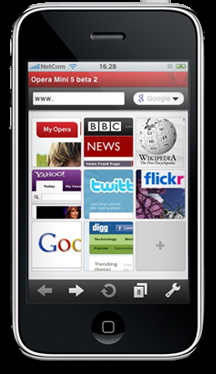
    Opera Mini iPhoneWay back in 2008, Opera Software’s CEO Jon Stephenson von Tetzchner said the company’s popular Opera Mini mobile browser was ported to the iPhone, but it could not be released because it competed with the iPhone’s built-in Safari browser.
    Then, last February, Opera Software actually started showing off its version the popular browser for iPhone OS as a run-up to its submission to Apple for App store review in March.

    Tonight, Opera announced that Opera Mini for iPhone was finally approved for distribution in the iTunes app store.

    Some have expressed surprise that the app finally passed Apple’s notoriously strict approval process, but really it was anything but a surprise.

    “We wholeheartedly believed Opera Mini would be approved. We knew we stood a good chance and were pleased to see it happen. The only surprise was the exact time the approval came. But we were confident the approval would come,” Opera’s Thomas Ford told us this evening.

    Now that it’s been approved (and downloaded thousands of times already), the iPhone can now begin to affect Opera’s comprehensive tallies of international mobile browsing habits which it releases as the State of the mobile Web every month.

    “I wouldn’t expect to see it this month, for instance, because we will be reporting March numbers. So when we report April numbers (in May), that would be the first time the iPhone would have a chance of being listed,” Thomas told us.

    Opera Mini for iPhone arrives alongside Windows Mobile, Android, BlackBerry, and S60.

    Here’s a quick look at Opera Mini on an iPod Touch alongside Opera Mini 5 Beta on a Motorola Droid.

    Copyright Betanews, Inc. 2010


    Add to digg
    Add to Google
    Add to Slashdot
    Add to Twitter
    Add to del.icio.us
    Add to Facebook
    Add to Technorati


  • Microsoft unveils KIN, the Sidekick for the 2010s

    By Tim Conneally, Betanews

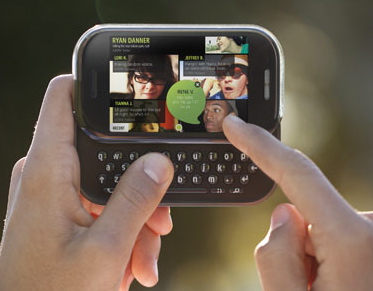
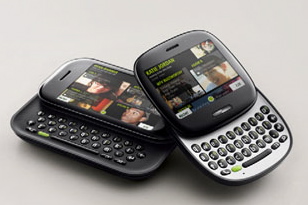
    Microsoft today debuted a whole new Windows Phone experience developed in conjunction with Sharp called KIN.

    Billed not as a smartphone, but as a “social phone,” KIN is like the Sidekick/hiptop concept updated to fit a lifestyle based around constant social media use, which is made up of four components:

    The Device
    Microsoft and Sharp's KIN, new Windows Phone

    Microsoft debuted two KIN devices today, simply called KIN One and KIN Two, both made by Sharp. One is a square-shaped touchscreen QWERTY slider with a 5 megapixel video camera and 4 GB of non-exapandable memory. Two is a more traditional landscape (480×320) touchscreen slider with an 8 megapixel camera capable of 720p video, and ships with 8 GB of storage. Like the Zune HD, both devices run on Nvidia’s Tegra platform.

    The UI
    Kin Loop

    The KIN user interface follows the design ethic Microsoft debuted with Zune and Windows Phone 7: big pictures, simple, easy-to-read text, and smooth animations. The home screen is called “KIN Loop” and is actually very similar to Motorola’s MotoBLUR for Android. It takes all of the user’s favorite feeds and makes them available in real time. Rather than keep all of the social networks as separate apps, they’re actually integrated into the phone, so contact information from all the different sites is kept in the user’s native address book.

    Social Sharing

    Since it’s meant to be a device for people who frequently share photos, videos, and status and location updates, KIN adds a drag-and-drop social media sharing as a central part of the UI. Called “The Spot,” a small green circle permanently lives at the bottom of the screen and takes whatever content you drag onto it and funnels it to your various social networks, or lets you share that content via MMS or e-mail.

    100% Content Backup

    KIN Studio is one of the more impressive features of Microsoft’s new device family. Any content from the phone — photos, messages, videos, and such — is automatically backed up, chronologically logged, and geotagged in this Silverlight-based Web app.

    All these things put together make up the foundation of KIN, but there is much more Microsoft stuff included. The first two KIN phones are also the first two real “Zune Phones;” that is, they include access to the Zune Marketplace and Zune Pass subscriptions, as well as Zune-powered music, and video and FM radio playback. Additionally, Local search, Web Search, and RSS functionality are all powered by Bing.

    Though a video in the KIN presentation briefly showed a folder called “Xbox,” we were informed that there is no Xbox Live integration with KIN as there will be with Windows Phone 7.

    Pricing of the Kin One and Kin Two have not yet been announced, but they will be available in May on Verizon Wireless in the United States, and some time “this autumn” on Vodafone in the UK, Germany, Italy, and Spain.

    Copyright Betanews, Inc. 2010


    Add to digg
    Add to Google
    Add to Slashdot
    Add to Twitter
    Add to del.icio.us
    Add to Facebook
    Add to Technorati


  • Adobe’s Creative Suite 5 packs in tons of new features

    By Tim Conneally, Betanews

    Adobe today celebrated the global launch of Creative Suite 5 (CS5), the first new version of the company’s suite of digital art, design, and development tools in nearly two years.

    Creative Suite 5 includes 15 of Adobe’s products: Photoshop CS5, Illustrator CS5, InDesign CS5, Acrobat 9 Pro, Flash Catalyst CS5, Flash Professional CS5, Flash Builder 4, Dreamweaver CS5, Fireworks CS5, Contribute CS5, Adobe Premiere Pro CS5, After Effects CS5, Soundbooth CS5, Adobe OnLocation CS5, Adobe Bridge CS5, Adobe Device Central CS5, and Adobe Dynamic Link.

    These are grouped into five different editions which attend to different needs: Master Collection ($2,599), Design Premium ($1,899), Design Standard ($1,299), Web Premium ($1,799), and Production Premium ($1,699). Of course, all of Adobe’s CS5 applications can be purchased individually as well.

    With such a huge simultaneous release, it’s difficult to cover every new feature included in all of Adobe’s products. Fortunately, Adobe has been slow and deliberate in showing off what’s special about CS5:

    -Photoshop, Premiere Pro, and After Effects now natively support 64-bit architecture.

    Adobe Premiere Pro CS5
    -Adobe’s Mercury Playback Engine includes Nvidia GPU acceleration to speed up rendering in Premiere Pro.

    Dreamweaver CS5
    -Dreamweaver finally supports PHP-based CMS like Drupal, WordPress, and Joomla!

    Adobe Flash Catalyst CS5
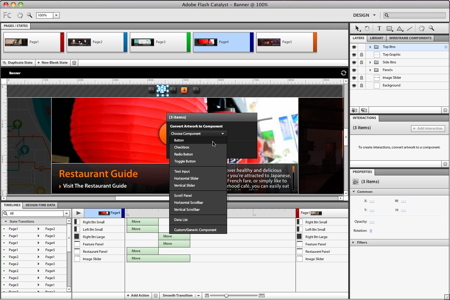
    -Flash Catalyst is a new addition to Creative Suite, though it is already pretty well-known as the tool that lets designers turn their graphics and animations into rich Web content automatically without the need for any coding.

    -Photoshop now includes a “content aware fill,” which intelligently fills in the background when you cut out or move an object in the foreground.

    Adobe Illustrator CS5

    -Illustrator includes new stroke and paint capabilities that let you adjust the thickness of any stroke at any point. Painting with vectors now includes bristle brush painting, which promises more realistic-looking results.

    The new CS5 software is available for pre-order now and will ship within the next 30 days.

    Copyright Betanews, Inc. 2010


    Add to digg
    Add to Google
    Add to Slashdot
    Add to Twitter
    Add to del.icio.us
    Add to Facebook
    Add to Technorati


  • Apple’s Game Center will catapult iPhone into video gaming big leagues

    By Tim Conneally, Betanews

    Today, Apple unveiled a major update to the iPhone OS which is expected to reach iPhone 3G/3GS and 2nd/3rd gen iPod users sometime this summer, and iPad users in the fall. While the banner feature of this release is its multitasking capability, the announcement that Apple will open a web-based gaming network akin to Xbox Live and PlayStation Network has potential to be the biggest coup.

    Game Center lets users invite friends to play games, start multiplayer games through matchmaking, track achievements, and compare their high scores on a Web-based game network. This is a huge addition to the iPhone ecosystem which puts it on par with the two major home consoles, and actually catapults it past BOTH Nintendo’s Wii and its DS.

    Currently, Nintendo offers Web-based gameplay on a title-by-title basis for its systems, but it has no unified service with gamer identities, records, or social invitations where users can form a community.

    In a recent interview, Nintendo of America President Reggie Fils-Aime dismissed iPhone OS as a viable gaming ecosystem. Too many users were downloading free games and had only low engagement levels, he argued.

    “If our games represent a range between snacks of entertainment and full meals, depending on the type of game, theirs aren’t even a mouthful, in terms of the gaming experience you get,” Fils-Aime said.

    But the addition of an online gaming service has the potential to turn the “mouthful” of iPhone OS gaming into something much more satisfying.

    Unfortunately, information about the upcoming service is still scarce. Apple’s iPhone developer site says it will be available “later this year,” but it does not say whether it will be a subscription service like Xbox Live, nor does it say how users will interact with it.

    Copyright Betanews, Inc. 2010


    Add to digg
    Add to Google
    Add to Slashdot
    Add to Twitter
    Add to del.icio.us
    Add to Facebook
    Add to Technorati