Author: Wayne Williams

  • Microsoft officially confirms what we already know about Windows 8.1

    Antoine Leblond, Microsoft’s corporate VP for Windows Program Management, has today made an official announcement on the Windows Blog detailing some of the many changes we can expect to see in Windows 8.1.

    There are no massive surprises in the reveal, which is titled “Continuing the Windows 8 vision with Windows 8.1”. We’ve already seen and covered most of them previously. But it is good to finally get an official peak behind the curtain.

    Windows 8.1 will, Leblond states, be Windows 8, but better. Microsoft is using the update to respond to customer feedback and “deliver improvements and enhancements in key areas like personalization, search, the built-in apps, Windows Store experience, and cloud connectivity”.

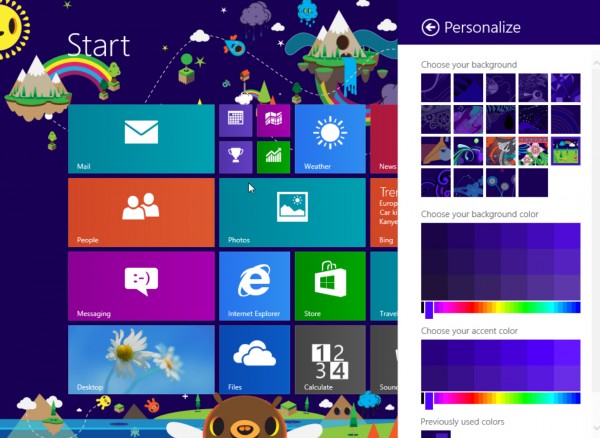
    Windows 8.1 will offer a greater selection of colors and backgrounds for the Start screen, including animated ones, and you’ll be able to use your own desktop wallpaper on the Start screen too. There’s a selection of tile sizes, including bigger and smaller options, and it will be easier to rearrange tiles, name groups, and delete apps.

    Apps you download from the Windows Store won’t be automatically added to the Start screen, instead they’ll appear on the Apps page and you’ll be able to choose which ones to pin. Which is great.

    You’ll be able to “turn your PC or tablet into a picture frame by making your Lock screen a slide show of your pictures” (stored locally or in SkyDrive) and take photos with a webcam right from the Lock screen without logging in.

    The search charm has been revamped and will provide global Bing-powered search results. “It is the modern version of the command line!” claims Leblond, which really fails to sell it.

    The built in Windows apps are being revamped, with big changes in store for Photos and Music in particular.

    The ability to run multiple apps alongside each other will make a welcome appearance in Windows 8.1 — something that should have been available from the start in Windows 8.

    You’ll be able to access PC Settings quickly without having to go through the Control Panel and save files directly to SkyDrive.

    The Windows Store has been improved too, to show more information about the apps on offer. Given how poor I found the Windows Store experience, anything Microsoft can do to improve it will be hugely welcome.

    Perhaps the best news for Windows 8 haters is the return of the Start button which I posted about earlier today. Antoine Leblond admits that touch hasn’t taken off quite as quickly as Microsoft obviously expected, and so Windows 8.1 will offer various improvements for the legion of keyboard and mouse users out there.

    “We’ve improved the way you navigate to Start with the mouse by changing the Start ‘tip’ to be the familiar Windows logo,” he says. Clearly Microsoft doesn’t want to use the word “button”.  “The new tip appears anytime you move the mouse to the bottom left corner of the screen, and is always visible on the taskbar when on the desktop. There are also options to change what the corners do, and options to boot into alternate screens. For example, if you prefer to see the Apps view versus all the tiles, you can choose to have the Start screen go directly to Apps view”.

    Leblond also confirms that Windows 8.1 will be available to download and try for yourself from June 26, timed to tie in with Microsoft’s Build developer conference.

    Leblond finishes by stating, somewhat defensively:

    Windows 8 has been a bold, necessary move towards mobility for the PC industry — pushing ourselves and our industry ahead with a touch-first approach that is redefining the PC as we know it, while offering the best of all worlds across any device at any time. Our commitment to that vision — and to always improving — remains the same as we stay the course of the evolution of Windows with Windows 8.1. We’ve been watching, we’ve been listening; Windows 8.1 will continue to build on what you love bringing the latest advancements in hardware, apps, cloud services and the OS to enable a unique experience in everything you do.

    So what are your thoughts on what Windows 8.1 has to offer? Excited, relieved, underwhelmed? Leave your comments below.

  • Rejoice! The Start button WILL return in Windows 8.1

    Ringo Starr admits he gets frustrated that all people ever want to talk to him about is The Beatles. The developers of Windows 8 must feel similarly annoyed that despite all the changes in the new OS, all anyone wants to talk about is the Start button.
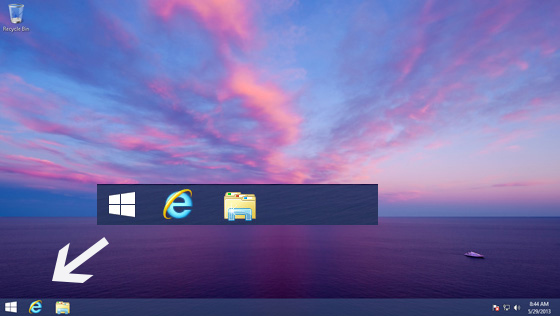
    Windows 8 gets a lot of things right, and a lot of things wrong, but the lack of a Start button and menu in the desktop is the one thing that seems to unite all the haters. It’s symbolic of how badly Microsoft judged our attachment to the status quo in its rush to embrace the future. Fortunately with Windows 8.1 Microsoft gets a chance to fix things and give us the OS we should have had in the first place.

    Windows 8.1 will sport a lot of tweaks, including additional tiles sizes, the ability to personalize the Modern UI, and split-screen apps. It also introduces new built in apps and Internet Explorer 11. You can find out more about what’s on offer here.

    But of course all anyone wants to talk about is the Start button, so let’s do that. Yesterday Microsoft blogger Paul Thurrott confirmed the return of the button in the Windows 8.1 Milestone Preview and showed the first screenshots of it.

    He also confirmed that boot to desktop was in the new build, and off by default. His posting was light and sadly pretty devoid of important details, like exactly what happens when you click that button.

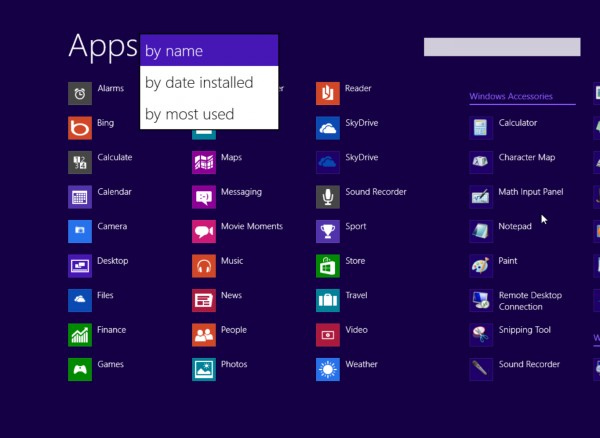
    However, Mary Jo Foley at ZDNet says reliable sources tell her the Start button will have an option to go directly to the Apps List (the list you see in Windows 8.1 when swiping upwards) instead of the Start Screen when clicked or tapped. So instead of a Windows 7 style menu, you’ll get a full screen of programs you can launch. These icons can be ordered by name, date installed, or usage.

    While a lot of people will hate anything that isn’t a straight up Start menu, I actually like this approach, and provided Foley’s information is correct (and I believe it is) I think Microsoft has actually come up with a decent compromise. Tap the Start button, and select the program/app you want. Sounds like a Start menu to me.

    However, the beauty of the Windows 7 Start menu is you can launch other programs, and access folders and settings without losing sight of any open windows. The Apps page is full screen, which will — understandably — annoy some people.
    What do you think about the news that Windows 8.1 will reintroduce the Start button, and is the suggested compromise good enough in your opinion? Comments below please.

    Photo credit: kurhan/Shutterstock

  • Amazon launches its own login service for apps, games and websites

    A few years ago, if you wanted to join a website you had to create a brand new account, enter your email address and come up with yet another password to try and remember. That’s all changed of course and now you can log into a vast amount of sites using existing credentials for services like Google, Facebook and Yahoo.

    Today, Amazon adds itself to the list of services you can use to gain access to other sites with the introduction of Login with Amazon.

    The official press release reads like the feature is something brand new and never been done anywhere before, which is quite amusing considering how late Amazon is to the single sign-on party. Still, another login option will always be welcome and provides a good alternative for anyone worried about how many sites they already access through Google and/or Facebook.

    “Login with Amazon enables app developers and website owners to leverage Amazon’s trusted sign-in solution, allowing them to focus on providing a great experience for their customers,” Michael Carr, Amazon Vice President, eCommerce Services said. “Amazon customers now have a hassle-free way to quickly and securely sign-in to apps, games and websites, without having to remember yet another password”.

    Amazon’s single sign-on feature can be used on websites and iOS and Android apps.

  • Xbox One to cost £600 in the UK — says Amazon

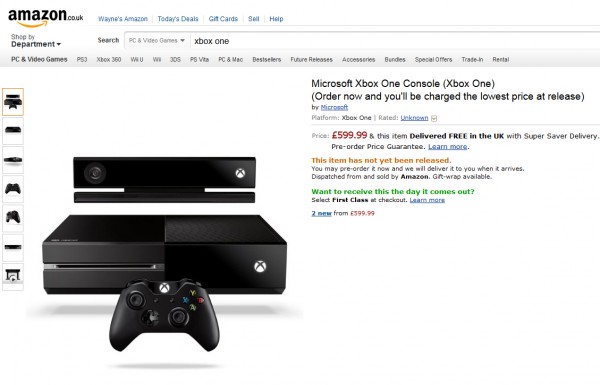
    Although Microsoft has yet to officially reveal the price of its next generation games console, Amazon has decided to set the figure at £599.99 on its pre-order page.
    This is considerably higher than most people would have expected — closer to £400 would have been a reasonable guess — and dwarfs the launch price of the Xbox 360 which cost gamers £209.99 for the core system back in December 2005.

    Of course just because Amazon says it will cost £600, with free postage, doesn’t mean that’s how much interested shoppers will need to pay for the next generation device.

    It’s likely to have been priced this high just so Amazon can send good news to pre-orderers when the real, much lower, figure is announced. The pre-order page does say “Order now and you’ll be charged the lowest price at release”, which is a good indicator that the figure Amazon has on its site is just a guestimate.

    Amazon.com has yet to put up a pre-order page, but expect it to appear shortly.

    How much would you be prepared to pay for the Xbox One? Will you be buying it at launch?

  • Give your Android device a Windows 8-style makeover

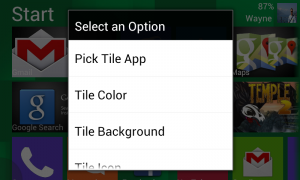
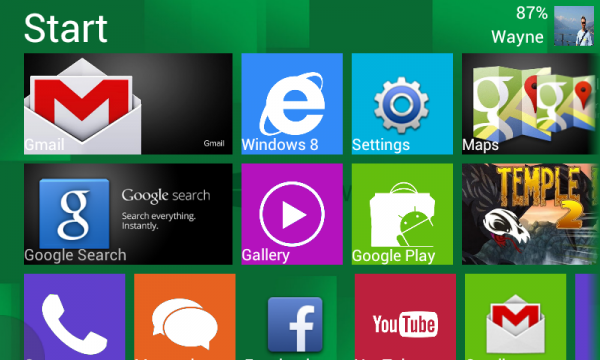
    The Best Windows 8 Launcher, from PRR Apps, is a new app designed to bring the Windows 8 Modern UI experience to Android devices.

    It offers two modes — tablet and mobile — with full screen support and is highly customizable. There are 150 downloadable images of apps you can use as tile backgrounds, as well as 50 Windows 8 style icons, and widget and live wallpaper support.

    Once the app is installed it will take a little while to set up the first tile block as you’ll need to select various apps, such as Settings, Gallery, and SMS, when prompted. You can have a maximum of five blocks with up to 18 tiles in each one.

    You’ll then need to further personalize things by setting your name and profile pic and adjusting the dimensions to suit your device’s screen size. You can also set the titles for the tile blocks and lock your phone into portrait or landscape mode. There’s an optional free tile images pack available to download.

    Tiles can be customized — you can stretch and shrink each one, change the colors and use your own images, if you wish. There’s no obvious way of reordering tiles however, and I’ve found the customize menu, which you call up by long pressing on a tile, sometimes refuses to appear.

    Still, for a first release, The Best Windows 8 Launcher is stable (the only comment so far on Google Play says the app won’t stop closing all the time, but it hasn’t yet crashed once on me) and well-designed. I expect the rough edges will be dealt with in future releases.

    The Best Windows 8 Launcher is available to download from Google Play now priced at $0.99.

  • Microsoft: Social networking is underestimated in the workplace

    According to a new survey conducted by research firm Ipsos for Microsoft, many employers are at odds with their employees when it comes to social networking.

    The global survey, among 9,908 information workers in 32 countries, found that while 46 percent of employees believe social tools help with productivity, 34 percent of companies undervalue the benefit of such technology in the workplace.

    As a result, 17 percent of respondents say they ignore their organization’s IT policy and install social tools on their work computers or phones, and 31 percent say they would be willing to spend their own money to buy social tools to help them do their jobs.

    The survey found the tools were most used for communicating with colleagues (68 percent), sharing and reviewing documents (50 percent), and communicating with customers and clients (47 percent), but they were also useful for growing a professional network (36 percent) and finding an expert or information within their own company (29 percent).

    Perhaps the most damning aspect of the survey was 39 percent of respondents felt people in their organizations just didn’t collaborate enough.

    “Just as email accelerated the pace of business in the ’90s, enterprise social will be the driver of greater agility and transformation in the 21st century workplace,” Kurt DelBene, president, Microsoft Office Division believes. “As we look ahead at how collaboration and communications continue to evolve, we believe the tools people use today — email, instant messaging, voice, videoconferencing, social — will come together and be deeply integrated into apps in ways that will speed collaboration and truly transform the way people work”.

    To go with the survey, Microsoft has launched a new site called The Worldwide Water Cooler, which allows people from any country to have their say on social tools and workplace collaboration.

    Photo Credit: ra2 studio/Shutterstock

  • Microsoft has a huge Windows 8 app problem

    A few days ago, cloud-based PC management service Soluto released a study into the habits of 10,848 Windows 8 users, and found that consumers really aren’t running apps all that regularly on the new operating system.
    According to Soluto, “on average, a Windows 8 user will launch a Metro app 1.52 times a day. Tablet users launch the most Metro apps at 2.71 times per day”.

    Soluto also found that among desktop and laptop users, 60 percent of people launch an app less than once a day. Presumably the only tile they click on the Modern UI is the one that takes them through to the desktop. Or maybe they have a third-party Start button installed and don’t ever see the new UI.

    I use Windows 8 for at least eight hours a day, five or six days a week, but I’ll admit I can often go for very long stretches without launching a single app. Although I have the free Adobe Photoshop Express installed in the Modern UI, I’ve only ever used it once. Even for simple tasks I prefer to launch the actual Photoshop from the desktop. I might not need anywhere the power it offers, but it’s good to have it on hand.

    And once I’m working on the desktop, I have no real need to go back to the Start screen because I have a browser window with likes of Outlook.com, Facebook, and Google Reader permanently open in tabs, on my second monitor.

    The Windows 8 app experience often isn’t a great one truth be told. Lots of apps are just websites presented differently or cut down versions of better programs. The few occasions I’ve used the Modern UI version of Internet Explorer I’ve felt as if it’s designed for people who don’t really use the web much.

    Low app usage, coupled with the lack of big name apps, is clearly a problem for Microsoft. And it’s a vicious circle. Lack of official apps, leads to lack of app use, leads to the lack of official app creation. Certainly, in the case of Windows 8 on the PC, there isn’t a great need for apps based on websites, when you can fire up the actual website and get the full experience. And not all apps need clicking on anyway — sometimes the information that appears on a live tile is all you need at that moment.

    Soluto’s survey also found that most of the apps people were using were the ones supplied with the operating system. Out of the top 12 the most tried and used apps, all bar one (Netflix, at number 8) were from Microsoft. (Just as an interesting aside, Soluto found the most engaging app was Yahoo Mail — the company’s reasoning for this is Yahoo mailers find it easier to use the app than work out how to set up their mail in Windows 8).

    So we’ve got a lack of official apps, people mostly using the ones baked into Windows 8, and a vast proportion of users just not bothering with apps at all. Which clearly isn’t good news for Microsoft — if Soluto’s findings are reflected across the entire Windows 8 user base, that is.

    Many of the BetaNews audience are Windows 8 users, so I’d find it interesting to hear your views on the app situation. Do you use apps regularly (and if so, how often and which ones) or do you tend to bypass them altogether? Comments below please.

  • Internet Explorer Q&A: The ‘browser you loved to hate’ is making a comeback

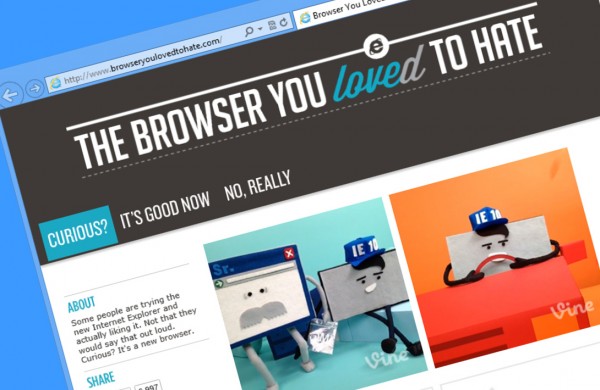
    Internet Explorer’s tight integration into Windows 8, coupled with the fact that IE10 is actually pretty good, means the veteran browser is enjoying something of a resurgence these days. Humorous advertising poking fun at the browser’s past (while distancing itself from it) has also encouraged many ex-users to take a fresh look.

    I chatted with Internet Explorer’s Marketing Manager Rebecca Wolff about the “Browser you loved to hate” campaign, asked her what major changes we can expect to see in IE11, and found out why embracing web standards is now a major priority for Microsoft.

    BN: Has the “Browser you loved to hate” campaign changed public opinion of Internet Explorer?

    RW: We’ve seen some great feedback from the community on the campaign and our videos like “Do you know this guy?” and “Child of the 90s.” In a little over a year since we launched the campaign, we’ve had over 35 million total video views worldwide, so we know we’re reaching some new users and reconnecting with some old ones, hopefully piquing their interest about the entirely new Internet Explorer. IE has been posting some of its highest share numbers in years the past few months, so that’s pretty encouraging too.

    BN: Are there any areas where you know you can be doing better?

    RW: When it comes to the web, it can never be fast enough and safe enough, so even where we’re leading in performance like hardware accelerated graphics and malware protection with SmartScreen, we know we’ll just keep investing. We see touch performance as the new measuring stick for fast, so we hold the bar very high for what great touch performance for the real web means — pages that pan and zoom with buttery smoothness and a user experience that really embraces the great capabilities of new mobile touch devices like Surface.

    BN: Any major changes to look forward to IE11?

    RW: We don’t have any additional information on future versions of IE or Windows to share today, but suffice it to say it’s going to build on a lot of the great work we did with IE10. Of course, if you want just a little hint, there’s always this Vine

    BN: Do you have any idea of how the browser is being used in Windows 8 — by which I mean, what percentage are using the Modern UI version vs. desktop.

    RW: We’re getting great feedback from our customers on both experiences, and the immersive experience in the Windows 8 UI is getting particularly high marks from people for things like gaming, watching movies or reading web content. People also tell us how much they like multi-tasking with it — snapping a web page alongside another app, for example. We don’t typically provide percentage breakouts for usage, but our internal telemetry from millions of Windows 8 users through the opt-in customer experience program shows that tablet users spend the majority of their browsing time in the Windows 8 UI, which is great since we built the modern IE10 experience to be perfect for touch on a tablet.

    BN: What are the challenges of developing two versions of the same browser?

    RW: IE is one browser — one HTML5 engine, one JavaScript engine, one networking stack — with user experiences that are optimized for both the immersive, touch-first Windows 8 UI and the Windows desktop. We have a point of view that your experience of the web shouldn’t be compromised on modern touch devices. Getting the touch experience right, with great touch performance for the real web, with pages that pan and zoom, a really fluid feel and a user experience that fully respects the needs of new mobile touch devices; that’s a challenge. The team wrote a blog on that recently that’s worth a read since it talks about some of the things we did to make sure the touch experience was really great.

    BN: What kind of innovations will we see in future versions of Internet Explorer?

    RW: We don’t have any specific information on future versions of IE to share, but touch will continue to be a big area of focus for us. As more and more touch devices come to market, we want to keep raising the bar on responsiveness and the best ways to experience web browsing on modern, touch devices.

    BN: Will we get to see the Chrome and Windows 8 style login and sync feature added to IE?

    RW: Again, we can’t speak to any new features coming to future versions of IE just yet, but I think our customers are going to like what they see. We do currently sync your IE Favorites (or bookmarks), Pinned Sites, and browser history across Windows 8 PCs that are connected to your Microsoft Account.

    BN: Why can’t newer versions of IE run on Windows XP?

    RW: Starting with IE9, we started to really take advantage of both a modern OS like Windows 7 and modern PC hardware — tapping into things like the GPU with hardware acceleration. With both IE9 and IE10, we want to ensure users have the best possible experience, which means being on modern hardware with a modern OS — so that we can offer features like hardware accelerated HTML5.

    BN: Why the sudden interest in HTML5 and other assorted open web standards?

    RW: We know all too well about the issues of a single browser ecosystem and the barriers that creates for innovation. We don’t want to go down that road again and so we really started to change things up with IE9. That was a significant release for us in terms of showing our commitment to supporting web standards, and we continued that with IE10, which has a 60 percent increase in supported modern web standards. We’ve also doing more to help developers write cross-browser and cross-platform with tools and resources like modern.IE, and providing examples — including code samples — of what can be done on the web through experiences like the The Hunger Games Explorer and Contre Jour. This will continue to be a huge focus for us moving forward too.

    BN: Any features you admire in other browsers?

    RW: We’ve been pushing support for modern web standards and interoperability across all browsers for some time now. It’s great to see the continued development to these standards and the specs that come out from standards bodies like the W3C from the folks at Google, Mozilla, Apple and Opera. You may have seen this recently with the cross-platform pointer events work. With this common goal of having the same markup run across all browsers, web developers can spend less time worrying about coding to a particular browser and instead spend more time building great web sites and web experiences. I’d also give a shout out to Mozilla’s efforts around privacy and how there are trying to better protect users online with privacy protections in Firefox.

  • Internet Explorer uses its ongoing Vine series to tease future WebGL support

    The leaked builds of Windows 8.1 provided a pretty strong clue that Microsoft intends to support WebGL in Internet Explorer 11, but so far the software giant has stayed silent on such matters.

    However, a new Vine clip — part of an on-going series titled “Not your Father’s Browser” — drops a pretty big hint that WebGL (Web Graphics Library) support is definitely on its way.

    The series follows the relationship between the old Internet Explorer, and his son, the modern version of the browser. Given the apparent age gap between them, it’s clear old IE has lived a hard life.

    In the latest vine, episode 9, IE Sr. holds up a plastic bag containing the letters H, T, M, L and the number 5, like it’s a drugs stash, and says “HTML5? What’s next WebGL?” and both browsers slowly turn to look at the camera. Cute. (You’ll want to turn on the sound to follow what’s going on.)

    You can catch up on the full series at Internet Explorer’s Twitter account.

  • Microsoft recruits Siri to highlight the iPad’s failings

    I’m not a fan of the “Scroogled” campaign, because Microsoft is just attacking Google rather than focusing on selling its own products. It’s a negative campaign dressed up as consumer championing, and I don’t think it does the software giant any favours.

    However, I do like the new Windows 8 commercial which is a clever attack on the Apple iPad (a device I own and love).

    In the 30-second spot, which is called “Windows 8: less talking, more doing”, Microsoft highlights things that the iPad can’t do that Windows 8 tablets can, and cleverly employs the voice of Siri to point out the failings of Apple’s device.

    The advert starts by showing an iPad sitting next to an ASUS VivoTab Smart tablet. As Windows 8’s live tiles refresh, Siri admits, “Sorry, I don’t update like that”. Next the VivoTab is shown running two apps side by side, while Siri bemoans the fact she can “only do one thing at a time”.

    While the ASUS device displays PowerPoint, the iPad shows a virtual piano keyboard and Siri suggests they “just play Chopsticks” instead.

    While I like the ad, and really appreciate its inventive use of Siri, it could be argued there’s no clear winner in it. The iPad appears simple, but the Windows 8 tablet overly complicated. And if Apple was to make a response it could simply show all the official apps that exist on iPad that are entirely absent from Windows 8, like Facebook, Twitter, YouTube, Gmail, Google Maps, BBC iPlayer…

    But that’s just my opinion. What do you think of Microsoft’s new ad?

  • Samsung Galaxy S4 ‘sells’ 10 million units in its first month

    There was never any doubt that the Galaxy S4 was going to be a huge hit. When my colleague Joe Wilcox asked BetaNews readers if they were likely to buy the new flagship phone, a whopping 70 percent said you were definitely considering it.
    A month after the phone went on sale — it launched globally on April 27 — Samsung has taken the unusual step of actually reporting sales numbers, something it hasn’t done in years. According to the South Korean tech manufacturer, the device has shifted 10 million units and is selling at an estimated four units every second, making it the fastest selling smartphone in Samsung’s history.

    To put that in context, the smartphone’s predecessor, the Galaxy S III, took 50 days to reach the 10 million milestone, and its predecessor, the Galaxy S II, took five months. The Galaxy S took even longer — around seven months.

    However, the Galaxy s4’s numbers are actually shipments to wireless operators, rather than sales to end users, and the iPhone 5, in comparison, sold (not shipped) five million units in its first three days — and was viewed by many to be something of a flop. It’s all about the expectations…

    “On behalf of Samsung, I would like to thank the millions of customers around the world who have chosen the Samsung Galaxy S4,” JK Shin, CEO and President of the IT & Mobile Communications Division at Samsung Electronics said, following the announcement. “At Samsung we’ll continue to pursue innovation inspired by and for people”.

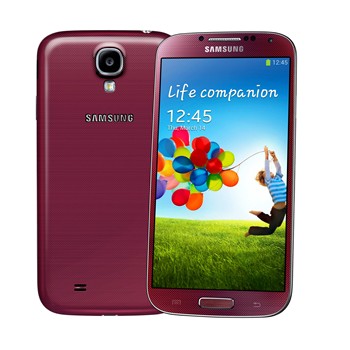
    The Galaxy S4 is available in more than 110 countries and will eventually be rolled out to a total of 155 countries. Samsung is planning to introduce more color variations, including Blue Arctic and Red Aurora, followed by Purple Mirage and Brown Autumn. There’s also the Google branded S4 to look forward to.

  • Microsoft releases a new ‘training brochure’ for Windows 8

    Microsoft certainly seems to be ramping up the help for its new operating system at the moment. First it uploaded a “Get to know Windows 8” video to YouTube, and late yesterday it published a “Windows 8 End User Training Brochure” in its Download Center.

    Unlike the video, the 36-page PDF guide is definitely new (there’s a screenshot from April 2013) and will prove a godsend for anyone struggling to get to grips with Windows 8 or Surface. Each of the multi-colored pages clearly and concisely explains how to use a particular element of the operating system, with the aid of large, friendly illustrations.

    There are pages on exploring the Start screen, rearranging apps and creating groups, information on the Charms, and changing settings for apps and your PC, and even cheat sheets for touch and mouse control, and keyboard shortcuts.

    According to the information on the download page:

    Windows has been reimagined to be all about you and your style of working. Put what matters most right on your Start screen, and get instant access to your people, apps, sites, and more, so you can spend less time searching and more time doing. No matter what you want to do, you can get it done quickly in Windows 8. Whether you’re collaborating on a large project, preparing for an upcoming conference, or traveling for work, you can use touch, mouse, and keyboard together–seamlessly–to do what you want, the way you want. This brochure will show you how to get around, navigate, manage apps, and personalize in Windows 8.

    The timing of the release is odd — Windows 8 has been out for seven months now — but still, better late than never…

  • KiSSFLOW adds quick action workflow buttons to Google Apps

    Last week at Google’s annual I/O conference in San Francisco the web giant launched a new feature called quick actions for Gmail which recognizes certain types of messages and lets you take immediate action on them directly from the inbox — RSVP to an invitation, or quickly see flight info for example.
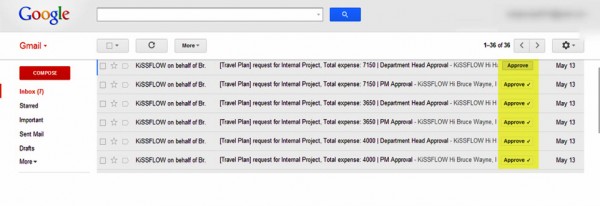
    Third-party developers are able to add their own actions, and OrangeScape announces it is doing exactly that with its self-service workflow builder, KiSSFLOW.

    KiSSFLOW lets users build business workflows that flow through various departments like Finance, HR, Marketing and Administration. Adding the quick action functionality will allow workflow users of Google Apps to respond to notifications, and complete tasks like “Approve”, by clicking the button displayed in the message’s subject line.

    “Working with its ecosystem of partners, Google continually adds exciting, user-centric new capabilities that take the maturity of the Google Apps platform to new levels,” said Dinesh Varadharajan, head of KiSSFLOW at OrangeScape. “With this release of new quick actions, KiSSFLOW is thrilled to work closely with Google to provide simple yet powerful self-service workflow for Google Apps customers. Unlike some of the other products that have a portion of their users on Gmail, KiSSFLOW users are 100 percent Gmail users — our entire user base is going to love this new capability”.

    KiSSFLOW is priced at $3.00 per user, per month and is available in the Google Enterprise Marketplace.

    Photo Credit: Dmitriy Shironosov/Shutterstock

  • Inteliscope lets you mount an iPhone on your favourite tactical firearm

    You can buy plastic guns designed to add a touch of realism to first person shoot-em-ups on the iPhone. Just slide in your device, and use the screen to view the action and pull the gun trigger to fire. The Inteliscope is kind of like that, but instead of letting you attach your iPhone to a plastic gun, it’s designed to be used on real tactical firearms.

    To clarify, it isn’t a game, rather it’s a “combination of a tactical rail mount for an iPhone or iPod and an app that brings critical ballistics and environmental insight to the shooter in real time”. Among the features on offer is the ability to “shoot around corners with no head exposure”. Handy.

    The device, designed and assembled in Sandpoint, Idaho, apparently attaches to any firearm with a Picatinny (Mil-STD-1913) or Weaver tactical rail and features a portable quick-release protective cover for your iPhone.

    The app’s on-screen HUD is packed with features including:

    • Intuitive User Interface
    • Custom Crosshairs
    • 5X Digital Zoom
    • Video Recording from the Shooter’s Perspective
    • Ballistics and Firearm Data
    • Built-in Compass
    • GPS Position
    • Local Prevailing Winds
    • Shot Timer
    • Flashlight and Strobe using Built-in LED

    The Inteliscope is scheduled to launch in June and is available for preorder now, priced at $69.99. There are versions for the iPhone 5, iPhone 4/4S and iPod touch.

    No word on an Android release, yet.

  • Missed yesterday’s big Xbox One reveal? Watch it here

    Microsoft yesterday took the wraps off its next generation games, TV and entertainment console at a special event held at the Microsoft Xbox campus and we streamed it live right here.

    Don Mattrick, President of the Interactive Entertainment Business at Microsoft, kicked off the event unveiling the Xbox One, a name that dispelled many myths about Infinity, 720 and 8.

    If you wanted to watch the live unveiling but were unable to due to more pressing things — like work perhaps — don’t worry. You can catch up on it here at your leisure. The hour long video is definitely worth watching, and because the presentation is no longer live, you can skip ahead to the really good bits.

  • Watch Microsoft’s next-gen Xbox announcement live HERE

    Microsoft is set to take the wraps off the next generation of its Xbox games, TV and entertainment console at a special event held at the Microsoft Xbox campus. But don’t worry, you won’t need to rush there and bribe your way in (you left it too late anyway, the fun starts at 10AM Pacific Time) as we’ll be streaming it live right here.

    It will be interesting to see what Microsoft has planned for us. In recent times it’s focused on making the Xbox more of an entertainment hub than a games console, and we’ll likely see the next-gen device continuing to head in that direction, while still delivering enough gaming power to see off the PS4.

    According to a blog post from Major Nelson, Microsoft will give us a “real taste of the future”, which sounds rather exciting. He goes on to add, “19-days later at the Electronic Entertainment Expo (E3) in Los Angeles, we’ll continue the conversation and showcase our full lineup of blockbuster games”.

    Right, enough talk — on with the show!

  • What will it take for people to care about Yahoo again?

    Yahoo is a media and technology giant. It is claimed that around 700 million people still visit Yahoo websites every month, and yet I personally can’t remember the last time I went to a Yahoo site, and I don’t know anyone who uses Yahoo for search, email, or news — or visits the fabled Yahoo home page.

    To me Yahoo mostly exists in the past, largely forgotten and gathering dust. I have photos stored on Flickr, but I haven’t uploaded anything there for ages. The last time I tried Yahoo — following a lackluster revamp of the site — I stumbled across broken link after broken link and gave up.

    The firm had a disastrous decade in which it lost a fortune for investors, turned down a $40 billion takeover bid from Microsoft, fumbled promising acquisitions (GeoCities and Del.icio.us to name just two), ignored mobile, alienated users, and employed CEOs who didn’t just take their eyes off the ball, they turned their backs on the ball altogether.

    Current CEO Marissa Mayer is doing her best to reverse the company’s slide into irrelevancy, and doing a pretty fine job of trying to repair the damage a decade of complacency and incompetency has caused Yahoo.

    In a year she’s overseen various acquisitions (such as MileWise, GoPollGo, Loki Studios, Summly, and Astrid), and under her stewardship Yahoo has launched a Summly-powered Android app, a weather app for iOS, and an improved Flickr app. The company has overhauled its mail service and rolled out new mobile apps for it, introduced tweets into Yahoo’s homepage newsfeed, and gained the rights to distribute the entire 38-year archive of Saturday Night Live.

    And yesterday of course Yahoo purchased Tumblr for $1.1 billion (with the promise not to screw it up) and made Flickr attractive once again with a fresh redesign and the offer of 1TB of free space.

    These last two moves are Yahoo’s most ambitious by far to date and lift the company back into the public consciousness. How long it will stay there is another matter. Can Yahoo make itself cool again? That remains to be seen.

    When Google acquired YouTube it purchased a rising star with a problem — the video site’s meteoric rise was fuelled by illegal content. Google’s greatest triumph was shifting YouTube’s focus to legal, user generated uploads.

    Tumblr, as good as it could be for Yahoo, is a sputtering star with falling page views and (according to web measurement company SimilarGroup) a major porn problem — 11.4 percent of Tumblr’s top 200,000 domains contain pornography. Yahoo has vowed to keep Tumblr independent, but it will be interesting to see how it addresses this issue. Mainstream advertisers aren’t keen on being associated with adult content.

    So What Next?

    Yahoo has taken the first steps to get back in the game, but it’s what happens from now that really counts.

    The media giant still has an identity problem (or should that be the tech giant still has an identity problem), it can’t seem to properly monetize its own web pages (and monetizing Tumblr sites will be even harder), there’s still a slapdash half-finished approach to many of its products, and a brief stroll around Yahoo this morning reveals many of its properties feel about 15 years old.

    I admire what Marissa Mayer has done with Yahoo, or is attempting to do with it at least, and later on today I’ll actually upload some new photos to Flickr, and maybe even update my thingsthatlooklikehitler Tumblr for the first time in a while.

    But I still can’t see how Yahoo intends to shake off its dusty old threads and come charging into the modern age. Where’s the innovation, the products that no one else offers? And where are the products everyone else offers? Being able to use Dropbox in Yahoo Mail is great, but where’s Yahoo Drive?

    It took a $1.1 billion purchase to get Yahoo back in the news. What will the company need to do next to keep people talking about it, to get people excited about it once more? Getting back to the question I asked initially: What do you think it will take for people to care about Yahoo again?

  • Ziff Davis snaps up NetShelter from inPowered

    NetShelter, a digital advertising network that focuses on tech publications, has been purchased by Ziff Davis for an undisclosed sum.
    The name and activities of the company may not be familiar to you, but it’s responsible for delivering nearly 16 billion ad impressions per year on 150 consumer and business tech sites, including BetaNews, SlashGear, TechSpot, CrackBerry, Android Central, MacRumors and Neowin.

    The purchase makes a lot of sense for Ziff Davis and adds at least 155 million global readers to the company’s growing ad sales portfolio.

    Vivek Shah, CEO of Ziff Davis, said: “The acquisition of NetShelter fully returns Ziff Davis to the dominant market position in the technology vertical. We will combine our best-in-class ad targeting capabilities and trading desk expertise with what our marketers need most today: High-quality, high-impact inventory that’s available at scale on trusted sites frequented by tech enthusiasts.”

    Photo Credit: bloomua/Shutterstock

  • Microsoft wants you to get to know Windows 8

    Speaking to the New York Times a couple of weeks ago, Tami Reller, Windows division CFO, admitted that the Windows 8 “learning curve is real” and said that Microsoft will be addressing the issue in Windows 8.1.

    Perhaps in response to that public admission, Microsoft has released a video showing how to use the polarizing operating system. Called “Get To Know Windows 8” it’s aimed at anyone who might be thinking of upgrading, or who needs a little guidance.

    The 3:25 minute video walks you through the Start screen, showing how to add, rearrange and remove tiles, and how to get to the desktop. It explains how to open the charms, as well as search, share photos, print content, and make adjustments to your PC.

    It’s actually very instructive, but it seems odd that it’s taken until now to release a video like this. And of course some would say it’s a failure of design that the operating system needs an instructional video in the first place.

  • Everything you need to know about Windows 8.1

    Microsoft is working on an update to Windows 8 and RT and will be releasing a preview version of it in June (in time for the Build developer conference), with the full release expected before the year’s end. The software giant has confirmed three things for definite about the update: its name (Windows 8.1), its price (free), and where you’ll be able to get it from (the Windows Store).

    But thanks to early build leaks and statements from Microsoft, we also know quite a bit about the many changes the new release will bring to the polarizing operating system. Here’s a rundown of what to expect.

    Tile Sizes

    The leaked 9374 build of Windows 8.1 showed two additional tile sizes — a larger one that’s double the size of the largest one in Windows 8, and a smaller one that’s a quarter of the size of the current smallest tile.

    Personalize

    The Settings charm has a new Personalize option that will let you change the Start screen background, and choose a different color and/or accent color.

    Split-screen apps

    Windows 8.1 will improve multi-tasking by letting you run two apps side by side, with each app taking up one half of the screen. If you have a large high-resolution display you’ll also be able to run three or four apps on screen.

    Swipe Up

    Swiping upwards on the Start screen will reveal your apps list, and you’ll be able to sort the apps by Name or Date Installed. A handy addition.

    Internet Explorer 11

    Microsoft’s browser is being updated and will include Do Not Track protection, upgraded developer tools, and will probably support WebGL and SPDY. The Modern UI version will have an integrated download manager.

    Support For Smaller Screen Sizes

    Microsoft reportedly believes there’s a demand for iPad Mini-sized tablets running Windows and so has been working to make sure Windows 8.1 displays well on smaller screens.

    Automatic Desktop Scaling

    The Windows 8 desktop display scaling issue should be fixed in 8.1, with the update offering auto scaling based on screen size and pixel density. A slider will let you adjust things to suit your tastes (and eyesight). You will of course still be able to adjust things manually.

    Assigned Access

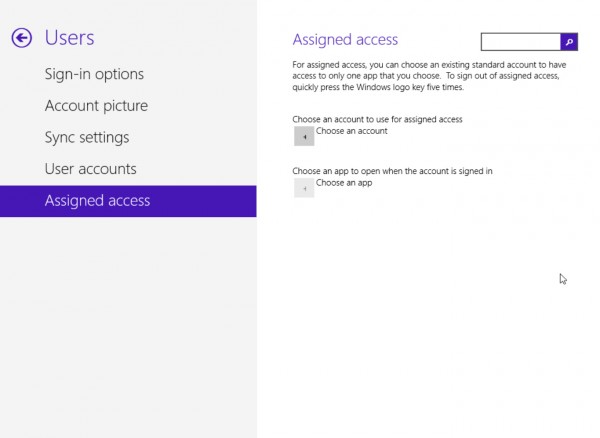
    The leaked 9374 build included a Kiosk Mode that lets you lock down Windows to a single app — making it useful for Media Centers, or for showing a particular app in a public place. In the most recent leak, 9385, the Kiosk feature was renamed Assigned Access.

    SkyDrive

    The leaked builds show SkyDrive as a more integrated option and suggest you’ll be able to back up your PC data to the cloud.

    Lock Screen

    Windows 8 can display status and notification information on the lock screen. Windows 8.1 adds the ability to add an alarm. It also lets you use the lock screen as a picture frame.

    New Apps

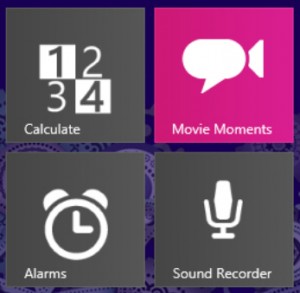
    The update will include some new and improved apps, such as Alarms, Calculate, Sound Recorder, and Movie Moments (this last one lets you trim a scene from a video, add captions, and share it with friends). Leaked build 9385 also revealed the Camera app is being worked on with quite a few changes, including a new panorama feature that looks like Photosynth.

    New Drivers

    Because what would a system pack update be without lots more of these?

    Improved Touch

    Touch will still be the primary focus in Windows 8.1, so expect lots of refinements here.

    A Start Button

    Microsoft hasn’t yet confirmed the return of the Start button in Windows 8.1 and there’s been no sign of it in any of the leaked builds. There have been lots of rumors about it though, with some people claiming it will be a traditional Start button with a Start menu, and others just that it will be there purely to open the Start screen.

    In an interview with The Verge last week, Tami Reller, Windows division CFO, admitted Microsoft was aware of the outcry for a Start button. “We have heard that, we definitely have heard that and taken that into account,” she said, before adding: “We’ve really also tried to understand what people are really asking for when they’re asking for that”.

    Oh dear. Has Microsoft really not grasped what people have been requesting since before Windows 8 even launched? A Start button, Tami, with a Start menu attached.

    Boot To Desktop

    Again, we don’t know for certain if this option will make an appearance in 8.1, but the ability to skip the Modern UI screen is a request Microsoft is more than aware of.

    Windows 8.1 – A Work In Progress

    At the end of last week, Frank Shaw, Microsoft’s Vice President of Corporate Communications said:

    Unlike a can of soda, a computer operating system offers different experiences to different customers to meet different needs, while still moving the entire industry toward an exciting future of touch, mobility, and seamless, cross-device experiences.

    We are going to keep improving Windows 8, as we do with all our products, making what’s good even better. There will be new devices, new use cases, new data that makes us think, “Hey, we should do more of this, or less of that”. And we will. There will be people who agree, strongly. There will be those who disagree, equally strongly. All good, all expected.

    With his reference to a “can of soda” Shaw is of course alluding to the New Coke comparison that a lot of people have made about Microsoft’s new operating system.

    It’s clear from what Shaw and Reller have both said that Windows 8.1 won’t be the full back down that a lot of people have been hoping for. Rather it will serve to refine and improve the Windows 8 experience to make the OS more palatable and easier to use, as well as introducing some appealing new features.

    Will it go far enough to persuade the doubters to make the switch from Windows 7 (or earlier)? We’ll just have to wait and see. As always leave your thoughts and comments below.