Author: Wayne Williams

  • Switching from Google to Microsoft, part 4 — In with the Bing

    Fourth in a series. Before I switched to using Bing full time my view of Microsoft’s search service was that it was a slightly less reliable alternative to Google, but with some smart touches. I’ve been using it for over a month now and — spoiler alert — I actually really like it. Although it’s far from perfect.

    As a Brit I do have a gripe with Bing though, and that’s it presents me with two choices. I can set my country to UK and get results that relate more to my life, or I can set it to the United States and get an all-round better search experience. Seriously, what’s THAT all about, Bing?

    To give you some examples — the American version of Bing has a rewards program. Join up, perform some searches and you can win an Xbox 360 prize pack. UK users have no such incentive. US searchers can connect Facebook to “tap into the wisdom of friends and experts across major social networks like Facebook, Twitter, foursquare, Quora, Klout, Google+ and more”. UK users? Nope.

    The Popular Now bar at the bottom of the screen on the US version has a variety of stories with images. The UK version — three or four plain text links. Although we do also get a link relating to the image of the day, and a link about something to do with Britain. So yesterday, on St George’s Day (the Patron Saint of England) there was a link about him. While Google UK had a St George’s Day doodle, Bing’s image was a cool interactive shot of Antelope Canyon, Arizona.

    There are other benefits to using the US version of the site too — the US results page is full of images, useful information and links on the right. The UK version just shows text ads and related searches. So for most of my time on Bing I’ve had my country set to the United States. Although, here’s an interesting thing — the number of results you get varies wildly depending on which country you’re set to. Run a search for “Google” for example, and Bing US claims around 75,800,000 results. Bing UK 2,110,000,000, or 1,650,000,000 if you choose English Only as the language. Very strange. I didn’t check all the results to find the reason for the difference.

    When I perform a search on Google it’s usually through my browser’s search box. I only go to Google itself when there’s a doodle worth seeing (like the cool St George’s Day one). I’ve been using Bing in the same way, but I’ve been going to the home page a lot more — partly to see the photo of the day (I’m a sucker for a great image, some of which can be downloaded and used as wallpaper) and partly to see what’s popular now. It also gives me quick access to previous searches I’ve performed (you can turn this off if you don’t want your searches logged).

    For the most part, in my day to day use, I no longer even think about the fact I’m searching with Bing, not Google. The results pages look similar, and the results are as you’d expect them to be. Occasionally Bing’s top result will be a slightly odd choice (it’s almost as if the site does this to check you’re paying attention), but all the results you’ll likely to need will appear on the front page, so the “correct” top choice (which Google pretty much always nails) is never far away.
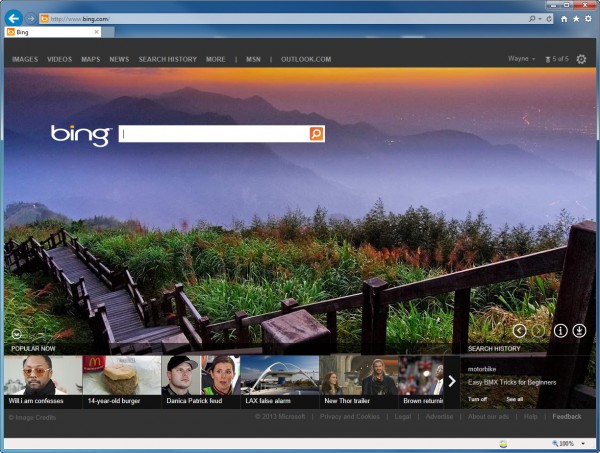
    In comparing Bing’s results with Google I’ve found the two sites often deliver the same results, just in a slightly different order. Bing has some great touches I really like. Search for an artist, like “will.i.am” for example, and Bing will provide quick links to his Twitter account and Facebook page and Klout score. You can also listen to his songs via the MySpace player.

    A feature I use all the time on Google is the ability to sort results by time — any time, past hour, past 24 hours, past week, past month, past year or custom range. Bing added a similar feature last month that lets you order results by past 24 hours, past week or past month. Needless to say this is only available on the US site (the UK site lets you sort the results by language or region).

    Beyond Search

    As for Bing’s other sections — Images is, for the most part, very good and offers a selection of choices to filter your search as well as a strip showing related topics. However, if you search for something less well known, such as Zombies Run Google’s results are far more accurate, and show a much deeper understanding of what you are likely to be searching for. Some of the connections Google makes are scarily well chosen. Some of the images Bing presents you with seem almost selected at random. Although, that said, sometimes Bing will come up with excellent images that Google doesn’t find. And if you’re a Pinterest user, Bing lets you pin images you find directly from the photo detail’s page.

    Video search is good, and you can sort results by length, resolution and source. Bing Maps is decent, but can’t quite compete with Google Maps. Its Streetside feature — while good — only covers a fraction of the places Street View does. Bing News (US) is on a par with Google News (naturally the UK version of Bing News is not as good) and other Bing services, like Shopping and Translator will suit most people’s needs perfectly. As you’d expect, the US site offers lots more additional elements — like Weather, Events, and Friends’ Photos.

    Summing Up

    So what’s my overall view of Bing? If you live in the US, it’s a very, very good search engine and you could easily use it as your primary choice for most things. If you live outside of the US, as I do, it’s sadly not as good and means compromising on your location.

    Is it better than Google? No. Is it as good as Google? No — at least not when it comes to results. It does, however, do a lot of things as well, and it does do some things better. The gap between Bing and Google has definitely closed since I last used it, and because Microsoft isn’t trying to force users to a specific social portal (as Google is with Google+) the integration with services that most people use — such as Twitter, and Facebook, gives Bing an edge I like.

    Would I recommend you switch to Bing? It depends on where you live and what you want from a search engine really. If it’s just straightforward, bang on the money results, stick with Google. If you don’t mind occasionally having to hunt a little harder, you use Windows 8 (optional) and appreciate deep integration with all the popular social networks, Bing could well be for you.

  • At last! BBC iPlayer Radio app finally available on Android

    The BBC tends to favor iOS when it comes to mobile apps. The broadcaster isn’t ignoring Android, it just takes a while to roll out apps for Google’s mobile operating system, and often those apps, when they do arrive, aren’t as slick or don’t have all the features found in the iOS versions.
    Case in point — the Beeb debuted the iPlayer Radio app for iOS seven months ago, but it’s taken until now for the Android version to appear on Google Play (it will also be available on Amazon’s app store “very soon”).

    If you’re not familiar with the app, it lets UK users tune into BBC radio stations live and catch up on radio broadcasts from the past seven days. It works over both Wi-Fi and mobile networks.

    So finally, Android owners get to enjoy iPlayer Radio. As long as they don’t have a Samsung Galaxy S III that is, because according to the BBC:

    Some Samsung Galaxy S III users may find that audio playback does not work for them for live or on-demand programmes. This is due to a problem with a specific recent firmware version for this device. Devices purchased independently of your network operator should not be impacted. A firmware fix has been deployed by Samsung but may take some time to be rolled out across all networks. Podcast and video playback should not be affected.

    Oh, and of course because the BBC only had an additional seven months to work on the Android app, on-demand and catch-up from local and regional stations is “not yet available”.

    The Android app does offer some improvements over the iOS version however. James Simcock, executive producer for mobile in BBC Radio, explains:

    On iOS some content is tucked beneath the ‘currently-playing content’ area on the screen, revealed by swiping upwards to show a ‘carousel’. However, on Android simply swiping horizontally will take you through all the content from the currently selected station.

    Other differences between the Android and iOS versions of the app include the use of the notifications panel which appears at the top of the screen when you are elsewhere on your phone, making it easy to get back to the app.

    There is also an alarm clock which works regardless of whether the app is active. Sharing programmes and tracks is also more ‘open’, using the extensive sharing functions of the Android platform to make programme URLs or artist and track names available to any application you have installed which can make use of such links.

    Having tried it out myself, I can confirm the app is really good, very slick with a stylish radio tuner dial, and I’ve found the quality of the sound to be excellent so far. If you live in the UK, have an Android phone, and love music, you should download the app now.

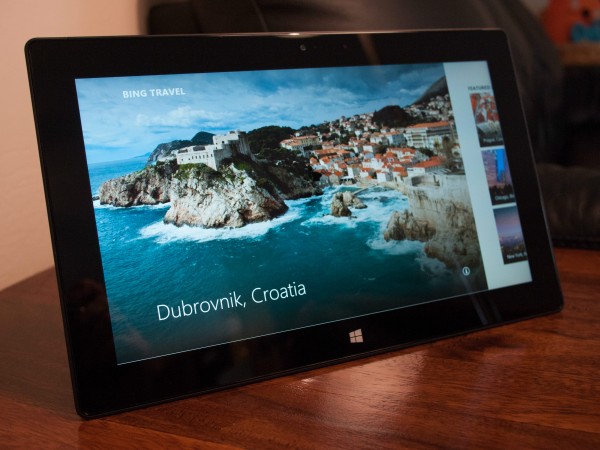
  • Surface Pro coming to the ‘rest of the world’ from next month

    If you live outside of the US and Canada, you might have been wondering when — or indeed if — Microsoft’s flagship Surface Pro tablet was going to appear in your part of the world.

    It’s been all quiet on the Surface front for a while. Microsoft announced back in February that it would be broadening the availability of the RT version of its tablet, introducing it into 13 more European countries, but since then we haven’t had any other real news. That’s all about to change though, as Microsoft has finally delivered an update regarding worldwide availability for its Windows 8 Pro powered device.

    According to the technology giant, Surface Pro will be available from May in the following territories: Australia, Austria, Belgium, Denmark, Finland, France, Germany, Hong Kong, Ireland, Italy, Luxembourg, New Zealand, the Netherlands, Norway, Portugal, Spain, Sweden, Switzerland, and the United Kingdom.

    Korea, Malaysia, Russia, Singapore, and Thailand will get the tablet a month later. It’s already available to buy in the US, Canada, and China.

    There’s no word yet on little things like retail availability (if it will just be available online or in actual shops) or pricing for that matter, but Microsoft says it will reveal all in due course closer to the actual launches. Which suggests it’s still ironing out the details. Don’t be too surprised if you can only buy it online in your part of the world though, as RT is only available from brick-and-mortar stores in very few countries.

    The RT version of the tablet is also getting expanded distribution and will launch in Malaysia on April 25th, in Mexico by the end of May, and in Korea and Thailand at some point in June.

    Announcing the news, Brian Hall, General Manager Microsoft Surface says:

    The enthusiasm for Surface has been fantastic, and we love hearing the stories of people who are making it the one device they use to work and play. This is what Surface was designed to do — simplify your life while letting you do more! In fact, one of our biggest challenges has been keeping our 128GB Surface Pro in stock. We’ve worked hard to increase availability, and most retail partners in the US and Canada as well as the Microsoft Store now have the 128 GB product consistently in stock.

    To those of you who have pressed for information — please understand that before making these announcements we make sure that we have the volume of devices in place and alignment with our retail partners to do each launch well. We value every Surface customer. We’re passionate about the products we’ve built, and we appreciate your passion for getting Surface in your market.

    So what do you think of the news? If you live outside of the US and Canada (and China for that matter) will you be snapping up a Surface Pro when it becomes available?

  • Why I love Raspberry Pi

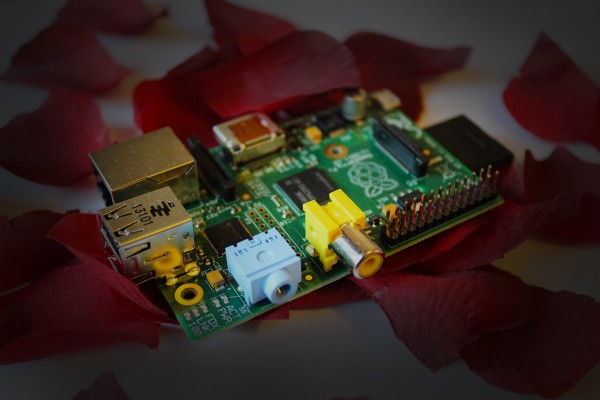
    Sixth in a series. I’ve always admired the concept, execution and possibilities of Raspberry Pi, the British designed and built world-conquering credit card-sized ARM GNU/Linux computer. But despite following the Raspberry Foundation’s every move closely, and frequently promising that I’d buy myself a Pi soon, for some reason I never did.

    A year came and went, and although a million Pis were sold in that time, I wasn’t one of the proud purchasers. But after my chat with the lovely Liz Upton, Head of Communications at Raspberry Pi Foundation (and wife of executive director Eben), I realized I had to rectify that mistake. Three weeks ago I finally ordered a Model B Pi, and minutes after powering it up, I knew I was in trouble.

    Setting up the Pi was easy as. I took a gamble that I’d have all the required peripherals and cables I’d need sitting around in boxes somewhere, and fortunately the risk paid off. I had a HDMI/DVI cable I’d never used, a new SD card that I’d yet to put in a camera (the card is used as the system drive), a spare USB keyboard and mouse, and a microUSB cable for powering the device. I could have connected the Pi to my HDTV, but instead I chose to use the second screen from my PC’s multi-monitor set up instead. That way I could easily use my PC and Pi at the same time.

    Once the OS (Raspbian “wheezy”, a Debian Linux port) was copied on to the SD card, and everything was connected up, I powered up the Pi, tapped in a few commands and loaded the desktop.

    Raspberry Pi uses LXDE (Lightweight X11 Desktop Environment) and comes preloaded with a selection of applications including the Midori web browser, a game and animation creator called Scratch, and IDLE/IDLE 3 (Integrated DeveLopment Environment), a Python programming tool.

    I explored the delights of the different bundled applications, launched the Pi store and downloaded some additional games and applications (OpenTTD, Freeciv, LibreOffice, BarracudaDrive, and Unreal Speccy Portable) and before I knew it three hours and a deadline had passed. Uh-oh.

    I logged off, yanked out the power (that’s the beauty of the Pi, turning it off just involves unplugging it) and went back to working.

    An hour later, I’d downloaded Minecraft — Pi edition, and was playing it on my new seductive little computer. I sought out some guides for programming Minecraft and gave that a try too.

    My programming skills, I’ve discovered, are so rusty they’ve pretty much seized up, but the Pi has been encouraging me to get things up to speed again. I downloaded the RISC OS (Reduced Instruction Set Computing), so I could relive my youth, tapping in BBC Basic commands long forgotten since my school days.

    Then, inevitably, I downloaded ChameleonPi and started emulating old computers on my new one.

    I’ve had my Raspberry Pi for three weeks now, and I don’t think a day has passed when I haven’t powered it up and played around with it for at least half an hour — and it’s usually a lot longer than that. I’m currently experimenting with turning my Pi into a media center using XBMC.

    I doubt I’ll actually create any great projects on my own, or become a proficient Python programmer, but that doesn’t matter. Raspberry Pi has helped me rediscover my inner coder and tinkerer, for which I’m grateful, and I’m looking forward to spending many more hours playing around with my new favorite piece of technology.

    Photo credit: Wayne Williams

  • Can social media help reduce the number of accidental fires? Maybe

    According to the London Fire Brigade, the number of accidental fires involving young professionals (aged 18-35) in the UK capital has dropped by an average of nearly two a week since the fire service started using social media to deliver fire safety advice.

    The Brigade set up its Twitter account and official Facebook page in 2009, and now has over 66,000 followers across both social sites.

    Of course while any reduction in the number of accidental fires is good news, it has to be put into context. According to the Brigade, social media use has resulted in 95 fewer fires a year involving its target demographic, but young professionals are still responsible for around a quarter of the 6,000 accidental house fires the Brigade attends each year. This figure was 1,515 in 2012, so the actual drop is just 6 percent, and there’s no way of knowing how much impact social media use actually had on that anyway.

    In a statement, London Fire Brigade’s Head of Media and Internal Communications Glenn Sebright says:

    When we started using social media  we were testing waters to see if social media could really work for a fire and rescue service.

    Sharing live updates about fire and other emergencies on Twitter, and photos of homes damaged by fires on Facebook has caught the attention of young professionals especially.

    We’re reaching people who don’t take notice of traditional public safety messages or advertising, challenging the way we share information at the London Fire Brigade and seeing real benefits as a result.

    The Brigade released the figures about the drop in fires ahead of its first ever social media conference which is being held today, aimed at sharing social media best practice with other emergency services, armed forces and public sector bodies.

    Photo Credit: BESTWEB/Shutterstock

  • Microsoft is concerned about your privacy — and wants you to be too

    Your privacy is Microsoft’s priority. At least that’s what the software giant is saying. According to Ryan Gavin, General Manager, Windows, the company takes its responsibilities for protecting your privacy very seriously.

    To prove this, Microsoft is launching a new consumer awareness campaign focused on online privacy. There’s a special information and tools page at www.Microsoft.com/YourPrivacy (which is so private it doesn’t currently exist), and an ad campaign to “kick start awareness and conversation”.

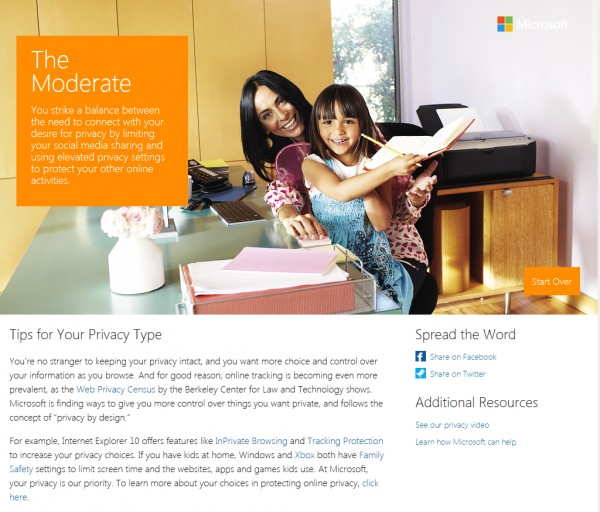
    You can also check how good you are at protecting your privacy by taking an online quiz at Your Privacy Type. This asks you questions such as where you access the internet from, which social networks you use and how regularly, how often you check them, who you’re connected to, the sort of information you post, and so on. At the end you’ll be shown your privacy type (I’m “Moderate” apparently) and present tips for improving things.

    As Ryan Gavin says:

    Very few of us believe that sharing some personal data online is a bad thing. It’s part of our everyday routines to fill out profiles, login to sites, and oftentimes provide personal information like our credit card or phone numbers in order to take advantage of all the web has to offer. In fact, the more personal and relevant the web gets, the better it can get.

    Yet, at some point, we all draw a line where we are uncomfortable sharing more. And when we think we’re being tracked, particularly by those we may not have a direct relationship with, our tolerance drops. And while tracking isn’t bad per se, we typically reach our information-sharing breaking point with very personal data, like items related to our kids or our health. That said, everyone is unique when it comes to what we feel comfortable sharing with whom.

    Providing customers with the tools and technology that allow you to have more choice and control is something Microsoft has been doing for quite some time, and today’s products like Internet Explorer, Windows, Xbox, and Outlook.com make it easier to manage and control your privacy.

    So what do you think of Microsoft’s new initiative?

  • Google Apps users can now get interactive in-app training

    Over five million businesses currently use Google Apps — a number that is growing all the time — and while getting to grips with the cloud-based productivity suite is fairly easy, there will always be some staff members who struggle.

    Toronto-based Synergyse, a startup comprised of former Google employees, hopes to make it easy for everyone to get the most out of Google’s suite by providing training directly inside each application.

    The new, interactive, measurable and scalable training system is aimed at consumers, businesses and schools looking to get more out of Google Apps. Powered by Google’s cloud platform it currently covers Gmail, Calendar and Drive.

    Co-founder Varun Malhotra says: “Google Apps is a robust solution, but a majority of people are not aware of all the features it has. We focused on making training that was easy to use and in-application in order to help the world learn Google Apps”.

    The training is priced at $10 a year for individuals or per employee (enterprises with over 5,000 employees can contact Synergyse for a quote).

    Synergyse is currently offering businesses and educational institutions a chance to win a lifetime license. All you have to do is visit www.synergyse.com and say how Google Apps has helped your school or business.

    Photo Credit: auremar

  • Do consumers really want touchscreen PCs? (Because I don’t)

    I own an iPad, which I love dearly. I use it for lots of things — games, email, browsing the web, social networking, writing, viewing photos and video, and remote accessing my PC. The iPad, like all tablets, is a true jack of all trades and a master of some too.
    But, try as I might, I can’t use it for “real” tasks. While it’s fine for writing small-ish articles on, I could never write a novel on it — and I’ve tried. For some reason, I just can’t connect with typing on a touchscreen in the same way I do when typing on a proper full-size keyboard. And I could never imagine attempting detailed Photoshop work on a touchscreen either (well, not without a fine stylus at least).

    Maybe it’s just because I’ve been using a keyboard and mouse combo for so long that the old control method has become part of who I am when working. I sit down in front of my PC and the mouse and keyboard are there, in my hands without my ever really having to think about what I’m doing.

    Touch is more deliberate. Of course I can zip around the iPad, switching apps, firing off emails and zooming in and out without thinking about it. It’s intuitive, but it’s not as fast or as comfortable. And when you put your fingers on the screen, you’re obscuring the view in a way a diminutive mouse cursor doesn’t.

    When I’m working I’m at least twice as quick on my PC as I am on my iPad, and I’m usually doing lots more tasks at the same time too.

    My point is while I love touch for lots of things, I can’t imagine it ever being the primary method of interacting with all the tech in my life and I really don’t see the purpose of touchscreen PCs.

    Is It Just Me?

    The problem I have is I just don’t think there’s a need for touchscreen on PCs. It adds a third control method that’s not required. And an awkward third control method at that. I know touch is useful for swiping through open apps in Windows 8, and performing other tasks in the OS (and admittedly it can be a little easier than using a trackpad at times), but I want to look at a screen directly ahead of me and interact with what it’s showing me without stretching my arms out to it.

    I asked around in our newsroom and my colleague Mihaita Bamburic agrees (so it’s not just me!), saying: “I share the same view. Touch is confusing because you have to reach out and then retract your arms in order to fully use it. I think we find it most convenient when the movement of our arms is done on the same level most of the time. Think about it, we move our left or right arm to the side to reach for the mouse and one stays on the keyboard at all times. It’s natural to do so, it’s habit. Now, with touchscreen PCs, we have to raise the left or right arm to do stuff, which I find tiresome in the long run”.

    Dire PC sales suggest — to my mind at least — that people don’t want to buy new computers with touchscreens and the touch-friendly Windows 8, because, well, they don’t need touchscreens. Touch is essential on tablets and mobile phones, but on PCs, where the issue of gorilla arm remains a problem, it’s not necessary, and it adds a lot of extra cost for no real gain.

    As Isabelle Durand, Gartner principal research analyst, says: “The majority of consumers remain unwilling to pay the price premium for touchscreen capabilities on PCs at this stage”.

    Frankenstein Hybrids

    Microsoft bet the farm on touch. It came up with an OS that works brilliantly on touch devices and not as well on bog-standard PCs (it’s not bad on them — far from it — but it’s not as good).
    There are rumors that Microsoft is considering allowing users to skip the Start screen and restore the Start menu in the next version of Windows 8, which a lot of mice and keyboard users will appreciate, and which is clearly a good idea, but PC manufacturers aren’t going to stop pushing touchscreens on us. It’s the future, you see. Isabelle Durand again: “Touchscreens and Windows 8 will represent key opportunities for PC manufacturers in the second half of 2013”.

    According to the latest Touch Panel Market Analysis Report from NPD DisplaySearch, which was released a couple of days ago, manufacturers believe the penetration of touchscreens in notebook PCs is going to grow from under 3 percent last year to over 12 percent this year. Growth triggered, naturally enough, by Windows 8.

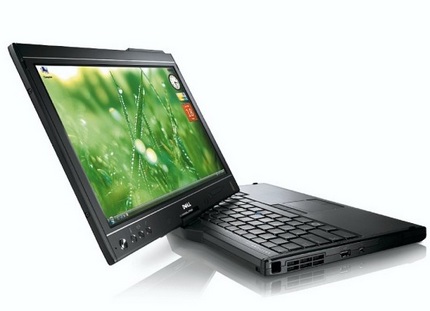
    To drive this growth many manufactures are coming up with new types of PCs, such as flip and convertible models that can be both PCs and tablets. Great, except isn’t that a bit like saying cars are great, and motorbikes are great, so here’s a car made up of two motorbikes stuck together. It can be an uncomfortable car, or it can be two slightly rubbish motorbikes.

    Er, can’t I just have a great car AND a great motorbike?

    Another analogy: touch is like 3D in the cinema. A few great movies came out which made excellent use of the third dimension — well, Avatar — and suddenly every film was 3D, including plenty which just didn’t work with an added dimension. Movie studios like 3D because they can charge more for people to see it, but consumers are less keen (a friend of mine runs a cinema and says 2D versions of movies are much more popular than their 3D counterparts, most of the time). 3D is a fad that’s now slowly dying out and hopefully touch — on devices where it really doesn’t serve any great purpose — will be too. But somehow I doubt it.

    So my question for you is this: am I just swimming pointlessly against the tide here? Should I be forcing myself to fully embrace touch and accept it’s here to stay — on all devices — or do you feel the same? Comments below please.

    Photo Credit: nrt/Shutterstock

  • Twitter #music arrives first on iOS, then the web

    There’s been a lot of talk and rumors flying about Twitter’s new music discovery service, but today the social network revealed the details and launched the first app for it.
    Based partly on the social site’s recent acquisition of the music startup We Are Hunted, Twitter #music is described as a “new service that will change the way people find music”.

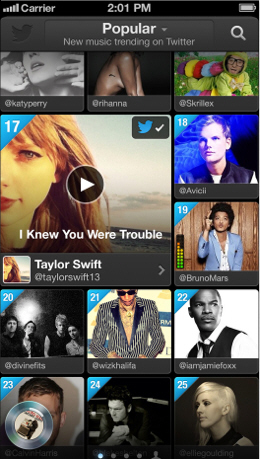
    It uses activity on Twitter (such as tweets and general engagement) to identify the most popular tracks and emerging artists and lets you listen to previews from iTunes. If you have a Rdio or Spotify account, you can log in to those and enjoy the full tracks.

    Twitter says it plans to add additional music sources in due course.

    The Twitter #music app, which is available for iOS now, offers four main tabs — Popular (new music trending on Twitter), Emerging (hidden talent found in tweets), Suggested (artists you might like), and #NowPlaying (music that’s been tweeted by artists and people you follow). You can join in on the recommendations by using the #nowplaying” hashtag to tell people what you’re listening to.

    When you discover new music you want to share with others, you just tap the spinning disc in the lower left corner to open the player and access the Compose button.

    The service is initially available in the US, UK and Ireland, Canada, Australia, and New Zealand, with more countries being added over time. Although the app is only for iOS right now, Twitter says it will be bringing its service to Android. No word on any plans to introduce it to Windows Phone or BlackBerry, however.

    The web application will be open for everyone later today and can be accessed at music.twitter.com.

    According to Twitter’s official announcement, “Twitter and music go great together. People share and discover new songs and albums every day. Many of the most-followed accounts on Twitter are musicians, and half of all users follow at least one musician. This is why artists turn to Twitter first to connect with their fans — and why we wanted to find a way to surface songs people are tweeting about. We offered music artists an early look at the service. You can see some of their reactions below. We hope you like it, too”.

  • Give your Android smartphone a new lease of life with these free apps

    If you don’t look after your computer, it will start to slow down and misbehave. Smartphones too can get clogged up and begin to lag as the amount of storage space and available memory starts to diminish with use.

    There are lots of good, free apps available that you can use to make sure your Android (or iOS) device is running at peak performance. Here are some of the more recent.

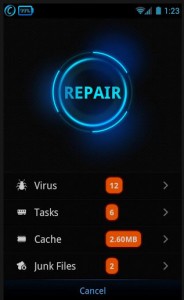
    IObit, which is best known for its excellent Advanced SystemCare suite for Windows, has a useful all-in-one Android security and performance optimization app called Advanced Mobile Care.
    This performs real-time virus scans and offers a range of handy tools including Anti-theft, Battery Saver, Game Speeder, App Manager, Task Killer, Privacy Locker, Privacy Advisor and Cloud Backup. It works with most devices running Android 2.2 and up.

    I generally have to charge my smartphone pretty much every day, which can get annoying. Battery Doctor, available for both Android 2.2+ and iOS 4.3 and later, can help prolong battery life. There’s a one-tap power saving option which will automatically optimize battery usage, and the app can tell you exactly how many more minutes of battery life you have left. You can also use it to turn off power draining features to give you an extra boost.

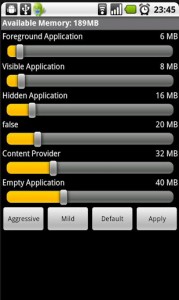
    Iolo, the developer responsible for System Mechanic, has an Android app called Auto Memory Manager. As you can guess from the name, this lets you customize the out-of-memory manager settings on Android phones and tablets so you don’t have to do it yourself with task killers. The new release shows how much memory has been freed, and how many times it has killed off troublesome apps. It should work on any device running Android 1.6 onwards.

    Clean Master, which I covered previously, does a good job of freeing up space and resources on your Android device. It can clean the cache, remove unused files, clear the search history, uninstall unused apps and free up RAM by killing running tasks. It requires Android 2.1 and up.

    Piriform also has an Android version of CCleaner in development which should be available soon.

    Those of course are just some of the many system cleaning apps available for Android. Do you have any favorites that you use? Share your recommendations in the comments below.

    Photo Credit: Kirill__M/Shutterstock

  • Amazon expands its Android Appstore to nearly 200 countries

    Amazon is a truly global company but until now its Android Appstore was only available in seven countries — the US, UK, France, Germany, Italy, Spain and Japan.

    That’s about to change though as Amazon has today announced plans to introduce its Appstore to close to 200 countries, inviting developers to submit their apps with the promise that they’ll be able to reach millions more active Amazon customers by doing so.

    The additional countries include Australia, Brazil, Canada, Mexico, India, South Africa, and South Korea, as well as less obvious territories like Papua New Guinea, and Vatican City.

    Developers who are interested in making use of this increased international distribution will have their apps made available for download automatically, unless they state otherwise.

    “Amazon’s platform is a complete end-to-end solution for developers wanting to build, market and monetize their apps and games on Kindle Fire and Android devices,” Mike George, Vice President of Apps and Games at Amazon said. “Allowing developers to target distribution of their apps and games in even more international countries is yet another important milestone as we strive to serve consumers and developers globally. Many of our existing developers have localized their apps and games for international consumers, and we look forward to working with new developers that have been waiting to bring their apps to more Amazon customers across the globe”.

    The roll out of the new store fronts is expected to take several months to complete.

    Photo Credit: karen roach/Shutterstock

  • Zombies, Run! 2 arrives on iOS and Android

    My favorite exercise companion, Zombies, Run!, has just received its promised free upgrade and is available now on both iOS and Android (I’m such a fan I’ve downloaded both).

    The immersive app, which basically turns a real-world run into a fear-filled journey through the zombie apocalypse, is ideal for anyone who struggles with motivation and is a bit like a radio play that takes place through your headphones as you run, with the gripping story — and the occasional zombie chase — unfolding in between tracks from your playlist.

    The upgraded version comes with seven free new missions to get you started (four main ones and three side-quests), with new missions released weekly starting from 29 April. The new missions, of which there are over 60, pick up from where the original Zombies, Run! missions left off, but I won’t say more than that because I don’t want to spoil the experience for anyone starting from scratch. There will be three missions released every week — two main ones advancing the story, and one side mission.

    You can purchase the missions separately or buy a season pass. You have a choice of purchase options. If you’re in the US, a Season Pass (all 40 story missions) will cost you $1.99, a Season Pass Plus (with the 20 sidequests included) is $4.99 and if you just want the sidequests themselves, that’ll set you back $2.99. If you’re in the UK, a Season Pass is £1.49 on iOS and £1.59 on Android, a Season Pass Plus is £2.99 on iOS but £3.99 on Android, and the sidequests are £1.99 on iOS and £2.39 on Android.

    The difference in price is because iTunes and Google handle VAT in slightly different ways and the Apple app prices are actually artificially low because they were set back when the pound was much stronger.

    The prices are around 50 percent cheaper at the moment to celebrate the launch of the app, so if you’re thinking of buying a pass now is the time to do it.

    In the app itself you can flick between Season 1 (23 main missions) and 2, and also access any race missions. There’s no Radio Mode option at the moment, but that’s coming back soon.

    In addition to the new missions, the upgraded app comes with a Base Builder that lets you create your own vision of Able Township (where the game is based), by adding new buildings, upgrading or demolishing existing ones and so on. The more you run, the more supplies you collect (on average you’ll pick up 30 supplies an hour) and the more you can build. You start with the farmhouse, defense tower and an armory, and can add housing, hospitals and recreation areas. Bonus items will be unlocked as you progress in the game.

    Zombies, Run! 2 is a free upgrade to the original. If you don’t already have the app installed, you can buy it on the App Store or Google Play for $3.99/£2.79 which, like the season passes, is currently 50 percent cheaper than it would be normally.

  • BlackBerry Q10 now available to pre-order on Vodafone

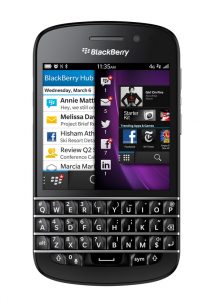
    UK dwellers keen to get their hands on BlackBerry’s new Q10 smartphone will have to wait until the end of the month when it goes on sale officially, but they can start pre-ordering it today.

    Vodafone, which describes the new handset as a “classic in the making” has opened its pre-order page so you can choose a tariff and place your order.

    The handset is available in any color — so long as it’s black or white — and as always there’s a choice of plans to pick from. If you don’t want to shell out anything upfront, you can sign up for a 24-month Vodafone Red contract which will cost you £37 a month and give you unlimited texts and calls, as well as 1GB of data.

    While the phone’s stable mate, the Z10, comes with a 4.2-inch touchscreen display, the BlackBerry Q10 has a 3.1-inch touchscreen and the traditional BlackBerry physical keyboard.

    Specs-wise, the Q10 rocks a 1.5GHz dual-core processor with 2GB of RAM, and a rear-facing 8-Megapixel camera.

  • YouTube adds a VHS simulator to select videos

    The VHS is about to celebrate its 57th birthday, and in honor of that milestone, Google has added a new tape mode to some of the videos on YouTube.

    Although it’s not widely available at the moment, a few clips have a tape icon under them which, which clicked, makes the videos look as if they are playing on a VHS recorder.

    In addition to the distortion, screen noise, and occasional screen roll, YouTube has faithfully captured the wobbling pause effect beautifully.

    In a Google+ update discussing the new addition, YouTube says: “Not too long ago, the video tape was the media of choice for living rooms around the world. In celebration of the 57th birthday of the first commercial video cassette recorder, check out a fun VHS mode for the YouTube player to relive the magic feel of vintage video tapes”.

    To see it in action, try this video.

  • So is Windows 8 Microsoft’s ‘biggest failure ever’?

    There are lots of questions concerning Windows 8 — does Microsoft need to make changes to it? Is the OS responsible for the death of the PC? How many copies has it actually sold? And last Friday financial-services company The Motley Fool asked the question in my headline, which I know a lot of people have been pondering too — is Windows 8 Microsoft’s biggest failure ever?

    Like all tech firms, the software giant has had its fair share of hits and misses. Microsoft isn’t the greatest risk taker out there, but it does make gambles occasionally that don’t pay off and it has experienced some major flops over the years. People talk about Vista, but there have been plenty of other past disasters, including Windows Me, Microsoft Bob, Zune, Kin… But is Windows 8 its worst catastrophe to date?

    As always, it’s a matter of opinion. There’s no question that Windows 8 hasn’t been a success on any real level. Sure Microsoft made money from it, selling those 60 million licenses early on, but Windows 8 is an incredibly important operating system for Microsoft. It’s what ties the company’s entire future together — computers, tablets, smartphones — and if it doesn’t work, the whole company strategy will inevitably start to crumble.

    In this video, Andrew Tonner, a tech/telecom analyst at The Motley Fool discusses whether Microsoft is a good tech investment (spoiler alert — he recommends steering well clear), and he certainly doesn’t pull any punches in his analysis. He discusses the shrinking PC market, touching on the IDC and Gartner reports, and admits that a weak economy and factors like slowing growth in emerging markets are partially to blame, before laying into Windows 8 for its role in the decline. He states that “people simply don’t seem to like the platform very much”, talks about how precarious Microsoft’s position is, and then delivers his killer line:

    There’s a reason this company basically has generated zero returns for investors over the last ten years, and that’s because they [Microsoft] simply don’t get where technology is going any more.

    Ouch.

    Personally I think that’s more than a tad harsh. Windows 8 was inspired because Microsoft saw where technology was going and wanted to get there fast. It just may not have chosen the best route in its scramble to embrace tablets and touch.

    BetaNews readers love a great debate, especially on the topic of Windows 8, and Andrew Tonner has raised two interesting topics I’d love to get your views on. Do you think Windows 8 is Microsoft’s biggest failure, or is it just a slow burner? And do you agree with him that the firm doesn’t get where technology is going any more, or is he just plain wrong? As always, leave your comments below.

  • ServicePower lets firms manage their workforces in the cloud [Q&A]

    ServicePower — a mobile workforce management software provider — is seeing more and more companies turning to a workforce model that relies on a mix of full-time employees, third-party contractors, and independent technicians being brought together and managed seamlessly in one place using the power of the cloud.

    I chatted with Mark Duffin, CEO and president of ServicePower, about the changes he’s seen recently, the data his firm collects, and why cloud deployment has become so important to his company and its clients.

    BN: For the benefit of any readers not familiar with ServicePower, can you tell me about the platform and what it does?

    MD: ServicePower Technologies provides a mobile field management software platform that enables clients to mix labor resources — utilizing full-time employees, contractors, and third-party resources while easily controlling, monitoring and analyzing scheduling and operations.

    Our clients use the platform to manage customers, inventory and finances. It enables them to schedule, optimize and dispatch jobs to field resources, while collecting real time job status information, and asset location data. Our platform manages time cards for employees, payments to contractors, and also provides the end-to-end business intelligence to manage the whole process with an eye towards cost control, increased profit margin, increased productivity and utilization, cycle time control and enhanced customer satisfaction.

    BN: If you’re dealing with scheduling and delivery, is this a tool that could be used by Amazon, for example?

    MD: Any organization that needs field resources to perform service, installation, delivery, inspections, etc., can use our field management platform to ensure that they have resources with the correct skills, in the right geography to execute against its customer commitments.

    Our platform enables retailers and e-tailers, for instance, to focus on selling product, rather than manually determining the best route for a series of deliveries. Our software platform will determine the best field resource from amongst employee, third party contractor and on demand technician labor pools. It will communicate the schedule of jobs as well as the real time status of the event, via our mobile application, which can be used from any handheld device capable of browsing the web. It also will pay contractors for work performed, and generate business intelligence that can then feed the field management process.

    So, companies like Walmart, or Amazon, for instance, can use the ServicePower platform as an extension of product sales, enabling them to drive incremental services sales, as well as build customer ‘stickiness’ since they can offer the product, as well as delivery, initial installation and service in the future.

    BN: ServicePower started life as a scheduling tool, but now it also manages operations, inventory, digital assets and tracks data in all of them. Was it always the plan to support so many services and to enter the world of big data?

    MD: ServicePower’s vision evolved over the last five years to a complete end-to-end solution, rather than independent products that address organizations with a single labor resource pool.

    We’ve learned that in order for our clients to become best-in-class field service organizations, they must be able to seamlessly tap into multiple labor resource pools, enabling them to achieve metrics around cost and margin control, demand seasonality, productivity and utilization, cycle time, and customer satisfaction.

    Our goal has always been to provide the best field management tools. The completed platform now enables clients to get all functionality they need from a single source vendor.

    All field service organizations are operating in a big data environment, due to the increase in the collection of data, through sources like mobile devices, software logs, and wireless networks.

    Our field management platform gives them the tools they need to use that data to plan, execute and analyze.

    BN: What type of data do you collect and how do you use it?

    MD: Our platform collects:

    • Field resource skills
    • Field resource geography, including a the level of knowledge of an area for employed or dedicated field resources
    • Field resource efficiency (how well they can execute what they’re scheduled to do related to job length)
    • Travel times from location to location
    • Mileage costs, fuel utilization
    • Driving behavior
    • Cost of overtime
    • Cost of a particularly routed set of jobs, versus the cost of a differently routed job set
    • Total job cost
    • Shift adherence
    • SLA adherence
    • Schedule adherence
    • Centralized dispatch management throughput improvements
    • Decreased rework/truck rolls
    • Productivity
    • Utilization
    • Capacity
    • Labor rates
    • Parts usage
    • Quality scores
    • Part failure rates
    • Cycle time
    • Job status
    • GPS location

    The data is used to drive not only the scheduling behavior of the platform, in terms of who is scheduled for which jobs, but also uses the data to drive planning and forecasting, and continuous execution improvements.

    BN: You’ve recorded job complete times across multiple industries? Any trends?

    MD: The trend is that job times differ greatly around different industries but travel times by and large do not. Nor should job times differ by training for an employee. Interestingly, we have found that in urban areas, travel times often reduce when utilizing our solution. The real importance with job times isn’t that each industry is different but that we’ve seen common best practices which improve job times and ultimately customer satisfaction. Those standards are to accurately status jobs, report accurate travel times, compare performance of the workforce based on seniority and training, and optimize frequently by more than just travel time. By doing so, the organization can increase capacity, plan for emergency work and meet customer SLA’s (service-level agreements).

    BN: What makes ServicePower worth paying for as an IT solution?

    MD: ServicePower embraced cloud technologies long before the rest of the market did. We recognized that cloud based deployment drove aggregation of jobs within the third-party contractor markets, while increasing adoption of technology due to low cost of entry for independent, often cash-strapped contractors.

    By offering our entire platform as a cloud solution, we’ve also driven cost out of organizations that would have historically paid for the infrastructure to support on premise deployments. We’re managing the hardware and software, within the cloud, with the appropriate redundancy and failover safeguards, to provide our clients with the best tools, at the lowest costs.

    ServicePower provides clients with the ability to forecast, execute and analyze its operation, while mixing field labor resources to achieve its most desirable field service metrics, yielding a best-in-class field service operation.

    BN: Why is cloud-based technology so important to ServicePower?

    MD: As stated above, cloud technology is very important to today’s field service organization. Cloud deployment, if implemented with rigid redundancy and failover capabilities, enables organizations to utilize cutting edge technology at the lowest cost possible, while still able to realize improvements in productivity and utilization, margin and customer satisfaction.

    Cloud deployment drives aggregation and adoption in the contractor markets, while also providing them with cost savings. The addition of our new HTML5 mobile application and S2 Suite business management software, both cloud-based technologies, further enhance our ability to provide our clients with the best possible, least costly mixture of field labor resources to achieve their business metrics.

    BN: When choosing a hybrid/HTML5 mobile solution, what factors did you take into account?

    MD: ServicePower has been in the mobile application space for many years. With the proliferation of devices and operating systems, it became apparent that our clients, as well as and perhaps most importantly, our third-party contractor networks, required a solution that supports evolving mobile strategies.

    So many clients are moving away from outfitting their own technicians with a single device, instead implementing a BYOD (Bring-Your-Own-Device) strategy. That trend, plus the need to secure the same level of real-time job status information from third-party contractors required technology that would work on just about any device a technician may already have in hand.

    Working in conjunction with the largest device manufacturers in the world, particularly Apple, ServicePower’s team of developers created a browser product that takes advantage of elements found in native apps, to ensure a consistent, OS centric user experience called ServiceMobility. Apple users interact with what looks and works like an iTunes app. Android users interact with an app that looks and feels like a Google Play app.

    The ServiceMobility product suite supports key enterprise requirements such as disconnected data, signature capture and barcode scanning, across the product set, and is structured to support our wide range of client needs.

    BN: What is one industry that is not currently using your platform, but could benefit greatly from it?

    MD: ServicePower has just scratched the surface of the telecom industry. The supply chain is so extensive, with companies ranging from VARs (value-added resellers) to telecom carriers, yet each link in the chain utilizes field resources to execute.

    But, ServicePower is uniquely positioned to provide a multi-labor channel solution that is relevant and necessary for telecom supply chain members to execute, whether they provide equipment installation or repairs, infrastructure or consumer based voice and data services.

    Our solution enables the telecom industry to optimize their own employed field resources, but also utilize third-party contractors to address geography, skill, and capacity or catastrophe events.

    Photo Credit: everything possible/Shutterstock

  • O2 Refresh uncouples phone and airtime tariffs in the UK for easier upgrades

    When you get a new mobile phone and set up a new contract, you’re tied into it for a set period of time. If you want to upgrade to a new phone partway through your contract you’ll need to pay off at least some — if not all — of the remaining fees, which can prove very costly.

    O2 has come up with a new mobile phone price plan designed to appeal to people who like to always have the latest smartphone.

    Available from O2 stores from Tuesday 16 April, O2 Refresh is actually two separate contracts — one covering airtime (your talktime, texts, data and so on) and another covering the cost of the phone itself.

    Customers firstly choose the airtime plan they want. There are a choice of three price points on offer — £12 a month (600 minutes, unlimited texts and 750MB of data), £17 a month (unlimited minutes, unlimited texts and 1GB of data) and £22 a month (unlimited minutes, unlimited texts and 2GB of data). Buyers then add on the plan for the phone (the HTC One, for example, costs £49.99 up front and £20 per month for two years). When a new model comes out, they only have to pay off whatever’s remaining on the phone plan. The airtime plan can be ended at the same time with no termination fee.

    “Mobile phone technology continues to advance at a rapid pace, yet the way phones are sold has remained largely static,” Feilim Mackle, Sales and Service Director at Telefónica UK explains. “Increasingly our customers are telling us that they don’t want to be tied to the same phone for two years and, with 4G coming to O2 this summer, we want to make it easier for our customers to benefit from the latest technology. For the first time in the UK, O2 Refresh will make it possible to get a new phone part way through a pay monthly contract, at any time — quickly, easily and cost-effectively”.

    The list of phones available on the O2 Refresh plan include HTC One, Sony Xperia Z, Blackberry Z10, Samsung Galaxy S3 and Apple iPhone 5. The Blackberry Q10 and Samsung Galaxy S4 will be added when they become available.

  • Google finally brings its Map Maker tools to the UK

    Google’s digital maps are some of the very best in the world, and getting better all the time thanks to contributions and improvements from an army of users who submit additional details such as roads, rivers, railways and building outlines using Google Map Maker.

    Map Maker was initially only available to users in more poorly mapped countries (such as Vietnam, Jamaica, Iceland, Cyprus, and Pakistan), but after successfully introducing it into territories like the US, Australia, New Zealand, Canada, and France, Google has finally made the tools available to residents in the UK.

    From today, Google is inviting British users to help improve its maps by adding knowledge of their local areas. Additions and alterations are reviewed by other users and Google’s Maps team, before being made live on Google Maps, Google Earth, and Google Maps for Mobile.

    Today’s launch has been marked with a MapUp workshop in Bletchley Park (the site of secret British code breaking activities during WWII and birthplace of the modern computer). The difference is already very impressive with new features like blocks and huts appearing where previously it was all just white space.

  • Rackspace helps developers create mobile apps on the cloud

    Enterprise-hosting service Rackspace has launched a new cloud mobile partner ecosystem that brings together various trusted solutions to make it easier for developers to design, build, test, deploy and scale mobile applications on Rackspace’s open cloud.

    According to Rackspace, developers can start building mobile apps on a pre-configured cloud backend, without needing to reinvent the wheel every time they start work on a mobile project.

    Partners in the new initiative include StackMob, for mobile backend-as-a-service (MbaaS), SDKs, push services and app usage analytics; Sencha, a mobile HTML5 toolkit; New Relic, for real time performance metrics; and SOASTA, for load and performance testing across the mobile app lifecycle.

    “Mobile technology is disrupting all industries. Businesses, from startups to enterprises, are aggressively building out their mobile presence. By launching a powerful new ecosystem, we are enabling mobile developers to innovate faster,” John Engates, CTO of Rackspace explains. “Our pre-configured mobile stacks were developed based on our experience with hosting thousands of complex applications. These stacks are reducing complexity for mobile developers who no longer have to reinvent the wheel every time they build and deploy mobile apps. By wrapping Fanatical Support around these new mobile tools and capabilities, we’ve created a unique developer experience that’s unmatched in the market.”

    Speaking about becoming one of Rackspace’s new mobile application developer partners, Ty Amell, CEO and Co-Founder of StackMob adds: “Entrepreneurs and enterprises need a quick way to create apps but they also need a platform that is reliable and supported. StackMob and Rackspace will provide a rock-solid open cloud platform for mobile application developers to create the very best apps for their customers with confidence”.

    Photo Credit: Minerva Studio/Shutterstock

  • Microsoft continues its childish attacks on Google

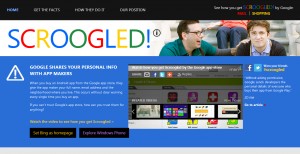
    Microsoft’s Scroogled campaign, in which the technology giant attacks Google for various perceived transgressions, has now turned its sights to Android, or more specifically the Google Play store.

    Past Scroogled “attacks” (aka petty whining) have taken Google to task for using a pay-to-rank practice in Google Shopping, and reading emails in Gmail. The newest complaint is that Google shares your personal info with app makers.

    Or more specifically:

    When you buy an Android app from the Google app store, they give the app maker your full name, email address and the neighborhood where you live. This occurs without clear warning every single time you buy an app.

    If you can’t trust Google’s app store, how can you trust them for anything?

    Microsoft then helpfully provides a couple of videos explaining how this happens (watch them below).

    If you were unaware that Google passes on your information to app makers, and you’re concerned about this, then you’ll probably be thankful to Microsoft for pointing it out. Even though there’s actually nothing particularly nefarious about it. When you buy something from pretty much anywhere on the internet, the seller gets your information. That’s how things work. If you don’t trust a retailer — or an app maker — don’t buy something from them.

    The problem I personally have with the Scroogled campaign is I (like most people) don’t view Microsoft as the people’s champion. It’s not warning consumers, it’s trying to get them to switch from Google to Microsoft (something I’ve actually done, but out of interest rather than any concern about what Google’s doing with my information).

    If Microsoft truly had our best interests at heart, then it would be providing useful advice on what to do to safeguard privacy — like setting up a second Google account purely for purchasing apps. Instead, what it does is say “Unlike Google, Windows Phone Store doesn’t share your personal information with app makers” and then helpfully provides a button to “Explore Windows Phone”.

    Microsoft should, in the interest of full transparency, also perhaps add “Unlike Google, Windows Phone Store doesn’t offer anywhere near the breadth and quality of apps”, but obviously it doesn’t say that because Scroogled isn’t about truth, it’s about trying to snare customers through fear, uncertainty and doubt — instead of wooing them with great products, as a company of Microsoft’s size and standing should be doing.

    The Scroogled campaign continues to be a sad and embarrassing waste of Microsoft’s time and money and really it’s time it was laid to rest now.

    Photo Credit: Denis Belyaevskiy/Shutterstock