Blog

  • Incentivizing Employers to Hire Veterans through Permanent Tax Credits

    With the Iraq War over and the war in Afghanistan drawing to a close, the Administration has undertaken an unprecedented effort to help our veterans and military spouses find employment and build their careers. Today, the overall unemployment rate for veterans remains below the national rate at 7.1 percent. But for veterans of the post-9/11 generation, many returning to the civilian workforce at a time when our economy, while making progress, is still healing from the Great Recession, too many American heroes are struggling to find work.  This is a critical economic challenge that requires our long-term focus, especially as in the coming years over one million service members will be hanging up their uniforms and transitioning back to civilian life.

    In August 2011, President Obama visited the Washington Navy Yard to outline his comprehensive plan to ensure that all of America’s veterans have the support they need and deserve when they leave the military, look for a job, and enter the civilian workforce. This plan included a total redesign of the military’s transition program to ensure every service member is “career-ready”; a challenge to the private sector to hire and train veterans; increased access for veterans to intensive reemployment services; and new online tools to boost veteran employment.

    A signature component of his plan was a series of significant, new tax credits aimed at getting veterans back to work. In the American Jobs Act the President proposed three new veterans hiring tax credits that greatly expanded the number of veterans eligible to be hired with tax credits. Recognizing the specific imperative of helping veterans dealing with long-term employment, the President proposed in the American Jobs Act tax credits that for the first time offered tax relief at least two times larger than current veterans tax relief for those veterans that have been pounding the streets for over six months looking for work. This includes the Returning Heroes Tax Credit, which provides an incentive of up to $5,600 for firms to hire long-term unemployed veterans, and the Wounded Warrior Tax Credit, which provides firms with up to $9,600 for hiring long-term unemployed veterans with service-connected disabilities.

    The President’s tax credits were passed with full bi-partisan support by Congress and signed into law by the President in November 2011 as part of the VOW to Hire Heroes Act, and were extended through the end of 2013 by the American Taxpayer Relief Act of 2012.

    read more

  • HTC to include “Live Experience Tour” in 11 cities for HTC One marketing campaign

    HTC

    HTC has already been pretty clear that they’re going to put their best marketing foot forward with the HTC One to help boost sales. We’ve seen some commercials for the One, but now we’re hearing that HTC’s marketing campaign will include “Live Experience Tours” in several cities in the US. These stops will include pop up shops to demonstrate the key features of the HTC One, like BlinkFeed, Zoe, and BoomSound. HTC wants to show you that the One is “everything your phone isn’t.” Very arrogant confident marketing slogan.

    In addition to the showrooms for the One, BoomSound lounges will begin popping up in locations starting today. The showrooms won’t hit until April 11th, but they’ll be up for around three months, so you’ll have plenty of time to check it out. HTC is also planning a few tie-in shows to their BoomSound lounges and showrooms with some performances by popular artists in certain locations; Pharrell in New York, Grouplove in Chicago and Manchester Orchestra in Los Angeles. HTC is definitely pulling out all the stops to try to kick this phone off right.

    Hopefully HTC will see some significant returns from a marketing blitz of this scale, because I’m sure it’s not cheap. Hit the break for the full press release.

    HTC CHALLENGES CONSUMER EXPECTATIONS WITH NEW HTC ONE® LIVE EXPERIENCE TOUR

    Tour Launches Across the Country to Show Consumers the New HTC One Is “Everything Your Phone Isn’t”

    BELLEVUE, Wash. – April 5, 2013 — HTC, a global leader in mobile innovation and design, today introduced the company’s integrated U.S. marketing campaign launching its new flagship smartphone, the new HTC One. The campaign challenges the current mobile phone experience with a bold and playful execution, and offers consumers the opportunity to see, hear and hold the new smartphone before nationwide availability in traditional retail channels. The campaign comes to life as pre-order begins today, following unprecedented demand and the strongest pre-registration interest for any smartphone designed by HTC. The new HTC One will be available nationwide at retail stores through AT&T, Sprint and Best Buy on April 19, and through T-Mobile later this spring.

    “We’re establishing the U.S. brand identity for the new HTC One as an innovative, stunning product with a full-metal design and a clear difference in experiences from any previous, or recently announced smartphone” said Erin McGee, vice president, marketing, North America, HTC Corporation. “The new HTC One has already won numerous prestigious awards and accolades, but consumers have yet to see it for themselves. We are changing that, starting today, by delivering unique and highly relevant experiences on city streets, in suburban malls, and at hundreds of movie theaters that brings the product to life through an authentic connection with the consumer.”

    Everything Your Phone Isn’t™

    Crafted with a distinct zero-gap aluminum unibody, the new HTC One introduces HTC BlinkFeed™, HTC Zoe™ and HTC BoomSound™, key new HTC Sense® innovations that reinvent the mobile experience and set a new standard for smartphones. HTC is taking the breakthrough product directly to consumers with the HTC One Live Experience Tour, bringing each unique innovation to life and prompting consumers to compare the new HTC One to their current phone experience.

    The advertising features a similarly evocative theme positioning the new smartphone to consumers as “Everything Your Phone Isn’t”, with several deep integrations that highlight the dynamic experiences of the device. The new advertising campaign will run across a variety of media, including heavy rotation in relevant national TV programming, print, digital media and mobile advertising to include Pandora, Spotify, YouTube and Vevo. In-market geo-targeted advertising will also be incorporated into the HTC One Live Experience Tour.

    The HTC One Live Experience Tour will appear in 11 major markets across the U.S. and consists of three distinct executions: the HTC BoomSound Lounge, HTC One Showrooms and HTC One Cinema Experiences.

    HTC BoomSound Lounge

    The new HTC One introduces — for the first time on a phone — front-facing stereo speakers with a dedicated amplifier, as well as Beats Audio™ integration for rich, authentic sound whether listening to music, watching a video or playing a game.

    Opening today, the HTC BoomSound Lounges bring the extraordinary on-device audio experience to life at pop-up listening booths in prominent locations in six major cities across the U.S.: Columbus Circle in New York, Embarcadero Plaza in San Francisco, Hollywood and Highland in Los Angeles, Wrigleyville in Chicago, Franklin Square in Philadelphia, and Perimeter Mall in Atlanta.

    In addition to product experiences, the BoomSound Lounges serve as the connection for consumers to exclusive HTC concerts produced by Live Nation. Performances by Pharrell in New York, Grouplove in Chicago and Manchester Orchestra in Los Angeles will be limited to an audience of 1,000 fans, creating an intimate, once-in-a-lifetime experience for attendees. Consumers in those three markets can visit the HTC BoomSound Lounges for the opportunity to receive tickets to the concerts happening in their city. On April 19, all of the BoomSound Lounges across the country will transform into listening and viewing locations for the broadcast of one of the exclusive live concerts.

    HTC One Showroom

    Starting on April 11, HTC One Showrooms will begin appearing in high-traffic malls across the U.S. where they will live for a minimum of three months to create a playful, dynamic, digital space for consumer interaction and entertainment. The HTC Showrooms are built solely on the experiences of the new HTC One, placed where people spend time shopping, dining and hanging out, and allow engagement at their leisure. HTC Showrooms are popping up in eight U.S. markets featuring interactive experiences and a plethora of new HTC One smartphones for hands-on experiences: Atlanta, Chicago, Dallas, Houston, Los Angeles, New York, San Francisco, and Washington, D.C.

    “HTC One Showrooms are taking the concept of a pop-up store to different place by creating a large, playful, interactive exhibit where we expect people to be entertained and have a new experience with the HTC One at each visit. It gives them the chance to truly immerse themselves in everything the phone offers at their own pace – and delivers a different experience than a traditional retail setting. We’ve created a mobility-powered playground that is good for our consumers, and for our retail partners as we send informed customers to their doors,” said McGee.

    • HTC BlinkFeed: The new experience that transforms the home screen on the new HTC One into a single live stream of personally relevant information is re-created in the HTC Showroom as a larger-than-life interactive phone display that will provide news updates to shoppers.
    • HTC Zoe: The ability to shoot high-res photos that come to life and transform the photo gallery into a living gallery will be brought to the HTC Showroom as interactive touch screens representing the on-device photo experience.
    • HTC Sense TV™: HTC experts demonstrate how the new HTC One transforms into an interactive program guide and remote control to easily sort through and check all content on TV by selectable categories.
    • HTC Live Cinema Experience
    • HTC is treating moviegoers to hands-on opportunities with the new HTC One through live product demonstrations in the lobby of select theaters and showing the latest commercial for the new HTC One on the big screen. In the near future, HTC will add entertainment content to the on-screen viewing experience in theaters and also across key online and TV channels.

    Availability

    The highly anticipated new HTC One will be available globally through more than 185 mobile operators and major retailers in more than 80 regions and countries. In the United States, the new HTC One is available today for pre-order online through AT&T, Sprint, HTC and Best Buy in silver. Nationwide retail availability is as follows:

    • AT&T: Available on April 19th in silver and black with 32GB of memory for $199.99, and in sliver with 64 GB of memory for $299.99 with a two-year commitment.
    • Sprint: Available on April 19th in silver and black with 32GB of memory for $199.99 with a two-year commitment.
    • T-Mobile: Available later this spring in silver with 32GB of memory.
    • Best Buy: Available with service from AT&T and Sprint in conjunction with wireless operator availability.

    For more information about the new HTC One, visit www.htc.com.

    About HTC

    Founded in 1997, HTC Corporation (HTC) is the creator of many award-winning mobile devices and industry firsts. By putting people at the center of everything it does, HTC pushes the boundaries of design and technology to create innovative and personal experiences for consumers around the globe. HTC’s portfolio includes smartphones and tablets powered by the HTC Sense® user experience. HTC is listed on the Taiwan Stock Exchange (TWSE: 2498). For more information, please visit www.htc.com.

    Come comment on this article: HTC to include “Live Experience Tour” in 11 cities for HTC One marketing campaign

  • PETMAN Is A Humanoid Robot That Could Probably Walk Big Dog

    PETMAN is a humanoid robot made by Boston Dynamics. BD also created Big Dog, the quadrupedal, brick-throwing robot that haunts our dreams.

    This robot, shown here gussied up in a hazmat suit and gas mask, however, is far scarier. While I doubt he can do much right now without those cable support, just imagine PETMAN bopping up to you on a mission to keep you from entered a contaminated zone. First, he looks surprisingly life-like in this outfit and, second, he would be completely deaf to your entreaties. As they say, we’re living in the future. It’s just not evenly distributed yet.

    Plus, PETMAN can dance.

    via Giz

  • Google Posts New Android Developer Hangout

    Google put out a new Android Developers Office Hours hangout from this week. Watch it below if you have some hangout time. This one’s only about a half hour.

  • Former Windows 8 bull changes tune, says platform is ‘challenging our optimism’

    Windows 8 Momentum
    We know that Windows 8 has failed to reignite demand in the PC market so far and now one formerly bullish analyst says that the platform “lacks momentum” and is “challenging” his earlier optimism. Benzinga notes that Bank of America analyst Kash Ragan downgraded Microsoft (MSFT) from “Buy” to “Neutral” on Thursday and expressed dismay that Windows 8 has still shown few signs of catching on “despite more available touch-based devices” more than six months since the platform’s initial launch. Microsoft has been taking feedback from early Windows 8 adopters and is planning to make changes to the operating system aimed at winning over more traditional Windows users with its “Windows Blue update” rumored to be released this summer.

  • Microsoft Is A Bit Sour Over Facebook Home

    Yesterday, Facebook announced Home, a custom Android skin that replaces the default Android experience with one that’s entirely based around Facebook. As part of the presentation, Mark Zuckerberg lamented the current state of app-centric phones, and said that Home would finally bring people to the forefront of the mobile experience.

    The mission statement of Home seems to have caught the ire of Microsoft as the company’s VP or corporate communications, Frank Shaw, took to the company blog today to say that Facebook is late to the party. Shaw says that Windows Phone 7.5, which was introduced in 2011, was in fact the first phone based around people instead of apps.

    You could argue whether or not Shaw’s claim is true, but the company was marketing Windows Phone 7.5 as a people-first phone back in 2011. It’s understandable that the company would be a little upset over Facebook essentially stealing its nonexistent thunder.

    Shaw ends his mini-rant with the suggestion that Windows Phone is superior to Home because Home is just an Android skin. Besides, Home takes away some features from Android while Windows Phone offers all the features of Home and then some without sacrificing any core features.

    What makes this even sadder is that Home isn’t even out yet. It’s entirely unproven, and yet Microsoft is already on the offensive. As TechCrunch rightly points out, Microsoft’s readiness to attack Facebook Home shows just how sensitive it is over how nobody cared about its people-first device in the first place.

    All this leads us to the million dollar question – will people care about Facebook Home when they clearly didn’t care about Windows Phone? Facebook certainly seems to think so, but the tepid reaction to Windows Phone shows that the majority of mobile device users are probably pretty happy with their app-centric devices.

    Besides, I’m sure most Android users would prefer a better Facebook app over Home anyway.

  • Gay NFL Players Could Come Out “Sooner Than You Think”

    The last few weeks have been significant for the gay rights movement. In mid-March Republican U.S. Senator Rob Portman became the first sitting U.S. senator to publicly endorse gay marriage. This was followed by the U.S. Supreme Court hearing two different gay marriage-related cases in one week, sparking the red equality symbol movement on social media and leading to the usual online debates.

    Now it appears that even professional sports will become part of the gay rights movement in the U.S. In addition to Mark Cuban’s recent statement that he would be “honored” for the Dallas Mavericks to have the first NBA player to come out as gay, rumors have now surfaced that several NFL players will soon be coming out of the closet.

    Linebacker Brendon Ayanbadejo was released from the NFL’s Baltimore Ravens this week. As an outspoken advocate for gay rights, speculation centered on the rumor that Ayanbadejo’s release was related to his views. However, in an interview with the Baltimore Sun this week, Ayanbadejo stated that this was not the case, and that the Ravens organization had always supported his outspokenness on the issue.

    Ayanbadejo went on to say that gay NFL players will soon be coming out of the closet. In fact, he told the Sun that “the groundwork is being laid” for as many as four NFL players to come out simultaneously, to reduce the pressure on any one player.

    “I think it will happen sooner than you think,” said Ayanbadejo.

    When the story hit, Ayanbadejo took to his Twitter account to defend his views and set the record straight:

    (Image courtesy Keith Allison/Wikimedia Commons)

  • This Week On The TechCrunch Gadgets Podcast: Facebook Phone AKA The FF

    scaled.gadgets130405b

    This week on the TechCrunch Gadgets Podcast we talk about bold moves by Verizon and T-Mobile and the Facebook Fone and Facebook Home.

    This week we welcome Darrell “Patents” Etherington to our soundstage and I’ve removed quite a bit of the messy static.

    We invite you to enjoy our weekly podcasts every Friday at 3pm Eastern and noon Pacific.

    Click here to download an MP3 of this show.
    You can subscribe to the show via RSS.
    Subscribe in iTunes

    Intro Music by Rick Barr.

  • Games for the weekend: Block Fortress

    Games for the Weekend is a weekly feature aimed at helping you avoid doing something constructive with your downtime. Each Friday we’ll be recommending a game for Mac, iPhone or iPad that we think is awesome. Here is one cool enough to keep you busy during this weekend.

    Block FortressBlock Fortress ($1.99, Universal) is a mix of tower defense and first person shooter style games where you must create your own fortress to defend.  As if defending a fortress is not challenging enough already, you must also collect rare minerals to craft better and stronger defenses to use while protecting your fortress.  This game will push your warrior, engineering and crafting skills to their limits.

    When building up your defenses, you can fly around the environment putting the various elements and materials in place. This helps you survey the land to determine where the most defensible position is, as well as check out your fortress before you go to battle.  The left side of the screen is a virtual d-pad for strafing left and right as well as moving forward and backward. When designing your fortress, on the right side of the screen are two arrows that allow you to fly by controlling you movement up and down. However, when you are battling the enemy and defending your fortress, you are not able to fly over your opponents as you remain firmly on the ground. Also when battling, your player will be equipped with a weapon and a red fire button will appear on the right side of the screen replacing the up and down flying buttons. You look around as well as turn directions when walking or running by dragging your finger across the screen.

    Block Fortress

    In this game your barracks is your home base that you must defend.  If destroyed, the game is over.  Placing your barracks in a defendable position and building up a fortress to defend them is more than half the fun of the game. More than just your creative building skills will be used as you must think about how the enemy will attack your fortress; there are over 30 different building blocks to choose from, each with their own characteristics, strengths and costs. You will choose between different types of wood, stone and steel materials when you build your defenses. The weapons you mount on your turrets have their own characteristics as well: each has a different range and will inflict varying amounts of damage. Some weapons will require mounting an accompanying spotlight when fighting at night. You are also responsible for placing power blocks and boosters around your fortress in order to supply your weapons with the energy they need to operate.

    Block Fortress

    Your fortress is not the only thing that needs to be well equipped to fight off the enemy. Being a first person shooter as well, your avatar also needs to suit up for battle. For the most part, this involves selection of various hand weapons that you will use to take out individual attacking units on the battlefield.  As you continue to play the game, you will see that your avatar levels up and unlocks additional weapons, armor and tools.

    Block Fortress

    There are three main gaming modes to choose from. Survival is the most difficult of the three as you must gather the minerals you need in order to build up your defenses. There is no pause button in survival mode. In Quickstart mode, you are given enough resources to build a defendable fortress. When the game begins you are given time to build these defenses before starting the battle. With the Sandbox mode of gameplay, you have an unlimited supply of resources and you can start and stop the battle whenever you need to in order to readjust your strategy. Sandbox is a great mode to get started with, as you can work your way of to playing in Survival mode.

    Block Fortress

    You can also choose where on the map of a fairly large region you would like to set up your barracks. Green Hills, Jungle, Snowy Hills, Rocky Mountains, Tropical Islands and Tidal Cliffs are the terrains you have to choose from. Each terrain has a set of minerals that are more common in that area of the map. The Jungle and Green Hills, for instance, have an abundance of rare green minerals. If you don’t want to choose where you start, there is a random setting that will pick the terrain for you.  It is important that you play in different locations in order to collect minerals from each region.

    Block Fortress

    As you accumulate these minerals, you can use them to create crafting mods that will permanently upgrade your blocks, weapons and equipment. Each resource you use to build up your defenses and equip your avatar for battle can be upgraded. The more minerals you collect in each of the different regions, the more you can upgrade your favorite gear.

    There is certainly a lot going on within this game.  The 3D environment you play, while not the most stunning graphically, does captivate you.  The landscape you have to work with is very large, and you are free to roam around while your fortress is being invaded.  You are even able to save your creations so you can modify them and tweak them in order to get your strategy down to a science.  So this weekend find a secure location in your household and prepare to defend it, because you will be spending a lot of time playing Block Fortress.

    Related research and analysis from GigaOM Pro:
    Subscriber content. Sign up for a free trial.


  • Running out of memory on a Chromebook? Here’s a 30-second solution

    Several Google Chromebooks, particularly the lower-priced models, come with just 2 GB of memory and for some, that’s just not enough. What often happens is that as more browser tabs are opened, data on older tabs simply disappears. These tabs have to be refreshed and that’s not ideal, especially if those tabs are being used for any communications or media consumption.

    The problem happens on Chromebooks with 4 GB of RAM as well, but much less often. Still, even on the Chromebook Pixel, I experience it from time to time. The good news is that regardless of your Chromebook model, one quick command line with a restart can definitely help. The solution uses zRam or compressed swap space and you can use it on a Chromebook because it’s part of Linux, which is the underlying core of a Chrome OS device.

    Essentially, zRam creates a swap disk to virtually increase the amount of memory your system can use. This is a description from the zRAM / compressed cache project site:

    “This project creates RAM based block device (named zram) which acts as swap disk. Pages swapped to this disk are compressed and stored in memory itself. Compressing pages and keeping them in RAM virtually increases its capacity. This allows more applications to fit in given amount of memory.”

    Here are the simple steps I found in the Chromebook Central Google Group to enable it:

    1. Open up a terminal tab with the CTRL + ALT + T keys.
    2. Type “swap enable” (without the quotes).
    3. Restart your Chromebook.

    That’s it! The change is persistent, meaning the swap file will stay active after each restart. If you want to disable it, just follow the same instructions but type “disable” instead of “enable.” And if you want to manage the actual size of the swap file, you can do that too: When enabling it, follow the command with a number representing the size of the swap file in megabytes.

    Enable zRam

    I’ve used this function on several Chromebook models and have noticed that blank tabs are mostly a thing of the past, even after opening and closing dozens of tabs during a typical day.

    The nice thing is that you have nothing to lose by enabling the swap function since it can easily be disabled. Even better: As of last month, Google is experimenting to see if enabling swap by default is a viable option.

    Related research and analysis from GigaOM Pro:
    Subscriber content. Sign up for a free trial.


  • Who Has It Right On Enhanced Campaigns: Google Or Bing?

    In early February, Google introduced Enhanced Campaigns, which it described as an “evolution” of AdWords. While embraced by some advertisers, others do not like the direction Google has elected to take.

    Microsoft, Google’s competitor in the space and a frequent critic of numerous Google practices, has now laid out its policy aimed at attracting advertisers who don’t like Google’s new model.

    Which model do you prefer: Google’s or Bing’s? Let us know in the comments.

    If you’re still unfamiliar with Enhanced Campaigns, here’s a look:

    David Pann, GM of Microsoft’s Search Network, spoke to advertisers at a San Francisco Forum to address concerns Microsoft Advertising has heard around whether Bing Ads will go down a similar path as Google with Enhanced Campaigns. This is a legitimate concern, considering how Microsoft has been openly adapting other models that Google has embraced.

    Microsoft is not going down the Enhanced Campaigns path ,however.

    “While Enhanced Campaigns may seem to provide greater management efficiencies and improve mobile traffic, our customers have expressed worry that this change may in fact bring inefficiencies for more sophisticated advertisers or those with specific targeting needs,” a spokesperson for Microsoft tells WebProNews, echoing sentiments shared in a blog post from Pann.

    During the forum, Pann expressed a commitment to “making it simple for small business advertisers to participate across devices while at the same time, enabling more sophisticated advertisers to have the fine grain targeting controls they require.”

    Pann expands in the blog post:

    At Bing Ads, we believe very strongly in giving advertisers the tools and flexibility to control their spending, target the most relevant audiences, and ensure they can get the best return on investment. We do not believe bundling mobile, desktop and tablet advertising together in an opaque manner is in the best interests of our customers.

    Our own customers have been concerned whether we would sacrifice control for convenience, and our answer is no.

    We are committed to reducing friction by providing advertisers with the transparency and controls needed to maximize campaign effectiveness. We strive to make it simple for small business advertisers to participate across devices and more sophisticated advertisers to have the fine grain targeting controls they require. Our stated goal of providing advertisers the ability to do in 15 minutes what it takes them 45 minutes to do on Google, should not – and does not – come with any caveats or loss of control.

    Bing Ads believes in building long-term trust through consistency, expectancy and transparency.We know budgets and resources are limited – we want to enable our customers, not hinder them.

    Bing Ads Platform Manager Dare Obasanjo discusses Microsoft’s policy in a separate post.

    “With enhanced campaigns, fine-grained targeting by operating system, device model and carrier is no longer available,” writes Obasanjo. “More importantly, tablets and desktop PCs are now treated as a single entity. It is no longer possible to target an iPad or Kindle Fire user differently from a user of on Dell or HP desktop PC.”

    “Another elimination of flexibility also occurs when it comes to targeting users on mobile devices. All search marketing campaigns in AdWords are now desktop/tablet targeted campaigns. The ability to target mobile devices is only available by augmenting certain aspects of a desktop/tablet campaign.”

    Microsoft says it will be updating its product to ensure AdWords advertisers can “seamlessly” transition between both products, despite Bing’s absence of Enhanced Campaigns-like functionality.

    At least there’s not a “Scroogled” campaign this time.

    As mentioned, some advertisers see the value of what Google’s doing, and certainly Google thinks there is plenty of good reason to operate this way.

    Will you be switching from Google to Bing? Do you think Enhanced Campaigns are good or bad for advertisers? Let us know in the comments.

  • Microsoft exec tells critics of possible always-online Xbox to ‘deal with it’ [updated]

    Microsoft Executive Xbox
    While we still don’t know for certain if Microsoft (MSFT) will really require an always-on Internet connection for its next-generation Xbox, one Microsoft executive doesn’t see why anyone should be upset about the prospect of being online as a prerequisite to playing games. Kotaku has spotted some tweets sent out by Microsoft Studios creative director Adam Orth on Thursday that hit back at people who were critical of the idea that the Xbox must be online to work properly.

    Continue reading…

  • Featured Android App Review: Todoist: To Do List, Task List [Productivity]

    Todoist_To_Do_List_Task_List_Splash_Banner

    Todoist has always been one of the best personal task managers, but it was only available on the desktop until November of last year. That’s when Doist released native apps for both Android and iOS, which brought Todoist’s robust elements to users for on-the-go task management. With the addition of the app, Todoist users are now synced across nine platforms, which include Android, iOS, Web, Chrome, Firefox, Outlook, Thunderbird, Windows, and Mac.

    I generally don’t use the desktop to manage my tasks, although it’s important to me that the tasks are synced and accessible from various platforms. With that said, the desktop Web interface is a tremendous application for those that really need a lot of control for their tasks. The Todoist app for Android brings most of those features to your phone or tablet.

    Todoist is aimed at the professional and is more comprehensive than most of the other task managers available on Android. What separates Todoist from other todo apps is the ability to organize tasks into projects with labels. You can even create sub tasks as well. By including projects, it effectively organizes everything in a logical manner. Who wants to look at a list of 30 todos when you can look at a list of 3 or 4 projects. Tapping on projects will give you the list of todos that are only related to that project. Color-coding is quite popular as well, and Todoist has you covered. You can select from 22 different colors to help you further organize things.

    If you’re new to Todoist, you will need to setup an account in order to sync data to the cloud. You can simply use your gmail or any other email account. This enables you to utilize the app or the desktop via your favorite Web browser. If you’re using Chrome on your desktop, you can also install the Chrome Extension, which will allow you to manage tasks from your toolbar. You can also use it as a “read it later” type of app  in that you can add URLs as tasks. It even integrates with Gmail so that you can add any email as a task.

    When using the app for the first time, you will find handy popup tutorials walking you through some of the basics. The interface is very clean and easy to get around. Everytime you open the app, you will see the tasks that are due today. Just swipe to the right, and the side menu appears. This is where you will see the list of your color-coded projects. Tapping on any of the projects brings you to the tasks that are due for the respective project. You will also see “Manage projects” at the bottom, which lets you add, edit or delete projects. The labels tab will show you any labels you have created and what tasks are associated with those labels. It works the same way as Projects in that you tap on the labels to see the listed tasks. You will also find “Manage labels” at the bottom. The last tab is filters, and this is where you can create predefined filters. For example, you could have a filter for all tasks that are due on Friday or all tasks that are labeled as personal and due next Wednesday. Again, you will find a “Manage filters” option at the bottom.

    Setting up a task is quite easy. Once you are in a project, just hit the “+” sign at the top right. You can title the task, give it a due date, assign a project, label it, set the priority (1-4), and assign a sub-task. Now this is where things get a little weird. You can enter textual dates in the date field, and there are a number of abbreviated commands to learn such as “tod” for today, “tom at 16:30″ for tomorrow at 16:30, “+5″ for 5 days from now, “ev day” for every day, “ev 7″ for every 7th of the month, and so on. Thankfully you can tap the three dot menu for the full list of commands. You can still enter a date by tapping the clock icon, but the displayed calendar is very small, and unless you have a magnifying glass, you won’t be able to read the dates.

    One of my biggest complaints is the use of reminders. The only way to set a reminder (in the app) is to type a command as part of the title of the task. So you would have something like this: Wash the car <remind tom at 13:00>. For an app that stresses productivity, this is highly unproductive. I believe they will resolve this issue with a future update so I wouldn’t use it as a reason to detract you from trying the app. On the flip side, you can easily manage reminder notifications from the desktop by just entering the date and time. If you’re someone who likes to manage your tasks from the desktop then it won’t be an issue, but for those of you that are on the go or would rather use the mobile app, it’s not the best situation.  Even using the desktop isn’t so easy as you should be able to just click on a date and pick a time rather than being forced to type it out. As far as notifications go, you can set the default to be push (notification panel), SMS text, or email. You can only do this via the desktop interface, but once it’s set, you shouldn’t need to change it that often.

    Just like most Android apps, a widget is included. They only offer one size (4 x 3), but it’s resizable. You can also choose what information you would like to show up in the widget, and that includes any of the default views (tasks due today or the next 7 days), Projects, Labels, or Filters.

    As you would imagine, an app like this probably isn’t free or at least there has to be a premium version. The app itself is actually free, but the premium version is my second biggest complaint. It costs $29 per year. The premium version adds notification reminders, use of the labels and filters, task notes, SSL encryption, access to iCalendar, task searching and the ability to add emails as tasks. If you don’t rely on notifications and you think you can go without labels and filters, the free version can do a lot for you. For me personally, $29 is too much because I am not a heavy todo and task user. With that said, I think Todoist is the best task management app I have seen, and is sure to suit those that need more productivity out of their todos.

    It seems to me that Doist is going after the serious professional only, and not catering to the casual user. I would rather see the free version offer everything the premium version offers, but make it a trial for 14 days. After the trial period has ended, offer a version priced at $4.99 (one time purchase) with a limit of how many projects, labels, and filters you can have so that casual users can enjoy this type of productivity. If someone needs to manage more projects and tasks, they can pay the annual fee of $29.99. If you’re in that camp, it’s not too much to ask for something as powerful as Todoist. Either way, if you’re someone who could use a little more organization and productivity in your life, then you need to look at Todoist. It won’t cost you a dime to see what it’s all about, and you probably won’t find anything better.

    Check out my hands on video below and hit one of the download links to get started. You can also visit their website for more information. As always, let me know what you think.

    Todoist_To_Do_List_Task_List_01
    Todoist_To_Do_List_Task_List_02
    Todoist_To_Do_List_Task_List_03
    Todoist_To_Do_List_Task_List_04
    Todoist_To_Do_List_Task_List_05
    Todoist_To_Do_List_Task_List_06
    Todoist_To_Do_List_Task_List_07

    Click here to view the embedded video.

    QR Code generator

    Play Store Download Link

    Come comment on this article: Featured Android App Review: Todoist: To Do List, Task List [Productivity]

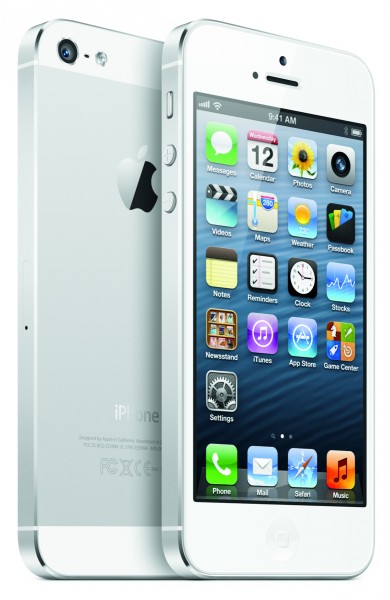
  • T-Mobile starts taking iPhone 5 preorders

    One week from today, Apple’s smartphone goes on sale from the nation’s fourth-largest carrier. But you can order now. The 16GB iPhone 5 is available with T-Mobile USA’s new Simple Choice, no-contract plan. The device is $99.99 upfront, plus tax, and $20 per month for 24 months — or $579.99 outright. Full price elsewhere: $649. The 32GB is $199.99 and the 64 gigger $299.99 upfront and 24 monthly payments, or $679.99 and $779.99 outright, respectively. Full price elsewhere: $749 and $849.

    By several measures, T-Mobile offers the most-affordable iPhone 5 around, but it’s the odd duck of the flock. Apple only sells devices for AT&T, Sprint and Verizon from its online and retail stores, which is advantageous sales placement. Perhaps T-Mobile’s status will change after official sales start, but I suspect the carrier will join regionals selling iPhone in the backwater. C`mon, none of the big three would want T-Mobile’s model listed alongside theirs for about $100 less.

    Money down is another odd thing. Upfront pricing from the big three for 16GB, 32GB and 64GB iPhone 5 is $199, $299 and $399, with 2-year contract. T-Mobile not only asks for less at time of purchase, but there are no contracts, and no financing charges to pay off the phone. So when full price is reached, the bill goes down by $20 a month. With, say, AT&T, your bill stays the same after the contract commitment is complete.

    Contract-free is another way this odd duck stands apart from larger rivals. They sell you iPhone at a lower subsidized price, with contract commitment. My soon-to-be old carrier, AT&T, charges considerably more, particularly for data, and plan is required for smartphones. Minimum: $20 for 300MB per month (cough, cough).

    AT&T’s cheapest family plan starts at $59.99 per month for 550 minutes. For two lines, with minimum 300MB data for both phones ($40) and unlimited family messaging ($30) monthly bill is $129.99 for iPhone 5 (two). T-Mobile is $80 ($50 for first line and $30 for the second) and comes with unlimited talk and text and 500MB high-speed data and unlimited slower speed through end of the monthly bill cycle. Adding monthly fee for two iPhones, brings T-Mobile to $120, but for more of everything.

    AT&T’s Mobile Share plan, with unlimited talk and text would be $130 ($40 for plan and $45 for each phone). T-Mobile’s bill would go up $20 a month ($10 for each line) for 2.5GB data and tethering or $140 for unlimited data. That 2.5GB is for each line versus 1GB shared from AT&T. Going up to the 4GB shared plan raises AT&T’s monthly commitment to $150 ($70 for the plan and $40 for each phone). Remember, if you bring your own phone, then T-Mobile is $40 less per month — that’s $100 for 2.5GB data for each of two lines or $120 for unlimited.

    I ordered one black and one white 16GB iPhone 5 this morning, setting me back nearly $293, thanks to California’s outrageously high sales tax (yeah, I know it’s a pittance to many Europeans). The handsets are for my college-age daughter and 91 year-old father-in-law. I already moved over three lines. My total bill, even paying $40 a month for two iPhones, should be about one-third less with T-Mobile compared to AT&T.

    One more odd thing: T-Mobile’s iPhone 5 includes the 1700MHz, which along with 2100MHz, supports the carrier’s HSPA+ network. Am I confused. No 1700MHz is the reason other iPhones unlocked and brought to T-Mobile can’t use the high-speed data network. If Apple can add the radio now, why not years ago? There is also 4G LTE, but coverage is limited to a handful of cities, for now.

  • Samsung found to infringe Apple’s patent for text-selection feature

    Apple Samsung Patent Dispute ITC
    A judge with the United States International Trade Commission found in a preliminary decision that Samsung (005930) infringed upon Apple’s (AAPL) patented technology for text selection, Reuters reported. ITC judge Thomas Pender said that Samsung infringed upon Apple’s intellectual property by including the text-selection feature in its smartphones and tablets. Samsung was found not guilty of infringing upon a second patent that dealt with the ability to detect microphones and other devices when plugged into a headphone jack. If the full commission decides to uphold Pender’s ruling then Samsung will face an import ban for its Galaxy, Transform and Nexus devices, among others, into the United States. A final decision is expected in August.

  • The Rising Tide Lifts One Boat Most of All

    “Kaiea” is Hawaiian for ‘rising tide.’ I grew up in Hawaii, and “kaiea” is one of my favorite words. I like its meaning, the memories and images of the Pacific Ocean it conjures up and how it sounds onomatopoeic to me (like a wave crashing on the rocks), especially during Chicago winters.

    It is also the underlying idea for an effective — and underutilized — growth strategy. My consulting firm works with many successful market leaders with amazing market shares — 30%, 50%, 70% and even 90%. Since these companies already effectively own their existing categories, the only way to grow is to find the rising tide to grow or create a new category.

    One example of a company in this situation is Gillette, which has approximately a 70% share of the shaving market. For decades, the shaving market was men’s facial hair removal. Everyone is familiar with the primary methods Gillette used to grow: It innovated via technology (with the Sensor, Mach 3, and Fusion razors), and in 2001 it formally expanded into the women’s leg shaving market with a new brand called Venus.

    Now Gillette is formally expanding into the men’s body shaving market via a new product called the Fusion ProGlide Styler.

    The Gillette story clearly illustrates the simple math of Category Growth. Category Growth = A (# of consumers) x B (units per user) x C (price per unit). To grow a category, you can focus on A (by luring new consumers into the category), or B (by convincing existing users to buy additional units) or C (by increasing prices).

    Gillette’s waves of growth illustrate how a company can use these different growth strategies. Since Gillette already had a 70% share of adult men who were shaving most of their faces, for many years its best growth strategy was to increase pricing (C) by rolling out innovative new kinds of blades.

    With the rollout of Venus, Gillette refocused on increasing its number of customers (A) by formally inviting women into the franchise to not just settle for a razor designed for a man’s face, but rather one tailored for women shaving their legs.

    Now with its focus on body shaving, it’s targeting variable B. They’re taking existing users and encouraging them to use their products to ‘manscape’ their way to masculinity — a process that generally requires either a new razor (such as the ProGlide Styler) or more razor blades. (Most men won’t use the same razor for their face and their body.)

    This is why Interbrand valued the Gillette brand at $25 billion in 2012, making it the 16th most valuable brand in the world, ahead of Amazon.com, American Express, and Nike.

    But you don’t have to be a market leader like Gillette for Category Growth as a growth strategy to work. My colleague, Linda Deeken, and I did some analysis of the top 75 Food & Beverage categories sold in classic retail channels that Nielsen measures for a 4 year period from 2007-2011. What we found was that only 1 in 5 categories experienced true category growth — meaning they grew faster than inflation. Of the 20% of categories that experienced growth, 80% of the incremental growth was captured by 1% of the companies or brands. The 1% was a mixture of market leaders, new entrants, and players in between.

    In contrast, any growth strategy that doesn’t seek to grow the pie or create a new pie is by definition a pie-splitting, share-stealing strategy. But our prior post shows a wealth of Nielsen analysis that shows that pie splitting is a long-term losing strategy. Economics 101 will tell you that any industry with positive profits invites competitors into it until industry profit goes to zero.

    Sometimes it is hard for executives to accept that their growth strategy is fundamentally one of pie splitting. The easy diagnostic here is to ask a few questions of various functional leads. Ask your CFO if greater than 50% of their profit objective is a combination of population growth, raising prices (without real innovation), or cost cutting. Ask your head of sales if greater than 50% of their profit objective is based on increased trade rates, buying slotting and/or forcing competitors out of the shelf set. Ask your head of strategy or marketing if greater than 50% of their profit objective is based on close-in innovation, superior marketing plans, increased marketing spend, or a key competitor stumbling in the marketplace. If any of these answers are yes, then you have a pie splitting strategy.

    In my consulting work, when I ask an executive to describe their company’s growth strategy, 9 of 10 times it is a pie splitting strategy. Their eyes light up when I tell them 80% of category growth is captured by 1% of the companies. Or that category creators grow sales and market capitalization 4x and 6x faster than the other fast growing companies, respectively.

    Imagine if the idiom “The rising tide lifts all boats” actually said “The rising tide lifts all boats…but lifts one boat most of all”? That’s the reality of category growth: It can deliver far greater growth than pie-splitting, and many companies should be spending much more time and energy trying to achieve it.

  • How did supercomputer Watson beat Jeopardy champion Ken Jennings? Experts discuss.

    Ken Jennings (left) faces off against supercomputer Watson (center) and his fellow Jeopardy champion, Brad Rutter (right).

    Ken Jennings (left) faces off against supercomputer Watson (center) and his fellow Jeopardy champion, Brad Rutter (right).

    Perhaps you know Ken Jennings by name, perhaps you simply know him as “that guy with the winning streak on Jeopardy.”  In 2004, this trivia enthusiast won an incredible 74 consecutive times on Jeopardy, setting the record as the classic game show’s most winning contestant and securing the Guinness World Record at the time for “most cash won on a game show.”

    Ken Jennings: Watson, Jeopardy and me, the obsolete know-it-allKen Jennings: Watson, Jeopardy and me, the obsolete know-it-allIn today’s talk, he shares how he became obsessed with trivia as a young child.

    “I remember being able to play Trivial Pursuit against my parents and hold my own,” says Jennings in this talk, given at TEDxSeattleU. “There’s a weird sense of mastery you get when you know some …. Beattles factoid that dad didn’t know. You think, ‘Aha. Knowledge really is power.’”

    In 2011, however, Jenning’s legacy changed when he accepted a match against the IBM supercomputer, Watson.

    “I was pretty confident that I was going to win,” says Jennings of how he felt going into the match. “I had taken some Artificial Intelligence classes and I knew there were no computers that could do what you need to do to win on Jeopardy. People don’t realize how tough it is to write that kind of program that can read a clue in a natural language like English — to understand the puns, the red herrings, to unpack just the meaning of the clue …  I thought, ‘Yes I will come destroy the computer.’”

    But that’s not exactly what happened. To hear how the match what down (interestingly, Jennings said it had an energy far more like a basketball game than a game show) and the profound lessons Jennings learned from it about the state of knowledge, watch this hilarious talk.

    Shortly after the Jennings-Watson showdown in 2011, TED hosted a panel of IBM experts and insiders about the supercomputer and its Jeopardy victory. Below, see the discussion between Final Jeopardy: Man vs. Machine author Stephen Baker, Watson’s principal investigator Dr. David Ferrucci, IBM Fellow Kerrie Holley and Columbia professor Herbert Chase.

    So how did it feel to lose to Watson? Jennings shares in this talk.

    “I felt obsolete,” he reveals. “I felt like a Detroit factory worker in the ‘80s seeing a robot that could now do his job on the assembly line. I felt like ‘Quiz Show Contestant’ was now the first job that had become obsolete under this new regime of thinking computers.”

  • Deal: Best Buy has some Great Android Deals

    For the past few years Best Buy has struggled to remain relevant. That might sound odd, since Best Buy is the country’s No. 1 electronics retailer. But these days that’s not enough. More and more people are shopping online, and for electronics particularly. Brick and mortar stores become glorified showroom floors.

    Best Buy does have a strong web presence, but it still needs to drive sales to its retail outlets. Otherwise it can’t justify paying the rent and keeping the lights on. To that it has created several stores within its stores. It is currently planning Samsung stores, which will sell products ranging from tablets and smartphones to TVs. It’s one way to generate foot traffic and interest in Best Buy physical outlets.

    One mini-store Best Buy has always boasted is its Mobile Solutions. There they sell phones and plans from all major service providers. It’s hard to miss it when you walk into a Best Buy store. Of course, they also have a mobile section online. And there are some deals to be had currently.

    While there are plenty of deals you can find directly with a carrier — the BlackBerry Z10 from T-Mobile and AT&T are the standard $200 — there are some discounts to be had. The Galaxy S3, for instance, is $100 from AT&T and $150 from Verizon, cheaper than you’ll find them in stores (at least without a special sale). They’re definitely worth checking out.

    So check out Best Buy Mobile Solutions for deals on a new smartphone. Any time you can get a better price than the carrier offers, you should take it.

    The post Deal: Best Buy has some Great Android Deals appeared first on MobileMoo.

  • Hide your Bitcoins from Skype!

    Another day, another threat to your computer. Kaspersky Labs is reporting that your faithful communication app may in fact be looking to steal your virtual money right out of your virtual pocket. The attack is underway in many locations around the world, and this is not the first malware to target Skype, just the latest and potentially most costly for users.

    Kaspersky’s Dmitry Bestuzhev reports that the latest curse on Skype “turns the infected machine to a slave of the bitcoin generator”. The attack affects users in Russia, Poland, Costa Rica, Spain, Germany, Ukraine, Italy and is spreading to other locations, but the initial dropper is downloaded from a server located in India and the malware connects to its C2 server located in Germany.

    Once the malware is on a victim’s computer, it begins usurping the PC’s processing power in the service of mining Bitcoins. The Bitcoin network is reliant on a rather complex system that creates each Bitcoin and verifies that it is valid and is being spent by the owner of the Bitcoins. The process requires a lot of processing power, and that is exactly what the attackers behind this malware are after. This news follows closely on the heels of a DDoS attack of Bitcoin Exchange service Mt. Gox.

    The biggest clue is if your machine begins ramping up CPU usage. You need to look into why it is doing that, though that is something you should always do, virus fear or not. According to Bestuzhev “as I said the campaign is quite active. If you see your machine is working hard, using all available CPU resources, you may be infected”. As of this writing, a single Bitcoin is worth $115.

    Photo Credit: Seleznev Oleg/Shutterstock

  • Fraunhofer tests an LED lamp that will light up your PC at 3 Gbps

    When you think about broadband connections, you usually picture radio airwaves or wires, not ambient light. But the emerging field of LED broadband (sometimes dubbed Li-Fi) aims to turn your light bulbs into data transmitters by subtly manipulating the rate they flicker. One of the organizations researching such optical communications technology, Germany’s Fraunhofer, has hit a new milestone: a lighting system that could deliver up to 3 Gbps.

    Fraunhofer’s Heinrich Hertz (yes, that Hertz) Institute said it has developed components in the lab that will allow off-the-shelf LED lights to transmit data at a rate of 1 Gbps on a single frequency. Since most commercial LEDs support three frequencies (or colors) of visible light, that gives the system a total capacity of 3 Gbps.

    The institute has achieved this, in part, by expanding the size of each frequency transmission band from 30 MHz to 180 MHz. Basically, Fraunhofer has developed a bigger light pipe into which it can cram more data.

    Fraunhofer HHI Visible light communication LED broadband

    The transmission is one-way of course — unless your PC or smartphone is equipped with its own LED — but the technology could be used as a high-powered supplemental downlink, say, for streaming video. And being that they’re light, the beams are also visible and can be highly focused. Wi-Fi may permeate your home, but once you walk out from under the warm glow of your lamp, your LED connection disappears. Fraunhofer said that could be useful in places such as hospitals where there is strict control over which devices and can access the network and where they can access it.

    Fraunhofer’s claims that its technology will work with off-the-shelf LEDs could have significant consequences. As my colleague Ucilia Wang points out in recent GigaOM Research report (subscription required), LED lighting prices are falling but haven’t reached the price point necessary to spur mass consumer adoption. LED manufacturers are trying to make their lighting systems smarter to boost their value. Connecting our light bulbs to the internet of things is one way to make them more valuable. Another way is to make a ceiling lamp that could function as high-speed broadband link as well as pleasant illumination source.

    Fraunhofer also points out that the technology could be used in other places beyond the indoors. For instance, the LED headlights in a car could be used to beam information to vehicles ahead about velocity, trajectory or even destination, allowing them to coordinate their driving patterns on the road.

    Related research and analysis from GigaOM Pro:
    Subscriber content. Sign up for a free trial.