This week, the President met with the Sultan of Brunei, his Export Council, Intel Science Fair finalists, and Israel Channel 2; he discussed cybersecurity and immigration reform with CEOs, and traveled to the Capitol to meet with Congressional Caucuses, while the First Lady honored Women of Courage, held a Twitter Q&A, and challenged CEOs to find innovative ways to hire veterans.
Blog
-
Podcast: Samsung Galaxy S 4 blasts off and RIP Google Reader
This was a week of saying hello to shiny new things and good-bye to old favorites. In this episode of the GigaOM Podcast, we give you everything you need to know about the Samsung Galaxy S4, ponder the death of Google Reader and even get in a little bit about how you can upgrade your seat in the stadium during a baseball game.
Show notes:
Hosts: Chris Albrecht and Tom Krazit
Guests: Kevin Tofel, Laura Hazard Owen and Erica OggThis episode of GigaOM Podcast is brought to you by Squarespace – the best way create a modern and professional website, with all the features you need integrated into one platform. Every Squarespace website is mobile ready, and includes e-commerce, 24/7 customer support, and a free domain name. Start your free trial today, at squarsepace.com/gigaom.
And thank you again to Stitcher smart radio for letting us use their studio.
- Here’s what you need to know about the Samsung Galaxy S 4
- Just how big a deal is the death of Google Reader?
- Get a better seat at the ballgame
SELECT PREVIOUS EPISODES:
Electric Imp aims to make the Internet of Things devilishly simpleCall-In: Galaxy S 4 predictions, Chromebook Pixel cloud storage
Podcast: Facebook’s feedin’; Lean In’s meanin’; and everyone’s Hadoop-in
IoT podcast: When devices can talk, will they conspire against you?
Call in podcast: Galaxy S 4 predictions and Chromebook Pixel cloud storage
Call-in show: Why the “I’m leaving iPhone” trend?
Internet of things Podcast – Almond+’s nutty idea: Making sensor connectivity a snap
Podcast: Why the internet of things is cool and how Mobiplug is helping make it happen

Related research and analysis from GigaOM Pro:
Subscriber content. Sign up for a free trial.- The future of mobile: a segment analysis by GigaOM Pro
- What the Google-Motorola deal means for Android, Microsoft and the mobile industry
- How to deliver the next-generation web experience


-
HTC launching offensive against Samsung?

Earlier this evening we saw HTC play the role of party crasher at Samsung’s big reveal event for the Samsung Galaxy S IV. Their efforts to present a different option did not stop with their pre-activity stunt though. Since Samsung’s event concluded, HTC has been busy leveling criticisms about their competitor and the new device.
Over on Twitter, HTC posed the following question:
So…how off-Broadway is this production?
#theNextBigFlop#HTCOne“The Next Big Flop” appears to be HTC’s attempt to rebrand the Galaxy S IV by playing off Samsung’s “The Next Big Thing” phrase. Meanwhile, HTC President Jason MacKenzie has been hitting up the journalists to express his opinion regarding Samsung’s efforts this evening. In an interview with CNET, MacKenzie indicated he “went from laughing to actually feeling embarrassed at some of the acting” in reference to some of the skits Samsung presented to highlight features of the new device. MacKenzie also thinks the Galaxy S IV lacks any significant new features and specifically called out S-Translator as an already available technology on Android phones.
Samsung thus far has opted to stay above the fray with Ryan Bidan, director of marketing for Samsung Telecommunications America, merely acknowledging MacKenzie’s right to have an opinion.
The actions of HTC may be one driven by some sense of desperation. They have already struggled a bit to get their new flagship HTC One device to market with the most recent delay pushing availability into April. Meanwhile, they are coming off of a difficult financial year with forecasts not looking pleasant. Clearly the Galaxy S IV and HTC One are both top-tier devices that will probably find themselves frequently mentioned in the same breath as being among the “best” Android devices available. For this evening at least, HTC has managed to get their HTC One device mentioned nearly as often as the Galaxy S IV judging by the headlines.
Are you glad to see HTC coming out swinging or do you think it just makes them look petty and desperate?
Come comment on this article: HTC launching offensive against Samsung?
Visit TalkAndroid for Android news, Android guides, and much more! -
C Lock Screen, C Widget, and C Shaker offer extra customization on your Android device

If you’ve been itching to have a few more customization options on your phone lately, we’ve got some really cool apps you’ll be interested in. Developer astoncheah on the XDA forums has released a trio of apps into the Play Store aimed at giving you a ton of customization options, ranging from a highly tweaked lock screen to a customizable widget, and even an app that lets you shake your phone to launch apps or toggle settings on your device.
C Lock Screen is a lock screen replacement that lets you set up a ton of shortcuts, add music controls, add a new clock, change the font, etc. Pretty much anything you can think of that you’d want on your lock screen, this app has it. It’s pretty much a mash-up of Jelly Bean’s lock screen widgets and Cyanogenmod options, but without the hassle of rooting your phone. Not bad for a free app. C Widget is similar in functionality, but for your home screens instead of your lock screen. It can customized to show the weather, the date, system information, etc.
C Shaker is the most unique app here. Instead of giving you a visual widget or customization, it gives you the ability to shake your phone to, say, turn WiFi on or off, or to play/pause music. It’ll even launch a custom app if that’s more your speed. And there are fortunately options for tweaking the strength needed activate the shaking action so you don’t accidentally start playing music in the office when your phone is in your pocket.
Sound interested in these? Hit the source below to check out the forum post with links to all of the apps.
source: XDA Forums
Come comment on this article: C Lock Screen, C Widget, and C Shaker offer extra customization on your Android device
Visit TalkAndroid for Android news, Android guides, and much more! -
XOLO X1000 Offers 2GHz Intel Chip with 4.7-inch Screen for Low $369 in India

XOLO has done it again! Their latest addition, the X1000, will offer some incredible specs for a price that won’t drain your bank account and leave your wallet bare since the X1000 will sport the following new features:
- SHARP HD 4.7-inch, 720p, 1280 x 720 LCD (edge-to-edge), 312 PPI
- 2GHz Atom Z2480
- 32GB of expandable storage
- High-speed 8MP rear (with “Burst Mode”)/1.3MP camera at the front
- 1GB of RAM
- 21Mbps HSPA+ 3G
One fairly disappointing feature of the X1000 is its use of the antiquated Android ICS OS. This means buyers have to hope XOLO releases the Jelly Bean upgrade in a timely manner, or that a bootloader unlock and CM ROM is around the corner for it. But for the price, it may be worth settling for the archaic OS and bring a little Intel Inside.
Source: XOLO
Come comment on this article: XOLO X1000 Offers 2GHz Intel Chip with 4.7-inch Screen for Low $369 in India
Visit TalkAndroid for Android news, Android guides, and much more! -
AT&T Expands 4G LTE Coverage, Brings Coverage to Cleveland, TN and Augusta, GA
 AT&T is looking to bring its RootMetric-awarded “fastest 4G LTE network” to a few new areas in the Southern US. The new areas that will see these new speeds are Cleveland, Tennessee and Augusta, Georgia, as well as other areas in the middle of Georgia including the city of Macon. While it’s nowhere near the coverage that Verizon has it’s good to see AT&T expanding its coverage. This is perfect timing especially if you’re considering the newly announced Galaxy S IV from Samsung.
Come comment on this article: AT&T Expands 4G LTE Coverage, Brings Coverage to Cleveland, TN and Augusta, GA
Visit TalkAndroid for Android news, Android guides, and much more! -
Rovio’s “The Croods” Now Available in the Play Store

A week ago we told you that Rovio would be bringing “The Croods” to a mobile screen near you. The makers of Angry Birds proved that they were up for the task of bringing featured films to the super small screen with Angry Birds: Rio. Unlike Rio, there will be no angry birds to the rescue this time. Instead, you will see more Sim-City style game that will include the ability to:
● Trap & tame 10 evolutionarily mixed- up creatures! You’ve never seen anything like the Girelephant or Molarbear! Think you can catch them all?
● Create wacky inventions with Grug to open and explore new areas!
● Decorate your pre-historic world with the latest in caveman fashion accessories!
● Meet your favorite characters from the feature animation film from DreamWorks Animation!If this seems like a game that’s up your alley you can hit the break to find your Play Store link and QR Code. Be warned though that even though you can play the game for free they have an IAP system for those premium goodies. Enjoy!


Come comment on this article: Rovio’s “The Croods” Now Available in the Play Store
Visit TalkAndroid for Android news, Android guides, and much more! -
Rogers, Bell, and TELUS all confirm they will carry the Galaxy S IV

So you’ve seen how awesome the Galaxy S IV is, but in the back of your mind you’re still wondering if your carrier will officially carry the device. If you’re a Rogers, Bell, or TELUS customer in Canada, put those fears to rest, as all three of the big cell carriers have taken to their Twitter accounts to confirm that they will be carrying your new favorite “Life Companion.”
There’s nothing official about date and pricing, but these things are going to fly off the shelves. You can likely expect the devices to be made available as soon as possible for each carrier, but keep your ears out for details as we get closer to April.
Come comment on this article: Rogers, Bell, and TELUS all confirm they will carry the Galaxy S IV
Visit TalkAndroid for Android news, Android guides, and much more! -
Samsung Unveils A Bluetooth Wireless Gaming Controller For The Galaxy S 4

Samsung is releasing a bombardment of accessories along with their Galaxy S 4, one of which is a fully functional, boda-fide wireless gaming controller.
The oval shaped controller is a great deal smaller and lighter than the Xbox and Playstation controllers you’re used to gripping. It has a plastic build, and it’s so light it feels almost hollow. It feels cheap, to be quite frank — I’m used to the heft of regular controllers, and it was a little oft putting to use at first. You’ll find the regular assortment of joysticks and buttons here: two analog sticks, inset d-pad controls, two triggers on the right and left – everything you’d expect.
The controller connects to the Galaxy S 4 via a Bluetooth connection, and sadly, it isn’t backwards compatible with the S 3 or any other Samsung phones. It’s powered by two AAA batteries and there are strangely two separate battery compartments for each battery. The coolest part of the controller, if anything, is that there’s a receptacle on the top of the phone that can be pulled out as a dock for the S 4.
Now for the bad news: the controller is only compatible with games that are purchased from Samsung’s curated app portal. For many of us Android users that have already purchased and downloaded a plethora of games from the Google Play Store, that’s a severe disappointment. It also appears as though the S 4 can only link up with one controller at a time, so multiplayer gaming is a no-go for now.
Samsung wouldn’t tell us any details about the pricing, but we expect the controller to be released sometime in May.
-
Samsung Taps Mobeam To Bring Beamable Barcodes To The Galaxy S 4, Could Wallet Integration Be Next?

Samsung talked up the Galaxy S 4′s features with a bit of Broadway flair here at Radio City Music Hall, but there still are some neat additions to the device that didn’t get a moment in the spotlight. The Korean electronics giant, for instance, tapped a San Francisco company called Mobeam to bring its novel approach to displaying barcodes to the Galaxy S 4.
Rather than sticking to the tried and not-so-true approach of trying to display a barcode on a phone’s screen, Mobeam coaxes the device’s infrared proximity sensor to pulse a pattern at a barcode scanner. Essentially, it’s trying to trick the scanner into thinking that the light flashing at it is a “reflection” of a valid barcode — it sounds a little out there, but it definitely seems to work. The problem may sound trivial to some, but that’s certainly not the case for companies and advertisers that want a more direct way to interact with consumers.
We’ve seen more than a few startups attempt to tackle this issue — there’s Disrupt Battlefield alumnus SnipSnap for one, while devices like the ambitious iCache Geode tried to solve the issue with a secondary display — but Mobeam’s solution strikes me as one of the smarter ways to do it. After all, why deal with paper coupons and gift cards that come in the mail (that often expire and get thrown out anyway) when a company like, say, Coca-Cola can cut out the middleman and send you retail-friendly deals directly. You get a price break, retailers don’t need to revamp their point of sales systems, and Coca Cola makes a sale.
According to Mobeam CEO Chris Sellers, the company has been working out the particulars of this partnership with Samsung for around 18 months. It’s the first time that the Mobeam has locked up a partnership with handset manufacturer, but they’re no stranger to attention from major companies — in late 2011 Procter and Gamble teamed with Mobeam in a bid to better distribute digital coupons. With any luck, the Galaxy S 4 won’t be the last device to benefit from Mobeam’s tech, as Sellers told TechCrunch that Mobeam has been in talks with a number of major handset OEMs.
At this stage, there don’t seem to be any applications on the Galaxy S 4 that take advantage of Mobeam’s tech. It’s there for curious developers and companies to muck around with, but one has to wonder if Samsung has something specific planned. Back at Mobile World Congress, Samsung officially pulled back the curtain on Samsung Wallet, a Passbook clone of sorts that lets users digitally store “coupons, membership cards, tickets, and boarding passes” — all things that a device like that S 4 could pass it self off as thanks to Mobeam. Sellers wouldn’t confirm that Samsung planned to tap into Mobeam’s API for Wallet, but if Samsung is really looking for a way to beat Apple and Passbook, this may well be it.
-
Hands on with the Samsung Galaxy S IV [Video]

Tonight at Radio City Music Hall in New York City, Samsung unveiled the Galaxy S IV, which promises to be your life companion for a richer, simpler, and fuller life. If there is one thing Samsung proved tonight, it’s not the specs that sells, it’s the features. Last year it was all about S Beam, S Voice, and AllShare. This year they added a whole lot more such as Dual Camera, Group Play, Share Music, Smart Scroll, Smart Pause, S Voice Drive, WatchOn, S Health, Adapt View, and Adapt Sound. Still, we can’t forget about the specs, and they are impressive with the 5-inch 1080p Super AMOLED display, 1.9GHz Exynos Octa or 1.6GHz Qualcomm quad-core CPU, 2GB of RAM, 16/32/64 GB of storage, microSD slot, 13MP rear camera, 2MP front camera, and 2600mAh battery. What are you waiting for? Hit the break to see our hands on of the Next Big Thing.
Click here to view the embedded video.
Come comment on this article: Hands on with the Samsung Galaxy S IV [Video]
Visit TalkAndroid for Android news, Android guides, and much more! -
Meet Samsung Galaxy S IV
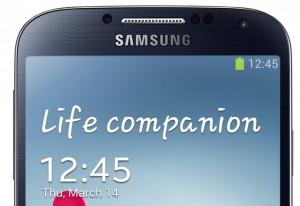 After months of rumors, Samsung finally took the wraps off Galaxy S IV tonight at the famed Radio City Music Hall and to big overflow crowd in Times Square. The phone is as large as the “Unpacked” event, quite literally — with 5-inch display. Try clipping that to your belt (how I carry my phones).
The hotly-anticipated smartphone starts shipping at the end of April, eventually available from 327 carriers in 155 countries. All major U.S. carriers will sell the phone: AT&T, Cricket, Sprint, T-Mobile, US Cellular and Verizon Wireless. Among the global partners: Deutsche Telecom, EE, H3G, Orange, Telenor, Telia Sonera, Telefonica, and Vodafone. Like earlier Galaxies, the S4 will be available in 3G and 4G (HSPA+ and LTE) variants and, once again, Americans can expect less than buyers in many international markets.
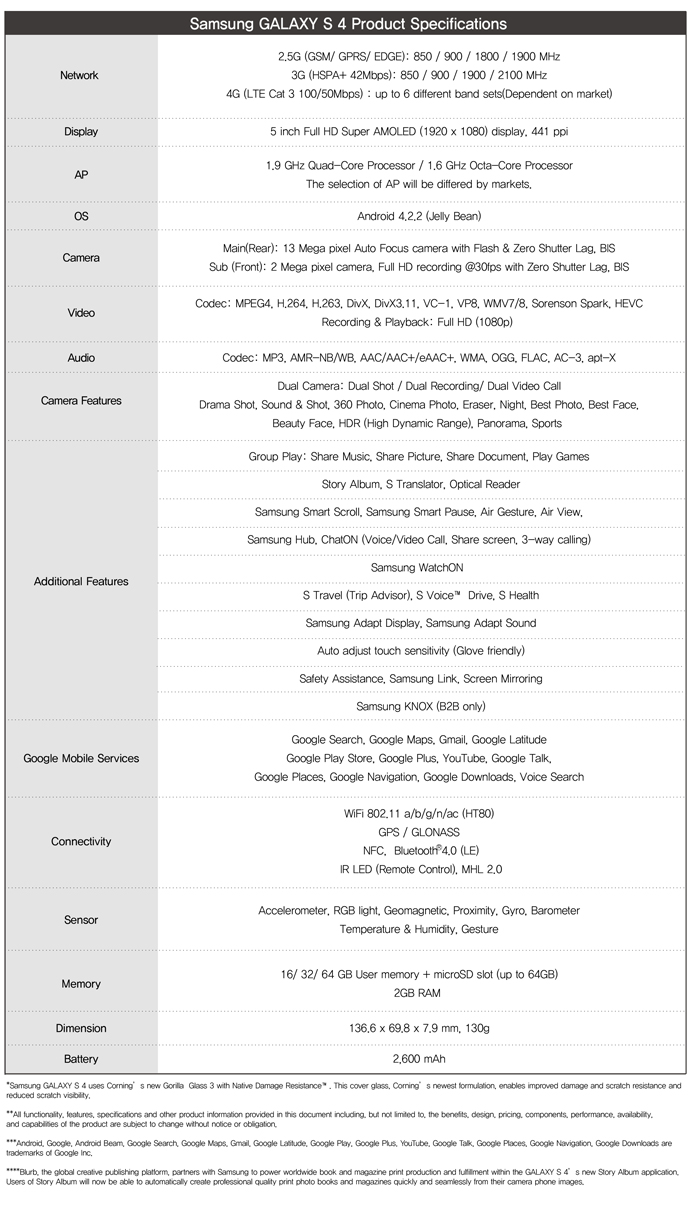
The 5-inch Super AMOLED display is 1920 x 1080 resolution and 441 pixels per inch. Processor will be 1.9 GHz quad-core or 1.6 GHz octa-core depending on the variation. In the past Americans got fewer cores on LTE models and more cores went to HSPA+ phones, which is my expectation here.
Memory is 2GB, while storage varies from 16GB to 64GB, depending on carrier variation, expandable with microSD card up to an additional 64GB. In a departure from other recent phone designs, the battery is removable and hefty — 2,600 mAh. Storage and battery expansion, along with the high-resolution touchscreen, really brings the S4 into tiny computer class.
The rear-facing camera is 13-megapixels, 2MP for the front. The phone runs Android 4.2.2, but Samsung adds many capabilities on top of the core operating system. For example, there is a Dual Camera mode that lets the shooter take photos front and back simultaneously and insert him or herself into the image. The feature also works for video, and lets the user pop in and out of frames.
Software and Services
Among the other software benefits:
Air Gesture lets users wave over the phone to manipulate some controls, such as choosing music or scrolling web pages. Related: Air Wave allows people to hover their fingers to manipulate the screen.
Dual Video Call. Users can use both cameras simultaneously so that the caller on the other end can see other people, say, at a party.
Eraser removes unwanted objects (or people) from photos. Who hasn’t wanted to do that?
Group Play lets S4 users share documents, music, games and more, even combining up to eight handsets to create a speaker system (using Share Music).
S Health tracks some personal biological functions, such as calorie burn, heart rate and pulse and pulls them together into a mini report.
S Translate. This one looks quite futuristic. Think Star Trek’s universal translator. The feature can translate 9 languages, including speech-to-text and text-to-speech capabilities. While the service needs a network connection for optimal use, there is basic vocabulary on device for basic translation.
S Voice Car is a voice-activated system for using Galaxy S IV hands-free.
 Life Companion
Samsung’s theme for Galaxy S IV is “life companion”, a point JK Shin, president of Samsung’s IT & Mobile Communications Division, repeatedly made during tonight’s launch event. From that perspective, much of the innovation is about software and services.
The theme extends from that adopted for the S3 and jumps past what Apple started nearly six years ago. The original iPhone stood apart from all other phones, not just smart ones, for its humanness. Touch, and its intimacy, and the way the handset responded to your proximity gave it a human quality. Suddenly the phone wasn’t an inanimate object but more living thing. Apple extended humanness with each new model. Siri is best representation in iPhone 4S and 5.
Galaxy S IV packs eight different sensors and uses them to make the phone highly responsive, as the above features should indicate. Wearing gloves or have chocolate on your hands? Wave instead of touch. Want to share the party with a distant friend? Use both cameras for the video call. Want to check your messages while driving? Let the S4 read them to you. Samsung’s software and services design approach is all about making the smartphone more human, more responsive and more like a personal assistant.
Already there is some debate here in the newsroom about the new handset. I am generally impressed by the software and services features. My colleague Mihaita Bamburic says the the phone is “alright, but not a GS4 — a GS3 Plus or like Apple’s iPhone 4S over the iPhone 4. I was expecting more because I hoped for Samsung to release some more impressive and truly innovative features”.
I expect Mihaita to add more tomorrow in a commentary, and he may not be the only one. Of course, the real test is hands-on, to see if the benefits are as good as Samsung promises.
-
Major US carriers updating plans to carry Samsung Galaxy S IV

When Samsung mentioned during their Unpacked Event this evening that 327 mobile operators around the world would carry the Samsung Galaxy S IV there was little doubt all of the major U.S. carriers would get to carry the device. Those carriers have been hitting the Internet to get the word out that there was no need to make an assumption – availability is going to happen.
Thus far US Cellular, Verizon Wireless, T-Mobile, Sprint and AT&T have all issued announcements of some sort to indicate they will carry the Galaxy S IV. Though none are providing any kind of pricing details or exact availability dates, Sprint did take the opportunity to mention in their release that the device would be available on their unlimited data plans:
Sprint is excited to bring the benefit of Truly Unlimited 4G LTE data to the U.S. variant of Galaxy S4 in the second quarter of this year. Our customers will appreciate the ability to use Galaxy S4 to surf the Web, share pictures and videos, and use this smartphone as much as they want without worrying about throttling or overage charges on their monthly bill due to data caps. NPD Group data indicated in 4Q 2012 that Sprint was the top U.S. seller of Samsung Galaxy S III, so we believe our customers will also enjoy its successor’s features and unlimited data.
T-Mobile and AT&T already have pages setup on their sites for potential buyers to sign up for notifications.
sources: Phandroid, Android Central
Come comment on this article: Major US carriers updating plans to carry Samsung Galaxy S IV
Visit TalkAndroid for Android news, Android guides, and much more! -
Samsung Galaxy S IV Adds Smart Software Features: New Camera Modes, S Voice Drive And More

The Samsung Galaxy S IV isn’t just packing upgraded hardware and an iPhone shattering 5-inch 1080p HD display. Several new software features were added with the camera being up first, benefiting from some of what you’ll find in the Galaxy Camera:
- Cinema Photo which captures still images from moving backgrounds
- Shooting in Drama Shot burst mode, you can create animated gifs
- Eraser mode removes unwanted background objects or people
- Sound & Shot mode adds audio to the background of still images
- Story Album automatically groups photos based on details such as location or time
Air View, a feature once found only in the Galaxy Note II, gives you a pop-up window preview of content when you hover over certain apps or menus. For users on the go, S Health in combination with new sensors, helps you stay fit. Samsung’s voice recognition app S Voice now includes S Voice Drive which allows you to navigate and get to places without ever having to look at your phone. With the Galaxy S IV, you’ll even be able to translate nine different languages via text or voice.
Another feature that piqued interest is Smart Scroll which utilizes the front-facing camera and scrolls based on the direction your eyes move. Furthering the eye-tracking technology, Smart Pause will pause a video if you happen to look away. You can check out the video below which shows off the Samsung Galaxy S IV and its new features.
Click here to view the embedded video.
Come comment on this article: Samsung Galaxy S IV Adds Smart Software Features: New Camera Modes, S Voice Drive And More
Visit TalkAndroid for Android news, Android guides, and much more! -
Samsung adds Knox and HomeSync to Samsung Galaxy S IV

During their big reveal of the Samsung Galaxy S IV tonight, the folks from Samsung talked about a couple new features they were including on the device that users may find useful. The first is the Samsung Knox security scheme. Knox is designed to create a virtual wall between the personal and work areas on a device. Knox may be thought of as the manifestation of their SAFE, Samsung Approved For Enterprise, security and part of their big push to get Samsung devices adopted in the enterprise.
Meanwhile, for users not focused on using their new Galaxy S IV in the enterprise, Samsung included a nice function for home use. HomeSync is a personal cloud service based on a 1 TB device that will run at home. The device will let up to eight users connect to store and share media. The device will be accessible from outside the local area network via any Internet connection. Besides Internet access, HomeSync can be accessed via NFC and will have Bluetooth built-in as well. Using an HDMI cable, the device could be connected to your favorite large entertainment device for playback. The Galaxy S IV will include the ability to seamlessly upload content to the HomeSync device. This may be a way for some users to avoid online storage services for media content.
source: Android Community
Come comment on this article: Samsung adds Knox and HomeSync to Samsung Galaxy S IV
Visit TalkAndroid for Android news, Android guides, and much more! -
Samsung Debuts S View Cover For Galaxy S 4 With Integrated Display Window

Samsung didn’t just unveil a new flagship smartphone today: it also introduced a cover accessory for that device with unique features. The S View cover has an integrated pass-through window for the main display, which can provide at-a-glance access to basic info like call display, SMS, current battery status and the time. It’s actually reminiscent of an old feature phone throwback, like the small displays built into flip phones once upon a time.
The idea is to keep the phone’s screen protected while also giving access to vital information, and it’s a rather nice execution. Maybe not as nice as the YotaPhone, which offers an e-ink display on the back that takes much less power than the main screen when activated which has a battery-saving feature, too.
-
The tech industry doubles down on design in 2013
If you thought the trend of the design founder, and the designer as the new tech rockstar, had reached its peak last year, think again. Internet and mobile startups, older tech firms and venture capitalists all seem to be doubling down on investing in design and building design practices in 2013.
On Thursday Facebook announced that it has acquired the talent of design firm Hot Studio. Facebook says it’s been working with Hot Studio for the past few months, and the acquihire follows in the footsteps of Facebook bringing in designers like Nick Felton, Mike Matas, and Nate Bolt.
Also on Thursday venture firm NEA announced the launch of NEA Studio, a 12-week program in New York for design founders of web and mobile startups. NEA says during the program founders will work with designers and NEA portfolio companies, and the founders that excel will have the opportunity to work on launching a product and can use NEA’s workspace and receive a stipend.
The NEA news is similar to the announcement by Kleiner Perkins back in November that it is launching a design fellows program. Google Ventures has been aggressive on design work with its Design Studio, as has 500 Startups with their design fund and Greenstart with its in house designers.
Mobile apps, web products, and wearable connected devices are winning and losing based on the designed user experience and user interface of the product. Well-designed products like Path and Pinterest have emerged as leaders, while sites that haven’t evolved with good design haven’t.
Another aspect behind this trend is that the Internet, mobile networks and computing is maturing, and the way regular people — not tech nerds and early adopters — interact with these technologies is fundamentally changing. Google and Apple both have their audio AI computing products, Google Now and Siri, respectively, and touch has started to become the defacto standard for mobile devices.
At the SXSW Interactive festival this week, there seemed to be a greater presence of talks from designers and design founders than in previous years. During one such panel Tony Fadell, the CEO and founder of Nest, talked about how good design has always existed but has more recently, with the rise of Apple, become more democratized.
But designing a winning UX for a targeted audience can be tricky, which is why designers are starting to be so highly coveted. On the SXSW panel, Fadell and Jawbone CEO Hosain Rahman talked about the importance of iteration and testing and Rahman said Jawbone’s connected wristband product UP had over 200 iterations. Still, the first version of the Jawbone UP flopped, and the company replaced those early versions with a version 2 of the product.
Wearables in particular can be tricky, as the world of computing hasn’t previously had to think much about the UX of the body. Google has reportedly started working with designer glasses company Warby Parker for the design of its Google Glass, augmented reality glasses.
We delved into some of these connected design topics at our second annual RoadMap event last year, and we think design is such an important trend that we plan to keep that conversation going throughout 2013. Our third annual RoadMap event will take place later this year in November.

Related research and analysis from GigaOM Pro:
Subscriber content. Sign up for a free trial.- Takeaways from mobile’s second quarter
- The state of cross-platform media measurement
- Social media in Q1: commerce and discovery dominated

-
Samsung Galaxy S 4 hands-on shows nice hardware but software is the star
After months of leaks, rumors and general gossip, the Samsung Galaxy S 4 is finally here. On Thursday night, Samsung unveiled its new flagship phone and I was able to spend a short amount of time using a pre-production model. While some may find the hardware improvements to be incremental, it’s difficult to argue that Samsung’s software is the star of the smartphone. In the 15 or so minutes that I used the handset, it became clear to me that nobody — not even Google, to a degree — is pushing Android software ahead.
Obviously, I’ll have a full review of the phone after getting a loaner device and putting it through paces. So consider this to be my first impressions.
The hardware: better but not a design departure
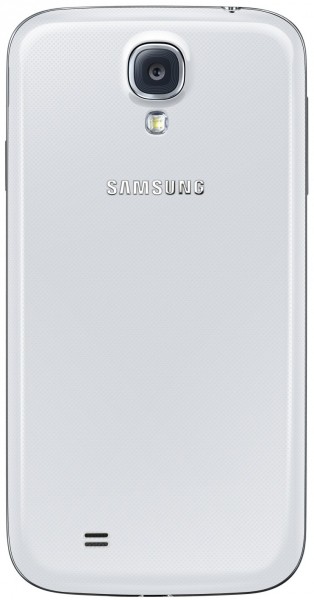
At 130 grams, the Galaxy S 4 is barely lighter than its predecessor. And yes, it’s mostly plastic and looks similar to the Galaxy S 3 and Galaxy Note 2. But at 7.9 millimeters thick, it is thinner and a little more polished than the prior model: If you don’t mind the Galaxy S 3 design and build, you’ll be happy with the look and feel this handset.
There are also some solid component upgrades: A next-generation, 1.9 GHz quad-core processor with integrated LTE modem (for the U.S. market), a 5-inch Full HD Super AMOLED display with 441 ppi density and Gorilla Glass 3, 2600 mAh battery, 2 GB of memory, 13 megapixel rear camera and 2 megapixel front facing camera. All flavors of Wi-Fi — including the new 802.11 a/c standard — are supported as is Bluetooth 4.0, NFC, GPS/GLONASS, HSPA+42 and LTE. The Galaxy S 4 also has an IR blaster in it, so you can use it to control any television set that uses an infrared remote.
With this hardware the device seemed peppy and responsive, even though it doesn’t yet have the final software version installed. The phone easily handled a burst of 20 camera shots without breaking a sweat. And the display is outstanding from every angle; colors aren’t over-saturated as they were on some Samsung phone displays over the past few years.
If you’re on the fence with hardware, the software may win you over
Samsung has packed so many new features in the phone that I have five handwritten pages of notes covering them all. I say that in a good way, because first and foremost, the Galaxy S 4 software is build on Android 4.2.2. Yes, this phone is actually introduced with the most current version of Android. That alone is nice, but then you have TouchWiz, Samsung’s software interface.
TouchWiz itself is really no different than before. Instead, Samsung has baked in more features to the phone through TouchWiz. There’s a new Settings option in the notification shade to enable or disable all of the features. So what are they? Here’s a run-down, brief description and thoughts on just some of the major ones:
- AirView. You can hover with your finger over the display — about 1 to 1.5 centimeters in my quick tests — to interact with the phone. This works for video previews, calendar event or email information and a custom version of Flipboard: Hover a finger over the Technology tile, for example, and the tile expands to show the first three story titles.
- AirBrowse. Another gesture function that I think will get more use than AirView. Waving your hand over the phone flips through gallery images, songs or browser tabs. You can also answer your phone with this gesture and the call will immediately initiate speakerphone mode. In the browser, waving up or down over the phone actually scrolls the web page; handy for reading while eating lunch! I’d love to see this feature in the Kindle app, but Samsung told me that Amazon would have to include it.
- Smart Pause. This uses facial recognition, not quite eye-tracking, to tell when you’re looking at the display. If you’re watching a video and turn your head away from the screen, the content will pause.
- Dual Camera. This feature uses both camera sensors at the same time and provides 8 ways to combine the images. It seems a little gimmicky, but I could see a few interesting use cases, such as interviews, gadget reviews or presentations.
- Drama Shot. An interesting use of burst mode that combines multiple images into one. This is good for action shots: One example I saw was someone diving off a cliff. Using Drama Shot, you can see the diver at multiple points of the dive in a single image.
- Eraser. Another camera mode and one I think can be really handy; especially if you live among photobombers. This mode takes multiple images in burst mode and detects any movement in the frame. The assumption is that you didn’t want that object or person in the image; think of someone walking in between you and a landmark. The Galaxy S 4 in Eraser mode lets you easily remove the unwanted bits from the picture and restores the background from the other images. Clever.
- S-Health. Samsung is getting into the health tracking business with custom software and accessories. The app works with an integrated pedometer, optional heart rate monitor or pedometer band. Your activity data is then synced up to Samsung for storage and analysis.
- S-Translator. Samsung has integrated a translation app in many of its own native software, helping to translate communications to one of 10 languages at launch. Email and ChatOn are two apps that support S-Translator.
- Text reader. This app will scan a picture of text and then convert it through Optical Character Recognition. If it detects contact information, it can even smartly auto-populate a contact record; great for scanning business cards instead of manually entering the data. It also works with QR codes.
There’s plenty more tucked inside the Galaxy S 4 but again, in my limited time, these were what I felt were the most interesting use cases and experiences. Other than a revamped design, I’m not sure what people could have expected Samsung to do from a hardware perspective. Even with technology cycling faster all the time, the components in the Galaxy S 4 are surely enough to carry the device out for a year or so. And most new flagship phones use the same, or nearly the same components.
That’s why I think Samsung’s software improvements and features will help the Galaxy S 4 appeal to a widespread audience when it becomes available. We’ll see in the second quarter when all four major U.S. carriers, along with Cricket and US Cellular start sales.

Related research and analysis from GigaOM Pro:
Subscriber content. Sign up for a free trial.- What the Google-Motorola deal means for Android, Microsoft and the mobile industry
- The fourth quarter of 2012 in mobile
- What to watch in mobile in 2013

-
Samsung Galaxy S 4 Beats The Best With 5-inch, 1080p Display, 1.9GHz Processor, Gesture Controls And A Q2 2013 Release
As if it could be any other way, the just-announced Samsung Galaxy S 4 is Samsung’s, and perhaps even Android’s, best phone yet. In fact, it very well may be the best smartphone on the market, period.
We’ve been through months of speculation, hype, rumors, and leaks, but the truth is out, and the Galaxy S 4 still has much more up its sleeve than the leaks suggested. More than any other Galaxy before it, the Galaxy S 4 is proof that the company can build a central brand the way Apple has with the iPhone. Both the Galaxy Note and Galaxy S series have been selling in the millions, and the Galaxy S 4 looks like it will hold up that trend.
Even with loads of new software, like an enhanced camera application, hover-style gesture features, and a slew of baked-in apps and services from Samsung, the Galaxy S 4 still brings the heat in the hardware/spec department. Here are the specifics:
The Galaxy S 4 clearly has a small ring of competition in the spec department. The only phones that are on this level are the Xperia Z (1080p 5-inch display, 13mp camera, quad-core Snapdragon S4 Pro CPU) and the HTC One (4.7-inch 1080p display, 1.7GHz Snapdragon 600 quad-core CPU, and an “Ultrapixel” camera) and LG’s Optimus G Pro (1080p 5.5-inch display, quad-core Snapdragon 600, 13-megapixel camera).
Of course, they each have their own pros and cons, but the Galaxy S 4 seems to be the most compact, lightest, and fastest among them. Samsung hasn’t been clear about the exact brand of the processor for the U.S. version, but it did say that it was a quad-core Snapdragon CPU clocked at 1.9GHz, which we believe may be the Snapdragon 600.
However, “processors vary by region,” says Samsung, and the Asian and European version will sport the long-awaited Samsung Exynos 5 Octa eight-core processor.
The Galaxy S 4 design manages to both fit in with the Galaxy S family and stand on its own as a unique breed. For one, Samsung packed a bigger display (5-inches diagonal) into a package that’s actually smaller than before. The GS4 is the same width, slightly shorter, and .7mm thinner than its predecessor.
As such, the bezels on the Galaxy S 4 are slightly thinner on all four sides, which means it’s all screen, all the time. And what a screen it is. The Galaxy S 4 display is 5 inches of unadulterated Super AMOLED 1080p brilliance. Surrounding it, the Galaxy S 4 takes a hybrid shape, something between the straight lines of the Galaxy Note and Galaxy S II with the curved tops, bottoms, and corners of the Galaxy S III. The elongated home button is unmistakably GSIII-style.
The Galaxy S 4 also sticks with familiar materials, and unfortunately that still means a whole lot of plastic. Both the front panel and back panel (which is removable) are made of brushed plastic, but with a textured pattern of tiny circles laid over it. It gives the phone an industrial, textured look, but in reality all you feel is smooth plastic.
Around the edge, you’ll notice a new embellishment to the S series: a metallic bar that runs along the edge of the device. Though it looks a lot like metal, it’s actually polycarbonate and meant to protect the sensitive corners of the device.
It would be nice to see some more premium materials in this generation of the Galaxy S, but the plastic and polycarbonate construction let Samsung fit many components into a very compact, light package, according to Director of Product Planning Drew Blackard.
The Galaxy S 4 uses a new 13-megapixel rear-facing camera, bumped up from the 8-megapixel shooter on the Galaxy S III. It’s still centrally placed on the upper back half of the device, complete with LED flash, autofocus, and 1080p video recording. On the front, the Galaxy S 4 sports a 2-megapixel camera.
The higher megapixel sensor is nice, and will surely make a slight difference, but where the Galaxy S 4 camera really evolves from past generations is in the software.
For one thing, the camera app now uses the same UI as the Galaxy Camera, with a brushed silver finish to the buttons and much simpler navigation. Clicking the mode button along the bottom will bring up a simple scroll wheel full of various modes. When one is highlighted, the menu gives the name as well as a description. More sophisticated users can also see these mode options in a grid view for quick changes.
Along with some of the same modes we’ve seen on both the Galaxy Camera and newer Galaxy smartphones like Beauty Shot, Samsung has added way more modes into the mix. One is called Eraser, and it lets you remove unwanted people from a shot. Samsung says it comes in handy for shots that have been photo-bombed, or tourist shots at busy places. The camera senses any motion that goes through the frame and lets you choose to remove it, as if that person had never walked through your shot of the Eiffel Tower.
The Galaxy S 4 also has a dual-shot mode, which is just a button press away from the main camera interface. This lets you use both the front-facing camera and the rear-facing camera at the same time, for both recording and still captures. There are various filters, such as Oval Blur, Postage Stamp, Cubism, and Split, which give you different options for the theme of your dual-shot creation. You can resize the pop-up picture, and move it around the screen using simple drag and drop tools. It’s pretty amazing.
Some other modes include Drama Shot, which lets you take a succession of photos of some action (like someone skiing down a mountain) and turn them into a composite of the entire sequence, and Sound and Shot, which lets you record up to 9 seconds of audio to pair along with a picture.
Samsung even jumped on the GIF train with the likes of Cinemagraph and Vine to create a gif-making mode, called Cinema Shot. It lets you take a short recording, and then determine which parts of the shot stay still and which parts remain animated. In fact, it’s almost exactly like Cinemagraph.
But Samsung took one step past capture and even built an app called Story Album which lets you create photo albums of special events or trips through templates, and use TripAdvisor to add extra location data to your story. You can even print your album through a partnership with Blurb’s print distribution network.
There’s a lot going on here, so try to keep up. We had recently heard that the GS4′s “wow” factor would be all in the software, and that’s exactly right. Most of TouchWiz is the same, though it seems to get lighter and lighter as the phones get faster. The one very noticeable edition was a set of extra toggle buttons available in the pull-down notifications menu.
Other than those particulars, let’s start with the gesture-based head-tracking stuff.
The most useful new feature of the Galaxy S 4 is Air View. It lets you hover over something on the screen to get an extended pop-up view of what’s inside. For example, if you hover over an email in your inbox, Air View will bring up the first few sentences of that email’s contents. If you hover over an album within the photo gallery, you’ll see nine thumbnails of the contents of that gallery. In fact, if you hover over an image while inside the folder, that particular thumbnail will expand to give you a better view of the particular picture. It’s all very reminiscent of what can be done with recent entries in the Galaxy Note line, except without requiring users to keep track of an S-Pen.
Air View is embedded in the email client, photo gallery, calendar, and a Galaxy S 4-edition of Flipboard, which lets you view and select headlines by hovering over a single tile.
Samsung also added an Air Gesture feature, which lets you control the phone without having to hold it — I could see this being used while driving. You can swipe left and right to switch between web pages, songs, photos in the gallery, etc. and swipe up and down to scroll. You can even accept calls by waving at the phone.
Rumors suggested that Samsung had developed some sort of magic-scroll eye-tracking technology, when in reality the Galaxy S 4 can actually only track your head, very much like the Galaxy S III’s Smart stay feature. The front-facing camera can detect that your head is facing the phone directly, which stops the display from dimming.
In the Galaxy S 4, that technology evolves to automatically pause videos when you turn away from the phone with Smart Pause. As far as scrolling is concerned, if you’re on a page that requires reading or scrolling, the Galaxy S 4 will let you tip the phone forward or backward to scroll (as long as the ff-camera senses that you’re paying attention).
Samsung said that using tilt-gestures as well as “head-tracking” technology to streamline browsing a page was “the most intuitive and natural to the end-consumer.”
As far as NFC is concerned, the GS4 includes S Beam and TecTile integration, but Samsung also lets you pair with up to eight other NFC-devices to run a feature called GroupPlay, which lets you play the same song across eight different devices… to create a party on the go.
Samsung also included an IR blaster on the Galaxy S 4 so that you can use it as a remote for just about any modern television. Called WatchON, it also includes rich information proved by an electronic programming guide.
Along with an updated camera and Story Album, the Galaxy S 4 brings a handful of brand new applications to the Galaxy S family. The first, and possibly most important, is S Translator. S Translator is available in nine languages at launch, including Chinese, English U.S., English British, French, German, Italian, Japanese, Korean and Portuguese.
It is a standalone app that automatically translates information that is typed or copy/pasted into it. S Translator is also embedded in ChatOn, Messaging, and email.
The Galaxy S 4 also has an optical reader which turns analog information into digital, by reading business cards and turning them into address book contacts. S Translator is also embedded into the optical reader, which scans QR codes as well.
ChatOn, Samsung’s own-branded VoIP application, has been updated to include three-way video calls, screen share, and annotations. You can even use the new dual-camera mode to enjoy ChatOn calls.
Samsung has been making a big push in the health department with the new Galaxy S 4, and has thus preloaded the S Health app on the device. The app originally made its debut last July and seemed to focus mainly on linking up with existing health gadgets like fancy scales and blood glucose monitors. This time around, using the Galaxy S 4′s built-in pedometer, S Health tracks your activity throughout the day and knows when you’re running, walking or climbing stairs. The S Health app also lets you input your consumption activities to track caloric intake and get suggestions.
Speaking of S Health, Samsung is selling a few health-related accessories to tackle the ever-growing quantified self products like the Jawbone Up, Nike Fuelband, and FitBit. That said, Samsung has introduced the wrist-worn S Band that tracks activity, temperature and humidity.
Samsung is even going so far as to sell a heart-rate monitor which you can strap on for your daily workouts, and a body scale. All of the accessories come with Bluetooth so they can pair back to your device and be recorded by the S Health app.
And since Samsung loves making special cases for its big-name phones, the Galaxy S 4 had to go big even with its case. It’s called the S View cover, and it has a little screen on the front that reads information from the phone. That way, even though the phone is locked, you can still see the time, SMS notifications, battery status, and choose to accept or ignore incoming calls.
Samsung didn’t specify which technology they used for the cover’s display, or whether or not it needs a charge or takes battery from the S 4, but it wouldn’t surprise me to hear they took a page out of the YotaPhone playbook and are using low-power e-ink here.
Samsung didn’t clarify exact pricing, but said it would go for the same price as a “Samsung premium smartphone”. The Galaxy S III launched in the US at $199 with a 2 year contact.
In terms of availability, they didn’t give a specific release date but did say it would be on store shelves in 2013Q2, at AT&T, Verizon, T-Mobile, Sprint, Cricket and U.S. Cellular.
Samsung is riding high on the success of the Galaxy S III and from what I’ve seen, the Galaxy S 4 is a worthy successor with innovative features packed into a familiar housing. It’s a bit of a shame that Samsung announced the phone without giving a price or release date, but at this point, with Samsung the global sales and innovation leader in smartphones, it can do pretty much whatever it wants.
-
Report: IBM and EMC eye SoftLayer
It is certainly interesting times in the cloud computing world. Not one, but two IT behemoths — IBM and EMC — are reportedly considering a buyout of SoftLayer, the Dallas-based cloud services provider. Reuters, citing unnamed sources, reported that any deal could be worth $2 billion. All three of the companies issued their standard “no comment” when contacted.
 If IBM and EMC are pursuing SoftLayer, it’s interesting for a few reasons. First, IBM has spent billions building its own cloud computing business cobbling together technologies from Tivoli, WebSphere and other sources from the last decade. Last week, it just started rolling out pieces of its OpenStack-based cloud. If it’s really going all out to buy a cloud provider of Softlayer’s size, it shows that time is of the essence for big blue.
As forEMC, the storage giant owns about 80 percent of VMware, which yesterday confirmed that it is building its own public Infrastructure-as-a-Service cloud to take on Amazon Web Services. SoftLayer competes with AWS for many workloads.
SoftLayer is a big cloud services provider with a flair for innovation and choice. It offers managed services, private and public cloud infrastructure as needed. It has lots of startup and enterprise customers including Path, SendGrid, SlideShare, Cloudant, Citrix, ZipServers and AT&T.
If IBM and EMC are considering this deal it means they see the need to buy a fully established cloud player with real customers and not a ton of reliance on older technologies. And that is the name of the game as legacy tech players see that they need to compete better with Amazon, and increasingly Google and Microsoft which are all building out massive scale-out cloud infrastructure for enterprise as well as startup workloads. Enterprise customers, as we know, are the lifeblood of IBM and EMC alike.
Because of its cloud experience, its customer list, and its size, SoftLayer could make an attractive target for an older, bigger company wanting to boast of a state-of-the-art, modern cloud. To put things in context, Rackspace, based in San Antonio, Texas, is also a rumored buyout target every month or so.

Related research and analysis from GigaOM Pro:
Subscriber content. Sign up for a free trial.- Takeaways from the second quarter in cloud and data
- Putting Big Data to Work: Opportunities for Enterprises
- Infrastructure Q1: Cloud and big data woo enterprises







