Blog

  • How I came to love Windows again

    Two words: Surface Pro. For most of February, I used Microsoft’s Windows 8 Pro tablet as my primary PC and loved the experience.

    I haven’t felt so good about using a Microsoft operating system for a decade. Actually, I’ve never felt like this. Windows 8 Pro is simply amazing when experienced on the right device, and starting point is touch. Modern UI really works for me. Windows 8’s visuals are stunning, making a truly satisfying and fun place to work. I enjoy working on Windows 8, which pretty UI beckons me to come back again and again.

    Smooth Surface

    There is something about Modern UI that is different on this computer, and I can’t stress this point enough. A year ago, I spent a few weeks with Windows 8 Consumer Preview running on a Samsung slate, and the experience so underwhelmed. Time spent using other laptops or tablets at my local Microsoft Store is ho-hum, too. But Modern UI enthralls on Surface Pro, which I largely credit to the bright, crisp display, touch and stylus inputs and smooth, speedy performance.

    Surface Pro is how Microsoft means Modern UI to be experienced. But distribution is limited to a few stores and a few countries, and there aren’t enough third-party devices available either.

    Yesterday, IDC confirmed with depressing data what many of us already knew: Windows 8 failed to lift fourth-quarter PC shipments. The analyst firm identified many reasons, with tablet competition high among them. Another: “limited supply of touch-enabled Windows 8 models”, which is “out of step with the touch focus of Windows 8”.

    How Touching

    Yes! Yes! Touch is so important to truly appreciate what Windows 8 can do. Modern UI really does feel modern. Microsoft’s built-in apps are simply gorgeous and functional. They beg to be touched, gawked. Overall, I find the interface to be surprisingly intuitive. All this beauty makes me feel good. Successful products should make you feel that way, and it’s all the more important with something meant to be handled, to be caressed.

    Near the end of February, I added Google’s first computer, Chromebook Pixel to my repertoire. The device also features a high-resolution touchscreen. But the usability experience between the two user interfaces is shockingly different. Google presents Chrome as the major motif. Modern UI is a full-screen motif that licks the display’s edges and presents big, bold elements that are easy to touch.

    For example, I find the experience using Internet Explorer 10 to be visually and tactfully more satisfying on Surface Pro than Chrome on Google’s laptop. Microsoft smartly places the navigation controls at the bottom of the screen, which diminishes Gorilla arm and puts them closer to the fingers for when people use keyboard and touch — which is the idea for Surface Pro. Additionally, going back or forward to webpages is easier. Just swipe your finger left or right. Somebody really thought-out this user interface.

    Living Machine

    Strangely, Microsoft has been down this path before and failed, back when there was neither touch nor Internet bandwidth. I refer to the dark ages of personal computing — the 1990s. Modern UI derives heritage from the Active Desktop, which Microsoft championed during the browser wars with Netscape. The idea of live, web content was visionary but too soon. PCs didn’t have the oomph and Internet pipes to most businesses or homes were too narrow — and there wasn’t enough quality content.

    But Microsoft had the right idea. Live tiles transform the desktop into a living, breathing thing. It responds to you, anticipates you. I simply cannot express the sheer value, when set alongside aspects of the overall user interface.
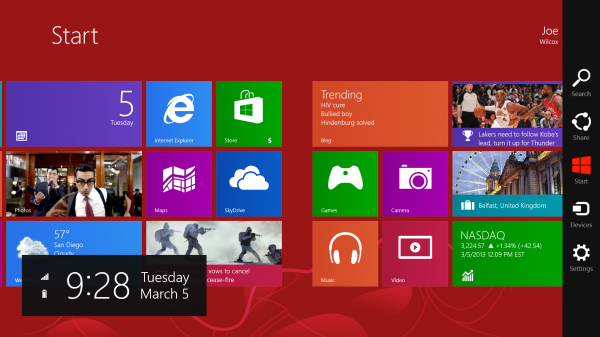
    That “anticipates you” aspect is more than displaying content. For example, after I logged into Windows 8 for the first time, the Start screen presented different options for my Epson Artisan 730 WiFi printer — including driver update. The operating system found the networked peripheral and provides what I need to use it, unprompted.

    To my surprise, on the Windows 8 Start screen, I find all the movement kind of refreshing, even fun, like using more of my senses — and fingers as tools — to get work done. Additionally, and I must express this again, I find Modern UI an absolute joy to use. Yes, the motif demands more work, such as seemingly endless scrolling left or right. But the design appeals and draws me in. It’s immersive and as previously expressed alive.

    Tool Users

    The best user interfaces make products more human, more approachable and responsive. The human body doesn’t have one UI, but many working together, giving dimension to living — sight, sound and touch, primarily. The best products are similar. Visuals are important because they appeal to sight, and the eyes are the main tool by which we take in the world around us. Modern UI is beautiful, as are many of the active — seemingly living — cues it provides. There, Live tiles add richness and movement to Surface Pro running Windows 8 Pro.

    But humans are primarily tool users. We look and then touch. Keyboard and mouse are unnatural constructions, even though they are so familiar to a generation of PC users. But touch is more natural and extension of you. There’s more intimacy involved with touching something on the screen than interacting with it via keyboard and mouse.

    I could never have come to truly appreciate what Windows 8 offers, if starting with mouse and keyboard only. The Start screen begs to be touched, to be looked at, to be appreciated. The intimacy of touch is one of many reasons. Think about it. Would you rather look at a picture of something or someone you love, or touch them?

    And Apps…

    I kept all the Windows 8 defaults, by the way, and they include using Bing, which I find more than good-enough for day-to-day searches. To be honest, I don’t miss Google search at all, even though it’s readily accessible. All the bundled apps look great, and are hugely functional. They are the model every developer creating Windows 8 apps should aspire to.

    There aren’t enough apps, and fewer really good ones — that meet the standard for quality and vitality of those Microsoft provides. Every Friday, my colleague Martin Brinkman posts the “Best Windows 8 apps this week“, which I highly recommend.

    Lots of you don’t like Windows 8, particularly Modern UI. Perhaps you would feel differently if using the OS on the right device — touch, for sure. Surface Pro perhaps even better.

    Photo Credit: Joe Wilcox

  • YouTube set to launch Spotify rival as music-streaming gets crowded

    YouTube, which has been quietly talking to music studios for months, is poised to launch a streaming service this year according to Fortune. The report says the service will mimic Spotify by offering listeners a choice between an ad-supported model and a paid subscription version.

    The arrival of the YouTube music venture has been rumored for a while and, when it comes, it will be the latest entrant into an evermore-crowded digital music space. In addition to Spotify, there is also a variety of other online music libraries like Pandora, SoundCloud and Vevo – a venture backed-by major studios that now uses YouTube as one of its distribution platforms. Apple is also rumored to be launching a streaming service.

    For musicians and rightholders, the arrival of Google-owned YouTube and its deep pockets could be good news. While the music industry has come to embrace digital distribution, it has also complained that the royalties it receives are still meager.

    Now, though, the entry of giants like YouTube and Apple is likely to give new leverage to the music industry in negotiating royalty rates. This is the case not only because these companies are awash in cash but also because more demand for digital music is likely to increase studios’ pricing power. Conversely, this could also spell bad news for Spotify; in the same way that Netflix struggled when its earlier movie contracts expired, Spotify could be confronted with much higher content bills in the near future.

    A music-streaming service for YouTube will also give it a new platform to test pricing model for paid subscriptions. This process could provide lessons for YouTube’s video service which is coming under criticism for failing to deliver enough ad revenue to creators.

    Related research and analysis from GigaOM Pro:
    Subscriber content. Sign up for a free trial.

  • Cute Baby Really Sucks at Closing Cabinet Doors

    If I had a toddler, I would hope that I would have the courage to troll it this hard.

    [ToddleTale]

  • AccuWeather for Windows 8 Review

    Running a weather app is more like a trend these days, no matter if we’re talking about laptops, tablets, desktop computers or mobile phones. And since so many users look for weather apps, this particular software category has grown a lot lately, so much that it’s now one of the largest on the newly released Windows 8 operating system.

    Ho… (read more)

  • To Become More Adaptable, Take a Lesson from Biology

    Remember when Apple’s stock traded at $7 a share? I do, because that’s when I sold my shares. Tech experts’ sage predictions had convinced me that the Mac would never make a dent in the PC market. As it turned out, the Mac didn’t need to make a dent, because Apple mutated its cute computer DNA into cute music players and phones that fit massive unfilled niches. Yet even the genius architect of this turnaround made faulty predictions sometimes. Remember the invention Steve Jobs said was going to be “bigger than the PC”? You may have seen a mall cop riding one recently.

    Even the best of us are horrible at predicting the future. That’s too bad, because our world is full of risk that we’d love to avoid and opportunity that we’d love to seize.

    Fortunately, there’s a rich source of lessons on how to thrive in an unpredictable world, and it has been cranking out success stories for 3.5 billion years. It’s called biology.

    All of Earth’s successful organisms have thrived without analyzing past crises or trying to predict the next one. They haven’t held “planning exercises” or created “predictive frameworks.” Instead, they’ve adapted. Adaptability is the power to detect and respond to change in the world, no matter how surprising or inconvenient it may be.

    While there’s much chatter in the management world about the need to be adaptable, only a few creative companies and innovative managers have probed the natural world for its adaptability secrets. But when they have, they’ve been remarkably successful. A study of nature offers straightforward guidance through four key practices of adaptable systems.

    Decentralization. The most successful biological organisms are structured or organized in such a way as to eschew centralized control in favor of allowing multiple agents to independently sense and quickly respond to change. An octopus, despite its surprisingly intelligent brain, doesn’t order each arm to change a certain color when it needs to hide quickly. Rather, individual skin cells across its body sense and respond to change and give the octopus a collective camouflage.

    CEOs and shareholders needn’t fear this kind of organization. The independent sensors of adaptable organisms are not anarchists. They rely on the resources and follow the overall direction that the body gives them. But decentralized organization yields faster, cheaper, and more effective solutions to complex problems — think Wikipedia versus Encyclopedia Britannica, DARPA Grand Challenges versus Department of Defense single-source contracts, or Google Flu Trends (which uses the power of billions of users independently searching for flu-related terms on Google to identify flu outbreaks) versus the U.S. Centers for Disease Control and Prevention flu reports (which can give you the same results, two weeks later).

    Redundancy. Adaptable systems make multiple copies of everything and modify the copies to hedge against uncertainty. Redundancy is not efficient, but it does help you solve a wide range of unexpected problems. A CEO I know who uses biological principles to run a manufacturing firm that has never been unprofitable or laid off an employee in 30 years keeps a massive warehouse full of multiple copies of every part he’s ever made. This cache of inventory and wasted real estate violates all the norms of just-in-time manufacturing, but when a 20-year-old helicopter is grounded and needs to fly now, he is the only one who has the part. Customers that have been bailed out by him go back to him. He has turned commodity parts into a proprietary service, just as nature turns the massive redundancy of just four DNA bases into a dazzling array of unique ways to deal with risk and uncertainty.

    Symbiotic relationships. All organisms use these to extend their own adaptability. Symbioses occur between the most unlikely of pairs, such as small scavenging fish and large predatory sharks — sometimes even between former adversaries. The effects can be profound. Tiny bacteria that live in the roots of legume plants and convert nitrogen into a useful form have literally changed the face of the entire planet.

    Ben and Jerry’s Ice Cream, a company known for its strong brand following and commitment to donating profits to social causes, would seem an unlikely match for Unilever, a food and beauty-products conglomerate with fairly anodyne brands. But each company had problems to solve. Ben and Jerry’s needed to grow after years of flat and declining sales, so that through profit sharing it could do more social good. Unilever needed to capture more niches in “boutique” food brands. When Unilever bought Ben and Jerry’s, the larger organization adapted more than the smaller one to make the symbiosis work. Unilever allowed casual dress for its Ben and Jerry’s executives, maintained the brand’s charitable giving, and expanded its commitments to sustainability by incorporating aspects of Ben and Jerry’s DNA throughout its corporate practice.

    Recursive processes. Adaptability in nature continually builds off of its own successes. The one turtle out of a hundred that survives from its infancy to adulthood is the only turtle that’s important to turtle evolution.

    The business literature is unfortunately rife with advice to “learn from failures.” One HBR article from the 1990s held up BP as an exemplar of learning from failure. Certainly BP has learned a lot from the failures of the Deepwater Horizon disaster, but is killing 11 people, crippling a huge ecosystem, and absorbing a $4.5 billion fine how you want to run your business? In nature, failure is literally a dead end — you don’t reproduce and you don’t pass on your genes. Learning from failure may make your business more prepared for the disaster that has already happened, but it does nothing to prevent the disaster in the first place. Identifying even small successes out of a larger operational failure can be the most important way to improve performance in the future.

    The practical way to start becoming adaptable is easy: Stop giving orders and start issuing challenges. Any organization of any size can develop faster, more effective, cheaper solutions to problems by challenging its people. 3M (hardly a nimble startup) used challenges to massively reduce its environmental footprint. Rather than having the CEO order all employees to recycle more, the company challenged employees to produce solutions. The result was more than 8,000 environmentally and financially beneficial changes, each developed out of individuals’ particular expertise: Administrative assistants knew best how to reduce paper waste, and chemists knew best how to reduce chemical waste.

    The U.S. Department of Defense now uses challenges to develop better weapons systems. Rather than paying single contractors billions over budget for products that arrive years too late and don’t solve the initial problems, the DoD typically offers a paltry million-dollar reward and typically gets results even faster than it expects. I’ve taken to ripping up the syllabus on the first day of my university classes and instead challenging students to create and deliver the content of my courses on the basis of what they want to learn. The classes become far more engaging for the students, far more adaptable to the rapidly changing state of scientific knowledge, and, as a bonus, far less work for me. For more on how challenges work, see my website.

    But in a deeper sense, awakening to the power of adaptability requires taking your eyes off the computer screen and your mind out of the boardroom long enough to appreciate the wonder and the lessons of the rain forest, the DNA helix, and the skin of the octopus.

  • Cities without highways: A Q&A with TED Books essayist Diana Lind

    DianaLind-Q&AIn the 1950s, 3 out of every 10 people on the planet lived in a city. Today, that ratio has nearly doubled — and the United Nations projects that by 2050, nearly 7 in 10 people will live in urban settings. Our population is gravitating towards cities, and this shift is creating amazing opportunities as well as critical problems that need our immediate attention. Modern cities are hubs of connection and creativity and, at the same time, centers of pollution and dehumanization.

    City 2.0: The Habitat of the Future and How to Get There is a new TED Books anthology that seeks to answer some of the key questions about how to develop thriving cities — tackling everything from issues of sustainability to infrastructure to the happiness of urban dwellers. Born out of The City 2.0, a broad initiative for citizen-powered change that began with the 2012 TED Prize, this collection of essays offers potential answers to the question: How can we ensure that our cities are sustainable, efficient, beautiful and invigorating? Produced in partnership with The Atlantic Cities, the 12 authors featured in this book offer fascinating ideas, from transportation to food to public art.

    Over the next three days, we’ll hear from three City 2.0 essay authors. Today, we sat down with Diana Lind, the editor-in-chief and executive director of Next City, to discuss her essay that envisions cities without highways.

    Why do highways have a bad effect on cities?

    While highways connect cities that are hundreds of miles apart and allow us to move people and goods across this vast country, many highways were built at the height of suburban development. They are not designed to bring people into cities so much as to allow people to drive past them. As a result, these highways often bisect neighborhoods, cut cities off from their waterfronts and obstruct the natural development that occurs along boulevards and streets. The land beside or under urban highways is often underdeveloped, creating no-go zones that are bad for the city’s economy, safety and appearance. Highways carry loud, polluting cars, and research has shown links between road pollution and asthma. The impervious highway surface creates stormwater runoff and heat-island effects, which are bad for a city’s resilience in climate change. And unlike other kinds of property, highways don’t generate tax revenue, preventing dozens of acres from being productively used. Simply put: highways are a blight on livable cities.

    I don’t think we should keep investing in highways. In this era of climate change, downtown revitalization and population density, they can no longer be the solution. As cities see their highways become structurally obsolete, it’s a perfect time to start thinking about how to connect cities through other modes of infrastructure.

    What are some of the alternatives to highways?

    Any plan to replace a highway needs to account for the cars that will be displaced. Ideally, you replace a highway with more transit options so people can take a bus or train instead of a car. In New York, when the city decided not to replace the West Side Highway, it cleverly took federal highway funds and used them towards improving transit. In San Francisco, a former highway was replaced with a trolley line. The footprint of the highway itself might become a boulevard, property for new development, a park or a bike lane. On a larger scale, our national network of highways should be replaced with a better rail network that allows people the option of taking a train between cities rather than having to choose between driving or flying.

    You say in your essay that more walkable neighborhoods contribute to lower foreclosure rates. Why would that be?

    It’s plain math. Imagine a couple that has to pay for two cars in addition to a mortgage; they’re less likely to be able to handle their monthly bills. Each car costs the average driver nearly $9,000 a year. Compare that with a monthly MetroCard pass in New York City — it’s less than $1,250 a year, and that’s as expensive as public transit gets. If you can bike or walk to take care of your daily needs, life gets even cheaper. The money saved on not owning a car actually helps keep people in their homes.

    You also say that there’s a connection between highways and obesity. Share more on that!

    It’s really a connection between obesity and driving. Researchers have found that driving and obesity have a shocking 99 percent correlation. The more you drive, the more likely you are to be obese, because you have less time to walk for daily errands and otherwise be active.

    What have been some of the benefits of replacing highways in New York and San Francisco?

    There have been many. Removing the highways has increased area property values, significantly reduced car traffic along these thoroughfares and reconnected both cities to their waterfronts. Local gems such as San Francisco’s Ferry Building and the Hudson River Park in New York are just two examples of how improving the area instead of improving highways has resulted in deeper investments in the city’s assets.

    City 2.0 is available for Kindle and Nook, as well as through the iBookstore. Or download the TED Books app for your iPad or iPhone. A subscription costs $4.99 a month, and is an all-you-can-read buffet.

    The City 2.0 is an online forum that showcase stories and projects for urban innovation, and also doled out 10 grants for thinkers with great ideas for cities throughout 2012. Here, meet 8 of the winners and hear their fascinating ideas »

  • 7 Free Smartphone Apps You Need When Traveling

    This week I’m on the road, staying in a city I haven’t yet visited. After a couple days, the biggest question on my mind is, how did people do this before smartphones? I’ve drained the battery in my Galaxy S III multiple times, and all for good reason. I have literally no idea how I’d have gotten around here without it.

    Sure, things were simpler back in the day, but they’re arguably easier in modern times. Instead of relying on second- and third-hand information about amenities and transportation in a given area, we can consult our smartphones for the first-hand scoop.

    While I’m working on an S III running Android, the apps I’m using are available on both iOS and Android. If not for them I’d have been sitting in my hotel room a lot more frequently, ordering disgusting Pizza Hut.

    1. Google Maps

    GoogleMaps

    The nice lady at the rental car counter tried to upsell me on everything. Sure, I took the insurance, and the EZ Tag for toll roads has come in incredibly handy. But when she asked if I wanted a GPS unit, my first response was, “how much?” The answer: $14 per day. No thank you. I’ll just use my smartphone.

    Now that Apple has put its Maps debacle behind it, Google Maps is freely available again. Enable GPS on your phone, and it’s one of the best apps for driving directions. It’s even better on Android, since it includes Google Navigation. While some of the routes are outdated, it’s still a solid navigational unit, especially if it saves you $14 per day.

    Get Google Maps for iPhone and Android (if you deleted it for some reason).

    2. Yelp

    When I visit a city, the last thing I want is to stick with fast food options. It might be quick and easy,but it’s also unhealthy — and frankly disgusting when consumed in anything above moderation. You can drive around and look for places that look decent, but what do you know? You’re just some out-of-towner.

    Yelp might not be the best resource for determining restaurant quality, but it will sure let you know the location (including directions), cost, and a general sense of the menu — if not the entire menu. Lean towards the higher-rated restaurants and you will probably get a good meal. It sure beats hitting Burger King every night.

    Get Yelp for iPhone and Android.

    3. TripIt

    TripIt

    When I was a young’un, I learned about proper travel planning from my dad. He’d take me along to the travel agent and I’d watch as he crafted a family vacation that fit in our budget. Then I saw how he prepared as we neared the trip. Evertything stayed in a manilla folder: tickets, itinerary, vouchers, coupons, and everything else we’d need.

    I think I’ve learned well from pops. Then again, things are a bit different these days. I can keep all of that information right on my smartphone. Most airlines have QR code scanners for boarding passes, meaning I don’t need to remember a physical ticket. For the rest of my itinerary, TripIt keeps me covered. It automatically scans your inbox for travel-related emails and scrapes them right into your itinerary. It then creates your itinerary in an easy to read format. Upgrading to pro gets you tons of other features, too, such as flight alerts.

    Get TripIt for iPhone and Android.

    4. AccuWeather

    AccuWeather

    This is an app I like having on my phone even when not traveling. With our high level of indoor climate control these days, it’s tough to know how it feels outside. After all, it feels perfectly comfortable at home. AccuWeather, and its notification bar widget, let me know exactly what to expect when I go outside.

    That’s all the more important in a strange city, especially when it has a different climate. After all, it’s under 40 degrees and windy at home, but it’s sunny and 75 here. AccuWeather lets me know how to pack in advance, and how to dress once I’m in my new location.

    Get AccuWeather for iPhone and Android.

    5. Twitter

    You might not think Twitter is a great resource for being on the road. But if you have a decent network, chances are it will work out well for you. All it takes is a simple tweet. “What’s the best place for BBQ in Houston?” Maybe no one who follows you lives in Houston. But chances are that someone who follows you knows someone in Houston. And there you have your recommendation.

    Twitter gets a lot of gruff for being a time waster, and for the most part that allegation is true. But it does have plenty of practical applications for individual users. Build up a wide network and reap the benefits.

    Get Twitter for iPhone and Android.

    6. WiFi Finder

    WiFiFinder

    It’s always easy to find a WiFi network at home. I know the lay of the land, so I know which businesses have a WiFi network I can tap into. On the road? Not so much. Other than Starbucks, Panera, and other chains it’s difficult to determine where you can find WiFi. That’s why JiWire’s WiFi Finder comes in so handy. It lets me know of all hotspots in the area.

    Not only can it search out public WiFi networks in your area, but it can also supply you with a database of public WiFi networks, so you can serach even when offline. That can come in greatly handy, especially for tablet users.

    Get WiFi Finder for iPhone and Android.

    7. ExpenseTracker

    These actually aren’t the same expense tracker apps for Android and iPhone. Believe it or not, it’s difficult to find free ones that are cross-platform.(There are ones that are free for a month, but we’re going for 100% free.) Yet these are both free apps, with the same name, that perform similar functions. After all, all you want is a simple function: track your expenses on the road so you can submit a report to your boss and get reimbursed.

    With just a few clicks you’ll have all of your financial information added up. Make sure to save your receipts of course, but this app will help you total it all up, separate it, and figure out what is reimbursable and what is not.

    Get ExpenseTracker for iPhone and Android.

    The post 7 Free Smartphone Apps You Need When Traveling appeared first on MobileMoo.

  • Bloomberg: Verizon and Vodafone in talks over possible merger or buyout

    Verizon Vodafone Merger Buyout
    Verizon (VZ) and Vodafone are reportedly actively discussing ways to resolve their relationship this year, Bloomberg reported on Tuesday. The companies, which jointly own top U.S. wireless carrier Verizon Wireless, have discussed merging as well as the possibility of a full or partial buyout of Vodafone’s 45% stake. Disagreements regarding leadership and the location of the merged entity’s headquarters have reportedly made a merger unlikely. “Verizon is eager to take full control of the unit this year, giving the New York-based company greater influence over its most profitable division,” Bloomberg’s Jeffrey McCracken, David Welch and Matthew Campbell wrote. According to the report, Vodafone has raised issues regarding valuation as well as how proceeds from the sale might be used. Vodafone’s stake is currently valued at about $115 billion according to the report, and the most likely outcome of the talks is said to be either a full or partial sale.

  • Google Maps for iPhone gets Google contacts integration

    Google updated its Maps app for iPhone on Tuesday, bringing the service to new countries and adding new nearby search buttons as well as integration with another of its services: Google contacts.

    Bahrain, Egypt, Lebanon, Oman, Qatar, Saudi Arabia and UAE will get access to the English version of Google Maps for iOS, the company announced on its blog Tuesday. Users will also be able to choose in settings to display directions in miles or kilometers.

    In addition, Google has added icons that will appear in search so you can tap them for a quicker way to see nearby bars, coffeeshops, restaurants.

    For those heavily invested in Google apps, the update to contacts will probably be the most interesting aspect of this update. Google contacts are now integrated into Maps for iPhone. That means that when you search for an address, if it matches with one in your Google contacts, the contact’s address will show up as a suggestion. That’s instead of having to go to your iPhone Contacts and getting directions from there. For users it can cut out a step and for Google it’s another opportunity to keep its users inside and using its own ecosystem even on the iPhone’s competing platform.

    The latest version of Google Maps for iPhone arrived in December, three months after Apple dropped the app from default placement on the iPhone’s homescreen. The move coincided with the introduction of Apple’s own Maps app, which debuted to poor reviews in September.

    Related research and analysis from GigaOM Pro:
    Subscriber content. Sign up for a free trial.

  • Student Suspended After Disarming Gunman on School Bus

    Despite being hailed as a hero by some, a student who wrestled a gun away from another teen on a school bus has now been suspended from school.

    According to a report from the Fort Myers, Florida Fox affiliate, the incident occurred last week, when the student wrestled a loaded .22 caliber revolver from a fellow 15-year-old student’s hands after it had been pointed at a classmate. Two other students then helped to disarm the suspect, who’s name has not been released but who was reportedly a member of the Cypress Lake High School football team.

    The Lee County School District subsequently suspended the “hero” for three days. According to Fox, the suspension referral states that he was “part of an incident” where a weapon was present. According to the student’s mother, the suspension is retaliation for the student refusing to participate in the investigation into the incident.

    “It’s dumb,” said the student. “How they going to suspend me for doing the right thing?” [sic]

  • YouTube Music Streaming Service On The Way [REPORT]

    According to a report from Fortune that cites multiple sources inside both Google and the record industry, YouTube is set to launch its own subscription music service later this year in tandem with the Google Play subscription service that we’ve been hearing about.

    The service would allow anyone to listen to music for free, but would include a subscription element that would unlock bonus features and of course, get rid of the ads that would be needed to support the free version.

    Recent reports suggested that Google was in fact working on a subscription music service that would take on Spotify, Pandora, and others. A Bloomberg report cited multiple sources who said that negotiations were already underway with major record labels to launch a streaming service in the third quarter.

    Apparently, the YouTube effort will see some overlap with the Google-branded effort.

    YouTube had this somewhat revealing comment on the report:

    While we don’t comment on rumor or speculation, there are some content creators that think they would benefit from a subscription revenue stream in addition to ads, so we’re looking at that.

    Basically, we’re not going to confirm that, but a bunch of people think it would be a good idea.

  • After Band of the Day success, app maker tries event curation with Applauze

    The team behind 955 Dreams has proven it knows a lot about music and a lot about curation with its Band of the Day app. Now it’s putting its established iOS app-making skills toward launching a mobile tickets and event-finder app for the iPhone and iPod touch called Applauze. The free app is launching on Tuesday before SXSW Interactive and has listings for 25 cities.

    ApplauzeThere are already apps that are tackling either the what-should-I-do angle (WillCall, Thrillist). And there are established players in ticketing on the iPhone (StubHub). But Applauze sees itself as a service for both use cases and thinks it can stand out because it is selling tickets directly, not through an affiliate model. Also, the app has some incentives built in, including attractive pricing, to get users on board.

    It doesn’t do discounting but Applauze sources tickets from a variety of brokers and venues so it surfaces the latest and cheapest price for each event. Applauze is also banking on the appeal of exclusive access: it’s struck deals with some venues (for now just in Los Angeles and Chicago) that allow Applauze users to sign up for VIP tickets. The venue can choose what that means, but in most cases it means not waiting in line with other ticket holders, getting access to a VIP area or a pre-show meet and greet, and usually a free drink, founder and CEO Kiran Bellubbi told me.

    After using the app, I found some really interesting and potentially great things about it, including:

    • It’s pretty diverse: Applauze is not just aimed at twentysomethings or music lovers; it’s for concerts large and small, for college and professional sports events, plus free community activities that might appeal to families or parents too. Bellubbi says, thanks to established relationships from Band of the Day, his company has access to “every big event in the U.S. right now.” Under the nearby tab in my city (Philadelphia) I’ve seen everything from a Rihanna stadium concert and an Emmylou Harris concert at a music hall to a Midsummer Night’s Dream performance, the Philadelphia Flower Show, comedy shows and free cultural events at the Franklin Institute and Barnes Foundation — in other words, a wide range.
    • It learns about you: The app learns about your preferences as you use it. If you like a particualr event and you rate it, bookmark it, or share it, Applauze interprets that as you like either the venue, the artist or the music category, so the list of events you are shown in the future will more closely align with your tastes. This means that you might eventually see different seats from some venues, for instance, if you have expressed interest in orchestra seating in the past.
    • It’s beautifully designed: The design flourishes are really nice, from the pop-up wheel of event categories to Applauze’s custom-designed expanding scroll list. Applauze is very clearly made by a group of interface designers who know what they’re doing. (Band of the Day was runner-up for Apple’s App of the Year in 2011.)
    • It’s inherently social: But it doesn’t require you to add new friends to the service. You connect it to your Facebook account so you can invite friends — either via Facebook or your phone’s contacts — from within the app. When you look at an event, if your friends are using the app too, you can see if they are — using the app’s parlance — “in” to attend.
    • They’re launching pretty widely right away: The app will be live in 25 cities starting Tuesday.

    There are some other things to appreciate about Applauze too, like it doesn’t hide ticketing fees. When you scroll through events, the price you see is the ticket price plus any processing fees or any fees associated with shipping physical tickets (if needed). You also can do everything inside the app: from browsing events, to making the purchase in a few taps, to inviting your friends, adding the event to Passbook, and adding it to your mobile calendar. Applauze has the mobile-first ticketing idea nailed.

    The service is starting out in the U.S. but has international aspirations. Bellubbi tells me the U.K., Germany and Dubai are set to have access to Applauze in the next six months.

    Related research and analysis from GigaOM Pro:
    Subscriber content. Sign up for a free trial.

  • eBay shows the world how to measure MPG for data centers

    eBay is busy building some of the world’s most-efficient data centers, and its efforts aren’t just show. The company has figured out a way to tie its computing infrastructure to specific business concerns and plans to continuously tweak its operations to meet top-level mandates. On Tuesday, eBay released a whitepaper describing how it accomplished this and laying out a framework for companies that want to do the same.

    Dean Nelson, eBay’s vice president of Global Foundation Services, says the effort, called the Digital Service Efficiency report, “is the miles per gallon measure for technical infrastructure for eBay.” Essentially, the company has boiled its business down to a single currency — transactions (specifically URL requests) associated with users’ buying and selling on the site — and created a slew of metrics that measure how efficiently it delivers those transactions in terms of revenue, performance, cost and carbon footprint.

    The project has been about 18 months in the making, Nelson told me during a recent phone call, and eBay was finally able to set a baseline measurement of its performance in 2012. Now that it knows what’s in place and how its infrastructure performs over the course of a year, the goal in 2013 is to cut its computing-related carbon usage and costs by 10 percent and increase performance in terms of transactions per kilowatt-hour by 10 percent.

    In order to meet these goals, he said, every member of the technical team — from facilities managers to software engineers — has be striving toward them and also be cognizant of how turning their “knobs” will affect the other metrics eBay is measuring. “Think of it like a Rubik’s cube,” Nelson explained. “You can solve one side but screw up the rest of them.”

    eBay plans to release quarterly updates on its progress along with its earnings reports, but employees will have access to down-to-the-second visibility into what’s going on. “It makes it personal for them,” Nelson said. “They can see what their efforts mean.”

    Digital Service Efficiency

    52,075 servers doing a lot of work

    Nelson offered some pretty compelling examples of how the Digital Service Efficiency project works in practice. If the goal is to decrease cost per transactions, data center engineers might try to minimize power usage at the facility level while server engineers might look to lower-power gear or better utilization on existing gear. They essentially reduce the denominator in that equation “and the net result is we should make more money from those transactions,” he said.

    In one real-world instance, a software engineer tweaked some code that affected how much memory an application requires and the company was able to eliminate 400 servers. That cut energy usage by 1 megawatt and a $2 million savings in capital expense when the time would have come to refresh those servers.

    eBay also has created a “list of fame” and a “list of shame” that highlight the 1,000 best- and worst-utilized servers within the company. “We have a hit list,” Nelson said, and it’s going to examine the bottom 20 percent to figure out why they’re as wasteful as they are.

    However, he added, it’s important to remember on the server front that improving cost, performance and carbon usage doesn’t always mean buying lower-power gear. If eBay can improve the power density of its racks using technology such as liquid cooling — something its Project Mercury data center in Phoenix is pre-equipped for — it can handle more transactions on less gear. It already has some racks running at a sustained rate of 35 kilowatts and thinks it can push that up to 50 kilowatts, Nelson said.

    Clean transactions with solar panels and Bloom boxes

    On the carbon front, eBay has nothing but open field in front of it thanks to some big clean-energy projects set to go live in 2013 in its new Salt Lake City, Utah, data center called Project Topaz. For starters, it’s using Bloom Energy boxes as the primary power source, which mean a slightly higher cost per transaction, but also a 13 percent reduction in carbon emissions and increased reliability (downtime costs eBay a lot of money).

    Also, the company has finally cleared some regulatory hurdles to tie an on-site solar array back to the grid. Because of changes to a Utah law that eBay lobbied for, it’s about to start sourcing off-site clean energy for its data centers, as well.

    “That is a corporate priority,” Nelson said. “We want to create the cleanest commerce engine on the freakin’ planet.”

    Trying to change an industry

    Of course, the Digital Service Efficiency methodology isn’t the only attempt by a major data center operator to show the world how efficient it is. Google publishes annual Power Utilization Efficiency (PUE) ratings for its data centers, and Facebook occassionally does as well. On Monday, Salesforce.com released a statement underscoring its commitment to sourcing renewable energy.

    dse chart

    However, Nelson pointed out, what eBay is doing — and encouraging others to do — is more transparent in that it gives a lot more depth about operations, including the company’s server count. Even if companies don’t publish their results, tying operational efficiency to other business objectives should have a positive effect on the bottom line and the environment, regardless. Every company will have its own base currency, Nelson explained, and they’ll have to find their own metrics to measure and figure out what are the knobs that each part of the company can turn to meet goals.

    “We all have the same challenges, the same things to solve for, but we have numerous ways to solve it,” Nelson said. …”[Their implementations] may change completely, but the point is the conversation is starting.”

    Related research and analysis from GigaOM Pro:
    Subscriber content. Sign up for a free trial.

  • New Books from HBR Press for March

    Check out these new, and forthcoming books from HBR Press:

    Playing to Win: How Strategy Really Works
    by A.G. Lafley, Roger L. Martin

    Strategy is not complex. But it is hard. It’s hard because it forces people and organizations to make specific choices about their future — something that doesn’t happen in most companies. Now two of today’s best-known business thinkers — A.G. Lafley and Roger Martin — get to the heart of strategy, explaining what it’s for, how to think about it, why you need it, and how to get it done.

    Sidetracked: Why Our Decisions Get Derailed, and How We Can Stick to the Plan
    By Francesca Gino

    You may not realize it but simple, irrelevant factors can have profound consequences on your decisions and behavior, often diverting you from your original plans and desires. Sidetracked will help you identify and avoid these influences so the decisions you make do stick — and you finally reach your intended goals.

    Global Dexterity: How to Adapt Your Behavior Across Cultures without Losing Yourself in the Process
    By Andrew Molinsky

    What does it mean to be a global worker and a true “citizen of the world” today? It goes beyond merely acknowledging cultural differences. In reality, it means you are able to adapt your behavior to conform to new cultural contexts without losing your authentic self in the process. Not only is this difficult, it’s a frightening prospect for most people and something completely outside their comfort zone. But managing and communicating with people from other cultures is an essential skill today. Global Dexterity will help you reach across cultures — and succeed in today’s global business environment.

    Innovation as Usual: How to Help Your People Bring Great Ideas to Life
    By Paddy Miller and Thomas Wedell-Wedellsborg

    Most organizations approach innovation as if it were a sideline activity. Every so often employees are sent to ‘Brainstorm Island”: an off-site replete with trendy lectures, creative workshops, and overenthusiastic facilitators. But once they return, it’s back to business as usual. Innovation experts Paddy Miller and Thomas Wedell-Wedellsborg suggest a better approach. They recommend that leaders at all levels become “innovation architects,” creating an ecosystem in which people engage in key innovation behaviors as part of their daily work.

    Financial Intelligence, Revised Edition: A Manager’s Guide to Knowing What the Numbers Really Mean
    by Karen Berman and Joe Knight, with John Case

    Since its release in 2006, Financial Intelligence has become a favorite among managers who need a guided tour through the numbers — helping them to understand not only what the numbers really mean, but also why they matter. This new, completely updated edition brings the numbers up to date and continues to teach the basics of finance to managers who need to use financial data to drive their business. It also addresses issues that have become even more important in recent years — including questions around the financial crisis and those around broader financial and accounting literacy.

    HBR’s 10 Must Reads on Making Smart Decisions
    HBR’s 10 Must Reads on Innovation
    HBR’s 10 Must Reads on Teams

    HBR’s 10 Must Reads series focuses on the core topics that every ambitious manager needs to know. We’ve sorted through hundreds of articles and selected only the most essential reading on each topic. Each title includes timeless advice that will be relevant regardless of an ever-changing business environment.

    Classic ideas, enduring advice, the best thinkers: HBR’s 10 Must Reads. Check out the newest books in the series.

  • Early BlackBerry Z10 price cuts could be ominous sign

    BlackBerry Z10 Price Cut
    UK’s leading mobile phone retailer Carphone Warehouse has cut the monthly package price of the BlackBerry Z10 from £36 to £29. That amounts to a £160 (or $240) price drop over the life of a 24-month contract. Vodafone is also now offering a package deal that is £72 cheaper than its previous one. The new monthly price for BlackBerry’s (BBRY) Z10 at Carphone Warehouse is on par with the monthly package for Apple’s (AAPL) iPhone 4S, so it now sits squarely in the mid-range smartphone price bracket. The Z10 does retain a £29 upfront fee since it’s a new model; older handsets such as the iPhone 4S come free with a two-year deal.

    Continue reading…

  • Google Maps for iOS Gets Google Contacts Support, Local Category Search

    Google Maps for iOS has just received its first major update since launching back in December. Today’s update brings a couple of new features that will make it easier for users to find people and places inside the app.

    Version 1.1 now allows you to search you Google contacts inside the app. When you sign in, you’ll be able to see all of your friends’ saved addresses – even if they aren’t stored on your device.

    The update also adds category searches for locations, meaning that you can browse local bars, restaurants, etc. within the app.

    Here’s the full list of what’s new in v1.1:

    • Search your Google Contacts; sign in to have your saved addresses show up when you search for friends and family by name.
    • Quickly search for local places by selecting popular categories such as restaurants, bars, cafes, gas stations, etc.
    • Choose between Kilometers or Miles for your preferred distance units.

    Google finally launched a native iOS maps app back in December after Apple booted it from iOS 6. Considering how ill-received Apple Maps was, it was no surprise that Google Maps for iOS took off, topping 10 million downloads in just two days.

    You can snag the update right now on iTunes.

  • Crysis 3 Review (PC)

    Crysis games have delivered some pretty impressive experiences over the years, even if developer Crytek mostly used them to show off its technical expertise and the power of its CryEngine technologies.

    With Crysis 3, the independent studio wants to close the trilogy that focused on protagonist Prophet by ending the story and combining some of the best elements from … (read more)

  • Twitter Kills TweetDeck Mobile Apps, Will Continue Working On Web App

    Since being purchased by Twitter in 2011, TweetDeck has gone through a number of changes. The last of which came in December of last year. Now the service is moving ahead with a new Web app, but the mobile apps won’t be along for the ride.

    The TweetDeck team announced that it would be discontinuing its support for the TweetDeck mobile apps in the coming months. The apps affected are TweetDeck for Android, TweetDeck for iOS and TweetDeck AIR. The apps will be taken off their respective app stores in May, and will stop working shortly after.

    The move away from native mobile apps to a Web app was spurred in part by the majority of TweetDeck users moving to the Web as well:

    In many ways, doubling down on the TweetDeck web experience and discontinuing our app support is a reflection of where our TweetDeck power-users are going. Over the past few years, we’ve seen a steady trend towards people using TweetDeck on their computers and Twitter on their mobile devices. This trend coincides with an increased investment in Twitter for iPhone and Twitter for Android –– adding photo filters and other editing capabilities, revamping user profiles and enhancing search. That said, we know this applies to most of our users –– not all of them. And for those of you who are inconvenienced by this shift, our sincere apologies.

    Those wanting to stick it out until the apps are killed off in May might have a few problems with the apps as they run off of version 1.0 of the Twitter API. Twitter will be retiring this API this month so TweetDeck says the apps may suffer some outages until they are officially killed for good.

    Fans of the desktop app will be pleased to know that those will not be getting the axe as part of TweetDeck’s new Web-centric focus. In fact, the team says that the updates hitting the Web app will come to the Mac and Windows clients soon after.

  • Senate Delays Negatively Impacting our Judicial System

    Ed note: The information on this graphic was updated on March 4, 2013

    In his briefing today, White House Press Secretary Jay Carney talked about Caitlin Halligan, who was nominated by President Obama to serve on the U.S. Court of Appeals for the District of Columbia Circuit. Ms. Halligan, who has bipartisan support from lawyers and law enforcement, was put forward for this position in 2011.  

    Mr. Carney said there will be a cloture vote on the nomination of Caitlin Halligan tomorrow, 726 days after her nomination, and strongly urged the Senate to support an up-or-down vote for this well-qualified nominee. "When Republicans filibustered her nomination in 2011, several of them hung their objections – not on her qualifications or her judicial philosophy – but on the DC Circuit workload. In essence, they didn’t object to her as a judge, just that the seat did not need to be filled. But since then, there has been an additional vacancy, leaving the court with four vacancies (36 percent vacant) – in fact, the court has never been this understaffed in history, with 188 cases pending."

    Ms. Halligan is not President Obama's only judicial nominee suffering endless delays for a vote. As the infographic below highlights:

    • 78 percent of President Obama’s circuit court judges have waited more than 100 days for a vote, compared to 15 of President Bush’s nominees. 
    • This obstruction also applies to President Obama’s district court nominees. 42 percent of our district court judges have waited more than 100 days for a vote, compared to 8 of President Bush’s nominees.
    • Further, the average wait time for our judicial nominees to get a vote on the floor of the Senate – both for the circuit court and the district court – is 3-4 times as long as those of our predecessor. 

    read more

  • Affordable care alone may not be enough to help Latinos overcome cancer care barriers

    A combination of financial, cultural and communication barriers plays a role in preventing underserved Latino men with prostate cancer from accessing the care and treatment they need, according to a new study by researchers at the UCLA School of Nursing.  
     
    The study, “Barriers to Prostate Cancer Care: Affordable Care Is Not Enough,” is published in the March issue of the peer-reviewed journal Qualitative Health Research.
      
    According to the American Cancer Society, prostate cancer is the most commonly diagnosed cancer among Latino men. Additionally, Latino men are more likely to be diagnosed with later-stage disease than non-Hispanic white men.   
      
    “We found that an array of obstacles compromise access and frequently result in negative outcomes,” said Sally L. Maliski, associate dean of academic affairs at the UCLA School of Nursing and senior author of the study. “Sadly, these obstacles disproportionately affect underserved individuals and require a new focus on not only adequate health care coverage but also on the array of hurdles that limit patient access.” 
       
    The UCLA study looked at Latino men who were enrolled in Improving Access, Counseling and Treatment for Californians With Prostate Cancer (IMPACT), a state-funded public assistance program. The analysis revealed barriers throughout the entire prostate cancer–care process, including screening, treatment and follow-up care.
     
    Among the key findings:
     
    Financial hardship
     
    Low socioeconomic status was commonly cited by the Latino men in the study as the primary impediment to care. The inability to afford medical insurance not only made it difficult to access care but also intensified the gravity of the prostate cancer diagnosis, leaving many participants feeling hopeless. 
     
    Participants often had difficulty understanding state- or county-based insurance policies, and this resulted in denied claims, loss of coverage or difficulty in accessing prescriptions. It ultimately led to increased out-of-pocket expenses and a fragmented system of care, leaving patients frustrated.
     
     
    Lack of doctor continuity and care coordination
     
    Participants frequently experienced poor care coordination, increased distrust for their doctors and decreased levels of comfort when care was administered disjointedly, by a frequently changing group of medical personnel.
     
    Their frustration was exacerbated when they perceived faulty equipment and multiple doctor referrals as a cause for delayed diagnosis. Surgical procedures for prostate cancer and treatments for side effects were also frequently complicated by poor care coordination.
     
    Inadequate access to primary care left many participants ill-equipped to navigate a complex medical system that often requires self-advocacy to demand the right care.
     
     
    Communication and education
     
    A lack of health literacy among the men, compounded by insufficient provider awareness of this issue, frequently resulted in the men misunderstanding doctors’ treatment recommendations and procedures.
     
    Patients’ limited proficiency in English also often hampered their ability to describe their symptoms and express their needs to providers.
     
     
    “Our study highlighted that we have an intricate web of barriers — societal, system and individual — that when combined leave many individuals without the care they should be receiving,” Maliski said. “These overlapping obstacles make it clear we need a system where not only is care affordable but where we use a multi-faceted approach to improve access, increase health literacy and greatly improve care coordination.”
     
    Maliski’s co-investigators on the study were Charlotte Oduro (Albert Schweitzer Fellow at UCLA’s Fielding School of Public Health) and Sarah E. Connor (UCLA Department of Urology). The study was funded through a grant from the Albert Schweitzer Foundation.
     
    The UCLA School of Nursing is redefining nursing through the pursuit of uncompromised excellence in research, education, practice, policy and patient advocacy. For more information, visit nursing.ucla.edu.
     
    For more news, visit the UCLA Newsroom and follow us on Twitter.