Blog

  • Mary Leakey Doodle Hits The Rest Of The World

    Yesterday, as the day had already changed in some parts of the world, Google began showing a doodle honoring the 100th birthday of archaeologist Mary Leakey. Now that it is February 6th in the rest of the world, other countries can now see the doodle.

    Mary Leakey was an archaeologist and anthropologist from Britain, who discovered the first fossilized Proconsul (extinct ape believed to be ancestral to humans) skull. She also discovered the Zinjanthropus (Paranthropus, a genus of extinct hominins) skull.

    She was born on this day in 1913, and died at the age of 83 in 1996. She attended University College London, was married to Louis Leakey, and had three children: Richard Leakey, Philip Leakey, and Jonathan Leakey.

    Google has run several other doodles this week in different countries, including one for the Canadian penny in Canada, Sri Lanka Independence Day in Sri Lanka, Josef Kajetán Tyl in the Czech Republic, and Manuel Álvarez Bravo in Mexico.

  • Jon Stewart Isn’t Surprised About Vine and Porn

    Twitter’s six-second video-sharing app Vine launched with a bit of a porn problem. Vine scurried around and quickly turned the porn problem into a much lesser porn problem by banning many porn-related searches and hiding NSFW material behind warning screens.

    Today, they launched an update to the app that carries a new 17+ rating in the App Store. Short of banning nudity, Vine has done pretty much all they can to make pornography as inaccessible to the wrong kind of eyes as they can.

    Anyway, Jon Stewart finally got around to addressing the porn issue. Watch the whole thing for some bonus jabs at Facebook.

  • Getting Stuck Can Help You Grow

    After an accident, there is often a second of calm when you realize that you are seriously hurt. Memory captures the scene in fine detail, as if you’re hovering outside your skin, before pain and confusion pull you right back in.

    I can still see myself getting up from a fall, almost exactly thirteen years ago, dusting snow off my tingling left arm. It looks odd, no longer in its usual place. I am somewhere between medical school and settling into my residency, before I could even imagine working in a school of business.

    That winter, for a moment, the idea of becoming a ski instructor had turned into more than a fantasy. I had been training with a group of aspiring instructors and was flirting with that job, so to speak, while in a complicated relationship with medicine. It was very romantic. I would say torrid if we weren’t talking snow.

    I have always loved skiing. I love the anticipation of watching snow fall late at night, counting the hours until the lifts reopen. I love the crackling of boots on packed snow. The loud click of bindings. The whisper of smooth turns. The vast quiet. The burning tickle of inhaling cold, clean air and snowflakes on a powder run. I love the solitude and conviviality of skiing. The restoring exhaustion. The mountains are the places where I have felt freest, happiest, most at peace.

    I was a solid amateur, not nearly good enough to be an instructor. I would not know, however, if I could have reached that bar until I had skied full time for a season or two. The only way to find out was to put my “real job” on hold.

    I think about that winter every time a student, a colleague, a friend confide that they’re wrestling with the temptation to change jobs, take time off, go back to school, make a commitment. Will I enjoy it? they wonder, Will it be worth it?

    It wasn’t the time or money I had invested in medical training that made me hesitate. Neither was it the fear of pursuing an unconventional career. There are many physicians who are also ski instructors. Many more than are also, say, management professors.

    I was prepared to offer devotion and make sacrifices. I have never believed work would be rewarding without both.

    My concern was spoiling the passion I felt for skiing by turning it into a job.

    When we’re lost in the space between potential futures, it seems, we can’t help but torment ourselves with impossible questions. Our ruminations tend to focus on what we are missing, what we may or may not get, or what we fear giving up.

    These days those sentiments go by the popular acronym FOMO, “Fear of Missing Out.” Back then we called it escapism. Most of us make sense of it as either cue or cowardice — either a healthy reminder to look beyond our current horizon, or a neurotic fear of commitment because there may be something better elsewhere.

    Once we reduce those feelings to a binary choice, however, we become too focused on yearning and too little on learning. The preoccupation with picking the right future — whether to follow or forget the temptation to make a change — obscures the question of what the temptation may be trying to teach us.

    It is often when we yearn for an answer that we stand to learn the most from staying with the question. It is neither resolution nor fulfillment that we long for in those moments, I suspect. It is desire. (We remain suspended because desire feeds on distance and possibility). If we can’t figure out which option is better then it may be worth examining what those options mean to us.

    My recollection of life after that fateful fall is organized not by hours, days, or months, but by different kinds of pain. The stabbing from the muscles pulling the split bone in my shoulder apart. The dull burning after the surgery that screwed it back together. The welcome sting of painkiller injections. The strain and jolts of physical therapy and the diffuse, sticky pain of feeling trapped.

    Nothing makes one focus on meaning quite like hurting. It is as if pain cracks the shell of a place in our hearts where we know what we need to do and why.

    I spent those months revisiting my relationship with work — the place it had in my life, what I hoped to experience, what I was prepared to give.

    While I had prided myself on my work-life balance, I realized, it was never work that made me feel alive. I had that version of work-life balance that resembles a frosty marriage — built on habit, convenience and reciprocal need. Skiing was refuge, restoration and escape. Work was ambition, duty and service. By keeping them apart, I was never fully present in either.

    I didn’t want work to take over my life. But I was not content for it to just fund my life, either. I wanted work that conjured passion and devotion. That made me serve and learn. That reflected who I am and brought me close to interesting people. That exhausted and restored me and excited me and scared me and kept me on edge the way skiing did at times. No job would do that for me. I had to work that way. A job could at best encourage me — literally, help me sustain the courage — to do it.

    It was then that I learned that in any job, the meaningful moments are like mornings of fresh powder and blue sky — few, far between, and all the more enjoyable the more prepared you are. So we better choose work, to the extent we can, where those moments of bliss are worth the effort it takes to be present and ready for them.

    In the best cases, the effort itself feels valuable often enough. But even when it doesn’t, we can still tell that our work is meaningful if between its moments of bliss we are more often frustrated than bored.

    I’ll never know if I could have become a ski instructor, or what life would be like if I had. That version of me rests somewhere in my psyche, among what Rice University Professor Otilia Obodaru calls our “alternative selves.” It wakes up from time to time, as these selves do, mumbling “what if…”

    For all the value we put on plans and pursuits, what makes us who we are is often what we do with life’s surprises. Temptations don’t always point to what we really want, but often hint towards who we are trying to become. Maturity is not the ability to pursue or suppress them. It is the ability to take them seriously without always taking them literally.

    I needed that break, it turns out. I had thought I needed to move on, but it was getting stuck that helped me grow.

    By the time I was back on a mountain, I had begun the transition that led me, through years of uncertainty, to what I do and who I am today.

    This month, I’ll be teaching my children to ski.

  • Vine’s Age Rating Jumps to 17+ with Update

    Twitter’s six-second video app that used to (and kind of still does) have a porn problem has just seen its age rating jump from 12+ to 17+.

    Now, iOS users must be at least 17 years old to download the app – a change that came along with the new version 1.0.5., which just launched on Wednesday. The update gives users the ability to share Vines to Twitter and Facebook after posting and also ships various bug fixes. Although the age rating jump isn’t mentioned in the update text, users will see the age-restricted warning box pop up when they attempt to download the app.

    Vine was found to have a porn problem pretty much as soon as it launched. That problem was exacerbated when a very NSFW six-second clip somehow made its way into the “Editors Pick” section of the explore page.

    That was quickly remedied, but the fact that porn was easily accessible on the app remained. In order to help keep pornographic imagery off of the eyes of youngsters, Vine began to censor porn-related hashtag searches like #porn, #nsfw, and #boobs.

    As of now, porn is still able to be found on Vine, as the app guidelines don’t ban it outright. It is a lot harder to find than it was surrounding launch, however. Plus, many NSFW videos are hidden behind a warning screen that users must tap through in order to reveal the video.

    Last week another controversial photo app, 500px, was restored with a 17+ age rating after Apple previously yanked it for pornographic content.

  • BlackBerry’s plans to take over your smartphone foiled by a misfiring app

    You’ve read all the press about the new BlackBerry 10 smartphones, and you’re intrigued enough to want to know more. Well, a clever new marketing campaign lets you transform your existing iOS or Android device into a BlackBerry Z10 using augmented reality. Well sort of.

    Unlike the Playboy interactive cover which uses Layar, you’ll need to have the free Blippar app installed on your phone. Once done, scan the special BB Take Over Me webpage (or just scan the image here, if you prefer) and your phone will be instantly transformed into an interactive Z10. Or at least that’s the theory.

    Both myself and my colleague Mihaita Bamburic found it just froze on the “Touch to start” screen. If that’s a genuine representation of the Z10, BlackBerry has a real problem on its hands. Still a bit of perseverance (and a couple of crashes later) and I finally got it working.


    Once your smartphone has been “taken over” you’ll see lots of apps streaming out of the silhouetted phone on the web page. Afterwards you’ll be taken to a demo of the Z10 running in your browser and can try out some of the device’s features for yourself.

    It’s obviously just a bit of fun, but it’s a clever idea (when it works), and one I’m sure we’ll see a lot more of in the future.

  • The U.S. Likely Won’t Get Its Thumbs On The Hardware QWERTY-Sporting BlackBerry Q10 Until May Or June

    nseries_black_front-1

    When BlackBerry unveiled its new BB10 line of devices and mobile OS, the company showed off both the Z10 and Q10 smartphones. The Z10 was released shortly after the announcement in many markets (the next day in the U.K., this week in Canada) and will hit the U.S. in March, but the Q10 with its hardware QWERTY keyboard was said to be hitting markets beginning in April. The key word there was “beginning,” however, as in a follow-up interview BlackBerry CEO Thorsten Heins reveals Americans likely won’t get the device until May or June.

    Heins told the Associated Press in an interview (via AllThingsD) that the Q10 is likely to arrive in the U.S. some eight to ten weeks after the Z10 hits the U.S., which is supposed to happen around mid-March. That means it will be until May or even June before U.S. customers are able to buy the Q10, some simple math tells us.

    The delay isn’t all that surprising. The Z10 is also arriving stateside later than it is coming to other markets, something Heins attributed to the extensive carrier testing required to get it approved for use on major networks in the U.S. from AT&T, Verizon, T-Mobile and Sprint. The same thing is to be expected for the Q10, with perhaps a bit of a shorter testing period required since it’s running BB10, which the carriers are seeing in final shipping form for the first time with the Z10′s round of testing.

    The delay isn’t great for BlackBerry, which would no doubt like to have the QWERTY handset out as soon as possible, after giving the Z10 a chance to find a foothold with consumers. The Q10 remains among the last real hardware keyboard smartphones, and it’ll be interesting to see how BlackBerry blends that control mechanism with BB10′s largely gesture based navigation interface, and how that combination works for consumers.

  • BurnAware 6.0 released — offers an updated authoring engine, disc error checker and more

    Windows disc-burning tool BurnAware 6.0 Free has been released. This major update, also available with additional features as BurnAware 6.0 Premium (rebadged from Home Edition) and BurnAware 6.0 Professional, comes with an updated burning engine and a number of new features, including a new tool for checking discs for read errors.

    BurnAware 6.0 also ships with a number of improvements, including the grouping of all burning elements at the bottom of the main form, and a number of notable bug fixes.

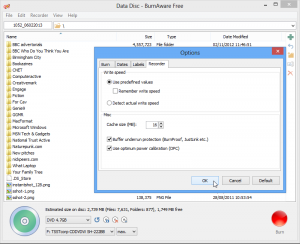
    BurnAware 6.0 adds a new View menu to its roster, allowing users to view the basic options in normal or large size. The new menu is joined by a brand new Verify Disc tool that scans discs for read errors.

    Also added is an option to burn an 800MB CD from the Disc Type drop-down list, plus users can now select the cache size (press [F10] and then set the size via the Recorder tab). BurnAware 6.0 also adds support for importing multi-extent and UDF embedded files, and there’s a new log window accessible from the Copy Disc and Copy to Image tools.

    The program’s burning engine has been updated, and the user manual has been rewritten from scratch to reflect all the changes in this new build. BurnAware 6.0 is also now capable of locking the burning drive for exclusive access when burning using the SCSI Pass Through Interface (SPTI). Version 6.0 also promises better optimized data transfer and buffering during the burning process.
    The update is rounded off with five notable bug fixes: problems causing potential read errors in produced disc images, write errors at the end of the burning process on DVD-R/-RW discs and with ejecting discs at the end of the burning process have all been resolved, along with fixes for BD-R disc burning errors on certain Pioneer drives and the “A general error occurred” error that occasionally appeared while Blu-Ray disc images were being prepared.

    BurnAware 6.0 Free is available as a free-for-personal-use download for PCs running Windows XP or later. Users wanting direct disc-to-disc copying capabilities and the ability to extract audio tracks and recover files from discs should download the 10-day trial of BurnAware 6.0 Premium, while a 10-day trial of BurnAware 6.0 Professional adds an option for burning a single ISO to multiple drives simultaneously to its commercial-use license. The two packages cost $29.95 and $39.95 respectively.

    Photo Credit: AISPIX by Image Source/Shutterstock

  • Vodafone UK slaps a price-tag on Windows Phone 8 devices

    Two days ago Vodafone UK teased subscribers and potential customers by announcing that, starting February 6, Windows Phone 8 smartphones would be available for purchase. There was no mention of price at the time, but today the missing piece of the puzzle is finally revealed.

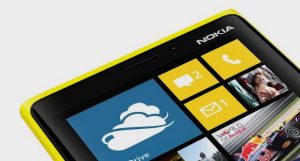
    The most expensive Windows Phone 8 device to be had with no upfront costs is the Nokia Lumia 920. For the Finnish manufacturer’s flagship Vodafone UK customers have to shell out GBP42 per month during a two-year agreement, and in return they receive 2GB of cellular data as well as unlimited calls and texts.

    For the same money as a Lumia 920, Vodafone UK customers can choose the newly-unveiled BlackBerry Z10. Other smartphones such as the Apple iPhone 5 and Samsung Galaxy S III are more expensive. Both cost GBP19 on GBP42 and GBP47 monthly plans, respectively, during a two-year agreement.

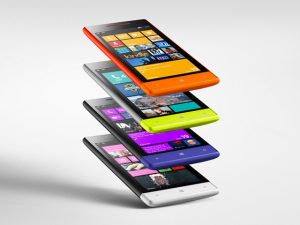
    Slightly above the GBP30 mark lie the HTC-made Windows Phone 8X and the Lumia 820. Both devices are available, with no upfront costs, for GBP33 per month, again with a two-year contract. The service plan offers 1GB of cellular data as well as unlimited calls and texts.

    The mid-range to low-end Windows Phone 8S and Lumia 620 are available, with no upfront cost, for GBP21 per month with a two-year contract. The service plan comes with just 250MB of cellular data as well as 300 minutes and unlimited texts.

  • [UPDATED] BlackBerry World vs BlackBerry App World: Not Just a Name Change

    BlackBerry has made a lot of changes to BlackBerry World, its app distribution portal, with the launch of BlackBerry 10. The new portal has a lot of positive design elements on BlackBerry 10 devices, as well as it received a makeover on the desktop. The problem, is that with this new design, Vendors have lost some of the functionality that made App World great. For me, as a Vendor, it has really have become a nightmare. Here are the current key issues with the new BlackBerry World:

    BlackBerry World

    1) Sort by popularity is gone – All of the most successful apps that have been developed over the years will be no longer be showing up at the top in each of the sub categories.

    2) Sort by rating does not take the total number of ratings into account – An app with a single, 5-Star review, will be listed at the same position as an app with 500 5-Start reviews. Even worse, the single 5-Star app will be listed ahead of an app that have 499 5-Stars and 1 4-Star review.

    Since the ‘popularity’ sorting has gone, the only way for an application to stay on top of a list is to have constant 5-Star reviews. This means that a vendor such as myself has to deny any none 5-Star review. This does not make sense for the customers and will likely lend itself to abuse.

    3) Search index changes and supported devices – This new search index does not work at all. It’s a total disaster. As soon as you select a specific device, the Search is unable to return any results. See the below screenshots.

    This is the search without a device selected:

    BlackBerry World

    Now, when you select a device, the search returns nothing:

    BlackBerry World search

    As you can see in the supported device details of the application, the 9900 is for sure supported by FileScout (in all countries, for all carriers):

    blackberry world search broken

    4) No RSS-feed for reviews any longer – One of the cool features of the old BlackBerry App World was that you could subscribe to the reviews made for an app via RSS. This made it very convenient for a Vendor to stay up to date with reviews and the things that are said about his apps. This is something that even Apple didn’t have and where you needed a third party. I have no clue why this very useful feature has been simply removed from BlackBerry World.

    UPDATE:

    5) No way to format text in the product description – The Vendor Portal says “Descriptions can be up to a maximum of 4000 bytes in length and must be in plain text; HTML tags are not supported but newlines and spacings are preserved.” This is simply not the case in the newly launched BlackBerry World. The given formatting will be removed completely which makes it unnecessarily hard for potential customers to get additional information about the product.

    I would really like to think that BlackBerry will be updating its store and it’s a shame that we’ve taken a leap forward in some areas, such as additional Music and Video content, but we’ve taken a few steps back with BlackBerry World, at least with the Desktop version.

    I’m curious, as a BlackBerry app consumer, do you use the Desktop version of BlackBerry World? What do you think of the changes?


  • Businesses Are Now Combatants in a Cyberwar with China and Iran

    American banks reportedly come under hostile cyberattack from Iran. Elite media companies confirm their firewalls have been breached by successful Chinese cyberattacks. Indeed, Google Chairman Eric Schmidt boldly declares China the world’s “most sophisticated and prolific hacker” nation. The President of the United States reportedly has assumed new powers to preserve, protect and defend America’s digital infrastructures.

    The scenarios I offered as serious business threat assessment almost two years ago now appear too polite and conservative in retrospect. The inherently global nature of the internet and the opportunities it offers for mischief, manipulation and mayhem have apparently proven irresistible. Businesses with dealings in China that either offend authorities or offer opportunities for industrial — or post-industrial — espionage have come under attack. This feels like a “cold” cyberwar where “humans” have been digitally superseded by bots, loggers and viruses. The purported Iranian attacks are more disruptive; less exercises in active espionage than pokes, prods and probes to determine exploitable systems weaknesses.

    To paraphrase Trotsky, you may not be interested in cyberwarfare, but cyberwarfare is interested in you.

    Business — both global and entrepreneurial — is the hard target here. If your company uses digital networks to manage supply chains, customer relationships, internal communications, financials and/or sensitive information that might interest Chinese or Iranian cyberwarriors, then a risk assessment re-think is paramount. If you’re outsourcing Web 2.0 to Amazon Web Services and/or other cloud providers, you need to know their security protocols and contingency plans have intensified to mission-critical.

    But, most of all, you need to recognize that cyberconflict realities dictate that “the government” — broadly defined and construed — will increasingly become business’s new best friend in cyberspace.The internet’s intrinsically international reach means that any and all cyberattacks — serious or casual — cross multiple sovereignties and jurisdictions. When the European subsidiary of a US bank — or web services provider — comes under attack, who, exactly, do they ask for help? Are these cross-border “crimes” requiring police action? Should diplomatic intervention come from American or European authorities? What role — public or covert — should the respective national intelligence agencies be playing?

    The single most important new reality emerging from this (apparent) rise in state-sponsored cyberattack on private enterprise is that individual businesses are ill-equipped and poorly-positioned to confront these incursions on their own. Companies can’t — and shouldn’t — unilaterally wage cyberwar on countries. But expecting effective legal recourse from sovereign nations that have, at best, ambivalent relationships with the “rule of law” is wishful thinking. Businesses — from digital entrepreneurs to the Fortune 10 behemoths — will have little choice but to partner with government to establish technical standards, incident reporting protocols and counter-measure responses for any meaningful hope of deterring or denying state-sponsored cyberattacks.

    Such cooperation, collaboration and coordination won’t come for “free.” We’ll likely see increased surveillance and monitoring of private and hybrid clouds, and proprietary networks, so governments and business alike can acquire greater intelligence and insight into the nature of the attacks and their own vulnerabilities. This will become an enormous challenge for “privacy” advocates and organizations wary of being too open with their customer/supplier data.

    But if state-sponsored hackers are corrupting communications between European financial service firms and their megadatacenters in India, what recourse exists? If state-sponsored cyberwarriors go after Microsoft’s, SAP’s, IBM’s, and/or Amazon’s “cloud services” offerings and disrupt the digital nervous systems of millions of users, strong diplomatic protests seem impotent. If a China or Iran succeeded in shutting down a major bank’s ATM network for a week, what kind of response qualifies as ‘proportionate’?

    Remember the May 2010 “flash crash” where the stock market plunged nearly 1000 points in a matter of moments? Suppose, just as a thought experiment, that had been caused by a state-sponsored cyber-attack.

    In another context, Intel co-founder and former CEO Andy Grove once observed, “Only the paranoid survive.” The recent cyber-flare-ups and skirmishes are, metaphorically, digital shots across the bow of Western businesses and their networks. Private businesses typically lack the legal standing and security resources to fend for themselves in the teeth of state-sponsored attacks from overseas. The exceptionally astute historian and foreign policy scholar Walter Russell Mead observes that the global interdependencies and vulnerabilities the Internet creates for global business requires a new entente between government and business. He asserts that traditionally pacifistic Silicon Valley progressives may soon demand a more robust nationally security posture for America and the West in the face of demonstrable digital threat.

    If cyberattacks become more innovative or intense, the West may well see the emergence of a “military, post-industrial complex” to protect and assert its interests.

  • LG Teases New Smartphone Line Unveiling On Facebook

    lg-teaser

    LG Mobile today posted an image to its Facebook page feed that strongly suggests we’ll soon see the company officially reveal its next generation of smartphone devices. The teaser graphic promises that LG’s “New series will be unveiled,” depicting a wrapped gift box. The curious tagline “See what surprise LG has in store for you this time, with an unexpected distinction” accompanies the images.

    LG may be eager to let people know that something new is coming, but the company isn’t giving anything away in terms of what will be announced or when. In all likelihood, however, given the timing of this announcement, we’ll probably see whatever LG has to show at Mobile World Congress this year in Barcelona. That event is taking place starting later in February, so we don’t have long to wait.

    We can also speculate about what LG will be unveiling at that show. While many of the commenters on the company’s Facebook post seem interested in getting updates to their devices to Android Ice Cream Sandwich or Jelly Bean, it’s much more likely we’ll see LG’s Optimus G successor, the G Pro, which boasts  a 5-inch, 1080p display shown off, and it seems a number of other devices designed to appeal to a range of budgets. The Optimus G Pro has already been confirmed by NTT DoCoMo, and should launch in April, but other LG smartphones likely remain to be seen.

    The question remains whether LG can deliver anything truly surprising now that the Optimus Pro has been outed. Then again, this is the company that delivered the excellent Nexus 4, so don’t underestimate what they can do outside of a flagship phone.

  • BlackBerry Z10 is available in Canada

    Great news for Canadian BlackBerry fans! The newly unveiled BlackBerry Z10 smartphone is now available for purchase at major carriers across the North American country.

    In its home land the BlackBerry Z10 is priced rather boldly against popular smartphones from Apple and Samsung. On a three-year agreement at Bell, the device goes for CAD139.95, while the Samsung-made Galaxy Note II and Galaxy S III run for CAD149.95 and CAD49.95, respectively. By comparison the Apple-made iPhone 5 is available from CAD179.95 for the 16GB variant, with the price increasing by CAD100 and CAD200 for the 32GB and 64GB variants, respectively.

    At Rogers, the BlackBerry Z10 goes for CAD139.99 on a three-year contract, while the Galaxy Note II and Galaxy S III are available at CAD149.99 and CAD49.99, respectively. By contrast the Nokia Lumia 920, powered by Windows Phone 8, can be had for CAD49.99 and the LG Optimus G only costs CAD24.99, again on a three-year contract. The BlackBerry Z10 is the most expensive device in Rogers’ lineup, after the Galaxy Note II.

    Telus drops the “.99” foreplay and demands CAD149 for the BlackBerry Z10. The Galaxy Note II and Galaxy S III are available at CAD149 and CAD49, respectively. Except for the former Samsung-made smartphone, the BlackBerry Z10 is the most expensive device in the Canadian carrier’s lineup, “besting” the HTC One X+ and LG Optimus G, among others.

    Can the BlackBerry Z10 really compete with popular Android devices or the iPhone 5 for market share, considering the price demanded by Canadian carriers?

  • Calligra rolls out a new version of its popular productivity suite

    The Calligra team has announced the release of version 2.6 of the Calligra Suite, Calligra Active and the Calligra Office Engine, a versatile Linux-based productivity suite.

    The big news in this suite is the addition of Calligra Author, a specialized tool which aims to help authors through the process of creating eBooks, including the ability to add interactive content (animations, embedded web content, scripting, and more).

    Application enhancements see spreadsheet application Sheets finally gaining a Solver, while Stage now allows you to create and work with animations in your presentation slides, and Krita adds support for the OpenColorIO color management system.

    Document compatibility improvements mean that Calligra 2.6 is now better at handling Microsoft Office documents. The suite can also now load and save 3D shapes and annotations, and is able to export documents to EPUB2, while MOBI exporting is apparently scheduled for inclusion in 2.6.1.

    And of course there’s the usual stack of smaller tweaks, including an improved layout for Words, more reliable CSV import and export in Kexi, various Krita speedups, more chart customizations (you can now set the fonts for titles, labels and so on), as well as a lengthy list of bug fixes.

    As previously, the Calligra team only provide the source code, so obtaining the package may require a little work. The official release announcement provides more details.

    Of course there are also builds of Calligra available for OS X and Windows, but they’re best treated with caution. Even the developers describe them as “preliminary” and “highly experimental”, and our initial tests of the current Windows build suggest that nothing much has changed — it’s packed with problems. So while the Linux suite works well, the Windows version is only really worth a look if you’ve a particular interest in Calligra or want to see how it’s developing on other platforms; it’s not yet something we’d want to use on a regular basis.

  • Layar brings Playboy to life on your smartphone

    The publisher of the Dutch edition of Playboy has started adding Layar augmented reality codes to the cover and certain pages inside of the magazine, providing a little interactive treat for iOS and Android smartphone owners.
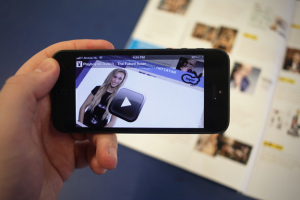
    When scanned with the Layar app, the cover of the current Playboy Netherlands comes to life, showing semi-nude, partially animated clips of the three potential Playmate of the Year cover models, Beau, Nadine and Lotte.

    Inside the magazine, last year’s Playmate winner — Zimra — introduces readers to the interactive magazine in a video, and a secret page allows them to ogle 2012’s worthy winner via the wonders of AR.

    Other content on offer includes videos of gadgets, cars and tech, a flashback to the girls of 1984, music playlist links, movies, TV and videogame trailers, competitions and more.

    “We saw some other magazines who were experimenting with Layar,” Patrick Goldsteen, editor in chief of Playboy NL explains. “This gave us some insights into what we could do with it and we saw some great opportunities to extend the experience of the magazine reader. As Playboy we have a great amount of content but are limited to the 114 pages of the magazine. With Layar we virtually have an unlimited amount of possibilities to publish extra content”.
    If you install the Layar app on your smartphone, you can experience the delights of Beau, Nadine and Lotte by scanning the cover for yourself. It’s NSFW though, so be warned.

  • Four things that Microsoft needs to fix in Windows Phone 8

    Coming from Android or iOS, Windows Phone 8 is an eye-opening smartphone operating system. It sets the bar pretty high when it comes to looks and performance — the design is simply beautiful and refreshing, and the software responsive and fluid — but it never really manages to outshine its main rivals. After living with the HTC Windows Phone 8X for a while, I can’t help but notice glaring oversights in an otherwise solid proposition. The package is not complete.

    You see, being pretty and going fast does not cut it among the fierce world of Android and iOS. Microsoft needs to take a good look around and take charge by solving the shortcomings of Windows Phone 8. Fact is, it’s easy to pick faults with the immature app selection, like many journalists do, but that’s more of a chicken and egg problem. What the software giant has to do is build on the current platform by offering better basic functionality, functionality that’s necessary for a greater user experience.

    1. Unified Notification Center

    In Windows Phone 8, Microsoft’s idea of notifications comes through live tiles. Live tiles are designed to offer notifications on a per-app basis, ranging from missed calls to unread email counters or weather data.

    The implementation, however, is not perfect and could be unified in a single notification center, similar to on Android or iOS. The user would then be able to check out what’s new in terms of notifications in a single place, instead of having to go through all the pinned tiles on the homescreen.

    This would also make it far less confusing to follow through on notifications, and easier to dismiss irrelevant or non-important ones without having to open the app to see what’s new. There are already rumors pointing to a unified notification center coming, so hopefully Microsoft has realized that live tiles alone simply do not cut it.

    2. Revamped Personal Assistant

    Android has Google Now, iOS has Siri, and Windows Phone 8 has… a fairly basic voice “assistant” that sounds like the female version of Stephen Hawking. By default it lists five commands, like “Call Chris mobile” and “Note Windows Phone 8 needs a personal assistant”. I’m joking about the latter, but you get the picture.

    The implementation is fairly basic, and could use some sprucing up. First of all, Microsoft has to find a better female or male voice that doesn’t come from the annals of voice recognition history. Users should be able to have access to sports results, weather info and other mundane features in a more neatly organized interface without leaving the app, instead of summoning Bing every time.

    It would be rather neat if the voice assistant could be used to display notifications through a voice command or answer questions, again without firing up Bing. Apps can take advantage of the voice recognition features too, but the only app that does it for me is Battery Sense. Microsoft develops the Facebook app, so why isn’t there a corresponding voice command to post a message?

    3. Improved Internet Explorer

    Even though my heart lies with Chrome and Firefox on the desktop side, Windows Phone 8 comes with Internet Explorer as the default and I was rather surprised to see just how well it performs. It honestly bests Chrome on Android when it comes to responsiveness and speed. But it’s not perfect.

    First of all the tab management feature is bad. The user has to open the contextual menu, go to “tabs” and manage the opened pages from there. It’s simply not ideal for easy access. For instance Chrome has a better implementation through swiping between opened tabs. I am not suggesting that Microsoft should copy Google, but a gesture seems much more appropriate for smartphones than a menu.

    The software giant could also add a password manager and bookmarks and password synchronization with the desktop variant of Internet Explorer 10. It’s the mobile era after all, not the 2000’s.

    4. Unified Search

    Windows Phone 8 devices, such as my HTC Windows Phone 8X, come with a physical search button, which is rather unusual for modern smartphones but also quite useful. After pressing it, users can look up various things through Bing but, sadly, it’s constricted to online use which means that searching for local items is a no-go.

    It’s misleading. Instead of showing up local apps, contacts, music, texts or videos, users have to open individual applications to look up various information. Windows Phone 8 would be much better served by offering a unified search app which also displays local results, all while keeping the existing functionality for in-app searches.

    The Chicken and Egg Problem of Google+ and Instagram

    As you might imagine, not every Windows Phone 8 owner is solely a Facebook, LinkedIn or Twitter user and many, like myself, would prefer to also have Google+ integration within the Me tile and People app. It’s a normal request with more than 135 million active Google+ users within the stream alone, but one that cannot be solved by Microsoft alone without Google stepping in.

    Then there’s Instagram, which is also part of the chicken and egg problem that continues to plague Windows Phone 8. The Facebook-owned social and photo-sharing network may not be as popular as Google+, but it still has more than 90 million active monthly hipsters users who also shouldn’t be neglected.

    Microsoft likely cannot take charge and embrace the development of a Google+ app, but seeing as the software giant developed the Facebook app why couldn’t it do the same for Instagram? Having Instagram on Windows Phone 8 would surely help its adoption level among socially active folks.

  • Record everything on screen and create quality presentations with ActivePresenter Free

    When you’re creating a presentation, a demonstration, a software tutorial, or just trying to show someone else what’s happening on your desktop, then you could just take and save screen grabs at the appropriate moments. But while that sounds simple enough, it’s not exactly convenient. You’ll have plenty of work to do later in converting your grabs into something meaningful. And even then, the finished results may not be that professional.
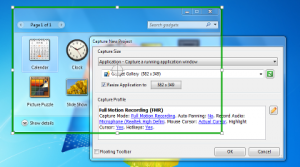
    Fortunately ActivePresenter Free offers a more capable alternative. It’s a powerful screen recorder which can track everything you’re doing, and automatically add some useful annotations. You can then quickly customize the results with an excellent editor, before saving your project as images (JPEG, PNG) or video (WMV, AVI, MPEG4, WebM).

    Create a new project and the program allows you to record a fixed area, an application window or the entire screen. It’s smart enough to grab images only when you take some action, like clicking a button or typing. But ActivePresenter can also record onscreen activity as a video, if you like, with an audio narration as well.

    And that would be useful enough, but it’s actually just the start. Because if, say, you click on the View menu within a program, ActivePresenter doesn’t just show an image with the cursor in the appropriate position. It can also highlight it, and even add a callout to make things clear to the reader, like “Select [View] menu item”. So you may need to do very little post-processing to your images, because ActivePresenter has sorted out the basics already.

    If you need to do more, though, that’s not a problem. The program includes a capable editor which allows you to further customize each slide with new shapes, captions, highlights, images, cursor paths, zoom and pan effects, even audio or video clips.
    And if you don’t like some aspect of how the program works, just check the Preferences dialog — it’s quite astonishingly customizable. So if you’re creating a cursor path, for instance, you’re able to set the default cursor highlight shape, color, size and opacity, the type of movement path, the cursor shape, even the noise it makes to indicate a left, right or double-click.

    This is the free version of ActivePresenter, of course, and so we were expecting it to be hobbled by ridiculous restrictions — you can only record 3 slides, they all have a massive watermark, and so on. But, surprisingly, there’s nothing like that here. The commercial versions (priced from $349.95) do have many more features, including the ability to add interaction to your projects (questions, quizzes, scripting and more), or export to PDF, Word, PowerPoint and so on. But the free edition has no length restrictions, watermarks, nag screens or anything similarly annoying, and if you need to export your on-screen activities to video then it should serve you very well.

    Photo Credit: Alexey Kashin/Shutterstock

  • Instagrammers, you can now use only the browser (almost)

    It was bound to happen at one point or another. Following the rolling out of web profiles in early November, Instagram now allows users to skip smartphones and go straight to the browser for all their filtered picture feed needs.

    This latest development is part of a plan to bring Instagram to a larger variety of devices, including PCs and tablets, a move that will undoubtedly help support the social network’s growth and popularity among a bigger crowd. Instagrammers only have to visit the popular social network’s website, press the log in button and enter their account information to start using Instagram inside a browser, without any encumbrance.

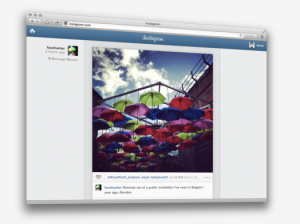
    On the web, the service looks similar to the smartphone app. The only visual difference, when the window is not narrowly shrunk, is the user’s name and profile appear on the left side of the picture instead of in the usual spot above it.

    The realtime feed allows Instagrammers to browse through photos uploaded by users they follow, and like pictures through the familiar double tap or by pressing the heart-shaped like button. Commenting on photos is also available and, when resizing the browser window, Instagram shrinks around it to a point when it looks exactly as it does inside the mobile app.

    What Instagram on the web does not allow, at the moment at least, is the ability to upload or filter pictures. Kevin Systrom, the social network’s co-founder, suggests that the reason lies within Instagram’s nature of “producing photos on the go, in the real world, in realtime”. Still there are certainly many users who may want to use the feature, especially when time is of the essence while on the go.

  • Replace Notepad with the powerful and smarter EverEdit

    Windows Notepad may be easy to use, but it’s also horribly basic, and so it’s no surprise that an entire industry has grown up in providing more powerful alternatives. Some, like Notepad++, have become famous in themselves, but there are also plenty of powerful but lesser-known tools around, and EverEdit is one of the most interesting.
    The program gets off to a good start with its ultra-compact 1.25MB download, for instance. There’s no installation, no adware, not as much as a “Donate” button — just unzip the file somewhere and you’re ready to go immediately.

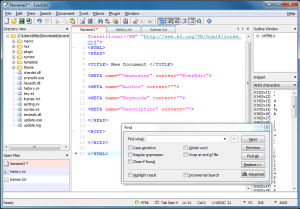
    EverEdit’s versatility is apparent very quickly, too. Click File > New, for instance, and you’ll find the program has built-in template support (there are C, HTML and PHP templates included, and it’s easy to add your own). And while full Unicode support means EverEdit can open text files in any encoding, the program also has an option to open binary files in its own simple hex editor.

    The interface is surprisingly configurable for a program of this size, too. As well as having a central tabbed area where you can work on your documents, EverEdit can display a Directory View to browse your system; an Outline window for easier navigation of lengthy documents; a list of open files, and a command window.

    There’s even a Snippets window for speedy entry of commonly used text. Choose the HTML category, say, then double-click “Object (Flash Movie)” and EverEdit will insert an ‘<object type=”application/x-shockwave-flash”…’ tag at your current cursor position.

    Other elements of the interface proved smarter than we’d expected. The status bar, for example, doesn’t just display details about the document and your current cursor position; it’s also clickable, so you can select your current tab size (or coding, or insert mode or whatever) and change it to something else.

    There are a stack of other extras, too, from the small (a Print Preview option, and the ability to set the program window transparency, or set it “always on top”), to the surprisingly large, like macro and plugin support.

    And of course you also get lots of core editing and developer-oriented features, like drag and drop support when moving text around, case conversion options, line manipulations (sorting, remove duplicates, more), auto-complete, code folding and more.

    The program isn’t perfect, of course. For all its functionality, there are some features which seem relatively basic when compared to the best of the competition (syntax highlighting), while one or two others are missing entirely (there’s no option to maintain multiple clipboards, for instance).

    More seriously, the features you do get aren’t always organized in an intuitive way. And there doesn’t seem to be any English language documentation, either, so figuring out how some of the more advanced features might work could prove quite a challenge.

    This isn’t a fatal problem, though. You won’t need any help to use the core EverEdit features, and there are more than enough of those to justify downloading the program. And if you’re willing to invest some time in exploring its features then there’s plenty more to discover.

  • How Soccer Aid is saving lives in Chad

    Until I arrived in the desert-like terrain of Chad, West Africa, and had driven the eight hours to the region of Guera, an area that sits on the periphery of the Sahel belt, I was struggling to visualise how the incredible amount of money raised through Soccer Aid was already changing children’s lives here.

    The first time I really saw the impact of the money raised – a staggering £4.9 million thanks to the incredible generosity of the UK public and UK Aid Match – was at a hospital in the capital of the region, Mongo. I was shown around the children’s wards: two large tents and two concrete buildings, the latter being the intensive care units. These units hold the children who arrive here with the most extreme conditions, suffering from severe malnutrition with serious complications. Many with death in their eyes.

    Thanks to money raised by Soccer Aid though, these children are being treated with life saving nutrition supplies and medicines, which means that within weeks it’s possible to bring even the most severely affected child back to health again, and give them the hope of a brighter future. And this isn’t the only place that this critical nutrition intervention is happening thanks to UK aid; since 2010, the UK has more than doubled resources for tackling undernutrition, with a commitment to reach 20 million pregnant women and children under five with nutrition interventions by 2015.

    Thanks to money raised by Soccer Aid, even severaly malnourished children can be nused back to health. Picture: Jordi Matas/UNICEF

    However, the difference that Soccer Aid money has made in Chad reaches much further than the country’s hospitals and out to a multitude of health centres that operate across the region, which work to prevent children from even getting to this severity of illness in the first place. The health workers at these centres are trained by UNICEF to identify and treat malnutrition, which, as a result of an ongoing food crisis caused by periods of extreme flooding and prolonged periods of drought, affects well over half the children living in Guera, Chad.

    Michael speaks to a mother, Nairri Daha, with her child, 2 year old Halime Seid, at the transition centre at the in-patient hospital, supported by UNICEF, in Mongo, Chad. Picture: Jordi Matas/UNICEF

    Another change that is now in place thanks to the support of the UK public and vital UK Aid Match, is the presence of the humble mosquito net. During my second day in Mongo, I visited a family whose youngest child had been extremely ill with malaria. The child was treated at the health centre and the family was given a mosquito net, paid for with money donated by UK aid, and now the entire family is safe from the life-threatening disease. We saw how they construct the net inside their home, which was a round mud hut with a roof made from sticks, carefully designed to keep the heat out. A mosquito net is such a simple thing, and yet it saves and changes lives.

    In the last year the UK government has delivered more than 12 million bed nets to protect against malaria transmission, preventing over 66,000 child deaths. I’m very pleased to say that thanks to the UK aid matching Soccer Aid, amongst that incredible statistic are the children I personally met, who are now safe from this deadly disease.

    Not having a mosquito net also means a child is at risk of serious wider health complications. Malaria causes diarrhoea. Diarrhoea means that the few nutrients the child is consuming aren’t absorbed and malnutrition sets in, worsening the child’s already fragile health. This in turn means the mother has to care for the child and therefore can’t earn a living by collecting fire wood or growing produce and the poverty deepens. 75% of the world’s poor – 3 billion people – depend on agriculture for their livelihood. Women make up almost half of the agricultural workforce in developing countries and often their contribution to a family’s income is a vital one. By simply providing a net – a simple net – this domino effect of destruction could be halted before it even starts.

    Michael plays football with children at Djoukoulikouli village in the Guera region of Chad. Picture: Jordi Matas/UNICEF.

    Possibly the most unforgettable time for me during my trip to Chad was the afternoon I spent with a women’s group that runs awareness raising campaigns that promote good family practices, such as hand washing, making sure families are drinking clean water and using nets and ultimately learning how to keep their children safe from illnesses such as diarrhoea. I walked into a courtyard to find a sea of women, covered head to toe in a riot of colour. They were listening attentively to a UNICEF trained volunteer (who was also a nurse) explaining simple ways to adapt to the continuously changing and extremely challenging surroundings, where environmental factors are getting more extreme due to the effects of climate change. The women learnt about how to prepare and store food, what food to buy, how to treat water and how to use rehydration salts if their child does get ill. I learnt a lot myself – not only about protecting children from the every day challenges and dangers that this country presents, but also about the sheer strength of community in this region and the desire to change things, something that they can do with the help of a little bit of money and support, thanks to you.

    —————————————————————————————————-

    Please note, this is a guest blog. Views expressed here do not necessarily represent the views of DFID or have the support of the British Government.


  • Emerging corporate bond boom stretches into 2013

    The boom in emerging corporate debt is an ongoing theme that we have discussed often in the past, here on Global Investing as well as on the Reuters news wire. Many of us will therefore recall that outstanding debt volumes from emerging market companies crossed the $1 trillion milestone last October. This year could be shaping up to be another good one.

    January was a month of record issuance for corporates, yielding $51 billion or more than double last January’s levels and after sales of $329 billion in the whole of 2012. (Some of this buoyancy is down to Asian firms rushing to get their fundraising done before the Chinese New Year starts this weekend). What’s more, despite all the new issuance, spreads on JPMorgan’s CEMBI corporate bond index tightened 21 basis points over Treasuries.

    JPM say in a note today that assets benchmarked to the CEMBI have crossed $50.6 billion, having risen 60 percent year-over-year.  Interest in corporates is strong also among investors who don’t usually focus on this sector, the bank says, citing the results of its monthly client survey. One such example is asset manager Schroders. Skeptical a couple of years ago about the risk-reward trade-off in emerging debt, Schroders said last month it was seeing more opportunities in emerging corporates, noting:

    Stronger economic growth in developed markets and because of surging new issue volumes which permit investment in a greater variety of companies and countries.

    There could be headwinds however. One could be a rise in Treasury yields that would make higher-risk assets less attractive. Corporate bonds are less well cushioned than in the past and many see valuations as looking a tad rich after last year’s 150 bps  spread compression on the CEMBI. Certainly, hardly anyone expects the kind of double-digit yields that came through in 2012.

    But many reckon the risks from U.S. Treasuries will be far greater for U.S. high yield and emerging sovereign debt. According to Mike Conelius,  who runs an EM bond fund at T.Rowe Price:

    (EM corporate) yields generally exceed those of corporate bonds in the United States, and companies in many cases are conservatively leveraged and managed with large cash reserves and little debt on their balance sheets. Yet they have a greater tailwind for growth, and the asset class is benefiting from investors’ search for yield.

    Fans of the sector will point out that the CEMBI  yield on average is still 320 basis points over Treasuries, while the EMBI Global sovereign bond index trades around 275 bps  — in these yield-scarce days that 45 bps represents no mean pick-up.