Author: Alan Buckingham

  • Microsoft busts some myths with new Outlook ad

    Microsoft is in the process of pushing users to Outlook.com for web email services. The company purchased Hotmail back in 1997, largely ignored it, and then suddenly began updating the app right before deciding to unceremoniously replace it with Outlook.com back in July of 2012.

    Now the company is in full push-mode to get users moved over and also try to woo new customers for the service. With that in mind, Microsoft has teamed up with the folks from the popular Mythbusters TV show to advertise Outlook.com and also push the brand new season of the show.

    No myths about the email service are touched on in the ad, but the team, or at least part of it, is shown using the web-based email to take a trip down memory lane in anticipation of the big anniversary. Microsoft, in posting the 30-second spot, describes it as “to celebrate the MythBusters’ 10th season premiering May 1, check out the build team — Kari, Tory and Grant — reminiscing about their experiences on the show through photos and videos shared with Outlook.com”.

    No word on when the ad will debut on TV, but the show, one of the longest-running in Discovery channel history, will hit the airwaves on May 1st to begin its tenth season with Adam Savage, Jamie Hyeman and the rest of the crew.

  • Google celebrates Earth Day with animated Doodle

    While I tend to visit the Google site daily, it is not to conduct a search — I can do that from the Omnibar in Chrome — but to simply to see if there is a new Doodle. Perhaps a silly reason, but it only takes a couple of seconds and sometimes I am rewarded with a small bit of entertainment.

    With today being Earth Day, which was first held on April 22nd 1970, I expected a nod from the search giant and I was not disappointed.

    To celebrate the occasion, the company posted a nifty little animated Doodle that you will need to sit and observe for some time to fully appreciate. At first glance it seems simple enough — the sun rises, travels across the sky and sets. But watch it long enough and you will note that each day is a different season and each night a different phase of the moon rises and travels across the sky.

    A Google Doodle is certainly not news, as the company produces them quite frequently — you can even view a gallery of all of the past iterations. But today’s version provides a bit of entertainment and forces you to watch a little longer. Perhaps the best doodle since Google made PAC-MAN playable back in 2010.

  • Windows 8 Build 9374 brings ‘Kiosk’ mode, confirms 8.1 name

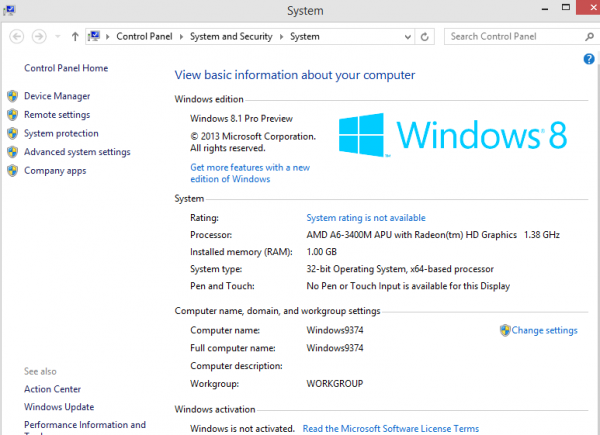
    Microsoft continues to build and leak Windows Blue at a solid rate. Last month we toured build 9364, and now 9374 is out. There are plenty of rumors about where “Blue” is headed, including even, oh the horrors, bringing back the Start menu and adding a boot-to-Desktop option. With 9374 now out on the web (BN can not tell you where to find it, but I am sure you will stumble upon it if you look), I decided to see what changed.

    Before we go any further, just for the record, this installation is 32-bit only and you will need to choose “Custom” when running setup — an upgrade does not work. I installed in Virtual Box, and I recommend you use some sort of virtualization software as well. This leak is certainly not ready for prime time just yet.

    What is New?

    First and foremost, you will notice that the version is now, indeed, listed as 8.1 Pro Preview. Honestly, you cannot miss this because the name is on the Desktop in the lower right corner and listed within the computer properties screen.

    Despite recent rumors, there is not, at least yet, any Start menu or a boot-to-Desktop option, though those may perhaps still be in the works. Personally, I do not miss those things and could care less if they are added or not, but many users will no doubt want them.

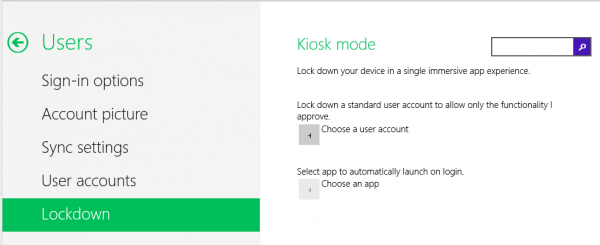
    The biggest addition to this latest build is the new Kiosk mode, which can be accessed from the PC Settings found in the Charms menu. The option is listed under the User setting. Kiosk mode allows you to lock down user accounts to certain functionalities that you choose and also makes it possible to set an app to launch upon Startup — possibly a reason for HTPC fans to finally move on from Windows 7, as 8 previously had no option for starting Windows Media Center upon boot (though some hacks existed to make it possible). Kiosk mode looks incomplete at this point. The feature is tailor-made for parental controls and also for computers located in retail locations that wish to have a dedicated store app.

    The Search option also is changed slightly, and no longer displays the app list behind it, but only the actual Search column on the right of the screen. This also looks incomplete — I could only access from the Start page, while the Desktop brought up only an empty column — no search box in it.

    Conclusion

    There is not really much to see here. Only the Kiosk mode and Search screen are really new, and neither feels complete at this point. Given that 9374 is a leaked build this is not a big surprise, and bugs are to be expected, too. The OS is certainly not ready for anything close to production use and should only be run on a test system or in virtual mode.

  • Bing answers malware critics

    Earlier this week word hit the web that Bing search results display more malware than Google. Naturally, Microsoft disagrees. “AV-TEST’s study doesn’t represent the true experience or risk to customers. In other words, the conclusions many have drawn from the study are wrong”, David Felstead, Bing senior program manager, says. Okay, why?

    Felstead elaborates: “By using the API instead of the user interface, AV-TEST bypassed our warning system designed to keep customers from being harmed by malware. Bing actually does prevent customers from clicking on malware infected sites by disabling the link on the results page and showing the…message to stop people from going to the site”.

    He goes on to explain that Bing displays links from infected sites because most are legitimate sites that normally don’t host malware but have been hacked. It is a plausible, but not fully satisfactory, answer. “We warn our customers rather than suppressing the result for both completeness and educational reasons”, Felstead states.

    Then, in true Scroogled fashion, he points out a search term that can be entered into Google that results in malicious results.

    In fairness, Felstead also points out that Microsoft is “still waiting on answers to many of our questions” on the methodology of these tests. In other words, this is a “he said, she said” matter that we will likely never have real answers on. In the end it boils down to which engine you prefer and the good sense to not click on results that claim to provide the moon to you.

  • Amazon Prime releases 14 original series

    Up front I should confess that I love Amazon Prime. The service is a bit cheaper than Netflix for streaming movies and TV shows but brings along other perks such as free second-day shipping and a lending library for Kindle users. The retailer continues to add features and work with studios in an effort to provide more content to viewers.

    Today Amazon releases pilot episodes for 14 new, original shows. We have known these were coming for some time, but the service waited until all pilots were ready and pushes them now as one giant release.

    Among the pilots are six childrens’ shows and eight original comedies, including the much anticipated Zombieland, which is based on the 2009 cult classic movie.

    Now the ball is in your court. Not all of these shows will make it, the company wants feedback to make that determination. Amazon solicits reviews and provides ability to take a survey. Customers will determine which pilots get the green light to begin production as complete series.

    Songs from the shows are also available for free download from AmazonMP3, and other information on each show is available from IMDb. Now you have a plan for your weekend and, if you are like me, then it involves zombies.

    Photo Credit: FotoYakov/Shutterstock

  • Get Xbox Live Gold free this weekend

    This may seem a bit ironic, given that Xbox Live spent much of last Saturday down, but this weekend Microsoft aims to make up for that little mishap with a free weekend of, well…possible service. Xbox Live Gold adds many of the features that the console has become known for, such as ESPN, YouTube, iHeartRadio and much more.

    Xbox Live chief Larry Hryb, better known as Major Nelson, announces “if you’ve always wanted to check out the latest entertainment experiences on Xbox 360, now is your chance”. The service will go free beginning at 10am ET today (Friday April 19) and remain that way though 1pm ET on Monday April 22.

    This is not only valid in the United States, but also Canada, Latin America and Japan. “All Xbox owners in these regions, regardless of their current Xbox LIVE subscription status, will have access to online multiplayer gaming, Video Kinect, and our entire catalog of entertainment apps” Hryb explains.

    This coincides with the debut tonight of the new Netflix (a Live Gold service) original series Hemlock Grove. The weekend also brings a special preview of Borderlands 2, for which Hryb provided a key — KTW3T-ZXXS5-JBSJF-5FJT3-6TB9X.

    Both the U.K. and Europe had a free weekend back in March, so this timing is seemingly coincidental and unrelated to last weekend’s crash of the service — in other words, it does not appear to be a Microsoft apology.

    Photo Credit: Aaron Amat/Shutterstock

  • Jolicloud update brings search, new services and more

    Jolicloud may perhaps be the coolest cloud service you have not yet discovered. Created back in 2009, the company derived from Joli OS into a platform to access your cloud-based online life. It brings together everything you have stored on all of the various cloud services and, if you are like me, then that can be a wide net to cast.

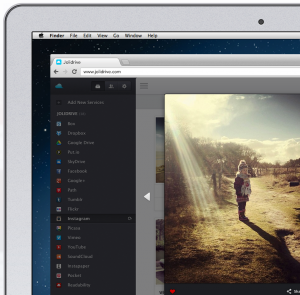
    The service finally adds search — a feature long sought after by users. The company announces that it has “made it very easy to search anything you have in your Jolidrive: music, photos, documents, videos in your online storages but search can also help you find great content in all your favorite social services like Instagram, Tumblr, SoundCloud, Youtube and more”.

    This encompasses all of the cloud services compatible with Jolicloud, including Box, Dropbox, Google Drive, SkyDrive, Facebook and more.

    The news does not stop there though. The company goes on to point out new cloud services that are available within the platform. These include Exfm, Ubuntu One, Cloud App, Google Plus, Vimeo and Tumblr.

    Finally, the service releases a brand new “explore” feature. “Combined with search we have created a powerful discovery feature letting you hop from users to locations or keywords. It’s a great way to discover new music, photos and videos that you can like and share with your friends” the Jolicloud team claims.

    The service has remained a hidden gem of sorts on the internet, but the continued innovation and updates may finally change all of that as it moves closer to the mainstream.

  • Yahoo forecasts weather app for iOS

    Marissa Meyer is bringing big changes to Yahoo and one of them is apparently getting the old search site back into the public focus with new mobile apps. That process begins today in the world of both Apple and meteorology — fitting since tornado and thunderstorm season is getting underway and hurricanes are on the horizon.

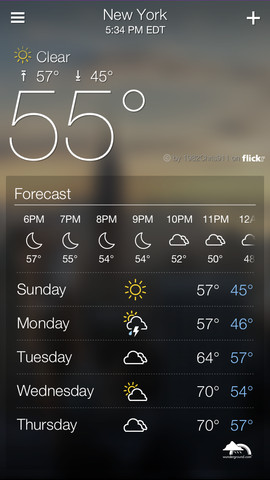
    Today the company announces a sleek new weather app that is compatible with iPhone, iPad and iPod touch — uninspiringly named “Yahoo! Weather App”. Marco Wirasinghe claims the new app will “bring together beautiful images from our Flickr community to show you current local conditions, with all the details you want to know about the forecast”.

    While this is a weather app at heart, it really is about the photos. You can simply tilt your device to scroll through images of weather in locations that you choose. However, you can still get details of current conditions and a forecast to let you know how to dress today and if you should bring along an umbrella.

    Wirasinghe elaborates on the photos: “Our goal is to have amazing photos for every weather condition that cover the globe — morning, afternoon, and night — across every city in the world, and we want your help. Whether you’re simply a daydreamer or an avid photographer, submit photos of your favorite places to our Flickr Group and your image can be seen by tens of millions in Yahoo! Weather for iPhone”.

    Yahoo! Weather is now in the iTunes App Store. The app is free and available in English, Bokmål, Norwegian, Chinese, Croatian, Czech, Danish, Dutch, Finnish, French, German, Greek, Hebrew, Hungarian, Indonesian, Italian, Korean, Malay, Polish, Portuguese, Romanian, Russian, Slovak, Spanish, Swedish, Thai, Turkish, Ukrainian, and Vietnames languages.

  • TomTom announces smartwatch for athletes

    I have previously gone on record as wanting a smartwatch. Yes, I still wear a watch because I am a runner and we are fastidious about time and distance and having a timepiece that prevents the need for driving a route to get the measurement is a major time and gas saver. Previously I looked at Pebble, with its built-in RunKeeper, but today TomTom changes that.

    The company announces the TomTom GPS Sport Watches, built specifically for the athlete — a new range of GPS watches designed to deliver “at-a-glance” performance information for runners, cyclists and swimmers.

    “We know that most GPS watches on the market are too bulky and complicated to use while training”, Corinne Vigreux, managing director for TomTom Consumer, says.

    There is a lot here to like for those on the go — an extra-large, high-resolution and high-contrast display, a graphical training partner, one button control, indoor tracker, waterproof design and Bluetooth connectivity. You can sync, analyze and share your data via TomTom’s new MySports (not yet available) website, as well as MapMyFitness, RunKeeper, TrainingPeaks and MyFitnessPal platforms.

    The training partner is especially interesting, as it includes the ability to race against both your PR (personal record) or last run, set a distance, time or calorie goal and see progress toward that goal with full-screen graphics and alerts, even set a target for pace or heart-rate.

    The watch will not be available until sometime this summer and no pricing has been announced, but if you would like a preview, then it is on display already. Finally, someone has made smartwatch with real-world functionality. I do not need to see my email on my wrist, but I do want data on my workout.

  • Microsoft ranked second on EPA green list

    A company that operates huge data centers around the world is probably not the thing that springs to mind when you think ‘green’. But that is exactly the case in the latest Green Power Partnership Top 50 List released by the United States Environmental Protection Agency.

    The EPA rankings of usage figures are based on annualized partner contract amounts (kilowatt-hours). Microsoft’s Josh Henretig announces “According to the EPA, Microsoft is purchasing nearly 1.9 billion kWh of green power, which is enough energy to meet 80 percent of Microsoft’s electricity use in the US”.

    The number is a 70 percent increase over the previous year when Microsoft used 1.1 billion kWh of green energy. The company puts it in perspective as being the equivalent of avoiding the carbon dioxide emissions of nearly 285,000 passenger vehicles.

    Henretig goes on to boast that “our green energy use also qualifies Microsoft for EPA’s Green Power Leadership Club, a distinction given to organizations that have significantly exceeded EPA’s minimum purchase requirements”.

    This is the second consecutive year in which Microsoft has made the EPA top 50 list, but moving up to number two was a major accomplishment for the software giant. The company also ranked second on the Top 20 Tech & Telecom list, behind Intel. A big portion of this success is down to the company’s move to “smart buildings“.

    Photo credit: Jannoon028/Shutterstock

  • It’s not Microsoft’s fault you’re too stupid to protect your PC

    You may want to sit down, because I know this will comes as a shock, but it turns out that if you do not have antivirus software installed and enabled on your PC then you are more likely to get malware.  If my truck gets stolen the next time I am at the store then I am more likely to walk home also.

    Okay. I am making light of a serious study, but the statement from Microsoft that “malware infections [are] 5.5 times more likely without antivirus software” lends itself to a bit of levity.

    In fairness, I recommend all users run antimalware and antivirus software, even though I fail to heed my own warning. Microsoft also has no horse in this race, as its own security tools are available for free. The company does, however, have a vested interest in protecting its customers — that is just good business sense.

    The new report is available now. “People intuitively understand the importance of locking their front doors to prevent their homes from being broken into. Computer security is no different. Surfing the Internet without up-to-date Antivirus is like leaving your front door open to criminals”, Tim Rains, director of Trustworthy Computing for Microsoft, says. “With the release of this new research, Microsoft is urging people to make sure they have up-to-date Antivirus installed on their computers”.

    The report goes on to point out the greatest threats to computer users, including many that will seem obvious to the tech crowd that visits BetaNews.

    Do not click on unknown email attachments. “Microsoft detected and removed malicious email attachments from almost 3 million computers in the fourth quarter of 2012”. The report points out that “On average, about 24 percent of computers scanned by the MSRT each month in 2H12 were not running real-time antimalware software or were running outof-date antimalware software at the time they were scanned”.

    Websites for free or discounted software should be avoided (exceptions to reputable sources like Woot and Groupon) and simply paying attention to your protection software. A surprising number of users allow antimalware to expire.

    A couple of things go unmentioned in all of this — first and foremost is that Microsoft, without naming itself, implies Windows is not safe without security software. Second, this entire thing brings up the specter of the recent news that Bing displays more malicious sites than rival Google in search results. My take is a bit different.

    The report states that “the RTM version of Windows 7, which had the highest percentage of unprotected computers of any platform…also displayed the highest infection rates for unprotected computers, with a CCM of 20.4 for the 32-bit edition and 12.5 for the 64-bit edition”. No surprise given the market share.

    However, Windows 8 is not immune, just better protected. “On Windows 8, which had the lowest infection rate overall, unprotected computers have an infection rate (CCM) that is 16.2 times greater than the infection rate for protected users” — though it still points to having a software program to second-guess the user.

    A couple of things go unmentioned in all of this — first and foremost is that Microsoft, without naming itself, implies Windows is not safe without security software. Second, this entire thing brings up the specter of the recent news that Bing displays more malicious sites than rival Google in search results. My take is a bit different.

    While all of this may sound dire, Microsoft is simply doing what is in its own best interest — trying to protect the average user, which is probably 85 of its 90 percent market share. The company is not implying that Windows 8 is unsafe — it is the safest version of the operating system yet.

    In fact, much of what is pointed out is user behavior, which is what really needs to change in order to make the computing world a safer place.

    Photo Credit: Peter Bernik/Shutterstock

  • Bring Serenity to Google TV

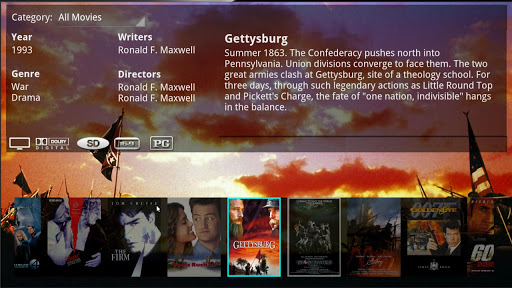
    No, I am not talking of the nerdtastic movie from Joss Whedon, but of an app. I have written twice now of my move from an HTPC to Google TV in the living room, with my most recent post surrounding ways to get both live TV and home media to the tiny set top box. For serving up home media I opted for Plex, which seemed the best solution.

    Plex is both a server and app and both are free. Simply install the server software on an always-on computer and control it from a web browser dashboard. From there you can direct it to all of your media — movies, TV shows, music and photos. It is dead simple to set up and maintain.

    After publishing that last article I received a message from a developer who wished to alert me that Plex had alternative Google TV interfaces, one of which was named Serenity.

    Beauty Pagent

    There is no delicate way to say this — if the Plex app is Windows Media Center then Serenity is XBMC with its beautiful skin. The difference here is night and day. Plex is functional and you will have no problem using it, but it has the basic look of the Windows software I was replacing.

    Serenity is the XBMC in this horse race, with skin that is soft and smooth. The menu glides across the screen with new images for each media type. While it still runs (pulls its data) off of the Plex media server you set up, it adds a new, and much improved interface to the whole thing. Everything is still there, you lose none of your media capability, you just get a much nicer view of all of those files.

    Serenity is not a skin for the Plex app, but a standalone app that simply is based on the Plex server, so you will need to scroll to it in your app drawer on Google TV.

    Behind the Scenes

    When Serenity is first launched it may throw you a bit, as it did me. Despite the fact that you have your Plex server up and running, it will still tell you that no server was found — do not panic. Just hit the “OK” button to enter “Settings”. From here, you can click “discover servers”, though it may remain grayed out for a bit. If you are in a rush, then simply choose the option to enter the IP address of the server, which is the route I chose.

    Once that IP is entered then everything populates very quickly. If you have any problems you can consult the Wiki or head over to Google Plus to get community help.

    The Verdict

    While Plex for Google TV is free, Serenity is not, though $1.99 is not a steep price for a good app. The code is also available over at GitHub.

    The app is also available for tablets, though the developer warns that “on a tablet it is recommended to use an external player like MX Player to provide support for codecs that aren’t native to the device”. No external player is required on Google TV, though you can use one — just enable it from the Settings page.

    Don’t get me wrong, Plex will work just fine on your set top box, but Serenity makes it look much nicer, which, on a big screen in your living room, can make all of the difference in the world.

  • Microsoft Research adds new functionality to Outlook

    Most of the focus these days seems to be around Outlook.com, as Microsoft anxiously endeavours to move its apps online and turn software into a service. But, while the latest version of Microsoft’s productivity suite — Office 365 Home Premium — includes the ability to access the apps on the web, ultimately it is still a software suite on your computer.

    Now Microsoft Research wants to bring new functionality to the desktop version of Outlook and is announcing the release of Mañana Mail to do just that.

    Mañana, Spanish for “tomorrow”, lives up to its name by allowing users to schedule an email to be sent at midnight. Outlook does not need to be running in order for the message to go out, and you can still edit or cancel the message up until midnight. The new Outlook plugin also adds a feature that has been available in Gmail for sometime — Undo Send. This means that every message is held for 15 seconds before being sent, during which time you can click “undo” to get it back.

    Many users, especially in business, still prefer their email to be desktop-based so it’s good to see that Microsoft is still paying attention to this, as opposed to focusing completely on the web version of the email app.

    credit: Gina Sanders/Shutterstock

  • Java must be improving — only 42 security holes patched this round

    Allow me to begin with an emphatic statement: if you have Java on your computer then get it off now! Oracle released its latest round of security patches for the incredibly buggy, and surprisingly still popular, platform, with numerous new holes waiting to either be patched or exploited.


    When word came down of the latest fixes and I mentioned it in the BetaNews newsroom, our president Scott Alperin could utter only “seems like time to put PC-side Java out of its misery”. Indeed.

    According to the Oracle announcement “this Critical Patch Update contains 42 new security fixes across Java SE products of which 2 are applicable to server deployments of Java”. The company continues to explain “39 of these vulnerabilities may be remotely exploitable without authentication”. 42, that is all. Thankfully it is not 43, or 50. Perhaps next month.

    For the record, this is Java 7 update 21. The update introduces some new security warnings and message prompts as well as patches. Apps that present a lower risk will display a simple informational message. This includes an option to prevent showing similar messages for apps that come from the same publisher in the future.

    The latest round of updates covers Java versions 5, 6 and 7, though I recommend you run the latest…ahh…actually I recommend you run none at all. Java has even managed to get the bastion of Apple hacked, and if it can do that then imagine the horrors which can be unleashed. Check Flash. Your move.

    Photo Credit: Ronald Sumners/Shutterstock

  • Microsoft updates Outlook.com for Android

    Microsoft’s relentless push for Outlook.com brings an app update to the enemy camp, today — big move given that Android now represents a large portion of today’s mobile market. Two weeks ago, Microsoft unleashed a major calendaring service overhaul.

    The interface has been completely revamped and new features come along for the ride. As you may know, Google has pulled support for Exchange ActiveSync, but Microsoft now works around that.

    According to Steven Kafka, who works on Outlook.com program management: “We believe that the best mobile experience is enabled through Exchange ActiveSync– which provides a rich, powerful, network-optimized experience for Windows Phone, iOS and other mobile devices. However, native support for Exchange ActiveSync on Android devices varies significantly and so we build a separate app to ensure as many people as possible can have a great Outlook.com experience across all their devices”.

    The new mobile app not only provides the same look as its web counterpart, but also adds new features including conversation threading, filters for unread and flagged mail, and also the ability to mark messages as spam.

    While the updates are welcome and should benefit many customers, it seems this also partially is a shot in the escalating war between Google and Microsoft that has resulted in the above mentioned Exchange ActiveSync cutoff and the whacky Scroogled campaign. The result, in this case at least, is good for consumers.

    Photo Credit:  2jenn/Shutterstock

  • BitTorrent releases Surf browser plugin beta

    The glory days of Torch, a Chrome-based web browser known for its built-in Torrent capabilities, may be short-lived because similar functionality is headed your way right in the web browser you are probably using right now. Surf, the plugin announced back in January, rolls into full beta release today.

    The company announces that “BitTorrent Surf started out as a little Chrome experiment: a way to make BitTorrent simpler. Basically, Surf transforms your browser into a BitTorrent client; with discovery and downloading built in”. The experiment apparently went well because the browser plugin hits beta mode for not only Chrome, but also Firefox as well.

    Of course, like all official BitTorrent products, Surf is designed with legal purposes in mind. The company envisions users being able to find content from the many artists who use the file-sharing network to distribute their work. The new plugin has a built-in recommendation engine so that customers searching for one artist will also discover work from other, similar musicians. “Recommendation and prioritization can help drive visibility for BitTorrent partner artists – solving for the exposure barrier that every creator is confronted with” the announcement tells us.

    Like all things BitTorrent, this will likely strike fear into organizations such as the MPAA and RIAA and those users who choose so, will find ‘other uses’ for the new plugin. However, for the many users and artist who use BitTorrent for genuine reasons, this could prove a boon.

  • Internet Explorer ‘Catching Fire’ with The Hunger Games

    Later this year, November 22nd to be exact, part two of The Hunger Games, titled The Hunger Games: Catching Fire, will hit the big screen. Microsoft’s Internet Explorer team has partnered with Lionsgate to set up a new IE-optimized website for the sequel to the blockbuster movie with the hope of not only getting you excited about the film but also about the “browser you loved to hate”.

    The Hunger Games Explorer launches on the heels of the MTV Movie Awards which premiered the trailer. Microsoft’s Roger Capriotti says “with the global launch of The Hunger Games: Catching Fire trailer, fans can now visit The Hunger Games Explorer to be immersed in this world, track every development of The Hunger Games: Catching Fire, including tweets, exclusive images and videos, and then share their thoughts and excitement with others around the world creating a global conversation”.

    Meanwhile, Lionsgate’s Danielle De Palma claims “The Hunger Games Explorer is not only a place for fans to spark the conversation around Catching Fire, it is also a destination for us to continue to provide fans with new content, experiences and unprecedented behind the scenes access”.

    When fans enter The Hunger Games Explorer they can manipulate the website to customize Catching Fire info to the exact way they want it. You can tailor and filter content in and out of the stream, pull in fan blogs and tweets in addition to messages from the Capitol, and interact with other fans across the globe.

    While the site is optimized for Internet Explorer, it works with every other web browser, and probably just as well. Still, it was created by the IE team, along with Lionsgate’s RED Interactive Agency and, given the anticipation for the movie, it is still a win for Microsoft.

  • So you pre-ordered an Ouya — here is when to expect it

    Back on March 28th Ouya president Julie Uhram announced the tiny Android-based gaming console started shipping, but only to backers of the Kickstarter project. Additional details were added such as a software update which would be run upon first boot up and that the device would officially hit retail stores on June 4th.

    As we have seen around the web, some have already received their boxes, but what if you did not get in on the Kickstarter ground floor, but instead placed a pre-order when those went live back in August of 2012? I happen to fall in that category and so I inquired about the timeframe and received a response from Ouya’s Carmelo Martinez.

    “We are now shipping Kickstarter orders (placed before Aug. 8). If you ordered between then and Feb. 4, your order should be shipped in late April. Orders placed after that time will be shipped in June. You will receive an email confirmation with tracking number once yours is on its way”.

    Seeing as I ordered on August 10th I suppose I should receive my confirmation at any moment. I say this with great hope since I paid for the console, along with two controllers, via PayPal back in August.

  • Facebook Home hits Google Play, HTC First up for order

    Facebook Home, which CEO Mark Zuckerberg announced on April 4, and leaked as three APK files shortly after, today officially hit the Google Play store and the HTC First, announced at the same event, can officially be ordered through AT&T. The social network today pushes out a new launch page designed to make a splash with its live background of endless video.

    The Google Play app describes itself as “the mobile experience that puts your friends at the heart of your phone”. It essentially functions in the same way as any other launcher app for Android, bringing Facebook front and center on your homepage. From the moment you unlock your device you will be bombarded with a steady stream of photos, posts from friends and notifications of all sorts — it’s like a full-screen Windows 8 Live Tile totally dedicated to Facebook.

    The company describes the app thus: “With Home, everything on your phone gets friendlier. From the moment you turn it on, you see a steady stream of friends’ posts and photos. Upfront notifications and quick access to your essentials mean you’ll never miss a moment. And you can keep chatting with friends, even when you’re using other apps”.

    The HTC First can now also be ordered through AT&T for $99 with free shipping. That price, of course, includes a two-year contract, but if you wish to go month-to-month then you can lay out the full $449 for the 4.3-inch handset.

    A word of caution about the links provided above — while all worked for me, some were inaccessible by others here at BetaNews. Perhaps the rollout is not totally complete as of this writing. Of course I would also warn anyone who wishes to turn their phone into a Facebook platform to think twice, but that is only personal opinion and not advice.


  • Does Patch Tuesday make your Windows 7 computer endlessly reboot?

    For the most part Microsoft’s Windows updates, known as Patch Tuesday, aim to fix problems as opposed to causing them. That is not always the case, and the most recent update, which took place this week, is a shining example of what happens when good intentions go bad.

    On April 9th Microsoft released two “critical” security updates and seven others rated as “important” for both Windows and Internet Explorer as part of its latest round of updates, collectively covering 14 issues. However one of those fixes, labeled KB2823324 and aimed at the Windows 7 file system kernel-mode driver, went badly for some customers. The result was reports of blue screens of death (BSOD) and also infinite reboots.

    The company has pulled the update and released KB2839011 to fix the problem — providing you can boot up and actually get to the fix. “Microsoft is investigating behavior where systems may not recover from a restart, or applications cannot load, after security update 2823324 is applied. We recommend that customers uninstall this update. As an added precaution, Microsoft has removed the download links to the 2823324 update while we investigate”, the latest patch claims.

    If you are stuck in a reboot loop then you will need to insert your Windows disc and boot to the Repair Windows option then follow the instructions from there.

    The issue affects only Windows 7 computers and only some users of those systems. Those of us on Windows 8 havw no known problems with the most recent round of updates, but there is always next month.

    Photo Credit: Roger Jegg – Fotodesign-Jegg.de/Shutterstock