Author: Mihaita Bamburic

  • Archos unveils the Platinum tablet lineup

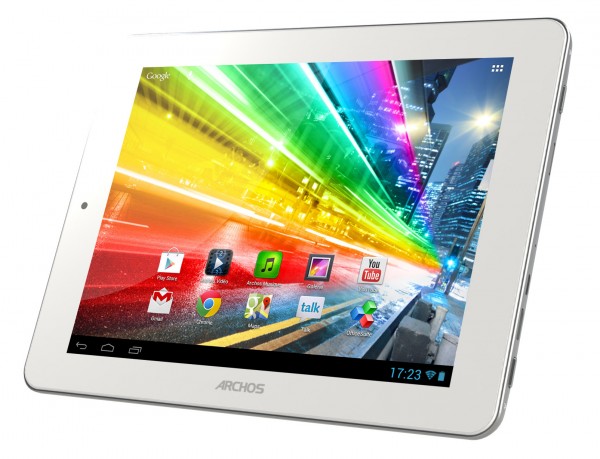
    On Valentine’s day, French consumer electronics company Archos professed its love for mobile technology by unveiling a new tablet lineup dubbed Platinum. The three devices, 80 Platinum, 97 Platinum HD and 116 Platinum, are designed for the wallet-conscious tablet buyers while also sporting pretty decent hardware specifications.

    The common denominators between the three tablets are found inside the shell, with only the physical dimensions and screen specifications separating them. The devices share a quad-core 1.2GHz processor backed by an 8-core GPU (Graphics Processing Unit) and 2GB of RAM. Archos also throws in its branded Media Center applications, front and back cameras, as well as a mini-HDMI port and microSD card slot.

    On each tablet Archos preloads Android 4.1 Jelly Bean, which the French consumer electronics company says provides “full access to 700,000 applications” suggesting that the Play Store app comes preinstalled. But enough of common denominators, let’s talk about what separates the three.

    The 80 Platinum features an 8-inch IPS display with a resolution of 1024 by 768, atop of the above mentioned specifications. Archos pits the 80 Platinum, which runs for $199 starting this month, against the Amazon Kindle Fire HD 8.9 that is available for purchase at $299.

    The 97 Platinum HD targets the Apple iPad, which starts at $499 for the latest iteration, through a 9.7-inch IPS display with a resolution of 2048 by 1536. The tablet, which is also available “in February”, can be had for $299. Archos must really want buyers to think of the 97 Titanium HD as they do about the iPad, because the resemblance between the two is uncanny.

    Finally, the 116 Platinum ships with an 11.6-inch IPS display and a resolution of 1920 by 1080. The 116 Platinum will be available for $349 when it ships later on in April. It is the only tablet of the three that comes with a 16:9 display, with the other two shipping with a 4:3 panel similar to Apple’s iPads.

    Archos says that the Platinum lineup features “a sleek aluminum design”, however the company does not specify whether that’s real aluminum or a faux-aluminum, the latter of which is similar to the side-trim used by Samsung on the Galaxy S III and Galaxy Note II, among others.

  • Google posts Android 4.2.2 factory images for Nexus 4, 7, 10 and HSPA+ Galaxy smartphone

    Three days ago, Google released the much-anticipated Android 4.2.2 Jelly Bean update, containing security improvements as well as Bluetooth-related bug fixes. Making Nexus owners even happier (well, at least some of them), the search giant also updated the factory images with the latest green droid iteration.

    Among other purposes, the factory images can be used to restore Nexus-branded devices to a stock state after previously running custom green droid distributions, or update them to the latest version of Android. At a quick glance, for my Galaxy Nexus smartphone, the Android 4.2.2 Jelly Bean factory images ship with a newer radio (XXLJ1), as well as a more recently-dated kernel (version 3.0.31, with a November 28 time-stamp). The “userdata.img” file is also freshly-dated with a February 8 build date.

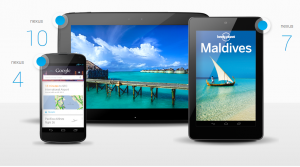
    The Android 4.2.2 Jelly Bean factory images are available for the Nexus 10 (codename “mantaray”), Nexus 7 in both Wi-Fi and HSPA+ trim (codename “nakasi” and “nakasig”, respectively), Nexus 4 (codename “occam”), as well as for the international and Google Play-sold Galaxy Nexus (codename “yakju” and “takju”, respectively).

    Using the “How to install Jelly Bean on Galaxy Nexus” guide, the Nexus 7 and 10 tablets as well as the Nexus 4 and Galaxy Nexus smartphones (the latter in LTE trim as well, after the factory images are updated) can be upgraded to Android 4.2.2 Jelly Bean by replacing the filenames from the guide with currently applicable ones found in the corresponding factory image.

    Keep in mind that by upgrading to Android 4.2.2, according to AnandTech, the Google Nexus 4 will lose support for Band 4 LTE.

  • Use DashClock widget to empower the Android 4.2 Jelly Bean lockscreen

    One of the least impressive features added by Google in Android 4.2 is the ability to use lockscreen widgets. By default the second Jelly Bean iteration comes with a limited number of options, none of which is capable of delivering enough glanceable information without swiping left and right to find emails or calendar entries. With DashClock Widget the true potential of lockscreen widgets is unleashed by displaying relevant “status items” right after unlocking the device, all in one go.

    DashClock Widget can be used as a Digital clock widget replacement, further building on the stock functionality by introducing support for next scheduled alarm, upcoming calendar appointments, missed calls and unread texts, unread Gmail inbox or Priority inbox count as well as local weather data. Straight off the bat it puts the stock lockscreen widgets to shame by combining sufficient relevant information, all in one place.

    In order to take advantage of DashClock Widget users have to unlock the device and navigate to the furthest lockscreen page on the right, tap the “+” sign and select the item named “DashClock” from the provided list. Afterwards a new window will appear, allowing users to enrich the default functionality by adding extensions. The available extensions are the above-mentioned supporting features. Extensions can be removed by swiping items to the left or to the right.

    At this point the only extensions that are user-customizable include Weather and Gmail unread count. For the former, users can choose between Imperial and Metric weather units (Fahrenheit and Celsius, respectively). There is one caveat though — users cannot choose a different weather provider, which may be an inconvenience for users outside of supported locations. The latter, Gmail unread count, can be used to display unread counts for either inbox and supports multiple Gmail accounts as well.

    Another caveat comes from the calendar functionality, which is limited to appointments. Users like me that sync multiple calendars for upcomings birthdays or events will find the lack of support for basic calendar entries rather disappointing.

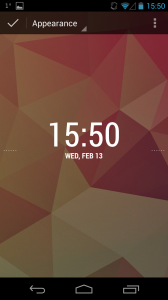
    Users can also customize the appearance by choosing between multiple clock and date styles with bold numbers and letters or smaller characters, among others. The design can be altered by selecting “Appearance” in the dropdown menu on the top-left side of DashClock Widget’s interface. Compared to the CyanogenMod 10.1 “Chronus” lockscreen widget DashClock Widget ups the ante by providing the above mentioned Gmail, call and text functionality.

    DashClock Widget is available to download from Google’s Play Store. The app is only compatible with Android 4.2 Jelly Bean.

  • Apple lowers laptop prices, beefs up specs

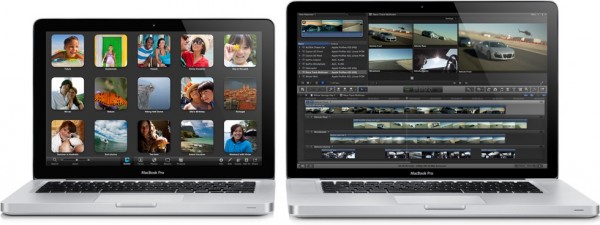
    Today, Apple announced a number of changes in the pricing and hardware department for the company’s MacBook laptop lineup. The Mountain View, Calif.-based corporation lowered the price for the 13-inch MacBook Pro with Retina display and for the top-of-the line 13-inch MacBook Air and beefed up the specs for the 15-inch MacBook Pro with Retina display.

    If you were holding off on buying an Apple MacBook now is a good time to reconsider. The fruit-logo company slashed $200 from the price of the 13-inch MacBook Pro with Retina display, which now starts at $1,499 and $1,699 for the base and top model, respectively. Apple applied a similar treatment to the 13-inch MacBook Air in 256GB trim, which now goes for $1,399, $100 less than before.

    The base 13-inch MacBook Pro with Retina display features a 13.3-inch LED-backlight IPS display with a resolution of 2560 by 1600 and 227 ppi (pixel per inch) density; 2.5GHz dual-core Intel Core i5 processor with Turbo Boost for up to 3.1GHz clockspeed backed by an Intel HD Graphics 4000 video card; 8GB DDR3L internal memory clocked at 1600MHz; 128GB of flash storage and a built-in 74Wh battery with a quoted battery life of 7 hours. There is also a 720p FaceTime front-facing video camera; two Thunderbolt ports; two USB3.0 ports; HDMI port as well as Bluetooth 4.0 and Wi-Fi 802.11 a/b/g/n connectivity.

    The top 13-inch MacBook Pro with Retina display adds a 2.6GHz dual-core Intel Core i5 processor with Turbo Boost for up to 3.2GHz clockspeed and 256GB of flash storage. Both models come in at 31.4 x 21.9 x 1.9 cm and 1.62kg.

    The top 13-inch MacBook Air features a 13.3-inch LED backlit display with a resolution of 1440 by 900; 1.8GHz dual-core Intel Core i5 processor with Turbo Boost for up to 2.8GHz clockspeed backed by an Intel HD Graphics 4000 video card; 4GB DDR3L internal memory clocked at 1600MHz; 256GB of flash storage and built-in 50Wh battery with a quoted battery life of 7 hours. There is also a 720p FaceTime front-facing video camera; Thunderbolt port; two USB3.0 ports as well as Bluetooth 4.0 and Wi-Fi 802.11 a/b/g/n connectivity. It comes in at 30 x 19.2 x 1.7 cm and 1.08kg.

    The 15-inch MacBook Pro with Retina display now features higher-clocked processors, 100MHz faster than before. The base model sports a 2.4GHz quad-core Intel Core i7 processor, while its more powerful brother now comes with a 2.7GHz quad-core Intel Core i7 processor as well as 16GB of internal memory. Pricing remains the same at $2,199 and $2,799 for the 256GB and 512GB variants, respectively.

    The base 15-inch MacBook Pro with Retina display features a 15.4-inch LED-backlit IPS display with resolution of 2880 by 1800 and 220 ppi; 2.4GHz quad-core Intel Core i7 processor with Turbo Boost for up to 3.4GHz speeds backed by the Intel HD Graphics 4000 and nVidia GeForce GT650M in 1GB trim graphics cards; 8GB DDR3L internal memory clocked at 1600MHz; 256GB of flash storage and a built-in 95Wh battery with a quoted battery life of 7-hours. There is also a 720p FaceTime front-facing video camera; two Thunderbolt ports; two USB3.0 ports; an HDMI port as well as Bluetooth 4.0 and Wi-Fi 802.11 a/b/g/n connectivity.

    The top 15-inch MacBook Pro with Retina display adds a 2.7GHz quad-core Intel Core i7 processor with Turbo Boost for up to 3.7GHz clockspeed, 16GB DDR3L internal memory clocked at 1600MHz as well as 512GB of flash storage. Both models come in at 35.89 x 24.71 x 1.8 cm and 2.02kg.

  • LG unveils a second and different Optimus G Pro

    If you’re confused, you are not alone. On Wednesday, LG unveiled a new smartphone dubbed Optimus G Pro, three weeks after Japanese carrier NTT DOCOMO announced a new LG-made smartphone dubbed Optimus G Pro. The twist — they are not one and the same.

    The confusion stems from the fact that the first Optimus G Pro features a 5-inch display while the second model comes with a 5.5-inch display, basically placing the two in different market segments. In terms of panel dimensions, the former is quite similar to the newest batches of Android flagships such as the Sony Xperia Z while with the latter LG takes the fight to Samsung’s Galaxy Note II. LG should really make up its mind and pick different names for its handsets.

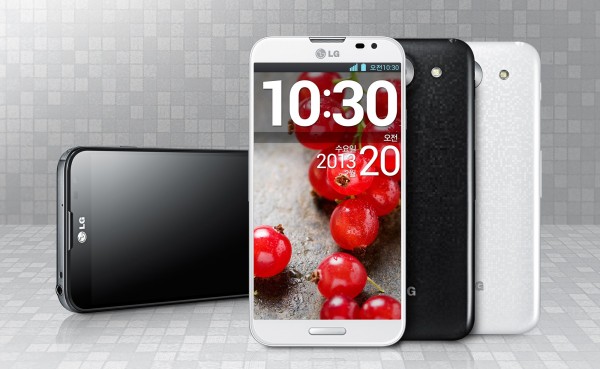
    The two devices don’t even share the same design language. The first one announced comes with a thicker side-bezel, elongated speaker grill and an LED flash under the camera lens, among other things. The model unveiled today reminisces the LG-made Google Nexus 4 in the speaker grill department and the back cover, has a thinner side-bezel and features the LED flash on the right-side of the camera.

    LG clearly aims to reinvent the wheel on the curved glass terminology by stating that it features a “2.5D” effect, which is both misleading and wrongfully used as the term generally applies to virtual geometric models not physical ones. That said, LG did reveal some down-to-Earth information concerning the hardware specifications.

    The 5.5-inch display on the newly-announced Optimus G Pro comes with a resolution of 1920 by 1080. The handset is powered by a quad-core processor, likely of Qualcomm origin. LG did not disclose any information related to the software, which is likely Android 4.1 Jelly Bean judging by the first Optimus G Pro’s green droid distribution. Since MWC 2013 (Mobile World Congress) is just around the corner, we can expect more information during the popular event.

  • Android 4.2.2 rolling out for Nexus devices

    Google Nexus owners, unlock your devices and start checking for updates because Android 4.2.2 Jelly Bean is now rolling out. The latest software version is reportedly hitting Galaxy Nexus, Nexus 7 and Nexus 10 devices, with no word at the moment relating to the Nexus 4.

    The Android 4.2.2 update bumps up the build number to version JDQ39 and mostly appears to contain minor fixes. No official changelog has been provided by Google at this moment, but users are reporting improvements for Bluetooth streaming which now presents “less hicups […] but still not perfect” with apparent disconnects when switching from Wi-Fi to cellular data.

    The update comes in at little over 46MB and considering the fairly significant size may feature plenty more under-the-hood changes. Android 4.2.2 is currently rolling out in waves and will likely hit the Nexus 4 in the following days if previous deployments are of any indication. For Galaxy Nexus owners there is an OTA Android 4.2.2 update file that can be manually downloaded and installed afterwards using ADB Sideload in the recovery.

  • First Surface Pro commercial is uninspiring

    Weather may have ruined the Surface Pro launch event, but the “laptop in tablet form” started selling on February 9, in Canada and United States, nonetheless. And just like with its Windows RT-powered sibling, Microsoft aired a video ad that is meant to increase awareness and promote Surface Pro as a business-oriented device. But does it?

    Interestingly titled “The Vibe”, the Surface Pro video commercial bears a strong resemblance to the Surface RT one that debuted in mid-October. It’s a very dynamic advert with business people dancing, smiling, signing, throwing things around, acting cool and generally doing things that business people don’t normally ever do while at the office. It even starts with the same guy that opened up the Surface RT ad. The Vibe is a nice concept, but a poor choice for Surface Pro.

    The first issue with The Vibe: Microsoft pointlessly tries to pit the Surface Pro target audience as a cool crowd, capable of breaking away from the corporate norm, stripped of any preconceptions and let loose. That has absolutely nothing in common with the day-to-day life of business users, nor does it help promote the tablet among the intended audience.

    The Vibe does not highlight any of the Surface Pro strong-suits and only shows that the device features a detachable stylus and USB port that can be used to tick something and plug in a microphone, respectively. It’s a missed opportunity for Microsoft, considering that Surface Pro can do plenty more.

    The Redmond, Wash.-based corporation could have emphasized the benefits of having a stylus by drawing a small sketch, plugging an external hard drive into the USB port, connecting a mini DisplayPort-compatible external display, running some resource-intensive software on Surface Pro and many more, but instead did none of that.

    The Surface brand does not need to break ground anymore through an impressively-hip ad or make tablet buyers look cool because it did that before with the Surface RT. With the Surface Pro commercial I expected Microsoft to rest on its laurels and tell viewers what makes it a good choice for them by connecting with them at a more mature level. After watching The Vibe I wonder: How can anyone know that Surface Pro is not just another tablet?

  • You can still get 50GB of free cloud storage with Box

    With cloud services like MediaFire and Mega offering generous free storage straight off the bat, the spotlight slowly fades away from other players and their abysmal free space offers. Box, however, has decided if you can’t beat them, join them and is currently providing the same mind-boggling 50GB of free cloud storage, courtesy of Dell.

    The offer has been available for a couple of days and comes with no expiration date on the storage limit. Even though it’s associated with Dell there is no limitation requiring you to sign up using a Dell device, such as computer or tablet. Any user can take advantage of the 50GB of free cloud storage just by providing the first name, last name, email address, password and phone number.

    For those who embrace a mobile lifestyle, Box is a better match than MediaFire and Mega as it offers apps for Android, iOS, Windows 8/RT and Windows Phone. The service is also available on the newly-launched BlackBerry 10, courtesy of BlackBerry which develops the app.

    Photo Credit: Sergej Khakimullin/Shutterstock

  • Sony details the Android 4.1 Jelly Bean upgrade for Xperia smartphones

    Sony’s Android 4.1 Jelly Bean upgrade for 2012 Xperia smartphones is a long time coming. The Japanese manufacturer announced its plans in mid-October last year, and followed it up with a brief update two months later. Finally, as planned, deployment is set to kick off “this week”.

    The first smartphones to receive the coveted upgrade to the original Jelly Bean iteration are the Xperia T and Xperia, with Xperia TX owners having to wait until next month for the same software treatment. In an attempt to appease impatient users and to drum up some interest, Sony has decided to spill the beans on what Android 4.1 Jelly Bean entails for Xperia users by providing a list of significant changes included in the upgrade.

    One of the most important improvements, carried over from the stock version of Android 4.1 Jelly Bean, is Google Now. The personal assistant delivers contextual cards based on search queries, location or upcoming events and provides Gmail integration as well for flight and hotel confirmations, event and restaurant bookings and packages, among others.

    Sony has revamped the camera interface, which now touts “a more intuitive viewfinder” with auto-scene setting and the option to switch between the two on-board cameras with a single press of a button. Users can search within the application tray to find specific apps, use up to seven homescreens, or take advantage of resizable widgets and expandable notifications. The Japanese manufacturer also includes updated versions of Album and Movies, as well as WALKMAN.

  • Get Aero back in Windows 8

    Windows 8 fans didn’t take Microsoft’s decision to dump the familiar Aero Glass interface lightly. Even though the software corporation has very good reasons for doing so, there are users who are willing to put up with the apparent disadvantages and want to bring the transparency back.

    Microsoft is known for its stance on the matter and it is unlikely that the software giant will be persuaded to bring Aero Glass back in Windows 8 and, therefore, eat its own words about the advantages of the new interface. For this reason, and likely others as well, a developer decided to take matters into his own hands and release a hack that brings back Aero Glass into the Windows 8 Desktop Window Manager.

    The developer, who goes by the userhandle bigmuscle, explains how the simply titled Aero Glass for Win8 works. He says:

    “I have developed DLL library in C++ which is injected into dwm.exe process (no system files replacement is required). Then, the functions used for window border drawing are hooked with my own implementation. This ensures that anytime DWM wants to draw the window border, the code is redirected into my library where I can change the parameters of vertex buffer, blend state and other stuff. Then I redirect back to the original drawing function. Transparent window border is drawn!”

    The implementation used by Aero Glass for Win8 comes with some caveats, as bigmuscle explains:

    “Currently, I implemented only blur effect using Direct2D. My plan is to return glow effect to the window caption, better shadow around the windows, and, if anyone is interested, try to reimplement Flip3D functionality.”

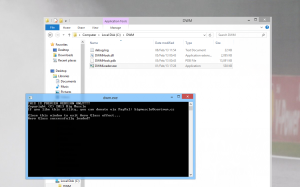
    That said, the hack works and does indeed bring the transparency effects back into Windows 8. Users must extract the provided 7z file into a “DWM” folder within the root of the drive where the operating system is installed, for instance “C:\DWM”, open the “DWMLoader.exe” file and validate any UAC or security software prompts.

    A command prompt window will then open, informing the user that Aero Glass is now enabled. In order to go back to the default Windows 8 interface, the user only has to close the command prompt window. Keep in mind that the hack is currently labeled as a preview build and it may “feature” the occasional bug associated with the early stages of development.

  • Microsoft launches ‘Don’t Get Scroogled by Gmail’ campaign to stop Google ‘going through personal emails’

    Microsoft’s efforts to downplay Google’s Gmail over its own Outlook.com service are well known amongst the tech crowd. In late-November the Redmond, Wash.-based corporation claimed that a third of new Outlook.com signups were people switching from Google’s email service, and after the web giant dropped support for EAS, Microsoft quickly advised Gmail users to make the same switch. Now Microsoft is at it again, launching a new crusade titled “Don’t Get Scroogled by Gmail“.

    The purpose of the campaign, according to the software firm, is to “educate consumers that Google goes through their personal emails to sell ads”. Don’t Get Scroogled by Gmail is aimed at American Gmail users and is supported by a GfK Roper study commissioned by Microsoft that found “70 percent of consumers don’t know that major email providers routinely engage in the practice of reading through their personal email to sell ads”, with a vast majority of people, 88 percent, disapproving of this practise once the information was brought to their attention.

    Well fine, but as you and I may ask: Why just target Gmail? Surely Microsoft could have taken various other email services to task as well. Fact is this has nothing in common with a “for the greater good” plan, but rather is a targeted plot to save Gmail users from the “evil” Google, by getting them to switch to Outlook.com.

    Microsoft’s senior director of Online Services says that: “Emails are personal — and people feel that reading through their emails to sell ads is out of bounds. We honor the privacy of our Outlook.com users, and we are concerned that Google violates that privacy every time an Outlook.com user exchanges messages with someone on Gmail. This campaign is as much about protecting Outlook.com users from Gmail as it is about making sure Gmail users know what Google’s doing.”

    Microsoft has a solution to this problem, as you might imagine, and has launched a petition on Scroogled.com to help “consumers have their voices heard” and “tell Google to stop going through their emails to sell ads”. Microsoft also states that Gmail users should “prioritize their privacy by switching to Outlook.com”.

    But what the Redmond, Wash.-based corporation seems to fail to realize is that being a Gmail user is both a choice and a necessity.

    In my case I use various other Google services connected to my Gmail account and I’m quite sure millions of other people are in a similar position. If I were to, hypothetically, switch to Outlook.com I’d still have to use my Gmail account to log into Google+ and check for notification emails, for instance. At the same time using Gmail with all the targeted ads is a personal choice, one that I favor over Outlook.com when it comes to features and adjacent functionality.

    I can also chat with my Google+ friends straight from Gmail, whereas I’d be stuck with Facebook Messenger on Outlook.com. By implication I’d be an even more active Facebook user and we all know how much Zuckerberg’s social network values our privacy. To me that’s a huge no-go.

  • Updated evasi0n iOS 6.x jailbreak now available

    Three days ago evad3rs released the first public iOS 6 jailbreak tool, opening up iPads, iPhones and iPod touch devices to the world of underground modding. But as is the case with the majority of infant jailbreak-related releases it also brought along a series of bugs, which the team behind the project now claims to have fixed in the latest update.

    On Twitter, planetbeing, one of the three members behind evad3rs, announced the release of evasi0n 1.1. The second iteration of the popular jailbreaking tool brings along “the latest fixes”, which are supposed to sort the Weather app and “long boot” time issues. The latter problem is also referred to by the team as the “reboots getting stuck” bug.

    planetbeing also says that users may have to clear the browser cache in order to “see” the evasi0n 1.1 tool on the website. For those who already run jailbroken devices, installing the latest release is not necessary as the same result can be achieved by using Cydia to update the existent packages.

    First time users may want to download the evasi0n 1.1 jailbreak tool once it can be “seen” on evad3r’s website. Since only the links for the original release are currently available, for impatient users installing the first release then updating via Cydia might be a quicker “fix” for their incurable modding needs. Keep in mind that it’s advised to perform a backup before jailbreaking the device.

    Photo Credit: Sura Nualpradid /Shutterstock

  • Jelly Bean and Ice Cream Sandwich chomp Gingerbread

    In with the new and out with the old. Well, almost. Jelly Bean and Ice Cream Sandwich are slowly taking Gingerbread’s crown, running on 42.6 percent of all Android devices. The two-year old operating system only has a slight edge, of 3 percentage points, against the two newest sweets in the family, based on the number of devices accessing Google Play during the 14 days ending February 4.

    Almost three months after Google released Android 4.2 Jelly Bean, the latest treat in the candy jar reached a 1.4 percent distribution level. Compared to the previous data set released by Google in early-January, the number is merely 0.2 percentage points higher, which translates into a 16.66 percent increase.

    The near-stagnant distribution can be attributed to stock issues and limited worldwide availability of Nexus devices that constantly plagued Google’s Play Store and retailers, respectively. Another factor to consider is the lack of software upgrades to the second Jelly Bean iteration for popular smartphones.

    By contrast, the first Jelly Bean iteration reached a 12.2 percent distribution level, a number 3.2 percentage points higher compared to the previous data set. The 35.55-percent increase likely comes from newer devices, such as the Samsung Galaxy Note II and HTC DROID DNA among others, as well as software upgrades.

    Ice Cream Sandwich, versions 4.0.3 to 4.0.4, runs on 29 percent of all green droid devices. The latest distribution level places Android 4.0 0.1 percentage points lower compared to one month ago. The decline appears influenced by the number of smartphones and tablets upgraded to the first Jelly Bean iteration, such as the Motorola Droid Razr HD for instance, as well as sales of popular new devices that now mostly skip the Ice Cream Sandwich sweet altogether.

    The tablet-only Honeycomb also saw a decrease in distribution level from 1.5 percent (in January) to 1.3 percent in a single month. Versions 3.1 and 3.2 run on 0.3 percent and 1.0 percent, respectively of all Android devices. Overall Honeycomb is down by 13.33 percent compared to the previous data set.

    The king of the sweets, Gingerbread, runs on 45.6 percent of all green droids with versions 2.3 to 2.3.2 and 2.3.3 to 2.3.7 touting a 0.2 percent and 45.4 percent distribution level, respectively. In the course of a month Gingerbread lost 2.0 percentage points, which represents a 4.2 percent decrease over the previous data set.

    Android 2.2 to Android 1.6 now claim a 10.5 percent cut of the pie, with Froyo being the most popular thanks to a 8.1 percent distribution level. It too has lost in the battle with its newer siblings, even if by a mere 0.9 percentage points. By contrast the oldest registered sweet, Donut, only runs on 0.2 percent of Android devices.

    The latest historical data set provided by Google shows that Jelly Bean and Ice Cream Sandwich will further rain on Gingerbread’s parade. The two display a consistent growth combined, which coupled with the latter’s downfall, will turn them into the new Android distribution leaders in the upcoming months. Jelly Bean and Ice Cream Sandwich have grown by 2.3 percentage points, gaining more than Gingerbread lost.

    If the current trend will repeat itself by next month, Gingerbread will lose its crown to Jelly Bean and Ice Cream Sandwich comes early-March.

    Photo Credit: Bobby Scrivener/Shutterstock

  • Vodafone UK slaps a price-tag on Windows Phone 8 devices

    Two days ago Vodafone UK teased subscribers and potential customers by announcing that, starting February 6, Windows Phone 8 smartphones would be available for purchase. There was no mention of price at the time, but today the missing piece of the puzzle is finally revealed.

    The most expensive Windows Phone 8 device to be had with no upfront costs is the Nokia Lumia 920. For the Finnish manufacturer’s flagship Vodafone UK customers have to shell out GBP42 per month during a two-year agreement, and in return they receive 2GB of cellular data as well as unlimited calls and texts.

    For the same money as a Lumia 920, Vodafone UK customers can choose the newly-unveiled BlackBerry Z10. Other smartphones such as the Apple iPhone 5 and Samsung Galaxy S III are more expensive. Both cost GBP19 on GBP42 and GBP47 monthly plans, respectively, during a two-year agreement.

    Slightly above the GBP30 mark lie the HTC-made Windows Phone 8X and the Lumia 820. Both devices are available, with no upfront costs, for GBP33 per month, again with a two-year contract. The service plan offers 1GB of cellular data as well as unlimited calls and texts.

    The mid-range to low-end Windows Phone 8S and Lumia 620 are available, with no upfront cost, for GBP21 per month with a two-year contract. The service plan comes with just 250MB of cellular data as well as 300 minutes and unlimited texts.

  • BlackBerry Z10 is available in Canada

    Great news for Canadian BlackBerry fans! The newly unveiled BlackBerry Z10 smartphone is now available for purchase at major carriers across the North American country.

    In its home land the BlackBerry Z10 is priced rather boldly against popular smartphones from Apple and Samsung. On a three-year agreement at Bell, the device goes for CAD139.95, while the Samsung-made Galaxy Note II and Galaxy S III run for CAD149.95 and CAD49.95, respectively. By comparison the Apple-made iPhone 5 is available from CAD179.95 for the 16GB variant, with the price increasing by CAD100 and CAD200 for the 32GB and 64GB variants, respectively.

    At Rogers, the BlackBerry Z10 goes for CAD139.99 on a three-year contract, while the Galaxy Note II and Galaxy S III are available at CAD149.99 and CAD49.99, respectively. By contrast the Nokia Lumia 920, powered by Windows Phone 8, can be had for CAD49.99 and the LG Optimus G only costs CAD24.99, again on a three-year contract. The BlackBerry Z10 is the most expensive device in Rogers’ lineup, after the Galaxy Note II.

    Telus drops the “.99” foreplay and demands CAD149 for the BlackBerry Z10. The Galaxy Note II and Galaxy S III are available at CAD149 and CAD49, respectively. Except for the former Samsung-made smartphone, the BlackBerry Z10 is the most expensive device in the Canadian carrier’s lineup, “besting” the HTC One X+ and LG Optimus G, among others.

    Can the BlackBerry Z10 really compete with popular Android devices or the iPhone 5 for market share, considering the price demanded by Canadian carriers?

  • Four things that Microsoft needs to fix in Windows Phone 8

    Coming from Android or iOS, Windows Phone 8 is an eye-opening smartphone operating system. It sets the bar pretty high when it comes to looks and performance — the design is simply beautiful and refreshing, and the software responsive and fluid — but it never really manages to outshine its main rivals. After living with the HTC Windows Phone 8X for a while, I can’t help but notice glaring oversights in an otherwise solid proposition. The package is not complete.

    You see, being pretty and going fast does not cut it among the fierce world of Android and iOS. Microsoft needs to take a good look around and take charge by solving the shortcomings of Windows Phone 8. Fact is, it’s easy to pick faults with the immature app selection, like many journalists do, but that’s more of a chicken and egg problem. What the software giant has to do is build on the current platform by offering better basic functionality, functionality that’s necessary for a greater user experience.

    1. Unified Notification Center

    In Windows Phone 8, Microsoft’s idea of notifications comes through live tiles. Live tiles are designed to offer notifications on a per-app basis, ranging from missed calls to unread email counters or weather data.

    The implementation, however, is not perfect and could be unified in a single notification center, similar to on Android or iOS. The user would then be able to check out what’s new in terms of notifications in a single place, instead of having to go through all the pinned tiles on the homescreen.

    This would also make it far less confusing to follow through on notifications, and easier to dismiss irrelevant or non-important ones without having to open the app to see what’s new. There are already rumors pointing to a unified notification center coming, so hopefully Microsoft has realized that live tiles alone simply do not cut it.

    2. Revamped Personal Assistant

    Android has Google Now, iOS has Siri, and Windows Phone 8 has… a fairly basic voice “assistant” that sounds like the female version of Stephen Hawking. By default it lists five commands, like “Call Chris mobile” and “Note Windows Phone 8 needs a personal assistant”. I’m joking about the latter, but you get the picture.

    The implementation is fairly basic, and could use some sprucing up. First of all, Microsoft has to find a better female or male voice that doesn’t come from the annals of voice recognition history. Users should be able to have access to sports results, weather info and other mundane features in a more neatly organized interface without leaving the app, instead of summoning Bing every time.

    It would be rather neat if the voice assistant could be used to display notifications through a voice command or answer questions, again without firing up Bing. Apps can take advantage of the voice recognition features too, but the only app that does it for me is Battery Sense. Microsoft develops the Facebook app, so why isn’t there a corresponding voice command to post a message?

    3. Improved Internet Explorer

    Even though my heart lies with Chrome and Firefox on the desktop side, Windows Phone 8 comes with Internet Explorer as the default and I was rather surprised to see just how well it performs. It honestly bests Chrome on Android when it comes to responsiveness and speed. But it’s not perfect.

    First of all the tab management feature is bad. The user has to open the contextual menu, go to “tabs” and manage the opened pages from there. It’s simply not ideal for easy access. For instance Chrome has a better implementation through swiping between opened tabs. I am not suggesting that Microsoft should copy Google, but a gesture seems much more appropriate for smartphones than a menu.

    The software giant could also add a password manager and bookmarks and password synchronization with the desktop variant of Internet Explorer 10. It’s the mobile era after all, not the 2000’s.

    4. Unified Search

    Windows Phone 8 devices, such as my HTC Windows Phone 8X, come with a physical search button, which is rather unusual for modern smartphones but also quite useful. After pressing it, users can look up various things through Bing but, sadly, it’s constricted to online use which means that searching for local items is a no-go.

    It’s misleading. Instead of showing up local apps, contacts, music, texts or videos, users have to open individual applications to look up various information. Windows Phone 8 would be much better served by offering a unified search app which also displays local results, all while keeping the existing functionality for in-app searches.

    The Chicken and Egg Problem of Google+ and Instagram

    As you might imagine, not every Windows Phone 8 owner is solely a Facebook, LinkedIn or Twitter user and many, like myself, would prefer to also have Google+ integration within the Me tile and People app. It’s a normal request with more than 135 million active Google+ users within the stream alone, but one that cannot be solved by Microsoft alone without Google stepping in.

    Then there’s Instagram, which is also part of the chicken and egg problem that continues to plague Windows Phone 8. The Facebook-owned social and photo-sharing network may not be as popular as Google+, but it still has more than 90 million active monthly hipsters users who also shouldn’t be neglected.

    Microsoft likely cannot take charge and embrace the development of a Google+ app, but seeing as the software giant developed the Facebook app why couldn’t it do the same for Instagram? Having Instagram on Windows Phone 8 would surely help its adoption level among socially active folks.

  • Instagrammers, you can now use only the browser (almost)

    It was bound to happen at one point or another. Following the rolling out of web profiles in early November, Instagram now allows users to skip smartphones and go straight to the browser for all their filtered picture feed needs.
    This latest development is part of a plan to bring Instagram to a larger variety of devices, including PCs and tablets, a move that will undoubtedly help support the social network’s growth and popularity among a bigger crowd. Instagrammers only have to visit the popular social network’s website, press the log in button and enter their account information to start using Instagram inside a browser, without any encumbrance.

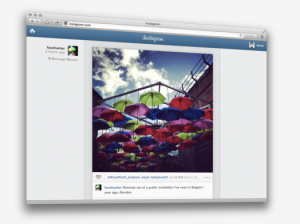
    On the web, the service looks similar to the smartphone app. The only visual difference, when the window is not narrowly shrunk, is the user’s name and profile appear on the left side of the picture instead of in the usual spot above it.

    The realtime feed allows Instagrammers to browse through photos uploaded by users they follow, and like pictures through the familiar double tap or by pressing the heart-shaped like button. Commenting on photos is also available and, when resizing the browser window, Instagram shrinks around it to a point when it looks exactly as it does inside the mobile app.

    What Instagram on the web does not allow, at the moment at least, is the ability to upload or filter pictures. Kevin Systrom, the social network’s co-founder, suggests that the reason lies within Instagram’s nature of “producing photos on the go, in the real world, in realtime”. Still there are certainly many users who may want to use the feature, especially when time is of the essence while on the go.

  • Unofficial Mega client is now available for Android devices

    With the ever-increasing popularity of mobile devices, Kim Dotcom’s Mega storage locker appears out of place without an official smartphone or tablet app, especially when Box, Dropbox and Google Drive, to name but a few alternatives, embrace the on-the-go user. Thankfully Alexander Hansen, an Android developer, has come to the rescue with his unofficial Mega Manager Alpha.
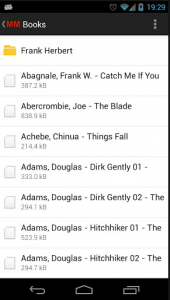
    As the use of “Alpha” in the name implies, Mega Manager Alpha is not a stable release at the moment but rather a “work in progress”. The developer also warns that users might experience “some crashes”. That said, the app only comes with a limited feature-set, which includes the ability to browse and download Mega content, and does not support uploading files to the cloud storage service.

    The app downloads uploaded content to the SD card, in the “Download” folder under MegaManager. Users can long press on files and folders to select multiple items for download. However, Mega Manager Alpha can only be used to sign in into a Mega account and cannot create one, forcing users to register via the browser.
    The developer promises that the app will be improved in subsequent releases, with future upgrades set to include stability enhancements, the ability to open files, perform file operations and upload content, automatic camera picture upload, folder synchronization, transfer history as well as the necessary account creation, among other features.

    Mega Manager Alpha is available to download from Google Play.

  • Windows Azure now features VM Depot integration

    Microsoft Open Technologies unveiled the VM Depot public preview early last month, and the software giant has just announced that its community-driven open-source virtual machine image catalog is now integrated into the company’s cloud platform, Windows Azure.
    The new feature is available through the Windows Azure management portal and is designed to ease the handling of virtual machine images from VM Depot. The cloud platform’s users can take advantage of open-source stacks, “based on supported Linux distributions, made available by members of the community and directly provision the files as personal images straight from the Windows Azure portal”.

    To take advantage of the new functionality, users will have to choose the “BROWSE VMDEPOT” option within the “Virtual Machines” tab and select the needed files from the list of available images. Windows Azure users can also use distribution filters.

  • Huawei 4Afrika brings Windows Phone 8 to the growing African market

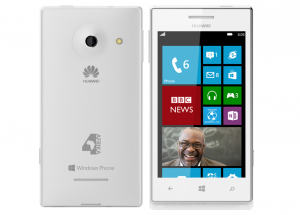
    On Tuesday, Huawei unveiled a new smartphone running Windows Phone 8 aimed at the “rapidly-growing” African market. Dubbed 4Afrika, the device is based on the Ascend W1 unveiled at CES 2013 in Las Vegas, and is marketed as an “affordable option” for developers, first-time smartphone buyers, small businesses and students.

    The 4Afrika is part of larger initiative which, by 2016, plans to deliver tens of millions of modern mobile devices (smartphones and tablets) into “the hands of African youth”. The initiative also intends to bring one million small and medium local enterprises online, and help 200,000 locals succeed in entrepreneurship and employability.

    In case the Huawei Ascend W1 doesn’t ring a bell, prospective buyers can expect a similar device to the HTC Windows Phone 8S in terms of specifications. By implication, the 4Afrika is not a speed demon nor a flagship smartphone, but it’s pretty decent hardware-wise.

    Specs include a 4-inch display with a resolution of 800 by 480, a dual-core 1.2GHz Qualcomm Snapdragon processor, and 4GB of internal storage. The 4Afrika also features front and back-facing cameras and comes in at 10mm thick.

    The 4Afrika is the first step in driving the African smartphone adoption, which according to Microsoft, represents 10 percent of the entire phone market. The smartphone will be available in Angola, Egypt, Ivory Coast, Kenya, Morocco, Nigeria and South Africa in late-February. The 4Afrika comes with a market-specific app store and ships with custom apps made by local developers.