Author: Mike Williams

  • How to run a web server on your own PC

    If you’ve created a website and want to test it properly, then you could get some web space, upload all your files and see how everything looks. But that’s not always too convenient, especially if you have to make several changes, as you’ll need to upload the tweaked files each time. The whole development process can be much faster if you run a web server on your own PC, then. And while this can be complicated — especially if you try to download and install each component individually — it doesn’t have to be that way. Especially if you grab a copy of Uniform Server.

    The package includes all the core components you need, with the latest versions of Apache2, MySQL5, Perl5, PHP5, phpMyAdmin and more. Yet it’s a surprisingly compact download at 15MB. And it’s a self-extracting archive, too, so all you have to do is run it, specify a folder and everything will be unpacked there.

    If you’re a server novice then you might be worried about what’s coming next. But it’s all very straightforward. Browse to the UniServer folder and you’ll find three further executables:”“help.exe”, “Start_as_program.exe” and “Start_as_service.exe”. Launching either of the executables will fire up everything you need, along with some explanations of what to do next, while Help.exe provides even more details.

    Whatever you do, there’s no complex installation here, so you’re not left on your own trying to figure out some MySQL issue, for instance. Simple alerts explain the basic server essentials, and within a few seconds you’ll be looking at the main Uniform Server console. You can start Apache with a click, and immediately you’ll be able to try out PHP or HTML pages just by copying them to your UniServer\www folder.

    This all works very well as a development server. You don’t have to run it all the time, it doesn’t add a bunch of extra components to your PC, you could even run it from a USB key on any convenient Windows system.

    But Uniform Server also includes everything you need to run a live web server, host your own sites and make them available online. This does require a lot more thought and configuration time, but again the package does a good job of helping you through the setup process. It really is a great way to get started with Apache, PHP, MySQL and more.
  • Start menu replacement Pokki now fully touch-enabled

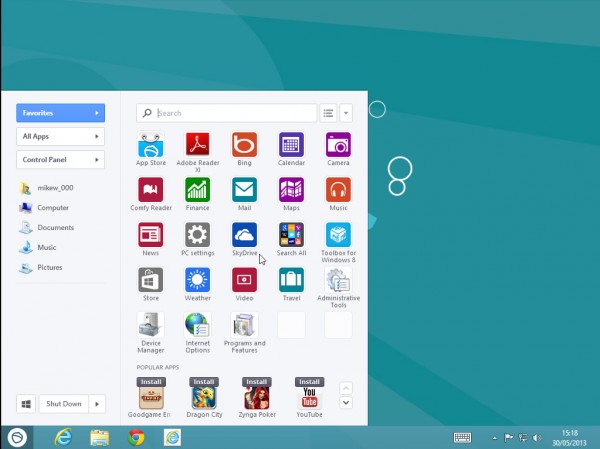
    SweetLabs Inc has just released a new version of Pokki, its ambitious Start Menu replacement and app framework. There are few visual changes — and not even that many in total — but the release does deliver some high value improvements which should make a real difference to the product.

    Full touch support for Pokki apps and menu will help make the program far more usable to a tablet audience, for instance.

    If, as is rumored, we finally see Windows 8 tablets released with Retina-type displays, then Pokki will be ready: both the apps and the menu now come with high DPI display support.

    Pokki has been held back a little by the lack of quality apps, but this release provides a few more goodies to developers in an effort to help. In particular, compatibility with the Unity 4 rendering engine should help bring a host of new games to the platform, while support for WebRTC introduces all kinds of real-time communication and audio/video capturing possibilities.

    And the official release notes detail some very significant bug fixes (although of course it’s not exactly encouraging that these bugs existed in the first place). Boot-time slowdowns, critical crashes, and several issues which could prevent the Pokki menu appearing at all have each been resolved.

    There’s no single killer new feature here, then, and if you just want a clone of the old Start Menu then there are simpler and more lightweight options elsewhere. This latest build does make welcome progress in a number of areas, though, and if you’re a Pokki fan — or liked the idea, tried it before and ran into one of those annoying bugs — then the new release has to be worth a try.

  • File sharing? Streaming media? Remote access? Blogging? Weezo does it all

    In theory, a free online storage account sounds like it should be a great way to share files with others. And this can be true, at least sometimes, but there are complications. Like having to upload your data first, for instance. And then trusting its security to your service provider.
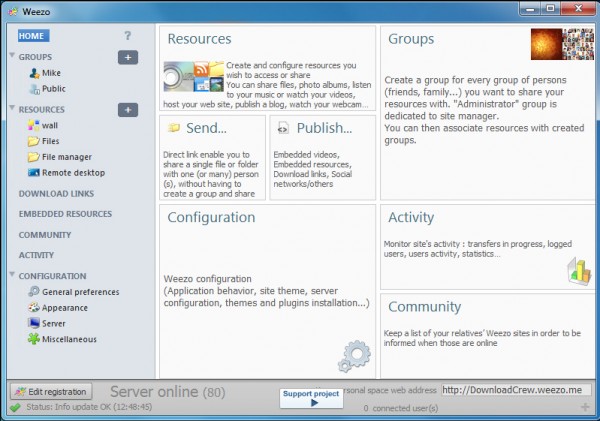

    If these are issues for you, though, you could try another option: installing Weezo and allowing it to run a secure server on your own PC, making selected files and folder available to whoever you like. This is far easier to get working than you might expect. And it’s just a small part of what this interesting free program can do.

    Weezo installation is surprisingly straightforward. Despite the fact that it’s installing and configuring Apache, you don’t have worry about the technical details. The installer normally handles the setup and configuration process for you with the absolute minimum of hassle.

    Weezo does its best to simplify remote access to your system, too. In particular, you don’t have to find a way to communicate your IP address to others. Create a Weezo account and you’ll be given a URL (YourName.weezo.net or www.weezo.net/YourName) which can be used to access whatever it is you want to share. (Although if you don’t want to do that, sharing your server IP address remains an option.)

    The next step is to decide what you’d like to make available, and there are plenty of options. You can create a Photo Album to share your latest photos with friends and family, for instance. Video and Music options give others access to your chosen files (and that’s instant access via streaming, too — no need to download). You can make your webcam available online, your bookmarks, create a basic blog, and more.

    There’s some depth to this functionality, too. A shared Photo Album, for example, isn’t just another thumbnail gallery. You can optionally allow visitors to download the originals (or not), add comments, even upload their own photos.

    You don’t have to use Weezo as a sharing tool, of course — it’s just as handy when kept for yourself. You might use the program as an easy way to stream your music collection, perhaps. You can also set up important files and folders so they’re available from anywhere, while a Remote Desktop allows you to take control of your system from over the internet (you can start up or shut down the system, run DOS commands, manage Weezo and more).

    Running any kind of server does introduce security issues, of course, but Weezo does its best to minimize them. Just the fact that it’s based on Apache is a good start. Whatever resources you make available will be password-protected. There are multiple authentication schemes to help organize things just as you’d like. And you can even enable SSL encryption for an extra layer of security.

    It’s not all good news. Although Weezo does a good job of getting the core server working, an unintuitive interface means configuring it afterwards can be a challenge, at least initially.

    Once you’re over the worst of the learning curve, though, life gets a lot easier, and on balance Weezo proves a versatile and effective file sharing and remote access tool.

    Photo credit: Modella/Shutterstock

  • Transform your printer and scanner into a powerful photocopier

    Multifunction printers have many useful features, but the ability to work as a photocopier has to be one of the best. Place your document on the scanner, click the Copy button, and a duplicate should appear in just a few seconds.
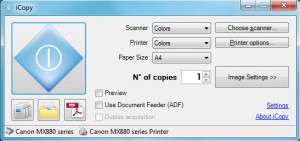
    You don’t have to miss out on this kind of convenience just because you’ve a separate printer and scanner, though. Grab a copy of iCopy and the program will combine your devices into a straightforward yet very capable photocopier.

    Getting started can be as easy as launching the program, perhaps choosing the number of copies you need, and clicking the Copy button. iCopy will then simply scan whatever is on your scanner right now, and send it to the printer.

    There are plenty of additional settings available, though. For example, you can choose your scanning mode (color, greyscale or text), resolution, brightness, contrast or more, and optionally display a preview if you need to check image quality.

    Printer controls include the option to set your print mode (color or black and white) and paper size, as well as configuring any of your regular printer settings.

    But the program doesn’t restrict itself to printing. You can also save pages as image files. And there’s even an option to save one or more scanned images into a single PDF file.

    Taken individually these functions aren’t any great surprise. In fact your scanner probably came with software which had most of these features, and many more.

    iCopy’s focus on simplicity, just scanning and printing (or saving) does make for real ease of use, though, and the program’s small size (1.3MB) and portability are also pluses. If you need simpler copying then we’d give it a try.

    Photo Credit: ColinCramm/Shutterstock

  • System Scheduler lets you easily automate PC tasks

    If you’d like to automatically run an antivirus scan at a particular time, or maybe defragment your hard drive, then it’s usually very easy. And that’s because security packages and defrag tools almost always include a scheduling option, which allows them to carry out some preferred action even when you’re not around.
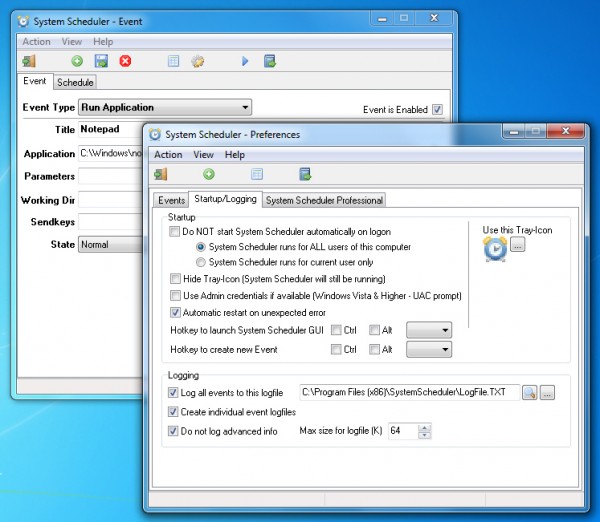
    Most programs don’t have this kind of feature, unfortunately, but automating them may still be possible, with just a little help from System Scheduler.

    You might use it to just launch certain programs at a defined time, for instance: once, every few minutes/ hours, daily, weekly, monthly, even yearly.

    You can also set up System Scheduler to display pop-up alerts, and again these can be one-off prompts or regular reminders about some important task.

    If you’re thinking this is much the same as Windows Task Scheduler, then you’re right, but System Scheduler does have a couple of useful extras.

    After launching an application you can also send it simulated keypresses, so helping you to automate all kinds of tasks. Sending something like “%FSc:\file.txt{ENTER}”. say, emulates an Alt+F keypress, then S for save, c:\file.txt as the file name, and the Enter key to finally save it. And you can expand on this to do whatever you like, perhaps opening your email client, creating a new message, attaching a specific file by name and then sending it somewhere.

    System Scheduler also includes a Window Watcher, an interesting tool which allows you to take action based on the presence or absence of a window. If a particular window exists then you could run another event to automate it, for instance. If a window doesn’t exist then you might fire up that application. If a program has hung then you can close and restart it, and there are plenty of other possibilities.

    And all this functionality is supported by a very lightweight scheduler, which consumed less than 2MB RAM when running in the background on our test PC.

    System Scheduler has its limits. And if you just want to launch tasks at particular times then you really should check out Windows Task Scheduler first. It’s more complex, but also far more flexible in many ways.

    If you need the extra automation possibilities exposed by System Scheduler’s “sendkeys” and Window Watcher features, though, we’d give the program a try. It’s a likeable tool, compact and easy to use, with no adware or other hassles. And although there’s a more powerful Professional version available (yours for $30), the Free build is fine while you’re getting started, and its license allows for both home and business use.

    Photo Credit: MR.LIGHTMAN/Shutterstock

  • PeStudio lets you analyse suspicious programs for malware

    If you find a program on your PC which you think might be malware, then checking it with an antivirus tool is a good first step — but it’s not the only option. You could also try “static analysis”, which involves examining the executable file itself to learn more about it. Most static analysis tools are aimed at developers and extremely complex, but the free PeStudio is an interesting exception: it offers plenty of low-level detail, but also has more straightforward features that just about anyone can use.
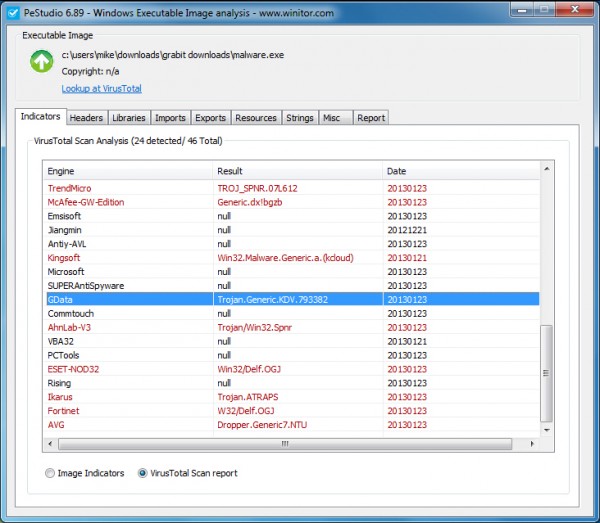
    It’s easy to get started with the program. Just download and unzip it, launch PeStudio.exe, and drag and drop your suspect executable onto the PeStudio window. Wait a few seconds for the program to run its analysis, and a detailed report then appears.

    The first tab, Indicators, gives you some useful information about the target application. Some of this is strictly experts-only, with details on the file’s use of DEP, ASLR, SafeSEH, Thread Local Storage, and so on. But you also get plenty of more generally useful data. Is it 32 or 64-bit, for instance? GUI, or console-based? Does it need administrative permission? Is it digitally signed?

    Clicking the Strings tab will then reveal any embedded text strings in the program — function names, paths, prompts, web addresses, error messages and more — which can be a useful way to figure out what it’s doing. (Malware will usually employ various tricks to hide this kind of information, but it’s still worth a try.)

    The Misc tab (if present) shows you any properties of your mystery executable. This might include file and product names, a description, version number, target language, and so on. Don’t assume any of this is true — malware could provide any details it likes here — but, again, it might help explain what the program is and where it’s come from.

    And if none of this is too conclusive, then clicking Indicators > VirusTotal Scan Report will tell you whether any of the VirusTotal antivirus engines (46, as we write) thinks the executable is malware. Again, don’t take the VirusTotal verdict as guaranteed, it’s possible you’ve encountered something which hasn’t been recognized yet, but it’s still useful to see what the rest of the antivirus world thinks.

    If you know your way around the executable file format then you’ll also appreciate the Libraries and Imports tabs, which reveal the DLLs and other support files required by your program, and the functions it’s using. The Resources tab is another plus, listing structures embedded within your program. While command line support means all this analysis can be automated and used to check a host of files in a single operation.

    You don’t have to delve into these complexities unless you really want to, though — and that’s the major plus here. There’s plenty of low-level information for experts, but all these technicalities don’t get in your way, and even if you’re a PC novice, you’ll still be able to use PeStudio to find out more about any mystery program.

    Photo credit: megainarmy/Shutterstock

  • CCleaner now better at cleaning up after Internet Explorer 10

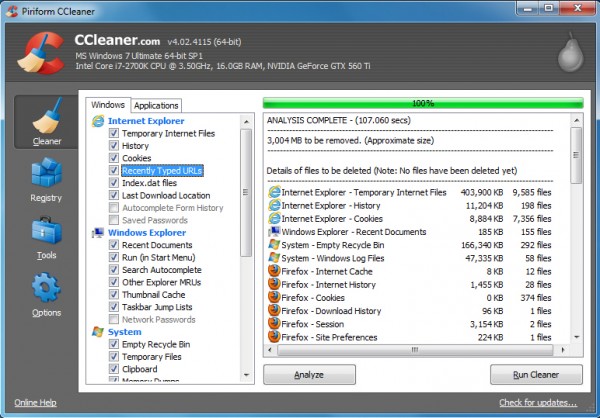
    Piriform Ltd has announced the release of CCleaner 4.02, and while it’s flagged as a minor release, the build includes plenty of worthwhile improvements.

    Internet Explorer 10 included several low-level changes in how the program stored its data, for instance, which meant CCleaner didn’t handle it quite as well as previous releases. But that situation was never going to last for long, and this build now includes improved IE10 history, cache and DOMStore cookie cleaning for better results all round.

    CCleaner 4.02 also now includes support for cleaning Virtual Clone Drive, PDFCreator, PDF Architect, Adobe Fireworks 6.0, Nero 12 Platinum HD Suite and Foxit Reader 6.0.

    There’s a scattering of smaller but still worthwhile improvements covering several popular applications, including Firefox, Chrome and Freemake Video Converter.

    Elsewhere, CCleaner 4.02 reportedly has improved drive detection in File Finder.

    And of course there’s the usual complement of very small GUI improvements and minor bug fixes.

    CCleaner 4.01 was already an excellent program, then, but it’s safe to say that CCleaner 4.02 is even better, and if you don’t have a copy already (or your auto update isn’t working) then that’s a situation you should rectify right now.

  • Mozilla Archive Format offers a better way to save web pages

    When you’re busy with some online research then you’ll often want to save interesting web pages for easy reference later. So it’s a pity that while every browser has some kind of “Save As” function, the end results are usually unimpressive, awkward to share with others, and may not even bear much resemblance to the original page.
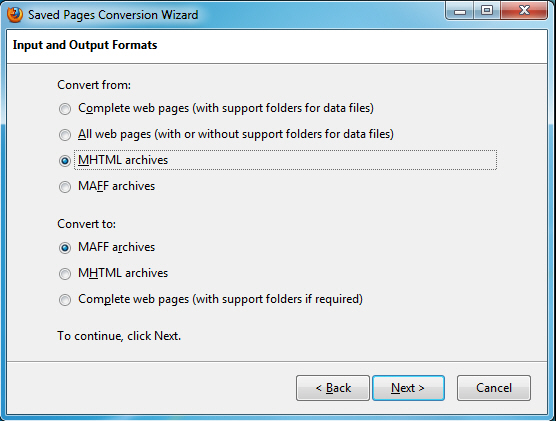
    This is such a fundamental requirement that you might have thought the big-name browsers would have come up with a solution already, but while we wait you can always try Mozilla Archive Format, a Firefox add-on which extends the usual “Save Page As” function in several very useful ways.

    If you’re engaged in some major research session, for instance, you no longer have to save each page individually. Mozilla Archive Format allows you to save the current page, selected tabs or everything in just a few clicks.

    The add-on’s “faithful snapshot” feature helps to ensure the saved documents look and feel more like the original pages, too (there’s even support for saving embedded audio and video).

    The pages can be saved in a compressed single file format, saving disk space and making them easy to share with others. And better still, they’re only zip archives, so you don’t need to have a copy of Mozilla Archive Format available to read them: they’re easily accessible anywhere, on any platform.

    Of course if you’re used to working with MHTML files then moving to a new format might cause problems. No need to worry, though — Mozilla Archive Format not only reads and writes MHTML files which are fully compatible with other browsers, it also includes a tool to convert your saved pages between the two formats (and several others).
    There are other common-sense improvements, too; the title of a page is used as the default file name when you’re saving, for instance.

    And best of all, while Mozilla Archive Format delivers plenty of extra functionality, it’s still extremely easy to use. When you need to save something, just click Save Page As and choose whatever new format you need.

    Photo Credit: sheelamohanachandran2010/Shutterstock

  • Registry Key Jumper lets you quickly access any registry key

    When troubleshooting technical PC problems then it’s likely you’ll often come across references to Registry keys, some of which you’ll want to check out. And usually this means you’ll have to manually launch REGEDIT, before browsing multiple levels until you find the key you need.
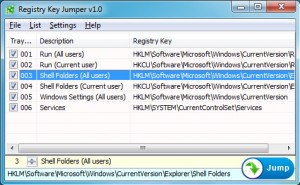
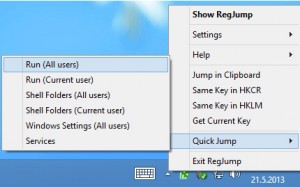
    Registry Key Jumper, however, offers a simpler route. Once the program is running in the background, you can just select the text of any Registry key, press Ctrl+Alt+X, and REGEDIT will open automatically at the appropriate location.

    You can use the program to maintain a list of your most-accessed Registry keys, which can then be accessed with a click. (REGEDIT already has its own Favorites list, of course, but Registry Key Jumper is portable: you can run it, and access your Registry list on whatever PC you happen to be using.)

    And the program also has an option to create desktop shortcuts which will launch REGEDIT at any specified key.

    Whatever you ask it to do, Registry Key Jumper does its best to help. You can specify your root hive in either the long (HKEY_LOCAL_MACHINE) or short (HKLM) forms, for instance, and the program will understand. And if, say, you’ve selected HKLM\SOFTWARE\CyberLink\PowerDVD13\KoanBox, but there’s no PowerDVD13 key on this system, Registry Key Jumper will still get you as close as it can (HKLM\SOFTWARE\CyberLink).

    In another helpful touch, you can choose your preferred system hotkey from a lengthy selection.

    The program isn’t restricted to working with REGEDIT; if you prefer some other tool, then you can point Registry Key Jumper at that, instead.

    And there are assorted other options which might come in useful. So you can set up the program window to remain on top of others, say, for easier access. And your Registry favorites can easily be exported, including in HTML, convenient when you need to share them with others.

    Despite this, if you only access the Registry occasionally, or you always revisit the same few keys, then there’s no real need to download Registry Key Jumper; the REGEDIT Favorites menu is likely to provide all the functionality you need.

    If you regularly spend time troubleshooting other people’s PCs, though, it’s a slightly different story. The program allows you to carry around your own Registry Favorites, share them with others, and access just about any key you like with the absolute minimum of hassle. Check it out.

  • DNSQuerySniffer shows all the DNS traffic on your system

    NirSoft has announced the public availability of DNSQuerySniffer, a tiny (130KB, including a Help file) network sniffer which detects and displays your DNS traffic.
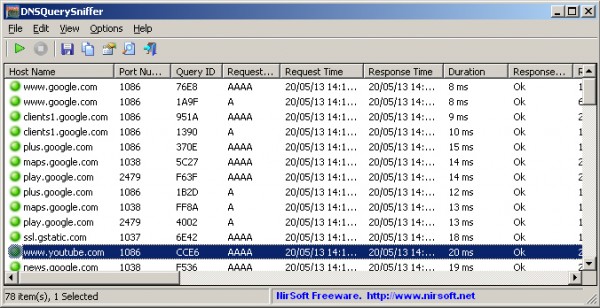
    If you think this sounds just a little technical, then you’re right, but the program does have some interesting applications. Malware will often use DNS traffic to communicate with its operators, for instance, and so taking a closer look at your own system may reveal the signs of an infection (a large number of failed lookups to domains you don’t recognize, say).

    And more generally, DNSQuerySniffer helps to reveal which of your applications is trying to go online, and maybe what they’re trying to do.

    The data capture itself can be done via WinPcap and Microsoft Network Monitor. But if you’d rather not install anything else, the program also supports Raw Sockets capture, and this may produce acceptable results (the documentation provided with DNSQuerySniffer explains more).

    Any queries intercepted are displayed in full, with all the details you’d expect: Host Name, Port Number, Query ID, Request Type, Request Time, Response Time, Duration, Response Code, Records Count, and the returned records.

    All of this data is displayed in a sortable table, and can be exported as a report in TXT, CSV, HTML and more.

    And as usual with NirSoft tools, while it’s not something you’ll use every day, DNSQuerySniffer is still a welcome complement to the more regular TCP/IP connection monitors, and you should probably grab a copy for your networking and security toolkit.

    Photo Credit: Yuriy Boyko/Shutterstock

  • KillEmAll helps you stamp out stubborn malware

    Removing malware used to be fairly easy, at least in principle. Detect the infection, kill any running processes and files, and that’s it — finished.

    These days, unfortunately, life can be more difficult. Some malware will actively try to block any attempts to remove it, perhaps preventing you from running antivirus tools, locking its files, maybe restarting itself if necessary. This can be frustratingly effective, too, but there are ways to fight back. And KillEmAll is a great place to start.

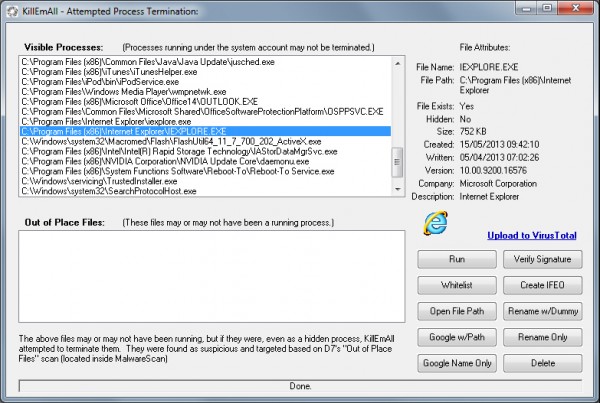
    As you might guess from the name, the program’s approach isn’t exactly subtle. Launch KillEmAll and it will immediately try to close everything but non-essential system processes. There’s no warning about this, either, so beware — if you’ve unsaved work in a document somewhere then it’ll almost certainly be lost. Otherwise, though, if there is malware running then hopefully it will closed down with everything else. And once this is done, an antivirus scan may stand a better chance of detecting and removing the threat.

    There are no guarantees, of course. The malware may prevent KillEmAll from running. It might prevent itself from being closed down, or have another component which restarts it whenever necessary. But if you’re manually malware-hunting then the program is a good first step, and if it doesn’t work immediately then there are other things you can try.

    Hold down Shift as you launch KillEmAll, for instance, and the program elevates itself to the system account. This gives it more rights and a better chance of closing down any malware, plus it’ll restart itself if malware tries to close the program down.

    If the program seems to work, but your regular antivirus tool can’t find anything, then there are various options which might be able to help. There’s a button to launch a Google search on a process name, for instance. You can upload a file to VirusTotal to try and identify malware. If you’re absolutely sure the file is dangerous, you can try to delete it, or there are a couple of “Rename” options if you’re more cautious (you can always restore the file later, if it turns out to be innocent).

    And if you find KillEmAll keeps closing some vital processes, then you’re able to add them to a whitelist, and they’ll be left alone.

    On balance, this isn’t a program you should take lightly. Closing multiple processes is dangerous, and there’s no way of telling what might happen. Again, you get no warning of this — just launch KillEmAll and it leaps into action. And using the other tools to rename or delete executables can also cause plenty of problems; it’s not something to try unless you’re entirely sure what you’re doing (and probably not even then).

    But if you really are at the last resort — the regular antivirus tools have let you down, and a manual cleanup is the only option left — then KillEmAll is a very useful tool to have in your armory. Go grab a copy for yourself (just don’t run the program until it’s needed).

    Photo Credit: lolloj/

  • Spybot +AV adds full antivirus protection to Home and Professional editions

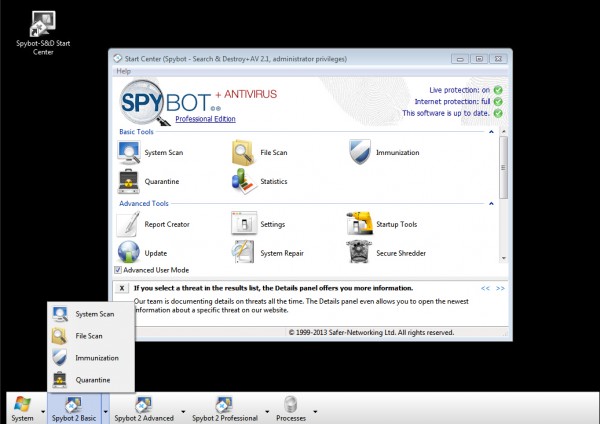
    Irish security firm Safer-Networking Ltd has announced the release of Spybot +AV 2.1, a major reinvention of the package which sees the addition of virus protection for the Home ($13.99) and Professional ($25.99) versions (the free build removes malware and rootkits only).

    A great deal of this new release is about delivering the framework necessary to support the antivirus engine. An update mechanism delivers antivirus signature files multiple times a day, for instance. The system offers real time protection, too, although this can optionally be turned off if there’s a chance of it conflicting with something else.

    One potential risk with this kind of major change is that you’re affected by false positives, with the program flagging every tiny utility you’ve downloaded recently as a serious threat. Spybot +AV 2.1 allows you to remain fully in control, though, with a new “selective removal” option which means you can review its findings, and decide if you want to remove or keep any suspect files.

    Elsewhere, this new release applies a number of tweaks to further enhance its performance. Smarter use of white listing for system files mean the program has less work to do; multi-core support helps it take full advantage of your system resources; and if you’re in a real hurry, there’s now an option to have the program scan only the most recently used files.

    An integrated proxy server sounds particularly interesting, as it looks out for and blocks “suspicious cookies and access to suspect URLs”. We’ve not been able to test this yet, but clearly there’s major scope for future developments here.

    And other enhancements include a simplified “Protected Repair Environment” (Professional version only), which makes it even easier to clean up an infected PC; new French and English language support; and, of course, the usual interface tweaks to try and simplify program use.

    The major improvements here are to the Home and Professional editions, then, but the free edition of Spybot 2.1 also has enough to justify the upgrade, and it’s available for download now.

  • Chrome 27 released, now 5 percent faster

    Google has released Chrome 27 for Windows, Mac and Linux. And while the previous build was less than exciting, this one delivers multiple improvements which see the browser’s page display time improve by 5 percent.

    Much of this acceleration is down to smarter scheduling, with Chrome 27 making more intelligent decisions about what it loads, and when. Previously, for instance, the browser might tie up bandwidth downloading a vast number of images in parallel. Now it focuses on visible images, and limits parallel downloads to a maximum of 10, so the details you need should be displayed noticeably faster.

    Another significant enhancement comes from moving Chrome’s resource scheduler into the browser process, which means it has much more knowledge about your system state. In particular, it can spot and take better advantage of network idle time, preloading images just as soon as it has the opportunity.

    Elsewhere, the official release blog post talks about “improved spell correction, and numerous fundamental improvements for Omnibox predictions”. We’ve yet to confirm these in practice, but anything Google can do here will be welcome.

    Developers will appreciate the new chrome.syncFileSystem API, which helps them create apps which can save and synchronize data on Google Drive. (Although as the API notes point out, this is about app-specific syncable storage, not some general API which will access whatever files happen to be on your Google Drive.)

    And of course there’s the usual selection of security fixes, 13 this time. 10 of these, all rated “High”, were “Use-after-free” issues, memory corruption flaws which at their worst may allow an attacker to execute arbitrary code. (Chrome isn’t alone, though — similar issues were uncovered in IE recently, and it seems that the area is a hot topic for security researchers right now.)

    On balance, then, while Chrome 27 may look exactly the same, it has some very welcome changes under the hood. The browser is now available for Windows, Mac and Linux.

  • Take control of your command line windows with ConsoleHoster

    Most PC users could benefit from working at the command line occasionally, but the rather basic interface is enough to put most people off. You don’t have to live with the standard Windows setup, though. There are plenty of tools which claim they can help, and one of the latest, ConsoleHoster, improves on the default command window in several ways.

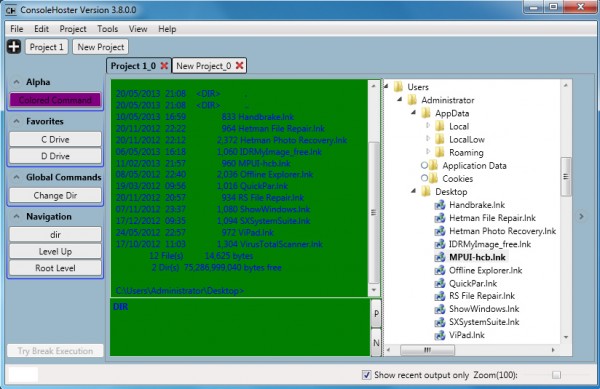
    Getting started with the program is certainly very easy. Download, unzip and launch it (there’s no installation required), click “Project 1” and your first command session appears. The blue text on a green background is a little distracting, but otherwise it’s straightforward enough. The main part of the window is split into two panes; you enter your commands in the lower, and any output appears above it.

    One immediate benefit of this arrangement is that you can resize the ConsoleHoster window, and unlike a regular command line window, the text reformats itself to fit. Which means you’re not wasting time with horizontal scrolling just because you want to review what you did earlier.

    In addition, an Explorer-type pane on the right side of ConsoleHoster provides an easier way to view files and folders. If you change to a new drive — just enter D:\ , say — then the Explorer view updates accordingly, so you can check out files and folders without needing to enter DIR and browse through any response.

    ConsoleHoster provides various other tools to assist with navigation. You can change the current directory in a command line session by shift+clicking a folder in the Explorer view, for instance. And you’re able to add files or folders to a Favorites list, allowing you to return to that location later in a single click.

    The program also has “Global Command” buttons, shortcuts to frequently used commands. Some very basic examples are included (“DIR”, “CD \”, “CD ..”), but you can easily add more, then recall them at will with a click.

    And, perhaps most usefully, none of these settings are global. Instead they’re assigned to “Projects”, individual command line sessions which can have their own color scheme, starting folder, favorite locations, global commands and so one. As a result, you’re able to create different command line sessions for different purposes. And then you can run as many of these command windows as you need at the same time, switching between them via a simple tabbed interface.

    Despite all this apparent functionality, ConsoleHoster has various problems, particularly with the Explorer view. This can be horribly slow when expanding large folder trees, for instance. It doesn’t consistently synchronize with your command session. Right-clicking files and folders gets you ConsoleHoster options only, nothing else (not even a “Properties”). And sometimes right-clicking got us nothing whatsoever, although we could never figure out why.

    Still, ConsoleHoster is free, extremely lightweight (0.5MB unzipped) and with no unwanted extras. Its ability to run multiple command line sessions in a single tabbed interface may already be useful, to some. The program is being updated every few days, so we’d guess any technical issues will be resolved soon. And we’ll be interested to see where the project goes next.

  • Reboot-To launches the OS you need direct from the desktop

    If you’ve installed multiple operating systems on a PC then normally, when your system starts, you’ll have to choose the one you need from a boot menu. And while this isn’t difficult in any way, it can be a minor irritation, especially if you’re switching between operating systems on a regular basis.

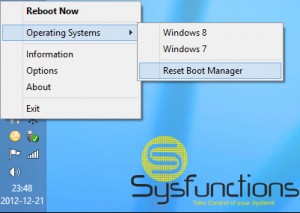
    Install Reboot-To, though, and you’ll have another option. When you need to restart your PC, just choose one of your installed operating systems from the Reboot-To menu — Window Vista, Windows 7, Windows 8, Windows Server 2008 R2, Windows Server 2012, Ubuntu (wubi) and Ubuntu Server (wubi) are supported — and it’ll reboot directly into that OS, without you ever seeing the boot menu at all.

    Reboot-To is straightforward to install, and by default sets itself up to run when Windows starts, adding a Windows service and an icon to your system tray. This is a little more intrusive than we were expecting, but presumably is just to ensure that you can reboot your system as quickly as possible. Fortunately the background processes are extremely lightweight, generally consuming less than 2MB RAM on our test PC, and you can turn them off if you prefer (select “Options”, clear “Start with Windows”).

    Once setup is complete, though, the program is straightforward enough to use. When you want to restart your system, right-click the Reboot-To icon, select Reboot > Operating System, choose one of your installed operating systems, and it’ll reboot directly into that OS — no need to worry about the boot menu.

    The change is just temporary, of course. If you install and run Reboot-To on Windows 7, for instance, and reboot it to Windows 8, then the boot menu will only disappear for that one time. If you reboot from Windows 8 then the boot menu will return. (Unless you install and use Reboot-To from there, anyway.)

    Allowing a program to play around with our system’s BCD (Boot Configuration Data) files in this way makes us just a little nervous. It’s carrying out a very simple and defined task, and there shouldn’t be any problems, ever, but we’d still recommend that you have a Windows recovery disc to hand, just in case.

    That aside, though, in our tests Reboot-To worked very well, and if you’re regularly booting between various Windows installations then it could save you some time and hassle.

  • Browse, play and control animated GIFs with 7GIF

    They may be just about the most primitive form of computer animation there is, but animated GIFs can still be fun, and genuinely useful, so it’s a shame they’re not more widely supported on the PC. Most programs will just display the opening frame, at best, leaving you to guess at everything else.

    There are ways around this, to some extent. Right-click a GIF in Explorer, for instance, select Open With > Internet Explorer, and a browser window will open and play the animation. This is a long way from being convenient, though, so if you’d like easier playback — and a lot more besides — then you’re sure to prefer 7GIF.

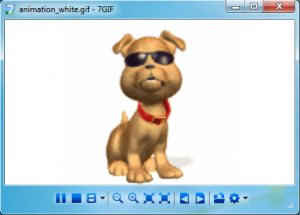
    The program is lightweight, portable and entirely free. It’s also extremely easy to use, courtesy of a trimmed down interface which makes it look much like a part of Windows. And so, at a minimum, all you have to do is drag and drop an animated GIF onto the 7GIF window, then watch as it’s played back immediately.

    You also get full control of the animation view. You can freely zoom in and out, for instance, or resize the animation to suit your needs. And Back and Next buttons step you through the images in your current folder, making 7GIF useful as a simple animated GIF browser.

    Better still, the program provides plenty of frame-level options. At its simplest this means you can step backwards or forwards through an animation, one frame at a time. But you can also print the current frame at any time, while there are options to save the current, or all frames as separate images.

    And a host of configuration options means the package can further be customized to suit your needs, perhaps associating it with GIF files, for instance, or setting its window to stay on top of others.

    7GIF could be improved still further with a few minor tweaks, in particular relating to the interface. We would add tooltips to the toolbar, for instance, and maybe include a button to access the main menu (right now you’ll only see that if you think to right-click in the playback area).

    These are fairly trivial issues, though, and for the most part 7GIF does its job very well. If you need an easier way to play back or explore animated GIFs then the program deserves a closer look.

  • Hornil StylePix is a powerful yet easy-to-use free image editor

    Designing a great image editor has always been a tricky balancing act. It’s important that the program has real power, plenty of useful functionality, and delivers more than you’d expect in every area. But at the same time, it should ideally be lightweight, easy to use, the kind of tool you can be using productively in just a few minutes.

    Most image editors fall short in at least one area, of course, but there are occasional exceptions. And Hornil StylePix is a great example. This lightweight and portable program concentrates on the core editing essentials — transforms, color and image corrections, painting, text tools and more — so isn’t weighed down with functions you’ll never need. But the features you do get are very well implemented, with a host of powerful options helping to deliver far more control than you might expect from a free tool.

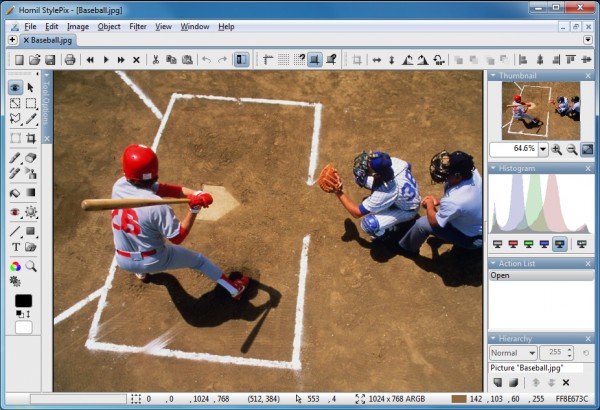
    Just launch the program and clues to its extra functionality are immediately obvious. There are bulky toolbars top and left, a thumbnail browser, multiple panels and some very lengthy menus, and browsing these reveals extra capabilities everywhere you look (the Filter menu has 13 entries, for instance, and clicking the Color option alone provides another 18).

    This doesn’t mean StylePix is complex, though. The interface is generally well designed, and in our experience the program’s extra features don’t get in your way. If you’re in a hurry then you can carry out all the usual basic edits — crop, resize, rotate, color tweaks, brightness and contrast correction, text and annotation options — just as quickly as with anything else.

    Life gets more interesting when you move beyond the basics, though, because StylePix just has so much to offer. So if you just want to draw a line on a photo, say, then you could simply click the Line button and drag your mouse across the image. But you can also customize this by choosing the line type (straight or curve), the color (solids, presets, gradients and more), width, alpha blend, blending mode and a whole lot more.

    Similarly, if you need to add a caption to an image then you could just select the Text tool, click on the photo and start typing. But if you need more, then you can choose your preferred typeface, its size, width, kerning or tracking, paragraph alignment and so on. Once you’ve defined your caption, then it’s added as a vector, which means you’re able to reposition and resize it to suit your needs. And if you want to edit that caption later, it’s not a problem – click it, select whatever you want to change — right down to individual characters — and you can resize that, change color or generally tweak whatever you like, without affecting anything else.

    The program is just as comprehensive elsewhere (selection types include auto selection, color range, rectangular region, circular region, lasso region, polygonal region, layer selection, channel selection and quick mask, for instance), and StylePix also includes plenty of features to help keep this manageable. The Batch Processing option, for instance, combines multiple actions to speed up operations, so for example you can add several layers (including watermarks) to a set of images in a single operation.

    If there’s one area where StylePix is a little underpowered, it’s probably in the program’s file format support. It can open the standard file types (JPG, PNG, GIF, TIFF and so on), plus a few less common extras (ICO, WMF), but there’s no support for RAW or PSD files.

    Otherwise, though, Hornil StylePix works very well, delivering a host of editing, selection, drawing and annotation tools in a straightforward and easy-to-use interface. Give it a try.

  • Disk Sorter Free can tell you what’s tying up all your hard drive space

    PC storage space is cheap these days, and if you’ve just bought one of the latest 4TB drives then the chances are you won’t be worried about filling it any time soon.

    It’s still important not to waste hard drive space, of course: the more clutter you have, the longer your file searches, virus scans, defrags and other system-wide operations will take. Understanding what’s stored on your hard drive is  a key part of PC maintenance, then, and Disk Sorter Free could be the ideal program to help.

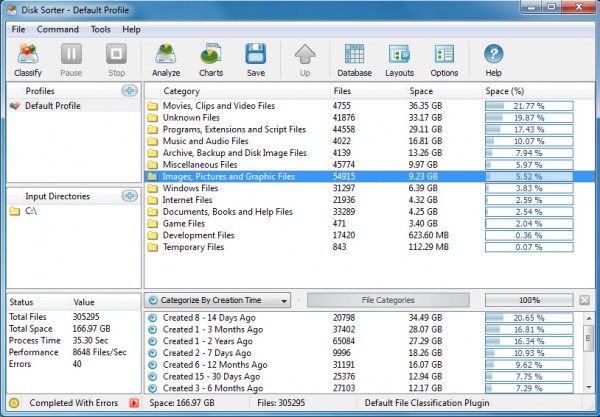
    As with many similar programs, Disk Sorter Free first allows you to specify a number of Input Directories (the folder trees you’d like to analyze). You can point the program at drives (C:\), folders of particular interest (C:\Users\MyName), or any combination of these, up to the limits of the free version (500,000 files, 2TB storage capacity).

    Click Classify > Classify and the program will go to work, quickly scanning your drive and organizing its contents into several common categories: “Movies…”, “Programs…”, “Music…”, “Archive…”, “Images…” and so on. These are sorted according to the amount of space they take up on your drive, and double-clicking any category will drill down to help you find out more.

    By default, for instance, if you’ve double-clicked the “Movies” category then you’ll see a further list of file types, again sorted by size. If this reveals that, say, half the space is taken up by MKV files, then you can double-click “MKV” in turn to see exactly what and where those videos are.

    Disk Sorter doesn’t have to organize its reports by extension, though. The program can also categorize your files by size, an easy way to identify particular groups (zero-length files, anything more than 1GB in size, and so on). And it can also classify files by creation, modification or last access date, handy if (for instance) you need to pick out files which have been created recently.

    The reporting is useful enough, but Disk Sorter goes even further. If you do manage to find a group of files which you don’t need, just select and right-click this, and you’ll find options to delete or compress your files, copy or move them elsewhere, and more.

    There are also some annoyances here. The filtering system is less than intuitive, for instance, and we had to play around with the program for some time before we figured out what’s going on. And if you choose an option which isn’t available in this free build (which happens a lot, at least initially) then you’ll quickly become very familiar with the “you can’t do that, would you like to upgrade?” dialog.

    Disk Sorter remains an unusually powerful tool for classifying, categorizing and reporting on your files, though, and if you really need an in-depth understanding of the contents of your hard drive then we’d give it a try.

  • NetDrive lets you mount FTP servers as regular drives in Explorer

    If you need to access an FTP server, perhaps to upload the latest version of your website, then you’ll probably reach for your favorite FTP client. But although that will transfer your files, it’s not exactly a convenient solution, particularly if you need to work with the server on a regular basis.

    NetDrive is a free (for personal use) tool which can greatly simplify this process. If you find you’re frequently working with a particular FTP or WebDav server then the program can mount it as a new drive in Explorer, and you’ll be able to access it — create, delete and rename folders, transfer and launch files — just like any other drive on your system.

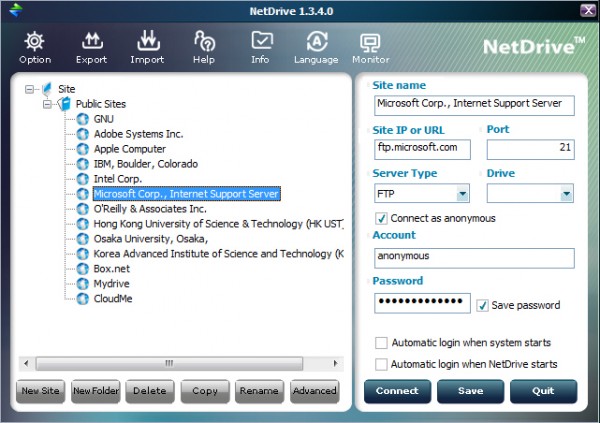
    To help you get started, the program comes with a built-in library of public FTP servers (Box.net, Mydrive, Microsoft, Apple and more), each of which includes key details like the site name and type, port, user name and password. Choose the local drive letter you’d like to allocate to the server, click Connect, and an Explorer window will open at that site.

    This works very well, too. Performance is unsurprisingly a big issue, and it’s hard to forget you’re accessing a remote site when it takes several seconds to do absolutely anything at all. But otherwise there’s nothing else to do, no special rules to learn or remember. You can drag and drop files, create folders, select and right-click items and use all the regular menu options, just as you always would — very convenient.

    It’s just as easy to add your own sites to the program. This works much like any bookmarking system, so if you’ve several sites then you can create multiple folders to help keep them organized. And you’ll then add individual sites to each folder, again starting with the basics: the URL, port, login details and so on.

    You’re also able to customize each bookmark with a few key local elements, though. You can choose a local drive, for instance, to make sure it always uses the same one (important if you want to use the space as a backup destination, say). You can tell NetDrive not to save the site password, perhaps useful for security. And you can optionally set up NetDrive to automatically log on to these sites when the system starts, which means you may never have to worry about these low-level details again.

    And when you’ve finished, you can explicitly close the connection by clicking the Disconnect button within NetDrive, or just close your system as usual and the program will handle this automatically.

    We did run into one issue here. After a hard testing session, opening and closing multiple servers, allocating and deallocating a host of different drive letters, the program just stopped working. Every time we tried to connect a new drive it complained of initialization problems, recommending that we reinstall if they continued.

    This did only happen once, though, after we had intentionally tried to push the program to its limits. Rebooting fixed the problem immediately, and in more standard use NetDrive worked just fine, delivering simple and straightforward Explorer-based access to all our test FTP servers.

  • IObit releases Malware Fighter 2

    IObit has announced the public availability of IObit Malware Fighter 2.0, the next generation of its popular anti-malware tool.

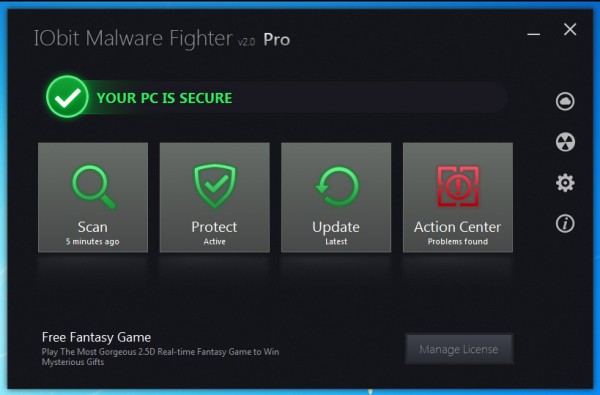
    The most obvious change this time is the move to a Windows 8-style interface: large tiles, stark black background, and everything happening in a single window, rather than separate dialogs. It looks good, and is easy to use.

    Beneath the surface, IObit say the program now includes a “groundbreaking ‘Dual-Core’ anti-malware engine”, which provides “deeper scanning, detection and comprehensive real-time protection”.

    If you’re more interested in improvements you can actually see, then there’s a new Cloud Security option, which makes it very easy to run a check on suspicious files. In a click or two you can have Malware Fighter 2.0 uploading a file to the IObit Cloud, an “advanced automated threat analysis system”. A browser window then opens to display its verdict.

    The program has a greater focus on ease of use, too. A quick install option helps to accelerate the setup process; the revamped interface is a real improvement; and even if a scan reveals plenty of problems, the new “Fix All” button will resolve them all in a single click.

    And IObit Malware Fighter 2.0 apparently now offers “full support for Windows 8”. If you’re running a previous version on Windows 8 already then you might wonder what you’ve been missing, but still, this has to be good news.

    Is there a radical change here? The interface looks good and worked well, at least for us, but the key here will be the new engine, and whether it can deliver the benefits IObit claims. We’ll have to see how that works out.

    IObit Malware Fighter 2.0 remains compact and relatively lightweight, though, and happily ran alongside other security tools on our test PC, without the slightest conflict. If you’re an IObit fan then it’s worth a look.